DuoFX News Filter Library user guide: backtest with a news filter in MQL5 and MQL4

This is the user guide for the DuoFX News Filter Library for MT5 and the DuoFX News Filter Library for MT4. It has everything in one place: install steps, a copy and paste header, every function and setting, how to pick the time mode, and a free sample EA. More about the product is on duofxlabs.com.
How-tos: How to backtest your EA with a news filter and Your news filter is an hour off: broker server time and the DST gap weeks.
What it is
- A library for MQL5 and MQL4 developers. It has no panel, no inputs of its own and it never trades. Your EA calls it and asks one question: is this server time inside a news window?
- The high impact US calendar is compiled into the library: FOMC, CPI, NFP, PPI, retail sales, GDP advance and PCE, 574 releases from January 2020 to 31 December 2027.
- Why it exists: the MT5 economic calendar is not available in the Strategy Tester, and MT4 has no built-in calendar. A news filter built on them only works live, so your backtests and optimizations run without it. This library gives you the same calendar live, in the tester and in every optimizer pass.
- No web requests, no files, no DLLs. Everything is prefixed DuoNews / DUONEWS_, so it does not clash with your code.
- It answers questions about time. Your EA decides what to do: skip entries, close trades, move stops.
Install
1. Get the library
- Buy and install it from the Market: press Ctrl+T, open the Market tab, then Purchased, and click Install on "DuoFX News Filter Library MT5" (or MT4).
- The terminal saves Market products in a Market subfolder named after the product, and the Journal tab (Ctrl+T, Journal) prints the exact path when the install finishes, for example MQL5\Libraries\Market\DuoFX News Filter Library MT5.ex5.
- Open the data folder (File, Open Data Folder), copy that file to MQL5\Libraries\DuoFX\ and rename the copy NewsFilter.ex5 (MT4: MQL4\Libraries\DuoFX\NewsFilter.ex4). That is the path the header below imports, and it keeps your EA's code the same on every terminal. Leave the original in place so the Market can update it, and copy it again after an update.
- Prefer to skip the copy? Change the two #import lines in the header to the path from the Journal, relative to MQL5\Libraries (for example #import "Market\\DuoFX News Filter Library MT5.ex5").
- Each terminal that runs your EA needs the library installed.
2. Save the include header
Save the code below as MQL5\Include\DuoFX\NewsFilter.mqh (create the DuoFX folder if it is not there). On MT4 it is the same file at MQL4\Include\DuoFX\NewsFilter.mqh. The header picks .ex5 or .ex4 by itself, so you keep one copy of the text.
//+------------------------------------------------------------------+ //| NewsFilter.mqh: import header for DuoFX News Filter Library | //| Copyright 2026, DuoFX - https://duofxlabs.com | //| | //| Save as MQL5\Include\DuoFX\NewsFilter.mqh (MT4: MQL4\Include\ | //| DuoFX\NewsFilter.mqh), then in your EA: | //| #include <DuoFX\NewsFilter.mqh> | //| DuoNewsInit(DUONEWS_TIER1,2,5,DUONEWS_TIME_NY_PLUS_7,0); | //| if(DuoNewsIsBlocked(TimeCurrent())) return; // stay out | //| | //| All times you pass in and get back are broker server time. | //| Windows are whole minutes, both ends included: 2 before and 5 | //| after an 08:30 New York release on a NY+7 broker blocks 15:28:00 | //| to 15:35:59 server time, and 15:36:00 is free again. | //+------------------------------------------------------------------+ #ifndef DUOFX_NEWSFILTER_MQH #define DUOFX_NEWSFILTER_MQH //--- event types, combine with | #define DUONEWS_FOMC 1 // FOMC rate decision (statement time) #define DUONEWS_CPI 2 // CPI #define DUONEWS_NFP 4 // Nonfarm Payrolls (Employment Situation) #define DUONEWS_PPI 8 // PPI #define DUONEWS_RETAIL 16 // Retail sales (advance) #define DUONEWS_GDP 32 // GDP advance estimate #define DUONEWS_PCE 64 // Personal income and outlays (PCE) #define DUONEWS_TIER1 7 // FOMC | CPI | NFP #define DUONEWS_ALL 127 // all seven //--- suggested windows, minutes #define DUONEWS_TIGHT_BEFORE 2 // tight: 2 before, 5 after #define DUONEWS_TIGHT_AFTER 5 #define DUONEWS_WIDE_BEFORE 15 // wide: 15 before, 30 after #define DUONEWS_WIDE_AFTER 30 //--- how event times (New York) become your broker's server time enum ENUM_DUONEWS_TIME_MODE { DUONEWS_TIME_AUTO=0, // Auto (live only; the tester uses NY+7) DUONEWS_TIME_NY_PLUS_7=1, // GMT+2/+3 with US DST (New York + 7 h) DUONEWS_TIME_EU_DST=2, // Offset + 1 h in EU summer time DUONEWS_TIME_US_DST=3, // Offset + 1 h in US summer time DUONEWS_TIME_FIXED=4 // Fixed GMT offset, no DST }; #ifndef NF_LIBRARY_BUILD #ifdef __MQL5__ #import "DuoFX\\NewsFilter.ex5" #else #import "DuoFX\\NewsFilter.ex4" #endif //--- Set up. types: DUONEWS_* flags (at least one). before/after: minutes, 0 to 1440. mode: ENUM_DUONEWS_TIME_MODE. //--- gmt_offset_minutes: winter (standard time) GMT offset for EU_DST, US_DST and FIXED, e.g. 120 for GMT+2; //--- ignored by AUTO and NY_PLUS_7. Returns false (and keeps the previous settings) on a bad argument. bool DuoNewsInit(int types,int minutes_before,int minutes_after,int mode,int gmt_offset_minutes); //--- True when server_time is inside a window around an enabled event. False after DuoNewsCoverageEnd(). bool DuoNewsIsBlocked(datetime server_time); //--- First enabled event at or after server_time, 0 if none. name gets e.g. "NFP" or "CPI + Retail Sales". datetime DuoNewsNextEvent(datetime server_time,string &name); //--- Last enabled event at or before server_time, 0 if none. datetime DuoNewsLastEvent(datetime server_time,string &name); //--- Whole minutes from server_time to the next enabled event, rounded up; 0 at the event, -1 if none. int DuoNewsMinutesToNext(datetime server_time); //--- Enabled events from..to (server time, both included) into the arrays, oldest first. Returns the count. int DuoNewsEventsBetween(datetime from,datetime to,datetime ×[],string &names[]); //--- Server time up to which the calendar is complete. Warn or stop when your EA passes it. datetime DuoNewsCoverageEnd(void); //--- Server time of the start of the calendar (first month listed). datetime DuoNewsCoverageStart(void); //--- A New York wall time converted with the current mode, for checks and drawing. datetime DuoNewsNyToServer(datetime ny_time); //--- The mode in use, e.g. "Auto: GMT+2/+3 with US DST (NY+7), confirmed from 104 weekly opens". string DuoNewsTimeModeText(void); //--- Calendar facts: events, first and last dates, confirmed-until date, library version. string DuoNewsCalendarInfo(void); #import #endif #endif
3. MT4 only
- Add #property strict to your EA, as the sample does.
- If MT4 refuses the call to the library, open the EA's Common tab and tick Allow DLL imports. MT4 uses that switch for library imports as well. The library itself uses no DLLs.
Quick start
Two calls are all most EAs need.
#include <DuoFX\NewsFilter.mqh>

int OnInit()
  {
   if(!DuoNewsInit(DUONEWS_TIER1,2,5,DUONEWS_TIME_NY_PLUS_7,0))
      return(INIT_PARAMETERS_INCORRECT);
   return(INIT_SUCCEEDED);
  }

void OnTick()
  {
   if(DuoNewsIsBlocked(TimeCurrent()))
      return;   // inside a news window: no new trades
   // ... your entry logic
} - DuoNewsInit goes in OnInit (it returns false and logs the reason if an argument is bad).
- DuoNewsIsBlocked goes before every entry. Pass the broker's server time, which is what TimeCurrent() returns.
- DUONEWS_TIER1 is FOMC, CPI and NFP. 2, 5 means 2 minutes before and 5 after. DUONEWS_TIME_NY_PLUS_7 is the most common forex and gold server clock. The last argument, 0, is the GMT offset, which that mode ignores.
- If you skip DuoNewsInit, the defaults apply: FOMC, CPI and NFP, 2 minutes before and 5 after, Auto time mode. In the tester, Auto assumes NY+7, so set the mode yourself for backtests.
Windows are whole minutes, both ends included, the same for ticks and M1 bars. Two before and five after an NFP at 15:30 server time blocks 15:28:00 to 15:35:59, and 15:36:00 is free again.
API reference
All times you pass in and get back are broker server time, except DuoNewsNyToServer, which takes New York wall time.
Event types (combine with |)
- DUONEWS_FOMC (1): FOMC rate decision, at the statement time.
- DUONEWS_CPI (2): consumer price index.
- DUONEWS_NFP (4): Nonfarm Payrolls (the Employment Situation report).
- DUONEWS_PPI (8): producer price index.
- DUONEWS_RETAIL (16): retail sales (advance).
- DUONEWS_GDP (32): GDP advance estimate.
- DUONEWS_PCE (64): personal income and outlays (PCE).
- DUONEWS_TIER1 (7): FOMC, CPI and NFP. DUONEWS_ALL (127): all seven.
Suggested windows
- DUONEWS_TIGHT_BEFORE (2) and DUONEWS_TIGHT_AFTER (5): tight.
- DUONEWS_WIDE_BEFORE (15) and DUONEWS_WIDE_AFTER (30): wide.
- These are starting points, not recommendations. Pick what your strategy and, if you trade a funded account, your firm's rules need.
Time modes (ENUM_DUONEWS_TIME_MODE)
- DUONEWS_TIME_AUTO (0): live only. Reads the server and picks the rule. See "Choosing the time mode".
- DUONEWS_TIME_NY_PLUS_7 (1): GMT+2 in winter and GMT+3 in summer, switching with US daylight saving (New York time plus 7 hours). The usual forex and gold server clock.
- DUONEWS_TIME_EU_DST (2): your winter offset, plus 1 hour in EU summer time. For example GMT+2/+3 or GMT+0/+1 on European dates.
- DUONEWS_TIME_US_DST (3): your winter offset, plus 1 hour in US summer time.
- DUONEWS_TIME_FIXED (4): a fixed GMT offset, no daylight saving.
DuoNewsInit
bool DuoNewsInit(int types, int minutes_before, int minutes_after, int mode, int gmt_offset_minutes)
- types: one or more DUONEWS_* flags, 1 to 127. At least one.
- minutes_before, minutes_after: 0 to 1440 each.
- mode: an ENUM_DUONEWS_TIME_MODE value.
- gmt_offset_minutes: the winter (standard time) GMT offset in minutes, for EU DST, US DST and fixed only: -720 to +840 in steps of 15. 120 means GMT+2. Ignored by Auto and NY+7.
- Returns true when accepted. On a bad argument it prints a log line, returns false and keeps the previous settings.
- It prints one log line with the settings and the time mode, except during optimization.
DuoNewsIsBlocked
bool DuoNewsIsBlocked(datetime server_time)
- True when server_time is inside the window around an enabled release. The one call most EAs need.
- Times are rounded down to the whole minute, like an M1 bar.
- Returns false after DuoNewsCoverageEnd(): past the calendar there is nothing to block.
DuoNewsNextEvent and DuoNewsLastEvent
datetime DuoNewsNextEvent(datetime server_time, string &name)
datetime DuoNewsLastEvent(datetime server_time, string &name)
- Next: the first enabled release at or after server_time. Last: the last one at or before it.
- Return the release time, or 0 if there is none. name is filled in, for example NFP or CPI + Retail Sales (releases in the same minute come back as one event).
- These return the release itself, not the edge of the window.
DuoNewsMinutesToNext
int DuoNewsMinutesToNext(datetime server_time)
- Whole minutes to the next enabled release, rounded up. 0 at the release, -1 if there is none.
- Use it to avoid opening a trade that would still be open when the next window starts.
DuoNewsEventsBetween
int DuoNewsEventsBetween(datetime from, datetime to, datetime ×[], string &names[])
- Every enabled release from from to to, both included, oldest first, into the two arrays (they are resized for you).
- Returns the count. One entry per release time. Handy for drawing the windows on a chart.
DuoNewsCoverageEnd and DuoNewsCoverageStart
datetime DuoNewsCoverageEnd(void)
datetime DuoNewsCoverageStart(void)
- The server time up to which the calendar is complete (31 December 2027) and the server time of its start (January 2020), converted with the current time mode.
DuoNewsNyToServer
datetime DuoNewsNyToServer(datetime ny_time)
- Converts a New York wall clock time to server time with the current mode. For checks and drawing.
DuoNewsTimeModeText and DuoNewsCalendarInfo
string DuoNewsTimeModeText(void)
string DuoNewsCalendarInfo(void)
- The mode in use as text, for your logs, for example Auto: GMT+2/+3 with US DST (NY+7), confirmed from 104 weekly opens.
- The calendar facts: number of events, first and last dates, the date confirmed against the official schedules, and the library version.
Choosing the time mode
The calendar is stored in New York time. The library turns each release into your broker's server time, with the US and EU daylight saving rules for every year. You tell it which clock your broker runs.
- NY+7: the server shows GMT+2 in winter and GMT+3 in summer, switching on US dates, and the daily candle starts at 17:00 New York. Most forex and gold brokers. An NFP at 08:30 New York is 15:30 server time all year.
- EU DST: the server follows European summer time. Give the winter offset, for example 120 for GMT+2 (GMT+3 in EU summer).
- US DST: an offset that follows US summer time but is not NY+7. Give the winter offset.
- Fixed: no daylight saving at all. Give the offset.
- Auto: live only. It reads the server's GMT offset, then matches the weekly market opens in the chart's H1 history against the US DST, EU DST and no-DST rules.
Auto limits
- It recognises those three families with any whole or half hour offset.
- With too little history, or on a symbol that trades all weekend, it cannot tell the rules apart outside the gap weeks. It then says "ambiguous" in its log line and assumes NY+7.
- Until the terminal is connected it also assumes NY+7.
- In the Strategy Tester, Auto always uses NY+7, because the tester has no real GMT clock. It prints a warning once. Set your broker's mode yourself for every backtest and optimization.
- Not sure which mode you have? Run your EA live with Auto and read the log line (DuoNewsTimeModeText() returns it). It names the rule it found, or says ambiguous. Then use that mode in the tester.
The gap weeks
The US and Europe change their clocks on different dates: the US earlier in March, and one to two weeks later in the autumn than Europe. In those gap weeks a release lands an hour apart on a US-following server and an EU-following server.
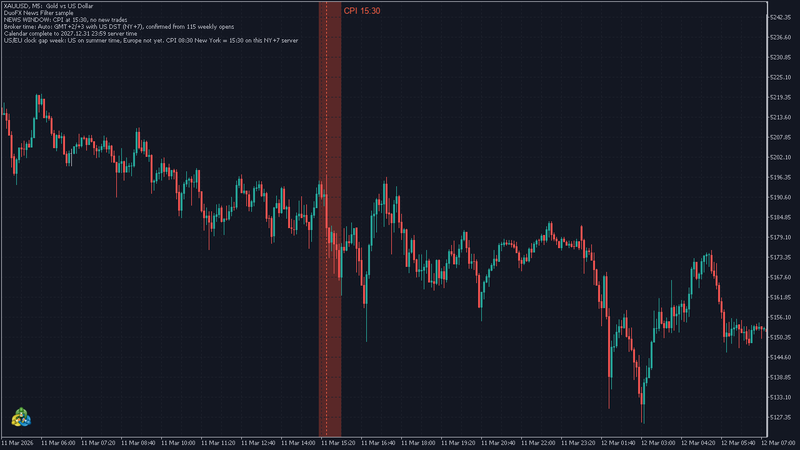
- Example: CPI on 11 March 2026. The US was already on summer time (since 8 March), Europe was not (until 29 March). The release at 08:30 New York was 12:30 UTC. On a NY+7 server (GMT+3 that week) that is 15:30. On an EU DST server still on GMT+2 it is 14:30.
- A wrong mode puts the window an hour off for those weeks and covers the wrong minutes. The screenshot shows the NY+7 case on the right bars.
Strategy Tester and optimizer
- The calendar is compiled in and the library is pure arithmetic on the time you pass it. Backtests, visual mode and every optimizer pass see the same releases as live trading.
- Pass the bar or tick time you are testing: TimeCurrent() in the tester is the simulated server time.
- Set the time mode yourself. Auto in the tester is NY+7 and warns once. If your broker's clock is different, the windows will be off.
- The library is fast, so thousands of optimizer passes are fine. The init log line is suppressed during optimization to keep the journal quiet.
- Compare your EA with and without the filter on the same history: run it twice, with the filter input off and on. Optimizing the window size is one of the easiest ways to overfit, so keep the grid coarse.
- The calendar has the scheduled time. A release that is delayed on the day is not reflected.
The sample EA
A free sample EA draws the windows on the chart and stays flat around them. It is not a Market file, and it is not a trading strategy. It is there to show the calls in a real EA and to let you check your time mode by eye.
- Save the MT5 version as MQL5\Experts\DuoFX\NewsFilterSample.mq5, or the MT4 version as MQL4\Experts\DuoFX\NewsFilterSample.mq4, and compile it in MetaEditor. The inputs are the same on both. It needs the header from the install step and the library.
MT5 sample EA:
//+------------------------------------------------------------------+
//|                                          NewsFilterSample.mq5    |
//| Free sample for DuoFX News Filter Library: shows the news        |
//| windows on the chart and keeps its own trades flat around them.  |
//| Demo trades are off by default; switch them on in the tester.    |
//+------------------------------------------------------------------+
#property copyright   "Copyright 2026, DuoFX"
#property link        "https://duofxlabs.com"
#property version     "1.00"
#property description "Sample EA for DuoFX News Filter Library: draws the news windows and stays flat around them."

#include <Trade\Trade.mqh>
#include <DuoFX\NewsFilter.mqh>

input group "News filter"
input bool                InpFOMC=true;                   // FOMC
input bool                InpCPI=true;                    // CPI
input bool                InpNFP=true;                    // NFP
input bool                InpPPI=false;                   // PPI
input bool                InpRetail=false;                // Retail sales
input bool                InpGDP=false;                   // GDP advance
input bool                InpPCE=false;                   // PCE
input int                 InpBefore=DUONEWS_TIGHT_BEFORE;    // Minutes before
input int                 InpAfter=DUONEWS_TIGHT_AFTER;      // Minutes after
input ENUM_DUONEWS_TIME_MODE InpTimeMode=DUONEWS_TIME_NY_PLUS_7; // Broker time: set your broker's server clock
input int                 InpGmtOffset=120;               // Winter GMT offset, minutes (EU DST, US DST, fixed)
input group "Demo"
input bool                InpDemoTrades=false;            // Open demo trades (tester)
input double              InpLots=0.01;                   // Demo lots
input int                 InpHoldBars=3;                  // Close demo trades after N bars
input bool                InpCloseBeforeNews=true;        // Close this EA's trades in a news window
input long                InpMagic=20261109;              // Magic number
input group "Chart"
input bool                InpDraw=true;                   // Draw news windows
input int                 InpDrawDays=10;                 // Days back to draw
input color               InpWindowColor=C'90,40,40';     // Window colour

#define PREFIX "DuoFXNews_"
CTrade   g_trade;
datetime g_last_bar=0;
bool     g_ready=false;
bool     g_coverage_warned=false;

int OnInit()
  {
   int types=(InpFOMC ? DUONEWS_FOMC : 0)|(InpCPI ? DUONEWS_CPI : 0)|(InpNFP ? DUONEWS_NFP : 0)|(InpPPI ? DUONEWS_PPI : 0)|
             (InpRetail ? DUONEWS_RETAIL : 0)|(InpGDP ? DUONEWS_GDP : 0)|(InpPCE ? DUONEWS_PCE : 0);
   if(!DuoNewsInit(types,InpBefore,InpAfter,(int)InpTimeMode,InpGmtOffset))
      return(INIT_PARAMETERS_INCORRECT);
   Print(DuoNewsCalendarInfo());
   g_trade.SetExpertMagicNumber(InpMagic);
   g_ready=true;
   Refresh();
   return(INIT_SUCCEEDED);
  }

void OnDeinit(const int reason)
  {
   ObjectsDeleteAll(0,PREFIX);
   Comment("");
  }

void OnTick()
  {
   if(!g_ready)
      return;
   datetime now=TimeCurrent();
   bool blocked=DuoNewsIsBlocked(now);
   if(blocked && InpCloseBeforeNews)
      CloseOwn("news window");
   datetime bar=iTime(_Symbol,_Period,0);
   if(bar==g_last_bar)
      return;
   g_last_bar=bar;
   Refresh();
   if(!InpDemoTrades)
      return;
   if(now>DuoNewsCoverageEnd())
     {
      if(!g_coverage_warned)
         Print("DuoFX News Filter sample: past the end of the embedded calendar, no new demo trades. Update the library.");
      g_coverage_warned=true;
      return;
     }
   if(OwnPositions()>0)
     {
      if(PositionAgeBars()>=InpHoldBars)
         CloseOwn("time exit");
      return;
     }
//--- no new trade inside a window, nor one that would still be open when the next window starts
   int to_next=DuoNewsMinutesToNext(now);
   if(blocked || (to_next>=0 && to_next<=InpBefore+InpHoldBars*PeriodSeconds()/60))
      return;
   bool up=iClose(_Symbol,_Period,1)>iOpen(_Symbol,_Period,1);
   double lots=NormalizeLots(InpLots);
   if(up)
      g_trade.Buy(lots,_Symbol,0,0,0,"news filter demo");
   else
      g_trade.Sell(lots,_Symbol,0,0,0,"news filter demo");
  }

double NormalizeLots(const double lots)
  {
   double step=SymbolInfoDouble(_Symbol,SYMBOL_VOLUME_STEP),lo=SymbolInfoDouble(_Symbol,SYMBOL_VOLUME_MIN),hi=SymbolInfoDouble(_Symbol,SYMBOL_VOLUME_MAX);
   if(step<=0)
      return(lo);
   return(MathMax(lo,MathMin(hi,MathFloor(lots/step+1e-9)*step)));
  }

int OwnPositions()
  {
   int n=0;
   for(int i=PositionsTotal()-1; i>=0; i--)
      if(PositionGetSymbol(i)==_Symbol && PositionGetInteger(POSITION_MAGIC)==InpMagic)
         n++;
   return(n);
  }

int PositionAgeBars()
  {
   for(int i=PositionsTotal()-1; i>=0; i--)
      if(PositionGetSymbol(i)==_Symbol && PositionGetInteger(POSITION_MAGIC)==InpMagic)
         return(iBarShift(_Symbol,_Period,(datetime)PositionGetInteger(POSITION_TIME)));
   return(0);
  }

//--- closes every position on this symbol with this EA's magic number. On a netting account there is one position
//--- per symbol, so a position shared with another EA or manual trades on the same magic would be closed too.
void CloseOwn(const string why)
  {
   for(int i=PositionsTotal()-1; i>=0; i--)
     {
      ulong ticket=PositionGetTicket(i);
      if(ticket==0 || PositionGetString(POSITION_SYMBOL)!=_Symbol || PositionGetInteger(POSITION_MAGIC)!=InpMagic)
         continue;
      if(g_trade.PositionClose(ticket))
         PrintFormat("DuoFX News Filter sample: closed #%I64u (%s)",ticket,why);
     }
  }

//--- draw only where someone can see it: live, or the tester's visual mode
bool DrawAllowed()
  {
   return(InpDraw && (MQLInfoInteger(MQL_TESTER)==0 || MQLInfoInteger(MQL_VISUAL_MODE)!=0));
  }

//--- keep the labels at the top of the chart when it is scrolled or rescaled
void OnChartEvent(const int id,const long &lparam,const double &dparam,const string &sparam)
  {
   if(id==CHARTEVENT_CHART_CHANGE && g_ready && DrawAllowed())
      Draw(TimeCurrent());
  }

//--- status comment and the windows on the chart
void Refresh()
  {
   datetime now=TimeCurrent();
   string name,status;
   datetime next=DuoNewsNextEvent(now,name);
   if(DuoNewsIsBlocked(now))
     {
      string last_name;
      datetime last=DuoNewsLastEvent(now,last_name);
      bool ahead=(next>0 && (last==0 || next-now<now-last));
      status=StringFormat("NEWS WINDOW: %s at %s, no new trades",ahead ? name : last_name,TimeToString(ahead ? next : last,TIME_MINUTES));
     }
   else if(next>0)
     {
      int m=DuoNewsMinutesToNext(now);
      status=StringFormat("Clear. Next: %s %s (in %dh %02dm)",name,TimeToString(next,TIME_DATE|TIME_MINUTES),m/60,m%60);
     }
   else
      status="Clear. No more events in the calendar: update the library.";
   Comment("DuoFX News Filter sample\n",status,"\nBroker time: ",DuoNewsTimeModeText(),"\nCalendar complete to ",
           TimeToString(DuoNewsCoverageEnd(),TIME_DATE|TIME_MINUTES)," server time");
   if(DrawAllowed())
      Draw(now);
  }

void Draw(const datetime now)
  {
   ObjectsDeleteAll(0,PREFIX);
   datetime times[];
   string names[];
   int n=DuoNewsEventsBetween(now-InpDrawDays*86400,now+3*86400,times,names);
   double top=ChartGetDouble(0,CHART_PRICE_MAX),bottom=ChartGetDouble(0,CHART_PRICE_MIN);
   if(top<=bottom)
     {
      top=SymbolInfoDouble(_Symbol,SYMBOL_BID)*1.5;
      bottom=0;
     }
   for(int i=0; i<n; i++)
     {
      string id=PREFIX+IntegerToString((long)times[i]);
      datetime a=times[i]-InpBefore*60,b=times[i]+(InpAfter+1)*60;
      ObjectCreate(0,id+"_w",OBJ_RECTANGLE,0,a,bottom-(top-bottom),b,top+(top-bottom));
      ObjectSetInteger(0,id+"_w",OBJPROP_COLOR,InpWindowColor);
      ObjectSetInteger(0,id+"_w",OBJPROP_FILL,true);
      ObjectSetInteger(0,id+"_w",OBJPROP_BACK,true);
      ObjectSetInteger(0,id+"_w",OBJPROP_SELECTABLE,false);
      ObjectSetString(0,id+"_w",OBJPROP_TOOLTIP,names[i]+" "+TimeToString(times[i],TIME_DATE|TIME_MINUTES));
      ObjectCreate(0,id+"_v",OBJ_VLINE,0,times[i],0);
      ObjectSetInteger(0,id+"_v",OBJPROP_COLOR,clrTomato);
      ObjectSetInteger(0,id+"_v",OBJPROP_STYLE,STYLE_DOT);
      ObjectSetInteger(0,id+"_v",OBJPROP_BACK,true);
      ObjectSetInteger(0,id+"_v",OBJPROP_SELECTABLE,false);
      ObjectSetString(0,id+"_v",OBJPROP_TOOLTIP,names[i]);
      // label at the top of the chart, just right of the window; with no price scale yet, at the release bar's high
      int shift=iBarShift(_Symbol,_Period,times[i]);
      bool scaled=(ChartGetDouble(0,CHART_PRICE_MAX)>ChartGetDouble(0,CHART_PRICE_MIN));
      double at=scaled ? top-(top-bottom)*0.01 : ((times[i]<=now && shift>=0) ? iHigh(_Symbol,_Period,shift) : SymbolInfoDouble(_Symbol,SYMBOL_BID));
      ObjectCreate(0,id+"_t",OBJ_TEXT,0,b,at);
      ObjectSetString(0,id+"_t",OBJPROP_TEXT," "+names[i]+" "+TimeToString(times[i],TIME_MINUTES));
      ObjectSetInteger(0,id+"_t",OBJPROP_ANCHOR,scaled ? ANCHOR_LEFT_UPPER : ANCHOR_LEFT_LOWER);
      ObjectSetInteger(0,id+"_t",OBJPROP_COLOR,clrTomato);
      ObjectSetInteger(0,id+"_t",OBJPROP_FONTSIZE,10);
      ObjectSetInteger(0,id+"_t",OBJPROP_SELECTABLE,false);
     }
   ChartRedraw();
  }
//+------------------------------------------------------------------+
MT4 sample EA:
//+------------------------------------------------------------------+
//|                                          NewsFilterSample.mq4    |
//| Free sample for DuoFX News Filter Library: shows the news        |
//| windows on the chart and keeps its own trades flat around them.  |
//| Demo trades are off by default; switch them on in the tester.    |
//+------------------------------------------------------------------+
#property copyright   "Copyright 2026, DuoFX"
#property link        "https://duofxlabs.com"
#property version     "1.00"
#property description "Sample EA for DuoFX News Filter Library: draws the news windows and stays flat around them."
#property strict

#include <DuoFX\NewsFilter.mqh>

input string              InpNewsGroup="--- News filter ---"; // News filter
input bool                InpFOMC=true;                   // FOMC
input bool                InpCPI=true;                    // CPI
input bool                InpNFP=true;                    // NFP
input bool                InpPPI=false;                   // PPI
input bool                InpRetail=false;                // Retail sales
input bool                InpGDP=false;                   // GDP advance
input bool                InpPCE=false;                   // PCE
input int                 InpBefore=DUONEWS_TIGHT_BEFORE;    // Minutes before
input int                 InpAfter=DUONEWS_TIGHT_AFTER;      // Minutes after
input ENUM_DUONEWS_TIME_MODE InpTimeMode=DUONEWS_TIME_NY_PLUS_7; // Broker time: set your broker's server clock
input int                 InpGmtOffset=120;               // Winter GMT offset, minutes (EU DST, US DST, fixed)
input string              InpDemoGroup="--- Demo ---";    // Demo
input bool                InpDemoTrades=false;            // Open demo trades (tester)
input double              InpLots=0.01;                   // Demo lots
input int                 InpHoldBars=3;                  // Close demo trades after N bars
input bool                InpCloseBeforeNews=true;        // Close this EA's trades in a news window
input int                 InpMagic=20261109;              // Magic number
input string              InpChartGroup="--- Chart ---";  // Chart
input bool                InpDraw=true;                   // Draw news windows
input int                 InpDrawDays=10;                 // Days back to draw
input color               InpWindowColor=C'90,40,40';     // Window colour

#define PREFIX "DuoFXNews_"
datetime g_last_bar=0;
bool     g_ready=false;
bool     g_coverage_warned=false;

int OnInit()
  {
   int types=(InpFOMC ? DUONEWS_FOMC : 0)|(InpCPI ? DUONEWS_CPI : 0)|(InpNFP ? DUONEWS_NFP : 0)|(InpPPI ? DUONEWS_PPI : 0)|
             (InpRetail ? DUONEWS_RETAIL : 0)|(InpGDP ? DUONEWS_GDP : 0)|(InpPCE ? DUONEWS_PCE : 0);
   if(!DuoNewsInit(types,InpBefore,InpAfter,(int)InpTimeMode,InpGmtOffset))
      return(INIT_PARAMETERS_INCORRECT);
   Print(DuoNewsCalendarInfo());
   g_ready=true;
   Refresh();
   return(INIT_SUCCEEDED);
  }

void OnDeinit(const int reason)
  {
   ObjectsDeleteAll(0,PREFIX);
   Comment("");
  }

void OnTick()
  {
   if(!g_ready)
      return;
   datetime now=TimeCurrent();
   bool blocked=DuoNewsIsBlocked(now);
   if(blocked && InpCloseBeforeNews)
      CloseOwn("news window");
   datetime bar=Time[0];
   if(bar==g_last_bar)
      return;
   g_last_bar=bar;
   Refresh();
   if(!InpDemoTrades)
      return;
   if(now>DuoNewsCoverageEnd())
     {
      if(!g_coverage_warned)
         Print("DuoFX News Filter sample: past the end of the embedded calendar, no new demo trades. Update the library.");
      g_coverage_warned=true;
      return;
     }
   int ticket=OwnTicket();
   if(ticket>0)
     {
      if(OrderSelect(ticket,SELECT_BY_TICKET) && iBarShift(_Symbol,_Period,OrderOpenTime())>=InpHoldBars)
         CloseOwn("time exit");
      return;
     }
//--- no new trade inside a window, nor one that would still be open when the next window starts
   int to_next=DuoNewsMinutesToNext(now);
   if(blocked || (to_next>=0 && to_next<=InpBefore+InpHoldBars*PeriodSeconds()/60))
      return;
   bool up=Close[1]>Open[1];
   double lots=NormalizeLots(InpLots);
   RefreshRates();
   int t=OrderSend(_Symbol,up ? OP_BUY : OP_SELL,lots,up ? Ask : Bid,30,0,0,"news filter demo",InpMagic,0,up ? clrDodgerBlue : clrTomato);
   if(t<0)
      PrintFormat("DuoFX News Filter sample: order failed, error %d",GetLastError());
  }

double NormalizeLots(const double lots)
  {
   double step=MarketInfo(_Symbol,MODE_LOTSTEP),lo=MarketInfo(_Symbol,MODE_MINLOT),hi=MarketInfo(_Symbol,MODE_MAXLOT);
   if(step<=0)
      return(lo);
   return(MathMax(lo,MathMin(hi,MathFloor(lots/step+1e-9)*step)));
  }

int OwnTicket()
  {
   for(int i=OrdersTotal()-1; i>=0; i--)
      if(OrderSelect(i,SELECT_BY_POS,MODE_TRADES) && OrderSymbol()==_Symbol && OrderMagicNumber()==InpMagic && OrderType()<=OP_SELL)
         return(OrderTicket());
   return(0);
  }

//--- closes every position on this symbol with this EA's magic number. On a netting account there is one position
//--- per symbol, so a position shared with another EA or manual trades on the same magic would be closed too.
void CloseOwn(const string why)
  {
   for(int i=OrdersTotal()-1; i>=0; i--)
     {
      if(!OrderSelect(i,SELECT_BY_POS,MODE_TRADES) || OrderSymbol()!=_Symbol || OrderMagicNumber()!=InpMagic || OrderType()>OP_SELL)
         continue;
      RefreshRates();
      double price=(OrderType()==OP_BUY) ? Bid : Ask;
      if(OrderClose(OrderTicket(),OrderLots(),price,30,clrWhite))
         PrintFormat("DuoFX News Filter sample: closed #%d (%s)",OrderTicket(),why);
     }
  }

//--- draw only where someone can see it: live, or the tester's visual mode
bool DrawAllowed()
  {
   return(InpDraw && (MQLInfoInteger(MQL_TESTER)==0 || MQLInfoInteger(MQL_VISUAL_MODE)!=0));
  }

//--- keep the labels at the top of the chart when it is scrolled or rescaled
void OnChartEvent(const int id,const long &lparam,const double &dparam,const string &sparam)
  {
   if(id==CHARTEVENT_CHART_CHANGE && g_ready && DrawAllowed())
      Draw(TimeCurrent());
  }

//--- status comment and the windows on the chart
void Refresh()
  {
   datetime now=TimeCurrent();
   string name,status;
   datetime next=DuoNewsNextEvent(now,name);
   if(DuoNewsIsBlocked(now))
     {
      string last_name;
      datetime last=DuoNewsLastEvent(now,last_name);
      bool ahead=(next>0 && (last==0 || next-now<now-last));
      status=StringFormat("NEWS WINDOW: %s at %s, no new trades",ahead ? name : last_name,TimeToString(ahead ? next : last,TIME_MINUTES));
     }
   else if(next>0)
     {
      int m=DuoNewsMinutesToNext(now);
      status=StringFormat("Clear. Next: %s %s (in %dh %02dm)",name,TimeToString(next,TIME_DATE|TIME_MINUTES),m/60,m%60);
     }
   else
      status="Clear. No more events in the calendar: update the library.";
   Comment("DuoFX News Filter sample\n",status,"\nBroker time: ",DuoNewsTimeModeText(),"\nCalendar complete to ",
           TimeToString(DuoNewsCoverageEnd(),TIME_DATE|TIME_MINUTES)," server time");
   if(DrawAllowed())
      Draw(now);
  }

void Draw(const datetime now)
  {
   ObjectsDeleteAll(0,PREFIX);
   datetime times[];
   string names[];
   int n=DuoNewsEventsBetween(now-InpDrawDays*86400,now+3*86400,times,names);
   double top=ChartGetDouble(0,CHART_PRICE_MAX),bottom=ChartGetDouble(0,CHART_PRICE_MIN);
   if(top<=bottom)
     {
      top=Bid*1.5;
      bottom=0;
     }
   for(int i=0; i<n; i++)
     {
      string id=PREFIX+IntegerToString((long)times[i]);
      datetime a=times[i]-InpBefore*60,b=times[i]+(InpAfter+1)*60;
      ObjectCreate(0,id+"_w",OBJ_RECTANGLE,0,a,bottom-(top-bottom),b,top+(top-bottom));
      ObjectSetInteger(0,id+"_w",OBJPROP_COLOR,InpWindowColor);
      ObjectSetInteger(0,id+"_w",OBJPROP_BACK,true);
      ObjectSetInteger(0,id+"_w",OBJPROP_SELECTABLE,false);
      ObjectSetString(0,id+"_w",OBJPROP_TOOLTIP,names[i]+" "+TimeToString(times[i],TIME_DATE|TIME_MINUTES));
      ObjectCreate(0,id+"_v",OBJ_VLINE,0,times[i],0);
      ObjectSetInteger(0,id+"_v",OBJPROP_COLOR,clrTomato);
      ObjectSetInteger(0,id+"_v",OBJPROP_STYLE,STYLE_DOT);
      ObjectSetInteger(0,id+"_v",OBJPROP_BACK,true);
      ObjectSetInteger(0,id+"_v",OBJPROP_SELECTABLE,false);
      ObjectSetString(0,id+"_v",OBJPROP_TOOLTIP,names[i]);
      // label at the top of the chart, just right of the window; with no price scale yet, at the release bar's high
      int shift=iBarShift(_Symbol,_Period,times[i]);
      bool scaled=(ChartGetDouble(0,CHART_PRICE_MAX)>ChartGetDouble(0,CHART_PRICE_MIN));
      double at=scaled ? top-(top-bottom)*0.01 : ((times[i]<=now && shift>=0) ? iHigh(_Symbol,_Period,shift) : SymbolInfoDouble(_Symbol,SYMBOL_BID));
      ObjectCreate(0,id+"_t",OBJ_TEXT,0,b,at);
      ObjectSetString(0,id+"_t",OBJPROP_TEXT," "+names[i]+" "+TimeToString(times[i],TIME_MINUTES));
      ObjectSetInteger(0,id+"_t",OBJPROP_ANCHOR,scaled ? ANCHOR_LEFT_UPPER : ANCHOR_LEFT_LOWER);
      ObjectSetInteger(0,id+"_t",OBJPROP_COLOR,clrTomato);
      ObjectSetInteger(0,id+"_t",OBJPROP_FONTSIZE,10);
      ObjectSetInteger(0,id+"_t",OBJPROP_SELECTABLE,false);
     }
   ChartRedraw();
  }
//+------------------------------------------------------------------+
What it does
- Calls DuoNewsInit in OnInit from its inputs, prints DuoNewsCalendarInfo() and shows the status on the chart: NEWS WINDOW: NFP at 15:30, no new trades, or Clear. Next: ..., plus the time mode text and the date the calendar is complete to.
- Draws, for each release in the last 10 days and the next 3 days: a shaded rectangle for the window, a dotted line at the release and a label. It draws live and in the tester's visual mode only.
- With "Close this EA's trades in a news window" on, it closes its own trades (its magic number, its symbol) while DuoNewsIsBlocked is true.
- With "Open demo trades" on (off by default), it opens one 0.01 lot trade in the direction of the last closed bar and closes it after N bars. It does not open a trade inside a window, or one that would still be open when the next window starts (DuoNewsMinutesToNext against minutes before plus the holding time). The demo trades have no stop loss or take profit: they exist to show the filter working in the tester.
- After DuoNewsCoverageEnd() it stops opening demo trades and prints a warning.
Inputs
News filter
- FOMC, CPI, NFP: on by default.
- PPI, Retail sales, GDP advance, PCE: off by default.
- Minutes before / Minutes after: 2 and 5 by default.
- Broker time: NY+7 by default. Set your broker's server clock here.
- Winter GMT offset, minutes: used by EU DST, US DST and fixed.
Demo
- Open demo trades (tester): off by default.
- Demo lots: 0.01.
- Close demo trades after N bars: 3.
- Close this EA's trades in a news window: on.
- Magic number.
Chart
- Draw news windows: on. Days back to draw: 10. Window colour.
Try it in the tester
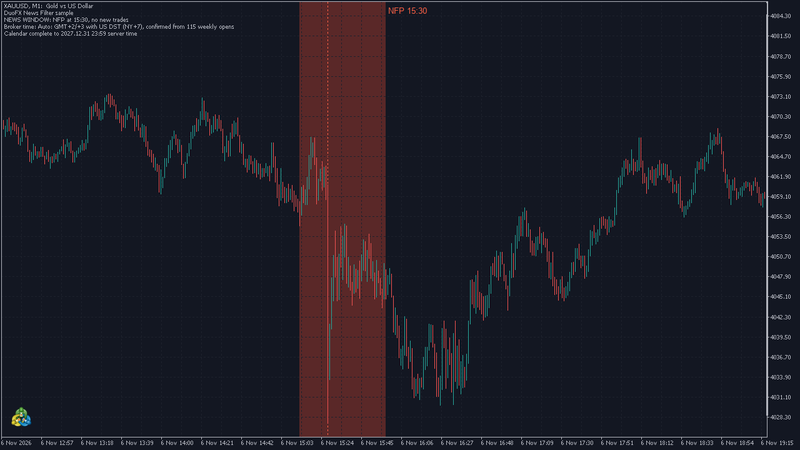
- 1. Strategy Tester: Expert DuoFX\NewsFilterSample, XAUUSD, M1, 5 to 7 November 2026, visual mode.
- 2. Inputs: defaults, and Open demo trades on.
- 3. The journal prints the library line, for example DuoFX News Filter 1.00: FOMC, CPI, NFP, 2 min before, 5 after; GMT+2/+3 with US DST (NY+7).
- 4. On 6 November the shaded band covers the M1 bars 15:28 to 15:35 with the dotted line at 15:30. No demo trade opens in the band, and any open one is closed at 15:28.
Use it in your own EA
Gate entries, and manage open trades yourself.
#include <DuoFX\NewsFilter.mqh>

bool g_warned=false;

int OnInit()
  {
//--- FOMC, CPI, NFP and PPI, wide window: 15 minutes before, 30 after
   if(!DuoNewsInit(DUONEWS_TIER1|DUONEWS_PPI,DUONEWS_WIDE_BEFORE,DUONEWS_WIDE_AFTER,DUONEWS_TIME_NY_PLUS_7,0))
      return(INIT_PARAMETERS_INCORRECT);
   Print(DuoNewsCalendarInfo());
   Print(DuoNewsTimeModeText());
   return(INIT_SUCCEEDED);
  }

void OnTick()
  {
   datetime now=TimeCurrent();
   if(now>DuoNewsCoverageEnd() && !g_warned)
     {
      Print("News calendar has ended: update the library.");
      g_warned=true;
     }
   if(DuoNewsIsBlocked(now))
     {
      // manage your open trades here (close, or move stops), then:
      return;
     }
   int m=DuoNewsMinutesToNext(now);
   if(m>=0 && m<=60)
      return;   // a trade opened now could still be open at the release
   // ... your entry logic
} - Close or protect open trades when DuoNewsMinutesToNext falls to your minutes before value. The library does not touch your orders.
- Past DuoNewsCoverageEnd() the filter says "not blocked". Check it once and warn.
Calendar coverage
- 574 releases from January 2020 to 31 December 2027, from the official Federal Reserve, BLS, Census and BEA schedules. That includes dates moved by government shutdowns and the emergency Fed actions of March 2020.
- Dates up to 8 November 2026 are confirmed against the official schedules. Later dates are as scheduled.
- Release times as scheduled by the agency (08:30, 10:00, 14:00 New York and so on). A release can be delayed on the day.
- US events only: FOMC, CPI, NFP, PPI, retail sales, GDP advance and PCE. No other countries, no speeches. They move gold, the US dollar pairs and US indices most.
- FOMC is the statement time. The press conference usually follows 30 minutes later and can move gold more than the statement: widen "minutes after" to cover it.
- Release times only: no forecasts, actual figures or surprises.
- After 31 December 2027, DuoNewsIsBlocked returns false. Use DuoNewsCoverageEnd() in your EA to warn or stop. We plan to extend the calendar in later versions.
Prop firm note
- Each prop firm has its own news rule: how many minutes, which currencies and events, and whether open trades count. Read yours.
- Set the window to match your firm's rule and test it in the tester. The library covers the US releases listed above only.
- It cannot guarantee that a trade complies with any firm's rules. Check the rules yourself.
FAQ
- Does it work in the Strategy Tester and the optimizer? Yes. The calendar is compiled in, so backtests, visual mode and optimizer passes use the same releases as live. Set your broker's time mode for backtests.
- Does it work on MT4? Yes. The MT4 version has the same functions and calendar.
- Which time mode do I pick? If your server shows GMT+2 in winter and GMT+3 in summer and the daily candle starts at 17:00 New York, use NY+7. Not sure? Run your EA live with Auto: its log line names the rule it found, or says ambiguous.
- Can it trade or close my positions? No. Your EA does that.
- Does it need WebRequest, DLLs or files? No.
- Is the forecast or actual number included? No, release times only.
- What happens after 2027? DuoNewsCoverageEnd() tells your EA where the calendar ends.
- I get "DuoNewsInit refused" in the log. An argument is out of range. The log line says which one, and the previous settings stay in force.
- The window is an hour off. Wrong time mode, or a gap week with the wrong clock family. Check DuoNewsTimeModeText() and see "The gap weeks".
- Can I use it in an EA I build for clients or sell? Each terminal that runs the EA needs the library installed, so your clients need their own copy. For an EA sold on the MQL5 Market, a Market product generally cannot depend on another Market product: check MQL5's seller rules first.
- Other currencies? US events only.
Trading is risky, and news releases are among the most volatile minutes of the month. A news filter reduces exposure to scheduled releases; it does not remove risk, and markets can move sharply at any time. Not financial advice, no promise of profit. Test any EA on a demo account first.