
Available on the MQL5 Market: JET Quant WIN · JET Quant WDO
Version 1.06 · Panels for MetaTrader 5 · B3 market
JET Quant is a market-reading panel. It never opens, closes or changes orders. Trading involves risk of loss; the panel measures the current state of the market, does not predict prices and does not guarantee results.
1. What it is
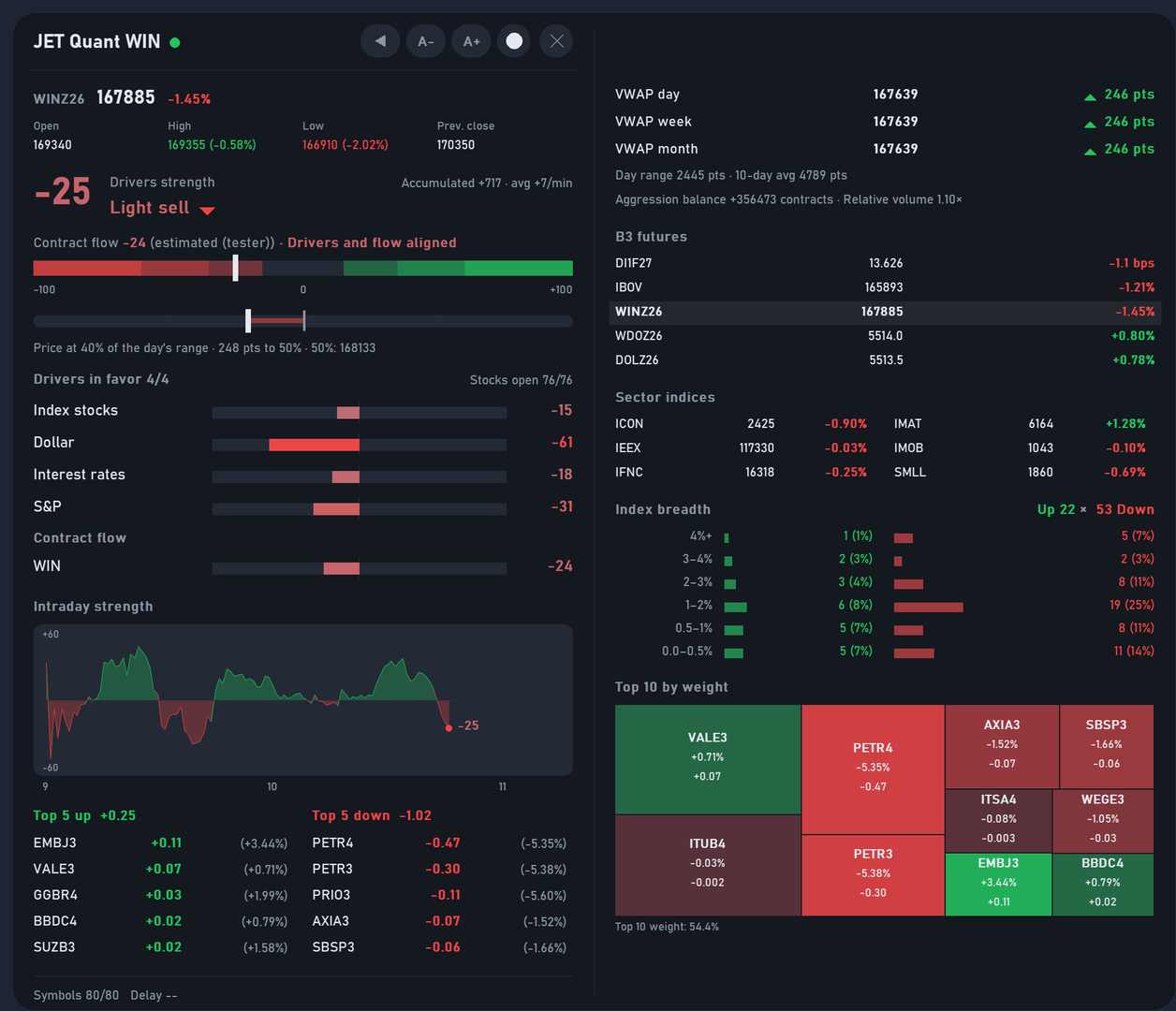
JET Quant reads, second by second, the trades of the instruments that drive the mini index (JET Quant WIN) or the mini dollar (JET Quant WDO) and shows two readings:
| Reading | What it answers |
|---|---|
| Drivers strength (−100 to +100) | Are the markets that usually push the contract buying or selling right now? |
| Contract flow | Are the participants in the contract itself hitting the buy side or the sell side? |
Combining the two gives the state:
| State | Meaning |
|---|---|
| Drivers and flow aligned | Both readings are away from neutral and on the same side |
| Flow without driver support | The contract is moving, but the drivers are neutral or against it |
| Drivers without flow | The drivers point to one side, but the contract has not followed yet |
| No direction | Both readings are close to neutral |
2. Requirements
- MetaTrader 5 with a broker that delivers B3 market data with real trades (WIN, WDO, DOL, DI1, Ibovespa stocks and the S&P contract traded on B3).
- Demo or real account: the panel does not send orders, so it works the same on both.
- On symbols without B3 data, the panel opens and shows "B3 symbols not found".
3. Installation
- Rent (1, 3, 6 or 12 months) or buy the lifetime license on the Market and install it from MetaTrader 5 itself (Market tab → Purchased).
- Open a chart of the current contract: WIN for JET Quant WIN, WDO for JET Quant WDO. Any timeframe works; we recommend M1.
- In the Navigator, under Expert Advisors → Market, drag the panel onto the chart.
- On the Common tab, tick Allow Algo Trading only if your broker requires it for EAs to load. The panel does not trade.
- Click OK. The first time it opens, the panel takes a few seconds to load the day's data.
Tip: open the panel before 09:00. That way the strength chart and the accumulated strength cover the whole day.
3.1 Allow the URLs (PTAX and projected values)
In Tools → Options → Expert Advisors, tick Allow WebRequest for listed URL and add:
| URL | What for | Required? |
|---|---|---|
| https://olinda.bcb.gov.br | Central Bank of Brazil PTAX bulletins (WDO) | Recommended for WDO |
| https://api.twelvedata.com | Projected opening values (WDO) | Only if you use this feature |
Without the Central Bank URL, the PTAX factor shows "n/a" and the rest of the panel works normally.
3.2 Projected opening values: creating the Twelve Data key (WDO)
This feature is optional and uses a free personal key from Twelve Data, a market data provider.
- Go to twelvedata.com and click Sign up. Choose the Basic plan (free) and confirm your e-mail.
- In the Twelve Data dashboard, open API Keys and copy your key.
- In MetaTrader 5, open the properties of JET Quant WDO, Inputs tab, group Projected opening values, and paste the key into Twelve Data API key.
- Allow https://api.twelvedata.com as described in 3.1.
Usage is two requests per day, well within the limit of the free plan. The key is yours: do not share it and do not show it in screenshots. Read the Twelve Data terms of use when you create the account.
4. Reading the panel
4.1 Compact mode
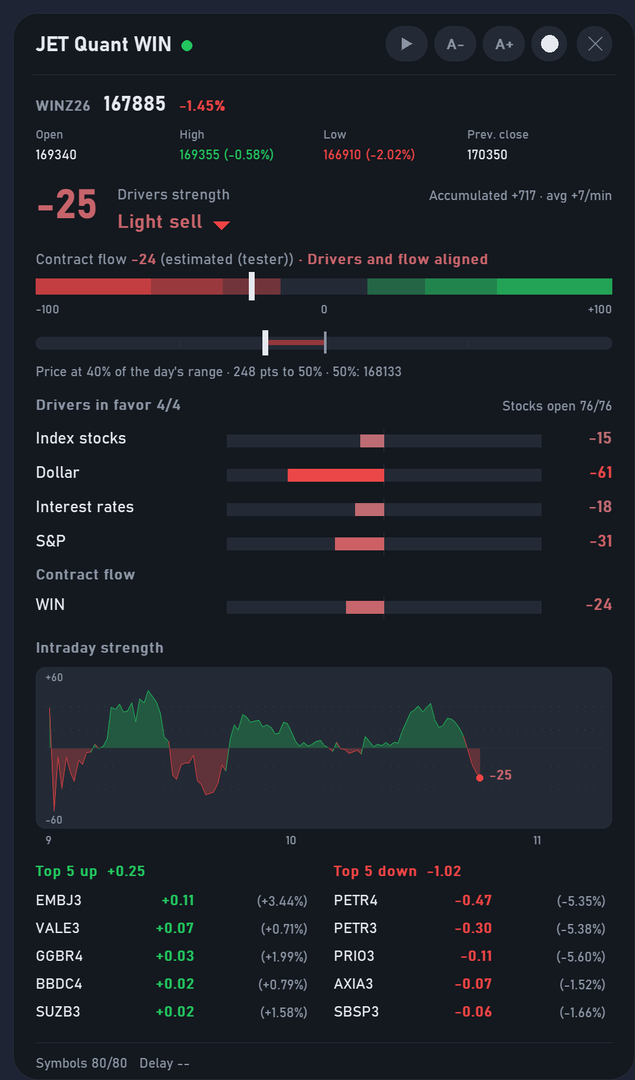
| Area | What it shows |
|---|---|
| Header | Name, data indicator (green = receiving), A−/A+ buttons (size), theme, mode (arrow) and × (removes the panel) |
| Price line | Last, change, open, high, low and previous close of the contract |
| Drivers strength | Number from −100 to +100, level (seven levels, from Strong sell to Strong buy) and a ▲/▼ arrow when the reading rises or falls sharply |
| Contract flow | Value and state (section 1) |
| Accumulated strength | Sum of the strength since the open and the average per minute, to compare days |
| Position bar | Where the price sits between the day's low and high, the 50% level and the distance to it |
| Factors | One bar per factor, from −100 to +100. The "Drivers in favor" counter tells how many are on the same side as the main reading |
| Intraday chart | The main reading minute by minute, with reference bands for the levels |
| Top 5 (WIN) | The five stocks that add the most and the five that take the most points from the index, with each one's change and the sum of each side |
| Stock session status (WIN) | Pre-opening · Auction · Stocks open n/76 · Closing auction · Stock session closed |
| Projected values (WDO) | Likely open, likely low and likely high, and where the price stands against them |
| Footer | Symbols found, data delay and, on WDO, the latest PTAX bulletin |
The seven on-screen levels are: Strong buy, Buy, Light buy, Neutral, Light sell, Sell and Strong sell.
4.2 Full mode
Click the arrow in the header: a column opens on the right.

| Block | WIN | WDO |
|---|---|---|
| Daily, weekly and monthly VWAP, with the distance to the price | ✓ | ✓ |
| Day range × 10-day average, aggression balance and relative volume | ✓ | ✓ |
| B3 futures (DI1, IBOV, WIN, WDO, DOL) | ✓ | ✓ |
| Sector indices | ✓ | — |
| Stock breadth: advancers and decliners by change bracket | ✓ | — |
| Ibovespa top 10 by weight (block map) | ✓ | — |
| PTAX of the day: all bulletins, buy and sell, change and distance to the WDO | — | ✓ |
4.3 Projected opening values (WDO)
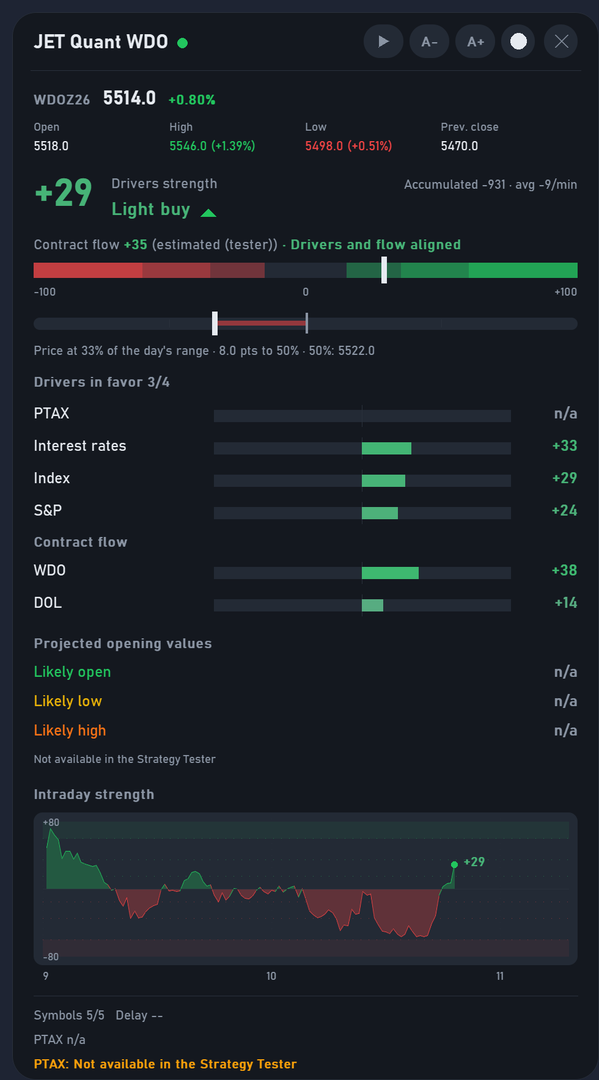
- They are read once a day, at 08:54, from the overnight dollar quotes. If the panel is opened after the reading time, the section shows "Outside the reading window", unless the panel has already read the values that day.
- They show three reference levels: Likely open, Likely low and Likely high. After the open, the panel shows where the price stands against them.
- They are reference levels for your planning, not forecasts nor a guarantee that the price will touch them.
- If you prefer, type the three values manually in the inputs; when they are filled in, the panel does not query Twelve Data.
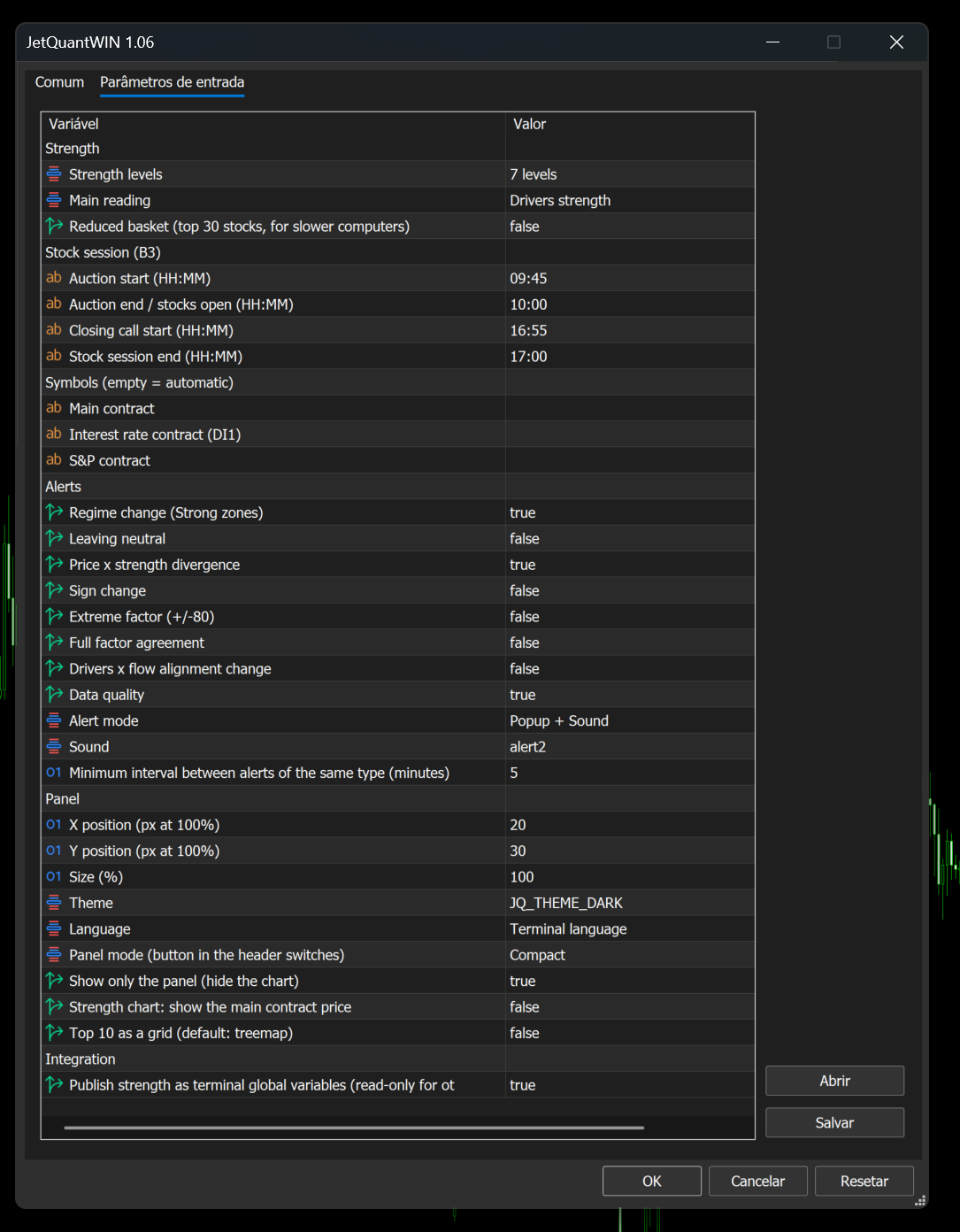
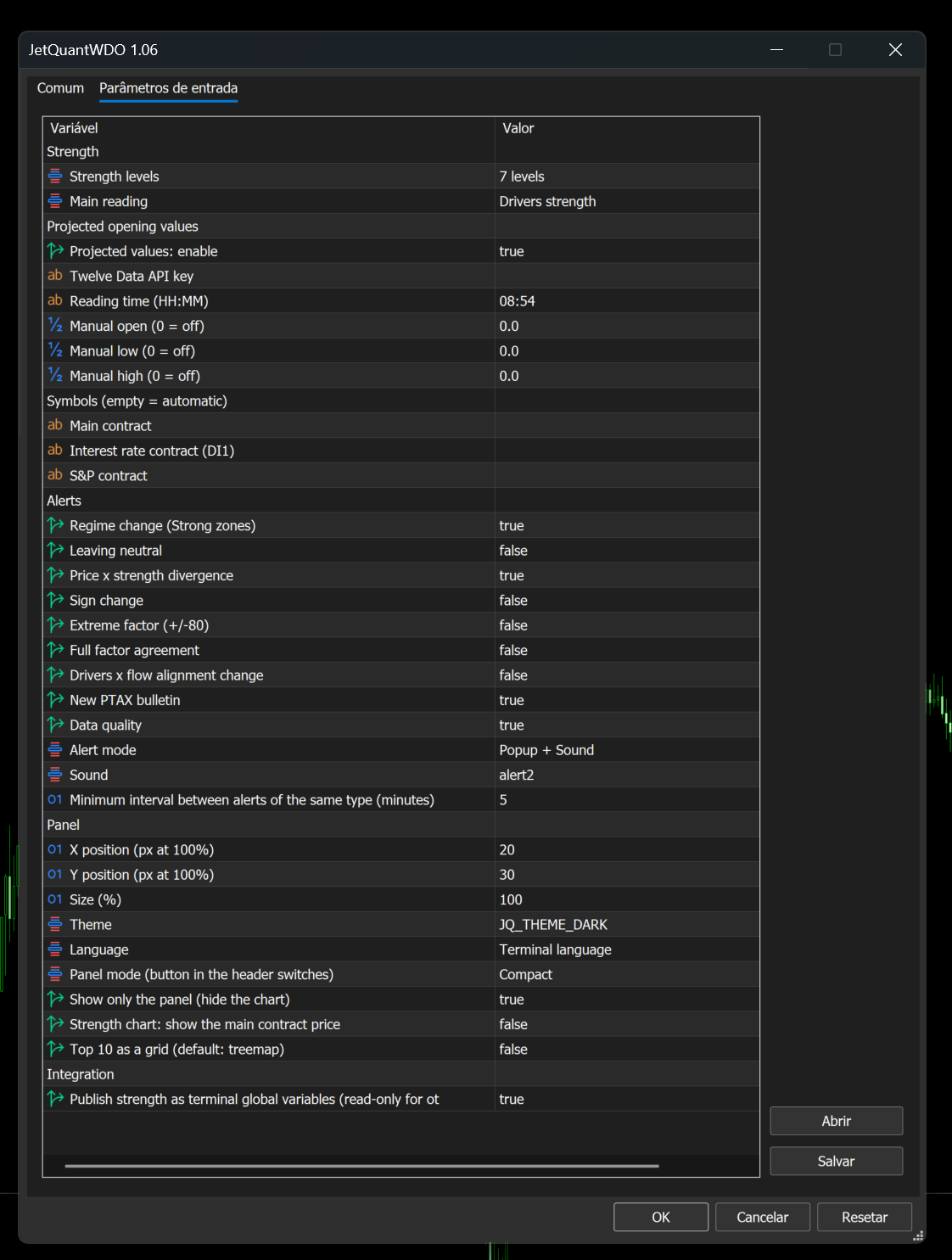
5. Settings (Inputs tab)
| Group | What you adjust |
|---|---|
| Strength | Levels (7 or 5), main reading (Drivers strength or combined) and reduced basket (WIN) |
| Stock session (B3) — WIN | Auction and stock session end times, in case B3 changes its schedule |
| Projected opening values — WDO | On/off, Twelve Data key, reading time and manual values |
| Symbols | Leave empty for automatic detection; fill in only if your broker uses different names |
| Alerts | Which alerts to turn on, how to notify (popup, sound, phone), sound and minimum interval |
| Panel | Position, size, theme, language, initial mode, show only the panel, price on the strength chart, Top 10 as a grid |
| Integration | Publish the readings as global variables for your EAs |
5.1 Alerts
| Alert | Default |
|---|---|
| Level change into or out of the Strong zones | On |
| Price × strength divergence (new high/low without confirmation) | On |
| New PTAX bulletin (WDO) | On |
| Data quality (delay, missing symbol, Central Bank service down) | On |
| Leaving neutral · Sign change · Extreme factor · All factors on the same side · Change of the drivers × flow state | Off |
To receive alerts on your phone, set your MetaQuotes ID in Tools → Options → Notifications.
6. Integration with your EAs
With Integration → Publish strength on, the panel publishes terminal global variables (read-only for other programs): main reading, drivers strength, flow, state and level. The names start with JETQ_WIN. or JETQ_WDO. . Open Tools → Global Variables (F3) to see the list.
7. Strategy Tester (demo)
- In the tester, at low speeds, the panel updates several times per second, close to what you see live. While the tester prepares the history of each stock, the panel shows a loading notice; this only happens in the tester.
- The demo runs in the Strategy Tester with the WIN or WDO contract. Choose a period with at least 2 trading sessions (e.g., start date 03/11 and end date 05/11): with a single session, the tester may end the test without processing the day.
- In the tester, the contract flow is marked "estimated (tester)" and is an approximation, and the delay field shows "--". Live, the flow uses the real trades.
- In the tester, the PTAX and the projected values show "n/a", because internet requests do not work there.
- Factors whose symbols are not available in the tester also show "n/a".
8. Frequently asked questions
The panel opened with "B3 symbols not found". The chart is not a B3 contract, or the broker does not deliver B3 data. Open the panel on a WIN or WDO chart from a broker with B3 data.
The PTAX shows "n/a". Allow https://olinda.bcb.gov.br (section 3.1). If the URL is already allowed, the Central Bank service may be down; the panel retries on its own.
The projected values show "Outside the reading window". The panel was opened after the reading time (08:54). Open it before that time in the next session.
The "Index stocks" factor shows "opens 10:00" or "Auction". The stocks have not opened yet or are in the opening auction. The factor is calculated again when trading starts.
Does the panel slow down the terminal? The panel updates only what changed and stays idle outside trading hours. On less powerful computers, turn on Reduced basket (JET Quant WIN) and use compact mode.
9. Support
Send your questions through the product page on MQL5 or the website jetinvest.com.br. To speed things up, tell us the panel version, your broker and send a screenshot of the panel (without your account data and without your Twelve Data key).
Trading involves risk of loss. JET Quant measures the current state of the market; it does not predict prices and does not guarantee results. Projected opening values are reference levels, not forecasts. Past performance does not guarantee future results.