
Dorado Trade Manager is a trade panel for MetaTrader 5. You set your risk once; it sizes every trade, places the stop loss and take profit, moves the stop to break-even, trails it and takes partial profits. It also manages trades you open from the MT5 phone app, and a prop-firm guard closes everything before you breach a daily-loss or drawdown limit.
This manual covers every button and setting in version 1.00.
Get Dorado Trade Manager on the MQL5 Market: https://www.mql5.com/en/market/product/207111
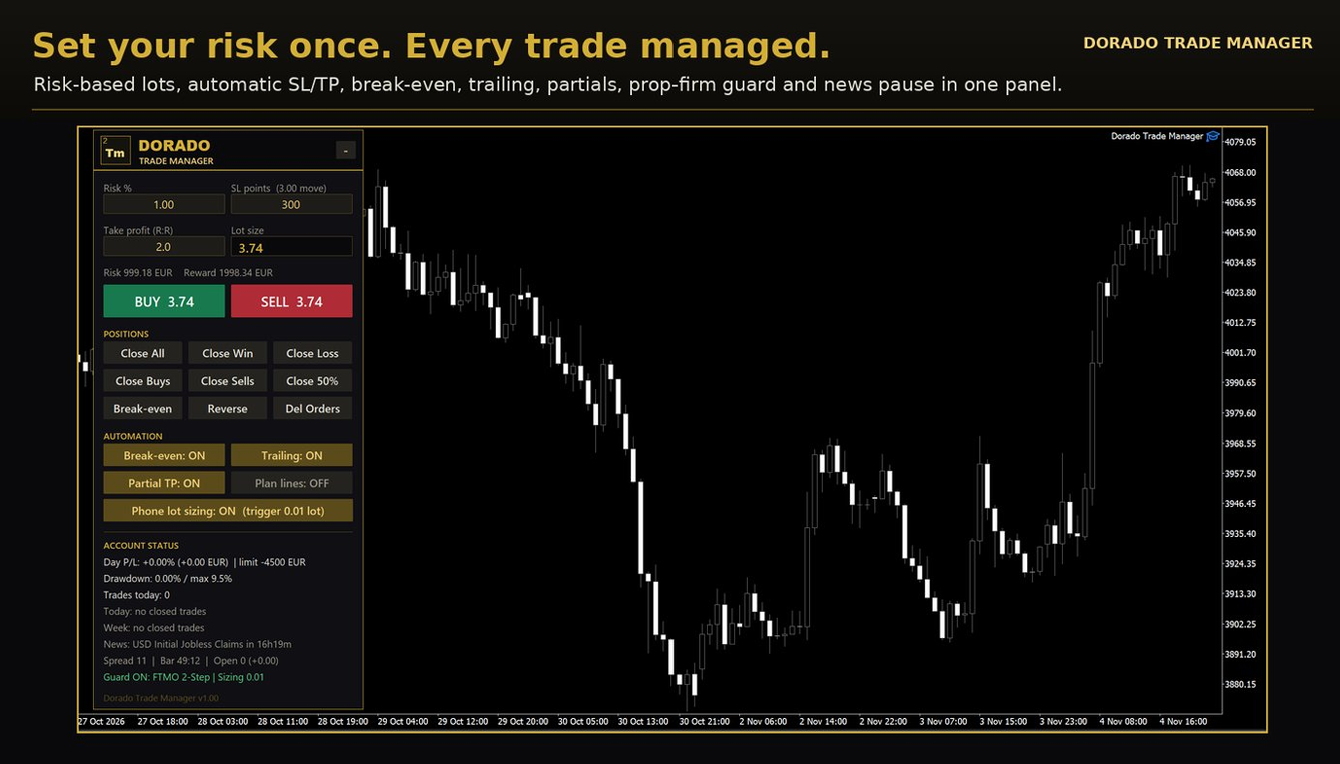
The panel: risk, lot size, one-click orders and account status
Contents: Quick start · The panel · Break-even, trailing and partials · Phone and manual trades · Plan lines, pending orders and OCO · Stealth mode · Prop-firm guard · News pause and alerts · Inputs reference · FAQ and troubleshooting
Quick start
You can place your first risk-sized trade about two minutes after installing.
- Install: in MT5 open Navigator › Expert Advisors › Market and drag Dorado Trade Manager onto a chart (for example XAUUSD).
- Allow trading: on the Common tab tick Allow Algo Trading, and make sure the Algo Trading button in the MT5 toolbar is green.
- Set your risk: in the panel type your risk (default 1% of balance) and your stop loss in points, then press Enter.
- Check the preview: the panel shows the lot size, the money you risk and what you could win at TP.
- Trade: press BUY or SELL. The order goes out with SL and TP attached.
Optional, but recommended:
- Telegram alerts: see News pause and alerts.
- Prop-firm account: turn on Use prop-firm guard and choose your firm's preset.
- Trading from your phone: keep MT5 running on a PC or VPS. The panel can only manage trades while MT5 is running.
One panel manages trades on all symbols by default, so you only need it on one chart.
The panel
The panel has five parts, top to bottom: header, inputs, BUY/SELL, buttons and status. Drag the header to move it; the position is remembered.
Header. It reads TRADE MANAGER when this panel manages your trades, or PANEL ONLY – NOT MANAGING when another chart already does. The – / + button minimises or expands the panel.
Inputs
| Field | What it does |
|---|---|
| Risk % | Risk per trade. Shows Risk in money in fixed-money mode, or Lots in fixed-lot mode. Type and press Enter. |
| SL points | Stop-loss distance in points, saved per symbol. The label shows it in pips (forex) or as a price move (gold, indices). |
| Take profit (R:R) | TP as a multiple of the SL. 2.0 = TP twice as far as SL; 0 = no TP. |
| Lot size | Calculated from risk and SL, rounded down, reduced if free margin is short. "below min" = risk too small for the broker's minimum lot. |
| Risk / Reward line | Money lost at SL and gained at TP with that lot. |
BUY / SELL. Opens a trade with the lot, SL and TP shown. The button shows the order type and lot, for example BUY 0.05, or BUY LIMIT 0.05 when plan lines are on. Before sending, the panel checks that Algo Trading is on, the guard is not locked, max trades is not reached, the spread is under the limit and there is no news pause. If a check fails, the reason appears on the bottom line and nothing is sent.
Position buttons (act on the chart symbol by default)
| Button | Action |
|---|---|
| Close All | Closes every position |
| Close Win | Closes positions in profit (profit + swap above 0) |
| Close Loss | Closes positions in loss |
| Close Buys / Close Sells | Closes one direction |
| Close 50% | Closes half of each position; skips any that would fall below the minimum lot |
| Break-even | Moves SL to entry + 20 points (or the spread, if wider) on positions far enough in profit; never moves a stop backwards |
| Reverse | Closes each position on the chart symbol and opens the opposite direction, same lot, panel SL/TP |
| Del Orders | Deletes pending orders |
Automation toggles (gold = ON, kept through MT5 restarts)
- Break-even, Trailing, Partial TP: switch each automation on or off.
- Plan lines: shows draggable entry, SL and TP lines for pending orders.
- Phone lot sizing: tops up phone trades to your risk; shows the trigger lot.
Account status
| Line | Shows |
|---|---|
| Day P/L | Today's result in % and money, with the daily loss limit when the guard is on |
| Drawdown | Current drawdown against the max; amber at 75% of the limit |
| Trades today | New trades today across the account, against your limit |
| Today / Week | Wins, losses, win rate, P/L and best trade today; profit factor this week (from Monday) |
| News | Next high-impact event for the chart's currencies, or PAUSED |
| Spread · Bar · Open | Spread, time to candle close, open positions and floating P/L |
| Guard line | Guard state and preset, LOCKED with the reason, or the last action for 6 seconds |
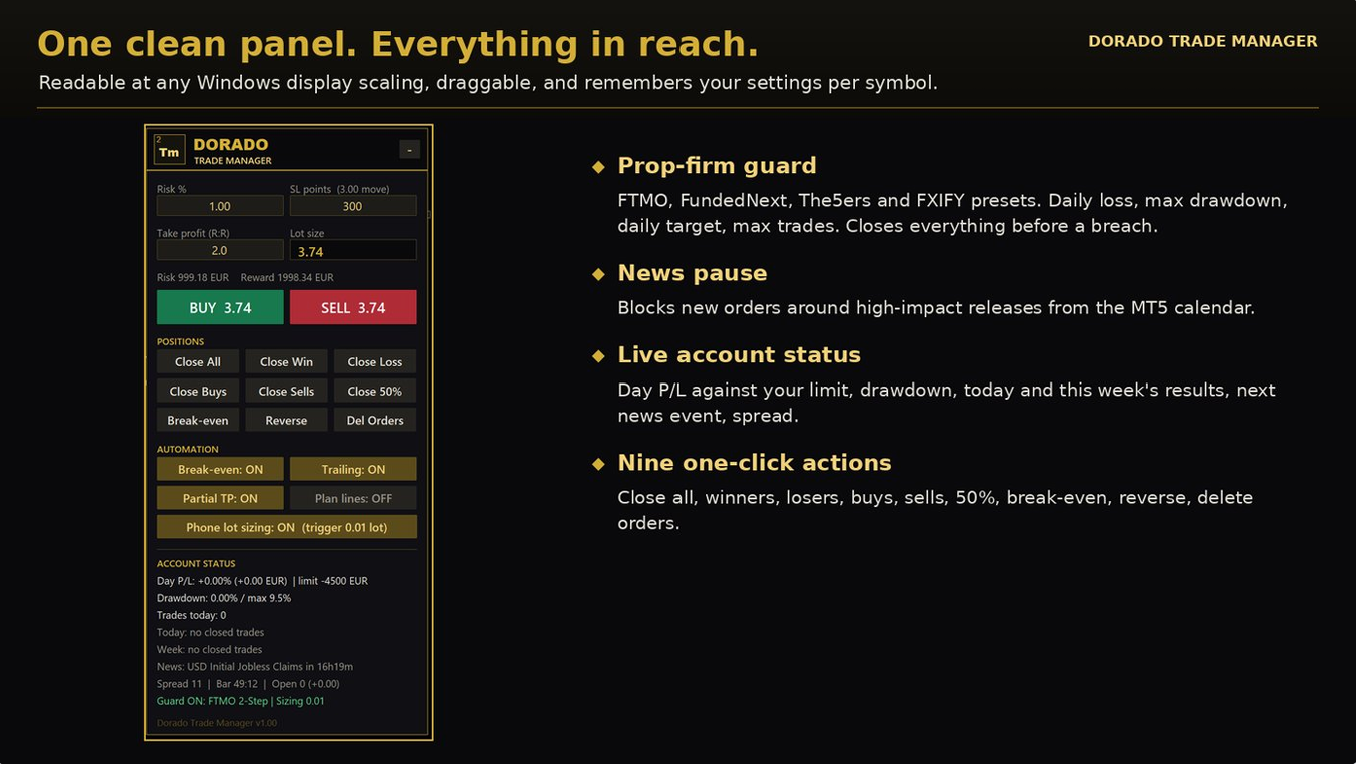
The full panel with automation toggles, prop-firm guard and news status
Break-even, trailing and partials
Every managed trade is measured in R, its original risk: the distance from entry to its first stop loss. With a $3 stop on gold, 1R = $3 of price movement.
- Break-even 1: at +1R the SL moves to entry + 20 points, or + the spread if that is wider (BTC, indices), so spread and commission are covered.
- Break-even 2: at +2R the SL moves to lock +1R of profit.
- Partial TP 1: at +1R, closes 50% of the original lot.
- Partial TP 2: at +2R, closes another 25% of the original lot. The rest runs to TP or the trailing stop.
- Trailing stop: starts at +1.5R and only ever tightens, in steps of at least 20 points (or twice the spread, if wider). Modes: ATR (2 × ATR(14) on H1, the default), Fixed points (300) or Candle (below the lowest low of the last 3 candles for a buy, above the highest high for a sell, plus spread).
All levels are inputs. Each step happens once per trade and is remembered through restarts.
Worked example: BUY 0.10 XAUUSD at 2650.00, SL 300 points ($3), R:R 3, trailing on Fixed points 300.
| Price | What happens | Stop loss |
|---|---|---|
| 2650.00 | Trade opens, TP 2659.00 | 2647.00 |
| 2653.00 (+1R) | Partial: 0.05 closed, +$15. Break-even 1. | 2650.20 |
| 2654.50 (+1.5R) | Trailing starts, 300 points behind price | 2651.50 |
| 2656.00 (+2R) | Partial: 0.02 closed, +$12 | 2653.00 |
| 2657.50 | Trailing follows the high | 2654.50 |
| Falls to 2654.50 | Stop hit, last 0.03 closed, +$13.50 | — |
Result: +$40.50 on a trade that risked $30.
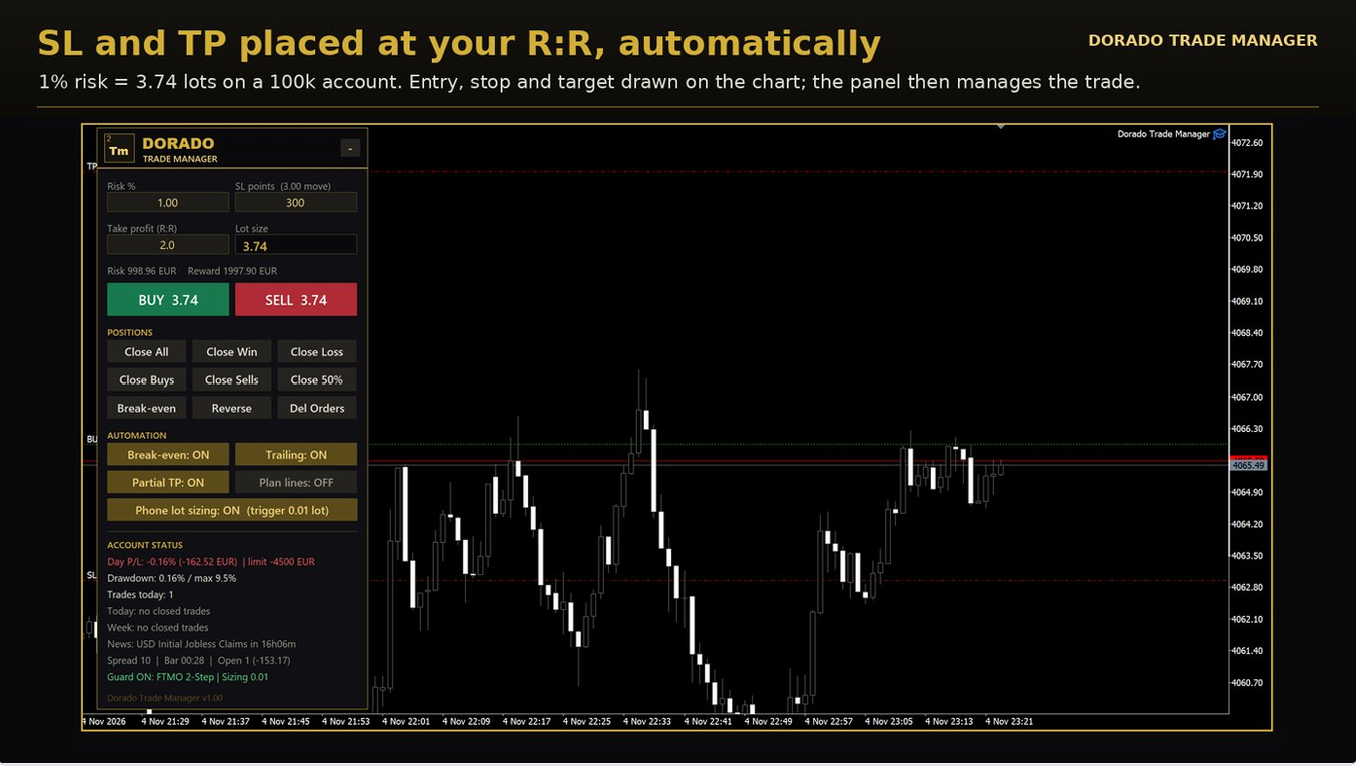
Entry, stop loss and take profit placed at your reward-to-risk
Good to know
- A 0.01 lot can't be split, so partials skip it; break-even and trailing still work.
- On gold the default ATR trailing is often $15 or more wide. Fixed points (300–500) or Candle mode follows price more closely.
- A trade whose stop is already at or beyond entry when the panel first sees it is treated as protected: no partials or break-even are fired on it. Trailing still works.
- Stop changes are sent all at once, so 20 trades reaching break-even together don't freeze the panel.
Phone and manual trades
Trades you open by hand (MT5 desktop, the MT5 phone app or the web terminal) are managed like panel trades, on every symbol. MT5 must be running on a PC or VPS for this to happen.
Automatic SL and TP. A manual trade without a stop gets one within a second, measured from its own open price:
- On a symbol you've used the panel on: your saved SL points for that symbol.
- On any other symbol: 1.5 × that symbol's 1-hour ATR (input Other symbols: SL = x × ATR(H1)). On AUDUSD that is typically 15–20 pips.
- TP: your R:R × the SL distance.
- A stop or target you set yourself is never replaced.
Phone lot sizing. Open the trigger lot (0.01 by default) from your phone, and the panel tops the trade up to your risk:
- It works out the lots your risk needs for the trade's stop (yours, or the automatic one).
- It opens one extra position in the same direction for the difference, commented Dorado TM size.
- It gives both positions the same SL and TP, measured from the top-up's real fill price.
Example (demo account): AUDUSD buy 0.01 at 0.70145, risk about $11. The panel added 0.05 lots; both positions got SL 0.69959 (18.6 pips) and TP 0.70517 (37.2 pips, R:R 2).
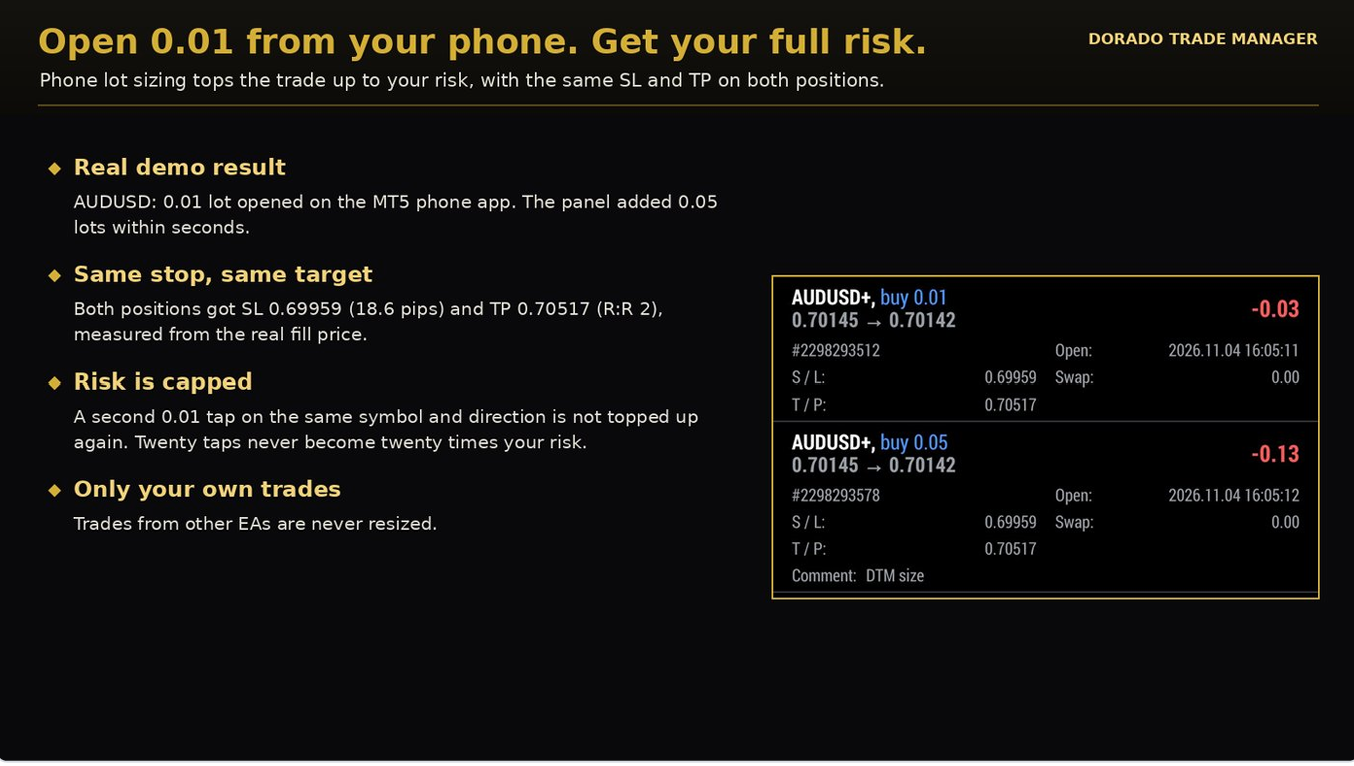
A 0.01 phone trade topped up to full risk, both positions with the same SL and TP
Built-in safety
- Risk cap: your risk applies to the whole symbol and direction. A second 0.01 AUDUSD buy is kept at 0.01, with "already uses your risk". Twenty taps never become twenty times your risk.
- Only the trigger lot is sized. Open 0.02 or 0.10 and it stays as you opened it (and still gets SL/TP).
- Only your own trades. Trades from other EAs are never sized, even ones that use magic number 0.
- Each trade is sized once, only if it is under 5 minutes old, and is skipped when the guard is locked or margin is short.
- Top-ups don't count toward max trades per day.
- On a netting account the top-up merges into one position.
Switch sizing off any time with the Phone lot sizing toggle on the panel.
Plan lines, pending orders and OCO
Turn on Plan lines to place a trade by dragging lines on the chart instead of typing numbers.
When you turn them on, the lines follow the price and BUY/SELL still place market orders; the red and green lines show where your stop and target will be. Drag the gold line to fix your entry price: from then on BUY/SELL place a limit or stop order at that price. Turn Plan lines off and on to go back to following the price.
- Gold line (entry): drag it to your entry price; it then stays there. SL and TP move with it.
- Red line (stop loss): drag to set the SL distance. Below entry sets up a buy, above entry a sell.
- Green line (take profit): drag to set the R:R.
Dragged values apply only to the order you are planning. They are not saved, and phone or manual trades keep using your own SL points and R:R. When you turn Plan lines off, the panel goes back to your own values.
The lot, risk and reward update as you drag. Press BUY or SELL and the panel picks the order type:
| Entry line is… | BUY places | SELL places |
|---|---|---|
| At the current price | Market buy | Market sell |
| Below the current price | Buy limit | Sell stop |
| Above the current price | Buy stop | Sell limit |
- Expiry: set Pending order expiry (hours); 0 = good till cancelled.
- OCO: when a panel pending order fills, the panel's pending orders in the opposite direction on that symbol are cancelled. Use it for breakouts: a buy stop above the range and a sell stop below. Orders in the same direction (a ladder of limits) are kept.
- Spread filter: Max spread for new orders blocks panel orders while the spread is too wide; 0 = off.
Stealth mode
Stealth mode hides your real SL and TP from the broker. The broker only sees a wider emergency stop; the panel watches price and closes the trade at market when your hidden level is touched. It is off by default.
- On the chart: dotted red and green lines mark the hidden SL and TP.
- At the broker: an emergency SL, 2 × the SL distance by default (Stealth emergency SL), and no TP.
- Break-even and trailing move the hidden SL. The emergency stop follows 1R behind it and only moves forward, so profit already locked in is protected if MT5 disconnects.
Example: buy at 2650.00 with a $3 stop. The hidden SL is 2647.00 and the broker sees 2644.00. After trailing, the hidden SL is 2654.50 and the broker sees 2651.50.
Before you use it
- MT5 must run all the time (use a VPS). While it's off, only the emergency stop protects you.
- The panel closes at market, so expect slippage; after a price gap the close can be worse than your hidden level.
- Emergency SL setting: 0 = no broker stop (risky), 1 = broker stop at your real SL (nothing hidden), 1.5–2 is sensible.
- Phone trades where you set a stop yourself keep a normal, visible stop.
Prop-firm guard
The guard watches the whole account (every symbol and every EA) and closes everything before a limit is breached. It is off by default: turn on Use prop-firm guard.
Limits
- Daily loss: % of the day-start value and/or a fixed money amount. On a breach, all positions are closed, pending orders deleted and trading locked until the next day.
- Max drawdown: static (from the account size) or trailing (from the equity peak). On a breach, everything is closed and trading locked until you reset it.
- Daily profit target (optional): locks in a good day by closing everything and pausing until tomorrow.
- Max trades per day (optional): any new trade above the limit is closed immediately.
- While locked: any trade opened anyway (phone, other EA) is closed (Close trades opened while locked).
Presets (input Prop-firm preset)
| Preset | Daily loss | Max loss |
|---|---|---|
| FTMO 2-Step | 5% of account size, from the day-start balance | 10%, static |
| FTMO 1-Step | 3% of account size | 10%, trailing |
| FundedNext Stellar 2-Step | 5% of account size | 10%, static |
| FundedNext Stellar 1-Step | 3% of account size | 6%, static |
| The5ers High Stakes | 5% of the higher of day-start balance or equity | 10%, static |
| The5ers Hyper Growth | 3% | 6%, static |
| FXIFY 2-Phase | 4% of the previous day's balance | 10%, trailing |
| Custom | Your own inputs | Your own inputs |
- Safety buffer (default 0.5%): presets fire early, so FTMO's 5% fires at 4.5%.
- Account size: presets use the account's first deposit (the challenge size). If that's wrong, set Start / account size.
- Day reset hour: server time; set it to your firm's reset (FXIFY resets at 5 PM New York time).
- Trailing limits here follow your equity peak; firms use closing balance, so the guard is slightly stricter, never looser.
- Firms change their rules. Check yours before choosing a preset, or use Custom.
After a max-drawdown lock: set Reset guard lock now to true, press OK, then set it back to false. The reset happens once per change, so a timeframe change can't clear a new lock.
If MT5 was off at the daily reset, the day-start balance is rebuilt from today's closed trades. Running on a VPS captures it live.
With several charts: the guard works from every chart where you turn it on, and always watches the whole account. Turn it on, with your preset, on one chart (the managing one is easiest). Every other panel follows it: it shows the same daily limit, drawdown and trade cap, and a lock blocks BUY/SELL and phone sizing on every panel, which all show LOCKED. If you turn it on on more than one chart, use the same settings on each: the stricter one acts first.
News pause and alerts
News pause (on by default)
- Uses the MT5 economic calendar for the chart symbol's currencies (XAUUSD uses USD).
- Blocks panel orders from 15 minutes before to 15 minutes after each high-impact release (medium impact optional).
- Optional: close managed positions just before the release (Close managed positions before news).
- The status line shows the next event and countdown, or PAUSED.
- Not available in the Strategy Tester (the calendar isn't).
Telegram alerts
- In Telegram, message @BotFather, send /newbot and copy the bot token.
- Open your new bot (the link BotFather gives you), press Start and send it any message. A bot can't message you until you've done this.
- Get your chat ID: message @userinfobot and copy the number it replies with. Not the number at the start of the bot token, and not your @username. For a public channel, add the bot as an admin and use @yourchannel; for a private channel or group, the ID starts with -100.
- In MT5: Tools › Options › Expert Advisors › tick Allow WebRequest for listed URL and add the Telegram API address (api.telegram.org, starting with https://).
- Press F7 on the chart whose header says TRADE MANAGER (alerts come from the managing panel), set Send Telegram alerts = true, paste the token and chat ID, and press OK.
- A test message arrives within seconds, and the Experts tab shows "Telegram message delivered OK". The test is sent again only when the token or chat ID changes.
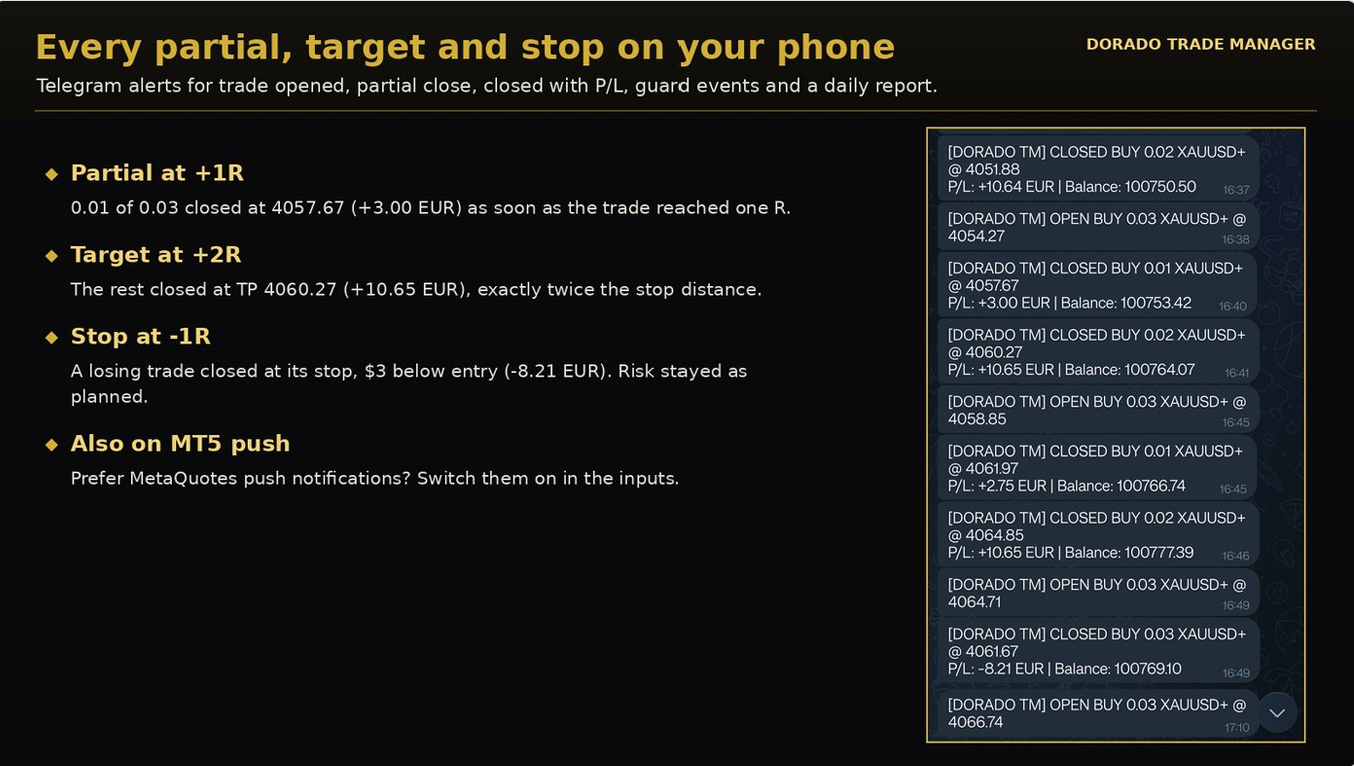
Telegram alerts for every open, partial close and close
MT5 phone push. Put your MetaQuotes ID (MT5 phone app › Settings › Messages) into desktop MT5 under Tools › Options › Notifications, then set Send MT5 mobile push notifications = true. MT5 limits push messages, so several alerts are combined into one, at most every 6 seconds.
What you get: trade opened, partial close (with the lots left), trade closed with P/L and balance, guard and news actions, and a daily report (closed deals, wins/losses, net P/L) at the day reset. Each can be switched off.
Inputs reference
Every input, grouped as in the EA's Inputs tab. Values you type into the panel (risk, SL, R:R) and the toggles are kept through timeframe changes and MT5 restarts. Removing the EA or closing the chart forgets them, so the next attach starts from these inputs.
| Group | Input | Default | What it does |
|---|---|---|---|
| Trade Panel | Risk mode | % of balance | % of balance, % of equity, fixed money or fixed lot |
| Trade Panel | Risk value | 1.0 | Starting risk for the chosen mode |
| Trade Panel | Default stop loss (points) | 300 | Starting SL distance. On symbols where 300 points is too tight or too wide (BTC, indices, oil), the panel starts from that symbol's volatility instead (Other symbols × ATR) |
| Trade Panel | Take profit as R:R | 2.0 | TP = R:R × SL; 0 = no TP |
| Trade Panel | Pending order expiry (hours) | 0 | 0 = good till cancelled |
| Trade Panel | Max spread for new orders (points) | 0 | Blocks panel orders above this spread; 0 = off |
| Trade Panel | Magic number | 790001 | Identifies panel trades |
| Trade Panel | Max slippage (points) | 30 | Allowed slippage on market orders (at least twice the symbol's spread) |
| Trade Panel | Confirm before close buttons | false | Yes/No popup before close actions |
| Trade Panel | Hotkeys | false | Shift+B buy, Shift+S sell, Shift+C close all, Shift+E break-even, Shift+H close 50% |
| Trade Panel | Play sounds | true | Sounds on orders and guard events |
| Trade Panel | Panel X / Y position | 15 / 60 | Starting position; dragging overrides it |
| Trade Panel | Panel size | 1.0 | Size on top of automatic screen scaling (0.6–2.0). On a short chart the panel shrinks by itself so it is always fully visible |
| Trade Management | Auto-manage on | All symbols | Where SL/TP, sizing, break-even, trailing and partials run |
| Trade Management | Panel buttons act on | Chart symbol | Where the close / break-even / 50% buttons act |
| Trade Management | Manage which trades | Panel + manual/mobile | Or all trades, including other EAs (careful with grid EAs) |
| Trade Management | Other symbols: SL = x × ATR(H1) | 1.5 | SL for symbols the panel hasn't been used on |
| Trade Management | Add SL/TP to trades opened without them | true | Protects phone, web and desktop trades |
| Trade Management | Stealth mode | false | Hides SL/TP from the broker |
| Trade Management | Stealth: emergency broker SL | 2.0 | Broker stop as a multiple of the SL distance |
| Trade Management | OCO | true | Cancels opposite-direction panel pendings when one fills |
| Trade Management | Use break-even | true | Two-level break-even |
| Trade Management | Break-even 1: trigger / lock | 1R / 20 points | Move SL past entry at +1R (lock is at least the spread) |
| Trade Management | Break-even 2: trigger / lock | 2R / 1R | Lock +1R at +2R; trigger 0 = off |
| Trade Management | Trailing stop mode | ATR | Off, fixed points, ATR or candle |
| Trade Management | Trailing: start after | 1.5R | When trailing begins |
| Trade Management | Trailing: distance | 300 points | Fixed-points mode |
| Trade Management | Trailing: timeframe / ATR period / multiplier | H1 / 14 / 2.0 | ATR and candle modes |
| Trade Management | Trailing: candle lookback | 3 bars | Candle mode |
| Trade Management | Trailing: minimum step | 20 points | Smallest SL move sent to the broker (at least twice the spread) |
| Trade Management | Use partial take-profit | true | Two partial closes |
| Trade Management | Partial 1: at / close | 1R / 50% | Of the original lot |
| Trade Management | Partial 2: at / close | 2R / 25% | Of the original lot; at 0 = off |
| Phone Lot Sizing | Resize manual/phone trades | true | Also a panel toggle |
| Phone Lot Sizing | Trigger lot | 0.01 | Only trades opened at exactly this lot are sized |
| Prop-Firm Guard | Use prop-firm guard | false | Acts on the whole account |
| Prop-Firm Guard | Prop-firm preset | Custom | FTMO, FundedNext, The5ers, FXIFY or custom |
| Prop-Firm Guard | Preset safety buffer | 0.5% | Presets fire this much early |
| Prop-Firm Guard | Daily loss limit (%) / (money) | 4.0 / 0 | Custom mode; 0 = off |
| Prop-Firm Guard | Max drawdown (%) / mode | 8.0 / static | Custom mode |
| Prop-Firm Guard | Start / account size | 0 | 0 = first deposit (presets) or balance at first attach |
| Prop-Firm Guard | Daily profit target (%) | 0 | Locks the day when reached; 0 = off |
| Prop-Firm Guard | Max new trades per day | 0 | 0 = off |
| Prop-Firm Guard | Day reset hour | 0 | Server time |
| Prop-Firm Guard | Close trades opened while locked | true | Enforces the lock |
| Prop-Firm Guard | Reset guard lock now | false | Set true once to clear a lock, then back to false |
| News Pause | Pause panel trading around news | true | Uses the MT5 calendar |
| News Pause | News impact | High | High, or medium + high |
| News Pause | Minutes before / after | 15 / 15 | Pause window |
| News Pause | Close managed positions before news | false | Closes just before the release |
| Alerts | Send Telegram alerts | false | Needs bot token, chat ID and WebRequest permission |
| Alerts | Telegram bot token / chat ID | empty | From @BotFather / your channel or chat |
| Alerts | Send MT5 mobile push | false | Needs your MetaQuotes ID in MT5 |
| Alerts | Alert on open / close / guard / daily report | true | Choose which alerts you get |
Several charts, VPS, FAQ and troubleshooting
Several charts. You can open the panel on as many charts as you like, for example to place orders on gold from one and AUDUSD from another. Only one panel manages trades; the others show PANEL ONLY – NOT MANAGING in the header. All their buttons still work (BUY/SELL and the close buttons act on that chart's symbol), and the automation toggles are shared: switching one on any chart switches it for the managing panel too. If you close the managing chart, another panel takes over within about 10 seconds. This stops partials and top-ups happening twice.
VPS. The panel can only act while MT5 runs. For phone trading, stealth mode or the prop-firm guard, run MT5 on a Windows VPS (the built-in MQL5 VPS works) so trades are managed 24/7. A VPS near your broker also makes closes faster.
FAQ
- Does it work with my other EAs? Yes. By default it manages only panel and manual trades. The prop-firm guard still protects the whole account.
- Does it change my trade comments? Trades the panel opens are commented Dorado TM (top-ups Dorado TM size). MT5 doesn't allow changing the comment of trades you open yourself.
- Hedging or netting? Both. On netting, a phone top-up merges into one position.
- Can I backtest it? It runs in the Strategy Tester, but news and Telegram are unavailable there.
Troubleshooting
| You see | Fix |
|---|---|
| Algo Trading is disabled | Turn on the Algo Trading button in the MT5 toolbar and Allow Algo Trading in the EA's Common tab |
| Lot size shows below min | Raise your risk or reduce the SL; the broker's minimum lot would risk more than your setting |
| Phone trade not sized | Check the toggle is ON, the trade was opened at exactly the trigger lot and MT5 was running; the Experts tab shows the reason |
| already uses your risk | Correct: that symbol and direction already carry your full risk |
| Telegram blocked | Add the Telegram API address under Tools › Options › Expert Advisors › Allow WebRequest |
| Telegram HTTP 400 "chat not found" | Press Start on your bot and send it a message, and check the chat ID is yours from @userinfobot (not the bot's number or your @username) |
| Telegram HTTP 401 | The bot token is wrong: copy it again from @BotFather |
| No Telegram messages and no errors | Put the Telegram settings on the chart whose header says TRADE MANAGER, not a PANEL ONLY chart |
| Waiting for price data | MT5 is loading that symbol's history; it retries automatically |
| LOCKED: max drawdown hit | Review the account, then use Reset guard lock now (true, then back to false) |
| Spread too high / News pause | Wait, or change the spread limit or news window in the inputs |
| Market closed for … | The symbol is outside its trading hours (weekend, or the daily break on indices and oil). Stops are not changed until it reopens |
| Broker: trading disabled / close-only | Your account can't trade that symbol. Check its Specification in Market Watch, or use the version your broker allows (for example EURUSD.r) |
Support: leave a comment on the product page or send me a private message on MQL5. Please include the Experts tab lines that start with Dorado TM.
A trade manager controls risk; it does not make losing trades win. Trading involves risk.