How to Calculate Lot Size in MetaTrader 5: Position Sizing, Stop Loss, Risk and MQL5 Examples

Hello, traders! Today I want to discuss one of the most important topics for beginners: how to calculate trade volume in MetaTrader 5 and why opening 0.01 lots does not necessarily mean that you are taking a small risk.
Imagine you have identified an interesting buying opportunity on EURUSD. You open MetaTrader 5, determine your entry price, and decide where to place your Stop Loss.
Now comes an important question: what trade volume should you use?
Should you open 0.01, 0.05, 0.10, or even 1.00 lot?
Many beginner traders choose their volume based almost entirely on account size. If the deposit is small, they trade 0.01 lots. When the deposit grows, they increase the volume to 0.10 lots.
Others choose their lot size based on how much money they hope to earn from the next trade.
In my opinion, neither approach is sufficient. Position size should be calculated using the amount of money you are prepared to risk, the distance to your Stop Loss, and the specifications of the financial instrument.
During more than 20 years of experience in financial markets and trading algorithm development, I have seen many cases where incorrect position sizing damaged an otherwise reasonable trading strategy.
On my MQL5 profile, I regularly publish educational material about trading and automation. You can also follow my English Telegram channel for discussions about trading systems, Expert Advisors, and risk management.
In this article, we will examine trading lots, calculate monetary risk, compare EURUSD with gold, distinguish margin from potential loss, and build an MQL5 function that automatically calculates position volume.
Let's begin with the basics.
1. What Is Trade Volume in MetaTrader 5?
Trade volume determines how much of a financial instrument you buy or sell.
In MetaTrader 5, volume is commonly expressed in lots.
However, one lot does not represent the same underlying quantity for every instrument.
For a standard EURUSD contract, one lot usually corresponds to 100,000 euros of the base currency.
For XAUUSD, many brokers define one lot as 100 troy ounces of gold.
These values are examples of common contract specifications, not universal rules.
For indices, metals, futures, and CFDs, contract sizes may be different. Even instruments with similar names can have different specifications at different brokers.
That is why the first step should always be checking the instrument specifications in MetaTrader 5.
Open Market Watch, select the symbol, and inspect its specification.
Example: Standard EURUSD Contract
Suppose the contract size is 100,000 EUR per lot.
| Trade volume | Underlying base currency |
|---|---|
| 1.00 lot | 100,000 EUR |
| 0.10 lot | 10,000 EUR |
| 0.05 lot | 5,000 EUR |
| 0.01 lot | 1,000 EUR |
These figures describe the size of the underlying exposure.
They do not describe the maximum potential loss, and they do not directly tell us how much margin the broker will require.
Exposure, margin, and risk are three different concepts.
2. Why 0.01 Lots Does Not Always Mean Low Risk
Let's examine two traders opening EURUSD BUY positions with exactly the same volume.
Both use 0.01 lots.
Trader A places the Stop Loss 20 pips away from the entry price.
Trader B places the Stop Loss 200 pips away.
Which trader is taking more risk?
Assuming a standard EURUSD contract and a USD-denominated account, the approximate value of one pip at 0.01 lots is $0.10.
Trader A's planned price-based loss is:
20 × $0.10 = $2.
Trader B's planned price-based loss is:
200 × $0.10 = $20.
Both traders use 0.01 lots, but Trader B's planned monetary risk is ten times higher.
This is why I do not recommend treating a small lot size as an automatic guarantee of low risk.
The distance between the entry price and protective Stop Loss matters just as much as the trading volume.
Of course, these calculations do not include commissions, slippage, or the possibility of execution at a worse price than expected.
3. Start With Risk, Not Lot Size
In my view, a reasonable position sizing process follows a specific sequence.
- Determine the capital used as the basis for risk calculation.
- Choose the planned risk percentage.
- Identify the intended entry price.
- Determine a technically justified Stop Loss.
- Calculate the monetary loss for a reference volume.
- Calculate the appropriate position size.
- Check broker volume limits and margin requirements.
The order is important.
First, we determine the amount we intend to risk.
Then we calculate the volume that corresponds to that risk.
We should not start with an arbitrary lot size and adjust the Stop Loss simply to make the trade appear more attractive.
Calculating Risk as a Percentage of Equity
Suppose your account equity is $1,000.
You decide to use a planned risk budget of 1% for a new trade.
The calculation is:
$1,000 × 1 / 100 = $10.
Therefore, your planned risk budget is $10.
It is important to understand that this figure is a planning target, not a guaranteed maximum possible loss.
Execution slippage, gaps, commissions, and other expenses can make the final loss larger.
Nevertheless, the calculation gives us a clear reference point for determining the position size.
4. The Basic Lot Size Formula
For instruments where we know the correct pip value per standard lot, the basic position sizing formula is straightforward:
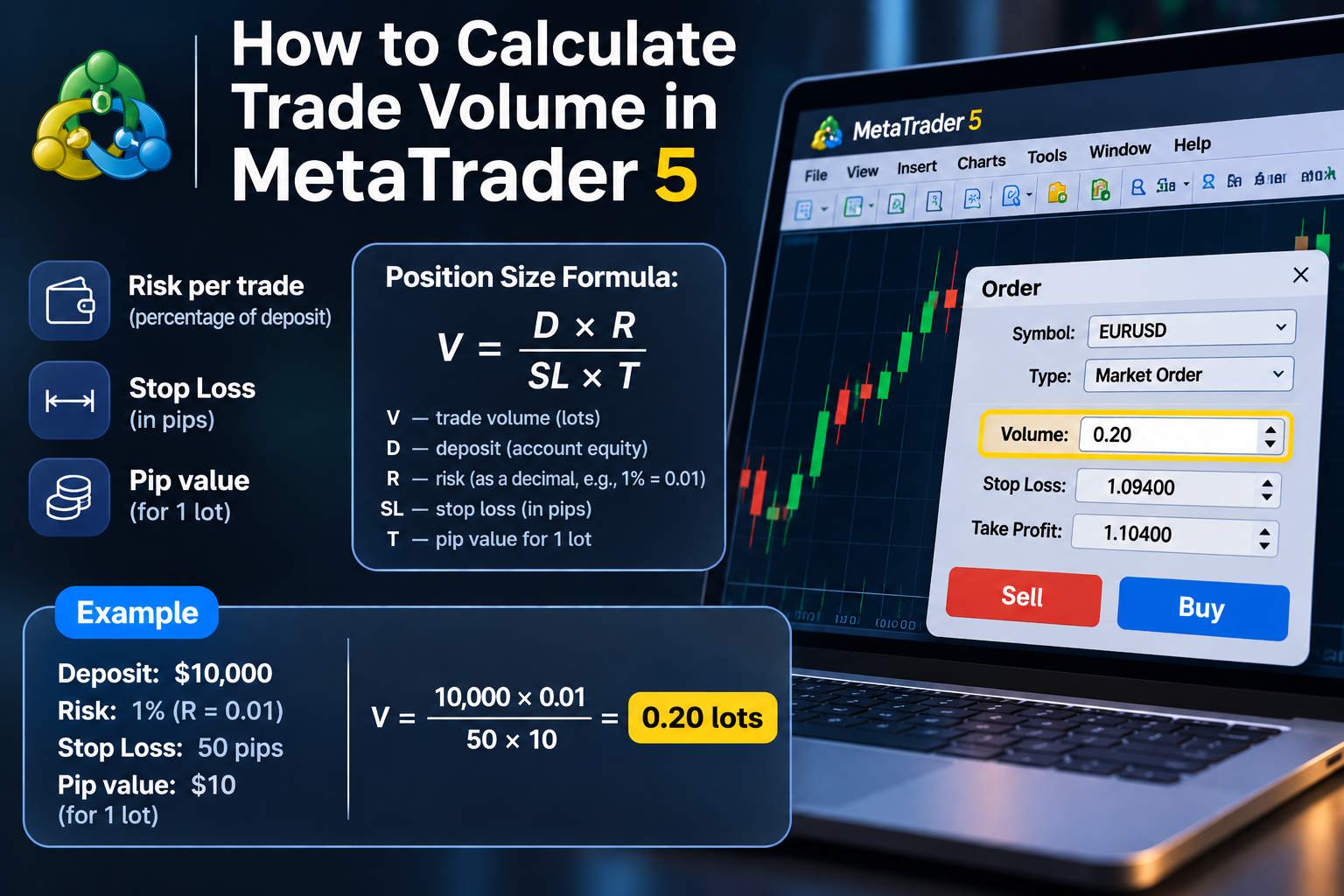
Volume = Monetary Risk / (Stop Loss Distance in Pips × Pip Value per Lot).
Let's use EURUSD as an example.
Assume the following conditions:
- Account equity: $1,000.
- Planned risk: 1%.
- Risk budget: $10.
- BUY entry price: 1.08500.
- Stop Loss: 1.08300.
- Stop Loss distance: 20 conventional pips.
- Approximate pip value for 1.00 lot: $10.
First, calculate the loss for one standard lot if the price moves 20 pips against the position:
20 × $10 = $200.
The planned risk budget is only $10.
Therefore:
$10 / $200 = 0.05 lots.
For these conditions, the theoretical position size is 0.05 lots.
Let's compare several possible trade volumes.
| Volume | Loss at a 20-pip Stop Loss | Percentage of $1,000 equity |
|---|---|---|
| 0.01 | $2 | 0.2% |
| 0.05 | $10 | 1% |
| 0.10 | $20 | 2% |
| 0.50 | $100 | 10% |
The table illustrates how the monetary risk changes with position volume.
It assumes that the Stop Loss is executed at the specified price and excludes additional trading expenses.
Notice that increasing the volume from 0.05 to 0.10 lots doubles the planned loss.
Position sizing should therefore be an intentional part of the trading system rather than an arbitrary decision.
5. Why Fixed Lots Can Create Inconsistent Risk
Now imagine a trader who uses 0.10 lots for every EURUSD position.
The account size remains $1,000.
However, the Stop Loss distance changes depending on the market setup.
Trade one uses a 15-pip Stop Loss.
Trade two uses 50 pips.
Trade three uses 100 pips.
With an approximate pip value of $1 for 0.10 lots of EURUSD, the planned price-based losses are:
| Stop Loss distance | Volume | Planned loss |
|---|---|---|
| 15 pips | 0.10 | $15 |
| 50 pips | 0.10 | $50 |
| 100 pips | 0.10 | $100 |
As a percentage of the $1,000 account, these values represent approximately 1.5%, 5%, and 10%.
The trading volume is identical.
The financial risk is not.
Fixed-lot trading is not inherently a programming error. Some strategies deliberately use fixed exposure.
But the trader or developer must understand how much money can be lost under different market conditions.
6. Points and Pips Are Not Always the Same
One common source of position sizing errors is confusion between conventional forex pips and the technical Point property used by MetaTrader.
Consider a typical five-digit EURUSD quote.
- One Point is usually 0.00001.
- One conventional pip is 0.00010.
- One pip equals ten Points in this example.
Therefore, the difference between 1.08500 and 1.08300 is 20 pips or 200 Points.
Confusing these quantities can produce an error of ten times in a manually calculated lot size.
For gold, indices, futures, and other instruments, the terminology can become even more confusing.
In MQL5, developers can access several symbol properties:
- SYMBOL_POINT — the technical Point value.
- SYMBOL_TRADE_TICK_SIZE — the minimum price increment.
- SYMBOL_TRADE_TICK_VALUE — the calculated monetary value of a tick.
- SYMBOL_TRADE_CONTRACT_SIZE — the contract size.
These properties should not be assumed to have identical relationships across every financial instrument.
For general-purpose Expert Advisors, I prefer calculating the expected financial result directly through the platform's trading functions.
7. Calculating Position Size for Gold: XAUUSD
Let's examine an instrument that demonstrates why universal assumptions about pip value can be dangerous.
Suppose our broker defines one XAUUSD lot as 100 troy ounces of gold.
We plan a hypothetical BUY at $2,500 per ounce with a Stop Loss at $2,490.
The distance to the Stop Loss is $10 per ounce.
For one full lot, the price-based loss would be:
100 ounces × $10 = $1,000.
For a volume of 0.01 lots:
$1,000 × 0.01 = $10.
If the account equity is $1,000, that represents approximately 1%.
Now consider another setup where the Stop Loss is $25 per ounce away.
At 0.01 lots, the calculated loss becomes:
100 × $25 × 0.01 = $25.
That is 2.5% of the same $1,000 account.
Suppose we still want to limit the planned price-based loss to $10.
The theoretical position size would be:
$10 / (100 × $25) = 0.004 lots.
But what happens if the broker's minimum permitted volume is 0.01 lots?
The theoretical calculation produces a volume that cannot be traded.
Opening the minimum 0.01 lot would exceed the original risk budget.
In that case, the correct risk-controlled response may be to skip the trade.
It would be a mistake to force the volume upward simply because the platform allows a larger minimum size.
Again, this example assumes a contract size of 100 ounces per lot. Always verify the actual specifications of your broker's XAUUSD symbol.
8. Minimum Lot, Maximum Lot, and Volume Step
MetaTrader 5 provides specific properties that describe the allowed trading volumes for each financial instrument.
The most important are:
- SYMBOL_VOLUME_MIN — minimum deal volume.
- SYMBOL_VOLUME_MAX — maximum volume for one deal.
- SYMBOL_VOLUME_STEP — minimum volume increment.
- SYMBOL_VOLUME_LIMIT — maximum combined exposure in one direction when such a limit is set.
Suppose the calculated volume is 0.057 lots.
The broker allows a minimum of 0.01 lots with a step of 0.01.
To avoid exceeding the planned risk, we can round down to 0.05 lots.
Rounding up to 0.06 lots would increase the planned exposure.
Now suppose the calculation produces 0.006 lots.
If 0.01 is the minimum permitted volume, a risk-controlled system should not automatically use that minimum.
Instead, it should recognize that no acceptable trading volume is available for the current setup.
This is particularly relevant for small accounts and instruments with relatively high monetary price sensitivity.
9. Margin Is Not the Same as Trading Risk
Another mistake is confusing margin with the amount of money that can be lost on a trade.
Margin is the collateral required by the broker to support a position.
Risk calculated from the entry and Stop Loss prices is the expected monetary loss if the protective level is reached and executed at the assumed price.
These are different calculations.
For example, an account using high leverage may require relatively little margin to open a position.
However, the monetary result of a market movement is still determined by the instrument, contract specification, position size, and price change.
High leverage can make large positions accessible with relatively small collateral.
It does not make those positions inherently safe.
In MQL5, OrderCalcMargin() can estimate the margin required for a proposed trade.
But the function has an important limitation: its calculation does not take existing open positions and pending orders into account.
For a full evaluation of a trade request against the actual account state, the developer should also consider OrderCheck() and the response from the trading server.
10. Should You Calculate Risk From Balance or Equity?
Let's examine another practical detail.
Suppose your account balance is $1,000.
However, existing positions currently have a combined floating loss of $200.
Assuming no other adjustments, equity is approximately $800.
One percent of the balance is $10.
One percent of equity is $8.
Both calculations are mathematically correct, but they use different capital references.
For dynamic position sizing, I often prefer using account equity because it reflects the current financial condition of the account more directly.
However, the exact choice should be defined by the trading system's risk management rules.
The important point is consistency.
A strategy should not switch between different risk calculations depending on whether the trader likes the current market opportunity.
Another issue is total portfolio exposure.
If several positions are already open, calculating the risk of a new trade in isolation may underestimate the account's combined vulnerability.
Correlated positions can lose money simultaneously.
Therefore, position sizing should be considered together with portfolio-level risk limits.
11. How to Calculate Trading Volume Automatically in MQL5
Now let's move to programming.
MetaTrader 5 provides a useful function called OrderCalcProfit().
It calculates an estimated financial result for a given order direction, symbol, volume, opening price, and closing price.
The result is returned in the account currency.
This makes the function useful for instruments with different contract sizes and profit calculation methods.
Instead of manually hardcoding pip values for every symbol, we can estimate the potential loss at the Stop Loss price and calculate the corresponding volume.
The following educational function uses a fixed percentage of account equity.
// Risk-based position sizing for MetaTrader 5 double CalculateRiskVolume( const string symbol, const ENUM_ORDER_TYPE type, const double entry, const double stop, const double risk_percent) { if(type != ORDER_TYPE_BUY && type != ORDER_TYPE_SELL) return 0.0; if(entry <= 0.0 || stop <= 0.0 || risk_percent <= 0.0) return 0.0; if(type == ORDER_TYPE_BUY && stop >= entry) return 0.0; if(type == ORDER_TYPE_SELL && stop <= entry) return 0.0; double min_volume = SymbolInfoDouble(symbol, SYMBOL_VOLUME_MIN); double max_volume = SymbolInfoDouble(symbol, SYMBOL_VOLUME_MAX); double step = SymbolInfoDouble(symbol, SYMBOL_VOLUME_STEP); if(min_volume <= 0.0 || max_volume < min_volume || step <= 0.0) return 0.0; double risk_money = AccountInfoDouble(ACCOUNT_EQUITY) * risk_percent / 100.0; if(risk_money <= 0.0) return 0.0; double result = 0.0; if(!OrderCalcProfit(type, symbol, min_volume, entry, stop, result)) { Print("OrderCalcProfit error: ", GetLastError()); return 0.0; } if(result >= 0.0) return 0.0; double loss_at_min = -result; if(loss_at_min > risk_money) return 0.0; double raw_volume = risk_money * min_volume / loss_at_min; double volume = MathMin(raw_volume, max_volume); volume = min_volume + MathFloor((volume - min_volume) / step + 1e-10) * step; volume = NormalizeDouble(volume, 8); double check_profit = 0.0; if(!OrderCalcProfit(type, symbol, volume, entry, stop, check_profit)) return 0.0; if(check_profit >= 0.0 || -check_profit > risk_money + 1e-6) return 0.0; return volume; }
How the function works
First, it verifies the order direction and checks whether the Stop Loss is on the appropriate side of the entry price.
Next, it reads the minimum volume, maximum volume, and permitted volume step from the symbol specification.
It calculates the planned monetary risk using account equity.
Then OrderCalcProfit() estimates the loss at the Stop Loss for the minimum permitted volume.
Using this reference, the function determines the theoretical position size.
It rounds the result down to the permitted volume increment and checks the estimated loss again.
If the minimum allowed volume would exceed the risk budget, the function returns zero.
That result means the current setup does not have an acceptable trade volume under the selected risk rule.
One important limitation: the function estimates price-based loss. It does not automatically include commissions, swaps, execution slippage, or other possible costs.
A production risk management system should explicitly account for these expenses, leaving an appropriate safety allowance.
12. Example: Using the Calculated Volume
Let's look at a simple example of calculating a BUY position using the current Ask price.
We will place the hypothetical Stop Loss 200 technical Points below the entry.
MqlTick tick; if(SymbolInfoTick(_Symbol, tick)) { double entry = tick.ask; double stop = entry - 200 * _Point; double volume = CalculateRiskVolume( _Symbol, ORDER_TYPE_BUY, entry, stop, 1.0 ); Print("Calculated volume: ", volume); }
The final argument, 1.0, represents a 1% risk budget based on current equity.
The 200-Point Stop Loss distance is included only to demonstrate the function call.
In an actual trading strategy, Stop Loss placement should be determined by the strategy's market logic.
Before submitting a trade, the Expert Advisor must also validate the protective level against broker restrictions, check margin availability, and confirm that the current market price has not materially changed the calculation.
It should also account for existing positions, pending orders, and the directional volume limit if applicable.
Finally, a submitted request must be checked using the actual trade-server response.
13. Why OrderCalcProfit Is Better Than Hardcoding Pip Values
For EURUSD on a USD account, a simple pip-based formula is often convenient.
However, consider a trading account denominated in euros while the strategy trades USDJPY.
The monetary result must be converted into the account currency.
For gold, indices, futures, and other instruments, contract sizes and profit calculation methods may also be different.
A hardcoded assumption such as "one pip always equals ten dollars per standard lot" is not universally correct.
OrderCalcProfit() provides a more flexible way to estimate the financial result using the platform's symbol-specific calculation logic.
This does not remove the need to check broker specifications and validate returned values.
But it helps developers avoid many common mistakes caused by manually implemented contract formulas.
14. Checking the Required Margin
After calculating a suitable position size, we should evaluate whether the account has enough margin for the proposed trade.
In MQL5, we can use OrderCalcMargin() for a preliminary estimate.
double margin = 0.0; if(OrderCalcMargin( ORDER_TYPE_BUY, _Symbol, volume, entry, margin)) { Print("Estimated margin: ", margin); }
The function calculates an estimated margin requirement for the specified order under current market conditions.
However, it does not incorporate the effects of already open positions and pending orders.
For this reason, OrderCheck() and the actual trade-server response remain important when evaluating whether a particular operation can be executed.
Remember that margin and Stop Loss risk are not interchangeable.
A trade can require relatively little collateral while still exposing the account to substantial price risk.
15. Seven Common Position Sizing Mistakes
Mistake one: choosing lot size only from the deposit. The same volume may produce very different losses depending on Stop Loss distance.
Mistake two: ignoring the Stop Loss. Without a defined protective exit, the usual fixed-percentage position sizing formula cannot determine a clear planned price-based loss.
Mistake three: confusing pips and Points. This can produce substantial calculation errors, especially with five-digit forex quotes.
Mistake four: assuming every symbol has the same pip value. Forex pairs, metals, indices, and futures can have different contract specifications.
Mistake five: rounding the volume upward. If a calculated volume is smaller than the permitted minimum, automatically increasing it may violate the risk limit.
Mistake six: confusing margin with risk. Required margin is collateral, not a guaranteed maximum trading loss.
Mistake seven: forgetting combined exposure. Several positions can create a much larger portfolio risk than any individual position suggests.
16. Building Position Sizing Into Your Trading Plan
I recommend treating position sizing as a standard part of every trading decision.
Start with the trading idea.
Identify the price level at which the setup would no longer be valid.
Then calculate the distance between the proposed entry and Stop Loss.
Choose a monetary risk budget that is consistent with the overall trading plan.
Use the instrument's specifications to determine the acceptable volume.
Check whether the broker permits that volume.
Verify margin availability and account-level exposure.
Only after these steps should a trading request be considered.
If the minimum permitted volume is too large for the risk budget, do not automatically move the Stop Loss closer just to make the mathematics work.
The protective level should follow the trading logic rather than the desire to open a larger position.
When building Expert Advisors that can manage several trades simultaneously, consider the planned combined exposure of the entire strategy, not merely the first position.
Practical Recommendations
Calculating trade volume correctly is one of the most important skills a beginner can develop in MetaTrader 5.
The main principle is simple: define the risk first, determine the appropriate Stop Loss, and calculate the volume afterward.
For standard EURUSD trading on a USD account, a simple pip-based formula can be useful for learning the fundamentals.
However, for universal automated trading systems, I recommend using OrderCalcProfit() to estimate the financial result in the account currency.
Always check the minimum and maximum volume, permitted lot step, margin requirements, and broker trading restrictions.
Remember that a planned Stop Loss risk is not a guaranteed maximum loss. Slippage, gaps, commissions, and other expenses can make the actual result worse.
Most importantly, if the smallest permitted position exceeds your risk budget, skipping the trade may be the correct decision.
If you want to study MQL4, MQL5, and the development of automated trading systems in greater depth, you can explore my programming education project MQL Master.
Now I would like to hear your opinion.
How do you calculate your trade volume?
Do you use fixed lots, a percentage of account equity, Stop Loss-based position sizing, or your own risk management formula?
And should every Expert Advisor include automatic position sizing?
Share your experience in the comments. Practical examples can be especially useful for beginners who are learning to manage trading risk.
This article is provided for educational purposes only and does not constitute personalized investment advice. Trading financial instruments involves a risk of losing capital.
Tags: MetaTrader 5, MT5, MQL5, Lot Size, Position Sizing, Trading Volume, Risk Management, Stop Loss, EURUSD, XAUUSD, Expert Advisors, Trading Automation