

[ English ] [ Русский ] [ 中文 ] [ Español ] [ Português ] [ 日本語 ] [ Deutsch ] [ 한국어 ] [ Français ] [ Italiano ] [ Türkçe ]
Local Copier copies trades between MetaTrader 4 and MetaTrader 5 terminals that run on the same Windows computer or VPS. It works in any direction: from MetaTrader 4 to MetaTrader 4, from MetaTrader 5 to MetaTrader 5, and between the two platforms. This manual explains how it works and describes every setting. The Installation Guide explains how to install it from the Market.
Product pages: Local Copier MT4 and Local Copier MT5. To copy between the two platforms you need both versions, one in each terminal.
Table of contents
- 1. How Local Copier works
- 2. Requirements and limitations
- 3. Installation and first start
- 4. The panel
- 5. What is copied
- 6. Lot size
- 7. Limits
- 8. Stop loss and take profit
- 9. Trade management
- 10. Own partial closes
- 11. Basket
- 12. Account protection
- 13. Symbols
- 14. Copy comment and identification tag
- 15. Notifications and reports
- 16. Netting accounts (MetaTrader 5)
- 17. Data files, restarts and safety
- 18. Input parameters
- 19. Differences in the MT4 version
- 20. Questions and troubleshooting
1. How Local Copier works
Local Copier is one Expert Advisor with three modes. You choose the mode with the input Mode:
- Transmitter publishes the open trades and pending orders of its account. It does not trade, except when you enable the option that closes the original when a copy is closed (section 9.7).
- Receiver reads one or more Transmitters and opens, changes and closes the copies on its own account.
- Self Copier copies or multiplies the trades of its own account, for example your manual trades or the trades of another Expert Advisor.
The Transmitter writes a small file with its trades in the common data folder of the computer, Common\Files\LocalCopier. In MetaTrader 5 it writes the file as soon as something changes; in MetaTrader 4 it does so on the next tick or within 100 milliseconds. It also refreshes the file every 250 milliseconds, so the Receiver knows that it is still running. The Receiver reads the file every 100 milliseconds, compares the trades with its copies and acts. The total time of a copy also depends on how fast your broker executes the order.
Because the terminals share that folder, all of them must run on the same computer. No internet connection between the terminals, no DLL and no external program are needed.
Each copy carries the magic number of its Receiver. The Receiver remembers which copy belongs to which original in its links file (chapter 17). A Transmitter can serve any number of Receivers, and a Receiver can copy several Transmitters at the same time. An account can also be a Transmitter and a Receiver at the same time, on two charts: the Transmitter publishes all the trades of the account, copies included, so chains such as A to B to C work, and copy loops are detected (section 17.4).
Words used in this manual. The original is a trade or pending order of the Transmitter. The copy is the trade or order that the Receiver opens for it. A copy can be split into several orders, called parts (section 6.3).
2. Requirements and limitations
- All terminals must run on the same Windows computer or Windows VPS, under the same Windows user, because the common data folder belongs to that user. Local Copier does not copy between different computers, it does not work on the built-in MQL5 VPS, and it does not work on cloud services where the terminals cannot share files.
- To copy between two accounts of the same broker, install the terminal twice, in two different folders (see the Installation Guide). MetaTrader 4 and MetaTrader 5 terminals can run side by side.
- Install Local Copier from the Market in each terminal. Activations are counted per computer, not per terminal.
- The Transmitter can work with the investor (read-only) password, unless you enable Close original when a Receiver copy is closed. The Receiver and the Self Copier need the trading password and Algo Trading enabled.
- The Self Copier needs a hedging account. The Receiver works on hedging accounts and, in beta, on MetaTrader 5 netting accounts (chapter 16).
- Accounts subscribed to an MQL5 Signal do not allow Expert Advisors to trade. Accounts with the US FIFO rule (first in, first out) are not supported.
- Prop firms have different rules about copy trading. Check the rules of your firm before you use any copier.
- The Receiver manages the copies only while its terminal is running: virtual levels, break even, trailing stop, baskets and account protection need the terminal and the Expert Advisor to be on. For 24/7 copying use a Windows VPS.
- Copying needs two running terminals, so it cannot be tested in the Strategy Tester. In the tester Local Copier only opens and closes the minimum lot from time to time, because the automatic validation of the Market requires it, and it explains this on the chart. It never does this on a live chart.
3. Installation and first start
The Installation Guide explains step by step how to install Local Copier from the Market and allow Algo Trading. Once it is installed, attach it to a chart in each terminal and choose the mode. The symbol and timeframe of the chart do not matter: the chart only shows the panel and, with virtual levels, the levels of the copies of its symbol. Use a chart that you keep open.
3.1 Transmitter
On the account whose trades you want to copy, attach Local Copier to any chart, set Mode to Transmitter and press OK. The panel shows Publishing N trades/orders. There can be only one Transmitter per account.
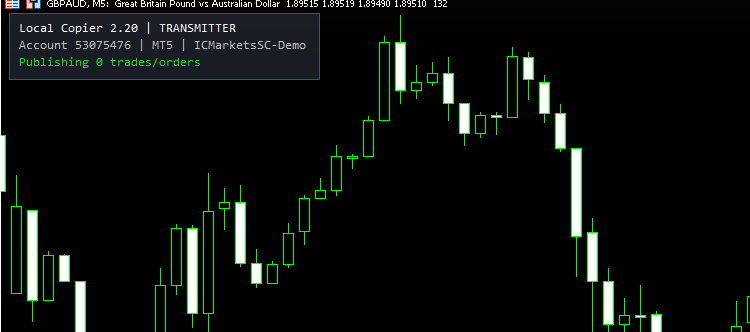
Transmitter panel (MetaTrader 5)
3.2 Receiver
On each account that should copy, attach Local Copier to any chart and set:
- Mode = Receiver.
- Transmitter account(s) = the account number of the Transmitter. For several Transmitters, separate the numbers with commas, for example 12345678,87654321.
- The lot size mode and its value (chapter 6).
- If the symbols have different names on the two brokers, the symbol settings (chapter 13).
Enable Algo Trading. The panel shows one line per Transmitter, which must say online. From that moment, every new trade of the Transmitter is copied. Trades that were already open the first time the Receiver connected to that Transmitter are not copied, unless you set Copy trades already open at start or opened during a pause to true. Trades opened while the Receiver was stopped are copied when it starts again (chapter 20).
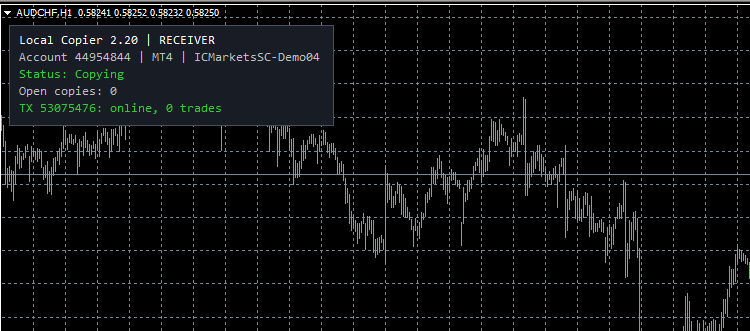
Receiver panel (MetaTrader 4), copying from the MetaTrader 5 account of the previous picture
Try it on demo accounts first. Open and close a small trade on the Transmitter and check the copy, its lot, its stop loss and take profit, and the messages in the Experts tab of the Receiver terminal.
3.3 Self Copier
On the account whose trades you want to copy or multiply, attach Local Copier to a chart and set Mode to Self Copier. It copies the manual trades and the trades of other Expert Advisors of the same account, with the lot settings you choose; for example, Multiplier of transmitter lot with a multiplier of 2 doubles every trade. It never copies trades made by Local Copier, from any instance on the account. When the original closes, the Self Copier closes its copy.
3.4 Several instances
- One Transmitter per account.
- One Receiver or Self Copier per account and magic number. If you attach a second one with the same magic number, it does not start and the panel says why.
- Two Receivers with different magic numbers can work on the same hedging account, but they must not copy the same trades. If both read the same Transmitter, use the filters (chapter 5) so that each trade is copied by only one of them, for example one Receiver for some symbols and the other for the rest. Local Copier warns you in the Experts tab when it finds another Receiver on the account.
- On a netting account only one Receiver can run.
4. The panel
The panel in the corner of the chart shows the state of the Expert Advisor. You can hide it with Show panel on chart.
| Line | Meaning |
|---|---|
| Local Copier 2.20 | RECEIVER | Version and mode. |
| Account 12345678 | MT5 | server | Account, platform and trade server of this terminal. |
| Publishing N trades/orders | Transmitter: it is running and publishes N trades and pending orders. |
| Closes originals when a copy is closed | Transmitter: the option of section 9.7 is on. |
| Status: Copying | Receiver: everything is working. On a netting account: Copying (netting beta). |
| Status: Paused: reason | Account protection closed the copies and stopped the copying (chapter 12). |
| Status: New copies paused (Receiver drawdown) | No new copies are opened while the drawdown of the account is above your limit; originals opened meanwhile are treated as opened during a pause (section 12.3). |
| Status: Closing basket | The basket was triggered and the copies are being closed (chapter 11). |
| Open copies: N | basket X | virtual SL/TP | Number of open copy orders (parts, pending orders and free copies included), result of the basket when a basket is active, and a reminder that virtual levels are on. |
| TX 12345678: online, N trades | A Transmitter that is read correctly and the number of its trades. |
| TX 12345678: OFFLINE (N s) | The Transmitter has not updated its file for N seconds (terminal closed or Expert Advisor removed). |
| TX 12345678: not connected to broker | The Transmitter terminal has lost its connection. |
| TX 12345678: starting or stopped | The Transmitter is starting, or its Expert Advisor has just been removed (after 10 seconds the line says OFFLINE). |
| TX 12345678: waiting for Transmitter... | No file from that account yet: the Transmitter is not running on this computer, or the account number is wrong. |
| TX 12345678: other Local Copier version (...) | The Transmitter uses another data format. Update all terminals to the same version. |
When the Expert Advisor cannot start, a red line explains why, for example Another Receiver/Self Copier already uses this magic. When it has started but cannot copy, the Status line explains why, for example Status: Algo Trading is disabled in the terminal. A yellow line shows a warning about your settings. Long messages continue on the next line. If an input has a value that is not valid, MetaTrader shows an alert with the reason and the Expert Advisor is not loaded. Chapter 20 explains the most common messages.
The Experts tab is the log. Every copy, close and reason why a trade was not copied is written in the Experts tab of the terminal (Toolbox in MetaTrader 5, Terminal in MetaTrader 4). Check it first when something does not behave as you expect.
5. What is copied
5.1 Trades and pending orders
- Market trades are copied with their stop loss and take profit. Later changes of the stop loss and take profit are followed.
- Pending orders are copied with their price and expiration, and changes of the order price are followed. If you set Copy pending orders to false, pending orders are not copied and the trade is copied when the order is triggered, also for pending orders that already exist when the Receiver starts. When a pending original is triggered while its copy is still pending, the copy is replaced by a market copy.
- Partial closes of the original reduce the copy in the same proportion (Copy partial closures).
- Volume increases of netting positions (a MetaTrader 5 netting Transmitter that adds to a position) increase the copy (Copy volume increases of netting positions). If the original was partly closed before, only the volume above its size before that partial close is added.
- When the original is closed or deleted, the copy is closed or deleted (section 9.1).
Trades that were already open the first time the Receiver connected to the Transmitter, or that are opened during a pause, are copied only if Copy trades already open at start or opened during a pause is true. Trades opened while the Receiver was stopped are copied when it starts again, unless they are older than Do not copy market trades older than N seconds. A pause is any time in which new copies are not allowed: outside the copy hours, during account protection and while a drawdown pause is active. With Copy new trades set to false, only trades already open are copied.
5.2 Filters
Filters decide which originals are copied. An original excluded by a filter is not copied later, even if you change the filter while it is open.
- Copy buy trades/orders, Copy sell trades/orders, Copy market trades and Copy pending orders select the direction and the order type.
- Only these magic numbers and Exclude these magic numbers take a list separated by commas. Each item can be a number (0 means manual trades), a range such as 100-200, or a number in brackets, such as (14), which matches every magic number that contains 14.
- Only these Receiver symbols and Exclude these Receiver symbols use the names of the symbols on the Receiver account, after the symbol settings of chapter 13. Upper and lower case do not matter.
- Only these comments and Exclude these comments compare the comment of the original. A text matches the whole comment; a text in brackets, such as (scalp), matches any comment that contains it. Upper and lower case do not matter.
- Ignore Transmitter trades with lot below and above skip originals by their lot.
5.3 Copy hours
Each day of the week has its own time windows, in the server time of the Receiver, for example 00:00-14:30,16:30-23:59:59. Each day only uses its own windows: on Monday, 22:00-02:00 means from 00:00 to 02:00 and from 22:00 to the end of Monday, and after midnight the windows of Tuesday apply. Leave a day empty to make no new copies on that day. Market trades opened outside the copy hours are treated as opened during a pause (section 5.1). The copy hours only affect new copies: changes and closes of existing copies continue at any time.
5.4 Execution conditions
Before opening a copy, the Receiver checks the following conditions. While a condition is not met, the copy waits and the reason is written in the Experts tab.
- Max spread in points: a market copy waits while the spread is higher. You can set one value for all symbols and other values for some symbols, for example 20,XAUUSD40 (20 points for all symbols, 40 for XAUUSD). 0 = no limit. The same format is used by other inputs that say "per symbol" or show a similar example.
- Max slippage in points: maximum slippage accepted by the order.
- Max price difference vs Transmitter, points: a market copy waits while the price on the Receiver is further than this from the open price of the original. It accepts values per symbol. 0 = off.
- Do not copy market trades older than N seconds: an original older than this, plus its copy delay, is not copied. It is checked at every attempt, so a copy that waits for another condition can still expire. 0 = off.
- Copy delay in seconds: waits before copying. With two numbers, such as 5,20, each original gets a random delay between them, the same on all Receivers.
- Copy only at a better price than the original and Better price points: a market copy waits until the price is this number of points better than the open price of the original. With a negative value, it waits until the original is that number of points in profit. The points accept values per symbol.
- Seconds between retries after a failed copy and Max attempts per trade: how long to wait after a rejected order (at least 5 seconds) and how many attempts are made. Errors that cannot be solved by trying again, such as a volume or an order type that the account does not accept, or the order limit of the broker, stop after 2 attempts. Temporary rejections (requote, price changed, no prices, too many requests) are repeated with growing pauses and do not use attempts. "Not enough money" waits 30 seconds and longer each time, up to 10 minutes. With the market closed, the copy waits for the session.
A copy is not opened when its stop loss or take profit is already crossed on the Receiver; it waits.
6. Lot size
6.1 Lot size modes
Choose the mode in Lot size mode. Each mode uses its own setting, so you can switch modes without changing other values.
| Mode | Lot of the copy | Setting used |
|---|---|---|
| Same lot as transmitter | Lot of the original, plus or minus a fixed amount | Add/subtract to same lot |
| Fixed lot | Always the same lot | Fixed lot, Per-symbol fixed lot |
| Multiplier of transmitter lot | Lot of the original x multiplier | Multiplier |
| Multiplier = balance / value | Lot of the original x your balance / value | Value for 'Multiplier = balance / value' |
| Multiplier = equity / value | Lot of the original x your equity / value | Value for 'Multiplier = equity / value' |
| Proportional by balance | Lot of the original x Receiver balance / Transmitter balance | None |
| Proportional by equity | The same with the equity | None |
| Proportional by free margin | The same with the free margin | None |
| Proportional by balance x multiplier | Proportional by balance, x multiplier | Multiplier for 'Proportional by balance x multiplier' |
| Proportional by equity x multiplier | Proportional by equity, x multiplier | Multiplier for 'Proportional by equity x multiplier' |
| Risk % of balance (needs SL) | The lot that loses this percent of the balance at the stop loss | Risk % of balance per trade |
| Risk % of equity (needs SL) | The same with the equity | Risk % of equity per trade |
| Risk % of free margin (needs SL) | The same with the free margin | Risk % of free margin per trade |
| Risk in money (needs SL) | The lot that loses this amount at the stop loss | Risk in money per trade |
| Lot per 1000 of balance | Value x balance / 1000 | Lot per 1000 of balance |
| Lot per 1000 of equity | Value x equity / 1000 | Lot per 1000 of equity |
| Lot sequence (e.g. 0.01,0.02,0.04) | The next value of a list for each new original | Lot sequence |
The proportional modes convert the balance of the Transmitter to the currency of the Receiver. If the conversion pair is not available, the copy waits; add the pair to Market Watch if the Experts tab asks for it. Cent accounts (USC, EUC and similar) are recognized.
Risk modes. They need a stop loss: a copy that would have no stop loss waits until it has one. The risk is measured with the stop loss of the copy, which is the stop loss of the original or your own (chapter 8). If the minimum lot of the broker would risk more than 1.5 times your setting, the trade is not copied. When the copy takes its stop loss from the original (Copy Stop Loss = true) and the original removes it, a copy opened with a risk mode is closed, because its lot depended on that stop loss.
Lot sequence. Each new original takes the next value of the list, for example 0.01,0.02,0.04. After the last value, the last value is used again; end the list with 0, such as 0.01,0.02,0.04,0, to stop copying after the last value. The sequence starts again when nothing is open on the Transmitters and on the Receiver. Reopenings and replacements of a copy use the same lot as before.
6.2 Per-symbol settings and contract size
- Per-symbol fixed lot sets fixed lots for some symbols in the Fixed lot mode, for example EURUSD0.15,XAUUSD0.05.
- Per-symbol multiplier multiplies the lot of some symbols in all modes except Fixed lot and Lot sequence, for example XAUUSD0.5,US30.r2.
- Adjust lot by contract size difference between brokers: in the modes based on the lot of the original, the lot is adjusted when the two brokers use a different contract size, price or currency for the same instrument (for example an index of 1 unit per lot on one broker and 10 on the other), so the copy has the same value as the original.
6.3 Rounding, limits and splitting
- Lot step: the calculated lot is rounded down to a multiple of this step. For example, with a step of 0.05, a calculated lot of 0.37 becomes 0.35. Use a multiple of the step of your broker; 0 uses the step of the broker.
- Minimum Receiver lot and Maximum Receiver lot raise or cut the calculated lot to these values.
- Do not copy if calculated lot is below and above skip the trade instead.
- Round up to broker minimum when calculated lot is smaller: when the lot is below the minimum of the broker, it opens the smallest valid lot, the minimum of the broker rounded up to your lot step (true), or skips the trade (false).
- Split automatically above broker max volume: a copy larger than the maximum volume per order of the broker is opened as several orders. With false, it is opened with the maximum volume of the broker only.
- Split each copy in N parts or Split each copy in parts of this lot: every copy is opened as several orders. The parts are opened right after the first one, and a partial close of the original is shared among them. If each part would be smaller than the minimum lot, the copy is not split. A copy that would need more than 100 orders is not copied.
7. Limits
Limits stop new copies when a maximum is reached. In most cases the copy waits and is opened when the limit allows it, unless Do not copy market trades older than N seconds expires first.
- Max simultaneous copied trades: maximum number of originals with an open copy. All the parts of a copy count as one, and free copies (section 9.1) count too.
- Max copied trades per symbol and Max copied volume per symbol: maximum number of copies and total lot per symbol, with one value for all symbols and other values per symbol, for example 3,XAUUSD1. In the number, each original counts once with all its parts. Free copies and trades with the magic number of the Receiver that are not linked to any original count in both limits.
- Max total copied volume (lots): maximum total lot of all copies.
- Min distance in points between copies of same symbol/direction: a new copy waits while the price is closer than this to the open price of another copy of the same symbol and direction.
- Max risk % per symbol, per currency and Max total risk %: the loss of all copies at their stop losses, in percent of the balance. These limits need a stop loss: while one of them is set, a new copy without stop loss waits. Open copies without a stop loss count as zero risk.
- Max different Transmitter magic numbers copied at once, Max different magic numbers on this account, Max different symbols copied at once and Max different symbols on this account: the account limits also count manual trades and other Expert Advisors. An original that would exceed these limits is not copied.
- Copy from the Nth trade of each symbol and Copy up to the Nth trade of each symbol: the trades of the Transmitter in each symbol are numbered 1, 2, 3 and so on, and only the trades in that range are copied. The trades are numbered per symbol of the Receiver, counting the trades of all Transmitters, also those excluded by other filters. The numbering starts again when no numbered trade of that symbol is open.
8. Stop loss and take profit
8.1 Copying the levels of the original
With Copy Stop Loss and Copy Take Profit set to true, the copy gets the same price levels as the original and follows their changes. You can change the levels with these inputs:
- SL distance multiplier and TP distance multiplier multiply the distance from the open price of the original to its level. The new distance is measured from the open price of the copy.
- Add/subtract points to SL distance and to TP distance add or remove points from that distance.
- Keep SL/TP distances from Receiver open price: the levels keep the same distance from the open price of the copy instead of the same price. This is useful when the prices of the two brokers differ.
- Wait for the original to have a SL before copying: an original without stop loss is not copied until it has one.
A stop loss that is too close to the price for the broker is placed at the closest distance allowed, and a take profit that is too close is left out; both are corrected as soon as the broker accepts the right level. With Reverse copying, the stop loss of the copy comes from the take profit of the original and the other way round.
8.2 Your own stop loss and take profit
With Copy Stop Loss or Copy Take Profit set to false, you can use your own levels: Own SL when Copy SL = false and Own TP when Copy TP = false. TP = SL distance x ratio sets the take profit as a multiple of the stop loss distance when Copy Take Profit is false and Own TP is 0.
The input Units of own SL/TP/BE/trailing sets the unit of all your own distances: points, pips (10 points on 3 and 5 digit symbols) or money. In money, the amount is for the whole copy of an original, including all its parts.
8.3 Virtual levels
With Virtual (hidden) SL/TP/BE/trailing set to true, the stop loss, take profit, break even and trailing stop are not sent to the broker. The Expert Advisor closes the copy at market when the price touches a level. If Show virtual levels on this chart is true, it draws the levels of the copies of the chart symbol.
Important. Virtual levels only protect the copy while the terminal and the Expert Advisor are running. If the computer or the terminal stops, the copy has no stop loss at the broker. Only when a copy becomes a free copy (section 9.1) are its virtual stop loss and take profit also set at the broker.
8.4 Break even and trailing stop
Break even and trailing stop are applied by the Receiver to its copies, so they need Copy Stop Loss = false (the Expert Advisor warns you on the panel if it is not). Their distances use the unit of section 8.2.
- Break even at this profit: when the copy reaches this profit, the stop loss moves to the open price, plus Lock this profit at break even.
- Trailing start, Trailing distance and Trailing step: from the start profit, the stop loss follows the price at the trailing distance and moves in steps (0 = one tenth of the distance, and at least the minimum stop distance of the broker).
8.5 Manual changes
If you change the stop loss or take profit of a copy by hand, the Receiver sets the levels of the original again. With Stop syncing SL/TP of a copy after a manual change set to true, the copy keeps your levels and the Receiver stops changing them.
9. Trade management
9.1 Closing with the original
Close copy when original closes decides what happens when the original is closed or deleted:
| Option | Effect |
|---|---|
| On | The copy is always closed or deleted. |
| On, only if same type (market/pending) | Only if the copy and the original are of the same type, both market or both pending. |
| On, market trades only | Only if both are market trades. |
| On, pending orders only | Only if both are pending orders. |
| Off (copy stays open) | The copy stays open. |
A copy that is not closed becomes a free copy: it keeps its stop loss and take profit, and the Receiver still applies break even, trailing stop, virtual levels, own partial closes, closing after N minutes, scheduled closes, the basket and account protection to it.
For safety, a copy is closed only after the original is missing from two valid readings in a row, and never with the data of a Transmitter that is offline.
9.2 Partial closes and volume increases
With Copy partial closures, a partial close of the original closes the same proportion of the copy. With Copy volume increases of netting positions, an increase of a netting position of the Transmitter increases the copy; after a partial close of the original, only the volume above its size before the partial close is added. When a copy is split into parts, a partial close is shared among the parts; some parts may be closed completely.
9.3 Reverse copying
Reverse copying opens a sell for a buy and a buy for a sell, with the stop loss and take profit swapped. Pending orders keep their price: a buy limit becomes a sell stop, a sell limit a buy stop, a buy stop a sell limit and a sell stop a buy limit. Each copy remembers the direction it was opened with: changing this input, or the lot size mode, with copies open only affects new copies.
9.4 Close delay and better price
- Closure delay in seconds waits before closing a market copy after its original closes. With two numbers, such as 5,20, the delay is random between them.
- Close copy only at a better price and Closure better price difference in points: after the original closes, the copy waits until its price improves by this number of points from the price it had at that moment. Close anyway after N seconds closes it after that time even without a better price (0 = wait without limit).
These two options only apply to market copies: pending copies are deleted at once.
9.5 Reopening copies
Reopen copies closed outside the EA reopens a copy that was closed by its stop loss or take profit at the broker, or by hand, while its original is still open:
- Instantly: at once.
- At original open price or better: when the price returns to the open price of the original or better.
- At a specific time: at Reopen time, in the server time of the Receiver.
Copies closed by the Expert Advisor itself (virtual levels, baskets, schedules, account protection) are not reopened, nor copies closed by a stop out, nor copies whose original the Transmitter is going to close (section 9.7). Max attempts per trade also limits how many times a copy can be reopened.
9.6 Scheduled closes
- Close all copied market trades on and Close all time: on that day (or every day) at that time, the copies opened before that time are closed.
- Delete all copied pending orders on and Delete pending time: the same for pending orders.
- Close each copied market trade after N minutes: each copy is closed when it has been open for this time.
If the Expert Advisor is not running at the scheduled time, the close is done when it starts later on the same day. If the market of a symbol is closed, the Receiver keeps trying for 10 minutes and then reports the market copies it could not close.
9.7 Closing the original from the Receiver
This option is set on the Transmitter: Close original when a Receiver copy is closed (SL/TP/manual). When a copy is closed by its stop loss or take profit at the broker, by a virtual level, or by hand, the Transmitter closes the original. It needs the trading password on the Transmitter. The request is not sent while other parts of the same copy are open, after a stop out, from a Self Copier or from a netting Receiver.