

Many traders run more than one MetaTrader 5 account: a personal account and a prop firm account, the same strategy on two brokers, or one EA whose trades should also go to a second account. Doing the same trade by hand on every account takes time, and sooner or later a stop loss is forgotten or a close is missed.
A local trade copier solves this. One terminal is the Master (where you trade), the other terminals are Slaves (they repeat the trades). Below is a simple setup and the points that matter most in daily use.
1. What you need
- Two or more MT5 terminals installed in different folders on the same Windows computer or VPS. You can install the same broker twice (choose a different folder during setup) or use terminals of different brokers.
- Algo Trading enabled in every terminal.
- A hedging account is recommended for the Slave, because a netting account merges positions of the same symbol.
Note: the built-in MetaTrader virtual hosting runs each terminal separately, so it cannot be used for local copying. Use your own PC or a normal Windows VPS.
2. Basic setup
- In the source terminal, attach the copier to any chart with Mode = Master.
- In the receiving terminal, attach it with Mode = Slave.
- Use the same Channel name on both (for example MSM1).
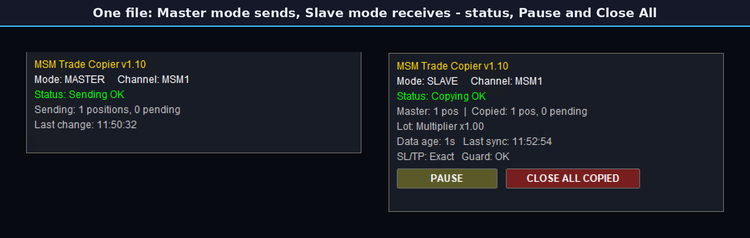
- The Slave panel should show "Copying OK". Now open a small trade on the Master on a demo account and check that it appears on the Slave.
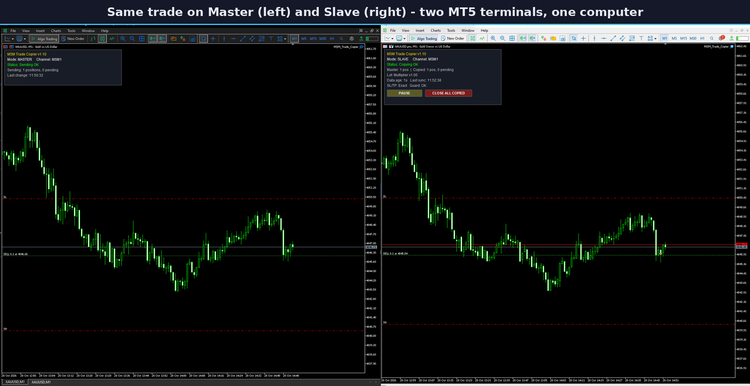
From now on, opens, Stop Loss and Take Profit changes, partial closes, pending orders and closes on the Master are repeated on the Slave.
3. Lot size on the Slave
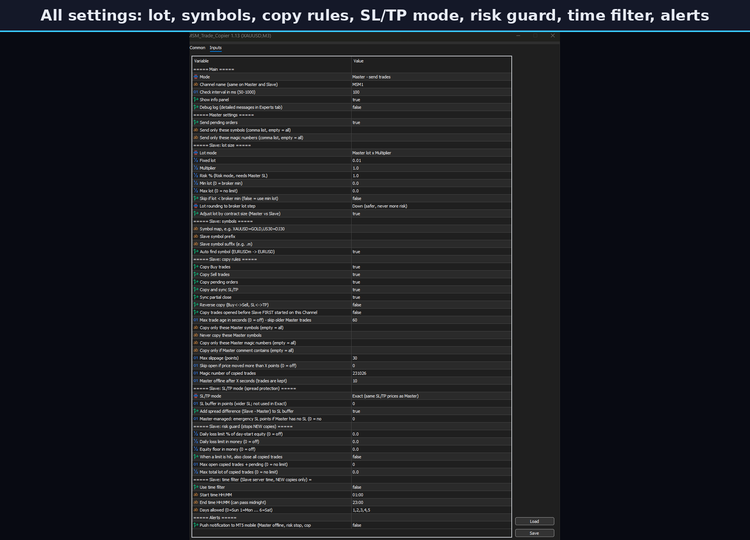
The Slave does not have to use the same lot as the Master. Common choices:
- Multiplier: Slave lot = Master lot x factor (for example 0.5 or 2).
- Balance or equity ratio: the lot follows the size difference between the two accounts.
- Fixed lot: every copy uses the same lot.
- Risk %: the lot is calculated from the Stop Loss distance.
Lot rounding (down, nearest or up) decides what happens with odd lots such as 0.004585 after the calculation. "Down" is the safest choice.
4. Different symbol names
Brokers often name symbols differently: XAUUSD and GOLD, EURUSD and EURUSDm. Use a symbol map (XAUUSD=GOLD) or the prefix/suffix settings. Simple suffix cases are also matched automatically.
5. The spread problem
This is the most common surprise. If the Slave broker has a wider spread, the copied trade can hit its Stop Loss before the Master trade does. There are a few ways to handle it:
- Exact: the same SL/TP prices as the Master.
- Buffer: the Slave Stop Loss is placed a few points further away.
- Same distance: SL/TP are placed at the same distance from the Slave's own entry price.
- Master-managed: the Slave closes together with the Master and keeps only a wider emergency Stop Loss.
On gold and other symbols with changing spreads, a buffer or the Master-managed mode avoids many early stop-outs.
6. Safety settings worth turning on
- Max trade age: a trade older than this (for example when the Slave was started later) is not copied at an old price.
- Copy old trades = off: trades that were already open before the Slave started are not copied.
- Risk guard: a daily loss limit or an equity floor stops new copies on the Slave.
- Time filter: new copies only within your trading hours.
- When the Master goes offline, copied trades are kept and not closed.
7. Daily checks
- Keep both terminals connected and Algo Trading on.
- Look at the Slave panel once: status, number of copied trades, data age.
- Use Pause if you want to stop new copies for a while, and Close All Copied if you need to close every copied trade at once.
Please test every copier on demo accounts first. Trading involves risk; a copier only repeats your own trades and settings and cannot guarantee profit.
If you have a question about a specific setup (two brokers, cent accounts, different lot sizes), write it in the comments.




