

[ English ] [ Русский ] [ 中文 ] [ Español ] [ Português ] [ 日本語 ] [ Deutsch ] [ 한국어 ] [ Français ] [ Italiano ] [ Türkçe ]
Table of contents
- 1. How Local Copier works
- 2. Requirements and limitations
- 3. Installation and first start
- 4. The panel
- 5. What is copied
- 6. Lot size
- 7. Limits
- 8. Stop loss and take profit
- 9. Trade management
- 10. Own partial closes
- 11. Basket
- 12. Account protection
- 13. Symbols
- 14. Copy comment and identification tag
- 15. Notifications and reports
- 16. Netting accounts (MetaTrader 5)
- 17. Data files, restarts and safety
- 18. Input parameters
- 19. Differences in the MT4 version
- 20. Questions and troubleshooting
10. Own partial closes
The Receiver can close parts of each copy at levels you choose, up to three on the way to the take profit and three on the way to the stop loss:
- Level 1: % of the way to TP and Level 1: close % of initial lot: when the price has covered this percent of the distance from the open price to the take profit, this percent of the initial lot is closed. Levels 2 and 3 work the same way.
- The levels toward the stop loss use the distance from the open price to the stop loss.
- The distances are measured to the take profit and stop loss of the copy, at the broker or virtual. A copy without them has no levels.
Each level is executed once per copy and always leaves at least the minimum lot. These closes are combined with the partial closes copied from the original: the copy is never larger than what the original requires.
11. Basket
The basket treats all copies of the Receiver as one group, free copies included. Its result is the floating result of the market copies, with swap and commission. You can set each function in three units: percent of the balance, money, or average points of the copies. A value of 0 disables each setting.
- Basket TP: everything is closed when the result reaches this profit.
- Basket SL: everything is closed when the result reaches this loss.
- Basket break even: once the result has reached this profit, everything is closed if the result falls back to zero.
- Basket trailing start, distance and step: once the result reaches the start, a level follows the best result at the trailing distance, moving in steps; everything is closed if the result falls to that level.
When the basket is triggered, the Receiver closes all copies, deletes the pending copies and keeps trying for up to 10 minutes if some cannot be closed. During that time no new copies are opened. If the terminal or the Expert Advisor restarts during the closing, it continues.
12. Account protection
Account protection works on the Receiver and the Self Copier. Its state is saved in the Global Variables of the terminal, so it continues after a restart. A stop condition must last 2 seconds before it acts, so a single wrong price does not trigger it. The limits use the balance and equity of the whole account, so manual trades and other Expert Advisors count too, but only the copies are closed, together with any trade with the magic number of the Receiver that is not linked to an original. Account protection works while the terminal is connected and Algo Trading is on.
12.1 Daily limits
- Max daily drawdown % and Max daily drawdown in money: when the equity falls this percent or this amount below the base of the day, all copies are closed and no new copies are made until the next day.
- Max daily profit % and Max daily profit in money: the same when the equity rises this percent or this amount above the base of the day.
- Daily drawdown measured from and Daily profit measured from: each limit has its own base, the balance or the equity at the start of the day.
Balance at start of day is the balance without the closed result of today, even if the Expert Advisor starts later in the day. Equity at start of day is the equity when the day changes; it is only known if the Expert Advisor is running at that moment, otherwise the balance at the start of the day is used. Deposits and withdrawals move both bases, so they do not trigger the limits. The day follows the server time of the Receiver. If you change the base during the day, the new base applies at once.
12.2 Emergency stop
- Max drawdown % from highest balance: the equity falls this percent below the highest balance reached.
- Emergency: equity below: the equity falls to this amount.
- Emergency: equity above: the equity reaches this target.
When one of them is reached, all copies are closed and the Receiver stops copying. It stays stopped, also after a restart, until you reset it: set Reset emergency stop now to true and press OK, then open the inputs again and set it back to false. The reset also starts the highest balance again from the current balance.
12.3 Pauses based on drawdown
Here the drawdown is the floating loss of an account, the balance minus the equity, in percent of the balance.
- Pause new copies while Receiver drawdown % is above: no new copies while the Receiver is in a larger drawdown. Open copies keep being managed.
- Pause new copies while Transmitter drawdown % is above: the same with the drawdown of the Transmitter.
- Copy only while Transmitter drawdown % above: new originals are copied only while the Transmitter is in a larger drawdown. Originals opened before that wait and are copied when the level is reached.
- Copy a symbol only while its Transmitter drawdown % is above: the same, measured with the floating loss of the Transmitter in the symbol of the original.
Trades opened during the first two pauses are treated as opened during a pause (section 5.1).
13. Symbols
The Receiver looks for the symbol of each original on its own account in this order:
- The pairs of Special symbols.
- The name of the original without the prefix and suffix of the Transmitter, with the prefix and suffix of the Receiver.
- The same name as on the Transmitter, or that name without its prefix and suffix.
- If Auto-detect dot prefixes/suffixes and Receiver variants is true, a symbol of the Receiver with the same name and a short prefix or suffix, for example EURUSD.r or EURUSDm. If several symbols match, the shortest name is used; if two are equally short, none is chosen.
Prefixes and suffixes separated by a sign, such as EURUSD.r, EURUSD_i or #EURUSD, are detected automatically when the auto-detection is on. The prefix and suffix inputs are for names that differ by letters without a sign: Transmitter symbol prefix and suffix are removed from the names of the Transmitter, and Receiver symbol prefix and suffix are added.
Special symbols lists pairs of names, the Transmitter symbol first, separated by semicolons: US500,SPX500;XAUUSD,GOLD. If the list is long, continue it in Special symbols 2 to 5, with the same format; each field holds about 250 characters.
The Receiver adds the symbol to Market Watch by itself. While no symbol matches, the trade is not copied and the Experts tab says what to set. If a symbol found by its prefix or suffix trades at a very different price (more than 10 percent), the trade is not copied, because it is probably a different instrument; set the pair in Special symbols if it is the same.
Different contract sizes are handled by the lot (section 6.2). Symbols quoted on a different price scale, for example an index quoted with one more digit, are detected by comparing the current prices: the price of pending orders, the stop loss and the take profit are converted in proportion. On these symbols, later changes of the price of a pending original are not copied.
14. Copy comment and identification tag
By default the copies have an empty comment. In Copy comment you can write your own text with these codes:
| Code | Replaced by |
|---|---|
| # | The comment of the original |
| @ | The ticket of the original |
| % | The magic number of the original |
| & | The account of the Transmitter |
For example, "Copy @" gives "Copy 12345678". The comment is cut at 31 characters. If Copy comment is empty, the Receiver uses the text set on the Transmitter in Comment for copies, with the same codes.
Add ID tag to copy comments puts an identification tag at the start of the comment, for example LC7clzi:gc0uy9 (the account of the Transmitter and the ticket of the original, in base 36). The tag lets the Receiver recognize each copy and its original even if its links file is lost or replaced by an older one (section 17.3). It is off by default, because most traders prefer clean comments. Some brokers change or remove comments; in that case the tag cannot help, and the links file is used as usual.
15. Notifications and reports
- Push notifications send the main events (new copies, closes, partial closes, protection, baskets and errors) to the MetaTrader app on your phone. Set your MetaQuotes ID in Tools > Options > Notifications.
- Email notifications send the same events by email. Set the email account in Tools > Options > Email.
- Daily account report times: a report with the balance, equity and margin of the account at these times, for example 08:00,20:00, in the server time of the Receiver. If the terminal is off at that time, the report is sent when it starts within the next hour.
- Alert when equity falls below: a warning when the equity falls below each level of the list, for example 9000,8000. If the equity falls through several levels at once, one warning is sent for the lowest. A level warns again only after the equity recovers about 0.5 percent above it.
Reports and alerts are sent while the terminal is connected and Algo Trading is on. Every notification is also written in the Experts tab. MetaTrader allows only a few notifications per minute, so Local Copier sends at most one every 7 seconds and joins several events in one message.
16. Netting accounts (MetaTrader 5)
On a netting account there is one position per symbol. A Receiver on a netting account adds up what each copied original contributes and adjusts the position with market orders. This mode is in beta.
- Use the account only for the copies if possible. If it already holds volume from manual trades or other Expert Advisors, the Receiver respects it and only adjusts its own part.
- Pending orders of the Transmitter are copied when they are triggered. Partial closes and volume increases are copied.
- Each order is saved before it is sent, and its result is checked in the history before another order is sent for that symbol.
- If the position is changed outside the Expert Advisor (stop loss, take profit, manual close, stop out), the current originals of that symbol stop being copied and the position is left as it is until a new original arrives.
- If a Transmitter goes offline, only the symbols that its originals contribute to wait; the others continue. If you remove a Transmitter from Transmitter account(s), its part of the positions is closed.
- If the links file is lost while positions are open, the Receiver waits until all Transmitters are online and then shares each position among the open originals of that symbol, without trading, unless the lot calculated now is very different from the position (more than double, less than half, or in the other direction).
- The stop loss and take profit of the position are those of the most recent original, when all contributions go in the same direction. Your own stop loss and take profit are not used, so the risk lot modes need Copy Stop Loss = true on a netting account.
- The orders have no comment (LCN with the identification tag); Copy comment is not used.
- Account protection closes the part of the Expert Advisor in all symbols.
- Only one Receiver can run on a netting account, and the Self Copier needs a hedging account.
- These functions do not apply on netting accounts: your own stop loss and take profit, virtual levels, break even and trailing stop, own partial closes, baskets, scheduled closes, closing each trade after N minutes, splitting, reopening, lot sequence, risk limits, limits on the number of copies, magic numbers and symbols, minimum distance, delays, better price and maximum price difference, trade numbering, the symbol drawdown condition and closing the original from the Receiver. Close copy when original closes always works as On. The Expert Advisor warns you at start if one of them is set.
17. Data files, restarts and safety
17.1 Data files
Local Copier keeps its data in Common\Files\LocalCopier, inside the common data folder of MetaTrader. To open it, use File > Open Data Folder in any terminal, go up one folder and open Common\Files\LocalCopier.
| File | Content |
|---|---|
| T_account.txt | The trades published by the Transmitter of that account. |
| R_account_magic.txt | The links file of a Receiver: which copy belongs to which original. It is saved with a backup copy (.bak). |
| S_account_magic.txt | The links file of a Self Copier. |
| X_transmitter_receiver_magic.txt | Requests to close originals (section 9.7). |
| TC_account.txt | MetaTrader 4: the chain of tickets after partial closes (TC_account_self_magic.txt for a Self Copier). |
| LOCK_T_account.txt, LOCK_C_account_magic.txt | Locks that prevent two instances with the same role. |
Do not edit these files. Part of the state, such as the emergency stop, the bases of the day, a basket or scheduled close in progress, the lot sequence and the trade numbering, is kept in the Global Variables of the terminal (names starting with LC_ and LCM_). Do not delete them while copies are open.
17.2 Restarts and uncertain orders
Local Copier is built to avoid duplicate copies and wrong closes:
- Each order is saved in the links file before it is sent. If the terminal, the VPS or the Expert Advisor restarts at any moment, the copy is not opened twice. If the file cannot be saved, for example because the disk is full, no new copy is sent; closes for protection are still sent.
- When the result of an order is uncertain, for example after a timeout, the Receiver looks for it in the account history before sending it again. If the order is executed late, the late copy is linked to its original or, if the original already has a copy, closed.
- After a restart the Receiver waits 5 seconds after the connection, and it does not act while its list of trades is still loading.
- A copy that disappears from the list is treated as closed only when the account history confirms it. Without that proof, the Receiver waits, and after 10 minutes it stops managing it without reopening it.
- The Receiver never acts on the data of a Transmitter that is offline, stopped or out of date (10 seconds). Break even, trailing stop, virtual levels, own partial closes, closing after N minutes and account protection keep working.
- Every 5 seconds the Receiver checks the trades with its magic number that are not linked: it links them to their original when it can, closes duplicates and reports the others in the Experts tab.
- A copy closed by a stop out is never reopened.
17.3 Lost or old links file
The links file is the only exact reference between copies and originals when the identification tag is off. It is saved safely, with a check line and a backup copy, and the Expert Advisor always uses the most recent valid copy. If the file is in use by another program, it waits. If no valid copy can be read, it keeps the damaged file as .damaged and recovers as if the file was lost. If the file is deleted or replaced by an older one, the Receiver recovers in this way:
- Lost file. The Receiver waits up to 10 minutes until all Transmitters are online, and meanwhile it does not copy new trades (they count as opened during a pause). Then it links each copy to an original of the same symbol and direction opened up to 10 minutes before it, only when there is no doubt: by opening order, when there are as many copies as originals and their lots keep a similar proportion, or as pairs that cannot be anything else. The parts of a split copy count as one copy.
- Older file (restored from a backup or a VPS snapshot). Before copying an original for the first time, the Receiver checks whether there is already an unlinked trade with its magic number, of the same symbol and type, opened after the original. If it is the only one and has the expected lot, it is linked instead of opening a new copy; if there is any doubt, the original is not copied and the Experts tab says so.
- A copy that cannot be linked is not managed: the Experts tab reports it, and you must close it by hand when its original closes. Originals opened before it are not copied, so it is not duplicated.
Exact recovery. Copies opened more than 10 minutes after their original (copies of trades already open at start, reopenings) cannot be linked again without the tag. If you want every copy to be recognized after any loss of files, turn on Add ID tag to copy comments (chapter 14).
17.4 Copy loops
Local Copier detects copy loops, for example when account A copies B and B copies A, or in longer chains such as A, B, C and back to A: a trade is never copied back to the account it came from. Without the tag, it follows the chain through the links files of the Receivers on the computer. If the origin of a trade cannot be checked yet, for example because the other Receiver has not saved its file, it waits up to 15 seconds. If it still cannot be checked, the trade is not copied when that account copies, directly or through others, from this account.
17.5 Moving to another computer or VPS
To move a Receiver with open copies, stop it first. Then copy the files R_*.txt and S_*.txt of Common\Files\LocalCopier (and, from a MetaTrader 4 Transmitter, TC_*.txt) to the same folder on the new computer, without the LOCK files. Moving the whole terminal folder keeps the Global Variables too. Never put back a links file that is older than the open copies.
18. Input parameters
The inputs are listed in the same order and with the same names as in the Inputs tab. On the Transmitter only Mode, Show panel on chart, the Transmitter group and Max slippage in points (when it closes originals, at least 30 points) are used. A value of 0 or an empty field turns a function off, except where the name of the input says otherwise and in Max slippage in points, where 0 allows no slippage.
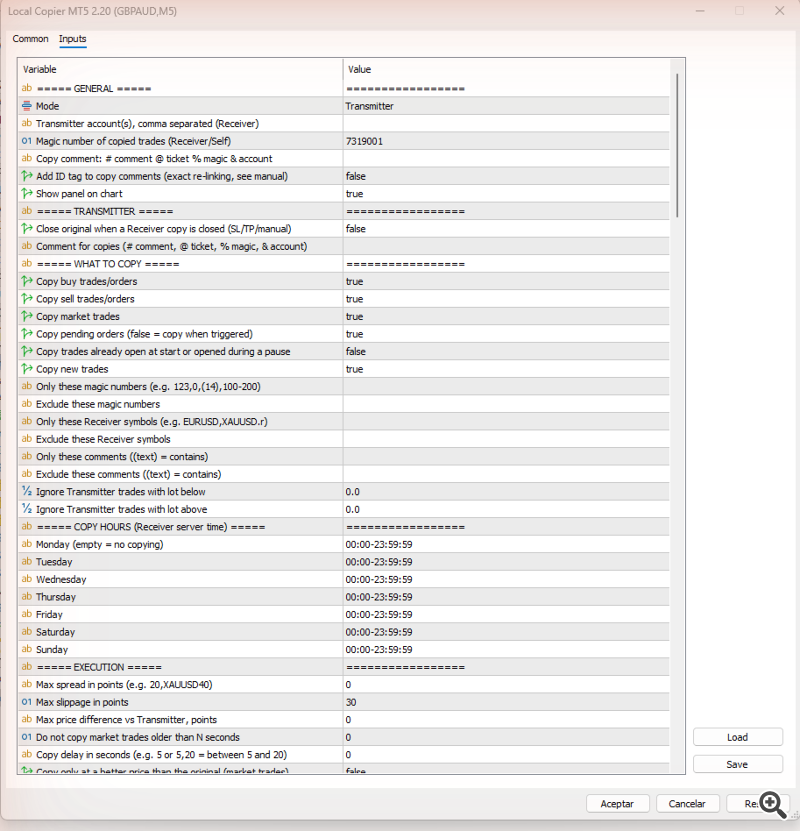
The Inputs tab (MetaTrader 5)
General
Mode and Transmitter account(s): chapter 3. Copy comment and ID tag: chapter 14. Panel: chapter 4.
| Parameter | Default |
|---|---|
| Mode | Transmitter |
| Transmitter account(s), comma separated (Receiver) | (empty) |
| Magic number of copied trades (Receiver/Self) | 7319001 |
| Copy comment: # comment @ ticket % magic & account | (empty) |
| Add ID tag to copy comments (exact re-linking, see manual) | false |
| Show panel on chart | true |
Transmitter
Set on the Transmitter: section 9.7 and chapter 14.
| Parameter | Default |
|---|---|
| Close original when a Receiver copy is closed (SL/TP/manual) | false |
| Comment for copies (# comment, @ ticket, % magic, & account) | (empty) |
What to copy
See chapter 5.
| Parameter | Default |
|---|---|
| Copy buy trades/orders | true |
| Copy sell trades/orders | true |
| Copy market trades | true |
| Copy pending orders (false = copy when triggered) | true |
| Copy trades already open at start or opened during a pause | false |
| Copy new trades | true |
| Only these magic numbers (e.g. 123,0,(14),100-200) | (empty) |
| Exclude these magic numbers | (empty) |
| Only these Receiver symbols (e.g. EURUSD,XAUUSD.r) | (empty) |
| Exclude these Receiver symbols | (empty) |
| Only these comments ((text) = contains) | (empty) |
| Exclude these comments ((text) = contains) | (empty) |
| Ignore Transmitter trades with lot below | 0 |
| Ignore Transmitter trades with lot above | 0 |
Copy hours (Receiver server time)
See section 5.3.
| Parameter | Default |
|---|---|
| Monday (empty = no copying) | 00:00-23:59:59 |
| Tuesday | 00:00-23:59:59 |
| Wednesday | 00:00-23:59:59 |
| Thursday | 00:00-23:59:59 |
| Friday | 00:00-23:59:59 |
| Saturday | 00:00-23:59:59 |
| Sunday | 00:00-23:59:59 |
Execution
See section 5.4.
| Parameter | Default |
|---|---|
| Max spread in points (e.g. 20,XAUUSD40) | 0 |
| Max slippage in points | 30 |
| Max price difference vs Transmitter, points | 0 |
| Do not copy market trades older than N seconds | 0 |
| Copy delay in seconds (e.g. 5 or 5,20 = between 5 and 20) | 0 |
| Copy only at a better price than the original (market trades) | false |
| Better price points (negative = wait until original gains them) | 0 |
| Seconds between retries after a failed copy | 10 |
| Max attempts per trade (also limits reopens) | 10 |
Lot size
See chapter 6.
| Parameter | Default |
|---|---|
| Lot size mode | Multiplier of transmitter lot |
| Fixed lot | 0.01 |
| Per-symbol fixed lot (e.g. EURUSD0.15,XAUUSD0.05) | (empty) |
| Add/subtract to same lot | 0 |
| Multiplier | 1 |
| Value for 'Multiplier = balance / value' | 1000 |
| Value for 'Multiplier = equity / value' | 1000 |
| Multiplier for 'Proportional by balance x multiplier' | 1 |
| Multiplier for 'Proportional by equity x multiplier' | 1 |
| Risk % of balance per trade | 1 |
| Risk % of equity per trade | 1 |
| Risk % of free margin per trade | 1 |
| Risk in money per trade | 100 |
| Lot per 1000 of balance | 0.01 |
| Lot per 1000 of equity | 0.01 |
| Lot sequence (end with ,0 to stop copying) | 0.01,0.02,0.04 |
| Per-symbol multiplier (e.g. XAUUSD0.5,US30.r2) | (empty) |
| Adjust lot by contract size difference between brokers | true |
| Lot step: lot rounded down to a multiple (0 = broker step) | 0 |
| Minimum Receiver lot (0 = broker minimum) | 0 |
| Maximum Receiver lot (0 = no limit) | 0 |
| Do not copy if calculated lot is below | 0 |
| Do not copy if calculated lot is above | 0 |
| Round up to broker minimum when calculated lot is smaller | true |
| Split automatically above broker max volume | true |
| Split each copy in N parts (1 = no split) | 1 |
| Split each copy in parts of this lot (overrides N) | 0 |
Limits
See chapter 7.
| Parameter | Default |
|---|---|
| Max simultaneous copied trades | 0 |
| Max copied trades per symbol (e.g. 3,XAUUSD1) | 0 |
| Max total copied volume (lots) | 0 |
| Max copied volume per symbol (e.g. 2,XAUUSD0.5) | 0 |
| Min distance in points between copies of same symbol/direction | 0 |
| Max risk % per symbol (needs SL; e.g. 2,XAUUSD1) | 0 |
| Max risk % per currency (needs SL; e.g. 3,JPY2) | 0 |
| Max total risk % (needs SL) | 0 |
| Max different Transmitter magic numbers copied at once | 0 |
| Max different magic numbers on this account (incl. other EAs) | 0 |
| Max different symbols copied at once | 0 |
| Max different symbols on this account (incl. other EAs) | 0 |
| Copy from the Nth trade of each symbol (e.g. 2,XAUUSD3) | 0 |
| Copy up to the Nth trade of each symbol (e.g. 4,XAUUSD2) | 0 |
Stop loss / take profit
See chapter 8.
| Parameter | Default |
|---|---|
| Copy Stop Loss | true |
| Copy Take Profit | true |
| SL distance multiplier | 1 |
| TP distance multiplier | 1 |
| Add/subtract points to SL distance | 0 |
| Add/subtract points to TP distance | 0 |
| Keep SL/TP distances from Receiver open price | false |
| Wait for the original to have a SL before copying | false |
| Stop syncing SL/TP of a copy after a manual change | false |
| Virtual (hidden) SL/TP/BE/trailing | false |
| Show virtual levels on this chart | true |
| Units of own SL/TP/BE/trailing (money = per original trade) | Points (receiver symbol) |
| Own SL when Copy SL = false | 0 |
| Own TP when Copy TP = false | 0 |
| TP = SL distance x ratio (Copy TP = false, own TP = 0) | 0 |
| Break even at this profit (needs Copy Stop Loss = false) | 0 |
| Lock this profit at break even | 0 |
| Trailing start (needs Copy Stop Loss = false) | 0 |
| Trailing distance | 0 |
| Trailing step (0 = 1/10 of the distance) | 0 |
Trade management
See chapter 9.
| Parameter | Default |
|---|---|
| Reverse copying (buy <-> sell) | false |
| Close copy when original closes | On |
| Copy partial closures | true |
| Copy volume increases of netting positions | true |
| Closure delay in seconds (e.g. 5 or 5,20) | 0 |
| Close copy only at a better price | false |
| Closure better price difference in points | 0 |
| Close anyway after N seconds (0 = wait forever) | 300 |
| Reopen copies closed outside the EA | Off |
| Reopen time (HH:MM, Receiver server time) | 08:00 |
| Close all copied market trades on (Receiver server time) | Off |
| Close all time (HH:MM) | 21:00 |
| Delete all copied pending orders on (Receiver server time) | Off |
| Delete pending time (HH:MM) | 21:00 |
| Close each copied market trade after N minutes | 0 |
Partial closes (own)
See chapter 10.
| Parameter | Default |
|---|---|
| Level 1: % of the way to TP | 0 |
| Level 1: close % of initial lot | 0 |
| Level 2: % of the way to TP | 0 |
| Level 2: close % of initial lot | 0 |
| Level 3: % of the way to TP | 0 |
| Level 3: close % of initial lot | 0 |
| Level 1: % of the way to SL | 0 |
| Level 1: close % of initial lot | 0 |
| Level 2: % of the way to SL | 0 |
| Level 2: close % of initial lot | 0 |
| Level 3: % of the way to SL | 0 |
| Level 3: close % of initial lot | 0 |
Basket (all copies together)
See chapter 11.
| Parameter | Default |
|---|---|
| Basket TP % of balance | 0 |
| Basket SL % of balance | 0 |
| Basket break even at profit % of balance | 0 |
| Basket trailing start % of balance | 0 |
| Basket trailing distance % of balance | 0 |
| Basket trailing step % of balance | 0 |
| Basket TP in money | 0 |
| Basket SL in money | 0 |
| Basket break even at profit in money | 0 |
| Basket trailing start in money | 0 |
| Basket trailing distance in money | 0 |
| Basket trailing step in money | 0 |
| Basket TP in average points | 0 |
| Basket SL in average points | 0 |
| Basket break even at average points | 0 |
| Basket trailing start in average points | 0 |
| Basket trailing distance in average points | 0 |
| Basket trailing step in average points | 0 |
Account protection
See chapter 12.
| Parameter | Default |
|---|---|
| Daily drawdown measured from | Balance at start of day |
| Max daily drawdown % -> close copies, pause until tomorrow | 0 |
| Max daily drawdown in money | 0 |
| Daily profit measured from | Balance at start of day |
| Max daily profit % -> close copies, pause until tomorrow | 0 |
| Max daily profit in money | 0 |
| Max drawdown % from highest balance -> close and stop | 0 |
| Emergency: equity below -> close copies and stop | 0 |
| Emergency: equity above -> close copies and stop | 0 |
| Reset emergency stop now (set back to false afterwards) | false |
| Pause new copies while Receiver drawdown % is above | 0 |
| Pause new copies while Transmitter drawdown % is above | 0 |
| Copy only while Transmitter drawdown % above | 0 |
| Copy a symbol only while its Transmitter drawdown % is above | 0 |
Symbol mapping
See chapter 13.
| Parameter | Default |
|---|---|
| Transmitter symbol prefix (non-dot) | (empty) |
| Transmitter symbol suffix (non-dot) | (empty) |
| Receiver symbol prefix | (empty) |
| Receiver symbol suffix | (empty) |
| Auto-detect dot prefixes/suffixes and Receiver variants | true |
| Special symbols: TX,RX;TX,RX (e.g. US500,SPX500;XAUUSD,GOLD) | (empty) |
| Special symbols 2 (same format) | (empty) |
| Special symbols 3 (same format) | (empty) |
| Special symbols 4 (same format) | (empty) |
| Special symbols 5 (same format) | (empty) |
Notifications
See chapter 15.
| Parameter | Default |
|---|---|
| Push notifications | false |
| Email notifications | false |
| Daily account report times (e.g. 08:00,20:00) | (empty) |
| Alert when equity falls below (e.g. 9000,8000) | (empty) |
19. Differences in the MT4 version
- The functions are the same as in MetaTrader 5. MetaTrader 4 has no netting accounts, so chapter 16 does not apply to a MetaTrader 4 Receiver. A MetaTrader 4 Receiver can copy a MetaTrader 5 netting Transmitter: a volume increase of the original is opened as an additional order.
- The Transmitter publishes each change on the next tick or within 100 milliseconds, instead of at once.
- In MetaTrader 4, a partial close gives the rest of the trade a new ticket, with the comment "from #...". Local Copier follows these tickets on both sides: the Transmitter keeps the chain in the file TC_account.txt, and the Receiver follows its copy through the account history. After a partial close the copy loses its identification tag, because MetaTrader 4 replaces the comment; the links file keeps it linked.
- Programs in MetaTrader 4 only see the history shown in the Account History tab of the terminal. Right-click in that tab and choose All History, so the Receiver can always confirm how a copy was closed.
- The magic number must be 2147483647 or less.
- The toolbar button is called AutoTrading, and the option in the Common tab of the Expert Advisor is Allow live trading.
- If MetaTrader 4 cannot create the millisecond timer, Local Copier works with a 1-second timer and the price ticks, and writes it in the Experts tab.
20. Questions and troubleshooting
The panel says "waiting for Transmitter...".
The Receiver does not find the file of that account. Check that the Transmitter is running on the same computer and under the same Windows user, and that the number in Transmitter account(s) is the account number of the Transmitter. The panel of the Transmitter must show Publishing N trades/orders.
The panel says "OFFLINE" or "starting or stopped".
The Transmitter terminal is closed, the Expert Advisor was removed from its chart, or the terminal is not connected or not ready yet. Meanwhile the Receiver does not open or close copies of that Transmitter, but it keeps protecting them: stop loss, break even, trailing stop, virtual levels and account protection. When the Transmitter is back, the Receiver catches up: copies whose originals closed in the meantime are closed, and new originals are copied.
"Algo Trading is disabled in the terminal", "Algo trading not allowed in the EA properties" or "Trading not allowed (investor password?)".
Turn on the Algo Trading button in the toolbar (MT4: AutoTrading) and tick Allow Algo Trading in the Common tab of the Expert Advisor (MT4: Allow live trading). The Receiver needs the trading password; the investor password only works on the Transmitter.
A trade was not copied.
Look in the Experts tab of the Receiver for the ticket of the original: lines such as "Not copied" or "Waiting to copy" say why. Trades that were already open the first time the Receiver connected to the Transmitter are skipped without a message (see Copy trades already open at start or opened during a pause). Other common reasons are: a filter, the copy hours or a limit; the symbol was not found ("No equivalent symbol", chapter 13); the calculated lot is below the minimum lot of the broker and Round up to broker minimum when calculated lot is smaller is false; or the original is older than Do not copy market trades older than N seconds.
The lot of the copy is different from what I expected.
Check the lot size mode and its own value (chapter 6). The lot is also adjusted when the contract sizes of the two brokers differ, multiplied by the per-symbol multiplier, rounded down to the lot step, and limited by the minimum and maximum lot. The Experts tab shows the lot of each copy.
The copy opened later or at a different price than the original.
A copy is opened at the market price of the Receiver broker, which can differ from the price of the Transmitter broker. It also waits while an execution condition is not met: maximum spread, copy delay, better price, maximum price difference, market closed. The Experts tab says what it is waiting for.
The copy closed before the original.
The stop loss or take profit of the copy was reached at the Receiver broker, whose prices can differ. If you want the copy back while the original is open, use Reopen copies closed outside the EA (section 9.5). If you want the original to close too, use Close original when a Receiver copy is closed on the Transmitter (section 9.7).
What happens to trades opened or closed while the Receiver is off?
When the Receiver starts again, it copies the originals opened in the meantime, at the current price, and closes the copies whose originals were closed. If you do not want late copies, set Do not copy market trades older than N seconds.
Can I change the settings while copies are open?
Yes. The Expert Advisor restarts with the new settings and continues with its copies. Changes of the lot size mode and of Reverse copying only affect new copies. Do not change Magic number of copied trades with copies open: the copies with the old magic number are no longer managed (the Expert Advisor warns you) until you set it back.
"Another Receiver/Self Copier already uses this magic." or "Another Transmitter already runs for this account."
Local Copier is already running with the same role on this account, on another chart or in another terminal. Remove the second one, or give the second Receiver another magic number (section 3.4).
"Waiting for all Transmitters to link the open copies again".
The links file was not found while copies were open (section 17.3). Start all the Transmitters of this Receiver. After 10 minutes the Receiver links the copies of the Transmitters that are online, and the others when their Transmitters come online.
"Waiting: N of M copies are not in the trade list".
Many copies are missing at once and the account history does not show that they were closed, which usually means the terminal has not loaded the account yet. The Receiver waits up to 2 minutes before it acts. Check the connection of the Receiver terminal.
Can I trade by hand or use other Expert Advisors on the Receiver account?
Yes. The Receiver only manages the trades with its own magic number, and never closes your manual trades or the trades of other Expert Advisors. They count in the limits that say "on this account", and their result counts in account protection and in the Receiver drawdown pause, which use the balance and equity of the whole account.
How do I stop copying a Transmitter?
Remove its account number from Transmitter account(s). Its open copies no longer follow their originals: they keep their stop loss and take profit, and the Receiver still applies break even, trailing stop, virtual levels and account protection to them. On a netting account its part of the positions is closed. To stop the Receiver completely, remove Local Copier from the chart: the copies stay open without any management.
For other questions, please write in the product comments or send a private message on MQL5.