VEO PRO User Guide – Stretch, Impulse and Chase Veto for MetaTrader 5

1. What VEO PRO measures
Most oscillators tell you whether price is "overbought" or "oversold". VEO PRO asks a more practical question before an entry: how far has price already stretched from its equilibrium, and what is the current impulse doing?
It is computed on closed bars and does not repaint.
2. Reading the indicator
State histogram
- NEUTRAL: no organised impulse.
- CHARGE: energy is building.
- RELEASE: energy is being released, and the move is under way.
Stretch (S) The distance of price from an adaptive equilibrium (a Kalman-filtered price), in ATR units. S = 1.0 means price is one ATR away from equilibrium.
Footer The footer shows:
- the state and bias;
- the impulse phase and age;
- recent events, such as exhaustion and resumption;
- the Chase Veto status.
With QIF PRO on the same chart, it also shows the QIF regime.
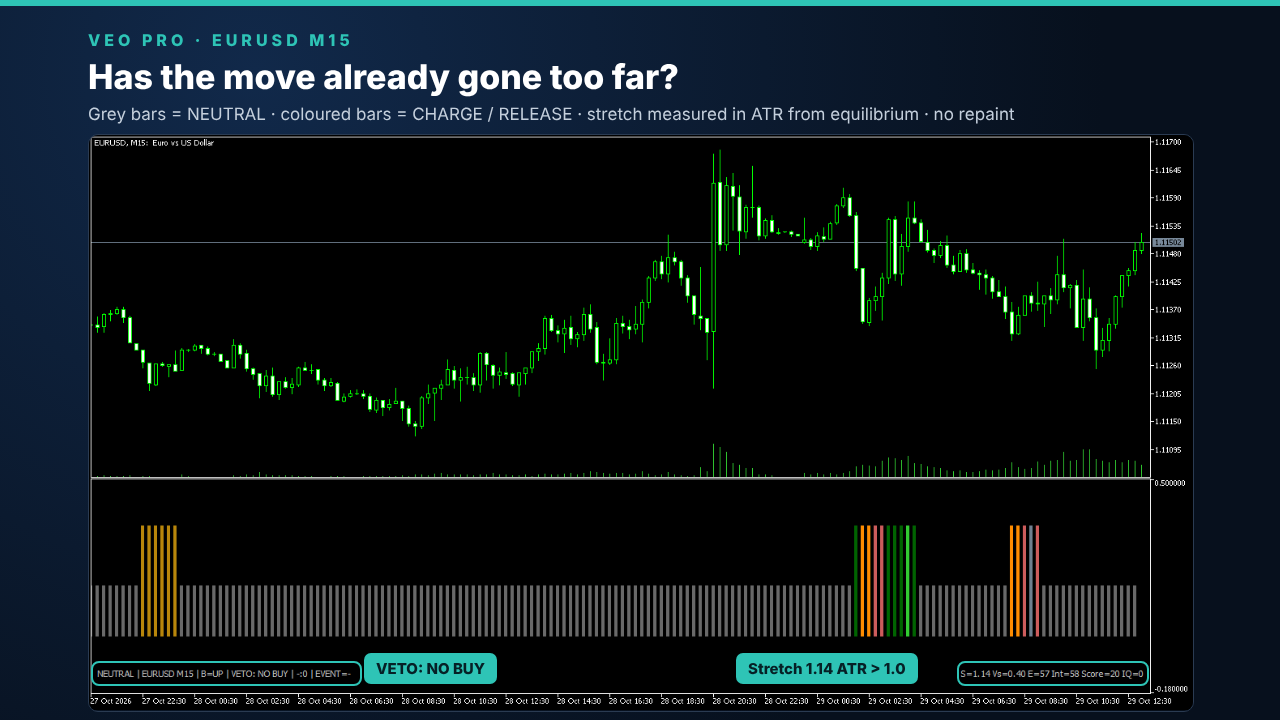
Image 1: VEO PRO on EURUSD M15: the state histogram and the information footer.
3. Chase Veto: the main use
Entering after a move is already stretched is one of the most common and expensive mistakes. The Chase Veto flags it:
- VETO: NO BUY: price is already stretched more than 1 ATR above equilibrium, so a buy here would chase the move.
- VETO: NO SELL: the same, below equilibrium.
The veto does not tell you to trade in the opposite direction. It tells you not to chase: wait for a pullback, or skip the trade.
How it was validated
- Five out-of-sample tests on 30 instruments that were not used to build the indicator.
- In the latest test, on all 11 cross pairs, the vetoed entries performed worse than removing the same number of trades at random. In other words, the veto removes worse-than-average trades, not just fewer trades.
Where it applies
- Active on M15, forex and metals: the validated configuration (threshold 1.0 ATR).
- Off by default on equity indices and CFDs: in testing, the vetoed trades on indices were profitable. The input "also on indices/CFDs" can enable it, but it is not recommended.
- Other timeframes: not validated, and the veto always reads 0.
What it does not do
- It modestly improves entry selection. It does not make a losing strategy profitable.
- Do not use it with breakout strategies: they enter stretched moves by design, and the veto would remove exactly the trades they are built on.
4. Impulse lifecycle (context only)
VEO PRO also describes the current impulse:
- phase: new, active, extended, decay;
- age;
- peak energy;
- exhaustion and resumption events;
- impulse integrity.
These values describe the move. They are not entry or reversal signals.
5. Settings
The settings you will normally use are at the top of the input window:
| Input | Default | Purpose |
|---|---|---|
| Profile | VEO_FX_M15 | parameter set: FX M15, FX H1 or Custom |
| UseClosedBarOnly | true | compute on closed bars only (no repaint) |
| anti-chase veto (M15, forex/metals) | true | Chase Veto on/off |
| also on indices/CFDs (NOT recommended) | false | extends the veto to indices and CFDs, where it was not profitable in testing |
| validated value: 1.0 ATR of stretch | 1.0 | veto threshold |
| MaxBars | 5000 | bars calculated on the chart |
| NeutralDisplayMode | NEUTRAL_FAINT | how the NEUTRAL state is drawn |
| ShowFooter | true | shows the information footer |
| AlertsOnStateChange | true | alert when the state changes |
| ShowImpulseLifecycle | true | shows phase, age and events in the footer |
| EnableQIFIntegration / ShowQIFContext | true | reads QIF PRO on the same chart and shows its regime |
All the other inputs are model parameters:
- the Inp_… parameters (Kalman filter, energy, stretch, weights);
- Tension / Risk thresholds;
- Gate_… ;
- Impulse_… .
They are set to the values used in validation. Leave them at their defaults: changing them means the validation results no longer apply.
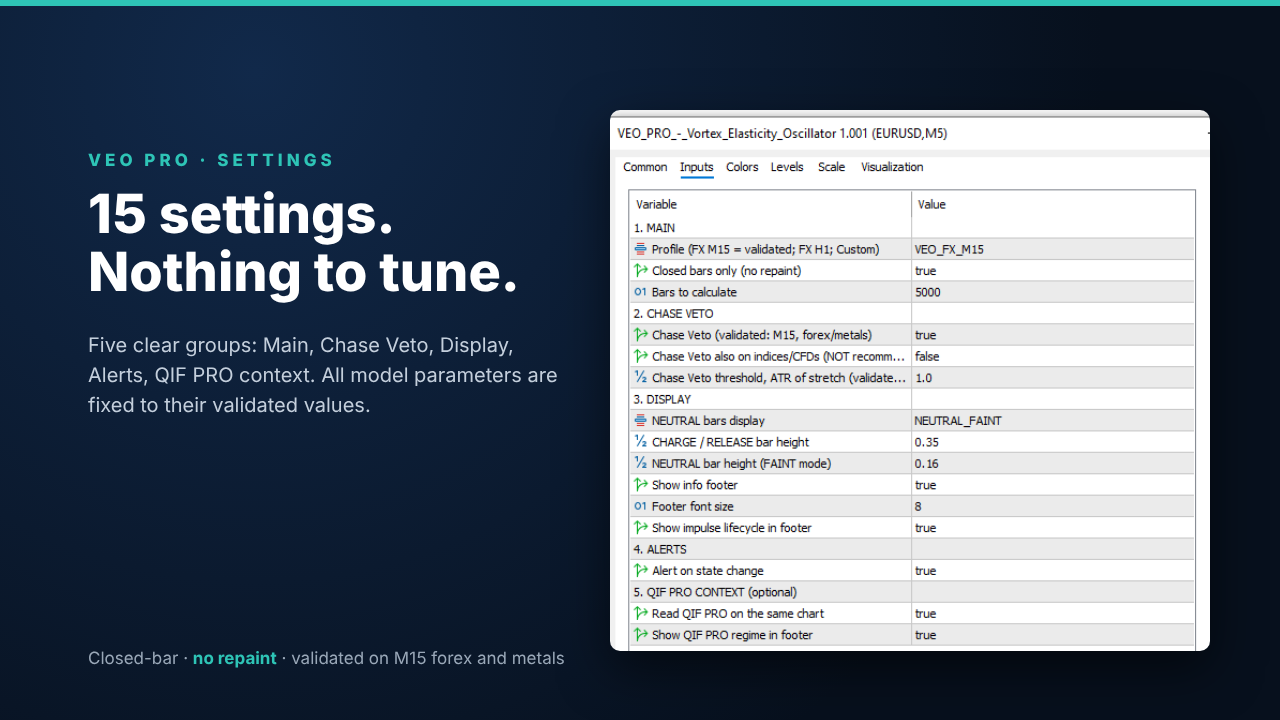
Image 2: 15 settings in 5 groups. The model parameters are fixed to their validated values.
6. Using VEO PRO with QRM PRO
Quantum Risk Manager Pro can read the Chase Veto before each trade. In QRM, group 5 "Companion indicators", set Use VEO PRO impulse context = true and choose the mode:
- WARN (default): the veto is shown in the decision and recorded in the audit file, and the risk is not changed;
- REDUCE: the risk is multiplied by 0.50 on a chasing entry.
If VEO PRO is not available, the check is neutral.
QRM PRO manual: https://www.mql5.com/en/blogs/post/778714
7. For EA developers
VEO PRO has 33 buffers, all on closed bars. Read shift 1. The main ones:
| Buffer | Content |
|---|---|
| 2 | State |
| 3 | Intensity |
| 4 | Energy |
| 5 | Stretch (ATR units) |
| 7 | Bias |
| 8 | Confidence |
| 14 | Phase |
| 15 | Age |
| 28 / 29 | Exhaustion events |
| 31 | Veto long (no buy) |
| 32 | Veto short (no sell) |
int h = iCustom(_Symbol, _Period, "Market\\Veo Pro Vortex Elasticity Oscillator");
double vl[];
if(CopyBuffer(h, 31, 1, 1, vl) == 1 && vl[0] == 1.0)
   Print("VEO: a buy here would chase the move");
8. Limitations
- Not a signal generator. The Chase Veto filters entries; it does not create them.
- Validated on M15 forex and metals only.
- Not suitable for breakout strategies.
- Trading involves risk. Results on historical data do not guarantee future results.