Sextant Trade Panel – complete guide: lot size from risk, stops from lines, trade management, daily limits, all settings

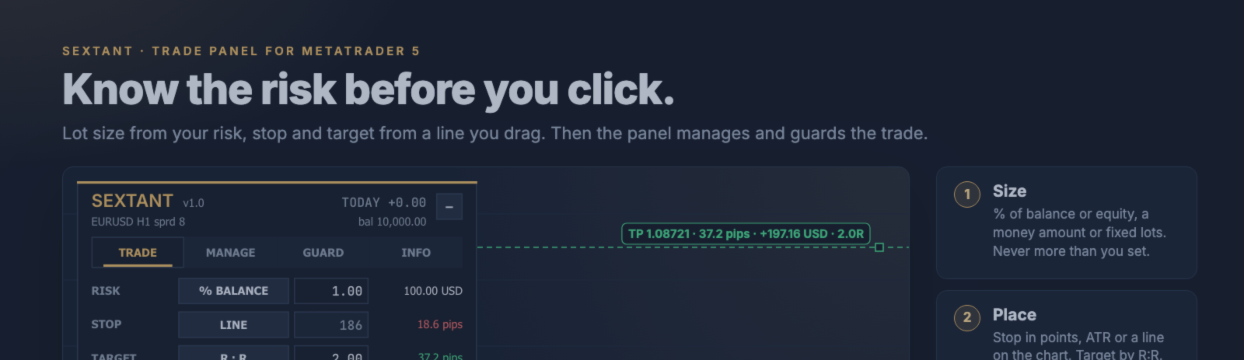
Sextant is a trade panel for MetaTrader 5. You set how much you want to risk, place the stop where the chart says, and Sextant calculates the lot size, sends the order and manages the trade. An account guard with a daily loss limit, a daily target and trade caps keeps a bad day from becoming a bad month. This post explains every tab, every input, the hotkeys and the built-in self test. Product page: https://www.mql5.com/en/market/product/199309
The panel does not trade on its own. Every trade starts with your click or hotkey.
1. Installation
- Buy or download Sextant from the MQL5 Market. It then appears under Market in the Navigator.
- Enable Algo Trading in the terminal toolbar.
- Drag Sextant onto the chart of the symbol you want to trade. On the Common tab tick Allow Algo Trading. Adjust the inputs if you like (section 8) and press OK.
- The panel appears in the top-left corner (or top-right, see inputs). One Sextant per chart. Several charts can run in parallel; they share the account guard.
Hidden stops, trailing, break-even, partial close and the guard work only while the terminal is running. If you use them, run the terminal on a VPS and keep the broker safety stop on.
2. The panel
Everything sits in one tabbed panel: TRADE, MANAGE, GUARD and INFO.
- Header: name and version, symbol, timeframe, spread, today's result (closed plus floating, in guard scope) and balance. The minus button minimises the panel to its header; plus expands it again.
- Footer: the last action or message, for example fills, refusals and errors.
- Every control has a tooltip. Values you change in the panel are remembered per symbol. If you later change an input in the EA properties, the inputs win.
3. TRADE: lot size from your risk
Risk
Click the mode button to switch:
| Mode | The value means | Lot size |
|---|---|---|
| % BALANCE | percent of the balance lost at the stop | calculated |
| % EQUITY | percent of the equity lost at the stop | calculated |
| Money (account currency) | money lost at the stop | calculated |
| LOTS | fixed volume | as typed |
How the lot size is calculated: Sextant takes the loss per 1.0 lot from entry to stop from MetaTrader's own profit calculation, so cross currencies, indices and metals are handled correctly. The commission per lot (input) is added. Then lots = risk money / loss per lot, rounded down to the broker's volume step. The loss at the stop therefore never exceeds your risk. If even the minimum lot would risk more, Sextant refuses the trade and tells you how much risk the minimum lot needs.
Example from the manual: EURUSD, 10,000 USD balance, 1 % risk = 100 USD, stop 18.6 pips. One lot loses 186 USD over 18.6 pips, 100 / 186 = 0.537, so Sextant sends 0.53 lots (loss at the stop 98.58 USD).
Stop loss
- POINTS: distance in points.
- x ATR: a multiple of the ATR (period input, current timeframe, last closed bar).
- LINE: with LINES on, the red line on the chart defines the stop; the field shows the resulting points.
Take profit
- R:R: reward-to-risk ratio (2.0 = target twice as far as the stop).
- POINTS: fixed distance.
- OFF: no target.
With LINES on, the green line sets the target and the field follows.
Lines, pending orders, hidden stops, split
- LINES (Shift+L): stop (red), target (green) and, in pending mode, entry as draggable lines. The labels show price, pips, money and R while you drag. Drag the entry line and stop and target move with it. The side of the setup follows the stop line: below the entry = buy, above = sell.
- PENDING (Shift+P): the order is placed at the entry line. Sextant picks the type itself: buy below price = buy limit, buy above = buy stop; sell above price = sell limit, sell below = sell stop.
- HIDDEN (Shift+H): stop and target are kept in the terminal, not at the broker. Sextant closes the position when the price touches them. An optional wider safety stop stays at the broker in case the terminal goes offline; it follows the hidden stop and never loosens. Hidden stops need a hedging account.
- PARTS 1/2/3: splits the volume into up to three positions with a target ladder at 1/3, 2/3 and 3/3 of the target distance. Hedging accounts only.
Readout and checks
The card shows position size, margin, risk in money and in % of the balance, reward and R:R. SELL and BUY show the price they would trade at, or the pending type and price. A grey button tells you why it cannot trade, for example Algo Trading off, stop too close to the price, risk too small for the minimum lot, not enough margin or a guard block. Hover for the full reason.
Before every order Sextant checks Algo Trading, the symbol's trade mode, the broker's minimum stop distance, the volume limits, free margin, your maximum spread and the guard. If a market order slips, the stop and target are moved to the planned distance from the real fill. A second click on BUY or SELL within one second is ignored, so there are no double entries.
4. MANAGE: break-even, partial close, trailing, bulk actions
Which trades are managed
Trades of the panel, also manual trades (magic 0), or every trade on the symbol (input "Which trades the panel manages").
R is the initial risk distance of a trade, from entry to the first stop. For manual trades Sextant learns R from the first stop it sees.
Auto-manage
- Break-even at x R: stop to entry plus lock-in points once the trade is x R in profit. Once per trade.
- Partial close once at x R, any percentage. If the rest would be below the minimum lot, the partial close is skipped and reported.
- Trailing stop, 5 methods. Click to cycle the method; the first field is its value, "from" is the start in R (0 = at once):
- Points: fixed distance in points
- x ATR: multiple of the ATR
- Bars: below the lowest low (buys) or above the highest high (sells) of the last N closed bars
- EMA: at the EMA (period input) minus or plus a buffer in points
- Parabolic SAR: at the SAR minus or plus a buffer
The stop moves only in steps of at least the trailing step, at most once per second, and never against the trade.
Bulk actions
All bulk buttons need a second click within 3 seconds (input "Bulk buttons need a second click").
| Button | Action |
|---|---|
| Close all / buys / sells | close the positions in scope |
| Close winners / losers | close the positions in profit / in loss |
| Delete pending | delete the pending orders in scope |
| Close 50 % | close half of every position (rounded to the volume step) |
| Stops to break-even | stop to break-even plus lock-in on positions that are past that level |
| Reverse | close and open the opposite side with the same volume, stop and target distance (guard and margin checked first) |
| Lock | hedge the net exposure of the symbol (hedging accounts) |
| Stop to line / target to line | set every stop or target of the symbol to the red / green line; stops never move against a trade |
Scope: this symbol (panel and manual trades on this symbol) or the whole account (every position on the account, shown in amber).
Open positions list
Up to six positions with side, volume, open price, tags (H = hidden stop, BE = at break-even, PC = partly closed), R multiple and result. The close button per position needs a second click.
5. GUARD: daily limits for the whole account
The guard protects the whole account (input "Guard scope": or only this symbol). Every Sextant chart on the account shares its values and its block.
| Rule | Meaning |
|---|---|
| Daily loss | stop the day when the closed result plus floating reach the limit; % of the balance at the start of the server day, or money |
| Daily target | stop the day when this profit is reached |
| Max trades | refuse new entries after N trades today (split orders count each part) |
| Max open risk | money at stake from the current price to all stops; new entries must fit under this % of the balance |
| Equity floor | stop when the equity falls to this level |
Room check: with a daily loss limit on, a new trade is refused if hitting its stop (plus all open stops) could break today's limit. While a position without a stop is open, new entries are refused.
On a hit: new entries are blocked until the next server day. With "close on hit" every position and pending order in guard scope is closed, including those of other EAs. With Enforce, any trade opened while blocked is closed again, also from other EAs or the mobile app. A desktop alert, and optionally a push notification, tells you what happened.
Lift the block exists for mistakes and needs a second click; a limit that is still breached is switched off at the same time. For prop-firm discipline set "Lock guard values (inputs only)" to true: the panel then shows the guard values read-only, so they cannot be changed in the heat of the moment.
The results card shows today's, this week's and this month's closed result, plus trades and win rate today.
6. INFO and hotkeys
INFO shows spread (points and pips), ATR, time to bar close, the value of one pip for one lot, swap long and short, lot minimum, step and maximum, stops and freeze level, net exposure and break-even price of the symbol, balance and equity, margin level, account type and leverage, and the server time.
Hotkeys (input "Hotkeys", on by default):
| Keys | Action |
|---|---|
| Shift+B | buy with the current settings |
| Shift+S | sell with the current settings |
| Shift+X twice | close all in scope |
| Shift+L | lines on / off |
| Shift+P | pending on / off |
| Shift+H | hidden stops on / off |
7. Themes
Three themes: Navy (dark, brass accent), Graphite (neutral dark) and Paper (for light chart backgrounds). One input switches it.
8. All inputs explained
The trade, management and guard inputs are start values. Changes you make in the panel are remembered per symbol.
Trade settings
| Input | Default | Notes |
|---|---|---|
| Risk mode | % of balance | % of balance, % of equity, fixed money amount, fixed lots |
| Risk per trade | 1.0 | % / money / lots, depending on the mode |
| Stop loss mode | x ATR | points or x ATR |
| Stop loss | 1.5 | points or x ATR |
| Take profit mode | reward:risk ratio | R:R, points or no take profit |
| Take profit | 2.0 | R:R or points |
| Split into parts | 1 | 1–3, target ladder |
| Hide SL/TP from the broker | false | hidden (virtual) stops |
| Virtual: broker safety stop at x SL | 2.0 | 0 = no real stop for hidden trades (not recommended) |
| Commission per lot, round turn | 0 | included in the lot size and the open risk |
| Max spread for entries | 0 | points, 0 = off |
| Max slippage | 20 | points |
| ATR period | 14 | current timeframe |
Trade management
| Input | Default | Notes |
|---|---|---|
| Which trades the panel manages | trades opened by this panel | panel, panel + manual trades (magic 0), every trade on this symbol |
| Break-even on | false | |
| Break-even at x R profit | 1.0 | |
| Break-even lock-in | 10 | points |
| Trailing stop | off | points, x ATR, last N bars, moving average, Parabolic SAR |
| Trailing value | 2.0 | points / x ATR / bars / buffer, depending on the method |
| Trailing starts at x R | 1.0 | 0 = at once |
| Trailing step | 10 | points |
| Trailing MA period | 20 | EMA |
| Partial close on | false | |
| Partial close at x R profit | 1.0 | |
| Partial close: % of the volume | 50 | |
| Bulk buttons need a second click | true |
Account guard
| Input | Default | Notes |
|---|---|---|
| Lock guard values (inputs only) | false | true = guard values read-only in the panel |
| Guard scope | whole account | or this symbol only |
| Daily loss limit on | false | |
| Daily limits in money | false | false = % |
| Daily loss limit | 4.0 | % of the day-start balance, or money |
| Daily profit target on | false | |
| Daily profit target | 3.0 | % or money |
| Max trades per day on | false | |
| Max new trades per day | 5 | |
| Max open risk on | false | |
| Max open risk | 3.0 | % of the balance |
| Equity floor on | false | |
| Equity floor | 0 | money |
| On a hit: close positions + pendings | true | |
| While blocked: close any new trade | false | Enforce |
| Push notification on a hit | false | needs the MetaQuotes ID in the terminal |
Panel
| Input | Default | Notes |
|---|---|---|
| Theme | Navy | Navy, Graphite, Paper |
| Corner | top left | or top right |
| Distance from side / from top | 12 / 24 | pixels |
| Hotkeys | true | Shift+B/S/X/L/P/H |
| Mark closed trades of today on chart | false | |
| Forget remembered panel values | false | |
| Order comment | Sextant | |
| Magic number | 20261003 |
Strategy Tester
| Input | Default | Notes |
|---|---|---|
| Run the built-in self test | false | see section 9 |
| Demo trades in a non-visual test | true | so that a test is not empty |
9. Strategy Tester and self test
- Visual mode: every button works on history, so you can try every function before you buy.
- Non-visual run: Sextant places demo trades so that the test is not empty.
- Self test: set "Run the built-in self test" to true and run a non-visual test (any symbol with history, M5 to H1, "Every tick"). The Journal prints PASS, FAIL or SKIP for risk maths, R:R target, market buy, close 50 %, stop to break-even, close all, pending from the line, delete pending, split into 3 parts, hidden stops, reverse, lock, trailing stop and the guard rules (max trades, daily loss, max open risk), plus a summary line.
How it was tested: in the MT5 Strategy Tester on a broker demo account with real ticks (all 17 self-test checks passed) and in a default-input run over nine months of H1 data without a single trade error. The code went through several review rounds before submission.
10. FAQ
Does Sextant open trades on its own?
No. The panel does not trade on its own. Only in a non-visual Strategy Tester run does it place demo trades, so that the test is not empty.
Why is the lot size smaller than I expected?
The lot is rounded down to the broker's volume step, so the loss at the stop never exceeds your risk. A commission per lot, if set, is included as well.
The BUY/SELL button is grey. Why?
Hover over it for the full reason. Common causes and fixes:
| Message | Fix |
|---|---|
| Algo Trading is off in the terminal | toolbar button Algo Trading |
| Allow Algo Trading in the EA settings | EA properties, Common tab |
| Risk too small for the minimum lot | raise the risk, tighten the stop or use a larger account |
| Stop too close to price (broker minimum) | the broker's stops level; widen the stop |
| Not enough free margin | smaller risk or wider stop |
| Guard: ... | a guard rule refused the entry; see the GUARD tab |
| Netting: close or reverse the open position first | netting account rule |
Does it work on netting accounts?
Yes, with one position per symbol. Sextant refuses a new entry while a position on the symbol is open (close or reverse it first). Split orders, hidden stops and lock are not available there.
What happens to hidden stops when my terminal is offline?
Hidden stops and the guard work while the terminal is running. Keep the broker safety stop on: it stays at the broker and follows the hidden stop. A VPS is recommended.
Does the daily loss limit also close trades from other EAs?
With "On a hit: close positions + pendings" every position and pending order in guard scope is closed, including those of other EAs. With Enforce, trades opened while blocked are closed again, also from other EAs or the mobile app.
Can I use several Sextant charts?
Yes. One Sextant per chart. All Sextant charts on the account share the guard.
Can I manage trades I opened by hand?
Yes. Set "Which trades the panel manages" to panel + manual trades, or to every trade on the symbol. For manual trades Sextant learns R from the first stop it sees.
11. Requirements
- MetaTrader 5, hedging or netting account. On netting accounts one position per symbol: split orders, hidden stops and lock are not available there.
- Allow Algo Trading in the terminal and in the program's settings.
- Hidden stops and the guard work while the terminal is running. For hidden stops a VPS is recommended, and the broker safety stop should stay on.
12. Support
Questions and bug reports through the product comments or a private message. Please include your broker, symbol, account type (hedging/netting) and the Experts log lines.
Risk warning: trading forex and CFDs on margin carries a high risk of loss. A trade panel helps you keep your rules; it does not make trades profitable.




