

HEX SCANNER PRO – USER GUIDE (MT5)
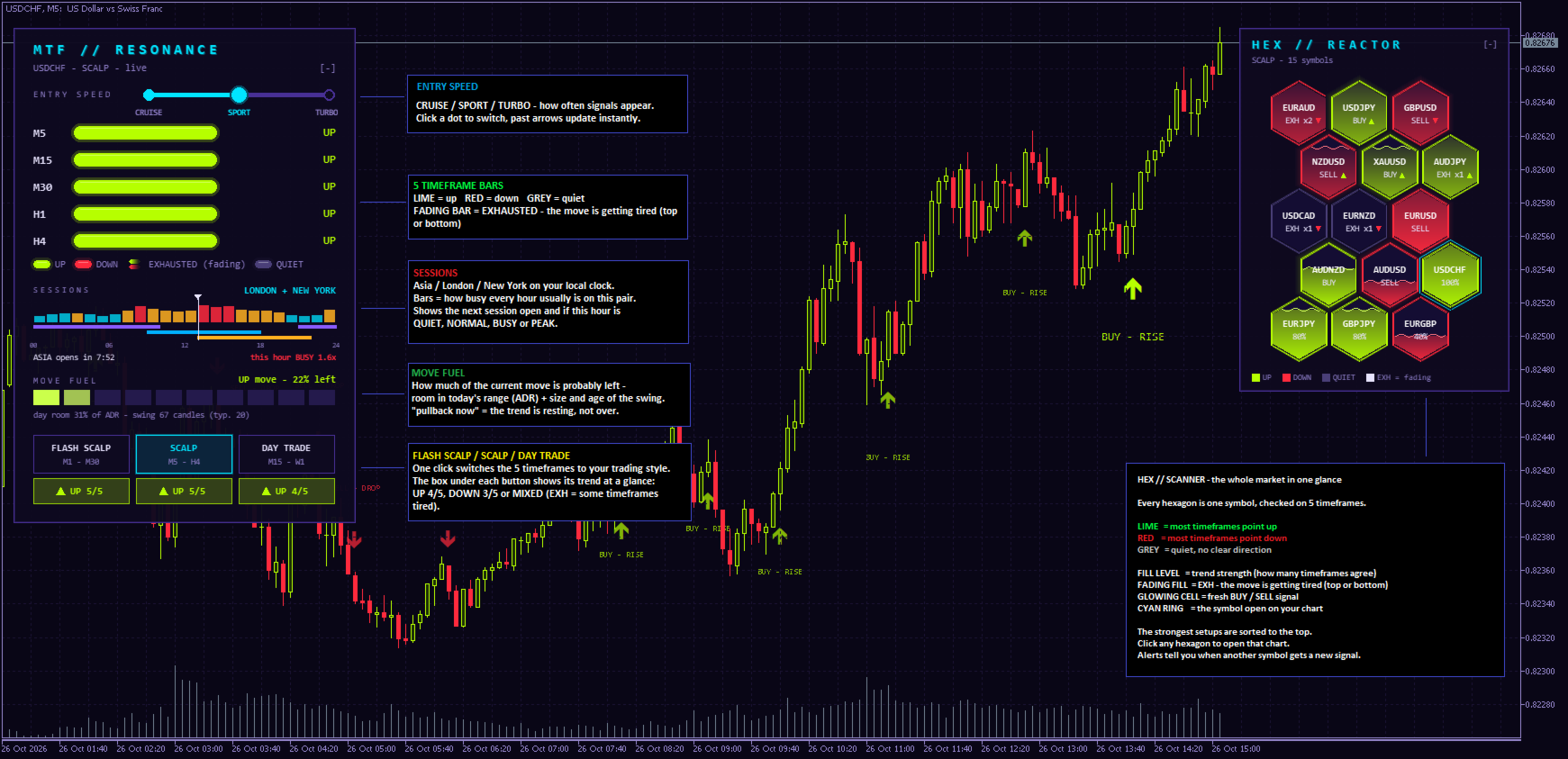
WHAT IT IS
Hex Scanner PRO shows trend, timing and entry signals for your chart and up to 18 other symbols on one screen. It works on forex, gold, indices and crypto. Everything on the panels is clickable: speed, preset, fold [-] / [+], and the scanner symbols.
INSTALLATION
- File > Open Data Folder > MQL5 > Indicators. Copy the file there.
- Right-click Indicators in the Navigator and choose Refresh.
- Drag HEX SCANNER PRO onto a chart and press OK.
On the first start the panels may show “loading...” for a few seconds while history downloads. The chart switches to neon colours, and your own colours come back when you remove the indicator. - SIGNALS (BUY · RISE / SELL · DROP)
A signal marks the end of a pullback in a trend: price dips to the fast EMA and turns back in the trend direction. Signals use closed candles only and never repaint.
Click the entry speed on the panel:
- CRUISE (EMA 30/75): calm, fewer signals
- SPORT (EMA 20/50): balanced, the default
- TURBO (EMA 13/34): fast, more signals
Put your stop behind the pullback low (for a buy) or high (for a sell).
- DASHBOARD (MTF // RESONANCE)
Click a preset to choose your 5 timeframes:
- FLASH SCALP: M1–M30
- SCALP: M5–H4 (default)
- DAY TRADE: M15–W1
The box under each preset shows UP 4/5, DOWN 3/5, or MIXED when fewer than 3 timeframes agree. EXH means one of its timeframes is exhausted.
Each timeframe shows one state: - UP (lime)
- DOWN (red)
- EXHAUSTED (faded): the move is losing force at the top or bottom
- QUIET (grey): no direction
- MOVE FUEL
Shows how much of the current move is probably left, for example “UP move · 71% left”. It’s based on room left in today’s average daily range, plus the size and age of the swing compared with past swings.
- Above about 60%: the move still has room.
- Below about 25%: don’t chase it.
- “pullback”: the trend is pausing.
- SESSIONS
Shows the open session (Asia, London, New York) on your local clock, how busy this hour usually is (QUIET, NORMAL, BUSY, PEAK), a 24-hour strip and a countdown to the next session open. Summer and winter time are handled automatically. The hour statistics need an M1–H1 chart. - HEX // SCANNER
Up to 18 symbols in a honeycomb, on your chart’s timeframe:
- Bright BUY ▲ / SELL ▼: a fresh signal in the last 3 candles
- %: how strongly the trend agrees
- EXH: the move is tired
- Grey: quiet
The best setups are sorted first: exhausted symbols, then fresh signals, then the strongest trends. Click a hexagon to open that chart.
MAIN SETTINGS
- ScanSymbols: symbols separated by commas. Leave it empty to use your Market Watch.
- ScanCount (15): number of symbols, up to 18
- ScanSeconds (5): seconds between rescans
- ExhaustLevel (55): how strict EXHAUSTED is
- RapidTFs / ScalpTFs / DayTFs: the timeframes of each preset
- HistorySignals (100): how many past signals are drawn
- PaintChart (true): neon chart colours
- ShowSynthRoll (false): the extra window under the chart
- PanelY (20): distance of the panels from the top
ALERTS
- AlertSignals: new signal on this chart
- AlertScanner: new signal on another scanner symbol
- AlertSour: this chart is exhausted
- AlertResonance: 2 or more timeframes are exhausted together
- PopupAlert / PushAlert: popup or phone notification
For phone alerts, enter your MetaQuotes ID (from the MT5 mobile app) under Tools > Options > Notifications, then set PushAlert = true.
QUICK ROUTINE
- Pick a preset and a speed.
- Trade NORMAL or BUSY hours.
- Find a fresh signal in the scanner and click it.
- Confirm it: the preset box agrees, MOVE FUEL is above about 50%, and no higher timeframe is EXHAUSTED.
- Enter after the candle closes, with the stop behind the pullback, and keep your risk small and fixed.




