RDP, AnyDesk or a Remote Control Panel: What to Use for MetaTrader on a VPS

Short answer: use RDP to look after the VPS itself, and something lighter for the daily "is my Expert Advisor alive?" check. RDP and AnyDesk show you the whole Windows desktop. That is exactly what you need to install software and exactly what you do not need to read a log from a phone.
What you actually do on the VPS
Think about the last ten times you logged in to the machine that runs your terminal. Most of them were probably one of these:
- Is the EA still running, or did it stop?
- Is the terminal connected to the broker?
- What did the EA write to the log overnight?
- Do I need to switch algo trading off right now?
That is looking, not administering. It takes seconds - but only if getting to the answer does not take minutes.
RDP on a phone: where it hurts
RDP is the standard tool for a Windows VPS, and for maintenance it is hard to beat. On a phone it gets in the way:
- You get the whole desktop. A full Windows screen squeezed onto a phone means pinching, zooming and tapping tiny buttons.
- It needs a decent connection. On mobile data the session is slow to open and slow to react.
- It exposes a port. RDP listens on a port that bots probe around the clock. You can protect it with a firewall or a VPN, but then you have another thing to set up and keep working.
AnyDesk, TeamViewer and similar tools
These are simpler to start with and usually do not need an open port on your side. But the experience on a phone is the same: you are looking at a remote desktop, not at the information you came for. You also depend on a third-party account that gives access to the whole machine.
A control panel for the terminal itself
A different approach is to skip the desktop and show only what matters. With MT-Remote and MT-Radar, a small program called MTAgent runs next to your terminal and opens no inbound ports. The traffic between the agent and the panel is end-to-end encrypted, and the panel opens in the browser of your phone.
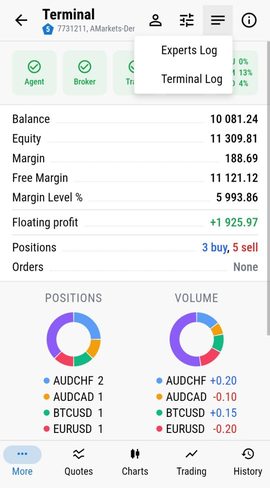
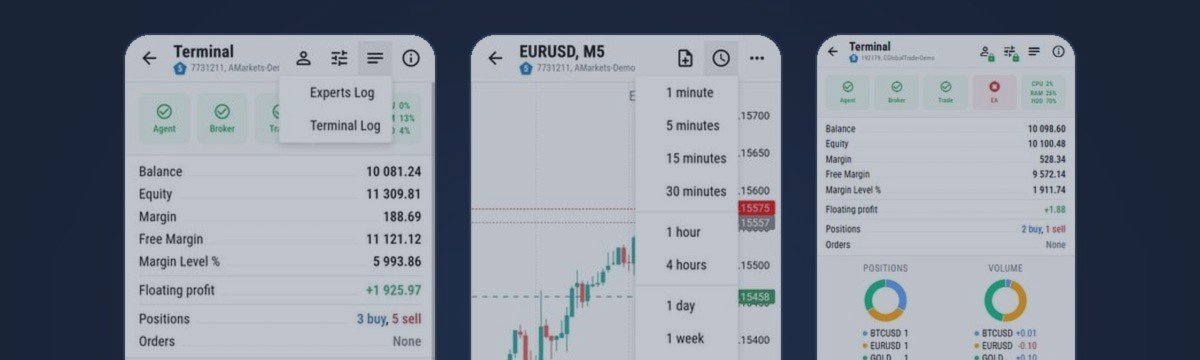
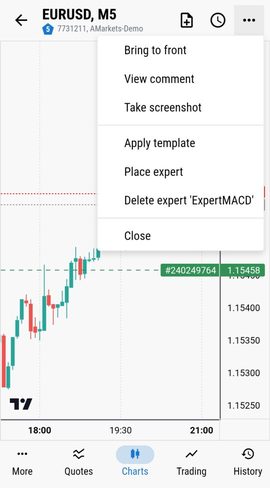
You see the terminals, the Experts and Terminal logs, positions and charts, and you can act in a tap: attach or remove an EA, apply a template, switch algo trading on or off.
Side by side
| RDP | AnyDesk / TeamViewer | Control panel (MT-Remote / MT-Radar) | |
|---|---|---|---|
| Made for a phone screen | No, full desktop | No, full desktop | Yes |
| What you see | Everything on the machine | Everything on the machine | Terminals, logs, positions, charts |
| Open port on the VPS | Yes, unless you restrict it | No inbound port, third-party account | No inbound ports, end-to-end encrypted |
| Quick action (switch algo trading off, remove an EA) | Several steps in a desktop UI | Several steps in a desktop UI | A tap |
| Install software, update Windows | Yes | Yes | No |
When you still need RDP
A panel does not replace remote access to the machine. You will still want RDP, or the console your VPS provider gives you, to:
- install or update MetaTrader and other software;
- change VPS settings or fix Windows itself;
- debug something that does not show up in the logs.
A sensible setup is a mix: the panel for the daily check and quick actions, RDP for maintenance a few times a month.
How to start
The easiest first step is the free MT-Radar: it shows the terminal, the account, logs, quotes and charts with the EA state, and cannot trade. Setup takes about 10-15 minutes and is described step by step with screenshots in the installation guide. When you also want to act from the phone, MT-Remote adds control in the same panel. Want to see it first? Open the free live demo.
Questions
Can I do without RDP completely?
For daily checks and quick actions - yes. For installing and updating software on the VPS you will still need RDP or your provider's console now and then.
Is it safe to leave a terminal on a real account connected to a panel?
MTAgent opens no inbound ports, the traffic is end-to-end encrypted, and the key stays with you. MT-Radar is view-only and cannot place or change trades.
Do I need to install anything on my phone?
No. The panel opens in the phone's browser.