
AETHERIS Signal Studio 1.10: AI tools, and 12 gold signals tested on 16 brokers

Version 1.10 of AETHERIS Signal Studio adds AI tools that work with your own key, and it comes with 12 recommended gold signals. This post shows what the 12 signals did together on the real ticks of 16 brokers, where to follow them on a real account, and what the AI tools do and never do.
Video guide from A to Z, in your language:
Why run many signals at once
A single strategy has its good and its bad months. Twelve signals that read the market in different ways (swing breakouts that lock profit early and trail the stop, and entries at the market when the price reaches yesterday's high or low or an unbroken swing) rarely have their bad weeks at the same time. In Signal Studio each signal keeps its own magic number, statistics and switch, and one set of account rules, the Risk Guard, watches all of them on one balance.
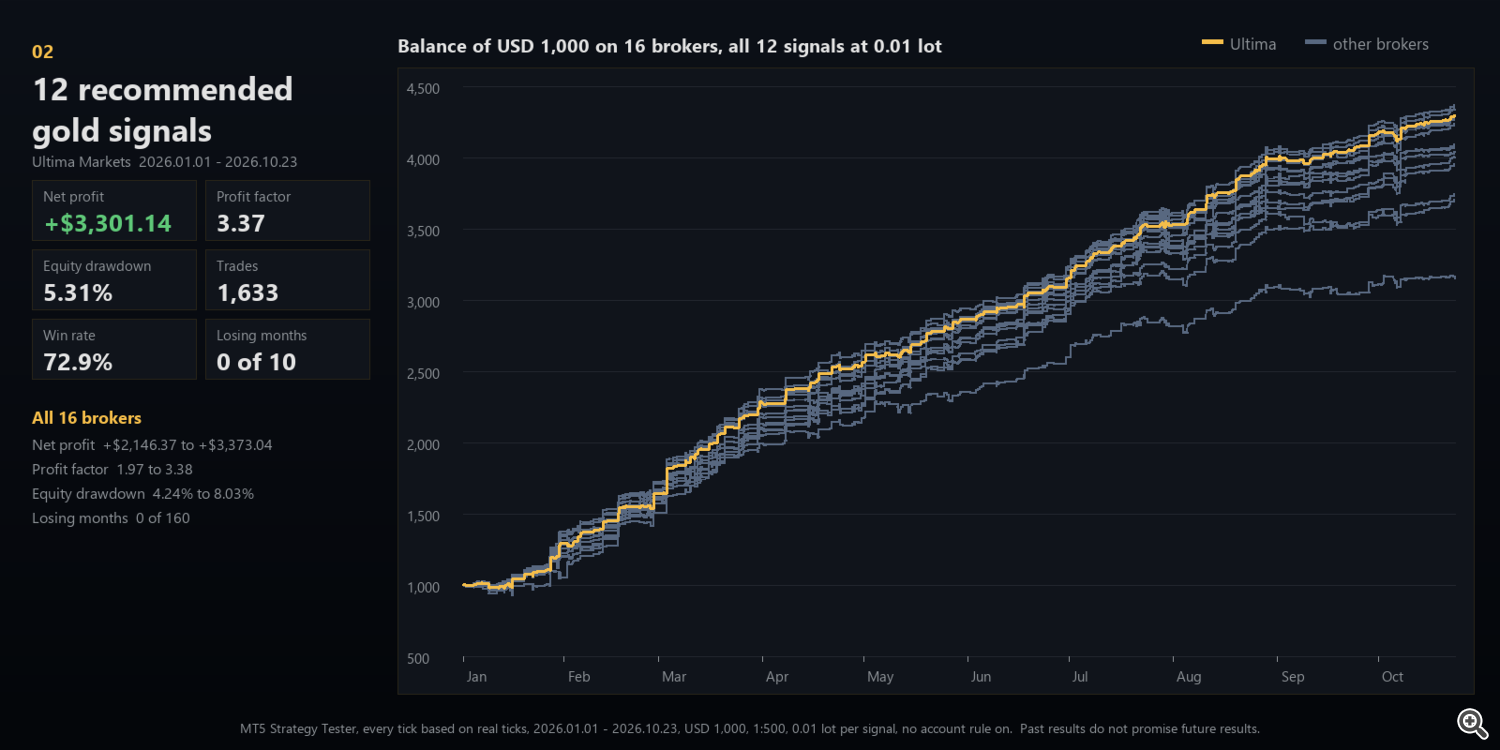
The 12 recommended gold signals: real-tick backtests
Signal Studio includes 30 gold signals, built from the same blocks you build with. Twelve of them are recommended and ticked at the first start: ten breakouts of H1 swing levels that lock profit early and trail the stop, and two that enter at the market when the price reaches yesterday's high or low or an unbroken H1 swing. Together, at 0.01 lot each and with no account rule switched on, from 1 January to 23 October 2026 on the real ticks of 16 brokers:
| Broker | Symbol | Net profit | Profit factor | Equity drawdown | Trades | Win rate |
| STARTRADER | XAUUSD+ | +$3,373.04 | 3.38 | 5.61% | 1,633 | 74.0% |
| Fortune Prime | XAUUSD-E | +$3,348.46 | 3.36 | 4.53% | 1,632 | 73.7% |
| Ultima Markets | XAUUSD+ | +$3,301.14 | 3.37 | 5.31% | 1,633 | 72.9% |
| Vantage | XAUUSD+ | +$3,291.10 | 3.36 | 5.34% | 1,634 | 72.9% |
| DBG Markets | XAUUSD.G | +$3,288.21 | 3.10 | 5.94% | 1,647 | 73.3% |
| Axi | XAUUSD.p | +$3,279.02 | 3.26 | 4.91% | 1,618 | 73.1% |
| VT Markets | XAUUSD-STD | +$3,239.39 | 3.25 | 5.88% | 1,638 | 73.1% |
| XM | GOLD.i# | +$3,092.86 | 2.92 | 4.24% | 1,639 | 71.2% |
| GTC Global | XAUUSD | +$3,077.78 | 2.88 | 5.12% | 1,634 | 71.4% |
| FXTM | XAUUSD | +$3,042.74 | 2.95 | 5.93% | 1,649 | 71.8% |
| FP Markets | XAUUSD.r | +$3,012.35 | 2.88 | 4.49% | 1,639 | 72.7% |
| Tickmill | XAUUSD | +$2,959.78 | 2.78 | 4.85% | 1,629 | 72.1% |
| Exness | XAUUSD | +$2,843.91 | 3.06 | 5.24% | 1,537 | 71.4% |
| ACY Securities | XAUUSDzero | +$2,746.14 | 2.45 | 4.96% | 1,625 | 71.1% |
| IC Markets | XAUUSD | +$2,707.92 | 2.60 | 5.49% | 1,637 | 71.3% |
| RoboForex | XAUUSD | +$2,146.37 | 1.97 | 8.03% | 1,661 | 67.8% |
Every tick based on real ticks of each broker, $1,000 deposit, leverage 1:500, M15 chart, 0.01 lot per signal. Equity drawdown is the largest relative drop of equity, open trades included.
Each signal has its own magic number, statistics and switch, so you can keep all twelve, run a few, change any of them or add your own. The set was chosen on 2026 data, so the table shows how its rules traded on the prices they were picked on, and that they trade the same way on brokers with different spreads, symbols and server clocks. Read it as a picture of the rules, not as a forecast.
Check it yourself: download the free demo and run it in the Strategy Tester on a gold M15 chart. With no signal switched on yet, the EA tests exactly these 12 signals. No set file, no inputs to fill.
Follow it on a real account
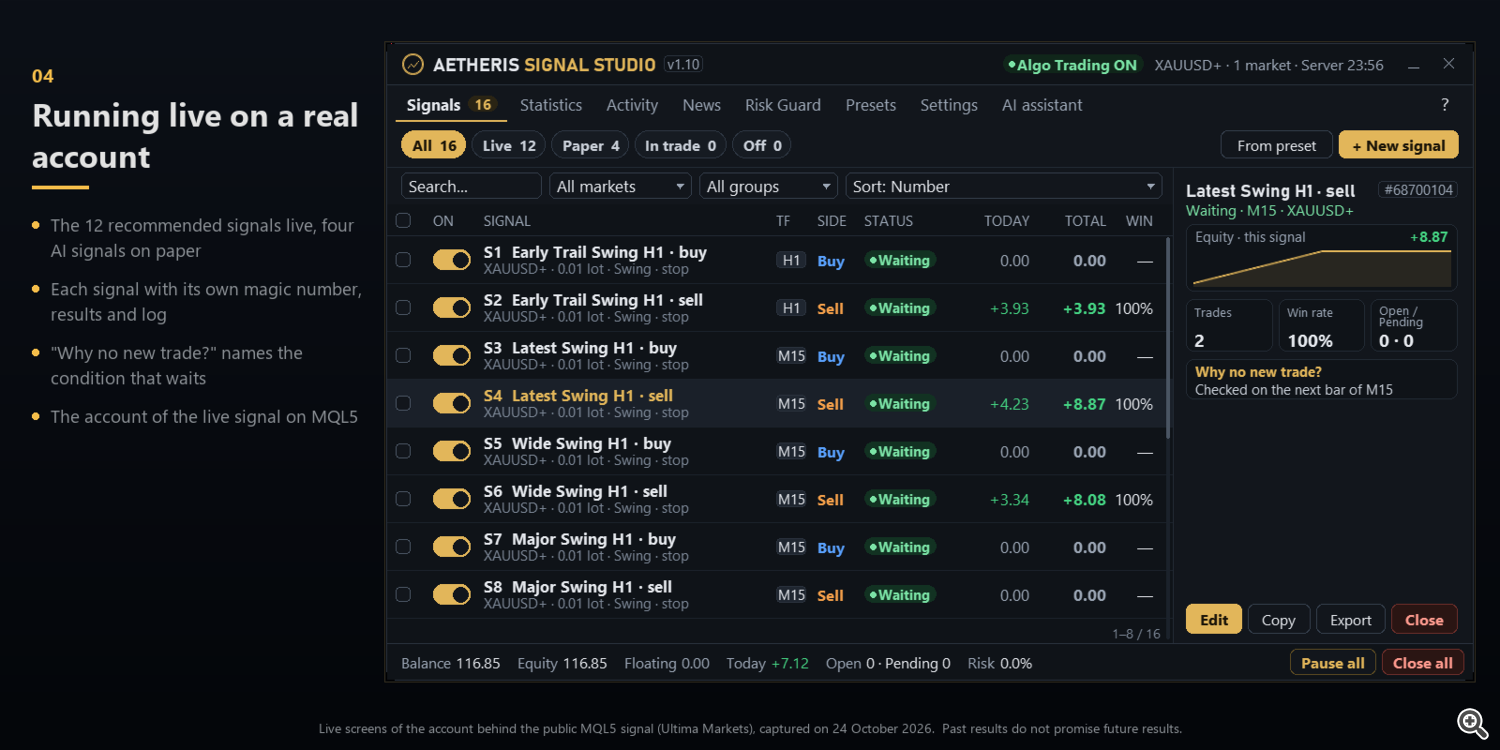
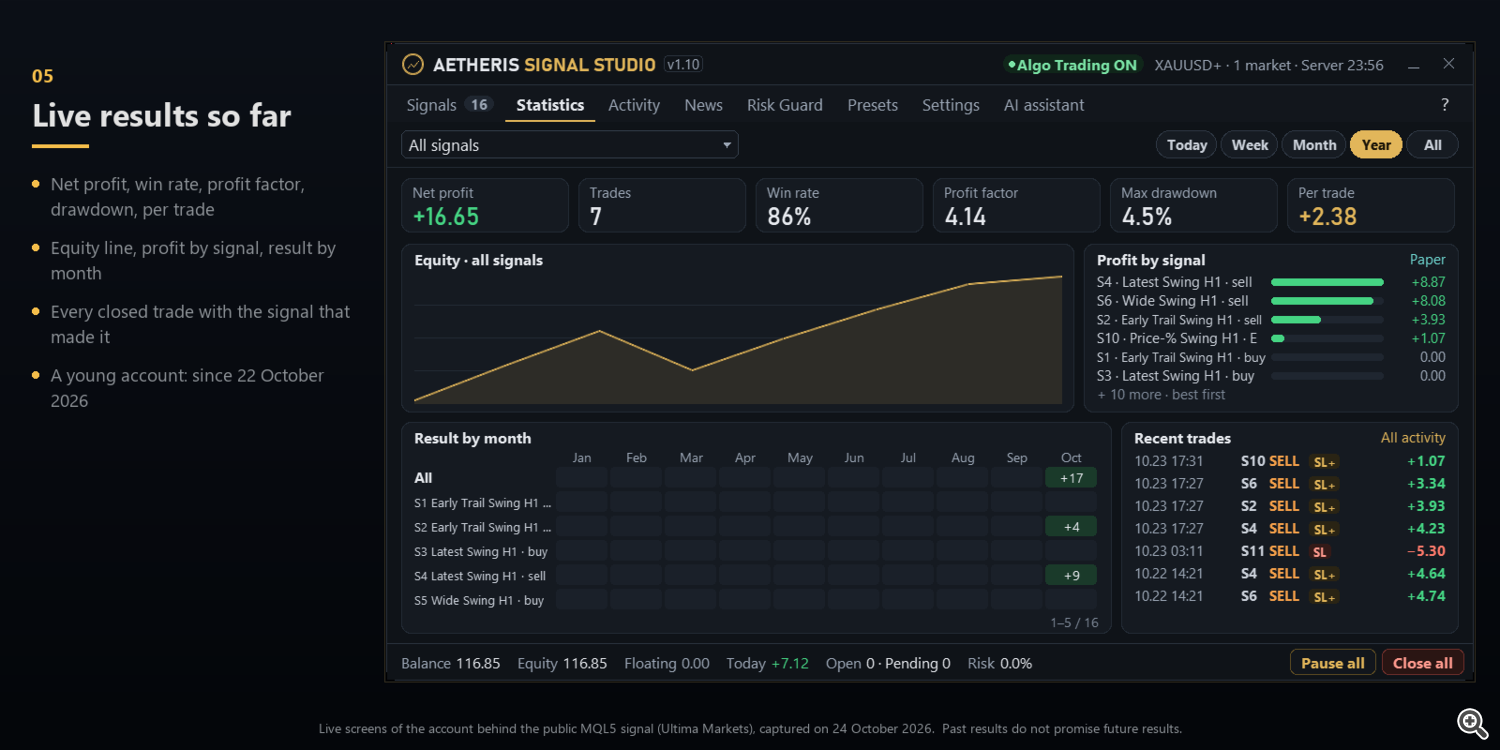
The same signals trade a real Ultima Markets account, published as an MQL5 signal: Ultima Aetheris Signal Studio. The account is young, so read it as a check that the panel trades as it was tested, not as a track record.
New in 1.10: AI tools with your own key
Connect Signal Studio to the AI model you already pay for: OpenAI, Anthropic Claude, Google Gemini, OpenRouter, DeepSeek, Groq, xAI, a local Ollama or any OpenAI-compatible link. Your key is stored encrypted on your computer and the EA talks to the provider directly. Three tools, all optional:
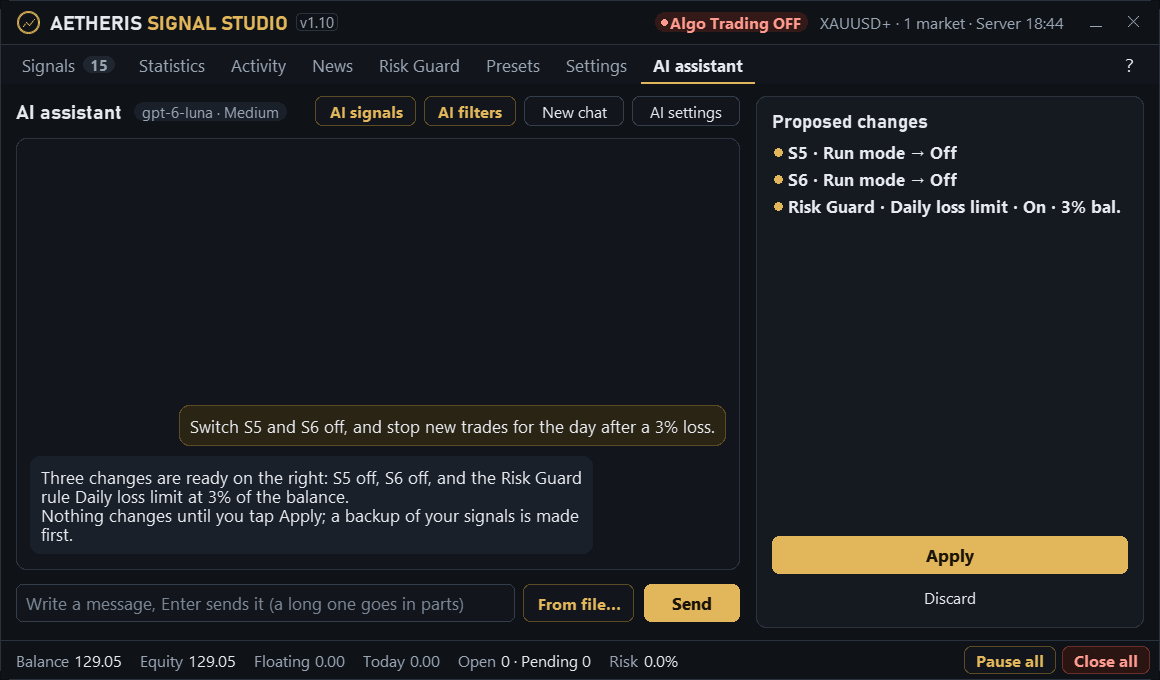
AI assistant: a chat inside the panel that knows your account. Ask why a signal is not trading, how your signals did this month or whether your risk is too high, and it answers with your real figures. Describe a strategy in plain words and it drafts the signal for you to check in the editor. Changes it proposes (run modes, settings, Risk Guard rules) are listed first and wait for your Apply, with a backup made before. It never opens, closes or changes a trade.
AI filters: a rule in your own words, such as "no gold buys in the hour before US CPI" or "hold back sells while gold is above yesterday's high", checked by the model before the signals you choose enter. Each answer gives a probability for buys and sells; above 70% that side waits until the time it names. A filter can only hold back new entries. It starts in Advise only, so you first see what it would have blocked and how those trades ended. With plan and memory it plans each morning, watches its levels for free between checks and keeps the lessons it learned.

AI signals: a trader you describe in your own words. The EA measures the facts (levels, news, volatility, how the presets did) and the model writes a ticket: entry, stop and targets. The EA places and manages it like any signal, inside limits you set, and refuses any ticket that breaks them. Each AI signal has its own row, magic number and statistics, starts on paper and can go live only after 30 paper trades with a positive average.

You pay the AI provider for what you use; the panel shows the tokens of every call and a daily cap. The AI tools need the internet, so they do not run in the Strategy Tester, and AI decisions have no track record yet: try them on paper first. Without them every signal runs as before.
What the AI tools never do
- The assistant never opens, closes or changes a trade: it proposes, and nothing changes until you tap Apply.
- An AI filter can only hold back new entries of the signals you choose; it never closes a trade.
- An AI signal starts on paper and can go live only after 30 paper trades with a positive average.
- No AI session runs while the market is closed, and AI tickets never double or trade against your own signals.
Getting started
- Attach the EA to a gold chart of a hedging account and enable Algo Trading.
- The four-step setup asks for the language and the risk (0.01 lot per 2,000, 1,000 or 500 of balance) and ticks the 12 recommended signals.
- Start on paper or paused. Check each signal's trade preview and the Risk Guard, then switch the signals you want to Live.
- Optional: allow the web addresses below for the Forex Factory calendar and the AI tools.
Allowing WebRequest for news and AI
MetaTrader 5 lets an EA reach only the web addresses you allow. Signal Studio trades without any of them; they are needed only for the Forex Factory calendar and the AI tools. Once per terminal:
- In MetaTrader 5 open Tools, Options (Ctrl+O), tab Expert Advisors.
- Tick "Allow WebRequest for listed URL".
- Click "add new URL", type the address and press Enter. Repeat for each address you need, then click OK.
- In the panel, AI settings shows the address of the provider you picked under "Allow the address once"; the News tab says whether Forex Factory is in use.
| Used for | Address to add |
| News calendar (Forex Factory) | https://nfs.faireconomy.media |
| OpenAI | https://api.openai.com |
| Anthropic Claude | https://api.anthropic.com |
| Google Gemini | https://generativelanguage.googleapis.com |
| OpenRouter | https://openrouter.ai |
| DeepSeek | https://api.deepseek.com |
| Groq | https://api.groq.com |
| xAI | https://api.x.ai |
| Ollama on this computer | http://127.0.0.1:11434 |
Add only the provider you use. Without the news address the EA uses the broker's MT5 calendar.
Important
- Backtests and a young live signal show how the rules behaved; they do not promise future results. Trading gold with leverage can lose money.
- The Risk Guard starts switched off, so the signals trade as they were tested: turn on the limits you want. Run new signals, and every AI signal, on paper first.
Signal Studio is available on the MQL5 Market at the launch price of $99. https://www.mql5.com/en/market/product/202792