LongRunner – complete guide: daily index long, every setting, set files, backtests

LongRunner is a daily index long Expert Advisor for MetaTrader 5. It buys a stock index once a day and sells it again before the broker's daily rollover. This post explains how it trades, what every input does, how to set it up on your broker and what the set files contain. Product page: https://www.mql5.com/en/market/product/198979
Live account (my own, same strategy, since Feb 2026)*: https://www.mql5.com/en/signals/2372831
1. How LongRunner trades
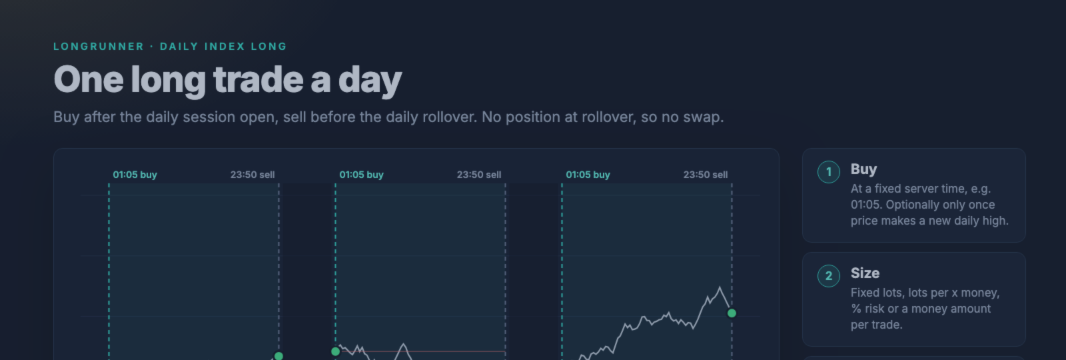
Stock indices have risen over the long run, but holding them as a CFD costs financing (swap) at every rollover. LongRunner takes the daily move and leaves that cost out:
- Buy at a fixed server time, for example 01:05 on the US indices. Optionally only once price makes a new high of the day.
- Size the position: fixed lots, lots per x money, % of the balance or a fixed money amount.
- Protect it if you like: stop loss, take profit, break-even and trailing stop, in % of the entry price or in points.
- Sell at a fixed time, for example 23:50. Flat at the rollover, a new trade the next day.
One trade per day and symbol. Long only. No grid, no martingale, no averaging, no position held over the rollover (unless you switch the close time off).
2. Markets and set files
Three set files, all attached to this post:
| Set file | Index | Buy (server time) | Sell (server time) | Position value | Trend filter | Magic |
|---|---|---|---|---|---|---|
| LongRunner_NAS100_v2.0.set | Nasdaq-100 | 01:05 | 23:50 | 0.5 × balance | SMA 200, D1 | 20260521 |
| LongRunner_US30_v2.0.set | Dow Jones | 01:05 | 23:50 | 0.7 × balance | SMA 200, D1 | 20260520 |
| LongRunner_DE40_v2.0.set | DAX | 09:05 | 22:55 | 0.1 × balance (test size) | SMA 200, D1 | 20260519 |
- No stop loss, no take profit, no break-even, no trailing stop in any set.
- DE40 is included at test size only. Confirm it on your own broker data before you raise the size.
- No S&P 500 set. It showed no edge after costs in our MT5 tests.
- Symbol names: a set file belongs to the market, not to the name. Use the NAS100 set on NAS100, USTEC or US100, the US30 set on US30, DJ30 or WS30, and the DE40 set on DE40, GER40 or DAX40.
- Every set has its own magic number, so the charts can run side by side.
- Several indices on one account: the US indices move together, so several index charts on one account add up their risk almost one to one. The set values (0.5–0.7 × balance per index) are meant for one index per account. Reduce them when you run several.
3. Installation
- In MT5 open File → Open Data Folder and copy the .set files to MQL5/Presets/. A product from the MQL5 Market appears in the Navigator under Expert Advisors → Market.
- In the Navigator right-click Expert Advisors and choose Refresh.
- Open a chart of the index. Any timeframe works; M15 or H1 is easy to watch.
- Drag LongRunner onto the chart. Tab Common: tick Allow Algo Trading. Tab Inputs: Load the matching set file, then OK.
- Switch on Algo Trading in the toolbar.
- Check the Experts log. On start LongRunner prints the settings, the lot size the next entry would use, the position value as a multiple of the balance and what a 10 % index drop would cost. A wrong set file shows up at once. It also warns if the start or close time lies outside the symbol's trading session.
- Keep the terminal online on trading days. A VPS is recommended. After a restart LongRunner checks open positions and today's deals and knows whether today's trade was already made.
4. All settings explained
The inputs are in seven groups: General, Time, Trailing Stop, Trading Days, Trend Filter, More and Dashboard. Values that need a unit state it on the line. The defaults below are the values in the EA itself; the set files change some of them.
General Settings
- Wait for a new daily high (default: off). From the start time on, LongRunner buys only once price is above every price of the day so far. No new high before the latest entry time means no trade that day. Not used in the set files.
- Trading volume (default: fixed lots per x money). Four modes: fixed lots, fixed lots per x money, % of balance, money amount. The set files use % of balance.
- Fixed lots (default: 0.01). The lot size in fixed mode, and the lot per step in per-x-money mode.
- Per x money (default: 1000). Step size for per-x-money mode: 0.01 lot per 1,000 of balance.
- Risk % of balance (default: 1). With a stop loss this is the share of the balance lost at the stop. Without a stop loss it sets the position value: 50 means a position worth half of the balance. The set files use 50, 70 and 10.
- Risk money (default: 100). The same as a fixed amount. Without a stop loss it is the position value.
- Max position value (default: 0 = off). Optional cap for all LongRunner positions on the symbol, as a multiple of the balance. Useful when the close time is off and positions add up.
- Take profit / TP value (default: off, 0). Off, % of the entry price or points.
- Stop loss / SL value (default: off, 0). Off, % of the entry price or points.
Time Settings
- Trading start – hour / minute (default: 01:05). The entry time in server time.
- Latest entry – hour / minute (default: 00:00 = the close time). Until when the entry may still happen: new-high wait, spread wait and retries.
- Close positions at the close time (default: on). On: every position is closed at the close time. Off: positions stay open until TP or SL, and a new one is added every trading day.
- Position close – hour / minute (default: 23:50).
- Friday: close even if close is off (default: off). With the close time off, this closes on Friday at the close time, so you are flat over the weekend.
Trailing Stop Settings
All off by default, all in % of the entry price or in points.
- Break-even stop, BE trigger, BE lock-in. Once the profit reaches the trigger, the stop moves to entry plus the lock-in.
- Trailing stop, TSL trigger, TSL distance, TSL step. Once the profit reaches the trigger, the stop follows price at the distance, in steps of at least the step size.
Stops always respect the broker's minimum distance and freeze level.
Trading Day Settings
Monday to Sunday individually. Default and set files: Monday to Friday on, Saturday and Sunday off.
Trend Filter Settings
- Trend filter (default: off). Off trades every enabled day. Only when the close is above the MA: the last closed bar of the trend timeframe must close above its moving average, otherwise there is no trade that day. All set files switch it on.
- Trend timeframe (default: D1).
- Moving average period (default: 200).
- Moving average method (default: SMA).
Section 6 explains why the set files use it.
More Settings
- Order comment (default: LongRunner).
- Magic number (default: 20260516). Use one per chart. The set files have their own.
- Max spread at entry (default: 0 = off, in points). If the spread is wider, LongRunner waits for it to come down until the latest entry time instead of skipping at once.
- Max slippage (default: 30 points).
- Draw day levels on the chart (default: on). Start time, close time and the high to beat.
Dashboard Settings
- Show dashboard (default: on), header label (default: empty, for example "US30 daily").
- Theme (default: Midnight; also Graphite and Daylight), size (default: full; compact shows status and today only), corner (default: top left), distance from side / from top or bottom (default: 10 / 22 px).
The dashboard shows the status (before start, waiting for a new high, in trade, done, or skipped with the reason), the session timeline with a countdown, the next entry with lot size and position value, the open position, today's result and the track record. It only reads the EA state; it never sends or changes an order.
5. Server time
The set files assume a server time of UTC+2 in winter and UTC+3 in summer, the usual "New York close = midnight" server. On such a server the US set trades 01:05–23:50, which is 18:05–16:50 New York time.
If your broker uses a different server time:
- Find the difference to UTC+2 / UTC+3. The Market Watch clock shows the server time.
- Shift the trading start and the close time by that difference. For example, one hour behind means start 00:05 and close 22:50.
- Keep the close before the broker's daily rollover, otherwise you pay the swap the EA is built to avoid.
- Restart the EA and read the start log. LongRunner warns if the start or close time lies outside the symbol's trading session.
6. Position size and trend filter
Position size. Without a stop loss, "Risk %" sets the position value: lot size = position value / value of one lot. A 10 % index drop then costs 10 % of the position value, and the start log prints that amount for your account.
The lot size respects the broker's minimum and maximum lot, the symbol volume limit and the free margin, so an order is reduced rather than rejected, and the log says why. If the calculated size falls below the broker minimum, fixed and per-x-money mode trade the minimum lot, while % and money mode skip the day, because a larger trade would break the risk you set.
% sizing uses the balance of the whole account. If other EAs on the same account grow the balance, LongRunner's lot size grows with it.
Trend filter. Buying every day also means buying through long bear markets. With the trend filter on, LongRunner only buys while the last daily close is above its moving average. In our 26-year test on the Nasdaq-100 this cut the maximum drawdown from 56 % to 16 %, because the filter sat out most of 2000–2002 and 2008.
It is insurance, not a return booster. On the Dow it also cut the drawdown, but made less money than trading every day, and after a V-shaped crash it buys back late. All set files use it.
7. Backtests
MetaTrader 5 Strategy Tester, "Every tick based on real ticks", demo accounts at two brokers, 10,000 USD, start 01:05, close 23:50, no stop loss:
| Market, broker, period | Settings | Trades | Profit factor | Net | Max. drawdown |
|---|---|---|---|---|---|
| Nasdaq-100, RoboForex, Dec 2017 – Jul 2026 | trend filter, 0.5 × | 1,645 | 1.10 | +38.8 % | 15.7 % |
| Nasdaq-100, RoboForex, Dec 2017 – Jul 2026 | every day, 0.67 × | 2,271 | 1.05 | +41.0 % | 31.0 % |
| Dow Jones, BlackBull, Aug 2020 – Sep 2026 | every day, 0.67 × | – | 1.12 | +36.7 % | 13.3 % |
| Dow Jones, BlackBull, Aug 2020 – Sep 2026 | trend filter, 0.7 × | – | 1.03 | +4.7 % | 8.0 % |
| Dow Jones, RoboForex, Dec 2017 – Jul 2026 | every day, 0.5 × | – | 0.97 | −11.5 % | 30.0 % |
| S&P 500, RoboForex, Dec 2017 – Jul 2026 | every day, 0.5 × | – | 1.00 | −0.8 % | – |
A dash means the figure is not stated in this summary.
The same Dow trade was profitable at one broker and lost at another. Spread is the main cost of a daily trade and decides whether the edge survives. The S&P 500 has no set file for this reason.
Long-term check, Nasdaq-100, Sep 2000 – Sep 2026: Python simulation on daily futures data, trade 01:05–23:50 server time (18:05–16:50 New York), position value 0.5 × balance, compounding. Costs: today's spread as a share of the price (about 0.007 % per trade on the Nasdaq-100), applied to every year.
| Variant | Growth | Per year | Max. drawdown | Trades | Profit factor |
|---|---|---|---|---|---|
| Trend filter on (SMA 200) | +158 % | about 3.7 % | 16 % | 4,774 | 1.11 |
| Every day | +139 % | about 3.4 % | 56 % | 6,548 | 1.06 |
Same method, Dow Jones 2002–2026, with / without the filter: maximum drawdown 11 % / 32 %, growth +57 % / +152 %.
The 26-year figures are a simulation, not the MT5 Strategy Tester: no slippage modelled, drawdown measured on daily closing equity, futures are not CFDs. Your broker's prices, spreads and session times differ. Please run the set file in your own Strategy Tester with "Every tick based on real ticks" on your broker's data.
8. Broker and account
- Tight index spreads at the start and close time. Both trades happen at a fixed minute, so the spread at that minute is paid every day. Set "Max spread at entry" to a value that fits your broker.
- Hedging account recommended. On a netting account LongRunner shares one position per symbol with every other EA. It then skips the day instead of buying into someone else's position.
- Server time UTC+2 / UTC+3 matches the set files without shifting. Otherwise see section 5.
- Test every symbol in the Strategy Tester with your broker's data, and on a demo account, before trading live.
9. Live account
Live account (my own, same strategy, since Feb 2026)*: https://www.mql5.com/en/signals/2372831
* My own live account since February 2026. It trades the same daily index long strategy with a different EA build, together with a session range breakout and Turnaround Tuesday on one account. Its result mixes all three strategies and is not a track record of LongRunner's code.
10. Risk warning
Trading CFDs on margin carries a high risk of loss. A position without a stop loss can lose much more than a normal daily move on a crash day: the worst test day was −10.9 % on the Nasdaq-100 (15 Oct 2008), about −5.5 % of the balance at 0.5 ×. The set sizes were chosen on this same history (about 20 % drawdown); future crashes can be deeper. Backtests and simulations are not a guarantee of future results. The set files are examples, not recommendations. Test on a demo account first.
11. Support
Post questions and bug reports in the product comments or send a private message. Please include your broker, the symbol, the .set file and the Experts log lines from the day in question.




