PropSizer setup guide: the free lot calculator with session candle counter and news line

PropSizer is the lot calculator I have on every chart myself, published free and unchanged in what it does. You move two lines, ENTRY and STOP LOSS, and one text line tells you the broker-normalised lot size for your risk, the money on the line and the stop distance in points. No typing, no separate window, no order placement. A session candle counter and a news line ride along because I never trade without them. This guide walks through the setup in the order you will meet it.
| You get | The lot size for your risk on every chart, candles numbered from the cash open, the next news release, the spread as a share of your stop, and the PropGuardian lock state. |
| Time | About five minutes. |
| You need | MetaTrader 5 and PropSizer (free). PropGuardian is optional. |
Step 1: Attach it
Drop PropSizer on the chart of the symbol you want to trade. Two lines appear: a blue ENTRY line at the current price and a red STOP LOSS line one ATR below. The info text sits in the top-left corner and moves below the one-click trading panel automatically if that panel is visible (Alt+T).
The first line reads, for example:
LONG | 109 pts | risk 124.76 EUR (EQ 0.25%) | Lots: 11.4
Direction comes from the lines: stop below entry = LONG, stop above entry = SHORT. Drag either line and the text updates; press R to put both lines back at the market.
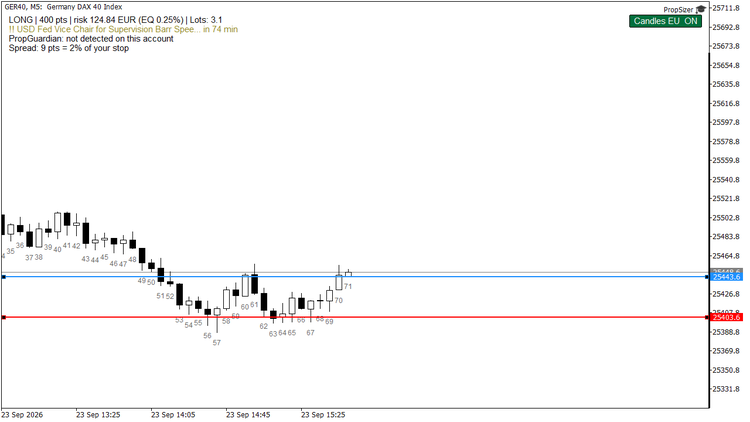
Planned long on GER40: entry and stop dragged into place, 400 points, 0.25 percent of equity, 3.1 lots.
Step 2: Set your risk once
| Input | Default | Meaning |
|---|---|---|
| Risk per trade (%) | 0.25 | percent of equity (or balance, see next row) |
| Fixed risk in account currency | 0 | overrides the percentage when > 0 |
| Base: equity or balance | equity | equity includes floating P/L, the number your prop firm's daily rule looks at |
| Commission per 1.0 lot round-trip | 0 | enter what your broker charges; the risk is then calculated net of fees |
Lots are rounded down to the symbol's volume step, never up. If even the minimum lot risks more than you allow, the line says SKIP and shows what the minimum lot would really risk; it never silently sizes you up. That is deliberate: a calculator that shows "0.25%" while the minimum lot risks 0.6% is lying to you.
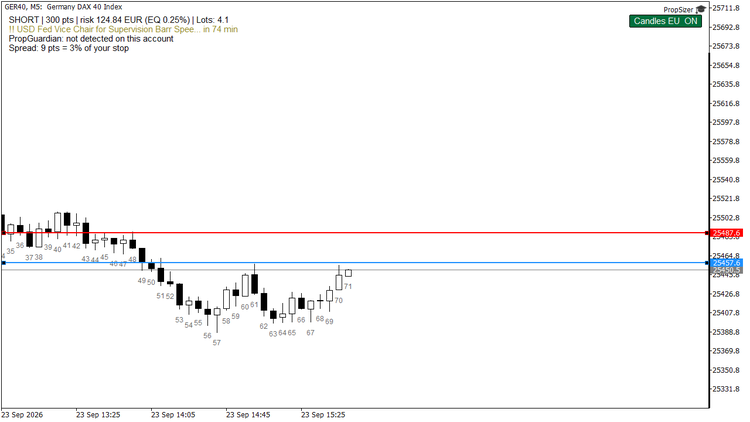
Stop moved above the entry: the direction flips to short and the size follows.
Step 3: The session candle counter
If your playbook says "the 2nd 15-minute candle" or "the 7th 5-minute candle", you stop counting by hand: every candle from the cash-session open is numbered 1, 2, 3 ... for each visible day, on the timeframe you are looking at.
- Session detection by symbol. EU indices (DAX, FTSE, CAC, Euro Stoxx, IBEX, SMI ...) count from 09:00 Frankfurt, US indices (US30, NAS100, US500, US2000) from 09:30 New York, both with automatic daylight saving time, converted to your broker's server time. That conversion is what most counters get wrong twice a year.
- Unknown symbol? The button shows "?" and EU is assumed; or set the open manually in server time (Count candles from = Manual).
- One chart button (top right: Candles EU ON / US ON / MAN ON) toggles the counter. Labels are drawn for the visible range only, so scrolling stays smooth even with a 400-label guard.
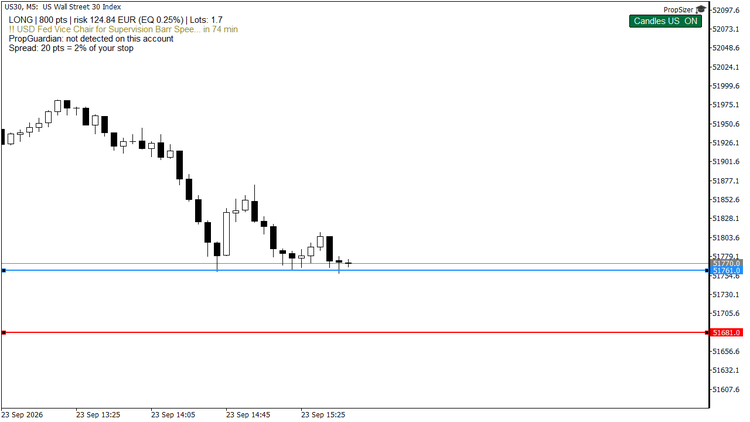
US30: the counter switches to the 09:30 New York open by itself; before the cash open there is nothing to count yet.
Step 4: The news line
The second text line shows the next event from MetaTrader's built-in economic calendar for the currencies you list (default USD, EUR, GBP) inside your look-ahead window (default 90 minutes), filtered by importance (1 = low, 2 = moderate, 3 = high; default 2). The line turns orange, then red, as the release gets close. At start, the next 24 hours of moderate and high events are written to the journal, so one glance tells you whether the calendar is loaded at all.
Step 5: PropGuardian integration
If PropGuardian runs on the same account, PropSizer reads its state and shows it in the third line: PropGuardian: PROTECTING or DAY LOCKED. When the day is locked, the lot line shows 0 lots in red: any new trade would be closed anyway, so there is no size to show. Without PropGuardian the line says "not detected on this account" and everything else works as usual. Turn the check off with Read PropGuardian lock state = false.
Step 6: The spread line
The fourth line puts the spread next to your stop, for example Spread: 12 pts = 3% of your stop . It turns orange at half your warning level and red at the level itself, with the note too tight for this spread. A stop that is only a few spreads wide pays a large part of its risk just to get in and out, and this line shows that before you click, on this symbol at this time of day.
Input Warn (red) when spread >= this % of the stop distance, default 20. Set it to 0 to hide the line.
Step 7: Colours, position, persistence
Text colour is picked automatically for light and dark charts (or fixed via Text colour automatic = false). Line colours, line width, font size, text position and the button geometry are inputs. Lines and the counter state survive timeframe changes; the values are stored per symbol, so switching M5 -> M15 keeps your planned entry and stop.
Limits
- It is a calculator, not a trade panel: no order placement, ever.
- The economic calendar is not available in the strategy tester (a MetaTrader limitation), and the news line says so there. In the tester the broker's GMT offset is unknown as well, so session anchors are treated as UTC; on a live chart everything is derived from the terminal.
- Tick value comes from your broker's symbol specification. If a broker reports zero, the panel shows n/a instead of guessing.
- Session detection covers the common index CFD names; exotic symbols use the manual open time.
Questions, or a symbol that is not recognised: ask in the Comments section of the product; every question gets an answer.
Get it: PropSizer on the Market (free) · reads the lock of PropGuardian
More guides: my blog · Tools for prop firm accounts: all my products