Why Your Expert Advisor Fails Market Validation - and a Drop-in Guard Layer That Fixes It

Introduction
You finish an Expert Advisor, it runs cleanly in the Strategy Tester, you upload it to the Market - and the automatic validation rejects it. The report says something like "not enough money", "invalid volume", "invalid stops", "market closed", or a close request was refused because the position was too close to the market. You never saw any of these errors on your own account.
The reason is simple: the validator does not run your EA in your environment. It runs it on several symbols and timeframes, with different deposits, contract sizes, digit counts, stop levels and session schedules. Every assumption your code makes about "a normal broker" gets tested - and the one that breaks fails the whole product.
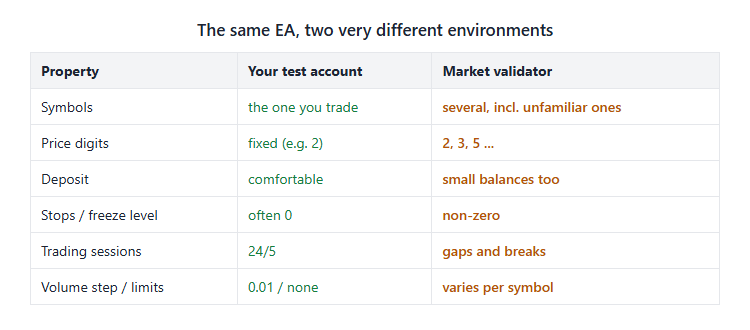
Figure 1. The environment you test in versus the environment the validator uses
Point A of this article is that seller: a working strategy and a red validation report. Point B is a single include file of guards that every trade action passes through, so the strategy code never talks to the trade server unprotected. I built this layer while publishing more than twenty Expert Advisors in the Market; once it was in place, new products passed validation on the first upload. Below I go through each guard, the failure it prevents, and the exact code.
The layer is strategy-agnostic. Your EA only has to call three functions: EntryGate() before deciding to trade, OpenTrade() to enter, and CloseMine() / MoveSL() / SetTP() to manage positions.
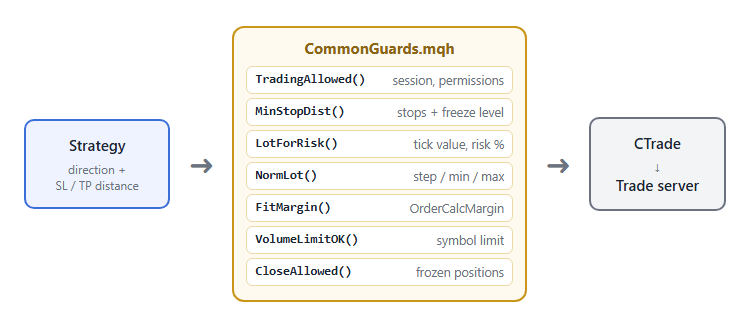
Figure 2. The strategy never calls CTrade directly - every request passes the guard layer first
1. Price scale: one "point" is not the same on every symbol
The first silent bug is not an error at all. A spread filter of "50 points" means 0.50 USD on a 2-digit gold quote and 0.050 USD on a 3-digit one. The same is true for slippage, trailing distances and every other input you express in points. On the validator's symbols your filters suddenly become ten times tighter - so the EA never trades, and a product that never opens a trade is also a validation problem.
Normalize all user inputs to one scale:
// Point adjusted for 3/5-digit quotes (2-digit gold scale: 100 points = 1.00 USD)
double AdjPoint() { return((_Digits == 3 || _Digits == 5) ? _Point * 10.0 : _Point); }

bool SpreadOK()
{
   if(InpMaxSpreadPts <= 0) return(true);
   double sp = SymbolInfoDouble(_Symbol, SYMBOL_ASK) - SymbolInfoDouble(_Symbol, SYMBOL_BID);
   return(sp <= InpMaxSpreadPts * AdjPoint());
}
Use AdjPoint() for anything the user types in, and the raw _Point only for broker-defined values such as stop and freeze levels, which are always given in the symbol's own points.
2. Volume: step, minimum, maximum and the symbol limit
"Invalid volume" almost always comes from a lot that is not a multiple of SYMBOL_VOLUME_STEP, or is outside the minimum/maximum. A risk-based calculation produces values such as 0.0734, which no server will accept.
double NormLot(double v)
{
   double st = SymbolInfoDouble(_Symbol, SYMBOL_VOLUME_STEP);
   double mn = SymbolInfoDouble(_Symbol, SYMBOL_VOLUME_MIN);
   double mx = SymbolInfoDouble(_Symbol, SYMBOL_VOLUME_MAX);
   if(st <= 0) st = 0.01;
   if(InpMaxLot > 0) mx = MathMin(mx, InpMaxLot);
   v = MathFloor(v / st + 1e-9) * st;               // round DOWN to the step
   if(v > mx) v = MathFloor(mx / st + 1e-9) * st;
   if(v < mn - 1e-9) return(0.0);                    // 0 = "do not trade"
   return(NormalizeDouble(v, LotDigits()));
}
Two details matter. Round down, never to the nearest step - rounding up can push the trade over the user's risk. And return 0 instead of silently forcing the minimum lot; the caller decides what to do.
Risk-based sizing then becomes:
double LossPerLot(double slDist)
{
   double tv = SymbolInfoDouble(_Symbol, SYMBOL_TRADE_TICK_VALUE_LOSS);
   if(tv <= 0) tv = SymbolInfoDouble(_Symbol, SYMBOL_TRADE_TICK_VALUE);
   double ts = SymbolInfoDouble(_Symbol, SYMBOL_TRADE_TICK_SIZE);
   if(tv <= 0 || ts <= 0 || slDist <= 0) return(0.0);
   return(slDist / ts * tv);
}

double LotForRisk(double slDist)
{
   if(InpFixedLot > 0) return(NormLot(InpFixedLot));
   double lpl = LossPerLot(slDist);
   if(lpl <= 0) return(0.0);
   double riskMoney = AccountInfoDouble(ACCOUNT_EQUITY) * InpRiskPercent / 100.0;
   double lot = NormLot(riskMoney / lpl);
   if(lot == 0.0)   // minimum lot allowed only if it stays within 2x the chosen risk
   {
      double mn = SymbolInfoDouble(_Symbol, SYMBOL_VOLUME_MIN);
      if(mn * lpl <= riskMoney * 2.0) lot = NormLot(mn);
   }
   return(lot);
}
SYMBOL_TRADE_TICK_VALUE_LOSS is used first because, for cross-currency symbols, the tick value of a losing trade differs from the profit one.
Some symbols also define SYMBOL_VOLUME_LIMIT - the maximum total volume of open positions and orders in one direction. It is easy to forget and it is checked:
bool VolumeLimitOK(double lot)
{
   double lim = SymbolInfoDouble(_Symbol, SYMBOL_VOLUME_LIMIT);
   if(lim <= 0) return(true);
   double open = 0;
   for(int i = PositionsTotal() - 1; i >= 0; i--)
   {
      ulong tk = PositionGetTicket(i);
      if(tk != 0 && PositionGetString(POSITION_SYMBOL) == _Symbol) open += PositionGetDouble(POSITION_VOLUME);
   }
   return(open + lot <= lim + 1e-9);
}
3. Money: fit the lot to free margin before sending
"Not enough money" appears because the validator also tests small deposits. A correctly sized risk lot can still need more margin than the account has. Do not wait for the server to refuse - ask OrderCalcMargin() and shrink the lot step by step:
double FitMargin(ENUM_ORDER_TYPE type, double lot, double price)
{
   double st = SymbolInfoDouble(_Symbol, SYMBOL_VOLUME_STEP);
   double mn = SymbolInfoDouble(_Symbol, SYMBOL_VOLUME_MIN);
   if(st <= 0) st = 0.01;
   double free = AccountInfoDouble(ACCOUNT_MARGIN_FREE);
   int guard = 0;
   while(lot >= mn - 1e-9 && guard < 10000)
   {
      double m = 0.0;
      if(OrderCalcMargin(type, _Symbol, lot, price, m) && m >= 0.0 && m <= free * 0.5) return(lot);
      lot = NormalizeDouble(lot - st, LotDigits());
      guard++;
   }
   return(0.0);   // even the minimum lot does not fit: skip the trade
}
The 50% cap of free margin is deliberate: it leaves room for the position to move against you without an immediate stop-out. When the result is 0, the EA prints a clear message and skips the trade. A skipped trade with a log line passes validation; a rejected order does not.
4. Stops: respect both the stops level and the freeze level
"Invalid stops" means the SL or TP is closer to the price than the broker allows. Two values define that distance: SYMBOL_TRADE_STOPS_LEVEL (for placing) and SYMBOL_TRADE_FREEZE_LEVEL (for modifying or closing). Many EAs check neither, and the ones that do usually check only the first. Use the larger of the two, plus the current spread and a small safety margin:
double MinStopDist()
{
   long lvl = MathMax(SymbolInfoInteger(_Symbol, SYMBOL_TRADE_STOPS_LEVEL),
                      SymbolInfoInteger(_Symbol, SYMBOL_TRADE_FREEZE_LEVEL));
   double spread = SymbolInfoDouble(_Symbol, SYMBOL_ASK) - SymbolInfoDouble(_Symbol, SYMBOL_BID);
   return((double)(lvl + 5) * _Point + MathMax(spread, 0.0));
}
On entry, widen any SL/TP that is too tight rather than rejecting the trade:
double minD = MinStopDist();
slDist = MathMax(slDist, minD + 2 * _Point);
if(tpDist > 0) tpDist = MathMax(tpDist, minD + 2 * _Point);
Modifications need the same discipline, and one more rule: only move a stop in the profitable direction, and never modify a position whose current SL or TP is already inside the frozen zone - the server will refuse it.
bool MoveSL(ulong ticket, double newSL)
{
   if(!PositionSelectByTicket(ticket)) return(false);
   if(!IsMarketOpen()) return(false);
   long   type = PositionGetInteger(POSITION_TYPE);
   double sl   = PositionGetDouble(POSITION_SL), tp = PositionGetDouble(POSITION_TP);
   double bid  = SymbolInfoDouble(_Symbol, SYMBOL_BID), ask = SymbolInfoDouble(_Symbol, SYMBOL_ASK);
   double minD = MinStopDist();
   newSL = NormalizeDouble(newSL, _Digits);
   if(type == POSITION_TYPE_BUY)
   {
      if(newSL <= sl + _Point || newSL >= bid - minD) return(false);
      if(tp > 0 && tp - bid < minD) return(false);
   }
   else
   {
      if((sl > 0 && newSL >= sl - _Point) || newSL <= ask + minD) return(false);
      if(tp > 0 && ask - tp < minD) return(false);
   }
   return(trade.PositionModify(ticket, newSL, tp));
}
The sl + _Point comparison also stops the EA from sending the same modification on every tick, which the validator reports as excessive requests.
Take-profit changes follow the same pattern. The only differences are that a TP may be removed completely (a value of 0), and that the function ignores changes smaller than one adjusted point, so a trailing TP does not produce a request on every tick:
bool SetTP(ulong ticket, double newTP)
{
   if(!PositionSelectByTicket(ticket)) return(false);
   if(!IsMarketOpen()) return(false);
   long   type = PositionGetInteger(POSITION_TYPE);
   double sl   = PositionGetDouble(POSITION_SL), tp = PositionGetDouble(POSITION_TP);
   double bid  = SymbolInfoDouble(_Symbol, SYMBOL_BID), ask = SymbolInfoDouble(_Symbol, SYMBOL_ASK);
   double minD = MinStopDist();
   newTP = NormalizeDouble(newTP, _Digits);
   if(MathAbs(newTP - tp) < AdjPoint()) return(false);
   if(type == POSITION_TYPE_BUY)
   {
      if(newTP > 0 && newTP <= bid + minD) return(false);
      if(sl > 0 && bid - sl < minD) return(false);
   }
   else
   {
      if(newTP > 0 && newTP >= ask - minD) return(false);
      if(sl > 0 && sl - ask < minD) return(false);
   }
   return(trade.PositionModify(ticket, sl, newTP));
}
Both functions return false instead of forcing the request through. This is a deliberate design choice that runs through the whole layer: when the market does not allow an action, the right answer is to do nothing and try again on the next bar or tick. A refused request is counted against the product; a skipped one is not.
5. The case nobody warns you about: closing a position near its SL or TP
This is the one that cost me a failed upload. The EA closed positions on an opposite signal. It worked everywhere I tested it - but the validator rejected the version: a close request was refused because the position was too close to the market.
What happened: at the moment the opposite signal fired, the price was already within the freeze level of the position's own SL (or TP). In that state the server treats the position as frozen - it is about to be closed by the stop anyway - and refuses a manual close. The check for this is not in most templates, because on a normal account it happens rarely. The validator found it.
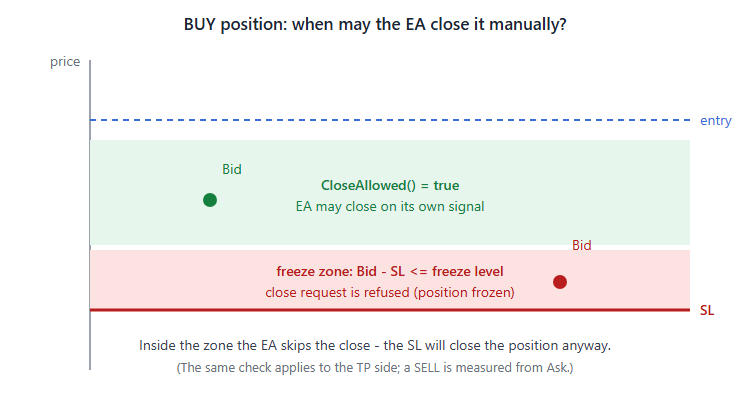
Figure 3. Inside the freeze zone the server refuses a manual close, so the EA must skip it
The fix is a guard called with the position selected, before every close:
// The broker refuses to close a position whose SL / TP sits inside the freeze (or stops) level
// of the current price - it is about to be closed by that SL / TP anyway.
bool CloseAllowed()
{
   long lvl = MathMax(SymbolInfoInteger(_Symbol, SYMBOL_TRADE_STOPS_LEVEL),
                      SymbolInfoInteger(_Symbol, SYMBOL_TRADE_FREEZE_LEVEL));
   double frz = (double)(lvl + 1) * _Point;
   double sl = PositionGetDouble(POSITION_SL), tp = PositionGetDouble(POSITION_TP);
   if(PositionGetInteger(POSITION_TYPE) == POSITION_TYPE_BUY)
   {
      double bid = SymbolInfoDouble(_Symbol, SYMBOL_BID);          // a buy closes at Bid
      if((tp > 0 && tp - bid <= frz) || (sl > 0 && bid - sl <= frz)) return(false);
   }
   else
   {
      double ask = SymbolInfoDouble(_Symbol, SYMBOL_ASK);          // a sell closes at Ask
      if((tp > 0 && ask - tp <= frz) || (sl > 0 && sl - ask <= frz)) return(false);
   }
   return(true);
}

void CloseMine(string why)
{
   if(!IsMarketOpen()) return;
   for(int i = PositionsTotal() - 1; i >= 0; i--)
      if(SelectMineAt(i))
      {
         if(!CloseAllowed()) continue;     // the SL/TP will close it - do not fight the server
         ulong tk = (ulong)PositionGetInteger(POSITION_TICKET);
         if(trade.PositionClose(tk))
            Print(EA_NAME, ": closed #", tk, " (", why, ")");
         else
            Print(EA_NAME, ": close failed #", tk, " code=", trade.ResultRetcode());
      }
}
Note the price used for each side: a buy is closed at Bid, a sell at Ask. Comparing a sell's stop with Bid is a classic off-by-spread bug that makes the guard useless exactly when the spread widens. Skipping the close costs nothing - the position will be closed by its own SL or TP within the freeze distance. The corrected version passed validation on the next upload, and every product built on the layer since then has passed the first time.
6. Time and permissions: is trading possible right now?
"Market closed" is the validator telling you the EA sent a request outside the symbol's trading session. Testing on a symbol with gaps in its schedule exposes this immediately. Check the session table before every request:
bool IsMarketOpen()
{
   MqlDateTime dt; TimeToStruct(TimeCurrent(), dt);
   long sec = (long)dt.hour * 3600 + (long)dt.min * 60 + (long)dt.sec;
   datetime from = 0, to = 0;
   bool any = false;
   for(uint i = 0; i < 16; i++)
   {
      if(!SymbolInfoSessionTrade(_Symbol, (ENUM_DAY_OF_WEEK)dt.day_of_week, i, from, to)) break;
      any = true;
      long f = (long)from % 86400, t = (long)to;
      if(t > 86400) t = t % 86400;
      if(t == 0 && (long)to > 0) t = 86400;
      if(f <= t) { if(sec >= f && sec < t) return(true); }
      else if(sec >= f || sec < t) return(true);
   }
   if(any) return(false);
   for(int d = 0; d < 7; d++)                       // no session table at all: do not block trading
      if(SymbolInfoSessionTrade(_Symbol, (ENUM_DAY_OF_WEEK)d, 0, from, to)) return(false);
   return(true);
}
The last loop handles a symbol with no session table at all: rather than block the EA forever, it allows trading.
Permissions and symbol trade mode come next. A symbol may be close-only, long-only or short-only, and the terminal, the program or the account may forbid automated trading:
bool TradingAllowed(int dir)
{
   if(!IsMarketOpen()) return(false);
   if(!TerminalInfoInteger(TERMINAL_TRADE_ALLOWED) && !MQLInfoInteger(MQL_TESTER)) return(false);
   if(!MQLInfoInteger(MQL_TRADE_ALLOWED)) return(false);
   if(!AccountInfoInteger(ACCOUNT_TRADE_ALLOWED) || !AccountInfoInteger(ACCOUNT_TRADE_EXPERT)) return(false);
   long mode = SymbolInfoInteger(_Symbol, SYMBOL_TRADE_MODE);
   if(mode == SYMBOL_TRADE_MODE_DISABLED || mode == SYMBOL_TRADE_MODE_CLOSEONLY) return(false);
   if(dir > 0 && mode == SYMBOL_TRADE_MODE_SHORTONLY) return(false);
   if(dir < 0 && mode == SYMBOL_TRADE_MODE_LONGONLY) return(false);
   return(true);
}
7. Netting accounts and other EAs on the same symbol
On a netting account a new "buy" from your EA can silently add to, reduce or reverse a position opened by someone else. Detect the margin mode once at start and refuse to enter while a foreign position exists on the symbol:
g_netting = ((ENUM_ACCOUNT_MARGIN_MODE)AccountInfoInteger(ACCOUNT_MARGIN_MODE)
             != ACCOUNT_MARGIN_MODE_RETAIL_HEDGING);
Combined with a magic number filter on every position loop, this keeps several copies of the EA (or several different EAs) from interfering with each other.
The magic number deserves one more remark. Make it an input, not a constant. A buyer who runs the same EA on two charts of the same symbol, for example with different timeframes, needs two different magic numbers, or each copy will treat the other copy's positions as its own. Every loop in the layer goes through one small selector, so the filter cannot be forgotten in one place:
bool SelectMineAt(int i)
{
   ulong tk = PositionGetTicket(i);
   if(tk == 0) return(false);
   if(PositionGetString(POSITION_SYMBOL) != _Symbol) return(false);
   return(PositionGetInteger(POSITION_MAGIC) == (long)InpMagic);
}
8. Putting it together: one entry point
Every guard above meets in a single function. The strategy only computes direction and SL/TP distances; it never calls CTrade directly.
bool OpenTrade(int dir, double slDist, double tpDist, string cmt)
{
   if(dir == 0 || slDist <= 0) return(false);
   if(!TradingAllowed(dir)) { g_status = "trading not allowed"; return(false); }

   MqlTick tk;
   if(!SymbolInfoTick(_Symbol, tk) || tk.ask <= 0 || tk.bid <= 0) return(false);
   double minD = MinStopDist();
   slDist = MathMax(slDist, minD + 2 * _Point);
   if(tpDist > 0) tpDist = MathMax(tpDist, minD + 2 * _Point);

   ENUM_ORDER_TYPE type = (dir > 0) ? ORDER_TYPE_BUY : ORDER_TYPE_SELL;
   double price = (dir > 0) ? tk.ask : tk.bid;

   double lot = LotForRisk(slDist);
   if(lot <= 0) { Print(EA_NAME, ": lot too small for the chosen risk, trade skipped"); return(false); }
   lot = FitMargin(type, lot, price);
   if(lot <= 0) { Print(EA_NAME, ": not enough free margin, trade skipped"); return(false); }
   if(!VolumeLimitOK(lot)) { Print(EA_NAME, ": symbol volume limit reached, trade skipped"); return(false); }

   double sl = NormalizeDouble((dir > 0) ? price - slDist : price + slDist, _Digits);
   double tp = (tpDist > 0) ? NormalizeDouble((dir > 0) ? price + tpDist : price - tpDist, _Digits) : 0.0;
   if(sl <= 0 || (tpDist > 0 && tp <= 0)) return(false);

   trade.SetExpertMagicNumber(InpMagic);
   bool ok = (dir > 0) ? trade.Buy(lot, _Symbol, price, sl, tp, cmt)
                       : trade.Sell(lot, _Symbol, price, sl, tp, cmt);
   uint rc = trade.ResultRetcode();
   if(ok && (rc == TRADE_RETCODE_DONE || rc == TRADE_RETCODE_PLACED || rc == TRADE_RETCODE_DONE_PARTIAL))
      return(true);
   Print(EA_NAME, ": order failed code=", rc, " ", trade.ResultRetcodeDescription());
   return(false);
}
The order of the checks is intentional: cheap permission checks first, then price, then stops (because the stop distance feeds the lot size), then volume and money, and only then the request.
A minimal strategy using the layer looks like this:
#include <Trade\Trade.mqh>
CTrade trade;
#define EA_NAME "Demo Cross"
input ENUM_TIMEFRAMES InpTF    = PERIOD_H1; // Signal timeframe
input int             InpSLPts = 300;       // Stop-loss distance (points, 2-digit gold scale)
input double          InpRR    = 2.0;       // Take-profit as a multiple of the stop
#include "CommonGuards.mqh"

int hFast, hSlow;

int OnInit()
{
   if(!CommonInputsOK()) return(INIT_PARAMETERS_INCORRECT);
   hFast = iMA(_Symbol, InpTF, 20, 0, MODE_EMA, PRICE_CLOSE);
   hSlow = iMA(_Symbol, InpTF, 50, 0, MODE_EMA, PRICE_CLOSE);
   if(hFast == INVALID_HANDLE || hSlow == INVALID_HANDLE) return(INIT_FAILED);
   CommonInit();
   return(INIT_SUCCEEDED);
}

void OnTick()
{
   UpdateDay();
   if(!IsNewBar(InpTF)) return;
   double f1 = Buf(hFast, 0, 1), f2 = Buf(hFast, 0, 2), s1 = Buf(hSlow, 0, 1), s2 = Buf(hSlow, 0, 2);
   if(Bad(f1) || Bad(f2) || Bad(s1) || Bad(s2)) return;
   int dir = (f2 <= s2 && f1 > s1) ? 1 : (f2 >= s2 && f1 < s1) ? -1 : 0;
   if(dir == 0) return;
   if(MyDir() == -dir) CloseMine("opposite cross");
   if(CountMine() > 0 || !EntryGate()) return;
   double slDist = InpSLPts * AdjPoint();   // replace with your own stop logic
   OpenTrade(dir, slDist, slDist * InpRR, EA_NAME);
}
Notice that Buf() returns EMPTY_VALUE on failure and Bad() filters it. Indicator buffers are not always ready on the first ticks of a new symbol in the validator, and an EA that trades on a zero value is worse than one that waits a bar.
9. Reproduce the validator before you upload
Every upload that fails costs time: you fix the code, increase the version, upload again and wait for the next report. It is much cheaper to create the difficult conditions yourself in the Strategy Tester first. You do not need special tools for this, only a few deliberate test runs.
Run on more than one symbol. Test the EA on a 5-digit currency pair, on gold with 2 or 3 digits, and on an index or a stock CFD if your broker has one. If the EA opens no trades at all on one of them, check your point scaling first. If it opens trades with absurd stop distances, the same function is usually the cause.
Use a small deposit. Set the initial deposit in the tester to 100 or even 10 units of the account currency and run the EA again. Watch the Journal for "not enough money". With the margin guard in place you should see only your own "trade skipped" lines instead.
Use a custom symbol with non-zero levels. Most retail accounts have a stops level and a freeze level of 0, which is exactly why these bugs survive. Create a custom symbol from your usual one, set Stops level and Freeze level to a value such as 50 points in its specification, and test on it. This is the fastest way to reproduce the frozen-position close from section 5 on your own computer.
Restrict the session. In the same custom symbol, shorten the trading sessions so that the market is closed for a few hours every day. An EA without a session check will now try to trade during the break, and the tester will show the same error the validator reports.
Read the Journal, not only the balance curve. The validator reports errors from the log, not from the result. A run that ends with a nice profit but has a single rejected order in the Journal will still fail. Search the Journal for the words "failed", "invalid" and "rejected" after each run.
10. Make the log readable
When the validator does reject a version, the report contains the lines your EA printed before the problem. That is often the only information you will have, so it pays to print short and specific messages. Every guard in the layer that refuses an action prints why it did so, together with the EA name and the ticket or the volume involved.
There is a balance to keep. A message on every tick fills the log and can itself be reported as a problem, so the layer prints only when something actually happens: a trade is opened or closed, a request fails, or an entry is skipped for a reason the user should know about, such as the daily loss limit or insufficient margin. Routine "no signal" states go to the on-chart status line instead of the Journal.
11. Mistakes that bring the errors back
Adding the guards is not the end of the work. In my own EAs the same errors returned a few times, always for one of the following reasons.
A direct call to CTrade somewhere else. A trailing stop or a partial close written quickly at the end of a project often calls trade.PositionModify() or trade.PositionClose() directly and skips every check. The simplest rule is to search the source for trade. before each upload and make sure every call goes through one of the guard functions.
Prices that are not normalized. A stop computed as entry price minus an ATR value has many decimal places. The server expects a price rounded to _Digits. All price values in the layer pass through NormalizeDouble() before they are sent.
Trading on the first bar after start. When the EA is attached, the current bar is already partly formed. If the signal logic runs on it immediately, the EA can enter on a signal that was decided before it started. The layer stores the open time of the current bar in CommonInit(), so the first entry can only happen on the next new bar.
Risk settings that cannot work. If a buyer enters a risk of 0% and a fixed lot of 0, the EA can never trade. CommonInputsOK() checks the inputs in OnInit() and returns INIT_PARAMETERS_INCORRECT with a clear message, which is better than an EA that silently does nothing.
Validation checklist
Before uploading, go through this list. Each line is one of the guards above:
| Validator complaint | Guard |
|---|---|
| Invalid volume | NormLot() - round down to step, respect min/max |
| Not enough money | FitMargin() with OrderCalcMargin() |
| Volume limit reached | VolumeLimitOK() with SYMBOL_VOLUME_LIMIT |
| Invalid stops | MinStopDist() = max(stops, freeze) + spread |
| Close/modify refused near the market | CloseAllowed() and the frozen-zone checks in MoveSL() / SetTP() |
| Market closed | IsMarketOpen() from the session table |
| Trade disabled / close-only symbol | TradingAllowed() with SYMBOL_TRADE_MODE |
| Filters never trigger on 3/5-digit quotes | AdjPoint() for every user input in points |
| Indicator values not ready | Buf() + Bad() |
Conclusion
The Market validator is not trying to break your strategy - it is checking that your code does not assume a particular broker. Almost every rejection traces back to one missing check between the strategy and CTrade. Putting those checks in one include file has two benefits: new products pass validation on the first upload, and the strategy files stay short enough to read.
The attached CommonGuards.mqh contains every function from this article, and DemoCross.mq5 shows the minimal integration. Drop the include into your own EA, route every trade action through it, and the validation report should come back green.
Need an EA built this way?
I build custom Expert Advisors, indicators and utilities for MetaTrader 5 on top of this guard layer, so they work the same on any broker and pass Market validation. If you have a strategy you want automated, create a personal order for WorapongLongwong in the MQL5 Freelance service - your payment stays protected until you accept the work.