
Gold ATR Risk Calculator: Size Every Gold Trade Correctly - Before the Market Moves Without You

💎 TL;DR
Gold ATR Risk Calculator is a compact on-chart panel for MetaTrader 5 that calculates your exact lot size, stop loss, take profit, and projected reward automatically - all anchored to the current ATR of XAUUSD. It tells you not just what size to trade, but whether current execution conditions meet your predefined risk criteria. With one-click BUY/SELL execution and a built-in quality gate (GOOD/CAUTION/AVOID), it removes the two most disruptive moments in manual gold trading: the hesitation and the math error.

🔔 The Problem
You've done the setup. Liquidity grab below the Asian low. Clean rejection. M15 structure holding. You know this is a valid entry.
Then the mental arithmetic starts.
Account is $8,200. You want to risk 1%. That's $82. ATR is around 22 points and you're using a 2x multiplier, so the SL is somewhere around 44 points. What lot size does that produce? You reach for an external calculator. You get a number. You type it in.
The candle is already closing.
You either overtrade out of frustration, undertrade out of uncertainty, or skip the entry entirely. All three outcomes cost money - and none of them are discipline failures. They're workflow failures.
Gold can move tens of dollars within a single session. During the London–New York overlap especially, the market doesn't wait for anyone's arithmetic. The issue isn't that traders don't understand risk. The issue is that under pressure, the math takes too long and the moment passes before you've finished it.
🏆 The Real Engine
Gold ATR Risk Calculator solves this by combining three things that most position sizing tools treat separately: volatility-aware stop placement, broker-aware lot calculation, and pre-trade quality scoring - all updating automatically in real time on your chart without you touching anything.
The stop distance isn't a fixed number you guessed last week. It's derived from the current ATR of the chart you're looking at, multiplied by a configurable factor. When gold is quiet, the SL is tighter. When volatility expands, it adjusts automatically. Your position size moves with it, keeping your dollar risk consistent regardless of market conditions.
The lot calculation uses MT5's OrderCalcProfit function when available - meaning the calculation is based on your broker's current contract specifications and account settings, helping the displayed risk closely match the intended exposure. If that path is unavailable for any reason, the tool falls back cleanly to a tick-value calculation. Either way, the result reflects your actual broker environment rather than a generic formula that ignores contract size, currency conversion, or symbol-specific quirks.
The quality engine then reads the full picture - spread relative to SL distance, ATR size relative to configurable extremes, margin availability, MT5 stop and freeze level compliance - and gives you a one-word verdict before you click anything. GOOD means proceed. CAUTION means check your spread or context. AVOID means the panel disables one-click order placement until conditions improve.
That last part matters more than it sounds. A tool that shows you numbers but lets you place an order on a 25-point spread AVOID setup hasn't actually protected you.
🚀 What the Tool Shows You
Lot size, large and clear. The calculated position size sits at the top of the panel in oversized text - 0.37 LOT in the example shown. No digging. No secondary window.
Actual dollar risk and projected reward. Not the target risk you set - the actual risk after lot normalization to your broker's volume step. The panel shows both what you're putting at stake and what a given R-multiple looks like in your account currency. In the screenshot: Risk $829.91, Reward +$1,660.19 at 2R. You see the full trade economics before you commit.
ATR stop distance in price and points. "ATR SL: 22.43 (2243 pts)" gives you both the human-readable price distance and the raw points value so you can sanity-check against your broker's minimum stop level.
Spread awareness. "Spread: 17 pts (0.8% SL)" tells you the spread is consuming 0.8% of your stop distance. The panel will flag CAUTION at a configurable threshold (default 10%) and AVOID above a second threshold (default 20%). If you're entering a fast-news moment with a 150-point spread against a 200-point SL, you'll know before the order goes out.
Entry, SL, and TP prices. All three are displayed as they'll be placed, derived from the current bid/ask. No rounding surprises.
Risk:Reward and trade quality. The RR label and Quality field sit together at the bottom of the information block. Quality reflects the combined read of spread, ATR range, margin, and stop validity - not any single condition in isolation.
BUY/SELL preview and one-click execution. The Mode button toggles between BUY and SELL, recalculating everything instantly. When you're ready, the BUY or SELL button sends the market order with the calculated lot, SL, and TP already filled in. When quality is AVOID, those buttons dim and order placement through the panel is disabled. Trades can still be placed manually through MT5 directly, but the panel itself will not fire them.
Risk mode switching. A toggle on the panel switches between percentage-based sizing (e.g., 0.5% / 1% / 2%) and fixed-dollar presets without reloading the indicator - useful when you want consistent dollar exposure regardless of recent equity swings.
🔎 What This Looks Like in Real Trading
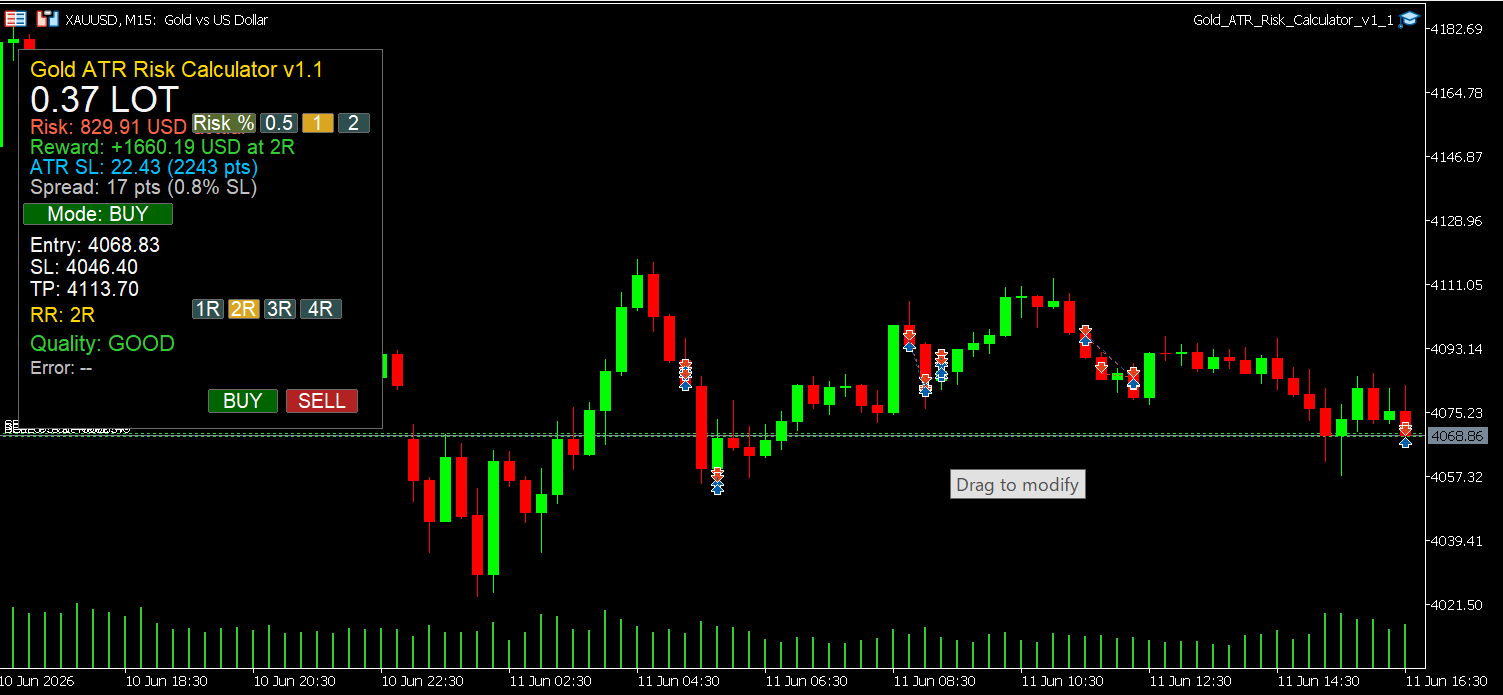
The screenshot above was taken on XAUUSD M15 during the London–New York overlap. The ATR-derived stop came in at 22.43 price points, producing a 0.37 lot position at the account's configured risk level. The spread was 17 points - 0.8% of the SL distance. Quality: GOOD. The full trade preview (Entry 4068.83/SL 4046.40/TP 4113.70 at 2R) was visible and confirmed before a single click.
From chart open to order ready: a matter of seconds rather than the manual calculation routine. No external calculator. No second-guessing the math.
The M15 session captured was a straightforward setup - structure rejection after a liquidity grab, panel flagging no quality issues. Whether the trade won or lost is beside the point. The decision-making process was clean, repeatable, and based on current market data rather than mental arithmetic under pressure.
🌟 Practical Advantages Worth Noting
Timer-driven updates. The panel refreshes on a periodic timer rather than on every tick. On active gold sessions where ticks arrive many times per second, this helps reduce unnecessary chart redraws during long trading sessions. The update interval is configurable in the inputs.
Smart redraw logic. The UI only triggers a chart redraw when something actually changed in the display state. If nothing changed, nothing redraws. Across an eight-hour session on a busy chart, this adds up.
Click cooldown. A configurable cooldown between BUY and SELL button clicks prevents accidental double-entry when you're operating fast in a moving market.
Multi-chart safe. Each panel instance uses a unique object prefix tied to the chart ID, so you can run the tool on M5 and H1 simultaneously without panels interfering with each other's objects.
Equity or balance as sizing base. Selectable via input parameter - percentage of current equity or of account balance, depending on your preference or risk framework.
Margin and stop-level validation before every click. Before enabling the one-click buttons, the tool verifies that your free margin is sufficient and that the SL/TP distances comply with your broker's stop and freeze levels. If either check fails, the panel flags it as AVOID and disables order placement through the panel.
🎁 Who This Is For
If you trade XAUUSD manually and you're spending more than a few seconds sizing your position before each entry, this tool removes that overhead.
It fits prop firm challenge traders who need exact risk percentages on every trade and can't afford sizing errors under time pressure. It fits swing traders who want to see the full trade P&L preview before committing. It fits day traders running multiple sessions who want consistent sizing without rebuilding the calculation from scratch each time.
If you trade a fixed lot every session and never want to think about sizing, this tool will feel like overhead. If you want an automated EA that enters trades for you, this is not that either.
📢 What It Doesn't Do
It does not predict direction. The quality gate evaluates execution conditions - spread, ATR size, margin, stop validity - not chart direction or setup quality. A GOOD rating means conditions are acceptable. It does not mean the trade will win.
It does not manage open trades. Once an order is placed, the tool has no awareness of it. There is no trailing stop, breakeven automation, or position monitor built in.
It does not guarantee identical behavior across all brokers. Lot step, minimum volume, and stop level constraints differ by broker. The tool respects your broker's actual constraints via the MT5 API, but non-standard contract specifications on some prop firm or micro accounts may behave unexpectedly. The error field will surface issues when they occur.
It is a risk calculation utility. Not a trading system.
🎁 Get the Tool
👉 Gold ATR Risk Calculator MT5 on MQL5 Market: https://www.mql5.com/en/market/product/169535
If you're sizing positions manually on XAUUSD and you want to remove the math from the equation - without removing the judgment - this is the tool to have on your chart.
🧰 Related Tools
👉 Gold Trade Manager MT5 - The ATR Risk Calculator handles the planning. Gold Trade Manager handles what comes next: partial closes, manual trailing, and trade hygiene after the order is live. They're designed to sit on the same chart without conflict.
👉 Equity Protector Pro MT5 - The ATR Risk Calculator controls per-trade risk. Equity Protector Pro controls per-session risk. If you've had sessions where a string of losses led to revenge-sizing, the two tools together close that loop at both levels.
👉 Gold Session Box MT5 - ATR tells you how much gold is moving. Session Box tells you when it typically moves, by marking the Asia, London, and New York session ranges directly on your chart. Useful context for understanding why the ATR is what it is at a given moment.
❓ FAQ
✅ Does this work on other symbols besides XAUUSD? Yes. The calculation engine uses standard MT5 API functions that work across forex pairs, indices, and other CFDs. The tool was designed and tested for XAUUSD, so the default parameters - ATR period, multiplier, spread thresholds - are tuned for gold's typical volatility profile. All inputs are adjustable for other instruments, but you'll want to validate the defaults before relying on them elsewhere.
✅ Does the one-click BUY/SELL button place a real trade? Yes, when one-click execution is enabled in the inputs, clicking BUY or SELL sends a real market order with the calculated lot, SL, and TP. Review the panel fully before clicking. The AVOID quality state disables panel-based order placement automatically, but trades can still be placed manually through MT5.
✅ What is the GOOD/CAUTION/AVOID scoring based on? The quality gate checks four conditions: spread relative to SL distance, ATR size relative to configurable extremes (too compressed or too extended), free margin sufficiency, and MT5 stop/freeze level compliance. GOOD means all checks pass. CAUTION means at least one condition warrants attention but doesn't block the trade. AVOID means at least one condition would likely result in a poor or rejected order, and panel-based execution is disabled until it clears.
✅ Can I run this on multiple timeframes simultaneously? Yes. Each chart instance uses a unique object prefix based on its chart ID, so multiple panels don't interfere with each other. Running M5 and H1 panels side by side works correctly.
✅ What happens if my broker uses a non-standard contract size? The primary calculation routes through OrderCalcProfit, which uses your broker's actual symbol specifications within the MT5 terminal environment. If that path is unavailable, the tool falls back to tick-value calculation. The error field will indicate if a fallback occurred. On brokers with highly non-standard specs, verify the displayed numbers against a known reference before trading live.
✅ Can I test this in the Strategy Tester before using it on a live chart? The tool is designed as a chart utility and relies on live tick data, account state, and chart interaction - none of which are fully replicated in the Strategy Tester's standard mode. Testing on a demo account with a live data feed is the recommended approach before moving to a live environment.
✅ Is there a free version to try? There is no free trial version of the ATR Risk Calculator. However, the Gold Algo Lab catalog includes several free tools that reflect the same coding and UX standard - including the Gold Risk Radar - available on the MQL5 marketplace. Downloading one of those first is a reasonable way to evaluate the build quality before purchasing.
🎁 New to Gold Algo Lab?
Start with the Gold Algo Lab Tool Map - a practical guide that organizes our MT5 tools into 6 connected stages: market context, setup selection, risk planning, trade execution, position management and account protection.
→ Gold Algo Lab Tool Map: Where to Actually Start With MT5 Tools for XAUUSD
https://www.mql5.com/en/blogs/post/771930
Do not choose a tool by its name alone. Start with the part of your trading process that needs the most control, then build your workflow one layer at a time.
Gold Algo Lab builds practical, risk-first MT5 tools for serious XAUUSD traders, shaped by 8 years of developing and trading real systems to help traders identify clearer setups, manage risk with greater confidence and execute with more discipline.


