Stop Guessing Your Lot Size - Plan Every XAUUSD Trade with Clarity Using Risk Ratio Planner

💎 TL;DR
Risk Ratio Planner is a visual pre-trade planning utility for XAUUSD on MetaTrader 5. You drag three lines on the chart - Entry, Stop Loss, and Take Profit - and the panel instantly shows a broker-based estimate of your lot size, dollar risk, estimated reward, R/R ratio, and a full trade readiness check covering spread, margin, and stop level validity. Nothing executes automatically. This is purely a planning tool - so that by the time you reach for the order button, you have a clear, broker-calculated picture of what the trade costs before you commit to it.

🔔 The Problem That Costs You Before You Even Enter
You draw your level. You identify the stop. The setup looks right. Then you open the order window, type a lot size - something that feels roughly right for a 1% risk - and click send.
But did you actually calculate it? Against your current balance, at the exact distance between your planned entry and that stop? Did you verify that the R/R clears your minimum threshold? Did you check whether spread right now is elevated enough to meaningfully erode the first few points of the trade before price has even moved?
Many traders struggle to do all of that correctly, quickly, while price is moving and the setup is live. So they estimate. And on XAUUSD - where contract specifications vary meaningfully by broker, which is exactly why this tool calculates risk using the symbol settings provided by your MT5 broker rather than any fixed assumption - that estimation adds up over time.
The Risk Ratio Planner solves the evaluation step: the gap between "I see the setup" and "I have a reliable, broker-based estimate of what this trade costs me before I take it."
🏆 The Real Engine: A Pre-Flight Check, Not Just a Calculator
Most risk calculators give you a number. This tool gives you a verdict.
Every time you move a line on the chart, the panel recalculates the complete picture and runs four independent checks: R/R quality against your minimum threshold, current spread against your maximum tolerance, available margin against trade requirements, and stop distance against your broker's minimum stop level. Each check resolves to a pass or a caution. The combined result determines the Status badge displayed at the top of the panel.
When all four checks pass, the panel shows BUY READY or SELL READY - indicating that the planned setup passes the configured risk and broker-condition checks available to the tool. This is a planning status, not a trade recommendation or execution signal. The final entry decision remains entirely yours.
What elevates this beyond a standard calculator is the broker lot rounding layer. When you set a 1% risk and the mathematically correct lot comes out to 2.847, your broker rounds it to 2.82 or 2.85 depending on their volume step. The panel shows you both the target risk and the actual risk after rounding - so you know whether the rounded lot still keeps you within tolerance or has pushed you slightly outside it.
The screenshot makes this concrete: "Target Risk: $848.63 | Lot Size: 2.82 | Actual Risk: $846.00 | Lot Status: STEP ROUNDED." The full picture, visible before execution. No mental math required.
🚀 What the Tool Shows on Your Chart
Attach it to your XAUUSD chart and the following appear immediately:
🏅 Three Draggable Lines - Entry (blue), Stop Loss (red), and Take Profit (green). Drag any line and every section of the panel recalculates instantly. Lines are labeled with price levels and configurable label placement keeps them readable regardless of how tight the setup is.
🏅 Visual Risk and Reward Zones - a shaded red band between Entry and Stop Loss, and a shaded green band between Entry and Take Profit, extending forward on the chart for a configurable number of bars. These zones give you an immediate spatial sense of how risk and reward relate to nearby price structure.
🏅 ENTRY PLAN Section - direction (BUY or SELL, detected automatically from line positions), entry price, stop loss price, take profit price, and distance from current market price in points.
🏅 RISK/REWARD Section - risk in points, reward in points, and R/R ratio with a pass/caution against your configurable minimum threshold. Green when R/R clears your minimum, amber when it does not.
🏅 POSITION SIZE Section - risk mode, target risk in dollars, calculated lot size, actual risk after broker lot rounding, estimated reward in dollars, and lot status (EXACT or STEP ROUNDED).
🏅 TRADE READINESS Section - spread versus your maximum, required margin versus available (validated against broker margin calculations), stop level check against your broker's minimum, and calculation mode (Broker or Fallback). The Status field at the bottom shows the final combined verdict.
🏅 Control Buttons - SYNC snaps the Entry line to current market price in one click; RESET clears all lines back to defaults; RR 1.5, RR 2.0, and RR 3.0 instantly reposition the Take Profit to hit those R/R ratios from the current Entry and Stop Loss.
The panel adapts automatically to different chart sizes and screen resolutions - laptop, desktop, or VPS environment - and rebuilds cleanly when you resize the chart.
🔎 What This Looks Like in Real Trading
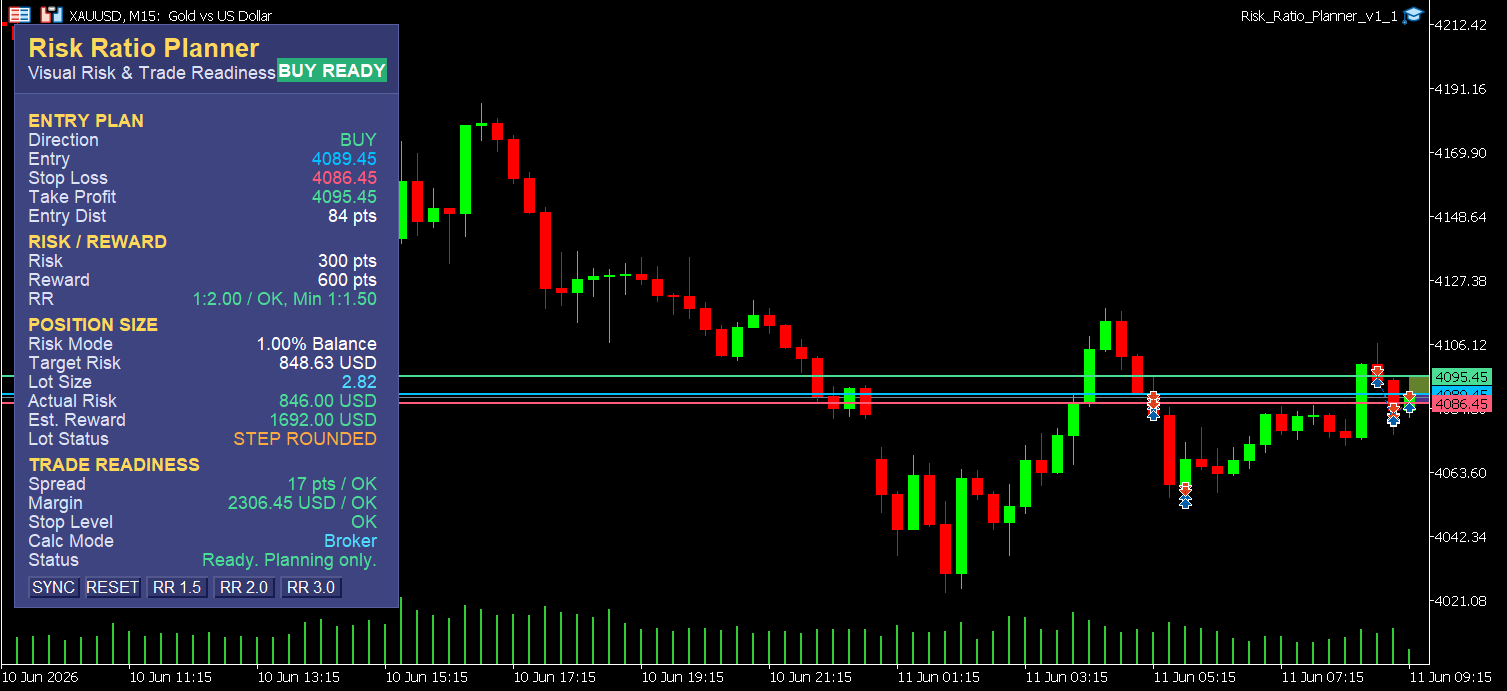
The M15 screenshot from June 10–11, 2026 on XAUUSD shows the panel mid-planning. Entry at 4089.45, Stop Loss at 4086.45, Take Profit at 4095.45. Direction detected as BUY. Entry distance from current price: 84 points.
Risk: 300 points. Reward: 600 points. R/R at 1:2.00 - confirmed "OK, Min 1:1.50" in green. Risk mode: 1.00% balance. Target risk $848.63, lot 2.82 (step rounded), actual risk $846.00, estimated reward $1,692.00.
Trade Readiness: Spread 17 points - OK. Margin $2,306.45 - OK. Stop Level - OK. Calc Mode: Broker. Status: "Ready. Planning only."
That last line is intentional and important. The panel is telling you that the setup passes the configured risk and broker-condition checks available to the tool. The decision is yours.
🌟 Practical Advantages Worth Noting
Three workflow details that matter for daily MT5 use:
- The SYNC button snaps Entry to the current market price in one click. On a fast-moving instrument like XAUUSD, manually dragging the entry line to market price is impractical - price moves before you finish. SYNC removes that friction entirely, making it straightforward to plan around a live market-order entry without chasing the line
- The Stop Level check prevents a frustration that many MT5 traders know: placing an order only to receive an "Invalid Stops" rejection because the SL or TP was dragged closer to price than your broker's minimum stop distance allows. The tool flags this in Trade Readiness before you ever attempt to send the order
- The three RR preset buttons (1.5, 2.0, 3.0) reposition the TP line instantly, letting you cycle through reward scenarios on the same setup in seconds - without redrawing and recalculating each one manually
🎁 Who This Is For
- XAUUSD manual traders who size lots by feel or mental approximation and want a reliable broker-accurate planning layer before every entry
- Traders who enforce a minimum R/R standard and want to verify it visually on the chart rather than calculating in their head while price is moving
- Prop firm traders who need to demonstrate pre-trade risk discipline - reading balance or equity live, validating spread and margin conditions, and showing consistent position sizing against defined risk parameters
- Anyone who has entered a trade and only realized afterward that the lot was wrong, the R/R was below their threshold, or the spread at entry was worse than expected
📢 Who This Is NOT For
- Traders looking for entry signals - this tool evaluates the setups you bring to it, it does not find them
- Anyone wanting automated order placement - all execution happens separately through MT5's native order interface or a companion tool
- Traders who work exclusively on daily or weekly charts - the visual line interaction is designed for intraday timeframes
📘 What It Doesn't Do
Risk Ratio Planner does not trade. It does not send orders, modify positions, or interact with your account in any execution capacity.
It does not tell you where to place your stop loss or whether a setup is structurally valid. Those judgments remain entirely yours.
What it does is make sure that once you have identified your setup, you have a broker-based estimate of the risk, reward, and entry conditions before committing a single dollar - consistently, on every trade, without the mental math.
Think of it as the pre-flight check before the trade.
🎁 Get the Tool
👉 Risk Ratio Planner on MQL5 Market: https://www.mql5.com/en/market/product/169275
If you currently size lots by approximation, or if you have ever entered a trade and regretted the size or R/R the moment the order filled - this panel gives you the clarity layer that disciplined pre-trade planning on XAUUSD actually requires. Drag three lines, read the verdict, decide.
🧰 Related Tools
These tools integrate naturally into the same pre-trade and execution workflow:
- Gold Trade Manager PRO - once your plan is confirmed, execute it with one-click entries, auto SL/TP, break-even, trailing stop, and basket controls from a single adaptive panel
- Gold Session Box MT5 - session structure and rolling range calibration to help you judge whether the planned entry fits the intraday context before you commit
- Gold Bias Regime Filter - directional bias classification for XAUUSD to confirm whether the trade direction aligns with the current market regime
❓ FAQ
✅ Does it place trades automatically or touch my open positions? No. The tool is a planning-only utility. It does not send orders, modify positions, or interact with your account in any way. All execution happens separately through MT5's native order interface or a companion tool such as Gold Trade Manager PRO.
✅ What is the difference between Target Risk and Actual Risk? Target risk is what you intended to risk based on your percentage or fixed dollar setting. Actual risk is what you will risk after the broker rounds your calculated lot to their permitted volume step. The panel shows both so you know exactly where you land after rounding - and a configurable risk tolerance percentage lets you define how much rounding deviation is acceptable before the tool flags a caution.
✅ What does "Fallback" calculation mode mean, and can I trade from it? When the MT5 broker margin calculation API returns an unavailable result - which can occur on some demo accounts or outside market hours - the tool switches to an estimated internal calculation and clearly labels the mode as "Fallback." This ensures the panel never silently shows numbers from a failed broker call. That said, Fallback figures should not be relied upon for live execution decisions. Wait for Broker mode to confirm before acting on the numbers.
✅ Does it work on symbols other than XAUUSD? Although optimized for XAUUSD, it works on any MT5 symbol your broker supports. All calculations use the actual symbol specifications reported by your broker - lot step, margin requirements, tick value - rather than fixed assumptions.
✅ Does it repaint? Since this is a visual planning utility rather than a predictive indicator, repainting is not applicable. The panel displays live calculations based on where you have placed the three lines and current market conditions. There is no historical signal buffer and no value that could repaint.
🎁 New to Gold Algo Lab?
Start with the Gold Algo Lab Tool Map - a practical guide that organizes our MT5 tools into 6 connected stages: market context, setup selection, risk planning, trade execution, position management and account protection.
→ Gold Algo Lab Tool Map: Where to Actually Start With MT5 Tools for XAUUSD
https://www.mql5.com/en/blogs/post/771930
Do not choose a tool by its name alone. Start with the part of your trading process that needs the most control, then build your workflow one layer at a time.
Gold Algo Lab builds practical, risk-first MT5 tools for serious XAUUSD traders, shaped by 8 years of developing and trading real systems to help traders identify clearer setups, manage risk with greater confidence and execute with more discipline.