See Your Real XAUUSD Trading Cost Before You Click Buy With Gold Spread Monitor MT5

💎 TL;DR
Gold Spread Monitor MT5 is a real-time spread awareness utility for XAUUSD manual traders. It shows your live spread in points and dollar cost per lot, classifies the current market condition as NORMAL/HIGH/DANGER/SPIKE, and indicates whether current spread conditions are favorable for entry - before you click the button. It does not trade for you. It does not give signals. It simply makes the spread visible, measurable, and harder to overlook so you stop accumulating entry costs that quietly compound over time.

🔔 The Problem
You've done your analysis. Price is sitting at a clean level. Structure confirms the direction. You hit BUY.
The trade opens - already 17 points underwater.
That's not slippage. That's the spread. And on XAUUSD, where each point at 0.10 lot costs exactly $0.10 on a standard contract, entering during a 45-point spread is not the same as entering during a 12-point spread. Your effective reward-to-risk is different. The margin for error is smaller. A wider spread reduces the room your setup has to work before reaching breakeven.
During the London-New York overlap, during news events, during rollover hour around midnight server time - gold spreads can quietly triple. You're entering the same trade, with the same setup, but the cost structure has changed completely.
MT5 does show the spread in the Market Watch and Data Window. But it doesn't actively tell you when today's trading cost has become unusually expensive compared to the recent average. There's no badge that turns red. No alert. No session history. No dollar amount tied to your actual lot size.
That gap is what this tool fills.
🏆 The Real Engine
The core idea is simple: before you trade, know the cost. But the execution is what makes it actually useful in live trading.
The monitor keeps a rolling history of spread samples - up to 600 data points - and uses that to calculate your 1-minute and 5-minute average spread in real time. When the live spread jumps past that rolling average by a configurable multiplier, it registers as a SPIKE and immediately changes the entry status. The spike detection only activates after a minimum number of samples have been collected, so you won't get false alarms during the first few ticks of a new session when the baseline hasn't stabilized yet.
Beyond spike detection, the tool calculates your actual spread cost in USD using your selected lot size - pulling from multiple calculation methods with automatic fallback to produce a reliable estimate across different broker specifications. The number you see reflects what that entry actually costs you at that moment, in real dollars.
The result is a single panel that tells you, in plain language: "Spread safe" or "Spread too wide - wait."
Over time, many traders begin to recognize recurring spread patterns around session opens, economic news, and rollover windows. The monitor makes those patterns visible and measurable instead of relying on memory or guesswork.
🚀 What the Monitor Shows You
✨ Live Spread in Two Formats
The main display shows your current spread in both points (the raw broker number) and price distance. At a glance, you know what 17 pts translates to in dollar cost for your lot size - not an abstract number, but an actual entry cost.
✨ Dollar Cost Preview Per Lot
Set your preview lot size in the inputs and the panel calculates your real spread cost in USD every tick. Before you open any trade, you can see: "This entry costs me $1.70." That small moment of visibility often leads to more deliberate entry decisions.
✨ Spread Status Badges
Four condition levels - NORMAL (green), HIGH (amber), DANGER (red), SPIKE (red) - are shown as colored badges, not buried in text. You read the situation in under a second.
✨ Entry Readiness Signal
Three states: TRADE OK, WAIT, BLOCK. BLOCK activates during defined danger conditions: spread spikes, stale ticks, broker trade-disabled mode, and an optional rollover guard window. WAIT fires when spread is elevated but hasn't crossed your danger threshold. TRADE OK means spread conditions are within your configured acceptable range - your trade decision still depends on your own analysis.
✨ Rolling Statistics
The panel tracks your 1-minute average, 5-minute average, today's minimum, today's maximum, and a spike count for the session. This context tells you not just what the spread is right now, but how it compares to recent behavior - which is the information that actually changes decisions.
✨ Tick and Market State Feedback
Live tick confirmation (LIVE vs STALE) and broker trade mode status (ENABLED vs DISABLED) are displayed in the panel. If your data feed goes quiet for 30 seconds before a major news release, the tool flags it before you enter on a potentially frozen price.
✨ Alerts
Popup, sound, push notification, and email alerts are all configurable. Alerts fire when the market transitions into HIGH, DANGER, or SPIKE states - and optionally when it returns to NORMAL. A configurable cooldown prevents alert flooding during volatile conditions. One-click MUTE on the panel for when you need silence without changing settings.
🔎 What This Looks Like in Real Trading
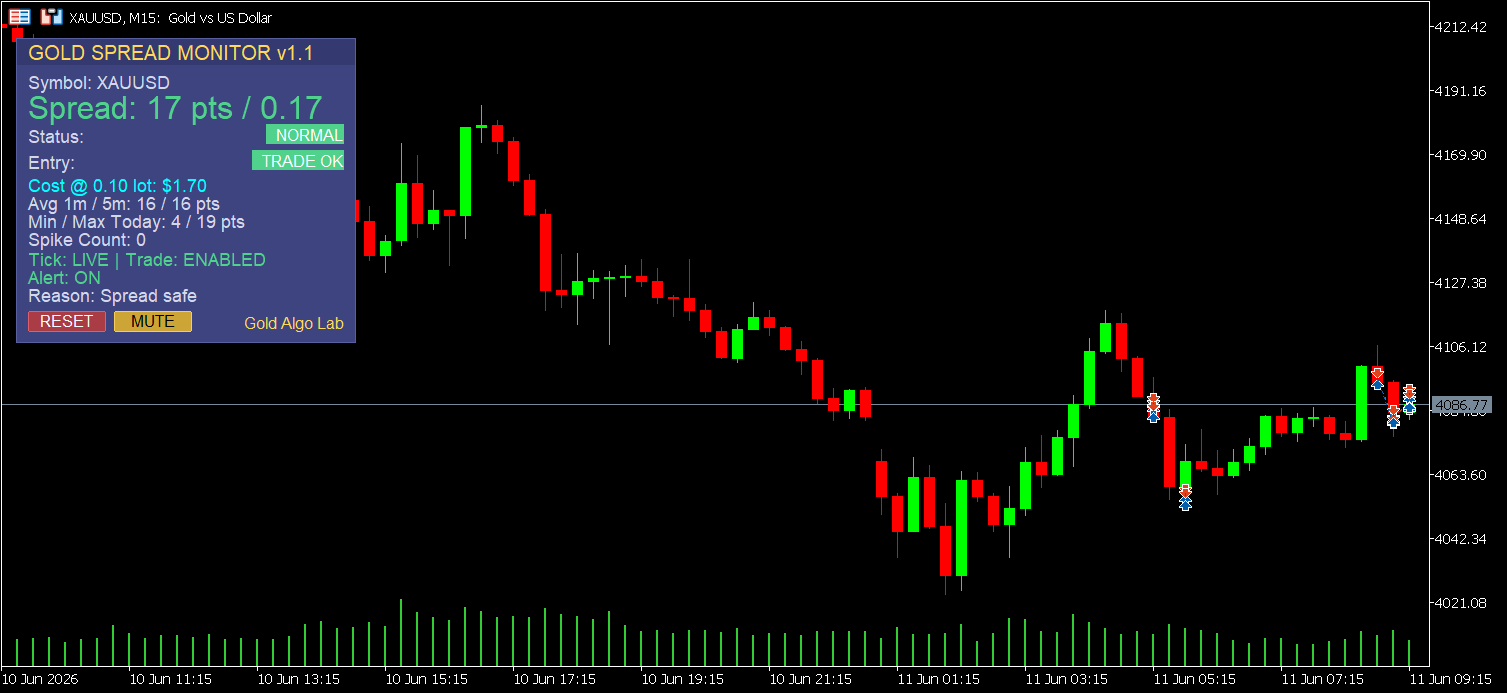
The screenshot shows a clean session on XAUUSD M15 during early Asian hours. Live spread: 17 points/$0.17 at 0.10 lot. Status: NORMAL. Entry: TRADE OK. The 1-minute and 5-minute averages both at 16 points confirm the spread has been stable. Min/Max today: 4/19 points - a useful reference for understanding how wide this broker's gold spread has ranged during the current trading day. Spike count: 0.
This is the panel when conditions are clean. Spread is within normal range, tick data is live, trade mode is enabled. The entry decision remains yours - but the cost side of the equation is no longer invisible.
Now compare that to what the panel shows at 23:58 server time on a Monday. Spread jumps to 58 points, status flips to HIGH, entry badge switches to WAIT, reason line reads "Spread elevated." If it crosses your DANGER threshold (default 60 points), the badge switches to BLOCK. No alert needed in that moment - the visual alone is often enough to make traders pause before entering.
The spike counter is also worth watching over a full week. If you're seeing frequent spikes outside of major news events and rollover windows, it may be worth comparing your broker's execution conditions against alternatives. That's the kind of data this monitor gives you to work with.
🏅 Practical Advantages Worth Noting
✅ Ready to use immediately. Drop it on your XAUUSD chart and it works from the first tick with sensible defaults: warn at 30 points, danger at 60 points, preview lot at 0.10. No configuration is required to start, although adjusting thresholds to match your broker's typical spread behavior is recommended to get the most out of the alert system.
✅ Anti-flicker UI. The panel only redraws when data actually changes, with a 500ms refresh floor. On busy sessions, this keeps the panel clean and CPU usage low without sacrificing responsiveness.
✅ RESET button for clean statistics. One click clears your Min/Max, spike count, and rolling averages mid-session - useful when you've switched instruments or want a fresh baseline after a volatile news period. Note that statistics also reset when the indicator is reloaded or the chart is reopened, so they are session-based by design.
✅ Works on any timeframe. The spread monitoring logic is tick-driven, not bar-driven. You get the same live cost data whether you're on a 1-minute chart or a daily chart.
✅ Rollover guard. Optional. Blocks the TRADE OK signal automatically during the configurable rollover window (default 23:55–00:10 server time) when gold spreads on most brokers widen significantly. Toggle it on if you've been caught by rollover entries before.
🎁 Who This Is For
Manual XAUUSD traders - particularly scalpers and intraday traders - who enter trades by hand and want a real-time picture of what each entry actually costs. Traders who trade during London open, New York open, or around news events and need a fast read on whether current spread conditions are favorable.
Also useful for broker evaluation. Run the monitor for a week on a new broker account and you'll have a full picture of their spread behavior across sessions - Min, Max, spike frequency, and session averages - rather than relying on the broker's marketing sheet.
📢 Who This Is NOT For
Automated trading systems. This tool is an indicator - it runs passively and does not interact with EA logic, filter EA entries, or trigger or block trades in any automated way. If you need a spread filter inside a bot, that logic needs to live inside the EA itself. This is strictly a manual trader's awareness layer.
🌟 What It Doesn't Do
It does not predict future spread movements. It does not guarantee that TRADE OK means the next trade will be profitable - spread conditions are one input among many in any trade decision. It does not restrict your trading in any way; every status is advisory and you remain in full control. It monitors spread, not execution latency, requotes, or partial fill behavior. Statistics are session-based and do not persist to a file after the indicator is removed or the terminal is restarted. Commission is not included in the spread cost display by default - since commission structures vary by broker and account type, it is handled as a separate configurable input.
🎁 Get the Tool
👉 Gold Spread Monitor MT5 on MQL5 Market: https://www.mql5.com/en/market/product/169253
If you trade gold manually and you've never had a real-time, session-aware view of what each entry costs in dollar terms, this is where that changes.
🧰 Related Tools
🥇 Gold Risk Calculator MT5 - Once the spread is clean and entry conditions are favorable, calculate your exact lot size from account risk percentage and stop distance before you enter. Pairs naturally with the Spread Monitor as a pre-entry checklist.
🥇 Gold Trade Manager MT5 - The panel that handles your open trades: breakeven, partial close, trailing. If the Spread Monitor is your pre-entry layer, Trade Manager is your active position layer.
🥇 Equity Protector Pro MT5 - Hard guardrails on daily drawdown and equity floor. For traders who want session-level risk control after entry, not just cost awareness before it.
🥇 Gold Session Box MT5 - Visualizes key session ranges so you know which price areas matter for the current session. Combined with spread awareness, it gives you both timing and cost clarity on the same chart.
❓ FAQ
✅ Does this work on any XAUUSD broker? Yes. It reads the live bid/ask spread directly from your MT5 data feed and works with any broker offering XAUUSD on MetaTrader 5. Default thresholds (30 points warn / 60 points danger) are calibrated for typical ECN-style gold spreads. If your broker runs consistently wider, adjust the thresholds in the input settings to match your normal trading conditions.
✅ Can I use this alongside an EA at the same time? Yes. It's a chart indicator - it runs passively and does not interfere with any Expert Advisor. It won't modify, block, or interact with trades opened by an EA. Spread-based entry filtering for an automated system would need to be coded inside the EA itself.
✅ What's the difference between WAIT and BLOCK? WAIT means spread is elevated above your warning threshold but hasn't reached the danger level - it's a caution signal and your judgment call. BLOCK means a harder condition is active: spread has crossed the danger threshold, a spike is detected, the broker's trade mode is disabled, or the rollover guard window is active. Both are advisory, not restrictive.
✅ Will this slow down my MT5 platform? No. The panel uses a smart redraw system that only updates when data actually changes and enforces a 500ms minimum refresh interval. It is lightweight by design and won't visibly impact platform performance during normal sessions.
✅ How do I set up the rollover guard? Enable InpEnableRolloverGuard in the inputs, then set the start and end hours and minutes to match your broker's rollover window. These use broker server time - check your broker's swap schedule to confirm the exact window, as it varies slightly by broker.
✅ How accurate is the spread cost calculation? The tool uses multiple calculation methods with automatic fallback, designed to produce a reliable cost estimate across different broker specifications and XAUUSD contract configurations. For most standard ECN accounts, the displayed cost will closely reflect your actual entry cost. Commission is not included by default but can be added via the InpCommissionPerLotUSD input, since commission structures vary by broker and account type.
🎁 New to Gold Algo Lab?
Start with the Gold Algo Lab Tool Map - a practical guide that organizes our MT5 tools into 6 connected stages: market context, setup selection, risk planning, trade execution, position management and account protection.
→ Gold Algo Lab Tool Map: Where to Actually Start With MT5 Tools for XAUUSD
https://www.mql5.com/en/blogs/post/771930
Do not choose a tool by its name alone. Start with the part of your trading process that needs the most control, then build your workflow one layer at a time.
Gold Algo Lab builds practical, risk-first MT5 tools for serious XAUUSD traders, shaped by 8 years of developing and trading real systems to help traders identify clearer setups, manage risk with greater confidence and execute with more discipline.