
Stop One Bad Day from Wrecking Your Account with Gold Equity Protector

💎 TL;DR
Gold Equity Protector is an account protection utility that monitors your daily loss, equity drawdown, and floating exposure in real time - and is designed to help prevent a single trading session from exceeding the account-level limits you've defined. It works alongside any manual trading strategy or EA, closes positions when your preset limits are hit, and stays locked until the next trading day even across platform restarts. It does not open trades. It does not give signals. It's designed to help prevent a single bad session from growing into a much larger account drawdown.

🔔 The Problem
You've been there. Maybe not last week - but you've been there.
You wake up, gold is running hard, you take a position. It reverses. You add. It reverses harder. By the time you admit the day is broken, you've given back three weeks of profit in a single session. Not because your strategy failed. Because there was nothing stopping you from doubling down when you shouldn't have.
One of the most common ways retail gold traders damage an account is allowing one losing session to spiral beyond their original risk plan - a chain of increasingly emotional decisions that no trading system can prevent once it starts. The problem isn't the trade. It's the absence of a hard external stop.
Prop firm traders know this problem intimately. Many prop firms enforce daily loss limits around 4–5%. Once breached, the account typically violates the firm's risk rules. That hard stop is a feature, not a punishment. It's what keeps the account alive for day two.
Manual traders usually have to enforce those limits themselves. Many Expert Advisors also focus primarily on trade execution rather than account-level daily risk limits. And MetaTrader 5 has no native daily loss protection built in.
That's the gap Gold Equity Protector was built to fill.
🏆 The Real Engine
Most "risk management" tools in MT5 are glorified calculators. They show you numbers. They don't act.
Gold Equity Protector actively enforces the limits you configure.
When your preset thresholds are crossed - whether that's daily loss %, equity drawdown %, a hard dollar amount, or floating loss - the utility closes all managed positions, deletes pending orders, and locks the account against any new trades opening for the rest of the day. It does this autonomously, without you needing to click anything.
What makes it different from simpler kill-switch scripts is the persistent lock state. Most utilities trigger once and lose their state the moment you restart MT5. Gold Equity Protector saves its protection state to global variables tied to your account number and instance ID. If the platform restarts - intentionally or from a crash - the EA restores the saved protection state during initialization and re-engages the lock automatically, minimizing the chance of accidental trading after a restart. The lock holds until the daily reset time you configure.
Alongside that, the utility runs a close/delete retry engine in the background. If a position fails to close on the first attempt - slippage, server rejection, busy market - the retry engine is designed to reduce the chance that a temporary execution failure leaves positions open longer than intended. If repeated attempts continue to fail, you receive an alert so you can intervene manually.
It's more than a monitoring dashboard. The dashboard reflects these protection mechanisms in real time, providing visibility into the account's current protection status.
🚀 What the Tool Shows and Does in Practice
The live risk dashboard gives you a single-glance view of everything that matters before a trade decision:
Account status and live equity - shown at the top of the panel in large text alongside a color-coded status indicator (SAFE/WARNING/LIMIT HIT/LOCKED). At a glance, you know whether the account is still tradeable.
Daily P/L tracking - real-time dollar and percentage change versus your day-start baseline. You always know exactly where you stand against your daily limit. The baseline can be configured to use either balance or equity at the start of the day, depending on which reference point fits your risk methodology better.
Risk room remaining - the panel shows how much daily loss room and drawdown room you have left in dollar terms. When that room is shrinking fast, it's a visible signal to step back before the system steps in for you.
Peak equity and drawdown from peak - the utility tracks your highest equity point each day and measures current drawdown from that peak. This matters for equity drawdown protection, which measures not just from the day-start level but from your intraday high-water mark.
Open positions and pending orders - count visible at all times so you know the exact footprint under management.
Next reset time - shows exactly when protection state will refresh for the next day. No guessing when you're unlocked.
Three manual control buttons sit below the dashboard:
Close All - closes all managed positions immediately on demand, without waiting for a limit trigger. Useful when you decide manually that a session is done.
Lock Now - engages the hard lock immediately at any time, regardless of whether a limit has been hit. Sometimes you want to end the day early and make it stick.
Unlock - releases the lock manually. Configurable: you can set the tool to disallow manual unlock when the lock was triggered by a limit breach, ensuring the lock can only expire at reset time. This prevents the most common self-sabotage pattern - unlocking yourself "just to check one more setup."
🔎 What This Looks Like in Real Trading
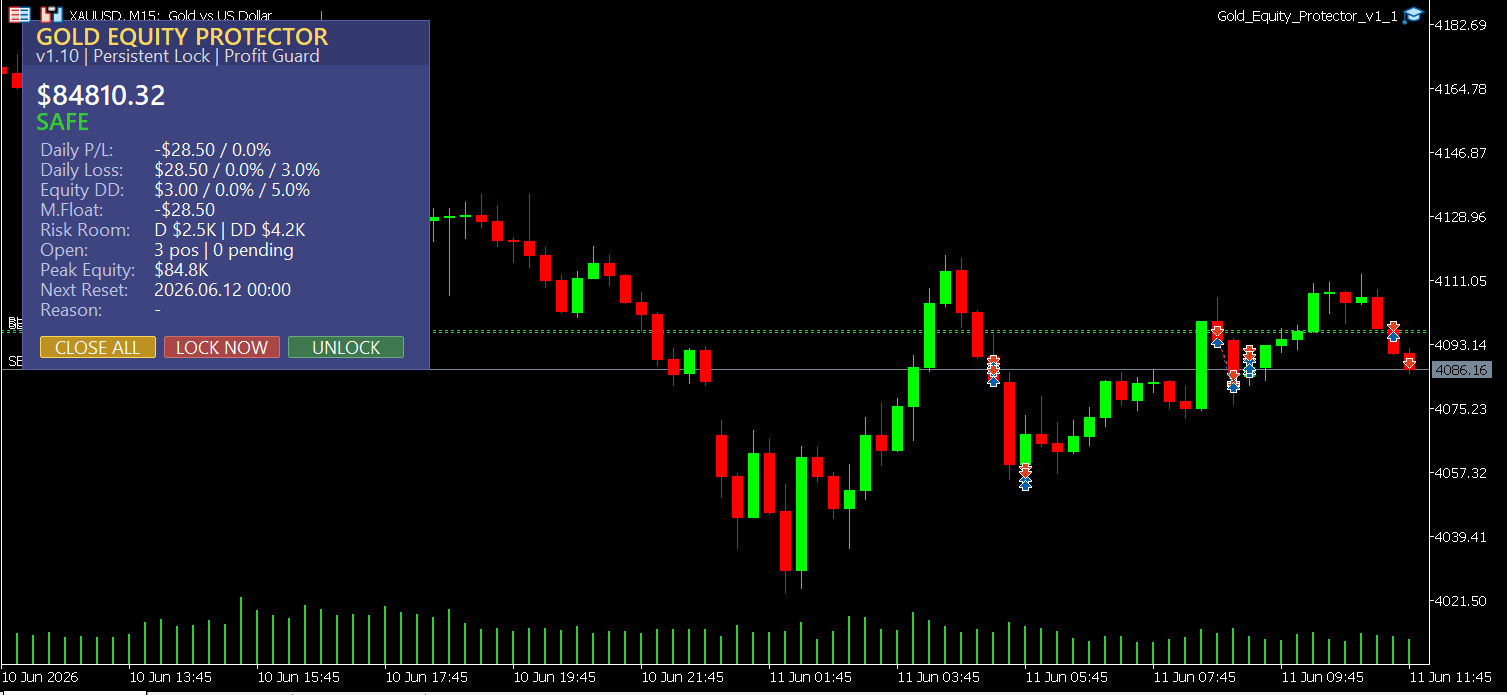
The screenshot above was taken on an active XAUUSD M15 chart with the utility running live.
The panel shows the account in SAFE state. Daily P/L is -$28.50 - a small fraction of the configured daily limit. Daily loss used is 0.0% against a 3.0% threshold. Equity drawdown used is 0.0% against a 5.0% threshold. Risk room remaining shows the dollar buffer left before either protection layer triggers. Three positions are open with none pending. The next daily reset time is displayed precisely.
This is exactly what the tool is designed to show: real-time clarity on where you stand versus your limits before those limits are approached. When the daily or drawdown limits are approached, the status indicator shifts to WARNING. When breached, it shifts to LIMIT HIT, positions are closed, the account locks, and the panel displays the trigger reason - all without the trader needing to be watching the screen at the moment it happens.
🌟 Practical Advantages Worth Noting
Works with any manual strategy or EA. The utility operates independently at the account level. It monitors account-level risk, not trade logic. You can run it alongside any existing EA or trade the account manually - Gold Equity Protector only intervenes when your pre-set risk thresholds are reached.
Multi-layer limits, not just one switch. You can enable daily loss %, equity drawdown %, hard dollar limits, floating loss limits, and daily profit lock - in any combination. Real account protection is rarely a single number. Gold traders who run through volatile New York sessions often want both a percentage floor and a dollar ceiling.
Balance-based or equity-based daily baseline. The daily loss calculation can reference either your balance or equity at the start of each day. This matters for traders who carry overnight positions - your starting reference point affects how much room you actually have for the session.
Daily profit lock. If you've had a strong day, you can configure the utility to lock the account after a target profit percentage or dollar amount, helping preserve gains from strong trading sessions before a late-session reversal gives them back.
Granular close behavior. You can filter by magic number or symbol so the utility protects specific EAs or specific positions without touching others running on the same account.
Event logging. Every trigger, lock, unlock, close action, and retry attempt is written to a CSV log file per account and instance. When something happens to your account overnight, you have a timestamped record of exactly what the tool did and why.
Anti-flicker UI. The panel uses a smart redraw engine that updates values in place rather than rebuilding the entire display on each tick, helping reduce unnecessary chart redraws during active markets and keeping the display responsive even when tick activity is high.
📢 A Note on EA Interaction
If you are running a trading EA alongside Gold Equity Protector with the "close new trades while locked" setting enabled, be aware of a potential interaction: some high-frequency EAs may attempt to open new positions immediately after the protector closes them, creating a rapid open-close loop that burns commission without benefit. The cleanest approach when a hard lock triggers is to also pause or disable the trading EA for the remainder of the session. The event log will record the trigger reason so you can review the session afterward.
🎁 Who This Is For
Traders who run serious risk on XAUUSD and have learned - usually the hard way - that manual discipline under drawdown pressure is not reliable. If you've ever planned to stop at 2% loss and found yourself still trading at 6% down, this tool exists for exactly that situation.
Prop firm preparation traders who want to simulate real daily loss limits before trading a funded account, so that the discipline is already a habit when real capital is at stake. Note that this tool enforces limits locally on your MT5 terminal - it does not replace the firm's own server-side enforcement and does not guarantee compliance with specific firm rules.
EA developers and users who want an account-level backstop that their Expert Advisor doesn't provide natively. Many EAs have trade-level stop losses but no mechanism to halt trading for the day when cumulative session losses reach a dangerous level.
Traders running multiple EAs on the same account who need one unified protection layer rather than trying to build risk limits into each bot separately.
📘 Who This Is NOT For
Traders looking for a trading signal or market analysis tool. Gold Equity Protector shows account data - it does not show price structure, entry zones, or trade direction.
Traders who need intraday scalping without any account-level restrictions. If your strategy requires the freedom to continue adding to positions under drawdown without hard limits, a protection utility is inherently incompatible with that approach.
Traders who expect the tool to recover losing trades or manage trade exits for profit. Position management and profit targeting are handled by your strategy or EA. Gold Equity Protector handles the risk ceiling.
📝 What It Doesn't Do
It does not open trades.
It does not predict market direction.
It does not guarantee you will be profitable.
It limits losses to the thresholds you configure - it does not prevent all losses, and in fast-moving markets or during extreme slippage, close orders may not execute at the exact equity level the limit was set at.
It does not override a broker's margin call process.
It does not send trading signals, connect to external data sources, or require anything beyond your standard MT5 broker connection.
It is a risk management utility. It works within the execution constraints of MetaTrader 5's environment.
🎁 Get the Tool
👉 Gold Equity Protector on MQL5 Market: https://www.mql5.com/en/market/product/169415
If you've ever ended a session asking "how did today get that bad" - this is the tool that is designed to prevent the next one.
🧰 Related Tools
If you're building a complete risk-controlled trading setup around XAUUSD, these tools work alongside Gold Equity Protector at different layers of the risk stack:
👉 Equity Protector Pro MT5 - the advanced version with extended prop firm compliance modes, multiple daily session windows, and deeper drawdown analytics for traders managing more complex account structures.
👉 Gold Trade Manager PRO - handles trade-level execution: manual entry, partial close, break-even automation, and trailing stop. Complements the account-level protection that Gold Equity Protector provides. Think of it as the execution layer above the safety net.
👉 Position Stress Monitor - shows real-time margin usage, stress-tested drawdown scenarios, and position-level exposure. Useful for understanding why your equity is moving before Gold Equity Protector has to act on it.
👉 Gold ATR Risk Calculator MT5 - used before the trade to calculate correct position sizing based on ATR-derived stop distance. Combining pre-trade sizing discipline with post-entry account protection is the complete risk management picture.
❓ FAQ
✅ Does the lock survive a MetaTrader 5 restart or platform crash?
Yes, with an important clarification. The protection state is saved to global variables tied to your account number and instance ID. When MT5 restarts, the EA reloads the saved state during initialization and re-engages the lock before any new trades can proceed. There is a brief initialization period during restart - this is standard MT5 behavior - but the lock is restored as part of the startup sequence rather than requiring manual intervention.
✅ Can I run this alongside my EA without conflicts?
In most cases, yes. Since Gold Equity Protector monitors account-level conditions rather than trade logic, it can generally run alongside manual trading or other Expert Advisors. However, be aware: once a protection limit is triggered, any new managed positions opened while the account remains locked will be closed according to your configured rules. If you run a high-frequency EA, consider pausing it when a hard lock triggers to avoid a rapid open-close loop consuming unnecessary commission.
✅ What happens if one of my positions fails to close when the limit triggers?
The utility has a built-in close retry engine. If a close order is rejected, it queues a retry attempt automatically at a configurable interval and sends an alert - popup, sound, push notification, or email - if multiple attempts fail. This is designed to reduce the chance that a temporary execution failure leaves positions open longer than intended. In extreme market conditions, manual intervention may still be necessary if the broker repeatedly rejects close orders.
✅ Can I unlock the account manually if I disagree with the trigger?
This is configurable. By default, when a limit is genuinely breached, manual unlock is disabled until the next daily reset. This is intentional - the most common failure pattern is traders unlocking themselves immediately after a trigger and continuing into deeper losses. If you need the flexibility, you can enable manual unlock in the settings, but the default reflects best practice for account protection.
✅ Will this work for prop firm accounts?
Yes, with one clarification. You can configure Gold Equity Protector to trigger at or below your firm's daily loss limits, giving you a local enforcement layer that acts before the firm's own rules are breached. However, this tool enforces limits on your local MT5 terminal only - it does not replace the prop firm's server-side enforcement and does not guarantee compliance with any specific firm's exact rules. Always verify your firm's requirements independently.
✅ Can the EA be tested in the Strategy Tester?
The EA can be loaded in the Strategy Tester for basic initialization and connection validation. However, the core account-level protection features - daily loss tracking, equity drawdown monitoring, persistent lock state, and real position close actions - are intended for live or demo trading environments where real account equity, open positions, and broker execution are available. The Strategy Tester does not replicate multi-session account behavior.
🎁 New to Gold Algo Lab?
Start with the Gold Algo Lab Tool Map - a practical guide that organizes our MT5 tools into 6 connected stages: market context, setup selection, risk planning, trade execution, position management and account protection.
→ Gold Algo Lab Tool Map: Where to Actually Start With MT5 Tools for XAUUSD
https://www.mql5.com/en/blogs/post/771930
Do not choose a tool by its name alone. Start with the part of your trading process that needs the most control, then build your workflow one layer at a time.
Gold Algo Lab builds practical, risk-first MT5 tools for serious XAUUSD traders, shaped by 8 years of developing and trading real systems to help traders identify clearer setups, manage risk with greater confidence and execute with more discipline.



![[iVISTscalp5]: XAUUSD. Forecast First. Market Reaction Afterwards](https://c.mql5.com/6/1035/splash-preview-777232.png "[iVISTscalp5]: XAUUSD. Forecast First. Market Reaction Afterwards")