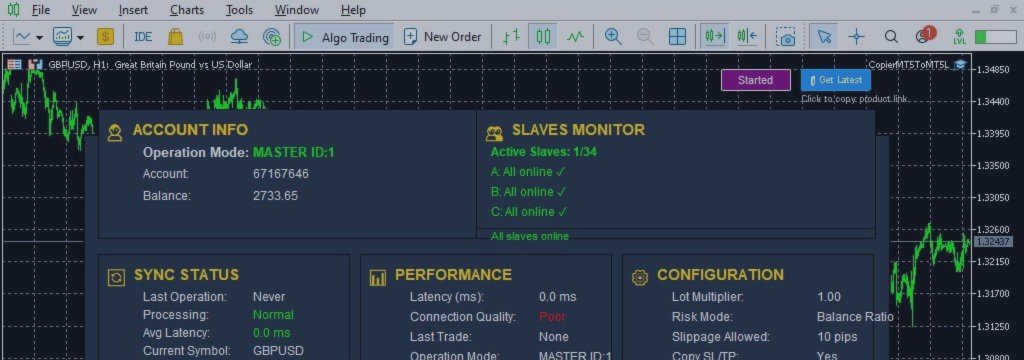
Understanding Slave Account Monitoring in MetaTrader 5 Copier: Real-Time Dashboard Control and Multi-Account Connection

PRODUCT ACCESS LINK ON MQL5 MARKET:
https://www.mql5.com/en/ market/product/191385
In a multi-account trading environment, visibility into account status is just as important as trade execution itself.
While most traders focus on how trades are copied from a Master account to Slave accounts, the real stability of a copy trading system depends on whether all connected accounts remain online, synchronized, and actively receiving trades.
A Slave account may become disconnected at any time due to:
• Internet interruptions
• VPS failures
• Broker connection issues
• MetaTrader crashes or shutdowns
If this issue is not detected immediately, the affected account may stop receiving new trades while other accounts continue operating normally, creating performance inconsistencies across the entire system.
Slave Account Monitoring in MT5 Trade Copier
Slave Account Monitoring is a real-time system designed to track the connection status and operational health of all Slave terminals connected to a Master account.
Instead of manually checking each terminal, traders receive centralized visibility of all accounts inside a single interface.
This ensures that at any moment, the trader can see:
• Which accounts are ONLINE
• Which accounts are OFFLINE
• Which accounts require attention
This visibility is essential in multi-account trading environments where even a single disconnected terminal can distort overall performance results.
Causes of Slave Disconnection
In real trading environments, disconnections are common and can occur for multiple reasons:
Internet Interruptions
Temporary loss of connectivity can immediately stop trade replication.
VPS Failure
Overloaded or unstable VPS servers can cause MetaTrader to freeze or crash.
Broker Issues
Server maintenance or connectivity problems may interrupt trade communication.
Platform Shutdown or Crash
MetaTrader may close unexpectedly due to system errors or updates.
When any of these occur, Slave accounts stop receiving trades while the Master continues operating normally.
Importance of Real-Time Visibility
Without monitoring, traders may assume all accounts are synchronized while in reality some terminals may already be disconnected.
This leads to:
• Missed trades on specific accounts
• Uneven performance across accounts
• Incorrect strategy evaluation
• Hidden execution gaps
Real-time visibility ensures immediate detection of such issues.
Dashboard-Based Monitoring System
Modern MT5 Trade Copier systems use a centralized dashboard to display all Slave account statuses in real time.
Instead of switching between multiple terminals, traders can monitor everything from a single interface.
The dashboard typically shows:
• ONLINE / OFFLINE status
• Account identifiers
• Connection health indicators
• Last update timestamps
• Synchronization state
This simplifies multi-account management significantly.
Internal Mechanism of Slave Monitoring
Slave Monitoring works through continuous status communication between Master and Slave terminals.
When a Slave is functioning correctly:
• It sends periodic heartbeat signals
• Confirms active connection
• Reports synchronization status
When communication stops:
• The system marks the account as OFFLINE
• Calculates disconnection duration
• Triggers alert notifications
This allows immediate detection of any failure.
Offline Detection and Timing Impact
The duration of disconnection is critical in determining its impact.
Short interruptions may not significantly affect performance, but long disconnections can lead to:
• Multiple missed trades
• Strategy desynchronization
• Account performance divergence
The longer a Slave remains offline, the greater the deviation from Master account behavior.
Monitoring in Multi-Account Environments
In setups with multiple MT4 or MT5 terminals, manual monitoring becomes impractical.
As the number of accounts increases:
• 5–10 accounts can be monitored manually
• 20+ accounts become difficult to track
• 50+ accounts require full automation
Without a monitoring system, traders risk missing critical connection failures.
Alert and Notification System
An effective Slave Monitoring system includes automatic alerts.
These alerts may notify:
• When a Slave goes OFFLINE
• When a Slave reconnects
• When extended disconnection occurs
The system must clearly indicate:
• Which account is affected
• When the issue started
• Whether recovery occurred
This allows fast troubleshooting and decision-making.
Identifying Problematic Accounts
One of the most important functions of monitoring is isolating the exact source of the problem.
Instead of generic system warnings, traders can see:
• Specific account number
• Terminal identity
• Connection history
This helps determine whether the issue is:
• Account-specific
• Broker-related
• VPS or network-related
Relationship with Trade Copying System
Slave Monitoring works alongside the trade copying engine.
While trade copying ensures execution, monitoring ensures visibility.
Together they provide:
• Execution reliability
• System transparency
• Operational awareness
Without monitoring, trade copying alone cannot guarantee consistency.
Preventing Silent Copy Failures
One of the most dangerous issues in copy trading systems is silent failure.
This occurs when:
• Master continues trading normally
• Some Slaves stop receiving trades
• No immediate warning is generated
Over time, this creates hidden performance gaps.
Slave Monitoring eliminates this risk by ensuring immediate visibility of all disconnections.
Overview of MT5 Trade Copier System
An MT5 Trade Copier is a multi-layer trade replication system designed for professional multi-account trading environments.
It includes:
• Trade execution engine
• Symbol Mapping system
• Slave Monitoring module
• Synchronization controller
• Configuration system
• Performance tracking layer
Each component works together to maintain system stability.
Dashboard Overview
The dashboard is the central control interface of the MT5 Trade Copier system.
It provides real-time visibility of:
• All Slave accounts
• Connection status
• Trade synchronization state
• System health
This eliminates the need for manual terminal checking.
Account Information
This section displays key account details:
• Master or Slave mode
• Account number
• Balance
• Equity
It ensures clarity about system structure and account roles.
Sync Status System
Synchronization status provides insight into system communication:
• Last trade execution time
• Signal processing state
• Delay and latency indicators
This ensures transparency in trade replication behavior.
Performance Monitoring
Performance metrics include:
• Execution speed
• Connection stability
• Latency behavior
• System responsiveness
This is critical in multi-account trading environments.
Configuration System
The configuration layer controls system behavior:
• Copy mode selection
• Master ID linkage
• Slave identification
• Trade replication rules
Proper configuration ensures stable operation.
Key Features of Slave Monitoring
• Real-time ONLINE / OFFLINE detection
• Automatic disconnection alerts
• Centralized dashboard visibility
• Account-specific status tracking
• Live connection updates
• Fast failure detection
Setup Guide
Master Setup
• Install EA on Master terminal
• Enable Master mode
• Set Master ID
• Enable AutoTrading
Slave Setup
• Install EA on Slave terminal
• Enable Slave mode
• Set CopyFromMasterID
• Assign unique Slave number
• Enable AutoTrading
System Validation
After setup:
• All accounts appear in dashboard
• Status updates are active
• Monitoring signals are working
FAQ
Why is Slave Monitoring important?
Because it ensures real-time visibility of all connected accounts and prevents unnoticed disconnections.
Can it detect VPS failure?
Yes, any interruption that stops communication is detected as OFFLINE.
Does it require manual checking?
No, monitoring is fully automated.
What happens when a Slave reconnects?
The system updates status and resumes normal tracking automatically.
Conclusion
Slave Account Monitoring is a core component of modern MT5 Trade Copier systems.
It ensures that all connected accounts remain visible, synchronized, and actively monitored in real time.
By combining dashboard visibility, automated alerts, and real-time status tracking, it eliminates the risk of silent disconnections and improves overall stability in multi-account trading environments.
When integrated with trade execution and synchronization systems, it forms a complete infrastructure for reliable copy trading operations.
PRODUCT ACCESS LINK ON MQL5 MARKET:
https://www.mql5.com/en/ market/product/191385




