What is Symbol Mapping? A Complete Guide to Broker Symbol Compatibility in MT5 Trade Copier (Copier MT5 To MT5)

PRODUCT ACCESS LINK ON MQL5 MARKET:
https://www.mql5.com/en/ market/product/191385
In multi-account trading systems built on an MT5 Trade Copier architecture, maintaining consistency between different broker environments is one of the most critical technical challenges.
Although trade replication systems are designed to synchronize orders from a Master account to multiple Slave accounts, the actual execution reliability depends on multiple internal layers such as symbol compatibility, trade routing logic, terminal health status, and synchronization timing.
One of the most important foundational components in this architecture is Symbol Mapping, which ensures that trading instruments remain consistent across brokers that use different naming conventions.
However, Symbol Mapping is only one part of a larger system that also includes execution monitoring, trade synchronization, configuration control, and real-time terminal health tracking.
Symbol Mapping in MT5 Trade Copier
Symbol Mapping is a core translation mechanism inside an MT5 Trade Copier that connects equivalent financial instruments across different broker terminals.
Since brokers do not follow a standardized naming system, the same instrument may appear under multiple formats across MetaTrader 5 environments.
For example:
EURUSD may appear as:
• EURUSD
• EURUSDm
• EURUSD.pro
• EURUSD#
• EURUSD.a
Although these all represent the same underlying asset, the MT5 Trade Copier cannot treat them as identical without a mapping system.
Symbol Mapping solves this by creating a logical relationship between different symbol formats, ensuring that trades are executed correctly regardless of broker differences.
Deep Understanding of Symbol Mapping Logic
At a system level, Symbol Mapping works by identifying the base instrument behind each symbol string.
Instead of relying on exact string comparison, the MT5 Trade Copier uses normalization logic to extract the core symbol identity.
This process typically includes:
• Removing suffixes such as “m”, “.pro”, “#”
• Removing prefixes added by brokers
• Standardizing symbol naming structure
• Matching against a base instrument dictionary
This allows the system to interpret multiple representations of the same asset as a single tradable entity.
Why Symbol Differences Exist Between Brokers
Symbol inconsistency is not a system error but a structural design decision made by brokers.
Each broker configures MetaTrader 5 based on its own infrastructure, which may include:
• Liquidity provider formatting rules
• Internal risk management systems
• Account type segmentation
• Regional trading conditions
• Instrument contract specifications
Because of these differences, symbols are often modified at server level before being displayed in MetaTrader.
Common variations include:
Suffix-based naming: EURUSDm, GBPUSD.pro, XAUUSD#
Prefix-based naming: mEURUSD, proEURUSD
Contract-based naming: US30.cash, DJ30.cash
These variations create a major challenge for trade replication systems.
Symbol Mapping in Complex Broker Environments
In advanced MT5 Trade Copier setups, Symbol Mapping must handle not only simple forex pairs but also:
• Indices
• Commodities
• Metals
• Crypto CFDs
• Synthetic instruments
Each category may have different naming conventions depending on the broker.
For example:
XAUUSD may also appear as GOLD, GOLD.spot, or XAUUSDm depending on the broker.
Without Symbol Mapping, these instruments would be treated as unrelated assets.
Multi-Symbol Conflict Resolution
In some cases, multiple possible matches exist for a single symbol.
For example:
EURUSD → EURUSDm, EURUSD.pro, EURUSD.fx
In such cases, the MT5 Trade Copier must apply resolution logic such as:
• Exact match priority
• Broker preference hierarchy
• Symbol availability filtering
• Manual mapping overrides
This ensures deterministic trade execution.
Missing Symbol Handling
Another important scenario occurs when a symbol exists on the Master account but is not available on the Slave terminal.
In this case, the system cannot execute the trade.
The MT5 Trade Copier typically handles this by:
• Skipping the trade
• Logging the missing symbol event
• Optionally triggering alerts
This prevents accidental execution on incorrect instruments.
CFD and Index Mapping Complexity
CFD instruments often have the highest variation across brokers.
Examples include:
US30 → DJ30.cash → US30.m → WALL30
NAS100 → USTEC → NAS100.cash
GER40 → DAX40 → DE40.cash
Symbol Mapping must recognize these as equivalent financial instruments even when naming conventions differ completely.
Symbol Mapping Execution Pipeline
When a trade is executed on the Master account, the MT5 Trade Copier follows a structured pipeline:
- Trade is created on Master
- Symbol is extracted from order
- Slave symbol list is loaded
- Mapping rules are applied
- Base instrument is identified
- Matching symbol is selected
- Trade is executed on Slave terminal
This ensures that execution is always validated before order placement.
Symbol Mapping Performance Optimization
In high-frequency MT5 Trade Copier systems, Symbol Mapping must operate with minimal overhead.
Optimizations typically include:
• Preloaded symbol tables
• Cached mapping results
• Reduced runtime lookup operations
• Fast string normalization routines
This ensures that mapping does not introduce latency into trade execution.
Transition into System-Level Architecture
While Symbol Mapping ensures instrument compatibility, a complete MT5 Trade Copier system also requires deeper layers of infrastructure to ensure operational stability.
These include:
• Dashboard monitoring
• Account synchronization
• Slave terminal health tracking
• Execution performance monitoring
• Configuration management
• Risk and trade filtering systems
Overview of MT5 Trade Copier System Architecture
An MT5 Trade Copier is not just a trade replication tool but a multi-layer synchronization system designed for professional trading environments.
It operates through several interconnected modules:
• Trade execution engine
• Symbol Mapping layer
• Slave Monitoring system
• Synchronization controller
• Configuration manager
• Notification system
• Performance tracking module
Each module plays a role in ensuring consistent trade replication across multiple accounts.
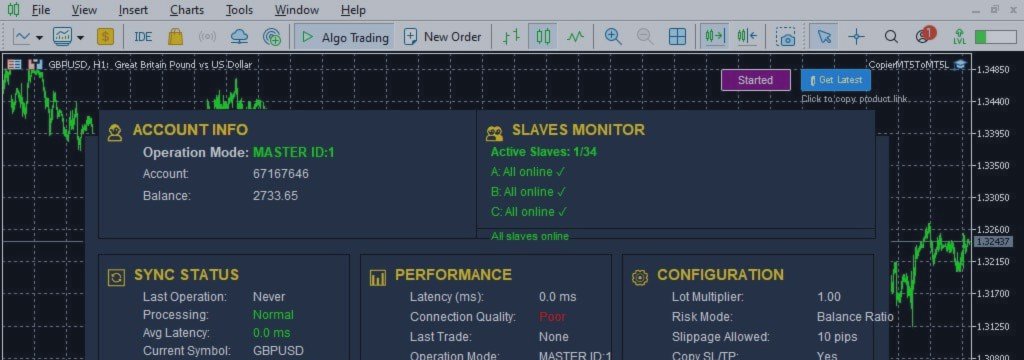
Dashboard Overview
The dashboard serves as the central control interface of the MT5 Trade Copier system.
It provides real-time visibility into:
• Account status
• Active trades
• Slave connection health
• Execution performance
• Synchronization timing
This allows traders to monitor the entire system from a single interface.
Account Information Layer
The Account Info section displays essential data such as:
• Master or Slave mode
• Account number
• Balance
• Equity
This ensures clarity about which terminal is currently active.
Slave Monitoring System
Slave Monitoring is responsible for tracking the operational status of all connected Slave terminals in real time.
It detects:
• Online status
• Offline status
• Reconnection events
• Terminal inactivity
• Connection interruptions
If a Slave becomes disconnected, the system immediately updates the dashboard.
Synchronization Status
Synchronization tracking ensures that trade replication is functioning correctly.
It monitors:
• Last executed operation
• Processing state
• Execution delay
• Timestamp of last sync
This ensures full transparency in system behavior.
Performance Monitoring
Performance metrics include:
• Execution latency
• System response time
• Connection quality
• Last trade execution speed
This helps evaluate system efficiency under real trading conditions.
Configuration System
The configuration layer defines how the MT5 Trade Copier behaves.
It includes:
• Copy mode selection
• Master ID
• Slave identification
• Risk settings
• Trade replication rules
Trade Settings
Trade behavior is controlled through settings such as:
• Stop Loss / Take Profit copying
• Pending order replication
• Slippage control
• Reverse mode
Trade Filtering System
Filtering allows selective trade replication:
• Buy-only mode
• Sell-only mode
• Magic number filtering
This ensures strategy-specific execution.
Day Filtering
Day filtering allows control over trading activity by weekday:
• Enable/disable trading per day
This is useful for strategy timing control.
Notifications System
The notification system provides alerts for:
• Trade execution
• Slave disconnection
• System events
Alerts can be:
• Pop-up notifications
• Email notifications
Key Features
Core capabilities include:
• Ultra-fast execution
• Multi-account replication
• Symbol Mapping engine
• Slave Monitoring system
• Advanced dashboard
• Synchronization control
Setup Guide
Master setup:
• Enable Master mode
• Set Master ID
• Activate AutoTrading
Slave setup:
• Enable Slave mode
• Assign Slave number
• Link to Master ID
• Enable AutoTrading
Conclusion
An MT5 Trade Copier system is a multi-layer architecture designed for professional trade replication across multiple accounts and brokers.
Symbol Mapping ensures correct instrument compatibility, while the system-level architecture ensures stability, synchronization, and execution reliability across all connected terminals.
Together, these components form the foundation of modern multi-account trading infrastructure.
PRODUCT ACCESS LINK ON MQL5 MARKET:
https://www.mql5.com/en/ market/product/191385