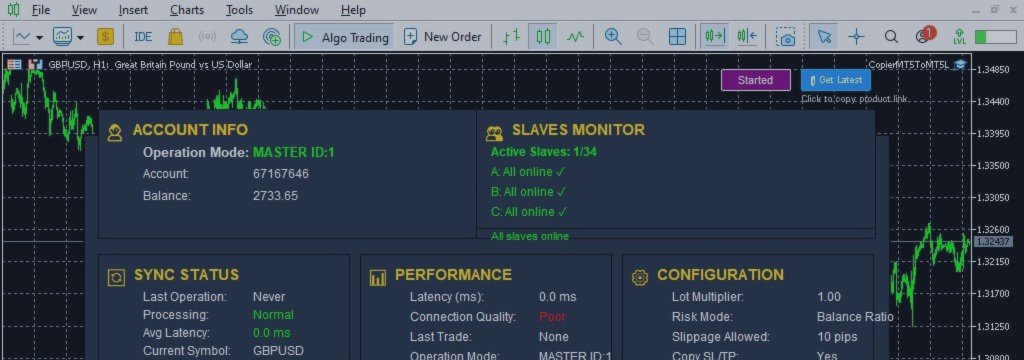
How to Manage Multiple Prop Firm Accounts from One Master Account in a Local Trade Copier

PRODUCT ACCESS LINK ON MQL5 MARKET:
Copier MT5 To MT5 https://www.mql5.com/en/ market/product/191385
Introduction
As proprietary trading firms (Prop Firms) continue to grow in popularity, many traders are managing multiple funded accounts simultaneously. Instead of relying on a single account, traders often distribute capital across several prop firm accounts to increase buying power, diversify risk, and maximize profit opportunities.
While managing multiple accounts can offer significant advantages, it also introduces operational challenges. Opening, modifying, and closing trades manually across several MetaTrader terminals can become time‑consuming, inefficient, and prone to costly execution errors. Even experienced traders may struggle to maintain perfect consistency when managing multiple accounts during fast‑moving market conditions.
This is where a Local Trade Copier for MetaTrader 5 and MetaTrader 4 becomes an essential tool. By using a Master‑Slave trade replication system, traders can execute trades on a single master account while automatically copying those trades to multiple connected accounts in real time.
A professional trade copier not only saves time but also improves execution consistency, enhances risk management, and simplifies multi‑account trading operations. Whether you manage funded accounts, investor accounts, client accounts, or multiple personal trading accounts, a reliable local trade copier can transform the way you trade.
Why Traders Manage Multiple Prop Firm Accounts
Many prop firms impose account size limitations, daily drawdown restrictions, and maximum allocation rules. As a result, traders frequently operate several funded accounts simultaneously rather than relying on a single large account.
There are several reasons for this approach:
Increased Capital Allocation
Instead of trading one account with limited buying power, traders can combine multiple funded accounts to gain access to significantly larger capital.
Risk Diversification
Spreading trades across several accounts can reduce the impact of unexpected account issues, broker‑specific conditions, or firm‑specific rule changes.
Strategy Separation
Some traders run different strategies on different accounts. For example:
- Scalping strategy on one account
- Swing trading strategy on another
- News trading strategy on a third account
Prop Firm Scaling Programs
Many funded traders gradually receive larger allocations as they demonstrate consistent performance. Managing multiple accounts allows traders to participate in several scaling programs simultaneously.
However, as the number of accounts increases, manual management quickly becomes inefficient.
The Challenges of Manual Multi‑Account Trading
Managing two or three accounts manually may seem manageable initially. However, once traders begin handling five, ten, or even twenty funded accounts, several problems emerge.
Execution Delays
Every second matters in financial markets. Manually placing identical trades across multiple terminals introduces delays that can affect trade performance.
Inconsistent Entries
Small differences in entry prices can create noticeable performance variations between accounts.
Human Errors
Common mistakes include:
- Opening the wrong position size
- Missing Stop Loss settings
- Forgetting Take Profit levels
- Closing trades on some accounts but not others
- Entering trades in the wrong direction
Increased Stress
Constantly switching between multiple MetaTrader terminals can become mentally exhausting and increase the likelihood of costly errors.
A centralized trade replication system solves these problems by automating the entire process.
What Is a Local Trade Copier?
A Local Trade Copier is an Expert Advisor (EA) designed to replicate trades between MetaTrader accounts running on the same machine, VPS, or shared MetaTrader environment.
The system typically operates using two roles:
Master Account
The Master account acts as the source of all trading activity. Whenever a trade is:
- Opened
- Modified
- Partially closed
- Fully closed
the copier instantly records and distributes that information.
Slave Accounts
Slave accounts receive trade instructions from the Master account and automatically execute the same actions according to their configured settings.
This creates a highly efficient trading environment where a trader only needs to manage one account while all other accounts remain synchronized automatically.
How Master‑Slave Trade Replication Works
The Master‑Slave architecture is one of the most reliable methods of multi‑account trading.
The process works as follows:
- The trader opens a trade on the Master account.
- The copier detects the new position.
- Trade information is transmitted locally.
- Connected Slave accounts receive the signal.
- The trade is replicated automatically.
- Future modifications such as Stop Loss updates, Take Profit changes, and position closures are synchronized across all accounts.
This process occurs within milliseconds, allowing all accounts to remain aligned with the Master account.
Real‑Time Trade Synchronization
Modern local trade copiers provide real‑time synchronization for virtually all trading activities.
These include:
- Market Orders – Buy and Sell positions are copied immediately after execution.
- Pending Orders – Advanced systems can synchronize Buy Limit, Sell Limit, Buy Stop, Sell Stop, and Stop Limit Orders. This ensures complete strategy replication rather than copying only active positions.
- Stop Loss and Take Profit Synchronization – When risk parameters change on the Master account, the copier automatically updates all connected accounts.
This helps maintain consistency across the entire trading network.
Advanced Slave Monitoring and Health Tracking
One of the most important features in a professional trade copier is real‑time slave monitoring.
As traders increase the number of connected accounts, visibility becomes critical.
A modern monitoring dashboard allows traders to instantly view:
- Connected accounts
- Active accounts
- Offline accounts
- Synchronization status
- Last copied trade
- Latency information
- Connection quality
Instead of manually checking every terminal, traders can monitor their entire network from one centralized dashboard.
Offline Detection System
Advanced copiers continuously track the health of each slave account.
If a slave account experiences:
- Platform crash
- VPS interruption
- Internet outage
- Terminal freeze
- Account disconnection
the system immediately detects the issue.
The dashboard can display:
- Online status
- Short‑term offline status
- Long‑term offline status
- Offline duration timer
This allows traders to respond quickly and prevent synchronization issues.
Instant Alerts
Professional systems may provide:
- Pop‑up notifications
- Desktop alerts
- Email notifications
- Push notifications
These alerts help traders maintain complete awareness of account connectivity.
Flexible Risk Management Across Multiple Accounts
Not all accounts should use identical position sizes. Different account balances often require different risk settings.
A professional copier offers multiple lot‑sizing methods.
Fixed Lot Size
Every copied trade uses a predefined lot size regardless of the Master account.
Mirror Lot Size
Slave accounts use the exact same lot size as the Master account.
Lot Multiplier
Traders can multiply the Master lot size. For example:
- Master = 1.00 lot
- Multiplier = 2
- Result: Slave = 2.00 lots
Balance‑Based Scaling
One of the most popular features among prop firm traders. The copier automatically calculates lot sizes according to account balance ratios.
Example:
- Master Balance = $100,000
- Slave Balance = $50,000
- The copier may automatically adjust position sizes proportionally to maintain consistent risk exposure.
This helps maintain uniform risk management across accounts of different sizes.
Reverse Trade Copying
Some traders use hedging or inverse trading strategies.
A Reverse Mode feature allows:
- Master Buy → Slave Sell
- Master Sell → Slave Buy
This can be useful for:
- Hedging portfolios
- Testing alternative strategies
- Managing opposing market exposure
Reverse copying provides additional flexibility that many basic trade copiers do not offer.
Symbol Mapping for Different Brokers
One common challenge when copying trades between different brokers is symbol naming differences.
Examples:
- XAUUSD vs Gold
- US30 vs US30.cash
- EURUSD vs EURUSDm
Without proper mapping, copied trades may fail.
Advanced trade copiers include Symbol Mapping functionality that automatically translates symbols between brokers. This ensures accurate execution even when account providers use different naming conventions.
Multi‑Master Trading Environments
Professional traders often run multiple trading systems simultaneously.
A modern copier can support multiple Master accounts, each with its own unique Master ID.
For example:
- Master 1 – Scalping Strategy
- Master 2 – Swing Strategy
- Master 3 – News Trading Strategy
Slave accounts can choose which Master to follow, allowing highly customized account structures.
This flexibility is particularly valuable for professional account managers and signal providers.
Why Local Trade Copiers Are Popular Among Prop Firm Traders
Prop firm traders have specific requirements that differ from retail traders.
They typically need:
- Fast execution
- Stable trade replication
- Consistent risk management
- Reliable monitoring
- No external software dependencies
A local trade copier addresses these requirements effectively.
No DLLs or External Programs
Many professional copiers operate entirely within MetaTrader. Benefits include:
- Enhanced security
- Improved stability
- Simpler installation
- Greater compatibility with prop firm environments
Low‑Latency Execution
Local communication allows trades to be copied extremely quickly without relying on external trade‑copying servers. This can be particularly important for scalpers, high‑frequency traders, news traders, and challenge account traders.
Improving Operational Efficiency
The primary advantage of centralized trade replication is operational efficiency.
Instead of repeating the same actions across multiple terminals, traders can:
- Focus on analysis
- Improve execution quality
- Reduce administrative work
- Minimize operational risk
As account numbers increase, these benefits become even more significant. For traders managing ten or more accounts, a professional trade copier can save hours of work every week.
Best Practices for Managing Multiple Funded Accounts
To maximize performance, traders should follow several best practices.
Monitor Account Connectivity
Regularly check dashboard status and synchronization health.
Use Appropriate Risk Scaling
Different account sizes should use suitable lot‑sizing methods.
Configure Symbol Mapping Carefully
Verify broker symbols before trading live.
Test Before Going Live
Always test copier settings on demo accounts before using funded accounts.
Enable Notifications
Alerts provide immediate awareness of connectivity or synchronization issues.
Maintain VPS Stability
Reliable VPS infrastructure helps ensure uninterrupted operation.
Conclusion
Managing multiple prop firm accounts manually becomes increasingly difficult as account numbers grow. Execution delays, inconsistent entries, and human errors can negatively impact overall trading performance.
A Local Trade Copier for MetaTrader 5 and MetaTrader 4 provides a practical solution by allowing traders to manage all accounts from a single Master account. Through real‑time trade replication, advanced slave monitoring, risk‑based lot management, pending order synchronization, symbol mapping, and health‑tracking features, traders can maintain consistency across all connected accounts while significantly reducing workload.
For funded traders, account managers, signal providers, and professional multi‑account operators, centralized trade replication offers a more efficient, scalable, and reliable way to manage modern trading environments.
Frequently Asked Questions
Q: Can I copy trades to multiple accounts simultaneously?
A: Yes. A professional copier can replicate trades from one Master account to multiple Slave accounts at the same time.
Q: Does the copier support pending orders?
A: Yes. Advanced copiers can synchronize pending orders including Limit, Stop, and Stop Limit orders.
Q: Can different accounts use different risk settings?
A: Yes. Fixed lots, multipliers, and balance‑based scaling methods allow customized risk management for each account.
Q: What happens if a slave account goes offline?
A: The monitoring system detects the issue, displays an offline warning, tracks offline duration, and can send alerts to the trader.
Q: Can the copier work with different brokers?
A: Yes. Symbol Mapping allows trades to be copied accurately even when brokers use different symbol names.
Q: Is a local trade copier suitable for prop firm accounts?
A: Yes. Local copiers are widely used by prop firm traders because they provide fast execution, stable synchronization, advanced monitoring, and operation without DLLs or external software.
PRODUCT ACCESS LINK ON MQL5 MARKET:
Copier MT5 To MT5 https://www.mql5.com/en/ market/product/191385




