RSI Turn Finder Indicator: Non-Repainting Momentum Turn Detection with Adaptive Trend Line for MT4 and MT5

Introduction
Trend reversals are notoriously hard to time. The Relative Strength Index (RSI) is one of the oldest and most studied momentum oscillators ever developed, but read in isolation it produces an enormous amount of noise. A 70/30 RSI cross is often blamed for whipsaws because the signal is taken at face value -- without context, without a momentum confirmation, and without any state to keep the trader on the right side of the move once the turn has happened.
RSI Turn Finder Indicator solves all three problems in a compact, focused tool. It watches for the precise moment when the 14-period RSI crosses up through a configurable Positive threshold (default 65). It confirms that close-price momentum is rising at the same instant by checking the slope of a 5-period EMA. It then latches the resulting trend state -- Positive or Negative -- and renders a single bicolor EMA(low, 10) line on the chart so the trader can see the active bias at a glance. The opposite signal fires only when RSI drops below a configurable Negative threshold (default 32) AND close-price momentum has rolled over.
Because the entire engine evaluates on confirmed (closed) bars and the latched state can never change mid-bar, the indicator is non-repainting by construction. Once a Positive or Negative label is printed on the chart, it stays there. The colored trend line follows the EMA(low, 10) value as it forms in real time, but state transitions -- and therefore label placements -- only happen on bar close.
The indicator is available for both MetaTrader 4 and MetaTrader 5, with 100% identical logic and visual output between the two builds.
Download the indicator:
- MetaTrader 5: RSI Turn Finder MT5
- MetaTrader 4: RSI Turn Finder MT4
This article walks through the indicator concept, the precise momentum cross logic, the EMA slope confirmation, why the colored line is rendered the way it is, the full alert package, every input parameter, and a recommended trading workflow. The eleven inputs are documented so you can tune the indicator to any symbol and any timeframe.
What Is a Momentum Turn
Most traders learn RSI as a level-based indicator: above 70 is overbought, below 30 is oversold, and a return through those levels is a reversal signal. This framing is not wrong, but it is incomplete. A 70 cross taken without context fires constantly during strong trends -- and a long strong trend is exactly when a counter-trend RSI signal performs the worst.
A momentum turn is a stricter idea. It is the instant at which RSI breaks out of mid-range territory with confirming directional pressure from price itself. Rather than trying to fade extreme readings, the turn-finder approach trades with the RSI move once it has cleared a meaningful threshold and once recent closes are pushing in the same direction.
The default Positive level is 65 (not 70) and the default Negative level is 32 (not 30). These choices are deliberate. Setting the Positive threshold at 65 means the indicator catches momentum turns slightly earlier than a classical 70/30 system, which improves entries during fast moves where waiting for 70 leaves substantial pip distance on the table. The Negative threshold at 32 captures bearish turns slightly sooner for the same reason. Both can be raised or lowered to match the trader's preferred sensitivity.
The crucial second test is the slope of the 5-period EMA on close. A Positive turn requires the most recent 5-period EMA value to be greater than the previous bar's value -- in other words, short-term close-price momentum must be rising at the very bar where the RSI cross fires. A Negative turn requires the same EMA to be falling. This eliminates the most common RSI failure mode: an oscillator cross that fires while underlying price is moving sideways or counter to the cross direction.
The Three-Condition Cross Logic for Positive Turns
A Positive turn (state flips to bullish) requires four conditions on the same closed bar. All four must be true simultaneously, otherwise no transition occurs.
Condition 1: RSI[1] is below the Positive Level. The RSI value on the previous closed bar must be below 65 (default). This ensures the indicator detects an actual cross, not a continuation of an already-elevated RSI reading.
Condition 2: RSI[0] is above the Positive Level. The RSI value on the most recently closed bar must be above 65. Combined with Condition 1, this defines a cross-up event between two consecutive closed bars.
Condition 3: RSI[0] is above the Negative Level. The current RSI must also be above the Negative threshold (default 32). This is a sanity check that prevents a Positive turn from firing if the RSI is somehow simultaneously triggering a Negative condition due to extreme parameter overlap (only relevant if a user sets pmom equal to or below nmom, which the indicator's input validation rejects, but the safeguard is built into the logic regardless).
Condition 4: EMA(close, 5) is rising. The 5-period exponential moving average on close prices must be greater on the current closed bar than on the previous closed bar. Mathematically, EMA5[0] - EMA5[1] > 0 . This is the close-price momentum confirmation that distinguishes a meaningful turn from an oscillator artifact.
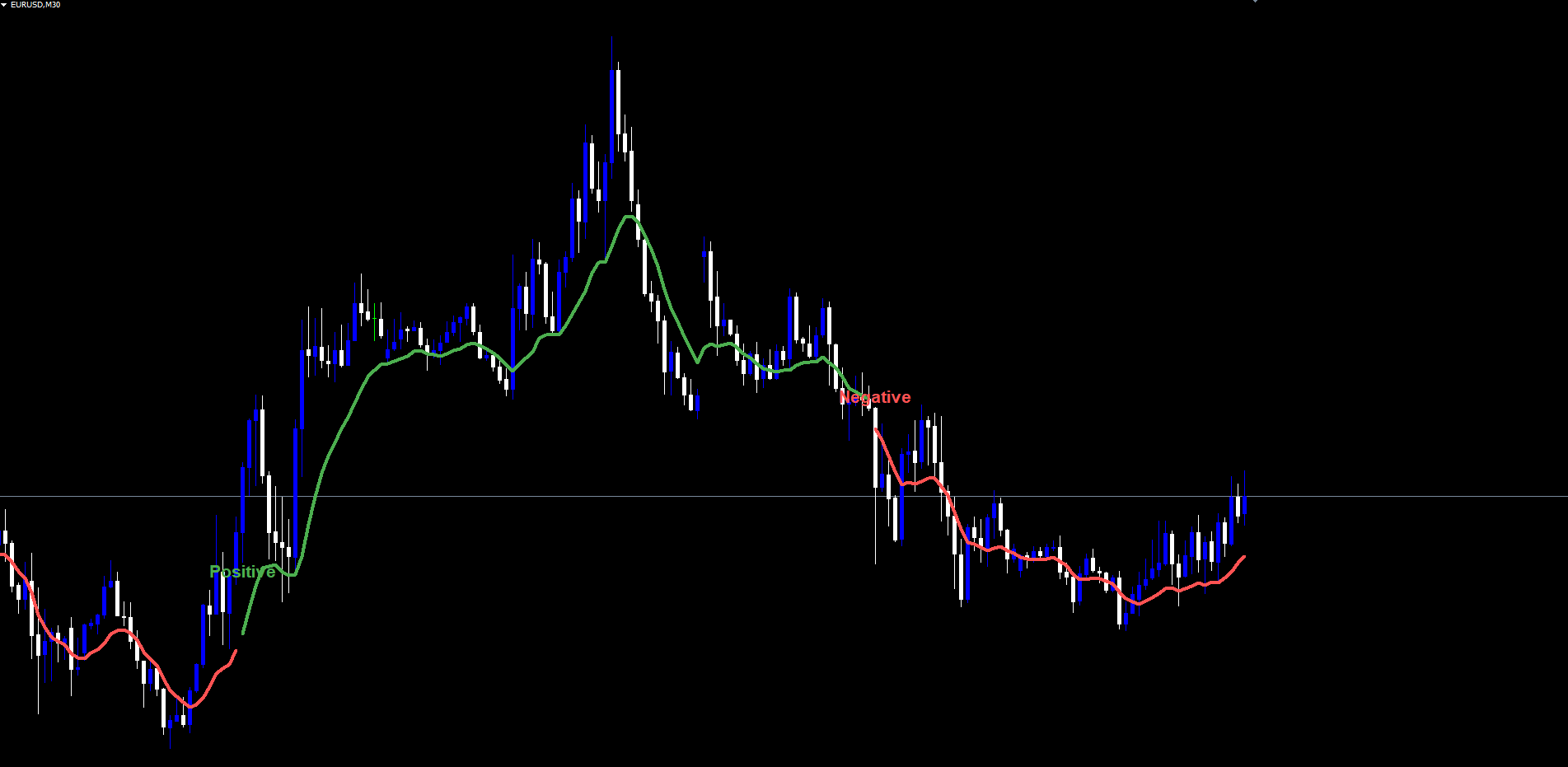
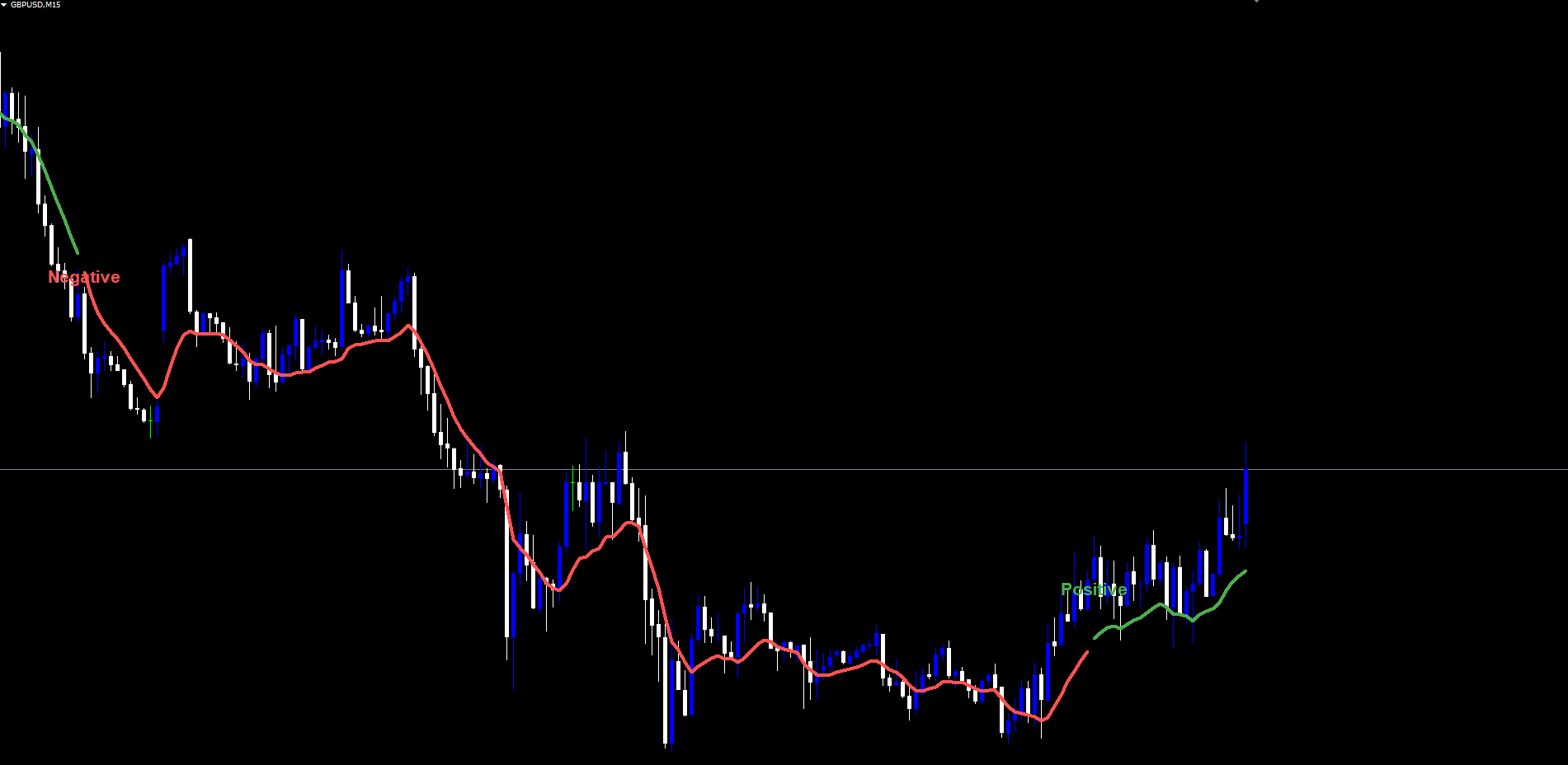
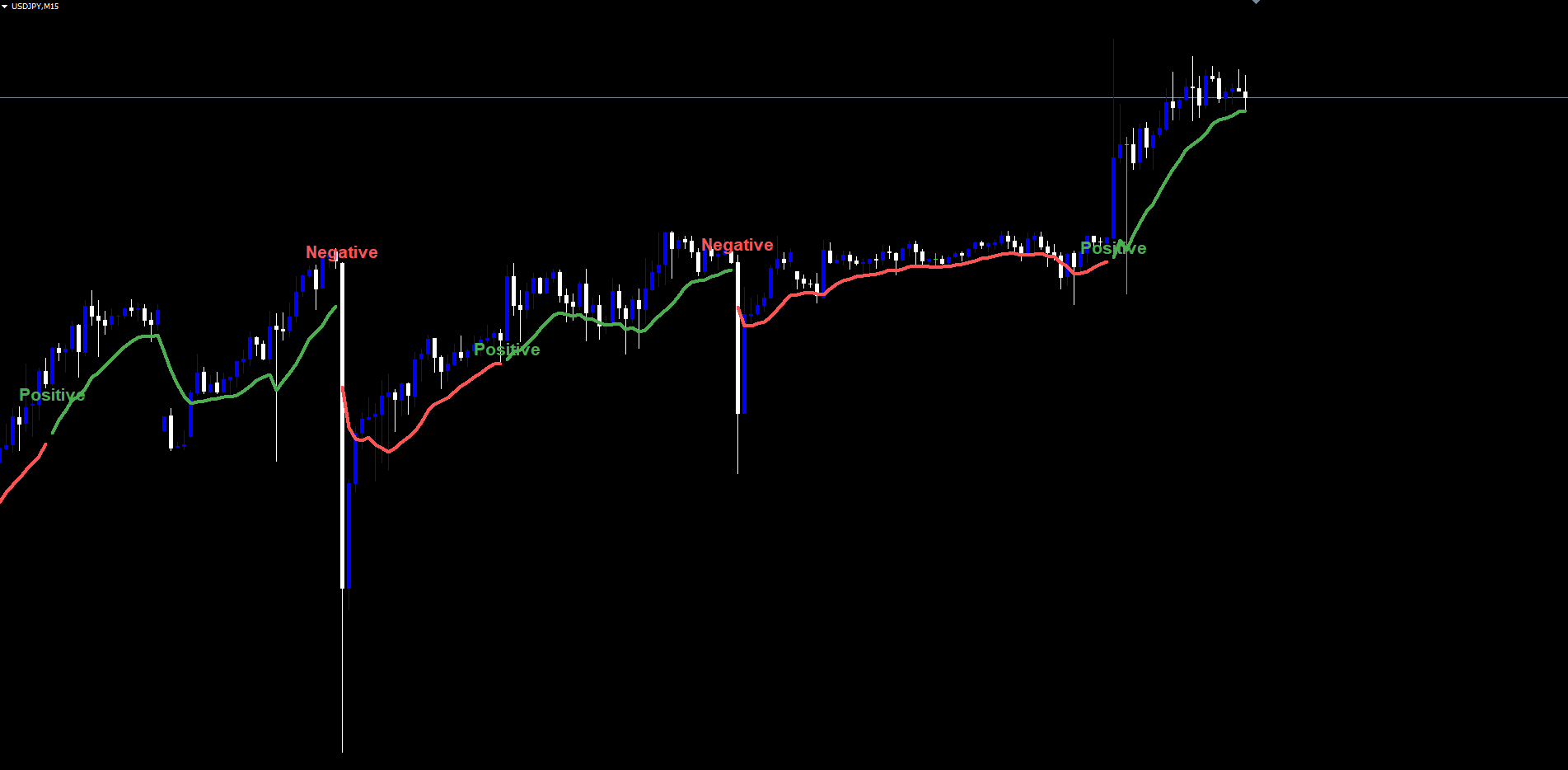
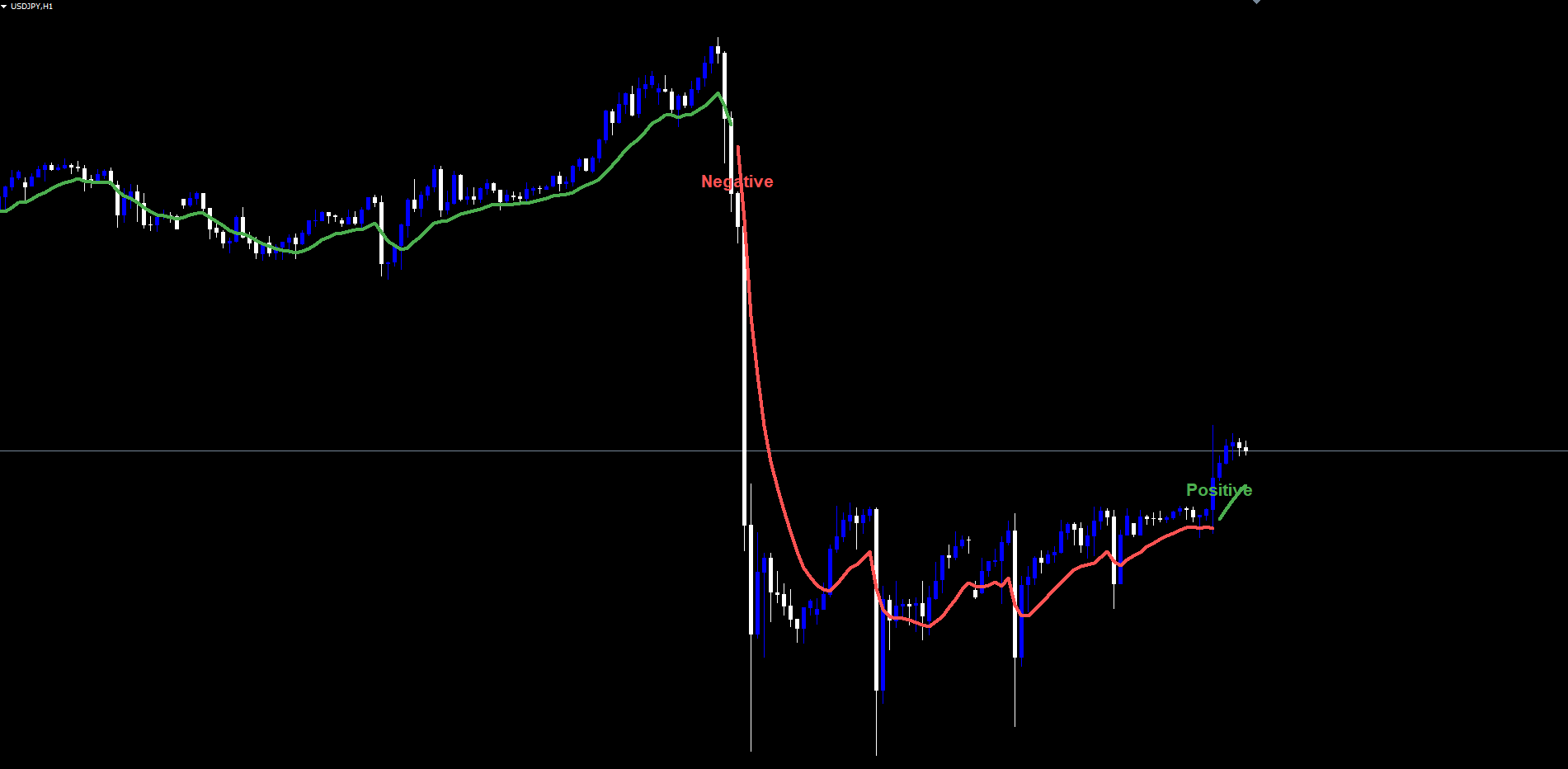
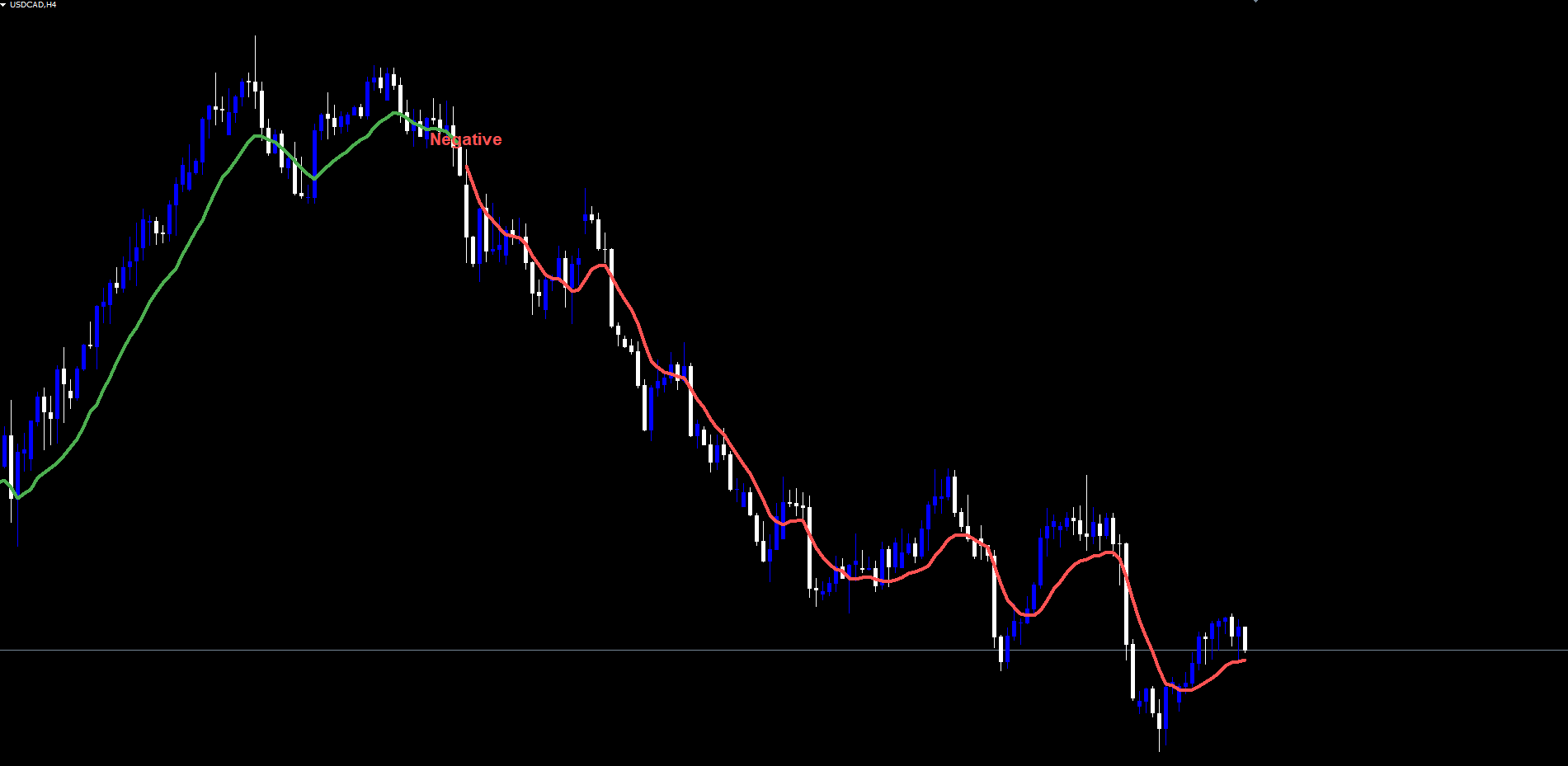
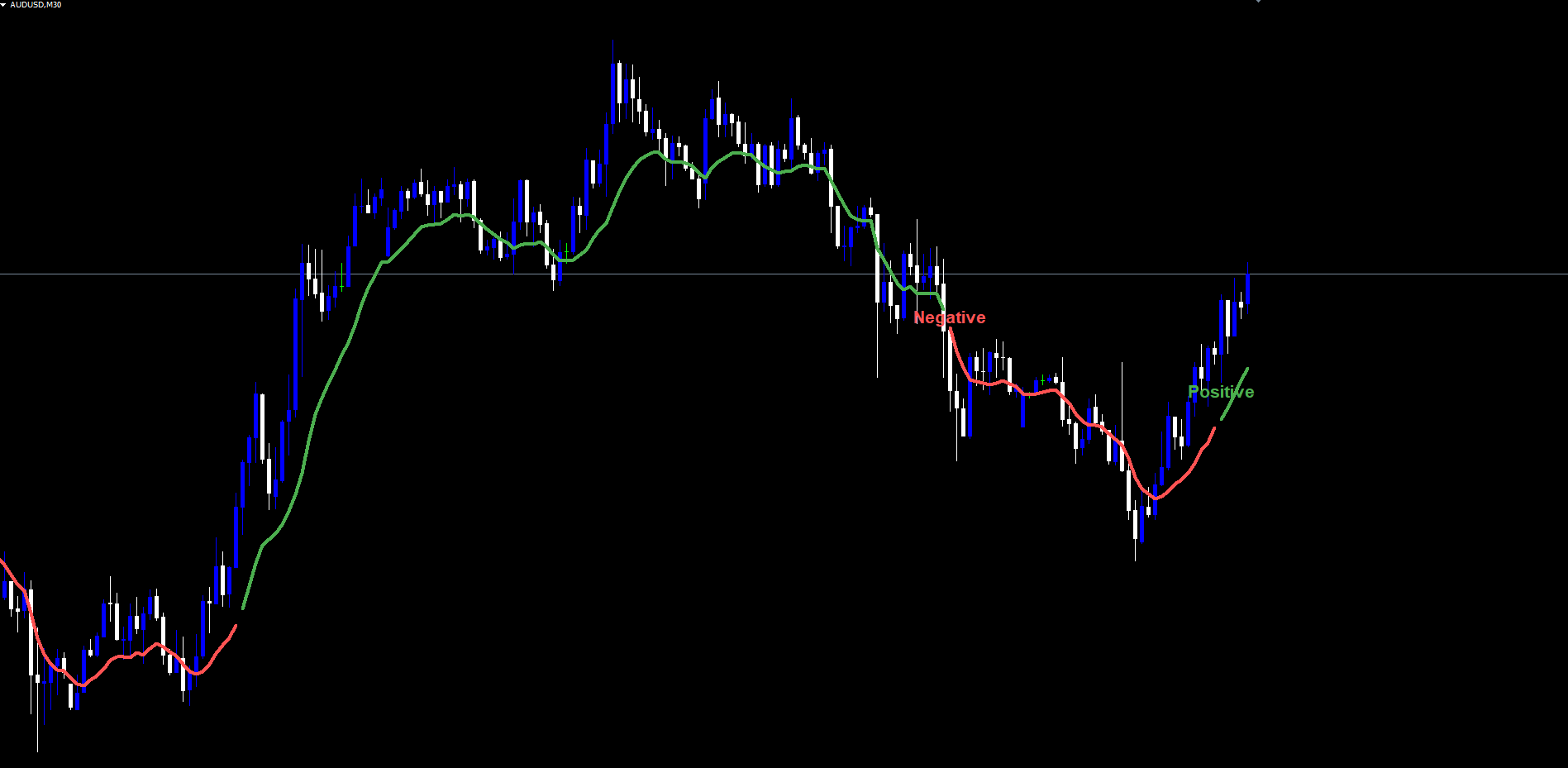
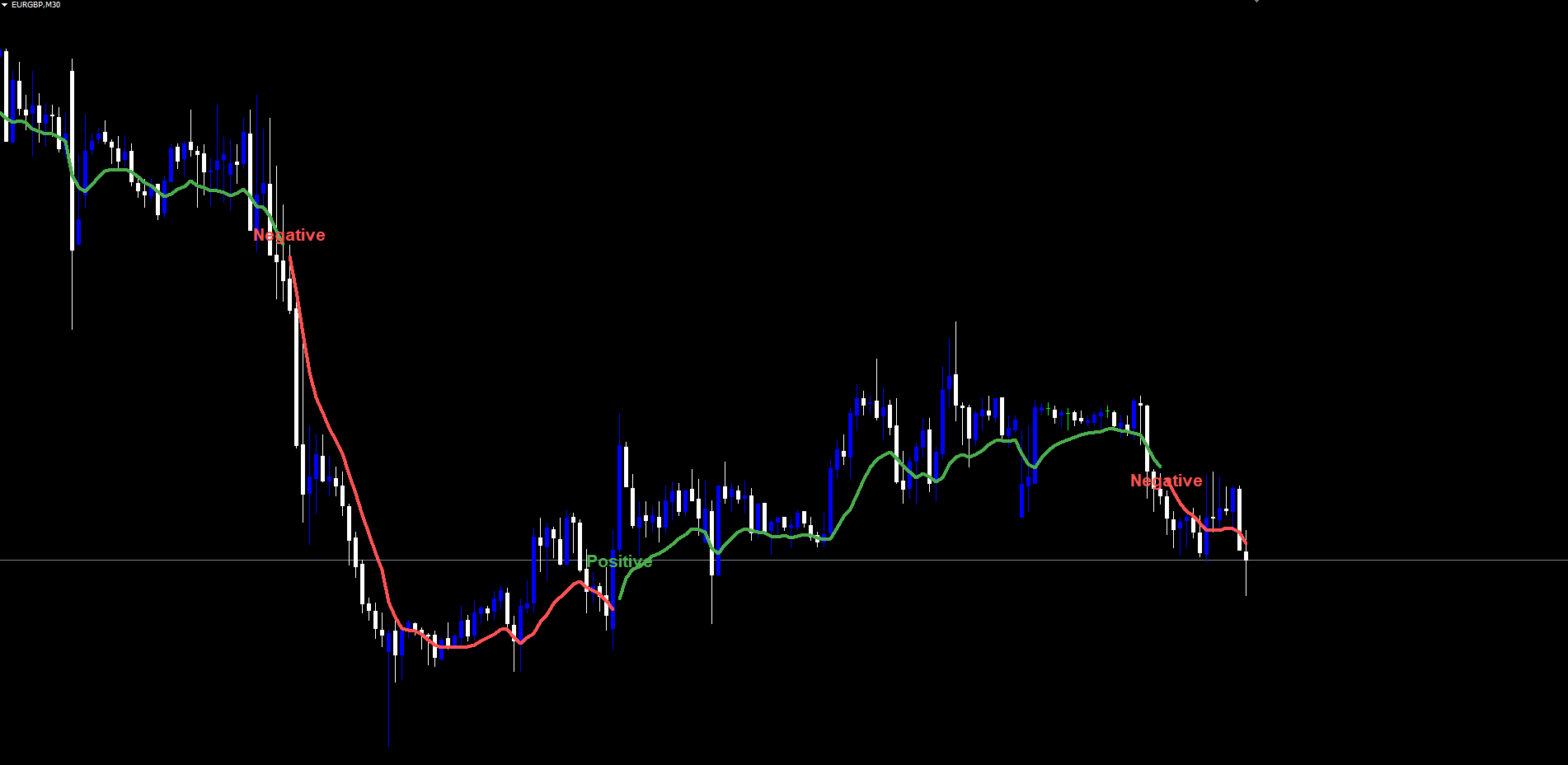
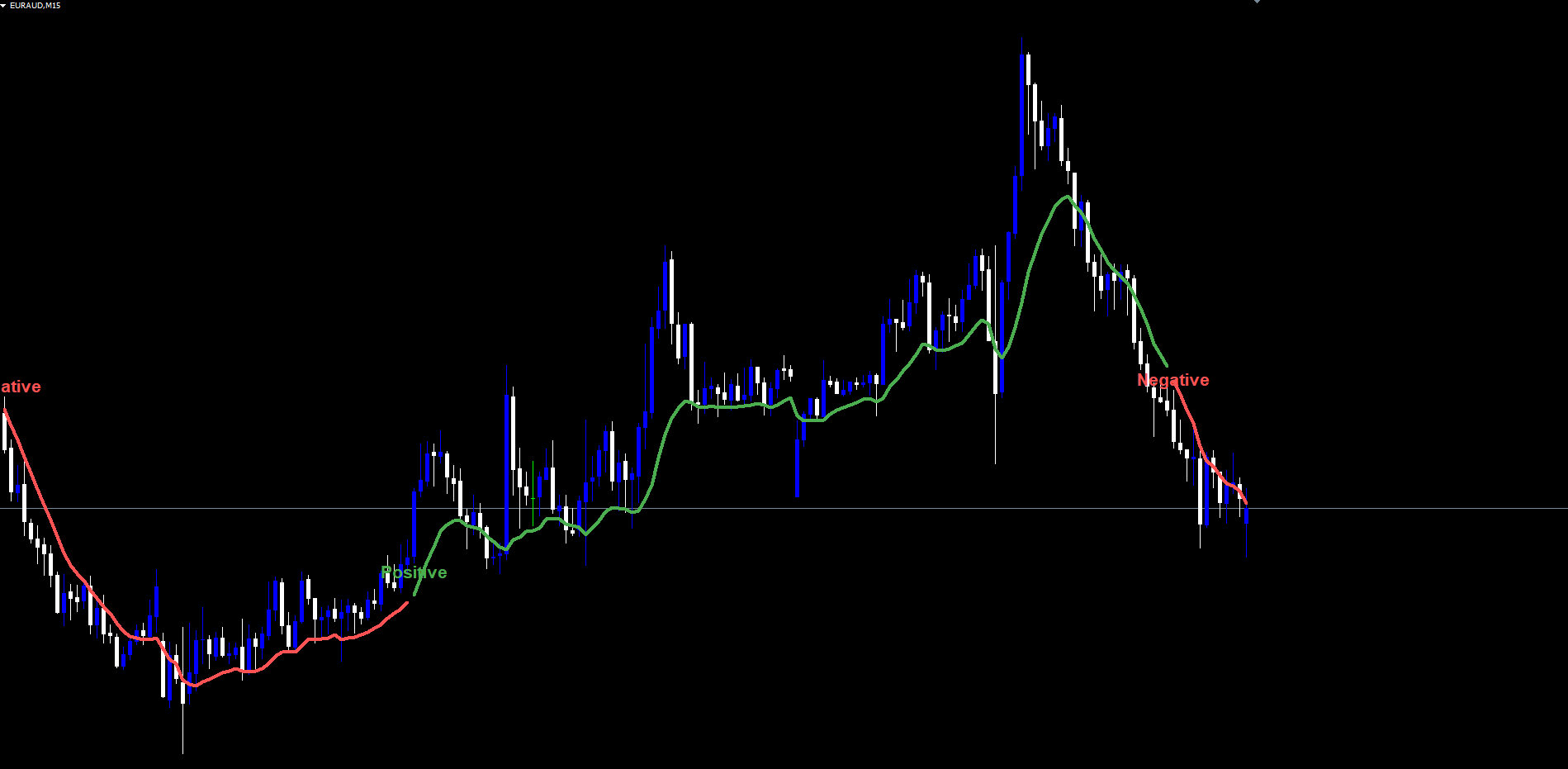
When all four conditions are met, the internal Positive flag is set to true and the Negative flag is set to false. A green "Positive" text label is drawn anchored to the low of the trigger bar, and the colored trend line transitions to green from that bar forward.
The Two-Condition Cross Logic for Negative Turns
A Negative turn is simpler -- only two conditions are required:
Condition 1: RSI[0] is below the Negative Level. The RSI on the most recently closed bar must be below 32 (default).
Condition 2: EMA(close, 5) is falling. The 5-period EMA on close must be lower on the current closed bar than on the previous closed bar. Mathematically, EMA5[0] - EMA5[1] < 0 .
Note that the Negative condition is intentionally asymmetric -- it does not require a cross from above. Once RSI is below 32 with falling momentum, the turn is recognized immediately. This makes the indicator slightly more sensitive to bearish turns, which is appropriate for trading because bearish moves typically accelerate faster than bullish ones.
When both conditions are met, the Negative flag is set to true and the Positive flag is set to false. A red "Negative" text label is drawn anchored to the high of the trigger bar, and the colored trend line transitions to red from that bar forward.
State Latching: How the Trend Bias Persists
Many oscillator-based systems suffer from "signal decay" -- a buy signal fires, the chart shows it briefly, and then the indicator forgets the signal as soon as the next bar closes. RSI Turn Finder Indicator avoids this by maintaining a latched state that persists from one transition to the next.
After a Positive turn fires, the state remains Positive on every subsequent bar until a Negative turn fires. Likewise, once a Negative turn fires, the state remains Negative until the next Positive turn. This means the colored trend line will continue to render as green for as many bars as needed -- whether that is two bars or two hundred -- until the opposite condition triggers.
The state is held in a per-bar internal array sized to the chart history. On the first calculation pass when the indicator is loaded, the array is filled by walking forward through historical bars chronologically and applying the same momentum-cross logic that runs in real time. This produces a complete state history so that the trend line is correctly colored from the earliest visible bar to the present, not just from the moment the indicator was loaded.
Subsequent ticks only re-evaluate bars that have closed since the last calculation. New state values are written, the trend line is extended, and labels are drawn for any new transitions. Past state values are never modified -- a bar that was Positive yesterday will still be Positive when you scroll back to it tomorrow.
The live (forming) bar mirrors the state of the most recently closed bar. Because the EMA(low, 10) value updates as the bar forms, the trend line on the live bar moves with price tick by tick. However, the state of the live bar does not change until the bar closes and the next OnCalculate cycle confirms whether a new transition occurred. This is the architectural reason the indicator does not repaint.
The Bicolor Trend Line: EMA(low, 10) with State-Based Color
The single most prominent visual element is a 3-pixel-wide colored line that tracks the 10-period exponential moving average of bar lows. Its color depends entirely on the latched state:
- Green when state is Positive
- Red when state is Negative or neutral (the initial state before any turn has fired)
The line is implemented internally as two separate buffers -- one for green segments, one for red segments -- with both buffers carrying the same EMA value at the bar of any color transition. This one-bar overlap is essential. Without it, MetaTrader's line drawing would leave a visible one-pixel gap at every transition, which would make the indicator look glitchy on dense data. With the overlap pattern, the line transitions cleanly between colors with no gap and no double-rendering.
The choice of EMA(low, 10) for the line track (rather than EMA(close) or a faster average) is intentional. EMA(low) sits naturally below price action during bullish moves and above the price action's swing tops during bearish reversals, providing a clean visual reference for trend direction without crowding the candles. The 10-period length is slow enough to filter intraday noise on the M15-H4 timeframes where this style of indicator is most useful, and fast enough to remain responsive when the trend turns.
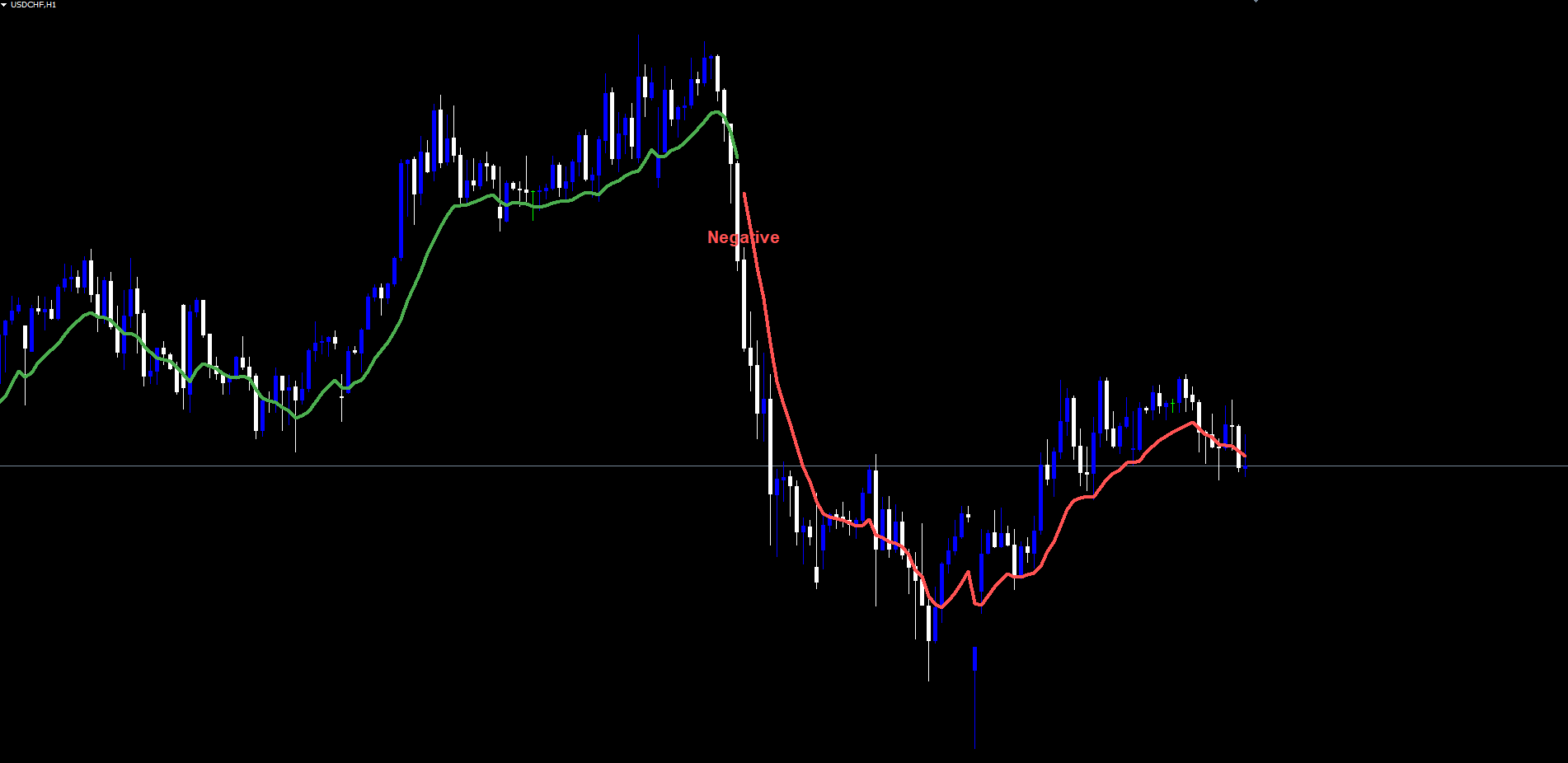
The line width is fixed at 3 pixels for visibility. The colors are fixed at compile time to ensure perfect MT4 / MT5 visual parity -- specifically RGB(76, 175, 79) for green and RGB(255, 82, 82) for red, which match the original Pine Script source colors exactly.
For traders who prefer no line at all (signals-only mode), the InpShowLine input can be set to false. The state machine and labels still operate normally, but no buffer values are written.
Non-Repainting by Construction
"Non-repainting" is one of the most abused words in the indicator marketplace. Most indicators that claim non-repainting actually do repaint -- they simply do so subtly enough that traders do not notice during casual review. RSI Turn Finder Indicator is non-repainting in the strict architectural sense:
-
Closed-bar evaluation only. State transitions are evaluated on bar shifts >= 1, never on the live bar (shift 0). The forming bar inherits the state of the most recent closed bar; its state cannot independently change during tick updates.
-
No retroactive state writes. Once a state value is written to bar N during the chronological history walk, that value is never overwritten on subsequent ticks. New ticks only write to bars that have closed since the last calculation.
-
No label deletion. Once a "Positive" or "Negative" label is drawn on the chart, it remains until the indicator is removed. The label-drawing routine includes a duplicate check -- if a label already exists for a given bar, it is not redrawn -- but it is never deleted.
-
Alert deduplication by bar timestamp. The most recently fired alert's bar timestamp is stored. A new alert can only fire if the new transition's bar timestamp is strictly greater than the last alert's bar timestamp. This prevents the same closed-bar transition from generating multiple alerts on subsequent ticks.
The combined effect is that the trader sees a permanent record of every state transition. A backtest performed by visually scanning the historical chart matches the live trading behavior exactly -- there are no "ghost" signals that would have appeared and then vanished during real-time formation.
The Four-Channel Alert Package
When a state transition is detected on the most recently closed bar (and only on that bar), the indicator fires alerts through up to four independent channels. Each channel is individually toggleable.
Popup Alert ( InpAlertPopup , default true). Calls MetaTrader's standard Alert() function, which displays an on-screen modal dialog with the alert message and an audible default chime. This is the most reliable channel for on-screen monitoring.
Sound Alert ( InpAlertSound , default true). Calls PlaySound() with the file specified in InpAlertSoundFile (default "alert.wav"). The file must exist in the MetaTrader installation's Sounds folder. Custom sound files can be specified by name without a path.
Push Notification ( InpAlertPush , default false). Calls SendNotification() to deliver the alert to the MetaTrader mobile app. Requires the trader's MetaQuotes ID to be configured in MetaTrader's Tools > Options > Notifications panel.
Email Alert ( InpAlertEmail , default false). Calls SendMail() to deliver the alert via SMTP. Requires SMTP credentials to be configured in Tools > Options > Email.
Every channel additionally writes the message to the Experts log via Print() for permanent record-keeping regardless of which channels are enabled.
The alert message format is consistent across all channels: RSI Turn Finder: <Positive|Negative> Trend on <Symbol> <Timeframe> . For example, on a EURUSD M15 chart, a Positive transition would generate: RSI Turn Finder: Positive Trend on EURUSD M15 .
Practical Trading Workflow
The indicator is designed to be used as a momentum-trend filter rather than a standalone entry trigger. The recommended workflow has four steps.
Step 1: Apply the indicator. Open any chart in MetaTrader 4 or MetaTrader 5. From the Navigator panel, drag RSI Turn Finder Indicator onto the chart. The default settings work well on most major Forex pairs, indices, and commodities on the M15 to H4 timeframes. For very volatile instruments (crypto, exotic crosses), consider raising both threshold inputs by 5-10 points to require stronger momentum cross confirmation.
Step 2: Establish the bias. The colored trend line tells you the current latched state at a glance. If it is green, the current bias is Positive -- look for long entries on pullbacks to the line or to nearby support. If it is red, the current bias is Negative -- look for short entries on rallies to the line or to nearby resistance. Avoid taking countertrend trades against the line color unless you have a strong reason from a separate analysis framework.
Step 3: Use the labels for fresh-turn entries. A new Positive or Negative label marks the precise bar where the latched state flipped. This is often the cleanest entry point because the move has just been confirmed by both RSI and EMA slope. Enter at the open of the next bar after the label appears. Place stops slightly beyond the most recent swing high (for shorts) or swing low (for longs) -- the EMA(low, 10) line itself can serve as a trailing reference once the trade is in profit.
Step 4: Manage the trade with state changes. Hold the position as long as the colored line remains the same color as your trade direction. Exit (or tighten stops) when the line transitions to the opposite color, marked by a fresh opposite-direction label. This produces a hold-while-trending, exit-on-reversal style that aligns naturally with the indicator's state-machine logic.
Timeframe Considerations
The indicator works on every timeframe but produces different signal characteristics depending on the chart period.
M5 to M15 -- More frequent signals, suitable for intraday scalping and short-duration swing trades. Consider raising the Positive level to 70 and lowering the Negative level to 30 to reduce noise.
M30 to H1 -- Default settings produce well-spaced signals that align with multi-day market structure. This is the most balanced timeframe range for the indicator.
H4 to D1 -- Few but high-conviction signals. Each transition typically marks a multi-week trend change. Consider lowering both thresholds slightly (e.g., Positive at 60, Negative at 35) to capture turns earlier on slow-moving higher timeframes.
Parameter Reference
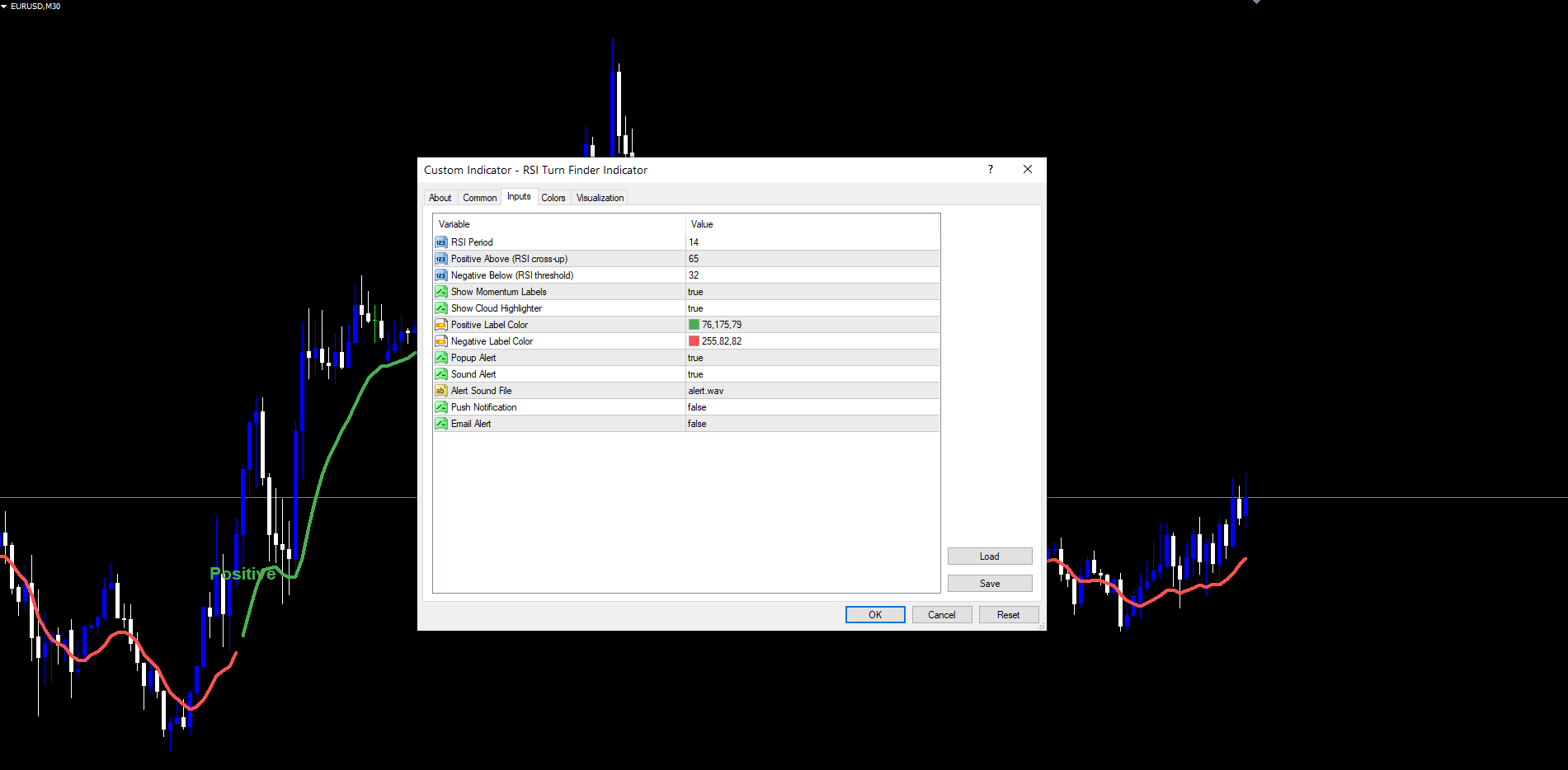
All eleven inputs are documented below. Defaults match the source code exactly.
RSI Settings
| Parameter | Default | Description |
|---|---|---|
| InpRSIPeriod | 14 | Period of the underlying RSI calculation. Standard Wilder's RSI on close. |
| InpPositiveLevel | 65 | RSI level the indicator must cross UP through to fire a Positive turn. |
| InpNegativeLevel | 32 | RSI level the indicator must be BELOW (with falling EMA) to fire a Negative turn. |
Visuals
| Parameter | Default | Description |
|---|---|---|
| InpShowLabels | true | Draw "Positive" and "Negative" text labels at state transitions. |
| InpShowLine | true | Render the bicolor EMA(low, 10) trend line. |
| InpPosLabelColor | C'76,175,79' (green) | Text color for "Positive" labels. |
| InpNegLabelColor | C'255,82,82' (red) | Text color for "Negative" labels. |
Alerts
| Parameter | Default | Description |
|---|---|---|
| InpAlertPopup | true | Trigger MetaTrader's on-screen popup alert dialog. |
| InpAlertSound | true | Play the sound file specified in InpAlertSoundFile . |
| InpAlertSoundFile | alert.wav | Sound file to play (must be in MetaTrader's Sounds folder). |
| InpAlertPush | false | Send a push notification to the MetaTrader mobile app. |
| InpAlertEmail | false | Send an email alert via configured SMTP. |
Recommended Configuration Profiles
Default (balanced) -- All defaults. Suitable for major Forex pairs on M15 to H4.
Sensitive (more turns, suitable for fast markets) -- Set InpPositiveLevel to 60, InpNegativeLevel to 35. Captures momentum turns earlier at the cost of additional signals during choppy phases.
Strict (fewer turns, suitable for ranging instruments) -- Set InpPositiveLevel to 70, InpNegativeLevel to 28. Requires stronger RSI cross before flipping the state, reducing whipsaws.
Higher timeframe (D1 / W1) -- Set InpPositiveLevel to 60, InpNegativeLevel to 35. Compensates for the lower frequency of RSI cross events on slow-moving daily and weekly bars.
Cross-Symbol and Multi-Timeframe Setup
The indicator runs independently on each chart instance. This means a trader can apply RSI Turn Finder Indicator to multiple charts simultaneously and each instance maintains its own state, line, labels, and alert deduplication. Combined with push notifications, this allows monitoring of a watchlist of 10 or more instruments without manually switching charts.
A practical setup is to apply the indicator to the H1 chart of each watched instrument with InpAlertPush = true and InpAlertPopup = false . Push notifications then arrive on the mobile device whenever any chart's state flips. The trader can then open the relevant chart for full visual context before deciding on entry.
For multi-timeframe analysis on a single instrument, applying the indicator to both the H1 and H4 charts at the same time is a useful pattern. The H4 line color shows the dominant bias; the H1 line color shows the active phase. Trading only when both timeframes agree (both green or both red) yields a higher signal quality than relying on either timeframe alone.
Source Heritage and Credit
The original concept comes from the open-source Pine Script community indicator "RSI Momentum Trend" by TZack88, published on TradingView under the Mozilla Public License 2.0. RSI Turn Finder Indicator preserves the original logic exactly -- the same RSI cross-up condition, the same EMA(close, 5) slope confirmation, the same state-latching behavior, and the same threshold defaults (65 / 32).
The MetaTrader port required substantial architectural work to make the engine non-repainting, to fit MT4's series-indexed buffer model, and to deliver pixel-perfect MT4 / MT5 visual parity. The Pine Script "fill" between EMA(high, 5) and EMA(low, 10) was replaced with a single bicolor EMA(low, 10) line for a cleaner visual presentation that does not overlap candle bodies. The remaining elements -- labels, color choices, threshold defaults -- are preserved from the source.
MT4 / MT5 Visual and Logic Parity
Both builds are designed to render identical output on the same data. Specifically:
- The same RSI period, the same threshold defaults, the same EMA periods, and the same logic structure.
- The same fixed line colors (green RGB(76, 175, 79); red RGB(255, 82, 82)).
- The same label fonts (Arial Bold, size 16), label anchors (above bar high for Negative, below bar low for Positive), and label colors.
- The same alert message format and the same four channels.
- The same non-repainting guarantees (closed-bar evaluation, no retroactive writes, no label deletion).
The only differences are the platform-required ones: MT5 uses indicator handles + CopyBuffer for iRSI / iMA, while MT4 uses the same functions per shift. This produces no visible difference in output -- it is purely an internal API distinction.
Installation
RSI Turn Finder Indicator is distributed through the MQL5.com Market and installs automatically after purchase.
- Purchase the indicator from the MQL5.com Market product page.
- The indicator downloads and installs automatically into MetaTrader.
- Open the Navigator panel (Ctrl+N) and expand the Indicators section.
- Find RSI Turn Finder Indicator under Indicators > Market.
- Drag the indicator onto any chart.
- Adjust input parameters if needed, then click OK.
The indicator works on all timeframes and all instruments supported by your broker. No manual file copying is required and no DLLs are used.
The first calculation on a fresh chart processes the entire history in one pass and may take a fraction of a second on charts with several thousand bars. Subsequent ticks process only newly closed bars and have no perceptible CPU cost. The indicator creates two indicator buffers (for the green and red line segments) and one chart object per labeled state transition. All chart objects use the prefix FXOB_RTF_ and are automatically cleaned up when the indicator is removed.
Conclusion
RSI Turn Finder Indicator turns the classic RSI overbought / oversold concept into a structured, non-repainting trend tool by adding a close-price momentum confirmation, a latched state machine, and a clean bicolor visualization. Every signal is permanent, every state transition has a clearly defined trigger condition, and every visual element renders identically between MT4 and MT5.
The indicator is intentionally simple. It exposes only eleven inputs and presents only one line plus two label types on the chart. There are no oscillator panels, no complicated dashboards, no proprietary smoothing algorithms. The entire engine can be understood from this article in one read, and the source defaults match what most traders would intuitively reach for.
This makes RSI Turn Finder Indicator suitable both as a standalone bias filter for discretionary traders and as a clean, well-defined component within larger trading systems. The four-channel alert package allows the indicator to do its work in the background while the trader focuses on execution and risk management.
Download the indicator:
- MetaTrader 5: RSI Turn Finder MT5
- MetaTrader 4: RSI Turn Finder MT4
CONTACT & SUPPORT
- Email: info@forexobroker.com
- Questions: Use the Comments section on the product page or send a private message
- Bug Reports: Please include your broker name, account type, and a screenshot
-
✅ All MQL Tools: https://www.mql5.com/en/users/forexobroker/ ✅
--------------------------------------------------------------------------------------------------------------
🏦 **Broker I use**: https://icmarkets.com/?camp=55869
🏦 **Broker For EU Traders I use 1**: https://www.ictrading.com?camp=91414
🏦 **Broker I use 2**: https://one.exnessonelink.com/boarding/sign-up/a/c_thuv62ocfq
💻 **VPS**: https://chocoping.com/processing/aff.php?aff=738
💼 **Companies I use for getting funded**:
Fundednext: https://fundednext.com/?fpr=kestutis39
The5ers: https://www.the5ers.com/?afmc=16kl
FTMO: https://trader.ftmo.com/?affiliates=nRAyOhmFRnEnFdOpdLeh
Risk Disclaimer
Trading foreign exchange and CFDs on margin carries a high level of risk and may not be suitable for all investors. You may sustain a loss exceeding your initial investment. Trend Quorum is a technical analysis tool and does not guarantee profitable trades. Past performance is not indicative of future results. The authors accept no liability for any loss arising from use of the indicator. By using Trend Quorum you acknowledge sole responsibility for your trading decisions.




