

Introduction
HyperTrend PRO is a non-repainting, adaptive trend-following indicator for MetaTrader 4 and MetaTrader 5. It combines a SuperTrend engine with a 5-factor confluence scoring system, EMA trend cloud, Hull Moving Average tracer, contrarian reversal engine, and pullback signals -- with built-in risk management and a multi-timeframe dashboard.
The confluence scoring evaluates five independent market conditions on every bar, assigning each signal a strength rating from 1 to 5 stars. Four preset modes let you switch between aggressive and conservative filtering with a single click.
Key Features:
- SuperTrend engine with configurable sensitivity and tuner period
- 5-Factor Confluence Scoring: MACD, EMA cloud, ADX, volume, HMA direction
- Non-repainting signals on confirmed bars only
- 4 Signal Presets: All Signals, Quality+, Strong+, Trend Scalper
- Strong signal classification (score 4+ beyond EMA200)
- EMA Trend Cloud with 4 styles (Smooth, Scalping, Scalping+, Swing)
- Trend Tracer with bull/bear color switching
- WaveTrend pullback and contrarian RSI signals
- ATR-based SL + 3 take profit levels + optional trailing stop
- Multi-timeframe dashboard with session detection
- 9 alert events via popup, sound, push, and email
- MetaTrader 5: Hyper Trend PRO MT5
- MetaTrader 4: Hyper Trend PRO MT4
Understanding SuperTrend Signals
The SuperTrend calculates two adaptive bands using ATR: Close + Sensitivity x ATR(Tuner) (upper) and Close - Sensitivity x ATR(Tuner) (lower). These bands ratchet -- the lower band only moves up during uptrends, the upper only moves down during downtrends. A signal fires when price crosses from one side to the other.
| Parameter | Default | Effect |
|---|---|---|
| Sensitivity | 3.1 | ATR multiplier. Higher = wider bands, fewer signals |
| Signal Tuner | 25 | ATR period. Higher = smoother volatility estimate |
Confluence scoring evaluates five factors at each crossover and assigns a score 0-5:
- MACD Momentum -- Histogram positive and rising (buy) / negative and falling (sell)
- EMA Cloud -- EMA 150 above EMA 250 (buy) / below (sell)
- ADX Strength -- ADX above 20 (trending market)
- Volume -- Tick volume above 20-bar SMA
- HMA Direction -- 55-period Hull MA rising (buy) / falling (sell)
Presets:
| Preset | Min Score | Behavior |
|---|---|---|
| All Signals | MinStrength (default 0) | Most permissive |
| Quality+ | 3 | Good confluence required |
| Strong+ | 4 | High confluence required |
| Trend Scalper | N/A | Pullback signals only |
Installation Guide
HyperTrend PRO is distributed through the MQL5.com Market with automatic installation.
- Purchase from the MQL5 Market: HyperTrend PRO
- The indicator installs automatically
- Open Navigator (Ctrl+N) > Indicators > Market
- Drag Hyper_Trend_PRO onto any chart
- Adjust parameters and click OK
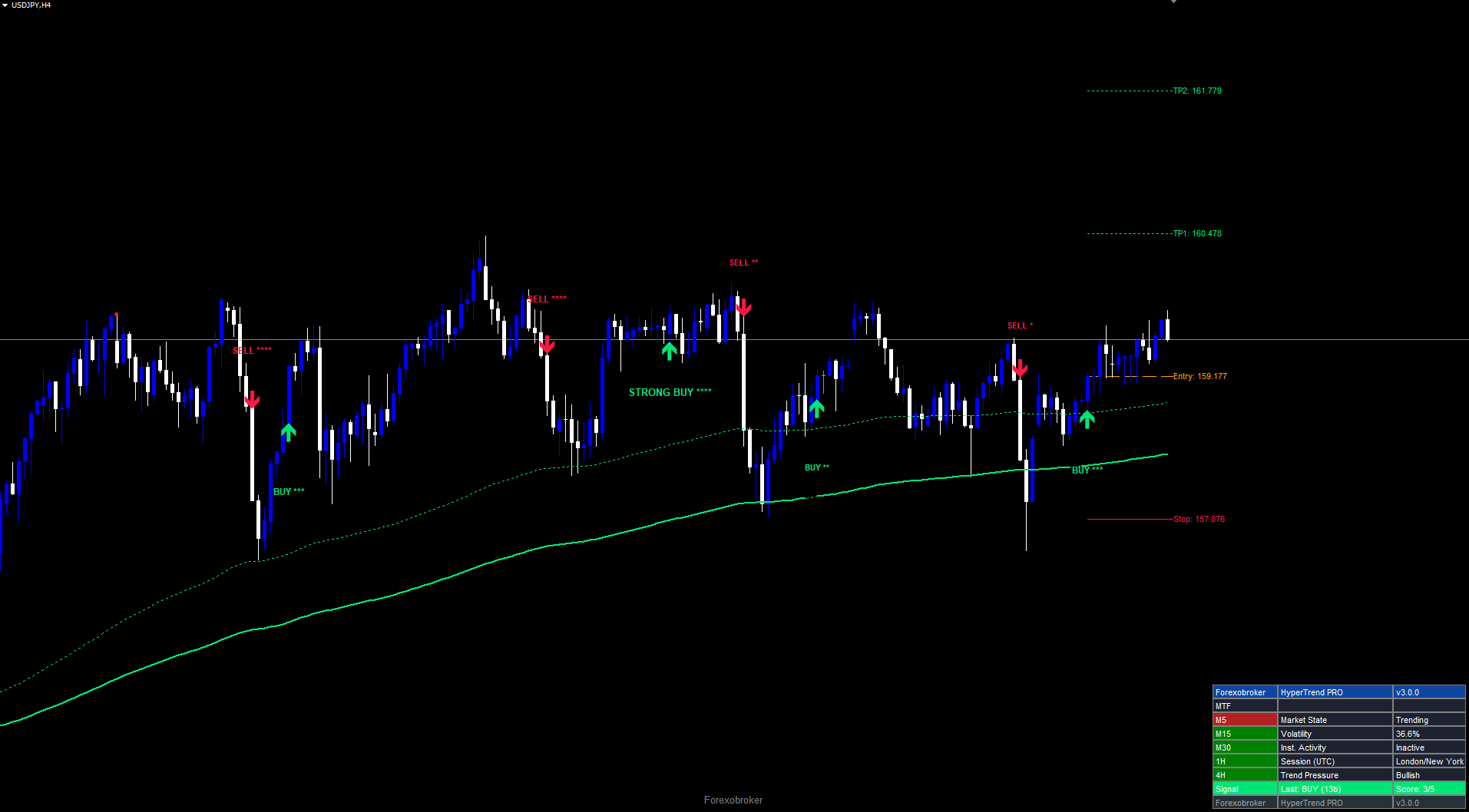
After loading you will see signal arrows, text labels with star ratings, EMA cloud lines, trend tracer, pullback circles, TP/SL levels, and a dashboard panel. All objects use the prefix HTP_ and are cleaned up automatically when the indicator is removed.
Signal System Overview
Each signal has two components: an arrow (Wingding 233 buy / 234 sell) and a text label showing direction, star rating, and strength.
| Score | Stars | Strength |
|---|---|---|
| 0-1 | * | Weak |
| 2 | ** | Fair |
| 3 | * | Good |
| 4 | ** | Strong |
| 5 | * | Ultra |
Strong signals require score >= 4 AND close beyond EMA 200 in signal direction. They receive the STRONG BUY or STRONG SELL prefix and larger font.
Non-repainting: Signals fire only on confirmed (closed) bars ( shift > 0 ). Once placed, they never move or disappear.
Pullback signals use a WaveTrend oscillator. Buy circles appear when WT crosses up from below -60; sell circles when WT crosses down from above +60. Controlled by Show Pullback Signals and Pullback Tuner (default 5).
Contrarian engine uses smoothed RSI with adaptive ATR bands. When Contrarian Only is enabled, buy signals require the oscillator in the oversold zone (below OS=40), sell signals require overbought (above OB=60).
Cloud Configuration
The EMA Trend Cloud fills the area between two EMAs to show trend direction.
| Style | Description | Best For |
|---|---|---|
| Smooth | EMA 150 / EMA 250 | Swing trading, daily (default) |
| Scalping | Tighter EMAs | M5-M15 scalping |
| Scalping+ | Enhanced sensitivity | Active scalping |
| Swing | Wide EMAs | H4-D1 position trading |
When Smooth is selected, EMA 150 and EMA 250 are plotted as dotted lines. EMA 150 above EMA 250 = bullish; below = bearish.
Trend Tracer: An independent long-period EMA (default 250) drawn as a solid line -- green when price is above, red when below. Controlled by Show Trend Tracer and Trend Tracer Length . Does not affect signal generation.
Confluence Filter Configuration
The five factors measure different market dimensions:
| Factor | Measures | Timescale |
|---|---|---|
| MACD Momentum | Direction + acceleration | Short (12/26/9) |
| EMA Cloud | Broad trend | Long (150/250) |
| ADX Strength | Trending vs ranging | Medium (14) |
| Volume | Market participation | Current bar |
| HMA Direction | Medium momentum | Medium (55) |
MinStrength (default 0): Minimum score required. Only used with All Signals preset. Quality+ overrides to 3, Strong+ to 4.
Toggle filters (all default false) add hard requirements beyond the score:
| Filter | Effect When Enabled |
|---|---|
| Trending Market Only | Blocks signals unless ADX > 20 |
| Strong Signals Only | Requires close beyond EMA 200 |
| High Volume Only | Requires volume > 20-bar SMA |
| Cloud-Aligned Only | Requires EMA 150/250 alignment |
| Contrarian Only | Requires RSI oscillator in OS/OB zone |
Risk Management Setup
Every signal calculates SL and up to 3 TP levels automatically.
Stop Loss: ATR(14) x 2.2 from entry (default). Or percentage-based when Use % for SL = true .
Take Profit:
| Level | Default Multiplier | Example (50-pip SL) |
|---|---|---|
| TP1 | 1.0x | 50 pips (1:1 RR) |
| TP2 | 2.0x | 100 pips (1:2 RR) |
| TP3 | 3.0x | 150 pips (1:3 RR) |
Trailing stop (default off): Ratchets in profit direction using ATR-based calculation. Resets on new signal.
Hit tracking: The indicator monitors whether each TP/SL level is reached. Hit status appears in the dashboard and triggers alerts. Flags reset when a new signal fires.
Visual display: Entry (orange dashed), SL (red solid), TP1/TP2/TP3 (green dotted) lines with price labels extending from signal bar to current bar.
Dashboard Guide
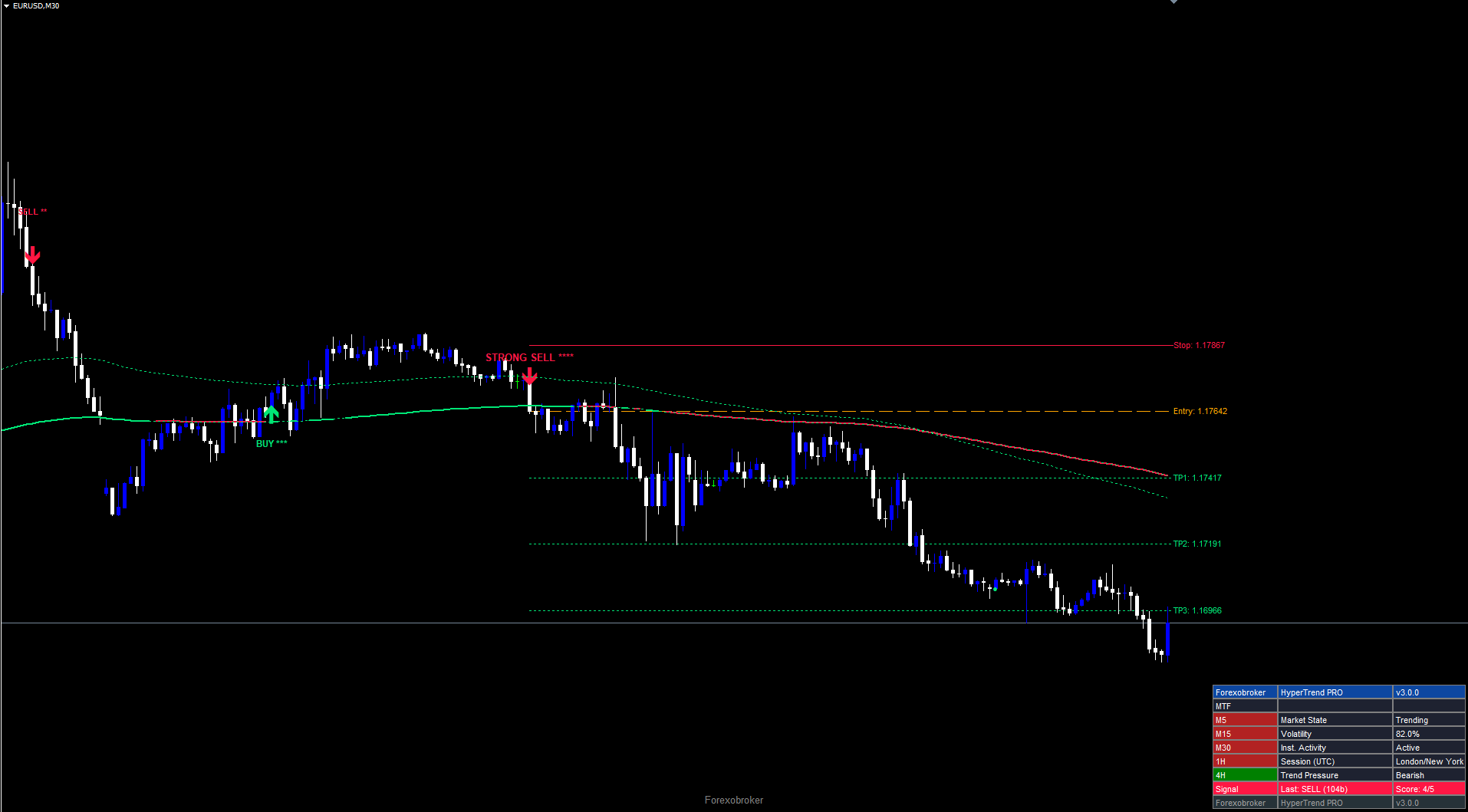
A 9-row, 3-column panel showing multi-timeframe alignment and market conditions.
| Row | Content |
|---|---|
| 0 | Header: Forexobroker / HyperTrend PRO / v3.0.0 |
| 1 | MTF label |
| 2-6 | MTF (M5/M15/M30/H1/H4 with green=bullish/red=bearish bg) + Market State / Volatility / Inst. Activity / Session (UTC) / Trend Pressure |
| 7 | Signal: direction, stars, score |
| 8 | Footer |
MTF column: Green = price above EMA 200 on that timeframe. Red = below. All green = strong bullish alignment.
Market metrics:
- Market State: ADX < 15 = No Trend, 15-25 = Ranging, > 25 = Trending
- Volatility: Normalized ATR band deviation percentage
- Inst. Activity: Active when volume > 144% of 21-bar average
- Session: NY (13-22 UTC), London (07-16), Tokyo (00-09), Sydney (21-06), with overlap detection
- Trend Pressure: EMA 9 direction (Bullish/Bearish/Flat)
Position options: Top Right, Middle Right, Bottom Right, Top Left, Middle Left, Bottom Left. Repositions automatically on chart resize.
Alert Configuration
9 alert events with 4 delivery channels. Alerts fire once per bar per event.
| # | Event | Info Included |
|---|---|---|
| 1 | Buy Signal | Symbol, TF, score, entry, SL, TP1 |
| 2 | Sell Signal | Same |
| 3 | Any Signal | Direction, score |
| 4 | Strong Signal | Fires only for score >= 4 + beyond EMA200 |
| 5 | SL Hit | Symbol, TF |
| 6-8 | TP1/TP2/TP3 Hit | Symbol, TF |
| 9 | Trend Change | Bullish/Bearish (EMA 150 crosses EMA 250) |
Channels:
| Parameter | Default | Description |
|---|---|---|
| Enable Alerts | true | Master switch |
| Popup Alert | true | MT dialog popup |
| Sound Alert | true | Plays alert.wav |
| Push Notification | false | Requires MetaQuotes ID in Tools > Options > Notifications |
| Email Alert | false | Requires SMTP config in Tools > Options > Email |
Trading Strategies
Strategy A: Scalping (M5-M15)
| Setting | Value |
|---|---|
| Preset | All Signals |
| MinStrength | 2 |
| Sensitivity | 2.5 |
| Signal Tuner | 15 |
| Cloud Style | Scalping |
| TP1/TP2/TP3 | 1.0 / 1.5 / 2.0 |
Take 50% at TP1, move stop to breakeven, close remainder at TP2. Check dashboard for "Trending" + 3/5 MTF alignment before entry.
Strategy B: Swing Trading (H1-H4)
| Setting | Value |
|---|---|
| Preset | Quality+ |
| Sensitivity | 3.1 (default) |
| Signal Tuner | 25 (default) |
| Cloud Style | Smooth |
| Trailing Stop | true |
| TP1/TP2/TP3 | 1.0 / 2.0 / 3.0 |
Close 1/3 at each TP level. Let trailing stop protect the final third. Only trade in EMA cloud direction.
Strategy C: Alert-Based (Strong+)
Apply to multiple charts with Strong+ preset, push notifications enabled, and Strong Signals Only = true. Receive phone alerts for only the highest-conviction setups. Review dashboard before entering.
Parameter Tuning Presets
Scalping (M5-M15)
Sensitivity=2.5, Tuner=15, Preset=All Signals, MinStrength=2, Cloud=Scalping, Pullback=true, Tuner=3, Trailing=false, TP=1.0/1.5/2.0
Swing (H1-H4)
Sensitivity=3.1, Tuner=25, Preset=Quality+, Cloud=Smooth, Pullback=true, Tuner=5, Trailing=true, TP=1.0/2.0/3.0
Conservative (H4-D1)
Sensitivity=3.5, Tuner=25, Preset=Strong+, Strong Only=true, Cloud-Aligned=true, Cloud=Swing, Pullback=false, Trailing=true, TP=1.0/2.0/4.0
Complete Parameter Reference
| # | Parameter | Type | Default |
|---|---|---|---|
| 1 | Bull Color | color | C'0,230,118' |
| 2 | Bear Color | color | C'255,23,68' |
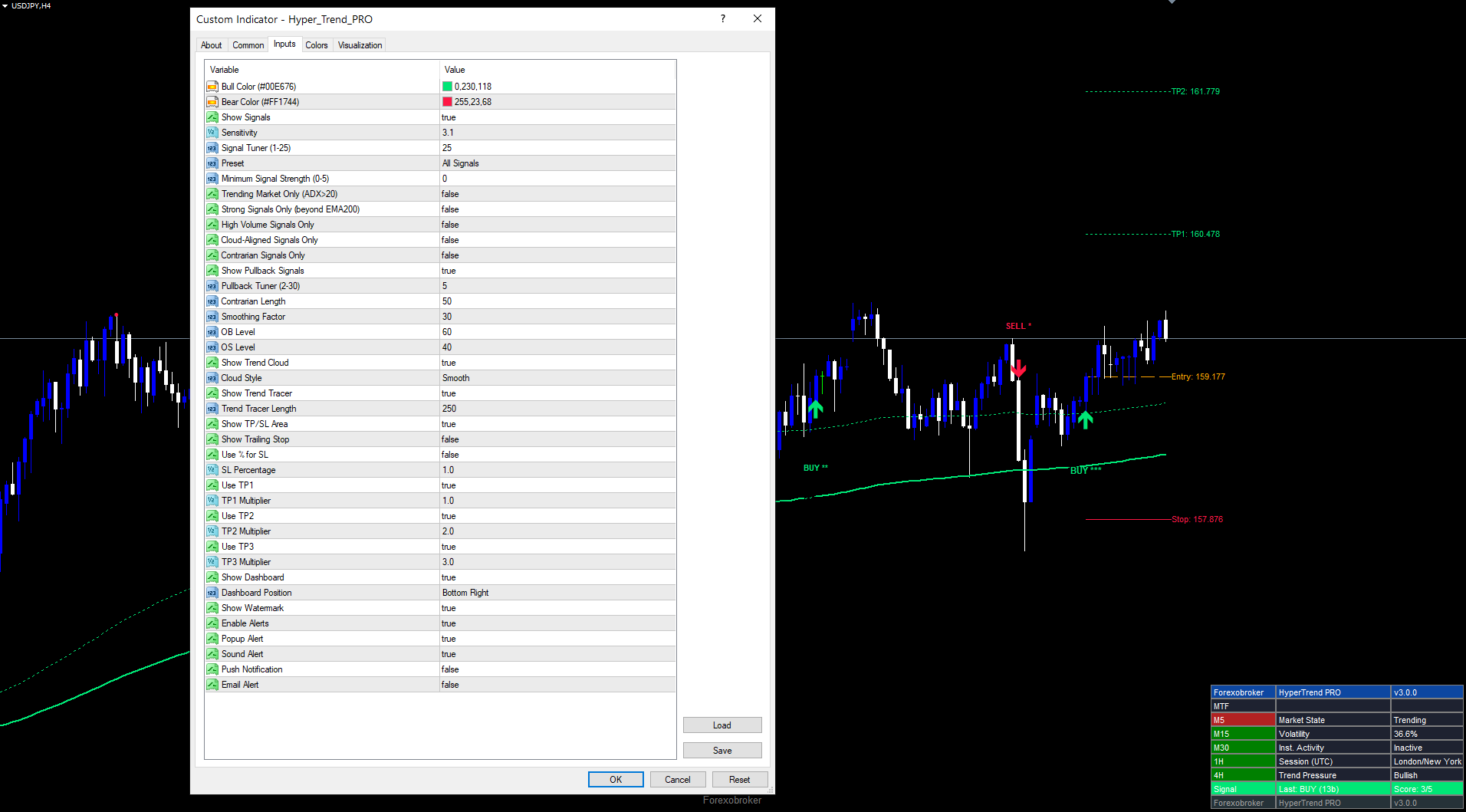
| 3 | Show Signals | bool | true |
| 4 | Sensitivity | double | 3.1 |
| 5 | Signal Tuner | int | 25 |
| 6 | Preset | enum | All Signals |
| 7 | Min Strength | int | 0 |
| 8 | Trending Market Only | bool | false |
| 9 | Strong Signals Only | bool | false |
| 10 | High Volume Only | bool | false |
| 11 | Cloud-Aligned Only | bool | false |
| 12 | Contrarian Only | bool | false |
| 13 | Show Pullback Signals | bool | true |
| 14 | Pullback Tuner | int | 5 |
| 15 | Contrarian Length | int | 50 |
| 16 | Smoothing Factor | int | 30 |
| 17 | OB Level | int | 60 |
| 18 | OS Level | int | 40 |
| 19 | Show Trend Cloud | bool | true |
| 20 | Cloud Style | enum | Smooth |
| 21 | Show Trend Tracer | bool | true |
| 22 | Tracer Length | int | 250 |
| 23 | Show TP/SL Area | bool | true |
| 24 | Show Trailing Stop | bool | false |
| 25 | Use % for SL | bool | false |
| 26 | SL Percentage | double | 1.0 |
| 27 | Use TP1 | bool | true |
| 28 | TP1 Multiplier | double | 1.0 |
| 29 | Use TP2 | bool | true |
| 30 | TP2 Multiplier | double | 2.0 |
| 31 | Use TP3 | bool | true |
| 32 | TP3 Multiplier | double | 3.0 |
| 33 | Show Dashboard | bool | true |
| 34 | Dashboard Position | enum | Bottom Right |
| 35 | Show Watermark | bool | true |
| 36 | Enable Alerts | bool | true |
| 37 | Popup Alert | bool | true |
| 38 | Sound Alert | bool | true |
| 39 | Push Notification | bool | false |
| 40 | Email Alert | bool | false |
Troubleshooting
No signals: Check that Show Signals = true. Reduce MinStrength or switch to All Signals preset. Disable all toggle filters. Ensure chart has 250+ bars of history.
Cloud not visible: Confirm Show Trend Cloud = true. Cloud lines only plot in Smooth mode. Other styles use the cloud for scoring only.
Dashboard missing: Confirm Show Dashboard = true. Try different Dashboard Position if overlapping with chart edges.
Alerts not firing: Check Enable Alerts = true. For push: configure MetaQuotes ID in Tools > Options > Notifications. For email: configure SMTP in Tools > Options > Email. Alerts fire once per bar only.
MT4 vs MT5: Calculation logic is identical. Minor tick volume differences between platforms may occasionally cause the Volume factor to differ on individual bars.
Download the indicator:
- MetaTrader 5: Hyper Trend PRO MT5
- MetaTrader 4: Hyper Trend PRO MT4
CONTACT & SUPPORT
- Email: info@forexobroker.com
- Questions: Use the Comments section on the product page or send a private message
- Bug Reports: Please include your broker name, account type, and a screenshot
-
✅ All MQL Tools: https://www.mql5.com/en/users/forexobroker/ ✅
--------------------------------------------------------------------------------------------------------------
🏦 **Broker I use**: https://icmarkets.com/?camp=55869
🏦 **Broker For EU Traders I use 1**: https://www.ictrading.com?camp=91414
🏦 **Broker I use 2**: https://one.exnessonelink.com/boarding/sign-up/a/c_thuv62ocfq
💻 **VPS**: https://chocoping.com/processing/aff.php?aff=738
💼 **Companies I use for getting funded**:
Fundednext: https://fundednext.com/?fpr=kestutis39
The5ers: https://www.the5ers.com/?afmc=16kl
FTMO: https://trader.ftmo.com/?affiliates=nRAyOhmFRnEnFdOpdLeh




