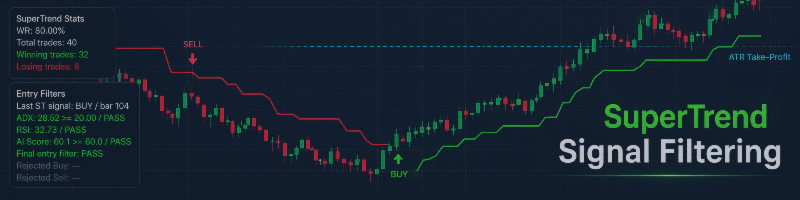

Quantum SuperTrend AI is a professional visual trend indicator for MetaTrader 5. It combines SuperTrend signals, ATR Take Profit levels, ADX and RSI filters, AI Score confirmation, AI Exit logic, rejected signal visualization, and on-chart statistics in one structured tool.
The indicator is designed for traders who want a clear visual framework for analyzing trend-following signals directly on the chart. It does not open or close trades automatically. It is a manual trading and analysis tool.
Main Idea
SuperTrend is a popular trend-following indicator, but in sideways markets it can generate weak or false signals. Quantum SuperTrend AI improves the visual workflow by adding additional confirmation filters and signal-quality tools.
The indicator checks each SuperTrend reversal signal using optional filters:
ADX filter
RSI filter
AI Score filter
Only signals that pass the active filters are displayed as valid Buy or Sell entries. Rejected SuperTrend signals can also be shown on the chart, so the trader can understand where a raw signal appeared but was blocked by the filters.
Key Features
SuperTrend trend visualization directly on the chart.
Buy and Sell arrows for confirmed entries.
ATR Take Profit level calculated from the entry price.
Exit marker when ATR Take Profit is reached.
Exit marker when the opposite SuperTrend signal appears.
Optional AI Exit when signal quality weakens after entry.
Optional ADX filter for trend strength confirmation.
Optional RSI filter for directional momentum confirmation.
Optional AI Score filter for local signal-quality evaluation.
Rejected signal markers for blocked SuperTrend entries.
On-chart statistics panel with WR, total trades, winning trades, and losing trades.
Entry filter panel showing ADX, RSI, AI Score, and final PASS / FAIL status.
Visual and transparent signal logic.
Works on Forex, metals, indices, crypto CFDs, and other MT5 symbols.
SuperTrend Logic
The base signal comes from a SuperTrend reversal.
Buy signal:
SuperTrend changes from bearish to bullish.
Sell signal:
SuperTrend changes from bullish to bearish.
If all filters are disabled, the indicator can show raw SuperTrend reversal signals.
If filters are enabled, the signal must pass all active filters before it becomes a confirmed entry.
ADX Filter
The ADX filter is used to evaluate trend strength.
ADX does not show direction. It shows whether the market has enough trend strength.
Example logic:
Buy or Sell signal is allowed only if:
ADX >= selected minimum value
For example:
ADX Min = 20
If ADX is below the selected value, the SuperTrend signal is rejected.
This can help avoid weak signals during flat or low-energy market conditions.
RSI Filter
The RSI filter is used to confirm directional momentum.
Example Buy logic:
Buy is allowed only if RSI is above the selected Buy level.
Example Sell logic:
Sell is allowed only if RSI is below the selected Sell level.
Typical starting values:
Buy RSI = 55
Sell RSI = 45
A softer mode can use:
Buy RSI = 50
Sell RSI = 50
The RSI filter helps avoid entries where SuperTrend has changed direction but momentum does not yet confirm the move.
AI Score Filter
AI Score is a local scoring model calculated inside the indicator. It does not use external servers, APIs, neural network requests, or trading account data.
The AI Score may evaluate several market features, such as:
ADX trend strength
RSI direction confirmation
SuperTrend slope
Candle impulse relative to ATR
Example logic:
AI Score >= 60
If AI Score is below the selected minimum value, the signal is rejected.
This allows the trader to evaluate signal quality using a combined score instead of relying on only one filter.
Rejected Signals
Rejected signals are one of the most useful visual features of the indicator.
A rejected signal means that SuperTrend generated a raw reversal signal, but one or more active filters blocked the entry.
Example:
SuperTrend generated a Buy signal.
ADX was below the minimum value.
RSI did not confirm the direction.
AI Score was below the required threshold.
In this case, the normal Buy arrow is not displayed, but the rejected signal marker can be shown on the chart.
This makes the indicator more transparent because the trader can see not only where valid entries appeared, but also where signals were filtered out.
ATR Take Profit
The indicator can display a dynamic ATR Take Profit level.
For Buy trades:
TP = Entry Price + ATR × Multiplier
For Sell trades:
TP = Entry Price - ATR × Multiplier
The ATR Take Profit level adapts to current market volatility.
If volatility increases, the target becomes wider.
If volatility decreases, the target becomes closer.
This is more flexible than using a fixed number of points or pips for all market conditions.
Exit Logic
After a confirmed entry, the indicator monitors exit conditions.
Exit priority:
- ATR Take Profit
- AI Exit, if enabled
- Reverse SuperTrend signal
If price reaches ATR Take Profit, the virtual trade is counted as winning.
If the opposite SuperTrend signal appears before ATR Take Profit, the virtual trade is counted as losing.
If AI Exit is enabled and AI Score falls below the selected exit level, the indicator marks an early AI Exit.
ATR Take Profit has priority. If ATR Take Profit and another exit condition appear on the same candle, the trade is counted as a TP exit.
AI Exit
AI Exit is an optional early exit feature.
It can close a virtual trade when the AI Score for the active direction falls below the selected level.
Example:
AI Exit Below Score = 35
If the trade is active and AI Score falls below 35 after the minimum number of bars, the indicator marks an AI Exit.
This feature is useful for traders who want to identify weakening trend conditions before the opposite SuperTrend signal appears.
AI Exit can be turned on or off.
On-Chart Statistics
Quantum SuperTrend AI includes a statistics panel on the chart.
The panel can show:
WR
Total trades
Winning trades
Losing trades
WR means win rate. It is calculated from historical virtual trades using the same visual logic displayed on the chart.
A trade is counted as winning if ATR Take Profit is reached first.
A trade is counted as losing if reverse SuperTrend or AI Exit appears before ATR Take Profit.
The current open virtual trade is not counted until it is closed by one of the exit conditions.
Important: statistics are historical and visual. They do not guarantee future performance.
Entry Filter Panel
The filter panel shows the status of the most recent SuperTrend signal.
It may display:
Last ST signal
ADX value and status
RSI value and status
AI Score and status
Final entry filter status
Rejected Buy / Sell information
Status meanings:
PASS — the condition is satisfied.
FAIL — the condition is not satisfied.
OFF — the filter is disabled.
This helps the trader understand why a signal was accepted or rejected.
Suggested Starting Settings
Balanced mode:
ATR Period: 10
SuperTrend Multiplier: 3.0
ATR Take Profit Multiplier: 3.0
ADX Filter: ON
ADX Min: 20
RSI Filter: ON
RSI Buy: 55
RSI Sell: 45
AI Filter: ON
AI Min Score: 60
AI Exit: OFF
Conservative mode:
ATR Period: 10
SuperTrend Multiplier: 4.0
ATR Take Profit Multiplier: 2.0
ADX Filter: ON
ADX Min: 25
RSI Filter: ON
RSI Buy: 55–60
RSI Sell: 40–45
AI Filter: ON
AI Min Score: 65–70
AI Exit: ON
AI Exit Below Score: 35
Aggressive mode:
ATR Period: 10
SuperTrend Multiplier: 2.0
ATR Take Profit Multiplier: 2.0–3.0
ADX Filter: OFF or ADX Min 15
RSI Filter: ON
RSI Buy: 50
RSI Sell: 50
AI Filter: ON
AI Min Score: 50
AI Exit: OFF
These settings are only starting points. Each symbol and timeframe should be tested separately.
Recommended Markets and Timeframes
The indicator can be used on different MT5 symbols:
Forex pairs
Gold and metals
Indices
Crypto CFDs
Commodities
Other CFD instruments
Recommended starting timeframes:
M15
M30
H1
H4
Lower timeframes such as M1 and M5 may generate more signals, but they usually contain more noise. If lower timeframes are used, stricter filters may be needed.
How to Use
- Add the indicator to a chart.
- Start with balanced settings.
- Check the SuperTrend direction.
- Watch for Buy or Sell arrows.
- Use the filter panel to confirm ADX, RSI, and AI Score status.
- Check the ATR Take Profit level.
- Monitor exit markers.
- Review the statistics panel.
- Adjust filters if signals are too frequent or too rare.
- Test settings on a demo account before live trading.
Why This Indicator Is Useful
Quantum SuperTrend AI is designed to make trend signal analysis more transparent.
Instead of showing only simple Buy and Sell arrows, it shows:
where the base SuperTrend signal appeared;
whether filters accepted or rejected it;
where the ATR Take Profit target is located;
where the trade exited;
how the historical visual statistics look;
which filters confirmed or blocked the signal.
This helps traders analyze SuperTrend signals in a more structured way.
Important Notes
This indicator is not an Expert Advisor.
It does not open trades automatically.
It does not close trades automatically.
It does not guarantee profit.
AI Score is a local scoring model, not an external artificial intelligence service.
Past statistics do not guarantee future results.
Always test the indicator on your broker, symbol, and timeframe before using it in live trading.
Disclaimer
Trading involves risk. This indicator is intended for technical analysis and visual decision support only. It should not be treated as financial advice or as a guaranteed trading system. The final trading decision is always made by the trader.




