
Overview
Volatility Master is a powerful MetaTrader indicator designed to help traders identify volatile and trending markets while avoiding low-volatility ranges. With its intuitive dashboard and actionable signals, this tool enhances trading decisions and boosts confidence in market analysis.
© 2026 Intraquotes.
🔗Indicator Related Blog Links:
✅ Trading Strategy: How to use the 3-in-1 combo of Volatility Master + Hydra Trend Rider + IQ FX Gann Levels NEW!
More links will be added in future.
Latest Version: MT4 - 1.15 | MT5 - 1.11
🔗Indicator Download Links: MT4 | MT5
New Versions Include the following features:
1. Modern Dashboard
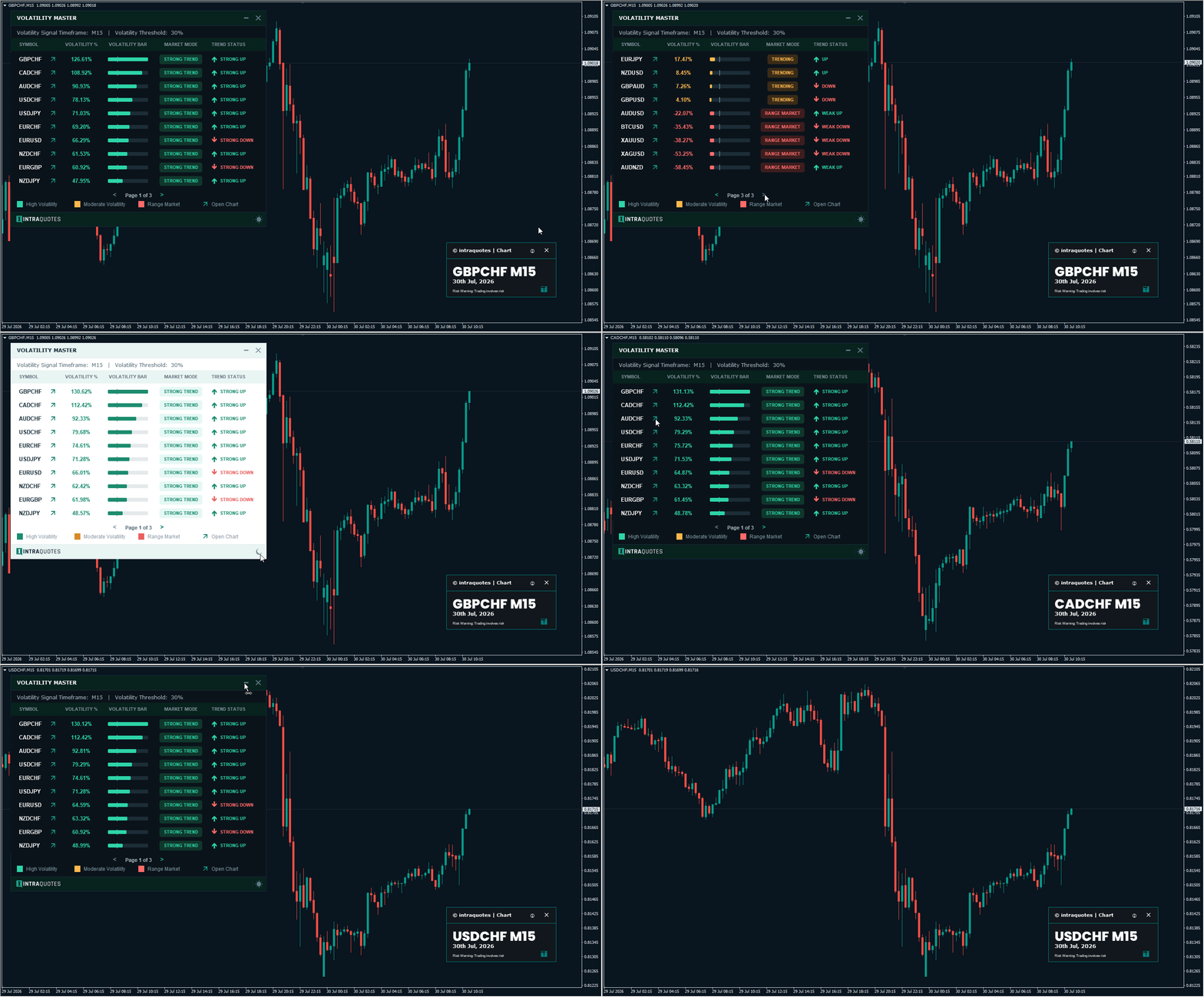
Redesigned dashboard with multiple new features:
- Eye-soothing dark/light theme button.
- Pagination for easier navigation between the symbols.
- Dashboard Minimize/Maximize button.
- Dashboard Close button
2. Auto Sorted Volatility Bar added
Hassle free volatility sorting now done automatically by the indicator. Most volatile symbols will be shown at the top in a sorted manner.
3. One-click Arrow to Open Chart
Simply click on the arrow beside your desired symbol name to instantly open the chart of that symbol—making navigation faster and more intuitive.
4. Significantly optimised the indicator with high-quality code improvements for smoother overall performance.
We’ve enhanced our volatility calculation methods for even greater accuracy, giving you more reliable trading signals and insights.
➡️ Update Instructions (for existing users):
1. Remove the old version of the indicator from your chart.
2. In your MetaTrader terminal, go to the Market tab.
3. Open the Purchased section.
4. Locate Volatility Master and click Update.
Installation and Setup
Step 1: Download the indicator from the MQL5 marketplace.
Step 2: Open MetaTrader 4/5, Open Terminal > Click on the ‘Purchased’ tab > Click on the ‘Install’ button to install the indicator.
Step 3: Restart MT4 and open the ‘Navigator’ > Click on the ‘Market’.
Step 4: Drag and drop Volatility Master onto your chart.
INDICATOR DASHBOARD
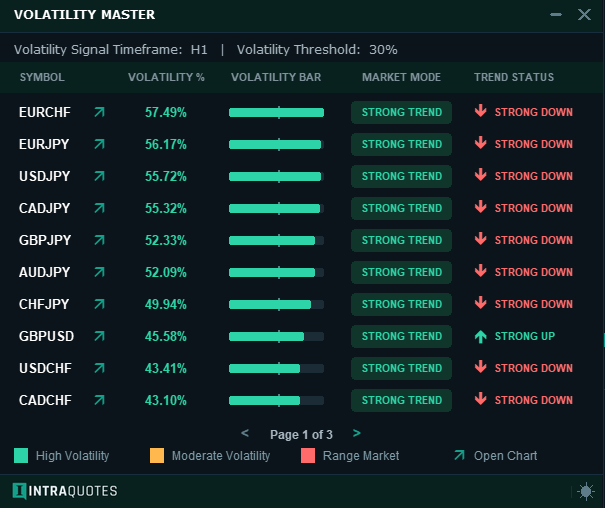
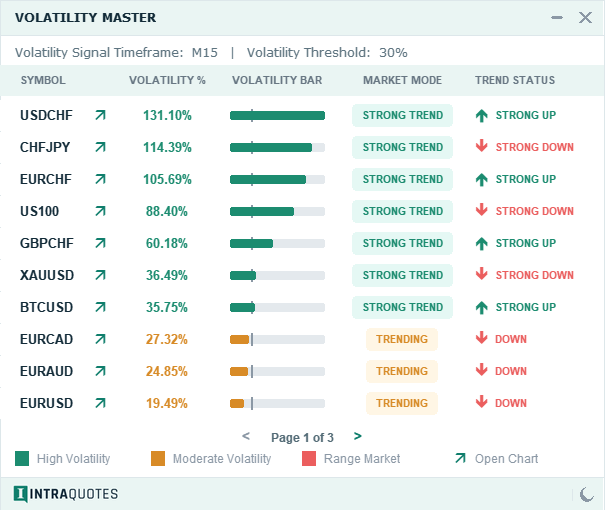
- Displays up to 30 symbols from the Market Watch with pagination option.
-
One-click instant chart open option.
-
Displays volatility in percentages, volatility bar with auto-sort feature that displays the highest volatile symbols form the market watch list at the top in descending order.
-
Provides two additional signals:
➡️ Trend Status: Indicates whether the trend is bullish or bearish.
- Displays your chosen Volatility Signal Timeframe at the top of the dahboard.
- Displays your chosen Volatility Threshold Percentage at the top of the dahboard.
- One-Click Dashboard features include:
- Eye-soothing dark/light theme button (right bottom corner).
- Pagination for easier navigation between the symbols.
- Dashboard Minimize/Maximize button.
- Dashboard Close button.
HOW DOES THE INDICATOR WORK?
✔️ Signals Interpretation:
-
High Volatility Percentage + Green Volatility Bar (when it crosses your 'set' Volatility Threshold) + Strong Trend (Market Mode) = Active trading opportunity.
-
Low Volatility Percentage + Red Volatility Bar + Range Market (Market Mode) = Avoid trading.
✔️ Example of a High Volatile Market:
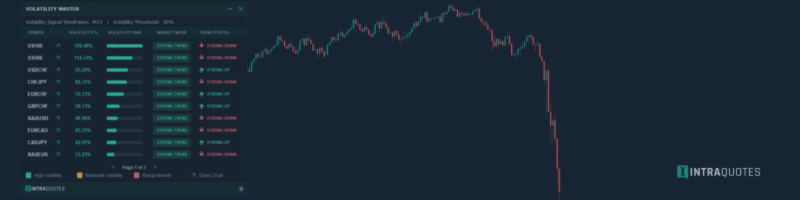
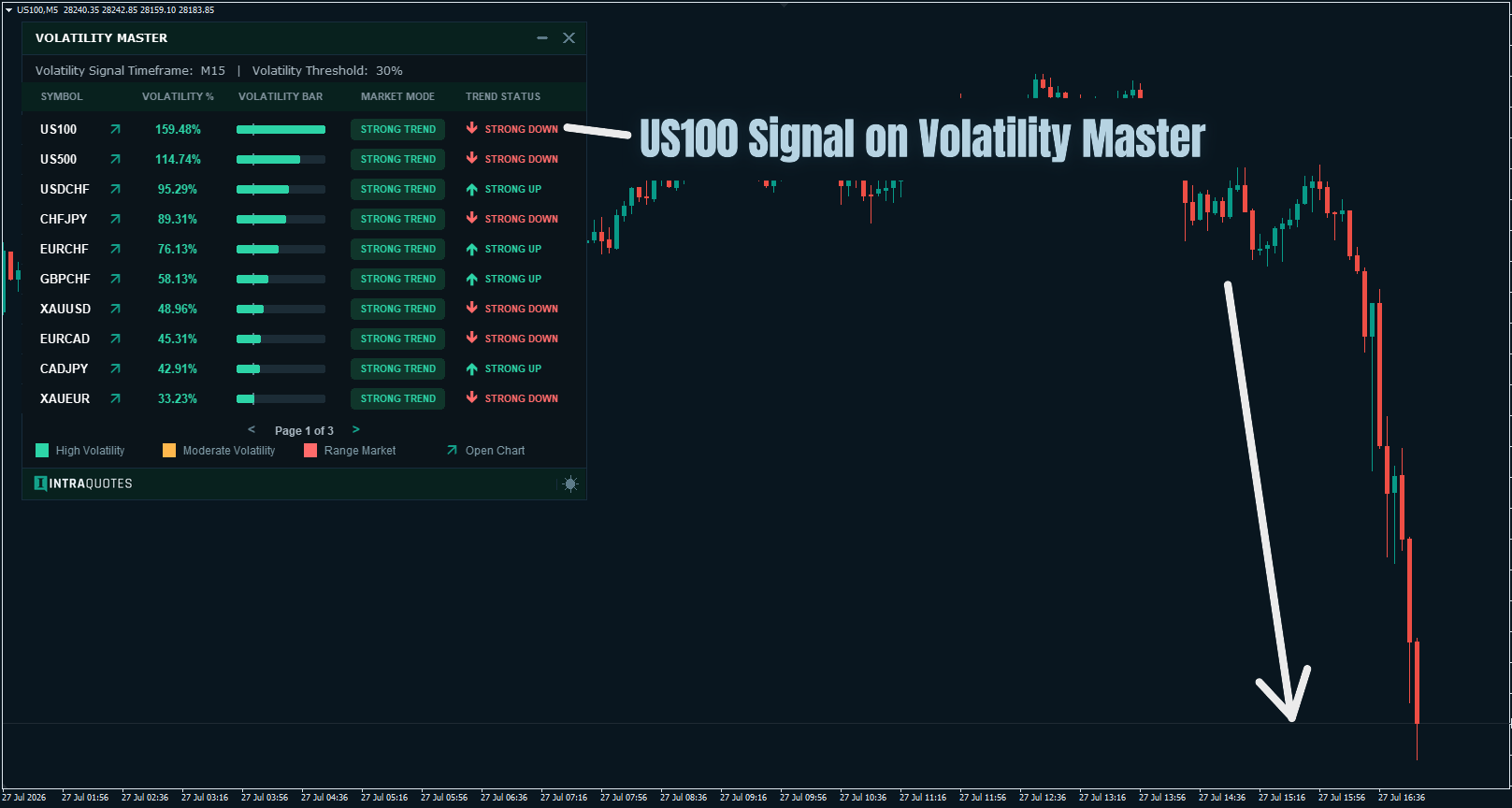
Here in the US100 chart, all 3 options met the criteria, i.e., the dashboard displays a high volatility percentage (on the selected timeframe: M15), along with a Green Volatility Bar + Strong Trend (Market Mode) + Strong Down (Trend Status Signal). Hence, a perfect entry spot appeared. After which the market went bearish more a couple of hours.
✔️ Example of a Low Volatile Market:
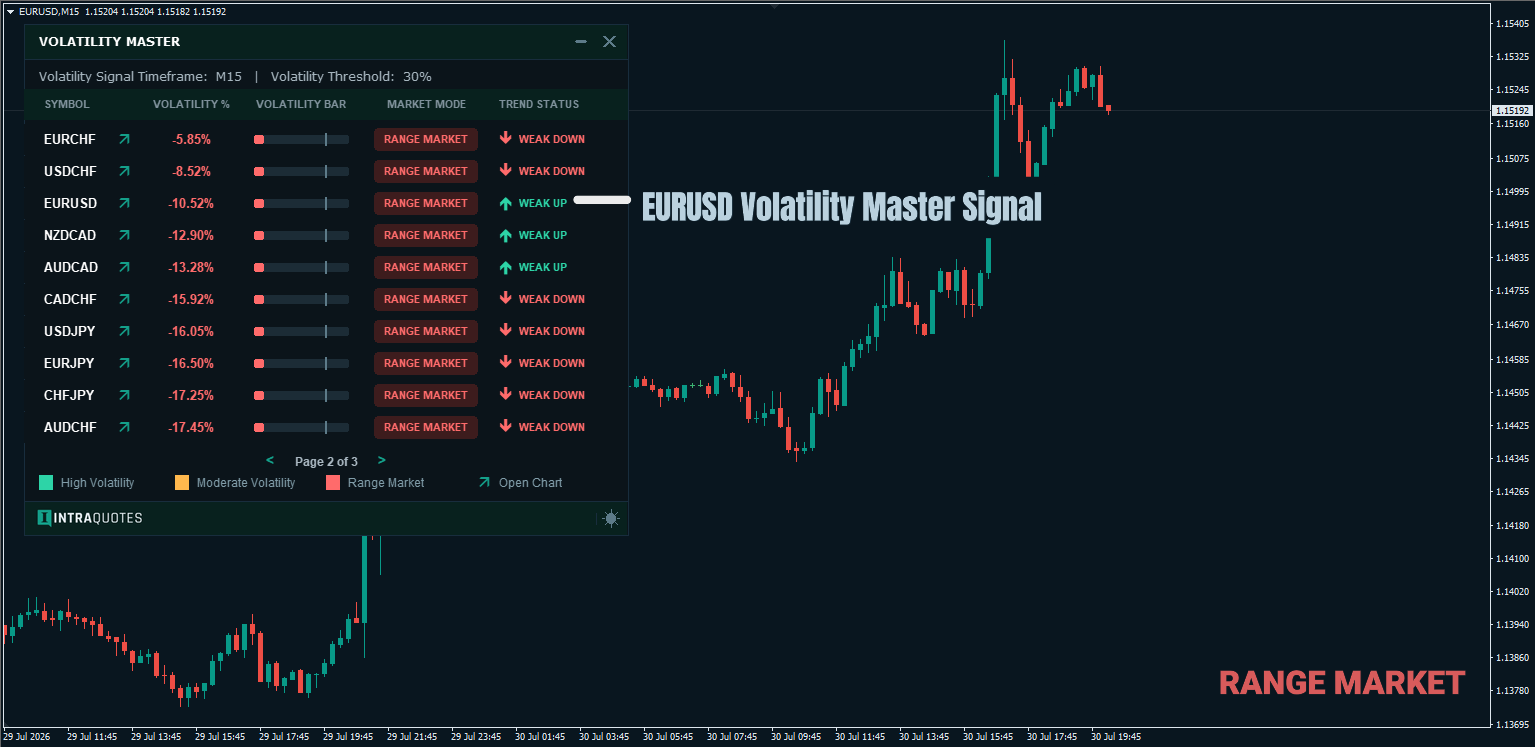
In the EURUSD chart, none of the 3 options met the criteria. The dashboard displays a low volatility percentage (which is negative), along with a Range Market signal. Hence, NOT a perfect entry spot. A trader must avoid such pairs with zero momentum and a range market at any cost.
This tool gives you a clear picture on which symbols to avoid saving you from financial loss, and protecting your capital.

Volatility Indicator: Your trading superhero!
Trading in a range market is the worst nightmare situation you can have. The pattern is fairly common every time. You notice the market is trending and moving up nicely, and you place a buy trade. But after you place your buy trade, the nightmare starts... The market starts losing momentum and falls asleep, or shall I say it dies? ☠️ You keep waiting for the market to go in your favor, and reach your target anyhow, but it just won’t. It drags the range hour after hour. That’s exactly what happens, right? Don’t worry! Because it happens with every trader out there, you are not alone; it happened to me, too. And of course, no one would want to go through that pain of hanging in there in a range market with hope in their mind! Which is why I’ve built this indicator to get us out of this misery.
That’s why gauging market volatility in advance is way more powerful than you think. Checking the volatility before placing any trade can save you both time and money, and of course, also saves you from the frustration and anxiety that come with it. You check the volatility and jump into the market when it's trending with a good percentage (at least above 40%-50%).
➡️ Volatility Percentages:
This metric has been built to make your symbol-selection decision easier and quicker. The higher the volatility percentage, the better the symbol is to trade. This indicator lets you view the volatility percentage for any selected timeframe.
Good Signal:
When highlighted in bold, the volatility percentage indicates a trendy market, and a good trading situation.
Bad Signal:
When the signal displays range and the volatility percentage is shown in negative, you must avoid trading on this symbol during that time. The higher the negative volatility percentage, the worse the range market is. No man's land.
Awesome, isn’t it? This indicator includes many complex calculations to make it simpler and cleaner for you.
💡Tips:
High Volatility Percentage + Green Volatility Bar = TOP PRIORITY
If none of the Volatility Bar is green, and Market Mode Signal displays 'Trending', then only focus on the volatility percentage. Look carefully if it is increasing gradually and reaching the volatility threshold percentage that you've set (from the input settings. Yes, you can set volatility threshold percentage as per your trading strategy requirement).
Note: Trend Status signal is not predictive but real-time signal, that changes every minute based on the market volatility.
🔴 Exit strategy:
Even though this indicator's main feature is to highlight the most volatile symbol in real-time, it can still be used to plan an exit strategy. For example, if you are trading a symbol, and you see its volatility percentage is dropping, and instead of STRONG UP or STRONG DOWN signal it is entering UP or DOWN signal, it is a cue for you to either trail your stoploss or simply exit if you don't have enough profit to trail. This indicator shows real-time symbol volatility, which means, it doesn't predict the future volatility, but gives you real-time data, which is an added advantage, knowing how exactly the pair is behaving in that particular moment so that you can strategize your entry exit accordingly.
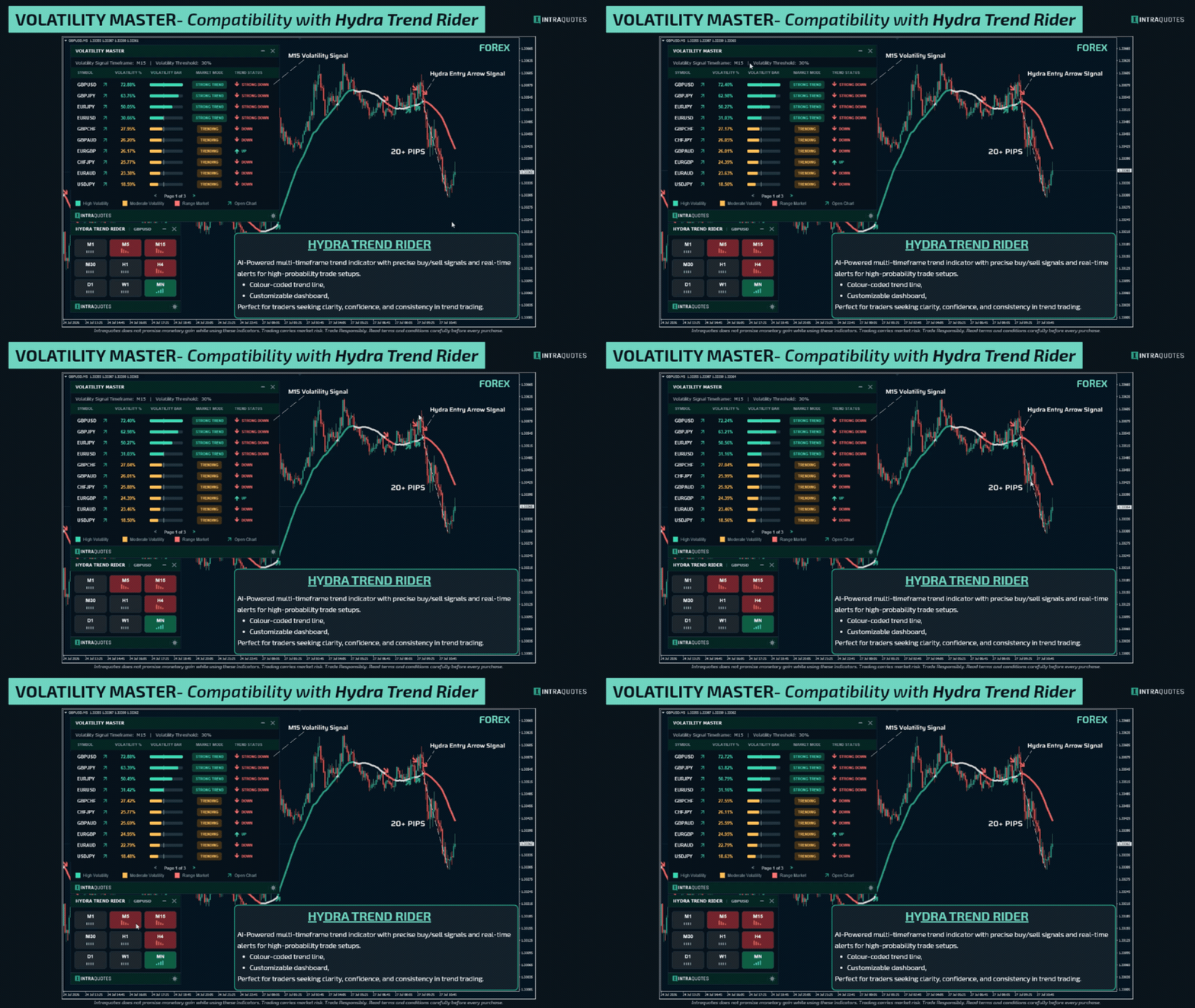
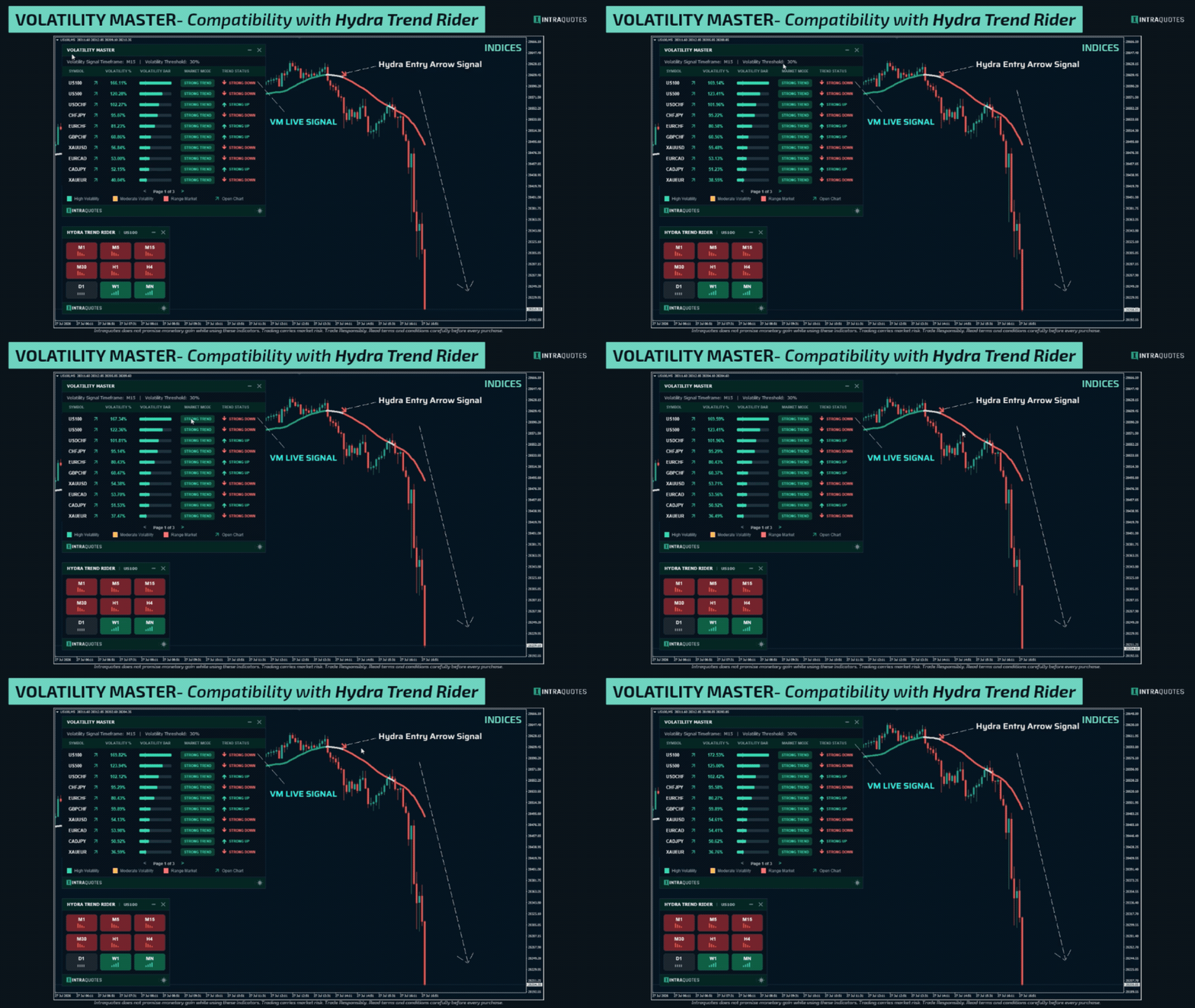
On the other hand, if you want to get that extra confirmation before entry/exit, we highly recommend pairing Volatility Master up with Hydra Trend Rider. Hydra Trend Rider is an AI powered trend indicator that tracks multiple timeframe's trend and highlights them on a single dashboard and gives entry arrow signal along with range signal (often used by traders as exit points).
Under 'Secret Tips for this indicator' section, a strategy has been given on how to use this indicator with Hydra Trend Rider for a good trade setup.
Note: Both entry and exit strategy varies from person to person depending on their individual trading style keeping lots of factors in the scene. Always keep your risk-reward ratio in mind while trading for consistent profits.
INDICATOR CUSTOMIZATION
✔️ Symbol Selection:-
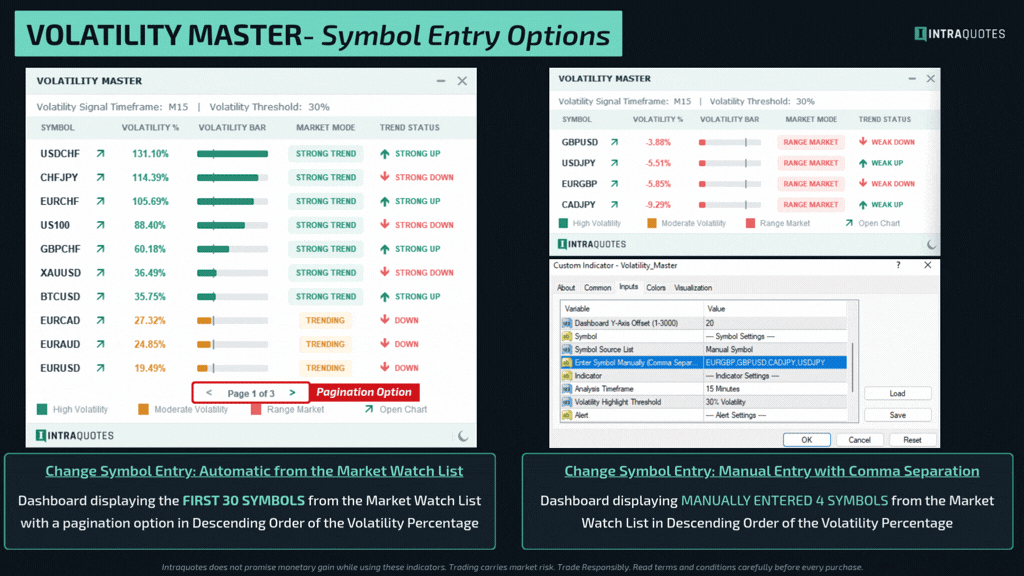
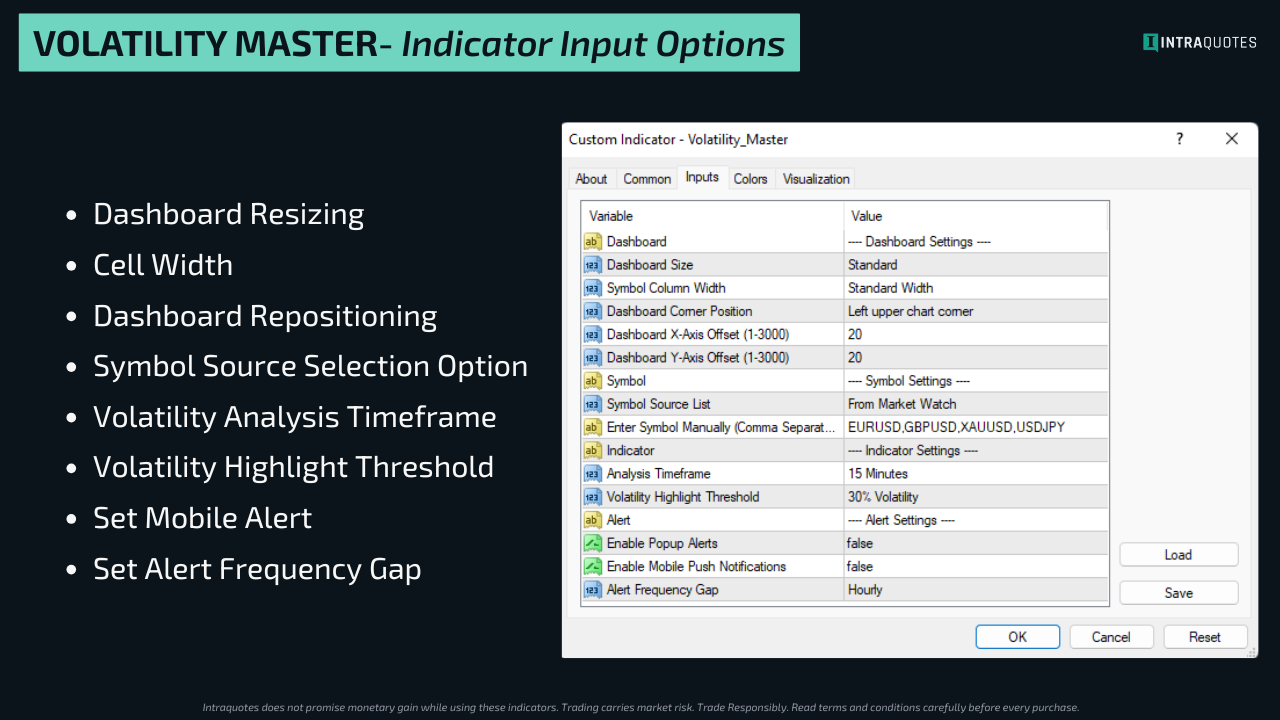
By default, the indicator displays the first 30 Market Watch symbols.
-
You can even enter up to 30 symbols manually from the input area section to display them in the indicator dashboard.
⚡️Bonus Tips
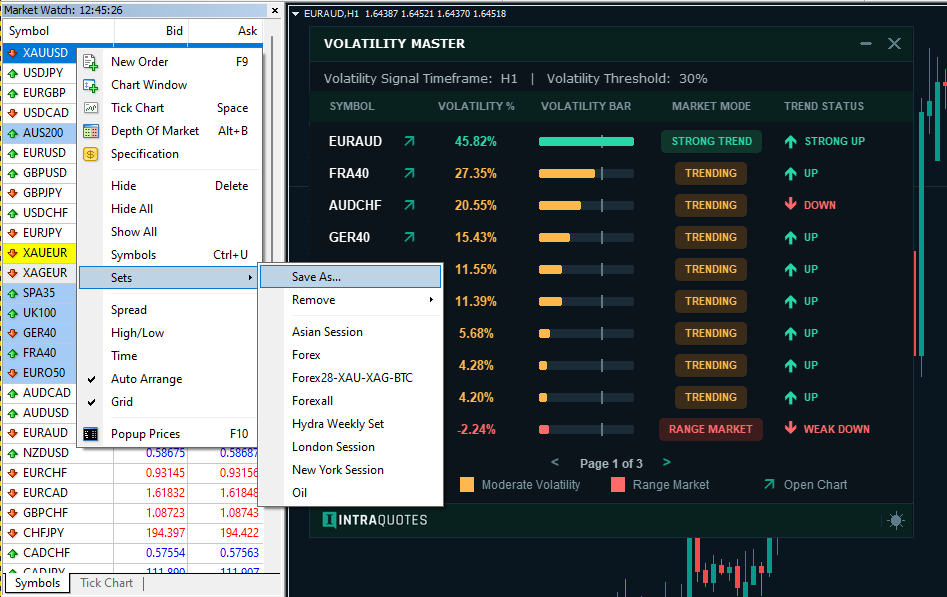
📂 Custom Market Watch List: You can also create a custom market watch list with all your favorite symbols and save it. Left-click on the market watch list-’sets’-’save as’, to save the current market watch list under your desired name. You can use the saved list for specific indicators. Open 30 preferred symbols in the market watch list, save it, and use the saved list every time you use the indicator for quicker navigation among the supported symbols. Watch this video for a quick video guide on how to save Sets.
✔️ Timeframe Adjustment:
Choose between M15, H1, H4, and D1 timeframes based on your trading style.
✔️ Dashboard Resizing:
2 options available: Standard and Large. Compatible with SD, HD, Full HD, and 4K monitors.
Now you can create a default dashboard location on the chart using the X/Y coordinate from the indicator settings. Every time you add the indicator to the chart, it will be displayed at the same location according to your chosen X/Y coordinate preference. This feature comes in handy when you are using multiple indicators in one chart.
✔️ Dashboard theme customization:
Switch between Dark and Light modes to match your trading environment and lower your eye strain. Customize Signal, Volatility, Text, and Trend colors for a trading experience tailored to your style.
✔️ Dashboard cell width customization:
Increase cell width for better readability, especially for symbols with longer names, making your charts easier on the eyes.
✔️ Volatility Highlight Threshold Percentage:
Choose between 20%, 30%, and 50% based on your trading style.
✔️ Alert Settings:
- Enable/Disable Popup Alert options. Select True to enable, false to disable.
- Enable/Disable Mobile Push Notifications Alert options. Select True to enable, false to disable.
- Alert Frequency Gap: Choose Hourly or 4 Hourly to keep it noise free.
📳 Indicator Volatility Alert: (True/false)
You can get a mobile push notification alert with this indicator. 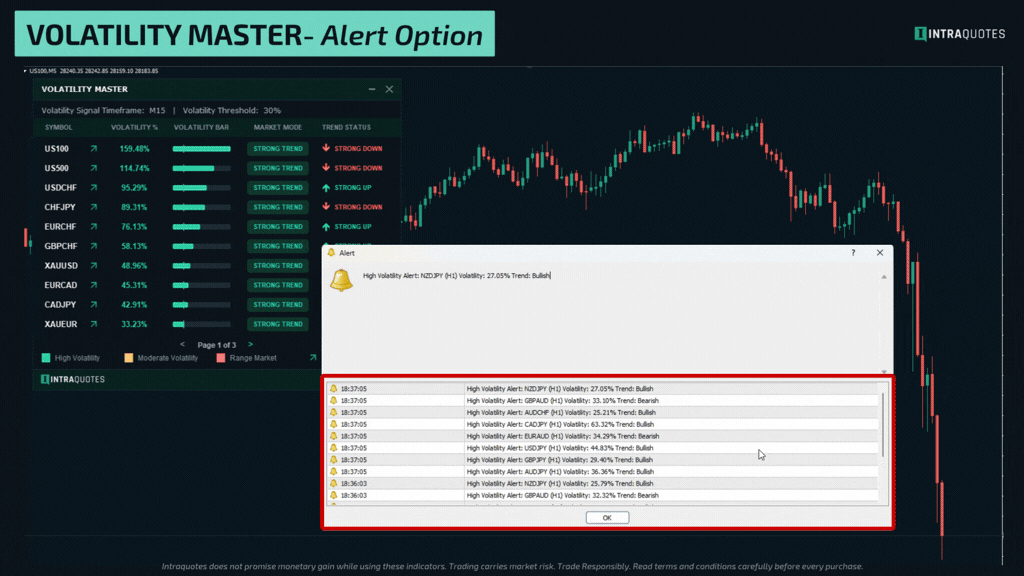
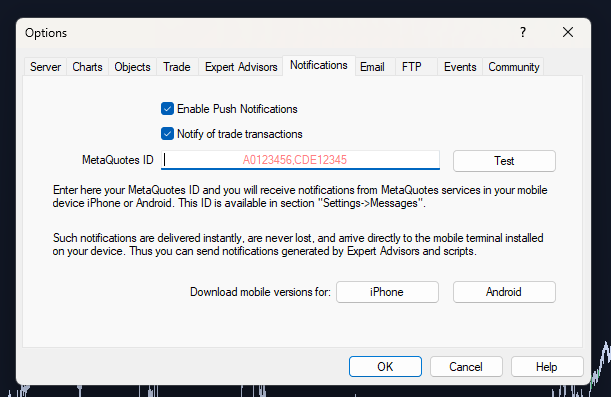
📝 Note for Mobile Alert: To receive mobile alerts for this indicator, enable push notifications in MetaTrader 4 by pressing Ctrl + O (or accessing Options) and navigating to the Notifications tab. Enter your MetaQuotes ID from the MetaTrader app on your mobile device to link it with your platform. Once connected, test the setup to ensure alerts are working.
🕵️♂️Secret Tips for this indicator
✅ Focus on symbols with high volatility percentages (greater than 50% is always a smart choice), and a Trending signal.
✅ Use D1 for long-term trades, H4 for swing trades, and H1 for intraday setups.
✅ Avoid trades during low volatility periods, or even highly volatile periods like immediately before or after a major news release.
🔥 Strategy to use this indicator with the Gann Levels and Hydra Trend Rider is here. NEW!
FAQs
❓What if the dashboard doesn’t display on the chart?
➡️ Ensure the indicator is properly installed, the Market Watch symbols are visible, and you have a stable internet connection with good speed.
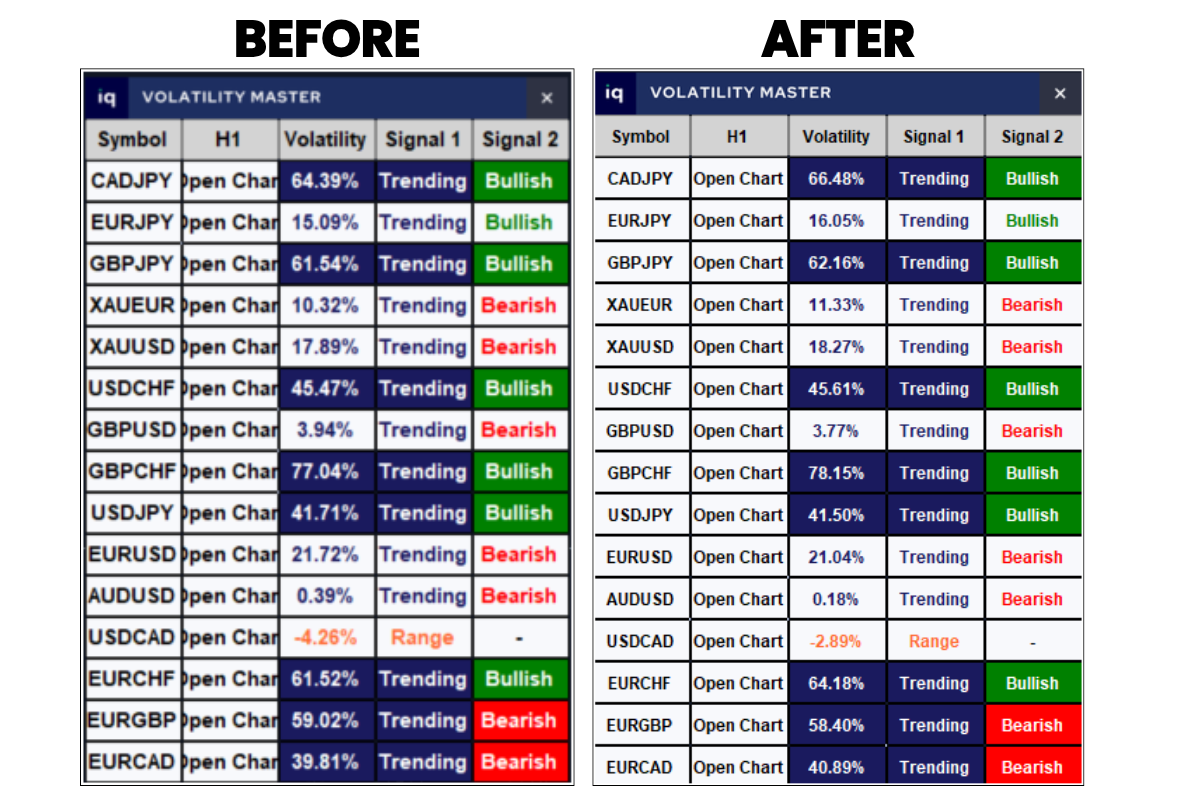
❓What if the dashboard seems squished or can’t see the data?
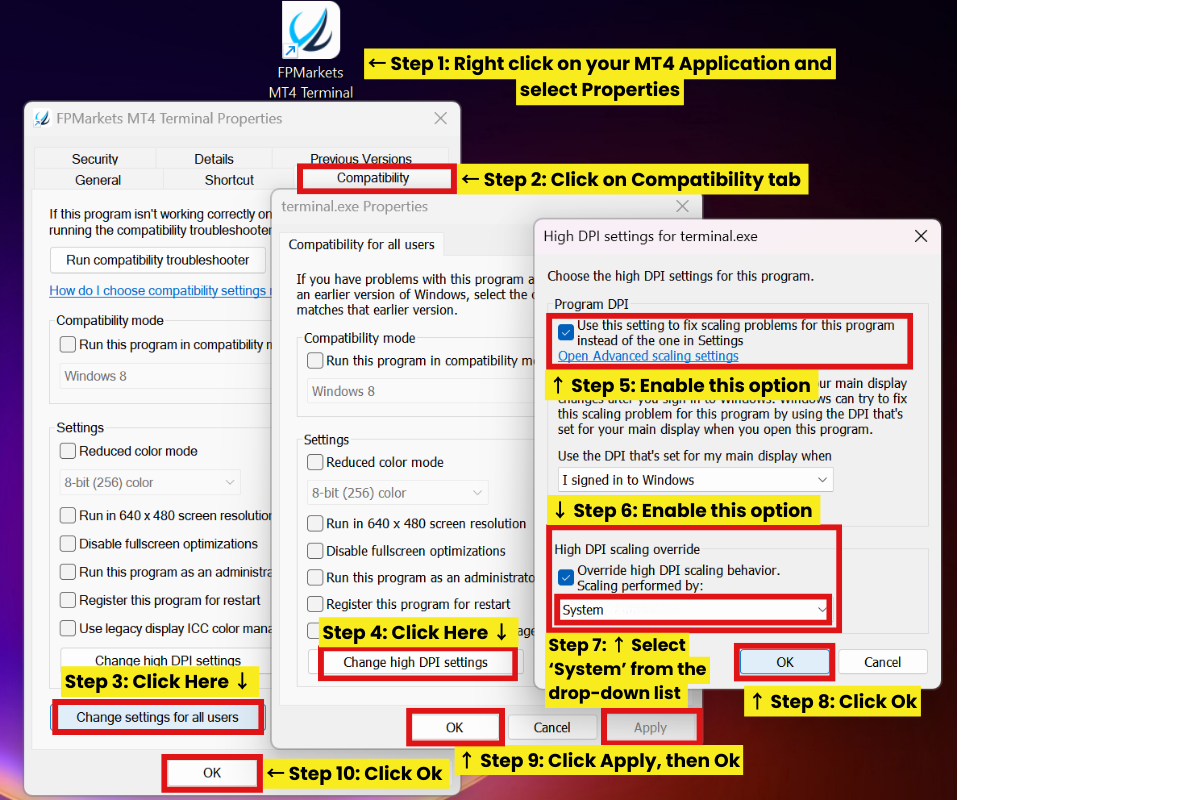
➡️If your indicator dashboard looks squished and you can’t read the data properly, it is due to the scaling issue of MetaTrader. Follow the simple steps explained in the picture given below to fix the issue.
▶ Click Here for Basic Indicator Troubleshoot Guide.
Join Official MQL5 Channel for daily market update and to learn more about the Gann trading.
Also Check out: Seller Page | Welcome Post
Telegram | Threads | YouTube
Disclaimer:
• Trading involves financial risk. Know all the risks before investing. Read all the Terms & conditions of each of the product pages before purchasing indicators.
• Our products are available only on mql5.com.
• We never contact anyone or sell our products privately.
• We do not provide any personal trading advice.
• We do not sell any of the Intraquotes products on Telegram or any other platform or website.
©intraquotes | DO NOT COPY THIS CONTENT
RISK DISCLOSURE
Trading financial markets carries inherent risks and may not be suitable for every investor. This indicator is designed as a tool to assist in trading decisions but does not guarantee profits or prevent losses, which could exceed your initial investment. Past performance is not a reliable indicator of future outcomes. Users are encouraged to fully understand the risks and seek independent financial advice if needed. Any trading decisions made using this indicator are at the user's discretion and responsibility.
COPYRIGHT NOTICE
This user manual and its contents, including text, graphics, and code samples, are the exclusive property of Intraquotes. All rights reserved.
Unauthorised reproduction, distribution, modification, or use of this document, in whole or in part, without prior written permission from the copyright owner, is strictly prohibited. This document is provided exclusively to verified buyers of the associated indicator on MQL5.com. Sharing or distributing this document to others is a violation of copyright law.
The information provided in this manual is for personal use only and is intended to assist with the use of the associated indicator. The author assumes no responsibility for any misuse of this material or any trading decisions made based on its contents.