

Automating Classic Market Methods in MQL5 (Part 2): Wyckoff Cause and Effect—Point and Figure Price Targets
 2 064
2 064
 1
1

Introduction
In Part 1, we built an Expert Advisor that detects Wyckoff accumulation and distribution with a finite state machine. It confirms the spring→SOS sequence for longs and the upthrust→SOW sequence for shorts, then enters at the last point of support or supply.
That EA answered the question of where to enter. This article answers the companion question that Wyckoff considered equally important: where to exit. The answer comes from his second law—cause and effect—and the point and figure count that measures it. The EA built here is self-contained: every function needed to run it is included below, and no code from Part 1 is required.
Richard Wyckoff taught that markets move in two phases: accumulation, where large operators quietly absorb supply at low prices, and distribution, where they offload those positions at high prices. The transition from accumulation to markup, or from distribution to markdown, is not random. It is the proportional effect of a measurable cause. Wyckoff called this his second law, and he gave traders a precise tool for measuring it: the point and figure count.
This article builds a complete Expert Advisor that automates the Wyckoff trading cycle in MQL5. It detects structures with a finite state machine, confirms key events, enters at the correct structural point, and calculates take profit using a point‑and‑figure model of the range.
No external libraries are required. The complete source file is attached and requires no dependencies beyond the standard "Trade\Trade.mqh" include.
We will cover the following topics:
- Wyckoff Accumulation and Distribution
- The Law of Cause and Effect—Theory and Formula
- Solution Architecture
- Implementation in MQL5
- Key Implementation Choices
- Backtesting
- Known Limitations
- Conclusion
Wyckoff Accumulation and Distribution
Wyckoff identified two structural patterns that precede major price moves: accumulation before a markup phase, and distribution before a markdown phase. Both follow a recognizable sequence of events. Understanding this sequence is necessary to understand how the EA makes its decisions.
The Accumulation Sequence
Accumulation forms after a downtrend. Large operators—Wyckoff called them the Composite Man—begin absorbing supply from retail sellers. The structure has five phases, but the EA focuses on the specific events that confirm it.
The spring is the first key event. The price penetrates support briefly—dipping below the range low—and then recovers back inside the range on the same bar. This move flushes out weak longs and tests whether genuine supply remains. A spring with relatively low tick volume suggests that selling pressure is exhausted.
The sign of strength follows the spring. The price closes above resistance on high tick volume, demonstrating that demand is now in control and the range is being broken to the upside.
The last point of support is the entry trigger. After the sign of strength, the price pulls back toward the resistance level—which has now become support—on low volume. This pullback is the final retest before the markup begins. The EA enters long at the last point of support.
The Distribution Mirror
Distribution is the mirror of accumulation. It forms after an uptrend, as large operators distribute their holdings to retail buyers.
The upthrust is the key event corresponding to the spring. The price penetrates resistance briefly and then reverses back inside the range on the same bar, on relatively low tick volume. The sign of weakness follows the upthrust. The price closes below support on high tick volume.
The last point of supply is the entry trigger. After the sign of weakness, the price rallies back toward the support level—now acting as resistance—on low volume. The EA enters short at the last point of supply.
Why Sequential Detection Matters
Each of these events only carries meaning in context. A close below support is not a sign of weakness unless an upthrust has already been confirmed. A pullback after a breakout is not a last point of support unless a spring and a sign of strength have already occurred in sequence. A standalone check for any one of these events, regardless of what preceded it, will produce many false signals. The finite state machine enforces the correct sequence: every event must follow the event before it. If the sequence breaks—for example, if the price closes below the spring low before a sign of strength is confirmed—the state machine resets to idle and starts over.
The Law of Cause and Effect—Theory and Formula
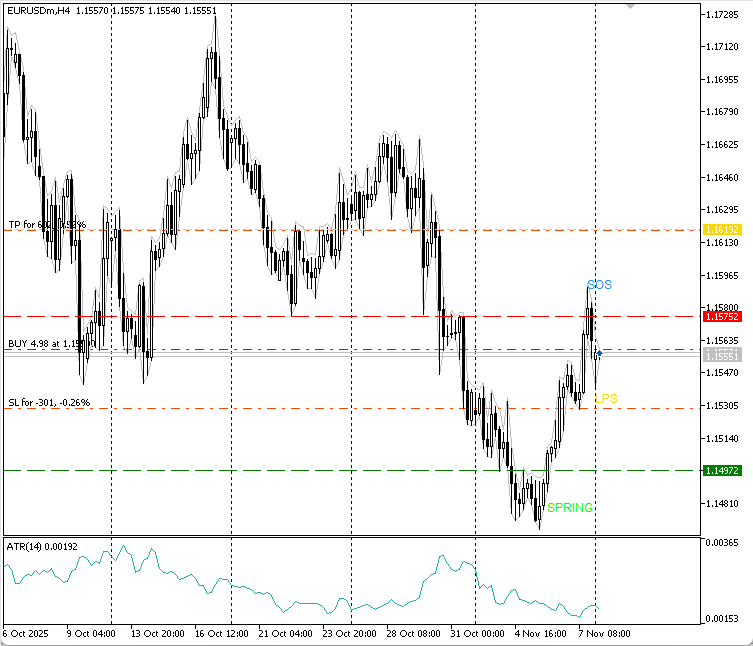
Figure 1. Chart showing spring, SOS, LPS, entry, and target (cause and effect).
The P&F price target formula has two versions, one for accumulation and one for distribution.
For a long target from an accumulation range:
Target = (Column Count × Box Size × Reversal Factor) + Count Line Price
For a short target from a distribution range:
Target = Count Line Price − (Column Count × Box Size × Reversal Factor)
Each term has a precise definition.
The count line is the price level at which the horizontal count is taken. For accumulation, Wyckoff specified that the count line should be drawn at the last point of support—the final low before the sign of strength. This is the level where the strongest institutional demand was demonstrated, and it is the most conservative level from which to project. For distribution, the count line is drawn at the last point of supply—the final high before the sign of weakness.
The column count is the number of P&F columns within the trading range at the count line level. A column is counted whenever the P&F chart records a reversal at or through that price level. The wider the accumulation range, the more columns it contains, and the higher the projected target.
The box size is the price increment that each X or O represents. If it is too small, minor ticks create noise; if it is too large, structure is hidden. In this article, box size is derived from the range ATR (≈0.25 ATR) to adapt to volatility across instruments.
The reversal factor is the number of boxes required to register a new column. The most conservative approach, and the one that produces the highest column count and therefore the most optimistic target, is a 1-box reversal. For intraday and swing trading on forex pairs, a 1-box reversal is the standard choice. A 3-box reversal is more common for longer-term analysis and produces more conservative targets by generating fewer columns for the same price movement.
This article uses a 1-box reversal. It provides the most complete representation of the oscillations within the trading range and therefore the most accurate column count.
A worked example with the same EURUSD parameters from Part 1:
The range identified by the EA spans from 1.0680 (support) to 1.0820 (resistance). ATR during the range is 22 pips. Box size: 0.25 × 22 pips = 5.5 pips, rounded to 5 pips for clean arithmetic. The count line, taken at the last point of support, is 1.0700. The P&F representation of the range produces 18 columns at the 1.0700 level. The reversal factor is 1.
Long target = (18 × 5 pips × 1) + 1.0700 = 1.0700 + 90 pips = 1.0790
This projects the markup phase to reach 1.0790. If the actual markup takes the price beyond 1.0820 (the top of the range), the target is likely conservative—which is exactly as Wyckoff intended. He taught traders to always use the most conservative count first.
Solution Architecture
Before writing any code, it helps to see how the pieces connect. The EA operates as a pipeline: each stage produces output that the next stage consumes.
OHLC bars and tick volume
        ↓
  DetectRange()
  Identifies support, resistance, bias, average volume, and range ATR
        ↓
  CheckSpring() or CheckUpthrust()
  Confirms the structural entry event on low volume
        ↓
  CheckSOS() or CheckSOW()
  Confirms the directional breakout on high volume
        ↓
  CheckLPSEntry() or CheckLPSYEntry()
  Waits for the pullback and sets the count line
        ↓
  CalcPFTarget()
  Calls CalcRangeATR, then BuildPFChart, then CountColumnsAtLevel
  Returns the projected price or 0 for the fallback
        ↓
  CTrade.Buy() or CTrade.Sell()
  Opens the position with the structural take profit or the 2R fallback
The state machine controls which stage is active at any given bar. It advances only when the current stage's conditions are confirmed, and resets to idle if an invalidation condition is triggered.
State Machine States
The state machine moves through seven states. "STATE_IDLE" means no structure is active, and the EA is scanning for a range. "STATE_RANGE_FORMING" means the range is locked, and the EA is watching for a spring or an upthrust. "STATE_SPRING_DETECTED" means the spring is confirmed, and the EA is watching for the sign of strength. "STATE_SOS_CONFIRMED" means the sign of strength is confirmed, and the EA is waiting for the last point of support pullback. "STATE_UPTHRUST_DETECTED" means the upthrust is confirmed, and the EA is watching for the sign of weakness. "STATE_SOW_CONFIRMED" means the sign of weakness is confirmed, and the EA is waiting for the last point of supply rally. "STATE_IN_TRADE" means a position is open, and the EA is monitoring for its close.
Function Map
"DetectRange()" identifies a valid Wyckoff trading range from the OHLC bars. "HasPriorDowntrend()" confirms a downtrend preceded the range, giving accumulation context. "HasPriorUptrend()" confirms an uptrend preceded the range, giving distribution context. "CheckSpring()" detects a spring on the last closed bar. "CheckSOS()" detects a sign of strength on the last closed bar. "CheckUpthrust()" detects an upthrust on the last closed bar. "CheckSOW()" detects a sign of weakness on the last closed bar. "CheckLPSEntry()" waits for the last point of support pullback and opens the long position. "CheckLPSYEntry()" waits for the last point of supply rally and opens the short position. "CalcRangeATR()" computes the average "ATR" over the range bars. "BuildPFChart()" converts the OHLC bar data into a sequence of "P&F" columns. "CountColumnsAtLevel()" counts how many columns pass through the count line. "CalcPFTarget()" orchestrates the full "P&F" target calculation. "CalcLots()" sizes the position by monetary risk and stop distance. "PipSize()" returns the pip size for the current symbol.
Implementation in MQL5
Each section below presents a logical piece of the EA: the purpose of the code, the snippet itself, and an explanation of the key decisions within it.
Header, Includes, and Enumerations
The EA requires only the standard trade library. The state machine enumeration defines the seven possible states of the Wyckoff detection pipeline.
//+------------------------------------------------------------------+
//|                                        WyckoffCauseEffectEA.mq5  |
//|                                Copyright 2026, Tola Moses Hector |
//|                                          https://t.me/tolahector |
//+------------------------------------------------------------------+
#property copyright "Copyright 2026, Tola Moses Hector"
#property link      "https://t.me/tolahector"
#property version   "1.00"
#property description "Automating Classic Market Methods in MQL5 Part 2"
#property description "Wyckoff Cause and Effect — P&F Price Targets"
#property description "Extends Part 1 with structural take-profit calculation"
#property description "H4 timeframe recommended"

#include <Trade\Trade.mqh>

//+------------------------------------------------------------------+
//| State Machine                                                    |
//+------------------------------------------------------------------+
enum ENUM_WYCKOFF_STATE
  {
   STATE_IDLE,
   STATE_RANGE_FORMING,
   STATE_SPRING_DETECTED,
   STATE_SOS_CONFIRMED,
   STATE_UPTHRUST_DETECTED,
   STATE_SOW_CONFIRMED,
   STATE_IN_TRADE
  };
Input Parameters
The inputs are organized into four groups. The "Range Detection" group controls how the EA identifies a valid consolidation. The "Volume Settings" group controls the tick volume thresholds used to distinguish meaningful events from noise. The "P&F Target Settings" group controls the take profit calculation. The "Entry and Risk" group controls stop placement and position sizing.
//+------------------------------------------------------------------+
//| Input Parameters                                                 |
//+------------------------------------------------------------------+
input group "=== Range Detection ==="
input int    InpTrendBars        = 15;    // Bars of prior trend required
input int    InpMinRangeBars     = 10;    // Minimum bars to form range
input int    InpMaxRangeBars     = 60;    // Maximum bars to scan for range
input double InpMinRangePips     = 20.0;  // Minimum range height in pips
input double InpMaxRangePips     = 400.0; // Maximum range height in pips
input double InpSpringTolerance  = 10.0;  // Pips below support for Spring
input int    InpRangeWatchBars   = 30;    // Max bars to watch range before reset

input group "=== Volume Settings ==="
input double InpHighVolMult      = 1.2;   // High-volume multiplier for SOS and SOW
input double InpLowVolMult       = 1.2;   // Low-volume multiplier for Spring and Upthrust

input group "=== P&F Target Settings ==="
input int    InpPFReversalBoxes  = 1;     // P&F reversal factor (1 = most conservative)
input double InpMinTargetPips    = 30.0;  // Minimum valid target distance in pips
input double InpMaxTargetPips    = 500.0; // Maximum valid target distance in pips

input group "=== Entry and Risk ==="
input double InpRiskPercent      = 1.0;   // Risk per trade as percent of balance
input int    InpATRPeriod        = 14;    // ATR period for stop and box size
input double InpATRMult          = 1.5;   // ATR multiplier for stop distance
input int    InpLPSBars          = 8;     // Bars to wait for LPS or LPSY pullback

input group "=== General ==="
input int    InpMagicNumber      = 888001; // Magic number
input int    InpSlippage         = 10;     // Slippage in points
input bool   InpShowLabels       = true;   // Draw event labels on chart
"InpPFReversalBoxes" controls how many boxes must be exceeded before a new column is recorded. At 1, every move of one box in the opposite direction starts a new column, producing the most complete representation of range oscillation. "InpMinTargetPips" and "InpMaxTargetPips" guard against nonsensical projections: if the calculated target falls outside these bounds, the EA falls back to a 2R take profit and logs the reason.
Data Structures
Two structures hold the EA's working state. "SPFColumn" represents a single column on the "P&F" chart. "SWyckoffRange" holds all data about the currently detected trading range, including the two fields added for the "P&F" calculation: "range_atr" and "count_line."
//+------------------------------------------------------------------+
//| P&F Column Structure                                             |
//+------------------------------------------------------------------+
struct SPFColumn
  {
   bool              is_up;        // true = X column (rising), false = O column (falling)
   double            extreme;      // Furthest price reached in this column
   double            base;         // Price where this column began
  };
Three fields are sufficient to determine whether a column crosses any given price level. The count line check requires only "base" and "extreme." The "is_up" flag controls which price extreme is tracked during construction.
//+------------------------------------------------------------------+
//| Wyckoff Range Structure                                          |
//+------------------------------------------------------------------+
struct SWyckoffRange
  {
   double            support;        // Range support level
   double            resistance;     // Range resistance level
   int               start_bar;      // Bars back where range started
   double            avg_volume;     // Average tick volume within range
   bool              bullish_bias;   // true = accumulation, false = distribution
   double            spring_low;     // Low of the Spring bar
   double            sos_high;       // High of the SOS bar
   double            upthrust_high;  // High of the Upthrust bar
   double            sow_low;        // Low of the SOW bar
   double            count_line;     // P&F count line price (LPS or LPSY level)
   double            range_atr;      // ATR averaged over range bars
  };
The "count_line" is initialized to zero in "DetectRange()" and is set to the actual last point of support or last point of supply close only when entry conditions are confirmed. This ensures the count is always taken at the real pullback level, not an estimated level set earlier. The "range_atr" is populated alongside the other range fields and is used by "CalcPFTarget()" as the basis for the box size.
Global Variables and Utility Functions
//+------------------------------------------------------------------+
//| Global Variables                                                 |
//+------------------------------------------------------------------+
ENUM_WYCKOFF_STATE g_state       = STATE_IDLE;        // Current EA state
SWyckoffRange      g_range;                           // Current range data
CTrade             g_trade;                           // Trade execution object
int                g_atr_handle  = INVALID_HANDLE;    // ATR indicator handle
datetime           g_last_bar    = 0;                 // Last processed bar time
int                g_lps_count   = 0;                 // Bars waited after SOS
int                g_lpsy_count  = 0;                 // Bars waited after SOW
int                g_range_watch = 0;                 // Bars watched in range state
"PipSize()" returns the correct pip size for both 4 or 2-digit and 5 or 3-digit symbols. "CalcLots()" sizes the position using the tick value and the tick size from the symbol specification, which works correctly across forex pairs, metals, and "CFDs"—not just standard forex.
//+------------------------------------------------------------------+
//| Returns pip size for the current symbol                          |
//+------------------------------------------------------------------+
double PipSize()
  {
   int digits = (int)SymbolInfoInteger(_Symbol, SYMBOL_DIGITS); // Get symbol digits
   return (digits == 3 || digits == 5) ? _Point * 10.0 : _Point; // Return pip size
  }

//+------------------------------------------------------------------+
//| Calculates lot size from risk percent and stop distance in pips  |
//+------------------------------------------------------------------+
double CalcLots(double sl_pips)
  {
   double balance    = AccountInfoDouble(ACCOUNT_BALANCE);                  // Get balance
   double risk_money = balance * InpRiskPercent / 100.0;                    // Monetary risk
   double tick_val   = SymbolInfoDouble(_Symbol, SYMBOL_TRADE_TICK_VALUE);  // Tick value
   double tick_size  = SymbolInfoDouble(_Symbol, SYMBOL_TRADE_TICK_SIZE);   // Tick size
   double pip_size   = PipSize();                                           // Get pip size
   if(tick_size <= 0 || tick_val <= 0 || sl_pips <= 0)
      return 0;                                                             // Validate inputs
   double pip_value  = (pip_size / tick_size) * tick_val;                   // Pip monetary value
   double lots       = risk_money / (sl_pips * pip_value);                  // Raw lot size
   double step       = SymbolInfoDouble(_Symbol, SYMBOL_VOLUME_STEP);       // Volume step
   double min_lot    = SymbolInfoDouble(_Symbol, SYMBOL_VOLUME_MIN);        // Minimum lot
   double max_lot    = SymbolInfoDouble(_Symbol, SYMBOL_VOLUME_MAX);        // Maximum lot
   lots = MathFloor(lots / step) * step;                                    // Normalize to step
   return MathMax(min_lot, MathMin(max_lot, lots));                         // Clamp to limits
  }
The monetary risk calculation uses pip size divided by tick size, multiplied by tick value and lot size, rather than a fixed point value. This works correctly for "JPY" pairs, gold, indices, and other instruments where a naive pip times lots calculation gives the wrong result.
Three chart helper functions manage the visual output:
//+------------------------------------------------------------------+
//| Returns true if EA has an open position on this symbol           |
//+------------------------------------------------------------------+
bool PositionOpen()
  {
   for(int i = PositionsTotal() - 1; i >= 0; i--)                          // Iterate positions
     {
      ulong ticket = PositionGetTicket(i);                                  // Get ticket
      if(!PositionSelectByTicket(ticket))
         continue;                                                          // Select position
      if(PositionGetString(POSITION_SYMBOL)  != _Symbol)
         continue;                                                          // Check symbol
      if(PositionGetInteger(POSITION_MAGIC)  != InpMagicNumber)
         continue;                                                          // Check magic
      return true;                                                          // Position found
     }
   return false;                                                            // No position
  }

//+------------------------------------------------------------------+
//| Draws a horizontal line at the specified price level             |
//+------------------------------------------------------------------+
void DrawHLine(string name, double price, color clr, ENUM_LINE_STYLE style)
  {
   if(!InpShowLabels)
      return;                                                               // Check flag
   string obj = "WYK2_" + name;                                             // Build object name
   ObjectDelete(0, obj);                                                    // Remove existing
   ObjectCreate(0, obj, OBJ_HLINE, 0, 0, price);                            // Create hline
   ObjectSetInteger(0, obj, OBJPROP_COLOR, clr);                            // Set color
   ObjectSetInteger(0, obj, OBJPROP_STYLE, style);                          // Set line style
   ObjectSetInteger(0, obj, OBJPROP_WIDTH, 1);                              // Set width
   ChartRedraw(0);                                                          // Redraw chart
  }

//+------------------------------------------------------------------+
//| Places a text label at the specified time and price              |
//+------------------------------------------------------------------+
void DrawLabel(string name, datetime time, double price, string text, color clr)
  {
   if(!InpShowLabels)
      return;                                                               // Check flag
   string obj = "WYK2_" + name;                                             // Build object name
   ObjectDelete(0, obj);                                                    // Remove existing
   ObjectCreate(0, obj, OBJ_TEXT, 0, time, price);                          // Create text object
   ObjectSetString(0, obj, OBJPROP_TEXT, text);                             // Set text content
   ObjectSetInteger(0, obj, OBJPROP_COLOR, clr);                            // Set color
   ObjectSetInteger(0, obj, OBJPROP_FONTSIZE, 9);                           // Set font size
   ChartRedraw(0);                                                          // Redraw chart
  }

//+------------------------------------------------------------------+
//| Removes all chart objects created by this EA                     |
//+------------------------------------------------------------------+
void ClearLabels()
  {
   int total = ObjectsTotal(0);                                             // Get object count
   for(int i = total - 1; i >= 0; i--)                                      // Iterate backwards
     {
      string name = ObjectName(0, i);                                       // Get object name
      if(StringFind(name, "WYK2_") == 0)
         ObjectDelete(0, name);                                             // Delete if EA's
     }
   ChartRedraw(0);                                                          // Redraw chart
  }
All chart objects are prefixed with "WYK2_" so they can be selectively removed without affecting other objects on the chart.
Computing the Range ATR
Purpose: compute the average "ATR" over the bars that made up the detected range, to use as the basis for the "P&F" box size. Input: the number of range bars. Output: the average "ATR" value in price units, or 0 if there is insufficient data.
//+------------------------------------------------------------------+
//| Computes average ATR over the range period                       |
//+------------------------------------------------------------------+
double CalcRangeATR(int range_bars)
  {
   double atr_buf[];                                                        // ATR buffer
   ArraySetAsSeries(atr_buf, true);                                         // Set as series
   if(CopyBuffer(g_atr_handle, 0, 1, range_bars, atr_buf) < range_bars)
      return 0;                                                             // Copy ATR values
   double total = 0;                                                        // Accumulator
   for(int i = 0; i < range_bars; i++)
      total += atr_buf[i];                                                  // Sum ATR values
   return total / range_bars;                                               // Return average
  }
Using an average "ATR" over the range period rather than the current "ATR" ensures that the box size reflects the volatility that was present while the cause was being built, not the volatility at the moment of entry. A range that forms during a low-volatility period produces a smaller box size and therefore more columns than an identical-width range that forms during high volatility—correctly reflecting that the price oscillated more frequently within the available space.
Building P&F Columns from OHLC Bars
Purpose: convert the OHLC bar data of the trading range into a sequence of "P&F" columns. Input: the range support, the resistance, the bar count, the box size, the reversal factor, and an output array to fill. Output: the total column count; the "columns[]" array is filled in place.
"P&F" charts do not exist as a native data type in MQL5. "BuildPFChart()" constructs one by scanning the range bars from oldest to newest, maintaining the current column's direction and extreme price, and recording a new column whenever the price moves enough in the opposite direction to trigger a reversal.
//+------------------------------------------------------------------+
//| Builds P&F chart from bar data — returns column count            |
//+------------------------------------------------------------------+
int BuildPFChart(double range_support, double range_resistance,
                 int range_bars, double box_size,
                 int reversal_boxes, SPFColumn &columns[])
  {
   ArrayResize(columns, 0);                                                 // Clear array
   double high_buf[], low_buf[];                                            // Price buffers
   ArraySetAsSeries(high_buf, true);                                        // Set as series
   ArraySetAsSeries(low_buf,  true);                                        // Set as series
   if(CopyHigh(_Symbol, PERIOD_CURRENT, 1, range_bars, high_buf) < range_bars)
      return 0;                                                             // Copy highs
   if(CopyLow(_Symbol,  PERIOD_CURRENT, 1, range_bars, low_buf)  < range_bars)
      return 0;                                                             // Copy lows
   double reversal_dist = box_size * reversal_boxes;                        // Reversal distance
   bool   col_is_up     = (high_buf[range_bars - 1] > range_support + box_size); // First direction
   double col_extreme   = col_is_up ? high_buf[range_bars - 1] : low_buf[range_bars - 1]; // First extreme
   SPFColumn first_col;                                                     // First column
   first_col.is_up   = col_is_up;                                           // Set direction
   first_col.extreme = col_extreme;                                         // Set extreme
   first_col.base    = col_extreme;                                         // Set base
   ArrayResize(columns, 1);                                                 // Add first column
   columns[0] = first_col;                                                  // Store column
   int col_count = 1;                                                       // Column counter
   for(int i = range_bars - 2; i >= 0; i--)                                 // Scan bars oldest to newest
     {
      double bar_high = high_buf[i];                                        // Bar high
      double bar_low  = low_buf[i];                                         // Bar low
      if(col_is_up)                                                         // In up column
        {
         if(bar_high > col_extreme + box_size)                              // Extends column
           {
            col_extreme = MathFloor((bar_high - range_support) / box_size) * box_size + range_support; // Snap to grid
            columns[col_count - 1].extreme = col_extreme;                   // Update extreme
           }
         else
            if(bar_low <= col_extreme - reversal_dist)                      // Reversal
              {
               col_is_up   = false;                                         // Switch direction
               double new_base = col_extreme;                               // New base
               col_extreme = MathCeil((bar_low - range_support) / box_size) * box_size + range_support; // Snap low
               SPFColumn nc;                                                 // New column
               nc.is_up   = false;                                           // Down column
               nc.extreme = col_extreme;                                     // Set extreme
               nc.base    = new_base;                                        // Set base
               ArrayResize(columns, col_count + 1);                          // Expand array
               columns[col_count] = nc;                                      // Store column
               col_count++;                                                  // Increment count
              }
        }
      else                                                                  // In down column
        {
         if(bar_low < col_extreme - box_size)                               // Extends column
           {
            col_extreme = MathCeil((bar_low - range_support) / box_size) * box_size + range_support; // Snap to grid
            columns[col_count - 1].extreme = col_extreme;                   // Update extreme
           }
         else
            if(bar_high >= col_extreme + reversal_dist)                     // Reversal
              {
               col_is_up   = true;                                          // Switch direction
               double new_base = col_extreme;                               // New base
               col_extreme = MathFloor((bar_high - range_support) / box_size) * box_size + range_support; // Snap high
               SPFColumn nc;                                                 // New column
               nc.is_up   = true;                                            // Up column
               nc.extreme = col_extreme;                                     // Set extreme
               nc.base    = new_base;                                        // Set base
               ArrayResize(columns, col_count + 1);                          // Expand array
               columns[col_count] = nc;                                      // Store column
               col_count++;                                                  // Increment count
              }
        }
     }
   return col_count;                                                         // Return count
  }
The snapping logic—"MathFloor" multiplied by box size plus range support for highs, and "MathCeil" multiplied by box size plus range support for lows—aligns all column extremes to the nearest box boundary relative to the range support. This is important because columns must be comparable when counting at a given price level. Without grid snapping, floating-point arithmetic can produce columns whose extremes straddle a level inconsistently.
Design note: the "P&F" chart is reconstructed from bar-level OHLC data, not from intraday tick data. On very short timeframes, individual bars may contain multiple reversal-worthy moves that are invisible at the bar level. H4 and above is the recommended minimum timeframe for this approach.
Counting the Horizontal Cause
Purpose: count how many "P&F" columns pass through the count line level. Input: the completed column array, the column count, and the count line price. Output: the number of columns that include the count line within their range.
//+------------------------------------------------------------------+
//| Counts columns passing through the count line level              |
//+------------------------------------------------------------------+
int CountColumnsAtLevel(const SPFColumn &columns[], int col_count, double count_line)
  {
   int count = 0;                                                           // Initialize counter
   for(int i = 0; i < col_count; i++)                                       // Iterate columns
     {
      double col_top = MathMax(columns[i].base, columns[i].extreme);        // Column top
      double col_bot = MathMin(columns[i].base, columns[i].extreme);        // Column bottom
      if(count_line >= col_bot && count_line <= col_top)                    // Passes through level
         count++;                                                           // Increment counter
     }
   return count;                                                            // Return count
  }
A column passes through the count line when the count line price falls anywhere between the column's "base" and "extreme"—inclusive. The direction of the column is not relevant for this check. Both up columns and down columns count equally when they straddle the level. This is the horizontal width of the cause, measured at the count line.
Calculating the P&F Target
Purpose: orchestrate the full "P&F" target calculation and return a validated price target. Input: a direction flag, where true means long and false means short. All other inputs are read from "g_range." Output: the projected price target, or 0 if the calculation produces an invalid result.
//+------------------------------------------------------------------+
//| Calculates P&F price target from the confirmed range             |
//+------------------------------------------------------------------+
double CalcPFTarget(bool is_long)
  {
   double box_size = g_range.range_atr * 0.25;                              // Box size = 0.25 ATR
   double pip      = PipSize();                                             // Get pip size
   if(box_size < pip * 3)
      box_size = pip * 3;                                                   // Minimum box size
   if(box_size <= 0)
      return 0;                                                             // Invalid box size
   SPFColumn columns[];                                                     // Column array
   int col_count = BuildPFChart(g_range.support, g_range.resistance,        // Build P&F chart
                                g_range.start_bar, box_size,
                                InpPFReversalBoxes, columns);
   if(col_count < 2)
     {
      Print("WyckoffP&F: Insufficient columns (", col_count, ") — skipping P&F target."); // Log
      return 0;                                                             // Not enough columns
     }
   int h_count = CountColumnsAtLevel(columns, col_count, g_range.count_line); // Count at level
   if(h_count < 2)
     {
      Print("WyckoffP&F: Horizontal count too small (", h_count, ") — skipping."); // Log
      return 0;                                                             // Count too small
     }
   double projected_move = h_count * box_size * InpPFReversalBoxes;         // Project move
   double target = is_long                                                  // Calculate target
                   ? g_range.count_line + projected_move
                   : g_range.count_line - projected_move;
   double target_pips = MathAbs(target - g_range.count_line) / pip;        // Target in pips
   if(target_pips < InpMinTargetPips || target_pips > InpMaxTargetPips)    // Validate range
     {
      Print(StringFormat("WyckoffP&F: Target %.1f pips outside valid range [%.0f, %.0f] — skipping.",
                         target_pips, InpMinTargetPips, InpMaxTargetPips)); // Log validation
      return 0;                                                             // Invalid target
     }
   Print(StringFormat("WyckoffP&F: Box:%.5f | Cols:%d | Count:%d | Move:%.5f | Target:%.5f",
                      box_size, col_count, h_count, projected_move, target)); // Log result
   return target;                                                           // Return target
  }
The function logs every calculation: the box size, the total column count, the horizontal count at the count line, the projected move, and the final target. During testing, these Journal entries let you verify the calculation is behaving correctly on each trade before drawing conclusions from the results. When "CalcPFTarget()" returns 0, the entry functions use a 2R take profit as the fallback and log which source was used, making it straightforward to separate the two groups for analysis.
The 3-pip floor prevents the box size from collapsing on very low-volatility instruments, which would generate an unrealistically large column count. There is no upper bound on the box size in the code—the "InpMaxTargetPips" guard on the output effectively prevents oversized projections from reaching the order.
Range Detection
"DetectRange()" scans recent bars for a consolidation that meets the width, height, and prior-trend requirements. "HasPriorDowntrend()" and "HasPriorUptrend()" are helper functions called within it to verify the directional context before the range.
//+------------------------------------------------------------------+
//| Returns true if a downtrend preceded the specified bar           |
//+------------------------------------------------------------------+
bool HasPriorDowntrend(int from_bar)
  {
   double high_buf[], low_buf[];                                            // Price buffers
   ArraySetAsSeries(high_buf, true);                                        // Set as series
   ArraySetAsSeries(low_buf,  true);                                        // Set as series
   if(CopyHigh(_Symbol, PERIOD_CURRENT, from_bar, InpTrendBars, high_buf) < InpTrendBars)
      return false;                                                         // Copy highs
   if(CopyLow(_Symbol,  PERIOD_CURRENT, from_bar, InpTrendBars, low_buf)  < InpTrendBars)
      return false;                                                         // Copy lows
   double first_high = 0, second_low = DBL_MAX;                            // Init comparators
   int half = InpTrendBars / 2;                                            // Split midpoint
   for(int i = 0; i < half; i++)
      first_high = MathMax(first_high, high_buf[i + half]);                // Find early high
   for(int i = 0; i < half; i++)
      second_low = MathMin(second_low, low_buf[i]);                        // Find recent low
   return first_high > second_low + PipSize() * InpMinRangePips * 0.3;     // Confirm descent
  }

//+------------------------------------------------------------------+
//| Returns true if an uptrend preceded the specified bar            |
//+------------------------------------------------------------------+
bool HasPriorUptrend(int from_bar)
  {
   double high_buf[], low_buf[];                                            // Price buffers
   ArraySetAsSeries(high_buf, true);                                        // Set as series
   ArraySetAsSeries(low_buf,  true);                                        // Set as series
   if(CopyHigh(_Symbol, PERIOD_CURRENT, from_bar, InpTrendBars, high_buf) < InpTrendBars)
      return false;                                                         // Copy highs
   if(CopyLow(_Symbol,  PERIOD_CURRENT, from_bar, InpTrendBars, low_buf)  < InpTrendBars)
      return false;                                                         // Copy lows
   double first_low = DBL_MAX, second_high = 0;                            // Init comparators
   int half = InpTrendBars / 2;                                            // Split midpoint
   for(int i = 0; i < half; i++)
      first_low   = MathMin(first_low,   low_buf[i + half]);               // Find early low
   for(int i = 0; i < half; i++)
      second_high = MathMax(second_high, high_buf[i]);                     // Find recent high
   return second_high > first_low + PipSize() * InpMinRangePips * 0.3;    // Confirm ascent
  }
Both functions split the "InpTrendBars" lookback in half. The first half covers the earlier portion of the lookback and the second half covers the recent portion. A downtrend is confirmed when the highest point in the early half is meaningfully above the lowest point in the recent half. An uptrend is the reverse.
//+------------------------------------------------------------------+
//| Detects a valid Wyckoff trading range                            |
//+------------------------------------------------------------------+
bool DetectRange()
  {
   double high_buf[], low_buf[];                                            // Price buffers
   long   vol_buf[];                                                        // Volume buffer
   ArraySetAsSeries(high_buf, true);                                        // Set as series
   ArraySetAsSeries(low_buf,  true);                                        // Set as series
   ArraySetAsSeries(vol_buf,  true);                                        // Set as series
   int bars = InpMaxRangeBars + InpTrendBars + 5;                           // Total bars needed
   if(CopyHigh(_Symbol,       PERIOD_CURRENT, 1, bars, high_buf) < bars)
      return false;                                                         // Copy highs
   if(CopyLow(_Symbol,        PERIOD_CURRENT, 1, bars, low_buf)  < bars)
      return false;                                                         // Copy lows
   if(CopyTickVolume(_Symbol, PERIOD_CURRENT, 1, bars, vol_buf)  < bars)
      return false;                                                         // Copy volumes
   double pip   = PipSize();                                                // Get pip size
   double min_h = InpMinRangePips * pip;                                    // Min height in price
   double max_h = InpMaxRangePips * pip;                                    // Max height in price
   for(int range_bars = InpMinRangeBars; range_bars <= InpMaxRangeBars; range_bars++) // Try lengths
     {
      double rh = 0, rl = DBL_MAX;                                          // Init bounds
      for(int i = 0; i < range_bars; i++)                                   // Scan range bars
        {
         rh = MathMax(rh, high_buf[i]);                                    // Update high
         rl = MathMin(rl, low_buf[i]);                                     // Update low
        }
      double height = rh - rl;                                              // Compute height
      if(height < min_h)
         continue;                                                          // Too narrow
      if(height > max_h)
         break;                                                             // Too wide
      double tol  = height * 0.25;                                          // Tolerance band
      bool   fits = true;                                                   // Fit flag
      for(int i = 0; i < range_bars; i++)                                   // Verify bars fit
        {
         if(high_buf[i] > rh + tol || low_buf[i] < rl - tol)               // Outside tolerance
           {
            fits = false;                                                   // Mark invalid
            break;
           }
        }
      if(!fits)
         continue;                                                          // Skip this length
      bool down_before = HasPriorDowntrend(range_bars + 1);                // Check downtrend
      bool up_before   = HasPriorUptrend(range_bars + 1);                  // Check uptrend
      if(!down_before && !up_before)
         continue;                                                          // No prior trend
      double avg_vol = 0;                                                   // Volume sum
      for(int i = 0; i < range_bars; i++)
         avg_vol += (double)vol_buf[i];                                    // Accumulate
      avg_vol /= range_bars;                                               // Compute average
      double range_atr = CalcRangeATR(range_bars);                         // Compute range ATR
      g_range.support      = rl;                                            // Store support
      g_range.resistance   = rh;                                            // Store resistance
      g_range.start_bar    = range_bars;                                    // Store bar count
      g_range.avg_volume   = avg_vol;                                       // Store average vol
      //--- When both trends detected, pick the more dominant one
      if(down_before && up_before)
        {
         //--- Measure which directional move was larger immediately before range
         double high_buf[], low_buf[];
         ArraySetAsSeries(high_buf, true);
         ArraySetAsSeries(low_buf,  true);
         int trend_bars = InpTrendBars;
         CopyHigh(_Symbol, PERIOD_CURRENT, range_bars + 1, trend_bars, high_buf);
         CopyLow(_Symbol, PERIOD_CURRENT, range_bars + 1, trend_bars, low_buf);
         double trend_high = 0, trend_low = DBL_MAX;
         for(int k = 0; k < trend_bars; k++)
           {
            trend_high = MathMax(trend_high, high_buf[k]);
            trend_low  = MathMin(trend_low,  low_buf[k]);
           }
         double first_close  = iClose(_Symbol, PERIOD_CURRENT, range_bars + trend_bars);
         double last_close   = iClose(_Symbol, PERIOD_CURRENT, range_bars + 1);
         //--- If price fell into the range = downtrend before = accumulation
         //--- If price rose into the range = uptrend before = distribution
         g_range.bullish_bias = (last_close < first_close);
        }
      else
         g_range.bullish_bias = down_before;                                //Set Bias
      g_range.spring_low   = 0;                                             // Clear spring low
      g_range.sos_high     = 0;                                             // Clear SOS high
      g_range.upthrust_high= 0;                                             // Clear upthrust
      g_range.sow_low      = 0;                                             // Clear SOW low
      g_range.count_line   = 0;                                             // Clear count line
      g_range.range_atr    = range_atr;                                     // Store range ATR
      DrawHLine("SUPPORT",    g_range.support,    clrGreen, STYLE_DASH);    // Draw support
      DrawHLine("RESISTANCE", g_range.resistance, clrRed,   STYLE_DASH);    // Draw resistance
      Print(StringFormat("WyckoffEA: Range | Bias:%s | S:%.5f | R:%.5f | Bars:%d | ATR:%.5f",
                         g_range.bullish_bias ? "ACCUMULATION" : "DISTRIBUTION",
                         g_range.support, g_range.resistance, range_bars, range_atr)); // Log
      return true;                                                          // Range valid
     }
   return false;                                                            // No range found
  }
DetectRange() tests bar counts from InpMinRangeBars to InpMaxRangeBars and stops at the shortest valid range. The 25% tolerance band allows small excursions without invalidating the range. The range_atr field is populated here, so it is available for CalcPFTarget().
Wyckoff Event Detection
Each detection function examines only the last closed bar, at index 1. All functions share the same pattern: check the price condition first, then confirm with volume.
Spring detection, the accumulation entry event:
//+------------------------------------------------------------------+
//| Checks for a valid Spring on the last closed bar                 |
//+------------------------------------------------------------------+
bool CheckSpring()
  {
   double low1   = iLow(_Symbol, PERIOD_CURRENT, 1);                        // Last bar low
   double close1 = iClose(_Symbol, PERIOD_CURRENT, 1);                      // Last bar close
   double pip    = PipSize();                                               // Get pip size
   double thresh = g_range.support - InpSpringTolerance * pip;              // Spring threshold
   if(low1 < thresh && close1 > g_range.support)                            // Penetrate and recover
     {
      long vol1 = iTickVolume(_Symbol, PERIOD_CURRENT, 1);                 // Last bar volume
      if((double)vol1 < g_range.avg_volume * InpLowVolMult)                // Below threshold
        {
         g_range.spring_low  = low1;                                       // Store Spring low
         g_range.count_line  = low1 + (g_range.support - low1) * 0.5;      // Count line near LPS level
         datetime t1 = iTime(_Symbol, PERIOD_CURRENT, 1);                  // Get bar time
         DrawLabel("SPRING", t1, low1 - pip * 5, "SPRING", clrLime);       // Draw label
         Print(StringFormat("WyckoffEA: SPRING | Low:%.5f | Vol:%I64d | AvgVol:%.0f",
                            low1, vol1, g_range.avg_volume));              // Log event
         return true;                                                      // Spring confirmed
        }
     }
   return false;                                                            // Not a Spring
  }
The spring is valid when the low penetrates "InpSpringTolerance" pips below support and the close recovers back inside the range, on tick volume below the average. The below-average volume indicates that genuine supply is absent—the dip was a flush of weak hands, not institutional selling.
Sign of strength detection, the accumulation continuation event:
//+------------------------------------------------------------------+
//| Checks for a Sign of Strength on the last closed bar             |
//+------------------------------------------------------------------+
bool CheckSOS()
  {
   double close1 = iClose(_Symbol, PERIOD_CURRENT, 1);                     // Last bar close
   double high1  = iHigh(_Symbol, PERIOD_CURRENT, 1);                      // Last bar high
   if(close1 > g_range.resistance)                                         // Close above resistance
     {
      long vol1 = iTickVolume(_Symbol, PERIOD_CURRENT, 1);                 // Last bar volume
      if((double)vol1 > g_range.avg_volume * InpHighVolMult)               // High volume confirms
        {
         g_range.sos_high = high1;                                         // Store SOS high
         datetime t1 = iTime(_Symbol, PERIOD_CURRENT, 1);                  // Get bar time
         DrawLabel("SOS", t1, high1 + PipSize() * 5, "SOS", clrDodgerBlue); // Draw label
         Print(StringFormat("WyckoffEA: SOS | Close:%.5f | Vol:%I64d | AvgVol:%.0f",
                            close1, vol1, g_range.avg_volume));            // Log event
         return true;                                                      // SOS confirmed
        }
     }
   return false;                                                            // Not a SOS
  }
The sign of strength requires a close above resistance on above-average tick volume. High volume on the breakout confirms that demand is genuinely controlling the move. Without the volume confirmation, a close above resistance could be a low-conviction excursion that quickly reverses.
Upthrust detection, the distribution entry event:
//+------------------------------------------------------------------+
//| Checks for a valid Upthrust on the last closed bar               |
//+------------------------------------------------------------------+
bool CheckUpthrust()
  {
   double high1  = iHigh(_Symbol, PERIOD_CURRENT, 1);                      // Last bar high
   double close1 = iClose(_Symbol, PERIOD_CURRENT, 1);                     // Last bar close
   double pip    = PipSize();                                               // Get pip size
   double thresh = g_range.resistance + InpSpringTolerance * pip;          // Upthrust threshold
   if(high1 > thresh && close1 < g_range.resistance)                       // Penetrate and reverse
     {
      long vol1 = iTickVolume(_Symbol, PERIOD_CURRENT, 1);                 // Last bar volume
      if((double)vol1 < g_range.avg_volume * InpLowVolMult)                // Below threshold
        {
         g_range.upthrust_high = high1;                                    // Store Upthrust high
         g_range.count_line    = high1 - (high1 - g_range.resistance) * 0.5; // Count line near LPSY level
         datetime t1 = iTime(_Symbol, PERIOD_CURRENT, 1);                  // Get bar time
         DrawLabel("UT", t1, high1 + pip * 5, "UPTHRUST", clrOrangeRed);  // Draw label
         Print(StringFormat("WyckoffEA: UPTHRUST | High:%.5f | Vol:%I64d | AvgVol:%.0f",
                            high1, vol1, g_range.avg_volume));             // Log event
         return true;                                                      // Upthrust confirmed
        }
     }
   return false;                                                            // Not an Upthrust
  }
Sign of weakness detection, the distribution continuation event:
//+------------------------------------------------------------------+
//| Checks for a Sign of Weakness on the last closed bar             |
//+------------------------------------------------------------------+
bool CheckSOW()
  {
   double close1 = iClose(_Symbol, PERIOD_CURRENT, 1);                     // Last bar close
   double low1   = iLow(_Symbol, PERIOD_CURRENT, 1);                       // Last bar low
   if(close1 < g_range.support)                                            // Close below support
     {
      long vol1 = iTickVolume(_Symbol, PERIOD_CURRENT, 1);                 // Last bar volume
      if((double)vol1 > g_range.avg_volume * InpHighVolMult)               // High volume confirms
        {
         g_range.sow_low = low1;                                           // Store SOW low
         datetime t1 = iTime(_Symbol, PERIOD_CURRENT, 1);                  // Get bar time
         DrawLabel("SOW", t1, low1 - PipSize() * 5, "SOW", clrCrimson);   // Draw label
         Print(StringFormat("WyckoffEA: SOW | Close:%.5f | Vol:%I64d | AvgVol:%.0f",
                            close1, vol1, g_range.avg_volume));            // Log event
         return true;                                                      // SOW confirmed
        }
     }
   return false;                                                            // Not a SOW
  }
The upthrust and the sign of weakness are structural mirrors of the spring and the sign of strength. The upthrust flushes weak shorts above resistance on low volume; the sign of weakness confirms that supply is in control with a close below support on high volume.
Entry Functions
"CheckLPSEntry()" and "CheckLPSYEntry()" are called on each new bar after the sign of strength or the sign of weakness is confirmed. They wait up to "InpLPSBars" bars for the pullback to meet conditions, then set the count line, calculate the "P&F" target, and open the position.
Long entry at the last point of support:
//+------------------------------------------------------------------+
//| Waits for LPS pullback, calculates P&F target, opens long        |
//+------------------------------------------------------------------+
void CheckLPSEntry()
  {
   g_lps_count++;                                                           // Increment wait counter
   if(g_lps_count > InpLPSBars)                                            // Wait window expired
     {
      Print("WyckoffEA: LPS window expired — resetting.");                 // Log expiry
      g_state = STATE_IDLE;                                                // Reset state
      ClearLabels();                                                       // Clear chart
      return;
     }
   double close1 = iClose(_Symbol, PERIOD_CURRENT, 1);                     // Last bar close
   long   vol1   = iTickVolume(_Symbol, PERIOD_CURRENT, 1);                // Last bar volume
   bool pulled_back = (close1 < g_range.sos_high && close1 > g_range.support); // Pullback check
   bool low_vol     = ((double)vol1 < g_range.avg_volume * InpHighVolMult);    // Volume check
   Print(StringFormat("WyckoffEA: LPS check %d/%d | Close:%.5f | PulledBack:%s | LowVol:%s",
                      g_lps_count, InpLPSBars, close1,
                      pulled_back ? "YES" : "NO", low_vol ? "YES" : "NO")); // Log check
   if(pulled_back && low_vol)                                              // LPS conditions met
     {
      g_range.count_line = close1;                                         // Update count line to LPS close
      double pf_target   = CalcPFTarget(true);                             // Calculate P&F target
      double atr_buf[];                                                    // ATR buffer
      ArraySetAsSeries(atr_buf, true);                                     // Set as series
      if(CopyBuffer(g_atr_handle, 0, 1, 1, atr_buf) < 1)
         return;                                                           // Copy ATR
      double atr    = atr_buf[0];                                          // ATR value
      double ask    = SymbolInfoDouble(_Symbol, SYMBOL_ASK);               // Current ask
      double sl     = ask - atr * InpATRMult;                              // Stop loss price
      double sl_pip = (ask - sl) / PipSize();                              // Stop in pips
      double tp     = (pf_target > 0) ? pf_target : ask + sl_pip * 2.0 * PipSize(); // P&F target or 2R fallback
      double lots   = CalcLots(sl_pip);                                    // Calculate lot size
      if(lots <= 0)
         return;                                                           // Invalid lot size
      long   stop_lv  = SymbolInfoInteger(_Symbol, SYMBOL_TRADE_STOPS_LEVEL); // Broker stop level
      double min_dist = stop_lv * _Point;                                  // Minimum distance
      if(ask - sl < min_dist)
         sl = ask - min_dist - _Point;                                     // Adjust SL if needed
      if(tp < ask + min_dist)
         tp = ask + min_dist + _Point;                                     // Adjust TP if needed
      if(g_trade.Buy(lots, _Symbol, ask, sl, tp, "Wyckoff LPS Long"))     // Open long
        {
         string tp_label = (pf_target > 0) ? "P&F" : "2R";               // Target label
         DrawHLine("TARGET", tp, clrGold, STYLE_DOT);                     // Draw target line
         datetime t1 = iTime(_Symbol, PERIOD_CURRENT, 1);                 // Get bar time
         DrawLabel("LPS", t1, iLow(_Symbol, PERIOD_CURRENT, 1) - PipSize() * 3, "LPS", clrGold); // Draw LPS label
         Print(StringFormat("WyckoffEA: LONG | Lots:%.2f | SL:%.5f | TP:%.5f (%s)",
                            lots, sl, tp, tp_label));                     // Log trade
         g_state = STATE_IN_TRADE;                                         // Update state
        }
     }
  }
The count line is set to the last point of support close at the exact moment the pullback is confirmed, not earlier. This is important: the count line must reflect the actual level from which the markup begins, and that level is not known until the pullback bar closes. Setting "g_range.count_line" to "close1" immediately before calling "CalcPFTarget()" ensures the measurement is always taken at the correct price.
The take profit selection is a single conditional: if the "P&F" target exceeds zero, use the "P&F" projection; otherwise use a 2R fixed ratio. The "(P&F)" or "(2R)" label in the log makes it easy to separate the two groups during analysis.
Short entry at the last point of supply:
//+------------------------------------------------------------------+
//| Waits for LPSY rally, calculates P&F target, opens short         |
//+------------------------------------------------------------------+
void CheckLPSYEntry()
  {
   g_lpsy_count++;                                                          // Increment wait counter
   if(g_lpsy_count > InpLPSBars)                                           // Wait window expired
     {
      Print("WyckoffEA: LPSY window expired — resetting.");                // Log expiry
      g_state = STATE_IDLE;                                                // Reset state
      ClearLabels();                                                       // Clear chart
      return;
     }
   double close1 = iClose(_Symbol, PERIOD_CURRENT, 1);                     // Last bar close
   long   vol1   = iTickVolume(_Symbol, PERIOD_CURRENT, 1);                // Last bar volume
   bool rallied = (close1 > g_range.sow_low && close1 < g_range.resistance); // Rally check
   bool low_vol = ((double)vol1 < g_range.avg_volume * InpHighVolMult);       // Volume check
   Print(StringFormat("WyckoffEA: LPSY check %d/%d | Close:%.5f | Rallied:%s | LowVol:%s",
                      g_lpsy_count, InpLPSBars, close1,
                      rallied ? "YES" : "NO", low_vol ? "YES" : "NO"));   // Log check
   if(rallied && low_vol)                                                  // LPSY conditions met
     {
      g_range.count_line = close1;                                         // Update count line to LPSY close
      double pf_target   = CalcPFTarget(false);                            // Calculate P&F target
      double atr_buf[];                                                    // ATR buffer
      ArraySetAsSeries(atr_buf, true);                                     // Set as series
      if(CopyBuffer(g_atr_handle, 0, 1, 1, atr_buf) < 1)
         return;                                                           // Copy ATR
      double atr    = atr_buf[0];                                          // ATR value
      double bid    = SymbolInfoDouble(_Symbol, SYMBOL_BID);               // Current bid
      double sl     = bid + atr * InpATRMult;                              // Stop loss price
      double sl_pip = (sl - bid) / PipSize();                              // Stop in pips
      double tp     = (pf_target > 0) ? pf_target : bid - sl_pip * 2.0 * PipSize(); // P&F target or 2R fallback
      double lots   = CalcLots(sl_pip);                                    // Calculate lot size
      if(lots <= 0)
         return;                                                           // Invalid lot size
      long   stop_lv  = SymbolInfoInteger(_Symbol, SYMBOL_TRADE_STOPS_LEVEL); // Broker stop level
      double min_dist = stop_lv * _Point;                                  // Minimum distance
      if(sl - bid < min_dist)
         sl = bid + min_dist + _Point;                                     // Adjust SL if needed
      if(bid - tp < min_dist)
         tp = bid - min_dist - _Point;                                     // Adjust TP if needed
      if(g_trade.Sell(lots, _Symbol, bid, sl, tp, "Wyckoff LPSY Short"))  // Open short
        {
         string tp_label = (pf_target > 0) ? "P&F" : "2R";               // Target label
         DrawHLine("TARGET", tp, clrGold, STYLE_DOT);                     // Draw target line
         datetime t1 = iTime(_Symbol, PERIOD_CURRENT, 1);                 // Get bar time
         DrawLabel("LPSY", t1, iHigh(_Symbol, PERIOD_CURRENT, 1) + PipSize() * 3, "LPSY", clrGold); // Draw LPSY label
         Print(StringFormat("WyckoffEA: SHORT | Lots:%.2f | SL:%.5f | TP:%.5f (%s)",
                            lots, sl, tp, tp_label));                     // Log trade
         g_state = STATE_IN_TRADE;                                         // Update state
        }
     }
  }
The last point of supply entry mirrors the last point of support entry in the short direction. "CalcPFTarget(false)" is called instead of "CalcPFTarget(true)," and the bid price replaces the ask. The stop is placed above the entry at the "ATR" value multiplied by "InpATRMult," added to the bid. All other logic is identical.
Event Handlers
"OnInit()" creates the "ATR" indicator handle, configures the trade object, and initializes all state variables. "OnDeinit()" releases the handle and removes chart objects. "OnTick()" runs the state machine once per new bar.
//+------------------------------------------------------------------+
//| Expert initialization function                                   |
//+------------------------------------------------------------------+
int OnInit()
  {
   g_atr_handle = iATR(_Symbol, PERIOD_CURRENT, InpATRPeriod);             // Create ATR handle
   if(g_atr_handle == INVALID_HANDLE)                                      // Check handle
     {
      Print("WyckoffCauseEffectEA: ATR handle creation failed.");          // Log error
      return INIT_FAILED;                                                  // Return failure
     }
   g_trade.SetExpertMagicNumber(InpMagicNumber);                           // Set magic number
   g_trade.SetDeviationInPoints(InpSlippage);                              // Set slippage
   g_state       = STATE_IDLE;                                             // Initialize state
   g_lps_count   = 0;                                                      // Initialize LPS counter
   g_lpsy_count  = 0;                                                      // Initialize LPSY counter
   g_range_watch = 0;                                                      // Initialize watch counter
   g_last_bar    = 0;                                                      // Initialize bar time
   Print("WyckoffCauseEffectEA initialized | Symbol:", _Symbol,
         " | TF:", EnumToString(Period()),
         " | Magic:", InpMagicNumber);                                     // Log initialization
   return INIT_SUCCEEDED;                                                  // Return success
  }

//+------------------------------------------------------------------+
//| Expert deinitialization function                                 |
//+------------------------------------------------------------------+
void OnDeinit(const int reason)
  {
   IndicatorRelease(g_atr_handle);                                          // Release ATR handle
   ClearLabels();                                                           // Remove chart objects
  }
A single "ATR" handle serves both purposes: the stop distance calculation and the range "ATR" averaging. No additional indicator handles are required.
//+------------------------------------------------------------------+
//| Expert tick function                                             |
//+------------------------------------------------------------------+
void OnTick()
  {
   datetime current_bar = iTime(_Symbol, PERIOD_CURRENT, 0);               // Current bar open time
   if(current_bar == g_last_bar)
      return;                                                              // Skip if same bar
   g_last_bar = current_bar;                                               // Update last bar time
   if(g_state == STATE_IN_TRADE)                                           // In trade state
     {
      if(!PositionOpen())                                                  // Position has closed
        {
         Print("WyckoffCauseEffectEA: Trade closed — returning to IDLE."); // Log closure
         g_state       = STATE_IDLE;                                       // Reset state
         g_lps_count   = 0;                                                // Reset LPS counter
         g_lpsy_count  = 0;                                                // Reset LPSY counter
         g_range_watch = 0;                                                // Reset watch counter
         ClearLabels();                                                    // Clear chart
        }
      return;                                                              // Exit tick
     }
   switch(g_state)                                                         // State machine switch
     {
      case STATE_IDLE:                                                     // Idle state
         if(DetectRange())                                                 // Range found
           {
            g_state       = STATE_RANGE_FORMING;                          // Advance state
            g_range_watch = 0;                                             // Reset watch counter
           }
         break;
      case STATE_RANGE_FORMING:                                            // Range locked
         g_range_watch++;                                                  // Increment watch counter
         if(g_range_watch > InpRangeWatchBars)                            // Range stale
           {
            Print("WyckoffCauseEffectEA: Range watch expired — resetting."); // Log expiry
            g_state = STATE_IDLE;                                          // Reset state
            ClearLabels();                                                 // Clear chart
            break;
           }
         if(g_range.bullish_bias)                                         // Accumulation bias
           {
            if(CheckSpring())
               g_state = STATE_SPRING_DETECTED;                           // Spring found
           }
         else                                                              // Distribution bias
           {
            if(CheckUpthrust())
               g_state = STATE_UPTHRUST_DETECTED;                         // Upthrust found
           }
         break;
      case STATE_SPRING_DETECTED:                                          // Spring detected
         if(CheckSOS())                                                    // SOS found
           {
            g_state     = STATE_SOS_CONFIRMED;                            // Advance state
            g_lps_count = 0;                                               // Reset LPS counter
           }
         else
            if(iClose(_Symbol, PERIOD_CURRENT, 1) < g_range.spring_low)  // Spring invalidated
              {
               Print("WyckoffCauseEffectEA: Spring invalidated — resetting."); // Log failure
               g_state = STATE_IDLE;                                       // Reset state
               ClearLabels();                                              // Clear chart
              }
         break;
      case STATE_SOS_CONFIRMED:                                            // SOS confirmed
         CheckLPSEntry();                                                  // Check LPS entry
         break;
      case STATE_UPTHRUST_DETECTED:                                        // Upthrust detected
         if(CheckSOW())                                                    // SOW found
           {
            g_state      = STATE_SOW_CONFIRMED;                           // Advance state
            g_lpsy_count = 0;                                              // Reset LPSY counter
           }
         else
            if(iClose(_Symbol, PERIOD_CURRENT, 1) > g_range.upthrust_high) // Upthrust invalidated
              {
               Print("WyckoffCauseEffectEA: Upthrust invalidated — resetting."); // Log failure
               g_state = STATE_IDLE;                                       // Reset state
               ClearLabels();                                              // Clear chart
              }
         break;
      case STATE_SOW_CONFIRMED:                                            // SOW confirmed
         CheckLPSYEntry();                                                 // Check LPSY entry
         break;
     }
  }
//+------------------------------------------------------------------+
"OnTick()" runs only once per new bar—the "g_last_bar" gate at the top filters out intra-bar ticks. This is correct for signal detection, which should evaluate completed bars only, but means that position management such as stop adjustments, trailing, or break-even would need to move outside this gate if added in a future version. The state machine processes exactly one state per bar and exits immediately after. Invalidation conditions are checked before advancing, so the machine cannot skip a state.
Key Implementation Choices
The box size is set to 0.25 times the range "ATR," which is volatility-adjusted and instrument-agnostic. A minimum box size of 3 pips prevents excessive column counts on low-volatility symbols. The reversal factor is fixed at 1 box, which captures the maximum internal oscillation within the range. The count line is taken from the last point of support or the last point of supply close, giving an objective and reproducible substitute for visual judgment. The fallback take profit is 2R, applied only when the "P&F" structure is too narrow for a valid projection. The stop distance is 1.5 times the "ATR," placed beyond one average range move from entry. Risk per trade is fixed at 1 percent of balance, sized through the tick value. The range tolerance is 25 percent of the range height, allowing minor excursions without disqualifying the range. The volume threshold is 1.2 times the average, applied to both the high-volume and the low-volume event checks.
Backtesting
To test the EA, open the MetaTrader 5 Strategy Tester and configure it as follows. Symbol = EURUSD. Timeframe = H4. Modeling = every tick based on real ticks. Initial deposit = $10,000. Test period = 2025.04.01 to 2026.04.01. Use the same range and volume input values as Part 1. For the P&F settings, begin with "InpPFReversalBoxes" = 1, "InpMinTargetPips" = 30, and "InpMaxTargetPips" = 500.
What to Expect
The journal will log each P&F calculation in detail: the box size derived from ATR, the total column count, the horizontal count at the count line, the projected move, and the resulting target. This output allows you to verify that the calculation is behaving correctly before drawing any conclusions from the results.
Trades where the P&F target was valid will show "TP:%.5f (P&F)" in the log. Trades where the structure was too narrow will show "TP:%.5f (2R)"—indicating the fallback was used. Track these separately to compare the performance of structurally targeted trades against fallback trades.
If the P&F target consistently falls short of actual price movement, the box size may be too large—increase the ATR multiplier for box size from 0.25 toward 0.35. If the target is consistently overshooting, decrease it toward 0.20.
Test Results
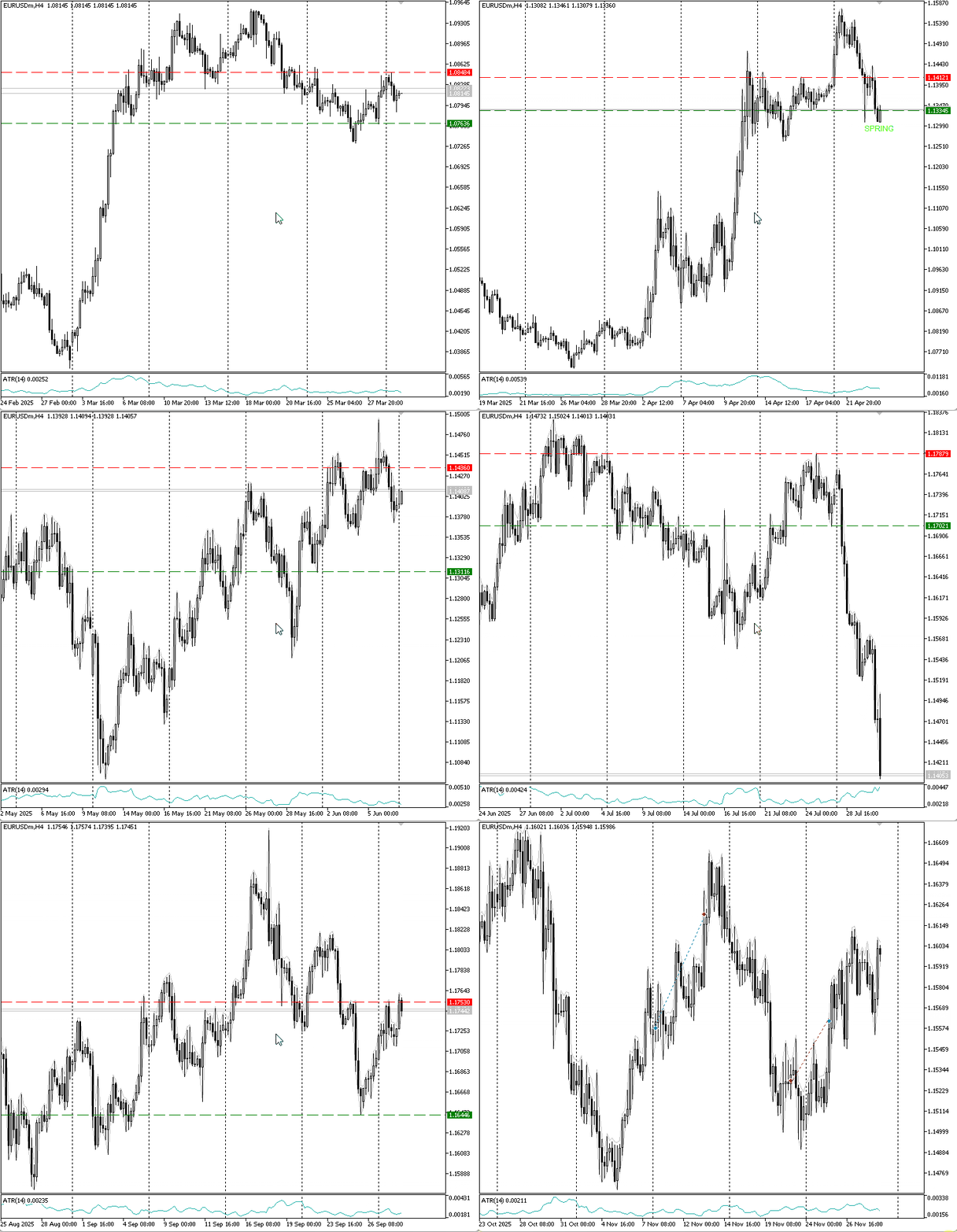
Figure 2. Demonstration test.
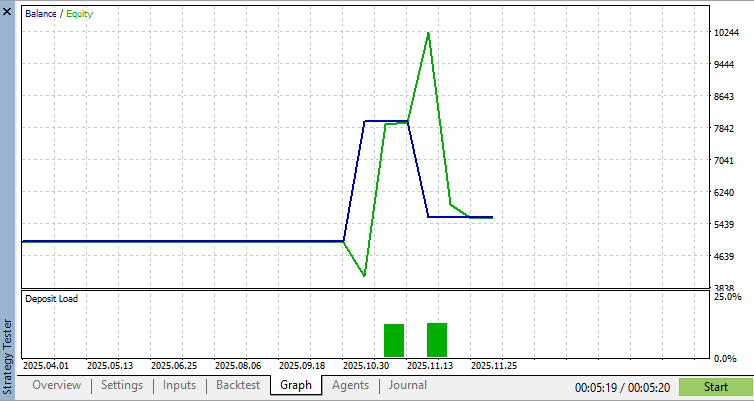
Figure 3. Equity and balance curve.
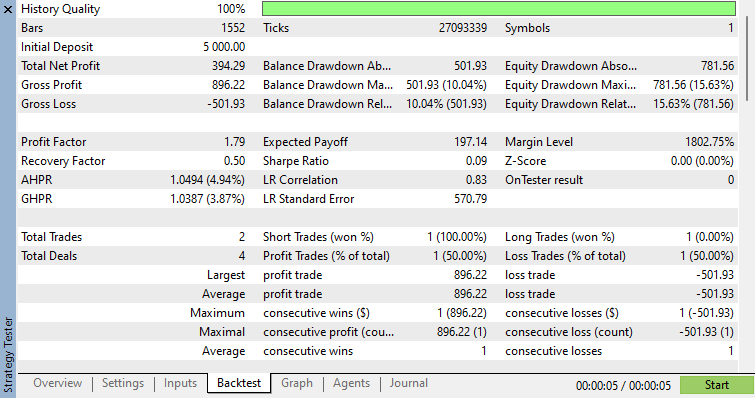
Figure 4. Test results.
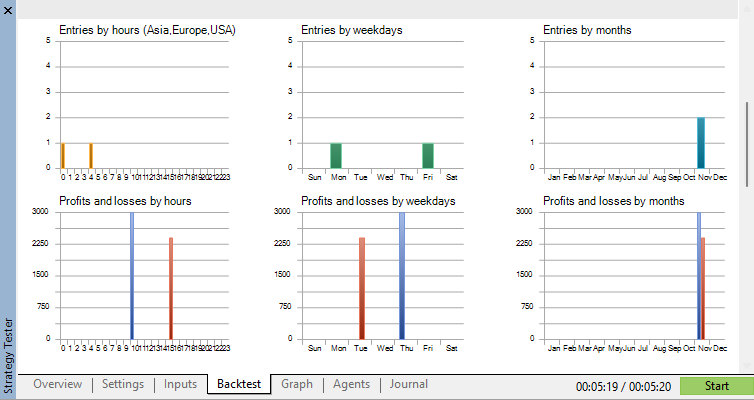
Figure 5. Test entries.
Known Limitations
The P&F box size is derived from ATR, not from an absolute price level. This is instrument-agnostic but means the box size changes as volatility changes. A range that forms during a low-volatility period will have a smaller box size and therefore more columns than an identical-width range forming during a high-volatility period. The resulting target will differ. This is mathematically correct—the P&F count is sensitive to the scale at which it is measured—but it means targets are not directly comparable across different market conditions.
The count line is set at the LPS or LPSY close, not at a manually identified last point of support level. In Wyckoff's original method, the count line is drawn at a specific structural level that requires visual judgment. The EA approximates this by using the pullback close as the count line. This produces a conservative and objective measurement but may differ from what an experienced Wyckoff analyst would select.
The EA uses a 1-box reversal throughout. Wyckoff practitioners sometimes use 3-box reversals for longer-term counts. The choice of reversal factor has a significant effect on the column count and therefore on the projected target. A future extension could offer both counts and use the average as the target zone.
The P&F construction scans bar-level OHLC data, not intraday tick data. On very short timeframes, individual bars may contain multiple reversal-worthy moves that are invisible at the bar level. H4 and above are the recommended minimum timeframes for this approach. On H1, results should be verified carefully against visual P&F analysis.
Conclusion
Wyckoff's law of cause and effect is one of the most elegant ideas in technical analysis: the size of a trend is proportional to the size of the consolidation that preceded it. The point and figure count is the tool that converts that idea into a number.
Part 1 of this series built the detection and entry architecture. This article builds the measurement layer that makes the exit structural rather than arbitrary. When the EA enters a trade at the last point of support, it now knows how wide the accumulation range was, how many P&F columns it generated, and how far the subsequent markup phase is projected to travel. The take profit is no longer a multiple of the stop distance—it is a measurement of the cause.
Together, Part 1 (entry) and Part 2 (exit) form a complete Wyckoff-based system. The EA enters at the lowest-risk point before markup and exits at the projected effect of the accumulated cause. Both decisions are derived from price structure rather than external indicators.
All code was compiled and tested in MetaTrader 5. The complete "WyckoffCauseEffectEA.mq5" source file is attached to this article. Copy to "MQL5\Experts\WyckoffCauseEffectEA.mq5" and compile in MetaEditor with no additional dependencies. Recommended for EURUSD on H4. Always test on a demo account before live deployment.
Warning: All rights to these materials are reserved by MetaQuotes Ltd. Copying or reprinting of these materials in whole or in part is prohibited.
This article was written by a user of the site and reflects their personal views. MetaQuotes Ltd is not responsible for the accuracy of the information presented, nor for any consequences resulting from the use of the solutions, strategies or recommendations described.

 MQL5 Wizard Techniques you should know (Part 99): Using a KD-Tree and an Echo State Network in a Custom Money Management Class
 Creating an HTML Dashboard for Strategy Tester and Prop Firm Challenge Analysis in MQL5
 Risk Manager for Trading Robots (Part I): Risk Control Include File for Expert Advisors
 Lazy-Loading Indicator Handles in MQL5: A Resource Manager Pattern for Multi-Timeframe EAs

- Free trading apps
- Over 8,000 signals for copying
- Economic news for exploring financial markets
You agree to website policy and terms of use
Check out the new article: Automating Classic Market Methods in MQL5 (Part 2): Wyckoff Cause and Effect—Point and Figure Price Targets.
Author: Tola Moses Hector