
Introduction to MQL5 (Part 28): Mastering API and WebRequest Function in MQL5 (II)
 3 016
3 016
 0
0

Introduction
Welcome back to Part 28 of the Introduction to MQL5 series! In the previous article, we explored the idea of APIs, discussed the WebRequest function's essential parameters, and talked about using it to connect to external servers. That lesson laid the foundation for understanding how data flows between MetaTrader 5 and other platforms.
As I always say, “In programming, you are only as good as the projects you’ve worked on.” And that perfectly captures the essence of this part.
As usual, we’ll be taking a project-based approach to make the learning process more practical and engaging. In this article, you’ll gain a complete understanding of how a URL works. Even though it was briefly explained in the last part, we’ll now explore it much deeper. Each component of a URL will be broken down into simple and clear parts, including the protocol, domain, pathway, and query. We'll create an MQL5 script for our straightforward project that uses the API of external services to retrieve real-time pricing data. Additionally, you will learn how to parse JSON replies and extract certain information from them using MQL5, which will help you close the gap between unprocessed API data and useful trading insights.
Understanding the URL
In the last article, I gave a brief explanation of URLs, but in this article, I will provide a detailed breakdown of their components, especially in the context of working with APIs.
Although the URLs used by various platforms vary, they typically follow a similar order. For instance, the Telegram API's base URL is
https://api.telegram.orgAnd the base URL for Binance’s API is
https://api.binance.comThe server to which you are connecting is identified by these URLs. The structure is comparable despite the differences in the platforms: a protocol, a domain, and a pathway leading to the desired resource or function.
Components of a URL
A component is just a portion or section of something bigger. Each of the several parts that make up something is referred to as a component. Similar to this, a URL consists of various components, each of which has a distinct function in assisting your software in finding and accessing data on a server.
The different parts that come together to make the entire address are referred to as the components of a URL. From the overall location to the precise resource that you wish to retrieve, these components direct your program. Just like a car may appear as one unit, but it is made up of different parts, each with its own function, the same applies to a URL. Although it appears to be a single long address, it is actually made up of several parts that have a distinct function.
When combined, they direct your software to the precise server resource you wish to access. Certain components indicate the particular service or function you wish to call, others assist in identifying the server you wish to connect to, and yet others include further information that lets the server know precisely what you are seeking.
The parts of a URL cooperate to help your program find and retrieve information on the internet effectively and accurately.
Each part has a special purpose and works in connection with the others. Your software can know exactly where to go and what information to ask a server for, thanks to these components.
The main parts of a URL are
- Protocol
- Domain
- Path
- Query string
Protocol
The next step is to describe each component separately now that we know what a URL is and what it stands for. The protocol is the first part of any URL. This instructs your browser or MQL5 application on how to connect to a server. The protocol, to put it simply, establishes the guidelines for data flow between your computer and the server you wish to connect to.
Example:
https://api.binance.comThe protocol in this case is https. This instructs your program to use the secure Hypertext Transfer Protocol. Working with sensitive data, such as trading information or account details, is safer since HTTPS encrypts the data being sent and received. HTTP and https differ in that http does not encrypt data. It merely transmits textual data. It is quicker but less secure as a result. Because they deal with sensitive and financial data, modern APIs like Binance need to use https.
Analogy:
Imagine you have a significant message to deliver to someone. Will you utilize normal mail, or a safe delivery service? Each method has its own set of safety standards. Similarly, a protocol dictates how your software interacts with a server.
It's similar to selecting a secure delivery service that guards against message interception when a URL starts with https. When a URL starts with http, it's similar to sending an unprotected letter via traditional mail. Because it guarantees that the data transferred between your program and the server is handled securely, https is necessary for Binance and the majority of contemporary APIs.
Domain
The domain comes after the protocol (https). The domain instructs your program on which server to connect to to obtain the desired data. It can be compared to the name of the structure that houses the data. To properly convey your message, you need the precise building name even if you are familiar with the street or city.
Examples:
https://api.binance.com
https://api.coingecko.com
The domain comes after the protocol, which indicates to your software that you wish to connect to a secure server. The domain functions similarly to the desired server's address.
The domain (api.binance.com) directs your program to the appropriate server, while the protocol ensures a secure connection. They serve as the cornerstone of your API request, ensuring that your software safely arrives at its destination.
The same holds true for api.coingecko.com. The domain is the server's address, and the https guarantees a safe connection. This helps prevent the data you send or request from one server from being confused with data from another server.
Path
Path is the next part of a URL, following the protocol and domain. The path indicates to your program which particular server function or resource you wish to access. The path points to the precise place or service within the server, whereas the domain points your software to the appropriate server.
Example:
https://api.binance.com/api/v3/ticker/price/api/v3/ticker/price is the path. This path points your software to the function that provides the most recent cryptocurrency symbol price. The server wouldn't know which information or feature you wish to access without the path.
Consider the path as the floor and room number within the building and the domain as the building itself. The path indicates the precise floor and room where the information is located, while the domain (such as api.binance.com) indicates which building to visit.
Another analogy is a path to a file on your computer:
C:\Users\Israel\Documents\CryptoData\prices.xlsx
This refers to the path to a particular document on your computer and the specific path you must follow. Which means you have to open several folders to have access to the file.
APIs and websites frequently follow distinct routes for various uses. A particular service or data set, such as obtaining the most recent prices, historical candlestick data, or account information, is associated with each path. The majority of APIs offer a documentation page with a list of all pathways that are available, along with an explanation of each path's functions and necessary parameters. Understanding how to properly submit requests and obtain the data you require depends on this guidance.
Let's use this path from the Binance API: /api/v3/ticker/price. It might be compared to going through your computer's files to find a particular file.
- First, you enter the folder api.
- Inside that, you go into the folder v3, which may represent the version of the API.
- Then you open the folder ticker, which contains files or functions related to cryptocurrency tickers.
- Finally, you reach price, which is the exact file or resource that gives you the latest price of a symbol.
Similarly, when your software reaches this path following the domain api.binance.com, it proceeds step-by-step through the structure of the server to obtain the exact function or information you have requested. For this reason, every segment of the path holds significance. Your program may end up in the wrong place or receive an error if any component is skipped or written incorrectly.
Query String
We described the path as similar to the folder on a server where the prices are kept. The path alone may yield all the contents of that folder, but you can use it to request data from it. You can be more precise about the exact data you desire by using the query string.
This similar to having a folder with different files on your computer, so instead of looking for a particular file yourself, you can use the query string to specify which file the computer should identify for you.
Example:
https://api.binance.com/api/v3/ticker/price?symbol=BTCUSDThttps://api.binance.com/api/v3/ticker/price?symbol=BTCUSDT is the URL. We can dissect it into its constituent parts. The https:// protocol instructs your application to establish a secure connection with the server so that all transmitted and received data is encrypted. The domain, api.binance.com, instructs your program where to send the request and is the address of the server you wish to connect to. The URL /api/v3/ticker/price points the server to the particular function that gives the most recent cryptocurrency price.
The query string always starts with the ?, and this is more like telling the server you have more instruction to give after adding the path. In the example, we could have just gone ahead and requested for the prices after adding the path, but to be more precise, we added the question mark sign, which indicates that we want to include additional instruction. After that we added the instruction by saying symbol=BTCUSDT, which means we want the price for BTCUSDT precisely.
This format can be used to request for various info like the current price or candle data for a specified time-frame. You must note that the query string format is similar for various platforms, but some keywords are different most times. So it is important to read the platform's API documentation to use it to its full potential.
Retrieving Current Prices Using an API in MQL5
You should have a firm grasp of how the protocol, domain, path, and query string interact by now, as I described the elements of a URL in the last chapter. You already understand the basics of MQL5's communication with external servers because we have discussed how to utilize the WebRequest method and its parameters in the previous article. The Binance API will be used in this section to obtain any asset's current price. The concept is straightforward. The server provides the most recent price in JSON format after you create the relevant URL and submit your request using WebRequest. We will develop MQL5 code to search through the returned text and extract only the necessary value because the response will be in JSON.
We will create a little MQL5 script that retrieves the current prices of various assets to make it feasible. The script will automatically connect to Binance and return the most recent price after the user enters the cryptocurrency's symbol. Because you can ask for the price of BTCUSDT, ETHUSDT, BNBUSDT, or any other trading pair that Binance supports, it is versatile.
For every external API, the general structure of this procedure is the same. The path and query string definitions used by each platform are the sole differences. So it's important to study the API documentation of the platform you wish to connect with so you know how to prepare your requests properly.
It is important to allow external requests on your MetaTrader 5 if you want to send or receive web requests with an external server. This is crucial since, for security reasons, MetaTrader 5 will automatically block all external queries. Go to Tools, then Options, or just hit Control + O to activate access. Next, select Allow WebRequest for listed URLs under the Expert Advisors tab. Lastly, click OK after adding https://api.binance.com to the list of permitted URLs. Your script will be able to send queries to Binance without any problems once this setup is finished.
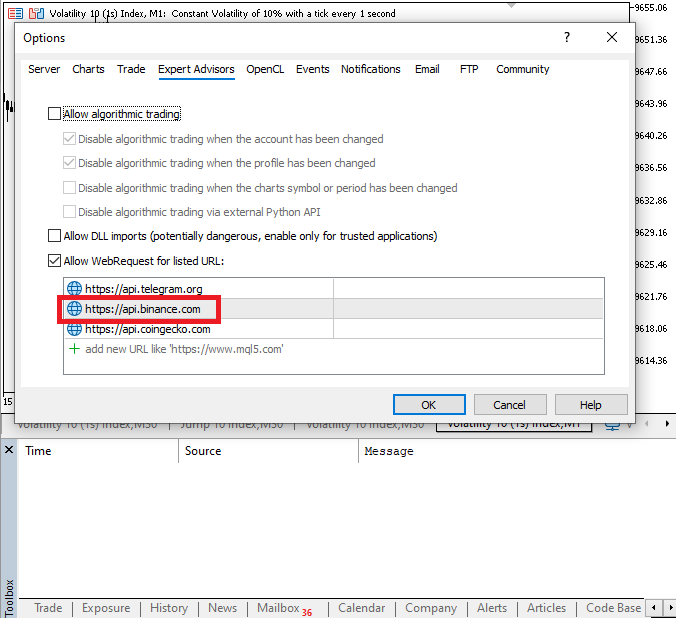
Declaring all the variables needed for the WebRequest function is the initial step before submitting any requests. The URL, headers, data to be sent, response buffer, and result code are all stored in these variables. By declaring these variables at the outset, we can maintain the script's organization and make sure that everything is prepared before submitting the real request to the Binance server.
Example:
const string method = "GET";
const string url = "https://api.binance.com/api/v3/ticker/price";
const string headers = "";
int timeout = 5000;
char   data[];
char result[];
string result_headers;

//+------------------------------------------------------------------+
//| Script program start function                                    |
//+------------------------------------------------------------------+
void OnStart()
  {
//---
   WebRequest(method,url,headers,timeout,data,result,result_headers);

   Print(CharArrayToString(result));

  }
Output:

Result:
[
{"symbol":"ETHBTC","price":"0.03313000"},
{"symbol":"LTCBTC","price":"0.00107100"},
{"symbol":"BNBBTC","price":"0.00974800"},
{"symbol":"NEOBTC","price":"0.00005020"},
{"symbol":"QTUMETH","price":"0.00055350"},
{"symbol":"EOSETH","price":"0.00030670"},
{"symbol":"SNTETH","price":"0.00001700"},
{"symbol":"BNTETH","price":"0.00020260"},
{"symbol":"BCCBTC","price":"0.00000000"},
{"symbol":"GASBTC","price":"0.00002500"},
{"symbol":"BNBETH","price":"0.29410000"},
{"symbol":"BTCUSDT","price":"95566.46000000"},
{"symbol":"E
Explanation:
const string method = "GET";
The "GET" method is used to tell the server you want to receive data.
const string url = "https://api.binance.com/api/v3/ticker/price";
Next, we defined a string variable to store the URL. The URL includes the protocol (https://), domain (api.binance.com), and the path (/api/v3/ticker/price). The only component of the URL that was not included was the query string, and that is because no extra command was needed. This will be important when filling the parameters for the WebRequest function.
const string headers = "";
int timeout = 5000;
char   data[];
In this block of code, we declared three variables. First is the header, which usually carries additional information you want to send along with your request to the server, but in a case like this the header can be left empty. The only reason the header was included was because it will be required when inputting the WebRequest function.
Next, the timeout is used to specify the milliseconds the request should wait to receive a response from the server. If no response is received within the specified period, the request will be canceled. Lastly, data is used to include additional information that will be sent with the request to the server.
char result[];
string result_headers;
After the WebRequest is finished, the server stores the response body in the result array. It stores the raw data that is typically in the form of bytes that the server returns, which can then be transformed into a readable text for additional usage. The response to this Binance endpoint will be a JSON string with various prices for each trading pair. All the HTTP response headers that the server sends, including metadata about the response like content type, content length, server information, and any additional instructions or information the server gives along with the data, are captured in the result headers string.
int web_request =  WebRequest(method,url,headers,timeout,data,result,result_headers);
Print(CharArrayToString(result));
The WebRequest function was used to send a "GET" request to the server. We input all the necessary parameters of the function: the method, URL, headers, timeout, result, and the result header. The function will wait to get a response from the server. After a successful response, it will be stored in the result variable.
Since arrays of characters cannot be read directly in the Experts log, the raw bytes in the result array are transformed into a readable string after getting the answer so they may be written and interpreted with ease. The string that results from this Binance request is JSON and contains the current prices of several trading pairs.
We must first study the precise arrangement of the JSON structure to be able to filter through it and get the information we require. JSON can be arranged differently by each platform or API, with differences in array structures, nesting, and field names. In addition to preventing mistakes that can arise if we assume a structure that does not match the real response, knowing the exact pattern enables us to accurately extract the necessary information, such as certain trading pairings or price values. The outcome is simply a repeating pattern of pricing for various symbols when we print it out, which makes it simpler to find and extract the precise information we need.
Example:
[
{"symbol":"ETHBTC","price":"0.03313000"},
{"symbol":"LTCBTC","price":"0.00107100"},
{"symbol":"BNBBTC","price":"0.00974800"},
{"symbol":"NEOBTC","price":"0.00005020"},
{"symbol":"QTUMETH","price":"0.00055350"},
Each price is formatted in the same way, starting with ".symbol",INSTRUMENT",price":," where INSTRUMENT represents the trading pair, and the price is the subsequent value. This regular structure allows us to carefully examine the JSON and extract the relevant prices and symbols.
Example:const string method = "GET"; const string url = "https://api.binance.com/api/v3/ticker/price"; const string headers = ""; int timeout = 5000; char data[]; char result[]; string result_headers; string instrument = "BTCUSDT"; //+------------------------------------------------------------------+ //| Script program start function | //+------------------------------------------------------------------+ void OnStart() { //--- int web_request = WebRequest(method,url,headers,timeout,data,result,result_headers); // Print(CharArrayToString(result)); string pattern = "{\"symbol\":\"" + instrument + "\",\"price\":\""; string jason = CharArrayToString(result); int pattern_lenght = StringFind(jason,pattern); pattern_lenght += StringLen(pattern); int end = StringFind(jason,"\"",pattern_lenght + 1); string coin_price = StringSubstr(jason,pattern_lenght,end - pattern_lenght); Print(instrument,": ", coin_price); }
Output:

Explanation:
string instrument = "BTCUSDT";
string pattern = "{\"symbol\":\"" + instrument + "\",\"price\":\"";
We defined a variable to store the symbol for the instrument we would like to work with. The second line combines the instrument variable and text to create the JSON search pattern. For the computer to find the right price, the same structure that appears in the Binance JSON response must be created. The end output matches what the API delivers by merging the variable with the fixed portion of the JSON.
To begin and finish a string in MQL5, use quotes. The compiler would assume that the string has finished if you were to type an actual quotation character inside the string. You use a backslash to escape the quote to fix this. Thus, " instructs MQL5 to handle the quotation as a regular character within the string rather than as the string's end.
This is required because the instrument name, price, and symbol are all surrounded by quotes in the JSON format itself. Without escaping them, the application would not properly match the JSON format given by the API, and the pattern would break or result in a syntax error.
string jason = CharArrayToString(result);
This line creates a readable string from the WebRequest's raw response and saves it in a new variable. You are unable to search or extract information straight from the WebRequest method since it returns its data as a character array. You may operate with the data using standard string operations like search, substring, and compare by turning the array into a string. This translated text is only stored in the new variable so that it may be handled in subsequent stages.
int pattern_lenght = StringFind(jason,pattern);
This line finds the start of the pattern within the whole JSON string, and we use that place to figure out how many characters come before the pattern begins. After examining the entire JSON answer, the function returns the index of the first character in the pattern. When you search for "BEGINNERS" in the text "MQL5 FOR BEGINNERS," for example, the function returns 9. An index in MQL5 is simply a character's numerical location within a string. This returned index indicates exactly where the pattern begins within the JSON so that we may retrieve the correct pricing value later.
pattern_lenght += StringLen(pattern);By adding the pattern's length, this line raises the starting position. The StringLen method is used to count the number of characters in the pattern itself after we have located the index of the pattern's first character inside the JSON. We do not want to include the pattern text in the final extraction; thus, this step is crucial. We advance the pointer until it precisely arrives on the first character of the price value by adding the pattern length to the starting index. This eliminates everything that comes before and includes the pattern itself. This ensures that the price is the only thing we extract.
int end = StringFind(jason,"\"",pattern_lenght + 1);
The function works once we have established the precise beginning of the pricing value, as well as the length of the pattern. The next step is to determine the end of that pricing. We employ the three-parameter StringFind function to accomplish this. The JSON text saved in Jason is the primary string we wish to search through, and it is the first parameter.
The second parameter is the character we are searching for, which in this case is the quote, because the price value in JSON is always surrounded in quotes." The third parameter tells StringFind where to begin its search. Using pattern_lenght + 1, we instruct it to start looking as soon as the pattern ends, which is precisely where the price digits begin.
This is important because, in the JSON structure, like
{"symbol":"ETHBTC","price":"0.03313000"},
{"symbol":"LTCBTC","price":"0.00107100"},
The part {"symbol":"ETHBTC","price":" is the pattern. The price value follows, and the final quote appears just after the price. To get that final phrase, we start our search just after the pattern. This enables us to accurately extract the price by providing us with the precise ending index.
string coin_price = StringSubstr(jason,pattern_lenght ,end - pattern_lenght);
Print(instrument,": ", coin_price);
Once we have determined where the pattern begins and where the closing quote appears, this section of the code is responsible for retrieving the actual price amount.
Here, only the price is extracted using the StringSubstr function, which is used to trim out a specified section of a string. The complete JSON contained in the variable jason is the first parameter that instructs the function which text we wish to cut from. Because pattern_lenght was already advanced to point at the first character of the price, the second argument indicates the precise location where the price begins, which is the value stored in pattern_lenght.
The third parameter instructs the function on the number of characters to be extracted. We use end minus pattern_lenght to calculate this length by subtracting the beginning point from the finishing point. Without any quotations or other symbols, this provides us with the precise number of letters that comprise the pricing value.
After the extraction is finished, the result is saved in coin_price, which only includes the clean price, such as 0.03313000. Lastly, the Print statement makes it simple to view the outcome in a legible fashion by displaying both the instrument name and the extracted price in the log. All you have to do now is enter the symbol to find the price for any asset on the platform. The system is adaptable and can handle whatever asset you select because the same logic will automatically search the JSON, find the appropriate pattern, extract the price, and display it.
It is crucial to remember that each site has a cap on how many requests you can submit in a given amount of time. Because of this, using this method directly in an EA's OnTick function is not advised since it may rapidly exceed the request limit. To guarantee that you stay within the platform's permitted request rate, you must, however, include a time gate or delay between each request if you have a valid reason.
We can obtain pricing using a different platform for greater comprehension; let's use CoinGecko this time. Additionally, CoinGecko offers a public API that yields JSON data for many cryptocurrencies. The procedure is essentially the same: you issue an HTTP call to the API endpoint, get a JSON response, and then extract the asset's price that interests you.
Example:
const string method = "GET";
//const string url = "https://api.binance.com/api/v3/ticker/price";
const string url = "https://api.coingecko.com/api/v3/simple/price?ids=bitcoin,ethereum&vs_currencies=usd";

const string headers = "";
int timeout = 5000;
char   data[];
char result[];
string result_headers;

string instrument = "ETHUSDT";

//+------------------------------------------------------------------+
//| Script program start function                                    |
//+------------------------------------------------------------------+
void OnStart()
  {
//---
   int web_request =  WebRequest(method,url,headers,timeout,data,result,result_headers);

   Print(CharArrayToString(result));


  }
Output:

{"bitcoin":{"usd":95566},"ethereum":{"usd":3169.35}}}Explanation:
We change the URL to the one used to request for current price when using the CoinGecko API. This time, we added a query string, which is required by CoinGecko to specify which coins and which currencies we want prices for. The base endpoint and parameters are separated by a question mark (?) at the beginning of the query string. In this instance, vs_currencies=usd indicates that we want the prices in US dollars, and ?ids=bitcoin,ethereum instructs CoinGecko which cryptocurrencies we want values for. We use an ampersand & to separate parameters when there are several, like in this example. The format key=value is used for each argument.
Therefore, the general guideline is to use & to divide multiple key-value pairs within the query string and use ? To begin the query string after the base URL. This lets the server know precisely what information you are asking for. You will see that the JSON pattern from CoinGecko differs from Binance after printing the outcome. This demonstrates the significance of first examining the response and comprehending the JSON's structure. Because each platform formats its response differently, knowing the precise pattern enables you to accurately extract the data you need, like the price of a particular coin, without making mistakes.
To enable the WebRequest to be issued, you must add the CoinGecko API URL to your MetaTrader 5 settings. Adding the API to the list of permitted URLs guarantees that your script or EA can successfully connect to CoinGecko and retrieve the data, as MetaTrader 5 by default blocks calls to external URLs.
https://api.coingecko.comExample:
const string method = "GET";
//const string url = "https://api.binance.com/api/v3/ticker/price";
const string url = "https://api.coingecko.com/api/v3/simple/price?ids=bitcoin,ethereum&vs_currencies=usd";

const string headers = "";
int timeout = 5000;
char   data[];
char result[];
string result_headers;

string instrument = "bitcoin";

//+------------------------------------------------------------------+
//| Script program start function                                    |
//+------------------------------------------------------------------+
void OnStart()
  {
//---
   int web_request =  WebRequest(method,url,headers,timeout,data,result,result_headers);

// Print(CharArrayToString(result));

   string pattern = "{\"" + instrument + "\":{\"usd\":";
   string jason = CharArrayToString(result);

   int pattern_lenght = StringFind(jason,pattern);
   pattern_lenght += StringLen(pattern);

   int end = StringFind(jason,"}",pattern_lenght + 1);

   string coin_price = StringSubstr(jason,pattern_lenght,end - pattern_lenght);

   Print(instrument,": ", coin_price);

  }
Output:
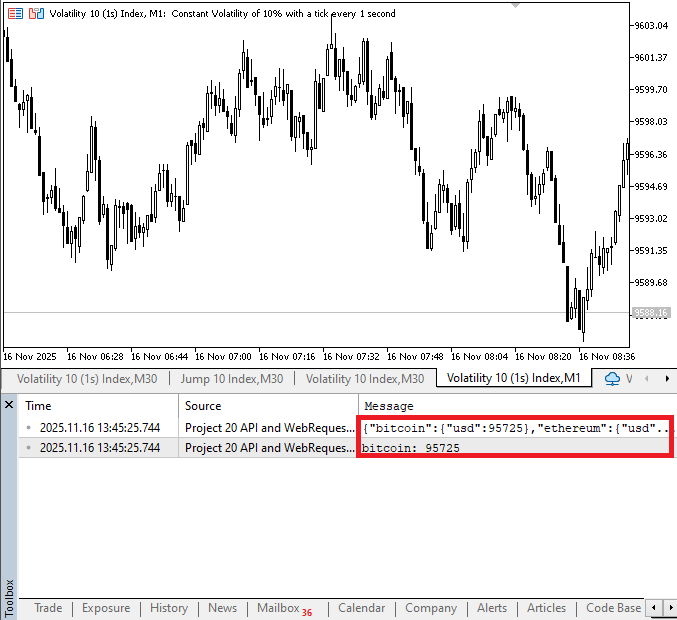
Explanation:
Only two changes were made. Firstly, we made sure the URL matched with the platform's API. Lastly, since the JSON format for platforms may vary, we made sure it's the same as GoinGecko.
Conclusion
This article taught you how to use MQL5's WebRequest function and external platforms' APIs to obtain real-time price data. Additionally, you now have a thorough understanding of the protocol, domain, pathway, and query of a URL. Ultimately, you discovered how to extract particular information from JSON responses and categorize them, transforming unprocessed API data into insightful knowledge.
Warning: All rights to these materials are reserved by MetaQuotes Ltd. Copying or reprinting of these materials in whole or in part is prohibited.
This article was written by a user of the site and reflects their personal views. MetaQuotes Ltd is not responsible for the accuracy of the information presented, nor for any consequences resulting from the use of the solutions, strategies or recommendations described.

 Developing a Trading Strategy: The Flower Volatility Index Trend-Following Approach
 Analytical Volume Profile Trading (AVPT): Liquidity Architecture, Market Memory, and Algorithmic Execution
 Table and Header Classes based on a table model in MQL5: Applying the MVC concept
 Price Action Analysis Toolkit Development (Part 51): Revolutionary Chart Search Technology for Candlestick Pattern Discovery

- Free trading apps
- Over 8,000 signals for copying
- Economic news for exploring financial markets
You agree to website policy and terms of use