

Dynamic Swing Architecture: Market Structure Recognition from Swings to Automated Execution
 6 945
6 945
 5
5

Table of contents:
Introduction
In the ever-changing rhythm of the markets, every price movement tells a story—a series of swing highs and swing lows that reveal where buyers and sellers take control. For most traders, identifying these swing points forms the foundation of understanding market structure. Yet doing this manually, bar after bar, can be inconsistent and prone to bias.
The Dynamic Swing Architecture system is built to read the market with precision. It dynamically adapts to evolving price action, detecting new swings in real time and executing trades automatically when structural shifts occur. When a swing low forms, it identifies potential bullish intent and triggers a buy when a swing high appears, it signals bearish pressure and opens a sell.
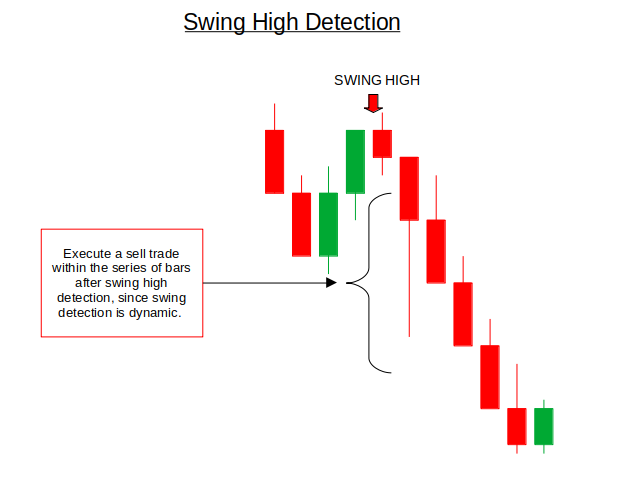
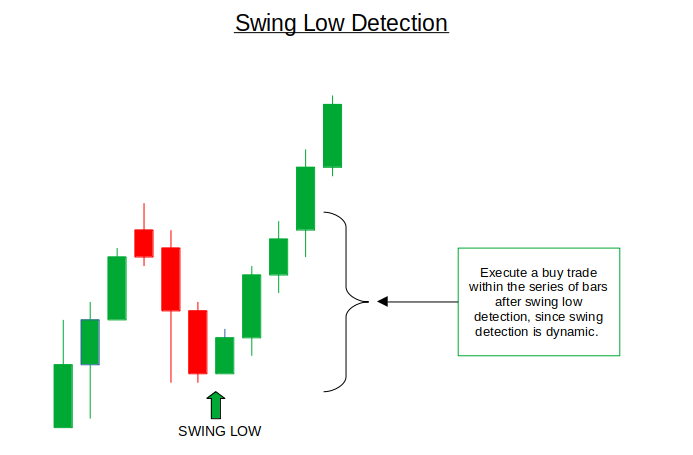
This approach eliminates emotional decision-making and keeps your strategy in sync with how the market naturally flows. Whether you’re trading gold, forex, or indices, the system recognizes the same core principle: market structure governs opportunity. With this architecture, traders can bridge human market intuition with algorithmic execution—making structure-based trading more consistent, adaptive, and powerful.
System Overview
The Dynamic Swing Architecture system is built on a simple but powerful principle: the market is always alternating between swing highs and swing lows. These turning points represent the ongoing battle between buyers and sellers—and by capturing them in real time, the system aligns each trade with the natural rhythm of price movement.
At its core, the system continuously scans recent price action to identify when a candle forms a new structural high or low relative to its neighboring bars. When a swing low forms—a local point where price stops making lower lows—the system recognizes it as a potential start of bullish momentum and places a buy trade. Conversely, when a swing high forms—a local peak that fails to make higher highs—it triggers a sell position.
What makes this system dynamic is its adaptability. Instead of relying on a fixed lookback period or static swing rules, it evaluates each new bar in context, allowing it to react to changing volatility and structure. This ensures that the EA doesn’t lag the market or rely on outdated data—it trades what’s happening now. To enhance clarity and transparency, the system also visualizes swings directly on the chart, marking each detected swing point and corresponding trade with clear labels and arrows. This provides traders with immediate feedback and allows them to observe how the algorithm interprets structure.
Getting Started
//+------------------------------------------------------------------+
//|                                      Dynamic Swing Detection.mq5 |
//|                        GIT under Copyright 2025, MetaQuotes Ltd. |
//|                     https://www.mql5.com/en/users/johnhlomohang/ |
//+------------------------------------------------------------------+
#property copyright "GIT under Copyright 2025, MetaQuotes Ltd."
#property link      "https://www.mql5.com/en/users/johnhlomohang/"
#property version   "1.00"
#include <Trade/Trade.mqh>

CTrade TradeManager;
MqlTick currentTick;

input group "General Trading Parameters"
input int     MinSwingBars = 3;          // Minimum bars for swing formation
input double  MinSwingDistance = 100.0;  // Minimum distance for swing (in points)
input bool    UseWickForTrade = false;   // Use wick or body for trade levels

input group "Trailing Stop Parameters"
input bool UseTrailingStop = true;              // Enable trailing stops
input int BreakEvenAtPips = 500;                // Move to breakeven at this profit (pips)
input int TrailStartAtPips = 600;               // Start trailing at this profit (pips)
input int TrailStepPips = 100;                  // Trail by this many pips
We start off by pulling in the trading utilities and preparing the objects the EA will use at runtime: #include <Trade/Trade.mqh> gives us the CTrade class, and CTrade TradeManager creates an instance that handles order sending, modifications, and closes in a safe, higher-level way so we don’t manage raw ticket calls. MqlTick currentTick is declared to hold the latest market tick (bid/ask/time) used when making execution decisions. Next, we expose the general trading parameters as inputs so the trader can tune behavior without changing code: MinSwingBars controls how many neighboring bars are required before we call a bar a swing (reducing false swings if you raise it), MinSwingDistance forces a minimum size for a swing (measured in points) so tiny noise isn’t traded, and UseWickForTrade lets you choose whether trade levels use candle wicks (more aggressive, captures extremes) or bodies (more conservative).
Then we define the risk & trailing inputs so trade management is configurable and transparent. UseTrailingStop toggles the trailing logic on or off, BreakEvenAtPips says at what profit (in pips) we move the stop to breakeven to remove downside risk, TrailStartAtPips is the profit threshold where trailing actually begins, and TrailStepPips is the granularity the stop follows price (move the stop every X pips). These parameters let you control when profits are protected and how tightly the stop chases price.
//+------------------------------------------------------------------+
//| Swing detection structure                                        |
//+------------------------------------------------------------------+
struct SwingPoint
{
    int       barIndex;
    double    price;
    datetime  time;
    bool      isHigh;
    double    bodyHigh;
    double    bodyLow;
};

//+------------------------------------------------------------------+
//| Expert initialization function                                   |
//+------------------------------------------------------------------+
int OnInit()
{
    return(INIT_SUCCEEDED);
}

//+------------------------------------------------------------------+
//| Expert deinitialization function                                 |
//+------------------------------------------------------------------+
void OnDeinit(const int reason)
{
    // Clean up all objects on deinit
    ObjectsDeleteAll(0, -1, -1);
}
We then define a custom structure called SwingPoint, which serves as the foundation for how the system stores and tracks each detected swing. This structure keeps all the essential information about a swing in one place: barIndex records the exact bar where the swing occurred, price holds the swing’s key level (either high or low), and time marks when it formed. The isHigh flag distinguishes between swing highs and swing lows, allowing the algorithm to decide whether to prepare for a sell or buy. Additionally, bodyHigh and bodyLow capture the candle’s body range—useful when the system needs to differentiate between using wicks or candle bodies for trade execution, based on the trader’s chosen input settings.
//+------------------------------------------------------------------+
//| Expert tick function                                             |
//+------------------------------------------------------------------+
void OnTick()
{
    if(!isNewBar())
        return;

    // Detect swings and manage trading logic
    ManageTradingLogic();

    if(UseTrailingStop) ManageOpenTrades();
}
The OnTick() function is the core of any MQL5 Expert Advisor, called on every market tick. Inside, we first check isNewBar() to ensure the logic only runs once per new candle, avoiding duplicate signals within the same bar. Once confirmed, the system calls ManageTradingLogic() to detect new swing points and execute trades. If trailing stops are enabled, ManageOpenTrades() is also triggered to update stop levels and secure profits dynamically.
//+------------------------------------------------------------------+
//| Manage trading logic                                             |
//+------------------------------------------------------------------+
void ManageTradingLogic()
{
    static SwingPoint lastSwingLow = {-1, 0, 0, false, 0, 0};
    static SwingPoint lastSwingHigh = {-1, 0, 0, true, 0, 0};
    static bool lookingForHigh = false;
    static bool lookingForLow = false;

    // Detect current swings
    SwingPoint currentSwing;
    if(!DetectSwing(currentSwing))
        return;

    // Bullish scenario logic
    if(!lookingForHigh && !currentSwing.isHigh) // New swing low detected
    {
        lastSwingLow = currentSwing;
        lookingForHigh = true;
        lookingForLow = false;
        Print("Swing Low detected at: ", DoubleToString(currentSwing.price, _Digits), " Time: ", TimeToString(currentSwing.time));
        ExecuteTrade(ORDER_TYPE_BUY, "SwingLow_Buy");
        // Draw swing low
        string swingName = "SwingLow_" + IntegerToString(currentSwing.time);
        drawswing(swingName, currentSwing.time, currentSwing.price, 217, clrBlue, 1);
    }
    else if(lookingForHigh && currentSwing.isHigh) // Swing high after swing low
    {
        lastSwingHigh = currentSwing;
        lookingForHigh = false;
        Print("Swing High detected after Swing Low.");

        // Draw swing high
        string swingName = "SwingHigh_" + IntegerToString(currentSwing.time);
        drawswing(swingName, currentSwing.time, currentSwing.price, 218, clrRed, -1);
    }

    // Bearish scenario logic
    if(!lookingForLow && currentSwing.isHigh) // New swing high detected
    {
        lastSwingHigh = currentSwing;
        lookingForLow = true;
        lookingForHigh = false;
        Print("Swing High detected at: ", DoubleToString(currentSwing.price, _Digits), " Time: ", TimeToString(currentSwing.time));
        ExecuteTrade(ORDER_TYPE_SELL, "SwingHigh_Sell");
        // Draw swing high
        string swingName = "SwingHigh_" + IntegerToString(currentSwing.time);
        drawswing(swingName, currentSwing.time, currentSwing.price, 218, clrRed, -1);
    }
    else if(lookingForLow && !currentSwing.isHigh) // Swing low after swing high
    {
        lastSwingLow = currentSwing;
        lookingForLow = false;
        Print("Swing Low detected after Swing High.");

        // Draw swing low
        string swingName = "SwingLow_" + IntegerToString(currentSwing.time);
        drawswing(swingName, currentSwing.time, currentSwing.price, 217, clrBlue, 1);
    }
}
The ManageTradingLogic() function is the system’s brain—handling all decisions based on newly detected swings. Inside, we initialize two static variables, lastSwingLow and lastSwingHigh, to store the most recent swing points so the system always knows where the last structural turn occurred. Flags like lookingForHigh and lookingForLow help the EA remember what kind of swing it’s expecting next, ensuring it reacts logically rather than randomly to each price move. Once a new bar forms, the system calls DetectSwing() to identify if a valid swing has occurred, and if not, it simply waits until the next bar update.
When a bullish scenario forms, meaning a new swing low has been detected, the system recognizes this as potential buying pressure. It updates the lastSwingLow record, switches to look for the next swing high, and instantly executes a buy trade using ExecuteTrade(ORDER_TYPE_BUY, "SwingLow_Buy"). To make this event visually clear, the EA also draws a blue marker on the chart where the swing low formed, allowing traders to see how the algorithm interprets price structure in real time. Once a swing high appears afterward, it’s simply drawn in red as confirmation that the bullish leg is complete.
In the bearish scenario, the logic is mirrored. When a swing high is detected, it marks potential selling pressure. The EA records that swing, toggles the direction flags, and executes a sell trade with ExecuteTrade(ORDER_TYPE_SELL, "SwingHigh_Sell"). Again, the swing is drawn on the chart in red for clarity, followed by a blue swing marker once the market finds its next low. This alternating recognition of highs and lows ensures that the system continuously adapts to the current flow of price—automatically executing trades that align with the most recent market structure without any manual intervention.
//+------------------------------------------------------------------+
//| Detect swing points dynamically                                  |
//+------------------------------------------------------------------+
bool DetectSwing(SwingPoint &swing)
{
    swing.barIndex = -1;

    int barsToCheck = MinSwingBars * 2 + 1;
    if(Bars(_Symbol, _Period) < barsToCheck)
        return false;

    // Check multiple recent bars for swings
    for(int i = MinSwingBars; i <= MinSwingBars + 5; i++)
    {
        if(i >= Bars(_Symbol, _Period)) break;

        // Check for swing high
        if(IsSwingHigh(i))
        {
            swing.barIndex = i;
            swing.price = UseWickForTrade ? iHigh(_Symbol, _Period, i) :
                          MathMax(iOpen(_Symbol, _Period, i), iClose(_Symbol, _Period, i));
            swing.time = iTime(_Symbol, _Period, i);
            swing.isHigh = true;
            swing.bodyHigh = MathMax(iOpen(_Symbol, _Period, i), iClose(_Symbol, _Period, i));
            swing.bodyLow = MathMin(iOpen(_Symbol, _Period, i), iClose(_Symbol, _Period, i));
            return true;
        }
        // Check for swing low
        else if(IsSwingLow(i))
        {
            swing.barIndex = i;
            swing.price = UseWickForTrade ? iLow(_Symbol, _Period, i) :
                          MathMin(iOpen(_Symbol, _Period, i), iClose(_Symbol, _Period, i));
            swing.time = iTime(_Symbol, _Period, i);
            swing.isHigh = false;
            swing.bodyHigh = MathMax(iOpen(_Symbol, _Period, i), iClose(_Symbol, _Period, i));
            swing.bodyLow = MathMin(iOpen(_Symbol, _Period, i), iClose(_Symbol, _Period, i));
            return true;
        }
    }

    return false;
}
The DetectSwing() function is responsible for dynamically scanning recent price bars to identify new swing highs or swing lows. It first ensures there are enough candles on the chart to evaluate by checking against MinSwingBars, then loops through a small range of recent bars to look for potential turning points. For each bar, it calls IsSwingHigh() or IsSwingLow() to verify if that bar stands out structurally from its neighbors. When a valid swing is found, the function records its index, price, and time, determining whether it’s a high or low and storing both the wick and body ranges depending on the trader’s chosen setting. Once a swing is confirmed, the function immediately returns true, signaling to the main logic that a structural shift has just been detected and can be traded upon.
//+------------------------------------------------------------------+
//| Check if bar is swing high                                       |
//+------------------------------------------------------------------+
bool IsSwingHigh(int barIndex)
{
    if(barIndex < MinSwingBars || barIndex >= Bars(_Symbol, _Period) - MinSwingBars)
        return false;

    double currentHigh = iHigh(_Symbol, _Period, barIndex);

    // Check left side
    for(int i = 1; i <= MinSwingBars; i++)
    {
        double leftHigh = iHigh(_Symbol, _Period, barIndex + i);
        if(leftHigh >= currentHigh - MinSwingDistance * _Point)
            return false;
    }

    // Check right side
    for(int i = 1; i <= MinSwingBars; i++)
    {
        double rightHigh = iHigh(_Symbol, _Period, barIndex - i);
        if(rightHigh >= currentHigh - MinSwingDistance * _Point)
            return false;
    }

    return true;
}

//+------------------------------------------------------------------+
//| Check if bar is swing low                                        |
//+------------------------------------------------------------------+
bool IsSwingLow(int barIndex)
{
    if(barIndex < MinSwingBars || barIndex >= Bars(_Symbol, _Period) - MinSwingBars)
        return false;

    double currentLow = iLow(_Symbol, _Period, barIndex);

    // Check left side
    for(int i = 1; i <= MinSwingBars; i++)
    {
        double leftLow = iLow(_Symbol, _Period, barIndex + i);
        if(leftLow <= currentLow + MinSwingDistance * _Point)
            return false;
    }

    // Check right side
    for(int i = 1; i <= MinSwingBars; i++)
    {
        double rightLow = iLow(_Symbol, _Period, barIndex - i);
        if(rightLow <= currentLow + MinSwingDistance * _Point)
            return false;
    }

    return true;
}
The functions IsSwingHigh() and IsSwingLow() form the analytical core of swing detection by determining whether a specific bar stands out as a local high or low. In IsSwingHigh(), the algorithm first validates that the bar being checked has enough neighboring candles on both sides to compare against. It then retrieves the bar’s high price and compares it to the highs of surrounding candles. If any of those nearby highs are within the defined MinSwingDistance, the bar is disqualified as a swing high because the price action around it isn’t distinct enough. This ensures that only clearly defined peaks, where the market genuinely shifted from bullish to bearish behavior, are recognized as valid swing highs.
Similarly, IsSwingLow() performs the same structural logic but inverted for lows. It checks whether the bar’s low stands significantly below its neighbors within the allowed MinSwingDistance. If any of the surrounding candles have lows that come too close, it means the market hasn’t truly shifted upward, so the bar is ignored. By using these distance and neighborhood checks, the system filters out noise and focuses on true structural turning points—those that mark real directional intent rather than temporary price wobbles.
//+------------------------------------------------------------------+
//| Draw swing point on chart                                        |
//+------------------------------------------------------------------+
void drawswing(string objName, datetime time, double price, int arrCode, color clr, int direction)
{
   if(ObjectFind(0, objName) < 0)
   {
      // Create arrow object
      if(!ObjectCreate(0, objName, OBJ_ARROW, 0, time, price))
      {
         Print("Error creating swing object: ", GetLastError());
         return;
      }

      ObjectSetInteger(0, objName, OBJPROP_ARROWCODE, arrCode);
      ObjectSetInteger(0, objName, OBJPROP_COLOR, clr);
      ObjectSetInteger(0, objName, OBJPROP_WIDTH, 3);
      ObjectSetInteger(0, objName, OBJPROP_BACK, false);

      if(direction > 0)
      {
         ObjectSetInteger(0, objName, OBJPROP_ANCHOR, ANCHOR_TOP);
      }
      else if(direction < 0)
      {
         ObjectSetInteger(0, objName, OBJPROP_ANCHOR, ANCHOR_BOTTOM);
      }

      // Create text label
      string textName = objName + "_Text";
      string text = DoubleToString(price, _Digits);

      if(ObjectCreate(0, textName, OBJ_TEXT, 0, time, price))
      {
         ObjectSetString(0, textName, OBJPROP_TEXT, text);
         ObjectSetInteger(0, textName, OBJPROP_COLOR, clr);
         ObjectSetInteger(0, textName, OBJPROP_FONTSIZE, 8);

         // Adjust text position based on direction
         double offset = (direction > 0) ? - (100 * _Point) : (100 * _Point);
         ObjectSetDouble(0, textName, OBJPROP_PRICE, price + offset);
      }
   }
}
The drawswing() function handles the visual representation of swing points directly on the chart, allowing traders to see where the algorithm has identified key turning levels. It begins by checking whether an object with the given name already exists to avoid duplication, and if not, it creates an arrow at the detected swing’s time and price. The arrow’s appearance—color, width, and anchor—is adjusted based on whether it represents a swing high or swing low, making the chart visually intuitive (for example, red arrows for highs and blue for lows). Additionally, the function creates a text label displaying the exact price level beside the arrow, offset slightly for better readability. This visualization not only helps confirm that the EA is detecting structure correctly but also gives traders a clear, real-time view of market rhythm and turning points.
//+------------------------------------------------------------------+
//| Helper functions                                                 |
//+------------------------------------------------------------------+
bool isNewBar()
{
   static datetime lastBar;
   datetime currentBar = iTime(_Symbol, _Period, 0);
   if(lastBar != currentBar)
   {
      lastBar = currentBar;
      return true;
   }
   return false;
}

//+------------------------------------------------------------------+
//| Execute trade with proper risk management                        |
//+------------------------------------------------------------------+
void ExecuteTrade(ENUM_ORDER_TYPE orderType, string comment)
{
   // Calculate position size based on risk
   double lotSize = 0.03;
   if(lotSize <= 0)
   {
      Print("Failed to calculate position size");
      return;
   }

   // Get current tick data
   if(!SymbolInfoTick(_Symbol, currentTick))
   {
      Print("Failed to get current tick data. Error: ", GetLastError());
      return;
   }

   // Define stop levels in points (adjust these values as needed)
   int stopLossPoints = 600;
   int takeProfitPoints = 2555;

   // Calculate stop loss and take profit prices
   double stopLoss = 0.0, takeProfit = 0.0;
   double point = SymbolInfoDouble(_Symbol, SYMBOL_POINT);
   int digits = (int)SymbolInfoInteger(_Symbol, SYMBOL_DIGITS);

   if(orderType == ORDER_TYPE_BUY)
   {
      stopLoss = NormalizeDouble(currentTick.bid - (stopLossPoints * point), digits);
      takeProfit = NormalizeDouble(currentTick.ask + (takeProfitPoints * point), digits);
   }
   else if(orderType == ORDER_TYPE_SELL)
   {
      stopLoss = NormalizeDouble(currentTick.ask + (stopLossPoints * point), digits);
      takeProfit = NormalizeDouble(currentTick.bid - (takeProfitPoints * point), digits);
   }

   // Validate stop levels before sending the trade
   if(!ValidateStopLevels(orderType, currentTick.ask, currentTick.bid, stopLoss, takeProfit))
   {
      Print("Invalid stop levels. Trade not executed.");
      return;
   }

   // Execute trade
   bool requestSent;
   if(orderType == ORDER_TYPE_BUY)
   {
      requestSent = TradeManager.Buy(lotSize, _Symbol, 0, stopLoss, takeProfit, comment);
   }
   else
   {
      requestSent = TradeManager.Sell(lotSize, _Symbol, 0, stopLoss, takeProfit, comment);
   }

   // Check if the request was sent successfully and then check the server's result
   if(requestSent)
   {
      // Check the server's return code from the trade operation
      uint result = TradeManager.ResultRetcode();
      if(result == TRADE_RETCODE_DONE || result == TRADE_RETCODE_DONE_PARTIAL)
      {
         Print("Trade executed successfully. Ticket: ", TradeManager.ResultDeal());
      }
      else if(result == TRADE_RETCODE_REQUOTE || result == TRADE_RETCODE_TIMEOUT || result == TRADE_RETCODE_PRICE_CHANGED)
      {
         Print("Trade failed due to price change. Consider implementing a retry logic. Retcode: ", TradeManager.ResultRetcodeDescription());
         // Here you can add logic to re-check prices and re-send the request
      }
      else
      {
         Print("Trade execution failed. Retcode: ", TradeManager.ResultRetcodeDescription());
         // Handle other specific errors like TRADE_RETCODE_INVALID_STOPS (10016)
      }
   }
   else
   {
      Print("Failed to send trade request. Last Error: ", GetLastError());
   }
}
The helper functions play an essential role in ensuring the EA operates efficiently and reacts only when necessary. The isNewBar() function, for example, prevents repetitive logic from running on every tick by confirming that a new candle has formed before any calculations or trades occur. It does this by storing the time of the last processed bar and comparing it with the current one; if they differ, it means a new bar has opened, and the function returns true. This simple yet crucial mechanism reduces unnecessary computation and ensures trades are only evaluated once per candle—keeping the system clean, efficient, and in sync with new market data.
The ExecuteTrade() function handles order execution with structured precision and built-in risk control. It starts by calculating the lot size (currently fixed but adaptable to risk-based formulas), retrieves the latest tick data, and defines stop-loss and take-profit levels in points. Depending on whether the signal is a buy or sell, it calculates corresponding price levels, normalizes them, and validates their distance before sending an order through the CTrade manager. Once the trade is sent, it checks the broker’s response code to confirm whether execution was successful or if issues like requotes or price changes occurred. This level of detail ensures the system trades automatically and does so safely—verifying every order and handling errors gracefully, just like a professional-grade trading algorithm should.
//+------------------------------------------------------------------+
//| Validate stop levels against broker requirements                 |
//+------------------------------------------------------------------+
bool ValidateStopLevels(ENUM_ORDER_TYPE orderType, double ask, double bid, double &sl, double &tp)
{
   double spread = ask - bid;
   // Get the minimum allowed stop distance in points
   int stopLevel = (int)SymbolInfoInteger(_Symbol, SYMBOL_TRADE_STOPS_LEVEL);
   double minDist = stopLevel * SymbolInfoDouble(_Symbol, SYMBOL_POINT);

   if(orderType == ORDER_TYPE_BUY)
   {
      // Check if Stop Loss is too close to or above the current Bid price
      if(sl >= bid - minDist)
      {
         // Option 1: Adjust SL to the minimum allowed distance
         sl = NormalizeDouble(bid - minDist, (int)SymbolInfoInteger(_Symbol, SYMBOL_DIGITS));
         Print("Buy Stop Loss adjusted to minimum allowed level.");
      }
      // Check if Take Profit is too close to or below the current Ask price
      if(tp <= ask + minDist)
      {
         // Option 1: Adjust TP to the minimum allowed distance
         tp = NormalizeDouble(ask + minDist, (int)SymbolInfoInteger(_Symbol, SYMBOL_DIGITS));
         Print("Buy Take Profit adjusted to minimum allowed level.");
      }
   }
   else // ORDER_TYPE_SELL
   {
      // Check if Stop Loss is too close to or below the current Ask price
      if(sl <= ask + minDist)
      {
         // Option 1: Adjust SL to the minimum allowed distance
         sl = NormalizeDouble(ask + minDist, (int)SymbolInfoInteger(_Symbol, SYMBOL_DIGITS));
         Print("Sell Stop Loss adjusted to minimum allowed level.");
      }
      // Check if Take Profit is too close to or above the current Bid price
      if(tp >= bid - minDist)
      {
         // Option 1: Adjust TP to the minimum allowed distance
         tp = NormalizeDouble(bid - minDist, (int)SymbolInfoInteger(_Symbol, SYMBOL_DIGITS));
         Print("Sell Take Profit adjusted to minimum allowed level.");
      }
   }

   return true;
}
The ValidateStopLevels() function ensures that every trade’s stop loss and take profit levels meet the broker’s minimum distance requirements to prevent invalid order rejections. It retrieves the broker’s SYMBOL_TRADE_STOPS_LEVEL, calculates the minimum permissible stop distance in points, and adjusts both SL and TP if they are set too close to the market’s bid or ask prices. This protective measure not only guarantees compliance with broker rules but also stabilizes order execution by automatically correcting risky or invalid price levels before a trade is sent to the server.
//+------------------------------------------------------------------+
//| Trailing stop function                                           |
//+------------------------------------------------------------------+
void ManageOpenTrades()
{
   if(!UseTrailingStop) return;

   int total = PositionsTotal();
   for(int i = total - 1; i >= 0; i--)
   {
      // get ticket (PositionGetTicket returns ulong; it also selects the position)
      ulong ticket = PositionGetTicket(i);
      if(ticket == 0) continue;

      // ensure the position is selected (recommended)
      if(!PositionSelectByTicket(ticket)) continue;

      // Optional: only operate on same symbol or your EA's magic number
      if(PositionGetString(POSITION_SYMBOL) != _Symbol) continue;
      // if(PositionGetInteger(POSITION_MAGIC) != MyMagicNumber) continue;

      // read position properties AFTER selecting
      double open_price   = PositionGetDouble(POSITION_PRICE_OPEN);
      double current_price= PositionGetDouble(POSITION_PRICE_CURRENT);
      double current_sl   = PositionGetDouble(POSITION_SL);
      double current_tp   = PositionGetDouble(POSITION_TP);
      ENUM_POSITION_TYPE pos_type = (ENUM_POSITION_TYPE)PositionGetInteger(POSITION_TYPE);

      // pip size
      double pip_price = PipsToPrice(1);

      // profit in pips (use current_price returned above)
      double profit_price = (pos_type == POSITION_TYPE_BUY) ? (current_price - open_price)
                                                             : (open_price - current_price);
      double profit_pips = profit_price / pip_price;
      if(profit_pips <= 0) continue;

      // get broker min stop distance (in price units)
      double point = SymbolInfoDouble(_Symbol, SYMBOL_POINT);
      double stop_level_points = (double)SymbolInfoInteger(_Symbol, SYMBOL_TRADE_STOPS_LEVEL);
      double stopLevelPrice = stop_level_points * point;

      // get market Bid/Ask for stop-level checks
      double bid = SymbolInfoDouble(_Symbol, SYMBOL_BID);
      double ask = SymbolInfoDouble(_Symbol, SYMBOL_ASK);

      // -------------------------
      // 1) Move to breakeven
      // -------------------------
      if(profit_pips >= BreakEvenAtPips)
      {
         double breakeven = open_price;
         // small adjustment to help account for spread/commissions (optional)
         if(pos_type == POSITION_TYPE_BUY)  breakeven += point;
         else                                breakeven -= point;

         // Check stop-level rules: for BUY SL must be >= (bid - stopLevelPrice) distance below bid
         if(pos_type == POSITION_TYPE_BUY)
         {
            if((bid - breakeven) >= stopLevelPrice) // allowed by server
            {
               if(breakeven > current_sl) // only move SL up
               {
                  if(!TradeManager.PositionModify(ticket, NormalizeDouble(breakeven, _Digits), current_tp))
                     PrintFormat("PositionModify failed (BE) ticket %I64u error %d", ticket, GetLastError());
               }
            }
         }
         else // SELL
         {
            if((breakeven - ask) >= stopLevelPrice)
            {
               if(current_sl == 0.0 || breakeven < current_sl) // move SL down
               {
                  if(!TradeManager.PositionModify(ticket, NormalizeDouble(breakeven, _Digits), current_tp))
                     PrintFormat("PositionModify failed (BE) ticket %I64u error %d", ticket, GetLastError());
               }
            }
         }
      } // end breakeven

      // -------------------------
      // 2) Trailing in steps after TrailStartAtPips
      // -------------------------
      if(profit_pips >= TrailStartAtPips)
      {
         double extra_pips = profit_pips - TrailStartAtPips;
         int step_count = (int)(extra_pips / TrailStepPips);

         // compute desired SL relative to open_price (as per your original request)
         double desiredOffsetPips = (double)(TrailStartAtPips + step_count * TrailStepPips);
         double new_sl_price;

         if(pos_type == POSITION_TYPE_BUY)
         {
            new_sl_price = open_price + PipsToPrice((int)desiredOffsetPips);
            // ensure new SL respects server min distance from current Bid
            if((bid - new_sl_price) < stopLevelPrice)
               new_sl_price = bid - stopLevelPrice;

            if(new_sl_price > current_sl) // only move SL up
            {
               if(!TradeManager.PositionModify(ticket, NormalizeDouble(new_sl_price, _Digits), current_tp))
                  PrintFormat("PositionModify failed (Trail Buy) ticket %I64u error %d", ticket, GetLastError());
            }
         }
         else // SELL
         {
            new_sl_price = open_price - PipsToPrice((int)desiredOffsetPips);
            // ensure new SL respects server min distance from current Ask
            if((new_sl_price - ask) < stopLevelPrice)
               new_sl_price = ask + stopLevelPrice;

            if(current_sl == 0.0 || new_sl_price < current_sl) // only move SL down (more profitable)
            {
               if(!TradeManager.PositionModify(ticket, NormalizeDouble(new_sl_price, _Digits), current_tp))
                  PrintFormat("PositionModify failed (Trail Sell) ticket %I64u error %d", ticket, GetLastError());
            }
         }
      }
   }
}

//+------------------------------------------------------------------+
//| Helper: convert pips -> price (taking 3/5-digit fractional pips) |
//+------------------------------------------------------------------+
double PipsToPrice(int pips)
{
   double point = SymbolInfoDouble(_Symbol, SYMBOL_POINT);
   int digits   = (int)SymbolInfoInteger(_Symbol, SYMBOL_DIGITS);
   double pip   = (digits == 3 || digits == 5) ? point * 10.0 : point;
   return(pips * pip);
}
The ManageOpenTrades() function automates the process of securing profits and reducing risk through dynamic stop-loss adjustments. It checks every open trade, ensures it belongs to the same symbol or magic number, and measures how many pips the position is currently in profit. Once the profit reaches a defined threshold, the function first moves the stop loss to breakeven—effectively locking in a risk-free trade—while ensuring all modifications comply with the broker’s minimum stop-level distance requirements.
After breakeven, the system transitions into a structured trailing stop mode that tracks the price as it continues in profit. This is done in controlled increments (steps) based on the user-defined TrailStepPips, ensuring that the stop loss is moved only when a meaningful amount of profit has been accumulated. The function calculates the new stop-loss level relative to the open price, checks that it respects server rules, and updates it only if the new level improves the position’s profitability.
The trailing stop mechanism adds an adaptive layer of trade management, ensuring trades are both protected and optimized for maximum potential gains. It enables a balance between letting profits run and maintaining risk discipline by methodically advancing stop levels as the trade matures. Such dynamic management helps traders capture sustained trends while minimizing emotional interference and manual intervention—crucial traits of a robust, automated trading system.
Backtest Results
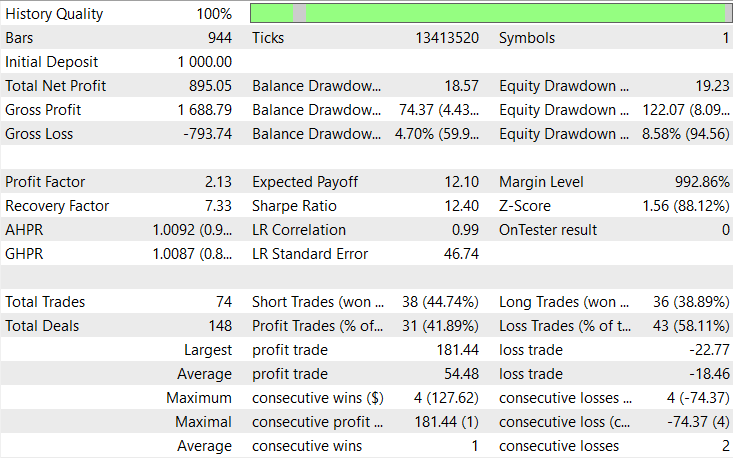
Thehe back-testing was evaluated on the 2H timeframe across roughly a 2-month testing window (08 April 2025 to 29 July 2025), with the default settings. 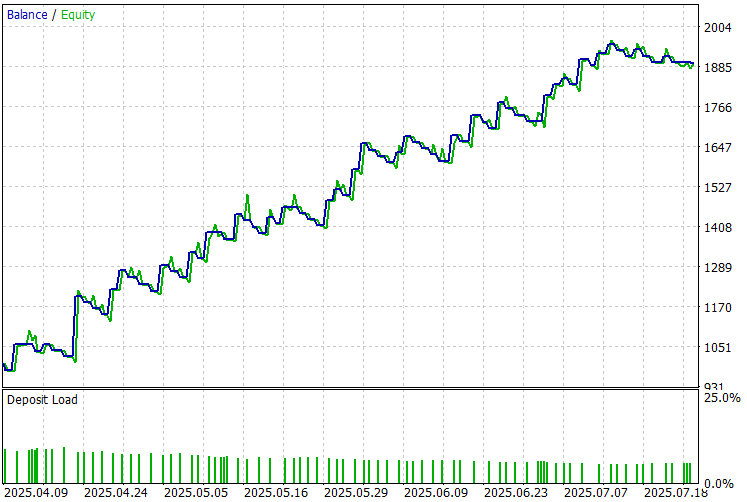
Conclusion
In conclusion, we developed the Dynamic Swing Architecture: Market Structure Recognition from Swings to Automated Execution, a system designed to interpret raw market movements through swing-based logic and translate them into intelligent trading decisions. The architecture begins with precise swing detection, identifying critical highs and lows that form the backbone of market structure. It then integrates risk-managed execution, ensuring each trade is entered with proper validation. To sustain trade efficiency, the system employs automated trailing logic that adapts to price movement, moving stop losses to breakeven and trailing profits intelligently as trends develop. Each component—from structural analysis to execution and management—works cohesively to form a self-sustaining, adaptive trading framework.
In summary, the Dynamic Swing Architecture empowers traders with a fully autonomous system that blends technical precision, market structure understanding, and adaptive trade management. By transforming price swings into actionable insights and automatically managing positions, it reduces human error and emotional bias while maximizing profit opportunities. This framework enhances trading consistency and serves as a foundation for advanced market intelligence—where every swing, retracement, and structure shift contributes to smarter, market data-driven trading decisions.
Warning: All rights to these materials are reserved by MetaQuotes Ltd. Copying or reprinting of these materials in whole or in part is prohibited.
This article was written by a user of the site and reflects their personal views. MetaQuotes Ltd is not responsible for the accuracy of the information presented, nor for any consequences resulting from the use of the solutions, strategies or recommendations described.

 Neural Networks in Trading: A Multimodal, Tool-Augmented Agent for Financial Markets (FinAgent)
 The MQL5 Standard Library Explorer (Part 2): Connecting Library Components
 Introduction to MQL5 (Part 25): Building an EA that Trades with Chart Objects (II)
 Royal Flush Optimization (RFO)

- Free trading apps
- Over 8,000 signals for copying
- Economic news for exploring financial markets
You agree to website policy and terms of use
Thank you for the great article.
That will help us to confirm we have the correct same/similar result too. Thanks.
Hi. Thank you for this wonderful EA and backtest result. May I know which pair/symbol you tested it on H2 timeframe that give the result in your article.
That will help us to confirm we have the correct same/similar result too. Thanks.