From Basic to Intermediate: Objects and Subwindows (III)
 112
 0

Introduction
In the previous article, “From Basic to Intermediate: Objects and Subwindows (II)”, we examined the simplest and most practical way to handle a situation where an object placed on the chart by our code has been deleted—either intentionally or through an error by the operator or user. However, this approach may ultimately lead to dissatisfaction among some users. In their view, deleting an object from the chart should not result in the entire program being removed from the chart.
Objects and Subwindows (III)
Although, in theory, the goal here is to preserve the integrity of the subwindow and the objects it contains, what we'll see goes far beyond the scope of this topic. You can use this approach even if you aren't using subwindows and simply want a particular object to remain on the chart as long as the application is still running. For this reason, we'll start with something simpler and then extend this concept to the case where we need subwindows.
So, up until the previous article, we had been developing a concept designed to help you create fairly complex applications with minimal effort. This is because, in MetaTrader 5, indicators form the basis for a whole range of elements that ultimately result in what many people know as Expert Advisors. We haven't started talking about Expert Advisors yet precisely because such programs are of little use without indicators. However, if we have a solid, well-structured foundation and understand what we can and cannot do with the capabilities provided by indicators, creating and developing an Expert Advisor becomes one of the simplest tasks.
However, if we haven't laid this foundation in advance, everything related to Expert Advisors will become confusing and make very little sense. Although it may seem to you that all of this is a waste of time, understanding how to handle different situations is much more important than writing code without a clear plan. Eventually, you'll find yourself in a situation you can't resolve, precisely because you lacked the patience or the necessary understanding to plan what you intend to implement.
So, based on what we've already discussed, we have the following situation: we've managed to create an indicator that can be used both inside and outside a subwindow simply by integrating it with a second indicator. Thus, the first indicator, which used to be the primary one, becomes an auxiliary indicator. That's why we don't need to do all the work at once. We can break this down into smaller steps that are simpler and easier to work with, and then combine everything into a single, larger, and more complex unit.
Based on this principle, we can assume the following: the code provided below can be analyzed, adapted to our needs, and then integrated into a much larger system.
01. //+------------------------------------------------------------------+
02. #property copyright "Daniel Jose"
03. //+------------------------------------------------------------------+
04. #property description "DEMO Indicator"
05. //+------------------------------------------------------------------+
06. #include "include\C_MiniChart.mqh"
07. //+------------------------------------------------------------------+
08. #property indicator_chart_window
09. #property indicator_height          150
10. #property indicator_plots           0
11. //+------------------------------------------------------------------+
12. C_MiniChart *gl_MiniChart;
13. //+------------------------------------------------------------------+
14. int OnInit(void)
15.   {
16.    IndicatorSetString(INDICATOR_SHORTNAME, def_ShortName);
17.    ChartSetInteger(0, CHART_EVENT_OBJECT_DELETE, 0, true);
18.    gl_MiniChart = new C_MiniChart("Mini Chart");
19.
20.    return INIT_SUCCEEDED;
21.   };
22. //+------------------------------------------------------------------+
23. int OnCalculate(const int rates_total, const int prev_calculated, const int begin, const double &price[])
24.   {
25.    return rates_total;
26.   };
27. //+------------------------------------------------------------------+
28. void OnChartEvent(const int id, const long &lparam, const double &dparam, const string &sparam)
29.   {
30.    switch(id)
31.      {
32.       case CHARTEVENT_OBJECT_DELETE:
33.          if(gl_MiniChart == sparam)
34.            {
35.             ChartIndicatorDelete(0, ChartWindowFind(0, def_ShortName), def_ShortName);
36.             OnDeinit(REASON_INITFAILED);
37.            }
38.          break;
39.      }
40.   };
41. //+------------------------------------------------------------------+
42. void OnDeinit(const int reason)
43.   {
44.    delete gl_MiniChart;
45.    ChartSetInteger(0, CHART_EVENT_OBJECT_DELETE, 0, false);
46.   };
47. //+------------------------------------------------------------------+
48. //+------------------------------------------------------------------+
49.
Code 01
If you run Code 01 and delete the object it creates, you'll notice that the code itself will also be removed from the chart. This was already discussed and explained in the previous article. Therefore, I don't see any need to go into further detail about how Code 01 works. However, here we'll approach this same situation differently. In other words, instead of simply removing the indicator itself or any other program from the chart, we'll make the deleted object reappear, thereby completely changing our approach to solving the problem.
First of all, I want you to understand this: the more you want everything to return to the state it was in before it was taken apart, the more effort it will take to ensure that all the necessary data is actually available when you need to recreate what was destroyed. In some cases, we'll be able to use simple data structures, while in others we'll have to resort to a small database. Fortunately, in both cases, MQL5 provides all the resources and tools needed to perform the necessary analysis and make the appropriate corrections. There's only one question: How much effort are you willing to put in to solve this problem?
Well, if we're going to put it that way, we'll have to start somewhere. Let's start with what will require the least effort. When I say "with minimal effort," I mean that any changes or settings made by the user or operator will be completely lost. This will require the user to make all these changes or configure all these settings again.
Although this solution may seem somewhat radical, it is still better than the alternative we discussed in the previous article or the one shown in Code 01. So, to ensure that Code 01 isn't removed from the chart when the object it created is deleted, we need to make a very small change to it—even though that change will completely alter the code's behavior. This change is shown below.
01. //+------------------------------------------------------------------+
02. #property copyright "Daniel Jose"
03. //+------------------------------------------------------------------+
04. #property description "DEMO Indicator"
05. //+------------------------------------------------------------------+
06. #include "include\C_MiniChart.mqh"
07. //+------------------------------------------------------------------+
08. #property indicator_chart_window
09. #property indicator_height          150
10. #property indicator_plots           0
11. //+------------------------------------------------------------------+
12. C_MiniChart *gl_MiniChart;
13. //+------------------------------------------------------------------+
14. void Initilize(void)
15.   {
16.    gl_MiniChart = new C_MiniChart("Mini Chart");
17.    ChartRedraw();
18.   }
19. //+------------------------------------------------------------------+
20. int OnInit(void)
21.   {
22.    IndicatorSetString(INDICATOR_SHORTNAME, def_ShortName);
23.    ChartSetInteger(0, CHART_EVENT_OBJECT_DELETE, 0, true);
24.    Initilize();
25.
26.    return INIT_SUCCEEDED;
27.   };
28. //+------------------------------------------------------------------+
29. int OnCalculate(const int rates_total, const int prev_calculated, const int begin, const double &price[])
30.   {
31.    return rates_total;
32.   };
33. //+------------------------------------------------------------------+
34. void OnChartEvent(const int id, const long &lparam, const double &dparam, const string &sparam)
35.   {
36.    switch(id)
37.      {
38.       case CHARTEVENT_OBJECT_DELETE:
39.          if(gl_MiniChart == sparam)
40.             Initilize();
41.          break;
42.      }
43.   };
44. //+------------------------------------------------------------------+
45. void OnDeinit(const int reason)
46.   {
47.    delete gl_MiniChart;
48.    ChartSetInteger(0, CHART_EVENT_OBJECT_DELETE, 0, false);
49.   };
50. //+------------------------------------------------------------------+
51. //+------------------------------------------------------------------+
52.
Code 02
Code 02 solves part of our problem. If you've been following the articles in this series, I don't think you'll have any trouble understanding what we're doing here. Simply examining Code 02 is enough to understand its purpose immediately. However, although Code 02 works, it has a few minor flaws. To understand this, I first need you to take a look at how most of the tests are conducted. Most beginner programmers simply do what is shown in the following animation.
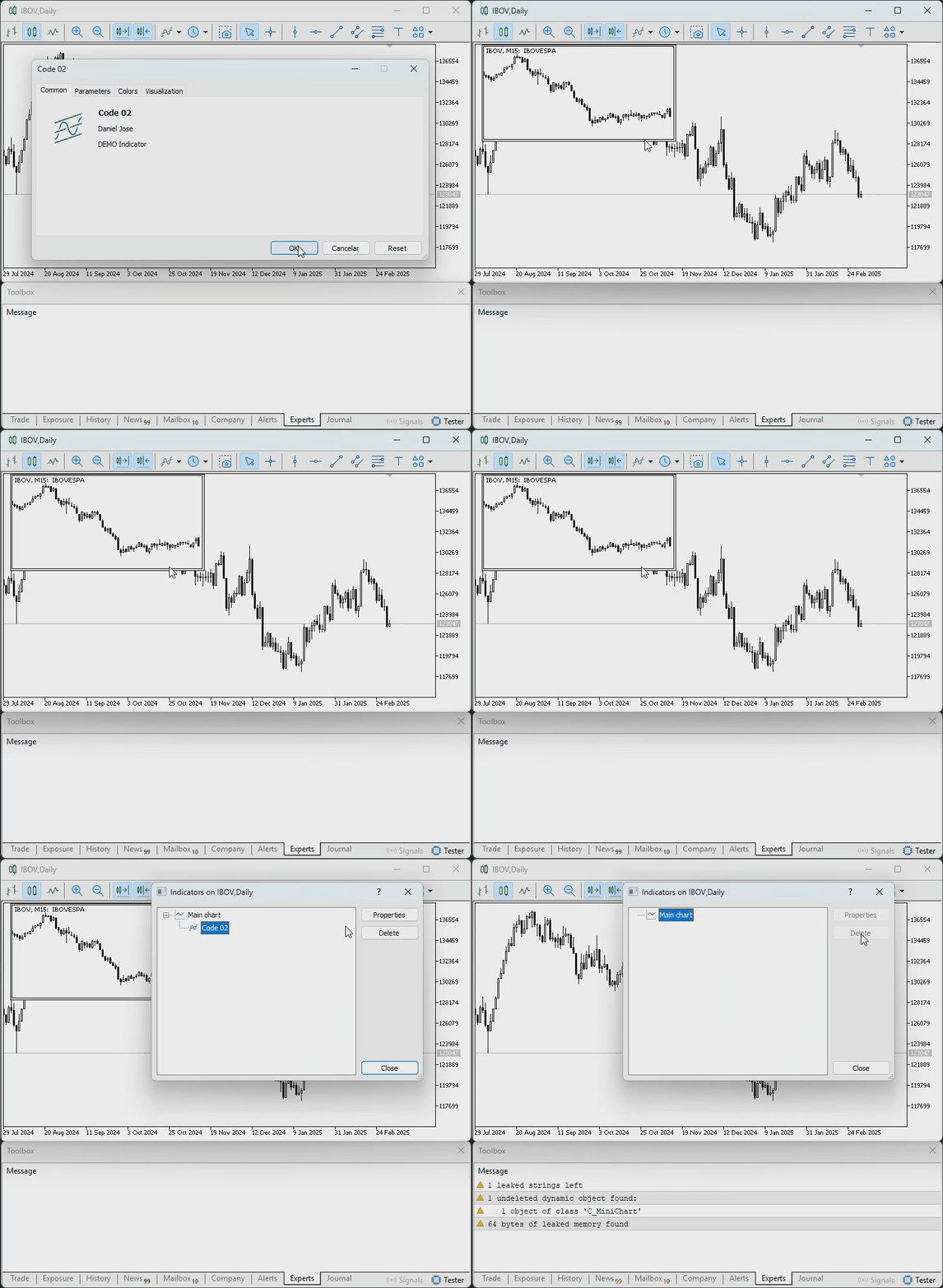
Animation 01
There's nothing wrong with that. However, such testing is considered incomplete and may lead to erroneous conclusions. The whole point was to check whether the object was being recreated or not. And, as you could see, it was indeed being recreated. Consequently, you consider the result satisfactory and continue your work. However, if you take a closer look at what's happening, you'll see what's shown in the following animation.
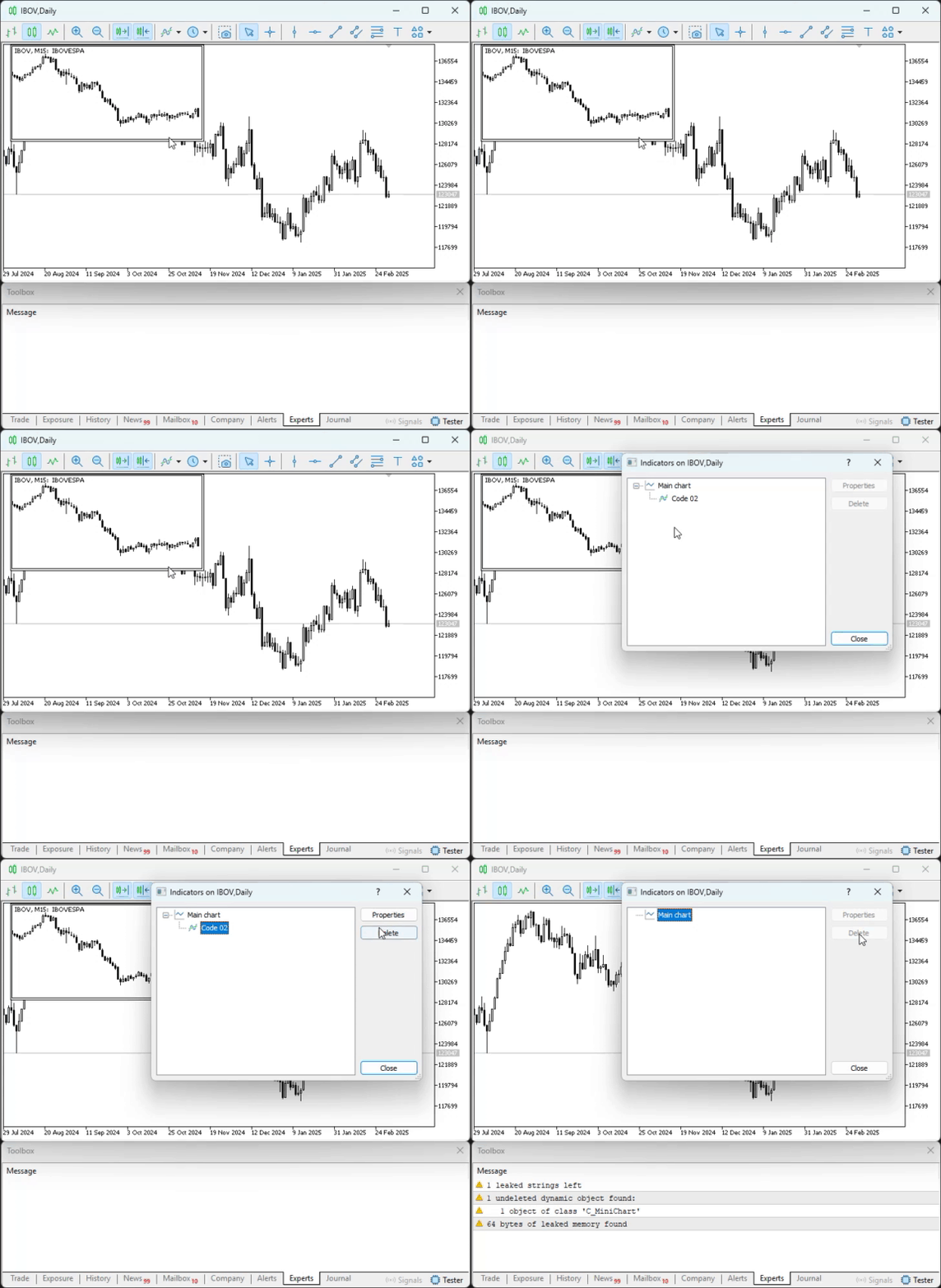
Animation 02
Please note the following: what is shown here in Animation 02 happens only because the terminal is open. Many beginners often don't keep the terminal open. As a result, various notifications or even warnings may go unnoticed for a long time. And when you try to solve a problem, you may find that you can no longer do so precisely because the code may have become too complex for you to find all the errors in it. However, since Animation 02 plays fairly quickly, let's take a look at the section we're interested in, highlighted in the following image.
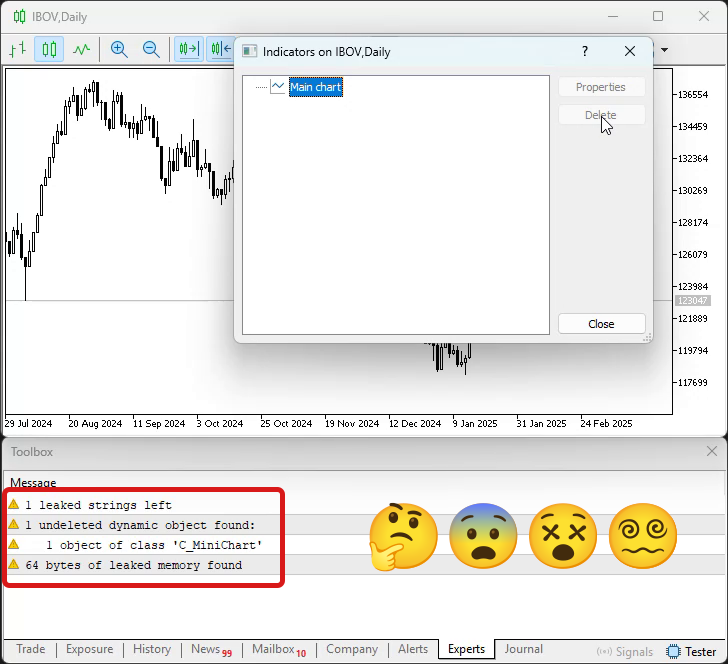
Image 01
But how is that possible? Where did this error come from? I don't see anything wrong with Code 02, since, essentially, we've only made a few changes to Code 01. I don't understand why this error occurred. So, dear reader, this error illustrates one of the reasons why MQL5 DOES NOT SUPPORT OPERATIONS ON POINTERS. Pointers are a wonderful tool, but if you don't understand them properly, they become a thorn in your side. In the previous code snippets, we have a pointer declared on line 12. However, it is initialized only when the new operator is used. Now pay attention: if, and only if, initialization occurred only once—that is, when the OnInit handler was executed—the message highlighted in image 01 WOULD NOT HAVE APPEARED.
However, in Code 02, the pointer may be initialized more than once. "Oh! How? I always thought that a single variable couldn't be associated with two different memory regions." And indeed, it can't. The problem is that the pointer is initialized for the first time when line 24 of Code 02 is executed. However, if the user removes an object from the chart, initialization of the same pointer will occur again. This is because of line 40. It is precisely because of this second initialization that the associated memory region will not actually be freed when line 47 is executed. For this reason, a message appears—highlighted in Image 01—indicating that something is wrong here.
But how can we avoid such problems? Essentially, there are two solutions. First, don't use pointers in your code. However, this significantly limits your options and may even make your code less readable as it grows. The second solution is to ensure, before initializing the pointer, that it is free of any previous references. In my opinion, this is the best solution. Therefore, we will use it to resolve the issue indicated by the message highlighted in Image 01. However, there is a second problem with Code 02. In a sense, this second problem is less harmful to the system. But depending on exactly what is being implemented, it can cause us quite a few headaches. And this problem lies within the OnDeinit procedure. Now stop for a moment and think about it. On line 47 of Code 02, we remove the object from the chart. Right? There's nothing wrong with that.
However, note that when we delete this object, we are still asking MetaTrader 5 to notify us whenever an object is deleted from the chart. For this reason, MetaTrader 5 will add an event to the event queue indicating that the object was removed from the chart. Consequently, if the code takes a little longer to execute, line 40 will be executed, causing the object—which was destroyed because code execution was ending—to be recreated. In many cases, this may not happen, but in others, it is entirely possible. That's why we need to fix this before the behavior gets out of hand. Based on this analysis, we can modify Code 02 to produce the version shown below.
01. //+------------------------------------------------------------------+
02. #property copyright "Daniel Jose"
03. //+------------------------------------------------------------------+
04. #property description "DEMO Indicator"
05. //+------------------------------------------------------------------+
06. #include "include\C_MiniChart.mqh"
07. //+------------------------------------------------------------------+
08. #property indicator_chart_window
09. #property indicator_height          150
10. #property indicator_plots           0
11. //+------------------------------------------------------------------+
12. C_MiniChart *gl_MiniChart;
13. //+------------------------------------------------------------------+
14. void Initilize(void)
15.   {
16.    delete gl_MiniChart;
17.    gl_MiniChart = new C_MiniChart("Mini Chart");
18.    ChartRedraw();
19.   }
20. //+------------------------------------------------------------------+
21. int OnInit(void)
22.   {
23.    IndicatorSetString(INDICATOR_SHORTNAME, def_ShortName);
24.    ChartSetInteger(0, CHART_EVENT_OBJECT_DELETE, 0, true);
25.    Initilize();
26.
27.    return INIT_SUCCEEDED;
28.   };
29. //+------------------------------------------------------------------+
30. int OnCalculate(const int rates_total, const int prev_calculated, const int begin, const double &price[])
31.   {
32.    return rates_total;
33.   };
34. //+------------------------------------------------------------------+
35. void OnChartEvent(const int id, const long &lparam, const double &dparam, const string &sparam)
36.   {
37.    switch(id)
38.      {
39.       case CHARTEVENT_OBJECT_DELETE:
40.          if(gl_MiniChart == sparam)
41.             Initilize();
42.          break;
43.      }
44.   };
45. //+------------------------------------------------------------------+
46. void OnDeinit(const int reason)
47.   {
48.    ChartSetInteger(0, CHART_EVENT_OBJECT_DELETE, 0, false);
49.    delete gl_MiniChart;
50.   };
51. //+------------------------------------------------------------------+
Code 03
These simple changes to Code 03 will prevent the problems mentioned above. Now let's see how the code reacts when an object is removed from the chart. You can see this in the following animation.
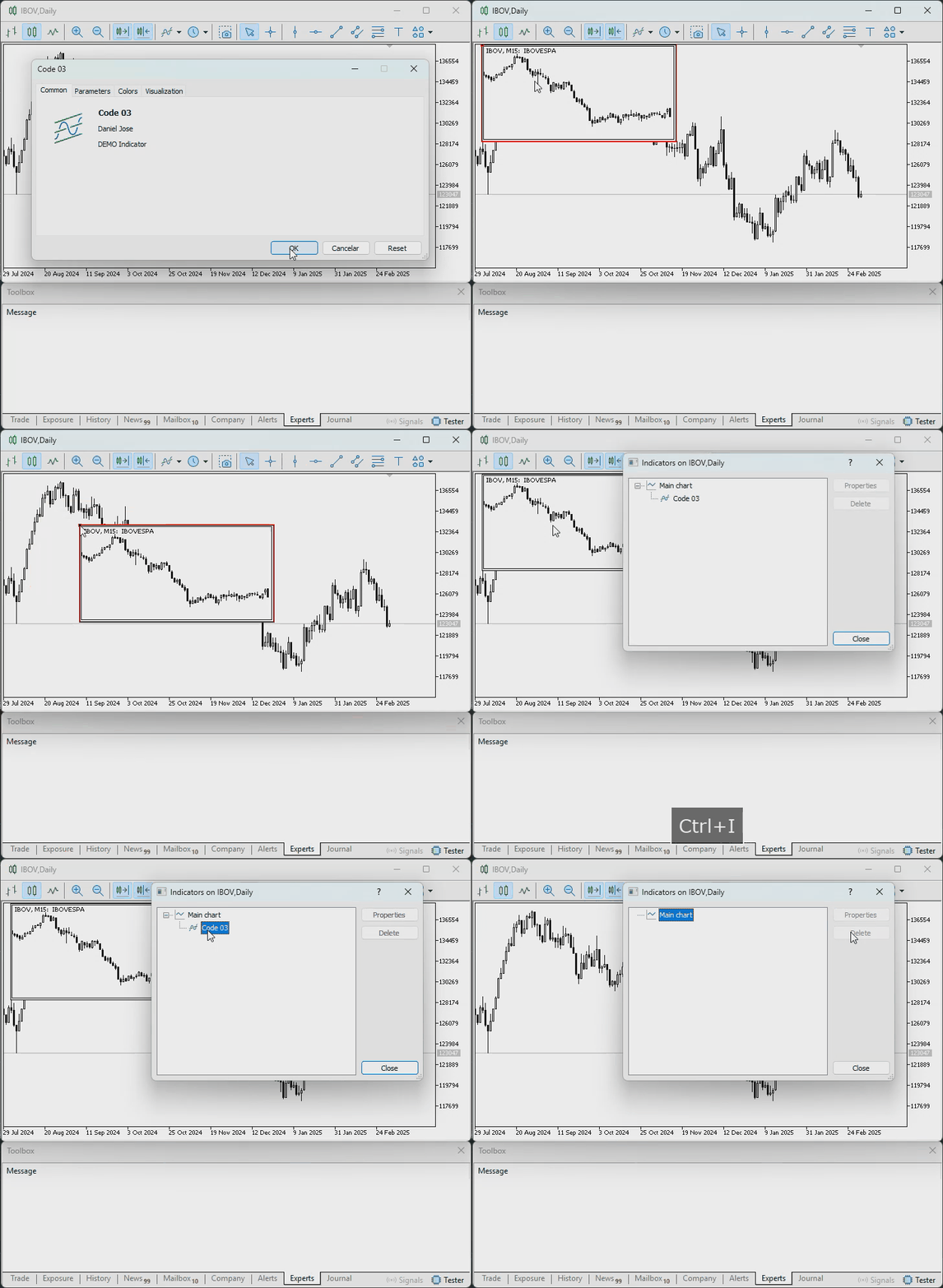
Animation 03
Just perfect. Everything worked perfectly, without any apparent glitches. Now take a look: even after you moved the object across the screen, it returned to its original position. That is the price of choosing the solution that requires the least effort, as I mentioned at the beginning of this article. In doing so, we chose to ignore any settings or changes that might have been made, forcing the user to start all over again. Well, that's a small price to pay, since the indicator remains active on the chart—unlike what we used to do, when we would simply remove the indicator from the chart.
In any case, we can improve this a little and make things a bit more convenient for the user or operator. However, when deciding to do this, we must keep one important point in mind: the more accurately we want to recreate the object’s state—so that the user doesn’t notice the difference between its state before and after it was removed from the chart—the more effort it will require. Therefore, we will only step up our efforts slightly, since the goal here is purely educational. Well, now it's time to make some decisions.
Since I want to keep things fairly simple while also giving you an idea of how to implement a more complete recreation, we'll do the following: save the position and dimensions of the graphical object. And even though that's all we're going to do, you'll notice that the effort required to implement this behavior correctly will be much greater than anything we've seen so far. First, we'll need to modify the class's source code. The original version is shown below.
01. //+------------------------------------------------------------------+
02. #property copyright "Daniel Jose"
03. //+------------------------------------------------------------------+
04. #include "defines.mqh"
05. //+------------------------------------------------------------------+
06. class C_MiniChart
07.   {
08. private :
09.    //+----------------+
10.    string            m_szNameObject;
11.    int               m_Sub;
12.    //+----------------+
13.    void              SetInteger(ENUM_OBJECT_PROPERTY_INTEGER prop, int value) { ObjectSetInteger(0, m_szNameObject, prop, value); }
14.    //+----------------+
15.    int               WhatSubWin(void)
16.      {
17.       for(int c0 = 0; c0 < (int)(ChartGetInteger(0, CHART_WINDOWS_TOTAL)); c0++)
18.          for(int c1 = (ChartIndicatorsTotal(0, c0) - 1); c1 >= 0; c1--)
19.             if(ChartIndicatorName(0, c0, c1) == def_ShortName)
20.                return c0;
21.       return INVALID_HANDLE;
22.      }
23.    //+----------------+
24. public  :
25.    //+----------------+
26.                      C_MiniChart(string szName)
27.      {
28.       if((m_Sub = WhatSubWin()) == INVALID_HANDLE)
29.          return;
30.       ObjectCreate(0, m_szNameObject = def_ShortName + "#" + szName + "#" + (string)ObjectsTotal(0, -1, -1), OBJ_CHART, m_Sub, 0, 0);
31.       ObjectSetString(0, m_szNameObject, OBJPROP_SYMBOL, _Symbol);
32.       SetInteger(OBJPROP_XDISTANCE, 10);
33.       SetInteger(OBJPROP_YDISTANCE, 0);
34.       SetInteger(OBJPROP_XSIZE, 300);
35.       SetInteger(OBJPROP_YSIZE, indicator_height);
36.       SetInteger(OBJPROP_PERIOD, PERIOD_M15);
37.       SetInteger(OBJPROP_DATE_SCALE, false);
38.       SetInteger(OBJPROP_PRICE_SCALE, false);
39.       SetInteger(OBJPROP_SELECTABLE, true);
40.       SetInteger(OBJPROP_SELECTED, false);
41.      }
42.    //+----------------+
43.                     ~C_MiniChart()
44.      {
45.       ObjectDelete(0, m_szNameObject);
46.       ChartRedraw();
47.      }
48.    //+----------------+
49.    bool              operator==(const string szArg) { return (szArg == m_szNameObject); }
50.    //+----------------+
51.   };
52. //+------------------------------------------------------------------+
Code 04
All right, since I want you to be able to experiment with this without having to type the code in manually, the modified version in the attached file will have a different name. This is done solely to make it easier to identify and to allow you to run tests in your local environment as well. All right, let's start by creating a mechanism to store the object's position. Later on, you'll understand why this mechanism should be considered separately from the rest of the code. Therefore, by modifying the code of the previous class, we will get the result shown below.
01. //+------------------------------------------------------------------+
02. #property copyright "Daniel Jose"
03. //+------------------------------------------------------------------+
04. #include "defines.mqh"
05. //+------------------------------------------------------------------+
06. class C_MiniChart
07.   {
08. private :
09.    //+----------------+
10.    string            m_szNameObject;
11.    int               m_Sub;
12.    //+----------------+
13.    struct  st_Memory
14.      {
15.       short          x, y, w, h;
16.       bool           selectable;
17.      } m_Memory;
18.    //+----------------+
19.    void              SetInteger(ENUM_OBJECT_PROPERTY_INTEGER prop, int value) { ObjectSetInteger(0, m_szNameObject, prop, value); }
20.    //+----------------+
21.    int               WhatSubWin(void)
22.      {
23.       for(int c0 = 0; c0 < (short)(ChartGetInteger(0, CHART_WINDOWS_TOTAL)); c0++)
24.          for(int c1 = (ChartIndicatorsTotal(0, c0) - 1); c1 >= 0; c1--)
25.             if(ChartIndicatorName(0, c0, c1) == def_ShortName)
26.                return c0;
27.       return INVALID_HANDLE;
28.      }
29.    //+----------------+
30. public  :
31.    //+----------------+
32.                      C_MiniChart(string szName)
33.      {
34.       if((m_Sub = WhatSubWin()) == INVALID_HANDLE)
35.          return;
36.       m_Memory.x = 10;
37.       m_Memory.y = 0;
38.       m_Memory.w = 300;
39.       m_Memory.h = indicator_height;
40.       m_Memory.selectable = true;
41.       m_szNameObject = def_ShortName + "#" + szName + "#" + (string)ObjectsTotal(0, -1, -1);
42.       RestoreMemory();
43.       ObjectSetString(0, m_szNameObject, OBJPROP_SYMBOL, _Symbol);
44.       SetInteger(OBJPROP_PERIOD, PERIOD_M15);
45.       SetInteger(OBJPROP_DATE_SCALE, false);
46.       SetInteger(OBJPROP_PRICE_SCALE, false);
47.       SetInteger(OBJPROP_SELECTED, false);
48.      }
49.    //+----------------+
50.                     ~C_MiniChart()
51.      {
52.       ObjectDelete(0, m_szNameObject);
53.       ChartRedraw();
54.      }
55.    //+----------------+
56.    void              RestoreMemory(void)
57.      {
58.       if(ObjectFind(0, m_szNameObject) < 0)
59.          ObjectCreate(0, m_szNameObject, OBJ_CHART, m_Sub, 0, 0);
60.       SetInteger(OBJPROP_XDISTANCE, m_Memory.x);
61.       SetInteger(OBJPROP_YDISTANCE, m_Memory.y);
62.       SetInteger(OBJPROP_XSIZE, m_Memory.w);
63.       SetInteger(OBJPROP_YSIZE, m_Memory.h);
64.       SetInteger(OBJPROP_SELECTABLE, m_Memory.selectable);
65.      }
66.    //+----------------+
67.    void              StoreMemory(void)
68.      {
69.       m_Memory.x = (short) ObjectGetInteger(0, m_szNameObject, OBJPROP_XDISTANCE);
70.       m_Memory.y = (short) ObjectGetInteger(0, m_szNameObject, OBJPROP_YDISTANCE);
71.       m_Memory.w = (short) ObjectGetInteger(0, m_szNameObject, OBJPROP_XSIZE);
72.       m_Memory.h = (short) ObjectGetInteger(0, m_szNameObject, OBJPROP_YSIZE);
73.       m_Memory.selectable = (bool) ObjectGetInteger(0, m_szNameObject, OBJPROP_SELECTABLE);
74.      }
75.    //+----------------+
76.    bool              operator==(const string szArg) { return (szArg == m_szNameObject); }
77.    //+----------------+
78.   };
79. //+------------------------------------------------------------------+
Code 05
So, we now have some truly unusual code on our hands. This is because Code 05 works the same way as Code 04. However, it contains a small block of internal memory intended for local use. And this allows Code 05 to restore certain settings that might otherwise be lost. This will happen if the user deletes the object from the chart while the indicator remains active. If this specific situation arises, the indicator will be able to use the data stored in the object's internal memory to recreate it with its previously saved properties.
So, if what I just said piqued your interest, take a look at how this mechanism works. Although the mechanism is simple, you need to use it carefully when incorporating it into your code.
As I mentioned earlier, we need a separate block of memory for this data. It is created on line 13 of Code 05. But perhaps you're wondering: Okay, so this memory isn't actually separate. It is located inside the class that creates the object. Won't this cause any problems down the road? No, not if you understand how everything actually works when the code is executed. If you simply think you already know what you're doing, you'll most likely make a mistake. But if you really understand what will be explained below, everything will work perfectly.
After creating this memory structure, we'll need to initialize it between lines 35 and 39. Please note that these lines are inside the class constructor. It's very important to do this at this specific point. It is equally important that the object's name be specified in this constructor. Now please note that WE DO NOT CREATE THE OBJECT IN THE CONSTRUCTOR. This is because if we were to create it here, it would be difficult for us to determine when and where the object was actually created.
Thus, after initializing the memory structure, we can call a procedure that will create the object—or, more precisely, place it back on the chart. This is handled by the procedure implemented in line 55. This procedure does exactly the same thing as the constructor in code 04, with one exception: in line 57, we check whether the object we want to place back on the chart is in the list of objects. But why perform this check? The fact is that, depending on the circumstances, some changes may have occurred, and another object may have taken the place of the deleted object. Don't worry about that for now, as it will be the subject of another article. So, let's continue to figure out what's going on.
Once the data has been restored during the execution of the class constructor, the object will be ready for use and will have all the previously specified settings. But before we move on to the main code, let's take a look at one more procedure that has been added to the class. It is on line sixty-five. The purpose of this procedure is very simple. It retrieves the properties we want to restore and stores them in the object’s memory structure to preserve the object's configuration, at least temporarily. This is the simplest and most basic code you can implement to restore an object that a user has deleted. Now let's take a look at how we had to modify the main code, since it's not exactly the same as in Code 03. However, it's very similar, as you can see below, where the complete code is provided.
01. //+------------------------------------------------------------------+
02. #property copyright "Daniel Jose"
03. //+------------------------------------------------------------------+
04. #property description "DEMO Indicator"
05. //+------------------------------------------------------------------+
06. #include "include\C_MiniChart_2.mqh"
07. //+------------------------------------------------------------------+
08. #property indicator_chart_window
09. #property indicator_height          150
10. #property indicator_plots           0
11. //+------------------------------------------------------------------+
12. C_MiniChart *gl_MiniChart;
13. //+------------------------------------------------------------------+
14. void Initilize(void)
15.   {
16.    if(gl_MiniChart == NULL)
17.       gl_MiniChart = new C_MiniChart("Mini Chart");
18.    else(*gl_MiniChart).RestoreMemory();
19.    ChartRedraw();
20.   }
21. //+------------------------------------------------------------------+
22. int OnInit(void)
23.   {
24.    IndicatorSetString(INDICATOR_SHORTNAME, def_ShortName);
25.    ChartSetInteger(0, CHART_EVENT_OBJECT_DELETE, 0, true);
26.    gl_MiniChart = NULL;
27.    Initilize();
28.
29.    return INIT_SUCCEEDED;
30.   };
31. //+------------------------------------------------------------------+
32. int OnCalculate(const int rates_total, const int prev_calculated, const int begin, const double &price[])
33.   {
34.    return rates_total;
35.   };
36. //+------------------------------------------------------------------+
37. void OnChartEvent(const int id, const long &lparam, const double &dparam, const string &sparam)
38.   {
39.    switch(id)
40.      {
41.       case CHARTEVENT_OBJECT_DELETE:
42.          if(gl_MiniChart == sparam)
43.             Initilize();
44.          break;
45.       case CHARTEVENT_OBJECT_DRAG:
46.          if(gl_MiniChart == sparam)
47.             (*gl_MiniChart).StoreMemory();
48.          break;
49.      }
50.   };
51. //+------------------------------------------------------------------+
52. void OnDeinit(const int reason)
53.   {
54.    ChartSetInteger(0, CHART_EVENT_OBJECT_DELETE, 0, false);
55.    delete gl_MiniChart;
56.   };
57. //+------------------------------------------------------------------+
Code 06
Code 06 is indeed very elegant, although it's missing one detail. However, before I fix this detail, I want you to take a look at this code and admire it, because it can bring something back from the dead. In fact, the object comes back slightly distorted, but this is because we don't save all of the object's properties—only some of them. Therefore, to understand Code 06, you first need to understand the previous code examples, including what was explained in other articles in this series.
In particular, refer to the article "From Basic to Intermediate: Object Events (IV)", since in it I explain how to work with simple events in equally simple objects. Of course, you may also need to refer to the previous articles. But I'll leave that decision up to you.
An important point: You MUST NOT directly assign arbitrary values to pointers as if they were memory addresses. They must always point to a memory region.
However, despite this restriction, a pointer can be assigned the value NULL, making it a null pointer. This situation is extremely important to us. This is because, unlike what we did previously in the `Initialize` procedure, we will no longer delete the object that the pointer points to when the procedure is called again, as happens whenever the object is deleted from the chart. Once again: to understand how Code 06 works, you need to understand the previous code examples.
Thus, on line 16, we perform a check to determine whether the pointer is valid. Since the pointer is considered invalid on the first call, the condition will be met, memory will be allocated using the new operator, and the pointer will begin to point to that memory region. And now let's move on to the part that many people find confusing. What happens when line 41 calls the procedure defined on line 14 again? So, in this case, the object will already have been deleted from the chart. However, the object or memory block pointed to by the pointer will not yet be freed. This memory block will be freed only when the delete operator is executed, which happens only on line 52.
Now, note that since line 51 disables notifications for object deletion from the chart, MetaTrader 5 will no longer generate the event that would cause line 41 to be executed again. It is very important to follow these steps in exactly this order. Otherwise, when the check is performed again on line 16, we will get an invalid pointer, and a new one will be created. However, since this will not happen during normal execution of the code, when line 41 is executed, the check in line 16 will cause execution to continue from line 17. And this line of code will restore the object's data. However, since the object is no longer on the chart, the class will force the creation of a new object with the same name, as shown in line 57 of Code 05.
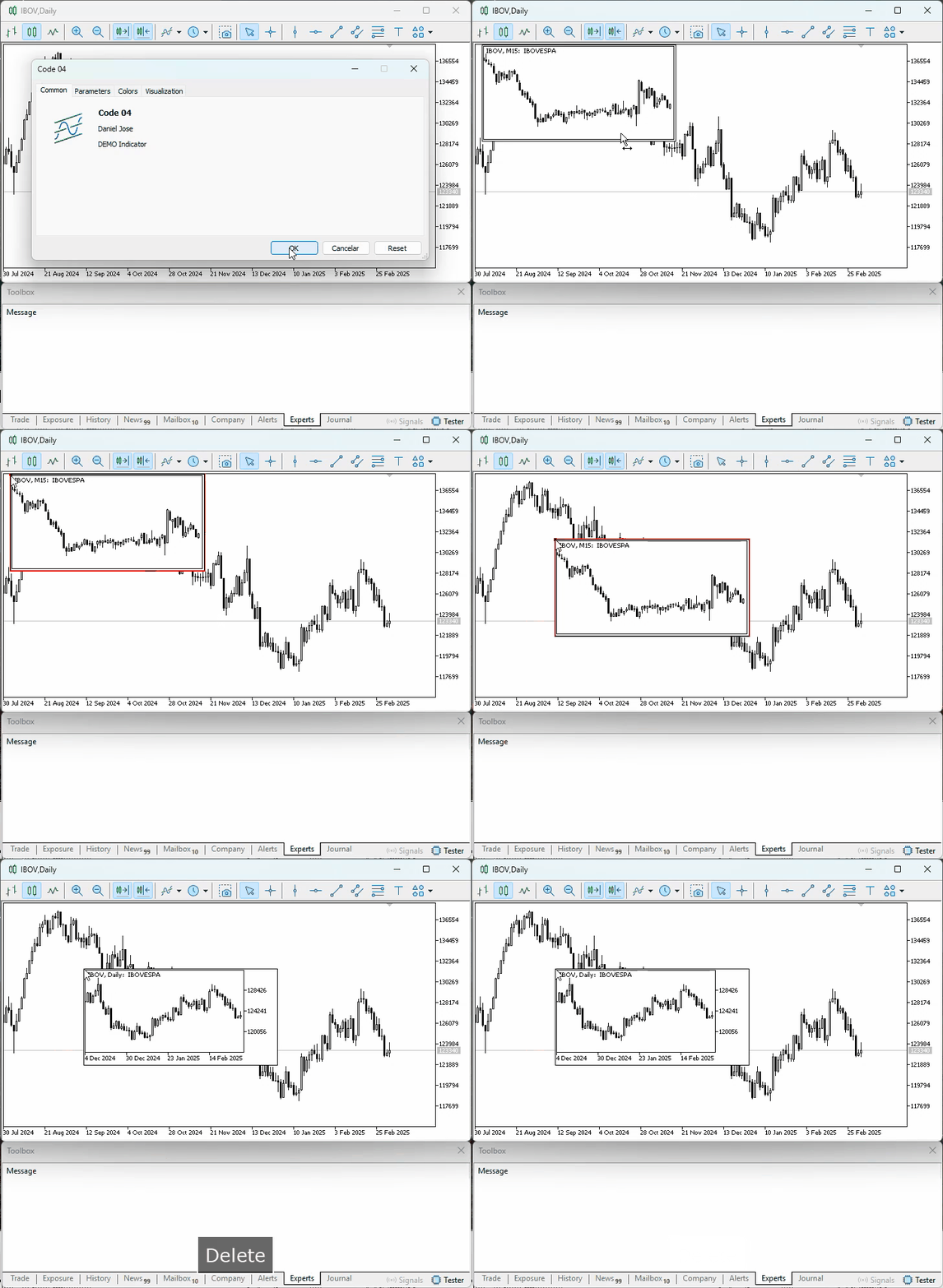
Animation 04
In Animation 04, we can see how the basic principle is applied. Note that the moment we delete an object from the chart, a new one is created. However, the saved properties are restored. The remaining properties are reset to the object's default values.
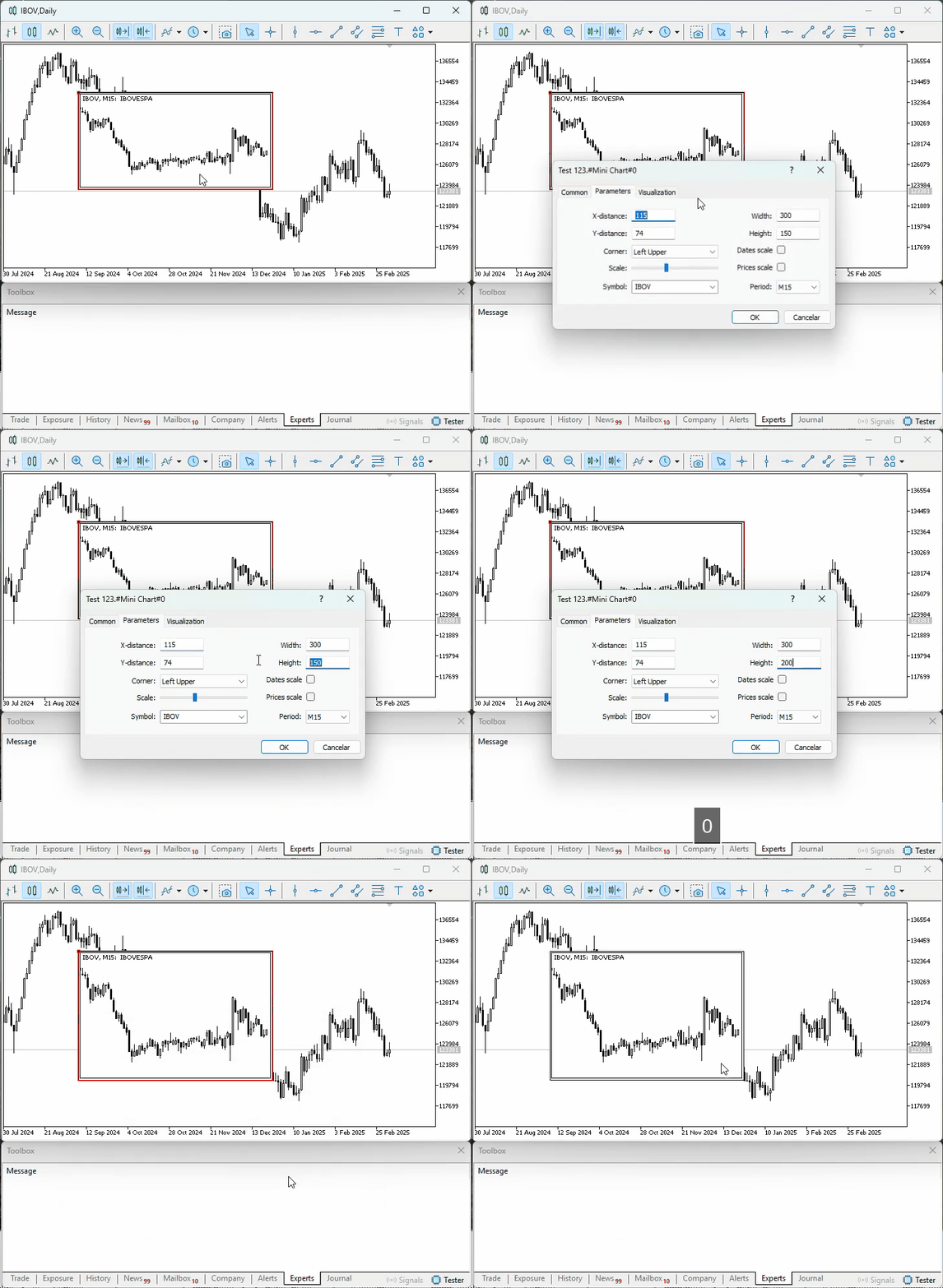
Animation 05
However—and this is important—if you move the object after changing its properties, the changes will be preserved, as shown in the following animation.
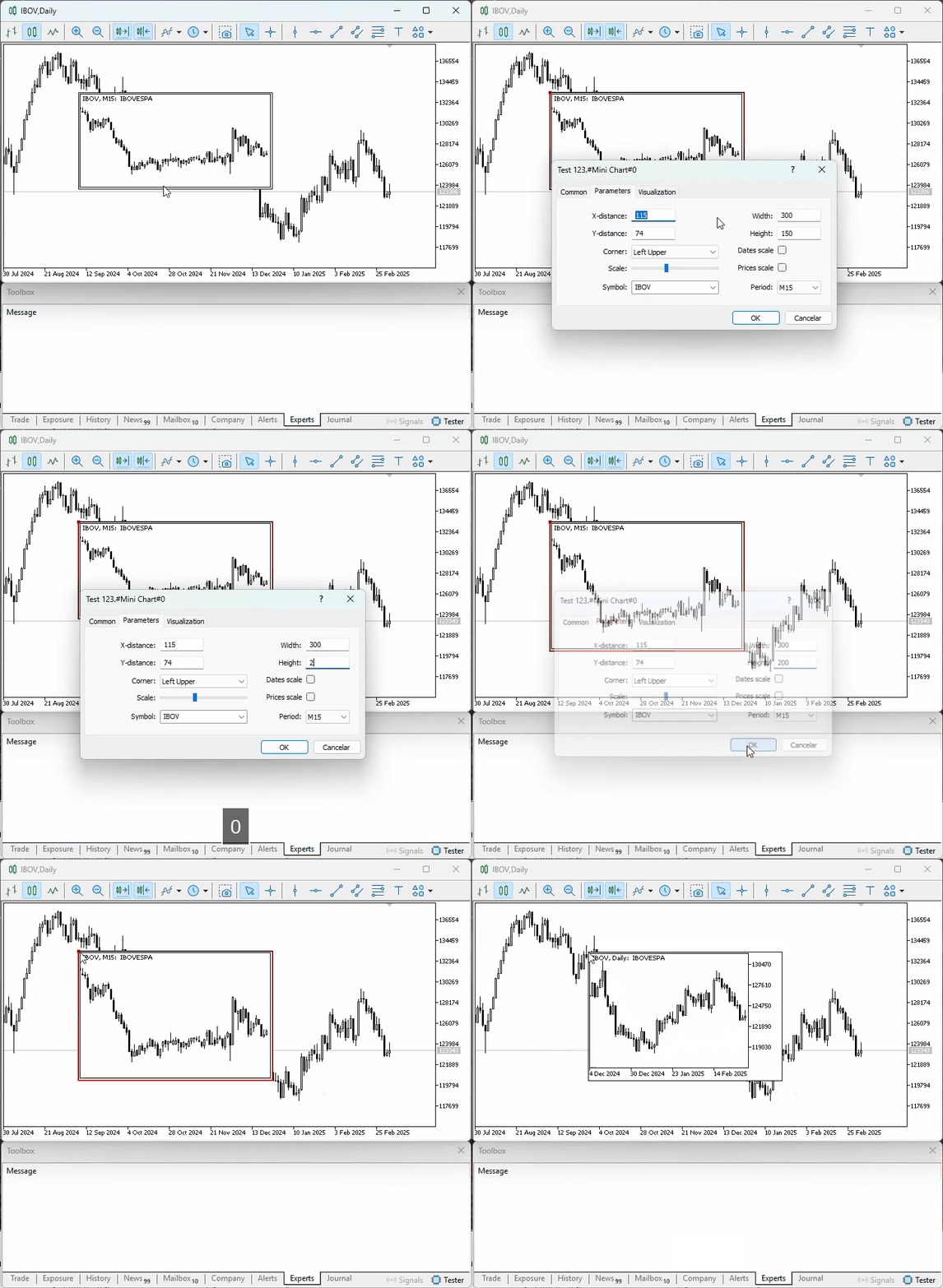
Animation 06
Hmm, that's interesting. But isn't there a way to change the properties and save the new values without moving the object on the chart? Yes, my friend, there is. But before showing you how, let's watch one more animation that demonstrates what happens when the application that keeps the object on the chart is removed. This animation is shown below.
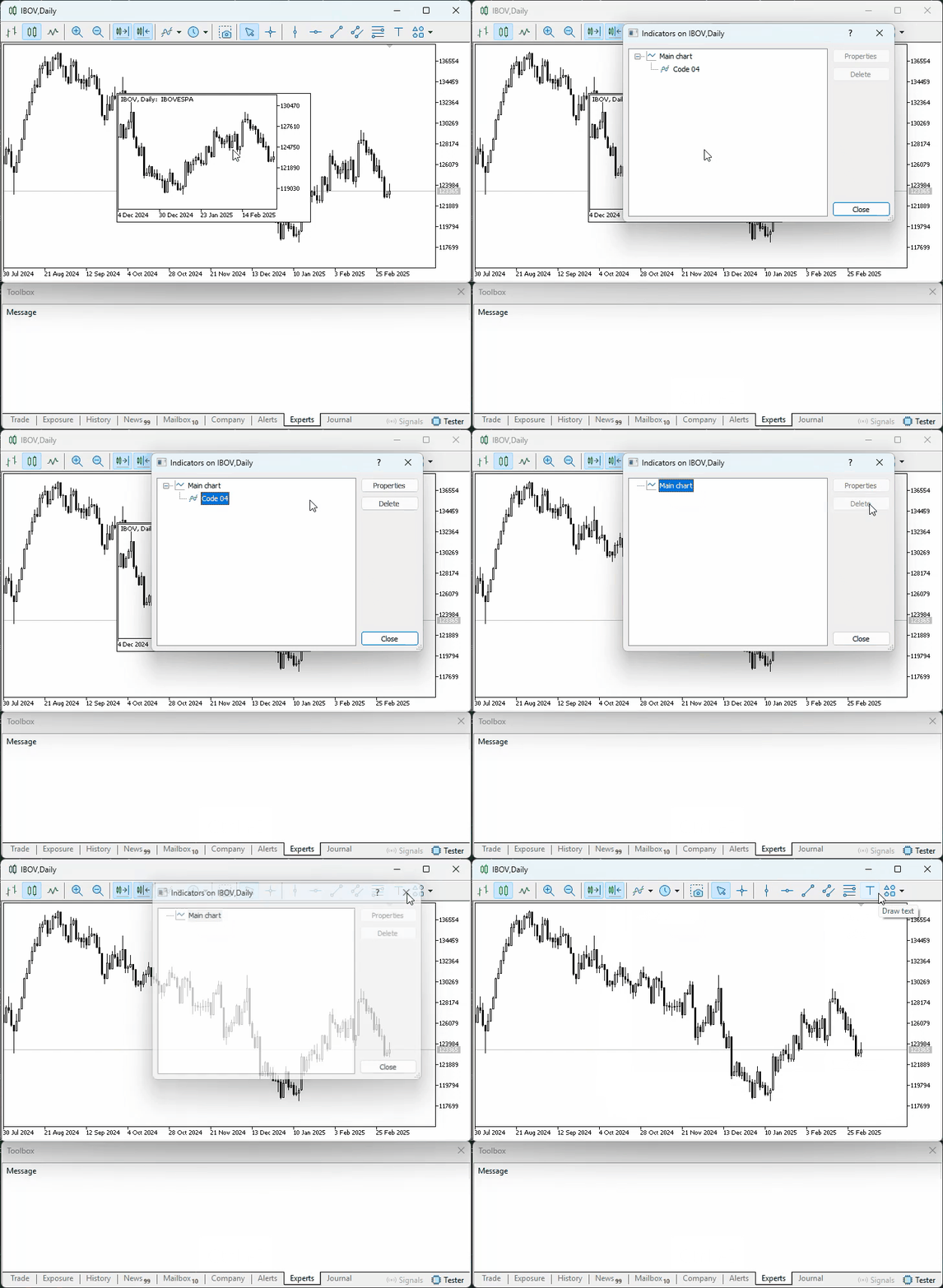
Animation 07
Please note that none of the animations showed any signs of problems in the code. That's a great sign. So, let's see how to solve the problem shown in Animation 05, where the modified property values were lost precisely because they weren't saved in memory. To solve this problem, we just need to add a single line of code. Its purpose is to intercept the specific event that MetaTrader 5 generates to notify us of a change in an object's property. Since the code remains virtually the same, we can focus only on the part that actually needs to be changed. It is shown below.
                                   .
                                   .
                                   .

35. //+------------------------------------------------------------------+
36. void OnChartEvent(const int id, const long &lparam, const double &dparam, const string &sparam)
37.   {
38.    switch(id)
39.      {
40.       case CHARTEVENT_OBJECT_DELETE:
41.          if(gl_MiniChart == sparam)
42.             Initilize();
43.          break;
44.       case CHARTEVENT_OBJECT_CHANGE:
45.       case CHARTEVENT_OBJECT_DRAG:
46.          if(gl_MiniChart == sparam)
47.             (*gl_MiniChart).StoreMemory();
48.          break;
49.      }
50.   };
51. //+------------------------------------------------------------------+
                                   .
                                   .
                                   .
Snippet 01
And that's all, dear reader. The only thing we need to do to correct what is shown in Animation 05 is to add the line `case CHARTEVENT_OBJECT_CHANGE:` (line 44 in the listing provided). Thus, when MetaTrader 5 generates a notification that an object's property has been changed, our code will be able to intercept that notification and ensure that the data stored in memory is updated. Thus, even if the object is deleted without being moved after its properties have been changed, our application will be able to recreate it with its properties preserved. Keep in mind that to restore an object identical to the one that existed previously, we'll have to save many more properties. But since my goal here is simply to show how we could do this, I'm satisfied with the result.
Concluding Thoughts
Although we did not move the indicator presented in this article into a subwindow by integrating it with another indicator—as we did in the previous article—what we have covered and explained here is key to understanding how we will solve the second part of another problem: ensuring that an indicator located in a subwindow and integrated with another indicator is not removed simply because one of the objects it creates and maintains has been deleted from the chart.
Although applying what we have covered here to what was explained in the previous article may seem fairly straightforward, there is a little trick, so to speak, to avoiding unexpected behavior. It's one thing to remove an object from the chart and then place it back on the chart. It's a completely different matter to restore the indicator in its entirety if, for some reason, it was removed from the chart. Both situations call for slightly different approaches.
| MQ5 File | Description |
|---|---|
| Indicators\Code 01 | Basic Demonstration |
| Indicators\Code 02 | Basic Demonstration |
| Indicators\Code 03 | Basic Demonstration |
| Indicators\Code 04 | Basic Demonstration |
| Indicators\Code 05 | Basic Demonstration |
Translated from Portuguese by MetaQuotes Ltd.
Original article: https://www.mql5.com/pt/articles/17398
Warning: All rights to these materials are reserved by MetaQuotes Ltd. Copying or reprinting of these materials in whole or in part is prohibited.
This article was written by a user of the site and reflects their personal views. MetaQuotes Ltd is not responsible for the accuracy of the information presented, nor for any consequences resulting from the use of the solutions, strategies or recommendations described.