

Trading Strategy Beyond Raw Volume: Using Transformed Volume Change for Trading
 142
142
 0
0

Introduction
Volume is one of the most fundamental measures of market activity. Price shows what the market is doing; volume adds context about how much participation sits behind the move. That context helps traders judge whether activity is building or fading, whether a breakout has real support, and whether market conditions are shifting.
Heavier activity tends to accompany larger price moves and higher volatility, but the two are not the same thing. High volume does not guarantee a big move, and a sharp move can happen on thin volume. For that reason, volume works best when read alongside price action, the instrument’s characteristics, the trading session, liquidity, and market structure, not as a signal on its own.
What “volume” actually means also depends on the market. On centralized exchanges such as the NYSE, Nasdaq, CME, and Eurex, real volume counts the shares or contracts that changed hands. Spot Forex is decentralized, so retail platforms usually show tick volume instead: the number of price updates within a period, not a consolidated tally of all transactions. Tick volume is therefore a proxy for activity, not a direct measurement of it.
Hartmann (1998) found a strong link between the frequency of Reuters quote updates and monthly Forex trading volume, although the strength of that link changed over time. Tick volume can therefore support Forex analysis, but how far it can be trusted depends on the broker, the instrument, and prevailing market conditions. This matters most when you are building an algorithmic trading strategy, since the quality of the volume input directly affects the quality of the signals built on it. In this article, we move beyond the direct use of raw volume. Instead of asking whether the current volume is above or below an average, we investigate how the transformed volume itself is changing.
The resulting approach follows a simple sequence: Raw Volume → Log Transformation → Volume Change → Activation Function → Threshold → Trading Signal. The objective is to convert an unbounded volume series into a more manageable signal, which is used to develop a trading strategy directly within an MQL5 expert advisor.
The Challenge with Raw Volume Analysis
Raw volume has no theoretical upper bound and can increase to extreme levels, making it difficult to depend on for direct analysis. Volume spikes can be massive during market openings, news releases, or earnings announcements, causing raw volume values to vary by orders of magnitude. One common method traders use with raw volume is computing the average volume over a specified period and comparing current volume to this average. When raw volume crosses above its average, it may indicate a potential breakout or increased institutional interest, giving the trader an edge to take action. However, this approach has limitations: - Average-based signals can be slow to adapt to changing market conditions
- Extreme outliers can skew averages and produce false signals
- The comparison doesn't account for the relative significance of volume changes
A New Approach: Transformed Volume Change Strategy
In our earlier article, "Developing a Trading Strategy: Using a Volume-Bound Approach," we introduced a normalized volume and logarithmic transformation technique. The key concepts from that article included the following:
- Normalization Process: We applied a normalization technique to standardize volume values across different assets and timeframes
- Logarithmic Transformation: We used logarithmic scaling to compress extreme volume values into a more manageable range
- Smoothing Function: The transformed values were passed through a smoothing function to create a boundary or envelope
- Threshold-Based Trading: We established thresholds within this boundary to generate buy and sell signals
That article established the foundation for using transformed volume data, but the focus was primarily on volume levels rather than volume changes.
In this article, we extend that methodology to focus specifically on volume change as a trading signal. We develop a trading strategy using transformed volume change. This is achieved through a five-step process:
- Transforming the raw volume (either tick or real volume) to logarithmic space
- Computing the change in transformed volume between consecutive periods
- Passing the transformed-volume change to an activation function — here, arctan(x)
- Comparing the output of the activation function (signal) to a user-defined threshold
- Triggering a trade order if the signal exceeds the threshold value
This approach offers several advantages over raw volume analysis:
- Scale Independence: The transformation removes the dependency on absolute volume values
- Focus on Change: By analyzing changes rather than levels, we capture momentum in market participation
- Normalized Signals: The activation function produces bounded signals that can be compared across different assets and timeframes
- Robust Thresholds: The user-defined threshold remains meaningful regardless of the underlying asset's typical volume
Mathematical Foundation of the Trading Strategy
Logarithmic Transformation of Volume
The core foundation of this strategy is to transform the real or tick volume into logarithmic space using the formula:
tvm= Ln( volume + 1 )
The logarithm transformation compresses large volume values into smaller, more manageable values while preserving relative differences. This is particularly useful because:
- Compression Effect: Large volume spikes (e.g., 70,000 to 65,000,000) are compressed into a smaller range (11.156 to 17.990)
- Relative Changes Emphasis: Small relative changes at high volume levels become more detectable
- Distribution Normalization: Logarithmic transformation often makes the volume distribution more normal, facilitating statistical analysis
- Handling Zeros: Adding +1 ensures the transformation is defined even when volume is zero
Consider five bars with the following tick volumes:
Table 1: Transforming volume into log space
| Bar | Volume | tvm = Ln(volume + 1) |
|---|---|---|
| 1 | 70,000 | 11.156 |
| 2 | 60,000 | 11.002 |
| 3 | 3,400,000 | 15.039 |
| 4 | 65,000,000 | 17.990 |
| 5 | 4,200,000 | 15.251 |
Notice how an approximately 19-fold increase from bar 3 to bar 4 (3.4 million to 65 million) only moves tvm from 15.039 to 17.990 — a change of under 3 units. This is the compression effect in action.
Volume Change in Log SpaceOnce every bar has a transformed volume value, the strategy looks at the change between consecutive bars:
Chn = tvm(current) − tvm(previous)
Applying this to table 1 —
Table 2: Volume Change in Log Space
| Change | tvm(current) − tvm(previous) | Value |
|---|---|---|
| 1 | 11.002 − 11.156 | −0.154 |
| 2 | 15.039 − 11.002 | +4.037 |
| 3 | 17.990 − 15.039 | +2.951 |
| 4 | 15.251 − 17.990 | −2.739 |
A positive change means transformed volume is rising bar-over-bar (activity accelerating); a negative change means it is falling (activity fading).
The Activation Function: arctan(x)
To make these changes usable as a trading signal rather than a raw statistic, they are passed through an activation function that squashes them into a fixed, interpretable range.
//+------------------------------------------------------------------+
//|  Activation Volume function                                      |
//+------------------------------------------------------------------+
double TransformSignal(const double chg)
  {
//--MathArctan is bounded by -1.57 and 1.57
   return MathArctan(chg);
  }
This strategy uses arctan(x), the inverse tangent function. Its key properties:
- Domain: Accepts all real numbers
- Range: Outputs values between -π/2 and π/2 (-1.5708 to 1.5708)
- Lower Saturation: Unlike the tanh function, arctan does not saturate quickly at -1 and 1, giving room for distinct differences to be detected
- Symmetry: The function is odd (arctan(-x) = -arctan(x)), maintaining directional integrity
Applying arctan to the change values computed in table 2:
Table 3: Computed Arctan(change value)
| Signal | Arctan(change value) | Value |
|---|---|---|
| 1 | arctan(−0.154) | −0.153 |
| 2 | arctan(4.037) | +1.328 |
| 3 | arctan(2.951) | +1.244 |
| 4 | arctan(−2.739) | −1.220 |
These values are now safely bounded, comparable across instruments and time periods, and ready to be compared against user-defined threshold.
The complete transformation can therefore be summarized as follows:
Table 4: Log Volume Transform Process to Signal
| Volume | tvm | Change | Signal |
|---|---|---|---|
| 70,000 | 11.156 | 0 | 0 |
| 60,000 | 11.002 | -0.154 | -0.153 |
| 3,400,000 | 15.039 | 4.037 | 1.328 |
| 65,000,000 | 17.990 | 2.951 | 1.244 |
| 4,200,000 | 15.251 | -2.739 | -1.220 |
The transformation has converted an unbounded volume series into a bounded signal that can be compared directly with a threshold.
Below is the code for the transformation and the signal:
//--- Signal is evaluated on the last completed candle (index 1) versus index 2.
   const double v_cur  = (InpUseRealVolume && rates[1].real_volume > 0) ?
                         (double)rates[1].real_volume : (double)rates[1].tick_volume;
   const double v_prev = (InpUseRealVolume && rates[2].real_volume > 0) ?
                         (double)rates[2].real_volume : (double)rates[2].tick_volume;
   double tvm_cur  = MathLog(v_cur + 1.0);
   double tvm_prev = MathLog(v_prev + 1.0);
   double chg = tvm_cur - tvm_prev;
   double signal = TransformSignal(chg);

   if(MathAbs(signal) <= InpSignalThreshold)
      return;
From Signal to Trade: Building the Strategy
The final step involves comparing the activation function output (signal value) to a user-defined threshold. When the absolute signal exceeds the threshold value, a trade order is executed. Figure 1 shows how the expert advisor (EA) is structured.
Log volume Transformation change EA workflow
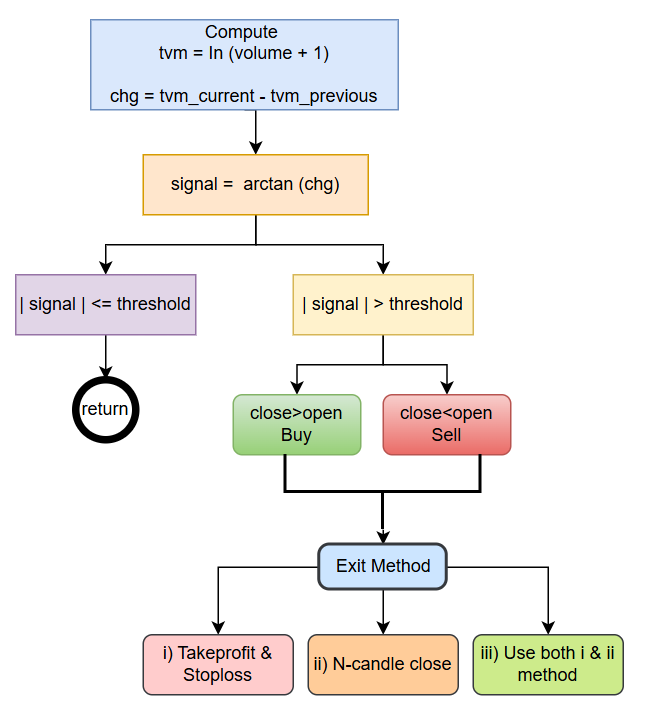
Figure 1: Log volume transform change workflow
Turning the bounded arctan signal into actual orders requires two sets of rules: a gate that decides which side(s) of the market the EA is even allowed to trade, and a confirmation condition that pairs the volume signal with price direction before an order is sent.
Entry Rule: Three Selectable Gates
Instead of hard-coding a directional bias, the EA exposes three entry-gate modes. This allows the same signal engine to be deployed differently depending on the instrument or session.
- Positive signal entry condition — trades are allowed only when the signal is positive and its magnitude exceeds the threshold (signal > +Threshold). This restricts the EA to acting only on accelerating volume, and is useful when a trader wants to trade breakouts or momentum bursts exclusively, ignoring fading-activity setups altogether.
- Negative signal entry condition — trades are allowed only when the signal is negative and its magnitude exceeds the threshold (signal < −Threshold). This restricts the EA to acting only on decelerating/waning volume — useful for a trader who wants to fade exhaustion moves or trade reversals that follow a drop-off in participation.
- Bi-directional entry condition — both gates are open simultaneously. Any bar where abs(signal) > Threshold, positive or negative, is eligible for a trade, with the specific direction determined by the candle confirmation described below.
The code structure is shown below:
enum SignalSelection
  {
   SIGNAL_POSITIVE = 0, // Positive signal only
   SIGNAL_NEGATIVE = 1, // Negative signal only
   SIGNAL_BOTH     = 2  // Either signal sign
  };
Before evaluating a candidate trade, the EA first checks which gate the user has selected and immediately rejects any signal that doesn't belong to that gate — for instance, in "positive signal entry condition" mode, a strongly negative signal is discarded outright, even if its absolute value comfortably clears the threshold. Once a signal passes its gate, the direction of the actual order is decided using the candle's own close-versus-open relationship rather than the sign of the signal itself.
- Buy condition: abs(signal) > Threshold and a bullish candle (Close > Open) — the volume signal, whether driven by accelerating or decelerating activity, is strong enough to have cleared the gate, and the bar itself closed higher than it opened.
- Sell condition: abs(signal) > Threshold and a bearish candle (Close < Open) — the same volume-signal condition, paired with a bar that closed lower than it opened.
Only when both conditions mutually agree does the EA submit an order. The two-layer check (gate first, then candle confirmation) keeps the strategy flexible while still requiring price confirmation before entering risk. The EA is designed to ensure that there is no open position before sending trade order.
//--- Signal selection gates eligibility only. Candle direction determines side:
   const bool polarity_allowed =
      (InpSignalSelection == SIGNAL_BOTH) ||
      (InpSignalSelection == SIGNAL_POSITIVE && signal > 0.0) ||
      (InpSignalSelection == SIGNAL_NEGATIVE && signal < 0.0);
   if(!polarity_allowed)
      return;

//--- bullish candle -> buy; bearish candle -> sell, for either signal polarity.
   bool bullish_candle = rates[1].close > rates[1].open;
   bool bearish_candle = rates[1].close < rates[1].open;
   ulong ticket=0;

   if(bullish_candle && !FindOurPosition(ticket)) // check if bullish and no open position
      OpenPosition(ORDER_TYPE_BUY);
   else
      if(bearish_candle && !FindOurPosition(ticket))  // check if bearish and no open position
         OpenPosition(ORDER_TYPE_SELL);
Exit and Risk Management
Three selectable exit methods are supported, and the trader picks one mode for the EA to run.
enum ExitMode
  {
   EXIT_TP_SL             = 0, // Use defined TP/SL method
   EXIT_PROFIT_LOSS_RULES = 1, // Exit @N-candle method
   EXIT_BOTH              = 2  // Use both exit method
  };
i) Fixed stop loss / take profit. The user defines stop-loss and take-profit distances (in points) when opening a trade. The stop-loss caps downside if the trade moves against the position. The take-profit locks in gains once the market moves favorably. This is the simplest method to backtest because each trade has predefined worst-case and best-case exit distances.
ii) N-candle close rule. Instead of a fixed price distance, this method ties the exit to the passage of time, measured in completed candles. It uses two inputs: M (InpLossBarsM), the number of completed candles after which a non-profitable trade is closed, and N (InpProfitLookbackN), the minimum holding period and lookback length for the profit-side breakout test. The rule is evaluated on every tick while the position is open, provided the exit mode is set to the profit/loss rules (or both exit methods). It works as follows:
- Non-profitable trades. Once at least M-candles have closed since entry, the EA checks the position’s status on each tick. If the trade is not in profit at that moment, it is closed outright. The rationale is that if the anticipated volume-driven move has not materialized within a reasonable window, the signal has effectively failed and there is no reason to keep the trade exposed.
- Profitable trades. A profitable trade is not closed by this rule until at least N-candles have closed since entry. From that point, the EA identifies the highest high (for a buy) or lowest low (for a sell) of the N most recently completed candles. The trade is closed as soon as the current bid exceeds that high (buy) or the current ask falls below that low (sell). The lookback window is rolling: it is recalculated as each new candle completes, so once more than N-candles have elapsed, the reference range covers the latest N-candles rather than the first N after entry. This lets a profitable move continue until price breaks out of the recent range, rather than cutting it off arbitrarily at the N-candle mark.
//+------------------------------------------------------------------+
//| Exit position when rule is valid: Managing position              |
//+------------------------------------------------------------------+
void ManageOpenPosition()
  {
   ulong ticket = 0;
   if(!FindOurPosition(ticket) || !PositionSelectByTicket(ticket))
      return;

   const ENUM_POSITION_TYPE type = (ENUM_POSITION_TYPE)PositionGetInteger(POSITION_TYPE);
   const double open_price = PositionGetDouble(POSITION_PRICE_OPEN);
   const datetime entry_time = (datetime)PositionGetInteger(POSITION_TIME);

   const bool in_profit = IsPositionInProfit(type, open_price);
   const int bars_elapsed = BarsSinceEntry(entry_time);
   bool close_now = false;

   if(InpExitMode == EXIT_PROFIT_LOSS_RULES || InpExitMode == EXIT_BOTH)
     {
      if(in_profit)
         close_now = ProfitBreakout(type, entry_time);
      else
         if(bars_elapsed >= InpLossBarsM)
            close_now = true;
     }

   if(close_now)
     {
      //--- error handling to log if the broker rejects the close request
      if(!trade.PositionClose(ticket))
         Print("Failed to close position #", ticket, " Error: ", GetLastError());
     }
  }
Position sizing and trade concurrency. The EA takes a fixed lot size as a direct input, left to the trader to size appropriately for their account balance and risk tolerance. Just as importantly, the EA enforces one open trade at a time: once a position is live, no new trade — regardless of how strongly a fresh signal clears its gate and threshold — is opened until the existing one has been closed by whichever exit method is active. This constraint is a deliberate simplicity-and-risk-control choice.
Helper functions code
ProfitBreakout() Function: This function determines whether the current price has broken above the high or below the low of the last N completed candles, but only after the trade has been open for at least N-candles. It first verifies that at least N-candles have elapsed since entry; only then does it calculate the highest high and lowest low over that period. If the current bid is greater than the highest high of the N-candles, the buy trade return true. If the current ask is lower than the lowest low of the N-candles, the sell trade return true. //+------------------------------------------------------------------+ //| Check whether price is above high/below low of N-candle | //+------------------------------------------------------------------+ bool ProfitBreakout(const ENUM_POSITION_TYPE type, const datetime entry_time) { if(BarsSinceEntry(entry_time) < InpProfitLookbackN) return false; MqlRates bars[]; ArraySetAsSeries(bars, true); //--- Look at the last N completed bars if(CopyRates(_Symbol, _Period, 1, InpProfitLookbackN, bars) < InpProfitLookbackN) return false; double extreme = (type == POSITION_TYPE_BUY) ? -DBL_MAX : DBL_MAX; for(int i = 0; i < ArraySize(bars); ++i) { if(type == POSITION_TYPE_BUY) extreme = MathMax(extreme, bars[i].high); else extreme = MathMin(extreme, bars[i].low); } MqlTick tick; if(!SymbolInfoTick(_Symbol, tick)) return false; return (type == POSITION_TYPE_BUY) ? (tick.bid > extreme) : (tick.ask < extreme); }
FindOurPosition() Function
The purpose of this function is to check whether the EA already has an open position for the current symbol and its specified magic number. The function prevents the EA from opening a new trade when one of its own positions is already active. This function is called before OpenPosition() function anytime there is a new signal. It returns true if there is an open position exists, otherwise false.
//+------------------------------------------------------------------+
//|  Check for existing position                                     |
//+------------------------------------------------------------------+
bool FindOurPosition(ulong &ticket_out)
  {
   ticket_out = 0;
   for(int i = PositionsTotal() - 1; i >= 0; --i)
     {
      const ulong ticket = PositionGetTicket(i);
      if(ticket == 0 || !PositionSelectByTicket(ticket))
         continue;

      if(PositionGetString(POSITION_SYMBOL) == _Symbol &&
         (ulong)PositionGetInteger(POSITION_MAGIC) == InpMagic)
        {
         ticket_out = ticket;
         return true;
        }
     }
   return false;
  }
OpenPosition() Function
The OpenPosition() function prepares and executes a market order while calculating the appropriate stop loss (SL) and take profit (TP) according to the selected exit mode. The function:
- Determines whether the order is a Buy or Sell.
- Calculates SL/TP distances using either fixed points, ATR multiples, or both.
- Determines the final SL/TP levels based on the selected exit method and normalizes SL and TP to the symbol's required price precision.
- Determines the trading lot size.
- Sends the Buy or Sell order using the trade object.
- Print error code if trade fails.
//+------------------------------------------------------------------+
//| Request position orders                                          |
//+------------------------------------------------------------------+
void OpenPosition(const ENUM_ORDER_TYPE order_type)
  {
   MqlTick tick;
   if(!SymbolInfoTick(_Symbol, tick))
      return;

   bool is_buy = (order_type == ORDER_TYPE_BUY);
   double entry = is_buy ? tick.ask : tick.bid;

   double sl = 0.0, tp = 0.0;

   double atr_method = (InpExitMode != EXIT_TP_SL) ? GetATR() : 0.0;
   if(InpExitMode != EXIT_TP_SL && atr_method <= 0.0)
      return;

// 1. Calculate the pure distances for both methods
   double sl_dist_pts = InpStopLossPoints * _Point;
   double tp_dist_pts = InpTakeProfitPoints * _Point;
   double sl_dist_atr = InpATRStopLossMultiple * atr_method;
   double tp_dist_atr = InpATRTakeProfitMultiple * atr_method;

// 2. Determine final distances and sizing_stop based on Exit Mode
   if(InpExitMode == EXIT_TP_SL)
     {

      sl = (sl_dist_pts > 0.0) ? (is_buy ? entry - sl_dist_pts : entry + sl_dist_pts) : 0.0;
      tp = (tp_dist_pts > 0.0) ? (is_buy ? entry + tp_dist_pts : entry - tp_dist_pts) : 0.0;
     }
   else
      if(InpExitMode == EXIT_PROFIT_LOSS_RULES)
        {

         sl = is_buy ? entry - sl_dist_atr : entry + sl_dist_atr;
         tp = is_buy ? entry + tp_dist_atr : entry - tp_dist_atr;
        }
      else
         if(InpExitMode == EXIT_BOTH)
           {
            //--- Take the maximum distance between Atr_stop_distance and sl_stop_distance
            double max_sl_dist = MathMax(sl_dist_pts, sl_dist_atr);
            //--- Take the maximum distance between Atr_tp_distance and tp_stop distance
            double max_tp_dist = MathMax(tp_dist_pts, tp_dist_atr);

            //--- max distance chosen for sl and tp
            sl = (max_sl_dist > 0.0) ? (is_buy ? entry - max_sl_dist : entry + max_sl_dist) : 0.0;
            tp = (max_tp_dist > 0.0) ? (is_buy ? entry + max_tp_dist : entry - max_tp_dist) : 0.0;
           }

//--- 3. Calculate lot size and execute
   double lots = LotSizeUse(InpFixedLot);

   sl = (sl > 0.0) ? NormalizeDouble(sl, _Digits) : 0.0;
   tp = (tp > 0.0) ? NormalizeDouble(tp, _Digits) : 0.0;

   if(is_buy)
     {
      if(!trade.Buy(lots, _Symbol, 0.0, sl, tp, "TVM buy"))
         Print("failed to execute buy trade: ", trade.ResultRetcode());
     }
   else
     {
      if(!trade.Sell(lots, _Symbol, 0.0, sl, tp, "TVM sell"))
         Print("failed to execute sell trade: ", trade.ResultRetcode());
     }
  }
The function determines the number of candles a trade has been open, which is used by the N-candle exit rule to decide when the position should be evaluated or closed. It accepts the entry time of an opened trade position and measure N-candle passed since trade entry. It returns the candle index which depicts the number of candle after trade entry.
//+------------------------------------------------------------------+
//| Find index of the candle bar since open position                 |
//+------------------------------------------------------------------+
int BarsSinceEntry(const datetime entry_time)
  {
   int shift = iBarShift(_Symbol, _Period, entry_time, false);
   if(shift < 0)
      return 0;
   return shift;
  }
IsPositionInProfit() Function
The function checks whether the current position has moved into profitable territory, which is useful for applying the N-candle profit-exit rule.
//+------------------------------------------------------------------+
//| Check for profitable position                                    |
//+------------------------------------------------------------------+
bool IsPositionInProfit(const ENUM_POSITION_TYPE type, const double open_price)
  {
   MqlTick tick;
   if(!SymbolInfoTick(_Symbol, tick))
      return false;
   return (type == POSITION_TYPE_BUY) ? (tick.bid > open_price) : (tick.ask < open_price);
  }
GetATR() Function
The function obtains the latest completed-bar ATR value, which is used to calculate volatility-based stop loss and take profit levels in the EA.
//+------------------------------------------------------------------+
//| Fetch ATR value                                                  |
//+------------------------------------------------------------------+
double GetATR()
  {
   if(g_atr_handle == INVALID_HANDLE)
      return 0.0;
   double buffer[1];
   if(CopyBuffer(g_atr_handle, 0, 1, 1, buffer) != 1)
      return 0.0;
   return buffer[0];
  }
LotSizeUse() Function
The purpose of this function is to adjust the user-defined lot size so that it complies with the trading symbol's volume restrictions.
//+------------------------------------------------------------------+
//|  Correct Fix Lotsize of the symbol                               |
//+------------------------------------------------------------------+
double LotSizeUse(double lotz)
  {
   const double min_lot = SymbolInfoDouble(_Symbol, SYMBOL_VOLUME_MIN);
   const double max_lot = SymbolInfoDouble(_Symbol, SYMBOL_VOLUME_MAX);
   const double step    = SymbolInfoDouble(_Symbol, SYMBOL_VOLUME_STEP);

   lotz = MathMax(min_lot, MathMin(max_lot, lotz));
   lotz = MathFloor(lotz / step) * step;  // corrects to broker standard
   return lotz;
  }
Input Variables
The input variables provide the user with control over the EA's behavior without requiring changes to the underlying program logic. By adjusting these parameters, the user can select the signal type, volume source, position size, exit method, volatility settings, and execution parameters directly from the EA's input panel. The main input parameters are shown in Figure 2.
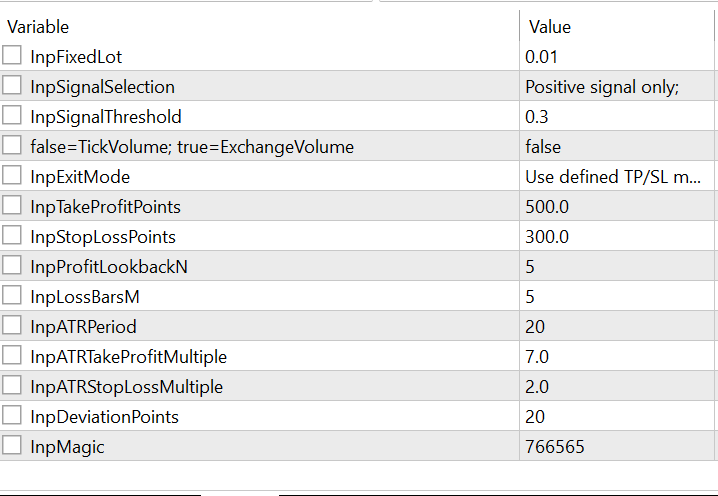
Figure 2: Input variables with default settings
Demonstrating How the EA Works
Figure 3 demonstrates the operation of the EA on the GBPUSD H1 timeframe using a fixed lot size of 0.01. The example illustrates how the transformed-volume signal is generated and used to trigger and manage trades according to the configured trading and exit rules.
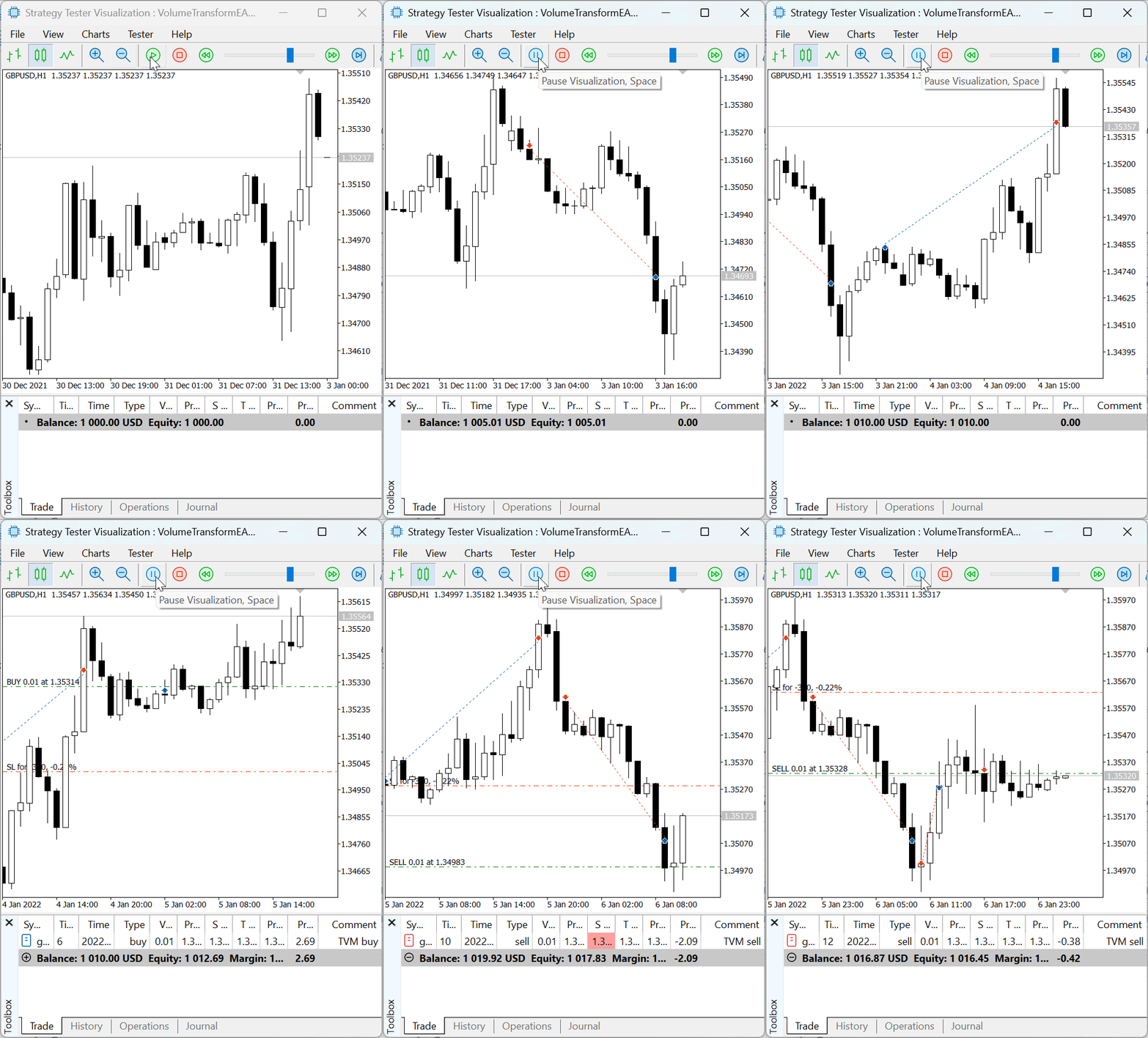
Figure 3: tvm change EA demonstration
Table 5: Key Parameter Settings for the EA Demonstration
| Parameter | Value |
|---|---|
| Lotsize | 0.01 |
| Threshold | 0.3 |
| Exit Mode | Fixed TP and SL |
| TP | 500 |
| SL | 300 |
| Signal Selection | Positive only |
The EA demonstration used the settings shown in Table 5 to illustrate that transformed volume data can be used to develop a trading strategy. Because the exit mode was configured to use user-defined take-profit and stop-loss levels, trades could exit only when either of these levels was reached.
Threshold Sensitivity.
To assess how the threshold affects the trading strategy, a sensitivity analysis was conducted on GBPUSD using the H1 timeframe from 1 January to 31 May 2026. The input parameters used for the analysis are listed below.
Table 6. Sensitivity settings (Positive Signal)
| Parameter | Value |
|---|---|
| Lotsize | 0.01 |
| Threshold | 0.1 to 0.7 |
| Exit Mode | Fixed TP and SL |
| TP | 1000 |
| SL | 600 |
| Signal Selection | Positive only |
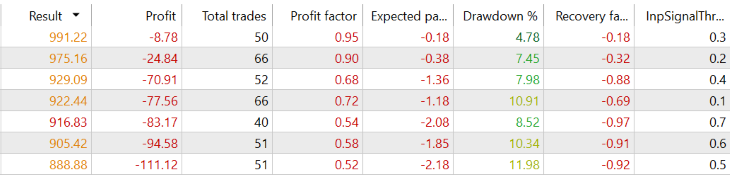
Figure 4: Threshold Sensitivity for Positive Signal
Figure 4 shows the results of the threshold sensitivity study for the positive signal mode. With all other input parameters held constant, changing the threshold as seen in Table 6 affected the profit, total number of trades, profit factor, and drawdown. For example, at a threshold of 0.3 the drawdown was 4.78%, whereas at 0.2 it rose to 7.45%, a difference of 2.67% points over the study period. Similarly, at a threshold of 0.4 the drawdown reached 7.98%, which is 3.20% points higher than at 0.3. To select a threshold suitable for a specific currency or financial instrument, the trader needs to run a backtest to determine which threshold is appropriate given the user’s predefined risk tolerance.
Table 7: Sensitivity settings (Negative Signal)
| Parameter | Value |
|---|---|
| Lotsize | 0.01 |
| Threshold | 0.1 to 0.7 |
| Exit Mode | Fixed TP and SL |
| TP | 1000 |
| SL | 600 |
| Signal Selection | Negative only |

Figure 5: Threshold Sensitivity for Negative Signal
Figure 5 presents the threshold sensitivity results for the negative signal mode. Again, all other inputs were held constant, and changing the threshold as shown in Table 7 affected the profit, total trades, profit factor, and drawdown. Over the study period, a threshold of 0.7 produced a profit factor of 1.35 with a drawdown of 3.67%, while a threshold of 0.6 produced a profit factor of 1.23 with a drawdown of 3.72%. At a threshold of 0.5, the profit factor fell to 0.85 and the drawdown rose to 7.59%. Moving from a threshold of 0.6 to 0.5 therefore increased the drawdown by 3.87% points, showing that even a small change in the threshold can noticeably change the outcome.
Together, Figures 4 and 5 show that the threshold influences the results and that its effect differs depending on the signal mode used. For simplicity, the case study uses the TP/SL exit method with 1000/600 points.
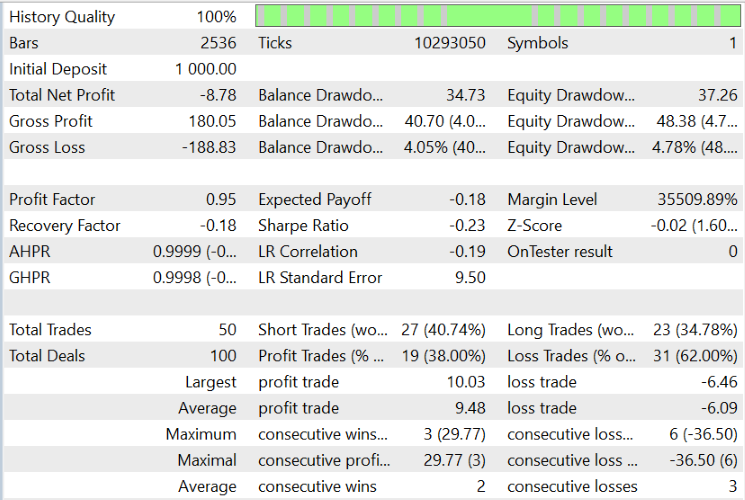
Figure 6: Data Output Metrics
Figure 6 shows the simulation results for the positive signal mode with a threshold of 0.3, along with the other metrics for the study period. The test used 100% history quality, 2,536 bars, 10,293,050 ticks, and an initial balance of 1,000.
Strengths and Limitations
Strengths:
- While empirical validation across diverse instruments, timeframes, and data streams is required to confirm robustness, the log difference reduces dependence on absolute scale and approximately reflects relative change at sufficiently large volumes.
- Reacts to changes in participation rather than static levels, making it sensitive to the early stages of a volume surge.
- The choice of arctan over tanh preserves more resolution at the extremes, giving the threshold finer discriminating power.
- Tick volume itself remains a proxy in forex markets rather than an exact trade count, so the strategy inherits whatever noise is already present in the broker's tick-volume reporting.
- Like any threshold-based system, performance is sensitive to the threshold and lookback choices, and both should be walk-forward tested rather than fixed from a single backtest window.
Conclusion
Raw volume provides valuable market information, but its unbounded nature and instrument-dependent characteristics make it difficult to use directly in systematic trading. In this article, we developed a trading strategy based on transformed volume (tvm) change, converting raw volume data into a bounded signal suitable for threshold-based decision-making.
The approach combines three transformations: logarithmic compression using ln(volume + 1), bar-to-bar differencing, and the arctangent activation function. Together, these operations reduce the influence of extreme volume values, emphasize relative changes, and produce a bounded signal that can be evaluated against configurable thresholds.
To demonstrate the practical implementation, we developed an MQL5 Expert Advisor that supports both real and tick volume, three signal-filtering modes (positive, negative, and bidirectional), and trade entry confirmation based on candle direction. The EA also limits trading to one open position at a time and provides three exit options: fixed take-profit and stop-loss levels, an N-candle exit with ATR-based protection, or a combination of both. Its configurable parameters allow the strategy to be tested and optimized in the MetaTrader 5 Strategy Tester.
The resulting framework provides a structured way to incorporate volume changes into algorithmic trading without relying on raw volume thresholds. However, the transformation itself does not establish predictive value or guarantee trading performance. Further testing across instruments, timeframes, and market conditions is needed to assess the strategy's robustness.
In the next article, we will explore how tvm change can be combined with other technical indicators and evaluate their compatibility within the strategy framework.
Key takeaway
In our study, we employed the natural logarithm, Ln(x), to transform volume. It should be noted that the logarithm does not have to be restricted to the natural logarithm; other logarithmic bases can also be used, provided that the transformation effectively compresses the volume data and preserves the intended characteristics of the signal.
Warning: All rights to these materials are reserved by MetaQuotes Ltd. Copying or reprinting of these materials in whole or in part is prohibited.
This article was written by a user of the site and reflects their personal views. MetaQuotes Ltd is not responsible for the accuracy of the information presented, nor for any consequences resulting from the use of the solutions, strategies or recommendations described.

 Neural Networks in Trading: Temporal Motion Aggregation (TMA)
 Color Harmony Algorithm (CHA)
 Building a PDF Creation Library in MQL5 (Part 3): The Byte-Exact Writer
 From Basic to Intermediate: Operator Overloading (VI)

- Free trading apps
- Over 8,000 signals for copying
- Economic news for exploring financial markets
You agree to website policy and terms of use