

Python-MetaTrader 5-Strategietester (Teil 05): Strategietests mit mehreren Symbolen und Zeitrahmen
 135
135
 5
5

Inhalt
- Einführung
- Multi-Timeframe-Datenverarbeitung
- Das Problem eines Multi-Timeframe-Ansatzes
- Daten direkt aus MetaTrader 5 extrahieren
- Verarbeitung von Instrumenten im Multithreading
- Leistungsprobleme weiter angehen
- Ein vollständig funktionsfähiger Trading-Roboter für mehrere Währungen
- Schlussfolgerung
Einführung
Im vorherigen Artikel konnten wir in unserem benutzerdefinierten Strategietester sowohl echte Ticks als auch generierte Ticks und Kursbalken aus dem MetaTrader 5-Terminal verwenden. Obwohl wir damit den ersten erfolgreichen Lauf des Strategietesters erreicht haben, müssen wir die Daten über verschiedene Instrumente und Zeitrahmen hinweg noch vollständig handhaben und verarbeiten (etwas, das der Strategietester von MetaTrader 5 wirklich gut beherrscht).
Angenommen, Sie haben einen Trading-Roboter, der mehrere Währungen und Zeitrahmen abdeckt:
EA.mq5 für mehrere Währungen und Zeitrahmen
string symbols[] = {"EURUSD", "GBPUSD", "USDCAD"};
ENUM_TIMEFRAMES timeframes[] = {PERIOD_M15, PERIOD_H1, PERIOD_H4, PERIOD_D1};
//+------------------------------------------------------------------+
//| Expert initialization function                                   |
//+------------------------------------------------------------------+
int OnInit()
  {
//---

//---
   return(INIT_SUCCEEDED);
  }
//+------------------------------------------------------------------+
//| Expert deinitialization function                                 |
//+------------------------------------------------------------------+
void OnDeinit(const int reason)
  {
//---

  }
//+------------------------------------------------------------------+
//| Expert tick function                                             |
//+------------------------------------------------------------------+
void OnTick()
  {
//---

     for (uint s=0; s<symbols.Size(); s++)
       for (uint t=0; t<timeframes.Size(); t++)
         {
            string symbol = symbols[s];
            ENUM_TIMEFRAMES tf = timeframes[t];
            double open = iOpen(symbol, tf, 0);

            printf("symbol: %s tf: %s | Current candle's opening = %.5f",symbol, EnumToString(tf), open);
         }
  }
Ausgabe des Strategietesters:
CS      0       12:27:55.690    Multicurrency timeframe EA (EURUSD,H1)  2025.10.01 00:00:00   symbol: USDCAD tf: PERIOD_D1 | Current candle's opening = 1.39191
CS      0       12:28:06.274    Multicurrency timeframe EA (EURUSD,H1)  2025.10.01 00:00:05   symbol: EURUSD tf: PERIOD_M15 | Current candle's opening = 1.17328
CS      0       12:28:06.274    Multicurrency timeframe EA (EURUSD,H1)  2025.10.01 00:00:05   symbol: EURUSD tf: PERIOD_H1 | Current candle's opening = 1.17328
CS      0       12:28:06.274    Multicurrency timeframe EA (EURUSD,H1)  2025.10.01 00:00:05   symbol: EURUSD tf: PERIOD_H4 | Current candle's opening = 1.17328
CS      0       12:28:06.274    Multicurrency timeframe EA (EURUSD,H1)  2025.10.01 00:00:05   symbol: EURUSD tf: PERIOD_D1 | Current candle's opening = 1.17328
CS      0       12:28:06.274    Multicurrency timeframe EA (EURUSD,H1)  2025.10.01 00:00:05   symbol: GBPUSD tf: PERIOD_M15 | Current candle's opening = 1.34442
CS      0       12:28:06.274    Multicurrency timeframe EA (EURUSD,H1)  2025.10.01 00:00:05   symbol: GBPUSD tf: PERIOD_H1 | Current candle's opening = 1.34442
CS      0       12:28:06.274    Multicurrency timeframe EA (EURUSD,H1)  2025.10.01 00:00:05   symbol: GBPUSD tf: PERIOD_H4 | Current candle's opening = 1.34442
CS      0       12:28:06.274    Multicurrency timeframe EA (EURUSD,H1)  2025.10.01 00:00:05   symbol: GBPUSD tf: PERIOD_D1 | Current candle's opening = 1.34442
CS      0       12:28:06.274    Multicurrency timeframe EA (EURUSD,H1)  2025.10.01 00:00:05   symbol: USDCAD tf: PERIOD_M15 | Current candle's opening = 1.39191
CS      0       12:28:06.274    Multicurrency timeframe EA (EURUSD,H1)  2025.10.01 00:00:05   symbol: USDCAD tf: PERIOD_H1 | Current candle's opening = 1.39191
CS      0       12:28:06.274    Multicurrency timeframe EA (EURUSD,H1)  2025.10.01 00:00:05   symbol: USDCAD tf: PERIOD_H4 | Current candle's opening = 1.39191
CS      0       12:28:06.274    Multicurrency timeframe EA (EURUSD,H1)  2025.10.01 00:00:05   symbol: USDCAD tf: PERIOD_D1 | Current candle's opening = 1.39191
Obwohl der Strategietester für einen Zeitrahmen von einer Stunde (H1) gestartet wurde, hatte der Strategietester dennoch Daten zu weiteren Instrumenten und Zeitrahmen verfügbar – also mehr, als der Benutzer ursprünglich angefordert hatte.
Diese faszinierende Fähigkeit des Terminals macht den Handel mit mehreren Währungen im MetaTrader 5-Terminal erst möglich.
In diesem Artikel werden wir in unserem benutzerdefinierten MetaTrader 5-Python-Simulator eine ähnliche Methode zur Verarbeitung von Kursbalken für verschiedene Instrumente und Zeitrahmen implementieren.
aten zurückgreifen, die direkt aus dem Terminal staMulti-Timeframe-Datenverarbeitung
Entsprechend der Art und Weise, wie wir eine benutzerdefinierte Strategietester-Klasse entworfen haben, erfassen wir während der Initialisierung der Klasse alle für einen gesamten Strategietest erforderlichen historischen Daten und speichern sie in den entsprechenden Parquet-Dateien in einem lokalen Verzeichnis, auf das wir zugreifen können (standardmäßig in einem Ordner namens History). (Befindet sich im selben Verzeichnis wie das Hauptskript).
Anders als in der vorherigen Version des Strategietesters, in der dieser Code überall verstreut war, ist diesmal alles in einer Klasse namens HistoryManager zusammengefasst.
Installieren Sie zunächst alle Abhängigkeiten aus der Datei requirements.txt, die am Ende dieses Artikels angehängt ist, in Ihrer virtuellen Python-Umgebung.
pip install -r requirements.txt
StrategyTester5/hist/manage.py
from strategytester5 import STRING2TIMEFRAME_MAP, TIMEFRAME2STRING_MAP
from strategytester5.hist import ticks, bars
from concurrent.futures import ThreadPoolExecutor, ProcessPoolExecutor, as_completed
from datetime import datetime
import time
import os
from typing import Any, Self
from typing import Optional
import logging

class HistoryManager:
    def __init__(self,
                mt5_instance: Any,
                symbols: list,
                start_dt: datetime,
                end_dt: datetime,
                timeframe: int,
                LOGGER: Optional[logging.Logger] = None,
                max_fetch_workers: int=None,
                max_cpu_workers: int=None,
                history_dir: str = "History"
                ):

        """Initialize a history manager for fetching and storing MT5 data.

        Args:
            mt5_instance: MT5 API/client instance used to fetch data.
            symbols: List of symbol strings to retrieve history for.
            start_dt: Inclusive start datetime for the history window.
            end_dt: Inclusive end datetime for the history window.
            timeframe: MT5 timeframe constant (e.g., mt5.TIMEFRAME_M1).
            LOGGER: A Logger instance,
            max_fetch_workers: Max concurrent fetch workers; defaults based on symbol count.
            max_cpu_workers: Max CPU workers for processing; defaults to (CPU count - 1).
            history_dir: Directory name for persisted history data.
        """

        self.mt5_instance = mt5_instance
        self.symbols = symbols
        self.start_dt = start_dt
        self.end_dt = end_dt
        self.max_fetch_workers = max_fetch_workers
        self.max_cpu_workers = max_cpu_workers
        self.LOGGER = LOGGER
        self.history_dir = history_dir
        self.timeframe = timeframe

        if max_fetch_workers is None:
            self.max_fetch_workers = min(32, max(4, len(self.symbols)))
        if max_cpu_workers is None:
            self.max_cpu_workers = max(1, os.cpu_count() - 1)

    def __critical_log(self, msg: str):
        """Log a critical message via LOGGER or print as fallback."""
        if self.LOGGER is not None:
            self.LOGGER.critical(msg)
        else:
            print(msg)

    def __info_log(self, msg: str):
        """Log an info message via LOGGER or print as fallback."""
        if self.LOGGER is not None:
            self.LOGGER.info(msg)
        else:
            print(msg)

    def _fetch_bars_worker(self, symbol: str, timeframe: int, return_df: bool=False) -> dict:
        """Fetch historical bars for a symbol and return summary info when requested.

        Args:
            symbol: Instrument symbol to fetch.
            timeframe: MT5 timeframe constant to query.
            return_df: If True, return a dict with bars and metadata; else {}.
        """

        bars_obtained = bars.fetch_historical_bars(
            which_mt5=self.mt5_instance,
            symbol=symbol,
            timeframe=timeframe,
            start_datetime=self.start_dt,
            end_datetime=self.end_dt,
            return_df=return_df,
            LOGGER=self.LOGGER,
            hist_dir=self.history_dir
        )

        bars_info = {
            "symbol": symbol,
            "bars": bars_obtained,
            "size": bars_obtained.height,
            "counter": 0
        }

        return bars_info if return_df else {}

    def _fetch_ticks_worker(self, symbol: str, return_df: bool=False) -> dict:
        """Fetch real ticks for a symbol and return summary info when requested.

        Args:
            symbol: Instrument symbol to fetch.
            return_df: If True, return a dict with ticks and metadata; else {}.
        """

        ticks_obtained = ticks.fetch_historical_ticks(
            which_mt5=self.mt5_instance,
            start_datetime=self.start_dt,
            end_datetime=self.end_dt,
            symbol=symbol,
            return_df=True,
            LOGGER=self.LOGGER,
            hist_dir=self.history_dir
        )

        ticks_info = {
            "symbol": symbol,
            "ticks": ticks_obtained,
            "size": ticks_obtained.height,
            "counter": 0
        }

        return ticks_info if return_df else {}

    def _gen_ticks_worker(self, symbol: str, symbol_points: float, return_df: bool=False) -> dict:
        """Generate synthetic ticks from M1 bars for a symbol and saves data.

        Args:
            symbol: Instrument symbol to generate ticks for.
            return_df: If True, return a dict with ticks and metadata; else {}.
        """

        one_minute_bars = bars.fetch_historical_bars(
            which_mt5=self.mt5_instance,
            symbol=symbol,
            timeframe=STRING2TIMEFRAME_MAP["M1"],  # <- use your map key directly
            start_datetime=self.start_dt,
            end_datetime=self.end_dt,
            LOGGER=self.LOGGER,
            hist_dir=self.history_dir,
            return_df=return_df
        )

        if one_minute_bars is None:
            return {}

        ticks_df = ticks.TicksGen.generate_ticks_from_bars(
            bars=one_minute_bars,
            symbol=symbol,
            symbol_point=symbol_points,
            LOGGER=self.LOGGER,
            hist_dir=self.history_dir,
            return_df=True
        )

        ticks_info = {
            "symbol": symbol,
            "ticks": ticks_df,
            "size": ticks_df.height,
            "counter": 0
        }

        return ticks_info if return_df else {}

    def fetch_history(self, modelling: str, symbol_info_func: any):
        """Fetch bars or ticks for all symbols according to the modelling mode.

        Args:
            modelling: One of "real_ticks", "every_tick", "new_bar", "1-minute-ohlc".

        Returns:
            Tuple of (all_bars_info, all_ticks_info) lists.
        """

        all_ticks_info = []
        all_bars_info = []

        if modelling == "real_ticks":

            start_time = time.time()

            with ThreadPoolExecutor(max_workers=self.max_fetch_workers) as executor:
                futs = {executor.submit(self._fetch_ticks_worker, s, True): s for s in self.symbols}

                for fut in as_completed(futs):
                    sym = futs[fut]
                    try:
                        res = fut.result()              # <- get dict
                        all_ticks_info.append(res)
                    except Exception as e:
                        self.__critical_log(f"Failed to fetch real ticks for {sym}: {e!r}")

            total_ticks = sum(info["size"] for info in all_ticks_info)
            self.__info_log(f"Total real ticks collected: {total_ticks} in {(time.time()-start_time):.2f} seconds.")

        elif modelling == "every_tick":

            start_time = time.time()

            with ThreadPoolExecutor(max_workers=self.max_fetch_workers) as executor:
                futs = {executor.submit(self._gen_ticks_worker,s, symbol_info_func(s).point, True): s for s in self.symbols}

                for fut in as_completed(futs):
                    sym = futs[fut]
                    try:
                        res = fut.result()              # <- get dict
                        all_ticks_info.append(res)
                    except Exception as e:
                        self.__critical_log(f"Failed to generate ticks for {sym}: {e!r}")

            total_ticks = sum(info["size"] for info in all_ticks_info)
            self.__info_log(f"Total ticks generated: {total_ticks} in {(time.time()-start_time):.2f} seconds.")

        elif modelling in ("new_bar", "1-minute-ohlc"):

            start_time = time.time()
            tf = STRING2TIMEFRAME_MAP["M1"] if modelling == "1-minute-ohlc" else STRING2TIMEFRAME_MAP[self.timeframe]

            with ThreadPoolExecutor(max_workers=self.max_fetch_workers) as executor:
                futs = {executor.submit(self._fetch_bars_worker, s, tf, True): s for s in self.symbols}

                for fut in as_completed(futs):
                    sym = futs[fut]
                    try:
                        res = fut.result()              # <- get dict
                        all_bars_info.append(res)
                    except Exception as e:
                        self.__critical_log(f"Failed to fetch bars for {sym}: {e!r}")

            total_bars = sum(info["size"] for info in all_bars_info)
            self.__info_log(f"Total bars collected: {total_bars} from '{TIMEFRAME2STRING_MAP[tf]}' timeframe in {(time.time()-start_time):.2f} seconds.")

        return all_bars_info, all_ticks_info

    def synchronize_timeframes(self):

        all_tfs = list(STRING2TIMEFRAME_MAP.values())
        start = time.time()

        with ThreadPoolExecutor(max_workers=self.max_fetch_workers) as ex:
            futs = {ex.submit(self._fetch_bars_worker, sym, tf, False): (sym, tf)
                    for sym in self.symbols
                    for tf in all_tfs}

            for fut in as_completed(futs):
                sym, tf = futs[fut]
                try:
                    fut.result()
                except Exception as e:
                    self.__critical_log(f"sync failed {sym} {TIMEFRAME2STRING_MAP.get(tf, tf)}: {e!r}")

        self.__info_log(f"Timeframes synchronization complete! {(time.time() - start):.2f}s elapsed.")
Die Klasse verfügt über drei separate Funktionen, deren Namen auf _worker enden;
- _fetch_bars_worker: Ruft die Funktion „fetch_historical_bars“ aus der Datei „bars.py“ auf, die Kursbalkendaten aus dem MetaTrader 5-Terminal abruft und diese an einem bestimmten Speicherort in einem Unterordner namens Bars speichert.
- _fetch_ticks_worker: Ruft die Funktion fetch_historical_ticks auf, die Ticks für einen bestimmten Datumsbereich aus dem MetaTrader 5-Terminal abruft; speichert den resultierenden Polars-DataFrame an einem gewünschten Speicherort in einem Unterordner namens Ticks
- _gen_ticks_worker: Diese Funktion ruft die Methode generate_ticks_from_bars einer Klasse namens TicksGen auf. Diese Klasse verfügt über Methoden, die für die Generierung synthetischer Ticks anhand von Kursbalken aus dem 1-Minuten-Zeitrahmen zuständig sind.
All diese Funktionen werden dann unter bestimmten Bedingungen innerhalb einer Funktion namens fetch_history aufgerufen. Im Gegensatz zur vorherigen Version erfassen wir diesmal sowohl Kursbalken als auch Ticks in einer Multithread-Umgebung.
Dies führt zu einer Geschwindigkeitssteigerung, da die Zeit für das Abrufen der historischen Daten im Vergleich zu früheren Versionen des benutzerdefinierten Strategietesters um mehr als 50 % reduziert wurde.
Im Konstruktor von StrategyTester rufen wir die Funktion zum Abrufen der historischen Daten auf.
class StrategyTester:
    def __init__(self,
                 tester_config: dict,
                 mt5_instance: MetaTrader5,
                 logs_dir: Optional[str]="Logs",
                 reports_dir: Optional[str]="Reports",
                 history_dir: Optional[str]="History"):

        """MetaTrader 5-Like Strategy tester for the MetaTrader5-Python module.

        Args:
            tester_config: Dictionary of tester configuration values.
            mt5_instance: MetaTrader5 API/client instance used for obtaining crucial information from the broker as an attempt to mimic the terminal.
            logs_dir: Directory for log files.
            reports_dir: Directory for HTML reports and assets.
            history_dir: Directory for historical data storage.
        Raises:
            RuntimeError: If required MT5 account info cannot be obtained.
        """

        #... other variables

        # --------------- initialize ticks or bars data ----------------------------

        self.logger.info("StrategyTester Initializing")
        self.logger.info(f"StrategyTester configs: {self.tester_config}")

        hist_manager = HistoryManager(mt5_instance=self.mt5_instance,
                                      symbols=self.tester_config["symbols"],
                                      start_dt=self.tester_config["start_date"],
                                      end_dt=self.tester_config["end_date"],
                                      timeframe=self.tester_config["timeframe"],
                                      history_dir=self.history_dir,
                                      LOGGER=self.logger
                                      )

        for symbol in self.tester_config["symbols"]:
            self.symbol_info(symbol)

        self.TESTER_ALL_BARS_INFO, self.TESTER_ALL_TICKS_INFO = hist_manager.fetch_history(
            self.tester_config["modelling"],
            symbol_info_func=self.symbol_info,
        )
Kurz nach dem Abrufen der historischen Daten synchronisieren wir die Kursbalken aller Zeitrahmen (nur wenn ein Benutzer das Programm im MetaTrader-5-Modus ausführt).
        if not self.IS_TESTER:
            hist_manager.synchronize_timeframes()
Das Ziel der Synchronisierung aller Zeitrahmen aus MetaTrader 5 für alle angegebenen Symbole (Instrumente) besteht darin, sicherzustellen, dass die Kursbalken aller Zeitrahmen erfasst und an einem lokalen Verzeichnis für den späteren Zugriff gespeichert werden, d. h., wenn ein Benutzer innerhalb eines Simulators die Methoden zum „Kopieren von Kursen“ aufruft.
Sämtliche Kursbalken müssen jederzeit verfügbar sein, genau wie im MetaTrader 5-Terminal.
Konfiguration mit mehreren Symbolen:
examples/tester.json
{
    "tester": {
        "bot_name": "MY EA",
        "symbols": ["EURUSD", "USDCAD", "USDJPY"],
        "timeframe": "H1",
        "start_date": "01.10.2025 00:00",
        "end_date": "31.12.2025 00:00",
        "modelling" : "new_bar",
        "deposit": 1000,
        "leverage": "1:100"
    }
}
Ausgabe:
D:\StrategyTester5\.env\Scripts\python.exe D:\StrategyTester5\examples\example_bot.py
2026-01-24 21:53:10,039 | INFO     | MY EA.tester | [tester.py:88 -   __init__() ] => StrategyTester Initializing
2026-01-24 21:53:10,040 | INFO     | MY EA.tester | [tester.py:89 -   __init__() ] => StrategyTester configs: {'bot_name': 'MY EA', 'symbols': ['EURUSD', 'USDCAD', 'USDJPY'], 'timeframe': 'H1', 'modelling': 'new_bar', 'start_date': datetime.datetime(2025, 10, 1, 0, 0), 'end_date': datetime.datetime(2025, 12, 31, 0, 0), 'deposit': 1000.0, 'leverage': 100}
2026-01-24 21:53:10,041 | INFO     | MY EA.tester | [bars.py:56 - fetch_historical_bars() ] => Processing bars for EURUSD (H1): 2025-10-01 -> 2025-10-31
2026-01-24 21:53:10,044 | INFO     | MY EA.tester | [bars.py:56 - fetch_historical_bars() ] => Processing bars for USDCAD (H1): 2025-10-01 -> 2025-10-31
2026-01-24 21:53:10,045 | INFO     | MY EA.tester | [bars.py:56 - fetch_historical_bars() ] => Processing bars for USDJPY (H1): 2025-10-01 -> 2025-10-31
2026-01-24 21:53:10,084 | INFO     | MY EA.tester | [bars.py:56 - fetch_historical_bars() ] => Processing bars for USDCAD (H1): 2025-11-01 -> 2025-11-30
2026-01-24 21:53:10,084 | INFO     | MY EA.tester | [bars.py:56 - fetch_historical_bars() ] => Processing bars for EURUSD (H1): 2025-11-01 -> 2025-11-30
2026-01-24 21:53:10,084 | INFO     | MY EA.tester | [bars.py:56 - fetch_historical_bars() ] => Processing bars for USDJPY (H1): 2025-11-01 -> 2025-11-30
2026-01-24 21:53:10,088 | INFO     | MY EA.tester | [bars.py:56 - fetch_historical_bars() ] => Processing bars for EURUSD (H1): 2025-12-01 -> 2025-12-31
2026-01-24 21:53:10,088 | INFO     | MY EA.tester | [bars.py:56 - fetch_historical_bars() ] => Processing bars for USDCAD (H1): 2025-12-01 -> 2025-12-31
2026-01-24 21:53:10,089 | INFO     | MY EA.tester | [bars.py:56 - fetch_historical_bars() ] => Processing bars for USDJPY (H1): 2025-12-01 -> 2025-12-31
2026-01-24 21:53:10,093 | INFO     | MY EA.tester | [manager.py:63 - __info_log() ] => Total bars collected: 4611 from 'H1' timeframe in 0.05 seconds.
2026-01-24 21:53:10,094 | INFO     | MY EA.tester | [bars.py:56 - fetch_historical_bars() ] => Processing bars for EURUSD (M1): 2025-10-01 -> 2025-10-31
2026-01-24 21:53:10,111 | INFO     | MY EA.tester | [bars.py:56 - fetch_historical_bars() ] => Processing bars for EURUSD (M2): 2025-10-01 -> 2025-10-31
2026-01-24 21:53:10,127 | INFO     | MY EA.tester | [bars.py:56 - fetch_historical_bars() ] => Processing bars for EURUSD (M3): 2025-10-01 -> 2025-10-31
2026-01-24 21:53:10,128 | INFO     | MY EA.tester | [bars.py:56 - fetch_historical_bars() ] => Processing bars for EURUSD (M4): 2025-10-01 -> 2025-10-31
2026-01-24 21:53:10,168 | INFO     | MY EA.tester | [bars.py:56 - fetch_historical_bars() ] => Processing bars for EURUSD (M3): 2025-11-01 -> 2025-11-30
2026-01-24 21:53:10,169 | INFO     | MY EA.tester | [bars.py:56 - fetch_historical_bars() ] => Processing bars for EURUSD (M2): 2025-11-01 -> 2025-11-30
2026-01-24 21:53:10,170 | INFO     | MY EA.tester | [bars.py:56 - fetch_historical_bars() ] => Processing bars for EURUSD (M4): 2025-11-01 -> 2025-11-30
2026-01-24 21:53:10,170 | INFO     | MY EA.tester | [bars.py:56 - fetch_historical_bars() ] => Processing bars for EURUSD (M1): 2025-11-01 -> 2025-11-30
2026-01-24 21:53:10,266 | INFO     | MY EA.tester | [bars.py:56 - fetch_historical_bars() ] => Processing bars for EURUSD (M15): 2025-10-01 -> 2025-10-31
2026-01-24 21:53:10,266 | INFO     | MY EA.tester | [bars.py:56 - fetch_historical_bars() ] => Processing bars for EURUSD (M10): 2025-12-01 -> 2025-12-31
2026-01-24 21:58:39,999 | INFO     | MY EA.tester | [manager.py:247 - synchronize_timeframes() ] => Synchronizing timeframes...
2026-01-24 21:53:10,267 | CRITICAL | MY EA.tester | [manager.py:56 - __critical_log() ] => sync failed EURUSD M5: AttributeError("'NoneType' object has no attribute 'height'")
2026-01-24 21:53:10,267 | INFO     | MY EA.tester | [bars.py:56 - fetch_historical_bars() ] => Processing bars for EURUSD (M12): 2025-12-01 -> 2025-12-31
2026-01-24 21:53:10,327 | CRITICAL | MY EA.tester | [manager.py:56 - __critical_log() ] => sync failed EURUSD M15: AttributeError("'NoneType' object has no attribute 'height'")
2026-01-24 21:53:10,327 | INFO     | MY EA.tester | [bars.py:56 - fetch_historical_bars() ] => Processing bars for EURUSD (H1): 2025-12-01 -> 2025-12-31
2026-01-24 21:53:10,344 | INFO     | MY EA.tester | [bars.py:56 - fetch_historical_bars() ] => Processing bars for EURUSD (H3): 2025-10-01 -> 2025-10-31
2026-01-24 21:53:10,346 | CRITICAL | MY EA.tester | [manager.py:56 - __critical_log() ] => sync failed EURUSD M20: AttributeError("'NoneType' object has no attribute 'height'")
2026-01-24 21:53:10,347 | INFO     | MY EA.tester | [bars.py:56 - fetch_historical_bars() ] => Processing bars for EURUSD (H2): 2025-11-01 -> 2025-11-30ribute 'height'")
2026-01-24 21:53:10,476 | INFO     | MY EA.tester | [bars.py:56 - fetch_historical_bars() ] => Processing bars for USDCAD (M2): 2025-10-01 -> 2025-10-31
2026-01-24 21:53:10,476 | INFO     | MY EA.tester | [bars.py:56 - fetch_historical_bars() ] => Processing bars for USDCAD (M3): 2025-10-01 -> 2025-10-31
2026-01-24 21:53:10,506 | INFO     | MY EA.tester | [bars.py:56 - fetch_historical_bars() ] => Processing bars for EURUSD (MN1): 2025-12-01 -> 2025-12-31
2026-01-24 21:53:10,507 | CRITICAL | MY EA.tester | [manager.py:56 - __critical_log() ] => sync failed EURUSD D1: AttributeError("'NoneType' object has no attribute 'height'")
2026-01-24 21:53:10,535 | CRITICAL | MY EA.tester | [manager.py:56 - __critical_log() ] => sync failed EURUSD W1: AttributeError("'NoneType' object has no attribute 'height'")
2026-01-24 21:53:10,536 | INFO     | MY EA.tester | [bars.py:56 - fetch_historical_bars() ] => Processing bars for USDCAD (M4): 2025-10-01 -> 2025-10-31
2026-01-24 21:53:10,537 | CRITICAL | MY EA.tester | [manager.py:56 - __critical_log() ] => sync failed EURUSD MN1: AttributeError("'NoneType' object has no attribute 'height'")
2026-01-24 21:53:10,546 | INFO     | MY EA.tester | [bars.py:56 - fetch_historical_bars() ] => Processing bars for USDCAD (M3): 2025-11-01 -> 2025-11-30
2026-01-24 21:53:10,546 | INFO     | MY EA.tester | [bars.py:56 - fetch_historical_bars() ] => Processing bars for USDCAD (M2): 2025-11-01 -> 2025-11-30
2026-01-24 21:53:10,558 | INFO     | MY EA.tester | [bars.py:56 - fetch_historical_bars() ] => Processing bars for USDCAD (M1): 2025-11-01 -> 2025-11-30
2026-01-24 21:53:10,882 | CRITICAL | MY EA.tester | [manager.py:56 - __critical_log() ] => sync failed USDCAD M12: AttributeError("'NoneType' object has no attribute 'height'")
2026-01-24 21:53:10,883 | INFO     | MY EA.tester | [bars.py:56 - fetch_historical_bars() ] => Processing bars for USDCAD (M20): 2025-12-01 -> 2025-12-31
2026-01-24 21:53:10,883 | INFO     | MY EA.tester | [bars.py:56 - fetch_historical_bars() ] => Processing bars for USDCAD (M30): 2025-12-01 -> 2025-12-31
2026-01-24 21:53:10,892 | INFO     | MY EA.tester | [bars.py:56 - fetch_historical_bars() ] => Processing bars for USDCAD (H2): 2025-10-01 -> 2025-10-31
2026-01-24 21:53:10,892 | INFO     | MY EA.tester | [bars.py:56 - fetch_historical_bars() ] => Processing bars for USDCAD (H1): 2025-11-01 -> 2025-11-30
2026-01-24 21:53:10,892 | CRITICAL | MY EA.tester | [manager.py:56 - __critical_log() ] => sync failed USDCAD M15: AttributeError("'NoneType' object has no attribute 'height'")
2026-01-24 21:53:10,905 | INFO     | MY EA.tester | [bars.py:56 - fetch_historical_bars() ] => Processing bars for USDCAD (H3): 2025-10-01 -> 2025-10-31
2026-01-24 21:53:10,908 | INFO     | MY EA.tester | [bars.py:56 - fetch_historical_bars() ] => Processing bars for USDCAD (H4): 2025-10-01 -> 2025-10-31
2026-01-24 21:53:10,908 | CRITICAL | MY EA.tester | [manager.py:56 - __critical_log() ] => sync failed USDCAD M30: AttributeError("'NoneType' object has no attribute 'height'")
2026-01-24 21:53:10,920 | INFO     | MY EA.tester | [bars.py:56 - fetch_historical_bars() ] => Processing bars for USDCAD (H1): 2025-12-01 -> 2025-12-31
2026-01-24 21:53:10,920 | INFO     | MY EA.tester | [bars.py:56 - fetch_historical_bars() ] => Processing bars for USDCAD (H2): 2025-11-01 -> 2025-11-30
2026-01-24 21:53:10,938 | CRITICAL | MY EA.tester | [manager.py:56 - __critical_log() ] => sync failed USDCAD M20: AttributeError("'NoneType' object has no attribute 'height'")
2026-01-24 21:53:10,938 | INFO     | MY EA.tester | [bars.py:56 - fetch_historical_bars() ] => Processing bars for USDCAD (H4): 2025-11-01 -> 2025-11-30
2026-01-24 21:53:11,018 | CRITICAL | MY EA.tester | [manager.py:56 - __critical_log() ] => sync failed USDCAD H8: AttributeError("'NoneType' object has no attribute 'height'")
2026-01-24 21:53:11,029 | INFO     | MY EA.tester | [bars.py:56 - fetch_historical_bars() ] => Processing bars for USDJPY (M1): 2025-10-01 -> 2025-10-31
2026-01-24 21:53:11,029 | INFO     | MY EA.tester | [bars.py:56 - fetch_historical_bars() ] => Processing bars for USDJPY (M2): 2025-10-01 -> 2025-10-31
2026-01-24 21:53:11,030 | CRITICAL | MY EA.tester | [manager.py:56 - __critical_log() ] => sync failed USDCAD D1: AttributeError("'NoneType' object has no attribute 'height'")
2026-01-24 21:53:11,031 | INFO     | MY EA.tester | [bars.py:56 - fetch_historical_bars() ] => Processing bars for USDCAD (W1): 2025-12-01 -> 2025-12-31
2026-01-24 21:53:11,051 | INFO     | MY EA.tester | [bars.py:56 - fetch_historical_bars() ] => Processing bars for USDCAD (MN1): 2025-11-01 -> 2025-11-30
2026-01-24 21:53:11,066 | CRITICAL | MY EA.tester | [manager.py:56 - __critical_log() ] => sync failed USDCAD H12: AttributeError("'NoneType' object has no attribute 'height'")
2026-01-24 21:53:11,071 | INFO     | MY EA.tester | [bars.py:56 - fetch_historical_bars() ] => Processing bars for USDJPY (M3): 2025-10-01 -> 2025-10-31
2026-01-24 21:53:11,071 | CRITICAL | MY EA.tester | [manager.py:56 - __critical_log() ] => sync failed USDCAD W1: AttributeError("'NoneType' object has no attribute 'height'")
2026-01-24 21:53:11,093 | INFO     | MY EA.tester | [bars.py:56 - fetch_historical_bars() ] => Processing bars for USDJPY (M2): 2025-11-01 -> 2025-11-30
2026-01-24 21:53:11,093 | INFO     | MY EA.tester | [bars.py:56 - fetch_historical_bars() ] => Processing bars for USDCAD (MN1): 2025-12-01 -> 2025-12-31
2026-01-24 21:53:11,095 | INFO     | MY EA.tester | [bars.py:56 - fetch_historical_bars() ] => Processing bars for USDJPY (M1): 2025-11-01 -> 2025-11-30
2026-01-24 21:53:11,101 | INFO     | MY EA.tester | [bars.py:56 - fetch_historical_bars() ] => Processing bars for USDJPY (M4): 2025-10-01 -> 2025-10-31
2026-01-24 21:53:11,102 | CRITICAL | MY EA.tester | [manager.py:56 - __critical_log() ] => sync failed USDCAD MN1: AttributeError("'NoneType' object has no attribute 'height'")
2026-01-24 21:53:11,102 | INFO     | MY EA.tester | [bars.py:56 - fetch_historical_bars() ] => Processing bars for USDJPY (M3): 2025-11-01 -> 2025-11-30
2026-01-24 21:53:11,113 | INFO     | MY EA.tester | [bars.py:56 - fetch_historical_bars() ] => Processing bars for USDJPY (M2): 2025-12-01 -> 2025-12-31
2026-01-24 21:53:11,119 | INFO     | MY EA.tester | [bars.py:56 - fetch_historical_bars() ] => Processing bars for USDJPY (M4): 2025-11-01 -> 2025-11-30
2026-01-24 21:53:11,124 | INFO     | MY EA.tester | [bars.py:56 - fetch_historical_bars() ] => Processing bars for USDJPY (M1): 2025-12-01 -> 2025-12-31ight'")
2026-01-24 21:53:11,307 | INFO     | MY EA.tester | [bars.py:56 - fetch_historical_bars() ] => Processing bars for USDJPY (M30): 2025-10-01 -> 2025-10-31ribute 'height'")
2026-01-24 21:53:11,344 | INFO     | MY EA.tester | [bars.py:56 - fetch_historical_bars() ] => Processing bars for USDJPY (H1): 2025-11-01 -> 2025-11-30
2026-01-24 21:53:11,345 | INFO     | MY EA.tester | [bars.py:56 - fetch_historical_bars() ] => Processing bars for USDJPY (H2): 2025-10-01 -> 2025-10-31
2026-01-24 21:53:11,468 | CRITICAL | MY EA.tester | [manager.py:56 - __critical_log() ] => sync failed USDJPY H4: AttributeError("'NoneType' object has no attribute 'height'")
2026-01-24 21:53:11,483 | INFO     | MY EA.tester | [bars.py:56 - fetch_historical_bars() ] => Processing bars for USDJPY (W1): 2025-11-01 -> 2025-11-30
2026-01-24 21:53:11,484 | INFO     | MY EA.tester | [bars.py:56 - fetch_historical_bars() ] => Processing bars for USDJPY (H12): 2025-12-01 -> 2025-12-31
2026-01-24 21:53:11,485 | CRITICAL | MY EA.tester | [manager.py:56 - __critical_log() ] => sync failed USDJPY H8: AttributeError("'NoneType' object has no attribute 'height'")
2026-01-24 21:53:11,485 | INFO     | MY EA.tester | [bars.py:56 - fetch_historical_bars() ] => Processing bars for USDJPY (MN1): 2025-11-01 -> 2025-11-30
2026-01-24 21:53:11,486 | INFO     | MY EA.tester | [bars.py:56 - fetch_historical_bars() ] => Processing bars for USDJPY (D1): 2025-12-01 -> 2025-12-31
2026-01-24 21:53:11,488 | INFO     | MY EA.tester | [bars.py:56 - fetch_historical_bars() ] => Processing bars for USDJPY (W1): 2025-12-01 -> 2025-12-31
2026-01-24 21:53:11,489 | CRITICAL | MY EA.tester | [manager.py:56 - __critical_log() ] => sync failed USDJPY H12: AttributeError("'NoneType' object has no attribute 'height'")
2026-01-24 21:53:11,492 | INFO     | MY EA.tester | [bars.py:56 - fetch_historical_bars() ] => Processing bars for USDJPY (MN1): 2025-12-01 -> 2025-12-31
2026-01-24 21:53:11,492 | CRITICAL | MY EA.tester | [manager.py:56 - __critical_log() ] => sync failed USDJPY D1: AttributeError("'NoneType' object has no attribute 'height'")
2026-01-24 21:53:11,493 | CRITICAL | MY EA.tester | [manager.py:56 - __critical_log() ] => sync failed USDJPY W1: AttributeError("'NoneType' object has no attribute 'height'")
2026-01-24 21:53:11,494 | CRITICAL | MY EA.tester | [manager.py:56 - __critical_log() ] => sync failed USDJPY MN1: AttributeError("'NoneType' object has no attribute 'height'")
2026-01-24 21:53:11,494 | INFO     | MY EA.tester | [manager.py:63 - __info_log() ] => Timeframes synchronization complete! 1.40s elapsed.
Versuchen wir nun in Python etwas Ähnliches wie zuvor in MQL5: Wir ermitteln den aktuellen Eröffnungskurs aus verschiedenen Zeitrahmen (15 Minuten, eine Stunde, 4 Stunden, täglich).
examples/example_bot.py
import sys
import os

sys.path.append(os.path.abspath(os.path.join(os.path.dirname(__file__), "..")))

import MetaTrader5 as mt5
from strategytester5.tester import StrategyTester, TIMEFRAME2STRING_MAP
import json
import os
from datetime import datetime
import pandas as pd

if not mt5.initialize(): # Initialize MetaTrader5 instance
    print(f"Failed to Initialize MetaTrader5. Error = {mt5.last_error()}")
    mt5.shutdown()
    quit()

# Get path to the folder where this script lives
BASE_DIR = os.path.dirname(os.path.abspath(__file__))

try:
    with open(os.path.join(BASE_DIR, "tester.json"), 'r', encoding='utf-8') as file: # reading a JSON file
        # Deserialize the file data into a Python object
        configs_json = json.load(file)
except Exception as e:
    raise RuntimeError(e)

tester_configs = configs_json["tester"]
tester = StrategyTester(tester_config=tester_configs, mt5_instance=mt5) # very important

# -------------  global variables ----------------

symbols = tester_configs["symbols"]
timeframes = [mt5.TIMEFRAME_M15, mt5.TIMEFRAME_H1, mt5.TIMEFRAME_H4, mt5.TIMEFRAME_D1]

# ---------------------------------------------------------

def on_tick():

    for symbol in symbols:
        for tf in timeframes:

            rates = tester.copy_rates_from_pos(symbol=symbol, timeframe=tf, start_pos=0, count=5)

            if rates is None:
                continue

            if len(rates) ==0:
                continue

            open_price = rates[-1]["open"] # current opening price, the latest one in the array
            time = datetime.fromtimestamp(rates[-1]["time"])

            print(f"{time} : symbol: {symbol} tf: {TIMEFRAME2STRING_MAP[tf]} | Current candle's opening = {open_price:.5f}");

tester.OnTick(ontick_func=on_tick) # very important!
Im Gegensatz zur Programmiersprache MQL5 beendet Python bei einer nicht behandelten Exception leicht das gesamte Programm. Um dies zu verhindern, müssen wir mehrere if-Anweisungen einfügen, die die aktuelle Iteration überspringen, wenn keine Daten bzw. ein leeres Array von einem benutzerdefinierten Strategietester zurückgegeben wird.
Beachten Sie, dass wir Informationen (Eröffnungskurse) zu allen Instrumenten abgerufen haben, die in der JSON-Konfigurationsdatei ausgewählt wurden.
So funktioniert unser benutzerdefinierter Strategietester – OHNE ÜBERRASCHUNGEN. Alle im Handelsbot verwendeten Instrumente müssen zunächst definiert werden.
Ausgabe:
StrategyTester Progress:   0%|          | 14/4611 [00:00<04:23, 17.44bar/s]
2025-10-06 03:00:00 : symbol: EURUSD tf: D1 | Current candle's opening = 1.17180
2025-10-01 08:15:00 : symbol: USDCAD tf: M15 | Current candle's opening = 1.39270
2025-10-01 12:00:00 : symbol: USDCAD tf: H1 | Current candle's opening = 1.39144
2025-10-02 03:00:00 : symbol: USDCAD tf: H4 | Current candle's opening = 1.39342
2025-10-06 03:00:00 : symbol: USDCAD tf: D1 | Current candle's opening = 1.39406
2025-10-01 08:15:00 : symbol: USDJPY tf: M15 | Current candle's opening = 147.95500
2025-10-01 12:00:00 : symbol: USDJPY tf: H1 | Current candle's opening = 147.51700
2025-10-02 03:00:00 : symbol: USDJPY tf: H4 | Current candle's opening = 147.03700
2025-10-06 03:00:00 : symbol: USDJPY tf: D1 | Current candle's opening = 149.44800
2025-10-01 08:15:00 : symbol: EURUSD tf: M15 | Current candle's opening = 1.17331
2025-10-01 12:00:00 : symbol: EURUSD tf: H1 | Current candle's opening = 1.17525
2025-10-02 03:00:00 : symbol: EURUSD tf: H4 | Current candle's opening = 1.17248
2025-10-06 03:00:00 : symbol: EURUSD tf: D1 | Current candle's opening = 1.17180
2025-10-01 08:15:00 : symbol: USDCAD tf: M15 | Current candle's opening = 1.39270
2025-10-01 12:00:00 : symbol: USDCAD tf: H1 | Current candle's opening = 1.39144
2025-10-02 03:00:00 : symbol: USDCAD tf: H4 | Current candle's opening = 1.39342
2025-10-06 03:00:00 : symbol: USDCAD tf: D1 | Current candle's opening = 1.39406
Das Problem eines Multi-Timeframe-Ansatzes
Als der obige Code in einem Skript mit dem Modellierungstyp real_ticks ausgeführt wurde, wurde der Strategietester extrem langsam.

Bei einer Geschwindigkeit von etwa 13 Ticks pro Sekunde kann es Wochen dauern, bis ein einzelner Test abgeschlossen ist.
Das liegt an der Art und Weise, wie wir die Datenverwaltung in unserem Projekt strukturiert haben. Wenn ein Benutzer Informationen zu Kursbalken oder Ticks anfordert, lesen wir diese direkt aus Parquet-Dateien aus, und wie wir alle wissen, gehören E/A-Operationen in den meisten Programmiersprachen zu den langsamsten Vorgängen.
Eine der besten Lösungen wäre gewesen, all diese Informationen im Speicher abzulegen und von dort auszulesen, doch dies wirft ein weiteres Problem auf. Die enorme Datenmenge. Es ist nicht immer zuverlässig, alle Tick- und Kursbalkendaten auf einmal im Speicher abzulegen.
Wir könnten dieses Problem vorerst auf zwei Arten angehen:
- Alle Daten (Ticks und Kursbalken) direkt aus dem MetaTrader 5-Terminal extrahieren.
- Einführung einer parallelen Verarbeitung von Instrumenten bzw. Symbolen.
Daten direkt aus dem MetaTrader 5-Terminal extrahieren
Im zweiten Artikel dieser Reihe haben wir eine Syntax vorgestellt, die der MetaTrader 5-API ähnelt und es ermöglicht, zu wählen, ob Informationen aus dem MetaTrader 5-Terminal bezogen oder aus einem nahegelegenen Ordner (aus dem History-Verzeichnis des Simulators) gelesen werden sollen.
Wenn ein finales Skript mit dem Argument --mt5 aufgerufen wird, greift der Simulator auf die MetaTrader 5-API zurück, um Informationen abzurufen (direkte Abfrage).
(.env) D:\StrategyTester5\examples\multicurrency trading bot>python bot.py --mt5 Als das im vorigen Abschnitt besprochene Skript im MetaTrader-5-Modus ausgeführt wurde, zeigte sich eine gewisse Verbesserung der Leistung (Geschwindigkeit).
(.env) D:\StrategyTester5\examples\multicurrency trading bot>python single_thread.py --mt5
2026-01-28 18:30:53,816 | INFO     | .mt5 | [tester.py:81 -   __init__() ] => MT5 mode
2026-01-28 18:30:53,817 | INFO     | .mt5 | [tester.py:88 -   __init__() ] => MT5 mode
2026-01-28 18:30:53,817 | INFO     | .mt5 | [tester.py:92 -   __init__() ] => StrategyTester Initializing
2026-01-28 18:30:53,817 | INFO     | .mt5 | [tester.py:93 -   __init__() ] => StrategyTester configs: {'bot_name': 'MY EA', 'symbols': ['EURUSD', 'GBPUSD', 'USDCAD'], 'timeframe': 'H1', 'modelling': 'real_ticks', 'start_date': datetime.datetime(2025, 10, 1, 0, 0), 'end_date': datetime.datetime(2025, 12, 31, 0, 0), 'deposit': 1000.0, 'leverage': 100}
2026-01-28 18:30:53,819 | INFO     | .mt5 | [ticks.py:53 - fetch_historical_ticks() ] => Processing ticks for EURUSD: 2025-10-01 -> 2025-10-31
2026-01-28 18:30:53,959 | INFO     | .mt5 | [ticks.py:53 - fetch_historical_ticks() ] => Processing ticks for GBPUSD: 2025-10-01 -> 2025-10-31
2026-01-28 18:30:54,137 | INFO     | .mt5 | [ticks.py:53 - fetch_historical_ticks() ] => Processing ticks for USDCAD: 2025-10-01 -> 2025-10-31
2026-01-28 18:30:54,676 | INFO     | .mt5 | [ticks.py:53 - fetch_historical_ticks() ] => Processing ticks for USDCAD: 2025-11-01 -> 2025-11-30
2026-01-28 18:30:54,967 | INFO     | .mt5 | [ticks.py:53 - fetch_historical_ticks() ] => Processing ticks for EURUSD: 2025-11-01 -> 2025-11-30
2026-01-28 18:30:54,967 | INFO     | .mt5 | [ticks.py:53 - fetch_historical_ticks() ] => Processing ticks for GBPUSD: 2025-11-01 -> 2025-11-30
2026-01-28 18:30:55,676 | INFO     | .mt5 | [ticks.py:53 - fetch_historical_ticks() ] => Processing ticks for USDCAD: 2025-12-01 -> 2025-12-31
2026-01-28 18:30:55,963 | INFO     | .mt5 | [ticks.py:53 - fetch_historical_ticks() ] => Processing ticks for EURUSD: 2025-12-01 -> 2025-12-31
2026-01-28 18:30:55,963 | INFO     | .mt5 | [ticks.py:53 - fetch_historical_ticks() ] => Processing ticks for GBPUSD: 2025-12-01 -> 2025-12-31
2026-01-28 18:30:56,972 | INFO     | .mt5 | [manager.py:63 - __info_log() ] => Total real ticks collected: 11893287 in 3.15 seconds.
2026-01-28 18:30:56,972 | INFO     | .mt5 |` [tester.py:115 -   __init__() ] => Initialized
StrategyTester Progress:   1%|▌                      | 88795/11893287 [03:44<7:06:56, 560.81tick/s]
Von 13 Ticks pro Sekunde auf fast 600 Ticks/s. Das ist zwar eine Verbesserung, aber angesichts der großen Anzahl von Ticks, die selbst in einem kurzen Zeitraum verfügbar sein könnten, immer noch nicht akzeptabel.
So standen beispielsweise in einem einzigen Jahr (vom 1. Januar 2025 bis zum 31. Dezember 2025) 11 Millionen Ticks zur Verfügung; beim derzeitigen Tempo würde es dennoch sehr lange dauern, bis ein einziger Test abgeschlossen wäre.
Multithread-Verarbeitung von Instrumenten
Bei einem Handelssystem mit mehreren Währungen werden alle Kontodaten wie Kontostand, Equity, freie Margin usw. für alle Instrumente gemeinsam genutzt, die Handelsvorgänge sind jedoch voneinander getrennt.
Vor diesem Hintergrund können wir anpassen, wie die Funktion „OnTick“ innerhalb der Klasse „StrategyTester“ die vom Benutzer übergebene Hauptfunktion (OnTick) verarbeitet und wie sie sich selbst verhält.
Zunächst haben wir diese Funktion so programmiert, dass sie nacheinander alle verfügbaren Ticks aller Instrumente durchläuft. Dieser Ansatz hat jedoch einen großen Nachteil.
Bei jeder Tick-Iteration wird eine benutzerdefinierte OnTick-Funktion aufgerufen (selbst bei Ticks anderer Symbole, die in keinem Zusammenhang stehen); diese unnötigen Funktionsaufrufe verursachen vermeidbaren Rechenaufwand, der das gesamte Programm verlangsamt.
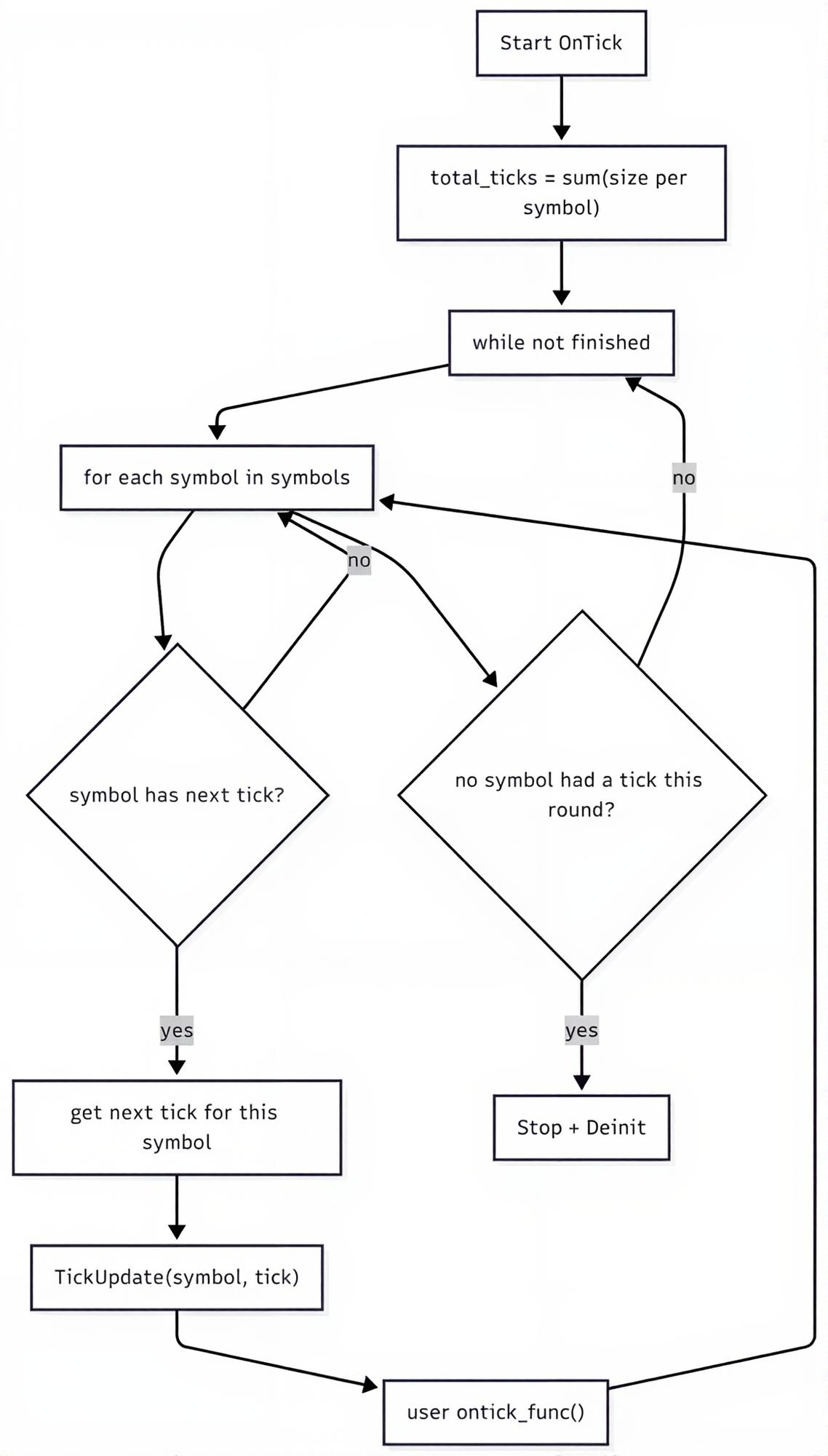
Da die Handelsvorgänge unabhängig von anderen Instrumenten ablaufen, führen wir einen multithreaded Ansatz zur Verarbeitung der vom Benutzer angegebenen OnTick-Funktion ein.
Jeder Thread wickelt die Handelsvorgänge für ein einzelnes Instrument separat ab, obwohl er dieselben Kontoressourcen nutzt.
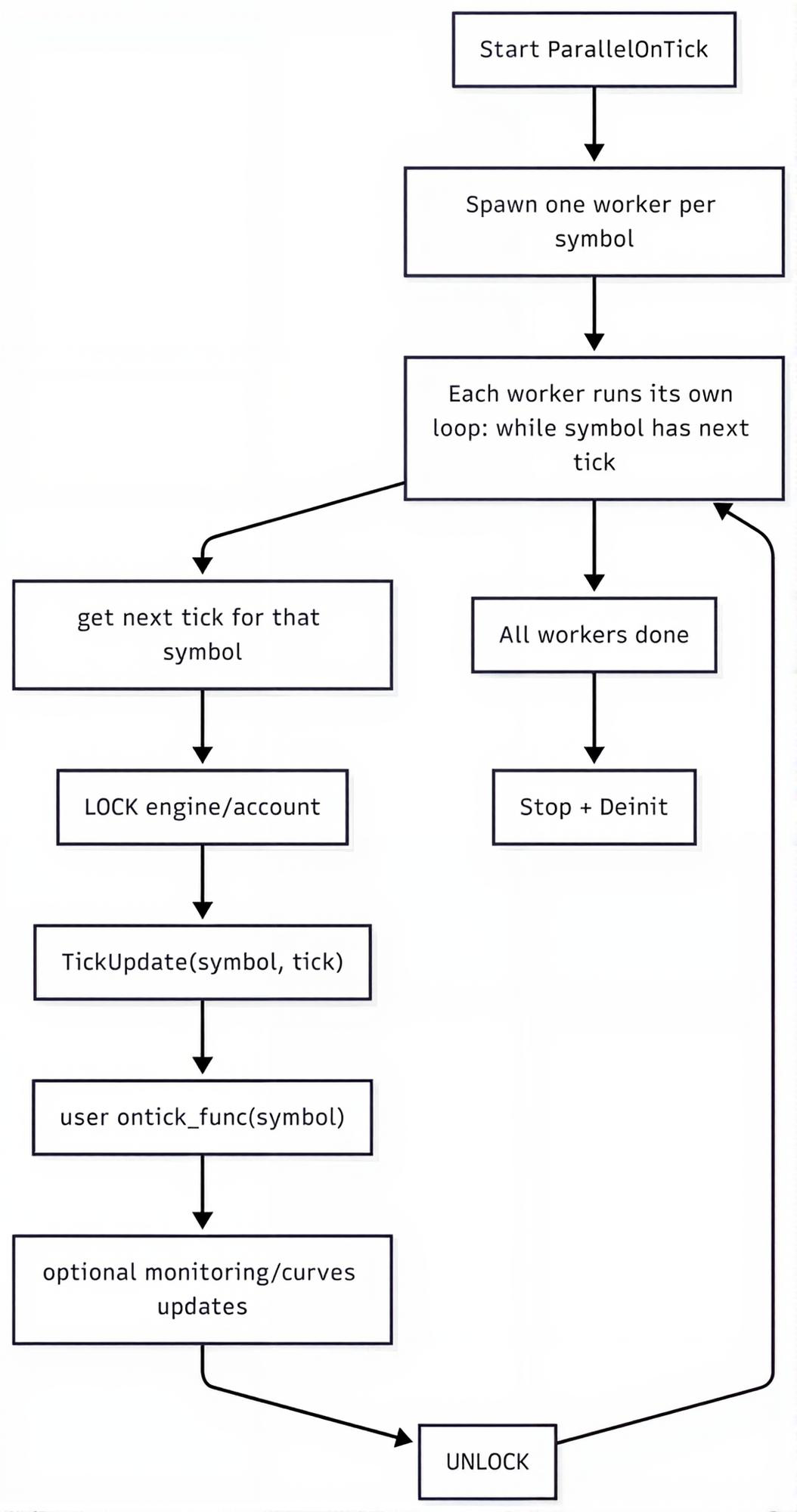
Für die parallele Verarbeitung benötigen wir eine Funktion für jeden Worker (in diesem Fall für jedes Symbol).
tester.py
    def __ontick_symbol(self, symbol: str, modelling: str, ontick_func: any):

        info = None
        is_tick_mode = False

        if modelling in ("new_bar", "1-minute-ohlc"):
            info = next(
                (x for x in self.TESTER_ALL_BARS_INFO if x["symbol"] == symbol),
                None,
            )

        if modelling in ("real_ticks", "every_tick"):
            info = next(
                (x for x in self.TESTER_ALL_TICKS_INFO if x["symbol"] == symbol),
                None,
            )

            is_tick_mode = True

        if info is None:
            return

        ticks = info["ticks"] if is_tick_mode else info["bars"]
        size = info["size"]

        self.logger.info(f"{symbol} total number of ticks: {size}")

        local_idx = 0
        with tqdm(total=size, desc=f"StrategyTester Progress on {symbol}", unit="tick" if is_tick_mode else "bar") as pbar:
            while local_idx < size:

                # tick = None
                if is_tick_mode:
                    tick = ticks.row(local_idx)
                else:
                    tick = self._bar_to_tick(symbol=symbol, bar=ticks.row(local_idx)) # a bar=tick is not actually a tick, rather a bar

                local_idx += 1
                if tick is None:
                    pbar.update(1)
                    continue

                # Critical section: only one thread at a time

                with self._engine_lock:
                    self.TickUpdate(symbol=symbol, tick=tick)

                    ontick_func(symbol) # each symbol processed in a separate thread

                    self.__account_monitoring()

                    # monitor only when positions of such symbol exists
                    if len(self.positions_get(symbol=symbol)) > 0:
                        self.__positions_monitoring()

                    # monitor only when orders of such symbol exists
                    if len(self.orders_get(symbol=symbol)) > 0:
                        self.__pending_orders_monitoring()

                    if isinstance(tick, dict):
                        time = tick["time_msc"]
                    elif isinstance(tick, tuple):
                        tick = make_tick_from_tuple(tick)
                        time = tick.time_msc
                    else:
                        self.logger.error("Unknown tick type")
                        continue

                    if self.positions_total() > 0:
                        self.__curves_update(index=self.CURVES_IDX, time=time)
                        self.CURVES_IDX+=1

                    self.TESTER_IDX += 1

                pbar.update(1)
Anstatt die zuvor erstellte Funktion zu überschreiben, führen wir eine neue OnTick-Funktion für das parallele Testen von Strategien ein.
tester.py
    def ParallelOnTick(self, ontick_func):
        """Calls the assigned function upon the receival of new tick(s)

        Args:
            ontick_func (_type_): A function to be called on every tick
        """

        self.__validate_ontick_signature(ontick_func)

        symbols = self.tester_config["symbols"]
        modelling = self.tester_config["modelling"]
        max_workers = len(symbols)

        size = 0
        if modelling in ("new_bar", "1-minute-ohlc"):
            size = sum(bars_info["size"] for bars_info in self.TESTER_ALL_BARS_INFO)

        if modelling in ("real_ticks", "every_tick"):
            size = sum(ticks_info["size"] if ticks_info else 0 for ticks_info in self.TESTER_ALL_TICKS_INFO)

        self.__TesterInit(size=size)

        with ThreadPoolExecutor(max_workers=max_workers) as executor:
            futs = {executor.submit(self.__ontick_symbol, s, modelling, ontick_func): s for s in symbols}

            # wait + raise exceptions
            for fut in as_completed(futs):
                fut.result()

        self.__TesterDeinit()
Bei diesem neuen Ansatz muss ein Benutzer in der benutzerdefinierten OnTick-Funktion ein Symbol-Argument angeben, bevor er sie an die oben genannte Funktion übergibt.
parallel.py
def on_tick_multicurrency(symbol: str):

    for tf in timeframes:
        rates = tester.copy_rates_from_pos(symbol=symbol, timeframe=tf, start_pos=0, count=5)

        if rates is None:
            continue

        if len(rates) == 0:
            continue


tester.ParallelOnTick(ontick_func=on_tick_multicurrency) # very important!
Versuchen wir noch einmal, ein Skript auszuführen, und schauen wir uns dessen Leistung an.
StrategyTester Progress on EURUSD:   0%|▏                                                             | 10118/3608681 [14:18<70:46:49, 14.12tick/s]
StrategyTester Progress on USDCAD:   0%|▏                                                             | 10391/3174201 [14:18<60:26:21, 14.54tick/s]
StrategyTester Progress on GBPUSD:   0%|                                                              | 9993/5110405 [14:17<128:16:10, 11.05tick/s]
Obwohl die Verarbeitungszeit für Ticks bei jedem Instrument gleich bleibt – da wir die eigentliche Ursache für die langsame Ausführung von Strategietests noch nicht behoben haben –, verkürzt die parallele Verarbeitung von Ticks die Gesamtzeit für die Verarbeitung aller verfügbaren Ticks, da die Ticks aller Instrumente gleichzeitig verarbeitet werden.
In diesem Fall ist gewährleistet, dass das Testen der drei Instrumente ungefähr genauso lange dauert wie das Testen eines einzelnen Instruments.
Im vorigen Abschnitt haben wir festgestellt, dass die Nutzung von MetaTrader 5 als direkte Datenquelle im Vergleich zur Verwendung unserer benutzerdefinierten historischen Daten eine bessere Leistung bietet. Probieren wir diesen Ansatz nun im MetaTrader-5-Modus aus.
(.env) D:\StrategyTester5\examples\multicurrency trading bot>python parallel.py --mt5 Ausgabe:
2026-02-03 14:48:12,013 | INFO     | .mt5 | [tester.py:2059 - __ontick_symbol() ] => EURUSD total number of ticks: 3608681
2026-02-03 14:48:12,013 | INFO     | .mt5 | [tester.py:2059 - __ontick_symbol() ] => GBPUSD total number of ticks: 5110405
2026-02-03 14:48:12,013 | INFO     | .mt5 | [tester.py:2059 - __ontick_symbol() ] => USDCAD total number of ticks: 3174201
StrategyTester Progress on EURUSD:   2%|█▍                                                            | 82545/3608681 [03:20<2:36:18, 375.97tick/s]
StrategyTester Progress on USDCAD:   3%|█▌                                                            | 82996/3174201 [03:20<1:58:49, 433.55tick/s]
StrategyTester Progress on GBPUSD:   1%|▉                                                             | 75724/5110405 [03:20<3:22:24, 414.57tick/s]
Leistungsprobleme weiter angehen
Es gibt noch einige Maßnahmen, die wir ergreifen und bestimmte Gewohnheiten vermeiden könnten, um die Gesamtleistung von Trading-Robotern zu verbessern, während wir sie mit einem StrategyTester5-Modul testen, darunter:
A: Vermeiden Sie unnötige Funktionsaufrufe für Methoden, die den Verlauf abrufen
Methoden der Klasse „StrategyTester“ wie beispielsweise:
- copy_rates_range
- copy_rates_from_pos
- copy_rates_from
- copy_ticks_from
- copy_ticks_range
Dies sind die zeitaufwendigsten und rechenintensivsten Methoden, da sie Informationen aus Parquet-Dateien auslesen (wodurch E/A-Operationen entstehen).
Falls Ihr Trading-Bot für die Berechnung von Indikatoren und andere Zwecke auf eine dieser Methoden zurückgreift, sollten Sie vermeiden, diese zu häufig aufzurufen.
Im vorherigen Beispiel haben wir die Methode copy_rates_from_pos bei jedem Tick von drei verschiedenen Instrumenten aufgerufen – und, was noch schlimmer ist, viermal bei einem einzigen Tick (iterativ in vier verschiedenen Zeitrahmen).
Zwar haben wir in unserem MQL5-basierten EA etwas Ähnliches umgesetzt, und das Terminal war extrem schnell, als wäre diese rechenintensive Operation dort nahezu trivial, doch unsere Klasse erreicht dieses Niveau bei weitem nicht – ganz zu schweigen davon, dass Python eine langsamere Programmiersprache ist.
Der beste Weg, unnötige Funktionsaufrufe zu vermeiden, ist die Verwendung eines neuen Kursbalken-Ereignis-Handlers.
Wir werden eine einfache Variante implementieren, die sich auf die aktuelle Uhrzeit und den Zeitrahmen stützt.
def is_newbar(current_time: datetime, tf: int) -> bool:

    """A function to help in detecting the opening of a bar"""

    tf_seconds = PeriodSeconds(tf)
    curr_ts = int(current_time.timestamp())

    return curr_ts % tf_seconds == 0
Die Funktion „PeriodSeconds“ ähnelt der in der Programmiersprache MQL5 angebotenen Funktion PeriodSeconds; Sie können sie direkt aus dem Modul importieren.
from strategytester5 import PeriodSeconds, TIMEFRAME2STRING_MAP
Anstatt nun bei jedem Tick Kursdaten (Kursbalkendaten) abzurufen (was keine gute Idee ist, da sich die Informationen aus den Kursbalken erst ändern, wenn ein neuer Kursbalken hinzukommt), holen wir die Informationen zu den Kursbalken erst dann ab, wenn ein neuer Kursbalken erkannt wird.
parallel.py
def on_tick_multicurrency(symbol: str):

    for tf in timeframes:

        rates = None
        if is_newbar(tester.current_time, tf):
            rates = tester.copy_rates_from_pos(symbol=symbol, timeframe=tf, start_pos=0, count=5)
            print(f"new bar at: {tester.current_time} on symbol: {symbol} tf: {TIMEFRAME2STRING_MAP[tf]}")

        if rates is None:
            continue

        if len(rates) == 0:
            continue

    return
Ausgabe:
StrategyTester Progress on EURUSD:   2%|█▍                                     | 83165/3608681 [00:11<07:08, 8227.49tick/s]
StrategyTester Progress on GBPUSD:   1%|▊                                     | 68224/5110405 [00:11<10:06, 8313.69tick/s]
StrategyTester Progress on USDCAD:   3%|█▋                                      | 83129/3174201 [00:11<09:02, 5702.92tick/s]
Die Geschwindigkeit des StrategyTesters hat sich deutlich verbessert.
Im MetaTrader-5-Modus funktioniert es sogar noch besser.
StrategyTester Progress on USDCAD:   6%|███▍                                   | 177558/3174201 [00:12<03:21, 14880.46tick/s]
StrategyTester Progress on EURUSD:   5%|███▏                                   | 186969/3608681 [00:12<05:20, 10690.13tick/s]
StrategyTester Progress on GBPUSD:   3%|██▏                                   | 178474/5110405 [00:12<03:50, 21413.38tick/s]
B: Die Wahl des richtigen Modells für das Programm
Strategietests auf Basis realer Ticks liefern die genauesten und zuverlässigsten Handelsergebnisse; sie sind jedoch rechenintensiv und sehr langsam. Es gibt einen Kompromiss zwischen Geschwindigkeit und Genauigkeit.
Man muss je nach den Anforderungen des Programms den passenden Modellierungsmodus wählen. Wenn Ihre Strategie nicht auf Berechnungen bei jedem Tick basiert, könnte der Modus „Neue Kursbalken“ (der zwar am ungenauesten, aber dafür am schnellsten ist) für ein solches Programm geeignet sein.
Der 1-Minuten-OHLC-Zeitrahmen eignet sich für die meisten Fälle, da er das richtige Gleichgewicht zwischen Genauigkeit und Geschwindigkeit bietet.
Bei wenigen Ticks, die durchlaufen werden mussten (basierend auf 1-Minuten-Kursbalken), dauerte der Test für ein ganzes Jahr 17 Sekunden.
StrategyTester Progress on GBPUSD: 100%|██████████████████████████████████████████████████████████████████| 92056/92056 [00:17<00:00, 5342.72bar/s]
StrategyTester Progress on EURUSD: 100%|██████████████████████████████████████████████████████████████████| 92066/92066 [00:17<00:00, 5237.11bar/s]
StrategyTester Progress on USDCAD: 100%|██████████████████████████████████████████████████████████████████| 92062/92062 [00:17<00:00, 5116.49bar/s]
Ein vollständig funktionsfähiger Trading-Roboter für mehrere Währungen
Nachdem wir nun verstanden haben, wie die Mehrwährungsfunktion in unserem Simulator funktioniert und welche Vorsichtsmaßnahmen beim Testen zu beachten sind, wollen wir einen einfachen, aber vollständig funktionsfähigen Trading-Roboter in Python erstellen, der mit mehreren Währungen handelt.
Schritt 01: Wir benötigen eine JSON-Konfigurationsdatei
tester.json
{
    "tester": {
        "bot_name": "multi-curency-EA",
        "symbols": ["EURUSD", "GBPUSD", "USDCAD"],
        "timeframe": "H1",
        "start_date": "01.01.2025 00:00",
        "end_date": "31.12.2025 00:00",
        "modelling" : "new_bar",
        "deposit": 1000,
        "leverage": "1:100"
    }
}
Auch hier müssen alle im Programm benötigten Instrumente in einer JSON-Konfigurationsdatei vordefiniert werden.
Diese Datei wird dann geladen – als erstes im Skript nach den Importen.
Handelsbot für mehrere Währungen/parallel.py
# Get path to the folder where this script lives
BASE_DIR = os.path.dirname(os.path.abspath(__file__))

try:
    with open(os.path.join(BASE_DIR, "tester.json"), 'r', encoding='utf-8') as file: # reading a JSON file
        # Deserialize the file data into a Python object
        configs_json = json.load(file)
except Exception as e:
    raise RuntimeError(e)

tester_configs = configs_json["tester"]
Schritt 02: Wir initialisieren eine MetaTrader-5-Instanz und weisen deren Objekt der Klasse „StrategyTester“ zu
if not mt5.initialize():
    raise RuntimeError(f"Failed to initialize MT5, Error = {mt5.last_error()}")

tester = StrategyTester(mt5_instance=mt5,
                        tester_config=tester_configs,
                        logging_level=logging.CRITICAL,
                        POLARS_COLLECT_ENGINE="streaming")
Anmerkung:
Sie sollten es vermeiden, das MetaTrader-5-Modul direkt zu importieren; importieren Sie es stattdessen immer über das Modul strategytester5.
from strategytester5.tester import StrategyTester, MetaTrader5 as mt5
Sofern Sie Ihre Programme nicht im MetaTrader-5-Modus (mit dem Argument --mt5) ausführen, d. h. auf Daten zurückgreifen, die direkt vom Terminal stammen, müssen Sie nicht die vollständige MetaTrader-5-API verwenden, sondern benötigen vielmehr einige MetaTrader-5-Konstanten wie Positionstypen, Zeitrahmenwerte usw.
Innerhalb eines „strategytester5“-Moduls wird diese Unterscheidung näher erläutert.
strategytester5/__init__.py
try:
    import MetaTrader5 as _mt5
    MT5_AVAILABLE = True

except ImportError:
    from strategytester5.mt5 import constants as _mt5

    print(
        "MetaTrader5 is not installed.\n"
        "On Windows, install it with: pip install strategytester5[mt5]\n"
        "Falling back to bundled MT5 constants."
    )
    MT5_AVAILABLE = False

MetaTrader5 = _mt5
Diese Unterscheidung ermöglicht den Einsatz des Frameworks auch auf nicht unterstützten Betriebssystemen wie Linux und macOS, sofern History-Ordner mit den richtigen Daten bereitgestellt werden (da bekannt ist, dass die MetaTrader 5 Python-API auf diesen beiden Betriebssystemen nicht läuft).
Nur wenn ein Benutzer das Framework nicht im MetaTrader-5-Modus aufruft.
Schritt 03: Ein CTrade-Objekt für jedes Instrument
Da jedes Instrument andere Eigenschaften als die anderen aufweist, benötigen wir für jedes Instrument eine eigene CTrade-Instanz.
from strategytester5.trade_classes.Trade import CTrade

symbols = tester_configs["symbols"]

m_trade_objects = {
    symbol: CTrade(
        simulator=tester,
        magic_number=magic_number,
        filling_type_symbol=symbol,
        deviation_points=slippage
    )
    for symbol in symbols
}
Letzter Schritt: Eine Handelsstrategie
Unsere Strategie ist einfach: Liegt der aktuelle Kurs über einem einfachen gleitenden Durchschnitt von 10 Kursbalken, eröffnen wir eine Verkaufsposition, und wir eröffnen eine entgegengesetzte Position, sobald der aktuelle Kurs unter denselben gleitenden Durchschnitt fällt.
def on_tick_multicurrency(symbol: str):

    m_trade = m_trade_objects[symbol]
    tick_info = tester.symbol_info_tick(symbol=symbol)

    if tick_info is None:  # if the process of obtaining ticks wasn't successful
        return

    rates_df = None
    tf = STRING2TIMEFRAME_MAP[timeframe]
    if is_newbar(tester.current_time, tf):
        rates = tester.copy_rates_from_pos(symbol=symbol, timeframe=tf, start_pos=0, count=20)
        rates_df = pd.json_normalize(rates) # a data structure is JSON-like

    if rates_df.empty:
        return

    sma_10 = sma_indicator(close=rates_df["close"], window=10)

    ask = tick_info.ask
    bid = tick_info.bid

    symbol_info = tester.symbol_info(symbol) # symbol information
    pts = symbol_info.point
    volume = martingale_lotsize(initial_lot=symbol_info.volume_min, symbol=symbol, current_time=tester.current_time)

    if ask < sma_10.iloc[-1]: # if price is below the SMA 10
        if not pos_exists(magic=magic_number, symbol=symbol, type=mt5.POSITION_TYPE_BUY):  # If a position of such kind doesn't exist
            m_trade.buy(volume=volume, symbol=symbol, price=ask, sl=ask - sl * pts, tp=ask + tp * pts, comment="Tester buy")  # we open a buy position

    if ask > sma_10.iloc[-1]: # if price is above the SMA 10
        if not pos_exists(magic=magic_number, symbol=symbol, type=mt5.POSITION_TYPE_SELL):  # If a position of such kind doesn't exist
            m_trade.sell(volume=volume, symbol=symbol, price=bid, sl=bid + sl * pts, tp=bid - tp * pts, comment="Tester sell")  # we open a sell position

tester.ParallelOnTick(ontick_func=on_tick_multicurrency) # very important!
Für den Indikator „Einfacher gleitender Durchschnitt“ verwenden wir eine technische Analysebibliothek (TA) .
Beim Geldmanagement wenden wir die Martingale-Methode zur Losgrößenbestimmung an (was ich nicht empfehle).
def martingale_lotsize(initial_lot: float, symbol: str, current_time: datetime, multiplier: float=2) -> float:

    end_date = datetime.strptime(tester_configs["start_date"], "%d.%m.%Y %H:%M")
    deals = tester.history_deals_get(date_from=end_date, date_to=current_time)

    if not deals:
        return initial_lot

    last_deal = deals[-1]

    if last_deal.entry == mt5.DEAL_ENTRY_OUT: # a closed operation
        if last_deal.profit < 0 and last_deal.symbol == symbol: # if the deal made a loss on the current instrument
            return last_deal.volume * multiplier

    return initial_lot
Die Syntax entspricht der der Python-API von MetaTrader 5, da unsere Klasse darauf aufbaut.
Abschließend führen wir einen Testlauf im Strategietester im MetaTrader-5-Modus durch.
Ausgabe:
StrategyTester Progress on EURUSD:  99%|████████████████████████████████████████████████████████████████████▏| 6124/6193 [00:49<00:00, 107.15bar/s]2026-02-05 10:00:20,899 | INFO     | .mt5 | [tester.py:1160 - order_send() ] => Position: 112785638400061 closed!815/6193 [00:49<00:02, 176.53bar/s]
2026-02-05 10:00:20,899 | DEBUG    | .mt5 | [tester.py:1161 - order_send() ] =>
2026-02-05 10:00:20,899 | DEBUG    | .mt5 | [tester.py:1162 - order_send() ] => balance: 1866.65 equity: 1949.040000 pl: 82.39
StrategyTester Progress on EURUSD:  99%|████████████████████████████████████████████████████████████████████▎| 6136/6193 [00:49<00:00, 109.76bar/s]2026-02-05 10:00:20,928 | INFO     | .mt5 | [tester.py:1252 - order_send() ] => Market Buy order Position: 112796467200046 opened!
StrategyTester Progress on EURUSD: 100%|████████████████████████████████████████████████████████████████████▉| 6187/6193 [00:49<00:00, 162.54bar/s]2026-02-05 10:00:21,182 | INFO     | .mt5 | [tester.py:1160 - order_send() ] => Position: 113055667200056 closed!852/6193 [00:49<00:02, 135.75bar/s]
2026-02-05 10:00:21,182 | DEBUG    | .mt5 | [tester.py:1161 - order_send() ] => ████████████████████▏         | 5321/6193 [00:49<00:11, 79.11bar/s]
2026-02-05 10:00:21,182 | DEBUG    | .mt5 | [tester.py:1162 - order_send() ] => balance: 1871.61 equity: 1874.360000 pl: 2.75
StrategyTester Progress on EURUSD: 100%|█████████████████████████████████████████████████████████████████████| 6193/6193 [00:49<00:00, 125.16bar/s]
2026-02-05 10:00:21,216 | INFO     | .mt5 | [tester.py:1160 - order_send() ] => Position: 112796467200046 closed!
2026-02-05 10:00:21,216 | DEBUG    | .mt5 | [tester.py:1161 - order_send() ] =>
2026-02-05 10:00:21,216 | DEBUG    | .mt5 | [tester.py:1162 - order_send() ] => balance: 1876.84 equity: 1882.270000 pl: 5.43
2026-02-05 10:00:21,216 | INFO     | .mt5 | [tester.py:1252 - order_send() ] => Market Buy order Position: 112802918400033 opened!
                                                                                                                                                   2026-02-05 10:00:21,498 | INFO     | .mt5 | [tester.py:1160 - order_send() ] => Position: 112969958400047 closed!882/6193 [00:49<00:02, 132.31bar/s]
2026-02-05 10:00:21,498 | DEBUG    | .mt5 | [tester.py:1161 - order_send() ] => ████████████████████         | 5391/6193 [00:49<00:04, 166.35bar/s]
2026-02-05 10:00:21,498 | DEBUG    | .mt5 | [tester.py:1162 - order_send() ] => balance: 1880.28 equity: 1880.590000 pl: 0.31
2026-02-05 10:00:21,498 | INFO     | .mt5 | [tester.py:1252 - order_send() ] => Market Sell order Position: 112990464000031 opened!
                                                                                                                                                   2026-02-05 10:00:21,520 | INFO     | .mt5 | [tester.py:1160 - order_send() ] => Position: 112802918400033 closed!901/6193 [00:49<00:02, 141.29bar/s]
2026-02-05 10:00:21,520 | DEBUG    | .mt5 | [tester.py:1161 - order_send() ] =>
2026-02-05 10:00:21,520 | DEBUG    | .mt5 | [tester.py:1162 - order_send() ] => balance: 1872.93 equity: 1864.810000 pl: -8.12
2026-02-05 10:00:21,530 | INFO     | .mt5 | [tester.py:1252 - order_send() ] => Market Buy order Position: 112830105600007 opened!
                                                                                                                                                   2026-02-05 10:00:21,633 | INFO     | .mt5 | [tester.py:1160 - order_send() ] => Position: 112830105600007 closed!920/6193 [00:49<00:01, 153.08bar/s]
2026-02-05 10:00:21,633 | DEBUG    | .mt5 | [tester.py:1161 - order_send() ] => ████████████████████▎        | 5410/6193 [00:49<00:04, 164.98bar/s]
2026-02-05 10:00:21,633 | DEBUG    | .mt5 | [tester.py:1162 - order_send() ] => balance: 1882.85 equity: 1892.970000 pl: 10.12
2026-02-05 10:00:21,633 | INFO     | .mt5 | [tester.py:1252 - order_send() ] => Market Buy order Position: 112835174400063 opened!
                                                                                                                                                   2026-02-05 10:00:22,066 | INFO     | .mt5 | [tester.py:1160 - order_send() ] => Position: 112835174400063 closed!980/6193 [00:50<00:01, 149.36bar/s]
2026-02-05 10:00:22,066 | DEBUG    | .mt5 | [tester.py:1161 - order_send() ] => █████████████████████▏       | 5492/6193 [00:50<00:03, 226.76bar/s]
2026-02-05 10:00:22,066 | DEBUG    | .mt5 | [tester.py:1162 - order_send() ] => balance: 1873.72 equity: 1864.790000 pl: -8.93
2026-02-05 10:00:22,078 | INFO     | .mt5 | [tester.py:1252 - order_send() ] => Market Buy order Position: 112869043200053 opened!
                                                                                                                                                   2026-02-05 10:00:22,565 | INFO     | .mt5 | [tester.py:1160 - order_send() ] => Position: 112990464000031 closed!070/6193 [00:50<00:00, 207.80bar/s]
2026-02-05 10:00:22,565 | DEBUG    | .mt5 | [tester.py:1161 - order_send() ] => ██████████████████████▎      | 5588/6193 [00:50<00:03, 178.40bar/s]
2026-02-05 10:00:22,565 | DEBUG    | .mt5 | [tester.py:1162 - order_send() ] => balance: 1877.50 equity: 1889.000000 pl: 11.50
2026-02-05 10:00:22,565 | INFO     | .mt5 | [tester.py:1252 - order_send() ] => Market Sell order Position: 113055667200042 opened!
                                                                                                                                                   2026-02-05 10:00:22,607 | INFO     | .mt5 | [tester.py:1160 - order_send() ] => Position: 112869043200053 closed!092/6193 [00:50<00:00, 186.63bar/s]
2026-02-05 10:00:22,607 | DEBUG    | .mt5 | [tester.py:1161 - order_send() ] =>
2026-02-05 10:00:22,607 | DEBUG    | .mt5 | [tester.py:1162 - order_send() ] => balance: 1889.28 equity: 1900.220000 pl: 10.94
2026-02-05 10:00:22,615 | INFO     | .mt5 | [tester.py:1252 - order_send() ] => Market Buy order Position: 112900838400021 opened!
                                                                                                                                                   2026-02-05 10:00:22,640 | INFO     | .mt5 | [tester.py:1252 - order_send() ] => Market Buy order Position: 113059123200046 opened!
2026-02-05 10:00:22,660 | INFO     | .mt5 | [tester.py:1160 - order_send() ] => Position: 112900838400021 closed!07/6193 [00:50<00:03, 171.67bar/s]
2026-02-05 10:00:22,662 | DEBUG    | .mt5 | [tester.py:1161 - order_send() ] =>
2026-02-05 10:00:22,662 | DEBUG    | .mt5 | [tester.py:1162 - order_send() ] => balance: 1896.20 equity: 1903.400000 pl: 7.20
2026-02-05 10:00:22,688 | INFO     | .mt5 | [tester.py:1252 - order_send() ] => Market Buy order Position: 112902681600023 opened!
StrategyTester Progress on USDCAD: 100%|█████████████████████████████████████████████████████████████████████| 6193/6193 [00:51<00:00, 120.81bar/s]
StrategyTester Progress on USDCAD: 100%|████████████████████████████████████████████████████████████████████▋| 6170/6193 [00:51<00:00, 230.27bar/s]2026-02-05 10:00:22,996 | INFO     | .mt5 | [tester.py:1160 - order_send() ] => Position: 112902681600023 closed!625/6193 [00:51<00:03, 171.11bar/s]
2026-02-05 10:00:22,996 | DEBUG    | .mt5 | [tester.py:1161 - order_send() ] => ██████████████████████▊      | 5643/6193 [00:51<00:04, 122.35bar/s]
2026-02-05 10:00:22,996 | DEBUG    | .mt5 | [tester.py:1162 - order_send() ] => balance: 1901.13 equity: 1906.260000 pl: 5.13
2026-02-05 10:00:23,001 | INFO     | .mt5 | [tester.py:1252 - order_send() ] => Market Buy order Position: 112910054400008 opened!
                                                                                                                                                   2026-02-05 10:00:23,266 | INFO     | .mt5 | [tester.py:1160 - order_send() ] => Position: 112910054400008 closed!
2026-02-05 10:00:23,266 | DEBUG    | .mt5 | [tester.py:1161 - order_send() ] => ███████████████████████▊     | 5725/6193 [00:51<00:02, 231.58bar/s]
2026-02-05 10:00:23,267 | DEBUG    | .mt5 | [tester.py:1162 - order_send() ] => balance: 1907.15 equity: 1913.370000 pl: 6.22
2026-02-05 10:00:23,268 | INFO     | .mt5 | [tester.py:1252 - order_send() ] => Market Buy order Position: 112946227200001 opened!
                                                                                                                                                   2026-02-05 10:00:23,547 | INFO     | .mt5 | [tester.py:1160 - order_send() ] => Position: 112946227200001 closed!
2026-02-05 10:00:23,547 | DEBUG    | .mt5 | [tester.py:1161 - order_send() ] => █████████████████████████▎   | 5861/6193 [00:51<00:00, 351.41bar/s]
2026-02-05 10:00:23,547 | DEBUG    | .mt5 | [tester.py:1162 - order_send() ] => balance: 1912.32 equity: 1917.690000 pl: 5.37
2026-02-05 10:00:23,547 | INFO     | .mt5 | [tester.py:1252 - order_send() ] => Market Buy order Position: 112986316800034 opened!
2026-02-05 10:00:23,599 | INFO     | .mt5 | [tester.py:1160 - order_send() ] => Position: 112986316800034 closed!
2026-02-05 10:00:23,599 | DEBUG    | .mt5 | [tester.py:1161 - order_send() ] =>
2026-02-05 10:00:23,599 | DEBUG    | .mt5 | [tester.py:1162 - order_send() ] => balance: 1917.13 equity: 1922.140000 pl: 5.01
2026-02-05 10:00:23,599 | INFO     | .mt5 | [tester.py:1252 - order_send() ] => Market Buy order Position: 112990694400051 opened!
                                                                                                                                                   2026-02-05 10:00:23,649 | INFO     | .mt5 | [tester.py:1160 - order_send() ] => Position: 112990694400051 closed!
2026-02-05 10:00:23,649 | DEBUG    | .mt5 | [tester.py:1161 - order_send() ] => █████████████████████████▊   | 5903/6193 [00:51<00:00, 369.28bar/s]
2026-02-05 10:00:23,649 | DEBUG    | .mt5 | [tester.py:1162 - order_send() ] => balance: 1909.87 equity: 1902.810000 pl: -7.06
2026-02-05 10:00:23,666 | INFO     | .mt5 | [tester.py:1252 - order_send() ] => Market Buy order Position: 112996224000033 opened!
                                                                                                                                                   2026-02-05 10:00:23,763 | INFO     | .mt5 | [tester.py:1160 - order_send() ] => Position: 112996224000033 closed!
2026-02-05 10:00:23,765 | DEBUG    | .mt5 | [tester.py:1161 - order_send() ] => ██████████████████████████▏  | 5945/6193 [00:51<00:00, 381.10bar/s]
2026-02-05 10:00:23,765 | DEBUG    | .mt5 | [tester.py:1162 - order_send() ] => balance: 1921.97 equity: 1934.270000 pl: 12.30
2026-02-05 10:00:23,767 | INFO     | .mt5 | [tester.py:1252 - order_send() ] => Market Buy order Position: 113016960000039 opened!
2026-02-05 10:00:23,815 | INFO     | .mt5 | [tester.py:1160 - order_send() ] => Position: 113016960000039 closed!
2026-02-05 10:00:23,815 | DEBUG    | .mt5 | [tester.py:1161 - order_send() ] =>
2026-02-05 10:00:23,815 | DEBUG    | .mt5 | [tester.py:1162 - order_send() ] => balance: 1911.71 equity: 1901.650000 pl: -10.06
2026-02-05 10:00:23,815 | INFO     | .mt5 | [tester.py:1252 - order_send() ] => Market Buy order Position: 113022028800004 opened!
                                                                                                                                                   2026-02-05 10:00:23,837 | INFO     | .mt5 | [tester.py:1160 - order_send() ] => Position: 113022028800004 closed!
2026-02-05 10:00:23,837 | DEBUG    | .mt5 | [tester.py:1161 - order_send() ] => ██████████████████████████▋  | 5989/6193 [00:52<00:00, 392.39bar/s]
2026-02-05 10:00:23,837 | DEBUG    | .mt5 | [tester.py:1162 - order_send() ] => balance: 1925.99 equity: 1940.470000 pl: 14.48
2026-02-05 10:00:23,841 | INFO     | .mt5 | [tester.py:1252 - order_send() ] => Market Buy order Position: 113023872000040 opened!
                                                                                                                                                   2026-02-05 10:00:23,996 | INFO     | .mt5 | [tester.py:1160 - order_send() ] => Position: 113023872000040 closed!
2026-02-05 10:00:23,996 | DEBUG    | .mt5 | [tester.py:1161 - order_send() ] => ███████████████████████████▎ | 6036/6193 [00:52<00:00, 406.89bar/s]
2026-02-05 10:00:23,996 | DEBUG    | .mt5 | [tester.py:1162 - order_send() ] => balance: 1931.84 equity: 1937.890000 pl: 6.05
2026-02-05 10:00:23,997 | INFO     | .mt5 | [tester.py:1252 - order_send() ] => Market Buy order Position: 113051289600041 opened!
                                                                                                                                                   2026-02-05 10:00:24,039 | INFO     | .mt5 | [tester.py:1160 - order_send() ] => Position: 113051289600041 closed!
2026-02-05 10:00:24,039 | DEBUG    | .mt5 | [tester.py:1161 - order_send() ] => ███████████████████████████▊ | 6081/6193 [00:52<00:00, 416.29bar/s]
2026-02-05 10:00:24,039 | DEBUG    | .mt5 | [tester.py:1162 - order_send() ] => balance: 1937.19 equity: 1942.740000 pl: 5.55
2026-02-05 10:00:24,039 | INFO     | .mt5 | [tester.py:1252 - order_send() ] => Market Buy order Position: 113055436800050 opened!
StrategyTester Progress on GBPUSD: 100%|█████████████████████████████████████████████████████████████████████| 6193/6193 [00:52<00:00, 117.85bar/s]
2026-02-05 10:00:24,282 | INFO     | .mt5 | [tester.py:1160 - order_send() ] => Position: 113059584000046 closed!
2026-02-05 10:00:24,282 | DEBUG    | .mt5 | [tester.py:1161 - order_send() ] => ████████████████████████████▊| 6178/6193 [00:52<00:00, 433.45bar/s]
2026-02-05 10:00:24,282 | DEBUG    | .mt5 | [tester.py:1162 - order_send() ] => balance: 1932.94 equity: 1926.310000 pl: -6.63
2026-02-05 10:00:24,282 | INFO     | .mt5 | [tester.py:1450 - __terminate_all_positions() ] => Position 113059584000046 closed successfully! End of test
2026-02-05 10:00:25,932 | INFO     | .mt5 | [tester.py:2320 - __GenerateTesterReport() ] => Strategy tester report saved at: Reports/multi-curency-EA-report.html
Ausgabe:

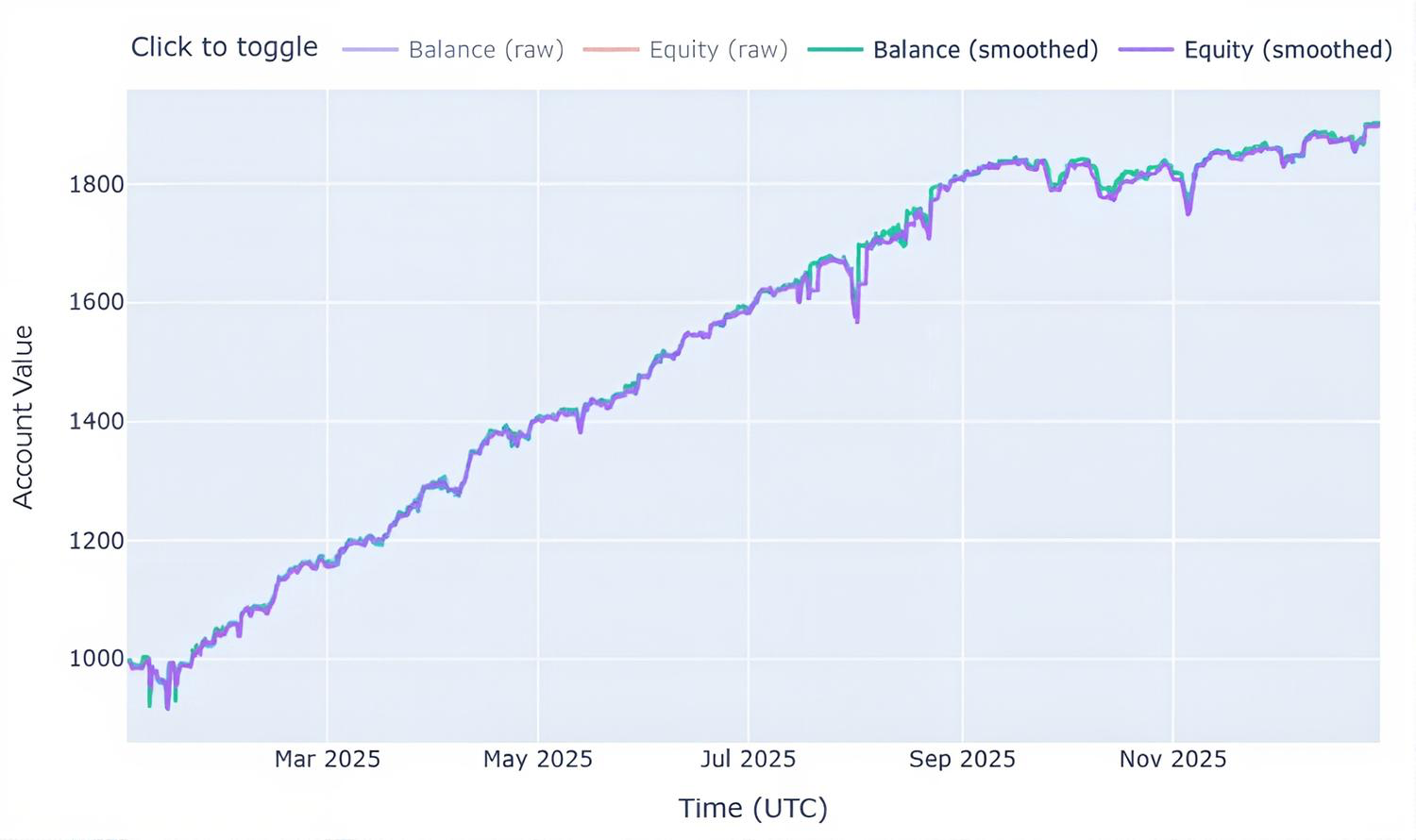
Schlussfolgerung
Die MetaTrader 5 Python-API ist in Bezug auf die Bereitstellung historischer Daten deutlich überlegen. Sofern Sie dieses Framework nicht unter Linux oder macOS ausführen – was mittlerweile unterstützt wird –, sollten Sie stets auf Daten zurückgreifen, die direkt aus dem Terminal stammen. Dies sorgt bei komplexen Programmen für eine bessere Leistung und einen geringeren Speicherverbrauch.
Tabelle der Anhänge:
| Dateiname | Beschreibung und Verwendung |
|---|---|
| single_thread.py | Ein Beispiel für einen Handelsbot für mehrere Währungen, der alle Instrumente in einem einzigen Thread testet. |
| parallel.py | Ein Beispiel für einen Handelsbot für mehrere Währungen, der eine Handelsstrategie für verschiedene Instrumente in einer Multithread-Umgebung testet, wobei jedes Instrument in einem eigenen Thread läuft. |
| tester.json | Enthält wichtige Konfigurationsoptionen für die Klasse „StrategyTester“, die dem Konfigurationsbereich für Strategien in MetaTrader 5 ähnelt. |
| requirements.txt | Es enthält alle in diesem Projekt verwendeten Python-Abhängigkeiten. Die in diesem Projekt verwendete Python-Version ist 3.11.0rc2 |
Übersetzt aus dem Englischen von MetaQuotes Ltd.
Originalartikel: https://www.mql5.com/en/articles/20958
Warnung: Alle Rechte sind von MetaQuotes Ltd. vorbehalten. Kopieren oder Vervielfältigen untersagt.
Dieser Artikel wurde von einem Nutzer der Website verfasst und gibt dessen persönliche Meinung wieder. MetaQuotes Ltd übernimmt keine Verantwortung für die Richtigkeit der dargestellten Informationen oder für Folgen, die sich aus der Anwendung der beschriebenen Lösungen, Strategien oder Empfehlungen ergeben.

 Die MQL5-Standardbibliothek im Überblick (Teil 8): Ein hybrides Handelsjournal mit CFileTxt
 MQL5 Trading Tools (Teil 16): Verbessertes Supersampling-Anti-Aliasing (SSAA) und hochauflösendes Rendering
 MQL5-Handelswerkzeuge (Teil 17): Vektorbasierte abgerundete Rechtecke und Dreiecke
 Optionshandel ohne Optionen (Teil 1): Grundlagen und Nachbildung mittels des Basiswerte

- Freie Handelsapplikationen
- Über 8.000 Signale zum Kopieren
- Wirtschaftsnachrichten für die Lage an den Finanzmärkte
Sie stimmen der Website-Richtlinie und den Nutzungsbedingungen zu.
Ist die Entwicklung eines Strategietesters in Python nur ein Experiment oder gibt es dafür auch praktische Anwendungsmöglichkeiten?
Hallo, ich bin wirklich beeindruckt von Ihrem Projekt. Ich habe eine Frage, da ich großes Interesse daran habe, es genauer zu untersuchen und vielleicht als Open-Source-Projekt weiterzuentwickeln.
Im Strategietester von MetaTrader verwenden wir normalerweise einen Expert Advisor oder einen Indikator, um eine Strategie auszuführen. Daher würde mich interessieren: Wo ist der MQL-Strategiecode in diesem Projekt implementiert, oder gibt es hier überhaupt keinen MQL-Strategiecode?
Das gibt es, deshalb haben wir das hier: https://www.mql5.com/de/docs/python_metatrader5