Quant Desk Pro

Quant Desk Pro

An R-native trade manager for MetaTrader 5. It manages the trades you have already opened: it measures what each one is really risking, protects it, scales out of it on a plan you set, trails what is left, and stops the whole book when the day has gone far enough wrong.

Read this first. Quant Desk Pro does not open trades and has no signal. And it ships in VIEW ONLY: it will not send a single order until you set  I understand the risks  to true in the inputs. Until you do, everything else works - the panel measures, the chart draws, the journal records - so you can run it on your own account for a session before it is allowed to touch anything.

What this is

Quant Desk Pro manages trades that are ALREADY OPEN. It does not look for entries, it has no signal, and it will not decide when you should be in the market. What it does is everything that happens after that decision: it measures what each position is really risking, protects it, scales out of it on a plan you set, trails the remainder, and stops the whole book when the day has gone far enough wrong.

It does not care where a trade came from. A position opened by hand on the desktop terminal, from the MetaTrader phone app, from the web terminal, or by another expert advisor is picked up on the next cycle and managed like any other.

The one idea underneath all of it is R - the money a position would lose if its stop were hit. Quant Desk Pro measures that once, at the moment it first sees the trade, and then keeps it fixed for the life of the position. Every number the product shows you is a multiple of that one number, which is what makes a two-hundred-dollar loss on gold and a forty-dollar loss on EURUSD comparable at a glance.

What it will never do

This matters as much as the feature list, so it comes second rather than last.

  • No grid. It will never open a position to average down a losing one.
  • No martingale. It will never increase size after a loss.
  • No hidden entries. With the entry tools off - which is how it ships - the product sends no order that you did not press a button for, except the protective stop described in Protection.
  • No loosening. A stop this desk has moved into profit is never moved back down. Only you can do that, by hand, in the terminal.
  • No touching your take profit, unless you ask. The desk reads it, warns you when it sits in front of one of your targets, and leaves it exactly where you put it.
  • No third-party server. Nothing leaves your terminal. There is no licence call, no telemetry and no web request of any kind.

Hedging accounts only. On a netting account the product runs in MONITOR ONLY: it measures and displays everything and sends no orders at all, because a netting account has one position per symbol and per-position management is not possible on it.

Before you start

  • MetaTrader 5, build 3800 or newer.
  • A HEDGING account. Check it in Tools - Options - Trade, or on the terminal's account information: it must say Hedging.
  • Algo Trading enabled in the terminal toolbar.
  • Allow Algo Trading ticked in the expert's own Common tab.

The product runs on one chart and manages whatever its scope tells it to. One chart is enough for the whole account; you do not need a copy per symbol.

Five minutes to running

Read this section even if you never read another one.

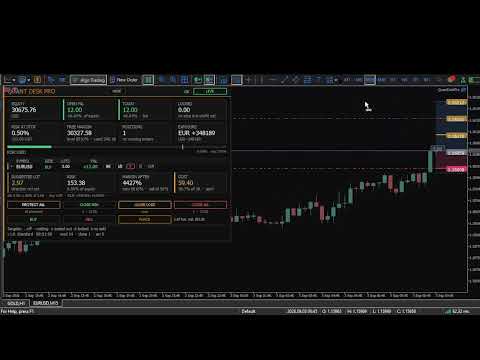
  • Drag Quant Desk Pro onto any chart. The panel appears in the top-left corner and can be dragged anywhere with the mouse.
  • Look at the chip in the top right of the panel. It will say VIEW ONLY.
  • THE PRODUCT SHIPS IN VIEW ONLY AND WILL NOT SEND A SINGLE ORDER UNTIL YOU CHANGE THAT. This is deliberate. A tool that can close your positions should not be able to do it because you dragged it onto the wrong chart.
  • Press F7, find I understand the risks in the first group, and set it to true. The chip turns green and reads LIVE.
  • Choose a preset in the second group. Standard is a sensible starting point and is described in Presets.
  • Open a trade, or let the desk find one you already have. Watch the panel fill in.

Until you set that consent input, everything works except sending orders: the panel measures, the chart draws, the journal records. It is a full dry run of the product on your own account, and it is worth spending a session in it.

The one idea: sealed R

One R is what the position loses if its stop is hit. Quant Desk Pro seals that number the first time it sees the trade and never recalculates it.

An example. You buy 0.20 lots of EURUSD at 1.09500 with a stop at 1.09200. Thirty points on 0.20 lots is sixty dollars, so one R is sixty dollars for this trade, for as long as it lives. At +120 dollars the panel reads +2.00R. If you later move the stop up to breakeven, the trade is still measured in sixty-dollar units - because that is what you actually risked to get here.

This is the part most trade managers get wrong. If R were recalculated from the CURRENT stop, then every time the stop moved up the same profit would suddenly be worth more R, and a trade that had gone nowhere would appear to be winning. A sealed R is the only version of the number that can be compared between trades, between symbols and between weeks.

The figure the panel shows is NET. Anything an earlier target already banked, plus swap, plus commission, is inside it. +1.00R means the position has actually delivered one R into the account, not that price has travelled one R.

If a position arrives without a stop, there is nothing to measure. The desk then estimates R from an ATR multiple so that the rest of the product has something to work with - see InpFallbackRiskATR - and the moment a real stop exists the position is protected at that estimated level. Set that input to 0 if you would rather the desk simply refuse to manage a stopless trade.

Reading the panel

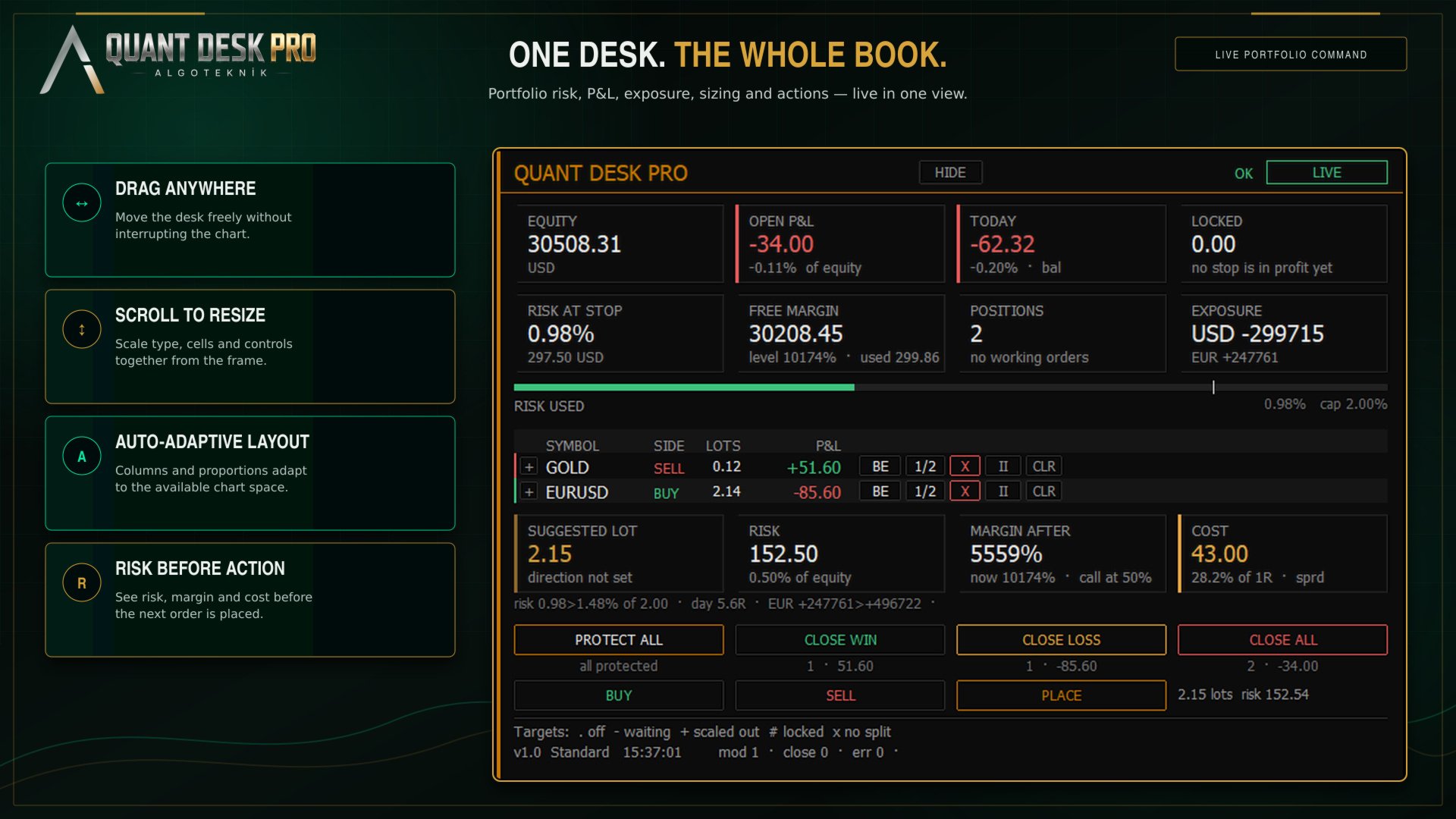
The panel is in three tiers. Small grey capitals name a thing; the large figure under them is the thing; the small line under that is its context. Nothing else on the panel is decoration.

The Money Row

  • EQUITY — Account equity, refreshed every cycle.
  • OPEN P&L — Every managed position added up, net of swap and commission, with its share of equity underneath.
  • TODAY — Today's result: realised plus floating, with deposits and withdrawals removed. The tag says which basis the daily limits use - bal for the day-start balance, eq for day-start equity, eq~ when the desk attached mid-day and had to take equity as found. Ln counts losing trades in a row.
  • LOCKED — What the stops have already secured. If every stop that sits in profit were hit right now, this is what the account would keep.

The Limits Row

  • RISK AT STOP — What the account would lose if every stop were hit at once, as a share of equity. Positions with NO stop are not counted into it - their loss is not bounded by anything, and averaging a measured risk with an unmeasurable one would be the most dangerous thing this panel could say. They are named beside the figure instead: 2 UNPROTECTED, in red.
  • FREE MARGIN — Margin still available, with the margin level and margin in use underneath. Amber inside twice your broker's own margin call level, which is read off the account rather than guessed.
  • POSITIONS — How many open positions pass the scope and ownership filters, and how many working orders are waiting.
  • SPREAD — The current spread on this chart's symbol. With the R layer on, this cell shows net currency exposure instead.

The Risk Bar

Under the cells is a single bar: open risk against the cap you set. The white tick is the cap, and it sits at four fifths of the bar's length rather than at the end - so being over the cap looks like being over the cap, instead of like a bar that has been full since some point you cannot identify.

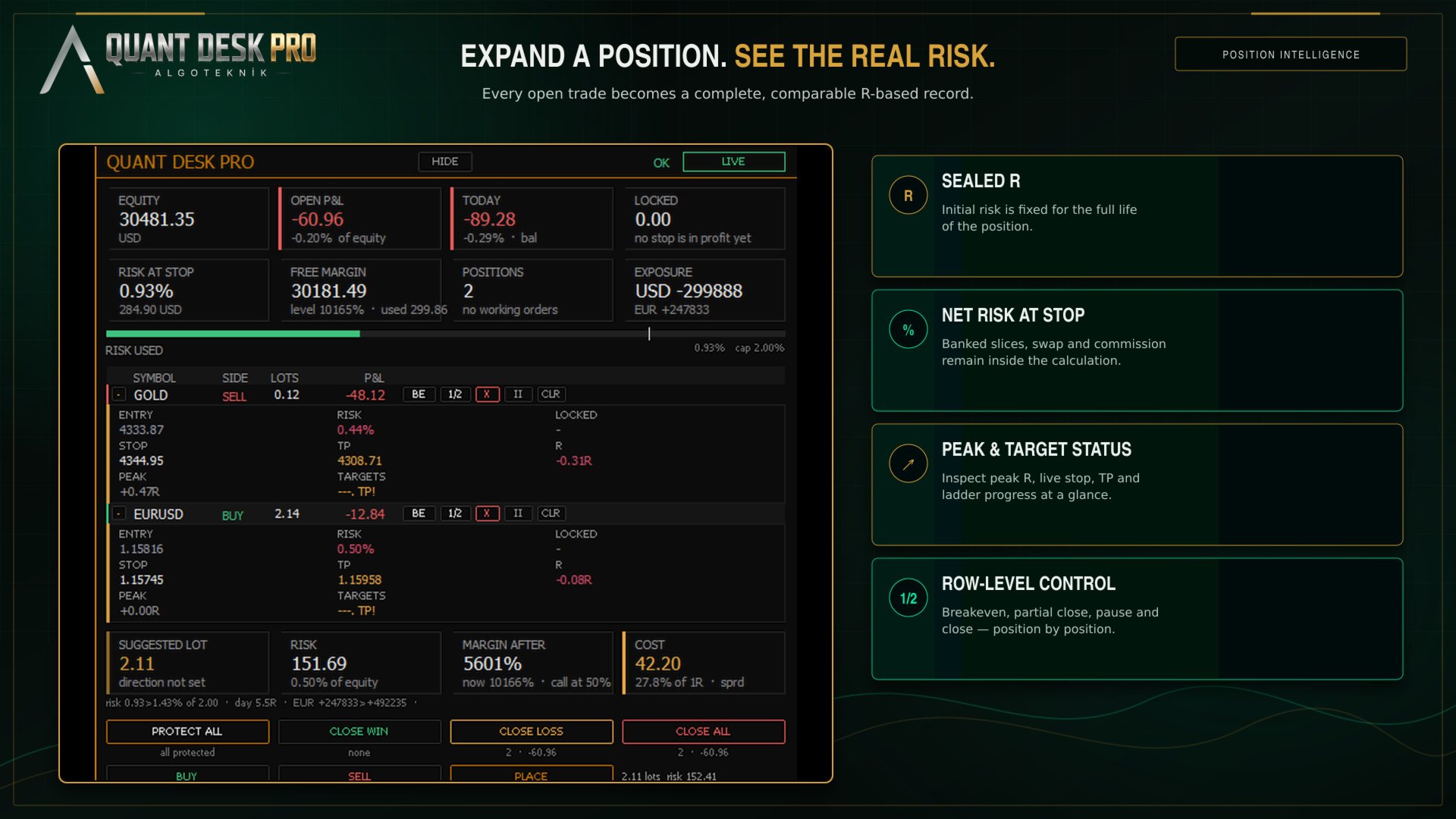
The Position Table

  • SYMBOL — The symbol. A two-pixel edge down the left of the row carries the direction in colour, so the shape of the book reads before any word does.
  • SIDE — Buy or sell.
  • LOTS — Volume still open, after any partial closes.
  • ENTRY — The price the position was opened at.
  • P&L — What this position is worth right now, net.
  • RISK — What hitting THIS position's stop would cost the account, as a share of equity - banked slices and swap counted. 0.00% means the stop is far enough into profit that nothing is at risk. A dash means there is no stop, and then the loss is not zero, it is unknown.
  • LOCKED — The mirror of RISK: what hitting the stop would BANK, when the stop sits in profit.
  • STOP — Where the stop actually sits. Green once it locks a profit, white while it still costs money, red when there is none.
  • TP — Your own take profit, as the broker holds it. Amber when it sits in front of one of your targets and will end the trade before the plan finishes.
  • R — The same result in R. Off by default - see The R layer.
  • PEAK — The best R this position has reached. Off by default.
  • TARGETS — One character per exit target. Off by default. See The exit ladder.

The Row Buttons

  • BE — Move this position's stop to its entry price, plus the breakeven buffer. Nothing is closed.
  • 1/2 — Close half of what is STILL OPEN, at market. Note the difference from a target: a target closes a share of the position's ORIGINAL size, this button closes a share of what is left.
  • X — Close this position completely. Click once to arm, again within six seconds to send.
  • II — Take this position off the desk. No targets, no trailing, no automatic stop moves - it is still measured and still shown. The button becomes GO to hand it back. The setting survives a restart.
  • TP — Put a take profit on the broker's server. Press it on a position that already has one and it CLEARS it. See The size calculator.

The Desk Buttons

Four buttons act on the whole managed book, and each carries its own consequence underneath it before you press: how many positions, and what they are worth.

  • PROTECT ALL — Put a stop on every managed position that has none, at the price its R was sealed from.
  • CLOSE WIN — Close every managed position in profit. Profit here is net.
  • CLOSE LOSS — Close every managed position that is losing, net.
  • CLOSE ALL — Close the whole managed book at market.

The three closing buttons ask twice by default. Every button on the panel has a tooltip: hover for a second and it explains itself in plain sentences.

The R layer

Out of the box the panel speaks money. R, PEAK, the target glyphs, the R-denominated open risk and the currency legs are hidden behind one switch: InpShowRLayer.

This is not a crippled default. It is the recognition that a trader who has never sized a position in R cannot read those columns on day one, and that three columns of money they can read are worth more than three columns of R they cannot. Turn the layer on when R has stopped being a foreign word - most people do it within a week, and then never turn it off.

InpValueUnit is a separate choice and applies to both the panel and the chart: money, R, percent of equity, or R and money together.

Protection

A managed position with no stop is the one case where this product acts on its own without being asked, and it is worth understanding exactly what it does.

With InpAutoProtect on - which is the default - any managed position that has no stop is given one, at the price its R was sealed from. Not when it goes into profit; immediately, on the first cycle that sees it. The trade that runs straight against you is the one that needs a stop most, and it is exactly the trade that a profit-triggered mechanism never reaches.

If you would rather place your own stops, switch it off. The panel still counts what is unprotected and the PROTECT ALL button still does the same job on demand.

The exit ladder

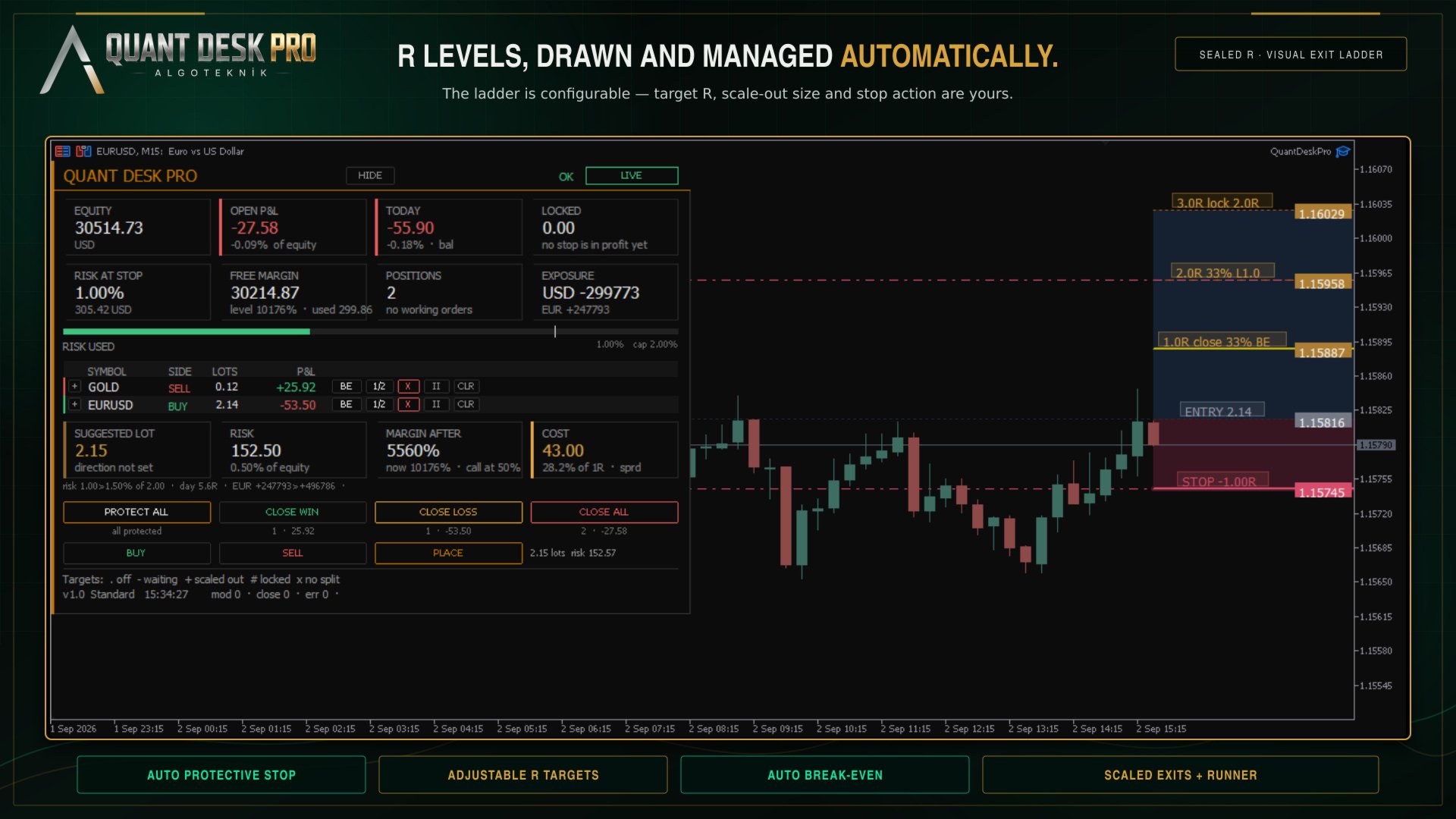
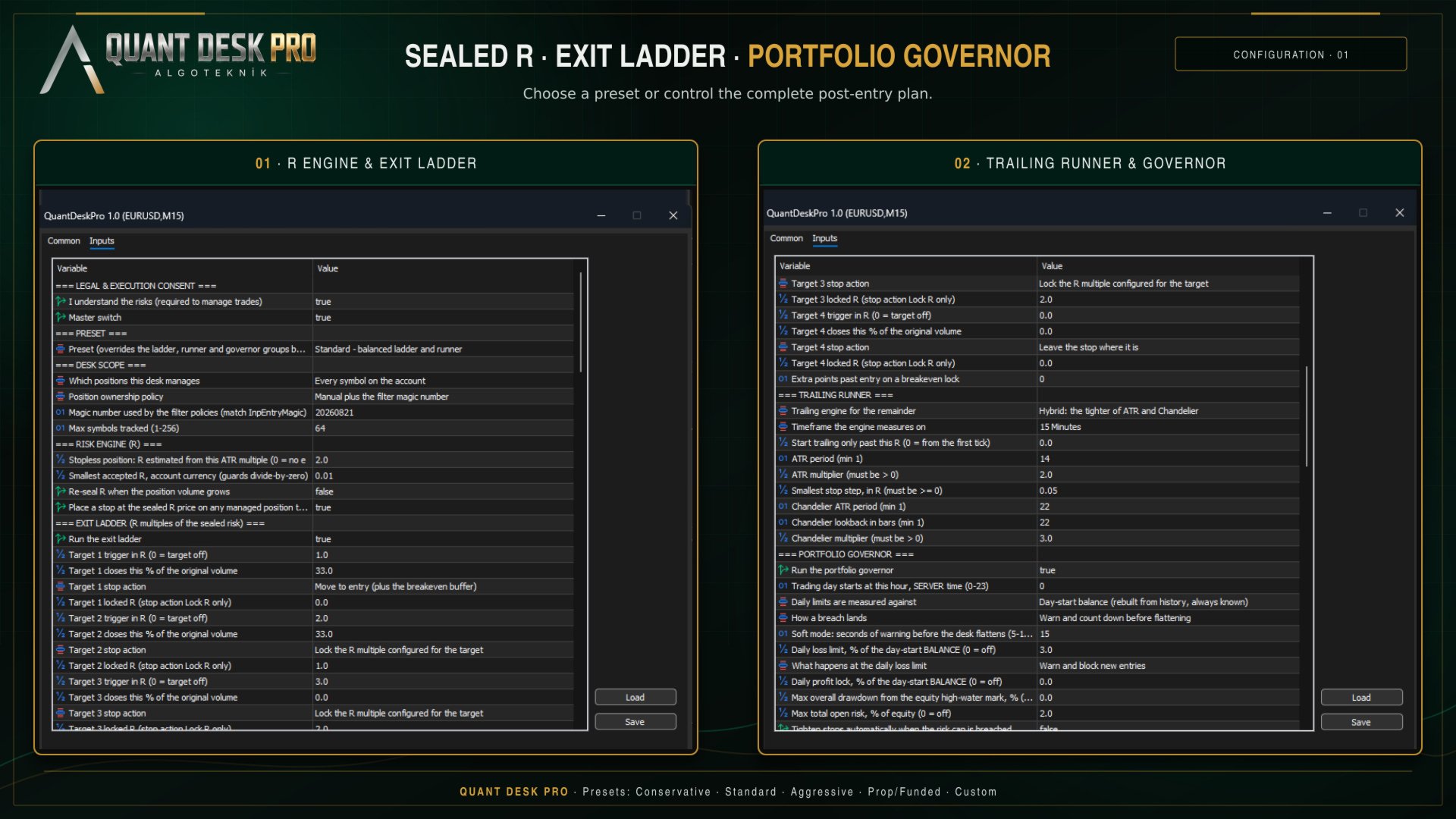
The ladder is a list of up to four TARGETS. Each one is a level in R, and when the trade reaches it two things can happen: a share of the position is closed, and the stop is moved.

The default ladder:

  • +1.0R — 33% of the original volume — to breakeven - the trade is now free
  • +2.0R — 33% of the original volume — to +1.0R - one R is banked and locked
  • +3.0R — nothing — to +2.0R - the remainder runs with two R secured
  • - — target 4 is off

Note what the third target does NOT do. It closes nothing. The point of a ladder is that something is still running when the move keeps going, and a target that closes the last of the position is the end of the trade, not the top of the plan.

The percentage is always a share of the ORIGINAL volume, not of what is left. Two 33% targets take two thirds of the trade, not 33% and then 33% of the remaining 67%.

The TARGETS column shows one character per target, in order:

  • . — the target is switched off
  • - — armed and waiting - price has not reached it
  • + — half done: either the slice closed or the stop landed, not both
  • # — done
  • x — this position is too small to split, so this target can never fire
  • TP! — your own take profit sits in front of a target and will end the trade first

The x is worth reading carefully. If your position is 0.01 lots and your broker's minimum is 0.01, a 33% slice cannot be sent. The desk says so on the row rather than failing quietly every time price crosses the level, and it tells you at start-up which of your targets will never fire at the minimum lot for your symbols.

The trailing runner

Whatever the ladder has not closed is trailed. Four engines are available:

  • Off — no trailing; only the ladder moves stops
  • ATR — a multiple of ATR behind price
  • Chandelier — a multiple of ATR below the highest high since entry, or above the lowest low
  • Hybrid — whichever of the two is further into profit, which is the default

Two guards apply to all of them. A stop is never moved backwards, and it is never moved by less than InpMinMoveR - a stop that creeps a tenth of a point every tick generates server traffic and achieves nothing.

InpTrailStartR delays trailing until the trade is far enough along. Left at 0 the runner engages from the first tick.

The portfolio governor

Everything above works on one position. The governor works on all of them, and on the day.

  • Daily loss — the day's result against the day-start balance
  • Daily profit — the same, upward - lock the day in when it has gone well
  • Max drawdown — equity against its own all-time high on this account
  • Open risk cap — everything at stake across the book at once
  • Losing streak — consecutive losing trades closed today
  • Currency leg — net exposure to one currency across every symbol - long EURUSD and long GBPUSD are two trades but one bet against the dollar

A breach can block new entries, or flatten the book, or both. In SOFT mode the desk warns for a configurable number of seconds first, so that a spike through the limit and back does not close your day for you.

The trading day starts at InpDayResetHour in SERVER time. On a funded account this matters: your programme's day probably starts at 17:00 or 00:00 New York, which is rarely your broker's midnight. Set it to the hour you are actually graded on, and the anchor, the day's P&L and every daily limit move with it.

Presets

A preset overrides the ladder, runner and governor groups in one choice, and prints exactly what it applied to the journal when it starts.

  • Conservative — Scales out early and locks in fast. Tight daily loss limit.
  • Standard — The ladder described in The exit ladder. A reasonable place to begin.
  • Aggressive — Later targets, looser trailing, more room to run.
  • Prop / funded — Built around a daily loss limit and a drawdown ceiling, because that is what the account is graded on.
  • Custom — Nothing is overridden. Every input below is yours.

Choose a preset first and read what it did in the journal. Then, if you want to change one thing, switch to Custom and change it - a preset ignores individual edits by design, so that half-applied configurations cannot happen.

The size calculator

Under the table is a block that answers one question: how big, at my risk setting, on this account, right now.

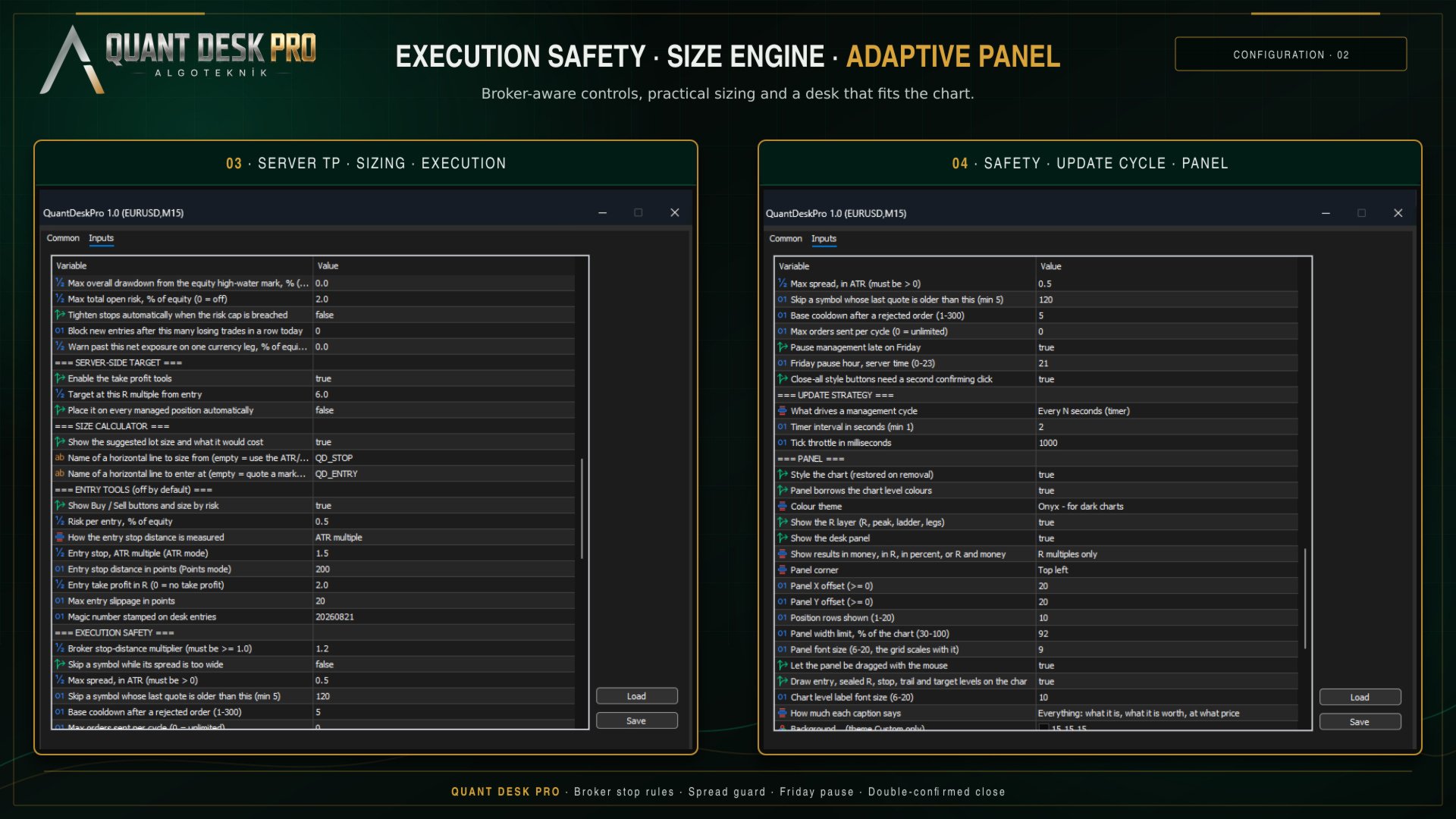
  • SUGGESTED LOT — The volume that makes the distance from entry to stop cost the risk percentage in your inputs. Lot step and the broker minimum are honoured, so it is a volume that can actually be sent.
  • RISK — What that volume ACTUALLY risks - not the budget it was sized from. The volume is floored to the lot step, so the tradeable size always risks a little less than you asked for, and the cell says both when the gap is worth seeing.
  • MARGIN AFTER — The margin level once this trade is on. The current level is in the FREE MARGIN cell above. Amber inside twice your broker's margin call level, red at or below it.
  • COST — What the trade costs before price has moved at all: the spread at that volume, plus commission averaged from what THIS account has actually paid on THIS symbol over the last month. And what share of one R that adds up to, which is the number that matters.

The line underneath is headroom: what the trade would leave of every limit that could refuse it. If a limit is already in force it says so in red, first, before anything else makes the trade look available.

By default the stop distance comes from an ATR multiple and the block says so - with no line on the chart there is nothing to take a direction from, and the cell reads 'direction not set' rather than inventing one. Draw a horizontal line, name it QD_STOP, and the block sizes from YOUR stop and takes the direction from which side of price the line sits on. Add a second line named QD_ENTRY and it quotes a working order instead.

The server-side target

Every exit in this product needs the terminal open, the chart loaded and the expert running. The targets, the trailing stop, the governor's flatten - all of them. A take profit needs none of that: it lives on the broker's server and fires whether or not anything of yours is running.

That is what this is for. It is not a rival to the ladder, and the default sits at 6R - clearly beyond a three-target plan - because a take profit at your highest target does not complete the ladder, it truncates it. If you set it inside the plan, the product tells you at start-up and does it anyway; it is your trade.

The TP button is a toggle. On a position with no target it places one; on a position that has one it CLEARS it. The desk never overwrites a take profit you set yourself.

Two terminals, one account

If you run Quant Desk Pro on two charts, or on two terminals against the same account, only one of them manages. The others read the same account and show the same numbers, and their state chip says STANDBY.

The claim is written to the shared terminal folder and refreshed while the owner lives. If that terminal closes, another takes over within a minute. You never have two desks moving the same stop.

In the Strategy Tester

Quant Desk Pro runs in the tester and the panel works there, but understand what you are testing.

This product does not open trades, so a tester run with nothing to manage produces nothing - correctly. To see it work, switch the entry tools on (InpEnableEntryTools) so that the tester has positions to manage, or run it in visual mode and open trades by hand from the panel.

The consent gate is bypassed in the tester, so you do not have to set it to run a test.

What a tester run will NOT tell you is whether this product is any good, because it manages YOUR trades. Its result is a function of your entries. The honest way to evaluate it is forward, on a demo account, on the trades you would have taken anyway.

The record

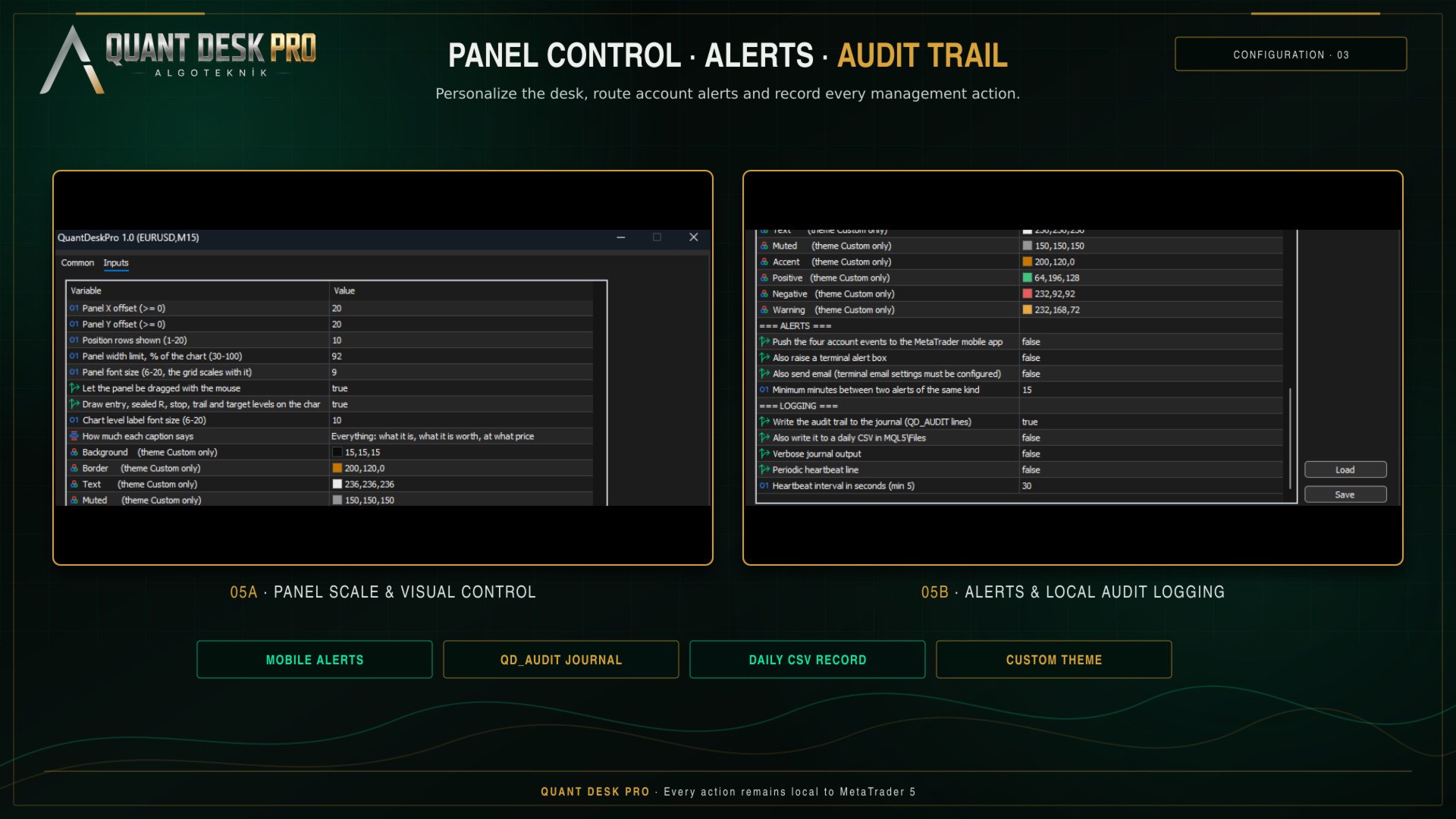
Everything the desk does is written to the Experts journal as QD_AUDIT lines: what was sent, on what, at what price, why, and what R it was measured against.

The same lines go to a daily CSV in MQL5\Files, semicolon separated, which opens directly in a spreadsheet. When a position closes, one POSITION_CLOSED record carries the whole life of the trade: net R, gross R, what it cost in commission and swap, the peak it reached, which basis its R came from, which targets fired, whether the stop was moved by hand, and how it ended.

That record is the point. A month of it answers questions no backtest can - whether your winners are actually reaching the second target, whether the trailing stop is taking you out of trades that then continue, whether your average loss is really one R.

If something does not happen

  • VIEW ONLY — Consent was never given. F7, first group, I understand the risks - set it to true.
  • MONITOR ONLY — This is a netting account. The desk will measure but never send. Nothing to fix; it is not the account type this product manages.
  • BLOCKED — The terminal or the account is refusing trades. Check the Algo Trading button in the toolbar and the expert's own Common tab.
  • STANDBY — Another Quant Desk Pro already owns this account. See Two terminals, one account.
  • PAUSED — The Friday cut-off is in force. InpPauseFridayLate.
  • OFF — The master switch. InpEnabled.
  • GOVERNOR - ... — A portfolio limit is in force. The message names which one.

R shows n/a on a row. The position's R could not be sealed - it has no stop and InpFallbackRiskATR is 0, or the priced risk is below InpMinR0Currency. Give the trade a stop, or press PROTECT ALL.

A target shows x. The position is too small to split at your broker's minimum lot. Nothing is broken; that target cannot fire on that trade.

The panel is too wide, or too narrow. The table is fitted to the chart, not to the screen: it is given a share of the chart's width - InpPanelMaxWidthPct, 92% out of the box - and if the columns do not fit inside it they are given up in a fixed order until they do. SIDE goes first, because the coloured edge down the left of every row already carries the direction and carries it better; then PEAK, ENTRY, TP, LOCKED, LOTS, and the R columns. SYMBOL, P&L and STOP are never dropped - what it is, what it is worth and where the protection sits are the table. Set the limit to 45 for a panel that stays out of the way of the chart, or to 92 to see everything that fits. It names what it dropped in the journal.

The panel is smaller than the font size you asked for. The size in the inputs is a ceiling, not an instruction: the panel measures itself against the WIDTH it is allowed and comes down a point at a time until it fits, saying so once in the journal. It never goes below 7 - past that it gives up columns instead, because a font that cannot be read is not a smaller panel, it is no panel. Height never shrinks the font: a panel taller than its chart scrolls under the mouse wheel while the cursor is over it, and HIDE collapses it to the title bar.

The panel looks different on another monitor. It is the same panel in a different shape. The account block, the size block and the desk buttons go two across on a chart with height to spare, and four across on a wide one that has none - four across costs width and gives back roughly a third of the panel's height, which is what a 1920 by 600 window needs and what a tall one does not. The desk measures the chart it is on and picks, preferring the narrow shape whenever it fits, because the panel is not the product and the price behind it is. Nothing is added or taken away in either shape. It says which one it chose, and why, in the journal.

To overrule it, resize the panel by its own frame. Put the cursor on any edge - the edge lights up when it is in reach - and either roll the mouse wheel or hold the left button and drag toward the opposite side. The far edge stays anchored, so the panel grows and shrinks toward you, and everything on it scales together: type size, cells, buttons and spacing. The top edge is worth knowing about, because it is on screen whatever the panel's height is doing - pulling it down is always available as the way out of a panel that overflows a short chart.

Type size steps in whole points, so one notch of the wheel is one point and the panel settles on sizes rather than following the mouse continuously. It ranges from 6 to 20 by hand; left to itself the desk will not go below 7, because past that the small lines stop being legible and that is not a decision a tool should make for you. Click the frame without dragging to hand the size back to the desk. What you choose is remembered per symbol and survives a restart.

The status line at the bottom of the panel is the one place that answers 'why did nothing happen'. Read it before anything else. The footer beside it counts what this session has done - stops moved, positions closed, orders refused - and why any action was skipped this cycle.

Every input

Every setting, in its group, with its default and what it does, is documented in the manual. It is generated from the product’s own source, so it cannot describe a setting that is not there. A Market product may carry one file, so the manual is published on the channel linked at the foot of this page rather than packed with the EX5.

algoteknik

Support, updates and every other product: mql5.com/en/users/bugraky123
Product channel: mql5.com/en/channels/trendtower

Quant Desk Pro version 1.0

推荐产品
TRADE PANEL MASTER — Know Your Risk Before You Click Open your chart. See your panel. Trade with confidence. Before you click Buy or Sell, Trade Panel Master shows you  exactly what you risk, what you gain, and your R:R ratio —  in real time. No mental math. No surprises. FEATURES - Lot sizing with real-time margin display - SL & TP in 3 modes: Points / Money / Price - Au
FREE
Truvana Trend Campaign Manager EA (TCM) Advanced Basket Management & Profit Locking Tool for Trend Traders Short Description Turn strong trends into managed campaigns. Truvana TCM is a professional trade management EA designed for traders who already know how to identify trends and execute entries. The EA automatically manages basket expansion, validates risk before adding positions, and locks profits using a broker-side Basket Stop Price (BSP). No martingale. No grid recovery. No signal genera
Local Copy Trader Utility - Professional Copy Trading System Overview Local Copy Trader Utility is the complete solution for mirroring trades between MetaTrader 5 accounts. With both Master and Slave functionality in one powerful Expert Advisor, it delivers reliable, lightning-fast trade copying with zero external dependencies. Perfect for managing multiple accounts, following trading signals, or transferring trades between brokers, this system ensures your positions stay perfectly synchronized
TP SL Bot MT5
Ruslan Brezovskiy
5 (1)
TP SL Bot - 新开立的 订单根据您的指示自动设置止损和止盈的工具。此外,还提供了一个计算器功能,可以计算在给定止损 / 止盈大小下,需要开立交易的数量来达到所需金 额。 有几种 选项来调整大小和参数: 1. 根据用 户指定的百分比来调整止损和止盈金额,作为账户余额的百分比。 2. 根據使用者指定的止盈和停損金額進行調整。 3. 根据开 仓价格的点数( tick )来 调整。 4. 根据开 仓价格的百分比来调整。 特点: 简单易用的界面 适用于市价 订单和挂单 适用于所有品种和 时间周期 多个工作模式 风险管理系统所需正确交易量的计算器 工作原理: !工具在 订单开仓后接收到第一个 tick 时更改订单参数。 模式 1 (存款百分比)。您 设置了存款百分比以计算止损和止盈金额。计算以点数 ( tick ) 为单位进行。 模式 2 ( 金 额 ) 。您设置了期望的止损和止盈金额。工具会自动计算点数 ( tick ) 大小。 注意 ! 前两种模式可能会有小 误差 , 因为指定的金额不一定是最小 tick 值的倍数。 模式 3 ( 点数 ) 。您 设置了止损和止盈的点数 ( tick
GGP Trade Copier MT5
Mohammadmahmood Pirayeh
GGP Trade Copier  EA is an automatic trading bot that can help traders automatically replicate the trading strategies and operations from one trading terminal to others by experiencing exceptionally fast trade copying system. Its easy-to-use setup allows you to copy trades between multiple MetaTrader terminals on the same Windows computer or Windows VPS with lightning-fast copying speeds of under 0.5 seconds. The software supports multiple trading varieties, including Forex, commodities, stocks
Equity Tracker MT5 Equity Tracker MT5 是一款用于 MetaTrader 5 的账户监控型智能交易系统(Expert Advisor),可通过通知消息报告交易活动、账户状态和技术运行情况。 该智能交易系统独立于任何交易逻辑运行,不会影响订单执行或交易管理。 本产品不会开仓、修改或平仓交易。 它仅用于监控和发送通知。 用途 Equity Tracker MT5 适用于希望随时了解交易账户状态、但又不想持续盯盘的交易者。它可以与任何交易策略或其他智能交易系统同时使用。 账户级别监控 交易活动通知 技术状态监测 账户与风险状态监控 该智能交易系统会持续评估账户参数,并在满足预设条件时报告变化。 净值(Equity)和回撤水平通知 保证金水平监控 用户自定义预警阈值 心跳机制与终端状态 可启用心跳机制,定期确认 MetaTrader 终端和智能交易系统是否正常运行。 如果心跳消息停止,可能表示终端卡死、崩溃或连接中断。 定期状态确认消息 提前发现终端或 VPS 中断问题 通知发送方式 通知通过 MetaTrader 的 WebRequest 功能发送至受支持
Grid Trading EA is a semi-automated one-click trading EA for both Normal Trading and Grid/Martingale Trading . Normal Trading Simply click Buy or Sell directly from the chart. The EA will automatically manage trades by: Setting Stop Loss and Take Profit Managing Trailing Stop Grid / Martingale Trading (For Hedging Account Type Only) When Grid Trading mode is enabled, the EA will automatically open additional grid orders at specified distances while increasing the lot size based on your settings.
PropWin EA
Nasimul Haque Choudhury
PropWin EA is an advanced automated trading system designed specifically for prop firm traders. It employs a sophisticated hedging strategy that protects your investment by trading simultaneously on your funded prop account AND your personal live account. The result? Even if you don't pass the challenge, your live account profits offset the challenge fee—ensuring you never truly lose money on the attempt. Key Features Automatic Trade Hedging Lightning-fast 100ms scan interval for near-instant
User Manual Buy Trading Utility, Get 1 indicator FREE ! After purchase contact me for your " one indicator GIFT (Any one you want) ", adding you in group. Trading Utility MT5 The manual trader's cockpit. Size every trade by risk, place it from the chart, and manage it without ever opening the order dialog. Eight tabs, seven trailing engines, and every stop and target draggable with one click. One panel between you and the order window. Risk-sized entries, draggable stops, seven trailing modes,
Opening EA - Start Edition Is a tool to trade the OpeningStrategy! The Opening EA is a semi-automated EA for MetaTrader 5! This means that the trader must actively start the EA using the Start button and stop it using the Stop button. This EA pursues an opening strategy which, at the start of trading, e.g. on the DAX or Nasdaq, etc., opens a trading channel with predefined TP's (TakeProfit). Two pending orders with the same lot size are set at the beginning. As soon as one of the pending order
FREE
SL Risk Manager Auto SL System SL Risk Manager Auto SL System 是一款简单实用的工具,可以帮助交易者在 开仓前和开仓后轻松管理止损(Stop Loss) 。 使用本工具,您可以在开仓之前提前设置止损水平。特别是在交易 黄金(XAU) 时,您可以根据 美元金额 设置止损,从而更加直观地控制每笔交易的风险。 您还可以通过控制面板,根据自己设定的比例和参数 自动开仓 。 对于已经开仓的交易,您可以随时快速更新止损水平。止损可以按照以下方式进行管理: 美元金额止损 点数(Pip)止损 此外,本工具也支持对**挂单(Pending Orders)**进行止损管理。您可以在订单成交之前提前设置和调整风险控制水平。 我们的控制面板设计得 简单、清晰、实用 ,无需复杂的操作。您可以在任何时候根据市场情况快速更新止损水平。 主要功能 开仓前设置止损 支持黄金(XAU)美元金额止损 支持点数(Pip)止损管理 更新已有持仓的止损 管理挂单的止损 根据设定的参数自动开仓 简洁易用的控制面板 快速灵活的风险管理 简单。实用。灵活。 使用 SL Ris
MT5 Trade Copier Master - 免费交易广播器 Require Slave EA:   https://www.mql5.com/en/market/product/178686 此 Master EA 仅用于广播交易,但本身无法复制交易。您必须购买并在第二个 MT5 终端上安装 SyncTrade Copier Slave EA 才能实现交易复制。没有 Slave EA,本产品本身没有实际用途。 两个 MT5 终端必须安装在同一台电脑上才能正常进行文件共享。它们不能位于不同电脑或不同 VPS 实例中。 此 Master EA 的功能 此 EA 会监控主账户上的所有交易活动,并通过共享文件实时广播给 Slave EA。 捕获所有交易事件:新开仓、全部平仓、部分平仓以及 SL/TP 修改 实时维护所有持仓状态文件及入场价格 可按 Magic Number 过滤,仅广播指定策略交易 可选择包含或排除手动交易 通过精准持仓跟踪防止重复记录 后台静默运行,占用资源极低 这是一个“设置后无需管理”的 EA。它不会执行任何交易,不连接互联网
FREE
CosmiCLab FIBO
Kirils Subins
CosmiCLab SMC FIBO CosmiCLab SMC FIBO is a professional trading indicator designed for traders who use Smart Money Concepts (SMC), market structure analysis and Fibonacci retracement levels. The indicator automatically detects market swings and builds Fibonacci levels based on the latest impulse movement. It also identifies market structure changes such as BOS (Break of Structure) and CHOCH (Change of Character), helping traders understand the current market direction. CosmiCLab SMC FIBO also pr
Key Benefits at a Glance: Lorentzian ML signal generation Majority voting across 3 timeframes Automatic market regime detection Smart equity recovery with group profit targets 1% risk‑based adaptive lot sizing ATR‑based dynamic SL/TP & trailing Emergency drawdown cut Live on‑chart info panel Hybrid Lorentzian Gold ML EA v2.0 – Intelligent Adaptive Trading for XAUUSD Next‑Gen Machine Learning Core A Lorentzian KNN classifier analyzes 5 normalized features (RSI, WaveTren
FREE
Auto Stop Loss MT5
Nabil Oukhouma
5 (1)
“一次设置,自动运行”的多品种风控管家 ️ 永远不要让您的交易裸奔。 Auto Stop Loss (MT5 Manager) 是注重资金安全的交易者的终极后台工具。与普通的交易面板不同,该工具在后台不知疲倦地运行,即时保护您的每一笔交易。无论您是手动开仓还是通过其他 EA 交易,该管家都能确保每个头寸立即附带硬止损 (Stop Loss)、止盈 (Take Profit) 和动态追踪止损 (Trailing Stop)。 颠覆性功能: 仅需在 一个图表 上即可管理您的整个投资组合。 无需打开 10 个不同的窗口拖慢电脑速度。只需列出您喜欢的货币对,该管家将同时监控所有货币对。 [   Get the MT4 Version Here   ] 核心功能 多品种控制 (节省 CPU 资源) :从一个图表管理 EURUSD, GBPJPY, US30 和黄金 (Gold) 的所有交易。 工作原理: 在逗号分隔的列表中输入代码(例如:EURUSD, GBPUSD, XAUUSD)。EA 将即时扫描并管理所有这些品种。 即时注入止损和止盈 :消除“胖手指”错误或网络断开的风险。交
Trading Utility for Forex Currency Pairs Only not for Gold  Functions Auto Lot Calculation based on Risk Auto stoploss  Auto TakeProfit Breakeven Auto Close Half % Close in percentage with respect to the PIPs Pending Orders BuyLimit Sell Limit with distances BuyStop Sell Stop    with distances Trading Informations Risk in percentage For Multiple trades Combine Takeprofit and Combine Stoplosses
King Trade Copier
Mohammed Maher Al-sayed Mohammed Ahmed Saleh
KingCopier – Lightning-Fast Local Trade Copier for MetaTrader (Master + Slave) KingCopier is a professional local trade copier that mirrors every trading action from one Master account to unlimited Slave accounts on the same PC or VPS — with an internal copy latency of just a few milliseconds. It was built by a real trader for daily real-money use, with one goal: whatever happens on the Master must happen on the Slave, instantly and without exceptions. Watch the demo video to see the real cop
Tired of fumbling with lot size calculations and manually managing every trade? The Visual Risk Manager (VRM) is a professional-grade trading panel designed to streamline your trading and enforce discipline. This Expert Advisor is not a strategy; it's a powerful utility that allows you to manage your risk and execute trades with unparalleled speed and precision, directly from your chart. Why You Need the Visual Risk Manager Stop letting emotions and guesswork control your trading. VRM ensures t
Ind5 Extra Report Pad
Vladislav Andruschenko
4.77 (35)
这是一个统计小组,提供MetaTrader 5交易账户的分析。 分析结果实时显示在图表上。 多币种交易非常受欢迎。但是,交易量越大,分析每个交易的盈利能力就越困难。按月分析交易并计算每笔交易的统计数据是更具挑战性的任务。 MT4版本 详细描述 +PDF 如何购买 如何安装     如何获取日志文件     如何测试和优化     Expforex 的所有产品 然而,交易量越大,分析每笔交易的盈利能力就越困难。 按月分析交易和计算每笔交易的统计数据更是具有挑战性的任务。 如果您想全面了解交易系统的表现,有多种工具可以帮助您实现这一目标。 其中一些工具包括报告、统计、myfxbook、交易日志、账户分析、性能统计、分析和创新的仪表盘。 利用这些工具,您可以详细分析自己交易系统的表现,并获得有关优势领域和潜在弱点的宝贵见解。 无论您是希望提高业绩的新交易员,还是希望优化交易策略的经验丰富的交易员,这些工具都能为您提供所需的信息,帮助您做出明智的决策,实现您的财务目标。 该面板提供了一种有效的解决方案,可以分析您的帐户并实时准备详细的统计数据 亲爱的朋友和我们的EA用户 Expfor
FREE
其中一个数字序列称为“森林火灾序列”。它被公认为最美丽的新序列之一。它的主要特点是该序列避免了线性趋势,即使是最短的趋势。正是这一属性构成了该指标的基础。 在分析金融时间序列时,该指标试图拒绝所有可能的趋势选项。只有当他失败时,他才会认识到趋势的存在并给出适当的信号。这种方法可以让人们正确地确定新趋势开始的时刻。然而,误报也是可能的。为了减少它们的数量,该指标添加了一个额外的过滤器。当新柱打开时会生成信号。在任何情况下都不会发生重绘。 指标参数: Applied Price   - 应用价格常数; Period Main   - 指标的主要周期,其有效值在 5 - 60 之间; Period Additional   - 附加周期,此参数的有效值为 5 - 40; Signal Filter   - 附加信号滤波器,有效值 0 - 99; Alerts   - 启用后,指示器会在出现新信号时提醒您; Send Mail   - 允许指标向电子邮件发送消息; Push   - 允许您发送 Push 消息。
Trendline EA MT5
Carlos Oliveira
4.8 (15)
Trendline EA MT5 Trendline EA MT5 是一款适用于 MetaTrader 5 的半自动专家顾问(EA),用于根据用户绘制的趋势线执行交易操作或发送提醒。 MetaTrader 5 并未提供直接通过趋势线下单或管理交易的原生功能。本专家顾问通过监控用户定义的趋势线,在价格与其发生交互时执行预先设定的操作,从而扩展了平台的标准行为。 该专家顾问不定义也不应用任何交易策略。所有交易逻辑和决策完全由用户自行控制。 附加资料 用户指南与文档 MT4 版本 功能概览 基于趋势线的交易执行 当价格触及、突破或回调趋势线时执行买入或卖出操作 可为每条趋势线单独设置止损、止盈和交易手数 可根据 K 线收盘或价格与趋势线的距离触发操作 监控与提醒 在趋势线触及、突破、回调或假突破时生成提醒 支持弹窗、电子邮件、推送通知和声音提醒 可选:当价格到达退出趋势线时自动平仓 用户自主分析 专家顾问不会绘制、修改或重新定位趋势线 所有图表分析保持不变,完全由用户控制 基本使用方法 将专家顾问加载到图表上 使用 MetaTrader 的标准工具绘制趋势线 在趋势线名称中添加操作指令 专家
购买前先在真实市场中进行测试 :  本产品包含一个 免费试用版本   ,您可以直接下载并在 模拟账户 上使用。在购买前,请在真实市场条件下测试所有功能。您可以在本产品的第一条评论中找到下载链接。 Prop Firm Trade Assistant 是一个专业的图表面板,专为希望通过明确的规则、受控的风险和规范的执行来 通过并保护 Prop Firm 账户 的交易者而设计。 这款产品适合您吗? 本产品适合希望交易更加轻松、快速和智能的手动交易者。该助手可以帮助您 避免更多亏损和心理错误。 价格 : 前100位购买者的价格保持在50$,之后将提高至100$,作为本产品的合理价格。 Prop Firm Trade Assistant 是一款专为 prop firm 交易 定制的专业交易助手。它帮助您定义 prop 账户、在面板中记住公司规则,然后在风险始终可控的情况下执行并管理交易。 无需在计算器、笔记和图表之间来回切换,一切都集中在一个现代化仪表盘中:您的限额、风险百分比、入场水平以及实时账户状态——帮助您在交易时保持纪律。 Prop Firm Trade Assistant 的主要功能
Inverted_Chart_EA Utility Expert Advisor Inverted_Chart_EA creates and maintains a mirror-inverted chart of any symbol and timeframe. It automatically generates a custom instrument (e.g. US30_INV ) and keeps its price history updated in real time, with bars mirrored around a chosen pivot. This utility gives traders a new way to analyze the market from a different perspective by flipping the chart upside down. Why use an inverted chart? Highlight hidden patterns – price formations that look ordin
按价格设置TP和SL – MT5自动订单修改器 自动为任意交易设置精确的TP和SL价格 ️ 适用于所有货币对和EA,可按符号或魔术号筛选 此EA允许您通过直接价格值(例如EURUSD的1.12345)来设置和应用精确的止盈(TP)和止损(SL)水平。无需点数或Pips。为所有订单或按图表/魔术号筛选实现干净、精准的交易管理。 主要功能: 通过精确价格即时修改TP和SL 应用于所有订单、当前图表或特定魔术号 ️ 输入0以移除TP或SL 连接到任意图表后自动运行 兼容所有交易品种 适用于: 想快速控制TP/SL的手动交易者 需要覆盖默认退出逻辑的EA用户 管理多订单或复杂头寸的交易者 有问题或建议吗? 请留言提出您的问题或功能想法。 您的反馈将帮助我们改进未来版本。 Keywords: 按价格设置TP SL, MT5 TP SL管理, 自动SL TP MT5, 修改SL TP MT5, 交易管理EA, 专家顾问SL TP, 设置止盈价格, 设置止损价格, 应用TP SL MT5, MT5工具EA, SL TP覆盖,
Guardian Yield Keeper is a utility Expert Advisor for traders who want real-time exit management and profit protection for open positions on the current symbol. This EA does not open new trades and does not generate entry signals. Its job is simple: monitor existing positions and close them when your profit or risk conditions are met . It is especially suitable for traders using DCA, Grid, Martingale, or basket trading systems and looking for a dedicated management layer that is more flexible th
PropArmor — 净值保护盾 (Equity Protection Shield) 一键保护您的交易账户免受灾难性回撤的影响。 PropArmor 实时监控您的账户净值,并在净值降至您指定的保护水平时,自动关闭所有仓位和挂单。 专为自营交易公司 (Prop Firm) 交易员、资金账户挑战以及任何希望为其账户提供可靠安全网的人设计。 工作原理 1. 在输入设置中设定您的“净值保护 (Equity Protect)”水平(例如,在 $10,000 的账户中设定为 $9,900) 2. 点击仪表板上的“开始保护 (Start Protect)” 3. PropArmor 每 500 毫秒持续监控您的净值 4. 如果净值触及您的保护水平 → 立即关闭所有仓位 核心功能 净值底线保护 — 以美元设定您的
FREE
Capital Management EA – Smart Risk Management & Profit Optimization for MT5 Take control of your trading capital with smart, automated strategies — fully optimized for MetaTrader 5 (MT5). Looking to protect your capital and maximize profits through automated money management strategies ? Capital Management EA is the all-in-one Expert Advisor for MetaTrader 5 (MT5) that helps you trade smarter, not harder. Core Features: 5-in-1 Capital Management Strategies – Built-in versatility Gr
Intelligent Trade Copier with Missed Trade Recovery Require Free Master EA:  https://www.mql5.com/en/market/product/178682 This Slave EA REQUIRES the FREE SyncTrade Copier Master EA to function. Without the Master EA installed and running on a second MT5 terminal, this product will not copy any trades. Download the FREE Master EA from the MQL5 Market before or after purchasing this Slave EA. Both EAs must be running simultaneously. Both MT5 terminals must be installed on the SAME computer for fi
GridZone Alpha: The Ultimate Semi-Automated Grid & Zone Manager GridZone Alpha is an advanced, interactive trading panel designed for the modern manual trader. Stop staring at the charts waiting for the perfect entry, and stop relying on rigid, fully automated bots that cannot read market context. With GridZone Alpha, you provide the human analysis by identifying your support, resistance, or supply/demand zones. Once confirmed, the Limit Order Engine takes over, instantly deploying a precision,
Price Magnet — Price Density and Attraction Levels Indicator Price Magnet is a professional analytical tool designed to identify key support and resistance levels based on statistical Price Density. The indicator analyzes a specified historical period and detects price levels where the market spent the most time. These zones act as “magnets,” attracting price action or forming a structural base for potential reversals. Unlike traditional Volume Profile tools, Price Magnet focuses on price-time d
该产品的买家也购买
Trade Assistant MT5
Evgeniy Kravchenko
4.41 (216)
它有助于计算每笔交易的风险,容易安装新的订单,具有部分关闭功能的订单管理, 7 种类型的追踪止损和其他有用的功能。   附加材料和说明 安装说明   -   应用程序说明   -   模拟账户应用程序的试用版 线条功能  - 在图表上显示开仓线、止损线、止盈线。 有了这个功能,就可以很容易地设置一个新的订单,并在开仓前看到它的附加特性。   风险管理  - 风险计算功能在考虑到设定的风险和止损单的大小的情况下,计算新订单的成交量。它允许你设置任何大小的止损,同时观察设定的风险。 批量计算按钮 - 启用 / 禁用风险计算。 在 " 风险 " 一栏中设置必要的风险值,从 0 到 100 的百分比或存款的货币。 在 " 设置 " 选项卡上选择风险计算的变量: $ 货币, % 余额, % 资产, % 自由保证金, % 自定义, %AB 前一天, %AB 前一周, %AB 前一个月。   R/TP 和 R/SL - 设置止盈和止损的关系。 这允许你设置相对于损失的利润大小。 例如, 1 : 1 - 这决定了 TP = SL 的大小。 2 : 1 - 这意味着 TP 是 SL 的两倍。 RR -
欢迎来到 Trade Manager EA——这是一个终极风险管理工具,旨在使交易变得更直观、精准和高效。它不仅仅是一个下单工具,而是一个用于无缝交易计划、仓位管理和风险控制的全面解决方案。不论您是新手交易员、资深交易员,还是需要快速执行的剥头皮交易员,Trade Manager EA 都可以满足您的需求,适用于外汇、指数、大宗商品、加密货币等各种市场。 借助 Trade Manager EA,复杂的计算已成过去。只需分析市场,在图表上用水平线标记入场、止损和止盈,设置您的风险水平,Trade Manager 就会立即计算出理想的头寸规模,并实时显示以点、账户货币计价的止损和止盈。每笔交易都得以轻松管理。 主要功能: 头寸规模计算器 :根据定义的风险瞬间确定交易规模。 简单的交易计划 :在图表上用可拖动的水平线直接计划交易,设置入场、止损和止盈。 实时显示 SL 和 TP :以账户货币、点或分显示止损和止盈,便于分析。 高级保护工具 盈亏平衡选项 : 基本盈亏平衡 :当您的交易达到设定水平时自动保护利润。 多级盈亏平衡 :设置多达 4 个级别以逐步保护利润。 尾随止损选项 : 基本尾随
TradePanel MT5
Alfiya Fazylova
4.88 (167)
交易面板是一款多功能交易助手。该应用包含超过50种手动交易功能,并允许您自动执行大多数交易任务。 应用程序说明 + 视频教程: https://www.mql5.com/zh/blogs/post/761102 用于模拟账户的应用程序试用版: https://www.mql5.com/zh/blogs/post/762579 如何安装应用程序: https://www.mql5.com/zh/blogs/post/762580 如何在可视化模式下测试应用程序: https://www.mql5.com/zh/blogs/post/770278 如何在VPS MetaTrader上安装应用程序: https://www.mql5.com/zh/blogs/post/770196 贸易. 只需单击一下即可执行交易操作: 打開掛單和頭寸,並自動計算風險。 一鍵打開多個訂單和頭寸。 打開訂單網格。 按組別關閉掛單和頭寸。 反轉頭寸方向(關閉買入>打開賣出,關閉賣出>打開買入)。 鎖定頭寸(通過開啟缺少的頭寸,使買入和賣出頭寸的數量相等)。 一鍵部分關閉所有頭寸。 將所有頭寸的止盈和止損設置在同
================================================================================ POC BREAKOUT - V20.72. Full Professional Grade Toolkit ================================================================================ POC Breakout is a full MetaTrader 5 trading dashboard for discretionary traders who want breakout signals, Point of Control (POC) context, volume profiles, order flow, market structure, news, alerts, and advanced trade planning in one professional workspace. Attached directly to you
测试版发布 Telegram to MT5 Signal Trader 即将进入正式的 Alpha 版本。一些功能仍在开发中,您可能会遇到一些小错误。如果您遇到问题,请反馈,您的意见将帮助我们改进软件。 Telegram to MT5 Signal Trader 是一款强大的工具,能够将 Telegram 频道或群组的交易信号自动复制到您的 MetaTrader 5 账户。 支持公开和私人频道,可将多个信号提供者连接至一个或多个 MT5 账户。软件优化、高效、稳定,精准控制每笔复制交易。 界面简洁,仪表盘美观,图表交互性佳,导航直观。您可以管理多个信号账户,自定义每个提供者的设置,并实时监控所有操作。 系统需求 由于 MQL 限制,EA 需要配合 PC 端应用与 Telegram 通信。 安装程序可通过官方 安装指南 获取。 核心功能 多提供者支持: 从多渠道复制信号至多个 MT5 帐户 高级信号识别: 关键词、模式和标签全面自定义 逐提供者控制: 可启用/禁用特定信号类型、平仓策略等 灵活风险管理: 固定手数、固定金额、余额/权益百分比、部分平仓设置 可定制 SL/TP: 覆盖信号
Farmed Hedge Yield Farming | All Markets (Manual - Hybrid - Semi/Automated EA) VERIFIED TRADING RESULTS - Farmed Hedge Yield Axi Copy:  https://www.mql5.com/en/signals/2356376 - Farmed Hedge Yield Exn Copy:   https://www.mql5.com/en/signals/2356404 - Farmed Hedge Yield V Copy:  https://www.mql5.com/en/signals/2357156 * Before purchasing, please feel free to send me a message if you have any questions about the product or setup. - You can test the system using Strategy Tester: Visual Mode , a
EA Overfitter
Stephen J Martret
回测看起来很漂亮。但它明天、下周、下个月还能继续赚钱吗? EA Overfitter 让您的 EA 在 100 段它从未见过的价格历史上重新运行。一个分数告诉您这个优势是否真实。 回测告诉您的,是 EA 在某一段价格历史上的表现——那段恰好发生过的历史。您无法从中判断,这个结果有多少来自策略本身,又有多少只是那一条特定路径带来的。 EA Overfitter 回答的正是这个问题。它构建最多 100 段您的 EA 从未交易过的合成价格历史,让策略在全部这些历史上重新运行,并展示它所产生的完整结果区间。您得到的不再是一条幸运或不幸路径上的单个数字,而是一幅真实的图景:策略在陌生数据上多久能赚钱、典型结果是什么样(而不是最好的那一次),以及您的回测离它有多远。 这些世界是由您自己的近期历史重建而成,因此这不是预测——任何从历史数据出发的检验都不可能是预测。它告诉您的是:这个优势是否依赖于价格的某一种特定排列,以及回测数字距离典型结果有多远。在投入资金之前,这才是值得回答的问题。 三个步骤 1. 构建。在图表上选择时间区间和世界数量,然后按 Build。EA Overfitter 会
Telegram to MT5 Multi-Channel Copier   可将您 Telegram 频道中的交易信号自动复制到 MetaTrader 5。无需机器人、无需浏览器扩展、无需手动复制。信号一到 Telegram,EA 几秒内就在您的终端开仓。 产品包含两个组件:一个监听您 Telegram 频道的 Windows 应用程序,以及在 MT5 终端执行信号的本 EA。同时提供 MT4 版本   点此 . 设置指南与应用下载: https://www.mql5.com/en/blogs/post/768988 工作原理 Windows 应用通过您自己的 API 凭据连接 Telegram——不是机器人。这意味着它可以读取您订阅的任何频道、群组或话题,包括私有和 VIP 频道。您还可以把直接给您发消息的信号机器人、私聊,甚至自己的"收藏夹"(Saved Messages)用作信号来源。检测到信号后,应用会解析并交给 EA。EA 按您的经纪商解析品种名称,按您的风险设置计算手数并开仓。 整个过程全自动,无需守在电脑前。专为 24/7 无人值守运行设计:Telegram 连接断开
Astro Trade MT5
Indra Maulana
5 (5)
25% discount on the release of the tool: only for the next 3 buyers Send a message to receive a demo version. AstroTrade Trading Assistant AstroTrade is a comprehensive multi-functional trading utility developed for the MetaTrader 5 platform. It integrates essential tools for trade execution, risk management, and technical monitoring into a single unified interface. The application is designed to assist traders in managing their daily operations through a visual and structured environment. Vi
Exp COPYLOT CLIENT for MT5
Vladislav Andruschenko
3.97 (35)
适用于 MetaTrader 5 的专业交易复制器 快速、专业、稳定可靠的 交易复制器 ,适用于 MetaTrader 。 COPYLOT 可在 MT4 和 MT5 终端之间复制 Forex 交易,并支持 Hedge 和 Netting 账户。 COPYLOT 的 MT5 版本支持: - MT5 Hedge → MT5 Hedge - MT5 Hedge → MT5 Netting - MT5 Netting → MT5 Hedge - MT5 Netting → MT5 Netting - MT4 → MT5 Hedge - MT4 → MT5 Netting MT4 版本 完整说明 + DEMO + PDF 如何购买 如何安装 如何获取日志文件 如何测试和优化 Expforex 的所有产品 您也可以将交易复制到 MT4 终端(MT4 → MT4,MT5 → MT4): COPYLOT CLIENT for MT4 COPYLOT 是一款专业的交易和持仓复制器,可同时与 2、3 甚至 10 个终端协同工作。 支持从 模拟账户和投资者账户 复制,也支持同时在多个终端上运行。 您可以使
HINN MagicEntry Extra
ALGOFLOW OÜ
4.74 (19)
HINN MAGIC ENTRY – the ultimate tool for entry and position management! SIMPLE. FASTEST. INTUITIVE. MAX AUTOMATED. Place orders by selecting a level directly on the chart! full description   ::  demo-version  :: 60-sec-video-description Key features: - Market, limit, and pending orders - Automatic lot size calculation - Automatic spread and commission accounting - Unlimited partitial take-profits  - Breakeven and trailing stop-loss and take-profit  functions - Invalidation leves - Intuitive, a
Premium Trade Manager - 内置交易导师的图表面板 Premium Trade Manager 将一位交易导师嵌入您的图表,并在其下搭载完整的执行引擎。像往常一样建立交易,然后让您的 AI 交易导师 Max 读取这笔具体的交易,结合您的实时账户给出直接判断,再由您决定是否下单:止损是否符合纪律化交易的要求、风险规模是否合理、高影响新闻事件是否即将发布、您是否接近资金盘限额。其下是完整的执行引擎,负责点击之后的一切:一键按风险下单、您在图表上拖动规划且交易进行中仍可随时调整的计划、最多四个分批止盈级别、七种移动止损方式、实时资金盘合规检查、新闻屏蔽保护,以及对自身成本进行评级的点差功能。决策由您做出。Max 给出第二次审视。面板负责此后的一切。 购买前先亲手体验。 直接在浏览器中点击实时面板,这是在购买前感受其工作方式的最快途径。 stein.investments/products/premium-trade-manager Max 是您的一对一 AI 交易导师,他直接内置于面板之中。  他了解您的账户、您的设置和您的规则,用您自己的语言回答,并在每笔交易下单前进
Anchor Trade Manager
Kalinskie Gilliam
5 (8)
Anchor: The EA Manager Your EAs cannot see each other, but Anchor can. Anchor gives you one place to coordinate your EAs, manage risk, and decide when trading is allowed. It works alongside the trading bots you already use without any changes to them. The Problem One EA opens a trade. Then another starts trading. The next thing you know, you wake up to multiple grids built across your account. Each EA may be doing exactly what it was designed to do, but together they can place far more risk on y
Power Candles 策略扫描器——自优化多符号设置查找器 Power Candles策略扫描器 采用与Power Candles指标相同的自优化引擎,可同时扫描您“市场观察”中的所有交易品种。一个面板即可显示当前哪些品种在统计上具备交易价值、每种策略的最佳应用方向、最优止损/止盈组合,并在新信号触发时立即向您发送提醒。 本工具是 Stein Investments 生态系统的一部分 - 18+ 款工具,加上 Max,您的一对一 AI 交易导师。  随时在线,深入了解每一款指标,在您需要梳理思路的那一刻就在那里。  立即认识他: https://stein.investments 您的全面市场监控。每个交易品种超过3,000次自动优化。2种警报类型。一键切换图表并采取行动。 为何您需要此工具 大多数多标的扫描器仅展示价格 波动 。每只股票的波动率、百分比变化、RSI。您仍需自行摸索正确的策略、合适的止损位以及理想的入场阈值。Power Candles策略扫描器针对每只股票自动解答这些问题,仅在数学验证过的交易设置中触发实际入场信号时才会向您发出提示。这就是全部卖点。 自动
Trade Dashboard MT5
Fatemeh Ameri
4.95 (132)
疲于复杂的订单下达和手动计算?Trade Dashboard 是您的解决方案。凭借其用户友好的界面,订单下达变得轻而易举,只需点击一下,您就可以开设交易、设置止损和止盈水平、管理交易手数,并计算风险回报比,让您只需专注于您的策略。告别手动计算,使用 Trade Dashboard 简化您的交易体验。 立即下载演示版本 。 您可以在这里找到仪表盘功能和特性的详细信息 。 加入 Telegram 频道 。 购买后请给我发消息以获取支持。如果您需要添加更多功能,可以在产品的评论区留下您的想法,我愿意听取任何建议,希望您能在使用我的产品时获得最佳体验 。 这是 MT4 版本。 风险管理:使用 Trade Dashboard,可以将您的风险设置为账户余额或权益的百分比,或将风险设置为总金额。在图表上直观地定义您的止损,让工具准确计算每个货币对的适当手数。该工具还可以根据您期望的风险回报比自动设置止盈水平。它甚至可以在手数计算中涵盖佣金和点差费用。此外,您的止损和止盈可以转变为虚拟水平,隐藏于经纪商。通过 Trade Dashboard 的高级风险管理功能,掌控风险,保护您的资本。 交易线
Ultimate Extractor
Clifton Creath
5 (8)
Ultimate Extractor - Professional Trading Analytics for MT5 *****this is the local HTML version of Ultimate Extractor. !!!!!it is not compatible with Cloud!!!! For the online version please reach out to me directly****** Ultimate EA manager also now available when you use cloud pro and above for free!! Ultimate Extractor transforms your MetaTrader 5 trading history into actionable insights with comprehensive analytics, interactive charts, and real-time performance tracking. What It Does Automa
Grid Manual MT5
Alfiya Fazylova
4.73 (22)
Grid Manual是一个交易面板,用于处理订单网格。 该实用程序是通用的,具有灵活的设置和直观的界面。 它不仅可以在亏损方向上设置订单网格,还可以在盈利方向上设置订单网格。 交易者不需要创建和维护订单网格,实用程序会这样做。 打开一个订单就足够了,Grid manual会自动为它创建一个订单网格,并伴随它直到非常关闭。 完整说明和演示版 此處 。 该实用程序的主要特性和功能: 伴隨以任何方式打開的訂單,包括從移動終端打開的訂單。 適用於兩種類型的網格:“限制”和“停止”。 使用兩種方法計算網格間距:固定和動態(基於 ATR 指標)。 允許您更改未結訂單網格的設置。 顯示圖表上每個網格的盈虧平衡水平。 顯示每個網格的利潤率。 允許您一鍵關閉網格中的盈利訂單。 讓您一鍵關閉每個訂單網格。 允許您對訂單網格應用追踪止損功能。 允許您在訂單網格上應用將訂單網格的止損轉移到盈虧平衡水平的功能。 相對於訂單網格的盈虧平衡水平自動重新排列止盈(僅在限價網格模式下,距離取決於所選的計算類型:“保守”或“激進”)。 最多可管理 20 個訂單網格,每個網格最多可包含 100 個訂單。 計算初始手數時,
Signal TradingView to MT5 Pro Automator TradingView 与 MetaTrader 5 之间的即时专业执行 使用最强大的桥梁,将 TradingView 警报与 MT5 中的实际执行连接起来,实现交易策略的自动化。这款 Expert Advisor 专为要求速度、灵活性和完美风险管理的交易者设计,可将任何警报消息转化为精确的市价或限价订单。 优势与特点 通用解析引擎(专有): 先进技术,能够自动识别并提取任何警报格式中的数据。您不再受限于单一的死板格式;系统会自动理解交易品种(Symbol)、操作(Action)、价格(Price)、止损(SL)和止盈(TP)。 实时执行: 极速轮询技术(低于 1 秒),经过优化可将延迟降至最低。接收到信号后,订单将在毫秒内执行。 机构级风险管理: 基于以下方式自动精确计算手数: 净值/余额百分比(% of Equity/Balance): 每笔交易承担固定账户百分比的风险。 风险金额(Risk Amount): 设定在触发止损时损失的固定货币金额(例如:100 美元)。 固定手数(Static Lots)
The News Filter MT5
Leolouiski Gan
4.78 (23)
这个产品在新闻时间过滤所有的专家顾问和手动图表,因此您不必担心突然的价格波动会破坏您的手动交易设置或其他专家顾问输入的交易。此产品还带有完整的订单管理系统,可在任何新闻发布前处理您的持仓和挂单。一旦您购买了   The News Filter ,您将不再需要依赖以后的专家顾问内置的新闻过滤器,因为这个产品可以从此过滤它们所有。 新闻选择 新闻来源于Forex Factory的经济日历。 选择可以基于任何一种货币,如USD,EUR,GBP,JPY,AUD,CAD,CHF,NZD和CNY等。 选择也可以基于关键识别,例如Non-Farm (NFP),FOMC,CPI等。 能够选择新闻影响级别的筛选,从低、中、到高影响。 自动模式只选择与图表相关的新闻。 新闻来源每小时自动刷新,以确保最新的新闻数据。 为每个新闻影响级别提供单独的输入,以确定您要过滤掉的新闻发布前后的分钟数。 订单管理选项 在新闻发布前关闭未平仓头寸的选项,并在新闻发布后恢复它们。 在新闻发布前删除挂单的选项,并在新闻发布后恢复它们。 在新闻发布前移除止损和止盈水平的选项,并在新闻发布后恢复它们。 在新闻发布前移动止损和
FUTURES ORDERFLOW FOOTPRINT CHART Professional OrderFlow EA for MetaTrader 5 Version 1.01| Professional tool for real traders | Institutional-Grade Visualization STRATEGY TESTER USERS - PLEASE SELECT EVERY REAL TICK WHEN TESTING AND YOU HAVE DOWNLOADED HISTORICAL DATA. IF YOU SEE A WAITING SCREEN AND IT IS NOT DOWNLOADING, IT MEANS YOU HAVE LOW HISTORICAL DATA. TRY 1 MIN AND 5 MIN FIRST ON 1 DAY DATA. ONE DAY DATA SHOULD BE THE NEWEST AND MOST CURRENT DATE. PLEASE WAIT UNTIL THE MARKET HAS ROL
The product will copy all telegram signal to MT5 ( which you are member) , also it can work as remote copier.  Easy to set up, copy order instant, can work with almost signal formats, image signal,  s upport to translate other language to English Work with all type of channel or group, even channel have "Restrict Saving Content", work with  multi channel, multi MT5 Work as remote copier: with signal have ticket number, it will copy exactly via ticket number. Support to backtest signal. How to s
Telegram To MT5 Receiver
Levi Dane Benjamin
4.53 (15)
将信号从您所属的任何渠道(包括私人和受限渠道)直接复制到您的 MT5。 该工具在设计时充分考虑了用户的需求,同时提供了管理和监控交易所需的许多功能。 该产品采用易于使用且具有视觉吸引力的图形界面。 自定义您的设置并在几分钟内开始使用该产品! 用户指南 + 演示  |   MT4版本  |   不和谐版本 如果您想尝试演示,请参阅用户指南。 Telegram To MT5 接收器在策略测试器中不起作用! Telegram 至 MT5 功能 一次复制多个通道的信号 从私人和受限频道复制信号 不需要机器人令牌或聊天 ID(如果出于某种原因需要,您仍然可以使用这些) 使用风险百分比或固定手数进行交易 排除特定符号 选择复制所有信号或自定义要复制的信号 配置单词和短语以识别所有信号(默认值应适用于 99% 的信号提供商) 配置时间和日期设置以仅在需要时复制信号 设置一次打开的最大交易量 交易和头寸管理 使用信号或自动设置的管理 通过设置每月、每周、每天、每小时或每分钟的最大交易次数,停止过度交易和报复性交易。 支持市价订单和挂单 每日最大利润目标(以美元为单位)以确保头寸并停止过度交易 确
MT5 to Telegram Signal Provider 是一个易于使用且完全可自定义的工具,它允许向 Telegram 的聊天室、频道或群组发送 指定 的信号,将您的账户变为一个 信号提供商 。 与大多数竞争产品不同,它不使用 DLL 导入。 [ 演示 ] [ 手册 ] [ MT4 版本 ] [ Discord 版本 ] [ Telegram 频道 ]  New: [ Telegram To MT5 ] 设置 提供了逐步的 用户指南 。 不需要了解 Telegram API;开发者提供了您所需的一切。 关键特性 能够自定义发送给订阅者的订单详情 您可以创建分层的订阅模型,例如铜、银、金。其中金订阅获得所有信号等。 通过 id、符号或评论过滤订单 包括执行订单的图表截图 在发送的截图上绘制已关闭的订单,以便额外核实 延迟发送新订单消息的可能性,以便在发送前对位置进行调整 订单详情完全透明: 新的市场订单*带截图 订单修改(止损、获利) 已关闭的订单*带截图 部分关闭的订单** 新的挂单 修改的挂单(进场价格) 挂单激活(作为新的市场订单附加) 已删除的挂单 历史订单报告
Prop Firm Os
Gayathiri Gopalakrishnan
5 (1)
PROP FIRM OS Structured Trading Assistant for MetaTrader 5 PROP FIRM OS is a structured trading assistant designed for MetaTrader 5 users who prefer rule-based market analysis and organized trading workflows. The Expert Advisor combines market analysis tools, scanner functions, dashboard monitoring, alerts, risk-control settings, and trade management features inside one system. PROP FIRM OS is designed to help traders follow selected rules, filters, and monitoring conditions during trading activ
News Filter EA
Rashed Samir
5 (2)
News Filter EA: Advanced Algo Trading Assistant News Filter EA is an advanced algo trading assistant designed to enhance your trading experience. By using the News Filter EA , you can integrate a Forex economic news filter into your existing expert advisor, even if you do not have access to its source code. In addition to the news filter, you can also specify trading days and hours for your expert. The News Filter EA also includes risk management  and equity protection features. MT4 Version Ma
EA Auditor
Stephen J Martret
5 (5)
EA Auditor is an independent analysis tool for traders evaluating Expert Advisors and trading signals on MetaTrader 5. It audits backtest reports, reviews posted developer signals, and cross-verifies the two against each other to help traders assess strategies before committing capital. The MQL5 market offers a wide range of Expert Advisors from many developers, with varying approaches, quality, and transparency. EA Auditor provides a consistent, data-driven framework for reviewing them, answer
Quant AI Agents
Ho Tuan Thang
5 (1)
Quant AI Agents are independent trading Expert Advisors. Instead of trading using a fixed strategy like other conventional EAs, Quant AI Agents   is a   multi-agent AI trading framework   that turns natural-language strategy prompts into live.  WANT THE SAME RESULTS AS MY LIVE SIGNAL?   Use the exact same brokers I do:   IC MARKETS , IC TRADING   .  Unlike the centralized stock market, Forex has no single, unified price feed.  Every broker sources liquidity from different providers, creating un
Trade Copier Ultimate
Janitha Sandaruwan Amaradasa Wickramasingha Arachchilage
5 (5)
Trade Copier Ultimate - Telegram to MT5 Signal Copier Trade Copier Ultimate automatically copies Telegram trading signals into MetaTrader 5. The EA can read signal messages, detect the symbol, order type, entry price, Stop Loss, Take Profit levels and selected update commands, then execute or manage the trade in MT5 using your lot and risk settings. It is more than a basic Telegram to MT5 copier. TCU also supports Bot API and user-account Bridge workflows, Discord signal routing, local MT5 to MT
Timeless Charts
Samuel Manoel De Souza
5 (8)
Timeless Charts is an all-in-one trading utility for professional traders. It combines custom chart types such as Seconds Charts and Renko with advanced order flow analysis using Footprints , Clusters , Volume Profiles , VWAP studies, and anchored analysis tools for deeper market insight. Trading and position management are handled directly from the chart through an integrated trade management panel , while Market Replay and Virtual Accounts provide environments for practicing trading skills and
Bots Builder Pro MT5
Andrey Barinov
4.17 (6)
This is exactly what the name says. Visual strategy builder . One of a kind. Turn your trading strategies and ideas into Expert Advisors without writing single line of code. Generate mql source code files with a few clicks and get your fully functional Expert Advisors, which are ready for live execution, strategy tester and cloud optimization. There are very few options for those who have no programming skills and can not create their trading solutions in the MQL language. Now, with Bots Builde
作者的更多信息
Smart Chandelier Exit
Bugra Kaan Yildirim
5 (3)
Smart Chandelier Exit Smart Chandelier Exit is an adaptive trailing-stop and trend-direction indicator. It plots a multi-layer ratchet stop line that follows price: green below price in an uptrend, red above price in a downtrend. The line only ever ratchets in the trend's favor, never against it, so it doubles as a mechanical trailing stop and a clear trend-state signal. What makes it smart is the built-in Pearson R trend-quality filter. A raw stop line tells you where the stop is; the Pearson R
FREE
Smart Exit EA
Bugra Kaan Yildirim
Smart Exit EA — Ride the Trend, Skip the Chop Smart Exit EA follows a trend with an adaptive ATR trailing line and stays in the move until the trend really turns. It is built for two problems every trend trader knows: getting shaken out of a good trade too early, and getting chopped up in a sideways market. Release notes, chart examples and new product announcements are posted on the TrendTower channel:   https://www.mql5.com/en/channels/trendtower What It Does Rides trends longer.   The trailin
FREE
Refine OBV
Bugra Kaan Yildirim
Refine OBV  Refine OBV measures cumulative volume flow read against its own adaptive signal line with a color-coded spread and non-repainting divergence detection. Raw On Balance Volume answers one question: is volume being credited to the buyers or the sellers? While useful, raw OBV is a single wandering line with no reference point. Refine OBV adds an adaptive EMA of the flow itself as a reference line. The distance between the flow and its signal line (the spread) is rendered as a color-coded
FREE
Trix Trend
Bugra Kaan Yildirim
Trix Trend algoteknik · MetaTrader 5 Indicator Manual Overview Trix Trend is a momentum oscillator based on TRIX — the rate of change of a triple-smoothed exponential moving average of price. Triple smoothing removes most of the short-term noise, so the oscillator reacts to the underlying momentum of the move rather than to every small wiggle, while staying more responsive than a simple long moving average. The indicator draws a slope-colored TRIX line, a weighted signal line, a zero line, and t
FREE
SVS Assistant
Bugra Kaan Yildirim
SVS Assistant SVS Assistant is the execution half of Smart Volatility Squeeze MT5. It carries out the orders you request from that indicator's 1-Click Trading Desk, applies your risk rules to them, and manages the resulting positions. It is published free of charge. Please read this before downloading: it does not analyse the market and it produces no signals of its own. Without the Smart Volatility Squeeze indicator running on the same chart there is nothing for it to listen to, and it will do
FREE
Smart Volatility Squeeze MT5 Smart Volatility Squeeze MT5 is a volatility compression and momentum expansion indicator for MetaTrader 5. It builds on John Carter's Volatility Squeeze framework and extends the usual single-tier squeeze into three compression tiers, so you can see not only whether the market is compressed but how tightly it is compressed before it expands. The indicator opens in a separate window and draws two elements: a linear regression momentum histogram and a row of coloured
Quant Key Levels
Bugra Kaan Yildirim
Quant Key Levels, version 1.0. The reference levels a discretionary trader actually works from, on one chart and in one visual language. Eleven families, each on its own switch, and nothing on the chart that a level does not earn. What separates it from a pivot pack is not the number of families. It is that the things most level tools assume, this one measures. How far your broker's clock sits from UTC, measured out of your own terminal rather than typed into a box. Where an exchange actually op
筛选:
无评论
回复评论