Quant Desk Pro

Quant Desk Pro

An R-native trade manager for MetaTrader 5. It manages the trades you have already opened: it measures what each one is really risking, protects it, scales out of it on a plan you set, trails what is left, and stops the whole book when the day has gone far enough wrong.

Read this first. Quant Desk Pro does not open trades and has no signal. And it ships in VIEW ONLY: it will not send a single order until you set  I understand the risks  to true in the inputs. Until you do, everything else works - the panel measures, the chart draws, the journal records - so you can run it on your own account for a session before it is allowed to touch anything.

What this is

Quant Desk Pro manages trades that are ALREADY OPEN. It does not look for entries, it has no signal, and it will not decide when you should be in the market. What it does is everything that happens after that decision: it measures what each position is really risking, protects it, scales out of it on a plan you set, trails the remainder, and stops the whole book when the day has gone far enough wrong.

It does not care where a trade came from. A position opened by hand on the desktop terminal, from the MetaTrader phone app, from the web terminal, or by another expert advisor is picked up on the next cycle and managed like any other.

The one idea underneath all of it is R - the money a position would lose if its stop were hit. Quant Desk Pro measures that once, at the moment it first sees the trade, and then keeps it fixed for the life of the position. Every number the product shows you is a multiple of that one number, which is what makes a two-hundred-dollar loss on gold and a forty-dollar loss on EURUSD comparable at a glance.

What it will never do

This matters as much as the feature list, so it comes second rather than last.

  • No grid. It will never open a position to average down a losing one.
  • No martingale. It will never increase size after a loss.
  • No hidden entries. With the entry tools off - which is how it ships - the product sends no order that you did not press a button for, except the protective stop described in Protection.
  • No loosening. A stop this desk has moved into profit is never moved back down. Only you can do that, by hand, in the terminal.
  • No touching your take profit, unless you ask. The desk reads it, warns you when it sits in front of one of your targets, and leaves it exactly where you put it.
  • No third-party server. Nothing leaves your terminal. There is no licence call, no telemetry and no web request of any kind.

Hedging accounts only. On a netting account the product runs in MONITOR ONLY: it measures and displays everything and sends no orders at all, because a netting account has one position per symbol and per-position management is not possible on it.

Before you start

  • MetaTrader 5, build 3800 or newer.
  • A HEDGING account. Check it in Tools - Options - Trade, or on the terminal's account information: it must say Hedging.
  • Algo Trading enabled in the terminal toolbar.
  • Allow Algo Trading ticked in the expert's own Common tab.

The product runs on one chart and manages whatever its scope tells it to. One chart is enough for the whole account; you do not need a copy per symbol.

Five minutes to running

Read this section even if you never read another one.

  • Drag Quant Desk Pro onto any chart. The panel appears in the top-left corner and can be dragged anywhere with the mouse.
  • Look at the chip in the top right of the panel. It will say VIEW ONLY.
  • THE PRODUCT SHIPS IN VIEW ONLY AND WILL NOT SEND A SINGLE ORDER UNTIL YOU CHANGE THAT. This is deliberate. A tool that can close your positions should not be able to do it because you dragged it onto the wrong chart.
  • Press F7, find I understand the risks in the first group, and set it to true. The chip turns green and reads LIVE.
  • Choose a preset in the second group. Standard is a sensible starting point and is described in Presets.
  • Open a trade, or let the desk find one you already have. Watch the panel fill in.

Until you set that consent input, everything works except sending orders: the panel measures, the chart draws, the journal records. It is a full dry run of the product on your own account, and it is worth spending a session in it.

The one idea: sealed R

One R is what the position loses if its stop is hit. Quant Desk Pro seals that number the first time it sees the trade and never recalculates it.

An example. You buy 0.20 lots of EURUSD at 1.09500 with a stop at 1.09200. Thirty points on 0.20 lots is sixty dollars, so one R is sixty dollars for this trade, for as long as it lives. At +120 dollars the panel reads +2.00R. If you later move the stop up to breakeven, the trade is still measured in sixty-dollar units - because that is what you actually risked to get here.

This is the part most trade managers get wrong. If R were recalculated from the CURRENT stop, then every time the stop moved up the same profit would suddenly be worth more R, and a trade that had gone nowhere would appear to be winning. A sealed R is the only version of the number that can be compared between trades, between symbols and between weeks.

The figure the panel shows is NET. Anything an earlier target already banked, plus swap, plus commission, is inside it. +1.00R means the position has actually delivered one R into the account, not that price has travelled one R.

If a position arrives without a stop, there is nothing to measure. The desk then estimates R from an ATR multiple so that the rest of the product has something to work with - see InpFallbackRiskATR - and the moment a real stop exists the position is protected at that estimated level. Set that input to 0 if you would rather the desk simply refuse to manage a stopless trade.

Reading the panel

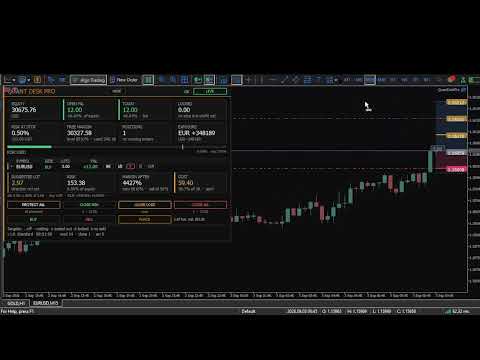
The panel is in three tiers. Small grey capitals name a thing; the large figure under them is the thing; the small line under that is its context. Nothing else on the panel is decoration.

The Money Row

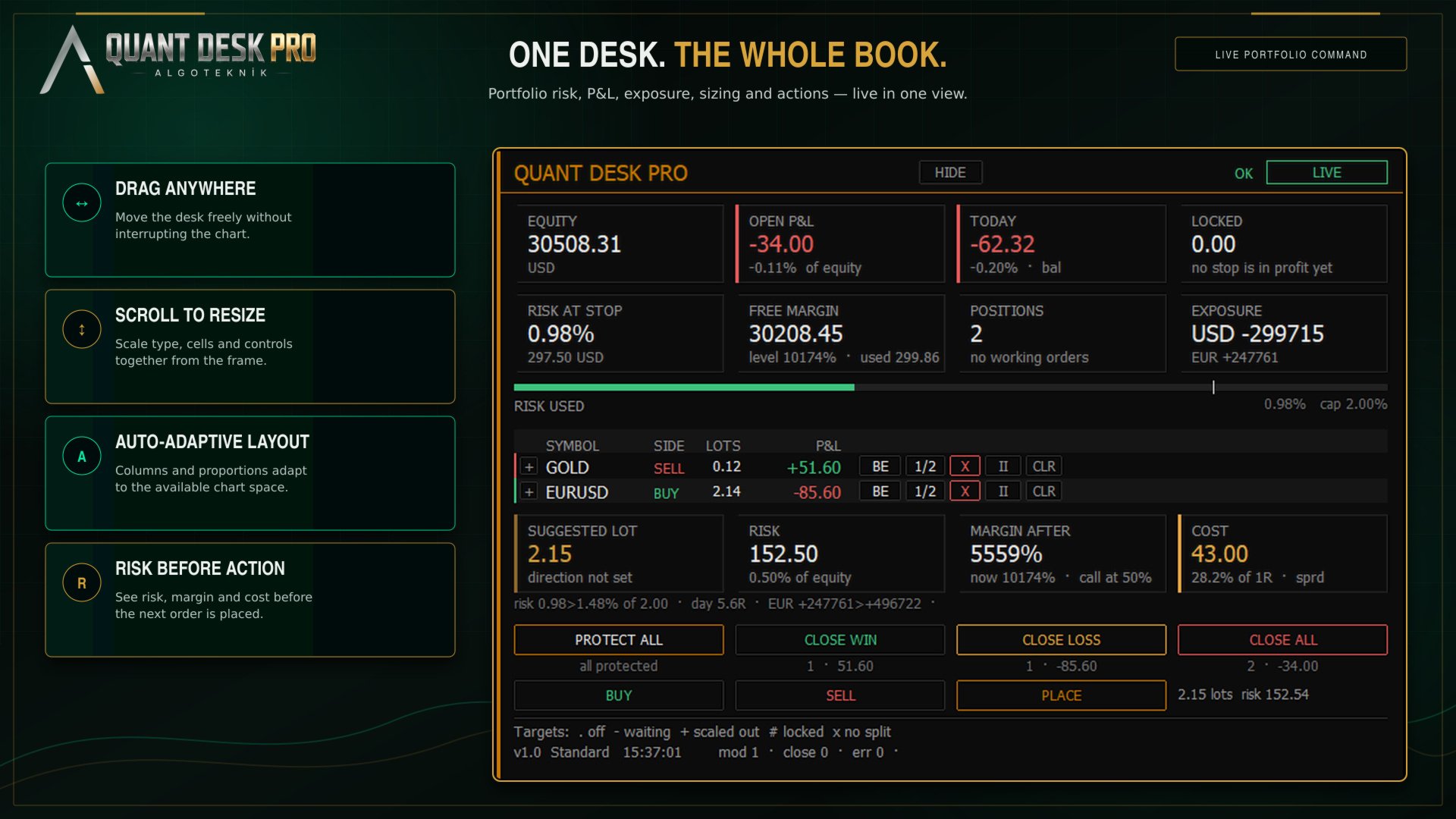
  • EQUITY — Account equity, refreshed every cycle.
  • OPEN P&L — Every managed position added up, net of swap and commission, with its share of equity underneath.
  • TODAY — Today's result: realised plus floating, with deposits and withdrawals removed. The tag says which basis the daily limits use - bal for the day-start balance, eq for day-start equity, eq~ when the desk attached mid-day and had to take equity as found. Ln counts losing trades in a row.
  • LOCKED — What the stops have already secured. If every stop that sits in profit were hit right now, this is what the account would keep.

The Limits Row

  • RISK AT STOP — What the account would lose if every stop were hit at once, as a share of equity. Positions with NO stop are not counted into it - their loss is not bounded by anything, and averaging a measured risk with an unmeasurable one would be the most dangerous thing this panel could say. They are named beside the figure instead: 2 UNPROTECTED, in red.
  • FREE MARGIN — Margin still available, with the margin level and margin in use underneath. Amber inside twice your broker's own margin call level, which is read off the account rather than guessed.
  • POSITIONS — How many open positions pass the scope and ownership filters, and how many working orders are waiting.
  • SPREAD — The current spread on this chart's symbol. With the R layer on, this cell shows net currency exposure instead.

The Risk Bar

Under the cells is a single bar: open risk against the cap you set. The white tick is the cap, and it sits at four fifths of the bar's length rather than at the end - so being over the cap looks like being over the cap, instead of like a bar that has been full since some point you cannot identify.

The Position Table

  • SYMBOL — The symbol. A two-pixel edge down the left of the row carries the direction in colour, so the shape of the book reads before any word does.
  • SIDE — Buy or sell.
  • LOTS — Volume still open, after any partial closes.
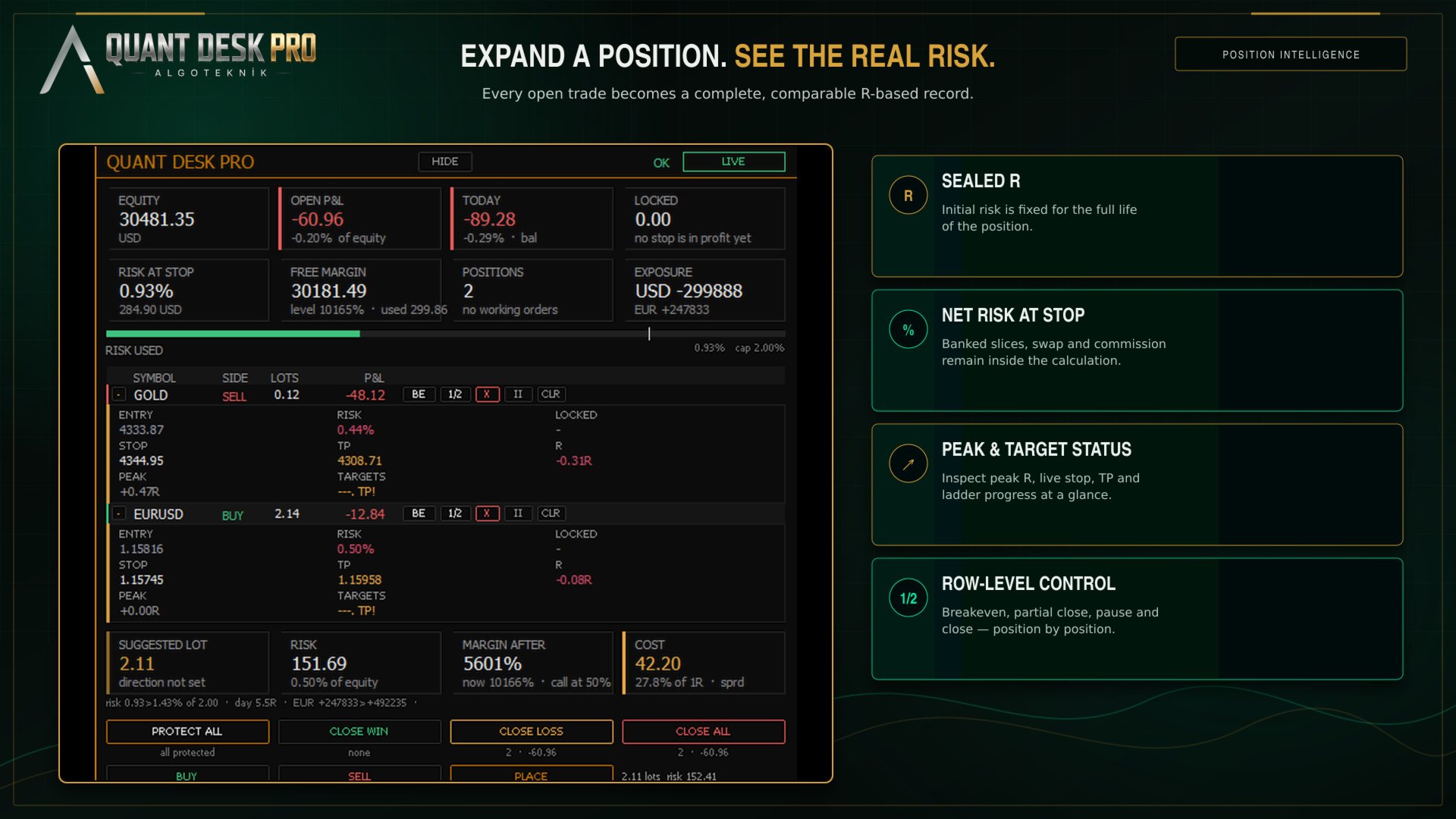
  • ENTRY — The price the position was opened at.
  • P&L — What this position is worth right now, net.
  • RISK — What hitting THIS position's stop would cost the account, as a share of equity - banked slices and swap counted. 0.00% means the stop is far enough into profit that nothing is at risk. A dash means there is no stop, and then the loss is not zero, it is unknown.
  • LOCKED — The mirror of RISK: what hitting the stop would BANK, when the stop sits in profit.
  • STOP — Where the stop actually sits. Green once it locks a profit, white while it still costs money, red when there is none.
  • TP — Your own take profit, as the broker holds it. Amber when it sits in front of one of your targets and will end the trade before the plan finishes.
  • R — The same result in R. Off by default - see The R layer.
  • PEAK — The best R this position has reached. Off by default.
  • TARGETS — One character per exit target. Off by default. See The exit ladder.

The Row Buttons

  • BE — Move this position's stop to its entry price, plus the breakeven buffer. Nothing is closed.
  • 1/2 — Close half of what is STILL OPEN, at market. Note the difference from a target: a target closes a share of the position's ORIGINAL size, this button closes a share of what is left.
  • X — Close this position completely. Click once to arm, again within six seconds to send.
  • II — Take this position off the desk. No targets, no trailing, no automatic stop moves - it is still measured and still shown. The button becomes GO to hand it back. The setting survives a restart.
  • TP — Put a take profit on the broker's server. Press it on a position that already has one and it CLEARS it. See The size calculator.

The Desk Buttons

Four buttons act on the whole managed book, and each carries its own consequence underneath it before you press: how many positions, and what they are worth.

  • PROTECT ALL — Put a stop on every managed position that has none, at the price its R was sealed from.
  • CLOSE WIN — Close every managed position in profit. Profit here is net.
  • CLOSE LOSS — Close every managed position that is losing, net.
  • CLOSE ALL — Close the whole managed book at market.

The three closing buttons ask twice by default. Every button on the panel has a tooltip: hover for a second and it explains itself in plain sentences.

The R layer

Out of the box the panel speaks money. R, PEAK, the target glyphs, the R-denominated open risk and the currency legs are hidden behind one switch: InpShowRLayer.

This is not a crippled default. It is the recognition that a trader who has never sized a position in R cannot read those columns on day one, and that three columns of money they can read are worth more than three columns of R they cannot. Turn the layer on when R has stopped being a foreign word - most people do it within a week, and then never turn it off.

InpValueUnit is a separate choice and applies to both the panel and the chart: money, R, percent of equity, or R and money together.

Protection

A managed position with no stop is the one case where this product acts on its own without being asked, and it is worth understanding exactly what it does.

With InpAutoProtect on - which is the default - any managed position that has no stop is given one, at the price its R was sealed from. Not when it goes into profit; immediately, on the first cycle that sees it. The trade that runs straight against you is the one that needs a stop most, and it is exactly the trade that a profit-triggered mechanism never reaches.

If you would rather place your own stops, switch it off. The panel still counts what is unprotected and the PROTECT ALL button still does the same job on demand.

The exit ladder

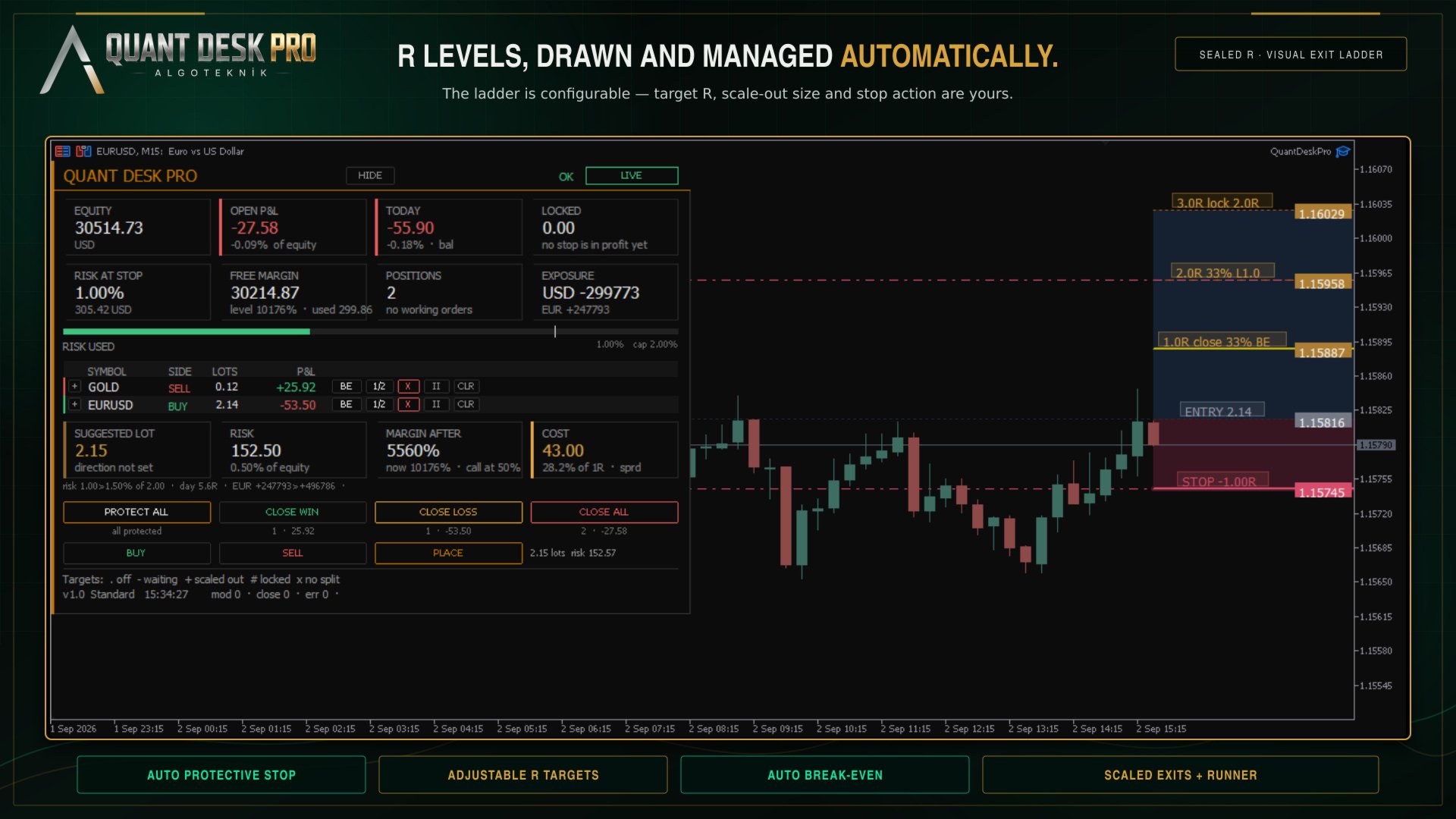
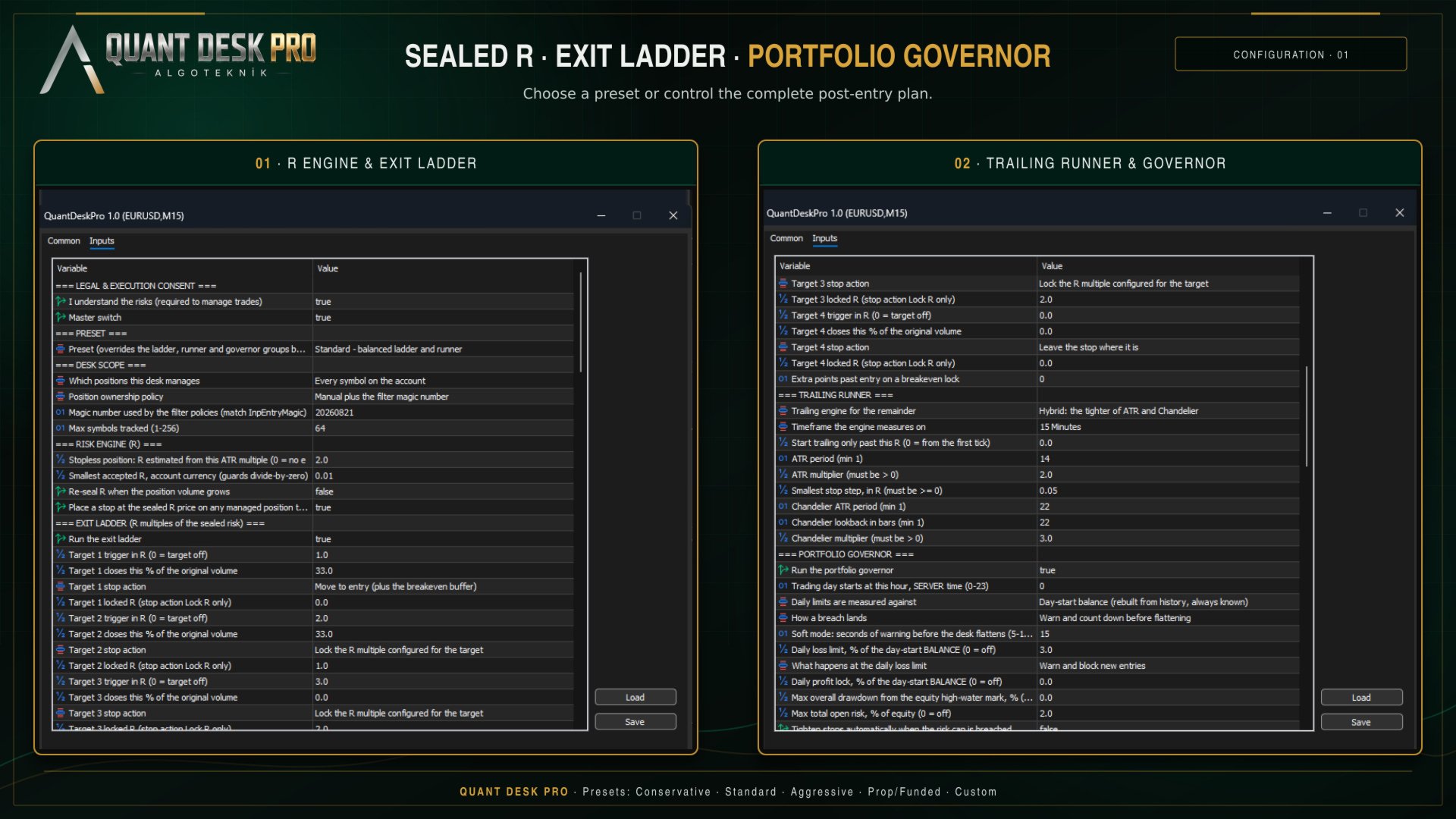
The ladder is a list of up to four TARGETS. Each one is a level in R, and when the trade reaches it two things can happen: a share of the position is closed, and the stop is moved.

The default ladder:

  • +1.0R — 33% of the original volume — to breakeven - the trade is now free
  • +2.0R — 33% of the original volume — to +1.0R - one R is banked and locked
  • +3.0R — nothing — to +2.0R - the remainder runs with two R secured
  • - — target 4 is off

Note what the third target does NOT do. It closes nothing. The point of a ladder is that something is still running when the move keeps going, and a target that closes the last of the position is the end of the trade, not the top of the plan.

The percentage is always a share of the ORIGINAL volume, not of what is left. Two 33% targets take two thirds of the trade, not 33% and then 33% of the remaining 67%.

The TARGETS column shows one character per target, in order:

  • . — the target is switched off
  • - — armed and waiting - price has not reached it
  • + — half done: either the slice closed or the stop landed, not both
  • # — done
  • x — this position is too small to split, so this target can never fire
  • TP! — your own take profit sits in front of a target and will end the trade first

The x is worth reading carefully. If your position is 0.01 lots and your broker's minimum is 0.01, a 33% slice cannot be sent. The desk says so on the row rather than failing quietly every time price crosses the level, and it tells you at start-up which of your targets will never fire at the minimum lot for your symbols.

The trailing runner

Whatever the ladder has not closed is trailed. Four engines are available:

  • Off — no trailing; only the ladder moves stops
  • ATR — a multiple of ATR behind price
  • Chandelier — a multiple of ATR below the highest high since entry, or above the lowest low
  • Hybrid — whichever of the two is further into profit, which is the default

Two guards apply to all of them. A stop is never moved backwards, and it is never moved by less than InpMinMoveR - a stop that creeps a tenth of a point every tick generates server traffic and achieves nothing.

InpTrailStartR delays trailing until the trade is far enough along. Left at 0 the runner engages from the first tick.

The portfolio governor

Everything above works on one position. The governor works on all of them, and on the day.

  • Daily loss — the day's result against the day-start balance
  • Daily profit — the same, upward - lock the day in when it has gone well
  • Max drawdown — equity against its own all-time high on this account
  • Open risk cap — everything at stake across the book at once
  • Losing streak — consecutive losing trades closed today
  • Currency leg — net exposure to one currency across every symbol - long EURUSD and long GBPUSD are two trades but one bet against the dollar

A breach can block new entries, or flatten the book, or both. In SOFT mode the desk warns for a configurable number of seconds first, so that a spike through the limit and back does not close your day for you.

The trading day starts at InpDayResetHour in SERVER time. On a funded account this matters: your programme's day probably starts at 17:00 or 00:00 New York, which is rarely your broker's midnight. Set it to the hour you are actually graded on, and the anchor, the day's P&L and every daily limit move with it.

Presets

A preset overrides the ladder, runner and governor groups in one choice, and prints exactly what it applied to the journal when it starts.

  • Conservative — Scales out early and locks in fast. Tight daily loss limit.
  • Standard — The ladder described in The exit ladder. A reasonable place to begin.
  • Aggressive — Later targets, looser trailing, more room to run.
  • Prop / funded — Built around a daily loss limit and a drawdown ceiling, because that is what the account is graded on.
  • Custom — Nothing is overridden. Every input below is yours.

Choose a preset first and read what it did in the journal. Then, if you want to change one thing, switch to Custom and change it - a preset ignores individual edits by design, so that half-applied configurations cannot happen.

The size calculator

Under the table is a block that answers one question: how big, at my risk setting, on this account, right now.

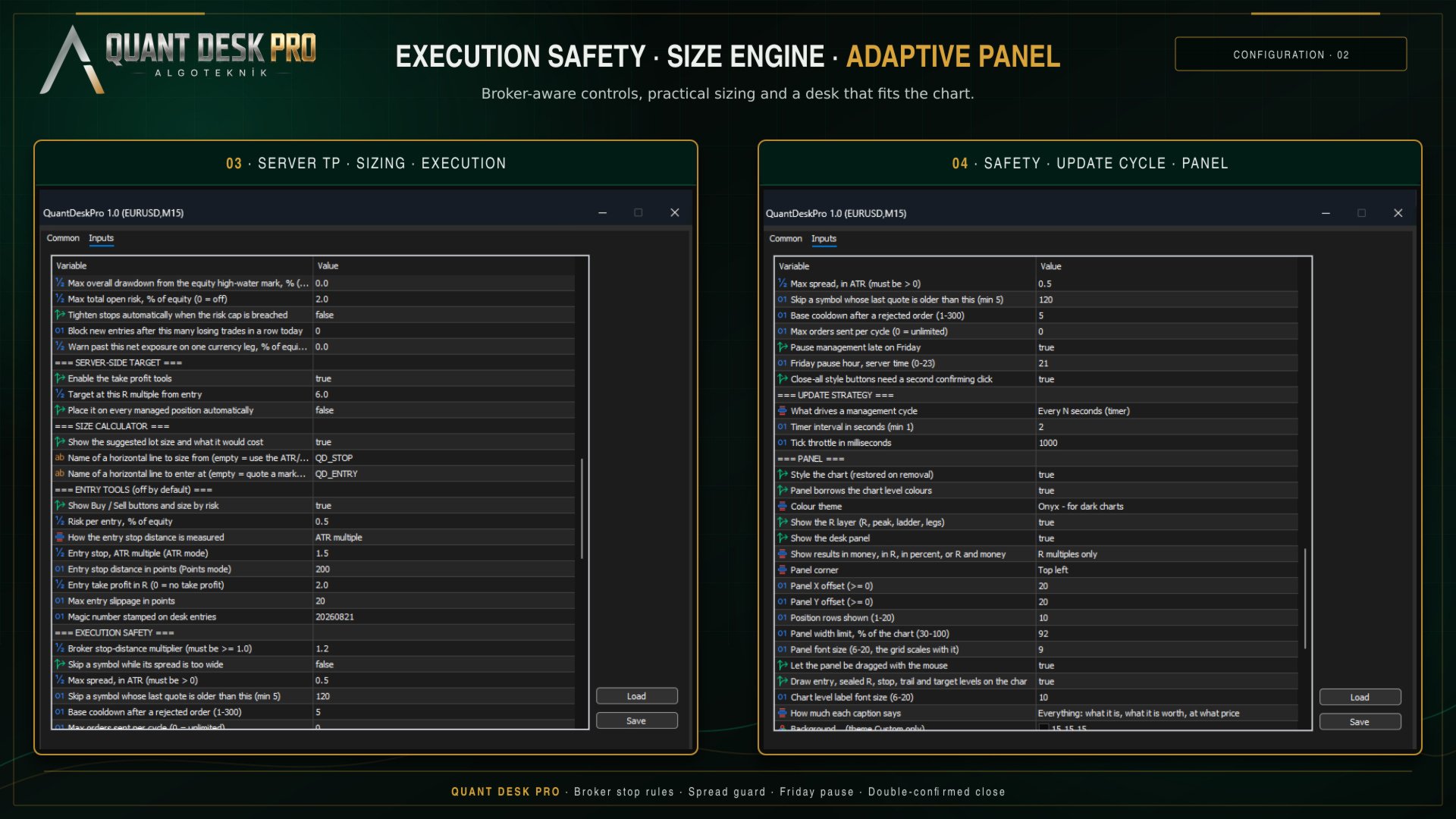
  • SUGGESTED LOT — The volume that makes the distance from entry to stop cost the risk percentage in your inputs. Lot step and the broker minimum are honoured, so it is a volume that can actually be sent.
  • RISK — What that volume ACTUALLY risks - not the budget it was sized from. The volume is floored to the lot step, so the tradeable size always risks a little less than you asked for, and the cell says both when the gap is worth seeing.
  • MARGIN AFTER — The margin level once this trade is on. The current level is in the FREE MARGIN cell above. Amber inside twice your broker's margin call level, red at or below it.
  • COST — What the trade costs before price has moved at all: the spread at that volume, plus commission averaged from what THIS account has actually paid on THIS symbol over the last month. And what share of one R that adds up to, which is the number that matters.

The line underneath is headroom: what the trade would leave of every limit that could refuse it. If a limit is already in force it says so in red, first, before anything else makes the trade look available.

By default the stop distance comes from an ATR multiple and the block says so - with no line on the chart there is nothing to take a direction from, and the cell reads 'direction not set' rather than inventing one. Draw a horizontal line, name it QD_STOP, and the block sizes from YOUR stop and takes the direction from which side of price the line sits on. Add a second line named QD_ENTRY and it quotes a working order instead.

The server-side target

Every exit in this product needs the terminal open, the chart loaded and the expert running. The targets, the trailing stop, the governor's flatten - all of them. A take profit needs none of that: it lives on the broker's server and fires whether or not anything of yours is running.

That is what this is for. It is not a rival to the ladder, and the default sits at 6R - clearly beyond a three-target plan - because a take profit at your highest target does not complete the ladder, it truncates it. If you set it inside the plan, the product tells you at start-up and does it anyway; it is your trade.

The TP button is a toggle. On a position with no target it places one; on a position that has one it CLEARS it. The desk never overwrites a take profit you set yourself.

Two terminals, one account

If you run Quant Desk Pro on two charts, or on two terminals against the same account, only one of them manages. The others read the same account and show the same numbers, and their state chip says STANDBY.

The claim is written to the shared terminal folder and refreshed while the owner lives. If that terminal closes, another takes over within a minute. You never have two desks moving the same stop.

In the Strategy Tester

Quant Desk Pro runs in the tester and the panel works there, but understand what you are testing.

This product does not open trades, so a tester run with nothing to manage produces nothing - correctly. To see it work, switch the entry tools on (InpEnableEntryTools) so that the tester has positions to manage, or run it in visual mode and open trades by hand from the panel.

The consent gate is bypassed in the tester, so you do not have to set it to run a test.

What a tester run will NOT tell you is whether this product is any good, because it manages YOUR trades. Its result is a function of your entries. The honest way to evaluate it is forward, on a demo account, on the trades you would have taken anyway.

The record

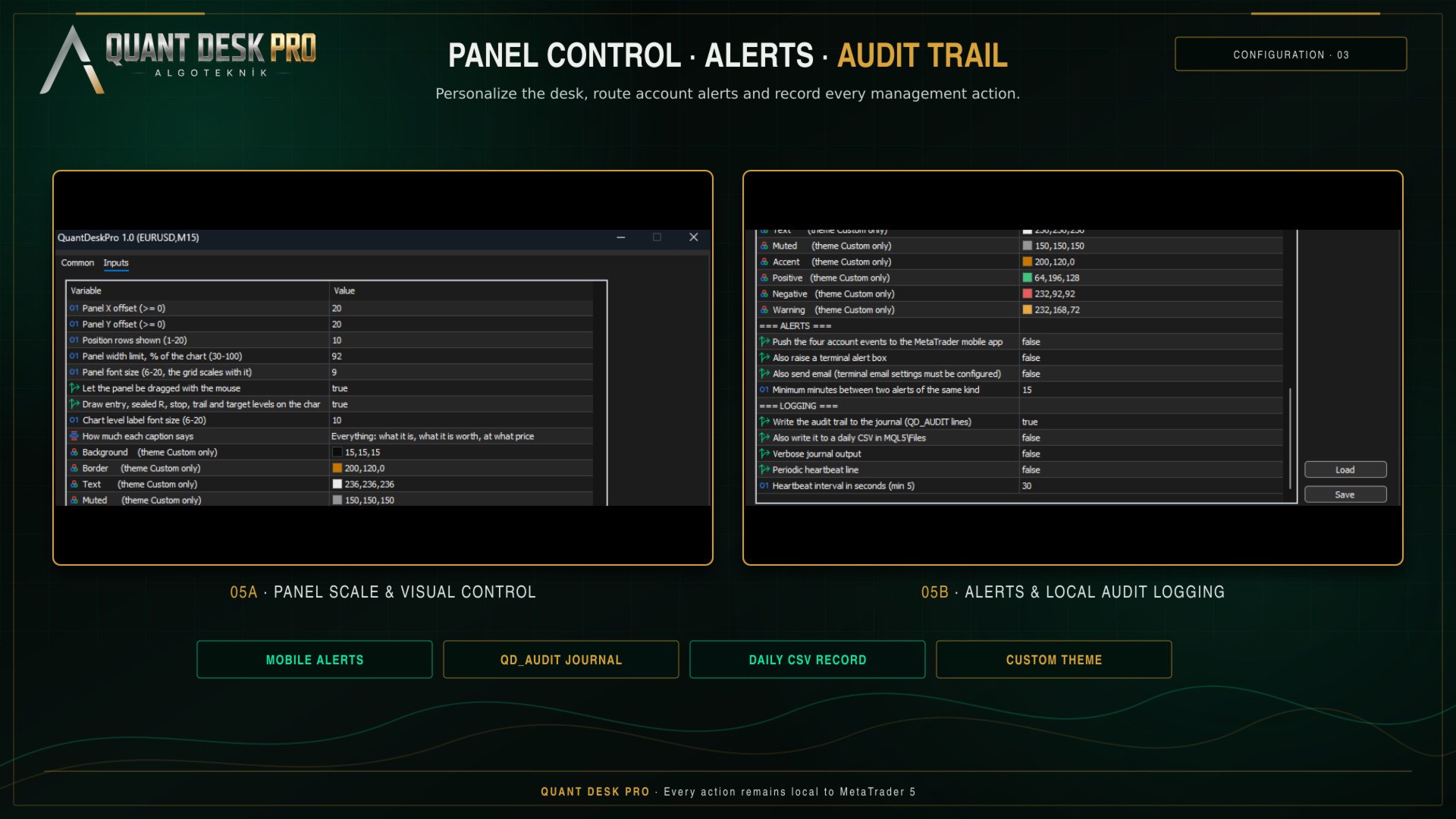
Everything the desk does is written to the Experts journal as QD_AUDIT lines: what was sent, on what, at what price, why, and what R it was measured against.

The same lines go to a daily CSV in MQL5\Files, semicolon separated, which opens directly in a spreadsheet. When a position closes, one POSITION_CLOSED record carries the whole life of the trade: net R, gross R, what it cost in commission and swap, the peak it reached, which basis its R came from, which targets fired, whether the stop was moved by hand, and how it ended.

That record is the point. A month of it answers questions no backtest can - whether your winners are actually reaching the second target, whether the trailing stop is taking you out of trades that then continue, whether your average loss is really one R.

If something does not happen

  • VIEW ONLY — Consent was never given. F7, first group, I understand the risks - set it to true.
  • MONITOR ONLY — This is a netting account. The desk will measure but never send. Nothing to fix; it is not the account type this product manages.
  • BLOCKED — The terminal or the account is refusing trades. Check the Algo Trading button in the toolbar and the expert's own Common tab.
  • STANDBY — Another Quant Desk Pro already owns this account. See Two terminals, one account.
  • PAUSED — The Friday cut-off is in force. InpPauseFridayLate.
  • OFF — The master switch. InpEnabled.
  • GOVERNOR - ... — A portfolio limit is in force. The message names which one.

R shows n/a on a row. The position's R could not be sealed - it has no stop and InpFallbackRiskATR is 0, or the priced risk is below InpMinR0Currency. Give the trade a stop, or press PROTECT ALL.

A target shows x. The position is too small to split at your broker's minimum lot. Nothing is broken; that target cannot fire on that trade.

The panel is too wide, or too narrow. The table is fitted to the chart, not to the screen: it is given a share of the chart's width - InpPanelMaxWidthPct, 92% out of the box - and if the columns do not fit inside it they are given up in a fixed order until they do. SIDE goes first, because the coloured edge down the left of every row already carries the direction and carries it better; then PEAK, ENTRY, TP, LOCKED, LOTS, and the R columns. SYMBOL, P&L and STOP are never dropped - what it is, what it is worth and where the protection sits are the table. Set the limit to 45 for a panel that stays out of the way of the chart, or to 92 to see everything that fits. It names what it dropped in the journal.

The panel is smaller than the font size you asked for. The size in the inputs is a ceiling, not an instruction: the panel measures itself against the WIDTH it is allowed and comes down a point at a time until it fits, saying so once in the journal. It never goes below 7 - past that it gives up columns instead, because a font that cannot be read is not a smaller panel, it is no panel. Height never shrinks the font: a panel taller than its chart scrolls under the mouse wheel while the cursor is over it, and HIDE collapses it to the title bar.

The panel looks different on another monitor. It is the same panel in a different shape. The account block, the size block and the desk buttons go two across on a chart with height to spare, and four across on a wide one that has none - four across costs width and gives back roughly a third of the panel's height, which is what a 1920 by 600 window needs and what a tall one does not. The desk measures the chart it is on and picks, preferring the narrow shape whenever it fits, because the panel is not the product and the price behind it is. Nothing is added or taken away in either shape. It says which one it chose, and why, in the journal.

To overrule it, resize the panel by its own frame. Put the cursor on any edge - the edge lights up when it is in reach - and either roll the mouse wheel or hold the left button and drag toward the opposite side. The far edge stays anchored, so the panel grows and shrinks toward you, and everything on it scales together: type size, cells, buttons and spacing. The top edge is worth knowing about, because it is on screen whatever the panel's height is doing - pulling it down is always available as the way out of a panel that overflows a short chart.

Type size steps in whole points, so one notch of the wheel is one point and the panel settles on sizes rather than following the mouse continuously. It ranges from 6 to 20 by hand; left to itself the desk will not go below 7, because past that the small lines stop being legible and that is not a decision a tool should make for you. Click the frame without dragging to hand the size back to the desk. What you choose is remembered per symbol and survives a restart.

The status line at the bottom of the panel is the one place that answers 'why did nothing happen'. Read it before anything else. The footer beside it counts what this session has done - stops moved, positions closed, orders refused - and why any action was skipped this cycle.

Every input

Every setting, in its group, with its default and what it does, is documented in the manual. It is generated from the product’s own source, so it cannot describe a setting that is not there. A Market product may carry one file, so the manual is published on the channel linked at the foot of this page rather than packed with the EX5.

algoteknik

Support, updates and every other product: mql5.com/en/users/bugraky123
Product channel: mql5.com/en/channels/trendtower

Quant Desk Pro version 1.0

Produits recommandés
TRADE PANEL MASTER — Know Your Risk Before You Click Open your chart. See your panel. Trade with confidence. Before you click Buy or Sell, Trade Panel Master shows you  exactly what you risk, what you gain, and your R:R ratio —  in real time. No mental math. No surprises. FEATURES - Lot sizing with real-time margin display - SL & TP in 3 modes: Points / Money / Price - Au
Truvana Trend Campaign Manager EA (TCM) Advanced Basket Management & Profit Locking Tool for Trend Traders Short Description Turn strong trends into managed campaigns. Truvana TCM is a professional trade management EA designed for traders who already know how to identify trends and execute entries. The EA automatically manages basket expansion, validates risk before adding positions, and locks profits using a broker-side Basket Stop Price (BSP). No martingale. No grid recovery. No signal genera
Local Copy Trader Utility - Professional Copy Trading System Overview Local Copy Trader Utility is the complete solution for mirroring trades between MetaTrader 5 accounts. With both Master and Slave functionality in one powerful Expert Advisor, it delivers reliable, lightning-fast trade copying with zero external dependencies. Perfect for managing multiple accounts, following trading signals, or transferring trades between brokers, this system ensures your positions stay perfectly synchronized
TP SL Bot MT5
Ruslan Brezovskiy
5 (1)
TP SL Bot - un utilitaire qui définit automatiquement les Stop Loss et Take Profit pour les nouveaux ordres ouverts de différentes manières selon vos indications. Il dispose également d'une fonction de calcul du volume nécessaire pour ouvrir un trade afin d'atteindre le montant souhaité avec la taille de Stop Loss/Take Profit spécifiée.   Il existe plusieurs façons de calculer la taille et de définir les paramètres : 1. Réglages basés sur le montant spécifié par l'utilisateur en pourcentage du s
GGP Trade Copier MT5
Mohammadmahmood Pirayeh
GGP Trade Copier  EA is an automatic trading bot that can help traders automatically replicate the trading strategies and operations from one trading terminal to others by experiencing exceptionally fast trade copying system. Its easy-to-use setup allows you to copy trades between multiple MetaTrader terminals on the same Windows computer or Windows VPS with lightning-fast copying speeds of under 0.5 seconds. The software supports multiple trading varieties, including Forex, commodities, stocks
Equity Tracker MT5 Equity Tracker MT5 est un Expert Advisor de surveillance pour MetaTrader 5 qui rapporte l’activité de trading, l’état du compte et les conditions techniques via des messages de notification. L’Expert Advisor fonctionne indépendamment de la logique de trading et n’influence ni l’exécution des ordres ni la gestion des positions. Le produit n’ouvre, ne modifie et ne ferme aucune position. Il effectue uniquement des tâches d’observation et de notification. Objectif Equity Tracker
Grid Trading EA is a semi-automated one-click trading EA for both Normal Trading and Grid/Martingale Trading . Normal Trading Simply click Buy or Sell directly from the chart. The EA will automatically manage trades by: Setting Stop Loss and Take Profit Managing Trailing Stop Grid / Martingale Trading (For Hedging Account Type Only) When Grid Trading mode is enabled, the EA will automatically open additional grid orders at specified distances while increasing the lot size based on your settings.
PropWin EA
Nasimul Haque Choudhury
PropWin EA is an advanced automated trading system designed specifically for prop firm traders. It employs a sophisticated hedging strategy that protects your investment by trading simultaneously on your funded prop account AND your personal live account. The result? Even if you don't pass the challenge, your live account profits offset the challenge fee—ensuring you never truly lose money on the attempt. Key Features Automatic Trade Hedging Lightning-fast 100ms scan interval for near-instant
User Manual Buy Trading Utility, Get 1 indicator FREE ! After purchase contact me for your " one indicator GIFT (Any one you want) ", adding you in group. Trading Utility MT5 The manual trader's cockpit. Size every trade by risk, place it from the chart, and manage it without ever opening the order dialog. Eight tabs, seven trailing engines, and every stop and target draggable with one click. One panel between you and the order window. Risk-sized entries, draggable stops, seven trailing modes,
Opening EA - Start Edition Is a tool to trade the OpeningStrategy! The Opening EA is a semi-automated EA for MetaTrader 5! This means that the trader must actively start the EA using the Start button and stop it using the Stop button. This EA pursues an opening strategy which, at the start of trading, e.g. on the DAX or Nasdaq, etc., opens a trading channel with predefined TP's (TakeProfit). Two pending orders with the same lot size are set at the beginning. As soon as one of the pending order
FREE
SL Risk Manager Auto SL System SL Risk Manager Auto SL System is a practical and easy-to-use tool designed to help you manage your Stop Loss levels before and after opening a trade . With this tool, you can set your Stop Loss level before entering a position . Especially when trading Gold (XAU), you can easily define your Stop Loss based on a specific dollar amount , giving you better control over the risk of each trade. You can also use the panel to automatically open trades according to the ra
MT5 Trade Copier Master - Free Trade Broadcaster Require Slave EA: https://www.mql5.com/en/market/product/178686 This Master EA broadcasts trades but CANNOT copy them by itself. You MUST purchase and install the SyncTrade Copier Slave EA on a second MT5 terminal to copy trades. Without the Slave EA, this product does nothing useful on its own. Both MT5 terminals must be installed on the SAME computer for file sharing to work. They cannot be on different computers or VPS instances. What This Ma
FREE
CosmiCLab SMC FIBO CosmiCLab SMC FIBO is a professional trading indicator designed for traders who use Smart Money Concepts (SMC), market structure analysis and Fibonacci retracement levels. The indicator automatically detects market swings and builds Fibonacci levels based on the latest impulse movement. It also identifies market structure changes such as BOS (Break of Structure) and CHOCH (Change of Character), helping traders understand the current market direction. CosmiCLab SMC FIBO also pr
Key Benefits at a Glance: Lorentzian ML signal generation Majority voting across 3 timeframes Automatic market regime detection Smart equity recovery with group profit targets 1% risk‑based adaptive lot sizing ATR‑based dynamic SL/TP & trailing Emergency drawdown cut Live on‑chart info panel Hybrid Lorentzian Gold ML EA v2.0 – Intelligent Adaptive Trading for XAUUSD Next‑Gen Machine Learning Core A Lorentzian KNN classifier analyzes 5 normalized features (RSI, WaveTren
FREE
Auto Stop Loss MT5
Nabil Oukhouma
5 (1)
Le Gestionnaire de Risque "Set & Forget" pour le Trading Multi-Actifs ️ Ne laissez jamais un trade sans protection. Auto Stop Loss (MT5 Manager) est l'utilitaire d'arrière-plan ultime pour les traders qui privilégient la sécurité. Contrairement aux panneaux standard, cet outil travaille sans relâche en coulisse pour sécuriser instantanément chaque trade que vous placez. Que vous ouvriez des trades manuellement ou via un autre EA, ce gestionnaire s'assure que chaque position dispose immédiateme
Trading Utility for Forex Currency Pairs Only not for Gold  Functions Auto Lot Calculation based on Risk Auto stoploss  Auto TakeProfit Breakeven Auto Close Half % Close in percentage with respect to the PIPs Pending Orders BuyLimit Sell Limit with distances BuyStop Sell Stop    with distances Trading Informations Risk in percentage For Multiple trades Combine Takeprofit and Combine Stoplosses
King Trade Copier
Mohammed Maher Al-sayed Mohammed Ahmed Saleh
KingCopier – Lightning-Fast Local Trade Copier for MetaTrader (Master + Slave) KingCopier is a professional local trade copier that mirrors every trading action from one Master account to unlimited Slave accounts on the same PC or VPS — with an internal copy latency of just a few milliseconds. It was built by a real trader for daily real-money use, with one goal: whatever happens on the Master must happen on the Slave, instantly and without exceptions. Watch the demo video to see the real cop
Tired of fumbling with lot size calculations and manually managing every trade? The Visual Risk Manager (VRM) is a professional-grade trading panel designed to streamline your trading and enforce discipline. This Expert Advisor is not a strategy; it's a powerful utility that allows you to manage your risk and execute trades with unparalleled speed and precision, directly from your chart. Why You Need the Visual Risk Manager Stop letting emotions and guesswork control your trading. VRM ensures t
Ind5 Extra Report Pad
Vladislav Andruschenko
4.77 (35)
Journal des traders : Il s'agit d'un panneau de statistiques fournissant une analyse de votre compte de trading pour MetaTrader 5. Les résultats de l'analyse sont affichés sur le graphique en temps réel. Le trading multidevises est très populaire. Version MT4 Description complète +PDF Comment acheter Comment installer     Comment obtenir des fichiers journaux     Comment tester et optimiser     Tous les produits de Expforex Cependant, plus le nombre de transactions est élevé, plus il est dif
FREE
L'une des séquences de numéros s'appelle « Séquence des incendies de forêt ». Il a été reconnu comme l'une des plus belles nouvelles séquences. Sa principale caractéristique est que cette séquence évite les tendances linéaires, même les plus courtes. C'est cette propriété qui a constitué la base de cet indicateur. Lors de l'analyse d'une série chronologique financière, cet indicateur essaie de rejeter toutes les options de tendance possibles. Et seulement s'il échoue, il reconnaît alors la prés
Trendline EA MT5
Carlos Oliveira
4.8 (15)
Trendline EA MT5 Trendline EA MT5 est un Expert Advisor semi-automatisé pour MetaTrader 5, conçu pour exécuter des actions de trading ou générer des alertes en fonction des lignes de tendance tracées par l’utilisateur. MetaTrader 5 ne propose pas nativement de fonctionnalité permettant de placer ou de gérer des trades directement à partir de lignes de tendance. Cet Expert Advisor étend le comportement standard de la plateforme en surveillant les lignes de tendance définies par l’utilisateur et e
Testez-le sur le marché réel avant d’acheter :  Ce produit comprend une version d’essai GRATUITE   que vous pouvez télécharger directement et utiliser sur un compte démo . Testez toutes les fonctionnalités dans des conditions réelles de marché avant l’achat. Vous trouverez les liens de téléchargement dans le premier commentaire de ce produit. Prop Firm Trade Assistant est un panneau graphique professionnel conçu pour les traders qui souhaitent réussir et protéger leurs comptes de prop firms grâ
Inverted_Chart_EA Utility Expert Advisor Inverted_Chart_EA creates and maintains a mirror-inverted chart of any symbol and timeframe. It automatically generates a custom instrument (e.g. US30_INV ) and keeps its price history updated in real time, with bars mirrored around a chosen pivot. This utility gives traders a new way to analyze the market from a different perspective by flipping the chart upside down. Why use an inverted chart? Highlight hidden patterns – price formations that look ordin
Définir TP et SL par Prix – Modificateur automatique d’ordres pour MT5 Définissez automatiquement des niveaux de TP et SL précis sur toute opération ️ Fonctionne avec toutes les paires et tous les EAs, filtrage par symbole ou Magic Number Cet Expert Advisor vous permet de définir et d’appliquer des niveaux exacts de Take Profit (TP) et Stop Loss (SL) à l’aide de valeurs de prix directes (ex. : 1.12345 sur EURUSD). Aucun point, aucun pip. Une gestion de trade propre et précise, sur toutes l
Guardian Yield Keeper is a utility Expert Advisor for traders who want real-time exit management and profit protection for open positions on the current symbol. This EA does not open new trades and does not generate entry signals. Its job is simple: monitor existing positions and close them when your profit or risk conditions are met . It is especially suitable for traders using DCA, Grid, Martingale, or basket trading systems and looking for a dedicated management layer that is more flexible th
PropArmor — Bouclier de Protection de l'Équité Protégez votre compte de trading contre les pertes catastrophiques (drawdowns) en un seul clic. PropArmor surveille l'équité de votre compte en temps réel et ferme automatiquement TOUTES les positions et les ordres en attente lorsque l'équité chute à votre niveau de protection spécifié. Conçu pour les traders de Prop Firms, les défis de comptes financés, et tous ceux qui souhaitent un filet de sécurité fiable sur leur compte.
FREE
Capital Management EA – Smart Risk Management & Profit Optimization for MT5 Take control of your trading capital with smart, automated strategies — fully optimized for MetaTrader 5 (MT5). Looking to protect your capital and maximize profits through automated money management strategies ? Capital Management EA is the all-in-one Expert Advisor for MetaTrader 5 (MT5) that helps you trade smarter, not harder. Core Features: 5-in-1 Capital Management Strategies – Built-in versatility Gr
Intelligent Trade Copier with Missed Trade Recovery Require Free Master EA:  https://www.mql5.com/en/market/product/178682 This Slave EA REQUIRES the FREE SyncTrade Copier Master EA to function. Without the Master EA installed and running on a second MT5 terminal, this product will not copy any trades. Download the FREE Master EA from the MQL5 Market before or after purchasing this Slave EA. Both EAs must be running simultaneously. Both MT5 terminals must be installed on the SAME computer for fi
GridZone Alpha: The Ultimate Semi-Automated Grid & Zone Manager GridZone Alpha is an advanced, interactive trading panel designed for the modern manual trader. Stop staring at the charts waiting for the perfect entry, and stop relying on rigid, fully automated bots that cannot read market context. With GridZone Alpha, you provide the human analysis by identifying your support, resistance, or supply/demand zones. Once confirmed, the Limit Order Engine takes over, instantly deploying a precision,
Price Magnet — Price Density and Attraction Levels Indicator Price Magnet is a professional analytical tool designed to identify key support and resistance levels based on statistical Price Density. The indicator analyzes a specified historical period and detects price levels where the market spent the most time. These zones act as “magnets,” attracting price action or forming a structural base for potential reversals. Unlike traditional Volume Profile tools, Price Magnet focuses on price-time d
Les acheteurs de ce produit ont également acheté
Trade Assistant MT5
Evgeniy Kravchenko
4.41 (216)
It helps to calculate the risk per trade, the easy installation of a new order, order management with partial closing functions, trailing stop of 7 types and other useful functions. Additional materials and instructions Installation instructions - Application instructions - Trial version of the application for a demo account Line function -   shows on the chart the Opening line, Stop Loss, Take Profit. With this function it is easy to set a new order and see its additional characteristics bef
Bienvenue sur Trade Manager EA, l’outil ultime de gestion des risques conçu pour rendre le trading plus intuitif, précis et efficace. Ce n’est pas seulement un outil d’exécution d’ordres ; c’est une solution complète pour la planification des trades, la gestion des positions et le contrôle des risques. Que vous soyez débutant, trader expérimenté ou scalpeur ayant besoin d’une exécution rapide, Trade Manager EA s’adapte à vos besoins, offrant une flexibilité sur tous les marchés, des devises et i
================================================================================ POC BREAKOUT - V20.72. Full Professional Grade Toolkit ================================================================================ POC Breakout is a full MetaTrader 5 trading dashboard for discretionary traders who want breakout signals, Point of Control (POC) context, volume profiles, order flow, market structure, news, alerts, and advanced trade planning in one professional workspace. Attached directly to you
TradePanel MT5
Alfiya Fazylova
4.88 (167)
Trade Panel est un assistant commercial multifonction. L'application contient plus de 50 fonctions de trading pour le trading manuel et permet d'automatiser la plupart des tâches commerciales. Instructions d'utilisation + tutoriel vidéo : https://www.mql5.com/fr/blogs/post/762589 Version d'essai de l'application pour un compte démo : https://www.mql5.com/fr/blogs/post/762644 Comment installer l'application : https://www.mql5.com/fr/blogs/post/762645 Comment tester l'application en mode visuel :
Version Bêta Le Telegram to MT5 Signal Trader est presque prêt pour la sortie officielle en version alpha. Certaines fonctionnalités sont encore en développement et vous pourriez rencontrer de petits bugs. Si vous rencontrez des problèmes, merci de les signaler, vos retours aident à améliorer le logiciel pour tout le monde. Telegram to MT5 Signal Trader est un outil puissant qui copie automatiquement les signaux de trading depuis des chaînes ou groupes Telegram vers votre compte MetaTrader 5 .
Telegram to MT5 Multi-Channel Copier   copie automatiquement les signaux de trading de vos canaux Telegram directement vers MetaTrader 5. Pas de bots, pas d'extensions de navigateur, pas de copie manuelle. Un signal arrive sur Telegram et l'EA ouvre le trade dans votre terminal en quelques secondes. Le produit comprend deux composants : une application Windows qui écoute vos canaux Telegram, et cet Expert Advisor qui exécute les signaux dans votre terminal MT5. Une version MT4 est également disp
Astro Trade MT5
Indra Maulana
5 (4)
25% discount on the release of the tool: only for the next 3 buyers Send a message to receive a demo version. AstroTrade Trading Assistant AstroTrade is a comprehensive multi-functional trading utility developed for the MetaTrader 5 platform. It integrates essential tools for trade execution, risk management, and technical monitoring into a single unified interface. The application is designed to assist traders in managing their daily operations through a visual and structured environment. Vi
Premium Trade Manager - Le panneau de trading avec un coach intégré Premium Trade Manager intègre un coach de trading directement dans votre graphique, avec un moteur d'exécution complet en dessous. Configurez le trade comme vous le faites toujours, puis laissez Max, votre coach de trading IA, analyser ce setup exact par rapport à votre compte en direct et vous donner un verdict clair avant de vous engager : le stop est-il discipliné, le risque est-il raisonnable, une publication à fort impact e
Exp COPYLOT CLIENT for MT5
Vladislav Andruschenko
3.97 (35)
Copieur professionnel de trades pour MetaTrader 5 Un copieur de trades rapide, professionnel et fiable pour MetaTrader . COPYLOT permet de copier des trades Forex entre les terminaux MT4 et MT5 avec prise en charge des comptes Hedge et Netting . La version MT5 de COPYLOT prend en charge : - MT5 Hedge → MT5 Hedge - MT5 Hedge → MT5 Netting - MT5 Netting → MT5 Hedge - MT5 Netting → MT5 Netting - MT4 → MT5 Hedge - MT4 → MT5 Netting Version MT4 Description complète + DEMO + PDF Comment acheter Comme
HINN MagicEntry Extra
ALGOFLOW OÜ
4.74 (19)
HINN MAGIC ENTRY – the ultimate tool for entry and position management! SIMPLE. FASTEST. INTUITIVE. MAX AUTOMATED. Place orders by selecting a level directly on the chart! full description   ::  demo-version  :: 60-sec-video-description Key features: - Market, limit, and pending orders - Automatic lot size calculation - Automatic spread and commission accounting - Unlimited partitial take-profits  - Breakeven and trailing stop-loss and take-profit  functions - Invalidation leves - Intuitive, a
Trade Dashboard MT5
Fatemeh Ameri
4.95 (132)
Trade Dashboard simplifies how you open, manage, and control your trades, with built-in lot size calculation. It allows you to execute trades, manage risk, and control positions directly on the chart, with tools such as partial close, breakeven, and trailing stop. Designed to reduce manual work and help you stay focused on your trading decisions. A demo version is available for testing. Detailed explanations of features are provided within the MQL5 platform. Installation instructions are include
Anchor Trade Manager
Kalinskie Gilliam
5 (8)
Anchor: The EA Manager Your EAs cannot see each other, but Anchor can. Anchor gives you one place to coordinate your EAs, manage risk, and decide when trading is allowed. It works alongside the trading bots you already use without any changes to them. The Problem One EA opens a trade. Then another starts trading. The next thing you know, you wake up to multiple grids built across your account. Each EA may be doing exactly what it was designed to do, but together they can place far more risk on y
Ultimate Extractor
Clifton Creath
5 (8)
Ultimate Extractor - Professional Trading Analytics for MT5 *****this is the local HTML version of Ultimate Extractor. !!!!!it is not compatible with Cloud!!!! For the online version please reach out to me directly****** Ultimate EA manager also now available when you use cloud pro and above for free!! Ultimate Extractor transforms your MetaTrader 5 trading history into actionable insights with comprehensive analytics, interactive charts, and real-time performance tracking. What It Does Automa
Signal Trading View to MT5 Pro
Mirel Daniel Gheonu
4.5 (2)
Signal TradingView to MT5 Pro Automator Exécution professionnelle instantanée entre TradingView et MetaTrader 5 Automatisez votre stratégie de trading avec le pont de communication le plus robuste entre les alertes TradingView et l'exécution réelle sur MT5. Conçu pour les traders qui exigent vitesse, flexibilité et une gestion des risques impeccable, cet Expert Advisor transforme tout message d'alerte en un ordre au marché ou à cours limité précis. POINTS FORTS ET AVANTAGES Moteur d'analyse univ
Timeless Charts
Samuel Manoel De Souza
5 (8)
Timeless Charts est un utilitaire de trading tout-en-un destiné aux traders professionnels. Il combine des types de graphiques personnalisés tels que les graphiques en secondes et Renko avec une analyse avancée du flux d’ordre s utilisant Footprints , Clusters , Profils de Volume , études VWAP et outils d’analyse ancrés pour une compréhension plus approfondie du marché. Le trading et la gestion des positions sont effectués directement depuis le graphique via un panneau intégré de gestion des ord
News Filter EA
Rashed Samir
5 (2)
News Filter EA: Advanced Algo Trading Assistant News Filter EA is an advanced algo trading assistant designed to enhance your trading experience. By using the News Filter EA , you can integrate a Forex economic news filter into your existing expert advisor, even if you do not have access to its source code. In addition to the news filter, you can also specify trading days and hours for your expert. The News Filter EA also includes risk management  and equity protection features. MT4 Version Ma
Farmed Hedge Yield Farming | All Markets (Manual - Hybrid - Semi/Automated EA) VERIFIED TRADING RESULTS - Farmed Hedge Yield Axi Copy:  https://www.mql5.com/en/signals/2356376 - Farmed Hedge Yield Exn Copy:   https://www.mql5.com/en/signals/2356404 - Farmed Hedge Yield V Copy:  https://www.mql5.com/en/signals/2357156 * Before purchasing, please feel free to send me a message if you have any questions about the product or setup. ** After purchase,  Contact me via private message to receive t
The product will copy all telegram signal to MT5 ( which you are member) , also it can work as remote copier.  Easy to set up, copy order instant, can work with almost signal formats, image signal,  s upport to translate other language to English Work with all type of channel or group, even channel have "Restrict Saving Content", work with  multi channel, multi MT5 Work as remote copier: with signal have ticket number, it will copy exactly via ticket number. Support to backtest signal. How to s
YuClusters
Yury Kulikov
4.93 (43)
Attention: You can view the program operation in the free version  YuClusters DEMO .  YuClusters is a professional market analysis system. The trader has unique opportunities to analyze the flow of orders, trade volumes, price movements using various charts, profiles, indicators, and graphical objects. YuClusters operates on data based on Time&Sales or ticks information, depending on what is available in the quotes of a financial instrument. YuClusters allows you to build graphs by combining da
Power Candles Strategy Scanner - Outil de recherche de configurations multi-symboles à optimisation automatique Le Power Candles Strategy Scanner utilise le même moteur d'auto-optimisation que celui qui alimente l'indicateur Power Candles, pour chaque symbole de votre Market Watch, en parallèle. Un panneau vous indique quels symboles sont statistiquement négociables à l'instant, quelle stratégie est la plus performante pour chacun, la paire Stop Loss / Take Profit optimale, et vous alerte dès qu
MT5 to Telegram Signal Provider est un utilitaire facile à utiliser et entièrement personnalisable qui permet l'envoi de signaux spécifiés vers un chat, un canal ou un groupe Telegram, transformant ainsi votre compte en fournisseur de signaux. Contrairement à la plupart des produits concurrents, il n'utilise pas d'importations DLL. [ Démonstration ] [ Manuel ] [ Version MT4 ] [ Version Discord ] [ Canal Telegram ]  New: [ Telegram To MT5 ] Configuration Un guide utilisateur étape par étape est
EA Overfitter
Stephen J Martret
That backtest looks great. But will it still be making money tomorrow, next week, next month? EA Overfitter re-runs your EA on 100 price histories it has never seen. One score tells you if the edge is real. Launch price of $99 for the next 24 hours only then price will increase to $149 A backtest tells you what an EA did on one price history — the one that happened to occur. What you cannot tell from it is how much of that result was the strategy and how much was the particular path. EA Over
Quant AI Agents
Ho Tuan Thang
5 (1)
Quant AI Agents are independent trading Expert Advisors. Instead of trading using a fixed strategy like other conventional EAs, Quant AI Agents   is a   multi-agent AI trading framework   that turns natural-language strategy prompts into live.  WANT THE SAME RESULTS AS MY LIVE SIGNAL?   Use the exact same brokers I do:   IC MARKETS , IC TRADING   .  Unlike the centralized stock market, Forex has no single, unified price feed.  Every broker sources liquidity from different providers, creating un
Trade Copier Ultimate
Janitha Sandaruwan Amaradasa Wickramasingha Arachchilage
5 (5)
Trade Copier Ultimate - Telegram to MT5 Signal Copier Trade Copier Ultimate automatically copies Telegram trading signals into MetaTrader 5. The EA can read signal messages, detect the symbol, order type, entry price, Stop Loss, Take Profit levels and selected update commands, then execute or manage the trade in MT5 using your lot and risk settings. It is more than a basic Telegram to MT5 copier. TCU also supports Bot API and user-account Bridge workflows, Discord signal routing, local MT5 to MT
Footprint Chart Pro — Professional OrderFlow EA for MetaTrader 5 Version 6.34 | Professional tool for real traders | Institutional-Grade Visualization DEMO USERS - PLEASE SELECT EVERY TICK / REAL TICK WHEN TESTING AND YOU HAVE DOWNLOADED HISTORICAL DATA. IF YOU SEE A WAITING SCREEN AND IT IS NOT DOWNLOADING, IT MEANS YOU HAVE LOW HISTORICAL DATA. TRY 1 MIN AND 5 MIN FIRST ON 1 DAY DATA. ONE DAY DATA SHOULD BE THE NEWEST AND MOST CURRENT DATE. PLEASE WAIT UNTIL THE MARKET HAS ROLLED OVER PERIOD.
The News Filter MT5
Leolouiski Gan
4.78 (23)
Ce produit filtre tous les conseillers experts et les graphiques manuels pendant les heures de publication des actualités, de sorte que vous n'avez pas à vous soucier des pics de prix soudains qui pourraient détruire vos configurations de trading manuelles ou les transactions entrées par d'autres conseillers experts. Ce produit est également livré avec un système de gestion des ordres complet qui peut gérer vos positions ouvertes et vos ordres en attente avant la publication de toute actualité.
Panneau de trading pour MetaTrader 5 — contrôle professionnel du trading en un clic depuis le graphique et le clavier Un panneau de trading avancé conçu pour les traders actifs, afin d’ouvrir, gérer et clôturer des positions bien plus rapidement qu’avec l’interface standard de MetaTrader. Cette solution s’adresse à ceux qui veulent contrôler positions, ordres en attente, profit global et exécution depuis un seul espace de travail professionnel. Il ne s’agit pas d’un simple utilitaire. C’est un
Bots Builder Pro MT5
Andrey Barinov
4.17 (6)
This is exactly what the name says. Visual strategy builder . One of a kind. Turn your trading strategies and ideas into Expert Advisors without writing single line of code. Generate mql source code files with a few clicks and get your fully functional Expert Advisors, which are ready for live execution, strategy tester and cloud optimization. There are very few options for those who have no programming skills and can not create their trading solutions in the MQL language. Now, with Bots Builde
SMC Trade Pilot MT5 Assistant de trading semi-automatique pour les traders Smart Money Concepts. Recevez les signaux directement sur Telegram avec capture du graphique, puis placez le trade en un seul appui. Gérez vos positions depuis votre téléphone, même loin de votre ordinateur. Le problème résolu Les setups Smart Money n'attendent pas. Les Order Blocks et les Liquidity Sweeps se forment pendant l'ouverture de Londres, de New York ou en plein milieu de la session asiatique, souvent quand vous
Trade Manager DaneTrades
Levi Dane Benjamin
4.23 (30)
Trade Manager pour vous aider à entrer et sortir rapidement des transactions tout en calculant automatiquement votre risque. Y compris des fonctionnalités pour vous aider à éviter le sur-trading, le trading de vengeance et le trading émotionnel. Les transactions peuvent être gérées automatiquement et les mesures de performances du compte peuvent être visualisées dans un graphique. Ces fonctionnalités rendent ce panneau idéal pour tous les traders manuels et contribuent à améliorer la plateforme
Plus de l'auteur
Refine OBV
Bugra Kaan Yildirim
Refine OBV  Refine OBV measures cumulative volume flow read against its own adaptive signal line with a color-coded spread and non-repainting divergence detection. Raw On Balance Volume answers one question: is volume being credited to the buyers or the sellers? While useful, raw OBV is a single wandering line with no reference point. Refine OBV adds an adaptive EMA of the flow itself as a reference line. The distance between the flow and its signal line (the spread) is rendered as a color-coded
FREE
Smart Exit EA
Bugra Kaan Yildirim
Smart Exit EA — Ride the Trend, Skip the Chop Smart Exit EA follows a trend with an adaptive ATR trailing line and stays in the move until the trend really turns. It is built for two problems every trend trader knows: getting shaken out of a good trade too early, and getting chopped up in a sideways market. Release notes, chart examples and new product announcements are posted on the TrendTower channel:   https://www.mql5.com/en/channels/trendtower What It Does Rides trends longer.   The trailin
FREE
Smart Chandelier Exit
Bugra Kaan Yildirim
5 (3)
Smart Chandelier Exit Smart Chandelier Exit is an adaptive trailing-stop and trend-direction indicator. It plots a multi-layer ratchet stop line that follows price: green below price in an uptrend, red above price in a downtrend. The line only ever ratchets in the trend's favor, never against it, so it doubles as a mechanical trailing stop and a clear trend-state signal. What makes it smart is the built-in Pearson R trend-quality filter. A raw stop line tells you where the stop is; the Pearson R
FREE
Trix Trend
Bugra Kaan Yildirim
Trix Trend algoteknik · MetaTrader 5 Indicator Manual Overview Trix Trend is a momentum oscillator based on TRIX — the rate of change of a triple-smoothed exponential moving average of price. Triple smoothing removes most of the short-term noise, so the oscillator reacts to the underlying momentum of the move rather than to every small wiggle, while staying more responsive than a simple long moving average. The indicator draws a slope-colored TRIX line, a weighted signal line, a zero line, and t
FREE
SVS Assistant
Bugra Kaan Yildirim
SVS Assistant SVS Assistant is the execution half of Smart Volatility Squeeze MT5. It carries out the orders you request from that indicator's 1-Click Trading Desk, applies your risk rules to them, and manages the resulting positions. It is published free of charge. Please read this before downloading: it does not analyse the market and it produces no signals of its own. Without the Smart Volatility Squeeze indicator running on the same chart there is nothing for it to listen to, and it will do
FREE
Smart Volatility Squeeze MT5 Smart Volatility Squeeze MT5 is a volatility compression and momentum expansion indicator for MetaTrader 5. It builds on John Carter's Volatility Squeeze framework and extends the usual single-tier squeeze into three compression tiers, so you can see not only whether the market is compressed but how tightly it is compressed before it expands. The indicator opens in a separate window and draws two elements: a linear regression momentum histogram and a row of coloured
Quant Key Levels
Bugra Kaan Yildirim
Quant Key Levels, version 1.0. The reference levels a discretionary trader actually works from, on one chart and in one visual language. It is not a levels dump. Eleven families were chosen deliberately and every one of them can be switched off on its own. The Camarilla set is the spine of the default chart. The other ten exist because they are the levels a Camarilla trader keeps checking anyway: where the imbalance is, where the real trading day started, where the last completed periods ended,
Filtrer:
Aucun avis
Répondre à l'avis