RT Executer MT5

RT EXECUTER — MANUAL DO USUÁRIO ========================================== O QUE É O EXECUTOR RT

O RT Executer é um painel de execução manual para MetaTrader 5, projetado para scalpers e day traders que desejam execução rápida de ordens combinada com gerenciamento de risco automatizado. Você define seu risco por operação e o tipo de stop, e o painel calcula automaticamente o tamanho do lote ao comprar ou vender.

O EA não toma decisões de entrada por você — a análise de mercado e os gatilhos de compra/venda permanecem inteiramente sob sua responsabilidade. O EA cuida da execução, do cálculo do tamanho do lote e do gerenciamento de stops (Breakeven e Trailing Stop).

========================================== PARÂMETROS (ENTRADAS)

Esses parâmetros podem ser encontrados na aba "Entradas" ao conectar o painel ao gráfico. Você pode ajustar cores, tamanhos e posições do layout sem modificar nenhum código.

  • Cor neon do botão Comprar (verde): Cor do botão Comprar (C). Padrão: Verde neon.

  • Cor neon do botão Vender (magenta/vermelho): Cor do botão Vender (V). Padrão: Magenta/vermelho neon.

  • Cor de fundo do painel (preto profundo/espacial): Cor do fundo do painel.

  • Tamanho do botão (px) - "tamanho da ponta do dedo": Tamanho dos botões Comprar/Vender/Fechar. Padrão: 46.

  • Espaço vertical entre botões: Espaçamento entre os botões do lado direito. Padrão: 8.

  • Distância da borda direita (ajuste para evitar cobrir a escala de preços): Aumente este valor se os botões sobrepuserem a escala de preços no lado direito do gráfico. Padrão: 70.

  • Distância do topo do gráfico: Distância dos botões até o topo do gráfico. Valor padrão: 40.

  • Cor de destaque principal (ciano neon): Cor para títulos, sublinhados e borda do painel.

  • Cor secundária de destaque (magenta neon): Cor para o efeito duplo/cromático no texto do cabeçalho.

  • Cor da linha divisória: Cor das linhas finas que separam as seções do painel.

  • Limiar de propagação (em pontos) para alerta laranja: Limiar de aviso visual para alta propagação. Padrão: 20.

  • Fonte do painel (aparência de terminal/hacker): Fonte usada em todo o painel. Padrão: Consolas.

  • Posição horizontal do painel esquerdo (px a partir da borda esquerda): Move o painel para a esquerda/direita. Padrão: 6.

  • Posição vertical do painel esquerdo (px a partir do topo do gráfico): Move o painel para cima/para baixo (aumente este valor se ele cobrir o menu superior do MetaTrader). Padrão: 36.

========================================== SEÇÕES DO PAINEL

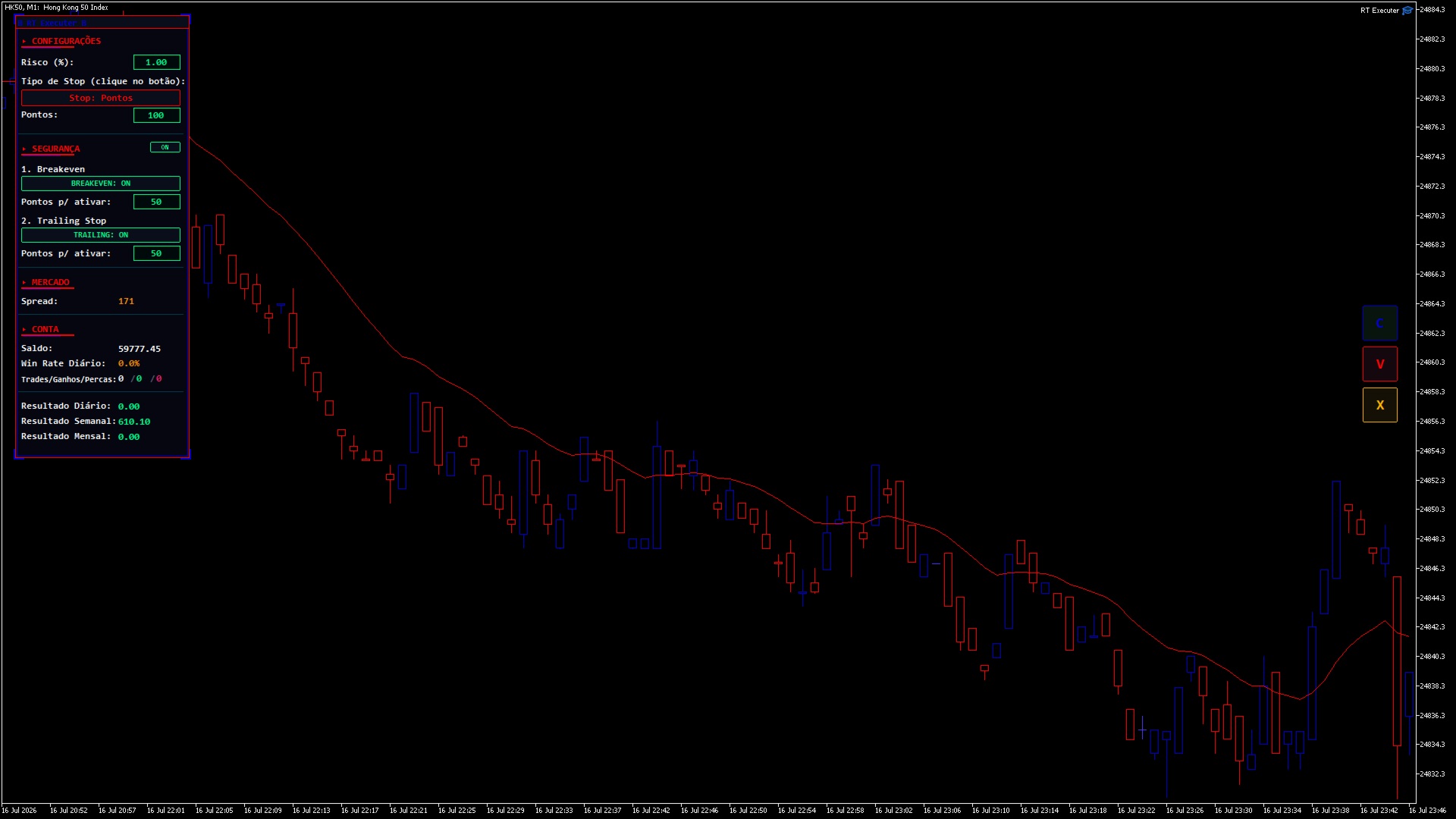
CONFIGURAÇÕES

  • Risco (%): Percentagem do seu saldo em risco por operação. O tamanho do lote é calculado automaticamente com base neste valor e na distância do stop loss. Clique duas vezes no campo para editar, digite o valor e pressione Enter.

  • Tipo de Stop: Clique no botão para alternar entre "Pontos" (distância fixa) e "Última Vela Fechada" (o stop loss é posicionado na mínima da vela anterior para compras ou na máxima para vendas).

    • Se houver pontos: Um campo "Pontos" será exibido, permitindo que você defina a distância de parada.

    • Se a última vela: Um botão de período de tempo aparece (por exemplo, "TF: M5"). Clique para alternar entre M1, M5, M15, M30, H1, H4 e D1 — o stop loss é calculado com base nesse período de tempo, independentemente do período de tempo atual do gráfico.

SEGURANÇA / GESTÃO

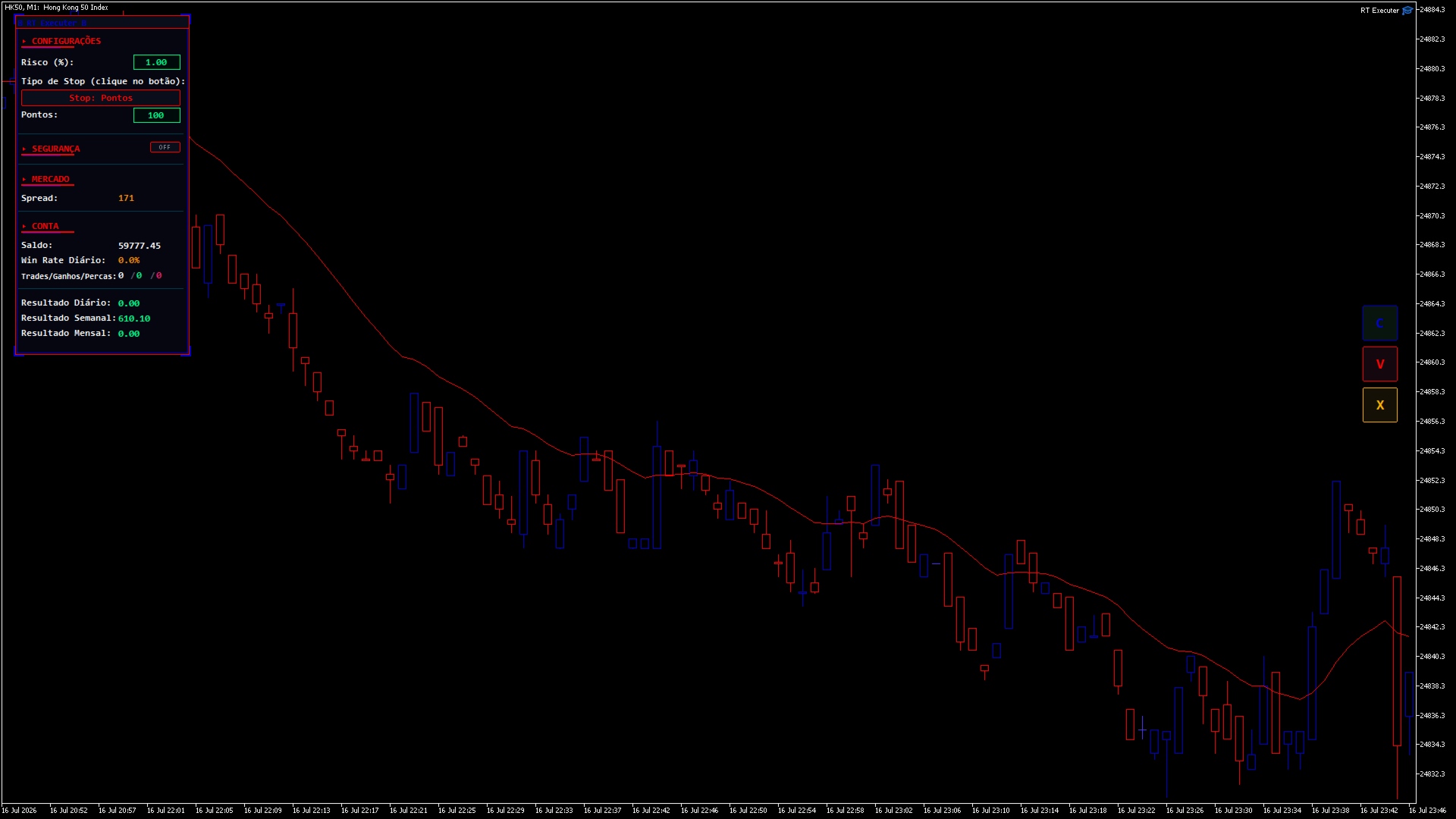
Ao lado do título da seção, há um interruptor liga/desliga. Quando definido como DESLIGADO , o painel oculta e recolhe todo o bloco (não deixando espaço vazio) e desativa automaticamente o Breakeven e o Trailing Stop.

  • Ponto de equilíbrio: Quando ativado, define quantos pontos de lucro são necessários para que o robô mova o stop loss para o preço de entrada.

  • Trailing Stop: Quando ativado, defina quantos pontos de lucro são necessários para que o robô comece a ajustar o stop loss, mantendo essa distância fixa do preço atual (movimentos apenas a favor da operação).

  • Se ambos estiverem ativados: o nível de stop loss mais protegido entre os dois sempre terá prioridade.

  • Ao abrir uma posição com Breakeven e/ou Trailing Stop ativos, setas aparecerão no gráfico ("BE" em ciano e "TS" em magenta) mostrando os níveis de preço exatos em que cada um será acionado. Elas desaparecem automaticamente quando o gatilho é ativado ou quando a posição é fechada.

MERCADO

  • Spread: Exibe o spread atual do ativo em pontos. Fica laranja quando ultrapassa o limite configurado.

CONTA / ESTATÍSTICAS DIÁRIAS

  • Exibe o saldo, a taxa de acerto diária e as negociações/ganhos/derrotas diárias (verde = vitórias, vermelho = derrotas).

RESULTADOS DIÁRIOS / SEMANAIS / MENSAIS

  • Resumo do desempenho total (lucro/prejuízo, incluindo swaps e comissões) das negociações fechadas no ativo do gráfico atual durante o dia, a semana (a partir de segunda-feira) e o mês.

========================================== BOTÕES DO LADO DIREITO
  • C (Verde): Comprar a mercado. O tamanho do lote é calculado automaticamente com base no Risco (%) e na distância do Stop Loss.

  • V (Magenta): Venda a mercado usando a mesma lógica de cálculo.

  • X (Laranja): Fecha a posição aberta gerenciada pelo painel no ativo gráfico atual. Fecha apenas as posições abertas pelos botões C/V — as posições abertas manualmente fora do painel permanecem inalteradas.

(Se os botões se sobrepuserem à escala de preços, aumente o parâmetro "Distância da borda direita".)

========================================== GUIA PASSO A PASSO
  1. Defina o nível de risco desejado (%) .

  2. Escolha o tipo de parada e defina a distância ou o período de tempo.

  3. Se desejar, habilite o Breakeven e/ou o Trailing Stop em Segurança, definindo seus pontos de ativação.

  4. Clique em C para comprar ou em V para vender.

  5. Acompanhe seus resultados em tempo real e monitore as setas BE/TS no gráfico.

  6. Para fechar uma posição manualmente, clique em X.

=========================================== SOLUÇÃO DE PROBLEMAS
  • Os botões não fazem nada quando clicados: Certifique-se de que a opção "Negociação Algorítmica" esteja ativada no MetaTrader e que a opção "Permitir Negociação Algorítmica" esteja marcada nas propriedades do painel.

  • Não é possível editar os campos de Risco/Pontos: No MetaTrader, os campos de texto exigem um clique duplo para serem editados (um único clique não ativa a edição). Pressione Enter após digitar o valor.

  • Os botões estão cobrindo a escala de preços: Aumente a "Distância da borda direita" nos campos de entrada.

  • O painel está muito alto ou muito à esquerda: ajuste os parâmetros de posição horizontal/vertical do painel.

  • O Stop Loss da "Última Vela" não está funcionando: Em gráficos abertos recentemente, os dados históricos para esse período específico ainda podem estar sendo carregados. Aguarde o carregamento dos dados ou altere o período.

========================================== AVISO DE ISENÇÃO DE RISCO

Este produto é uma ferramenta de execução e gestão de risco — não garante lucros nem elimina o risco de perdas. A negociação nos mercados financeiros envolve risco real de perda de capital. Utilize sempre um nível de risco compatível com a sua estratégia, teste numa conta de demonstração antes de negociar com capital real e negocie por sua conta e risco.
推荐产品
Auto SL & TP for Manual Trades – MT5 Application Overview Auto SL & TP for Manual Trades is a simple and practical Expert Advisor for the MetaTrader 5 platform that automatically applies Stop Loss and Take Profit levels to manually opened trades as well as pending orders. The EA is designed primarily for traders who execute trades manually but want the assurance that every position is immediately protected with predefined Stop Loss and Take Profit levels. The Expert Advisor works in points and
Grid Trading EA is a semi-automated one-click trading EA for both Normal Trading and Grid/Martingale Trading . Normal Trading Simply click Buy or Sell directly from the chart. The EA will automatically manage trades by: Setting Stop Loss and Take Profit Managing Trailing Stop Grid / Martingale Trading (For Hedging Account Type Only) When Grid Trading mode is enabled, the EA will automatically open additional grid orders at specified distances while increasing the lot size based on your settings.
Reversal Candlestick Patterns Indicator — Free Version This MT5 indicator identifies common bullish and bearish candlestick reversal patterns and displays them directly on the chart. It can be used on any market and timeframe, providing traders with clear visual references for potential reversal points. Main Features Automatic detection of well-known candlestick reversal patterns Works on all available MT5 timeframes Can be applied to Forex, Stocks, Commodities, Indices, and Cryptocurrency char
FREE
交易面板,手动交易,订单管理,风险管理,交易管理器,交易助手,一键交易,止损,止盈,移动止损 重要说明 为了使 JoPanel Prime 正常运行,必须在 MetaTrader 5 中启用“Algo Trading(算法交易)”选项。否则,交易面板将无法正常工作。 JoPanel Prime 是一款专为 MetaTrader 5 开发的专业手动交易面板,可帮助交易者快速执行订单并高效管理持仓。它使用现代化的图表交易面板取代 MT5 的默认交易界面,让交易操作更加便捷。 主要功能 • 一键执行市价买入(Buy)和卖出(Sell)订单。 • 支持挂单预览(Shift 创建买入挂单,Alt 创建卖出挂单)。 • 热键(Hotkeys):X(全部平仓)、I(反向持仓)、M(最小化面板)。 • 独立设置 Take Profit(止盈)和 Stop Loss(止损)。 • 支持 OCO(One-Cancels-Other,一单成交另一单自动取消)挂单。 • 实时统计:浮动盈亏、当日盈亏和手续费。 • 通过输入框或预设按钮调整手数(Lot Size)。 • 支持英语和葡萄牙语界面。 •
FREE
SPECIAL LAUNCH OFFER: $30 (1-Month Rent) Limited time offer to build our community and gather feedback! AmbM GOLD Institutional Scalper A high-precision M5 algorithm for XAUUSD (Gold) , engineered to trade exclusively at Institutional Liquidity Levels ($5/$10 psychological marks). PERFORMANCE DATA (BUY ONLY) • Win Rate: 87.09%. • Safe Growth: +$4,113 profit on $10k (13.75% Max Drawdown). • Extreme Stress Test: Successfully generated +$22,997 in a 5-year stress test (2020-2026), proving
Smart Hedge MT5
Francesco Baldi
Worried about weekend price crashes wiping your account? Tired of adverse news releases stopping your positions? Trade with peace of mind with Smart Hedge. Smart Hedge protects your positions from weekend gaps and news spikes. MT4 version: https://www.mql5.com/en/market/product/113290 Description : Have you ever feared that some breaking news during the weekend could wipe your account? Did you ever have your positions stopped by an adverse news release during the market open hours? I did, and
Partial
Pablo Filipe Soares De Almeida
部分平仓管理器 – 交易量智能调整工具 部分平仓管理器是一款专为 MetaTrader 5 平台设计的智能交易辅助工具,帮助交易者高效地管理持仓风险和利润。通过该工具,您可以在不完全关闭订单的情况下,仅平掉部分持仓,以锁定部分收益或减少潜在损失。这对于执行复杂的资金管理策略和动态仓位控制尤为有用。 功能特点: 部分平仓操作: 允许用户通过单击一次就能关闭所选持仓的一部分,无需手动输入复杂的数量。 自动计算交易量: 系统自动计算应关闭的手数,确保精确和快速,避免输入错误。 多订单同步支持: 可同时对同一品种下的所有持仓执行部分平仓,极大提高操作效率。 灵活拖拽界面: 用户可以点击并按住表格标题,将其移动到图表任意位置,操作更直观。 无论您是进行短线交易还是中长期策略,该工具都能帮助您更精确地控制交易节奏,实现稳定的资金管理。
CYP Trade Manager Pro MT5: The Trader's Edge in Position Management Transform How You Manage Trades - Focus on What Matters Why Most Traders Fail - And How CYP Trade Manager Pro Solves It Many traders have solid entry strategies but lack proper trade management - the key difference between professionals and amateurs. CYP Trade Manager Pro handles the critical "after entry" phase of trading that most EAs ignore, giving you the edge that institutional traders use every day. Who Is It For Manual
Imagine flying a real aircraft without ever stepping into a flight simulator. That's what trading is like. You have to simulate your strategy before you can take it to a live market. It is good if you can simulate things speedily before even stepping into any live market, or before coming up with an automated system.  People don't have all day to stare at a higher timeframe chart until the entry signal finally arrives. That's why I built this so that you can simulate your strategy with speed. Th
FREE
Pivot on Day Range
David Ben Svaiter
How many times have you looked for a PIVOT that works on a specific timeframe every day? Many traders like to estimate the direction of the day's trend based on a specific time interval every day, such as from 2 hours before the NYSE opens to 1 hour after, or from the NYSE opens to 30 minutes after. This indicator allows you to specify a certain time interval (hour and minute) and plots a pivot from that interval to the next day in the same time interval. It shows five lines based on this: me
DeepTrade SMC EA
Yasir Mohammed Sachit Sachit
DeepTrade SMC EA is a fully automated Smart Money Concepts expert advisor. Instead of blindly firing on every signal — the reason most SMC robots fail — it uses a weighted VOTING ENGINE. Each concept adds points toward a Buy or Sell case, and a trade is taken only when the combined score clears your minimum threshold. You control how strict it is.   100% SELF-CONTAINED: all detection logic (Order Blocks, Fair Value Gaps, BOS, CHoCH, swing structure) is built INSIDE the EA. You do NOT need any i
Trade Manager JM
Jonathan Ferreira De Magalhaes
Efficient Manual Trading Panel for Professional Traders === TRADING SESSIONS DISPLAY & BAR TIMER INCLUDED === Trade Manager JM is a comprehensive, intuitive utility designed to revolutionize manual order execution and management on MetaTrader 5. Built for speed and precision, this panel consolidates everything a serious manual trader needs into a single, sleek interface. Stop wasting precious seconds calculating lot sizes or manually setting SL/TP levels. Trade Manager JM allows you to focus pur
BKT Monday SMC
Khac Thanh Bui
5 (2)
BKT Monday 一款适用于 MetaTrader 5 的多层技术指标,将供需区域、支撑阻力位、自适应均线趋势信号与集成风险管理面板整合于单一图表覆盖层中。 BKT Monday 是一款适用于 MetaTrader 5 的图表指标,旨在通过三个互补的分析层帮助交易者识别高概率交易机会。该指标自动根据摆动枢纽绘制供需区域,从历史价格聚类中绘制支撑阻力线,并基于用户自选高级时间框架上的可配置均线交叉生成多头和空头信号箭头。每个信号的入场价、止损和三个止盈目标位均直接在图表上计算并显示。   概述 该指标同时处理两个时间框架的价格数据。主图表提供基于枢纽点的区域检测,而可配置的高级时间框架则为趋势信号计算提供数据。供应区绘制于确认摆动高点上方的当前价格之上;需求区绘制于确认摆动低点下方。每个区域使用 ATR 乘数进行缩放,以反映当前市场波动性。当价格收盘超出区域边界时,该区域将被移除,并在区域中点绘制一条突破结构线,以标记结构性转变。 趋势信号使用三种可选均线类型之一:ALMA、TEMA 或 Hull MA。将均线应用于高级时间框架收盘价与开盘价序列的交叉将在当前图表柱上触发多头或空头箭
FREE
AlgoDevMT5 Trade Manager Pro AlgoDevMT5 Trade Manager Pro is a professional trade management and risk control utility for MetaTrader 5. Designed for discretionary traders and funded account traders, this utility helps traders plan trades visually, calculate position size instantly, and manage risk with precision. Trade Manager Pro does not generate trading signals, open trades automatically, or provide investment advice. It is a trader-assistance utility designed to improve consistency and risk
BTC Master Pro
Farzad Saadatinia
4.58 (12)
BTC Master Pro —— 您值得信赖的比特币纪律化交易伙伴。 全新版本现已集成 OpenAI 人工智能技术 ,在高波动的加密市场环境中,实现更智能的执行与更精准的交易过滤。 本专业级交易机器人专为 Bitcoin (BTCUSD) 在 MetaTrader 5 平台上的交易而设计,专注于结构化执行、风险暴露控制以及智能化风险管理。 当前价格: $499  →  下一阶段: $699  →  最终价格: $999 LIVE SIGNAL HERE 基于 OpenAI 的执行过滤系统 最新版本集成 OpenAI 技术,用于实时分析市场环境并过滤低质量或弱势交易信号。 AI 安全层(AI Safety Layer): 人工智能模块作为交易执行前的第二层审核机制。其功能严格限定为执行过滤工具(而非市场预测工具)。每一笔交易都必须通过结构化逻辑与智能验证流程,以减少不必要的回撤并避免低质量入场。 为什么选择 BTC Master Pro? 加密货币市场——尤其是比特币——具有高度波动性。情绪化决策往往导致不稳定的交易结果。本系统旨在帮助交易者在快速市场变化中保持结构化、纪律性与
️ Trade Manager oneclick  ( Reverse Trade,  Partial Close,  Breakeven, Close All Running Trade )   control – Smart Manual Trade Control for MT5 Trade Manager oneclick control is a powerful yet lightweight trade management utility built for manual traders who want precise control over their open positions — directly from the MT5 chart. This EA does not open or close trades automatically based on any strategy. It simply provides one-click management tools to handle your running trades efficient
FREE
Trade Assistant Panel
Md Sakhawat Hossain
5 (1)
Trade Assistant Panel: Your Optimal Trading Ally "The Trade Assistant Panel" is a graphical tool for traders aiming to simplify and enhance their trading experience. It streamlines order execution and management, allowing you to focus on market analysis and decision-making. With just a few clicks, you can initiate various order types, ensuring that you always have full control over your trading strategy: Buy Orders Sell Orders Buy Stop Orders Buy Limit Orders Sell Stop Orders Sell Limit Orders Y
FREE
Title:   Smart Position Manager PRO - Advanced Risk & Position Manager Description: Smart Position Manager PRO is an all-in-one visual trade management and risk calculation tool designed for serious traders who prioritize iron discipline and strict risk management. Whether you are executing precise SMC or ICT setups on personal capital or managing large funded accounts on strict prop firms, this tool ensures you focus on counting percentages rather than emotional money swings. With a highly int
FREE
Introducing TEAB Builder - The Ultimate MT5 Expert Advisor for Profoundly Profitable and Customizable Trading!     Are you ready to take your trading to the next level? Meet TEAB Builder, an advanced MT5 Expert Advisor designed to provide unparalleled flexibility, high-profit potential, and an array of powerful features to enhance your trading experience. With TEAB Builder, you can effortlessly trade with any indicator signal, allowing you to capitalize on a wide range of trading strategies.  
Flexible receiver with lot scaling, symbol mapping and filters. Ideal receiver for MT4 → MT5 trade copying. Receive trades automatically from MT4 or MT5 master accounts. Designed for fast, flexible and reliable multi-account copying. Main Features • MT4 Master → MT5 Slave • MT5 Master → MT5 Slave • Lot size management: Same Lot Fixed Lot Multiply Lot Balance Based Lot • Symbol Mapping Example: XAUUSD = GOLD EURUSD = EURUSD.a • Include Symbols filter • Include Magics filter • Reverse Trades mode
It has never been so easy to manage the risk of your account until now, this tool will allow you to have full control of your capital and manage your entries in the synthetic index derivative markets, in an easy, practical and safe way. The available input and configuration parameters are as follows :  RISK MANAGEMENT 1. Value of your account: Here as its name says you will place the value corresponding to the size of your account, for example if your account is 150 dollars the corresponding val
CosmiCLab NY Liquidity PRO M15 Professional Smart Money Concepts indicator for detecting New York liquidity sweeps and institutional market behavior. CosmiCLab NY Liquidity PRO M15 is designed to help traders identify key liquidity zones formed during the New York session and trade institutional price movements with precision. The indicator automatically analyzes market structure and highlights important levels based on the first M15 candle of the New York session (09:30 NY time) . These levels
GridLinesX
Nattapon Chuekamhod
GridLinesX is a lightweight and efficient utility for MetaTrader 5 designed to help traders visualize price levels with precision. Whether you are a Grid Trader, a Scalper, or simply need to mark psychological price levels, GridLinesX automates the process instantly. Forget about drawing manual horizontal lines one by one. Simply define your High/Low range and the grid step (in points), and the tool will generate a clean, customizable grid overlay on your chart. Key Features: Customizable Range:
FREE
GOLD LIQUIDITY SENTINEL PRO is a premium algorithmic trading system engineered for the XAUUSD (Gold) market. Unlike standard retail indicators, this EA operates on Institutional Liquidity Sweep logic , identifying where "Smart Money" enters the market to capture high-probability reversals. ​ Why GOLD LIQUIDITY SENTINEL PRO? ​ 100% Tick Data Reliability: Rigorously tested with real market ticks to ensure the backtest matches live execution perfectly. ​ Institutional Order Flow: The EA scans lookb
See what your broker statement never shows. Test it before you buy. An on-chart analytics panel that reads your account history and your open positions, and turns them into a compact table right on the chart. No external file, no third-party service, no upload of your trading data anywhere. Around that, four things you will not find in your terminal report. Try it for real, before you buy Download the free demo and run it in the Strategy Tester in visual mode. This is not a stripped-down previe
Fractal Market Structure CHoCH BOS MT5 Fractal Market Structure CHoCH BOS MT5 is a price-action indicator designed to identify market structure through confirmed fractal formations. Instead of relying only on traditional swing-point calculations, the indicator analyzes structured candle patterns to locate important highs and lows, detect changes in directional behavior, and display relevant market structure events directly on the chart. The indicator can identify bullish and bearish Break of Str
按价格设置TP和SL – MT5自动订单修改器 自动为任意交易设置精确的TP和SL价格 ️ 适用于所有货币对和EA,可按符号或魔术号筛选 此EA允许您通过直接价格值(例如EURUSD的1.12345)来设置和应用精确的止盈(TP)和止损(SL)水平。无需点数或Pips。为所有订单或按图表/魔术号筛选实现干净、精准的交易管理。 主要功能: 通过精确价格即时修改TP和SL 应用于所有订单、当前图表或特定魔术号 ️ 输入0以移除TP或SL 连接到任意图表后自动运行 兼容所有交易品种 适用于: 想快速控制TP/SL的手动交易者 需要覆盖默认退出逻辑的EA用户 管理多订单或复杂头寸的交易者 有问题或建议吗? 请留言提出您的问题或功能想法。 您的反馈将帮助我们改进未来版本。 Keywords: 按价格设置TP SL, MT5 TP SL管理, 自动SL TP MT5, 修改SL TP MT5, 交易管理EA, 专家顾问SL TP, 设置止盈价格, 设置止损价格, 应用TP SL MT5, MT5工具EA, SL TP覆盖,
RastroBot EA
Raquel Costa
RastroBot usa o indicador Donchian Channel para identificar sinais de entrada, inspirados nas famosas estratégias Turtle. Simples e eficaz, é amplamente utilizado por traders profissionais e está integrado ao MT5. Ideal para quem quer usar esses sinais em operações de scalping. Não usa IA, Martingale ou Grid. Não é um "santo graal" do trading, mas uma estratégia honesta para lucrar com rápidas acelerações de tendência. O EA pode ser usado além do scalping, ajustando ou desativando o trailing
Posh Candle Info MT5
Theresia Yovitha Herwanda
5 (1)
Show candle info with: Time in selected timezone  Bar number Candle range points Upper wick points and percentage Body   points and percentage Lower wick   points and percentage Mark large/small candle body with customizable line. Settings group: Broker and local timezone. Lookback bars for candle marking. Large candle body Small candle body Date and time info with auto position or custom the x and y coordinate.
FREE
ProTrade Panel —— 极速、精准、专业的 MT5 交易面板 让交易不再繁琐,让执行快人一步。 您是否厌倦了 MT5 原生下单窗口的繁琐步骤? 您是否在剧烈波动行情中因操作缓慢而错失良机? ProTrade Panel (专业版)   专为手动交易者设计,集成了   一键下单、突破挂单、快速平仓、可视化风控 等核心功能,助您在该出手时绝不犹豫! 核心亮点 自由拖拽,随心所欲 : 独创的   图表锁定技术 。长按标题栏即可拖拽面板到屏幕任意位置,拖拽时K线图表不会乱跑,松手即停。 极速突破挂单 (Breakout Trading) : 专为突破行情设计。只需设置点数距离,一键生成     Buy Stop   (突破多) 或     Sell Stop   (突破空) 挂单,自动带好止损止盈。 精细化风控管理 : 所有数值(手数、止盈、止损、挂单距离)均支持   +   -   按钮微调,告别键盘输入的繁琐。 全方位平仓策略 : 不仅能平多、平空,更能   一键平盈利单 、   一键平亏损单 或   一键全平 ,风险控制尽在掌握。 极致的交互体验 : 双语切换
FREE
该产品的买家也购买
Power Candles 策略扫描器——自优化多符号设置查找器 Power Candles策略扫描器 采用与Power Candles指标相同的自优化引擎,可同时扫描您“市场观察”中的所有交易品种。一个面板即可显示当前哪些品种在统计上具备交易价值、每种策略的最佳应用方向、最优止损/止盈组合,并在新信号触发时立即向您发送提醒。 本工具是 Stein Investments 生态系统的一部分 - 18+ 款工具,加上 Max,您的一对一 AI 交易导师。  随时在线,深入了解每一款指标,在您需要梳理思路的那一刻就在那里。  立即认识他: https://stein.investments 您的全面市场监控。每个交易品种超过3,000次自动优化。2种警报类型。一键切换图表并采取行动。 为何您需要此工具 大多数多标的扫描器仅展示价格 波动 。每只股票的波动率、百分比变化、RSI。您仍需自行摸索正确的策略、合适的止损位以及理想的入场阈值。Power Candles策略扫描器针对每只股票自动解答这些问题,仅在数学验证过的交易设置中触发实际入场信号时才会向您发出提示。这就是全部卖点。 自动
Premium Trade Manager - 内置交易导师的图表面板 Premium Trade Manager 将一位交易导师嵌入您的图表,并在其下搭载完整的执行引擎。像往常一样建立交易,然后让您的 AI 交易导师 Max 读取这笔具体的交易,结合您的实时账户给出直接判断,再由您决定是否下单:止损是否符合纪律化交易的要求、风险规模是否合理、高影响新闻事件是否即将发布、您是否接近资金盘限额。其下是完整的执行引擎,负责点击之后的一切:一键按风险下单、您在图表上拖动规划且交易进行中仍可随时调整的计划、最多四个分批止盈级别、七种移动止损方式、实时资金盘合规检查、新闻屏蔽保护,以及对自身成本进行评级的点差功能。决策由您做出。Max 给出第二次审视。面板负责此后的一切。 购买前先亲手体验。 直接在浏览器中点击实时面板,这是在购买前感受其工作方式的最快途径。 stein.investments/products/premium-trade-manager Max 是您的一对一 AI 交易导师,他直接内置于面板之中。  他了解您的账户、您的设置和您的规则,用您自己的语言回答,并在每笔交易下单前进
Farmed Hedge Yield Farming | All Markets (Manual - Hybrid - Semi/Automated EA) MULTI-ASSET SUPPORT Trade any asset available on your broker - Forex: Major, Minor, Exotic pairs - Crypto: BTC, ETH, XRP, SOL, BNB - Stocks: Apple, Tesla, Amazon, Google, etc. - Commodities: Gold, Silver, Oil, Gas - Indices: US30, NAS100, SPX500, DAX40 - Any CFD your broker offers VERIFIED TRADING RESULTS - Farmed Hedge Yield Axi Copy:  https://www.mql5.com/en/signals/2356376 - Farmed Hedge Yield Exn Copy:   https:/
Footprint Chart Pro — Professional OrderFlow EA for MetaTrader 5 Version 6.34 | Professional tool for real traders | Institutional-Grade Visualization DEMO USERS - PLEASE SELECT EVERY TICK / REAL TICK WHEN TESTING AND YOU HAVE DOWNLOADED HISTORICAL DATA. IF YOU SEE A WAITING SCREEN AND IT IS NOT DOWNLOADING, IT MEANS YOU HAVE LOW HISTORICAL DATA. TRY 1 MIN AND 5 MIN FIRST ON 1 DAY DATA. ONE DAY DATA SHOULD BE THE NEWEST AND MOST CURRENT DATE. PLEASE WAIT UNTIL THE MARKET HAS ROLLED OVER PERIOD.
================================================================================ POC BREAKOUT - V20.72. Full Professional Grade Toolkit ================================================================================ POC Breakout is a full MetaTrader 5 trading dashboard for discretionary traders who want breakout signals, Point of Control (POC) context, volume profiles, order flow, market structure, news, alerts, and advanced trade planning in one professional workspace. Attached directly to you
Unlimited Trade Copier Pro MT5 is a tool to copy trade remotely to multiple MT4, MT5 and cTrader accounts at different computers/locations over internet. This is an ideal solution for you if you are a signal provider and want to copy your trades to other receivers globally on your own rules. One provider can copy trades to multiple receivers and one receiver can get trade from multiple providers as well. The provider can even set the subscription expiry for each receiver, so that receiver will n
HINN Lazy Trader
ALGOFLOW OÜ
5 (1)
LIMITED SUMMER SALE -40% ! ONLY $470 insead of $790!  Maximum real discount! ONLY UNTIL 08/22 The core idea: using the user interface, you configure the parameters the chart must meet before entering a position (or positions), choose which entry models to use, and set the rules for when trading and planning should end. Lazy Trader  handles the rest: it  takes over all the routine chart watching and execution! full description  :: 3 key videos [1] ->  [2]   ->  [3] What can it do? - Understand
EasyInsight AIO MT5
Alain Verleyen
4.92 (12)
EASY Insight AIO – 全能智能交易一站式解决方案 概述 想象一下,您可以在几秒钟内扫描整个市场——外汇、黄金、加密货币、指数,甚至股票——无需手动筛选图表、繁琐安装或配置指标。 EASY Insight AIO 是您专为 AI 交易打造的即装即用数据导出工具。它将整个市场快照一次性输出为简洁的 CSV 文件,直接支持 ChatGPT、Claude、Gemini、Perplexity 等各类 AI 平台的即时分析。 无需窗口切换,无需图表叠加,也没有任何杂乱。只需纯净、结构化的数据自动导出,让您专注于基于数据的高效决策,无需再盯盘耗时。 为什么选择 EASY Insight AIO? 真正的一体化 • 无需设置,无需安装指标,无图表叠加。只需安装、运行并导出——就是这么简单。 多资产全覆盖 • 扫描分析外汇、金属、加密货币、指数、股票——您的券商所能提供的一切市场。 AI 专属数据导出 • 高度结构化、针对 AI 优化的 CSV 文件,直接适配主流智能工具和平台。 完整导出内容: • 三个可选周期的货币强度分析 • 净多头头寸变化体现市场情绪 • 成交量变化、
The product will copy all telegram signal to MT5 ( which you are member) , also it can work as remote copier.  Easy to set up, copy order instant, can work with almost signal formats, image signal,  s upport to translate other language to English Work with all type of channel or group, even channel have "Restrict Saving Content", work with  multi channel, multi MT5 Work as remote copier: with signal have ticket number, it will copy exactly via ticket number. Support to backtest signal. How to s
Quant AI Agents
Ho Tuan Thang
5 (1)
Quant AI Agents are independent trading Expert Advisors. Instead of trading using a fixed strategy like other conventional EAs, Quant AI Agents   is a   multi-agent AI trading framework   that turns natural-language strategy prompts into live.  WANT THE SAME RESULTS AS MY LIVE SIGNAL?   Use the exact same brokers I do:   IC MARKETS , IC TRADING   .  Unlike the centralized stock market, Forex has no single, unified price feed.  Every broker sources liquidity from different providers, creating un
Trade Copier Pro MT5
Vu Trung Kien
3.67 (3)
Trade Copier Pro MT5 is a tool to copy trade remotely to multiple MT4, MT5 and cTradfer accounts at different computers/locations over internet. This is an ideal solution for you if you are a signal provider and want to copy your trades to other receivers globally on your own rules. One provider can copy trades to multiple receivers and one receiver can get trade from multiple providers as well. The provider can even set the subscription expiry for each receiver, so that receiver will not be abl
YuClusters
Yury Kulikov
4.93 (43)
Attention: You can view the program operation in the free version  YuClusters DEMO .  YuClusters is a professional market analysis system. The trader has unique opportunities to analyze the flow of orders, trade volumes, price movements using various charts, profiles, indicators, and graphical objects. YuClusters operates on data based on Time&Sales or ticks information, depending on what is available in the quotes of a financial instrument. YuClusters allows you to build graphs by combining da
Welcome to ENTRY IN THE ZONE WITH SMC MULTI TIMEFRAME Entry In The Zone with  SMC Multi Timeframe  is a professional trading indicator built on Smart Money Concepts (SMC), combining market structure analysis with a No Repaint BUY / SELL signal system in a single indicator. It helps traders understand market structure more clearly, identify key price zones, and focus on higher-quality trading opportunities. By combining Multi-Timeframe Analysis, Points of Interest (POIs), and real-time signals, t
AI Agent Supervisor is NOT an Expert Advisor. AI Agent Supervisor   is a   multi-agent AI risk & portfolio supervisor   that watches every EA on your account and intervenes in real time.  WANT AN AI PORTFOLIO MANAGER WATCHING YOUR FLEET 24/7?   Run your fleet on the same brokers I do:   IC MARKETS , IC TRADING   .  Unlike the centralized stock market, Forex has no single, unified price feed.  Every broker sources liquidity from different providers, creating unique data streams. The Supervisor r
FUTURES ORDERFLOW FOOTPRINT CHART Professional OrderFlow EA for MetaTrader 5 Version 1.01| Professional tool for real traders | Institutional-Grade Visualization STRATEGY TESTER USERS - PLEASE SELECT EVERY REAL TICK WHEN TESTING AND YOU HAVE DOWNLOADED HISTORICAL DATA. IF YOU SEE A WAITING SCREEN AND IT IS NOT DOWNLOADING, IT MEANS YOU HAVE LOW HISTORICAL DATA. TRY 1 MIN AND 5 MIN FIRST ON 1 DAY DATA. ONE DAY DATA SHOULD BE THE NEWEST AND MOST CURRENT DATE. PLEASE WAIT UNTIL THE MARKET HAS ROL
ManHedger MT5
Peter Mueller
4.83 (6)
THIS EA IS A SEMI-AUTO EA, IT NEEDS USER INPUT. Manual & Test Version Please TEST this product before BUYING  and watch my video about it. The price of the ManHedger will increase to 250$ after 20 copies sold. Contact me for user support or bug reports or if you want the MT4 version! MT4 Version  I do not guarantee any profits or financial success using this EA. With this Expert Advisor, you can: Implement your own Zone Recovery strategy to capitalize on trending markets. Create Grid trading s
Forex Analyzer Pro MT5 交易账户分析仪表板 Forex Analyzer Pro 是一款专为 MetaTrader 5 用户设计的网页交易分析平台。 Forex Analyzer Pro 可同步 MetaTrader 5 账户活动,并通过结构化仪表板将交易数据整理为分析、报告、监控和交易日志工具。 该平台允许用户通过支持的桌面和移动设备网页浏览器访问其交易仪表板。 Forex Analyzer Pro 可连接您的 MT5 账户,并将交易活动集中到统一的仪表板中,方便您监控持仓、查看历史记录、分析统计数据以及管理交易记录。 功能特色 • MT5 账户仪表板 • 持仓监控 • 交易历史分析 • 交易日历 • 策略跟踪 • 交易日志 • 账户统计分析 • 绩效报告 • 交易通知 • 多账户支持 MT5 账户仪表板 查看 MetaTrader 5 账户中的重要信息。 仪表板显示: • 账户余额 • 账户净值(Equity) • 可用保证金 • 保证金水平 • 当前持仓 • 浮动盈亏 • 交易量 • 经纪商信息 • 账户详情 所有账户信息均以结构化界面呈现,方便监控和管理。
Ultimate Extractor
Clifton Creath
5 (8)
Ultimate Extractor - Professional Trading Analytics for MT5 *****this is the local HTML version of Ultimate Extractor. !!!!!it is not compatible with Cloud!!!! For the online version please reach out to me directly****** Ultimate EA manager also now available when you use cloud pro and above for free!! Ultimate Extractor transforms your MetaTrader 5 trading history into actionable insights with comprehensive analytics, interactive charts, and real-time performance tracking. What It Does Automa
Telegram To MT5 Receiver
Levi Dane Benjamin
4.53 (15)
将信号从您所属的任何渠道(包括私人和受限渠道)直接复制到您的 MT5。 该工具在设计时充分考虑了用户的需求,同时提供了管理和监控交易所需的许多功能。 该产品采用易于使用且具有视觉吸引力的图形界面。 自定义您的设置并在几分钟内开始使用该产品! 用户指南 + 演示  |   MT4版本  |   不和谐版本 如果您想尝试演示,请参阅用户指南。 Telegram To MT5 接收器在策略测试器中不起作用! Telegram 至 MT5 功能 一次复制多个通道的信号 从私人和受限频道复制信号 不需要机器人令牌或聊天 ID(如果出于某种原因需要,您仍然可以使用这些) 使用风险百分比或固定手数进行交易 排除特定符号 选择复制所有信号或自定义要复制的信号 配置单词和短语以识别所有信号(默认值应适用于 99% 的信号提供商) 配置时间和日期设置以仅在需要时复制信号 设置一次打开的最大交易量 交易和头寸管理 使用信号或自动设置的管理 通过设置每月、每周、每天、每小时或每分钟的最大交易次数,停止过度交易和报复性交易。 支持市价订单和挂单 每日最大利润目标(以美元为单位)以确保头寸并停止过度交易 确
VOLUME BUBBLES ORDERFLOW FOOTPRINT PROFESSIONAL Expert Advisor for MetaTrader 5 Complete Feature Documentation Introduction: Volume Bubbles OrderFlow Footprint Professional is an advanced order flow visualization tool designed for the MetaTrader 5 platform. It provides institutional-grade market analysis through real-time volume bubbles visualization, volume profiling, and sophisticated order flow analysis. This Expert Advisor transforms raw market data into actionable trading intelligence, hel
Hedge Trimmer EA
Michael Sipho Bhiya
Hedge Trimmer & Roll-Over EA Managing a hedged position means carrying two opposing trades simultaneously. Over time, the losing side grows while the profitable side offsets it. The standard problem is that closing the loser costs money you may not have sitting in cash — it has to come from somewhere. Hedge Trimmer EA solves this by using the floating profit on your winning trades as the funding source to progressively close down the losing side. It identifies which trades are in profit, uses a
Custom Alerts AIO:多市场智能监控,一键启动,无需设置 概述 Custom Alerts AIO 是一款“开箱即用”的高级市场扫描工具,无需额外安装任何其他指标或进行复杂设置。它内置了 Stein Investments 的所有核心指标(FX Power、FX Volume、FX Dynamic、FX Levels 和 IX Power),可帮助您轻松监控所有主要资产类别,如外汇、黄金、指数和加密货币。如果您的经纪商支持股票,您也可以手动添加个股进行监控。 1. 为什么选择 Custom Alerts AIO? 无需额外购买任何指标 • 所有关键指标均已内置,开箱即用。 • 专注于实时预警,不包含任何图形元素,性能高效,界面简洁。 全面覆盖所有主要市场 • 支持监控外汇、金属、加密货币和指数市场。 • 无需手动输入任何交易品种,只需在设置中勾选资产类别即可启用。 • 股票并不属于默认类别,如有需要可手动通过参数输入添加。 高效、专业、便捷 • 无需图表模板和手动加载,适合自动化或远程交易环境。 • 非常适合 VPS 上长期运行,或作为后台市场预警工具使用。 2
Telegram to mt5 pro
Janet Abu Khalil
4 (4)
Telegram to MT5 Pro — 高级 Telegram 信号复制器(Auto-Fix,多TP,风险控制,完整交易管理) Telegram to MT5 Pro — 专业 Telegram 信号复制系统 Telegram to MT5 Pro 可将来自 Telegram 的交易信号实时复制到您的 MetaTrader 5 账户,并提供完整的风险控制、执行管理与交易管理功能。 系统由两个组件组成: • 运行在 MetaTrader 5 内的 Expert Advisor(EA) • 连接 Telegram 并将信号发送到 EA 的桌面桥接程序 两个组件必须在同一台电脑运行。由于 MQL5 限制,EA 无法直接连接 Telegram。 支持与安装 提供完整 PDF 安装指南。 支持内容: • 完整 PDF 使用手册 • 分步安装指导 • 在线聊天支持 • 交易商设置帮助(前缀、后缀、符号映射) 功能说明 • 读取任意 Telegram 群组或频道信号 • 自动解析交易品种、方向、入场、止损、止盈 • 秒级执行交易 • 管理交易(移动止损、保本、部分平仓) • 支持多账户与多信号
Prop Firm Os
Gayathiri Gopalakrishnan
5 (1)
PROP FIRM OS Structured Trading Assistant for MetaTrader 5 PROP FIRM OS is a structured trading assistant designed for MetaTrader 5 users who prefer rule-based market analysis and organized trading workflows. The Expert Advisor combines market analysis tools, scanner functions, dashboard monitoring, alerts, risk-control settings, and trade management features inside one system. PROP FIRM OS is designed to help traders follow selected rules, filters, and monitoring conditions during trading activ
QCML Assistant
Maxime Turcotte-lafreniere
QCML Assistant MT5 Your Trading. Our Assistant. Your Edge. Looking for a tool that completely transforms your experience on MetaTrader 5? QCML Assistant is the all-in-one solution built by traders, for traders. Just one tool installed on your chart, and you get access to an ultra-complete, ultra-fast, and ultra-simple trading platform. No more hours wasted setting up your workspace. No more complicated trade entries. With QCML Assistant, everything becomes simple, smooth, and efficient right fro
对于专业交易员和新手交易员来说,能够根据给定的止损水平立即计算仓位大小或风险的工具至关重要。 TRADE PRO 交易工具提供快速准确的计算,帮助您在时间紧迫且波动剧烈的市场条件下做出决策。 MT4 版本 /     其他安装材料 主要功能: 原创。简洁。有效。 打开主交易面板的一种独特便捷的方式:将鼠标悬停在图表右侧,然后单击相应的方向即可下单。 快速设置市价单 使用 TRADE PRO,您可以将风险水平设置为账户余额或资金的百分比,或者指定具体的风险金额。在图表上直观地定义止损位,工具将自动计算每个货币对的最佳仓位大小。该工具还可以根据指定的风险回报比自动设置盈利目标(止盈)。 下多个限价单,分担总风险(网格模式)。 无论你是进行多笔买入或卖出交易,还是采用网格策略,交易面板都提供了设置多个限价单的功能,使你可以将主要风险分散到每个部分,这些部分也可以进行调整。 在现有市价单的基础上添加额外的限价单。 为了方便起见,如果您已经有未结订单,我们添加了一项功能,允许您快速添加其他限价订单,并共享止损和止盈。 可设置额外的止盈水平,并能快速更改交易量。 新功能允许您快速设置额外的止盈点,
MT5 Trading Deck
Manuel Michiels
5 (2)
One button. One trade. MT5 Trading Deck is a hotkey trading panel for MetaTrader 5 that turns the platform into a keyboard-driven execution cockpit. Stop loss, take profit and lot size are pre-calculated for every key; the moment you press, a market order is live on the broker. A complete technical user manual is attached in the product Comments section. It documents every input parameter, the full hotkey map, the recommended Stream Deck XL layout, and the advanced workflows for Pre-Limit orders
Bots Builder Pro MT5
Andrey Barinov
4.17 (6)
This is exactly what the name says. Visual strategy builder . One of a kind. Turn your trading strategies and ideas into Expert Advisors without writing single line of code. Generate mql source code files with a few clicks and get your fully functional Expert Advisors, which are ready for live execution, strategy tester and cloud optimization. There are very few options for those who have no programming skills and can not create their trading solutions in the MQL language. Now, with Bots Builde
Discord Signal Notifications — это мощный инструмент для трейдеров, проповодов и управляющих счетами, который автоматически отправляет все ваши торговые события в канал или чат Discord. Главное преимущество — Глобальный мониторинг. Вам не нужно устанавливать советник на каждый график. Достаточно запустить одну копию утилиты на одном любом окне, и она будет отслеживать действия по всем инструментам и всем счетам в вашем терминале одновременно. Основные возможности Глобальный мониторинг счёта Ути
Global Investing FX Terminal
Santiago Nicolas Pla Casuriaga
Global Investing FX Terminal 是一款面向 MetaTrader 5 的一体化外汇仪表盘——涵盖央行政策利率、CFTC COT 持仓、利差排名、经济意外指数、期权偏斜、散户情绪与相关性,共十三个分析面板——以单一无闪烁画布呈现,每 10 秒从单个挂载 EA 刷新一次,无需任何外部软件。 专业外汇分析需要同时调取通常分散在不同平台的数据:利率衍生品、政府数据门户、券商掉期规格、期权台。此 EA 将所有这些整合到交易终端内的单一界面中,在您执行决策的地方完成分析。 仪表盘上显示的内容 市场概览 外汇对列表 — 所有 28 个 G10 货币对,加上当券商 Market Watch 中存在 NOK/SEK 交叉盘时显示的交叉盘——最多共 36 个货币对——的实时买卖价。每行显示点差、日度与周度变化、以点数表示的绝对区间,以及 ADR%——当前交易时段区间占 14 日平均日区间的百分比。ADR 达到 95% 的货币对已消耗其统计日内延伸空间;伦敦盘中场 ADR 仅 25% 的货币对仍有运行余地。颜色逐 Tick 实时更新。 货币对详情 — 点击列表中的任意行,即可打开该
筛选:
无评论
回复评论