RT Executer MT5

RT EXECUTER — MANUAL DO USUÁRIO ========================================== O QUE É O EXECUTOR RT

O RT Executer é um painel de execução manual para MetaTrader 5, projetado para scalpers e day traders que desejam execução rápida de ordens combinada com gerenciamento de risco automatizado. Você define seu risco por operação e o tipo de stop, e o painel calcula automaticamente o tamanho do lote ao comprar ou vender.

O EA não toma decisões de entrada por você — a análise de mercado e os gatilhos de compra/venda permanecem inteiramente sob sua responsabilidade. O EA cuida da execução, do cálculo do tamanho do lote e do gerenciamento de stops (Breakeven e Trailing Stop).

========================================== PARÂMETROS (ENTRADAS)

Esses parâmetros podem ser encontrados na aba "Entradas" ao conectar o painel ao gráfico. Você pode ajustar cores, tamanhos e posições do layout sem modificar nenhum código.

  • Cor neon do botão Comprar (verde): Cor do botão Comprar (C). Padrão: Verde neon.

  • Cor neon do botão Vender (magenta/vermelho): Cor do botão Vender (V). Padrão: Magenta/vermelho neon.

  • Cor de fundo do painel (preto profundo/espacial): Cor do fundo do painel.

  • Tamanho do botão (px) - "tamanho da ponta do dedo": Tamanho dos botões Comprar/Vender/Fechar. Padrão: 46.

  • Espaço vertical entre botões: Espaçamento entre os botões do lado direito. Padrão: 8.

  • Distância da borda direita (ajuste para evitar cobrir a escala de preços): Aumente este valor se os botões sobrepuserem a escala de preços no lado direito do gráfico. Padrão: 70.

  • Distância do topo do gráfico: Distância dos botões até o topo do gráfico. Valor padrão: 40.

  • Cor de destaque principal (ciano neon): Cor para títulos, sublinhados e borda do painel.

  • Cor secundária de destaque (magenta neon): Cor para o efeito duplo/cromático no texto do cabeçalho.

  • Cor da linha divisória: Cor das linhas finas que separam as seções do painel.

  • Limiar de propagação (em pontos) para alerta laranja: Limiar de aviso visual para alta propagação. Padrão: 20.

  • Fonte do painel (aparência de terminal/hacker): Fonte usada em todo o painel. Padrão: Consolas.

  • Posição horizontal do painel esquerdo (px a partir da borda esquerda): Move o painel para a esquerda/direita. Padrão: 6.

  • Posição vertical do painel esquerdo (px a partir do topo do gráfico): Move o painel para cima/para baixo (aumente este valor se ele cobrir o menu superior do MetaTrader). Padrão: 36.

========================================== SEÇÕES DO PAINEL

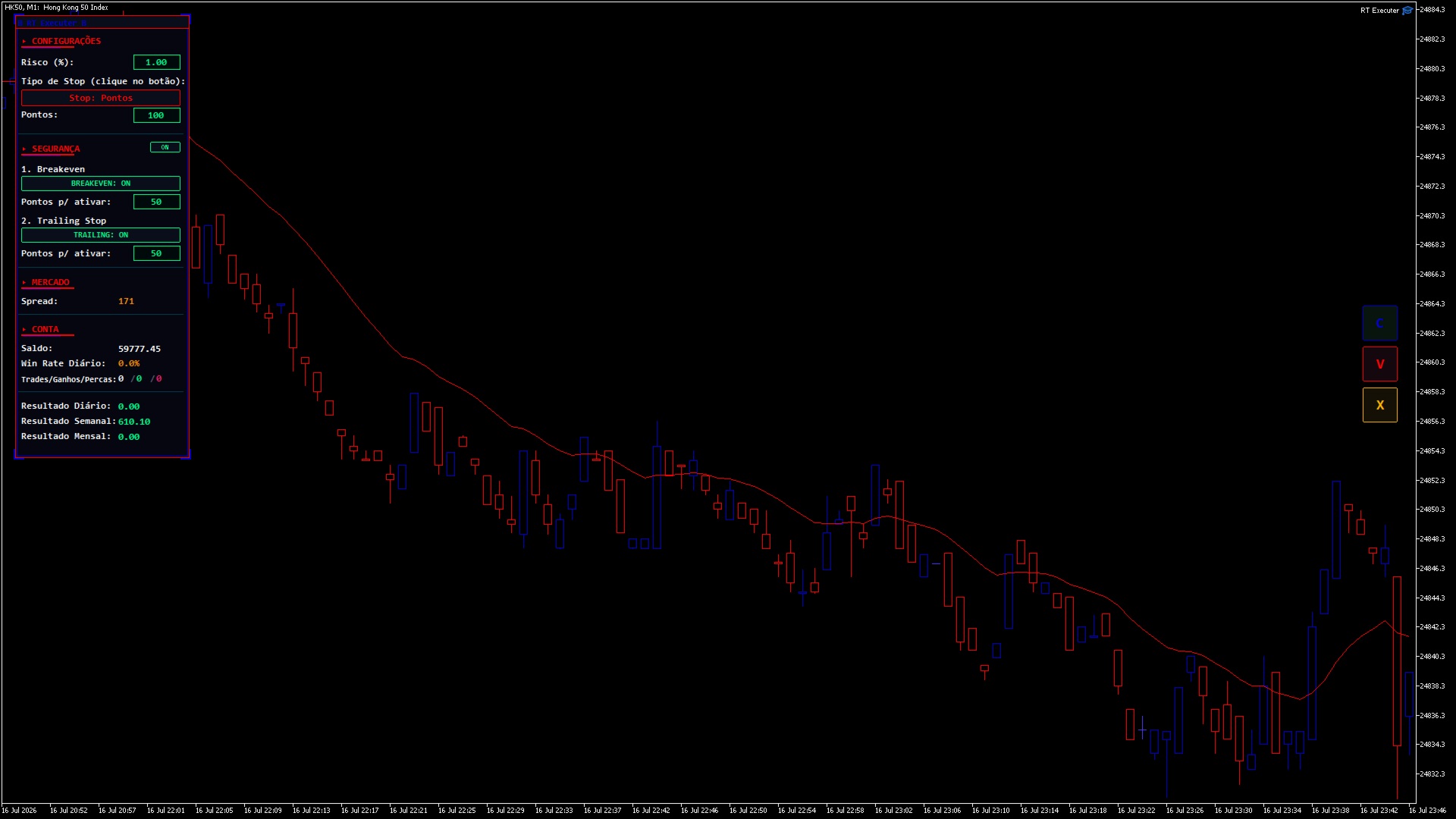
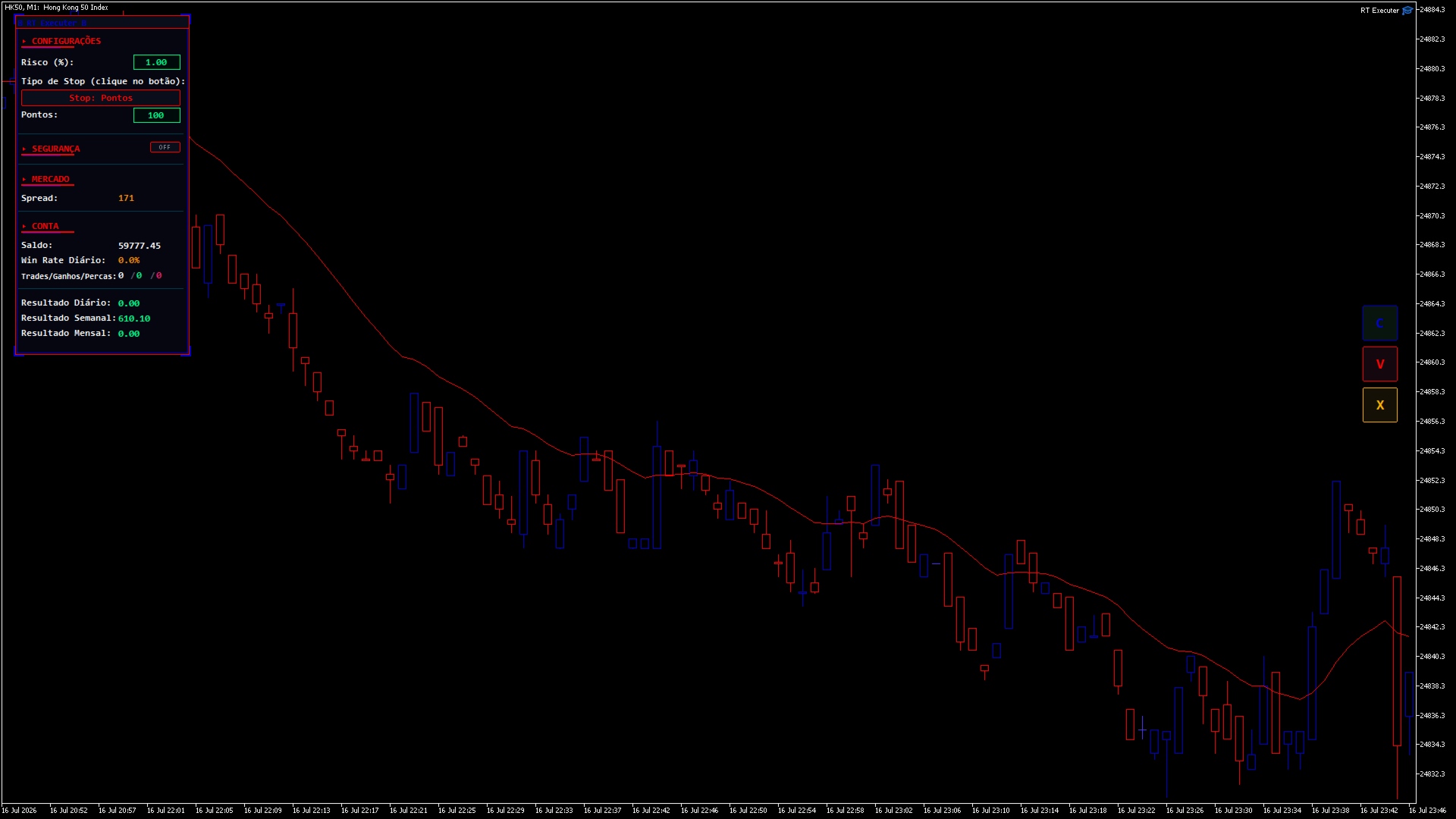
CONFIGURAÇÕES

  • Risco (%): Percentagem do seu saldo em risco por operação. O tamanho do lote é calculado automaticamente com base neste valor e na distância do stop loss. Clique duas vezes no campo para editar, digite o valor e pressione Enter.

  • Tipo de Stop: Clique no botão para alternar entre "Pontos" (distância fixa) e "Última Vela Fechada" (o stop loss é posicionado na mínima da vela anterior para compras ou na máxima para vendas).

    • Se houver pontos: Um campo "Pontos" será exibido, permitindo que você defina a distância de parada.

    • Se a última vela: Um botão de período de tempo aparece (por exemplo, "TF: M5"). Clique para alternar entre M1, M5, M15, M30, H1, H4 e D1 — o stop loss é calculado com base nesse período de tempo, independentemente do período de tempo atual do gráfico.

SEGURANÇA / GESTÃO

Ao lado do título da seção, há um interruptor liga/desliga. Quando definido como DESLIGADO , o painel oculta e recolhe todo o bloco (não deixando espaço vazio) e desativa automaticamente o Breakeven e o Trailing Stop.

  • Ponto de equilíbrio: Quando ativado, define quantos pontos de lucro são necessários para que o robô mova o stop loss para o preço de entrada.

  • Trailing Stop: Quando ativado, defina quantos pontos de lucro são necessários para que o robô comece a ajustar o stop loss, mantendo essa distância fixa do preço atual (movimentos apenas a favor da operação).

  • Se ambos estiverem ativados: o nível de stop loss mais protegido entre os dois sempre terá prioridade.

  • Ao abrir uma posição com Breakeven e/ou Trailing Stop ativos, setas aparecerão no gráfico ("BE" em ciano e "TS" em magenta) mostrando os níveis de preço exatos em que cada um será acionado. Elas desaparecem automaticamente quando o gatilho é ativado ou quando a posição é fechada.

MERCADO

  • Spread: Exibe o spread atual do ativo em pontos. Fica laranja quando ultrapassa o limite configurado.

CONTA / ESTATÍSTICAS DIÁRIAS

  • Exibe o saldo, a taxa de acerto diária e as negociações/ganhos/derrotas diárias (verde = vitórias, vermelho = derrotas).

RESULTADOS DIÁRIOS / SEMANAIS / MENSAIS

  • Resumo do desempenho total (lucro/prejuízo, incluindo swaps e comissões) das negociações fechadas no ativo do gráfico atual durante o dia, a semana (a partir de segunda-feira) e o mês.

========================================== BOTÕES DO LADO DIREITO
  • C (Verde): Comprar a mercado. O tamanho do lote é calculado automaticamente com base no Risco (%) e na distância do Stop Loss.

  • V (Magenta): Venda a mercado usando a mesma lógica de cálculo.

  • X (Laranja): Fecha a posição aberta gerenciada pelo painel no ativo gráfico atual. Fecha apenas as posições abertas pelos botões C/V — as posições abertas manualmente fora do painel permanecem inalteradas.

(Se os botões se sobrepuserem à escala de preços, aumente o parâmetro "Distância da borda direita".)

========================================== GUIA PASSO A PASSO
  1. Defina o nível de risco desejado (%) .

  2. Escolha o tipo de parada e defina a distância ou o período de tempo.

  3. Se desejar, habilite o Breakeven e/ou o Trailing Stop em Segurança, definindo seus pontos de ativação.

  4. Clique em C para comprar ou em V para vender.

  5. Acompanhe seus resultados em tempo real e monitore as setas BE/TS no gráfico.

  6. Para fechar uma posição manualmente, clique em X.

=========================================== SOLUÇÃO DE PROBLEMAS
  • Os botões não fazem nada quando clicados: Certifique-se de que a opção "Negociação Algorítmica" esteja ativada no MetaTrader e que a opção "Permitir Negociação Algorítmica" esteja marcada nas propriedades do painel.

  • Não é possível editar os campos de Risco/Pontos: No MetaTrader, os campos de texto exigem um clique duplo para serem editados (um único clique não ativa a edição). Pressione Enter após digitar o valor.

  • Os botões estão cobrindo a escala de preços: Aumente a "Distância da borda direita" nos campos de entrada.

  • O painel está muito alto ou muito à esquerda: ajuste os parâmetros de posição horizontal/vertical do painel.

  • O Stop Loss da "Última Vela" não está funcionando: Em gráficos abertos recentemente, os dados históricos para esse período específico ainda podem estar sendo carregados. Aguarde o carregamento dos dados ou altere o período.

========================================== AVISO DE ISENÇÃO DE RISCO

Este produto é uma ferramenta de execução e gestão de risco — não garante lucros nem elimina o risco de perdas. A negociação nos mercados financeiros envolve risco real de perda de capital. Utilize sempre um nível de risco compatível com a sua estratégia, teste numa conta de demonstração antes de negociar com capital real e negocie por sua conta e risco.
추천 제품
Auto SL & TP for Manual Trades – MT5 Application Overview Auto SL & TP for Manual Trades is a simple and practical Expert Advisor for the MetaTrader 5 platform that automatically applies Stop Loss and Take Profit levels to manually opened trades as well as pending orders. The EA is designed primarily for traders who execute trades manually but want the assurance that every position is immediately protected with predefined Stop Loss and Take Profit levels. The Expert Advisor works in points and
Grid Trading EA is a semi-automated one-click trading EA for both Normal Trading and Grid/Martingale Trading . Normal Trading Simply click Buy or Sell directly from the chart. The EA will automatically manage trades by: Setting Stop Loss and Take Profit Managing Trailing Stop Grid / Martingale Trading (For Hedging Account Type Only) When Grid Trading mode is enabled, the EA will automatically open additional grid orders at specified distances while increasing the lot size based on your settings.
Reversal Candlestick Patterns Indicator — Free Version This MT5 indicator identifies common bullish and bearish candlestick reversal patterns and displays them directly on the chart. It can be used on any market and timeframe, providing traders with clear visual references for potential reversal points. Main Features Automatic detection of well-known candlestick reversal patterns Works on all available MT5 timeframes Can be applied to Forex, Stocks, Commodities, Indices, and Cryptocurrency char
FREE
거래 패널,수동 거래,주문 관리,위험 관리,트레이드 매니저,트레이딩 어시스턴트,원클릭 거래,스톱로스,테이크프로핏,스캘핑 중요 JoPanel Prime가 정상적으로 작동하려면 MetaTrader 5에서 "Algo Trading" 옵션을 반드시 활성화해야 합니다. 이 옵션이 활성화되어 있지 않으면 패널이 작동하지 않습니다. JoPanel Prime는 MetaTrader 5용으로 개발된 전문 수동 트레이딩 패널입니다. 주문을 빠르고 효율적으로 실행하고 포지션을 관리할 수 있도록 설계되었으며, MT5의 기본 인터페이스를 차트에서 직접 사용할 수 있는 현대적인 트레이딩 패널로 대체합니다. 주요 기능 • 원클릭 시장가 Buy 및 Sell 주문 실행 • 차트 미리보기 기능이 있는 Pending Orders (Shift: Buy, Alt: Sell) • Hotkeys (X: 전체 청산, I: 포지션 반전, M: 패널 최소화) • Take Profit 및 Stop Loss 개별 설정 •
FREE
SPECIAL LAUNCH OFFER: $30 (1-Month Rent) Limited time offer to build our community and gather feedback! AmbM GOLD Institutional Scalper A high-precision M5 algorithm for XAUUSD (Gold) , engineered to trade exclusively at Institutional Liquidity Levels ($5/$10 psychological marks). PERFORMANCE DATA (BUY ONLY) • Win Rate: 87.09%. • Safe Growth: +$4,113 profit on $10k (13.75% Max Drawdown). • Extreme Stress Test: Successfully generated +$22,997 in a 5-year stress test (2020-2026), proving
Smart Hedge MT5
Francesco Baldi
Worried about weekend price crashes wiping your account? Tired of adverse news releases stopping your positions? Trade with peace of mind with Smart Hedge. Smart Hedge protects your positions from weekend gaps and news spikes. MT4 version: https://www.mql5.com/en/market/product/113290 Description : Have you ever feared that some breaking news during the weekend could wipe your account? Did you ever have your positions stopped by an adverse news release during the market open hours? I did, and
Partial
Pablo Filipe Soares De Almeida
부분 청산 관리자 – 거래량 자동 조정 도구 부분 청산 관리자는 MetaTrader 5 플랫폼에서 포지션의 일부를 빠르고 정확하게 청산할 수 있도록 돕는 고급 트레이딩 도구입니다. 이 도구를 사용하면 전체 포지션을 종료하지 않고도 수익을 일부 확보하거나 손실을 제한할 수 있어, 효율적인 리스크 관리와 유연한 자금 운영이 가능합니다. 특히 스캘핑이나 데이 트레이딩처럼 신속한 의사결정이 필요한 전략에 적합합니다. 주요 기능: 부분 청산: 클릭 한 번으로 열린 포지션의 일부를 손쉽게 청산할 수 있습니다. 자동 거래량 계산: 수동 입력 없이 자동으로 청산할 거래량을 계산하여 실수를 줄이고 속도를 높입니다. 다중 주문 지원: 동일한 심볼의 여러 주문에 동시에 부분 청산을 적용할 수 있어 효율적입니다. 이동 가능한 테이블: 헤더를 클릭하고 드래그하여 차트에서 원하는 위치로 쉽게 옮길 수 있습니다. 이 도구는 트레이더가 시장의 변동성 속에서도 안정적인 성과를 유지하도록 돕는 필수적인 리스크 관리
CYP Trade Manager Pro MT5: The Trader's Edge in Position Management Transform How You Manage Trades - Focus on What Matters Why Most Traders Fail - And How CYP Trade Manager Pro Solves It Many traders have solid entry strategies but lack proper trade management - the key difference between professionals and amateurs. CYP Trade Manager Pro handles the critical "after entry" phase of trading that most EAs ignore, giving you the edge that institutional traders use every day. Who Is It For Manual
Imagine flying a real aircraft without ever stepping into a flight simulator. That's what trading is like. You have to simulate your strategy before you can take it to a live market. It is good if you can simulate things speedily before even stepping into any live market, or before coming up with an automated system.  People don't have all day to stare at a higher timeframe chart until the entry signal finally arrives. That's why I built this so that you can simulate your strategy with speed. Th
FREE
Pivot on Day Range
David Ben Svaiter
How many times have you looked for a PIVOT that works on a specific timeframe every day? Many traders like to estimate the direction of the day's trend based on a specific time interval every day, such as from 2 hours before the NYSE opens to 1 hour after, or from the NYSE opens to 30 minutes after. This indicator allows you to specify a certain time interval (hour and minute) and plots a pivot from that interval to the next day in the same time interval. It shows five lines based on this: me
DeepTrade SMC EA
Yasir Mohammed Sachit Sachit
DeepTrade SMC EA is a fully automated Smart Money Concepts expert advisor. Instead of blindly firing on every signal — the reason most SMC robots fail — it uses a weighted VOTING ENGINE. Each concept adds points toward a Buy or Sell case, and a trade is taken only when the combined score clears your minimum threshold. You control how strict it is.   100% SELF-CONTAINED: all detection logic (Order Blocks, Fair Value Gaps, BOS, CHoCH, swing structure) is built INSIDE the EA. You do NOT need any i
Trade Manager JM
Jonathan Ferreira De Magalhaes
Efficient Manual Trading Panel for Professional Traders === TRADING SESSIONS DISPLAY & BAR TIMER INCLUDED === Trade Manager JM is a comprehensive, intuitive utility designed to revolutionize manual order execution and management on MetaTrader 5. Built for speed and precision, this panel consolidates everything a serious manual trader needs into a single, sleek interface. Stop wasting precious seconds calculating lot sizes or manually setting SL/TP levels. Trade Manager JM allows you to focus pur
BKT Monday SMC
Khac Thanh Bui
5 (2)
BKT Monday 공급 및 수요 구역, 지지 및 저항 레벨, 적응형 MA 추세 신호, 통합 리스크 관리 패널을 하나의 차트 오버레이로 결합한 MetaTrader 5용 다층 기술 지표입니다. BKT Monday는 세 가지 상호 보완적인 분석 레이어를 활용하여 고확률 트레이드 설정을 식별하는 데 도움을 주는 MetaTrader 5용 차트 지표입니다. 이 지표는 스윙 피벗에서 공급 및 수요 구역을 자동으로 그리고, 과거 가격 클러스터에서 지지 및 저항선을 그리며, 사용자가 선택한 상위 시간대에서 설정 가능한 이동평균 크로스오버로부터 롱 및 숏 신호 화살표를 생성합니다. 각 신호에 대한 진입가, 손절매, 세 개의 익절 레벨이 차트에 직접 계산되어 표시됩니다.   개요 이 지표는 두 개의 시간대에서 동시에 가격 데이터를 처리합니다. 메인 차트는 피벗 기반 구역 감지를 담당하고, 설정 가능한 상위 시간대는 추세 신호 계산에 데이터를 제공합니다. 공급 구역은 확인된 스윙 고점에서 현재 가격 위
FREE
AlgoDevMT5 Trade Manager Pro AlgoDevMT5 Trade Manager Pro is a professional trade management and risk control utility for MetaTrader 5. Designed for discretionary traders and funded account traders, this utility helps traders plan trades visually, calculate position size instantly, and manage risk with precision. Trade Manager Pro does not generate trading signals, open trades automatically, or provide investment advice. It is a trader-assistance utility designed to improve consistency and risk
BTC Master Pro
Farzad Saadatinia
4.58 (12)
BTC Master Pro — 규율 있는 비트코인 트레이딩을 위한 신뢰할 수 있는 파트너. 최신 버전은 OpenAI 인공지능 기술 이 통합되어, 높은 변동성을 가진 암호화폐 시장 환경에서 더욱 정교한 실행과 향상된 거래 필터링을 제공합니다. 이 전문 Expert Advisor는 MetaTrader 5 플랫폼에서 Bitcoin (BTCUSD) 거래를 위해 특별히 설계되었으며, 구조화된 실행, 노출 관리, 그리고 지능적인 리스크 관리에 중점을 두고 있습니다. 가격: $499  →  다음 단계: $699  →  최종 가격: $999 LIVE SIGNAL HERE OpenAI 기반 실행 필터 최신 버전은 OpenAI 기술을 활용하여 실시간 시장 상황을 분석하고, 품질이 낮거나 신뢰도가 부족한 거래 설정을 필터링합니다. AI 안전 레이어: 인공지능 모듈은 거래 실행 전에 작동하는 2단계 승인 시스템으로 설계되었습니다. 이는 예측 도구가 아닌 실행 필터로만 사용됩니다. 모든 거래는 구조화
️ Trade Manager oneclick  ( Reverse Trade,  Partial Close,  Breakeven, Close All Running Trade )   control – Smart Manual Trade Control for MT5 Trade Manager oneclick control is a powerful yet lightweight trade management utility built for manual traders who want precise control over their open positions — directly from the MT5 chart. This EA does not open or close trades automatically based on any strategy. It simply provides one-click management tools to handle your running trades efficient
FREE
Trade Assistant Panel
Md Sakhawat Hossain
5 (1)
Trade Assistant Panel: Your Optimal Trading Ally "The Trade Assistant Panel" is a graphical tool for traders aiming to simplify and enhance their trading experience. It streamlines order execution and management, allowing you to focus on market analysis and decision-making. With just a few clicks, you can initiate various order types, ensuring that you always have full control over your trading strategy: Buy Orders Sell Orders Buy Stop Orders Buy Limit Orders Sell Stop Orders Sell Limit Orders Y
FREE
Title:   Smart Position Manager PRO - Advanced Risk & Position Manager Description: Smart Position Manager PRO is an all-in-one visual trade management and risk calculation tool designed for serious traders who prioritize iron discipline and strict risk management. Whether you are executing precise SMC or ICT setups on personal capital or managing large funded accounts on strict prop firms, this tool ensures you focus on counting percentages rather than emotional money swings. With a highly int
FREE
Introducing TEAB Builder - The Ultimate MT5 Expert Advisor for Profoundly Profitable and Customizable Trading!     Are you ready to take your trading to the next level? Meet TEAB Builder, an advanced MT5 Expert Advisor designed to provide unparalleled flexibility, high-profit potential, and an array of powerful features to enhance your trading experience. With TEAB Builder, you can effortlessly trade with any indicator signal, allowing you to capitalize on a wide range of trading strategies.  
Flexible receiver with lot scaling, symbol mapping and filters. Ideal receiver for MT4 → MT5 trade copying. Receive trades automatically from MT4 or MT5 master accounts. Designed for fast, flexible and reliable multi-account copying. Main Features • MT4 Master → MT5 Slave • MT5 Master → MT5 Slave • Lot size management: Same Lot Fixed Lot Multiply Lot Balance Based Lot • Symbol Mapping Example: XAUUSD = GOLD EURUSD = EURUSD.a • Include Symbols filter • Include Magics filter • Reverse Trades mode
It has never been so easy to manage the risk of your account until now, this tool will allow you to have full control of your capital and manage your entries in the synthetic index derivative markets, in an easy, practical and safe way. The available input and configuration parameters are as follows :  RISK MANAGEMENT 1. Value of your account: Here as its name says you will place the value corresponding to the size of your account, for example if your account is 150 dollars the corresponding val
CosmiCLab NY Liquidity PRO M15 Professional Smart Money Concepts indicator for detecting New York liquidity sweeps and institutional market behavior. CosmiCLab NY Liquidity PRO M15 is designed to help traders identify key liquidity zones formed during the New York session and trade institutional price movements with precision. The indicator automatically analyzes market structure and highlights important levels based on the first M15 candle of the New York session (09:30 NY time) . These levels
GridLinesX
Nattapon Chuekamhod
GridLinesX is a lightweight and efficient utility for MetaTrader 5 designed to help traders visualize price levels with precision. Whether you are a Grid Trader, a Scalper, or simply need to mark psychological price levels, GridLinesX automates the process instantly. Forget about drawing manual horizontal lines one by one. Simply define your High/Low range and the grid step (in points), and the tool will generate a clean, customizable grid overlay on your chart. Key Features: Customizable Range:
FREE
GOLD LIQUIDITY SENTINEL PRO is a premium algorithmic trading system engineered for the XAUUSD (Gold) market. Unlike standard retail indicators, this EA operates on Institutional Liquidity Sweep logic , identifying where "Smart Money" enters the market to capture high-probability reversals. ​ Why GOLD LIQUIDITY SENTINEL PRO? ​ 100% Tick Data Reliability: Rigorously tested with real market ticks to ensure the backtest matches live execution perfectly. ​ Institutional Order Flow: The EA scans lookb
See what your broker statement never shows. Test it before you buy. An on-chart analytics panel that reads your account history and your open positions, and turns them into a compact table right on the chart. No external file, no third-party service, no upload of your trading data anywhere. Around that, four things you will not find in your terminal report. Try it for real, before you buy Download the free demo and run it in the Strategy Tester in visual mode. This is not a stripped-down previe
Fractal Market Structure CHoCH BOS MT5 Fractal Market Structure CHoCH BOS MT5 is a price-action indicator designed to identify market structure through confirmed fractal formations. Instead of relying only on traditional swing-point calculations, the indicator analyzes structured candle patterns to locate important highs and lows, detect changes in directional behavior, and display relevant market structure events directly on the chart. The indicator can identify bullish and bearish Break of Str
가격으로 TP 및 SL 설정 – MT5 자동 주문 수정기 모든 거래에 대해 정확한 TP 및 SL 가격 수준 자동 설정 ️ 모든 통화쌍 및 EA와 호환, 심볼 또는 매직넘버로 필터링 가능 이 EA는 직접 가격 값(예: EURUSD의 1.12345)을 사용하여 거래의 정확한 테이크프로핏(TP)과 스톱로스(SL) 수준을 정의하고 적용합니다. 포인트나 핍 없음. 모든 주문 또는 선택된 심볼/매직넘버에 대해 깔끔하고 정확한 거래 관리가 가능합니다. 주요 기능: 정확한 가격으로 TP 및 SL 즉시 수정 모든 주문, 현재 심볼 또는 특정 매직넘버에 적용 ️ 0을 입력하여 거래의 TP 또는 SL 제거 차트에 연결되면 완전 자동 작동 모든 거래 자산과 호환 적합 대상: 빠른 TP/SL 제어를 원하는 수동 트레이더 기본 종료 로직을 재정의해야 하는 EA 사용자 복잡한 포지션을 관리하는 다중 주문 트레이더 질문이나 제안이 있으신가요?
RastroBot EA
Raquel Costa
RastroBot usa o indicador Donchian Channel para identificar sinais de entrada, inspirados nas famosas estratégias Turtle. Simples e eficaz, é amplamente utilizado por traders profissionais e está integrado ao MT5. Ideal para quem quer usar esses sinais em operações de scalping. Não usa IA, Martingale ou Grid. Não é um "santo graal" do trading, mas uma estratégia honesta para lucrar com rápidas acelerações de tendência. O EA pode ser usado além do scalping, ajustando ou desativando o trailing
Posh Candle Info MT5
Theresia Yovitha Herwanda
5 (1)
Show candle info with: Time in selected timezone  Bar number Candle range points Upper wick points and percentage Body   points and percentage Lower wick   points and percentage Mark large/small candle body with customizable line. Settings group: Broker and local timezone. Lookback bars for candle marking. Large candle body Small candle body Date and time info with auto position or custom the x and y coordinate.
FREE
ProTrade Panel – Speed, Precision, Professionalism Master the markets with the ultimate MT5 assistant. Are you tired of the slow, clumsy default execution in MT5? Do you struggle to manage multiple orders during high volatility? ProTrade Panel   is designed for serious manual traders. It combines     One-Click Execution, Breakout Pending Orders, Bulk Closing, and Visual Risk Management   into one sleek, floating interface. Key Features Smart Drag & Drop : Long-press the header to move th
FREE
이 제품의 구매자들이 또한 구매함
파워 캔들 전략 스캐너 - 자체 최적화 다중 종목 설정 찾기 도구 파워 캔들 전략 스캐너는 마켓 워치에 등록된 모든 종목에 대해 파워 캔들 지표와 동일한 자체 최적화 엔진을 동시에 실행합니다. 하나의 패널에서 현재 통계적으로 거래 가능한 종목, 각 종목별 최적의 전략, 최적의 손절매/익절 조합을 알려주며, 새로운 신호가 발생하면 즉시 알림을 전송합니다. 이 도구는 Stein Investments 에코시스템의 일부입니다. 18개 이상의 도구와 함께 당신의 1대1 AI 트레이딩 멘토 Max.  항상 대기 중, 모든 인디케이터를 깊이 있게 이해, 무언가를 차근차근 생각해보고 싶은 순간에 도움을 줍니다.  https://stein.investments 에서 만나보세요 완벽한 시장 모니터링. 종목당 3,000건 이상의 자동 최적화. 2가지 알림 유형. 한 번의 클릭으로 차트를 전환하고 바로 거래하세요. 이 도구가 필요한 이유 대부분의 다중 종목 스캐너는 가격 변동만 보여줍니다. 티커별
Premium Trade Manager - 코치가 내장된 트레이딩 패널 Premium Trade Manager 는 차트 안에 트레이딩 코치를 심어놓은 도구입니다. 주문을 확정하기 전에, AI 트레이딩 코치 Max가 설정된 거래를 직접 읽고 명확한 판단을 내려줍니다. 스톱이 규율 있는 접근 방식에 맞는지, 리스크 크기가 합리적인지, 고영향 뉴스 이벤트가 몇 분 후에 있는지, 프롭 펌 한도에 근접했는지. 그 아래에는 완전한 실행 엔진이 있습니다. 원클릭 리스크 기반 진입, 차트에서 드래그로 세우고 거래가 진행되는 동안에도 계속 움직일 수 있는 플랜, 최대 4단계 분할 익절, 7가지 트레일링 방식, 실시간 프롭 펌 컴플라이언스, 뉴스 가드, 그리고 자체 비용을 평가하는 스프레드까지. 결정은 당신이 내립니다. Max가 두 번째 시선으로 확인합니다. 패널이 그 이후의 모든 것을 처리합니다. 구매 전에 직접 체험해 보세요. 브라우저에서 라이브 패널을 직접 클릭해볼 수 있습니다. 구매 전에 실제
Farmed Hedge Yield Farming | All Markets (Manual - Hybrid - Semi/Automated EA) MULTI-ASSET SUPPORT Trade any asset available on your broker - Forex: Major, Minor, Exotic pairs - Crypto: BTC, ETH, XRP, SOL, BNB - Stocks: Apple, Tesla, Amazon, Google, etc. - Commodities: Gold, Silver, Oil, Gas - Indices: US30, NAS100, SPX500, DAX40 - Any CFD your broker offers VERIFIED TRADING RESULTS - Farmed Hedge Yield Axi Copy:  https://www.mql5.com/en/signals/2356376 - Farmed Hedge Yield Exn Copy:   https:/
Footprint Chart Pro — Professional OrderFlow EA for MetaTrader 5 Version 6.34 | Professional tool for real traders | Institutional-Grade Visualization DEMO USERS - PLEASE SELECT EVERY TICK / REAL TICK WHEN TESTING AND YOU HAVE DOWNLOADED HISTORICAL DATA. IF YOU SEE A WAITING SCREEN AND IT IS NOT DOWNLOADING, IT MEANS YOU HAVE LOW HISTORICAL DATA. TRY 1 MIN AND 5 MIN FIRST ON 1 DAY DATA. ONE DAY DATA SHOULD BE THE NEWEST AND MOST CURRENT DATE. PLEASE WAIT UNTIL THE MARKET HAS ROLLED OVER PERIOD.
================================================================================ POC BREAKOUT - V20.72. Full Professional Grade Toolkit ================================================================================ POC Breakout is a full MetaTrader 5 trading dashboard for discretionary traders who want breakout signals, Point of Control (POC) context, volume profiles, order flow, market structure, news, alerts, and advanced trade planning in one professional workspace. Attached directly to you
Unlimited Trade Copier Pro MT5 is a tool to copy trade remotely to multiple MT4, MT5 and cTrader accounts at different computers/locations over internet. This is an ideal solution for you if you are a signal provider and want to copy your trades to other receivers globally on your own rules. One provider can copy trades to multiple receivers and one receiver can get trade from multiple providers as well. The provider can even set the subscription expiry for each receiver, so that receiver will n
HINN Lazy Trader
ALGOFLOW OÜ
5 (1)
LIMITED SUMMER SALE -40% ! ONLY $470 insead of $790!  Maximum real discount! ONLY UNTIL 08/22 The core idea: using the user interface, you configure the parameters the chart must meet before entering a position (or positions), choose which entry models to use, and set the rules for when trading and planning should end. Lazy Trader  handles the rest: it  takes over all the routine chart watching and execution! full description  :: 3 key videos [1] ->  [2]   ->  [3] What can it do? - Understand
EasyInsight AIO MT5
Alain Verleyen
4.92 (12)
EASY Insight AIO – 스마트하고 손쉬운 트레이딩을 위한 올인원 솔루션 개요 외환, 금, 암호화폐, 지수, 심지어 주식까지 — 전 시장을 몇 초 만에, 수동 차트 확인이나 복잡한 설치, 인디케이터 설정 없이 스캔할 수 있다고 상상해 보세요. EASY Insight AIO 는 AI 기반 트레이딩을 위한 궁극의 플러그 앤 플레이(Plug & Play) 데이터 내보내기 도구입니다. 단 하나의 깔끔한 CSV 파일로 전체 시장 스냅샷을 제공하며, ChatGPT, Claude, Gemini, Perplexity 등 다양한 AI 플랫폼에서 즉시 분석할 수 있습니다. 창 전환, 복잡함, 차트 오버레이는 더 이상 필요 없습니다. 자동으로 내보내지는 순수하고 구조화된 데이터 인사이트만으로, 반복적인 차트 감시 대신 데이터 기반의 스마트한 의사결정에 집중할 수 있습니다. 왜 EASY Insight AIO인가요? 진정한 올인원 • 별도의 설정, 인디케이터 설치, 차트 오버레이가 필요 없습
The product will copy all telegram signal to MT5 ( which you are member) , also it can work as remote copier.  Easy to set up, copy order instant, can work with almost signal formats, image signal,  s upport to translate other language to English Work with all type of channel or group, even channel have "Restrict Saving Content", work with  multi channel, multi MT5 Work as remote copier: with signal have ticket number, it will copy exactly via ticket number. Support to backtest signal. How to s
Quant AI Agents
Ho Tuan Thang
5 (1)
Quant AI Agents are independent trading Expert Advisors. Instead of trading using a fixed strategy like other conventional EAs, Quant AI Agents   is a   multi-agent AI trading framework   that turns natural-language strategy prompts into live.  WANT THE SAME RESULTS AS MY LIVE SIGNAL?   Use the exact same brokers I do:   IC MARKETS , IC TRADING   .  Unlike the centralized stock market, Forex has no single, unified price feed.  Every broker sources liquidity from different providers, creating un
Trade Copier Pro MT5
Vu Trung Kien
3.67 (3)
Trade Copier Pro MT5 is a tool to copy trade remotely to multiple MT4, MT5 and cTradfer accounts at different computers/locations over internet. This is an ideal solution for you if you are a signal provider and want to copy your trades to other receivers globally on your own rules. One provider can copy trades to multiple receivers and one receiver can get trade from multiple providers as well. The provider can even set the subscription expiry for each receiver, so that receiver will not be abl
YuClusters
Yury Kulikov
4.93 (43)
Attention: You can view the program operation in the free version  YuClusters DEMO .  YuClusters is a professional market analysis system. The trader has unique opportunities to analyze the flow of orders, trade volumes, price movements using various charts, profiles, indicators, and graphical objects. YuClusters operates on data based on Time&Sales or ticks information, depending on what is available in the quotes of a financial instrument. YuClusters allows you to build graphs by combining da
Welcome to ENTRY IN THE ZONE WITH SMC MULTI TIMEFRAME Entry In The Zone with  SMC Multi Timeframe  is a professional trading indicator built on Smart Money Concepts (SMC), combining market structure analysis with a No Repaint BUY / SELL signal system in a single indicator. It helps traders understand market structure more clearly, identify key price zones, and focus on higher-quality trading opportunities. By combining Multi-Timeframe Analysis, Points of Interest (POIs), and real-time signals, t
AI Agent Supervisor is NOT an Expert Advisor. AI Agent Supervisor   is a   multi-agent AI risk & portfolio supervisor   that watches every EA on your account and intervenes in real time.  WANT AN AI PORTFOLIO MANAGER WATCHING YOUR FLEET 24/7?   Run your fleet on the same brokers I do:   IC MARKETS , IC TRADING   .  Unlike the centralized stock market, Forex has no single, unified price feed.  Every broker sources liquidity from different providers, creating unique data streams. The Supervisor r
FUTURES ORDERFLOW FOOTPRINT CHART Professional OrderFlow EA for MetaTrader 5 Version 1.01| Professional tool for real traders | Institutional-Grade Visualization STRATEGY TESTER USERS - PLEASE SELECT EVERY REAL TICK WHEN TESTING AND YOU HAVE DOWNLOADED HISTORICAL DATA. IF YOU SEE A WAITING SCREEN AND IT IS NOT DOWNLOADING, IT MEANS YOU HAVE LOW HISTORICAL DATA. TRY 1 MIN AND 5 MIN FIRST ON 1 DAY DATA. ONE DAY DATA SHOULD BE THE NEWEST AND MOST CURRENT DATE. PLEASE WAIT UNTIL THE MARKET HAS ROL
ManHedger MT5
Peter Mueller
4.83 (6)
THIS EA IS A SEMI-AUTO EA, IT NEEDS USER INPUT. Manual & Test Version Please TEST this product before BUYING  and watch my video about it. The price of the ManHedger will increase to 250$ after 20 copies sold. Contact me for user support or bug reports or if you want the MT4 version! MT4 Version  I do not guarantee any profits or financial success using this EA. With this Expert Advisor, you can: Implement your own Zone Recovery strategy to capitalize on trending markets. Create Grid trading s
Forex Analyzer Pro MT5 거래 계좌 분석 대시보드 Forex Analyzer Pro는 MetaTrader 5 사용자를 위해 설계된 웹 기반 거래 분석 플랫폼입니다. Forex Analyzer Pro는 MetaTrader 5 계정 활동을 동기화하고 거래 정보를 분석, 보고서, 모니터링 및 트레이딩 저널 도구로 구성된 체계적인 대시보드에 정리합니다. 이 플랫폼을 통해 사용자는 지원되는 데스크톱 및 모바일 웹 브라우저에서 자신의 거래 대시보드에 접근할 수 있습니다. Forex Analyzer Pro는 MT5 계정에 연결되어 거래 활동을 중앙 집중식 대시보드로 구성하며, 사용자는 포지션을 모니터링하고 거래 내역을 검토하며 통계를 분석하고 거래 기록을 관리할 수 있습니다. 주요 기능 • MT5 계좌 대시보드 • 오픈 포지션 모니터링 • 거래 내역 분석 • 거래 캘린더 • 전략 추적 • 트레이딩 저널 • 계좌 통계 • 성과 보고서 • 거래 알림 • 다중 계좌 지원 MT5 계좌
Ultimate Extractor
Clifton Creath
5 (8)
Ultimate Extractor - Professional Trading Analytics for MT5 *****this is the local HTML version of Ultimate Extractor. !!!!!it is not compatible with Cloud!!!! For the online version please reach out to me directly****** Ultimate EA manager also now available when you use cloud pro and above for free!! Ultimate Extractor transforms your MetaTrader 5 trading history into actionable insights with comprehensive analytics, interactive charts, and real-time performance tracking. What It Does Automa
Telegram To MT5 Receiver
Levi Dane Benjamin
4.53 (15)
가입한 모든 채널에서 (개인 및 제한된 채널 포함) 시그널을 바로 MT5로 복사합니다.   이 도구는 사용자를 고려하여 설계되었으며 거래를 관리하고 모니터하는 데 필요한 많은 기능을 제공합니다. 이 제품은 사용하기 쉽고 시각적으로 매력적인 그래픽 인터페이스로 제공됩니다. 설정을 사용자 정의하고 제품을 몇 분 안에 사용할 수 있습니다! 사용자 가이드 + 데모  | MT4 버전 | 디스코드 버전 데모를 시도하려면 사용자 가이드로 이동하십시오. Telegram To MT5 수신기는 전략 테스터에서 작동하지 않습니다! Telegram To MT5 특징 여러 채널에서 동시에 신호를 복사합니다. 개인 및 제한된 채널에서 신호를 복사합니다. Bot 토큰이나 채팅 ID가 필요하지 않습니다.   (원하는 경우에는 사용할 수 있습니다) 위험 % 또는 고정된 로트로 거래합니다. 특정 심볼을 제외합니다. 모든 신호를 복사할지 또는 복사할 신호를 사용자 정의할지 선택할 수 있습니다. 모든 신호를 인
VOLUME BUBBLES ORDERFLOW FOOTPRINT PROFESSIONAL Expert Advisor for MetaTrader 5 Complete Feature Documentation Introduction: Volume Bubbles OrderFlow Footprint Professional is an advanced order flow visualization tool designed for the MetaTrader 5 platform. It provides institutional-grade market analysis through real-time volume bubbles visualization, volume profiling, and sophisticated order flow analysis. This Expert Advisor transforms raw market data into actionable trading intelligence, hel
Hedge Trimmer EA
Michael Sipho Bhiya
Hedge Trimmer & Roll-Over EA Managing a hedged position means carrying two opposing trades simultaneously. Over time, the losing side grows while the profitable side offsets it. The standard problem is that closing the loser costs money you may not have sitting in cash — it has to come from somewhere. Hedge Trimmer EA solves this by using the floating profit on your winning trades as the funding source to progressively close down the losing side. It identifies which trades are in profit, uses a
Custom Alerts AIO: 다중 시장을 동시에 모니터링 – 설정 없이 즉시 사용 가능 개요 Custom Alerts AIO 는 복잡한 설정 없이 즉시 사용할 수 있는 통합 시장 모니터링 도구입니다. FX Power, FX Volume, FX Dynamic, FX Levels, IX Power 등 필요한 모든 지표가 내장되어 있어 별도의 설치나 구성 없이 알림 기능을 바로 사용할 수 있습니다. 차트 그래픽 없이 작동하며, Forex, 금속, 지수, 암호화폐 등 주요 자산군을 모두 지원합니다. 주식(Symbols)은 별도로 입력하여 추가할 수 있으나, MetaTrader에서는 일반적으로 제한적으로만 사용됩니다. 1. 왜 Custom Alerts AIO를 선택해야 하나요? 추가 라이선스가 필요 없습니다 • 모든 Stein Investments 지표가 내장되어 있어 별도 구매가 필요 없습니다. • 즉시 알림 기능을 시작할 수 있어 빠르고 간편합니다. 모든 시장을 하나의 도구로
Telegram to mt5 pro
Janet Abu Khalil
4 (4)
Telegram to MT5 Pro — Advanced Telegram Signal Copier with Auto-Fix, Multi-TP, Risk Control and Full Trade Management Telegram to MT5 Pro — 전문 텔레그램 신호 복사기 Telegram to MT5 Pro는 텔레그램 신호를 MetaTrader 5 계정으로 자동으로 직접 실행하는 고성능 트레이드 복사기로, 리스크, 실행, 트레이드 관리에 대한 완전한 제어를 제공합니다. 이 시스템은 두 가지 구성 요소로 이루어져 있습니다: • MetaTrader 5 내부에서 실행되는 Expert Advisor (EA) • 텔레그램에 연결되어 신호를 로컬로 EA에 전송하는 데스크톱 브리지 애플리케이션 두 구성 요소는 동일한 컴퓨터에서 실행되어야 합니다. MQL5 플랫폼 제한으로 인해 EA는 텔레그램에 직접 연결할 수 없습니다. 브리지는 텔레그램을 처리하고 EA는 거래를 실행합니다. 지원 및 설치
Prop Firm Os
Gayathiri Gopalakrishnan
5 (1)
PROP FIRM OS Structured Trading Assistant for MetaTrader 5 PROP FIRM OS is a structured trading assistant designed for MetaTrader 5 users who prefer rule-based market analysis and organized trading workflows. The Expert Advisor combines market analysis tools, scanner functions, dashboard monitoring, alerts, risk-control settings, and trade management features inside one system. PROP FIRM OS is designed to help traders follow selected rules, filters, and monitoring conditions during trading activ
QCML Assistant
Maxime Turcotte-lafreniere
QCML Assistant MT5 Your Trading. Our Assistant. Your Edge. Looking for a tool that completely transforms your experience on MetaTrader 5? QCML Assistant is the all-in-one solution built by traders, for traders. Just one tool installed on your chart, and you get access to an ultra-complete, ultra-fast, and ultra-simple trading platform. No more hours wasted setting up your workspace. No more complicated trade entries. With QCML Assistant, everything becomes simple, smooth, and efficient right fro
주어진 손절 수준에 따라 포지션 크기나 위험을 즉시 계산할 수 있는 도구는 전문 트레이더와 초보 트레이더 모두에게 필수적입니다. TRADE PRO 거래 유틸리티는 빠르고 정확한 계산을 제공하여 시간에 민감하고 변동성이 큰 시장 상황에서 결정을 내리는 데 도움이 됩니다. MT4 버전       /           추가 설치 재료 주요 기능: 독창적이고, 간단하고, 효과적입니다. 메인 거래 패널을 여는 독특하고 편리한 방법: 차트 오른쪽에 마우스를 올려놓고 적절한 방향을 클릭하여 향후 주문을 하세요. 시장 주문의 빠른 설정 TRADE PRO를 사용하여 위험 수준을 잔액 또는 자본의 백분율로 설정하거나, 특정 위험 금액을 지정하세요. 차트에서 손절매 수준을 시각적으로 설정하면 도구가 각 통화쌍에 대한 최적의 포지션 크기를 자동으로 계산합니다. 또한, 도구는 지정된 위험-보상 비율에 따라 수익 목표(수익 실현)를 자동으로 설정할 수 있습니다. 여러 개의 제한 주문을 내어 총 위험을 공유합
MT5 Trading Deck
Manuel Michiels
5 (2)
One button. One trade. MT5 Trading Deck is a hotkey trading panel for MetaTrader 5 that turns the platform into a keyboard-driven execution cockpit. Stop loss, take profit and lot size are pre-calculated for every key; the moment you press, a market order is live on the broker. A complete technical user manual is attached in the product Comments section. It documents every input parameter, the full hotkey map, the recommended Stream Deck XL layout, and the advanced workflows for Pre-Limit orders
Bots Builder Pro MT5
Andrey Barinov
4.17 (6)
This is exactly what the name says. Visual strategy builder . One of a kind. Turn your trading strategies and ideas into Expert Advisors without writing single line of code. Generate mql source code files with a few clicks and get your fully functional Expert Advisors, which are ready for live execution, strategy tester and cloud optimization. There are very few options for those who have no programming skills and can not create their trading solutions in the MQL language. Now, with Bots Builde
Discord Signal Notifications — это мощный инструмент для трейдеров, проповодов и управляющих счетами, который автоматически отправляет все ваши торговые события в канал или чат Discord. Главное преимущество — Глобальный мониторинг. Вам не нужно устанавливать советник на каждый график. Достаточно запустить одну копию утилиты на одном любом окне, и она будет отслеживать действия по всем инструментам и всем счетам в вашем терминале одновременно. Основные возможности Глобальный мониторинг счёта Ути
Global Investing FX Terminal
Santiago Nicolas Pla Casuriaga
Global Investing FX Terminal 은 MetaTrader 5용 올인원 FX 대시보드입니다 — 중앙은행 정책금리, CFTC COT 포지션, 캐리 순위, 경제 서프라이즈, 옵션 스큐, 소매 심리, 상관관계까지 총 열세 개의 분석 패널을 깜빡임 없는 단일 캔버스에 렌더링하며, 단일 EA에서 10초마다 갱신됩니다. 외부 소프트웨어가 필요 없습니다. 전문적인 FX 분석은 일반적으로 별도의 플랫폼에 분산된 데이터에 동시에 접근해야 합니다: 금리 파생상품, 정부 데이터 포털, 브로커 스왑 명세, 옵션 데스크. 이 EA는 이 모든 것을 거래 결정이 실행되는 거래 터미널 내 단일 화면에 통합합니다. 대시보드에서 보이는 것 시장 개요 FX 페어 테이블 — 28개 G10 통화쌍 전체에, 브로커의 Market Watch에 NOK/SEK 크로스가 있을 경우 이를 더한 최대 36개 통화쌍의 실시간 매수/매도 가격. 각 행은 스프레드, 일간·주간 변화, 핍 단위의 절대 범위, ADR% — 1
필터:
리뷰 없음
리뷰 답변