RT Executer MT5

RT EXECUTER — MANUAL DO USUÁRIO ========================================== O QUE É O EXECUTOR RT

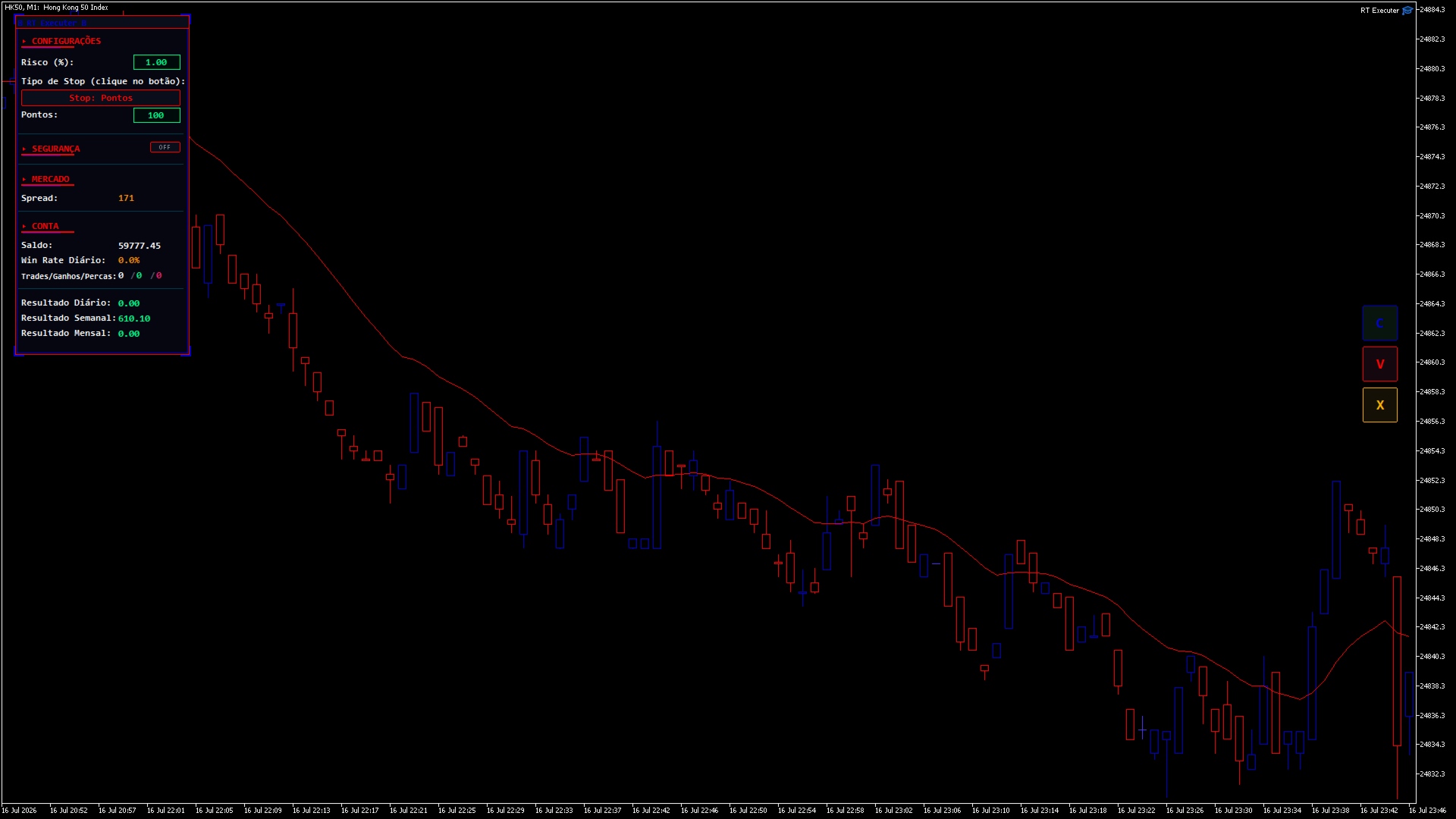
O RT Executer é um painel de execução manual para MetaTrader 5, projetado para scalpers e day traders que desejam execução rápida de ordens combinada com gerenciamento de risco automatizado. Você define seu risco por operação e o tipo de stop, e o painel calcula automaticamente o tamanho do lote ao comprar ou vender.

O EA não toma decisões de entrada por você — a análise de mercado e os gatilhos de compra/venda permanecem inteiramente sob sua responsabilidade. O EA cuida da execução, do cálculo do tamanho do lote e do gerenciamento de stops (Breakeven e Trailing Stop).

========================================== PARÂMETROS (ENTRADAS)

Esses parâmetros podem ser encontrados na aba "Entradas" ao conectar o painel ao gráfico. Você pode ajustar cores, tamanhos e posições do layout sem modificar nenhum código.

  • Cor neon do botão Comprar (verde): Cor do botão Comprar (C). Padrão: Verde neon.

  • Cor neon do botão Vender (magenta/vermelho): Cor do botão Vender (V). Padrão: Magenta/vermelho neon.

  • Cor de fundo do painel (preto profundo/espacial): Cor do fundo do painel.

  • Tamanho do botão (px) - "tamanho da ponta do dedo": Tamanho dos botões Comprar/Vender/Fechar. Padrão: 46.

  • Espaço vertical entre botões: Espaçamento entre os botões do lado direito. Padrão: 8.

  • Distância da borda direita (ajuste para evitar cobrir a escala de preços): Aumente este valor se os botões sobrepuserem a escala de preços no lado direito do gráfico. Padrão: 70.

  • Distância do topo do gráfico: Distância dos botões até o topo do gráfico. Valor padrão: 40.

  • Cor de destaque principal (ciano neon): Cor para títulos, sublinhados e borda do painel.

  • Cor secundária de destaque (magenta neon): Cor para o efeito duplo/cromático no texto do cabeçalho.

  • Cor da linha divisória: Cor das linhas finas que separam as seções do painel.

  • Limiar de propagação (em pontos) para alerta laranja: Limiar de aviso visual para alta propagação. Padrão: 20.

  • Fonte do painel (aparência de terminal/hacker): Fonte usada em todo o painel. Padrão: Consolas.

  • Posição horizontal do painel esquerdo (px a partir da borda esquerda): Move o painel para a esquerda/direita. Padrão: 6.

  • Posição vertical do painel esquerdo (px a partir do topo do gráfico): Move o painel para cima/para baixo (aumente este valor se ele cobrir o menu superior do MetaTrader). Padrão: 36.

========================================== SEÇÕES DO PAINEL

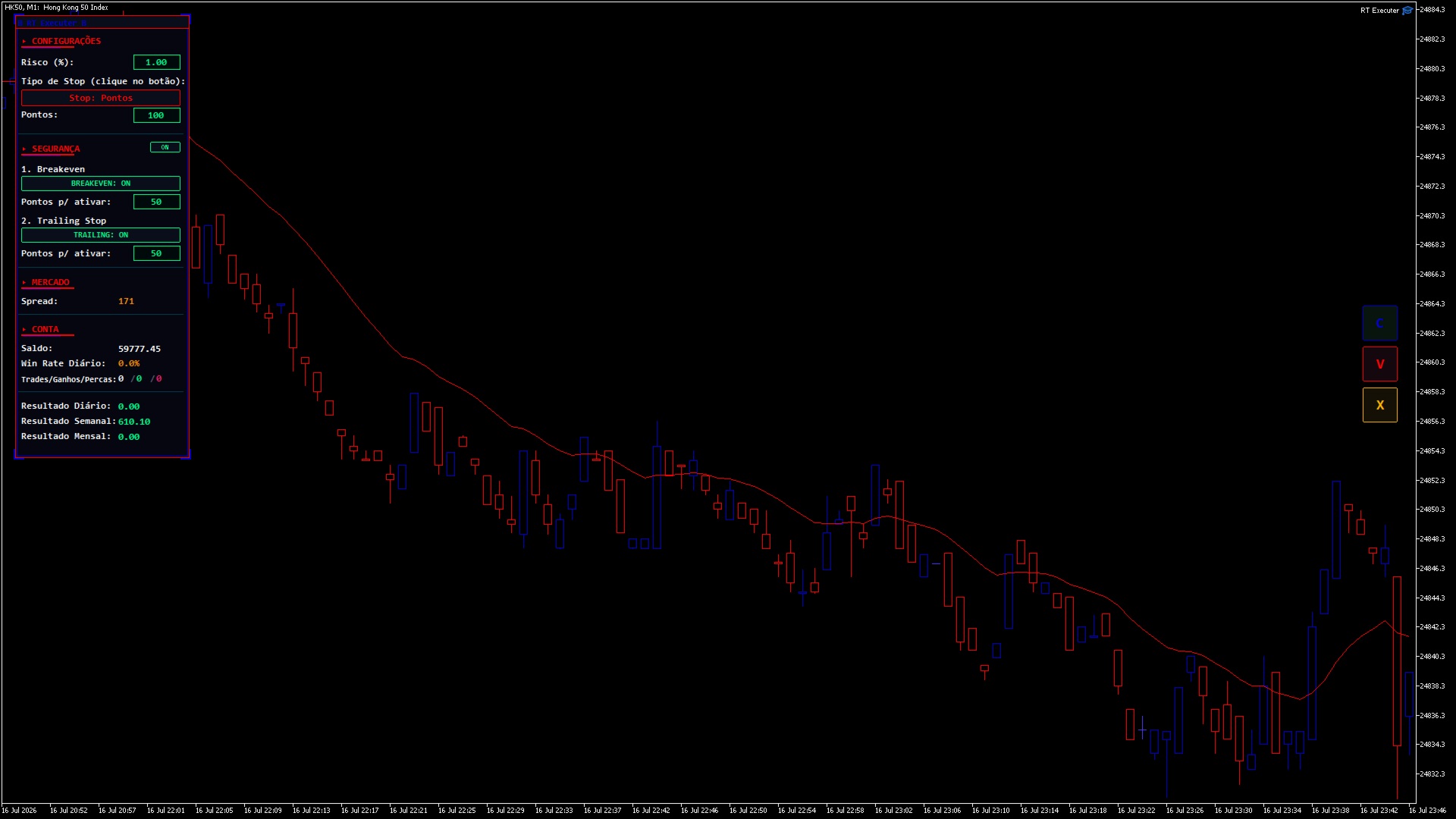
CONFIGURAÇÕES

  • Risco (%): Percentagem do seu saldo em risco por operação. O tamanho do lote é calculado automaticamente com base neste valor e na distância do stop loss. Clique duas vezes no campo para editar, digite o valor e pressione Enter.

  • Tipo de Stop: Clique no botão para alternar entre "Pontos" (distância fixa) e "Última Vela Fechada" (o stop loss é posicionado na mínima da vela anterior para compras ou na máxima para vendas).

    • Se houver pontos: Um campo "Pontos" será exibido, permitindo que você defina a distância de parada.

    • Se a última vela: Um botão de período de tempo aparece (por exemplo, "TF: M5"). Clique para alternar entre M1, M5, M15, M30, H1, H4 e D1 — o stop loss é calculado com base nesse período de tempo, independentemente do período de tempo atual do gráfico.

SEGURANÇA / GESTÃO

Ao lado do título da seção, há um interruptor liga/desliga. Quando definido como DESLIGADO , o painel oculta e recolhe todo o bloco (não deixando espaço vazio) e desativa automaticamente o Breakeven e o Trailing Stop.

  • Ponto de equilíbrio: Quando ativado, define quantos pontos de lucro são necessários para que o robô mova o stop loss para o preço de entrada.

  • Trailing Stop: Quando ativado, defina quantos pontos de lucro são necessários para que o robô comece a ajustar o stop loss, mantendo essa distância fixa do preço atual (movimentos apenas a favor da operação).

  • Se ambos estiverem ativados: o nível de stop loss mais protegido entre os dois sempre terá prioridade.

  • Ao abrir uma posição com Breakeven e/ou Trailing Stop ativos, setas aparecerão no gráfico ("BE" em ciano e "TS" em magenta) mostrando os níveis de preço exatos em que cada um será acionado. Elas desaparecem automaticamente quando o gatilho é ativado ou quando a posição é fechada.

MERCADO

  • Spread: Exibe o spread atual do ativo em pontos. Fica laranja quando ultrapassa o limite configurado.

CONTA / ESTATÍSTICAS DIÁRIAS

  • Exibe o saldo, a taxa de acerto diária e as negociações/ganhos/derrotas diárias (verde = vitórias, vermelho = derrotas).

RESULTADOS DIÁRIOS / SEMANAIS / MENSAIS

  • Resumo do desempenho total (lucro/prejuízo, incluindo swaps e comissões) das negociações fechadas no ativo do gráfico atual durante o dia, a semana (a partir de segunda-feira) e o mês.

========================================== BOTÕES DO LADO DIREITO
  • C (Verde): Comprar a mercado. O tamanho do lote é calculado automaticamente com base no Risco (%) e na distância do Stop Loss.

  • V (Magenta): Venda a mercado usando a mesma lógica de cálculo.

  • X (Laranja): Fecha a posição aberta gerenciada pelo painel no ativo gráfico atual. Fecha apenas as posições abertas pelos botões C/V — as posições abertas manualmente fora do painel permanecem inalteradas.

(Se os botões se sobrepuserem à escala de preços, aumente o parâmetro "Distância da borda direita".)

========================================== GUIA PASSO A PASSO
  1. Defina o nível de risco desejado (%) .

  2. Escolha o tipo de parada e defina a distância ou o período de tempo.

  3. Se desejar, habilite o Breakeven e/ou o Trailing Stop em Segurança, definindo seus pontos de ativação.

  4. Clique em C para comprar ou em V para vender.

  5. Acompanhe seus resultados em tempo real e monitore as setas BE/TS no gráfico.

  6. Para fechar uma posição manualmente, clique em X.

=========================================== SOLUÇÃO DE PROBLEMAS
  • Os botões não fazem nada quando clicados: Certifique-se de que a opção "Negociação Algorítmica" esteja ativada no MetaTrader e que a opção "Permitir Negociação Algorítmica" esteja marcada nas propriedades do painel.

  • Não é possível editar os campos de Risco/Pontos: No MetaTrader, os campos de texto exigem um clique duplo para serem editados (um único clique não ativa a edição). Pressione Enter após digitar o valor.

  • Os botões estão cobrindo a escala de preços: Aumente a "Distância da borda direita" nos campos de entrada.

  • O painel está muito alto ou muito à esquerda: ajuste os parâmetros de posição horizontal/vertical do painel.

  • O Stop Loss da "Última Vela" não está funcionando: Em gráficos abertos recentemente, os dados históricos para esse período específico ainda podem estar sendo carregados. Aguarde o carregamento dos dados ou altere o período.

========================================== AVISO DE ISENÇÃO DE RISCO

Este produto é uma ferramenta de execução e gestão de risco — não garante lucros nem elimina o risco de perdas. A negociação nos mercados financeiros envolve risco real de perda de capital. Utilize sempre um nível de risco compatível com a sua estratégia, teste numa conta de demonstração antes de negociar com capital real e negocie por sua conta e risco.
Prodotti consigliati
Auto SL & TP for Manual Trades – MT5 Application Overview Auto SL & TP for Manual Trades is a simple and practical Expert Advisor for the MetaTrader 5 platform that automatically applies Stop Loss and Take Profit levels to manually opened trades as well as pending orders. The EA is designed primarily for traders who execute trades manually but want the assurance that every position is immediately protected with predefined Stop Loss and Take Profit levels. The Expert Advisor works in points and
XBOOT BOLETA PRO Professional Manual Trading Panel for MetaTrader 5 XBOOT Boleta Pro is a complete trading panel designed for traders who execute manual trades and want greater speed, organization, and control during every trading session. More than a standard Buy and Sell panel, XBOOT Boleta Pro combines powerful trading tools into a single interface, helping traders analyze the market, manage risk, execute orders, and monitor trading performance without leaving the chart. Its purpose is to sim
LKLK Smart Panel
Karel Salotti Bastos
LKLK Smart Panel — The Professional One-Click Trading Panel for Manual Scalpers Take full control of your discretionary trading with a fast, elegant, and fully customizable control panel built directly on your chart. LKLK Smart Panel was designed for traders who execute manually and need speed, clarity, and real-time performance feedback — without ever leaving the chart. WHY LKLK SMART PANEL? Manual scalping and discretionary trading demand split-second execution. Switching between menus, ty
FREE
Grid Trading EA is a semi-automated one-click trading EA for both Normal Trading and Grid/Martingale Trading . Normal Trading Simply click Buy or Sell directly from the chart. The EA will automatically manage trades by: Setting Stop Loss and Take Profit Managing Trailing Stop Grid / Martingale Trading (For Hedging Account Type Only) When Grid Trading mode is enabled, the EA will automatically open additional grid orders at specified distances while increasing the lot size based on your settings.
Reversal Candlestick Patterns Indicator — Free Version This MT5 indicator identifies common bullish and bearish candlestick reversal patterns and displays them directly on the chart. It can be used on any market and timeframe, providing traders with clear visual references for potential reversal points. Main Features Automatic detection of well-known candlestick reversal patterns Works on all available MT5 timeframes Can be applied to Forex, Stocks, Commodities, Indices, and Cryptocurrency char
FREE
TrendSync AutoSL Guardian
Juliano Guzlinki Pacheco
TrendSync AutoSL Guardian  Trade and manage manual positions at the speed of a keystroke — every order protected the instant it opens. TrendSync AutoSL Guardian turns manual trading on MetaTrader 5 into a fast, disciplined workflow. Open, protect, scale and close positions straight from the chart or the keyboard — no order dialogs, no hunting for tickets. It is a trade-management and execution tool, not a signal EA : you make the decisions, it makes them instant and safe. Perfect for discretion
Trading Panel Prime
Joas Da Silva Veiga
Pannello di trading,Trading manuale,Gestione ordini,Gestione del rischio,Trade Manager,Assistente di trading,Stop Loss,Take Profit,Trailing Stop,Scalping Importante Per il corretto funzionamento di JoPanel Prime è obbligatorio abilitare l'opzione "Algo Trading" in MetaTrader 5. Se questa opzione non è attivata, il pannello non funzionerà. JoPanel Prime è un pannello professionale per il trading manuale sviluppato per MetaTrader 5. È stato progettato per eseguire gli ordini e gestire le posi
FREE
SPECIAL LAUNCH OFFER: $30 (1-Month Rent) Limited time offer to build our community and gather feedback! AmbM GOLD Institutional Scalper A high-precision M5 algorithm for XAUUSD (Gold) , engineered to trade exclusively at Institutional Liquidity Levels ($5/$10 psychological marks). PERFORMANCE DATA (BUY ONLY) • Win Rate: 87.09%. • Safe Growth: +$4,113 profit on $10k (13.75% Max Drawdown). • Extreme Stress Test: Successfully generated +$22,997 in a 5-year stress test (2020-2026), proving
Smart Hedge MT5
Francesco Baldi
Worried about weekend price crashes wiping your account? Tired of adverse news releases stopping your positions? Trade with peace of mind with Smart Hedge. Smart Hedge protects your positions from weekend gaps and news spikes. MT4 version: https://www.mql5.com/en/market/product/113290 Description : Have you ever feared that some breaking news during the weekend could wipe your account? Did you ever have your positions stopped by an adverse news release during the market open hours? I did, and
Partial
Pablo Filipe Soares De Almeida
Partial Close Manager – Strumento di Regolazione del Volume di Trading Questo strumento consente di chiudere parzialmente le operazioni aperte in MetaTrader 5. Funzionalità Chiusura Parziale: Chiudi parte delle operazioni aperte con un solo clic. Calcolo del Volume: Calcola automaticamente il volume da chiudere, evitando inserimenti manuali. Supporto Multi-Ordine: Applica la chiusura parziale a tutti gli ordini aperti dello stesso simbolo. Tabella Trascinabile: Clicca e tieni premuto l’intestazi
Imagine flying a real aircraft without ever stepping into a flight simulator. That's what trading is like. You have to simulate your strategy before you can take it to a live market. It is good if you can simulate things speedily before even stepping into any live market, or before coming up with an automated system.  People don't have all day to stare at a higher timeframe chart until the entry signal finally arrives. That's why I built this so that you can simulate your strategy with speed. Th
FREE
Quante volte avete cercato un PIVOT che funzionasse ogni giorno su uno specifico timeframe? Molti trader amano stimare la direzione del trend del giorno in base a uno specifico intervallo di tempo giornaliero, ad esempio da 2 ore prima dell'apertura del NYSE a 1 ora dopo, oppure dall'apertura del NYSE a 30 minuti dopo. Questo indicatore consente di specificare un determinato intervallo di tempo (ora e minuto) e traccia un pivot da quell'intervallo al giorno successivo nello stesso intervallo
DeepTrade SMC EA
Yasir Mohammed Sachit Sachit
DeepTrade SMC EA is a fully automated Smart Money Concepts expert advisor. Instead of blindly firing on every signal — the reason most SMC robots fail — it uses a weighted VOTING ENGINE. Each concept adds points toward a Buy or Sell case, and a trade is taken only when the combined score clears your minimum threshold. You control how strict it is.   100% SELF-CONTAINED: all detection logic (Order Blocks, Fair Value Gaps, BOS, CHoCH, swing structure) is built INSIDE the EA. You do NOT need any i
Trade Manager JM
Jonathan Ferreira De Magalhaes
Efficient Manual Trading Panel for Professional Traders === TRADING SESSIONS DISPLAY & BAR TIMER INCLUDED === Trade Manager JM is a comprehensive, intuitive utility designed to revolutionize manual order execution and management on MetaTrader 5. Built for speed and precision, this panel consolidates everything a serious manual trader needs into a single, sleek interface. Stop wasting precious seconds calculating lot sizes or manually setting SL/TP levels. Trade Manager JM allows you to focus pur
BKT Monday SMC
Khac Thanh Bui
5 (2)
BKT Monday Un indicatore tecnico multistrato per MetaTrader 5 che combina zone di offerta e domanda, livelli di supporto e resistenza, un segnale di tendenza MA adattivo e un pannello integrato di gestione del rischio in una singola sovrapposizione del grafico. BKT Monday è un indicatore grafico per MetaTrader 5 progettato per aiutare i trader a identificare configurazioni ad alta probabilità utilizzando tre livelli analitici complementari. L'indicatore traccia automaticamente zone di offerta e

FREE
AlgoDevMT5 Trade Manager Pro
Harry Charles H Westwood
AlgoDevMT5 Trade Manager Pro AlgoDevMT5 Trade Manager Pro is a professional trade management and risk control utility for MetaTrader 5. Designed for discretionary traders and funded account traders, this utility helps traders plan trades visually, calculate position size instantly, and manage risk with precision. Trade Manager Pro does not generate trading signals, open trades automatically, or provide investment advice. It is a trader-assistance utility designed to improve consistency and risk
Radar Trade Analytic
Jeverson Rodrigues Ferreira
Radar Trade Analytic 2.0 – Pannello Quantitativo per MT5 Cos'è Radar Trade Analytic? Radar Trade Analytic è il modulo quantitativo dell'ecosistema Radar Trade. Si apre in una finestra separata sotto il grafico principale e mostra quattro livelli sincronizzati, tutti costruiti con lo stesso motore proprietario Sigma, garantendo una corrispondenza diretta tra ciò che vedi sul grafico e ciò che leggi nel pannello. Nessun segnale di acquisto o vendita. Nessun target. Nessun alert. Radar Trade
BTC Master Pro
Farzad Saadatinia
4.58 (12)
BTC Master Pro — il tuo partner affidabile per un trading disciplinato su Bitcoin. La nuova versione è ora potenziata con intelligenza artificiale OpenAI , offrendo un’esecuzione più intelligente e un filtraggio migliorato delle operazioni in condizioni di elevata volatilità del mercato crypto. Questo Expert Advisor professionale è stato sviluppato specificamente per il trading di Bitcoin (BTCUSD) sulla piattaforma MetaTrader 5 , con particolare attenzione a un’esecuzione strutturata, esposizion
️ Trade Manager oneclick  ( Reverse Trade,  Partial Close,  Breakeven, Close All Running Trade )   control – Smart Manual Trade Control for MT5 Trade Manager oneclick control is a powerful yet lightweight trade management utility built for manual traders who want precise control over their open positions — directly from the MT5 chart. This EA does not open or close trades automatically based on any strategy. It simply provides one-click management tools to handle your running trades efficient
FREE
Professional Risk & Position Size Calculator for MetaTrader 5 POSITION SIZER PRO is a professional position sizing and risk management tool for MetaTrader 5 designed to help traders calculate the correct lot size before entering a trade. Instead of manually calculating lot sizes, traders can quickly define their risk percentage, entry price, and stop-loss, while POSITION SIZER PRO calculates the appropriate position size based on the account balance and selected trade setup. POSITION SIZER PRO p
Trade Assistant Panel
Md Sakhawat Hossain
5 (1)
Trade Assistant Panel: Your Optimal Trading Ally "The Trade Assistant Panel" is a graphical tool for traders aiming to simplify and enhance their trading experience. It streamlines order execution and management, allowing you to focus on market analysis and decision-making. With just a few clicks, you can initiate various order types, ensuring that you always have full control over your trading strategy: Buy Orders Sell Orders Buy Stop Orders Buy Limit Orders Sell Stop Orders Sell Limit Orders Y
FREE
Title:   Smart Position Manager PRO - Advanced Risk & Position Manager Description: Smart Position Manager PRO is an all-in-one visual trade management and risk calculation tool designed for serious traders who prioritize iron discipline and strict risk management. Whether you are executing precise SMC or ICT setups on personal capital or managing large funded accounts on strict prop firms, this tool ensures you focus on counting percentages rather than emotional money swings. With a highly int
FREE
Flexible receiver with lot scaling, symbol mapping and filters. Ideal receiver for MT4 → MT5 trade copying. Receive trades automatically from MT4 or MT5 master accounts. Designed for fast, flexible and reliable multi-account copying. Main Features • MT4 Master → MT5 Slave • MT5 Master → MT5 Slave • Lot size management: Same Lot Fixed Lot Multiply Lot Balance Based Lot • Symbol Mapping Example: XAUUSD = GOLD EURUSD = EURUSD.a • Include Symbols filter • Include Magics filter • Reverse Trades mode
Smart Structure Zones ICT Smart Structure Zones ICT is a MetaTrader 5 chart indicator for structure-based price analysis. It displays market structure, BOS, CHoCH, order block zones, fair value gaps, equal highs and lows, premium/discount areas, and higher-timeframe highs and lows directly on the chart. The indicator is made for traders who use price action, structure analysis, liquidity zones, order blocks, fair value gaps, and multi-timeframe levels as part of their chart study. Main Features
It has never been so easy to manage the risk of your account until now, this tool will allow you to have full control of your capital and manage your entries in the synthetic index derivative markets, in an easy, practical and safe way. The available input and configuration parameters are as follows :  RISK MANAGEMENT 1. Value of your account: Here as its name says you will place the value corresponding to the size of your account, for example if your account is 150 dollars the corresponding val
CosmiCLab NY Liquidity PRO M15 Professional Smart Money Concepts indicator for detecting New York liquidity sweeps and institutional market behavior. CosmiCLab NY Liquidity PRO M15 is designed to help traders identify key liquidity zones formed during the New York session and trade institutional price movements with precision. The indicator automatically analyzes market structure and highlights important levels based on the first M15 candle of the New York session (09:30 NY time) . These levels
GridLinesX
Nattapon Chuekamhod
GridLinesX is a lightweight and efficient utility for MetaTrader 5 designed to help traders visualize price levels with precision. Whether you are a Grid Trader, a Scalper, or simply need to mark psychological price levels, GridLinesX automates the process instantly. Forget about drawing manual horizontal lines one by one. Simply define your High/Low range and the grid step (in points), and the tool will generate a clean, customizable grid overlay on your chart. Key Features: Customizable Range:
FREE
GOLD LIQUIDITY SENTINEL PRO is a premium algorithmic trading system engineered for the XAUUSD (Gold) market. Unlike standard retail indicators, this EA operates on Institutional Liquidity Sweep logic , identifying where "Smart Money" enters the market to capture high-probability reversals. ​ Why GOLD LIQUIDITY SENTINEL PRO? ​ 100% Tick Data Reliability: Rigorously tested with real market ticks to ensure the backtest matches live execution perfectly. ​ Institutional Order Flow: The EA scans lookb
Fractal Market Structure CHoCH BOS MT5 Fractal Market Structure CHoCH BOS MT5 is a price-action indicator designed to identify market structure through confirmed fractal formations. Instead of relying only on traditional swing-point calculations, the indicator analyzes structured candle patterns to locate important highs and lows, detect changes in directional behavior, and display relevant market structure events directly on the chart. The indicator can identify bullish and bearish Break of Str
RastroBot EA
Raquel Costa
RastroBot usa o indicador Donchian Channel para identificar sinais de entrada, inspirados nas famosas estratégias Turtle. Simples e eficaz, é amplamente utilizado por traders profissionais e está integrado ao MT5. Ideal para quem quer usar esses sinais em operações de scalping. Não usa IA, Martingale ou Grid. Não é um "santo graal" do trading, mas uma estratégia honesta para lucrar com rápidas acelerações de tendência. O EA pode ser usado além do scalping, ajustando ou desativando o trailing
Gli utenti di questo prodotto hanno anche acquistato
================================================================================ POC BREAKOUT - V20.72. Full Professional Grade Toolkit ================================================================================ POC Breakout is a full MetaTrader 5 trading dashboard for discretionary traders who want breakout signals, Point of Control (POC) context, volume profiles, order flow, market structure, news, alerts, and advanced trade planning in one professional workspace. Attached directly to you
FarmedHedge Pair Trading Dashboard
Tanapisit Tepawarapruek
5 (5)
Farmed Hedge Yield Farming | All Markets (Manual - Hybrid - Semi/Automated EA) VERIFIED TRADING RESULTS - Farmed Hedge Yield Axi Copy:  https://www.mql5.com/en/signals/2356376 - Farmed Hedge Yield Exn Copy:   https://www.mql5.com/en/signals/2356404 - Farmed Hedge Yield V Copy:  https://www.mql5.com/en/signals/2357156 IMPORTANT NOTICE: FarmedHedge is a MANUAL-FOCUSED TRADING UTILITY ,not a fully automated EA. Results shown on this Signal include manual trades and overall strategic management.
Premium Trade Manager - Il pannello di trading con un coach integrato Premium Trade Manager porta un coach di trading direttamente nel tuo grafico, con un motore di esecuzione completo al di sotto. Imposta il trade come fai sempre, poi lascia che Max, il tuo coach di trading IA, legga esattamente quel setup rispetto al tuo conto live e ti dia un verdetto chiaro prima che tu confermi: lo stop rispetta un approccio disciplinato, il rischio è ragionevole, c'è un evento ad alto impatto tra pochi min
EA Overfitter
Stephen J Martret
5 (1)
That backtest looks great. But will it still be making money tomorrow, next week, next month? EA Overfitter re-runs your EA on 100 price histories it has never seen. One score tells you if the edge is real. A backtest tells you what an EA did on one price history — the one that happened to occur. What you cannot tell from it is how much of that result was the strategy and how much was the particular path. EA Overfitter answers that. It builds up to 100 synthetic price histories your EA has n
The product will copy all telegram signal to MT5 ( which you are member) , also it can work as remote copier.  Easy to set up, copy order instant, can work with almost signal formats, image signal,  s upport to translate other language to English Work with all type of channel or group, even channel have "Restrict Saving Content", work with  multi channel, multi MT5 Work as remote copier: with signal have ticket number, it will copy exactly via ticket number. Support to backtest signal. How to s
FUTURES ORDERFLOW FOOTPRINT CHART Professional OrderFlow EA for MetaTrader 5 Version 1.01| Professional tool for real traders | Institutional-Grade Visualization STRATEGY TESTER USERS - PLEASE SELECT EVERY REAL TICK WHEN TESTING AND YOU HAVE DOWNLOADED HISTORICAL DATA. IF YOU SEE A WAITING SCREEN AND IT IS NOT DOWNLOADING, IT MEANS YOU HAVE LOW HISTORICAL DATA. TRY 1 MIN AND 5 MIN FIRST ON 1 DAY DATA. ONE DAY DATA SHOULD BE THE NEWEST AND MOST CURRENT DATE. PLEASE WAIT UNTIL THE MARKET HAS ROL
Timeless Charts
Samuel Manoel De Souza
5 (8)
Timeless Charts è un'utilità di trading completa progettata per trader professionisti. Combina tipi di grafici personalizzati come Grafici a Secondi e Renko con analisi avanzata del flusso ordini tramite Footprints , Clusters , Profili di Volume , studi VWAP e strumenti di analisi ancorata per una visione più approfondita del mercato. Il trading e la gestione delle posizioni vengono eseguiti direttamente dal grafico tramite un pannello integrato di gestione delle operazioni , mentre Market Repla
Footprint Chart Pro — Professional OrderFlow EA for MetaTrader 5 Version 6.34 | Professional tool for real traders | Institutional-Grade Visualization DEMO USERS - PLEASE SELECT EVERY TICK / REAL TICK WHEN TESTING AND YOU HAVE DOWNLOADED HISTORICAL DATA. IF YOU SEE A WAITING SCREEN AND IT IS NOT DOWNLOADING, IT MEANS YOU HAVE LOW HISTORICAL DATA. TRY 1 MIN AND 5 MIN FIRST ON 1 DAY DATA. ONE DAY DATA SHOULD BE THE NEWEST AND MOST CURRENT DATE. PLEASE WAIT UNTIL THE MARKET HAS ROLLED OVER PERIOD.
Welcome to ENTRY IN THE ZONE WITH SMC MULTI TIMEFRAME Entry In The Zone and SMC Multi Timeframe is a real-time market analysis tool based on Smart Money Concepts (SMC), designed to analyze market structure, price direction, and key trading zones. It supports both Single-Timeframe Analysis and Multi-Timeframe Analysis, providing a clearer view of the overall market structure across multiple timeframes, with real-time BUY / SELL signals that do not repaint. It is designed to help filter trading op
Power Candles Strategy Scanner - Strumento di ricerca configurazioni multi-simbolo con ottimizzazione automatica Power Candles Strategy Scanner utilizza lo stesso motore di auto-ottimizzazione che alimenta l'indicatore Power Candles, applicandolo a tutti i simboli presenti nel tuo Market Watch, uno accanto all'altro. Un unico pannello ti indica quali simboli sono statisticamente negoziabili in questo momento, quale strategia è vincente su ciascuno di essi, la coppia ottimale di Stop Loss / Take
Questo Expert Advisor aspetta che venga aperta una posizione (può essere aperta manualmente, tramite i pulsanti dell'EA o anche tramite mobile) e crea una Griglia di ordini pendenti in stop nella stessa direzione della prima posizione. I parametri di Input vengono usati solo per il primo uso o per l'utilizzo con il Tester Stategia , in seguito vengono salvati in un file in modo da essere mantenuti anche se si dovesse togliere l'EA dallo strumento e poi riutilizzarlo. Attenzione in modalità Teste
YuClusters
Yury Kulikov
4.93 (43)
Attention: You can view the program operation in the free version  YuClusters DEMO .  YuClusters is a professional market analysis system. The trader has unique opportunities to analyze the flow of orders, trade volumes, price movements using various charts, profiles, indicators, and graphical objects. YuClusters operates on data based on Time&Sales or ticks information, depending on what is available in the quotes of a financial instrument. YuClusters allows you to build graphs by combining da
Ultimate Extractor
Clifton Creath
5 (8)
Ultimate Extractor - Professional Trading Analytics for MT5 *****this is the local HTML version of Ultimate Extractor. !!!!!it is not compatible with Cloud!!!! For the online version please reach out to me directly****** Ultimate EA manager also now available when you use cloud pro and above for free!! Ultimate Extractor transforms your MetaTrader 5 trading history into actionable insights with comprehensive analytics, interactive charts, and real-time performance tracking. What It Does Automa
AI Agents Supervisor
Ho Tuan Thang
5 (1)
AI Agent Supervisor is NOT an Expert Advisor. AI Agent Supervisor   is a   multi-agent AI risk & portfolio supervisor   that watches every EA on your account and intervenes in real time.  WANT AN AI PORTFOLIO MANAGER WATCHING YOUR FLEET 24/7?   Run your fleet on the same brokers I do:   IC MARKETS , IC TRADING   .  Unlike the centralized stock market, Forex has no single, unified price feed.  Every broker sources liquidity from different providers, creating unique data streams. The Supervisor r
EA Auditor
Stephen J Martret
5 (5)
EA Auditor is an independent analysis tool for traders evaluating Expert Advisors and trading signals on MetaTrader 5. It audits backtest reports, reviews posted developer signals, and cross-verifies the two against each other to help traders assess strategies before committing capital. The MQL5 market offers a wide range of Expert Advisors from many developers, with varying approaches, quality, and transparency. EA Auditor provides a consistent, data-driven framework for reviewing them, answer
Global Investing FX Terminal
Santiago Nicolas Pla Casuriaga
5 (1)
Il Global Investing FX Terminal è una dashboard FX tutto-in-uno per MetaTrader 5 — tassi di politica monetaria delle banche centrali, posizionamento COT del CFTC, ranking carry, sorprese economiche, skew delle opzioni, sentiment retail e correlazioni, tredici pannelli in totale — resa su un singolo overlay canvas privo di sfarfallio e aggiornata ogni 10 secondi da un singolo EA allegato. Nessun software esterno richiesto. L'analisi FX professionale richiede accesso simultaneo a dati che normalme
Telegram To MT5 Receiver
Levi Dane Benjamin
4.53 (15)
Copia i segnali da qualsiasi canale di cui sei membro (compresi quelli privati e ristretti) direttamente sul tuo MT5.  Questo strumento è stato progettato con l'utente in mente offrendo molte funzionalità necessarie per gestire e monitorare gli scambi. Questo prodotto è presentato in un'interfaccia grafica facile da usare e visivamente accattivante. Personalizza le tue impostazioni e inizia ad utilizzare il prodotto in pochi minuti! Guida per l'utente + Demo  | Versione MT4 | Versione Discord
Quant AI Agents
Ho Tuan Thang
5 (1)
Quant AI Agents are independent trading Expert Advisors. Instead of trading using a fixed strategy like other conventional EAs, Quant AI Agents   is a   multi-agent AI trading framework   that turns natural-language strategy prompts into live.  WANT THE SAME RESULTS AS MY LIVE SIGNAL?   Use the exact same brokers I do:   IC MARKETS , IC TRADING   .  Unlike the centralized stock market, Forex has no single, unified price feed.  Every broker sources liquidity from different providers, creating un
Copy your MT5 trades to Interactive Brokers You keep using MT5. Every order you open or close is sent to your IB account. In real time. No coding. No changes to your strategy or EA. Try it first Rent 1 month: $30. Test on a live or paper account. What it does Real-time copying: same direction, reverse, or one side only. Map any MT5 symbol to any IB symbol. Set a lot ratio for each. Forex, Futures, Stocks, CFDs, Metals and Crypto. Position sync: both accounts checked, any difference fixed. Optio
Prop Firm Os
Gayathiri Gopalakrishnan
5 (1)
PROP FIRM OS Structured Trading Assistant for MetaTrader 5 PROP FIRM OS is a structured trading assistant designed for MetaTrader 5 users who prefer rule-based market analysis and organized trading workflows. The Expert Advisor combines market analysis tools, scanner functions, dashboard monitoring, alerts, risk-control settings, and trade management features inside one system. PROP FIRM OS is designed to help traders follow selected rules, filters, and monitoring conditions during trading activ
MT5 Trading Deck
Manuel Michiels
5 (2)
One button. One trade. MT5 Trading Deck is a hotkey trading panel for MetaTrader 5 that turns the platform into a keyboard-driven execution cockpit. Stop loss, take profit and lot size are pre-calculated for every key; the moment you press, a market order is live on the broker. A complete technical user manual is attached in the product Comments section. It documents every input parameter, the full hotkey map, the recommended Stream Deck XL layout, and the advanced workflows for Pre-Limit orders
EasyInsight AIO MT5
Alain Verleyen
4.92 (12)
EASY Insight AIO – La soluzione all-in-one per un trading intelligente e senza sforzo Panoramica Immagina di poter analizzare l’intero mercato — Forex, Oro, Cripto, Indici e persino Azioni — in pochi secondi, senza dover controllare manualmente i grafici, installare indicatori o affrontare configurazioni complicate. EASY Insight AIO è il tuo strumento definitivo di esportazione per il trading alimentato dall’IA, pronto all’uso. Offre una panoramica completa del mercato in un unico file CSV pul
Exp5 VirtualTradePad PRO SE for MT5
Vladislav Andruschenko
5 (1)
VirtualTradePad PRO SE MT5 — centro di controllo professionale per il trading su MetaTrader 5 VirtualTradePad PRO SE è un pannello di trading premium basato sul grafico e un ambiente di gestione delle operazioni per MetaTrader 5 . È progettato per i trader che desiderano esecuzione più rapida, controllo più chiaro delle posizioni, gestione strutturata delle operazioni, pianificazione visiva dei livelli e un workflow professionale direttamente dal grafico. Non è soltanto un semplice pannello BUY
Bots Builder Pro MT5
Andrey Barinov
4.17 (6)
This is exactly what the name says. Visual strategy builder . One of a kind. Turn your trading strategies and ideas into Expert Advisors without writing single line of code. Generate mql source code files with a few clicks and get your fully functional Expert Advisors, which are ready for live execution, strategy tester and cloud optimization. There are very few options for those who have no programming skills and can not create their trading solutions in the MQL language. Now, with Bots Builde
The real‑time view of what is happening inside the market. Footprint Secrets brings detailed analysis directly into MetaTrader 5. It shows where volume is trading, how buyers and sellers are interacting, and how liquidity shifts as the market evolves. Designed for traders who want a precise, real‑time understanding of market behavior. Check out the free preview version here:  https://www.mql5.com/en/market/product/172398 Benefits for the Trader See the real activity behind price . Footprint ch
HINN Lazy Trader
ALGOFLOW OÜ
5 (1)
The core idea: using the user interface, you configure the parameters the chart must meet before entering a position (or positions), choose which entry models to use, and set the rules for when trading and planning should end. Lazy Trader  handles the rest: it  takes over all the routine chart watching and execution! full description  :: 3 key videos [1] ->  [2]   ->  [3] What can it do? - Understands Larry Williams market structure - Understands swing market structure by Michael Huddleston
Custom Alerts AIO: Monitora tutti i mercati — senza alcuna configurazione Panoramica Custom Alerts AIO è una soluzione di monitoraggio dei mercati pronta all’uso che non richiede alcuna configurazione. Tutti gli indicatori necessari — FX Power, FX Volume, FX Dynamic, FX Levels, IX Power — sono integrati internamente. Non vengono mostrati grafici, rendendolo ideale per generare alert in tempo reale in modo discreto ed efficiente. Supporta tutte le classi di asset offerte dal tuo broker: Forex,
Features   With MT5 to Interactive Brokers(IB) Trader, you can: 1. Load chart data from IB to MT5, and Analyze with all standard or customer Indicators. 2. Place Orders to IB Account Directly in MT5. 3. Make your Own EAs upon IB Securities by only making minus changes of the trading function. Usage 1) Installation Copy the "Mt5ToIBTraderEn.ex4" and sample files to [MT5 Data Folder]->MQL5->Experts.  2)  MT5 Settings Add the IP Address to the MT5 Allowed URLs in 'Tools->Options->Expert Adviso
Telegram to mt5 pro
Janet Abu Khalil
4 (4)
Telegram to MT5 Pro — Advanced Telegram Signal Copier with Auto-Fix, Multi-TP, Risk Control and Full Trade Management Telegram to MT5 Pro — Copiatore di segnali Telegram professionale Telegram to MT5 Pro è un copiatore di trading ad alte prestazioni che esegue automaticamente i segnali da Telegram direttamente nel tuo account MetaTrader 5, con pieno controllo su rischio, esecuzione e gestione del trading. Il sistema è composto da due componenti: • L’Expert Advisor (EA) che gira all’interno di M
Check EA performance  https://www.mql5.com/en/signals/2376164?source=Site +Profile+Seller Spot vs Future Arbitrage EA for MT5 Spot vs Future Arbitrage EA is an automated Expert Advisor designed for MetaTrader 5 that operates using price differences between Gold spot and Gold futures instruments. The strategy opens positions on both instruments simultaneously to take advantage of temporary differences between spot and futures prices. Requirements The trading account must provide both Gold spot
Filtro:
Nessuna recensione
Rispondi alla recensione