Neuron Trade Replay

NeuronReplay — replay each of your closed trades one by one, bar-by-bar, and analyze exactly what happened

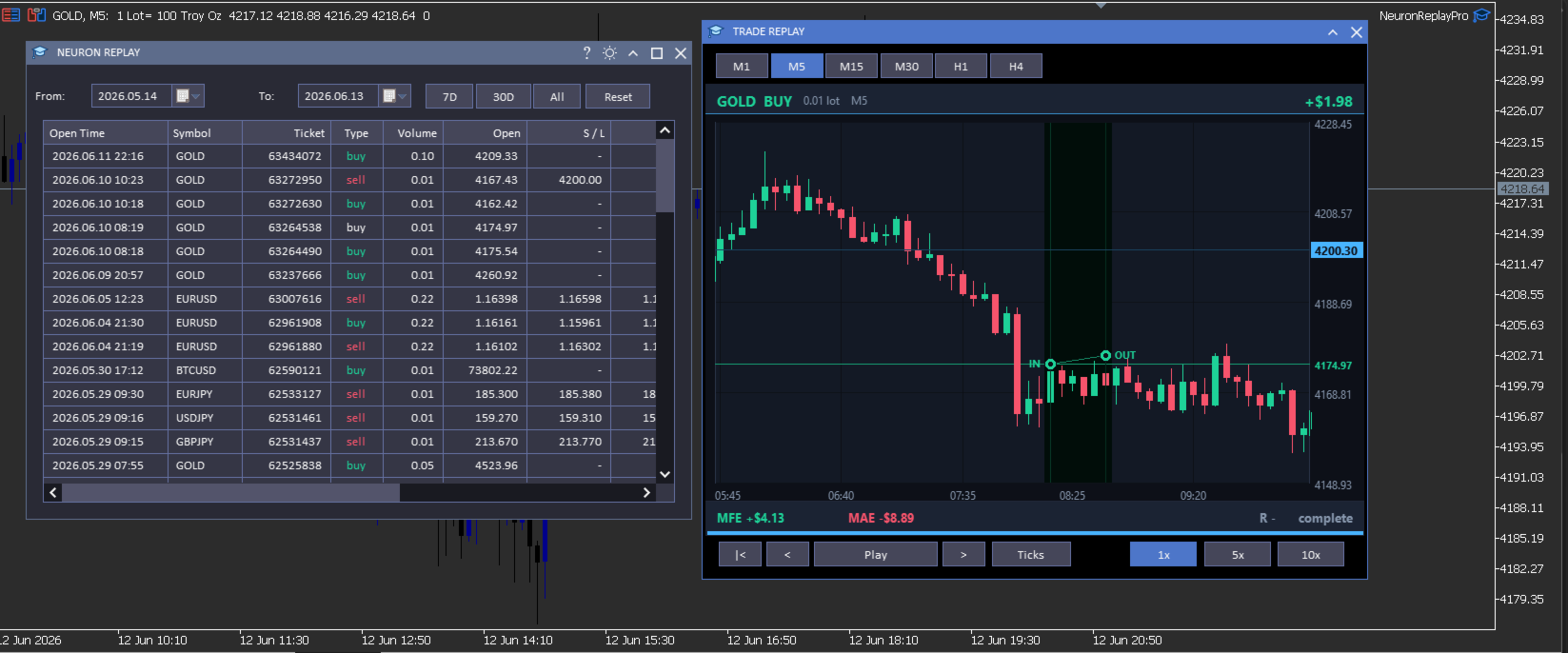
Your trade history is just a list of numbers. NeuronReplay turns it into film. It lists every closed trade in a dashboard; click any one and it re-plays that single trade candle-by-candle on its own chart, exactly like stepping through the MetaTrader 5 Strategy Tester — but scoped to a real trade you already took. You see the entry, the stop, the target and the exit drawn in, a floating P&L counting in real time, and the maximum favourable / adverse excursion and R-multiple measured for you. Go through your trades one at a time and finally understand why each one won or lost. 100% local and native MT5. Utility — it reads your history and draws; it does not place trades.

At a glance

  • Replay every closed trade one by one — pick it from the list, watch it play out bar-by-bar.
  • Strategy-Tester-style transport — restart, step back, play / pause, step forward, with 1x / 5x / 10x speed.
  • Tick-by-tick mode — watch each candle form tick by tick, or candle-by-candle.
  • Switch timeframe on the fly — replay the same trade on M1 · M5 · M15 · M30 · H1 · H4.
  • Full MT5-style zoom & pan — drag the price axis to squeeze vertically, the time axis horizontally, drag to scroll; double-click to reset.
  • Hundreds of candles of context loaded before and after every trade — scroll out to see the whole story.
  • Per-trade analytics — IN / OUT markers, entry / stop / target levels, win-loss path, MFE, MAE, R-multiple, live P&L.
  • Date-range filter, range presets and a clean dark dashboard with light/dark theme toggle.
  • 100% local & native: no DLL, no socket, no WebRequest. Utility — it does not trade.

The trade dashboard

  • Full closed-trade history — every position you have closed, newest first, grouped from your account's deal history.
  • Rich detail per trade — open / close time, symbol, ticket, type, volume, open and close price, S/L, T/P, commission, swap, net profit, pips and R — with profit and direction colour-coded green / red.
  • Date filters — a From / To calendar picker plus one-click 7D · 30D · All presets.
  • Click any trade to open the replay window for that trade — work through your history one trade at a time.

Replay & analyze each trade

  • Bar-by-bar replay — the trade's chart is revealed candle by candle on the bar close, exactly like the Strategy Tester, so you re-live the decision in real time.
  • Tick-by-tick mode — switch on Ticks and the forming candle moves tick by tick (open → swing → close) so you feel how price actually traded inside each bar.
  • Transport & speed — restart, step back, play / pause, step forward; play at 1x, 5x or 10x.
  • Entry / exit on the chart — IN and OUT markers with vertical time guides, a connecting line coloured green (win) or red (loss), and a shaded holding-period band that fills in as it plays.
  • Levels — entry, stop-loss and take-profit drawn with right-axis price tags (far levels are clamped to the edge so the candles always stay large and readable).
  • Live read-out — floating P&L that counts as the trade plays, plus MFE (max favourable), MAE (max adverse), R-multiple and a progress bar.
  • Real chart axes — right-side price axis, bottom time axis, grid and a live current-price tag that tracks the last revealed candle.
  • Change timeframe live — M1 to H4 — to see the same trade in finer or coarser detail.

Zoom, pan & context — like the MT5 chart

  • Squeeze vertically — drag the price axis up / down to zoom the price scale.
  • Squeeze horizontally — drag the time axis left / right to zoom the candles in or out.
  • Scroll — drag the chart body to pan in any direction; double-click to snap back to the trade.
  • Lots of surrounding context — hundreds of candles before and after the trade are loaded, so you can zoom out and study the lead-up and the aftermath.

How it works

NeuronReplay reads your account's closed deals from the standard MetaTrader 5 trade history, groups them into trades (entry / exit price and time, volume, stop, target, commission, swap and net profit), and pulls the surrounding bars for each trade with CopyRates. The replay, the floating P&L and the MFE / MAE / R figures are all computed locally on your terminal — there is no external data feed, no web request and no third-party service.

Inputs

Input Default What it does
InpTheme Dark Colour theme of the dashboard and windows (also toggleable from the title bar).
InpTF M5 Default timeframe used to replay a trade (changeable live in the replay window).
InpLookback 30 Bars shown before the entry in the default (zoomed-in) view.
InpLookfwd 18 Bars shown after the exit in the default view.
Optional dashboard columns
InpColTicket / InpColType / InpColVolume true Show the ticket / buy-sell / volume columns.
InpColOpen / InpColClose / InpColCloseT true Show the open price / close price / close time columns.
InpColSL / InpColTP true Show the stop-loss / take-profit columns.
InpColComm / InpColSwap false Show the commission / swap columns.
InpColPips / InpColR true Show the pips / R-multiple columns.

Open time, symbol and net profit are always shown.

Compatibility

  • MetaTrader 5, any broker, any symbol and any timeframe.
  • Reads the standard built-in MT5 trade history; no external indicators or data feeds required.
  • Native MQL5 — no DLLs, no sockets, no web requests.

What it is NOT

  • It is a utility — it reads your closed-trade history and replays trades on a chart; it does not place, modify or close trades.
  • It is not a signal service and makes no profit, win-rate or performance claim of any kind.
  • It replays your own historical trades for study; past trades are not indicative of future results — always combine review with your own plan and risk management.

Neuron Systems — do premium trading like a quant.
推荐产品
Welcome to Smart Algo Trade Panel Manager MT5 - the ultimate   risk management tool designed to make trading more effective based on user needs.  It is a comprehensive solution for seamless trade planning, position management, and enhanced control over risk. It does not matter weather you a beginner or an advanced trader, or a scalper needing rapid executions, SmartAlgo Trade Panel  adapts to your needs offering flexibility across all markets of your choice. You can put SL, Lot and TP of choice
Risk Calculator – PeterT (MT5 EA) What It Does This is a Position Size & Risk Calculator Expert Advisor for MetaTrader 5. It places a floating panel on your chart that automatically calculates the correct lot size based on your account balance and the risk percentage you set. Instead of doing math manually before every trade, the tool handles it instantly — so you always know exactly how much you're risking. Key Features Auto Lot Sizing — Enter your risk % and Stop Loss in pips, and the EA inst
Broker Environment Inspector 是一款专业的 MetaTrader 5 兼容性与诊断工具,用于检查当前终端、账户和交易品种环境。它通过清晰的技术面板展示交易权限、报价条件、合约设置和可用执行能力。 主要功能 • 终端连接状态与交易权限标志 • 报价新鲜度和当前点差检查 • 交易时段可用性 • 合约大小、最小跳动和跳动价值信息 • 最小、最大和步进交易量规则 • Stops Level 与 Freeze Level 检查 • 支持的成交模式和订单类型 • 不包含个人信息的诊断导出,便于支持和比较 建议在部署 EA 或手动交易流程前使用本工具,以识别可能影响运行的环境差异。本工具不会评价经纪商质量、执行交易或保证兼容所有第三方程序。显示数值来自当前终端,并可能随经纪商、账户、品种和服务器状态而变化。
This script is designed to download a long history of cryptocurrency quotes from the Binance exchange. You will find it perfectly suitable if you want once to download the history of cryptocurrencies for charts analyzing, collecting statistics or testing trading robots in the MetaTrader 5 strategy tester, or if you need to update the history not very frequently (for example, once a day or once a week). After running the script, you will have fully featured (but not automatically updated) cryptoc
Market View MT5
Kyra Nickaline Watson-gordon
Definition : Market View is a dashboard (scanner) to view price graphs of all symbols and all timeframes at a glance. The utility is designed user friendly and added a wide range of customization options. Main features of Market View : Visual settings window on the chart Customizable list of symbols and timeframes Different shapes : Real Candles, Schematic Candles, Arrows Customizable number of candles Changeable size of dashboard (scanner) Highlight timeframes with gaps on candles Open approp
ProTrading Panel — 专业的智能手动交易面板 使用 ProTrading Panel 大幅提升您的手动交易体验。本智能交易系统(EA)专为极速执行订单而设计,拥有优雅、舒适的垂直分栏界面,能完美融入您的图表,绝不占用多余的活动空间。无论您喜欢在屏幕上点击鼠标,还是习惯利用键盘快捷键以闪电般的速度执行交易,这款工具都是您的不二之选。 核心功能: 精准风险管理: 支持以点数(Points)设置止损(Stop Loss),并根据您期望的风险回报比(R:R)自动计算出对应的止盈(Take Profit)位置。 高级移动止损: 自动锁定您的交易利润。您可以随时开启或关闭移动止损功能,并能以点数为单位自由调整追踪启动点、追踪步长和追踪距离。 实时盈亏追踪: 直接在面板上直观地监测您当日的总体盈亏( Today's P/L = 已平仓盈亏 + 当前浮动盈亏)以及当前的浮动盈亏( Floating P/L = 当前所有持仓木子的盈亏)。 灵活位置调整: 自由选择将控制面板固定在图表的左侧或右侧。 快捷键与一键交易: 支持通过鼠标点击或键盘快捷键瞬间执行交易指令。 按键与键盘快捷键说明:
使用革命性的交易时间管理器轻松控制您的交易程序。这个强大的工具可以在指定时间自动执行订单,从而改变您的交易方式。 为不同的交易行为(从购买到设置订单)制定个性化任务列表,所有这些都无需人工干预。 交易时间管理器安装和输入指南 如果您想获取有关 EA 的通知,请将我们的 URL 添加到 MT4/MT5 终端(参见屏幕截图)。 MT4版本     https://www.mql5.com/en/market/product/103716 MT5版本     https://www.mql5.com/en/market/product/103715 告别人工监控,拥抱精简效率。直观的界面允许您设置精确的参数,包括交易品种、执行时间、价格、止损 (SL)、止盈 (TP) 点和手数大小。 该工具的灵活性通过与市场行为相匹配的适应性重复选项来凸显。通过视觉主题个性化您的体验,并减少长时间交易期间的眼睛疲劳。 摆脱手动交易程序,拥抱“交易时间管理器”的强大功能。提高交易的准确性、组织性和自由度。简化您的日常工作并重新体验交易。 主要特点: 自动订单执行:按指定时间间隔无缝自动执行订单,从而节省您的
Gold Scalping Matrix MT5
Mohamed Abdulmohsen Mohamed Saeed Ali
The Gold Scalping Matrix is an advanced trading algorithm designed to capitalize on market action and price reversals in the gold market. This innovative bot employs real time market behavior trading strategy, intelligently placing buy and sell orders at predetermined intervals around the current market price.  All Configuration Set Files for back-test and live accounts   All Experts for back-Test find the new free versions before change to paid Recommended Broker Support group   or DM for any
The Simple Manual Trading Panel (v2.11) Is a professional trade management tool designed with a clean, movable UI to streamline manual execution and automated exit strategies. Core Features Dynamic Visual Interface: A movable GUI panel that provides real-time information including a bar countdown timer, live spread, and advanced volume analysis. Flexible Lot Size setting, with 2 decimals (If broker supports it). Multi-Stage Take Profit: Supports three distinct Take Profit (TP) levels in either
Prop Firm Compliance Guardian
Muhammad Ahmad Abdulaziz Al-jamal
Prop Firm Guardian — Rule Protection System for Prop Firm Traders Most prop firm challenges aren't lost to bad strategy  they're lost to a moment of forgetfulness: one trade too many after a bad morning, one position left open past the daily reset, one day's profit that quietly breaks a consistency rule nobody was tracking. Prop Firm Guardian is a rule-protection EA built specifically to stop that from happening. It does not trade for you. It places no orders of its own and works alongside anyth
TELEGRAM_NOTIFICATION 是一款实用工具,可将您 MetaTrader 5 终端的实时交易事件转发到任何 Telegram 聊天、群组或频道。它跟踪每个订单事件(开仓、平仓、修改、取消),并在几秒内发送格式化消息。还可按您设定的时间窗口生成每日盈亏报告。 主要功能 市价和挂单开仓提醒 (BUY、SELL、BUY LIMIT、SELL LIMIT、BUY STOP、SELL STOP) 平仓提醒,包含净利润、余额、净值和当日累计利润 StopLoss、TakeProfit 或挂单价格修改时的提醒,含点数差 挂单取消提醒,区分手动取消与已触发 每日统计报告,在您设定的时间发送,覆盖您设定的时间窗口 按 MagicID 和交易品种过滤 发送失败时自动重试最多 3 次 图表仪表板显示实时状态和最后一个错误 支持 Telegram 群组话题 (thread ID) 适用于任何 MT5 经纪商 工作原理 将 EA 附加到单个图表。它监控账户上所有持仓和挂单。检测到事件时,构建 HTML 格式的 Telegram 消息并通过 WebRequest 经 Telegram Bot AP
Trading Calendar — 查看您最盈利的交易日 将您的交易历史转化为清晰的每日交易表现分析,使用   Trading Calendar   轻松掌握盈利规律。 Trading Calendar   是一款强大的 MT5 分析工具,帮助交易者通过交互式盈亏热力图直观查看每日交易表现。无需翻阅冗长的交易记录,您可以快速发现自己的最佳交易日、最差交易日,以及连续盈利和亏损的规律。 按天、按周或按月分析交易表现,精准了解您的交易策略在哪些时间段效果最佳。 核心功能 •   每日盈利热力图 通过颜色区分盈利和亏损交易日,快速掌握表现。 •   胜率追踪 实时监控您的交易准确率和稳定性。 •   盈利因子分析(Profit Factor) 评估交易策略整体质量和效率。 •   平均盈利与平均亏损统计 清楚了解您的风险回报比。 •   最佳与最差交易日识别 快速找出表现最强和最弱的交易日。 •   每周交易总结 一目了然查看每周整体表现。 •   夏普比率监控 评估风险调整后的收益表现。 •   交易量分析 了解交易频率与盈利之间的关系。 •   月度与年度视图 支持多
The professional browser of News and Trading Sessions is now available in MetaTrader 5. Now all the most important market information is collected on one dial! News located on the Time scale. Planning your working time has never been so easy and convenient ... The news scale can be switched a day, two, a week, a month forward or backward (see the details in the short video). All news updates in real time. Thanks to the built-in filters, you can configure the display of news by importance, cou
Chart Time Plus MT5
Isaac Montesinos Valdes
Description:   -   Chart Time + Indicator is very simple and easy, but it can be very important to control the time before opening any manual trade. This indicator shows the time in a panel between 3 different options. Can be possible to move the panel with mouse or with fixed coordinates on the chart. Input Parameters:   -   Local Time : Enable Local Time if you want to show it (Personal Computer Time).   -   Server Time : Enable Server Time if you want to show it (Broker Time).   -   GMT Time
️ UMNi-CMND MT5 Remote Command & Trade Control System UMNi-CMND turns Telegram into a full remote control panel for your MetaTrader terminal. Send commands from your phone to open trades, manage positions, query account status, and receive complete trade telemetry — all without touching the platform. KEY FEATURES Full remote trade execution via Telegram Open, close, and manage positions by command Move SL/TP, set breakeven, partial close Live status, account, and position
(Multiple Close All) for MT5 a lightweight and efficient utility designed to help traders close their open positions and pending orders directly from the chart. It provides a clean panel with interactive buttons, allowing quick closing of opened trades and deleting the Pending Orders with one click. Key Features: Close all BUY , SELL , or ALL positions with one click. Close only profitable trades or only losing trades . Close trades filtered by Magic Number or Ticket Number . Perform par
FREE
Telegram to MT5 Coppy
Sergey Batudayev
5 (10)
Telegram 到 MT5: 终极信号复制解决方案 使用 Telegram 到 MT5 简化您的交易,这款现代化工具可直接从 Telegram 频道和聊天室复制交易信号到您的 MetaTrader 5 平台,无需 DLL 文件。这款强大的解决方案可确保精准的信号执行、丰富的自定义选项,节省时间并提高您的效率。 [ Instructions and DEMO ] 主要特点 直接 Telegram API 集成 通过电话号码和安全码进行身份验证。 通过用户友好的 EXE 桥轻松管理聊天 ID。 添加、删除和刷新多个频道/聊天以同时复制信号。 使用高级过滤器进行信号解析 跳过包含异常词(例如“报告”、“结果”)的不需要的信号。 支持灵活的 SL 和 TP 格式:价格、点数或点数。 自动计算指定点而不是价格的信号的切入点。 订单定制和灵活性 使用多种模式配置订单大小:固定手数、动态手数(% 风险)或特定符号手数。 使用信号数据或自定义参数调整 SL/TP。 设置滑点限制、挂单到期时间和重试参数,以实现无缝执行。 综合符号管理 排除特定符号或映射到特定经纪人的符号。 自定义信号和经纪商符号之间
Overview : The Advanced News Trading Panel is a versatile tool designed for traders who rely on news-based trading strategies. This Expert Advisor (EA) provides an intuitive graphical interface that allows users to quickly set up pending orders and manage risk with ease. With the ability to automatically place Buy/Sell Stop orders based on your pre-set stop order distance from the bid/ask price, stop-loss and take-profit levels, the EA allows for precision trading during high-volatility news eve
ProBridger
Marius Ovidiu Sunzuiana
How Traders and Analysts Can Use the Data Export Bridge to Improve Their Analytics The MQL Data Export Bridge unlocks a new level of analytical power by transforming MetaTrader into a real‑time data provider for any external research environment. Here are the most impactful ways different users can apply the bridge to enhance their trading performance. Build Predictive Models with Machine Learning Who benefits: Quantitative traders, data scientists, algorithm developers How it helps: Export t

Algo Trading Indicaor MT5 The ATC ALGO indicator has been developed to work on the MetaTrader 5 platform. It has the same specifications and zones as the MetaTrader 4 version. There may be slight lag, which we believe is due to differences in MetaTrader 5 programming. We will work on improving it, God willing. MT5 Version                    https://www.mql5.com/en/market/product/170028 MT4 Version                    https://www.mql5.com/en/market/product/88034 With this indicator , you’ll have
Xcursion
Raymond Ogechukwu Omeh
This MT5 chart synchronization and swing excursion analysis tool is designed to help traders study price movement across multiple time frames from a single, coordinated workspace. It synchronizes several MetaTrader 5 chart views using a shared, draggable vertical reference line, allowing the same historical moment to be examined simultaneously across different time-frame charts. When the reference line is moved on one synchronized chart, the tool automatically updates its position on every conne
Nova Forex Traderr
Eduar Ulises Toro Daza
An algorithm that uses artificial intelligence (AI) to analyze the best entries in the market over the 24 hours generally works by following these steps: Real-Time Data Collection: The algorithm collects real-time information from various sources such as market prices, trading volumes, technical indicators, economic news, and fundamental analysis. Data Processing: It uses data processing techniques such as time series analysis, noise filtering, and extraction of relevant features that help pr
Trillion Pips Pro MT5
Sivaramakrishnan Natarajan
TRILLION PIPS ELITE PRO INDICATOR Advanced Wave-Based Auto Trend System Built with 12+ Years of Real Market Experience, this is not just an indicator — it is a complete market intelligence system designed to help traders identify key levels, understand auto trend direction, and read market movement with confidence. UNIQUE POWER OF THIS INDICATOR Proprietary Strategy – Only from Trillion Pips Advanced Wave-Based Market Structure Engine Auto Trend Detection System Built-in Trend Decider Log
Discord Signal & Performance Forwarder for MT5 Send your trades directly from MetaTrader 5 to your Discord server – modern, fully automated, and highly structured! Perfect for your trading community or personal journaling. Key Features: Complete Signal Transmission: Automatically sends all Buy and Sell orders, including symbol, lot size, entry price, Stop Loss (SL), and Take Profit (TP). Live Trade Updates: Instant notifications when a trade is moved to Break-Even (BE) or closed. Transparent Pro
Pending Orders Stacking Utility EA
Opengates Success International
Pending Orders Stacking EA 此手动智能交易系统用于堆叠挂单,数量可根据用户需求或经纪商允许的范围。 可堆叠买入止损挂单。 可堆叠卖出止损挂单。 可选择将第一单作为即时订单,其余为挂单。 可关闭所有挂单。 可关闭所有已开仓交易。 提供时间周期按钮,便于在不同周期之间切换。 提供品种切换按钮,便于在不同货币对之间切换。 提供订单编号用于识别订单。 提供交易管理功能,例如: 点差限制交易 —— 根据用户设定。 保本功能 —— 根据用户设定。 移动止损 —— 根据用户设定。 部分平仓 —— 根据用户设定。 用户可根据需要重新排列按钮。 使用这个强大的工具,希望能让您的交易生涯更加愉快。 感谢您对我们产品的关注。 祝交易顺利! Opengates Success International.
Chart Date Jump Chart Date Jump 是一款轻量级 MetaTrader 5 图表导航工具,可在几秒内定位历史行情位置。 输入目标 日 / 月 / 年 / 时 / 分 ,点击 Go to datetime ,图表会滚动到匹配的 K 线并居中显示;同时在该 K 线上绘制竖线标记,方便一眼确认跳转时间。 主要功能 按精确日期时间跳转到当前品种、当前周期的 K 线 将命中 K 线居中到可视窗口 用竖线与时间说明标记目标 K 线 快捷按钮: Earliest (最早)、 Today (最新) 面板可拖动;支持最小化 / 还原 / 关闭 切换图表周期时,保留面板位置与输入参数 只读工具:不开仓、不改仓、不平仓 使用方法 将 Chart Date Jump 挂到图表上。 设置日、月、年、时、分。 点击 Go to datetime 。 用 Today 回到最新 K 线,或用 Earliest 跳到可用历史最早一根。 说明 作用于当前图表的品种与周期。 若目标时间超出已加载历史,面板会提示 Outside chart history。 适用于复盘、研究、快速定位历史时段。
概述 RealCost Spread Guard 是一款用于 MetaTrader 5 的点差监控工具。它不交易、不修改订单,也不会把数据发送到外部服务器。它会采样当前图表的点差,显示实时和历史点差统计,在点差超过用户设置的阈值时发出提醒,并可选择写入本地 CSV 文件,便于之后复盘。 该工具适合在手动进场、剥头皮策略、网格系统、跟单系统或任何对点差波动敏感的 EA 运行前使用。 典型使用场景 - 检查某个品种在交易时段内的点差是否稳定。 - 手动进场前观察点差变化。 - 运行 EA 或跟单系统前查看点差条件。 - 对比不同市场时段的点差变化。 - 将点差采样导出到 CSV,用于交易日志或之后复盘。 主要功能 - 显示当前图表点差,单位为 points。 - 统计平均点差、p95 点差和最大点差。 - 可配置点差提醒阈值。 - 弹窗提醒和可选手机推送。 - 可配置写入间隔的本地 CSV 导出。 - 紧凑的图表面板。 - 不执行交易动作。 - 不使用 DLL,不使用 WebRequest,不连接外部服务。 不包含的功能 - 不交易。 - 不修改持仓或订单。 - 不提供买入
FREE
"Support or Resistance Alert Broken" is a simple and very intuitive tool that allows you to create or eliminate horizontal and trend supports and / or resistances with a simple click. When the support or resistance line is broken by the closing price at the end of the current candle, the "Support or Resistance Alert Broken" tool will send an alert with sound, as well as a notification to the MT4 or MT5 mobile application. This tool can send alerts from multiple pairs at the same time. Utility
Advanced Indicators Manager Tired of manually removing and re-adding indicators every time you want to switch between setups or get a clean chart? With this tool you turn them on and off with a single click, no digging through menus, no lost time. Advanced Indicators Manager automatically scans your chart and detects every indicator currently applied (main window and sub-windows), creating a small button panel with one button per indicator. You can add as many indicators as you want to your cha
Trade Sentinel MT5 is a manual trading panel for MetaTrader 5. It combines the usual trade manager functions (one-click orders, lot size from risk, draggable Entry, SL and TP lines, breakeven, trailing, partial closes) with a basket manager that handles several positions as one trade, and an equity monitor with daily and total loss limits. The user guide is published on the MQL5 blog: https://www.mql5.com/en/blogs/post/773646 . Support is available through the product comments or the mql5.com me
该产品的买家也购买
Trade Assistant MT5
Evgeniy Kravchenko
4.43 (216)
它有助于计算每笔交易的风险,容易安装新的订单,具有部分关闭功能的订单管理, 7 种类型的追踪止损和其他有用的功能。   附加材料和说明 安装说明   -   应用程序说明   -   模拟账户应用程序的试用版 线条功能  - 在图表上显示开仓线、止损线、止盈线。 有了这个功能,就可以很容易地设置一个新的订单,并在开仓前看到它的附加特性。   风险管理  - 风险计算功能在考虑到设定的风险和止损单的大小的情况下,计算新订单的成交量。它允许你设置任何大小的止损,同时观察设定的风险。 批量计算按钮 - 启用 / 禁用风险计算。 在 " 风险 " 一栏中设置必要的风险值,从 0 到 100 的百分比或存款的货币。 在 " 设置 " 选项卡上选择风险计算的变量: $ 货币, % 余额, % 资产, % 自由保证金, % 自定义, %AB 前一天, %AB 前一周, %AB 前一个月。   R/TP 和 R/SL - 设置止盈和止损的关系。 这允许你设置相对于损失的利润大小。 例如, 1 : 1 - 这决定了 TP = SL 的大小。 2 : 1 - 这意味着 TP 是 SL 的两倍。 RR -
欢迎来到 Trade Manager EA——这是一个终极风险管理工具,旨在使交易变得更直观、精准和高效。它不仅仅是一个下单工具,而是一个用于无缝交易计划、仓位管理和风险控制的全面解决方案。不论您是新手交易员、资深交易员,还是需要快速执行的剥头皮交易员,Trade Manager EA 都可以满足您的需求,适用于外汇、指数、大宗商品、加密货币等各种市场。 借助 Trade Manager EA,复杂的计算已成过去。只需分析市场,在图表上用水平线标记入场、止损和止盈,设置您的风险水平,Trade Manager 就会立即计算出理想的头寸规模,并实时显示以点、账户货币计价的止损和止盈。每笔交易都得以轻松管理。 主要功能: 头寸规模计算器 :根据定义的风险瞬间确定交易规模。 简单的交易计划 :在图表上用可拖动的水平线直接计划交易,设置入场、止损和止盈。 实时显示 SL 和 TP :以账户货币、点或分显示止损和止盈,便于分析。 高级保护工具 盈亏平衡选项 : 基本盈亏平衡 :当您的交易达到设定水平时自动保护利润。 多级盈亏平衡 :设置多达 4 个级别以逐步保护利润。 尾随止损选项 : 基本尾随
================================================================================ POC BREAKOUT - V20.72. Full Professional Grade Toolkit ================================================================================ POC Breakout is a full MetaTrader 5 trading dashboard for discretionary traders who want breakout signals, Point of Control (POC) context, volume profiles, order flow, market structure, news, alerts, and advanced trade planning in one professional workspace. Attached directly to you
Local Trade Copier EA MT5
Juvenille Emperor Limited
4.94 (148)
Local Trade Copier EA MT5 是一款快速、灵活的交易复制工具,用于在同一台 Windows 电脑或 Windows VPS 上的多个 MetaTrader 5 账户之间复制和管理交易。 它将本地交易同步与 Receiver 端的手数管理、风险管理、交易过滤、品种映射、交易管理和账户保护功能结合在一起。 只需约 1 分钟 即可完成 Transmitter 和 Receiver 终端的设置,并可在同一经纪商或不同经纪商的账户之间复制手动交易或 EA 交易。在合适的条件下,本地 MetaTrader 终端之间的交易信息可以在 0.5 秒以内 完成同步。实际交易执行速度取决于经纪商延迟、网络状况、电脑/VPS 性能以及终端负载。 购买前先试用免费演示版 您可以在 MT5 模拟账户上测试 功能完整的 Local Trade Copier EA MT5 免费演示版 ,每次可使用 4 小时 : 下载 Local Trade Copier EA MT5 免费演示版 将下载的文件放入: MT5 → 文件 → 打开数据文件夹 → MQL5 → Experts 然后重新启动 MT
TradePanel MT5
Alfiya Fazylova
4.88 (168)
交易面板是一款多功能交易助手。该应用包含超过50种手动交易功能,并允许您自动执行大多数交易任务。 应用程序说明 + 视频教程: https://www.mql5.com/zh/blogs/post/772452 用于模拟账户的应用程序试用版: https://www.mql5.com/zh/blogs/post/762579 如何安装应用程序: https://www.mql5.com/zh/blogs/post/762580 如何在可视化模式下测试应用程序: https://www.mql5.com/zh/blogs/post/770278 如何在VPS MetaTrader上安装应用程序: https://www.mql5.com/zh/blogs/post/770196 贸易. 只需单击一下即可执行交易操作: 打開掛單和頭寸,並自動計算風險。 一鍵打開多個訂單和頭寸。 打開訂單網格。 按組別關閉掛單和頭寸。 反轉頭寸方向(關閉買入>打開賣出,關閉賣出>打開買入)。 鎖定頭寸(通過開啟缺少的頭寸,使買入和賣出頭寸的數量相等)。 一鍵部分關閉所有頭寸。 將所有頭寸的止盈和止損設置在同
按照自己的交易规则复制 Telegram 信号 Telegram to MT5 Signal Trader 可将 Telegram 公开及私密频道和群组中的文字交易信号自动复制到 MetaTrader 5。通过一个桌面应用管理多个信号提供者和 MT5 账户,并为 每个提供者单独设置风险和交易参数 。 复制信号无需 Telegram 机器人,也无需配置 API。 只需通过手机号或二维码登录您自己的 Telegram 账户,然后选择您已加入的频道或群组。您无需创建机器人,也无需提供 Telegram API 令牌、API ID 或 API hash。 自行选择仓位大小,将平仓分配到多个止盈价位,并自动执行保本止损和移动止损。在跟随信号提供者的同时,掌握信号的实际交易方式。 本产品由这款 MT5 EA 和必须配合使用的 Windows 桌面应用组成。请参阅 安装指南及应用下载 。 管理多个信号提供者和账户 为每个提供者单独设置: 为每个频道设置专属的仓位计算方式、入场规则、止损、止盈和交易管理参数。 灵活分配至不同账户: 将同一提供者的信号复制到多个已连接的 MT5 账户,并为每个账户使用不
Farmed Hedge Yield Farming | All Markets (Manual - Hybrid - Semi/Automated EA) VERIFIED TRADING RESULTS - Farmed Hedge Yield Axi Copy:  https://www.mql5.com/en/signals/2356376 - Farmed Hedge Yield Exn Copy:   https://www.mql5.com/en/signals/2356404 - Farmed Hedge Yield V Copy:  https://www.mql5.com/en/signals/2357156 IMPORTANT NOTICE: FarmedHedge is a MANUAL-FOCUSED TRADING UTILITY ,not a fully automated EA. Results shown on this Signal include manual trades and overall strategic management.
Telegram to MT5 Multi-Channel Copier   可将您 Telegram 频道中的交易信号自动复制到 MetaTrader 5。无需机器人、无需浏览器扩展、无需手动复制。信号一到 Telegram,EA 几秒内就在您的终端开仓。 在复制某个频道之前,内置回测器还能告诉您该频道在您的账户上会有怎样的表现。 产品包含两个组件:一个监听您 Telegram 频道的 Windows 应用程序,以及在 MT5 终端执行信号的本 EA。同时提供 MT4 版本   点此 . 设置指南与应用下载:   https://www.mql5.com/en/blogs/post/768988 当前价格将来会上调。 工作原理 应用通过您自己的 Telegram 账号连接,因此能看到您关注的所有频道、群组、话题和机器人,包括私密和 VIP 频道。信号到达时,应用读取它,EA 按您的手数和设置在终端中开仓。 整个过程全自动,无需守在电脑前。专为 24/7 无人值守运行设计:Telegram 连接断开时,应用会自动重连。 打开应用并登录 Telegram(仅首次)。 选择要监听的频道或话
Strategy Ledger Pro
Abdullah Uygar Tuna
5 (2)
Strategy Ledger Pro 是一个面向 MetaTrader 5 的只读账户分析面板。它按 EA、策略、品种和魔术号分别呈现账户结果。 详细 手册 ,逐项说明每个功能。 MetaTrader 只显示整个账户的一个余额。当多个 EA 同时交易时,这个余额无法显示各自的贡献。Strategy Ledger Pro 读取账户历史,重建已平仓的持仓,将它们归属到各个策略,并在一个面板中呈现结果。 本产品不会开仓、修改或平仓。它不包含任何交易策略,不创建指标,也不读取图表价格。 主要功能 按 EA、单个策略、品种或魔术号统计结果。 预设周期和自定义日期范围。 已实现与浮动结果、持仓敞口、交易统计、点数、回撤和净值曲线。 佣金、隔夜利息、成本占比,以及入场和出场滑点估算与合计。 基于固定规则的表现评级、文字总结和状态标记。 交易组:同时开立的持仓在置信指标中算作一次决策。 账户和每一行的实时净值回撤跟踪。 交互式命名、分组、移动、隐藏、恢复、展开和排序。 身份:将一个魔术号声明为一个或多个策略;把魔术号或手数从面板上移除,并报告它们的价值。 固定手数模式:以统一手数回放每一笔交易,
Telegram To MT5 Ultra
Mirel Daniel Gheonu
5 (5)
Telegram To MT5 — 信号复制器 将您的 Telegram 频道中的交易信号变成真实的 MT5 订单 — 自动执行,可用于任意数量的账户,风险与规则完全由您掌控。 Telegram To MT5 将您已在 Telegram 关注的 VIP / 信号频道连接到您的 MetaTrader 5 终端。一个免费的配套桌面应用读取消息(即使是禁止机器人的频道),而本 EA 在您的账户上执行这些信号 — 应用您自己的风险设置、品种映射、止盈处理、交易时段与新闻过滤。 它是一个信号复制器,而非黑箱策略:由您决定信任哪些频道,以及每笔交易如何计算手数和管理。 分步设置与配套应用安装指南 工作原理 [您的 Telegram 频道] -> [配套桌面应用] -> [MT5 + 本 EA] -> 订单 配套桌面应用(免费,已包含)使用您的 Telegram 账户登录并监视您所选择的频道。即使是禁止机器人的 VIP 频道也能正常工作,它通过一个私有、加密的本地桥接转发每条消息。 本 EA 挂在一个图表上,在 MT5 接收这些信号,并按照您的规则开仓 / 管理交易。 应用与 EA 之间的连接是位于
Premium Trade Manager - 内置交易导师的图表面板 Premium Trade Manager 将一位交易导师嵌入您的图表,并在其下搭载完整的执行引擎。像往常一样建立交易,然后让您的 AI 交易导师 Max 读取这笔具体的交易,结合您的实时账户给出直接判断,再由您决定是否下单:止损是否符合纪律化交易的要求、风险规模是否合理、高影响新闻事件是否即将发布、您是否接近资金盘限额。其下是完整的执行引擎,负责点击之后的一切:一键按风险下单、您在图表上拖动规划且交易进行中仍可随时调整的计划、最多四个分批止盈级别、七种移动止损方式、实时资金盘合规检查、新闻屏蔽保护,以及对自身成本进行评级的点差功能。决策由您做出。Max 给出第二次审视。面板负责此后的一切。 购买前先亲手体验。 直接在浏览器中点击实时面板,这是在购买前感受其工作方式的最快途径。 stein.investments/products/premium-trade-manager Max 是您的一对一 AI 交易导师,他直接内置于面板之中。  他了解您的账户、您的设置和您的规则,用您自己的语言回答,并在每笔交易下单前进
EA Overfitter
Stephen J Martret
5 (1)
回测看起来很漂亮。但它明天、下周、下个月还能继续赚钱吗? EA Overfitter 让您的 EA 在 100 段它从未见过的价格历史上重新运行。一个分数告诉您这个优势是否真实。 回测告诉您的,是 EA 在某一段价格历史上的表现——那段恰好发生过的历史。您无法从中判断,这个结果有多少来自策略本身,又有多少只是那一条特定路径带来的。 EA Overfitter 回答的正是这个问题。它构建最多 100 段您的 EA 从未交易过的合成价格历史,让策略在全部这些历史上重新运行,并展示它所产生的完整结果区间。您得到的不再是一条幸运或不幸路径上的单个数字,而是一幅真实的图景:策略在陌生数据上多久能赚钱、典型结果是什么样(而不是最好的那一次),以及您的回测离它有多远。 这些世界是由您自己的近期历史重建而成,因此这不是预测——任何从历史数据出发的检验都不可能是预测。它告诉您的是:这个优势是否依赖于价格的某一种特定排列,以及回测数字距离典型结果有多远。在投入资金之前,这才是值得回答的问题。 三个步骤 1. 构建。在图表上选择时间区间和世界数量,然后按 Build。EA Overfitter 会
Trade Copier Ultimate
Janitha Sandaruwan Amaradasa Wickramasingha Arachchilage
5 (5)
Trade Copier Ultimate - Telegram 到 MT5 信号复制器 Trade Copier Ultimate 可将 Telegram 交易信号自动复制到 MetaTrader 5。EA 能读取信号消息,识别交易品种、订单类型、入场价格、止损、止盈目标以及部分更新指令,然后根据您设置的手数和风险参数,在 MT5 中执行或管理交易。 它不只是一款基础的 Telegram 到 MT5 跟单工具。TCU 还支持 Telegram Bot API 和用户账户 Bridge 工作流程、Discord 信号路由、本地 MT5 到 MT5 跟单、将 MT5 交易广播到 Telegram 或 Discord、图片信号识别、最多 TP5 的多止盈执行、TP OPEN 跑单仓位、虚拟多止盈模式、入场区间处理、挂单、经纪商交易品种匹配以及 Prop Firm 风险控制。 其他资料与使用说明 下载免费演示版  -  快速设置与使用手册  -  下载 NTS Bridge    点击这里测试您的信号格式 --->>> 免费演示版:   购买前可在模拟账户上测试完整的 EA 和 Brid
Astro Trade MT5
Indra Maulana
5 (7)
25% discount on the release of the tool: only for the next 3 buyers Send a message to receive a demo version. AstroTrade Trading Assistant AstroTrade is a comprehensive multi-functional trading utility developed for the MetaTrader 5 platform. It integrates essential tools for trade execution, risk management, and technical monitoring into a single unified interface. The application is designed to assist traders in managing their daily operations through a visual and structured environment. Vi
Exp COPYLOT CLIENT for MT5
Vladislav Andruschenko
3.97 (35)
适用于 MetaTrader 5 的专业交易复制器 快速、专业、稳定可靠的 交易复制器 ,适用于 MetaTrader 。 COPYLOT 可在 MT4 和 MT5 终端之间复制 Forex 交易,并支持 Hedge 和 Netting 账户。 COPYLOT 的 MT5 版本支持: - MT5 Hedge → MT5 Hedge - MT5 Hedge → MT5 Netting - MT5 Netting → MT5 Hedge - MT5 Netting → MT5 Netting - MT4 → MT5 Hedge - MT4 → MT5 Netting MT4 版本 完整说明 + DEMO + PDF 如何购买 如何安装 如何获取日志文件 如何测试和优化 Expforex 的所有产品 您也可以将交易复制到 MT4 终端(MT4 → MT4,MT5 → MT4): COPYLOT CLIENT for MT4 COPYLOT 是一款专业的交易和持仓复制器,可同时与 2、3 甚至 10 个终端协同工作。 支持从 模拟账户和投资者账户 复制,也支持同时在多个终端上运行。 您可以使
Trade Manager DashPlus
Henry Lyubomir Wallace
4.85 (13)
DashPlus 是一款先进的交易管理工具,旨在提升您在 MetaTrader 5 平台上的交易效率和效果。它提供一整套功能,包括风险计算、订单管理、先进的网格系统、基于图表的工具和绩效分析。 主要功能 1. 恢复网格 实施一个平均和灵活的网格系统,以在不利的市场条件下管理交易。 允许设置战略性进出点,以优化交易恢复。 2. 叠加网格 通过在强劲的市场波动中增加仓位,最大化有利交易的潜在回报。 帮助您通过扩展获利交易来利用趋势市场。 3. 盈亏线 在图表上直接提供潜在利润和损失场景的可视化表示。 调整设置并拖动盈亏线,以在执行之前评估各种交易结果。 4. 篮子模式 简化同一交易品种的多仓位管理,将它们合并为一个聚合仓位。 基于平均价格,便于监控和应用止损、止盈以及其他订单修改。 5. 图表上的新闻 将预定的经济新闻事件整合到您的交易图表中。 帮助您随时掌握可能影响市场波动的即将发生的事件,从而更好地规划交易。 6. 警报 设置基于时间或价格的警报,通知会显示在 MT5 中,或通过 MT5 应用发送到您的移动设备。 对监控关键价格水平或重要的交易时段非常有用。 7. 绩效统计 提供详细的
HINN MagicEntry Extra
ALGOFLOW OÜ
4.74 (19)
HINN MAGIC ENTRY – the ultimate tool for entry and position management! SIMPLE. FASTEST. INTUITIVE. MAX AUTOMATED. Place orders by selecting a level directly on the chart! full description   ::  demo-version  :: 60-sec-video-description Key features: - Market, limit, and pending orders - Automatic lot size calculation - Automatic spread and commission accounting - Unlimited partitial take-profits  - Breakeven and trailing stop-loss and take-profit  functions - Invalidation leves - Intuitive, a
FUTURES ORDERFLOW FOOTPRINT CHART Professional OrderFlow EA for MetaTrader 5 Version 1.01| Professional tool for real traders | Institutional-Grade Visualization STRATEGY TESTER USERS - PLEASE SELECT EVERY REAL TICK WHEN TESTING AND YOU HAVE DOWNLOADED HISTORICAL DATA. IF YOU SEE A WAITING SCREEN AND IT IS NOT DOWNLOADING, IT MEANS YOU HAVE LOW HISTORICAL DATA. TRY 1 MIN AND 5 MIN FIRST ON 1 DAY DATA. ONE DAY DATA SHOULD BE THE NEWEST AND MOST CURRENT DATE. PLEASE WAIT UNTIL THE MARKET HAS ROL
The product will copy all telegram signal to MT5 ( which you are member) , also it can work as remote copier.  Easy to set up, copy order instant, can work with almost signal formats, image signal,  s upport to translate other language to English Work with all type of channel or group, even channel have "Restrict Saving Content", work with  multi channel, multi MT5 Work as remote copier: with signal have ticket number, it will copy exactly via ticket number. Support to backtest signal. How to s
Timeless Charts
Samuel Manoel De Souza
5 (8)
Timeless Charts is an all-in-one trading utility for professional traders. It combines custom chart types such as Seconds Charts and Renko with advanced order flow analysis using Footprints , Clusters , Volume Profiles , VWAP studies, and anchored analysis tools for deeper market insight. Trading and position management are handled directly from the chart through an integrated trade management panel , while Market Replay and Virtual Accounts provide environments for practicing trading skills and
Trade Dashboard MT5
Fatemeh Ameri
4.94 (133)
疲于复杂的订单下达和手动计算?Trade Dashboard 是您的解决方案。凭借其用户友好的界面,订单下达变得轻而易举,只需点击一下,您就可以开设交易、设置止损和止盈水平、管理交易手数,并计算风险回报比,让您只需专注于您的策略。告别手动计算,使用 Trade Dashboard 简化您的交易体验。 立即下载演示版本 。 您可以在这里找到仪表盘功能和特性的详细信息 。 加入 Telegram 频道 。 购买后请给我发消息以获取支持。如果您需要添加更多功能,可以在产品的评论区留下您的想法,我愿意听取任何建议,希望您能在使用我的产品时获得最佳体验 。 这是 MT4 版本。 风险管理:使用 Trade Dashboard,可以将您的风险设置为账户余额或权益的百分比,或将风险设置为总金额。在图表上直观地定义您的止损,让工具准确计算每个货币对的适当手数。该工具还可以根据您期望的风险回报比自动设置止盈水平。它甚至可以在手数计算中涵盖佣金和点差费用。此外,您的止损和止盈可以转变为虚拟水平,隐藏于经纪商。通过 Trade Dashboard 的高级风险管理功能,掌控风险,保护您的资本。 交易线
Trade copier MT5
Alfiya Fazylova
4.6 (55)
Trade Copier 是一种专业实用程序,旨在复制和同步交易账户之间的交易。 复制发生从供应商的帐户/终端到收件人的帐户/终端,安装在同一台计算机或 vps 上。 促销活动 - 如果您已经购买了“Trade copier MT5”,您可以免费获取“Trade copier MT4”(用于 MT4 > MT5 和 MT4 < MT5 的复制)。欲了解更多详细条款,请通过私人消息与我们联系! 在购买之前,您可以在演示帐户上测试演示版本。 演示 这里 。 完整说明 这里 。 主要功能和优点: 支持复制MT5>MT5、MT4>MT5、MT5>MT4,包括МТ5 netting账户。 供应商和收件人模式在同一产品中实现。 简单直观的界面,允许您直接从图表中实时控制复制。 连接中断或终端重新启动时不会丢失设置和位置。 允许您选择要复制的符号,也可以替换接收者的符号,例如 EURUSD> USDJPY。 允许为每个符号设置个性化的复制设置。 支持回拷贝。 能够仅复制某些订单。 允许您设置开仓交易价格的最大差异和最大时间延迟。 正确复制部分订单关闭的执行。 计算复制手数的几种方法。 同步止盈和止损
Footprint Chart Pro — Professional OrderFlow EA for MetaTrader 5 Version 6.34 | Professional tool for real traders | Institutional-Grade Visualization DEMO USERS - PLEASE SELECT EVERY TICK / REAL TICK WHEN TESTING AND YOU HAVE DOWNLOADED HISTORICAL DATA. IF YOU SEE A WAITING SCREEN AND IT IS NOT DOWNLOADING, IT MEANS YOU HAVE LOW HISTORICAL DATA. TRY 1 MIN AND 5 MIN FIRST ON 1 DAY DATA. ONE DAY DATA SHOULD BE THE NEWEST AND MOST CURRENT DATE. PLEASE WAIT UNTIL THE MARKET HAS ROLLED OVER PERIOD.
Welcome to ENTRY IN THE ZONE WITH SMC MULTI TIMEFRAME Entry In The Zone and SMC Multi Timeframe is a real-time market analysis tool based on Smart Money Concepts (SMC), designed to analyze market structure, price direction, and key trading zones. It supports both Single-Timeframe Analysis and Multi-Timeframe Analysis, providing a clearer view of the overall market structure across multiple timeframes, with real-time BUY / SELL signals that do not repaint. It is designed to help filter trading op
Grid Manual MT5
Alfiya Fazylova
4.73 (22)
Grid Manual是一个交易面板,用于处理订单网格。 该实用程序是通用的,具有灵活的设置和直观的界面。 它不仅可以在亏损方向上设置订单网格,还可以在盈利方向上设置订单网格。 交易者不需要创建和维护订单网格,实用程序会这样做。 打开一个订单就足够了,Grid manual会自动为它创建一个订单网格,并伴随它直到非常关闭。 完整说明和演示版 此處 。 该实用程序的主要特性和功能: 伴隨以任何方式打開的訂單,包括從移動終端打開的訂單。 適用於兩種類型的網格:“限制”和“停止”。 使用兩種方法計算網格間距:固定和動態(基於 ATR 指標)。 允許您更改未結訂單網格的設置。 顯示圖表上每個網格的盈虧平衡水平。 顯示每個網格的利潤率。 允許您一鍵關閉網格中的盈利訂單。 讓您一鍵關閉每個訂單網格。 允許您對訂單網格應用追踪止損功能。 允許您在訂單網格上應用將訂單網格的止損轉移到盈虧平衡水平的功能。 相對於訂單網格的盈虧平衡水平自動重新排列止盈(僅在限價網格模式下,距離取決於所選的計算類型:“保守”或“激進”)。 最多可管理 20 個訂單網格,每個網格最多可包含 100 個訂單。 計算初始手數時,
Trade Indicator Assistant   is a powerful MT5 utility designed to turn indicators into automated trading systems. Its main feature is the ability to automatically detect an indicator’s   BUY and SELL signal buffers , without requiring you to know the buffer numbers, search through indicator settings, or modify the indicator source code. Bonus Indicator:   After purchasing Trade Indicator Assistant, contact me to receive   Trade Signal Pro   completely free as a bonus indicator. [Download Demo V
Anchor Trade Manager
Kalinskie Gilliam
5 (9)
Your EAs cannot see each other, but Anchor can. Anchor gives you one place to coordinate your EAs, manage risk, and decide when trading is allowed. It works alongside the trading bots you already use without any changes to them. The Problem One EA opens a trade. Then another starts trading. The next thing you know, you wake up to multiple grids built across your account. Each EA may be doing exactly what it was designed to do, but together they can place far more risk on your account than you in
Signal TradingView to MT5 Pro Automator TradingView 与 MetaTrader 5 之间的即时专业执行 使用最强大的桥梁,将 TradingView 警报与 MT5 中的实际执行连接起来,实现交易策略的自动化。这款 Expert Advisor 专为要求速度、灵活性和完美风险管理的交易者设计,可将任何警报消息转化为精确的市价或限价订单。 优势与特点 通用解析引擎(专有): 先进技术,能够自动识别并提取任何警报格式中的数据。您不再受限于单一的死板格式;系统会自动理解交易品种(Symbol)、操作(Action)、价格(Price)、止损(SL)和止盈(TP)。 实时执行: 极速轮询技术(低于 1 秒),经过优化可将延迟降至最低。接收到信号后,订单将在毫秒内执行。 机构级风险管理: 基于以下方式自动精确计算手数: 净值/余额百分比(% of Equity/Balance): 每笔交易承担固定账户百分比的风险。 风险金额(Risk Amount): 设定在触发止损时损失的固定货币金额(例如:100 美元)。 固定手数(Static Lots)
Seconds Chart MT5
Boris Sedov
4.61 (18)
秒级图表 (Seconds Chart) - 一款专为 MetaTrader 5 设计的独特工具,用于创建秒级时间框架的图表。 通过 秒级图表 ,您可以构建以秒为单位的时间框架图表,获得标准分钟或小时图表无法提供的极致灵活性和分析精度。例如,时间框架 S15 表示每根蜡烛图持续15秒。您可以使用任何支持自定义交易品种的指标和EA交易系统。操作它们就像在标准图表上交易一样方便。 与标准工具不同, 秒级图表 让您能够在超短时间框架下进行高精度交易,无延迟干扰。 免费演示版: Seconds Chart v2.29 Demo.ex5 下载免费演示版,亲自体验: 功能齐全 - 所有功能均可使用 24小时测试 - 足够评估准确性和便利性 仅限模拟账户 - 大多数经纪商均可轻松开立 仅限GBPCAD图表 - 大多数终端均可使用 这些限制仅适用于演示版。完整版适用于任何账户类型(真实、演示、竞赛)和任何图表(XAUUSD、EURUSD 等),无任何限制。 如何安装演示版 通过上方链接下载演示文件 打开MetaTrader -> 文件 -> 打开数据文件夹 -> MQL5 -> Experts 将下
Power Candles 策略扫描器——自优化多符号设置查找器 Power Candles策略扫描器 采用与Power Candles指标相同的自优化引擎,可同时扫描您“市场观察”中的所有交易品种。一个面板即可显示当前哪些品种在统计上具备交易价值、每种策略的最佳应用方向、最优止损/止盈组合,并在新信号触发时立即向您发送提醒。 本工具是 Stein Investments 生态系统的一部分 - 18+ 款工具,加上 Max,您的一对一 AI 交易导师。  随时在线,深入了解每一款指标,在您需要梳理思路的那一刻就在那里。  立即认识他: https://stein.investments 您的全面市场监控。每个交易品种超过3,000次自动优化。2种警报类型。一键切换图表并采取行动。 为何您需要此工具 大多数多标的扫描器仅展示价格 波动 。每只股票的波动率、百分比变化、RSI。您仍需自行摸索正确的策略、合适的止损位以及理想的入场阈值。Power Candles策略扫描器针对每只股票自动解答这些问题,仅在数学验证过的交易设置中触发实际入场信号时才会向您发出提示。这就是全部卖点。 自动
作者的更多信息
Chandelier Exit Pro
Muhammad Hassaan
Chandelier Exit PRO A precise and reliable trend-following indicator for MetaTrader 5 Chandelier Exit PRO is a professionally engineered implementation of the Chandelier Exit indicator, designed to closely match the original version in both logic and signal behavior. It provides clear trend direction, dynamic stop levels, and well-timed reversal signals, making it suitable for traders who require consistency and accuracy in their decision-making. Core Features Accurate Logic This indicator repli
FREE
NeuronLiquidity is a chart-overlay indicator for MetaTrader 5 from Neuron Systems that maps where liquidity rests and marks the exact bar where it is taken. It is an indicator only: it draws on your chart and raises alerts. It does not place trades, it does not send buy or sell orders, and it does not manage positions or accounts. Native MQL5, no DLLs, no external dependencies. Works on any symbol (forex, gold and metals, indices, crypto) and any timeframe. === HOW IT FINDS LIQUIDITY POOLS === A
Cardwell Range
Muhammad Hassaan
Cardwell Range Analyze reads trend from the range the RSI holds, not from a fixed overbought or oversold line. Andrew Cardwell's observation was that in a genuine uptrend the RSI oscillates inside a higher band and rarely breaks below it, while in a downtrend it works a lower band and rarely breaks above — so the band the RSI is respecting is itself the trend signal. This indicator turns that reading into a confirmed regime, colours the chart by it, and projects a full ATR trade the moment the r
Breakout Target
Muhammad Hassaan
NeuronBreakout identifies volatility compression before the market expands. It waits for price to contract, anchors a breakout range to the most recent confirmed swing, tracks that range until price closes beyond it, then projects a complete trade with entry, ATR-based stop loss, and three R-multiple profit targets. Every completed breakout remains frozen on the chart, allowing you to review past setups exactly as they formed. It is an indicator for chart analysis only: it draws on the chart, it
Trade. Allows you to perform basic trading operations in one click directly from the chart. Trading operations: Open Buy and Sell market positions with one click. Specify lot size manually before opening a trade. Set Stop Loss and Take Profit as price levels . Stop Loss and Take Profit are automatically initialized at a fixed distance from the current market price (default: ±50 pips , symbol-aware). Fully supports Forex, Metals (XAUUSD), Indices, and other MT5 symbols with correct price formatti
FREE
SMC Flow Cloud
Muhammad Hassaan
SMF Cloud is a clean, lightweight chart indicator that visualizes directional market flow using an adaptive trend “cloud”, dynamic volatility bands, retest markers, and a TradingView-style strength gauge. It is designed for fast decision-making: identify trend shifts, measure trend strength, and spot pullback/retest opportunities at a glance. Key Features Smart Money Flow Trend Cloud Smooth trend baseline (EMA or ALMA) with optional additional smoothing. Clear bullish/bearish flow visualization
Trend Magicc
Muhammad Hassaan
*This is tradingview indicator converted to mql5* The Trend Magic Indicator is a popular technical analysis tool used to identify the direction of a market trend and potential trend reversals. It is a versatile indicator that can be applied to various financial instruments and timeframes. The Trend Magic Indicator consists of a combination of moving averages and a volatility-based filter. It aims to smooth out price fluctuations and provide a clearer visualization of the underlying trend. Here
FREE
SuperTrend V
Muhammad Hassaan
*This is TradingView indicator converted to mql4* The SuperTrend V indicator is a popular technical analysis tool used to identify trends and potential trend reversals in financial markets. It is based on the concept of the SuperTrend indicator but incorporates additional features and variations. The SuperTrend V indicator uses a combination of price action and volatility to determine the trend direction and generate trading signals. Here are the key components and features of the indicator: Ca
FREE
CM SlingShot System
Muhammad Hassaan
*This is tradingview indicator converted to mql4* The CM Slingshot System Indicator is a trading tool that aims to identify potential trade setups based on market volatility and price action. It is designed to help traders spot entry and exit points in trending markets. The CM Slingshot System Indicator combines multiple indicators and techniques to generate trading signals. Here are the key features and components of the indicator: Bollinger Bands: The indicator incorporates Bollinger Bands, w
Chandelier Exits
Muhammad Hassaan
*This is tradingview indicator converted to mql4* The Chandelier Exit Indicator is a popular technical analysis tool developed by Chuck LeBeau. It is designed to help traders identify potential exit points for their trades based on market volatility and the concept of trailing stops. The Chandelier Exit Indicator consists of three main components: Average True Range (ATR): The indicator utilizes the Average True Range, which measures market volatility. The ATR calculates the average range betwe
UT bot alerts
Muhammad Hassaan
*This is tradingview bot converted to mql4* The UT Bot Alert Indicator is an advanced technical analysis tool designed to help traders optimize their trading performance. This innovative indicator is based on the proven UT Bot system, which utilizes multiple indicators to deliver accurate signals that can help traders make better decisions. The UT Bot Alert Indicator provides a range of features that can help you stay on top of market trends and capitalize on opportunities. Here are some of its
UT bot alert
Muhammad Hassaan
UT Bot Alerts is a technical indicator for MetaTrader 5 that highlights potential directional changes based on momentum conditions. The indicator marks signal points directly on the chart and can generate optional notifications for convenience. The signal generation logic can operate in two modes: Closed-bar mode: signals are confirmed only after the bar closes. Live-bar mode: signals are displayed during the formation of the current bar. Both modes are available depending on the user's preferr
HA Market Bias
Muhammad Hassaan
*This is trading view indicator converted in mql5* The HA Market Bias Indicator is a popular tool used in trading and technical analysis, designed to help traders identify market bias and potential trend reversals. It is commonly used in conjunction with candlestick charts and provides valuable insights into market sentiment. The indicator is based on the Heiken Ashi (HA) candlestick charting technique, which aims to filter out market noise and provide a smoother representation of price action.
The trendlines with breaks indicator return pivot point based trendlines with highlighted breakouts. Users can control the steepness of the trendlines as well as their slope calculation method. Trendline breakouts occur in real-time and are not subject to backpainting. Trendlines can however be subject to repainting unless turned off from the user settings. The indicator includes integrated alerts for trendline breakouts. Any valid trendlines methodology can be used with the indicator, users
AI Range Breaker
Muhammad Hassaan
Note: Kindly inbox me for setfile AI Range Breaker watches a time window you choose each day, marks that session’s high and low , then automatically places pending buy/sell orders just outside the range. If price breaks out, the EA manages the trade with breakeven, candle-based trailing, optional partial close, and a single scale-in once price moves in your favor. If nothing happens, the pending orders are removed after a set number of candles—keeping your chart and account clean. Best use Work
This indicator builds a Pivot Anchored Volume Profile (VAP/VPOC approximation using tick volume) and automatically splits the profile into pivot-to-pivot segments , giving you a clean, TradingView-like view of where volume concentrated during each swing. It draws a horizontal histogram for every segment and highlights the Value Area and key levels, making it easy to spot acceptance/rejection zones, high-volume nodes, and potential support/resistance. Key Features Segmented Volume Profile (Pivot-
NeuronScanner - Multi-Symbol Multi-Timeframe Confluence Scanner for MetaTrader 5 NeuronScanner is an on-chart scanner and dashboard for MetaTrader 5. It shows a colour-coded grid of confluence scores across many symbols and timeframes on one panel, so you can review a whole watchlist at once. Works on any symbol: forex, metals, gold, indices and crypto. HOW IT WORKS For every symbol and timeframe in the grid, NeuronScanner reads eight indicators and turns each into a simple vote - bullish, be
NeuronStructure reads market structure the way a desk does and labels every event on the exact closed bar that confirmed it, so what you see now is what you would have seen then. It is an indicator for chart analysis only: it draws on the chart, it does not place, modify or close trades, it does not send orders, and it does not manage positions or accounts. It is the market-structure companion to NeuronLiquidity, built to sit alongside it: structure tells you the framework and bias, liquidity te
Neuron Sessions
Muhammad Hassaan
NeuronSessions maps the four trading sessions, Sydney, Tokyo, London and New York, directly on your chart and keeps the read honest: a completed session is frozen and never redrawn, only the live one develops. It is an indicator for chart analysis only: it draws on the chart, it does not place, modify or close trades, it does not send orders, and it does not manage positions or accounts. It is the sessions companion to NeuronLiquidity and NeuronStructure, and is built to sit alongside them: stru
Neuron Sniper ICT
Muhammad Hassaan
NeuronSniper is a complete ICT (Inner Circle Trader / smart-money) workspace and setup engine for MetaTrader 5 from Neuron Systems. It maps the whole picture, market structure, liquidity, order blocks, fair value gaps and premium/discount, and then marks one strict, high-quality reversal setup with a fixed risk:reward plan. It is an indicator for chart analysis only: it draws on the chart, it does not place, modify or close trades, it does not send orders, and it does not manage positions or acc
Neuron Flow SMC
Muhammad Hassaan
NeuronFlow is a smart-money trend-continuation toolkit for MetaTrader 5 from Neuron Systems. It reads market structure and then, on every confirmed break, marks a continuation setup, a pullback into the fresh order block or fair value gap left by the move, in the direction of the trend, with a fixed risk:reward plan. It is an indicator for chart analysis only: it draws on the chart, it does not place, modify or close trades, it does not send orders, and it does not manage positions or accounts.
Neuron Super Trend
Muhammad Hassaan
NeuronTrend is a premium adaptive trend engine for MetaTrader 5 from Neuron Systems. It draws one clean, non-repainting baseline that colours the trend blue (up) or red (down), surrounds it with a translucent neon trend cloud, and reads the trend across timeframes in a live dashboard. It is an indicator for chart analysis only: it draws on the chart, it does not place, modify or close trades, it does not send orders, and it does not manage positions or accounts. Native MQL5, no DLLs, non-repaint
NeuronCloud is a premium moving-average cloud for MetaTrader 5 from Neuron Systems. A fast and a slow moving average fill a translucent neon cloud behind the candles and colour it blue (up) or red (down), while a multi-MA ribbon between them shows when a trend is fanning out or compressing into a squeeze. It is an indicator for chart analysis only: it draws on the chart, it does not place, modify or close trades, it does not send orders, and it does not manage positions or accounts. Native MQL5,
NeuronIchimoku is a premium Ichimoku Kinko Hyo indicator for MetaTrader 5 from Neuron Systems. It draws the full classic Ichimoku system, projects the cloud forward of price, and scores every Tenkan/Kijun cross with a transparent five-factor confidence engine so you can see, at a glance, which crosses agree with the bigger picture and which do not. It is an indicator for chart analysis only: it does not place, modify or close trades, it does not send orders, and it does not manage positions or a
NeuronQuant is a premium quant analytics indicator for MetaTrader 5 from Neuron Systems. It reads the chart with the kind of statistical tools common in quantitative analysis: a forward expected-move range, realized volatility, a market-regime read and a standardized z-score. It is an indicator for chart analysis only: it does not place, modify or close trades, it does not send orders, and it does not manage positions or accounts. Native MQL5, no DLLs, non-repainting closed-bar logic. Works on a
NeuronPropGuard — prop-firm rule compliance & trade management for MT5 Most funded accounts are not lost on bad entries — they are lost on a single trade that crosses the daily-loss line or the max-drawdown floor. NeuronPropGuard keeps those rules in front of you in real time, sizes every trade against the room you actually have left, and can step in before a buffer is breached. It reads only your own MetaTrader 5 account — no external feed, no signals, no profit promises. It cannot guarantee co
NeuronDivergence — multi-oscillator confluence divergence engine for MT5 A single oscillator showing divergence is a hint; three agreeing at once is a setup. NeuronDivergence reads RSI, MACD and Stochastic together, finds regular and hidden divergence on each, and only marks a signal when enough of them agree — then scores that agreement 0–100 with a confidence engine and draws it on your chart with entry, stop and target levels, a command dashboard and alerts. It is non-repainting and closed-ba
NeuronCopier — a local MT5 trade copier that actually thinks Most copiers blindly mirror lots. NeuronCopier verifies the symbol by price, sizes each trade by risk, scores the master it is copying, protects the receiving account against prop-firm and drawdown breaches, and ships with a full on-chart trade manager. It mirrors trades from one MetaTrader 5 account to one or many others running on the same PC , instantly and reliably, through the shared terminal data folder. 100% native MQL5 — no DLL
NeuronJournal - Trading Journal and Analytics Dashboard for MetaTrader 5 NeuronJournal reads your own MetaTrader 5 closed-trade history and presents it as an analytics dashboard inside the terminal. It shows your performance metrics, a calendar of daily results, a quant-style score of your trading, and a detailed breakdown of every trade and every day, with a built-in notes journal. It is an analytics and journaling tool only. It reads your account and draws. It does not give trading signals and
Neuron Replay — Bar Replay & Paper‑Trading Trainer Neuron Replay turns any MetaTrader 5 chart into a TradingView‑style market replay and risk‑free practice simulator . Rewind any symbol to any point in its history, then step through it bar‑by‑bar — or auto‑play it — and practice your entries, exits and trade management on a fully interactive on‑chart panel. Every trade is 100% simulated (paper / "ghost" trading): the tool never sends a single real order to your account, so you can train your str
筛选:
无评论
回复评论