Neuron Trade Replay
- Utilitários
-
Muhammad Hassaan
 I'm a quant-minded trader and developer. I build MetaTrader tools the way a quant builds models — deterministic, rules-based and non-repainting. No black boxes and no hype: every level and signal comes from defined price-structure logic you can see, tune and verify.
 - Versão: 2.0
- Ativações: 5
NeuronReplay — replay each of your closed trades one by one, bar-by-bar, and analyze exactly what happened
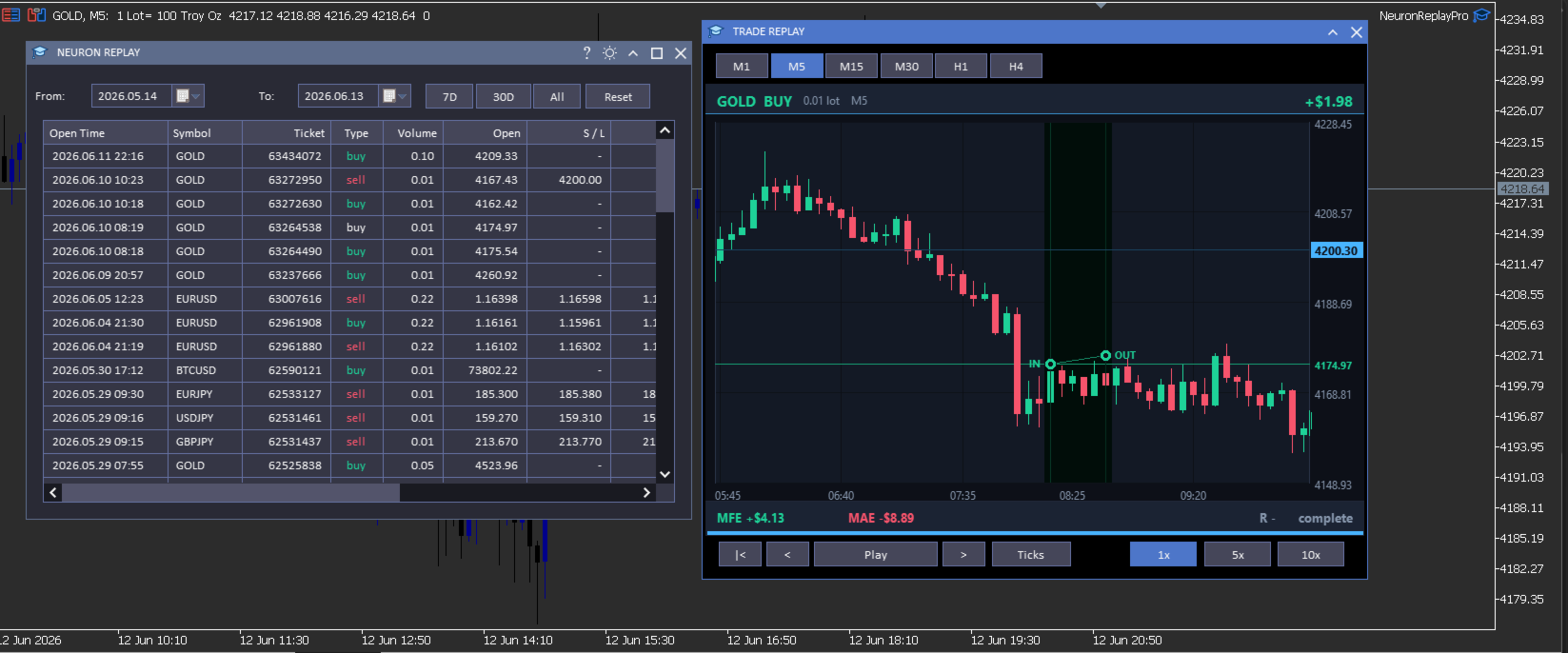
Your trade history is just a list of numbers. NeuronReplay turns it into film. It lists every closed trade in a dashboard; click any one and it re-plays that single trade candle-by-candle on its own chart, exactly like stepping through the MetaTrader 5 Strategy Tester — but scoped to a real trade you already took. You see the entry, the stop, the target and the exit drawn in, a floating P&L counting in real time, and the maximum favourable / adverse excursion and R-multiple measured for you. Go through your trades one at a time and finally understand why each one won or lost. 100% local and native MT5. Utility — it reads your history and draws; it does not place trades.
At a glance
- Replay every closed trade one by one — pick it from the list, watch it play out bar-by-bar.
- Strategy-Tester-style transport — restart, step back, play / pause, step forward, with 1x / 5x / 10x speed.
- Tick-by-tick mode — watch each candle form tick by tick, or candle-by-candle.
- Switch timeframe on the fly — replay the same trade on M1 · M5 · M15 · M30 · H1 · H4.
- Full MT5-style zoom & pan — drag the price axis to squeeze vertically, the time axis horizontally, drag to scroll; double-click to reset.
- Hundreds of candles of context loaded before and after every trade — scroll out to see the whole story.
- Per-trade analytics — IN / OUT markers, entry / stop / target levels, win-loss path, MFE, MAE, R-multiple, live P&L.
- Date-range filter, range presets and a clean dark dashboard with light/dark theme toggle.
- 100% local & native: no DLL, no socket, no WebRequest. Utility — it does not trade.
The trade dashboard
- Full closed-trade history — every position you have closed, newest first, grouped from your account's deal history.
- Rich detail per trade — open / close time, symbol, ticket, type, volume, open and close price, S/L, T/P, commission, swap, net profit, pips and R — with profit and direction colour-coded green / red.
- Date filters — a From / To calendar picker plus one-click 7D · 30D · All presets.
- Click any trade to open the replay window for that trade — work through your history one trade at a time.
Replay & analyze each trade
- Bar-by-bar replay — the trade's chart is revealed candle by candle on the bar close, exactly like the Strategy Tester, so you re-live the decision in real time.
- Tick-by-tick mode — switch on Ticks and the forming candle moves tick by tick (open → swing → close) so you feel how price actually traded inside each bar.
- Transport & speed — restart, step back, play / pause, step forward; play at 1x, 5x or 10x.
- Entry / exit on the chart — IN and OUT markers with vertical time guides, a connecting line coloured green (win) or red (loss), and a shaded holding-period band that fills in as it plays.
- Levels — entry, stop-loss and take-profit drawn with right-axis price tags (far levels are clamped to the edge so the candles always stay large and readable).
- Live read-out — floating P&L that counts as the trade plays, plus MFE (max favourable), MAE (max adverse), R-multiple and a progress bar.
- Real chart axes — right-side price axis, bottom time axis, grid and a live current-price tag that tracks the last revealed candle.
- Change timeframe live — M1 to H4 — to see the same trade in finer or coarser detail.
Zoom, pan & context — like the MT5 chart
- Squeeze vertically — drag the price axis up / down to zoom the price scale.
- Squeeze horizontally — drag the time axis left / right to zoom the candles in or out.
- Scroll — drag the chart body to pan in any direction; double-click to snap back to the trade.
- Lots of surrounding context — hundreds of candles before and after the trade are loaded, so you can zoom out and study the lead-up and the aftermath.
How it works
NeuronReplay reads your account's closed deals from the standard MetaTrader 5 trade history, groups them into trades (entry / exit price and time, volume, stop, target, commission, swap and net profit), and pulls the surrounding bars for each trade with CopyRates. The replay, the floating P&L and the MFE / MAE / R figures are all computed locally on your terminal — there is no external data feed, no web request and no third-party service.
Inputs
| Input | Default | What it does |
|---|---|---|
| InpTheme | Dark | Colour theme of the dashboard and windows (also toggleable from the title bar). |
| InpTF | M5 | Default timeframe used to replay a trade (changeable live in the replay window). |
| InpLookback | 30 | Bars shown before the entry in the default (zoomed-in) view. |
| InpLookfwd | 18 | Bars shown after the exit in the default view. |
| Optional dashboard columns | ||
| InpColTicket / InpColType / InpColVolume | true | Show the ticket / buy-sell / volume columns. |
| InpColOpen / InpColClose / InpColCloseT | true | Show the open price / close price / close time columns. |
| InpColSL / InpColTP | true | Show the stop-loss / take-profit columns. |
| InpColComm / InpColSwap | false | Show the commission / swap columns. |
| InpColPips / InpColR | true | Show the pips / R-multiple columns. |
Open time, symbol and net profit are always shown.
Compatibility
- MetaTrader 5, any broker, any symbol and any timeframe.
- Reads the standard built-in MT5 trade history; no external indicators or data feeds required.
- Native MQL5 — no DLLs, no sockets, no web requests.
What it is NOT
- It is a utility — it reads your closed-trade history and replays trades on a chart; it does not place, modify or close trades.
- It is not a signal service and makes no profit, win-rate or performance claim of any kind.
- It replays your own historical trades for study; past trades are not indicative of future results — always combine review with your own plan and risk management.
Neuron Systems — do premium trading like a quant.