Better Scroll

5

Daha İyi Kaydırma, kaydırma yaptığınızda MT4'ün Otomatik Kaydırma özelliğini etkinleştirir ve devre dışı bırakır, bu özelliğin daha sezgisel ve kullanışlı hissetmesini sağlar.

Artık Otomatik Kaydırmayı manuel olarak etkinleştirmeniz ve devre dışı bırakmanız veya geriye dönük test yaparken veya geçmiş fiyat verilerine bakarken kapatmayı unuttuğunuz için sizi grafiğin sonuna götürmeniz gerekmeyecek.

Özet

  • Otomatik Kaydırma şu durumlarda DEVRE DIŞIDIR:
    • Fare Tıklama+Sola sürükleme (geçmişte açık olan mum)
    • Fare Tekerleği Sola kaydırma (geçmişte açık olan mum)
    • Sayfa Yukarı Tuşuna basıldı
    • Ana Sayfa Tuşuna basıldı
    • Sol Ok Tuşuna basıldı (geçmişte açık olan mum)
    • Piyasa Kapalı
  • Otomatik Kaydırma şu durumlarda ETKİNDİR:
    • Fare Tıkla+Sağa sürükleyin (mum açmak için)
    • Fare Tekerleği Sağa kaydır (şu anda mumu açmak için)
    • Page Down Tuşuna basıldı (mum açmak için)
    • Bitir Tuşuna basıldı
    • Sağ Ok Tuşuna basıldı (mum açmak için)

Metatrader 4'ün yaşam kalitesini artıracak diğer yardımcı programlarıma göz atmayı unutmayın!
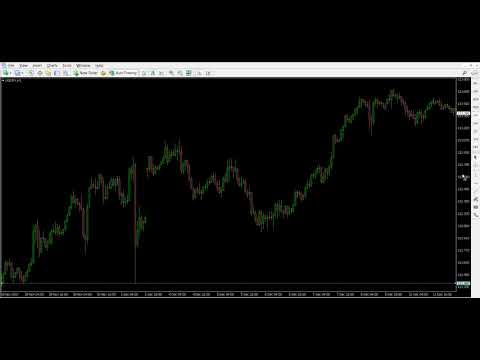
Video Better Scroll
Değerlendirmeler 1
Michael Tamilio
221
Michael Tamilio 2019.08.03 07:19 
 

Alexander has done it again! This little utility solved such a headache for me. If you like to scroll through the charts for reference points, support/resistance lines, and/or backtesting, this utility keeps you from having to remember the autoscroll button. I always forget. Even better, if you are using a chart sync indicator, so that your charts move back and forth together, this indicator is essential so that one of the charts doesn't override the location you selected. Then, you simply press end, to reengage the autoscroll feature.

Keep solving our headaches Alexander!

Önerilen ürünler
Always have a quick reference to timely information while trading. -Includes Currency Spread, Currency Trend w/ Time frame, Bar Timer, Server Time, Connection Status. ------------------------------------------------------------------------------------------------------------------------------ -Currency Spread; to know exactly how much you have to pay to get in. -Currency Trend with Time Frame; Understand the major direction of the currency pair for the last 3 months or other Time Frame. -Bar Tim
"Auto FIBO Pro" Crypto_Forex göstergesi - ticarette harika bir yardımcı araçtır! - Gösterge, Fibo seviyelerini ve yerel trend çizgilerini (kırmızı renk) otomatik olarak hesaplar ve grafikte yerleştirir. - Fibonacci seviyeleri, fiyatın tersine dönebileceği önemli alanları gösterir. - En önemli seviyeler %23,6, %38,2, %50 ve %61,8'dir. - Ters scalping veya bölge ızgara ticareti için kullanabilirsiniz. - Auto FIBO Pro göstergesini kullanarak mevcut sisteminizi geliştirmek için birçok fırsat vardı
"Just copier" is designed to copy trading without any complicated settings. The copy can be done in one PC. One EA can be set as master (provider) or slave (receiver). The receiver lot can be set to multiple providers lots. Please also check this product at fxina.hostingerapp.com.  Any type of copy is available. MT4 -> MT5 MT4 -> MT4 MT5 -> MT5 MT5 -> MT4 If you want to copy MT4 -> MT5 or MT5 -> MT4, please purchase "Just copier" for MT4 and "Just copier" for MT5 separately. Just Copier can copy
Trend Ray
Andriy Sydoruk
The indicator shows the potential trend direction by cyclical-wave dependence. Thus, all the rays of the intersection will be optimal rays, in the direction of which the price is expected to move, taking into account the indicator period. Rays can be used as a direction for potential market movement. But we must not forget that the approach must be comprehensive, the indicator signals require additional information to enter the market.
MQL5 Blogları: https://www.mql5.com/en/blogs/post/761446 MT4 Sürümü: https://www.mql5.com/en/market/product/136790 MT5 Sürümü: https://www.mql5.com/en/market/product/136791 Time Wizard, hız, zamanlama ve işlem kontrolünü tek bir temiz kontrol panelinde bir araya getirmek isteyen yatırımcılar için tasarlanmış profesyonel bir işlem asistanıdır. Bu Uzman Danışman, olay bazlı işlem, planlı işlem ve hızlı yarı otomatik emir yönetimi için tasarlanmıştır. Emirlerinizi önceden hazırlamanıza, tam işle
Broker Analysis Utility
AL MOOSAWI ABDULLAH JAFFER BAQER
Broker Analysis Utility – Your Ultimate Broker Performance Monitor! Get Full Transparency on Your Broker's Execution Quality! Are you a trader who values precision, transparency, and performance? Broker Analysis Utility is an essential tool designed to monitor your broker's execution quality, connection stability, spreads, slippage, and trading costs in real-time. Whether you are a scalper, day trader, or long-term investor, understanding your broker's performance is crucial to optimizing your
Scalping Day Trading Support Utility Scalping One for MT4 setting faile (for white Chart)    http://www.emkyuradias.shop/indexenglish.html One position is displayed with one button. View P & L, Lot, and Point in real time. It is possible to switch the display of positions of only chart currencies and all currency pairs.   Supports automatic identification in Japanese and English   Account currency notation corresponds to dollar, euro, pound, yen (automatic identification) Lot, take profit and
Trade History Exporter automatically exports trade history to a CSV (comma separated values) file. Trade History Exporter: - automatically exports trade history every time a trade is closed - allows you to manually force an export by using the "W" key on your keyboard - can use Order Comments as Magic Numbers - useful for instance when using a Trade Copier - calculates the Net Profit per trade
Fast Trade Copier
Volodymyr Hrybachov
4.2 (5)
The trade copier is designed for a fast and accurate copying of orders between the MetaTrader 4 terminals. The trade copier copies trades from the Master account to the Slave account by writing information to the total file, which is located in the common directory of the MetaTrader 4 terminals. This allows the trade copier to either customize various schemes for receiving and transmitting trade signals by changing the file name. Reading and writing the copier file is performed by timer. The tra
SMARTTARGETLINES – PRECISION TARGET VISUALIZER FOR MT4 The ultimate tool for traders who want to see exactly where price must go to hit their profit or equity targets — for BUY , SELL , and NET positions. KEY BENEFITS ️ Draws dynamic BUY , SELL , and NET TARGET LINES ️ Shows real-time price targets based on your equity or profit goals ️ Displays distance-to-target in points , dollars , or both ️ Includes a glowing corner label that changes color as you approach your goal ️ Clean des
This MetaTrader4 tool monitors 21 minor currency pairs over a user-defined timeframe, displaying key PIVOT values along with SUPPORT Zones 1, 2, and 3, and RESISTANCE Zones 1, 2, and 3 for each selected pair. Users can choose to have this information optionally displayed on the chart ; however, logging of the data to the log file is always active and occurs periodically based on the selected timeframe. For example, when set to an hourly timeframe, data will be logged every hour; on a minute-base
Price Magnet — Price Density and Attraction Levels Indicator Price Magnet is a professional analytical tool designed to identify key support and resistance levels based on statistical Price Density. The indicator analyzes a specified historical period and detects price levels where the market spent the most time. These zones act as “magnets,” attracting price action or forming a structural base for potential reversals. Unlike traditional Volume Profile tools, Price Magnet focuses on price-time d
Trade History Exporter automatically exports trade history to a CSV (comma separated values) file. Trade History Exporter: - automatically exports trade history every time a trade is closed - allows you to manually force an export by using the "W" key on your keyboard - can use Order Comments as Magic Numbers - useful for instance when using a Trade Copier - calculates the Net Profit per trade
AW Workpad
AW Trading Software Limited
3.67 (3)
AW Workpad, manuel ve yarı otomatik ticaret için tasarlanmış çok işlevli bir ticaret kontrol panelidir. Bekleyen siparişleri, piyasa pozisyonlarını yönetmenize olanak tanır, çok çeşitli istatistiksel veriler ve bir grup klasik göstergenin çok dönemli analizini sağlar. Yardımcı program beş sekme ile temsil edilir:   L'utilità è rappresentata da cinque schede:  POSITIONS, PENDING, CLOSE, INDICATORS, INFO.     Her sekme, siparişleri işlemek veya mevcut piyasa durumu hakkında bilgi almak için kendi
Hello Traders! Version 3.0 of the script has been released!  What's new?  Thanks to your suggestions I have inserted these changes to the tool: 1 - Data input are now date picker, it will be easier and faster to set the data export period; 2 - A message box will check that there is not a file with the same name in your folder; 3 - Error message to check that data insert are correct. If you like this product, take a look to the FULL INTERFACE!   MT4 To Excel Interface This script is a very usefu
The Pipsurfer Trade Manager Is A high level software that will automatically analysis each trading asset and calculate its optimal take profit and stop loss levels for Each trade it is managing. Complete with an easy to use management panel that allows you to manage your risk parameters for each individual trade that you place on each pair. You will have access to trailing stops, break even, partial take profits and account risk percentage features as well
Diamond Trend
Segundo Calvo Munoz
Indicator which identifies Trend and also buy/sell opportunities. Use for entries aligned to the Trend.  Although Diamond Trend is very accurate identifying entry points, it is always recommended to use a support indicator in order to reconfirm the operation. Remind to look for those Assets and Timeframes which best fit to your trader behavior/need... Valid for Scalping and Long Term operations. Please, set up a Bars Chart to be able to visualize the indicator properly...  ...And remind to give
DYJ Haber Dışı Aktarım Fabrikası, takvim işlemleri araçları ve makroekonomik olaylar için temel pazar analizi göstergesidir Burada dünyanın en büyük ekonomisinin finansal haberlerini ve göstergelerini bulabilirsiniz: ABD ve Avrupa Birliği'nden Avustralya ve Japonya'ya kadar halka açık kaynaklardan gerçek zamanlı olarak 800'den fazla makroekonomik gösterge ve olay toplamak Her işaretçinin geçmişi, geçerli ve tahmini değerleri ve önemli özellikleri vardır Buna ek olarak, bu hizmet büyük miktarda
Standard Trailing Stop is too slow! In the world of high-speed scalping like GOLD (XAUUSD) or volatile Forex pairs, even a few pips of delay in taking profit can be fatal.  "Just 5 more pips, then I'll cut!"  "But I need to find the next entry too!"  For scalpers fighting under such extreme pressure, we developed the "WOLF SCALPER PRO."  While inheriting the ironclad defense of "Auto SL/TP Insertion" and "Brother-Sync" from the original WOLF SYNC MANAGER, this new model is equipped with an
Simple HorizontalLine Trader is designed to simplify your trading activities and automatically open trade when the horizontalline you draw touched by the running price, You can choose to set EA to trade buy order or sell order when the horizontalline   touched by running price, you can also set stoploss and takeprofit in pips, when using MM Lot it will automatically calculate your order lot based on the SL distance and set risk per trade from your current equity. This EA include : 1. Trade Mode,
Otomatik başa baş seviyeleri Bu   araçla ,   işlem   istenilen   kâra   ulaştığında otomatik SL hareketini etkinleştirebilirsiniz.  Özellikle   kısa   vadeli   işlemciler   için   önemlidir.   Ofset seçeneği de mevcuttur: bir miktar kâr korunabilir. Çok fonksiyonlu araç : 66+ özellik, bu araç dahil  |   Sorularınız için bana ulaşın   |   MT5 versiyonu Otomatik başa baş fonksiyonunu etkinleştirme süreci: 1.   Sembol veya İşlem Seçin   Auto BE fonksiyonunun etkinleştirileceği: mevcut   [Symbol]  
This EA is an extension for the free trade indicator Trend Mate . https://www.mql5.com/en/market/product/50082 The main idea is to support your decision to  trade  according to the current trend. It is possible to configure alert and push notification to receive when entering to first candle for bull / bear trend. For this extension of the free indicator now it is possible to filter the current trend info with other timeframes. For example show trend for timeframe M5 considering also timeframe
Slide Trend is a simple indicator that shows a trend and allows for easy and fast navigation between charts. It was designed for quick analysis and aids you to scroll very fast through all the charts in the inputs list. The minimalist graphic allows receiving data on trend on D1, W1 and MN timeframes. The Trend feature (in the inputs) allows you to filter and view only the most powerful symbols. In this case, the circles are all of the same color. This indicator is a utility that speeds up navig
ExPad  - a trade panel for comfortable trading on financial markets. Suitable for trading any financial instruments. In general, the panel is able to perform the following functions: Open and reverse of deals Operation with visible and hidden StopLoss and TakeProfit Independent management of visible and hidden StopLosses Profit protection due to Breakeven and Trailing Stop  Choice of technique for Trailing Stop Distance from market price Moving Average Bolinger Bands Middle Line High and Low pri
BreakevenBoost, mevcut semboldeki tüm açık emirler için Kâr Al seviyelerini otomatik olarak, denge fiyatına ve puan cinsinden belirtilen bir ofsete göre ayarlar. Yeni bir emir açıldığında, yardımcı program tüm pozisyonlar için TP'yi, toplam ağırlıklı giriş fiyatlarına göre yeniden hesaplar ve günceller. Temel Özellikler Satın Alma ve/veya Satış emirlerini destekler Siparişleri belirtilen bir Sihirli Sayıya göre filtreler Sipariş sayısı değiştiğinde TP'yi otomatik olarak yeniden hesaplar ve uygul
velvet is an advanced ordering layer designed with MQL4 for use on a virtual private server to allow users to place orders with graphical objects placed onto compatible indicator charts displayed in the user session.  The current version of  velvet  supports ordering from trendlines placed on price charts and ordering from trendlines on the compatible version of the RSI indicator found here .  For compatible indicators to function they must be installed to the "velvet" (case-sensitive) directory
MultiChartSync4 - Multi-Chart Auto-Sync Tool  Program Overview MultiChartSync4 is a professional MetaTrader 4 multi-chart synchronization tool that enables automatic timeline alignment and synchronized navigation across multiple chart windows, significantly improving efficiency for multi-instrument and multi-timeframe analysis. Core Features 1. Intelligent Chart Synchronization Automatic Chart Alignment : All secondary charts automatically align with the master chart's candlestick timeline Re
Trendiness Index
Libertas LLC
5 (3)
"The trend is your friend" is one of the best known sayings in investing, because capturing large trendy price movements can be extremely profitable. However, trading with the trend is often easier said than done, because many indicators are based on price reversals not trends. These aren't very effective at identifying trendy periods, or predicting whether trends will continue. We developed the Trendiness Index to help address this problem by indicating the strength and direction of price trend
If you found this EA, it's probably because you want to get a funded account with a prop firm, but you see a rule that most of traders fear :   Maximum Daily Drawdown.  I've been through this problem myself as   I'm a prop firm trader   and I've made a bot to solve this rule, and you can get it to solve this problem too. How does it work ? When you first setup this EA, you need to input the   initial deposit   which corresponds to the size of your funded account. For exemple if you get a 10k$ f
Candle finder robot MT4 Candle finder robot is one of the trading assistant tools that helps the trader, this tool helps the trader to examine all the currency pairs that are in the Metatrader watch list in detail within a few seconds. Find the desired signals. According to the strategy that is defined for this robot, in your watch list, it carefully looks for trend change candles, there are many trend change candles that traders use in their trading decisions. This robot can simply check all t
Bu ürünün alıcıları ayrıca şunları da satın alıyor
Trade Manager EA’ye hoş geldiniz! Ticaretin daha sezgisel, hassas ve verimli hale gelmesi için tasarlanmış nihai risk yönetim aracı ile tanışın. Bu sadece bir emir verme aracı değil; ticaret planlaması, pozisyon yönetimi ve risk kontrolü için kapsamlı bir çözüm. İster yeni başlayan bir yatırımcı olun, ister deneyimli bir trader ya da hızlı emir gerektiren bir scalper, Trade Manager EA ihtiyaçlarınıza uyum sağlar ve forex, endeksler, emtialar ve kripto paralar dahil tüm piyasalarda esneklik sunar
Trade Assistant MT4
Evgeniy Kravchenko
4.43 (195)
It helps to calculate the risk per trade, the easy installation of a new order, order management with partial closing functions, trailing stop of 7 types and other useful functions. Additional materials and instructions Installation instructions   -   Application instructions   -   Trial version of the application for a demo account Line function -   shows on the chart the Opening line, Stop Loss, Take Profit. With this function it is easy to set a new order and see its additional characteris
Local Trade Copier EA MT4
Juvenille Emperor Limited
4.96 (110)
Local Trade Copier EA MT4 ile olağanüstü hızlı işlem kopyalama deneyimi yaşayın. Kolay 1 dakikalık kurulumuyla bu işlem kopyalayıcısı, aynı Windows bilgisayarda veya Windows VPS'te birden fazla MetaTrader terminali arasında işlemleri kopyalamanıza olanak tanır ve 0.5 saniyenin altındaki şimşek hızında kopyalama hızları sunar. Başlangıç seviyesinde veya profesyonel bir tüccar olsanız da, Local Trade Copier EA MT4 , spesifik ihtiyaçlarınıza göre özelleştirmek için geniş bir seçenek yelpazesi sunar
Copy Cat More Trade Copier MT4 (Kopyacı MT4) sadece basit bir yerel trade kopyalayıcı değildir; günümüzün alım satım zorlukları için tasarlanmış eksiksiz bir risk yönetimi ve yürütme çerçevesidir. Prop firm sınavlarından kişisel hesap yönetimine kadar, güçlü yürütme, sermaye koruması, esnek yapılandırma ve gelişmiş işlem yönetimi ile her duruma uyum sağlar. Kopyalayıcı hem Master (gönderici) hem de Slave (alıcı) modlarında çalışır ve piyasa emirleri ile bekleyen emirlerin gerçek zamanlı senkroni
Bu ürün, haber saatlerinde tüm uzman danışmanları ve manüel grafikleri filtreler, böylece manüel ticaret kurulumlarınızı veya diğer uzman danışmanlar tarafından girilen işlemleri yok edebilecek ani fiyat dalgalanmaları konusunda endişelenmenize gerek kalmaz. Bu ürün, herhangi bir haber yayınlanmadan önce açık pozisyonlarınızı ve bekleyen emirlerinizi yönetebilen tam bir sipariş yönetim sistemi ile birlikte gelir. The News Filter'ı satın aldığınızda, gelecekteki uzman danışmanlar için yerleşik ha
Exp COPYLOT CLIENT for MT4
Vladislav Andruschenko
4.69 (65)
MetaTrader 4 için profesyonel işlem kopyalayıcı MetaTrader 4 için hızlı, güvenilir ve profesyonel bir işlem kopyalayıcı. COPYLOT , MetaTrader 4 ve MetaTrader 5 terminalleri arasında Forex işlemlerinin kopyalanmasını sağlar ve farklı hesap türleri ile işlem senaryoları için esnek senkronizasyon sunar. COPYLOT MT4 sürümü şunları destekler: MetaTrader 4 → MetaTrader 4 MetaTrader 5 Hedge → MetaTrader 4 MetaTrader 5 Netting → MetaTrader 4   MT5 sürümü Tam açıklama + DEMO + PDF Nasıl satın alınır Nası
Telegram to MT4 Multi-Channel Copier , Telegram kanallarınızdaki işlem sinyallerini otomatik olarak doğrudan MetaTrader 4'e kopyalar. Bot yok, tarayıcı uzantısı yok, manuel kopyalama yok. Telegram'da bir sinyal alırsınız ve EA saniyeler içinde terminalinizde işlemi açar. Ürün iki bileşen içerir: Telegram kanallarınızı dinleyen bir Windows uygulaması ve sinyalleri MT4 terminalinizde yürüten bu Expert Advisor. Uygulamayı indirmek için kılavuza bakın:   https://www.mql5.com/en/blogs/post/768988 Nas
This EA Utility allows you to manage (with advanced filtering) unlimited open orders (manual or EA) with 16 trailing stop methods: fixed, percent, ATR Exit, Chandelier Exit, Moving Average, Candle High Low Exit, Bollinger Bands, Parabolic, Envelope, Fractal, Ichimoku Kijun-Sen, Alligator, Exit After X Minutes or Bars, RSI and Stochastic. The trailing stop can be either real or virtual, and you can exit fully or with a partial close percent on touch or bar close.  Moreover, you can add (overrid
Trade copier MT4
Alfiya Fazylova
4.58 (33)
Trade Copier, ticaret hesapları arasındaki işlemleri kopyalamak ve senkronize etmek için tasarlanmış profesyonel bir yardımcı programdır. Kopyalama, tedarikçinin hesabından/terminalinden alıcının aynı bilgisayarda veya vps'de kurulu olan hesabına/terminaline gerçekleşir. KAMPANYA - Eğer zaten "Trade copier MT5" aldıysanız, "Trade copier MT4"ü ücretsiz olarak alabilirsiniz (MT4 > MT5 ve MT4 < MT5 kopyalamalar için). Koşullar hakkında daha fazla bilgi almak için lütfen bizimle özel mesaj yoluyla i
TradePanel MT4
Alfiya Fazylova
4.84 (95)
Trade Panel, çok işlevli bir ticaret asistanıdır. Uygulama, manuel ticaret için 50'den fazla ticaret fonksiyonu içerir ve çoğu ticaret görevini otomatikleştirmeyi mümkün kılar. Satın almadan önce demo hesapta demo sürümü test edebilirsiniz. Demo hesap için uygulamanın deneme sürümünü indirin: https://www.mql5.com/en/blogs/post/750865 . Talimatların tamamı buraya . Ticaret. Tek tıklamayla ticaret işlemleri yapmayı sağlar: Risk otomatik hesaplaması ile bekleyen emirleri ve pozisyonları açmak. Bird
The product will copy all telegram signal to MT4   ( which you are member  ) , also it can work as remote copier.  Easy to set up, copy order instant, can work with almost signal formats, image signal, s upport to translate other language to English Work with all type of channel or group, even channel have "Restrict Saving Content", work with  multi channel, multi MT5 Work as remote copier: with signal have ticket number, it will copy exactly via ticket number. Support to backtest signal. How to
Close If Profit or Loss with Trailing for MetaTrader 4 — toplam kâr veya toplam zarar ile otomatik kapatma MetaTrader 4 için pratik bir işlem yönetimi aracıdır. Toplam kâr veya toplam zarar belirlediğiniz seviyeye ulaştığında, seçilen pozisyonları otomatik olarak kapatabilir. Expert Advisor açık işlemleri izler, değişken kâr/zarar sonucunu hesaplar, Trailing Profit kullanabilir ve pozisyonları manuel müdahaleden daha hızlı yönetmenize yardımcı olur. MetaTrader 4 hâlâ manuel trader’lar, scalper’
The Expert Advisor is a risk manager helping users to control their trading. In the settings, it is possible to specify the parameters at which the risk manager force closes the opened trades and closes the terminal as well, if it is needed to prevent opening trades on emotions, which do not correspond to the trading strategy. Risk Manager settings Check limit to close - check the equity limit Limit to close (account currency)   - equity limit that is checked when  Check limit to close is activ
Telegram'dan MT4'e:   Nihai Sinyal Kopyalama Çözümü Telegram ile MT4'e   işlemlerinizi kolaylaştırın, DLL'lere ihtiyaç duymadan doğrudan Telegram kanallarından ve sohbetlerinden MetaTrader 4 platformunuza işlem sinyallerini kopyalamak için tasarlanmış son teknoloji yardımcı program. Bu sağlam çözüm, sinyallerin benzersiz hassasiyet ve özelleştirme seçenekleriyle sorunsuz bir şekilde yürütülmesini sağlayarak size zaman kazandırır ve verimliliğinizi artırır. [ Instructions and DEMO ] Temel Özellik
Managing Trades 3.0 MT5 version:  https://www.mql5.com/en/market/product/172666?source=Site With Managing Trades 3.0, you can manage your trades quickly and efficiently. It features an intuitive visual interface with large buttons, allowing you to manage your trades as quickly as possible. With Managing Trades 3.0 you can: - Open a Buy and Sell order instantly with a single click, using any lot size you want. You can also optionally set Stop Loss and Take Profit. - Close all open trades in
Auto Trade Copier is designed to copy trades to multiple MT4, MT5 and cTrader accounts/terminals with 100% accuracy. The provider and receiver accounts must be on the same PC/VPS. With this tool, you can copy trades to receiver accounts on the same PC/VPS. All trading actions will be copied from provider to receiver perfectly. This version can be used on MT4 accounts only. For MT5 accounts, you must use Auto Trade Copier for MT5 . Reference: - For MT4 receiver, please download Trade Receiver Fre
Symbol Manager
Taras Slobodyanik
5 (4)
Symbol Manager or Grid Manager, designed to group orders into one position (by Symbol or by Magic Number). This utility will be useful to multi-currency traders (many EAs), who can have multiple orders on several pairs. You will be able to see the total number of lots, the total profit, and set virtual stop loss and virtual take profit. To set a real TP (or SL), you must first set the virtual value, and then enter the command in this cell: "set". If you want to set real TP/SL for all orders at
Trading History - A program for trading and money management on the history of quotes in stratagy tester. It can work with pending and immediate orders, and is equipped with trailing stop, breakeven and take profit functions. Very good for training and testing different strategies. Manual (Be sure to read before purchasing) Advantages 1. Allows you to test any trading strategy in the shortest possible time 2. An excellent simulator for trading training. You can gain months of trading experience
EchoTrade Telegram to MT5 Copier Seamless, Instant, and Reliable Signal Copying - Direct from Telegram to MetaTrader 4! The product does not run in the strategy tester but you can get free trial version   here  for testing before purchase. Tired of manually executing trades from Telegram signals? EchoTrade automates the process, instantly copying trades from any Telegram channel or group directly into your MT5 account—accurately, efficiently, and without delay. Key Features: Universal Compatib
Grid Manual MT4
Alfiya Fazylova
4.71 (17)
Grid Manual, sipariş ızgarasıyla çalışmak için kullanılan bir ticaret yardımcı programıdır. Yardımcı program evrenseldir, esnek ayarlara ve sezgisel bir arayüze sahiptir. Sadece kayıpların ortalaması yönünde değil, aynı zamanda kazanç artışı yönünde de bir emir ızgarası ile çalışır. Tüccarın bir emir ızgarası oluşturmasına ve eşlik etmesine gerek yoktur, bu yardımcı programı yapacaktır. Emri açmanız yeterlidir ve Grid manual otomatik olarak ona bir emir ızgarası oluşturacak ve kapanana kadar ona
The product will copy all  Discord  signal   to MT4   ( which you are member  ) , also it can work as remote copier.  Easy to set up. Work with almost signal formats, support to translate other language to English Work with multi channel, multi MT4. Work with Image signal. Copy order instant, auto detect symbol. Work as remote copier: with signal have ticket number, it will copy exactly via ticket number. How to setup and guide: Let read all details about setup and download Discord To MetaTrader
TP Splitter Pro MT4 TP Splitter Pro MT4 is an advanced Expert Advisor (EA) designed to optimize your take-profit strategy by automatically placing copy trades with multiple TP levels. It ensures a structured exit plan while maximizing profits and managing risk efficiently. Unlike standard trade copiers, TP Splitter Pro MT4 only executes copy orders when the entry price is more favorable than the master order. It places sell orders at a higher price and buy orders at a lower price. With built-in
The  MT4  EAs Manager   is a professional risk management and trade assistance tool designed to monitor, control, and optimize all trading activities on your MT5 account. It acts as a   central command center   that oversees every trade - whether opened by other Expert Advisors or manually by you. How it's work with other EAs :   Blog post  MT5 version :  https://www.mql5.com/en/market/product/166211 Only 10 copies will be sold at the early-bird price. After 10 copies, the price jumps directly t
Riskless Pyramid
Snapdragon Systems Ltd
5 (1)
Introduction This powerful MT4 trade mangement EA offers a way potentially to aggressively multiply trade profits in a riskfree manner. Once a trade has been entered with a defined stoploss and take profit target then the EA will add three pyramid add-on trades in order to increase the overall level of profit. The user sets the total combined profit target to be gained if everything works out. This can be specified either as a multiple of the original trade profit or as a total dollar amount. Fo
Trade Dashboard simplifies how you open, manage, and control your trades, with built-in lot size calculation. It allows you to execute trades, manage risk, and control positions directly on the chart, with tools such as partial close, breakeven, and trailing stop. Designed to reduce manual work and help you stay focused on your trading decisions. A demo version is available for testing. Detailed explanations of features are provided within the MQL5 platform. Installation instructions are include
If you need an advisor on any arrow indicator signals - this utility will definitely help you.  You will be able, with the help of this utility to form an unlimited number of EAs on YOUR signals , with your set of settings, with your copyright and complete source code . You will be able to use the resulting EAs unlimitedly , including adding them to the Market and other resources. Free simple version of the generation script to help you understand how it works - here What does the utility do? 
Local Trade Copier EA , bir MAM veya PAMM hesabına ihtiyaç duymadan, harici kaynaklardan ticaret sinyalleri yürütmesi veya aynı anda birkaç hesabı yönetmesi gereken bireysel tüccarlar veya hesap yöneticileri için bir çözümdür. 8 ana hesaptan sınırsız bağımlı hesaba kopyalar [ Kurulum Kılavuzu | Güncelleme Kılavuzu | Sorun Giderme | SSS | Tüm Ürünler ] %100 kendi kendine barındırılan Kurulumu ve kullanımı kolay Hiçbir yükleyici, yapılandırma dosyası, sunucu, bellek kanalı veya DLL kullanılmadı E
News filter, equity guard & session control for all your EAs — one tool, full protection Take a Break has evolved from a basic news filter into a comprehensive account protection solution . It pauses your other Expert Advisors during news events or based on custom filters. When trading resumes, it automatically restores your entire chart setup , including all EA settings. Why traders choose Take a Break One news filter for all your EAs — no more relying on individual built-in filters that may o
With this Expert Advisor you will follow the sound trading principle Buy Low and Sell High by default ! And you can do that even with a normal day job . You will be even able to trade on lower timeframes which you could never do without such an Expert Advisor. And the best thing is that you are in control! You can tell the Edge Zone EA where it has to enter and where it has to exit. And you can do that even many hours before the trade will occur . This EA is therefore an excellent assistant for
MultiOrder Assistent V3.0   - Your professional trading assistant for MetaTrader 4 The  MultiOrder Manager  is a powerful trading tool designed to optimize your trading while managing risk efficiently. With intuitive features and a user-friendly interface, this Tool is ideal for traders who want to manage multiple orders simultaneously without losing track.   Symbols: FX pairs, gold and cryptocurrencies Here you get a detailed description of the parameters and functions Manual     Features and
Yazarın diğer ürünleri
OHLC Magnet MT5
Alexander Martinez
4.75 (4)
OHLC Magnet adds the missing magnet points for Horizontal Lines and Price Labels. If you liked this utility, please rate, comment, and check out my other programs. Instructions: Simply drag one of the aforementioned objects to the desired Open, High, Low, or Close, within the Pixel Proximity, and OHLC Magnet will automatically attach the object to the exact price point you chose. Parameters: Proximity (Pixels): The proximity, in pixels, to how close your mouse cursor must be to the Open/High/Low
FREE
Saat Dilimi Dönüştürücü, bir grafikteki saati otomatik olarak yerel saatinize dönüştürür ve sizin için görüntüler . Bir Ön Ayar Dosyasını Otomatik Yükleme Talimatları: Bu özellik, göstergeyi her zaman çalışır durumda tutmak istemiyorsanız, ancak yine de özelleştirmek ve göstergeyi eklediğinizde bu özelleştirmelerin uygulanmasını istiyorsanız kullanışlıdır. Göstergeyi yükleyin, gösterge özelliklerine gidin ve "Girişler" sekmesine tıklayın Ayarları beğeninize göre özelleştirin İşiniz bittiğinde, "
OHLC Magnet
Alexander Martinez
5 (4)
OHLC Magnet adds the missing magnet points for Horizontal Lines, Rectangles, and Price Labels. Instructions: Simply drag one of the aforementioned objects to the desired Open, High, Low, or Close , within the Pixel Proximity, and OHLC Magnet will automatically attach the object to the exact price point you chose. Parameters: Proximity (Pixels): The proximity, in pixels, to how close your mouse cursor must be to the Open/High/Low/Close for the utility to attach to that specific price point. Defau
FREE
Yayılma Uyarısı , yayılmayı izler ve yayılma normalden yüksekse sizi uyarır veya belirlediğiniz eşiğin üzerindeyse sizi uyarır. Özellikler: Yayılmanın normal , normalden yüksek veya uyarıyı tetiklemiş olmasına bağlı olarak 3 farklı renk seçin . Özel bir ses ayarlamanıza izin veren isteğe bağlı sesli uyarı (.wav dosyası olmalıdır) Etiketin üzerine geldiğinizde araç ipucunda kaydedilen en düşük spread , spread uyarısı , uyarı pipleri ve spread durumunu görüntüler parametreler: İsim Tanım Ses Alar
FREE
With this utility, switching the object visibility for individual objects has never been easier. This will help eliminate the clutter that plagues MetaTrader 4 traders when they create objects and then go to a higher timeframe and see that the objects interfere with the visibility of the chart. The demo version of Visibility Switch only works on the EURUSD currency pair. The full version of Visibility Switch can be found here. By default, every new object created has its visibility set to the cu
FREE
Bu yardımcı programla, tek tek nesneler için nesne görünürlüğünü değiştirmek hiç bu kadar kolay olmamıştı. Bu, MetaTrader 4 yatırımcılarını nesneler oluşturduklarında ve daha sonra daha yüksek bir zaman dilimine gittiklerinde ve nesnelerin grafiğin görünürlüğünü engellediğini gördüklerinde rahatsız eden dağınıklığı ortadan kaldırmaya yardımcı olacaktır. Varsayılan olarak, oluşturulan her yeni nesnenin görünürlüğü geçerli zaman çerçevesine ve daha düşük olarak ayarlanır. Bu ayar, Görünürlüğü Otom
Quick Alerts
Alexander Martinez
5 (1)
Hızlı Uyarılar, MT4 nesneleri için uyarılar oluşturmak ve değiştirmek için hızlı ve kullanışlı bir yöntem sunar. Sürüm 4.0'da çok yakında: Tam olarak ne zaman bilgilendirilmek istediğinizi size bildiren anlamlı uyarılar oluşturun ve Koparma veya Yaklaşma uyarı türünü belirterek rahatsızlığı azaltın. Hızlı Uyarılar, bir grafiğe yerleştirildiğinde aşağıdaki nesneler için otomatik olarak uyarılar oluşturmak üzere varsayılan olarak yapılandırılmış olarak gelir: Yatay çizgiler dikdörtgenler Trend çiz
Akıllı Filigran, otomatik olarak ölçeklenirken ve ortalanırken sembolü ve zaman çerçevesini görüntüler. Ayrıca, çizelgelerinizi başkalarıyla paylaşmak için özel bir imza belirlemenize de olanak tanır. parametreler: Parametre Tanım Yazı tipi Filigranı görüntülemek için kullanılan yazı tipi Yazı rengi Filigranı görüntülemek için kullanılan yazı tipi rengi Yazı stili Yazı tipinin stili. Yok, İtalik, Altı Çizili veya Üstü çizili arasından seçim yapın. Varsayılan Yok'tur. Yazı Tipi Ağırlığı Yazı t
Daha İyi Kaydırma, kaydırma yaptığınızda MT5'ün Otomatik Kaydırma özelliğini etkinleştirir ve devre dışı bırakır, bu özelliğin daha sezgisel ve kullanışlı hissetmesini sağlar. Artık Otomatik Kaydırmayı manuel olarak etkinleştirmeniz ve devre dışı bırakmanız veya geriye dönük test yaparken veya geçmiş fiyat verilerine bakarken kapatmayı unuttuğunuz için sizi grafiğin sonuna götürmeniz gerekmeyecek. Özet Otomatik Kaydırma şu durumlarda DEVRE DIŞIDIR: Fare Tıklama+Sola sürükleme (geçmişte açık ola
Filtrele:
Michael Tamilio
221
Michael Tamilio 2019.08.03 07:19 
 

Alexander has done it again! This little utility solved such a headache for me. If you like to scroll through the charts for reference points, support/resistance lines, and/or backtesting, this utility keeps you from having to remember the autoscroll button. I always forget. Even better, if you are using a chart sync indicator, so that your charts move back and forth together, this indicator is essential so that one of the charts doesn't override the location you selected. Then, you simply press end, to reengage the autoscroll feature.

Keep solving our headaches Alexander!

Değerlendirmeye yanıt