Visibility Switch

5

Bu yardımcı programla, tek tek nesneler için nesne görünürlüğünü değiştirmek hiç bu kadar kolay olmamıştı. Bu, MetaTrader 4 yatırımcılarını nesneler oluşturduklarında ve daha sonra daha yüksek bir zaman dilimine gittiklerinde ve nesnelerin grafiğin görünürlüğünü engellediğini gördüklerinde rahatsız eden dağınıklığı ortadan kaldırmaya yardımcı olacaktır.

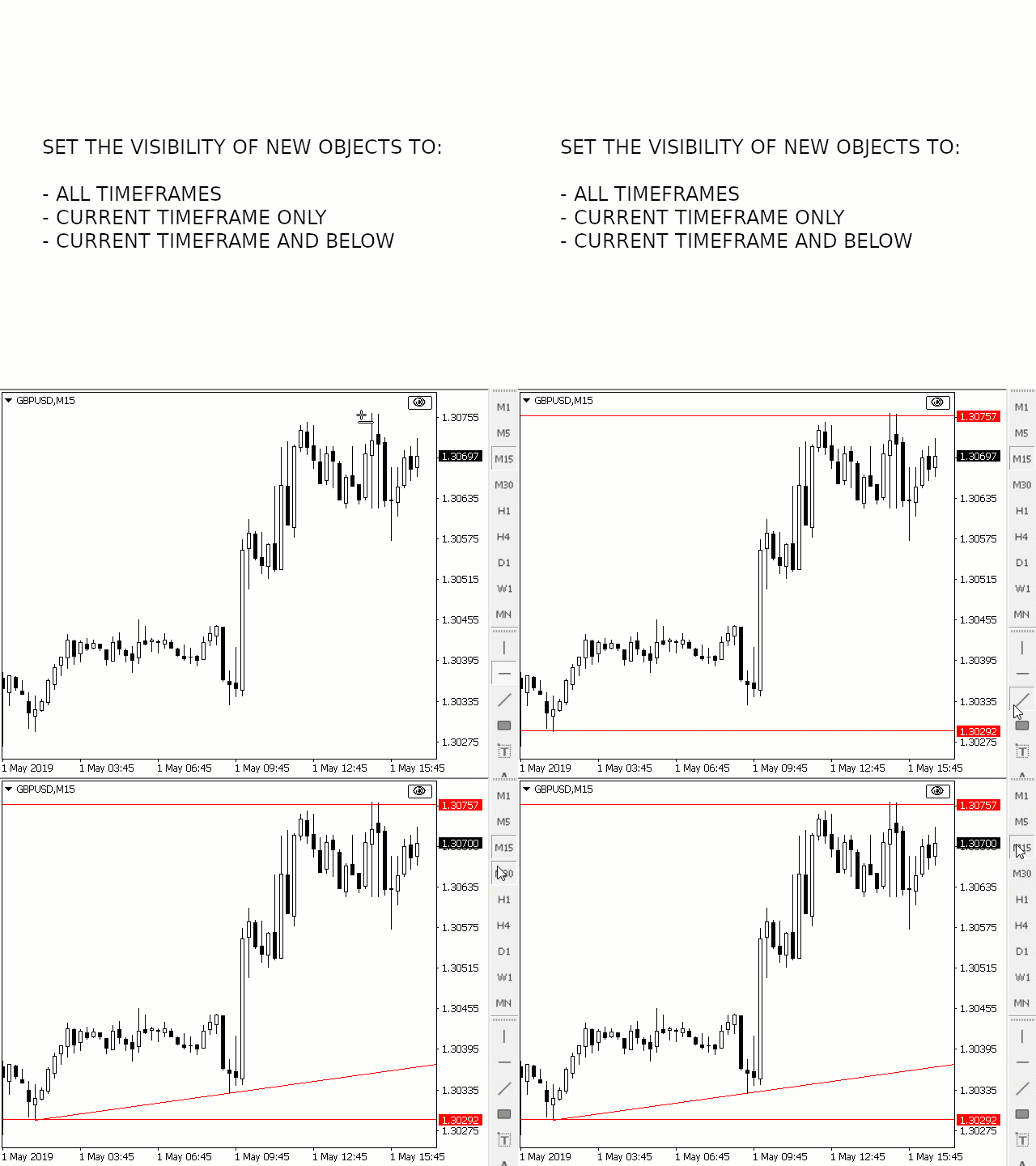
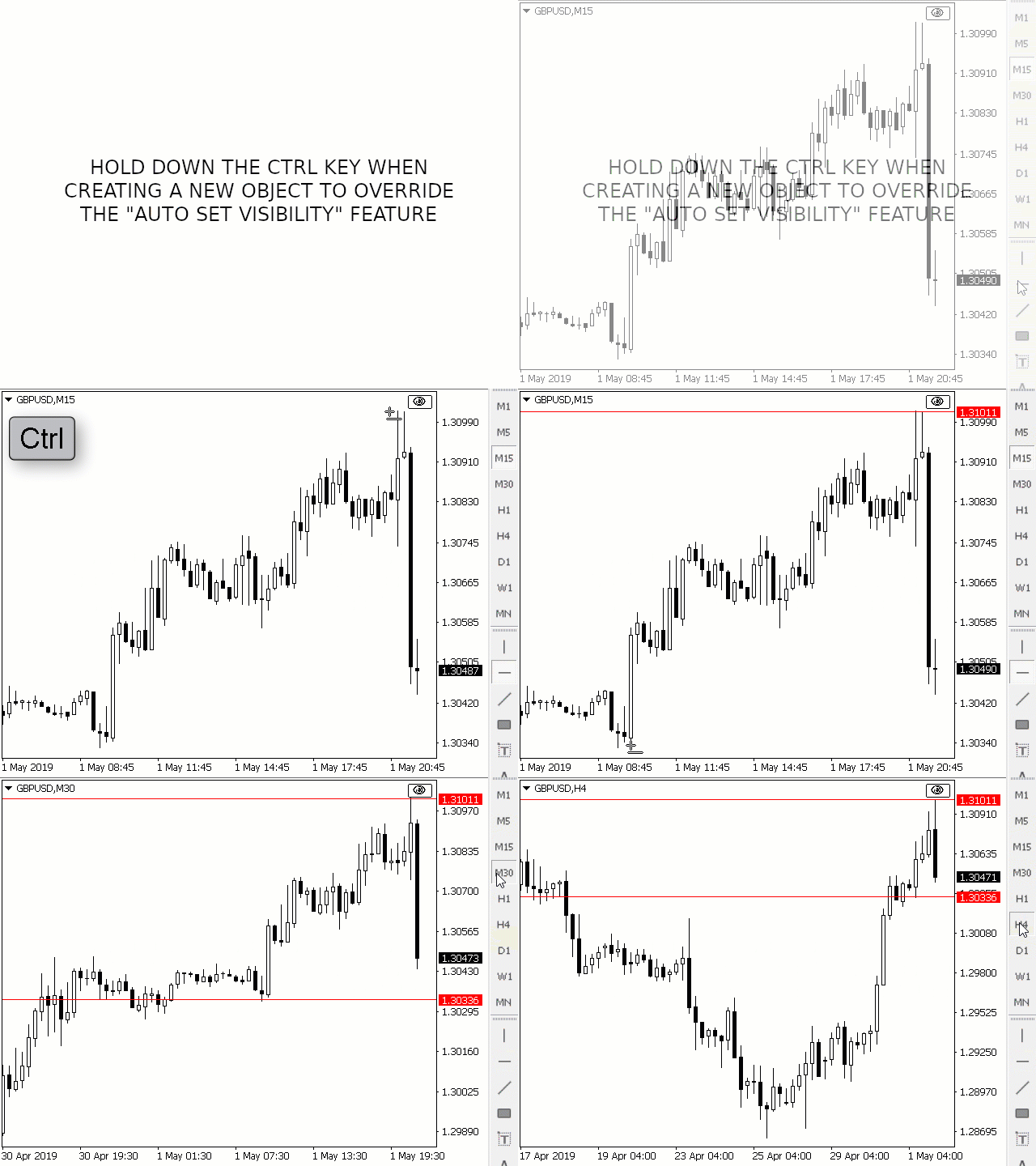
Varsayılan olarak, oluşturulan her yeni nesnenin görünürlüğü geçerli zaman çerçevesine ve daha düşük olarak ayarlanır. Bu ayar, Görünürlüğü Otomatik Ayarla parametresi altında değiştirilebilir veya yeni nesneyi oluştururken CTRL tuşunu basılı tutarsanız geçersiz kılınabilir.

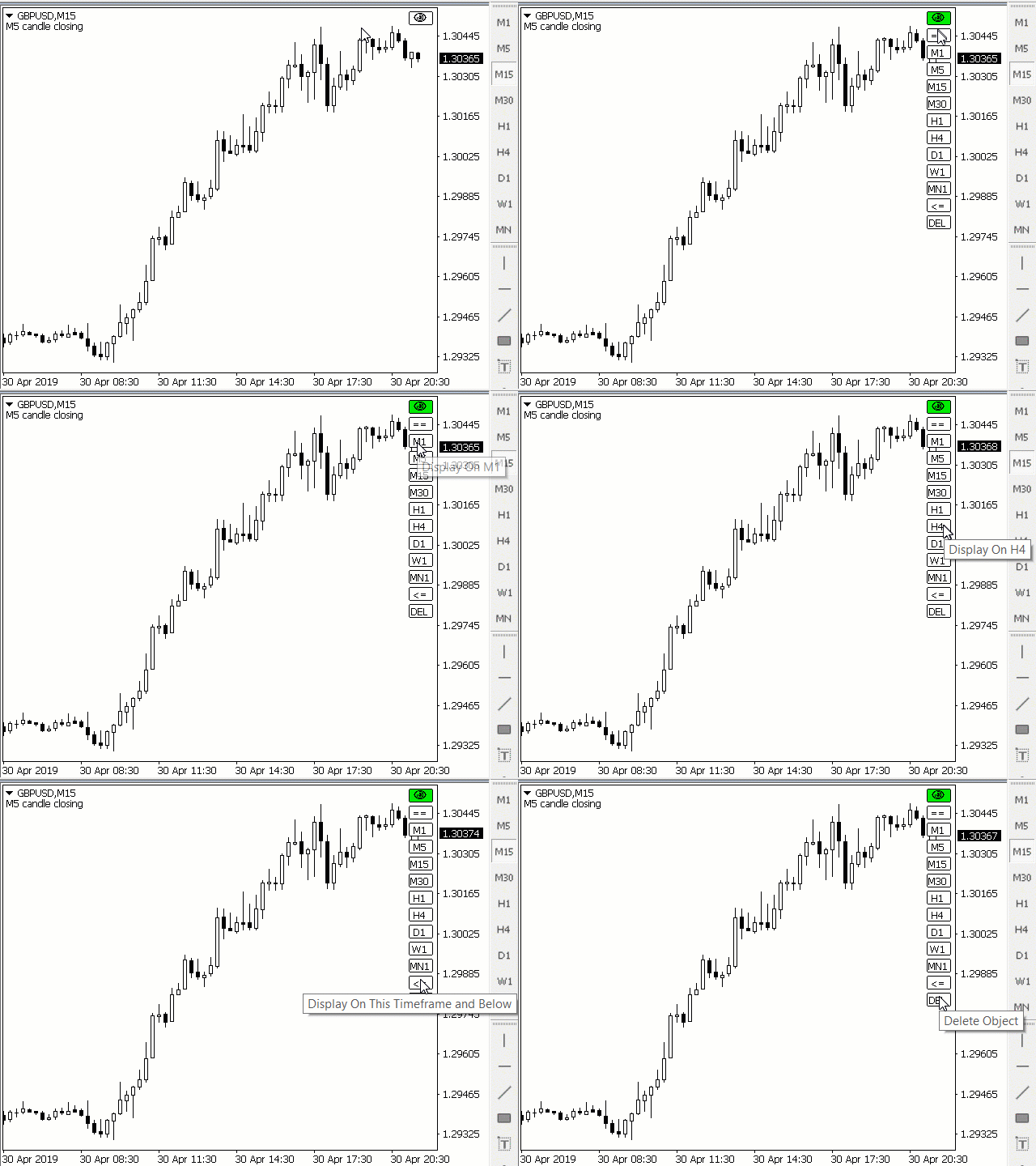
Mevcut tüm MetaTrader 4 zaman dilimlerini ve ayrıca iki ek seçeneği gösteren tıklanabilir bir düğme yerleştirilmiştir. Nesne görünürlüğü için birden fazla zaman çerçevesi seçilebilir veya nesne görünürlüğünü mevcut zaman çerçevesine veya mevcut zaman çerçevesine eşit ve daha düşük olarak ayarlayabilirsiniz.

parametreler


Parametre Tanım
Kontrol tuşu
Görünürlük Anahtarını etkinleştirmek için basılı tutma tuşu. Seçenekler "Devre Dışı" ve "Shift"
Kısayol tuşu
Görünürlük Anahtarını etkinleştirmek için Kontrol Tuşu basılı tutulurken basılacak tuş. Yalnızca tek bir karaktere izin verilir.
Görünürlüğü Otomatik Ayarla
Yeni nesnelerin görünürlüğü nasıl ayarlanmalıdır: Tüm Zaman Çerçeveleri, Mevcut Zaman Çerçevesi, Mevcut Zaman Çerçevesi ve Aşağısı (Varsayılan)
Nesne Tıklandığında Sesi Çal
Etkinse, gerçekleştirdiğiniz eylemin başarılı olduğuna dair işitsel bir onay verir
Metin ve Etiket Nesnelerini Değiştirin
Etkinse, Metin ve Etiket nesnelerini etkiler
BG Renk Düğmesi
---
Yazı Tipi Rengi Düğmesi
---
Kenarlık Rengindeki Düğme
---
Düğme Kapalı BG Renk
---
Düğme Kapalı Yazı Tipi Rengi
---
Düğme Kapalı Kenarlık Rengi
---
Düğme X Mesafe
---
Düğme Y Mesafesi
---
Düğme Köşesi ---


Göz simgesi olan düğmeye tıkladığınızda, bir nesneye tıklamak görünürlüğünü tüm zaman dilimlerine sıfırlayacaktır. Ayrıca diğer düğmeleri de gösterecektir:

  • M1
  • M5
  • M15
  • M30
  • H1
  • H4
  • D1
  • MN1

Bu düğmelerden herhangi birini tıkladığınızda ve ardından bir nesneyi tıkladığınızda, nesnenin görünürlüğü seçtiğiniz zaman dilimleriyle eşleşecek şekilde ayarlanır. Başka bir deyişle, tıkladığınız nesne yalnızca o zaman diliminde görünecektir.

Yukarıda belirtilen düğmelerin yanında görünen iki düğme daha vardır:

  • "==": tıkladığınız nesnenin görünürlüğünü geçerli zaman dilimine eşit olarak ayarlar
  • "<=": tıkladığınız nesnenin görünürlüğünü geçerli zaman dilimine ve daha düşük zaman dilimlerine eşit olarak ayarlar.

kara liste

Nesneleri, Görünürlüğü Otomatik Ayarla özelliğinden etkilenmekten ada göre hariç tutabilirsiniz:

  1. MT4'ünüzde "Dosya" > "Veri Klasörünü Aç"a tıklayın
  2. "MQL4" > "Dosyalar" klasörüne gidin
  3. "Görünürlük Anahtarı Dışlamaları.txt" başlıklı metin belgesini açın.
  4. Hariç tutmak istediğiniz nesnenin/nesnelerin adını girin. Not: Her giriş yeni bir satırla ayrılmalıdır.


Metin dosyasında listelediğiniz sözcüklerden birini içeren adla bir nesne oluşturulduğunda, program o nesneyi yok saymayı bilecektir.

Not: Belirli nesne türleri, tüccarları bilgilendirme gereği veya bir göstergenin GUI'sinin bir parçası olarak hareket etmeleri nedeniyle bu yardımcı programla çalışmayacaktır. Bu nesneler şunları içerir:
  • Metin*
  • Etiket*
  • Buton
  • Dikdörtgen Etiket
  • Alanı düzenle
  • bit eşlem
  • Bitmap Etiketi

* Metin ve Etiket Nesnelerini Değiştir ayarlanarak "Etkin" olarak değiştirilebilir.

MT4'te hayatınızı kolaylaştıracak diğer yardımcı programlarıma göz atmayı unutmayın!
İncelemeler 2
Trader mql5
1280
Trader mql5 2019.09.26 02:37 
 

Yes, I am surprised as well, maybe nobody does what is ESSENTIAL for forex trading - Technical Analysis. It is a gold nugget for those who do proper technical analysis with objects on all time frames - I mean do you really want to see your 15min trend and support/resistance analysis on the daily timeframe or vice versa or maybe you want to see the s/r but not the trend line, or you wish to see it only on 1hr and 4hr, but not daily - this indicator can do ALL of that easily, honestly. The specific delete button is also very useful. It is in my top 3 of all time best MT4 utilities.

Michael Tamilio
207
Michael Tamilio 2019.08.01 02:04 
 

I am surprised there are not more reviews of this excellent little tool!

If you are doing analysis across multi time-frames, this tool is such a time saver!

It folds up into a discrete box. Unfold when creating objects. It even works in combination with other indicators that I use to create rapid objects.

Önerilen ürünler
This indicator is a simple and handy tool, the main tasks of which are: Remind the trader of the approaching closing of the current bar. Visually display the remaining time on the chart before the end of the current bars of the charts with periods M1, M5, M15, M30 and H1. Notify the trader of the breakdown of High and/or Low bar set in the indicator settings. Notify the trader of the breakdown of the specified trend lines. In addition, notify the trader about the server connection loss.  Setting
Firstly , the script estimates how many Mx bars of the chart (on which this script is applied) the future trend will most likely continue and what is its quality. Secondly (and most importantly), the script is an auxiliary tool for the extremely mathematically advanced and extremely effective ScientificTrade indicator in trading. The script calculates the optimal averaging period, which is also equal to Mx, of the ScientificTrade indicator, which gives the maximum profit according to the strate
Expert candle finder for forex in MetaTrader 4 Expert candle finder is one of the practical trader assistant experts that is used in the forex financial market, this expert accurately identifies the candlestick patterns on the price chart as a signal, all the found candles. informs you. This expert is run on your Meta trader platform and in a very precise way, it examines all the currency pairs that are in your watch list and every currency pair that had a professional and good candlestick patt
Rainbow Price Visualizer v1.21 See where the market really breathes. Turns your MT4 chart into an ultra-precise heatmap that highlights price zones favored by big players. Why it matters 300 price levels at 0.2‑pip resolution — microscopic detail. 8 visual themes (Rainbow, Fire, Ocean…) for instant readibility. Smart opacity: low noise fades, real zones pop. Lightweight rendering with automatic cleanup. Fully customizable: saturation, opacity, resolution, history depth. Bands project into the f
News Scalping Executor Pro is an utility which helps to trade high impact and huge volatility   news . This utility helps to create two opposite orders with risk management and profit protection. It moves automatically stop loss level to avoid losses as much as possible by using many different algorithms. It helps to avoid trading the news if spread suddenly becomes very huge. It can lock profit by moving stop loss or partially closing of orders. To be profitable with this type of trading you
Fast Trade Copier
Volodymyr Hrybachov
4.2 (5)
The trade copier is designed for a fast and accurate copying of orders between the MetaTrader 4 terminals. The trade copier copies trades from the Master account to the Slave account by writing information to the total file, which is located in the common directory of the MetaTrader 4 terminals. This allows the trade copier to either customize various schemes for receiving and transmitting trade signals by changing the file name. Reading and writing the copier file is performed by timer. The tra
Lot Risk Calculator is a panel for order size calculation according to stop loss and allowed risk per trade. The calculation is performed for the symbol the indicator is launched at. You can set risk and stop loss manually in the panel. The stop loss is set considering 4 or 5 digits, for example, 20 - 4-digit, 200 - 5-digit. After editing each parameter, press Enter to confirm. To calculate a lot, click Calculate. The result appears below the button. Note! Set the panel for all necessary symbols
红盘手交易助手,该EA不会自动交易,属于辅助工具,参考4小时图表波动率参数,自动给订单设置止损和止盈,以及追踪止损。策略带有风控标准,如下<1K为50 >1K<1W为100, >1W<5W为500, >5W<10W为1000, >10<20为2000。最大的特色是资金管理和风控功能。显示信号为5日平滑均线方向,布林线中轨平仓功能,开仓警报提醒功能,手数资金恢复功能,该EA可以在历史数据测试时下单,所以它相当于复盘工具。注意EA会修改所不带止损和止盈品种的定单,并执行风控标准。EA参数经过实盘反复验证和优化,可以直接使用默认参数。        参数与功能: FixBuy_target 指定后统一修改当前品种所有多单的止盈价; FixSell_target 指定后统一修改当前品种所有空单的止盈价; 一比一恢复资金 默认不启用,启用盈利按固定亏损金额数字平仓; Boll_close_order 默认不启用,启用后价格遇到布林线(周期30)中轨平仓; Lots 设置固定手数,开启UseMM后无效; UseMM 默认启用资金管理; 风险系数 启用; ATR止损基数 默认按4小时
Gold Venamax MT4
Sergei Linskii
5 (1)
Gold Venamax   - bu en iyi hisse senedi teknik göstergesidir. Gösterge algoritması bir varlığın fiyat hareketini analiz eder ve oynaklığı ve potansiyel giriş bölgelerini yansıtır. Gösterge özellikleri: Bu, rahat ve karlı ticaret için Magic ve iki Blok trend oku içeren süper bir göstergedir. Grafikte blokları değiştirmek için Kırmızı Düğme görüntülenir. Magic, gösterge ayarlarında ayarlanır, böylece göstergeyi farklı Blokları görüntüleyen iki grafiğe yükleyebilirsiniz. Gold Venamax farklı ok tam
The script allows to close part of opened position if this position has some profit. You just need to drop this script on the chart with a desired currency pair.  Let's say you have 1 lot for a Long position with positive profit. With this script you can close any part of the 1 lot (input parameter LotCoeff from 0.1 to 0.9) and remain (for example, 0.4 lot) will have a BreakEven StopLoss. Before placing an opposite orders, the input window is opened allowing you to modify all input parameters: 
Gösterge, tarihsel olanlarla karşılaştırılabilecek güncel teklifler oluşturur ve bu temelde bir fiyat hareketi tahmini yapar. Gösterge, istenen tarihe hızlı navigasyon için bir metin alanına sahiptir. Seçenekler: Sembol - göstergenin göstereceği sembolün seçimi; SymbolPeriod - göstergenin veri alacağı dönemin seçimi; GöstergeRenk - gösterge rengi; Ters - doğru tırnakları tersine çevirir, yanlış - orijinal görünüm; Sonraki, tarihi girebileceğiniz ve 'enter' tuşuna basarak hemen atlayab
TPSpro Risk Yöneticisi       her türlü eğitim ve sermayeye sahip yatırımcılar için benzersiz bir profesyonel risk kontrol sistemidir. Ticarette kayıplardan ve işlemlerde ciddi hatalardan kaçınmanızı sağlar. TPSpro Risk Yöneticisi, öncelikle scalper'lar ve günlük yatırımcılar için risk yönetimi için gereklidir, ancak her türlü alım satım tarzındaki yatırımcılar tarafından başarıyla kullanılır. Panelde her biri yararlı bilgiler içeren 3 sütun bulunur. İlk sütun, içinde bulunulan ayın başı itibar
Description Strongest Higher Level  is an indicator that automatically plots the nearest level of strongest resistance and support in the main chart based on prices of the higher timeframe that differs it from Strongest Level indicator. Repeated usage of the indicator with various number of bars creates a system of support and resistance! The indicator calculates and plots levels based on number of bars set by the user.  It is recommended to set numbers from a golden ratio according to Fibonacci
Owl smart levels
Sergey Ermolov
4.24 (37)
MT5 versiyonu  |  FAQ Owl Smart Levels Indicator ,   Bill Williams'ın gelişmiş fraktalları , piyasanın doğru dalga yapısını oluşturan Valable ZigZag ve kesin giriş seviyelerini gösteren   Fibonacci seviyeleri   gibi popüler piyasa analiz araçlarını içeren tek gösterge içinde eksiksiz bir ticaret sistemidir. pazara ve kar elde edilecek yerlere. Stratejinin ayrıntılı açıklaması Gösterge ile çalışma talimatı Baykuş Yardımcısı ticaretinde Danışman Yardımcısı Kullanıcıların özel sohbeti -> Satın ald
Tin
Maryna Shulzhenko
The Tin indicator is designed to visually display the current trend in the market. One of the key aspects of foreign exchange market analysis is to determine the trend, which is the sustainable direction of price movement. To do this, the Tin indicator uses algorithms that smooth out sharp fluctuations that do not have a significant impact on the overall trend. A trend can be either upward (bullish) or downward (bearish). Typically, a trend persists for a long time before abruptly changing dir
50% off. Original price: $60 Ichimoku Assistant is a multi-timeframe panel and alert system that scans all timeframes for multiple rules related to different ichimoku strategies. The Ichimoku indicator has 5 different lines, including Tenkan-sen, Kijun-sen, Senku Span A, Senku Span B and Chikou Span. This scanner checks the status of these lines compared to each other and gives alert based on your selected rules. If you are using ichimoku kinko hyo in your trading strategy, this scanner and its
HFT FAST SCALPING EA the High Frequency Trading which use stop orders to enter the trades when market is trending. best use for 1- Low slippage brokers for us30 and DE40 . 2- LOW OR ZERO COMMISSION BROKERS FOR EUR AND GOLD. 3-Prop firms like ftmo ,tff,.......etc This EA UNLIKE Other HFT EAs , You can see that in the parameters ,, CHOOSE LOT SIZE , MAX LOT , CHOOSE TIME , COMMENT AND OTHERS . IT STOPS 3 MINUTES AUTOMATICALLY EVERY 15 MINUTES TO PROTECT THE EQUITY FROM A BIG UNWANTED SLIPPAGE .
Crypto_Forex Göstergesi HTF Ichimoku MT4 için. - Ichimoku göstergesi en güçlü trend göstergelerinden biridir. HTF - Daha Yüksek Zaman Çerçevesi anlamına gelir. - Bu gösterge Trend Yatırımcıları için mükemmeldir ve Fiyat Hareketi girişleriyle birleştirilebilir. - HTF Ichimoku Göstergesi, daha yüksek zaman çerçevesinden Ichimoku'yu mevcut grafiğinize eklemenizi sağlar. - Yukarı trend - mavi olanın üzerindeki kırmızı çizgi (ve her iki çizgi de bulutun üzerindedir) / Aşağı trend - mavi olanın altı
This indicator is the undisputed leader among the indicators. And for this statement there is a good reason. The indicator builds a very high quality channel in which it generates signals to enter! What is the ideal strategy for the trader, since the trader always hesitates when choosing a strategy for the job. That is, this indicator will allow you to solve the dilemma of choosing a job by trend or to the channel, since it combines these two basic concepts. Working with the indicator is very
The indicator detects and displays Shark harmonic pattern (see the screenshot). The pattern is plotted by the extreme values of the ZigZag indicator (included in the resources, no need to install). After detecting the pattern, the indicator notifies of that by a pop-up window, a mobile notification and an email. The indicator highlights the process of the pattern formation and not just the complete pattern. In the former case, it is displayed in the contour triangles. After the pattern is comple
Candlestick Pattern Scanner is a multi-timeframe and multi-symbol dashboard and alert system that checks all timeframes and currency pairs for different candlestick patterns that are formed in them. Scanner is integrated with support and resistance zones so you can check the candlestick patterns in the most important areas of the chart to find breakout and reversal patterns in the price chart. Download demo version   (works on M30,D1,W1 timeframes and 20 symbols of Market Watch window) Read the
The Range Directional Force Indicator is designed to help traders analyze market trends, reversals, and directional strength. It focuses on price movements within defined ranges, identifying key moments when the market is gaining momentum or preparing for a shift. By dividing the chart into dynamic price ranges, the indicator detects critical support and resistance levels. It calculates the directional force of price movements, highlighting potential entry and exit points based on market sentim
VR Cub
Vladimir Pastushak
VR Cub , yüksek kaliteli giriş noktaları elde etmenin bir göstergesidir. Gösterge, matematiksel hesaplamaları kolaylaştırmak ve bir pozisyona giriş noktalarının aranmasını basitleştirmek için geliştirildi. Göstergenin yazıldığı ticaret stratejisi uzun yıllardan beri etkinliğini kanıtlamaktadır. Ticaret stratejisinin basitliği, acemi yatırımcıların bile başarılı bir şekilde ticaret yapmasına olanak tanıyan büyük avantajıdır. VR Cub, pozisyon açılış noktalarını ve Kâr Al ve Zararı Durdur hedef sev
Scalping Day Trading Support Utility Scalping One for MT4 setting faile (for white Chart)    http://www.emkyuradias.shop/indexenglish.html One position is displayed with one button. View P & L, Lot, and Point in real time. It is possible to switch the display of positions of only chart currencies and all currency pairs.   Supports automatic identification in Japanese and English   Account currency notation corresponds to dollar, euro, pound, yen (automatic identification) Lot, take profit and
Account Protector Metatrader 4
Emmanuel Lovski Ijeawele Maduagwuna
Account Protector Meta Trader 4 This utility prevents risk of ruin per trading cycle.  Retail forex trading accounts are designed with   stop out levels   that make it impossible to quickly restore lost trading capital   (to initial levels)   in the event of a human or algorithm trader  " blowing"   an account. This hampers the efforts of a trader who after growing an account investment to a multiple of its initial value, suddenly suffers irreparable loss because of several trade entry mishaps.
"Auto FIBO Pro" Crypto_Forex göstergesi - ticarette harika bir yardımcı araçtır! - Gösterge, Fibo seviyelerini ve yerel trend çizgilerini (kırmızı renk) otomatik olarak hesaplar ve grafikte yerleştirir. - Fibonacci seviyeleri, fiyatın tersine dönebileceği önemli alanları gösterir. - En önemli seviyeler %23,6, %38,2, %50 ve %61,8'dir. - Ters scalping veya bölge ızgara ticareti için kullanabilirsiniz. - Auto FIBO Pro göstergesini kullanarak mevcut sisteminizi geliştirmek için birçok fırsat vardı
Easy Virtual Trader
Anoop Sivasankaran
4.89 (9)
Setup Easy Virtual Trader > Input your Rules > You are ready to trade from mobile or another EA or anywhere....Let robot manage your Trades !  This powerful EA will help you manage ALL or SPECIFIC trades automatically based on your PRE-SET rules and settings Once it is setup and running on just one chart, you don't need to monitor your orders anymore, the software will keep watching and control your orders with your predefined rules You can trade from your desktop MT4 or from your mobile appli
Scalper Strike
Yaroslav Varankin
works great with the trend, ideal for traders who trade using the scalping system. This is a pointer indicator. how to make deals. when the blue one appears, you need to open a trade to increase by 1 candle if the timeframe is m1 then for 1 minute, etc. if a red dot appears, you should make a deal to reduce it by 1 candle. Indicator signals appear along with a new candle; the working candle is the one on which the signal is located.
A utility for automatically setting breakeven levels, transfers trades to breakeven   when passing a given distance   . Allows you to minimize risks. Created by a professional trader for traders.       Utility       works with any market orders opened manually by a trader or using advisors. Can filter trades by magic number. The utility can work with any number of orders simultaneously. MT5 version https://www.mql5.com/ru/market/product/57077 WHAT THE UTILITY CAN DO: install virtulnoe levels   b
The most effective signals generated by Ichimoku strategies. Ichimoku Trade Alarm is a supplement for Ichimoku Trade Panel and it shows the signals that Expert Advisor reacts to. Visualization of signals:  Price / Kijun sen cross - the candle body must be between Min_Candlestick_Body and Max_Candlestick_Body. The candle must close above / below Kijun sen, minimum in 1/3 of its body. Open candle must be located above / below Kijun sen. Chinkou span must be under the price of 26 periods in advanc
Bu ürünün alıcıları ayrıca şunları da satın alıyor
Local Trade Copier EA MT4
Juvenille Emperor Limited
4.96 (105)
Local Trade Copier EA MT4 ile olağanüstü hızlı işlem kopyalama deneyimi yaşayın. Kolay 1 dakikalık kurulumuyla bu işlem kopyalayıcısı, aynı Windows bilgisayarda veya Windows VPS'te birden fazla MetaTrader terminali arasında işlemleri kopyalamanıza olanak tanır ve 0.5 saniyenin altındaki şimşek hızında kopyalama hızları sunar. Başlangıç seviyesinde veya profesyonel bir tüccar olsanız da, Local Trade Copier EA MT4 , spesifik ihtiyaçlarınıza göre özelleştirmek için geniş bir seçenek yelpazesi sunar
Trade Assistant MT4
Evgeniy Kravchenko
4.42 (192)
It helps to calculate the risk per trade, the easy installation of a new order, order management with partial closing functions, trailing stop of 7 types and other useful functions. Additional materials and instructions Installation instructions   -   Application instructions   -   Trial version of the application for a demo account Line function -   shows on the chart the Opening line, Stop Loss, Take Profit. With this function it is easy to set a new order and see its additional characteris
Trade Manager EA’ye hoş geldiniz! Ticaretin daha sezgisel, hassas ve verimli hale gelmesi için tasarlanmış nihai risk yönetim aracı ile tanışın. Bu sadece bir emir verme aracı değil; ticaret planlaması, pozisyon yönetimi ve risk kontrolü için kapsamlı bir çözüm. İster yeni başlayan bir yatırımcı olun, ister deneyimli bir trader ya da hızlı emir gerektiren bir scalper, Trade Manager EA ihtiyaçlarınıza uyum sağlar ve forex, endeksler, emtialar ve kripto paralar dahil tüm piyasalarda esneklik sunar
Copy Cat More Trade Copier MT4 (Kopyacı MT4) sadece basit bir yerel trade kopyalayıcı değildir; günümüzün alım satım zorlukları için tasarlanmış eksiksiz bir risk yönetimi ve yürütme çerçevesidir. Prop firm sınavlarından kişisel hesap yönetimine kadar, güçlü yürütme, sermaye koruması, esnek yapılandırma ve gelişmiş işlem yönetimi ile her duruma uyum sağlar. Kopyalayıcı hem Master (gönderici) hem de Slave (alıcı) modlarında çalışır ve piyasa emirleri ile bekleyen emirlerin gerçek zamanlı senkroni
The product will copy all telegram signal to MT4   ( which you are member  ) , also it can work as remote copier.  Easy to set up, copy order instant, can work with almost signal formats, image signal, s upport to translate other language to English Work with all type of channel or group, even channel have "Restrict Saving Content", work with  multi channel, multi MT5 Work as remote copier: with signal have ticket number, it will copy exactly via ticket number. Support to backtest signal. How to
Exp COPYLOT CLIENT for MT4
Vladislav Andruschenko
4.69 (65)
MetaTrader 4 için ticaret fotokopisi.       Herhangi bir hesaptan forex işlemlerini, pozisyonlarını, emirlerini kopyalar. En iyi ticari fotokopi makinelerinden biridir.       MT4 - MT4, MT5 - MT4       için       KOPYLOT MT4       sürüm (veya       MT4 - MT5 MT5 - MT5       için       KOPYLOT MT5       sürüm). MT5 sürümü Tam tanım   +DEMO +PDF Nasıl alınır Nasıl kurulur     Günlük Dosyaları nasıl alınır?     Nasıl Test Edilir ve Optimize Edilir     Expforex'in tüm ürünleri için fotokopi   sür
MT4 to Telegram Signal Provider , Telegram'a sinyal göndermeyi sağlayan ve hesabınızı bir sinyal sağlayıcısına dönüştüren kullanımı kolay ve tamamen özelleştirilebilir bir araçtır. Mesajların formatı tamamen özelleştirilebilir! Ancak basit kullanım için, önceden tanımlanmış bir şablonu seçebilir ve mesajın belirli kısımlarını etkinleştirebilir veya devre dışı bırakabilirsiniz. [ Demo ]  [ Kullanım Kılavuzu ] [ MT5 Sürümü ] [ Discord Sürümü ] [ Telegram Kanalı ]  New: [ Telegram To MT5 ] Kurulum
EASY Insight AIO – Akıllı ve zahmetsiz yatırım için hepsi bir arada çözüm Genel Bakış Tüm piyasayı — Forex, Altın, Kripto, Endeksler ve hatta Hisseler — saniyeler içinde, manuel grafik incelemesi, gösterge kurulumu ya da karmaşık ayarlar olmadan analiz edebildiğinizi hayal edin. EASY Insight AIO , yapay zekâ destekli yatırım için nihai, kullanıma hazır dışa aktarma aracınızdır. Tüm piyasanın kapsamlı bir anlık görüntüsünü tek bir temiz CSV dosyasında sunar; bu dosya ChatGPT, Claude, Gemini, Pe
TradePanel MT4
Alfiya Fazylova
4.84 (89)
Ticaret Paneli çok işlevli bir ticaret asistanıdır. Uygulama, manuel ticaret için 50'den fazla ticaret işlevi içerir ve çoğu ticaret işlemini otomatikleştirmenize olanak tanır. Dikkat, uygulama strateji test cihazında çalışmıyor. Satın almadan önce demo sürümünü bir demo hesabında test edebilirsiniz. Demo sürümü burada . Talimatların tamamı buraya . Ticaret. Tek tıklamayla alım satım işlemlerini gerçekleştirmenizi sağlar: Otomatik risk hesaplaması ile bekleyen emir ve pozisyonları açın. Tek tıkl
Trade copier MT4
Alfiya Fazylova
4.58 (33)
Trade Copier, ticaret hesapları arasındaki işlemleri kopyalamak ve senkronize etmek için tasarlanmış profesyonel bir yardımcı programdır. Kopyalama, tedarikçinin hesabından/terminalinden alıcının aynı bilgisayarda veya vps'de kurulu olan hesabına/terminaline gerçekleşir. Satın almadan önce demo sürümünü bir demo hesabında test edebilirsiniz. Demo versiyonu burada . Tüm talimatlar burada . Ana işlevler ve avantajlar: Emirlerin kopyalanmasını destekler: МТ4> МТ4, МТ4> МТ5, МТ5> МТ4. Emirlerin kopy
Tired of complex order placement and manual calculations? Trade Dashboard is your solution. With its user-friendly interface, placing orders becomes effortless, by a single click, you can open trades, set stop loss and take profit levels, manage trade lot size, and calculate risk to reward ratios, allowing you to only focus on your strategy. Say goodbye to manual calculations and streamline your trading experience with Trade Dashboard. Download  Demo Version  right now. You can find  Details of
EchoTrade Telegram to MT5 Copier Seamless, Instant, and Reliable Signal Copying - Direct from Telegram to MetaTrader 4! The product does not run in the strategy tester but you can get free trial version   here  for testing before purchase. Tired of manually executing trades from Telegram signals? EchoTrade automates the process, instantly copying trades from any Telegram channel or group directly into your MT5 account—accurately, efficiently, and without delay. Key Features: Universal Compatib
News Filter EA: Advanced Algo Trading Assistant News Filter EA is an advanced algo trading assistant designed to enhance your trading experience. By using the   News Filter EA , you can integrate a Forex economic news filter into your existing expert advisor, even if you do not have access to its source code. In addition to the news filter, you can also specify   trading days   and   hours   for your expert. The News Filter EA also includes   risk management   and   equity protection   features
Fotokopi->Kullanışlı ve hızlı arayüz etkileşimi, kullanıcılar hemen kullanabilir       ->>>> Windows bilgisayarlarda veya VPS Windows'ta kullanılması önerilir Temel işlevler: Kopyalama ticaretinin normal etkileşim hızı 0,5 saniyeden azdır Sinyal kaynaklarını otomatik olarak algıla ve sinyal kaynağı hesaplarının bir listesini görüntüle Sembolleri otomatik olarak eşleştirin, farklı platformlarda yaygın olarak kullanılan ticaret sembollerinin %95'i (farklı ekler gibi özel durumlar) otomatik olarak
MT4 için Expert Advisor Risk Manager çok önemli ve bence her yatırımcı için gerekli bir program. Bu Uzman Danışman ile ticaret hesabınızdaki riski kontrol edebileceksiniz. Risk ve kar kontrolü hem parasal hem de yüzdesel olarak yapılabilir. Danışman işlevleri Bu risk yöneticisi, riskleri kontrol etmenize yardımcı olacaktır: - bir anlaşma için - günlük - bir hafta için - Bir ay için Ayrıca kontrol edebilirsiniz 1) Ticaret yaparken izin verilen maksimum lot 2) günlük maksimum sipariş sayısı
Everything for chart Technical Analysis indicator MT4 in one tool Draw your supply demand zone with rectangle and support resistance with trendline and get alerts to mobile phone or email alert -  Risk reward indicator Video tutorials, manuals, DEMO download   here .  Find contacts on my   profile . 1.   Extended rectangles and trendlines Object will be extended to the right edge of the chart when price will draw new candles on chart. This is rectangle extender or trendline extender. 2. Price to
Ultimate Extractor - Professional Trading Analytics for MT4 Ultimate Extractor transforms your MetaTrader 4 trading history into actionable insights with comprehensive analytics, interactive charts, and real-time performance tracking. Ability to combine multiple accounts and MT4 and MT5 into a single dashboard. What It Does Automatically analyzes your MT4 trading history across all Expert Advisors and generates detailed HTML reports with interactive visualizations. Tracks live performance metric
Devrim niteliğindeki X2 Copy MT4 ile Anında Trade Kopyalamayı Keşfedin. Sadece 10 saniyelik bir kurulumla, tek bir Windows bilgisayarda veya VPS'te MetaTrader terminalleri arasında trades senkronizasyonu için güçlü bir araç elde edeceksiniz - benzeri görülmemiş bir hızla, 0.1 saniyenin altında. İster birden fazla hesap yönetin, ister sinyalleri takip edin, ister stratejinizi ölçeklendirin, X2 Copy MT4 eşsiz bir hassasiyet ve kontrolle iş akışınıza uyum sağlar. Beklemeyi bırakın — piyasa lideri h
Trailing Stop Universal MT4 / MT5 utility is a multifunctional tool for protecting floating profit on open positions and reducing possible risks in trading. To realize these goals, the tool offers the user the following features. Breakeven function - transfers a position to breakeven when the profit of the position allows it. If this function is enabled and the conditions of its operation are met, it moves the StopLoss order to the opening price of the position or even to the profitable area of
Unlimited Trade Copier Pro is a tool to copy trade remotely to multiple MT4, MT5 and cTrader accounts at different computers/locations over internet. This is an ideal solution for you if you are a signal provider and want to copy your trades to other receivers globally on your own rules. One provider can copy trades to multiple receivers and one receiver can get trade from multiple providers as well. The provider can even set the subscription expiry for each receiver, so that receiver will not b
Bu, Trend Line PRO göstergesi için otomatik parametre iyileştiricisidir En sevdiğiniz Trend Line PRO göstergesi için en uygun parametreleri kolayca ve hızlı bir şekilde seçeceksiniz.  Optimizasyon sadece birkaç saniye sürer. İyileştirici, her bir çift ve periyot için en iyi parametreleri bulmanızı sağlar: Amplitude, TP1-TP3, StopLoss ve seçilen tarih bölümünde (Days) Time Filter ve HTF Filter için değerler  Farklı zaman dilimlerini optimize etmek için farklı geçmiş aralıklarına ihtiyacınız var
This is a simple utility which will put Automatic Stop Loss and Take Profit. It also has Trailing Stop Loss and Break Even features. The input value of the Stop Loss and Take Profit is in Pips. Whenever you open a trade it will put stop loss and take profit in pips automatically. *If you need a more practical stop loss and take profit for your trades then you may like this ATR based stop loss utility,  Here! Inputs: 1. SL and Trailing SL - This is the Stop Loss value in Pips. Also used as Traili
Kar takip fonksiyonu ile toplam kar/zarara ulaşıldığında MetaTrader 4'te pozisyonları kapatmak. Sanal durakları (Ayrı Sipariş) etkinleştirebilirsiniz, AL ve SATIŞ pozisyonlarının ayrı ayrı hesaplanması ve kapatılması (Ayrı AL SATIŞ), Tüm sembollerin veya sadece mevcut sembolün kapatılması ve hesaplanması (Tüm Semboller), Kâr için takip etmeyi etkinleştir ( Sondaki Kâr ) Mevduat para birimi, puan, bakiyenin yüzdesi üzerinden toplam kâr ve zararı kapatın. Uygulama, diğer herhangi bir EA ile birli
Bu ürün, haber saatlerinde tüm uzman danışmanları ve manüel grafikleri filtreler, böylece manüel ticaret kurulumlarınızı veya diğer uzman danışmanlar tarafından girilen işlemleri yok edebilecek ani fiyat dalgalanmaları konusunda endişelenmenize gerek kalmaz. Bu ürün, herhangi bir haber yayınlanmadan önce açık pozisyonlarınızı ve bekleyen emirlerinizi yönetebilen tam bir sipariş yönetim sistemi ile birlikte gelir. The News Filter'ı satın aldığınızda, gelecekteki uzman danışmanlar için yerleşik ha
PnL Calendar MT4
Keni Chetankumar Gajanan -
PnL Calendar ... analyse to profit PnL Calendar transforms your trading history into a clear calendar view, helping you spot profitable days, monitor risk in real time, and unify accounts with the new Multi‑Broker data export feature. Core Features Calendar Panel: Profit breakdowns by day, week, month, and year Account Panel: Balance, equity, margin alerts, multi‑timeframe summaries, overnight gap adjustments Risk Dashboard: Leverage, drawdown, profit factor, consistency ratio, holding time, ri
Riskless Pyramid
Snapdragon Systems Ltd
5 (1)
Introduction This powerful MT4 trade mangement EA offers a way potentially to aggressively multiply trade profits in a riskfree manner. Once a trade has been entered with a defined stoploss and take profit target then the EA will add three pyramid add-on trades in order to increase the overall level of profit. The user sets the total combined profit target to be gained if everything works out. This can be specified either as a multiple of the original trade profit or as a total dollar amount. Fo
Shepherd Safety EA
AW Trading Software Limited
4.92 (13)
The work of the utility is directed at opening new market orders, maintaining them, transferring the unprofitable orders into profit using an internal loss handling algorithm, trend filtering and various types of trailing stop and take profit. Suitable for any instruments and timeframes. The algorithm works separately for buys and sells, which allows simultaneously working in both directions as well. For the event when the additional orders opened by the utility do not become profitable, a StopO
Strategy Builder offers an incredible amount of functionality. It combines a trade panel with configurable automation (covert indicators into an EA), real-time statistics (profit & draw down) plus automatic optimization of SL, TP/exit, trading hours, indicator inputs. Multiple indicators can be combined into an single alert/trade signal and can include custom indicators, even if just have ex4 file or purchased from Market. The system is easily configured via a CONFIG button and associated pop-up
Riskinizi otomatik olarak hesaplarken işlemlere hızlı bir şekilde girip çıkmanıza yardımcı olacak Ticaret Yöneticisi. Aşırı Ticaret, İntikam Ticareti ve Duygusal Ticaretten korunmanıza yardımcı olacak özellikler içerir. İşlemler otomatik olarak yönetilebilir ve hesap performans ölçümleri bir grafikte görselleştirilebilir. Bu özellikler, bu paneli tüm manuel yatırımcılar için ideal kılar ve MetaTrader 4 platformunun geliştirilmesine yardımcı olur. Çoklu Dil desteği. MT5 Sürümü  |  Kullanım Kılavu
VirtualTradePad mt4 Extra
Vladislav Andruschenko
4.86 (59)
1 tıklama ile ticaret için Ticaret Paneli.   Pozisyonlar ve emirlerle çalışmak!   Grafikten veya klavyeden alım satım. Alım satım panelimizi kullanarak, grafikten tek bir tıklamayla alım satım yapabilir ve alım satım işlemlerini standart MetaTrader kontrolünden 30 kat daha hızlı gerçekleştirebilirsiniz. Bir tüccar için hayatı kolaylaştıran ve bir tüccarın ticaret faaliyetlerini çok daha hızlı ve daha rahat gerçekleştirmesine yardımcı olan parametrelerin ve işlevlerin otomatik hesaplamaları. Graf
Yazarın diğer ürünleri
OHLC Magnet MT5
Alexander Martinez
4.75 (4)
OHLC Magnet adds the missing magnet points for Horizontal Lines and Price Labels. If you liked this utility, please rate, comment, and check out my other programs. Instructions: Simply drag one of the aforementioned objects to the desired Open, High, Low, or Close, within the Pixel Proximity, and OHLC Magnet will automatically attach the object to the exact price point you chose. Parameters: Proximity (Pixels): The proximity, in pixels, to how close your mouse cursor must be to the Open/High/Low
FREE
Yayılma Uyarısı , yayılmayı izler ve yayılma normalden yüksekse sizi uyarır veya belirlediğiniz eşiğin üzerindeyse sizi uyarır. Özellikler: Yayılmanın normal , normalden yüksek veya uyarıyı tetiklemiş olmasına bağlı olarak 3 farklı renk seçin . Özel bir ses ayarlamanıza izin veren isteğe bağlı sesli uyarı (.wav dosyası olmalıdır) Etiketin üzerine geldiğinizde araç ipucunda kaydedilen en düşük spread , spread uyarısı , uyarı pipleri ve spread durumunu görüntüler parametreler: İsim Tanım Ses Alar
FREE
OHLC Magnet
Alexander Martinez
5 (4)
OHLC Magnet adds the missing magnet points for Horizontal Lines, Rectangles, and Price Labels. Instructions: Simply drag one of the aforementioned objects to the desired Open, High, Low, or Close , within the Pixel Proximity, and OHLC Magnet will automatically attach the object to the exact price point you chose. Parameters: Proximity (Pixels): The proximity, in pixels, to how close your mouse cursor must be to the Open/High/Low/Close for the utility to attach to that specific price point. Defau
FREE
With this utility, switching the object visibility for individual objects has never been easier. This will help eliminate the clutter that plagues MetaTrader 4 traders when they create objects and then go to a higher timeframe and see that the objects interfere with the visibility of the chart. The demo version of Visibility Switch only works on the EURUSD currency pair. The full version of Visibility Switch can be found here. By default, every new object created has its visibility set to the cu
FREE
Better Scroll
Alexander Martinez
5 (1)
Daha İyi Kaydırma, kaydırma yaptığınızda MT4'ün Otomatik Kaydırma özelliğini etkinleştirir ve devre dışı bırakır, bu özelliğin daha sezgisel ve kullanışlı hissetmesini sağlar. Artık Otomatik Kaydırmayı manuel olarak etkinleştirmeniz ve devre dışı bırakmanız veya geriye dönük test yaparken veya geçmiş fiyat verilerine bakarken kapatmayı unuttuğunuz için sizi grafiğin sonuna götürmeniz gerekmeyecek. Özet Otomatik Kaydırma şu durumlarda DEVRE DIŞIDIR: Fare Tıklama+Sola sürükleme (geçmişte açık ola
Quick Alerts
Alexander Martinez
5 (1)
Hızlı Uyarılar, MT4 nesneleri için uyarılar oluşturmak ve değiştirmek için hızlı ve kullanışlı bir yöntem sunar. Sürüm 4.0'da çok yakında: Tam olarak ne zaman bilgilendirilmek istediğinizi size bildiren anlamlı uyarılar oluşturun ve Koparma veya Yaklaşma uyarı türünü belirterek rahatsızlığı azaltın. Hızlı Uyarılar, bir grafiğe yerleştirildiğinde aşağıdaki nesneler için otomatik olarak uyarılar oluşturmak üzere varsayılan olarak yapılandırılmış olarak gelir: Yatay çizgiler dikdörtgenler Trend çiz
Saat Dilimi Dönüştürücü, bir grafikteki saati otomatik olarak yerel saatinize dönüştürür ve sizin için görüntüler . Bir Ön Ayar Dosyasını Otomatik Yükleme Talimatları: Bu özellik, göstergeyi her zaman çalışır durumda tutmak istemiyorsanız, ancak yine de özelleştirmek ve göstergeyi eklediğinizde bu özelleştirmelerin uygulanmasını istiyorsanız kullanışlıdır. Göstergeyi yükleyin, gösterge özelliklerine gidin ve "Girişler" sekmesine tıklayın Ayarları beğeninize göre özelleştirin İşiniz bittiğinde, "
Akıllı Filigran, otomatik olarak ölçeklenirken ve ortalanırken sembolü ve zaman çerçevesini görüntüler. Ayrıca, çizelgelerinizi başkalarıyla paylaşmak için özel bir imza belirlemenize de olanak tanır. parametreler: Parametre Tanım Yazı tipi Filigranı görüntülemek için kullanılan yazı tipi Yazı rengi Filigranı görüntülemek için kullanılan yazı tipi rengi Yazı stili Yazı tipinin stili. Yok, İtalik, Altı Çizili veya Üstü çizili arasından seçim yapın. Varsayılan Yok'tur. Yazı Tipi Ağırlığı Yazı t
Daha İyi Kaydırma, kaydırma yaptığınızda MT5'ün Otomatik Kaydırma özelliğini etkinleştirir ve devre dışı bırakır, bu özelliğin daha sezgisel ve kullanışlı hissetmesini sağlar. Artık Otomatik Kaydırmayı manuel olarak etkinleştirmeniz ve devre dışı bırakmanız veya geriye dönük test yaparken veya geçmiş fiyat verilerine bakarken kapatmayı unuttuğunuz için sizi grafiğin sonuna götürmeniz gerekmeyecek. Özet Otomatik Kaydırma şu durumlarda DEVRE DIŞIDIR: Fare Tıklama+Sola sürükleme (geçmişte açık ola
Filtrele:
Trader mql5
1280
Trader mql5 2019.09.26 02:37 
 

Yes, I am surprised as well, maybe nobody does what is ESSENTIAL for forex trading - Technical Analysis. It is a gold nugget for those who do proper technical analysis with objects on all time frames - I mean do you really want to see your 15min trend and support/resistance analysis on the daily timeframe or vice versa or maybe you want to see the s/r but not the trend line, or you wish to see it only on 1hr and 4hr, but not daily - this indicator can do ALL of that easily, honestly. The specific delete button is also very useful. It is in my top 3 of all time best MT4 utilities.

Michael Tamilio
207
Michael Tamilio 2019.08.01 02:04 
 

I am surprised there are not more reviews of this excellent little tool!

If you are doing analysis across multi time-frames, this tool is such a time saver!

It folds up into a discrete box. Unfold when creating objects. It even works in combination with other indicators that I use to create rapid objects.

İncelemeye yanıt