Visibility Switch Demo

With this utility, switching the object visibility for individual objects has never been easier. This will help eliminate the clutter that plagues MetaTrader 4 traders when they create objects and then go to a higher timeframe and see that the objects interfere with the visibility of the chart.

The demo version of Visibility Switch only works on the EURUSD currency pair. The full version of Visibility Switch can be found here.

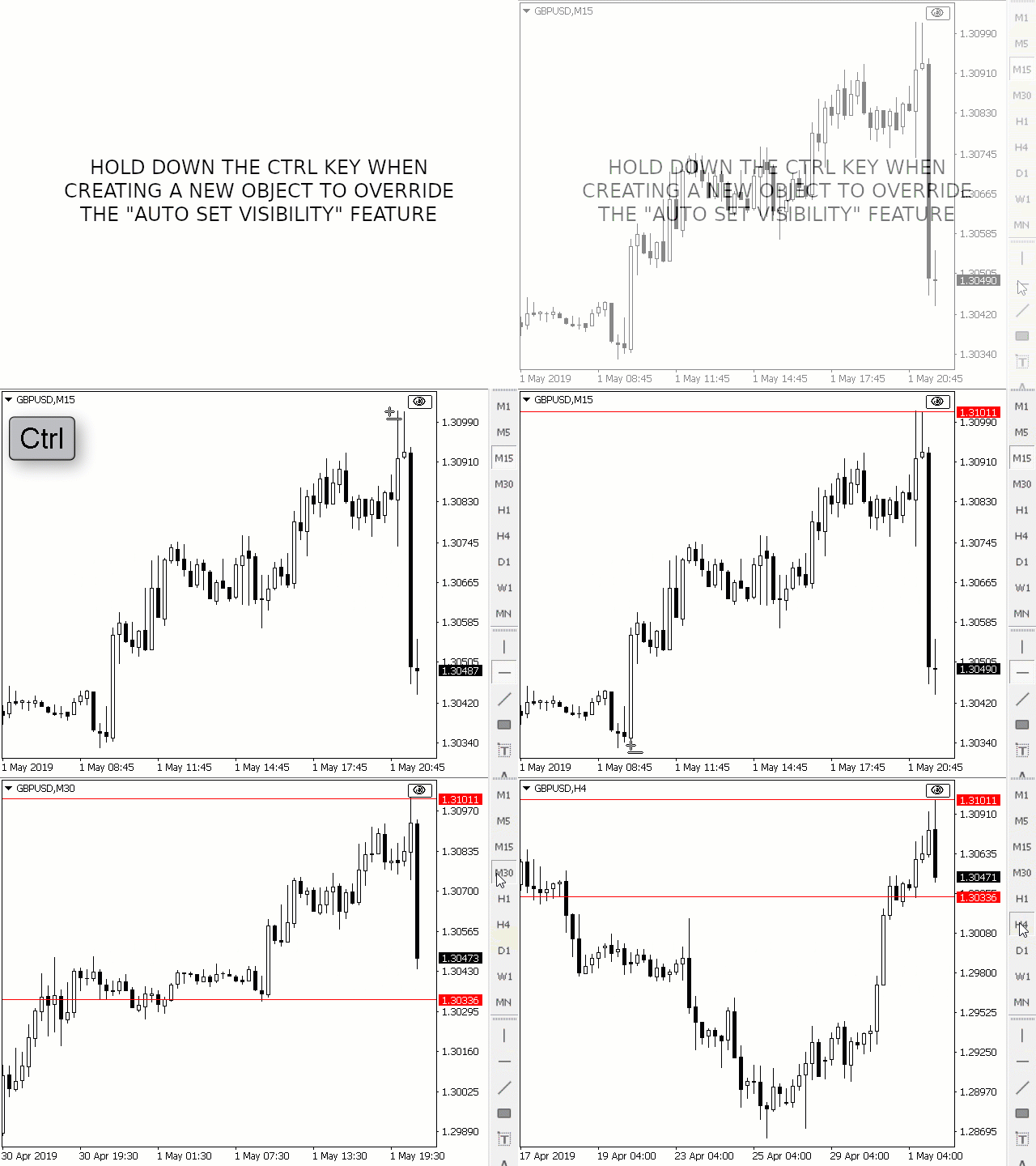
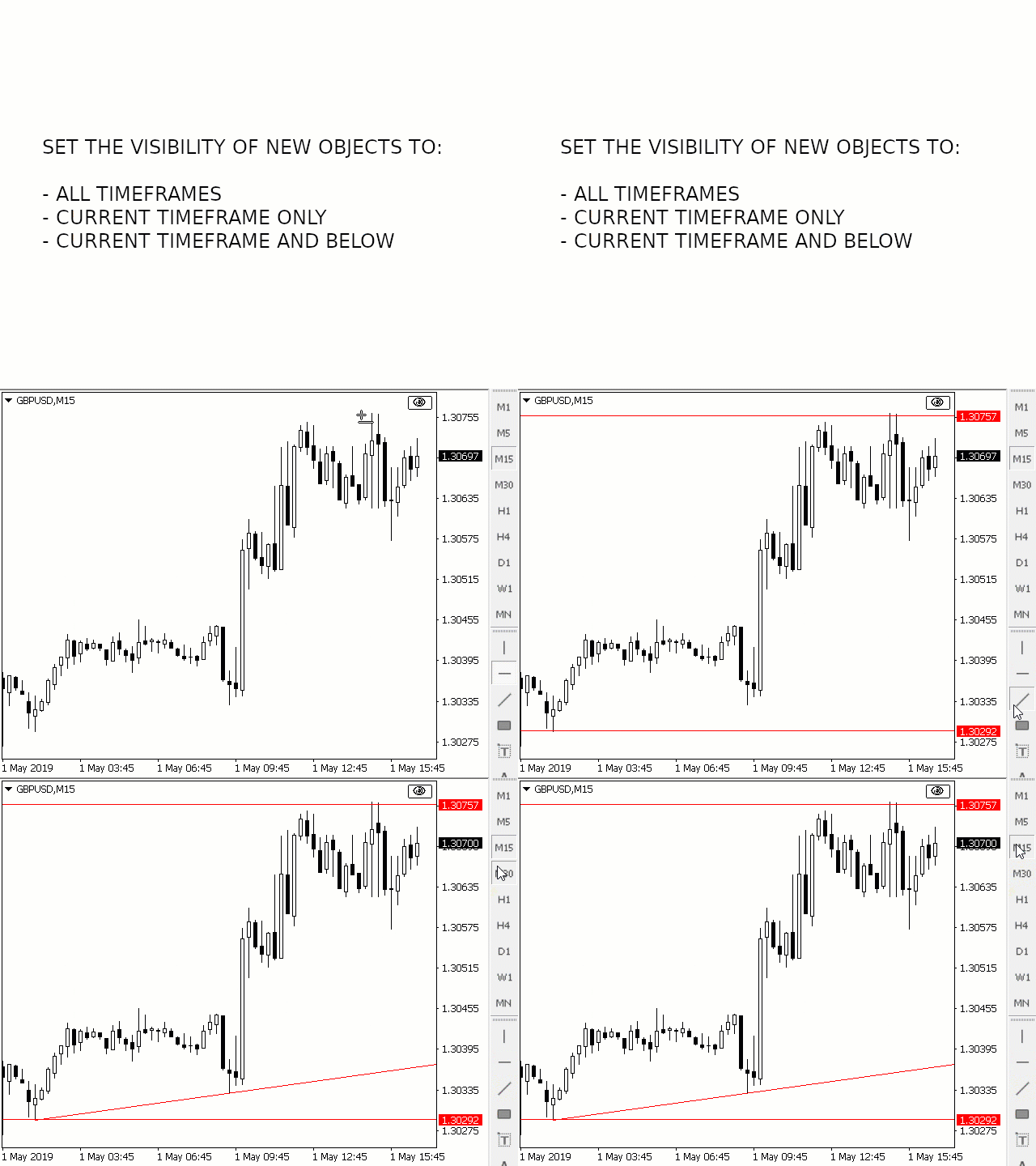
By default, every new object created has its visibility set to the current timeframe and lower. This setting can be changed under the Auto Set Visibility parameter or overridden if you hold down the CTRL key while creating the new object.

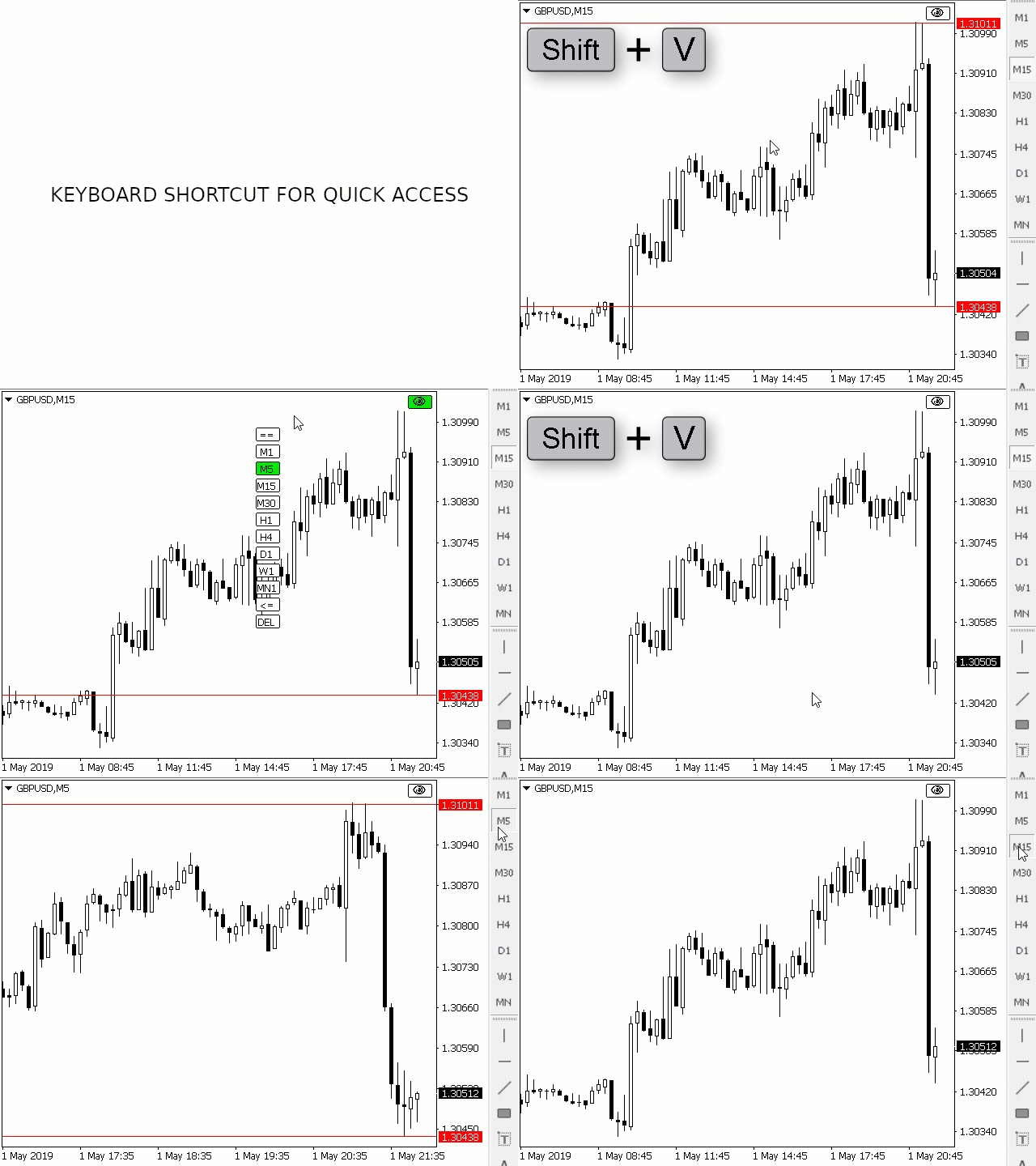
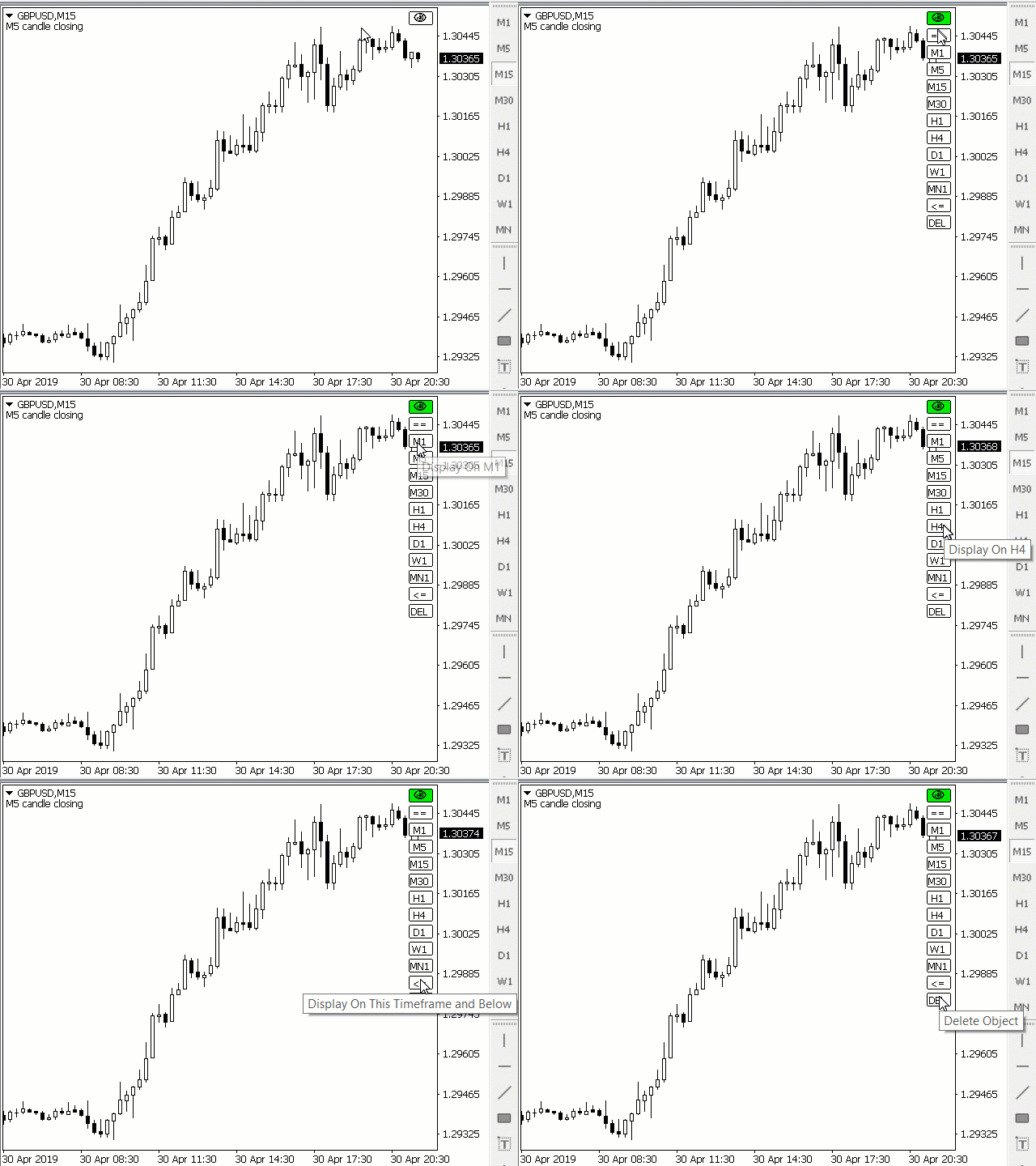
A button is placed that can be clicked on, displaying all available MetaTrader 4 timeframes, as well as two additional options. Multiple timeframes for the object visibility can be selected or you can set the object visibility equal to the current timeframe or the current timeframe and lower.


Parameters

  • Control Key: Key to hold down to activate Visibility Switch. Options are "Disabled" and "Shift"
  • Shortcut Key: Key to press while Control Key is held down to activate Visibility Switch. Only one single character allowed.
  • Auto Set Visibility: How the visibility of new objects should be set: All Timeframes, Current Timeframe, Current Timeframe and Below (Default)
  • Play Sound On Object Click: If Enabled, will give you an auditory confirmation that the action you have performed was a success.
  • Button On BG Color: Background color of button when on
  • Button On Font Color: Font color of button when on
  • Button On Border Color: Border color of button when on
  • Button Off BG Color: Background color of button when off
  • Button Off Font Color: Font color of button when off
  • Button Off Border Color: Border color of button when off
  • Button X Distance: The X Axis of the button
  • Button Y Distance: The Y Axis of the button
  • Button Corner: The corner of the chart on which to place the button

When you click on the button with the eye icon, clicking on an object will reset its visibility to all timeframes. It will also display other buttons:

  • M1
  • M5
  • M15
  • M30
  • H1
  • H4
  • D1
  • MN1

When you click any of these buttons and then you click an object, the object's visibility will be set to match the timeframes you selected. In other words, the object you clicked will only appear on that timeframe.

There are two other buttons that appear alongside the aforementioned buttons:

  • "==": when selected and you click on an object, it will set the object's visibility that you click equal to the current timeframe
  • "<=": when selected and you click on an object, it will set the object's visibility that you click equal to the current timeframe and lower timeframes.

Note: You can also blacklist certain objects from having the Auto Set Visibility feature from applying to that object. Simply go to your Data Folder (File > Open Data Folder), Click on MQL4 > Files, and look for the "Visibility Switch Exclusions.txt" file. Open it and enter the name of the objects, each on a new line.

Note: certain object types have been excluded from this utility due to their necessity to keep traders informed or they act as part of an indicator's GUI. These objects include:

  • Button
  • Text
  • Label
  • Rectangle Label
  • Edit field
  • Bitmap
  • Bitmap Label

In other words, this utility's main function (to easily change the object's visibility) will not function on the aforementioned objects.

If you enjoyed this utility, check out the other utilities I have for sale that are part of my MT4 Quality of Life Improvement series.
Önerilen ürünler
Wise Men Indicator demo
Bohdan Kasyanenko
3 (2)
The indicator displays signals according to the strategy of Bill Williams on the chart. Demo version of the indicator has the same features as the paid, except that it can work only on a demo account . Signal "First Wise Man" is formed when there is a divergent bar with angulation.  Bullish divergent bar - with lower minimum and closing price in the upper half. Bearish divergent bar - higher maximum and the closing price at the bottom half. Angulation is formed when all three lines of Alligator
FREE
Session Shade (MT4) – Non-Trading Hours Background Shading Overview Session Shade is a lightweight MT4 chart utility indicator that visually highlights non-trading hours by shading the chart background. It is designed to help you confirm your daily time-filter window at a glance. This is a visualization tool only. It does not generate trading signals and it does not place, modify, or close any orders. Key features Shades non-trading hours (NG) on the chart background Keeps trading hours (OK) cl
FREE
Free automatic Fibonacci is an indicator that automatically plots a Fibonacci retracement based on the number of bars you select on the BarsToScan setting in the indicator. The Fibonacci is automatically updated in real time as new highest and lowest values appears amongst the selected bars. You can select which level values to be displayed in the indicator settings. You can also select the color of the levels thus enabling the trader to be able to attach the indicator several times with differe
FREE
Show Pips
Roman Podpora
4.26 (58)
Bu bilgi göstergesi her zaman hesaptaki güncel durumdan haberdar olmak isteyenler için faydalı olacaktır. Gösterge, puan cinsinden kâr, yüzde ve para birimi gibi verilerin yanı sıra mevcut çiftin spreadini ve mevcut zaman diliminde çubuğun kapanmasına kadar geçen süreyi görüntüler. VERSİYON MT5 -   Daha kullanışlı göstergeler Bilgi satırını grafiğe yerleştirmek için birkaç seçenek vardır: Fiyatın sağında (fiyatın arkasında); Yorum olarak (grafiğin sol üst köşesinde); Ekranın seçilen köşesinde.
FREE
Safety
Sergey Ermolov
5 (2)
Sanırım herkes böyle bir para yönetimi kuralını «Kasa» olarak biliyor. Bilmeyenler için kasa, işlemdeki kazançlar ayak büyüklüğüyle eşitlendikten sonra pozisyonun yarısını kapatmayı varsayar. Böylece, fiyat açılıp dursa bile, artık para kaybetmeyeceksiniz, çünkü pozisyonun bir kısmı daha önce kapandığında tam olarak aynı miktarda kar elde edildi. Güvenlik Danışmanının yalnızca bir ayarı vardır – kapanış lotu. Onu 0 konumunda bırakarak, danışman anlaşmanın tam yarısını kapatacaktır. Danışmanın
FREE
RSI Signalz  ---------------------------------------------------------------------------------------------------------------------------------------------------------------------------------------------------------------------------------------------------------------------------------------------------------------------- NOW FREE FOR EVERYONE! TUNABLE IN THE INPUT SETTINGS - ENJOY :) (IT DOES NOT TRADE FOR YOU. THIS IS TOO JUST HELP WITH MANUAL TRADING)  Fully Automated EA for marking good en
FREE
This simple but useful script calculates the lot in % of the deposit. It is indispensable for risk management. There is only one customizable parameter: MaxRisk - risk in % for lot calculation. The product works as a standard script. Launch it once on an appropriate chart and start trading using the calculated lot value. Genious is simplicity! Happy trading!
FREE
Account Info EA It is a tool that presents on the graph all the positions of the account, and specific information concerning the positions, but also the account. It enables the user to have an image of his account at a glance. Use like any expert advisor. You can't attach it in the same chart with other expert advisor. It does not have the ability to open or manage positions. You can attach it on any chart and any timeframe.
FREE
The Candle Countdown Timer for MetaTrader 4 (also available for MT5) is a vital indicator designed to help you manage your trading time effectively. It keeps you updated about market open and close times by displaying the remaining time before the current candle closes and a new one forms. This powerful tool enables you to make well-informed trading decisions. Key Features: Asia Range: Comes with an option to extend the range. Broker Time, New York, London Time: Displays the current broker time
FREE
DF Fib Trader Pro DF Fib Trader Pro, MetaTrader 4 için tasarlanmış otomatik bir işlem sistemidir. Giriş ve çıkış noktalarını tanımlamak için Fibonacci tabanlı fiyat seviyelerini trend ve yapı analiziyle birleştirir. EA hem uzun hem de kısa pozisyonları destekler ve yerleşik risk yönetimi parametreleri içerir. Temel Özellikler: • Giriş, SL ve TP noktalarını çizmek için Fibonacci geri çekilme ve uzatma mantığını kullanır. • Yapılandırılabilir lot büyüklüğü ve zarar durdurma/kâr alma seviyeleri •
FREE
The indicator detects and displays М. Gartley's Butterfly pattern. The pattern is plotted by the extreme values of the ZigZag indicator (included in the resources, no need to install). After detecting the pattern, the indicator notifies of that by the pop-up window, a mobile notification and an email. The pattern and wave parameters are displayed on the screenshots. The default parameters are used for demonstration purposes only in order to increase the amount of detected patterns. Parameters z
Oynaklığa uyum sağlayarak, alım satım pozisyonlarını Ödüllendirmek için potansiyel Risk, Ortalama Gerçek Aralığa göre gösterilir. 'Al veya Sat' Düğmesine tıklandığında Risk-Ödül Kutuları gösterilir! ATR hesaplamasının bir faydası, bir işlemin ne zaman kapatılacağına dair zor bir kararın parçası olmayan bir meseleyle sevinin. Bu konu risk yönetimi kararınıza yardımcı olacaktır.  Özellikler Ortalama Gerçek Aralık, piyasadaki oynaklığı pip veya fiyat olarak ölçen yaygın olarak kullanılan bir göst
FREE
OHLC Magnet
Alexander Martinez
5 (4)
OHLC Magnet adds the missing magnet points for Horizontal Lines, Rectangles, and Price Labels. Instructions: Simply drag one of the aforementioned objects to the desired Open, High, Low, or Close , within the Pixel Proximity, and OHLC Magnet will automatically attach the object to the exact price point you chose. Parameters: Proximity (Pixels): The proximity, in pixels, to how close your mouse cursor must be to the Open/High/Low/Close for the utility to attach to that specific price point. Defau
FREE
Real-time spread tracking and monitoring software Displays spread values in form of histograms on current timeframe of chart Convenient for analyzing spread changes, as well as for comparing trading conditions of different brokers By placing on desired chart, the spread changes at different trading times are displayed Additionally Fully customizable Works on any instrument Works with any broker
FREE
Constructor is a convenient tool for creating, (building strategies) testing and applying trading strategies and ideas, as well as testing and using separate indicators and their groups. Constructor includes opening, closing, deal tracking, averaging and recovery modules, as well as various trading options with and without averaging and martingale. You are able to connect up to 10 different external indicators. Find the detailed instructions in the attached pdf file. Trading settings averaging
FREE
PZ Penta O MT4
PZ TRADING SLU
2.33 (3)
The Penta-O is a 6-point retracement harmonacci pattern which usually precedes big market movements. Penta-O patterns can expand and repaint quite a bit. To make things easier this indicator implements a twist: it waits for a donchian breakout in the right direction before signaling the trade. The end result is an otherwise repainting indicator with a very reliable trading signal. The donchian breakout period is entered as an input. [ Installation Guide | Update Guide | Troubleshooting | FAQ | A
FREE
FlatBreakout
Aleksei Vorontsov
FlatBreakout (Free Version) Flat Range Detector and Breakout Panel for MT4 — GBPUSD Only FlatBreakout is the free version of the professional FlatBreakoutPro indicator, specially designed for flat (range) detection and breakout signals on the GBPUSD pair only. Perfect for traders who want to experience the unique fractal logic of FlatBreakout and test breakout signals on a live market without limitations. Who Is This Product For? For traders who prefer to trade breakout of flat ranges (breakout,
FREE
SX Theme Setter is intended for changing chart appearance in 2 modes: - Gradient background mode: In this mode, the indicator creates a gradient background for your chart. Colors, steps and gradient type can be selected by user. - Color theme: Color theme mode provides more than 50 built-in different color themes which can be selected from a list. Most of these themes are converted from official color themes of real trading platforms of the past and present. Try them out and see if they suit
FREE
ZoomIN
Maxim Polishchuk
4.5 (2)
The ZoomIN indicator is designed for quickly viewing the selected bar on the smaller timeframes in a pop-up window. Once launched, the indicator works in the background, does not take up space on the chart and does not consume system resources. When the indicator is activated by the Shift + i combination (can be changed in the settings), a pop-up window with a chart of a smaller timeframe is created. The displayed timeframe can be changed by a left-click on the magnifying glass icon. To hide the
FREE
Position Selective Close MT4
Francisco Manuel Vicente Berardo
The Position Selective Close is a multi-symbol multi-timeframe script used to close simultaneously various positions.  General Description   The Position Selective Close   possesses   three operation modes (Intersection,   Union   and All) that control the way   as   four position features (symbol, magic number,   type   and profit) are used. The modes, available through the Selection Mode input parameter, relate to the features, available through the “Select by Feature” and “Feature” input pa


FREE
Follow The Line
Oliver Gideon Amofa Appiah
3.94 (16)
FOLLOW THE LINE GET THE FULL VERSION HERE: https://www.mql5.com/en/market/product/36024 This indicator obeys the popular maxim that: "THE TREND IS YOUR FRIEND" It paints a GREEN line for BUY and also paints a RED line for SELL.  It gives alarms and alerts of all kinds. IT DOES NOT REPAINT and can be used for all currency pairs and timeframes. Yes, as easy and simple as that. Even a newbie can use it to make great and reliable trades. NB: For best results, get my other premium indicators for more
FREE
HMA Trend
Pavel Zamoshnikov
4.59 (69)
A trend indicator based on the Hull Moving Average (HMA) with two periods. The Hull Moving Average is an improved variant of the moving average, which shows the moment of trend reversal quite accurately. It is often used as a signal filter. Combination of two types of Hull Moving Averages makes a better use of these advantages: HMA with a slow period identifies the trend, while HMA with a fast period determines the short-term movements and signals in the trend direction. Features The movement d
FREE
IceFX’s TradeInfo is an utility indicator which displays the most important information of the current account and position. Displayed information: Information about the current account (Balance, Equity, Free Margin). Current spread, current drawdown (DD), planned profit, expected losses, etc. Number of open position(s), volume (LOT), profit. Today’s and yesterday’s range. Remaining time to the next candle. Last day profit information (with integrated IceFX ProfitInfo indicator). Risk-based LOT
FREE
This indicator alerts you when/before new 1 or 5 minute bar candle formed. In other words,this indicator alerts you every 1/5 minutes. This indicator is especially useful for traders who trade when new bars formed. *This indicator don't work propery in strategy tester.Use this in live trading to check functionality. There is more powerful Pro version .In Pro version,you can choose more timeframe and so on. Input Parameters Alert_Or_Sound =Sound ----- Choose alert or sound or both to notify y
FREE
Stat Monitor is a good information indicator. Benefits of the indicator: The indicator provides useful information - the current spread, the cost of one lot of the symbol, trading leverage and the recommended lot size for trading. You can use the indicator on the MetaTrader 4 trading platform of any broker. The indicator provides useful information. Version of the Stat Monitor indicator for MetaTrader 5 I wish you all good luck in trading and stable profit!
FREE
Update:ver1.53 (2023/08/16) ・概要と必要環境 手動発注もしくは他ツール等からの発注に対し、指値発注予約の複製を生成します。こちらは「発注操作の簡易化」に特化したものになります。発注判断となる分析は、資料を漁る、経験則を導く、他の分析ツールやEAを併用する等、利用者ご自身で頑張ってください。なお、ver1.28より、「決済後、自動で再発注する」機能が実装されました。(有償版でのみ有効化できます) ・導入と導入後の操作 導入そのものは簡単です。「自動売買可能なEA」として、適当なチャートにて動作させるだけです。(チャートの対象相場は問いません。このEAは、チャートを見ていません)。あとは、「このEAでのローカルコピー以外の発注」があれば、それに応じて「損失が出た場合に備えての追加取引の予約」という形で、指値発注が自動生成されます。 導入操作上の注意として、「本EAを、複数のチャートで動作」はできません。EAがチャート自体を見ておらず、注文状況だけを見ているため、複数のチャートで動かす意味もありません。また、ターミナルとEAの設定として「自動売買」を許可しない
FREE
This indicator will mirror the assets in use in another metatrader, being able to choose the timeframe and a template. This is the Metatrader 4 Client, it needs the Metatrader 4 or 5 Server versions: Metatrader 4 Mirror Chart Server: https://www.mql5.com/en/market/product/88644 Metatrader 5 Mirror Chart Server:   https://www.mql5.com/en/market/product/88652 Details of how it works in the video.
FREE
This MQL4 indicator creates a customizable grid of horizontal lines on your trading chart. Here's what it does: **Main Functions:** - Draws equally spaced horizontal lines across the visible price range - Supports two line types: horizontal lines or trend lines with forward projection - Automatically adjusts to price scale changes **Key Features:** 1. **Customizable Spacing**: Set grid distance in pips (20 pips by default) 2. **Flexible Starting Point**: Auto-calculates starting price or lets
FREE
Onrex IV
Lee Teik Hong
5 (1)
ONREX IV  ONREX IV is a trading tool that be used to practise and enhance your manual trading skills. It's also Auto Trading Expert Advisor. Don't worry if your trades goes in the wrong direction, ONREX IV will take over and try to manage and control your risk management. ONREX IV offers a trading interface panel that allows traders to trade manually or opt FULL AUTO TRADING. It's also set to hide the Take Profit and Stop Loss. ONREX IV has its own Magic Number, please use trade button on the p
FREE
VR Renk Seviyeleri, trend çizgisi, dikdörtgen ve metin gibi unsurları kullanarak teknik analiz uygulayanlar için kullanışlı bir araçtır. Grafiğe doğrudan metin eklemek ve ekran görüntüsü almak mümkündür. Ayarlar, set dosyaları, demo versiyonları, talimatlar, problem çözme, adresinden edinilebilir. [Blog] İncelemeleri şu adresten okuyabilir veya yazabilirsiniz: [bağlantı] Sürümü [MetaTrader 5] Göstergeyle çalışma tek tıklamayla gerçekleştirilir. Bunu yapmak için, çizginin bulunduğu düğmeye tıkl
FREE
Bu ürünün alıcıları ayrıca şunları da satın alıyor
Local Trade Copier EA MT4
Juvenille Emperor Limited
4.96 (105)
Local Trade Copier EA MT4 ile olağanüstü hızlı işlem kopyalama deneyimi yaşayın. Kolay 1 dakikalık kurulumuyla bu işlem kopyalayıcısı, aynı Windows bilgisayarda veya Windows VPS'te birden fazla MetaTrader terminali arasında işlemleri kopyalamanıza olanak tanır ve 0.5 saniyenin altındaki şimşek hızında kopyalama hızları sunar. Başlangıç seviyesinde veya profesyonel bir tüccar olsanız da, Local Trade Copier EA MT4 , spesifik ihtiyaçlarınıza göre özelleştirmek için geniş bir seçenek yelpazesi sunar
Trade Assistant MT4
Evgeniy Kravchenko
4.42 (192)
It helps to calculate the risk per trade, the easy installation of a new order, order management with partial closing functions, trailing stop of 7 types and other useful functions. Additional materials and instructions Installation instructions   -   Application instructions   -   Trial version of the application for a demo account Line function -   shows on the chart the Opening line, Stop Loss, Take Profit. With this function it is easy to set a new order and see its additional characteris
Copy Cat More Trade Copier MT4 (Kopyacı MT4) sadece basit bir yerel trade kopyalayıcı değildir; günümüzün alım satım zorlukları için tasarlanmış eksiksiz bir risk yönetimi ve yürütme çerçevesidir. Prop firm sınavlarından kişisel hesap yönetimine kadar, güçlü yürütme, sermaye koruması, esnek yapılandırma ve gelişmiş işlem yönetimi ile her duruma uyum sağlar. Kopyalayıcı hem Master (gönderici) hem de Slave (alıcı) modlarında çalışır ve piyasa emirleri ile bekleyen emirlerin gerçek zamanlı senkroni
Trade Manager EA’ye hoş geldiniz! Ticaretin daha sezgisel, hassas ve verimli hale gelmesi için tasarlanmış nihai risk yönetim aracı ile tanışın. Bu sadece bir emir verme aracı değil; ticaret planlaması, pozisyon yönetimi ve risk kontrolü için kapsamlı bir çözüm. İster yeni başlayan bir yatırımcı olun, ister deneyimli bir trader ya da hızlı emir gerektiren bir scalper, Trade Manager EA ihtiyaçlarınıza uyum sağlar ve forex, endeksler, emtialar ve kripto paralar dahil tüm piyasalarda esneklik sunar
The product will copy all telegram signal to MT4   ( which you are member  ) , also it can work as remote copier.  Easy to set up, copy order instant, can work with almost signal formats, image signal, s upport to translate other language to English Work with all type of channel or group, even channel have "Restrict Saving Content", work with  multi channel, multi MT5 Work as remote copier: with signal have ticket number, it will copy exactly via ticket number. Support to backtest signal. How to
Exp COPYLOT CLIENT for MT4
Vladislav Andruschenko
4.69 (65)
MetaTrader 4 için ticaret fotokopisi.       Herhangi bir hesaptan forex işlemlerini, pozisyonlarını, emirlerini kopyalar. En iyi ticari fotokopi makinelerinden biridir.       MT4 - MT4, MT5 - MT4       için       KOPYLOT MT4       sürüm (veya       MT4 - MT5 MT5 - MT5       için       KOPYLOT MT5       sürüm). MT5 sürümü Tam tanım   +DEMO +PDF Nasıl alınır Nasıl kurulur     Günlük Dosyaları nasıl alınır?     Nasıl Test Edilir ve Optimize Edilir     Expforex'in tüm ürünleri için fotokopi   sür
MT4 to Telegram Signal Provider , Telegram'a sinyal göndermeyi sağlayan ve hesabınızı bir sinyal sağlayıcısına dönüştüren kullanımı kolay ve tamamen özelleştirilebilir bir araçtır. Mesajların formatı tamamen özelleştirilebilir! Ancak basit kullanım için, önceden tanımlanmış bir şablonu seçebilir ve mesajın belirli kısımlarını etkinleştirebilir veya devre dışı bırakabilirsiniz. [ Demo ]  [ Kullanım Kılavuzu ] [ MT5 Sürümü ] [ Discord Sürümü ] [ Telegram Kanalı ]  New: [ Telegram To MT5 ] Kurulum
EASY Insight AIO – Akıllı ve zahmetsiz yatırım için hepsi bir arada çözüm Genel Bakış Tüm piyasayı — Forex, Altın, Kripto, Endeksler ve hatta Hisseler — saniyeler içinde, manuel grafik incelemesi, gösterge kurulumu ya da karmaşık ayarlar olmadan analiz edebildiğinizi hayal edin. EASY Insight AIO , yapay zekâ destekli yatırım için nihai, kullanıma hazır dışa aktarma aracınızdır. Tüm piyasanın kapsamlı bir anlık görüntüsünü tek bir temiz CSV dosyasında sunar; bu dosya ChatGPT, Claude, Gemini, Pe
TradePanel MT4
Alfiya Fazylova
4.84 (89)
Ticaret Paneli çok işlevli bir ticaret asistanıdır. Uygulama, manuel ticaret için 50'den fazla ticaret işlevi içerir ve çoğu ticaret işlemini otomatikleştirmenize olanak tanır. Dikkat, uygulama strateji test cihazında çalışmıyor. Satın almadan önce demo sürümünü bir demo hesabında test edebilirsiniz. Demo sürümü burada . Talimatların tamamı buraya . Ticaret. Tek tıklamayla alım satım işlemlerini gerçekleştirmenizi sağlar: Otomatik risk hesaplaması ile bekleyen emir ve pozisyonları açın. Tek tıkl
Trade copier MT4
Alfiya Fazylova
4.58 (33)
Trade Copier, ticaret hesapları arasındaki işlemleri kopyalamak ve senkronize etmek için tasarlanmış profesyonel bir yardımcı programdır. Kopyalama, tedarikçinin hesabından/terminalinden alıcının aynı bilgisayarda veya vps'de kurulu olan hesabına/terminaline gerçekleşir. Satın almadan önce demo sürümünü bir demo hesabında test edebilirsiniz. Demo versiyonu burada . Tüm talimatlar burada . Ana işlevler ve avantajlar: Emirlerin kopyalanmasını destekler: МТ4> МТ4, МТ4> МТ5, МТ5> МТ4. Emirlerin kopy
Tired of complex order placement and manual calculations? Trade Dashboard is your solution. With its user-friendly interface, placing orders becomes effortless, by a single click, you can open trades, set stop loss and take profit levels, manage trade lot size, and calculate risk to reward ratios, allowing you to only focus on your strategy. Say goodbye to manual calculations and streamline your trading experience with Trade Dashboard. Download  Demo Version  right now. You can find  Details of
EchoTrade Telegram to MT5 Copier Seamless, Instant, and Reliable Signal Copying - Direct from Telegram to MetaTrader 4! The product does not run in the strategy tester but you can get free trial version   here  for testing before purchase. Tired of manually executing trades from Telegram signals? EchoTrade automates the process, instantly copying trades from any Telegram channel or group directly into your MT5 account—accurately, efficiently, and without delay. Key Features: Universal Compatib
KT Equity Protector MT4
KEENBASE SOFTWARE SOLUTIONS
3.4 (5)
Yatırım Sermayenizi Zahmetsizce Koruyun Yatırım sermayenizi korumak, onu büyütmek kadar önemlidir. KT Equity Protector, kişisel risk yöneticiniz olarak hesabınızın öz sermayesini sürekli izler ve önceden belirlenmiş kar hedeflerine veya zarar durdur seviyelerine ulaşıldığında tüm açık ve bekleyen emirleri kapatarak kayıpları önler veya karları güvence altına alır. Duygusal kararlar yok, tahmin yürütmeye gerek yok — sadece sizin yerinize yorulmadan çalışan güvenilir bir sermaye koruma sistemi. KT
News Filter EA: Advanced Algo Trading Assistant News Filter EA is an advanced algo trading assistant designed to enhance your trading experience. By using the   News Filter EA , you can integrate a Forex economic news filter into your existing expert advisor, even if you do not have access to its source code. In addition to the news filter, you can also specify   trading days   and   hours   for your expert. The News Filter EA also includes   risk management   and   equity protection   features
Fotokopi->Kullanışlı ve hızlı arayüz etkileşimi, kullanıcılar hemen kullanabilir       ->>>> Windows bilgisayarlarda veya VPS Windows'ta kullanılması önerilir Temel işlevler: Kopyalama ticaretinin normal etkileşim hızı 0,5 saniyeden azdır Sinyal kaynaklarını otomatik olarak algıla ve sinyal kaynağı hesaplarının bir listesini görüntüle Sembolleri otomatik olarak eşleştirin, farklı platformlarda yaygın olarak kullanılan ticaret sembollerinin %95'i (farklı ekler gibi özel durumlar) otomatik olarak
MT4 için Expert Advisor Risk Manager çok önemli ve bence her yatırımcı için gerekli bir program. Bu Uzman Danışman ile ticaret hesabınızdaki riski kontrol edebileceksiniz. Risk ve kar kontrolü hem parasal hem de yüzdesel olarak yapılabilir. Danışman işlevleri Bu risk yöneticisi, riskleri kontrol etmenize yardımcı olacaktır: - bir anlaşma için - günlük - bir hafta için - Bir ay için Ayrıca kontrol edebilirsiniz 1) Ticaret yaparken izin verilen maksimum lot 2) günlük maksimum sipariş sayısı
Everything for chart Technical Analysis indicator MT4 in one tool Draw your supply demand zone with rectangle and support resistance with trendline and get alerts to mobile phone or email alert -  Risk reward indicator Video tutorials, manuals, DEMO download   here .  Find contacts on my   profile . 1.   Extended rectangles and trendlines Object will be extended to the right edge of the chart when price will draw new candles on chart. This is rectangle extender or trendline extender. 2. Price to
Devrim niteliğindeki X2 Copy MT4 ile Anında Trade Kopyalamayı Keşfedin. Sadece 10 saniyelik bir kurulumla, tek bir Windows bilgisayarda veya VPS'te MetaTrader terminalleri arasında trades senkronizasyonu için güçlü bir araç elde edeceksiniz - benzeri görülmemiş bir hızla, 0.1 saniyenin altında. İster birden fazla hesap yönetin, ister sinyalleri takip edin, ister stratejinizi ölçeklendirin, X2 Copy MT4 eşsiz bir hassasiyet ve kontrolle iş akışınıza uyum sağlar. Beklemeyi bırakın — piyasa lideri h
Trailing Stop Universal MT4 / MT5 utility is a multifunctional tool for protecting floating profit on open positions and reducing possible risks in trading. To realize these goals, the tool offers the user the following features. Breakeven function - transfers a position to breakeven when the profit of the position allows it. If this function is enabled and the conditions of its operation are met, it moves the StopLoss order to the opening price of the position or even to the profitable area of
Unlimited Trade Copier Pro is a tool to copy trade remotely to multiple MT4, MT5 and cTrader accounts at different computers/locations over internet. This is an ideal solution for you if you are a signal provider and want to copy your trades to other receivers globally on your own rules. One provider can copy trades to multiple receivers and one receiver can get trade from multiple providers as well. The provider can even set the subscription expiry for each receiver, so that receiver will not b
Practice Simulator, geriye dönük test (backtesting), ticaret pratiği ve canlı ticaret için hepsi bir arada bir ticaret simülatörüdür. İster pratiğe ihtiyacı olan bir acemi, ister piyasa analizleri yapan deneyimli bir yatırımcı olun, bu araç tüm seviyeleri destekler. Forex ticareti, piyasa analizi veya strateji optimizasyonuna odaklanın. Practice Simulator, basit ama güçlü risk yönetimi ve ticaret desteği sağlayan özelliklerle donatılmış olup, tatil günleri de dahil olmak üzere istediğiniz zaman
Ultimate Extractor - Professional Trading Analytics for MT4 Ultimate Extractor transforms your MetaTrader 4 trading history into actionable insights with comprehensive analytics, interactive charts, and real-time performance tracking. Ability to combine multiple accounts and MT4 and MT5 into a single dashboard. What It Does Automatically analyzes your MT4 trading history across all Expert Advisors and generates detailed HTML reports with interactive visualizations. Tracks live performance metric
Bu, Trend Line PRO göstergesi için otomatik parametre iyileştiricisidir En sevdiğiniz Trend Line PRO göstergesi için en uygun parametreleri kolayca ve hızlı bir şekilde seçeceksiniz.  Optimizasyon sadece birkaç saniye sürer. İyileştirici, her bir çift ve periyot için en iyi parametreleri bulmanızı sağlar: Amplitude, TP1-TP3, StopLoss ve seçilen tarih bölümünde (Days) Time Filter ve HTF Filter için değerler  Farklı zaman dilimlerini optimize etmek için farklı geçmiş aralıklarına ihtiyacınız var
Kar takip fonksiyonu ile toplam kar/zarara ulaşıldığında MetaTrader 4'te pozisyonları kapatmak. Sanal durakları (Ayrı Sipariş) etkinleştirebilirsiniz, AL ve SATIŞ pozisyonlarının ayrı ayrı hesaplanması ve kapatılması (Ayrı AL SATIŞ), Tüm sembollerin veya sadece mevcut sembolün kapatılması ve hesaplanması (Tüm Semboller), Kâr için takip etmeyi etkinleştir ( Sondaki Kâr ) Mevduat para birimi, puan, bakiyenin yüzdesi üzerinden toplam kâr ve zararı kapatın. Uygulama, diğer herhangi bir EA ile birli
PnL Calendar MT4
Keni Chetankumar Gajanan -
PnL Calendar ... analyse to profit PnL Calendar transforms your trading history into a clear calendar view, helping you spot profitable days, monitor risk in real time, and unify accounts with the new Multi‑Broker data export feature. Core Features Calendar Panel: Profit breakdowns by day, week, month, and year Account Panel: Balance, equity, margin alerts, multi‑timeframe summaries, overnight gap adjustments Risk Dashboard: Leverage, drawdown, profit factor, consistency ratio, holding time, ri
Riskless Pyramid
Snapdragon Systems Ltd
5 (1)
Introduction This powerful MT4 trade mangement EA offers a way potentially to aggressively multiply trade profits in a riskfree manner. Once a trade has been entered with a defined stoploss and take profit target then the EA will add three pyramid add-on trades in order to increase the overall level of profit. The user sets the total combined profit target to be gained if everything works out. This can be specified either as a multiple of the original trade profit or as a total dollar amount. Fo
Smart Copy Local MT4
Kyra Nickaline Watson-gordon
5 (7)
Smart Copy is an Easy-to-Use EA that supports Multi Copying Metatrader4 and Metatrader5 and Local/Remote Copying. (Remote Version is coming soon) Free version is available on Smart Copy Local Free MT4 Specifications :     Real Time, Multi Terminal - Multi Account - MT4/MT5 trade copying     Copy from netting to hedge and hedge to netting is supported.     Fast and instant copy     All settings are input visually.     Easy modifying symbol names, prefix, suffix     Enable/Disable copying s
Bu ürün, haber saatlerinde tüm uzman danışmanları ve manüel grafikleri filtreler, böylece manüel ticaret kurulumlarınızı veya diğer uzman danışmanlar tarafından girilen işlemleri yok edebilecek ani fiyat dalgalanmaları konusunda endişelenmenize gerek kalmaz. Bu ürün, herhangi bir haber yayınlanmadan önce açık pozisyonlarınızı ve bekleyen emirlerinizi yönetebilen tam bir sipariş yönetim sistemi ile birlikte gelir. The News Filter'ı satın aldığınızda, gelecekteki uzman danışmanlar için yerleşik ha
The adviser has been withdrawn from sale  KopirMT4 (CopierMT4) - transaction copier for the MetaTrader 4 terminal, copies (synchronizes, duplicates) transactions from any accounts (copier, copy dealers).  Supports copying: MT4 <-> MT4, MT4 -> MT5 Hedge, MT5 Hedge -> MT4 Support:  https://www.mql5.com/ru/messages/01c3f341a058d901 Why exactly our product? The copier has a high speed and is not dependent on ticks. Copy speed - less than 0.5 sec. Transactions are copied with high accuracy, the sc
Shepherd Safety EA
AW Trading Software Limited
4.92 (13)
The work of the utility is directed at opening new market orders, maintaining them, transferring the unprofitable orders into profit using an internal loss handling algorithm, trend filtering and various types of trailing stop and take profit. Suitable for any instruments and timeframes. The algorithm works separately for buys and sells, which allows simultaneously working in both directions as well. For the event when the additional orders opened by the utility do not become profitable, a StopO
Yazarın diğer ürünleri
OHLC Magnet MT5
Alexander Martinez
4.75 (4)
OHLC Magnet adds the missing magnet points for Horizontal Lines and Price Labels. If you liked this utility, please rate, comment, and check out my other programs. Instructions: Simply drag one of the aforementioned objects to the desired Open, High, Low, or Close, within the Pixel Proximity, and OHLC Magnet will automatically attach the object to the exact price point you chose. Parameters: Proximity (Pixels): The proximity, in pixels, to how close your mouse cursor must be to the Open/High/Low
FREE
Yayılma Uyarısı , yayılmayı izler ve yayılma normalden yüksekse sizi uyarır veya belirlediğiniz eşiğin üzerindeyse sizi uyarır. Özellikler: Yayılmanın normal , normalden yüksek veya uyarıyı tetiklemiş olmasına bağlı olarak 3 farklı renk seçin . Özel bir ses ayarlamanıza izin veren isteğe bağlı sesli uyarı (.wav dosyası olmalıdır) Etiketin üzerine geldiğinizde araç ipucunda kaydedilen en düşük spread , spread uyarısı , uyarı pipleri ve spread durumunu görüntüler parametreler: İsim Tanım Ses Alar
FREE
OHLC Magnet
Alexander Martinez
5 (4)
OHLC Magnet adds the missing magnet points for Horizontal Lines, Rectangles, and Price Labels. Instructions: Simply drag one of the aforementioned objects to the desired Open, High, Low, or Close , within the Pixel Proximity, and OHLC Magnet will automatically attach the object to the exact price point you chose. Parameters: Proximity (Pixels): The proximity, in pixels, to how close your mouse cursor must be to the Open/High/Low/Close for the utility to attach to that specific price point. Defau
FREE
Bu yardımcı programla, tek tek nesneler için nesne görünürlüğünü değiştirmek hiç bu kadar kolay olmamıştı. Bu, MetaTrader 4 yatırımcılarını nesneler oluşturduklarında ve daha sonra daha yüksek bir zaman dilimine gittiklerinde ve nesnelerin grafiğin görünürlüğünü engellediğini gördüklerinde rahatsız eden dağınıklığı ortadan kaldırmaya yardımcı olacaktır. Varsayılan olarak, oluşturulan her yeni nesnenin görünürlüğü geçerli zaman çerçevesine ve daha düşük olarak ayarlanır. Bu ayar, Görünürlüğü Otom
Better Scroll
Alexander Martinez
5 (1)
Daha İyi Kaydırma, kaydırma yaptığınızda MT4'ün Otomatik Kaydırma özelliğini etkinleştirir ve devre dışı bırakır, bu özelliğin daha sezgisel ve kullanışlı hissetmesini sağlar. Artık Otomatik Kaydırmayı manuel olarak etkinleştirmeniz ve devre dışı bırakmanız veya geriye dönük test yaparken veya geçmiş fiyat verilerine bakarken kapatmayı unuttuğunuz için sizi grafiğin sonuna götürmeniz gerekmeyecek. Özet Otomatik Kaydırma şu durumlarda DEVRE DIŞIDIR: Fare Tıklama+Sola sürükleme (geçmişte açık ola
Quick Alerts
Alexander Martinez
5 (1)
Hızlı Uyarılar, MT4 nesneleri için uyarılar oluşturmak ve değiştirmek için hızlı ve kullanışlı bir yöntem sunar. Sürüm 4.0'da çok yakında: Tam olarak ne zaman bilgilendirilmek istediğinizi size bildiren anlamlı uyarılar oluşturun ve Koparma veya Yaklaşma uyarı türünü belirterek rahatsızlığı azaltın. Hızlı Uyarılar, bir grafiğe yerleştirildiğinde aşağıdaki nesneler için otomatik olarak uyarılar oluşturmak üzere varsayılan olarak yapılandırılmış olarak gelir: Yatay çizgiler dikdörtgenler Trend çiz
Saat Dilimi Dönüştürücü, bir grafikteki saati otomatik olarak yerel saatinize dönüştürür ve sizin için görüntüler . Bir Ön Ayar Dosyasını Otomatik Yükleme Talimatları: Bu özellik, göstergeyi her zaman çalışır durumda tutmak istemiyorsanız, ancak yine de özelleştirmek ve göstergeyi eklediğinizde bu özelleştirmelerin uygulanmasını istiyorsanız kullanışlıdır. Göstergeyi yükleyin, gösterge özelliklerine gidin ve "Girişler" sekmesine tıklayın Ayarları beğeninize göre özelleştirin İşiniz bittiğinde, "
Akıllı Filigran, otomatik olarak ölçeklenirken ve ortalanırken sembolü ve zaman çerçevesini görüntüler. Ayrıca, çizelgelerinizi başkalarıyla paylaşmak için özel bir imza belirlemenize de olanak tanır. parametreler: Parametre Tanım Yazı tipi Filigranı görüntülemek için kullanılan yazı tipi Yazı rengi Filigranı görüntülemek için kullanılan yazı tipi rengi Yazı stili Yazı tipinin stili. Yok, İtalik, Altı Çizili veya Üstü çizili arasından seçim yapın. Varsayılan Yok'tur. Yazı Tipi Ağırlığı Yazı t
Daha İyi Kaydırma, kaydırma yaptığınızda MT5'ün Otomatik Kaydırma özelliğini etkinleştirir ve devre dışı bırakır, bu özelliğin daha sezgisel ve kullanışlı hissetmesini sağlar. Artık Otomatik Kaydırmayı manuel olarak etkinleştirmeniz ve devre dışı bırakmanız veya geriye dönük test yaparken veya geçmiş fiyat verilerine bakarken kapatmayı unuttuğunuz için sizi grafiğin sonuna götürmeniz gerekmeyecek. Özet Otomatik Kaydırma şu durumlarda DEVRE DIŞIDIR: Fare Tıklama+Sola sürükleme (geçmişte açık ola
Filtrele:
mdub
118
mdub 2020.07.25 14:35 
 

Kullanıcı incelemeye herhangi bir yorum bırakmadı

İncelemeye yanıt