MultiTools
- Uzmanlar
- Sürüm: 1.2
- Etkinleştirmeler: 5

Description
NoNStop MultiTools is a fully automated multi-currency Expert Advisor for MetaTrader 5, based on the NRTR ATR STOP indicator with signal confirmation on a higher timeframe. The EA uses an averaging strategy (grid trading) with configurable dynamic lot and martingale options.
How the EA Works
1. Signal Generation
The EA analyzes the market on two timeframes:
-
Working Timeframe (WorkTF) — default M30. The NRTR ATR STOP indicator looks for signals here.
-
Higher Timeframe (HigherTF) — default D1. Signals are confirmed here.
Rule: A trade is opened ONLY if both timeframes show the same direction.
-
If both timeframes show BUY → a buy position is opened
-
If both timeframes show SELL → a sell position is opened
-
If signals diverge → no trade is opened
2. Opening the First Position
When a signal is received and there are no open positions for the symbol, the EA opens the first position with a Take Profit.
Example:
-
BUY signal for EURUSD
-
A BUY position is opened with TP at the distance specified in settings
-
If price reaches TP → position closes with profit
3. Averaging (Grid)
If the price moves against an open position, the EA can open additional positions for averaging.
Conditions for averaging:
-
The UseAveraging parameter is enabled
-
Price has moved against the position by AveragingStepInput (in points)
-
The number of positions in the grid does not exceed MaxGridPositions
Example of BUY grid averaging:
1. BUY 0.10 opened at 1.1000 2. Price dropped to 1.0970 (30 points against) 3. BUY 0.20 opened at 1.0970 4. Average price: 1.0980 5. Common TP: 1.0980 + 120 points = 1.1100 6. If price reaches 1.1100 → both positions close with profit
Important: When MaxGridPositions is reached, the oldest position is closed and a new one is opened.
4. Reverse Signal
If an opposite signal appears while positions are open:
If CloseOnReverse = true:
-
Opposite positions are closed
-
A new position is opened in the new direction
If CloseOnReverse = false:
-
Old positions remain open
-
A new position is opened in the opposite direction
-
Both grids (BUY and SELL) work independently
EA Settings
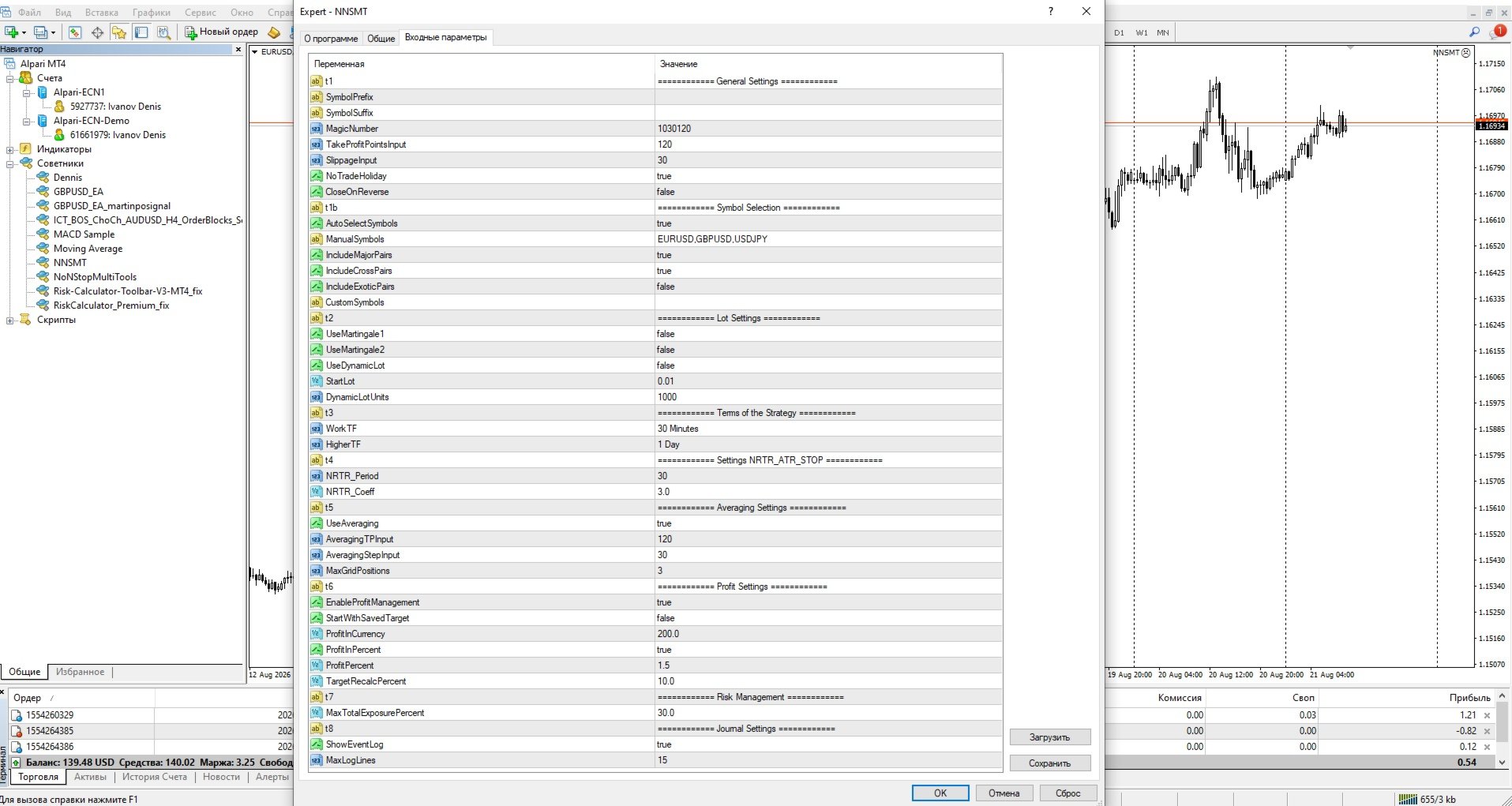
General Settings
| Parameter | Description |
|---|---|
| SymbolPrefix | Symbol prefix (if broker uses, e.g. "m.") |
| SymbolSuffix | Symbol suffix (if broker uses, e.g. ".pro") |
| MagicNumber | Unique identifier for EA orders |
| TakeProfitPointsInput | Take profit for first position in points |
| SlippageInput | Maximum slippage |
| NoTradeHoliday | Enabled: do not trade from December 20 to January 15. Disabled: trade always |
| CloseOnReverse | Enabled: close opposite positions on reverse signal. Disabled: keep both grids |
Symbol Selection
| Parameter | Description |
|---|---|
| Trade only current chart symbol | Trade only on the currency pair on which the advisor is installed. |
| AutoSelectSymbols | Enabled: automatically select symbols from categories. Disabled: use only manual list |
| ManualSymbols | Manual list of symbols separated by commas |
| IncludeMajorPairs | Enabled: trade major pairs (EURUSD, GBPUSD, etc.) |
| IncludeCrossPairs | Enabled: trade cross pairs (EURGBP, GBPJPY, etc.) |
| IncludeExoticPairs | Enabled: trade exotic pairs |
| CustomSymbols | Additional symbols separated by commas |
Lot Settings
| Parameter | Description |
|---|---|
| UseMartingale1 | Enabled: arithmetic martingale (lot increases: 1, 2, 3, 4...). Disabled: not used |
| UseMartingale2 | Enabled: geometric martingale (lot doubles: 1, 2, 4, 8...). Disabled: not used |
| UseDynamicLot | Enabled: lot calculated from equity. Disabled: fixed lot |
| StartLot | Initial lot size |
| DynamicLotUnits | For every X units of equity, StartLot is used. Example: with 1000 and StartLot=0.01, on a 10000 deposit the lot will be 0.10 |
Important: Do not enable both martingales simultaneously. Choose one.
Strategy Settings
| Parameter | Description |
|---|---|
| WorkTF | Working timeframe for signals (default M30) |
| HigherTF | Higher timeframe for confirmation (default D1) |
NRTR Indicator Settings
| Parameter | Description |
|---|---|
| NRTR_Period | ATR indicator period |
| NRTR_Coeff | ATR multiplication coefficient |
Recommendations:
-
Lower period = more signals, but more false ones
-
Higher period = fewer signals, but more reliable
-
Lower coefficient = more sensitive
-
Higher coefficient = more conservative
Averaging Settings
| Parameter | Description |
|---|---|
| UseAveraging | Enabled: use averaging. Disabled: only one position |
| AveragingTPInput | Take profit for the grid (from average price) |
| AveragingStepInput | Averaging step in points |
| MaxGridPositions | Maximum number of positions in one grid. 0 - unlimited |
Profit Settings
| Parameter | Description |
|---|---|
| EnableProfitManagement | Enabled: close all positions when target reached. Disabled: do not use target |
| StartWithSavedTarget | Enabled: load target from file. Disabled: create new target |
| ProfitInCurrency | Target in deposit currency (if ProfitInPercent = false) |
| ProfitInPercent | Enabled: target in percent. Disabled: target in currency |
| ProfitPercent | Profit percentage for target (if ProfitInPercent = true) |
| TargetRecalcPercent | Recalculate target when loss exceeds specified percentage |
Example of target operation:
Deposit: 10000 ProfitPercent: 1.5% Target: 10150 When equity reaches 10150: - All positions are closed - New target: 10150 * 1.015 = 10302.25
Risk Settings
| Parameter | Description |
|---|---|
| MaxTotalExposurePercent | Maximum deposit load (margin). 20-30% — conservative. 30-50% — moderate. 50-70% — aggressive |
What is exposure:
This is the percentage of the deposit used as collateral for open positions. Higher exposure means more positions are open, but less safety margin.
Journal Settings
| Parameter | Description |
|---|---|
| ShowEventLog | Enabled: show journal on chart. Disabled: do not show |
| MaxLogLines | Number of lines in the journal |
Recommended Settings
Conservative Trading
StartLot = 0.01 UseDynamicLot = false UseMartingale1 = false UseMartingale2 = false MaxGridPositions = 2 AveragingStepInput = 50 MaxTotalExposurePercent = 20
Moderate Trading
StartLot = 0.01 UseDynamicLot = true DynamicLotUnits = 2000 UseMartingale1 = true UseMartingale2 = false MaxGridPositions = 3 AveragingStepInput = 30 MaxTotalExposurePercent = 30
Aggressive Trading
StartLot = 0.02 UseDynamicLot = true DynamicLotUnits = 1000 UseMartingale1 = false UseMartingale2 = true MaxGridPositions = 4 AveragingStepInput = 20 MaxTotalExposurePercent = 50
Warning! Aggressive settings can lead to significant losses. Test on a demo account!
Important Warnings
-
Martingale increases risks — during prolonged movement against the position, losses grow exponentially
-
Always test on a demo account before using on a real one
-
Do not use aggressive settings on small deposits
-
Consider swaps and commissions — when holding a grid for a long time, they can eat up profits
-
Watch the news — during high volatility moments, grids can quickly go into loss