Strategy Ledger

5

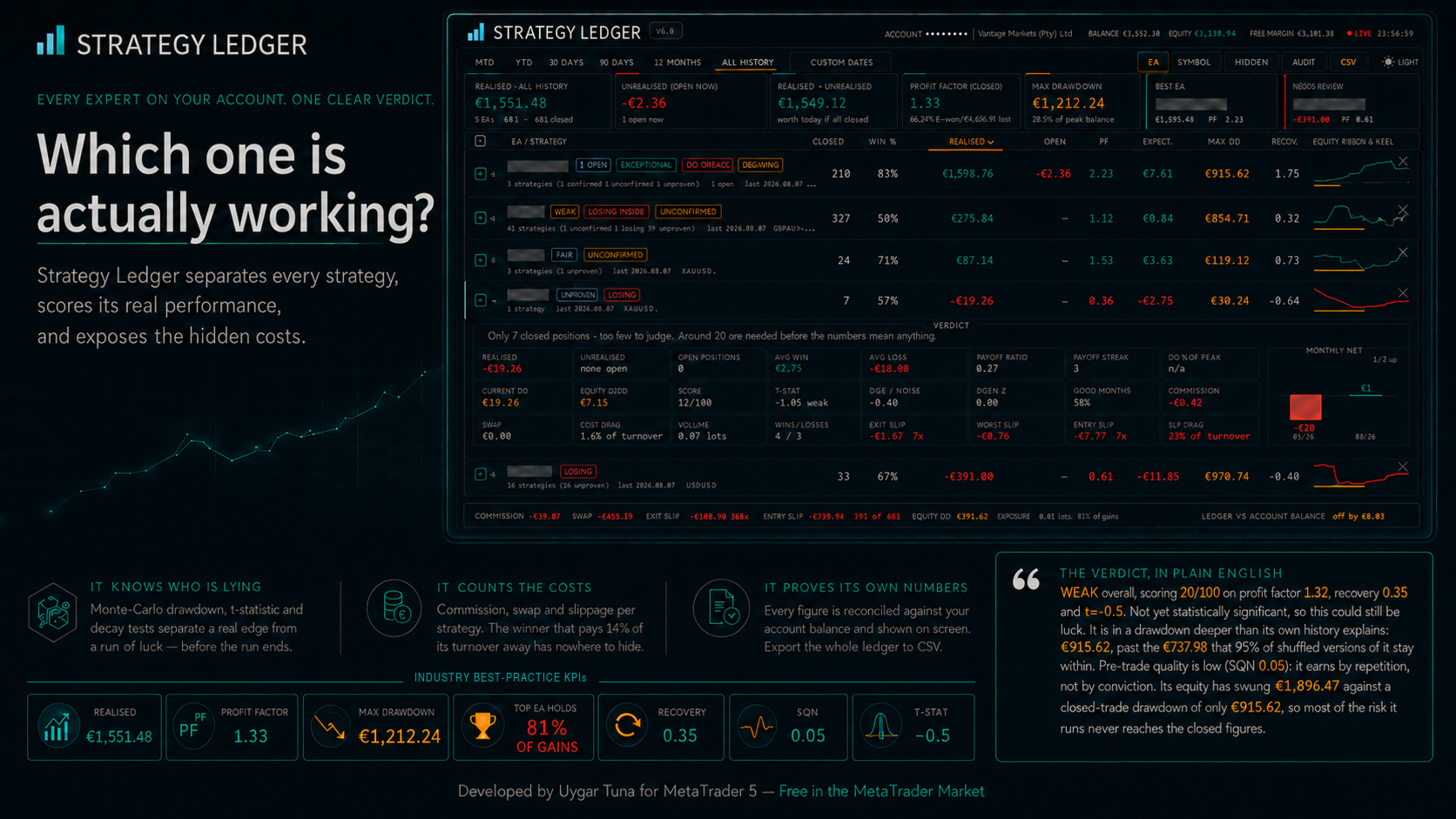
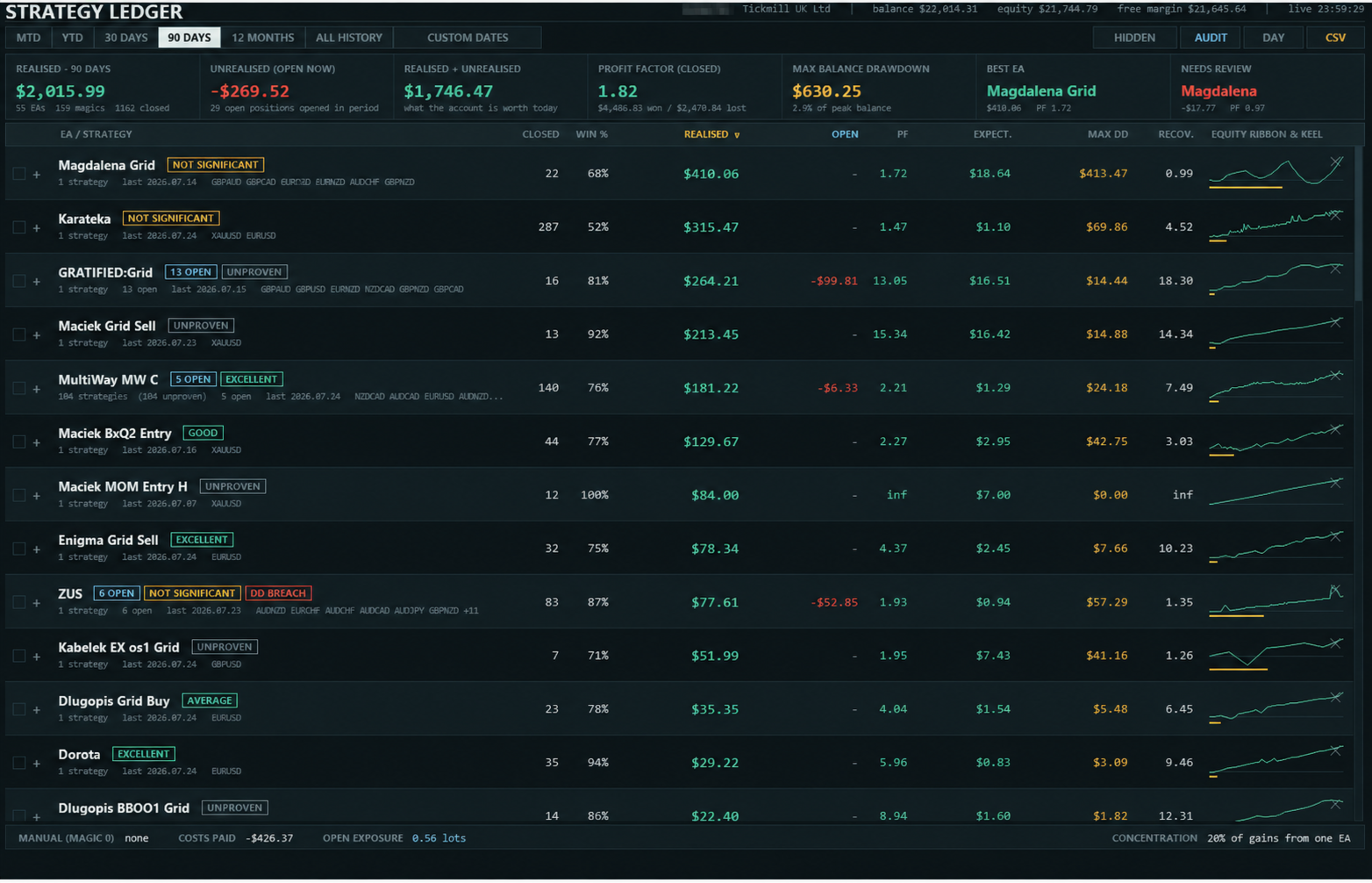
Strategy Ledger is a read-only account analysis panel for MetaTrader 5. It separates account results by Expert Advisor, strategy, and symbol.


Detailed manual with every feature explained:

https://www.mql5.com/en/blogs/post/774132


MetaTrader shows one balance for the whole account. When several Expert Advisors trade together, that balance does not show what each one contributed. Strategy Ledger reads the account history, rebuilds closed positions, assigns them to strategies, and presents the results in one panel.

The product does not place, modify, or close orders. It contains no trading strategy, creates no indicators, and does not read chart prices.

Main functions

  • Results by Expert Advisor, individual strategy, or symbol.
  • Preset periods and a custom date range.
  • Realised and floating results, open exposure, trade statistics, drawdown, and equity curves.
  • Commission, swap, cost drag, and estimated entry and exit slippage.
  • Performance grades, written summaries, and status marks based on fixed rules.
  • Live equity drawdown tracking for the account and each row.
  • Interactive naming, grouping, moving, hiding, restoring, expanding, and sorting.
  • Detailed measures and audit exports in CSV format.

How account data is built

Strategy Ledger counts completed positions rather than individual deals. MetaTrader may open or close one position through several deals. The panel groups those deals by position identifier and records one trade when the closing volume matches the opening volume. Partial closes remain part of the same position.

Profit, commission, fees, and swap are included in each result. Deposits, withdrawals, credits, corrections, bonuses, charges, interest, dividends, and taxes are included in the account reconciliation where the broker reports them in account history.

A strategy is normally identified by its magic number and the cleaned comment on its opening deal. This supports Expert Advisors that use one magic number for several internal strategies. Manual and mobile trades with magic number zero can also be included.

The footer compares the reconstructed realised result and account balance operations with the balance and credit reported by MetaTrader. Any difference is displayed. Netting reversal deals can make exact trade boundaries uncertain, so affected rows are marked Unverified and are not graded.

Views, periods, and organisation

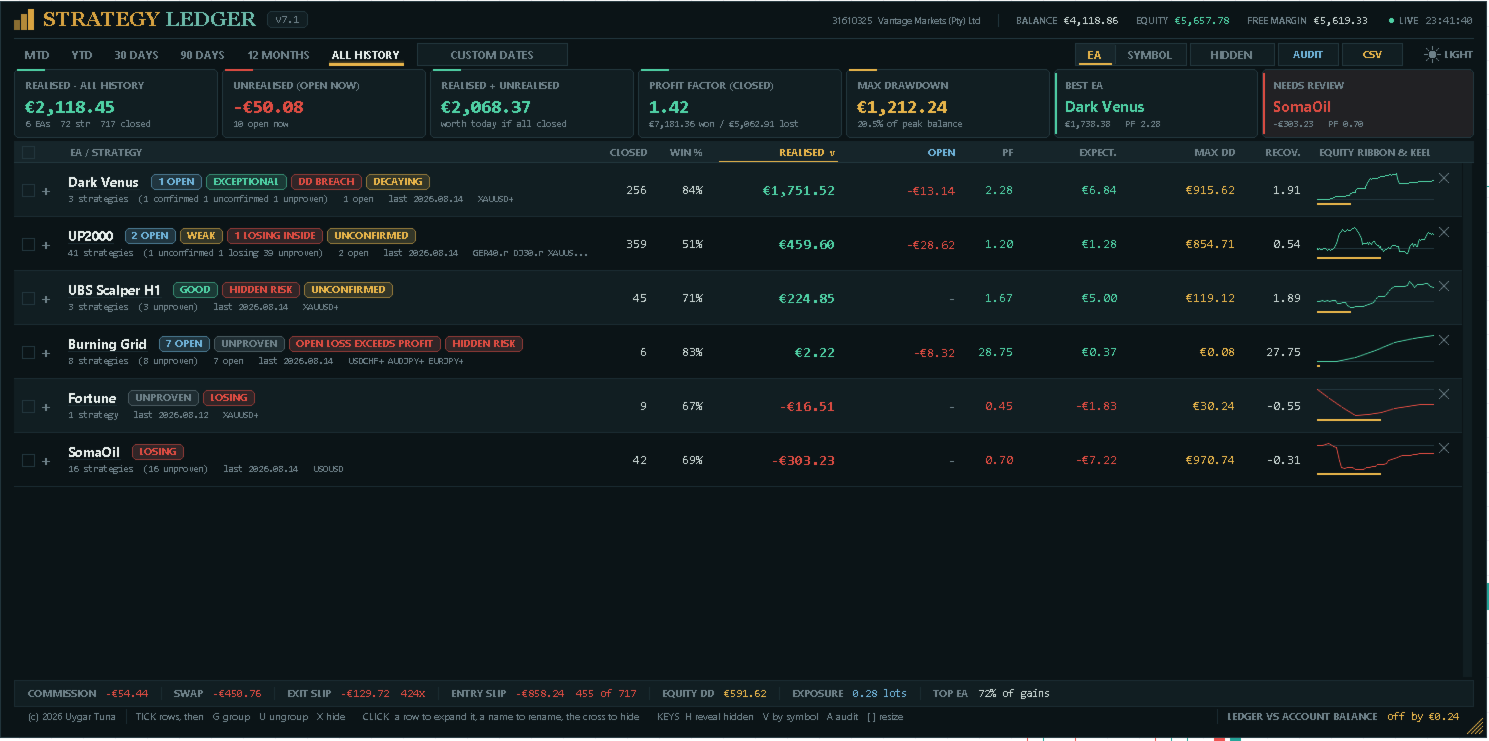
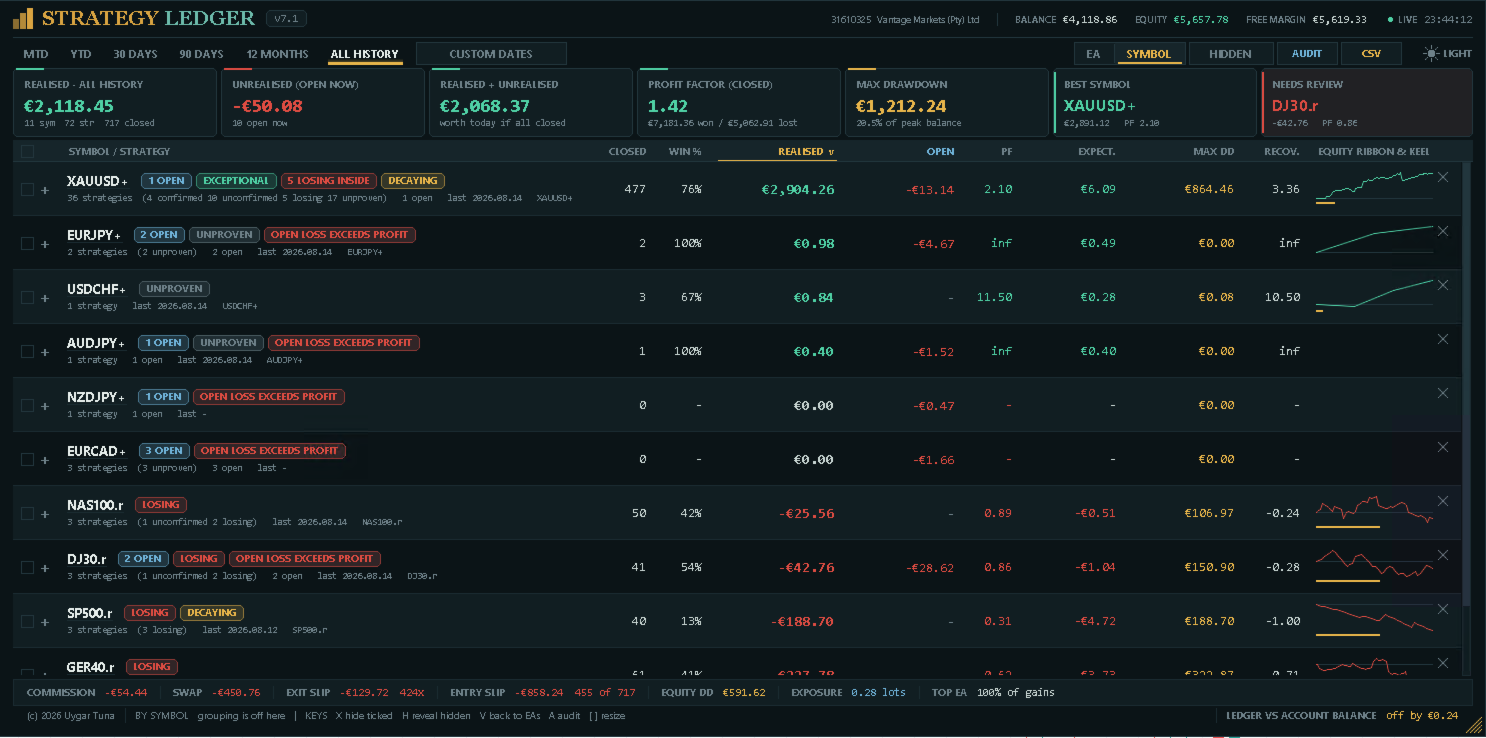
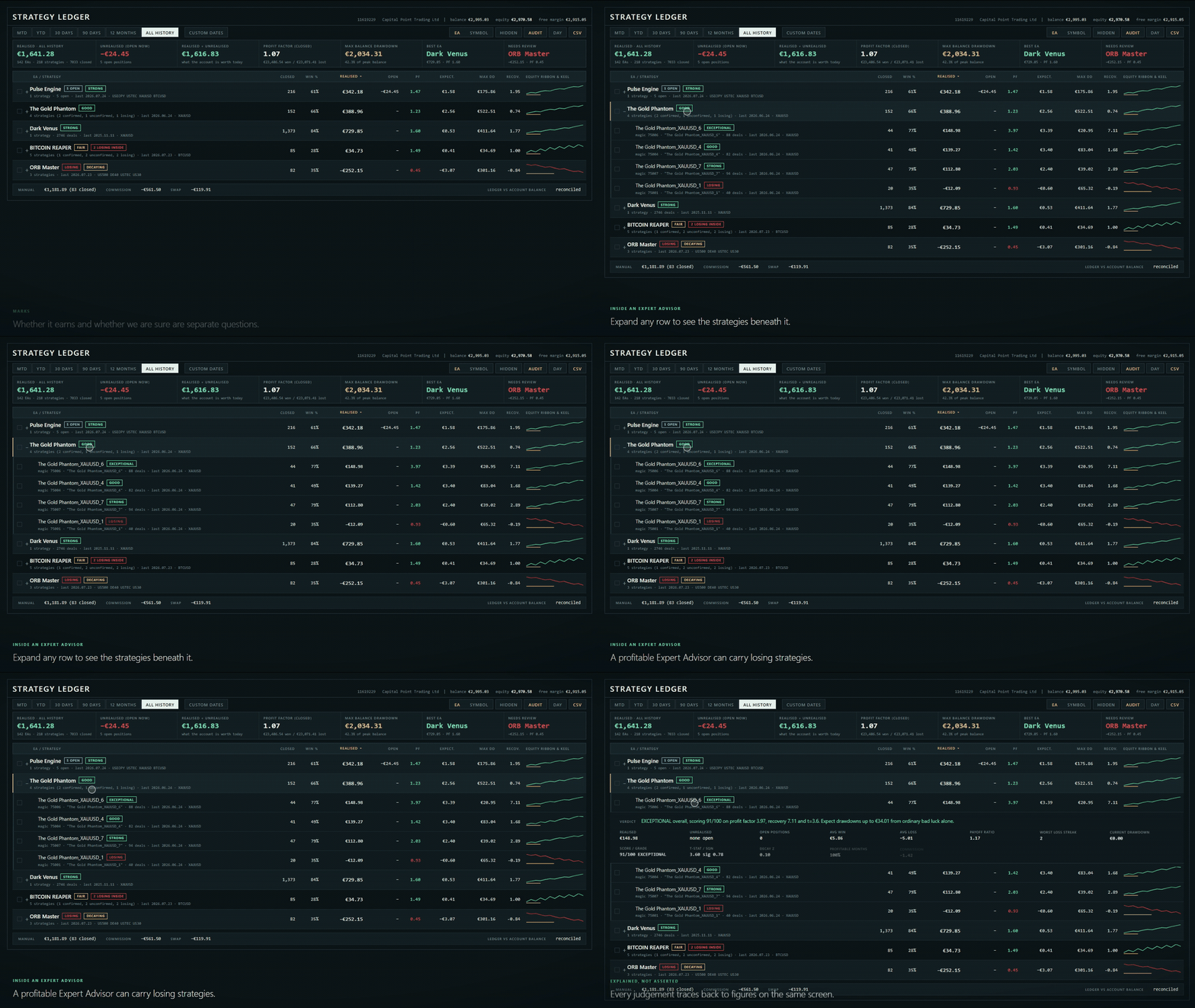
The Expert Advisor view groups strategies under their assigned Expert Advisor. The symbol view groups the same data by instrument. Several Expert Advisor rows can remain expanded at the same time.

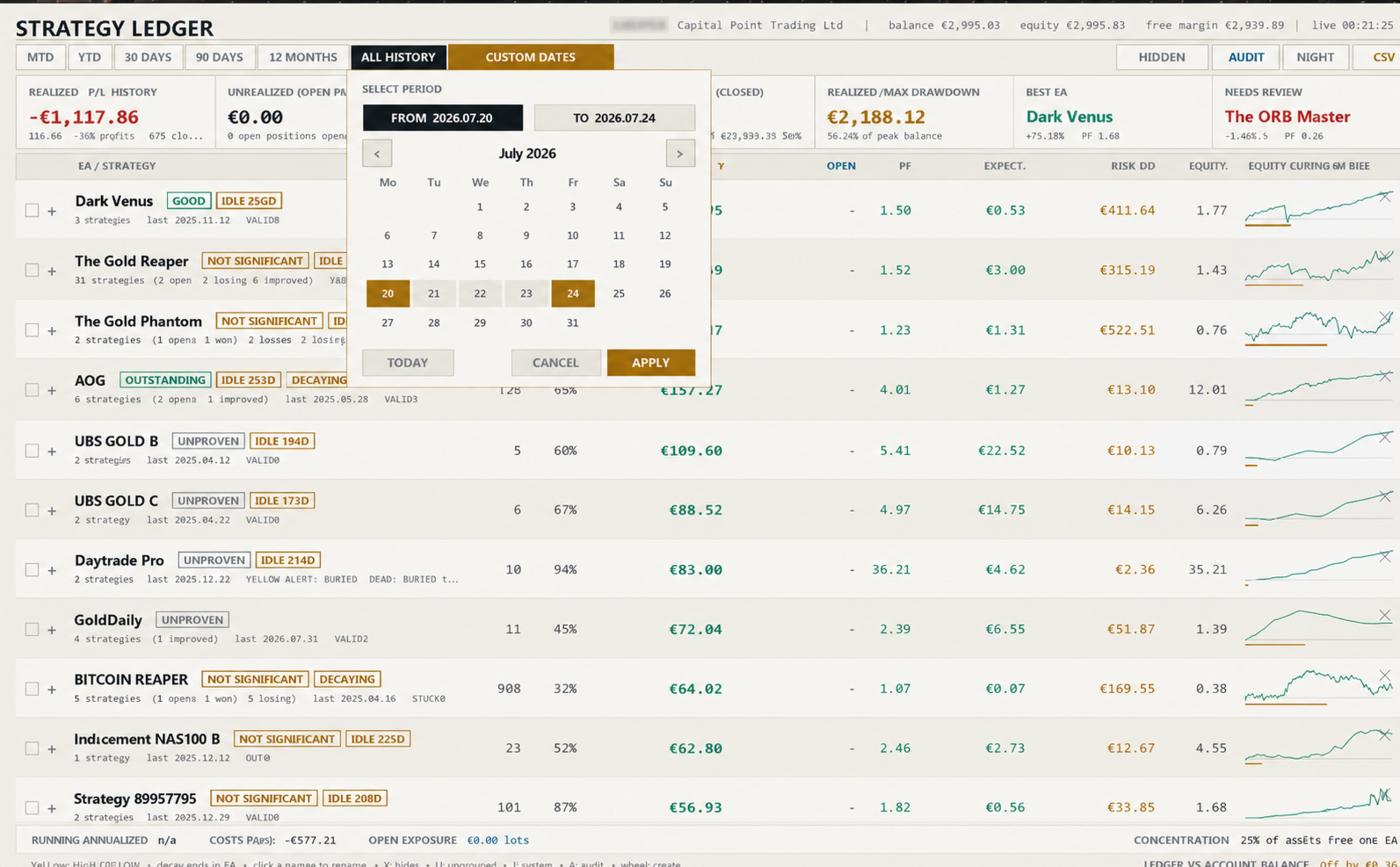
Available periods are month to date, year to date, 30 days, 90 days, 12 months, all history, and a custom date range. A position can be assigned to a period by its closing time or opening time.

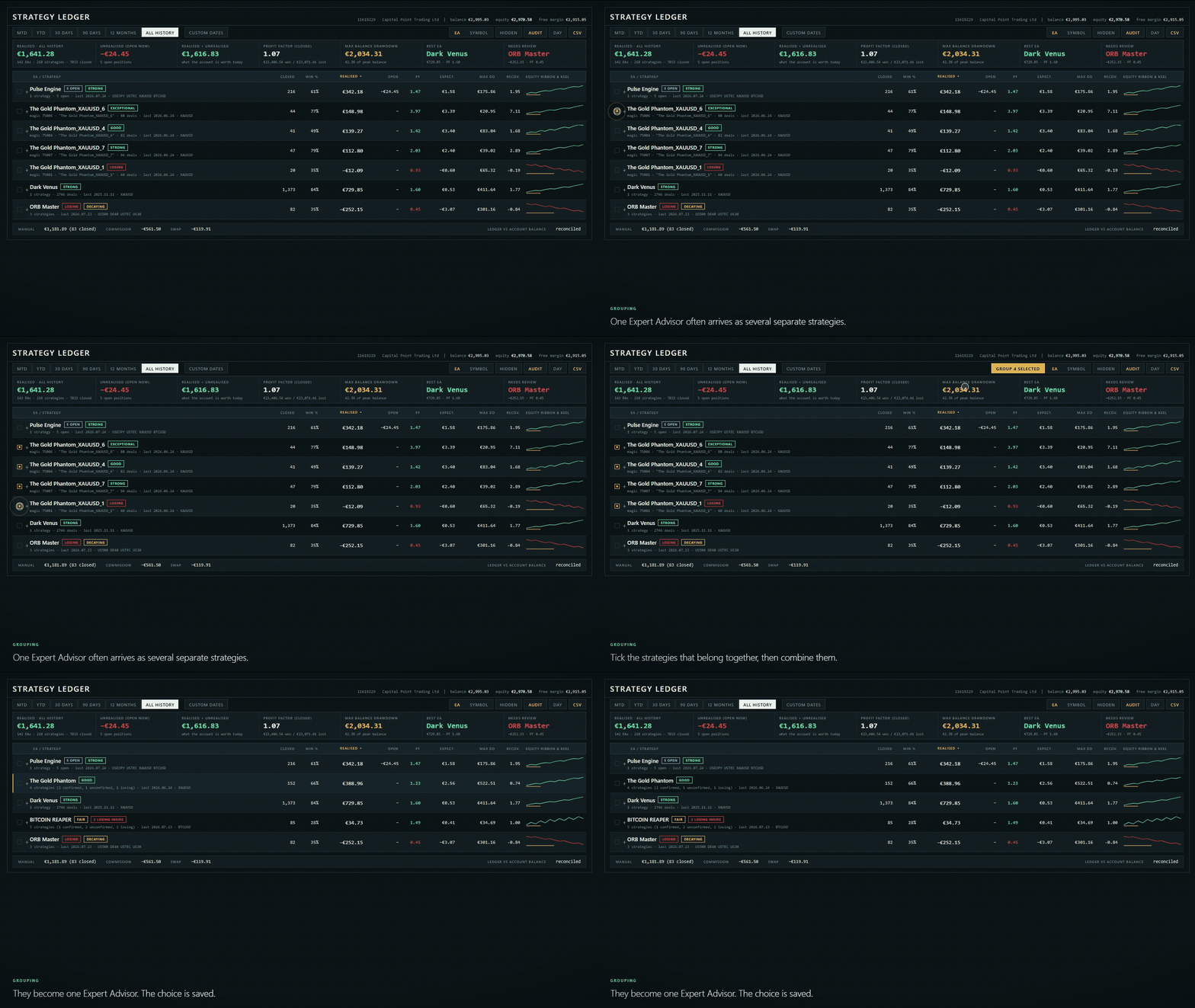
Names can be learned from deal comments or supplied through manual overrides. Strategies can be renamed, grouped from a selection, dragged to another Expert Advisor, merged, or separated. Identical comments can be merged across magic numbers, with an exception list for comments that must remain separate.

Rows can be hidden individually or in a selection and restored later. Hidden rows are stored separately for the Expert Advisor and symbol views. They are excluded from visible totals and from the filtered balance curve. Columns can be sorted by name, result, profit factor, closed positions, drawdown, or expectancy.

Dashboard and strategy details

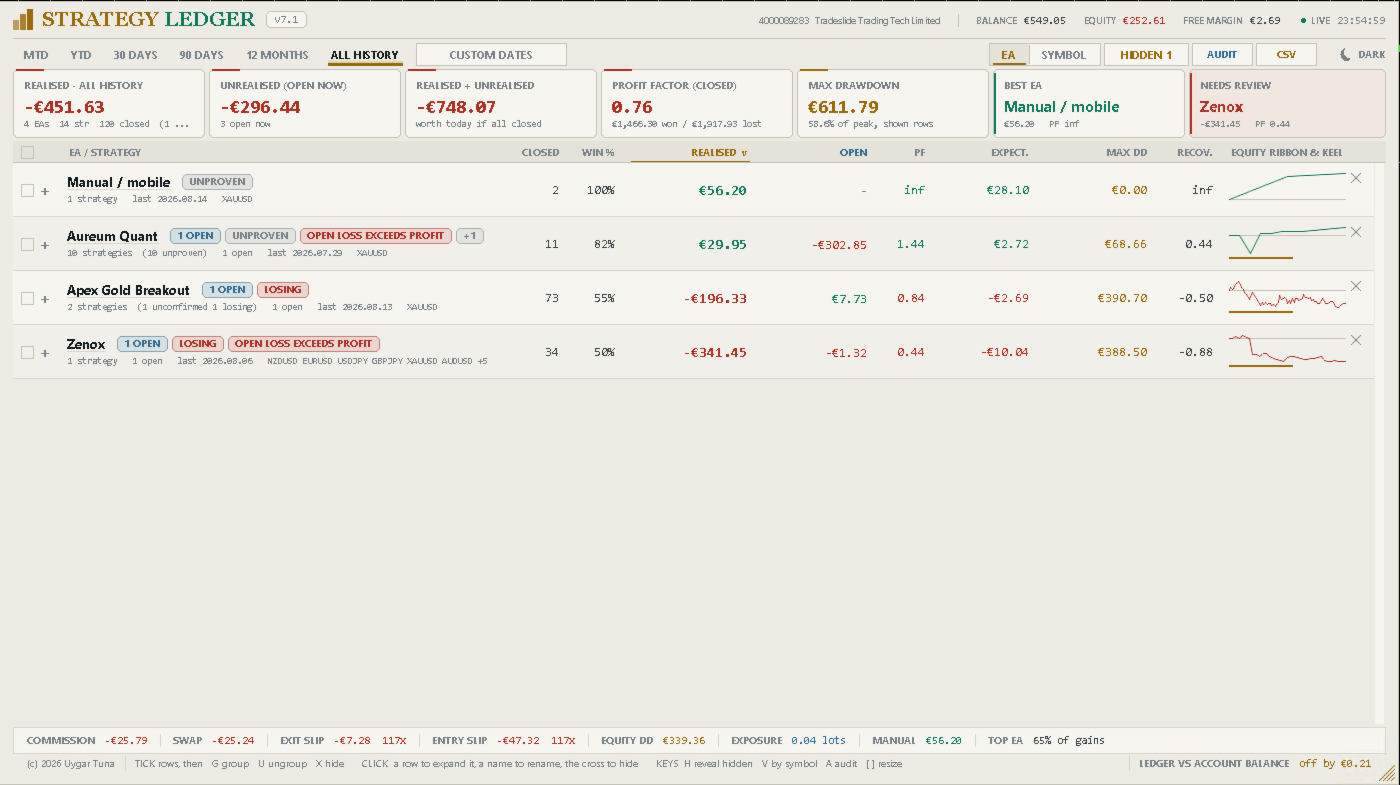
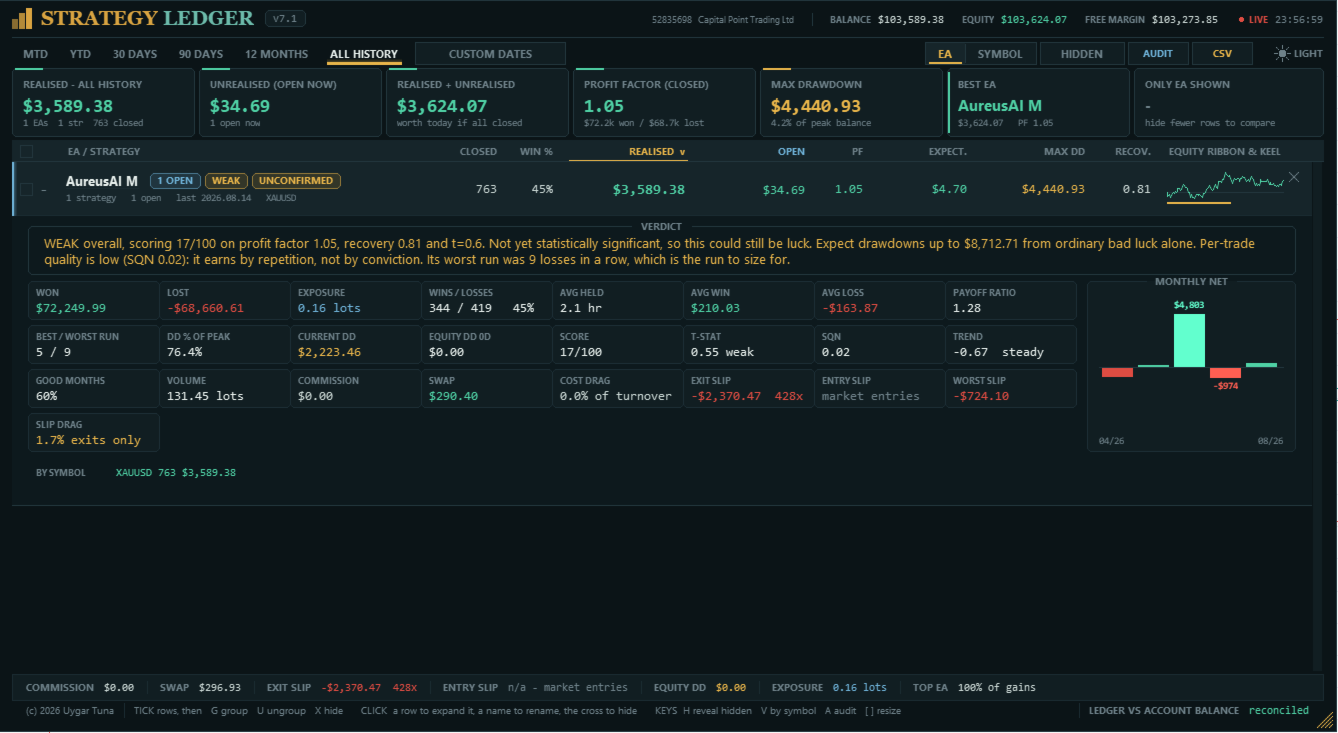
The header shows the account, broker, balance, equity, free margin, server time, and feed status. The summary shows realised result, current floating result, their combined value, closed-position profit factor, maximum balance drawdown, the strongest row by current value, and the row selected for review by the panel's concern rules.

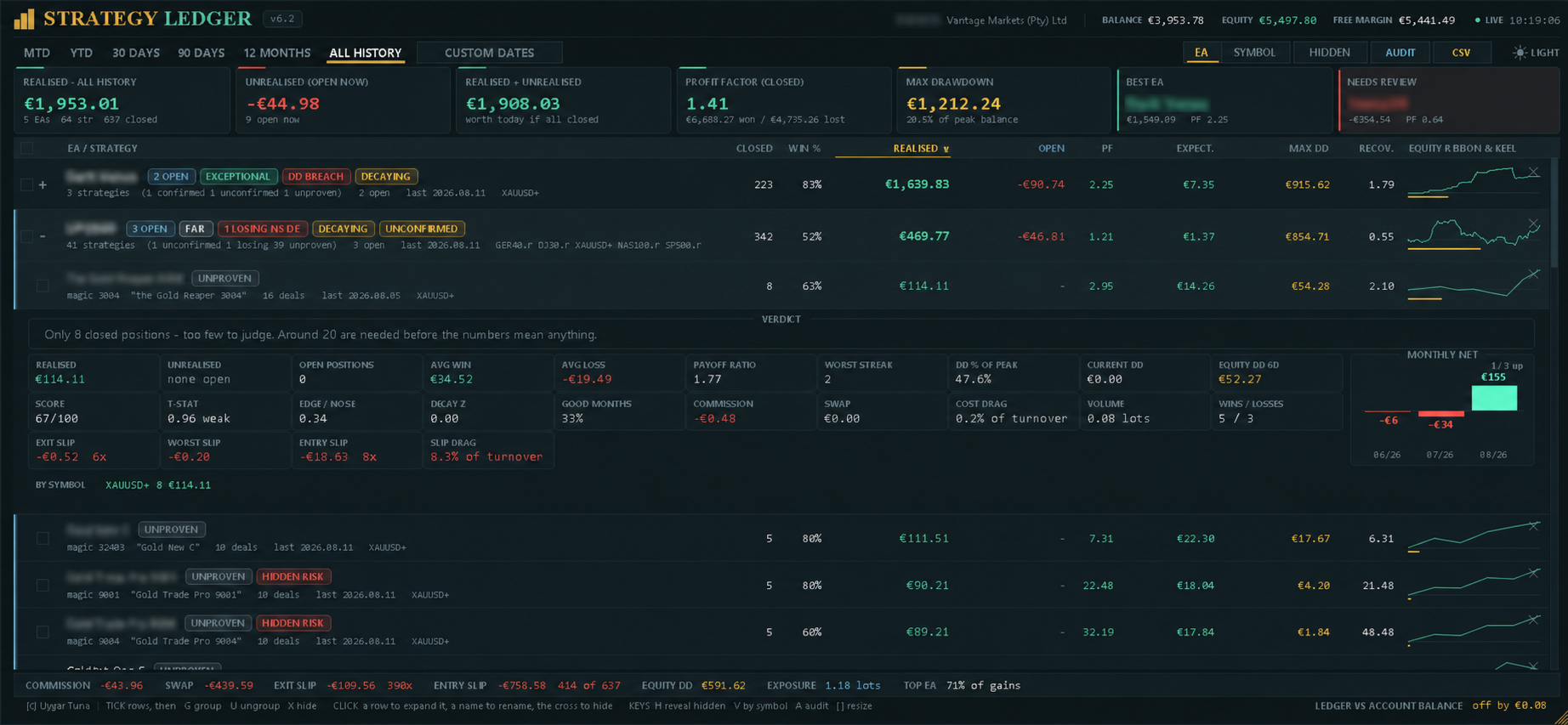
The table shows closed positions, win rate, realised result, floating result, profit factor, expectancy, maximum closed-position drawdown, recovery factor, and a compact equity curve with its drawdown path. When rows are hidden, these figures describe the displayed selection.

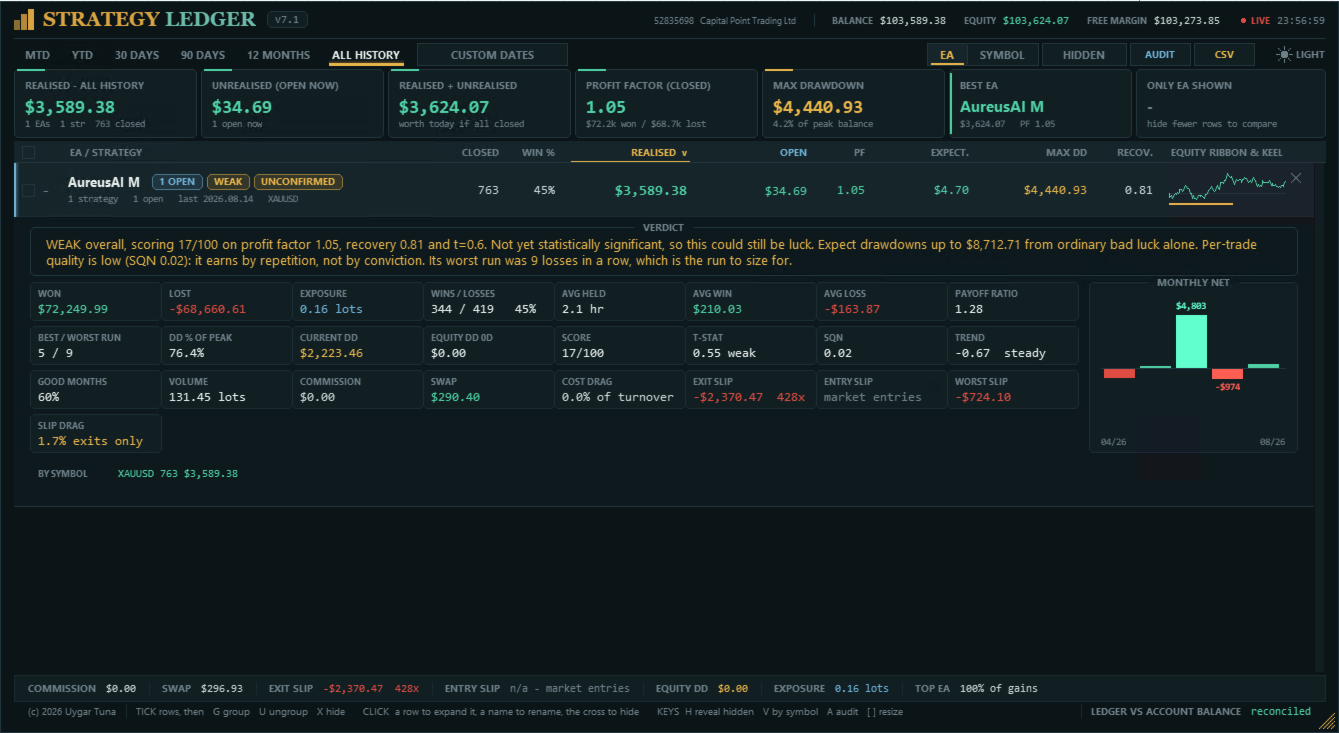
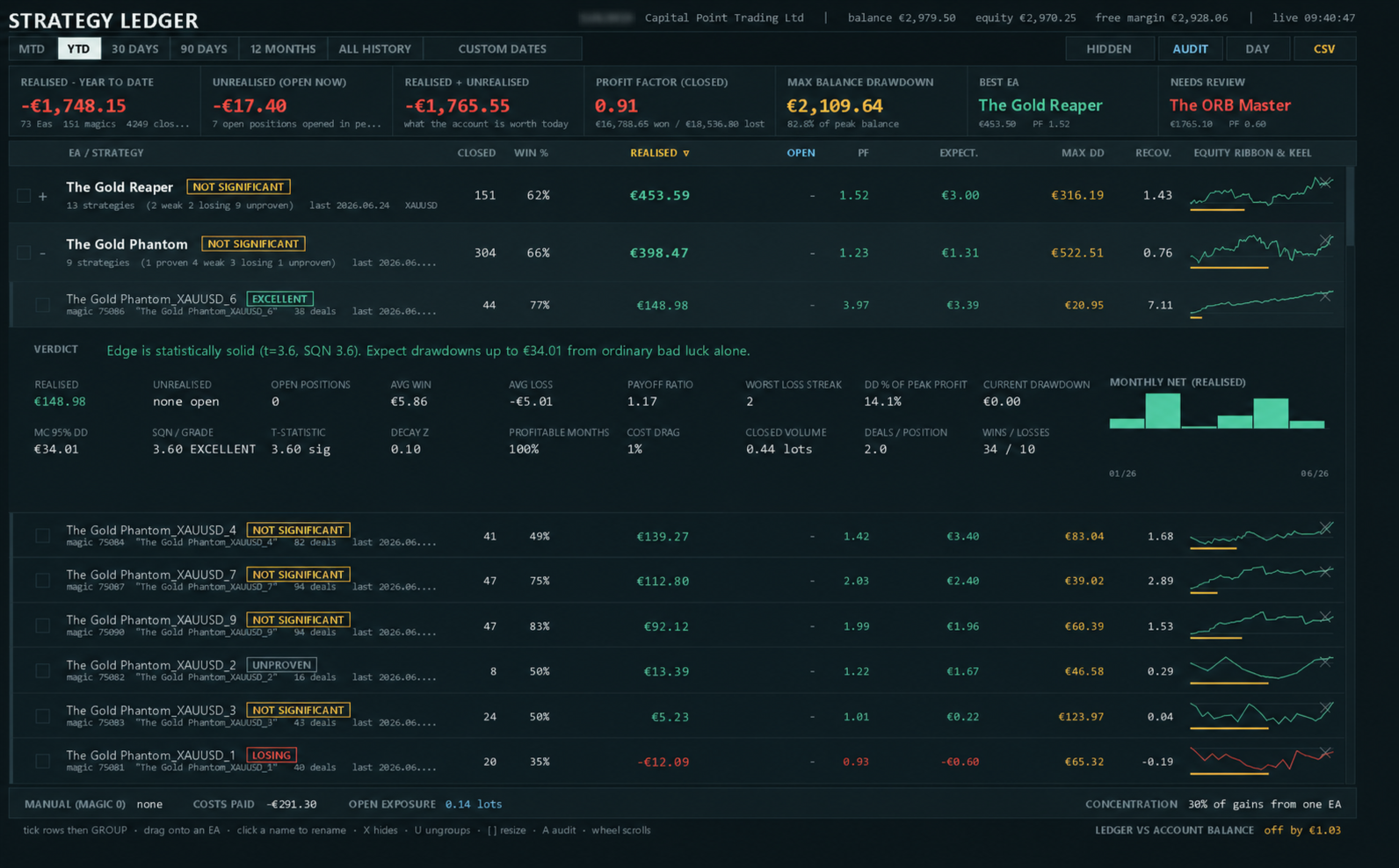
The expanded detail contains total won and lost, open exposure, wins and losses, average holding time, average win and loss, payoff ratio, best and worst consecutive runs, drawdown percentage, current drawdown, volume, and profitable-month percentage.

It also shows the score, statistical confidence, System Quality Number, recent-result trend, Monte Carlo drawdown estimate, live equity drawdown, commission, swap, cost drag, entry and exit slippage, worst measured slippage, and slippage drag. A monthly net chart and per-symbol breakdown are included.

Grades and risk marks

The score combines statistical confidence, profit factor, and recovery factor. Each component is capped before averaging. A floating loss can limit the score because closed-position statistics do not include that open loss.

The default minimum sample is 20 closed positions. Rows below it are marked Unproven. Other grades range from Losing to Exceptional according to the score and configured losing threshold. Grades describe recorded account data; they are not trading signals or forecasts.

Status marks identify open positions, no closed trades, inactivity, a losing result, open loss, open loss greater than booked profit, weaker recent results, insufficient statistical confirmation, drawdown above the shuffled-history estimate, losing strategies inside a profitable Expert Advisor, and live-equity drawdown materially above closed-position drawdown. Expanding a row shows the applicable marks and a written explanation.

Drawdown, costs, and slippage

Closed-position drawdown cannot show the full movement of positions while they remain open. Strategy Ledger can sample live equity once per second and store the largest observed fall from a previous high for the account, each Expert Advisor, and each strategy. Tracking starts when the feature is first enabled, and its start date is displayed.

When live tracking is disabled, the detail panel can show a 95th-percentile drawdown estimate produced by reshuffling closed results. This estimate and all grades describe historical data only.

Commission and swap are reported separately. The account footer also includes costs already charged on open positions. Cost drag is shown as a percentage of gross turnover when the required data is available.

Exit slippage is estimated where the exit order contains a requested price, including stop loss, take profit, and pending-order exits. Entry slippage is estimated for pending orders with a requested entry price. Market orders have no requested price for comparison, so the panel reports unavailable or partial coverage. Values are converted to account currency using current symbol tick values and include the number of measured events.

Exports

The measures export writes the displayed groups and strategies, including results, statistics, costs, slippage, grades, and written summaries. Automatic export can run after each refresh.

The audit export lists reconstructed closed positions, open positions, period and hidden-row status, and independent position-versus-deal checks. It is intended to help investigate missing history or calculation differences.

Layout and saved settings

The panel supports dark and light themes, mouse-wheel scrolling, custom width and table height, automatic chart fitting, display scaling, manual text scaling, and an optional live clock. Columns are removed progressively when the panel becomes too narrow.

Names, groups, hidden rows, expanded rows, sorting, period, view, theme, and panel size can be remembered. State and live-equity history are stored separately for each account and server. Older name and layout files are copied when available. Older equity history is adopted only when its dedicated setting is enabled.

Inputs control naming and grouping, manual trades, period basis, starting period, sorting, theme, panel position and size, chart fitting, live clock, saved layout, statistical summaries, minimum sample, Monte Carlo runs, live-equity tracking, status thresholds, automatic export, text size, diagnostic logging, and optional adoption of older equity history.

Setup and limitations

  1. In the MetaTrader History tab, select All History.
  2. Attach Strategy Ledger to a separate chart. Any symbol and timeframe can be used.
  3. Check the reconciliation line after the first scan.

Complete results require complete account history. Missing broker records, unusual deal structures, and netting reversals can create differences or unverified rows.

Slippage values are estimates. The conversion uses the symbol's current tick value rather than its value at the time of the fill. Slippage cannot be measured when an order did not specify a requested price.

If an Expert Advisor writes a different comment on every trade, the comments may create separate strategy rows. Common numbers and order references are removed automatically, and remaining rows can be grouped manually.

Questions and problem reports can be submitted through the product comments or MQL5 private messages. Include the audit export when reporting a calculation difference.

Değerlendirmeler 17
Gravity Tool
441
Gravity Tool 2026.08.22 04:51 
 

This is a great tool. Now it became very easy for me to keep track of every single EA's performance in a portfolio. And it has even more useful functions. It is really a jewel. So everybody, there are no many free lunches in life. Here is one of it. Grab it!

Celal Yazici
772
Celal Yazici 2026.08.20 08:24 
 

If you really want to see how the EAs work individually, this is an excellent piece of work; I really liked it.

Juan Antonio Lumbreras Marcos
198
Juan Antonio Lumbreras Marcos 2026.08.13 19:50 
 

I am genuinely impressed by this Tool, particularly the hard work behind its development. The information provided, the user interface, and the ability to view and modify variables are excellent. It definitely deserves a review from me. 5 stars

Önerilen ürünler
Click Trading
Jawad Tauheed
5 (2)
One Click Trading – Auto TP SL Developer TraderLinkz Version 1.00 Category Utility What it does Adds missing TP and SL to your manual trades and pending orders Sets them once per ticket Lets you move TP and SL afterward Works on hedging and netting accounts Scans on every tick and reacts on trade events Why you want it You place faster entries You get consistent risk and exit targets You reduce fat finger errors You keep full manual control Quick start Attach the EA to any chart Keep TP and SL e
FREE
Risk Manager – Account Protection Tool Risk Manager is an Expert Advisor for MetaTrader 5 designed to protect your trading account by applying automatic risk management rules. This tool does not open trades . It continuously monitors your account and enforces predefined limits to help prevent excessive losses and maintain disciplined trading. Risk Manager works in the background and can manage positions opened by manual trading or other Expert Advisors. It is particularly useful for: • Manual tr
FREE
Trade assistant pro v8
Ahmed Mohammed Bakr Bakr
2 (1)
FREE FREE FREE Trade Assistant MT5 – Professional Trading & Risk Management Panel Trade Assistant MT5 is an advanced trading panel designed to help traders execute orders faster, safer, and more professionally . It simplifies manual trading by combining smart order management , precise risk control , and one-click execution , making it ideal for both beginners and advanced traders. This tool does not trade automatically . Instead, it empowers you with full control while applying professional-gra
FREE
VR Renk Seviyeleri, trend çizgisi, dikdörtgen ve metin gibi unsurları kullanarak teknik analiz uygulayanlar için kullanışlı bir araçtır. Grafiğe doğrudan metin eklemek ve ekran görüntüsü almak mümkündür. Ayarlar, set dosyaları, demo versiyonları, talimatlar, problem çözme, adresinden edinilebilir. [Blog] İncelemeleri şu adresten okuyabilir veya yazabilirsiniz: [bağlantı] Sürümü [MetaTrader 4] Göstergeyle çalışma tek tıklamayla gerçekleştirilir. Bunu yapmak için, çizginin bulunduğu düğmeye tıkl
FREE
SmartRisk Trade Tool — One-Click Risk-Based Trade Panel SmartRisk Trade Tool is a manual trading panel for MetaTrader 5 built around position sizing and risk control rather than signal generation. It does not analyze the market or suggest trade direction — it exists so that every order sent from the chart already has a calculated lot size, stop loss, and take profit consistent with a risk value the trader chooses, removing the manual arithmetic that normally happens between deciding to trade and
FREE
This MQL5 indicator creates a customizable grid of horizontal lines on your trading chart. Here's what it does: **Main Functions:** - Draws equally spaced horizontal lines across the visible price range - Supports two line types: horizontal lines or trend lines with forward projection - Automatically adjusts to price scale changes **Key Features:** 1. **Customizable Spacing**: Set grid distance in pips (20 pips by default) 2. **Flexible Starting Point**: Auto-calculates starting price or lets
FREE
Overview FiT Panel Pro is a professional-grade trade management panel designed for MetaTrader 5 traders who demand speed, precision, and full control over their trades. Built with a modern dark-theme UI, it combines one-click execution with advanced risk management, visual SL/TP drag lines, automatic Fibonacci-based levels, and comprehensive order management — all in a single, compact panel. Whether you are a scalper, day trader, or swing trader, FiT Panel Pro gives you the edge you need to exec
FREE
================================================================ MATRIX CONDITION MONITOR Live Trade Condition Panel for MetaTrader 5 Fully Automatic -- Works with ALL Matrix EAs ================================================================ NEVER MISS A TRADE SETUP AGAIN Matrix Condition Monitor is a free utility that attaches to any chart and automatically checks all 10 trade conditions in real time -- showing you exactly why a trade will or will not open, and alerting you the moment ever
FREE
IMPORTANT NOTE: This is a professional Trade Management Utility and on-chart assistant. It is NOT an automated trading robot. It does not open trades on its own. The UltraFast Trade Manager MT5 is the ultimate execution and risk-management suite designed to give you absolute control over your manual and algorithmic trades. When managing multiple positions, calculating complex net break-even points, or constantly monitoring the economic calendar, hesitation can lead to costly mistakes. This utili
FREE
Account Info EA It is a tool that presents on the graph all the positions of the account, and specific information concerning the positions, but also the account. It enables the user to have an image of his account at a glance. Use like any expert advisor. You can't attach it in the same chart with other expert advisor. It does not have the ability to open or manage positions. You can attach it on any chart and any timeframe.
FREE
GDS RiskLab TradeDesk Free Manual Trading Desk and Risk-Control Utility for MetaTrader 5 GDS RiskLab TradeDesk is a free chart-based utility for traders who want a cleaner manual trading workspace in MetaTrader 5. It is designed as a simple execution-support and risk-control panel. The goal is to keep the trading process more organized: review the chart, plan the trade, keep risk visible and execute manually with more structure. This tool does not generate buy or sell signals. It does not predic
FREE
GDS Renko Pip ST Chart - Pip-Based Renko Chart Indicator for MetaTrader 5 GDS Renko Pip ST Chart is a pip-based Renko chart indicator for MetaTrader 5. It helps traders build and study cleaner Renko price movement using a practical fixed pip or point-based brick structure. This tool is designed as a Renko chart foundation for manual analysis. It does not predict the market, does not generate buy or sell signals and does not decide whether a trade should be opened. Renko EDGE EA Golden Delta | A
FREE
Position Size Tool – Smart Risk Management & Trade Execution Panel The Position Size Tool is a powerful and intuitive MT5 panel that simplifies your trading by combining position sizing , risk calculation , risk/reward visualization , and order placement —all in one place. ️ Clean & Functional Interface The tool features a compact, real-time panel with the following: Balance & Equity display Live Price tracking Customizable Risk % input Auto-calculated Lot Size based on SL and Risk Input for S
FREE
An advanced equity protection and trade management script. It monitors individual trade P&L and closes positions when floating equity targets (profit or loss) are met. It features "skip closing hours" for high volatility, wide spreads, or price instability times . Features: Closes trades at a target profit (`MAX_FLOATING_EQUITY`) or maximum loss (`MAX_FLOATING_LOSS`). Includes a `FORCE_CLOSE_AT_MAX_EQUITY` level that bypasses all exit protection checks. "SKIP_CLOSING_HOURS" input to pause loss
FREE
Equity monitor This is a simple means change informer. I wrote it for myself, maybe someone will need it... 1. Displays the change in funds for the day. Every day, when the terminal is first launched, it remembers the current funds and monitors changes throughout the day. 2. The first day of the month, well remembers the money and, within months, to monitor changes. 3. Well, it displays the profit of the open position. To work, you need to create 4 global variables: gvarEqityDay , gvarEq
FREE
Server Clock
Flavio Javier Jarabeck
5 (5)
Many friends asked me for a simple, non-obtrusive, resource-friendly clock to track the time during their trades. It seems pretty obvious, but it is a must-have for those trading the market manually, waiting for the Market News, or just to visually know what time it is... Trading is an absorbing endeavor! So, here it is... Totally configurable, including Font Type, Font Size and Chart Location: Upper Left/Center/Right OR Lower Left/Center/Right, with a little twist of adjusting the Offset, just
FREE
Trade Behavior Mirror, yalnızca kendi hesabınızın kapanmış işlem geçmişini okur ve tek bir örüntüyü sayar: gerçekleşen bir zarardan kısa süre sonra, kendi olağan hacminizden daha büyük bir lotla yeni bir pozisyon açmak. Araç hiçbir şey tahmin etmez ve hiçbir öneride bulunmaz. Panelde görünen her rakam, bu hesapta zaten gerçekleşmiş bir şeydir. Rakamlar nasıl hesaplanır: Tüm sembollerde ve tüm sihirli numaralarda, en fazla 31 günlük kapanmış işlemi okur - bu, grafikteki sembole değil, hesabın ta
FREE
Free automatic Fibonacci is an indicator that automatically plots a Fibonacci retracement based on the number of bars you select on the BarsToScan setting in the indicator. The Fibonacci is automatically updated in real time as new highest and lowest values appears amongst the selected bars. You can select which level values to be displayed in the indicator settings. You can also select the color of the levels thus enabling the trader to be able to attach the indicator several times with differe
FREE
Donchian Breakout And Rsi
Mattia Impicciatore
4.5 (2)
Genel Açıklama Bu gösterge, klasik Donchian Kanalı ’nın geliştirilmiş bir versiyonudur ve gerçek işlem için pratik işlevlerle zenginleştirilmiştir. Standart üç çizgiye (üst, alt ve orta çizgi) ek olarak sistem breakout (fiyat kırılımı) noktalarını tespit eder ve bunları grafikte oklarla görsel olarak gösterir. Ayrıca grafiği sadeleştirmek için mevcut trend yönünün tersindeki çizgi yalnızca görüntülenir. Gösterge şunları içerir: Görsel sinyaller : Kırılım sırasında renkli oklar Otomatik bildiriml
FREE
MT5 için NAS100 Auto SL ve TP Maker ile tanışın: MetaTrader 5'te Nasdaq 100 piyasasında gezinen yatırımcılar için vazgeçilmez bir yardımcı olan NAS100 Auto SL ve TP Maker ile StopLoss ve TakeProfit ayarlarını bir daha asla kaçırmayın. Bu araç, StopLoss ve TakeProfit seviyelerinin yönetimini otomatikleştirmek için sorunsuz bir çözüm arayanlar için tasarlanmıştır. Temel Özellikler: Zahmetsiz Otomasyon: StopLoss ve/veya TakeProfit olmadan Nasdaq 100 işlemlerini otomatik olarak izler. Kullanıcı ta
FREE
Lot by Risk MT5
Sergey Vasilev
4.88 (16)
Lot by Risk ticaret paneli elle işlem yapmak üzere tasarlanmıştır. Bu, emir göndermek için alternatif bir araçtır. Panelin ilk özelliği, kontrol hatlarını kullanarak siparişlerin uygun bir şekilde düzenlenmesidir. İkinci özellik, stop loss hattı mevcut olduğunda belirli bir risk için işlem hacminin hesaplanmasıdır. Kontrol hatları kısayol tuşları kullanılarak ayarlanır: kar al - varsayılan olarak T tuşu; price - varsayılan olarak P tuşu; kaybı durdur - varsayılan olarak S tuşu; Tuşları ticar
FREE
SWDM Position Manager EA The SWDM Position Manager EA is a MetaTrader 5 Expert Advisor for automatically managing matching positions on the current chart symbol. It can manage already open positions as well as newly opened positions, as long as they match the configured position filters. It is not a classic entry-signal robot and does not open trades by itself in the default workflow. The EA is designed to protect and manage manual trades or positions opened by other tools using internal risk m
FREE
Seconds Chart Calculator Tester — Seconds chart + Risk-based position calculator + Trade management This is the free DEMO version of Seconds Calculator. You can try every feature of the full product, with a usage limit (see below). For unlimited use, get the full version. Seconds Calculator — The all-in-one tool for precision trading on MT5 — MetaTrader 5 only offers timeframes from 1 minute up. This utility adds, in a floating window over your chart, a seconds-based candlestick chart, a risk-ba
FREE
PZ Penta O MT5
PZ TRADING SLU
3.8 (5)
The Penta-O is a 6-point retracement harmonacci pattern which usually precedes big market movements. Penta-O patterns can expand and repaint quite a bit. To make things easier this indicator implements a twist: it waits for a donchian breakout in the right direction before signaling the trade. The end result is an otherwise repainting indicator with a very reliable trading signal. The donchian breakout period is entered as an input. [ Installation Guide | Update Guide | Troubleshooting | FAQ | A
FREE
Trade With Price is a powerful and user-friendly MetaTrader 5 Expert Advisor designed to simplify and accelerate your trading execution. This EA provides a smart one-click trading panel that allows traders to instantly place BUY, SELL, and pending orders directly at the current market price—eliminating the need to calculate distances in pips. Key Features One-click BUY & SELL execution Place pending orders based on market price instead of pips Clean and intuitive trading panel interface
FREE
Show Pips for MT5
Roman Podpora
4.5 (32)
Bu bilgi göstergesi her zaman hesaptaki güncel durumdan haberdar olmak isteyenler için faydalı olacaktır. VERSION MT 4 -   More useful indicators Gösterge, puan cinsinden kâr, yüzde ve para birimi gibi verilerin yanı sıra mevcut çiftin spreadini ve mevcut zaman diliminde çubuğun kapanmasına kadar geçen süreyi görüntüler. Bilgi satırını grafiğe yerleştirmek için birkaç seçenek vardır: Fiyatın sağında (fiyatın arkasında); Yorum olarak (grafiğin sol üst köşesinde); Ekranın seçilen köşesinde. Bilgi
FREE
Signalator Trade Summary Panel MT5, hesap, pozisyon, sembol ve risk durumunu doğrudan grafik üzerinde açık şekilde gösteren ücretsiz yerel bir MetaTrader 5 aracıdır. Signalator Trading and Analysis Ecosystem'in bir parçasıdır — hesap izleme, piyasa analizi, sembol tarama, uyarılar ve trader çalışma akışını geliştirmek için büyüyen pratik MetaTrader araçları koleksiyonudur. Panel, hesap ve pozisyon izlemeyi entegre Symbol Inspector ve işlem öncesi Lot Size / Risk Calculator ile birleştirir. Float
FREE
Signalator Lot Size Evaluator MT5 is a free local MetaTrader 5 utility for manual traders who want to calculate an estimated position size before placing a trade. It helps you plan a trade using the selected symbol, BUY or SELL direction, planned entry price, Stop Loss, optional Take Profit and risk percentage. The calculator uses current account information together with broker-provided symbol specifications to estimate the suggested lot size and key risk values. The workflow is simple: define
FREE
MultiTimeframe Info Feed (MIF) Indicator Description: MultiTimeframe Info Feed (MIF) is a smart MQL5 indicator that displays a dynamic, real-time info panel directly on your chart, offering powerful insight into current market conditions. Key features include: Real-time display of Open, High, Low, Close, and live Tick price Tick Rate (ticks per second) for assessing market activity Auto-calculated Entry Price on new candle formation Signal direction detection (BUY / SELL) Price action pattern re
FREE
Are you tired of drawing trendlines every time you're analyzing charts? Or perhaps you would like more consistency in your technical analysis. Then this is for you. This indicator will draw trend lines automatically when dropped on a chart. How it works Works similar to standard deviation channel found on mt4 and mt5. It has 2 parameters: 1. Starting Bar 2. Number of bars for calculation The   starting bar   is the bar which drawing of the trend lines will begin, while the   number of bars for c
FREE
Bu ürünün alıcıları ayrıca şunları da satın alıyor
Trade Assistant MT5
Evgeniy Kravchenko
4.41 (216)
It helps to calculate the risk per trade, the easy installation of a new order, order management with partial closing functions, trailing stop of 7 types and other useful functions. Additional materials and instructions Installation instructions - Application instructions - Trial version of the application for a demo account Line function -   shows on the chart the Opening line, Stop Loss, Take Profit. With this function it is easy to set a new order and see its additional characteristics bef
Trade Manager EA’ye hoş geldiniz! Ticaretin daha sezgisel, hassas ve verimli hale gelmesi için tasarlanmış nihai risk yönetim aracı ile tanışın. Bu sadece bir emir verme aracı değil; ticaret planlaması, pozisyon yönetimi ve risk kontrolü için kapsamlı bir çözüm. İster yeni başlayan bir yatırımcı olun, ister deneyimli bir trader ya da hızlı emir gerektiren bir scalper, Trade Manager EA ihtiyaçlarınıza uyum sağlar ve forex, endeksler, emtialar ve kripto paralar dahil tüm piyasalarda esneklik sunar
Farmed Hedge Yield Farming | All Markets (Manual - Hybrid - Semi/Automated EA) VERIFIED TRADING RESULTS - Farmed Hedge Yield Axi Copy:  https://www.mql5.com/en/signals/2356376 - Farmed Hedge Yield Exn Copy:   https://www.mql5.com/en/signals/2356404 - Farmed Hedge Yield V Copy:  https://www.mql5.com/en/signals/2357156 * Before purchasing, please feel free to send me a message if you have any questions about the product or setup. - You can test the system using Strategy Tester: Visual Mode , a
Beta Sürümü Telegram to MT5 Signal Trader resmi alfa sürümüne neredeyse hazır. Bazı özellikler hâlâ geliştirilmekte olup küçük hatalarla karşılaşabilirsiniz. Sorun yaşarsanız lütfen bildirin, geri bildiriminiz yazılımın herkes için gelişmesine yardımcı olur. Telegram to MT5 Signal Trader , Telegram kanallarından veya gruplarından gelen işlem sinyallerini otomatik olarak MetaTrader 5 hesabınıza kopyalayan güçlü bir araçtır. Herkese açık ve özel kanalları destekler ve birden fazla sinyal sağlayıc
TradePanel MT5
Alfiya Fazylova
4.88 (167)
Trade Panel, çok işlevli bir ticaret asistanıdır. Uygulama, manuel ticaret için 50'den fazla ticaret fonksiyonu içerir ve çoğu ticaret görevini otomatikleştirmeyi mümkün kılar. Uygulama talimatları + video talimatları: https://www.mql5.com/en/blogs/post/756482 Demo hesabı için uygulamanın deneme sürümü: https://www.mql5.com/en/blogs/post/750865 Uygulamayı nasıl kurulur: https://www.mql5.com/en/blogs/post/756239 Uygulamayı görsel modda nasıl test edilir: https://www.mql5.com/en/blogs/post/770277
Local Trade Copier EA MT5
Juvenille Emperor Limited
4.94 (148)
Local Trade Copier EA MT5   ile olağanüstü hızlı işlem kopyalama deneyimi yaşayın. Kolay 1 dakikalık kurulumuyla bu işlem kopyalayıcısı, aynı Windows bilgisayarda veya Windows VPS'te birden fazla MetaTrader terminali arasında işlemleri kopyalamanıza olanak tanır ve 0.5 saniyenin altındaki şimşek hızında kopyalama hızları sunar. Başlangıç seviyesinde veya profesyonel bir tüccar olsanız da,   Local Trade Copier EA MT5 , spesifik ihtiyaçlarınıza göre özelleştirmek için geniş bir seçenek yelpazesi s
================================================================================ POC BREAKOUT - V20.72. Full Professional Grade Toolkit ================================================================================ POC Breakout is a full MetaTrader 5 trading dashboard for discretionary traders who want breakout signals, Point of Control (POC) context, volume profiles, order flow, market structure, news, alerts, and advanced trade planning in one professional workspace. Attached directly to you
That backtest looks great. But will it still be making money tomorrow, next week, next month? EA Overfitter re-runs your EA on 100 price histories it has never seen. One score tells you if the edge is real. A backtest tells you what an EA did on one price history — the one that happened to occur. What you cannot tell from it is how much of that result was the strategy and how much was the particular path. EA Overfitter answers that. It builds up to 100 synthetic price histories your EA has n
Telegram to MT5 Multi-Channel Copier , Telegram kanallarınızdaki alım-satım sinyallerini doğrudan MetaTrader 5'e otomatik kopyalar. Bot yok, tarayıcı uzantısı yok, elle kopyalama yok. Sinyal Telegram'a düşer ve EA birkaç saniye içinde terminalinizde işlemi açar. Ürün iki bileşenden oluşur: Telegram kanallarınızı dinleyen bir Windows uygulaması ve sinyalleri MT5 terminalinizde yürüten bu Expert Advisor. MT4 sürümü de mevcuttur   buradan . Kurulum kılavuzu ve uygulama indirme:   https://www.mql5.c
25% discount on the release of the tool: only for the next 3 buyers Send a message to receive a demo version. AstroTrade Trading Assistant AstroTrade is a comprehensive multi-functional trading utility developed for the MetaTrader 5 platform. It integrates essential tools for trade execution, risk management, and technical monitoring into a single unified interface. The application is designed to assist traders in managing their daily operations through a visual and structured environment. Vi
HINN MAGIC ENTRY – the ultimate tool for entry and position management! SIMPLE. FASTEST. INTUITIVE. MAX AUTOMATED. Place orders by selecting a level directly on the chart! full description   ::  demo-version  :: 60-sec-video-description Key features: - Market, limit, and pending orders - Automatic lot size calculation - Automatic spread and commission accounting - Unlimited partitial take-profits  - Breakeven and trailing stop-loss and take-profit  functions - Invalidation leves - Intuitive, a
Premium Trade Manager - İçine Koç Yerleştirilmiş İşlem Paneli Premium Trade Manager , grafiğinizin içine bir trading koçu yerleştirir; altında tam bir yürütme motoru çalışır. İşlemi her zamanki gibi kurun, ardından yapay zeka trading koçunuz Max, o kurulumu tam olarak okusun ve canlı hesabınıza göre taahhüt etmeden önce size net bir değerlendirme sunsun: stop disiplinli bir yaklaşıma uyuyor mu, risk büyüklüğü makul mü, yüksek etkili bir haber dakikalar sonra mı geliyor, prop firm limitinize yakl
Exp COPYLOT CLIENT for MT5
Vladislav Andruschenko
3.97 (35)
MetaTrader 5 için profesyonel işlem kopyalayıcı MetaTrader için hızlı, profesyonel ve güvenilir bir işlem kopyalayıcı . COPYLOT , MT4 ve MT5 terminalleri arasında Forex işlemlerini kopyalamanıza olanak tanır ve Hedge ile Netting hesaplarını destekler. COPYLOT MT5 sürümü şunları destekler: - MT5 Hedge → MT5 Hedge - MT5 Hedge → MT5 Netting - MT5 Netting → MT5 Hedge - MT5 Netting → MT5 Netting - MT4 → MT5 Hedge - MT4 → MT5 Netting MT4 sürümü Tam açıklama + DEMO + PDF Nasıl satın alınır Nasıl kurul
Your EAs cannot see each other, but Anchor can. Anchor gives you one place to coordinate your EAs, manage risk, and decide when trading is allowed. It works alongside the trading bots you already use without any changes to them. The Problem One EA opens a trade. Then another starts trading. The next thing you know, you wake up to multiple grids built across your account. Each EA may be doing exactly what it was designed to do, but together they can place far more risk on your account than you in
Power Candles Strateji Tarayıcısı - Kendi Kendini Optimize Eden Çoklu Sembol Kurulum Bulucu Power Candles Strateji Tarayıcısı , Power Candles göstergesini çalıştıran aynı kendinden optimize edici motoru, Piyasa İzleyicinizdeki her sembol üzerinde yan yana çalıştırır. Tek bir panel, şu anda istatistiksel olarak hangi sembollerin işlem yapılabilir olduğunu, her birinde hangi stratejinin kazandığını, en uygun Stop Loss / Take Profit çiftini gösterir ve yeni bir sinyal geldiği anda size bildirim gön
Telegram To MT5 — Sinyal Kopyalayıcı Telegram kanallarınızdaki işlem çağrılarını gerçek MT5 emirlerine dönüştürün — otomatik olarak, istediğiniz kadar hesapta ve risk ile kurallar tamamen sizin kontrolünüzde. Telegram To MT5, Telegram'da zaten takip ettiğiniz VIP / sinyal kanallarını MetaTrader 5 terminalinize bağlar. Ücretsiz bir eşlik eden masaüstü uygulaması mesajları okur (botlara izin vermeyen kanallardan bile), ve bu Expert Advisor bunları hesabınızda yürütür — kendi risk ayarlarınızı, sem
Grid Manual MT5
Alfiya Fazylova
4.73 (22)
Grid Manual, sipariş ızgarasıyla çalışmak için kullanılan bir ticaret yardımcı programıdır. Yardımcı program evrenseldir, esnek ayarlara ve sezgisel bir arayüze sahiptir. Sadece kayıpların ortalaması yönünde değil, aynı zamanda kazanç artışı yönünde de bir emir ızgarası ile çalışır. Tüccarın bir emir ızgarası oluşturmasına ve eşlik etmesine gerek yoktur, bu yardımcı programı yapacaktır. Emri açmanız yeterlidir ve Grid manual otomatik olarak ona bir emir ızgarası oluşturacak ve kapanana kadar ona
Signal TradingView to MT5 Pro Automator TradingView ve MetaTrader 5 arasında anında profesyonel uygulama TradingView alarmları ile MT5'teki gerçek uygulama arasındaki en güçlü iletişim köprüsüyle ticaret stratejinizi otomatikleştirin. Hız, esneklik ve kusursuz risk yönetimi talep eden yatırımcılar için tasarlanan bu Uzman Danışman (Expert Advisor), herhangi bir alarm mesajını hassas bir piyasa (market) veya limit emrine dönüştürür. GÜÇLÜ YÖNLER VE AVANTAJLAR Evrensel Ayrıştırma Motoru (Tescilli)
Bu ürün, haber saatlerinde tüm uzman danışmanları ve manüel grafikleri filtreler, böylece manüel ticaret kurulumlarınızı veya diğer uzman danışmanlar tarafından girilen işlemleri yok edebilecek ani fiyat dalgalanmaları konusunda endişelenmenize gerek kalmaz. Bu ürün, herhangi bir haber yayınlanmadan önce açık pozisyonlarınızı ve bekleyen emirlerinizi yönetebilen tam bir sipariş yönetim sistemi ile birlikte gelir.   The News Filter'ı   satın aldığınızda, gelecekteki uzman danışmanlar için yerleşi
Trade Dashboard simplifies how you open, manage, and control your trades, with built-in lot size calculation. It allows you to execute trades, manage risk, and control positions directly on the chart, with tools such as partial close, breakeven, and trailing stop. Designed to reduce manual work and help you stay focused on your trading decisions. A demo version is available for testing. Detailed explanations of features are provided within the MQL5 platform. Installation instructions are include
Strategy Ledger Pro , MetaTrader 5 için salt okunur bir hesap analiz panelidir. Hesap sonuçlarını Expert Advisor, strateji, sembol ve magic numarasına göre ayırır. Her özelliğin açıklandığı ayrıntılı kılavuz . MetaTrader tüm hesap için tek bir bakiye gösterir. Birden fazla Expert Advisor birlikte işlem yaptığında bu bakiye her birinin katkısını göstermez. Strategy Ledger Pro hesap geçmişini okur, kapanmış pozisyonları yeniden kurar, stratejilere atar ve sonuçları tek panelde sunar. Ürün emir a
Trade Copier Ultimate
Janitha Sandaruwan Amaradasa Wickramasingha Arachchilage
5 (5)
Trade Copier Ultimate - Telegram to MT5 Signal Copier Trade Copier Ultimate automatically copies Telegram trading signals into MetaTrader 5. The EA can read signal messages, detect the symbol, order type, entry price, Stop Loss, Take Profit levels and selected update commands, then execute or manage the trade in MT5 using your lot and risk settings. It is more than a basic Telegram to MT5 copier. TCU also supports Bot API and user-account Bridge workflows, Discord signal routing, local MT5 to MT
FUTURES ORDERFLOW FOOTPRINT CHART Professional OrderFlow EA for MetaTrader 5 Version 1.01| Professional tool for real traders | Institutional-Grade Visualization STRATEGY TESTER USERS - PLEASE SELECT EVERY REAL TICK WHEN TESTING AND YOU HAVE DOWNLOADED HISTORICAL DATA. IF YOU SEE A WAITING SCREEN AND IT IS NOT DOWNLOADING, IT MEANS YOU HAVE LOW HISTORICAL DATA. TRY 1 MIN AND 5 MIN FIRST ON 1 DAY DATA. ONE DAY DATA SHOULD BE THE NEWEST AND MOST CURRENT DATE. PLEASE WAIT UNTIL THE MARKET HAS ROL
Satın aldıktan sonra bana mesaj göndererek tam kullanım kılavuzu paketini + AI özelliklerini test etmek için 3 günlük OpenAI API denemesini + bir başka bonus hediyeyi alabilirsiniz Mevcut fiyat, Ağustos Yeniden Lansman Güncellemesi için sınırlı süreli indirimli fiyattır — fiyat artmadan önce sürümünüzü şimdi güvence altına alın. Sonraki fiyat: $340 Bu, piyasada şimdiye kadar denediğiniz veya gördüğünüz tüm trading panellerinden tamamen farklıdır. Şu anda perakende piyasasında bulunan en yenilik
Trade copier MT5
Alfiya Fazylova
4.59 (54)
Trade Copier, ticaret hesapları arasındaki işlemleri kopyalamak ve senkronize etmek için tasarlanmış profesyonel bir yardımcı programdır. Kopyalama, tedarikçinin hesabından/terminalinden alıcının aynı bilgisayarda veya vps'de kurulu olan hesabına/terminaline gerçekleşir. KAMPANYA - Eğer zaten "Trade copier MT5" aldıysanız, "Trade copier MT4"ü ücretsiz olarak alabilirsiniz (MT4 > MT5 ve MT4 < MT5 kopyalamalar için). Koşullar hakkında daha fazla bilgi almak için lütfen bizimle özel mesaj yoluyla i
Ultimate Extractor - Professional Trading Analytics for MT5 *****this is the local HTML version of Ultimate Extractor. !!!!!it is not compatible with Cloud!!!! For the online version please reach out to me directly****** Ultimate EA manager also now available when you use cloud pro and above for free!! Ultimate Extractor transforms your MetaTrader 5 trading history into actionable insights with comprehensive analytics, interactive charts, and real-time performance tracking. What It Does Automa
Risk Manager Pro MT5 is an account protection Expert Advisor for traders who want strict risk control inside MetaTrader 5. The utility monitors your account equity, daily and weekly results, drawdown, open positions, trade count, consecutive losses, and trading hours. When a configured limit is reached, it can automatically close positions, cancel pending orders, stop other EAs, send notifications, or close the terminal. Instead of relying on discipline during a stressful trading session, you de
Üye olduğunuz herhangi bir kanaldan (özel ve kısıtlı olanlar dahil) sinyalleri doğrudan MT5'inize kopyalayın.  Bu araç, kullanıcıyı göz önünde bulundurarak tasarlanmış olup işlemleri yönetmek ve izlemek için ihtiyacınız olan birçok özelliği sunar. Bu ürün, kullanıcı dostu ve görsel olarak çekici bir arayüzde sunulmaktadır. Ayarlarınızı özelleştirin ve ürünü dakikalar içinde kullanmaya başlayın! Kullanıcı Kılavuzu + Demo  | MT4 Sürümü | Discord Sürümü Demo denemek isterseniz lütfen kullanıcı kı
Welcome to ENTRY IN THE ZONE WITH SMC MULTI TIMEFRAME Entry In The Zone and SMC Multi Timeframe is a real-time market analysis tool based on Smart Money Concepts (SMC), designed to analyze market structure, price direction, and key trading zones. It supports both Single-Timeframe Analysis and Multi-Timeframe Analysis, providing a clearer view of the overall market structure across multiple timeframes, with real-time BUY / SELL signals that do not repaint. It is designed to help filter trading op
The product will copy all telegram signal to MT5 ( which you are member) , also it can work as remote copier.  Easy to set up, copy order instant, can work with almost signal formats, image signal,  s upport to translate other language to English Work with all type of channel or group, even channel have "Restrict Saving Content", work with  multi channel, multi MT5 Work as remote copier: with signal have ticket number, it will copy exactly via ticket number. Support to backtest signal. How to s
Yazarın diğer ürünleri
Strategy Ledger Pro , MetaTrader 5 için salt okunur bir hesap analiz panelidir. Hesap sonuçlarını Expert Advisor, strateji, sembol ve magic numarasına göre ayırır. Her özelliğin açıklandığı ayrıntılı kılavuz . MetaTrader tüm hesap için tek bir bakiye gösterir. Birden fazla Expert Advisor birlikte işlem yaptığında bu bakiye her birinin katkısını göstermez. Strategy Ledger Pro hesap geçmişini okur, kapanmış pozisyonları yeniden kurar, stratejilere atar ve sonuçları tek panelde sunar. Ürün emir a
Aurelia Forge
Abdullah Uygar Tuna
5 (1)
Official live signal: [Coming Soon] ————————————————————————— AURELIA FORGE — The Grid Lab Not just a grid EA. A complete grid research system with honest risk math. LAUNCH PRICING: $149 — price rises $50 every 10 copies sold. No exceptions, no discounts later. Most grid EAs sell you a black box and a dream. Aurelia Forge gives you a laboratory: a professional grid engine with unlimited configurations, prop-firm-grade protection, an embedded machine-learning layer, and a built-in opti
GoldMatrix Pro
Abdullah Uygar Tuna
5 (1)
Important Note About the Live Signal The Equity Booster module is designed to open multiple positions during ranging market conditions. In the current live signal setup, these trades operate with relatively wide trailing stops, which can sometimes lead to higher temporary exposure. To keep overall risk under control, I occasionally step in and close Equity Booster positions manually when exposure reaches a level I’m not comfortable with. In upcoming updates, I intend to implement a more advance
Pullback Sniper X
Abdullah Uygar Tuna
5 (1)
Pullback Sniper X Precision Entries. Controlled Risk. No Guesswork. Pullback Sniper X is a precision-engineered trading system designed to do one thing exceptionally well: enter the market at high-probability pullbacks after momentum is confirmed . Instead of chasing price or relying on lagging signals, Pullback Sniper X waits patiently for the market to come back to value — then strikes with sniper-level accuracy. Built for traders who value discipline over impulse , the system focuses on: Clea
Apex Gold Breakout
Abdullah Uygar Tuna
Apex Gold Breakout is an Expert Advisor for XAUUSD on the H1 timeframe. It identifies pivot-detected support and resistance levels, then places ATR-buffered pending stop orders ahead of price to catch confirmed breakouts in either direction. The system pairs anticipatory entries with multi-stage exits: a partial take-profit at a configurable R-multiple, break-even protection, and ATR-scaled trailing on the runner. A daily-loss kill switch halts new entries after a threshold drawdown, and weekend
Filtrele:
terry lee
317
terry lee 2026.09.02 17:22 
 

Kullanıcı değerlendirmeye herhangi bir yorum bırakmadı

Abdullah Uygar Tuna
1449
Geliştiriciden yanıt Abdullah Uygar Tuna 2026.09.02 21:50
Thank you very much for your review and support! A lot of work went into performance optimization to ensure that, despite the dashboard’s rich analytics and content, it doesn’t slow down the PC or interfere with the EAs. I personally tested it on an account with hundreds of strategies running simultaneously, and the additional performance burden was almost negligible. Thanks again for the feedback!
playgold
1318
playgold 2026.08.30 03:57 
 

Kullanıcı değerlendirmeye herhangi bir yorum bırakmadı

Abdullah Uygar Tuna
1449
Geliştiriciden yanıt Abdullah Uygar Tuna 2026.08.30 09:58
Hello, thanks for your review and support! And yes, that was exactly my reaction when I saw how much the slippage adds up to! I had to triple-check my calculations to make sure they were correct. No wonder the BT results can be so different from live trading for some EAs…
DMKAS
17
DMKAS 2026.08.28 10:36 
 

Kullanıcı değerlendirmeye herhangi bir yorum bırakmadı

Abdullah Uygar Tuna
1449
Geliştiriciden yanıt Abdullah Uygar Tuna 2026.08.29 17:26
Thank you very much for your kind words and recommendation! I’m really glad Strategy Ledger is helping you analyze your portfolio and individual strategies.
Gravity Tool
441
Gravity Tool 2026.08.22 04:51 
 

This is a great tool. Now it became very easy for me to keep track of every single EA's performance in a portfolio. And it has even more useful functions. It is really a jewel. So everybody, there are no many free lunches in life. Here is one of it. Grab it!

Abdullah Uygar Tuna
1449
Geliştiriciden yanıt Abdullah Uygar Tuna 2026.08.29 17:26
Thank you for the great feedback! I’m happy to hear Strategy Ledger makes tracking your EAs easier and more useful.
Celal Yazici
772
Celal Yazici 2026.08.20 08:24 
 

If you really want to see how the EAs work individually, this is an excellent piece of work; I really liked it.

Abdullah Uygar Tuna
1449
Geliştiriciden yanıt Abdullah Uygar Tuna 2026.08.29 17:25
Thank you for your kind feedback! I’m glad you’re enjoying Strategy Ledger and finding it useful for analyzing your EAs individually.
basa2021
353
basa2021 2026.08.19 07:28 
 

Kullanıcı değerlendirmeye herhangi bir yorum bırakmadı

Abdullah Uygar Tuna
1449
Geliştiriciden yanıt Abdullah Uygar Tuna 2026.08.19 19:23
I really appreciate your detailed feedback and five-star review. I’m especially glad you’re finding the slippage analysis and overall performance useful. It means a lot to hear that Strategy Ledger is providing real value. Thanks for your support!
Juan Antonio Lumbreras Marcos
198
Juan Antonio Lumbreras Marcos 2026.08.13 19:50 
 

I am genuinely impressed by this Tool, particularly the hard work behind its development. The information provided, the user interface, and the ability to view and modify variables are excellent. It definitely deserves a review from me. 5 stars

Abdullah Uygar Tuna
1449
Geliştiriciden yanıt Abdullah Uygar Tuna 2026.08.13 20:29
Thank you so much, Juan! I really appreciate your kind words and five-star review. Indeed a lot of work has gone into Strategy Ledger, so it’s great to hear that you’re enjoying it. Thanks again for your support!
projektfarm GmbH
758
Till Florian Dominic Brehm 2026.08.11 12:21 
 

It's a great tool to get a quick overview of your account. Especially the performance graphs of each set are very helpful.

Abdullah Uygar Tuna
1449
Geliştiriciden yanıt Abdullah Uygar Tuna 2026.08.11 13:40
Thank you very much! Really glad you’re finding it useful. I appreciate the feedback!
Flabby
34
Flabby 2026.08.10 10:43 
 

Kullanıcı değerlendirmeye herhangi bir yorum bırakmadı

Abdullah Uygar Tuna
1449
Geliştiriciden yanıt Abdullah Uygar Tuna 2026.08.10 11:48
Thank you! I’m glad you’re enjoying the tool, and I really appreciate you taking the time to leave a review.
IamGroot1982
78
IamGroot1982 2026.08.09 13:35 
 

Great tool to identify individual performances. Thank you for the hard work!

Abdullah Uygar Tuna
1449
Geliştiriciden yanıt Abdullah Uygar Tuna 2026.08.10 07:44
Thank you so much! I am glad you’re enjoying the tool and really appreciate your support!
Ivan Giovanni Rapisarda
248
Ivan Giovanni Rapisarda 2026.08.08 16:31 
 

This tool really surprised me. It’s extremely useful, and for anyone running multiple strategies on the same account, it’s perfect for keeping everything under control. Very good work — honestly, it’s much better than some paid tools or monthly subscription services out there. I admit that the settings are not as straightforward as they could be, but for someone who has been in the game for a few years, they’re not that difficult to understand, even without looking at the guide. Congratulations on the great work!

Abdullah Uygar Tuna
1449
Geliştiriciden yanıt Abdullah Uygar Tuna 2026.08.08 17:05
Thank you very much for using the tool and taking the time to share your feedback. I’m delighted that Strategy Ledger is helping you keep multiple strategies organised and under control. The tool is designed to be plug-and-play and works just fine with its default settings, while the additional options provide greater flexibility for advanced users. That said, I completely understand and agree that the settings could be clearer and more intuitive, and I will continue improving this aspect. Thank you again for your support and encouraging words!
Cristian Salute
479
Cristian Salute 2026.08.08 14:50 
 

Finally an alternative to all those server-based services! An authentic native utility on MT5 that runs locally without servers, maximum privacy, maximum efficiency! Really well done, excellent, professional level. A lot of effort has been made here and those who have made it know their stuff. We should all be grateful for this, especially free! It is a real gift and a real blessing on this marketplace, the real tool that all algo traders really needed! Thank you

Abdullah Uygar Tuna
1449
Geliştiriciden yanıt Abdullah Uygar Tuna 2026.08.08 17:06
Thank you very much for your review. Privacy, efficiency, and keeping Strategy Ledger fully local and server-free were important goals from the beginning, so it is especially rewarding to know that you value them. I truly appreciate your recognition of the work behind the tool and your generous support. Thank you again!
Antonius Henry S
283
Antonius Henry S 2026.08.06 13:24 
 

Kullanıcı değerlendirmeye herhangi bir yorum bırakmadı

Abdullah Uygar Tuna
1449
Geliştiriciden yanıt Abdullah Uygar Tuna 2026.08.06 13:32
I truly appreciate your support and am glad to hear that the tool is helpful for you. I will continue doing my best to improve the tools and provide value to the community. Thank you again for your encouragement.
Chiwi's IT
841
Paula Bianca Van Kerchove 2026.08.06 11:44 
 

Strategy Ledger is an excellent and very useful tool. It is one of the best MQL5 utilities I have used for analysing and comparing the performance of multiple Expert Advisors and strategies on several trading accounts from different brokers. The information is presented clearly, the statistics are detailed, and it makes it much easier to see which EAs are performing well and which ones need attention. The tool is also read-only, so it does not interfere with your trades. Support from the developer through another ommunity group is fast, helpful and professional. Cyber Wolfdog Trading highly recommends Strategy Ledger to traders who use multiple Expert Advisors and want a clear overview of their results.

Abdullah Uygar Tuna
1449
Geliştiriciden yanıt Abdullah Uygar Tuna 2026.08.06 12:07
Thank you very much for such a thoughtful and detailed review. Receiving this kind of insightful feedback from an experienced user is especially meaningful and greatly appreciated. I’m very glad Strategy Ledger is helping you analyse and compare your EAs more clearly across different accounts. I’m always available for any questions, suggestions, or ideas for improvement. Thank you again for your support.
Victor Minaev
2821
Victor Minaev 2026.07.29 05:43 
 

Great utility. Very useful for analyzing large portfolios on an account. It clearly shouldn't be free

Abdullah Uygar Tuna
1449
Geliştiriciden yanıt Abdullah Uygar Tuna 2026.07.29 08:31
Thanks for the comments—I’m glad you like it! The tool may be free, but your valuable feedback is priceless. :)
Alex Krol
39
Alex Krol 2026.07.28 21:24 
 

Kullanıcı değerlendirmeye herhangi bir yorum bırakmadı

Abdullah Uygar Tuna
1449
Geliştiriciden yanıt Abdullah Uygar Tuna 2026.07.29 08:30
Thanks for the kind feedback. I’m really glad you find it useful!
Sang Yoon Kim
161
Sang Yoon Kim 2026.07.27 20:41 
 

For a free utility this is a great way to keep your strategies organized. The instruction is some what intuitive but could use little more description. For example if you want to group different EA, you want to click multi EAs and press G then type name you want then and only then press enter. Maybe I am not using it correcctly but if it is possible to hide or ignore EA's so that it does occupy the entire window. Can't really scroll down or anything. If you have tested multi dozens of EAs under one account it's kinda hard to keep them organized. Also in the future if you decide to drop newly tested EA or system you can't really do it. Maybe I am using it wrong and tell me if I am doing something. But in general this is a great EA to keep track of your multi strategy portfolio.

Update. After reading Author's comment I realized that the panel itself was not showing 1/3. I did not realize as even I change the panel width and height values in input did not made any changes to the actual size so I thought the panel was fitting perfectly but after taking a careful look and off setting x y by -400 each I was able to see the right bottom corner where I can "drag". After making the panel smaller I offset the x y to 0 I was able to address all other concerns I had..

The utility is really great just need to set it up properly to show entire panel. Only thing I would ask for is equity max dd. Maybe the pro version might have this feature in the future.

Abdullah Uygar Tuna
1449
Geliştiriciden yanıt Abdullah Uygar Tuna 2026.07.27 21:04
Thank you for the kind words and such a useful review. Your description of grouping is exactly right: tick the rows, press G, type the name, then Enter. You were right about hiding and scrolling in the earlier versions. Both were missing and both have since been added, so do update to the latest build. Click the small cross at the right of a row to hide it, and every total adjusts as though it were not there. The HIDDEN button, or the H key, brings hidden rows back so you can restore them. The table scrolls with the mouse wheel, the scrollbar, or Page Up and Page Down, and the panel can be made taller by dragging the corner or using the [ and ] keys. Newly tested systems need no setup. The dashboard refreshes about once a second, so a new magic number appears as soon as it opens its first position, before anything has closed. And when you retire one, the cross takes it out of the view and the totals without touching your history. Your point about instructions was fair. The description now covers how the dashboard works and every parameter, and there is a short video. Please tell me if anything is still awkward or you have other ideas. Thank you again.
Değerlendirmeye yanıt