Strategy Ledger

5

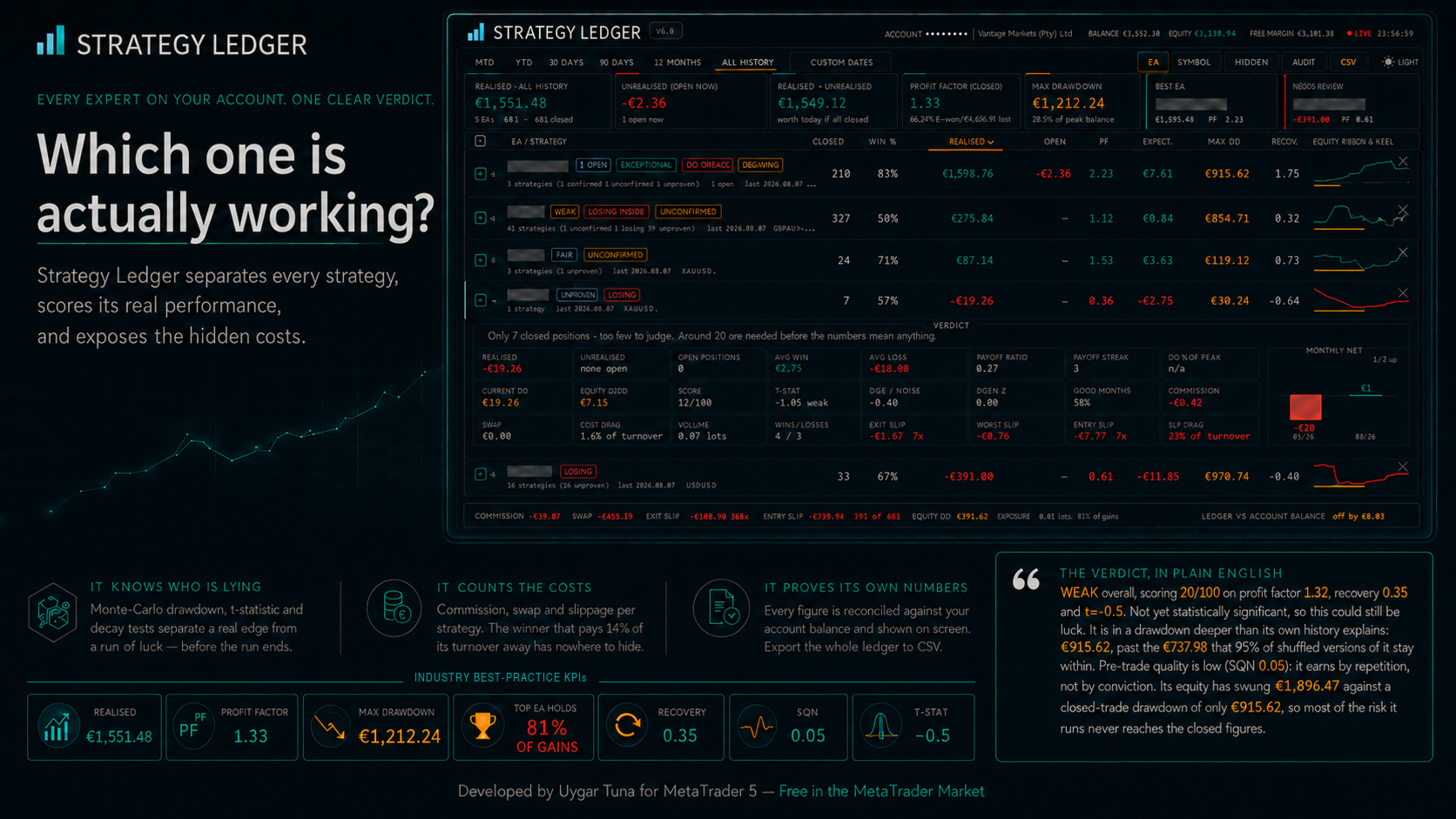
Strategy Ledger is a read-only account analysis panel for MetaTrader 5. It separates account results by Expert Advisor, strategy, and symbol.


Detailed manual with every feature explained:

https://www.mql5.com/en/blogs/post/774132


MetaTrader shows one balance for the whole account. When several Expert Advisors trade together, that balance does not show what each one contributed. Strategy Ledger reads the account history, rebuilds closed positions, assigns them to strategies, and presents the results in one panel.

The product does not place, modify, or close orders. It contains no trading strategy, creates no indicators, and does not read chart prices.

Main functions

  • Results by Expert Advisor, individual strategy, or symbol.
  • Preset periods and a custom date range.
  • Realised and floating results, open exposure, trade statistics, drawdown, and equity curves.
  • Commission, swap, cost drag, and estimated entry and exit slippage.
  • Performance grades, written summaries, and status marks based on fixed rules.
  • Live equity drawdown tracking for the account and each row.
  • Interactive naming, grouping, moving, hiding, restoring, expanding, and sorting.
  • Detailed measures and audit exports in CSV format.

How account data is built

Strategy Ledger counts completed positions rather than individual deals. MetaTrader may open or close one position through several deals. The panel groups those deals by position identifier and records one trade when the closing volume matches the opening volume. Partial closes remain part of the same position.

Profit, commission, fees, and swap are included in each result. Deposits, withdrawals, credits, corrections, bonuses, charges, interest, dividends, and taxes are included in the account reconciliation where the broker reports them in account history.

A strategy is normally identified by its magic number and the cleaned comment on its opening deal. This supports Expert Advisors that use one magic number for several internal strategies. Manual and mobile trades with magic number zero can also be included.

The footer compares the reconstructed realised result and account balance operations with the balance and credit reported by MetaTrader. Any difference is displayed. Netting reversal deals can make exact trade boundaries uncertain, so affected rows are marked Unverified and are not graded.

Views, periods, and organisation

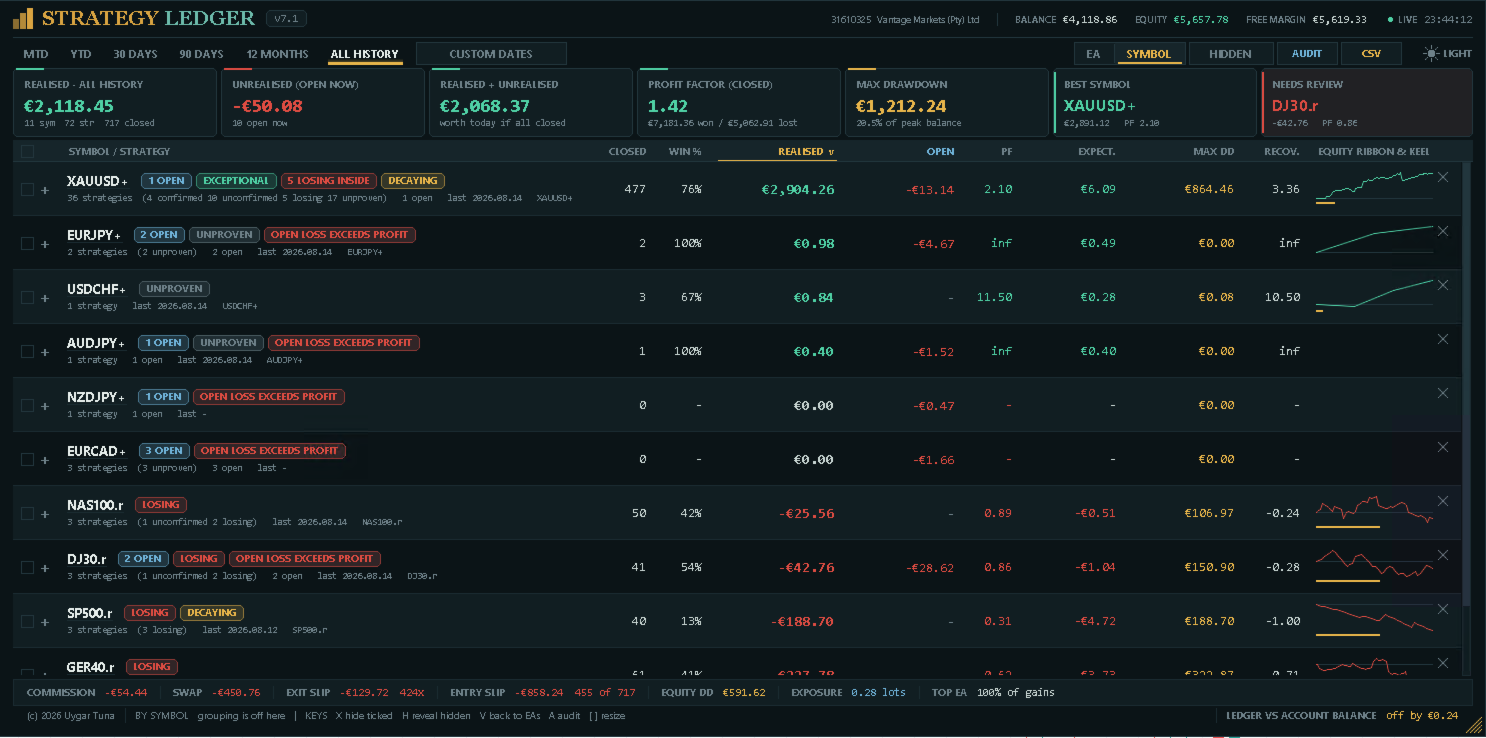
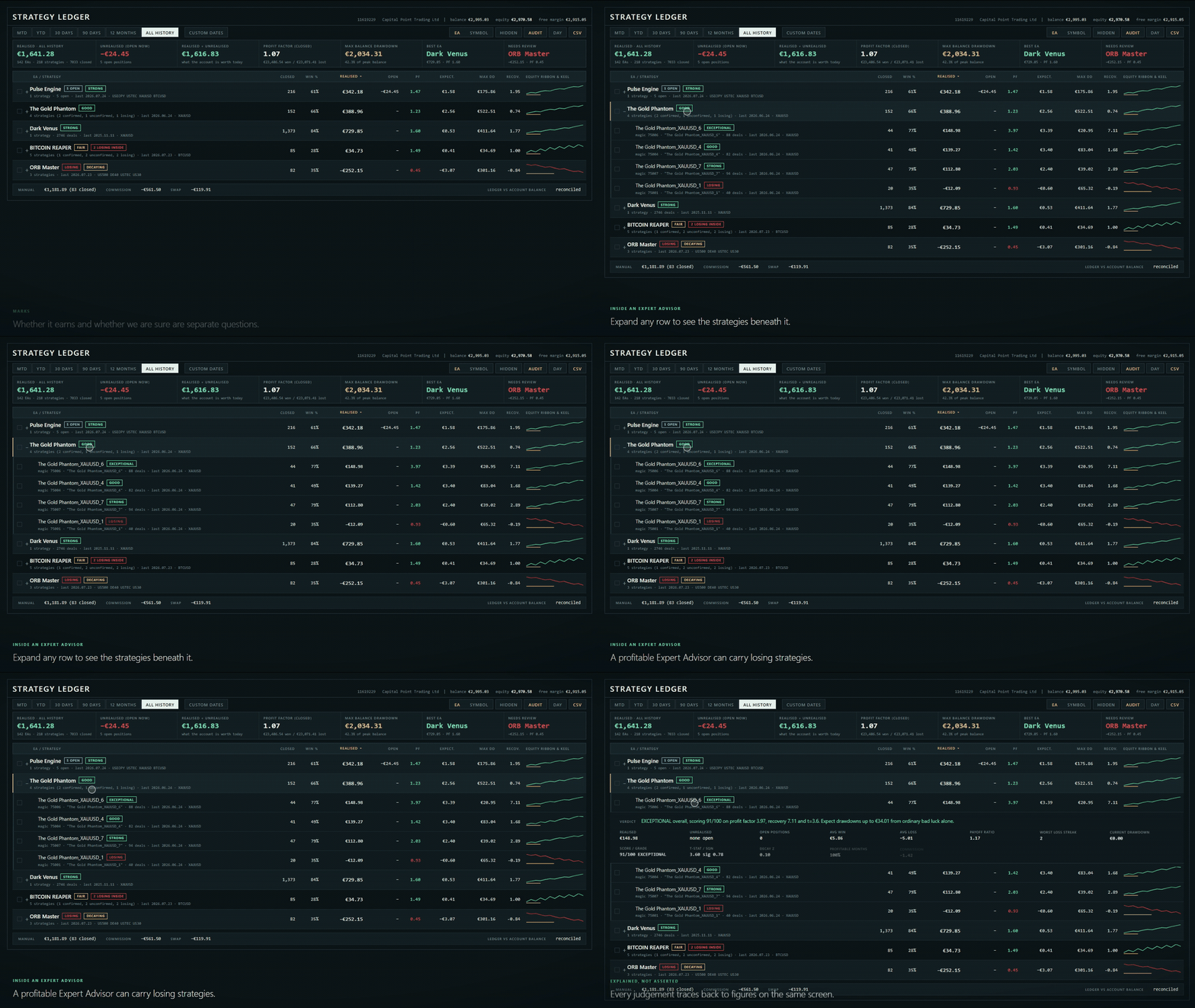
The Expert Advisor view groups strategies under their assigned Expert Advisor. The symbol view groups the same data by instrument. Several Expert Advisor rows can remain expanded at the same time.

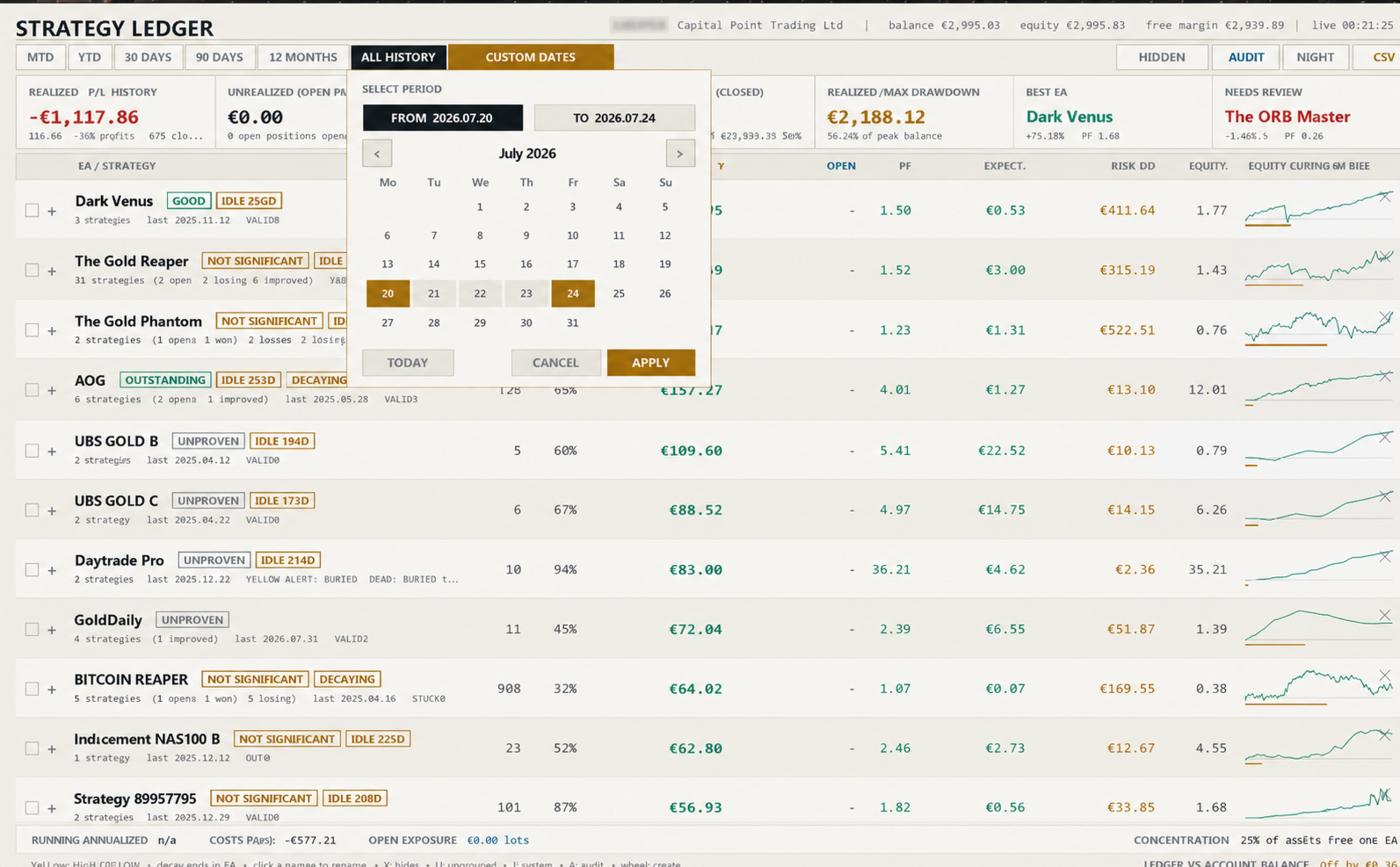
Available periods are month to date, year to date, 30 days, 90 days, 12 months, all history, and a custom date range. A position can be assigned to a period by its closing time or opening time.

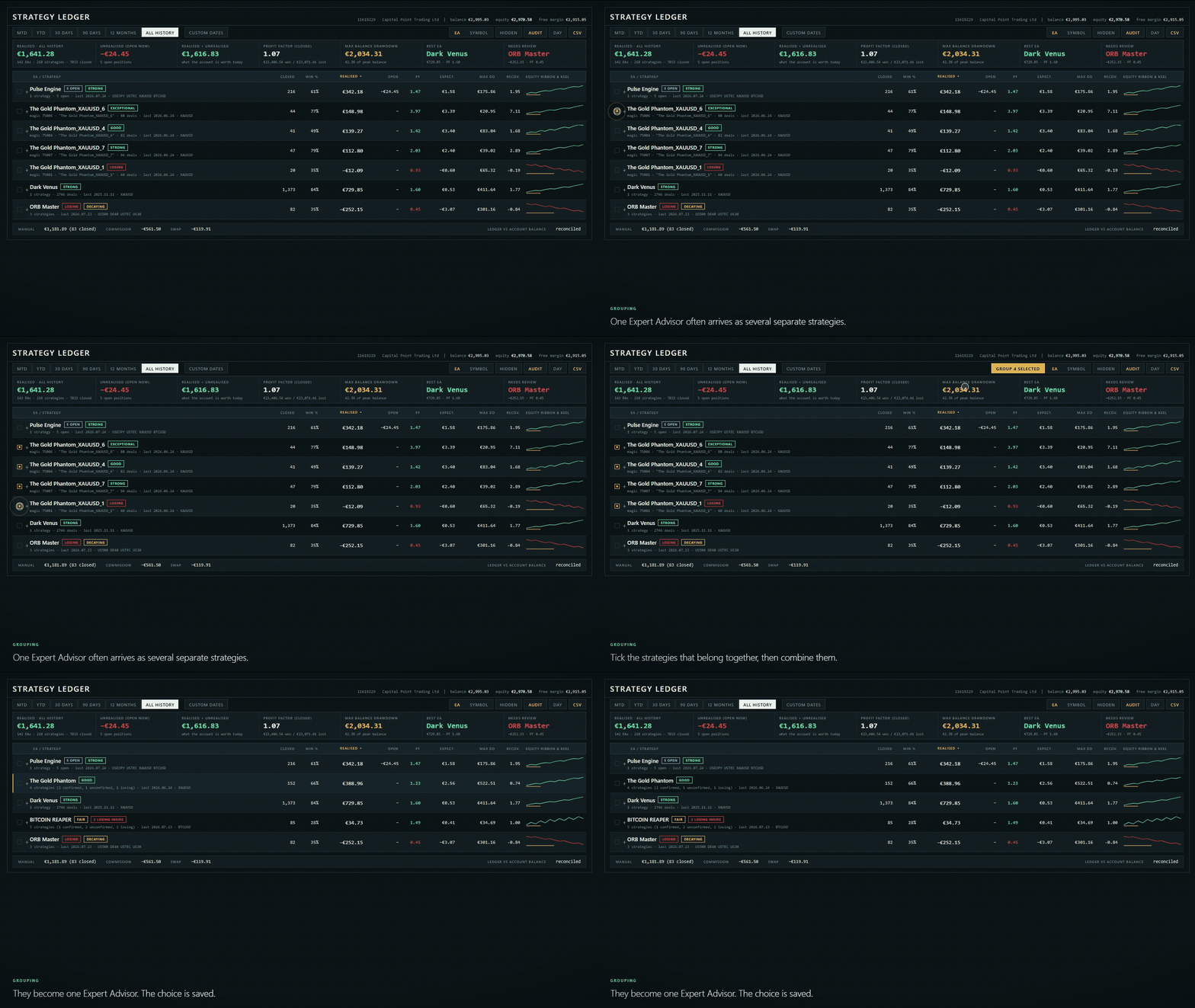
Names can be learned from deal comments or supplied through manual overrides. Strategies can be renamed, grouped from a selection, dragged to another Expert Advisor, merged, or separated. Identical comments can be merged across magic numbers, with an exception list for comments that must remain separate.

Rows can be hidden individually or in a selection and restored later. Hidden rows are stored separately for the Expert Advisor and symbol views. They are excluded from visible totals and from the filtered balance curve. Columns can be sorted by name, result, profit factor, closed positions, drawdown, or expectancy.

Dashboard and strategy details

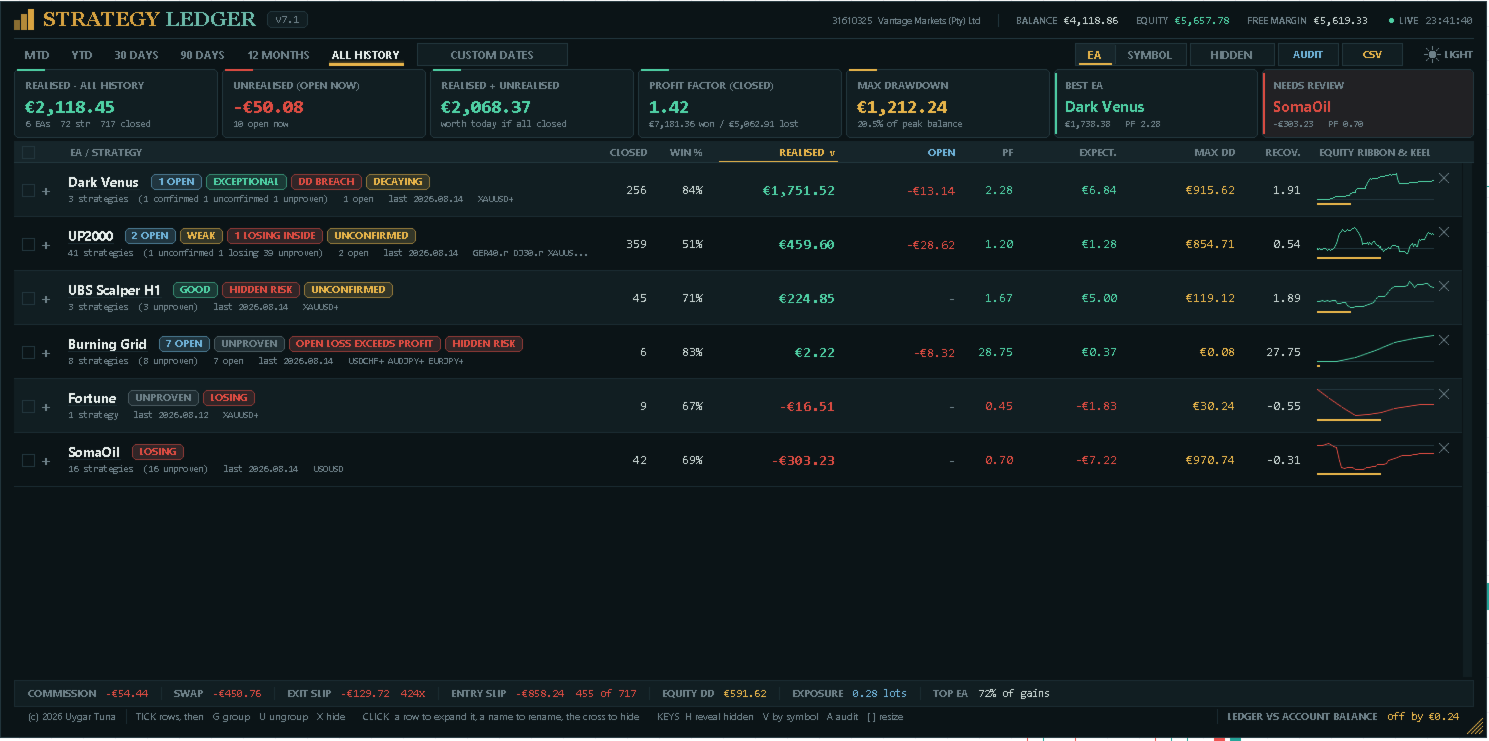
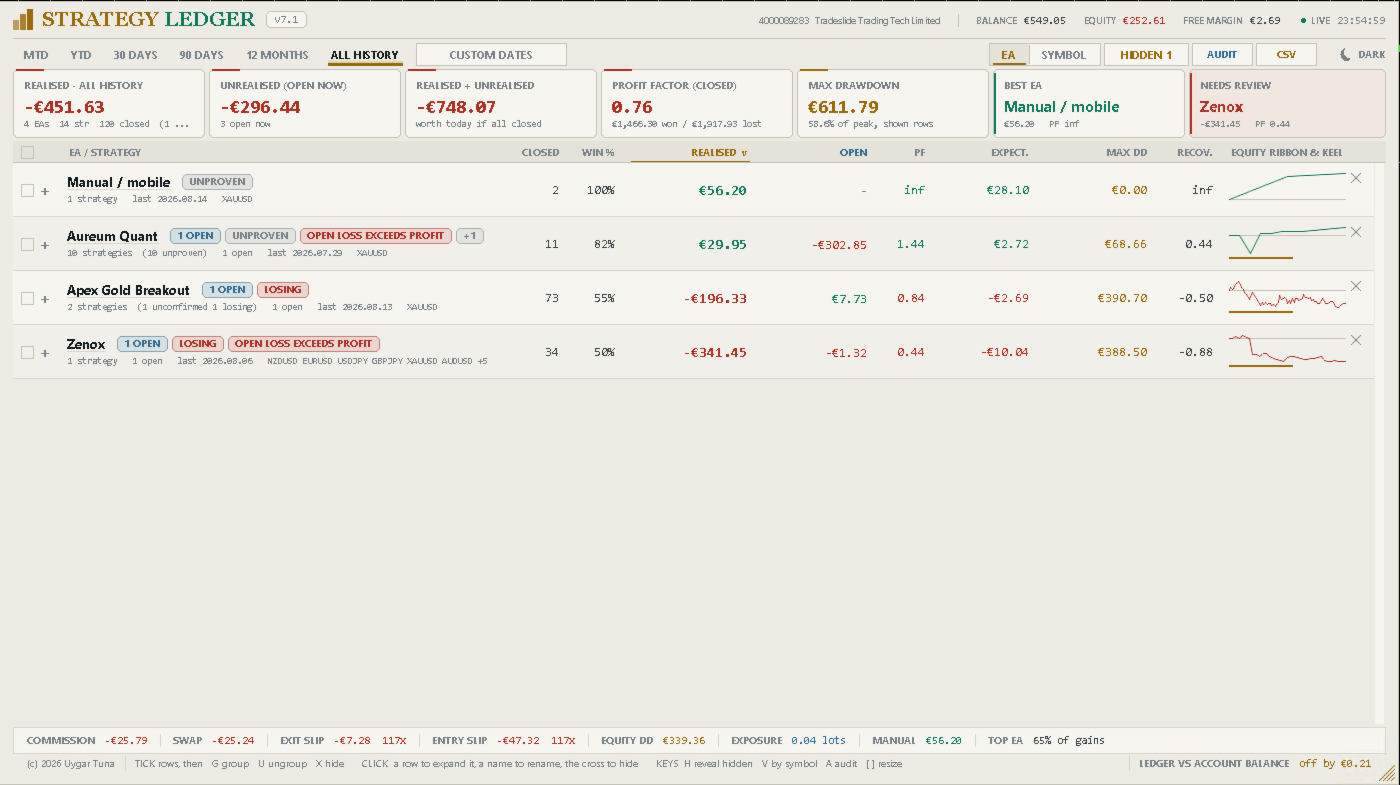
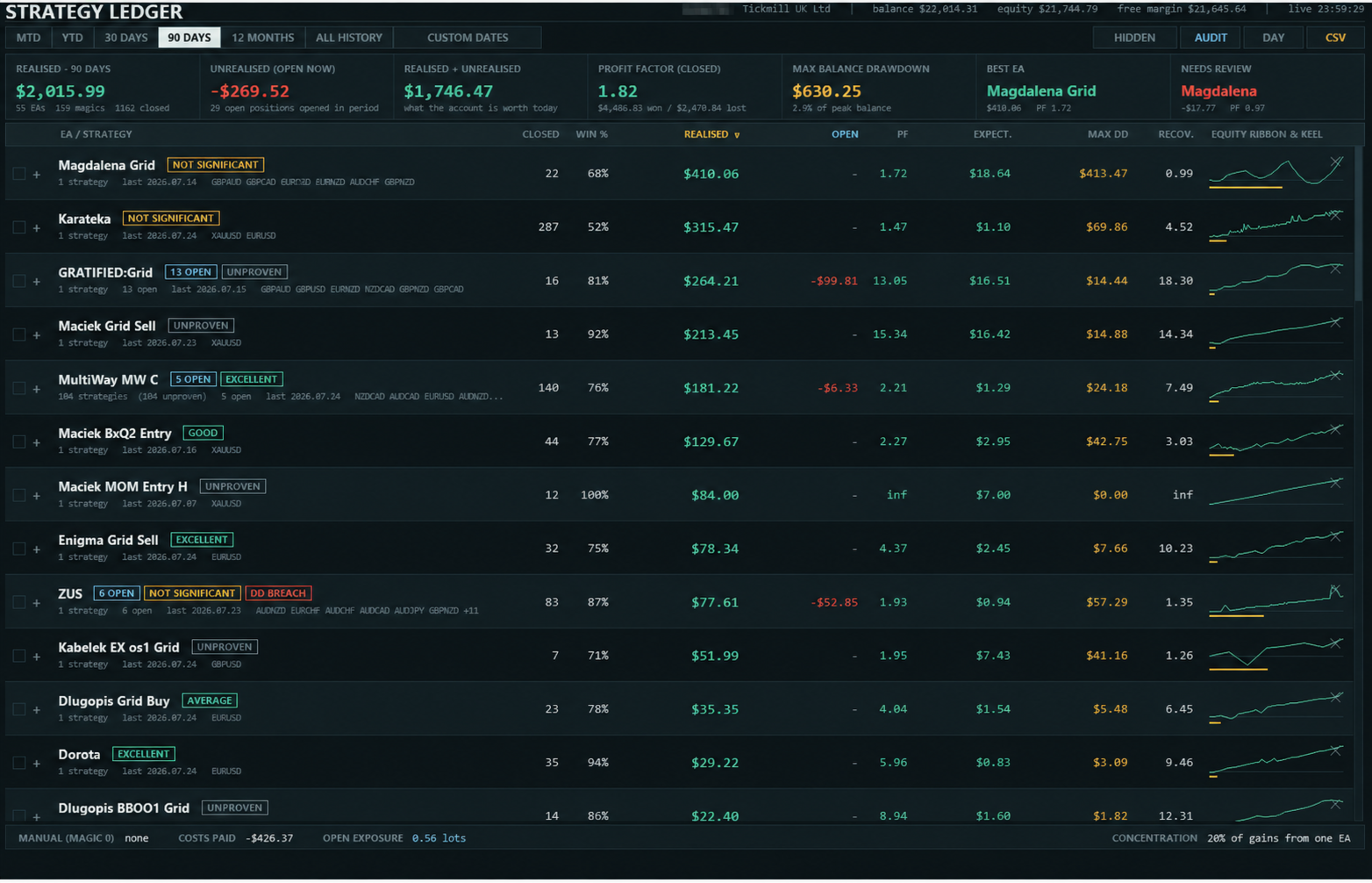
The header shows the account, broker, balance, equity, free margin, server time, and feed status. The summary shows realised result, current floating result, their combined value, closed-position profit factor, maximum balance drawdown, the strongest row by current value, and the row selected for review by the panel's concern rules.

The table shows closed positions, win rate, realised result, floating result, profit factor, expectancy, maximum closed-position drawdown, recovery factor, and a compact equity curve with its drawdown path. When rows are hidden, these figures describe the displayed selection.

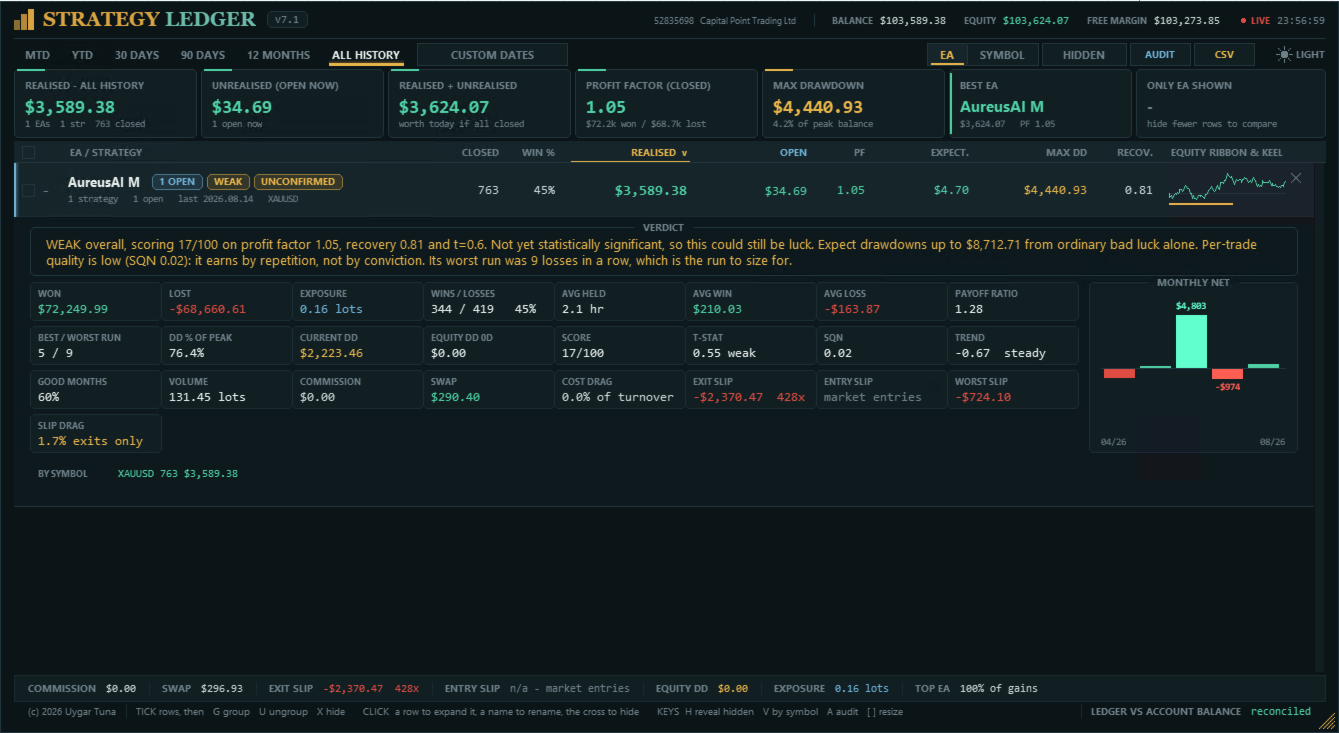
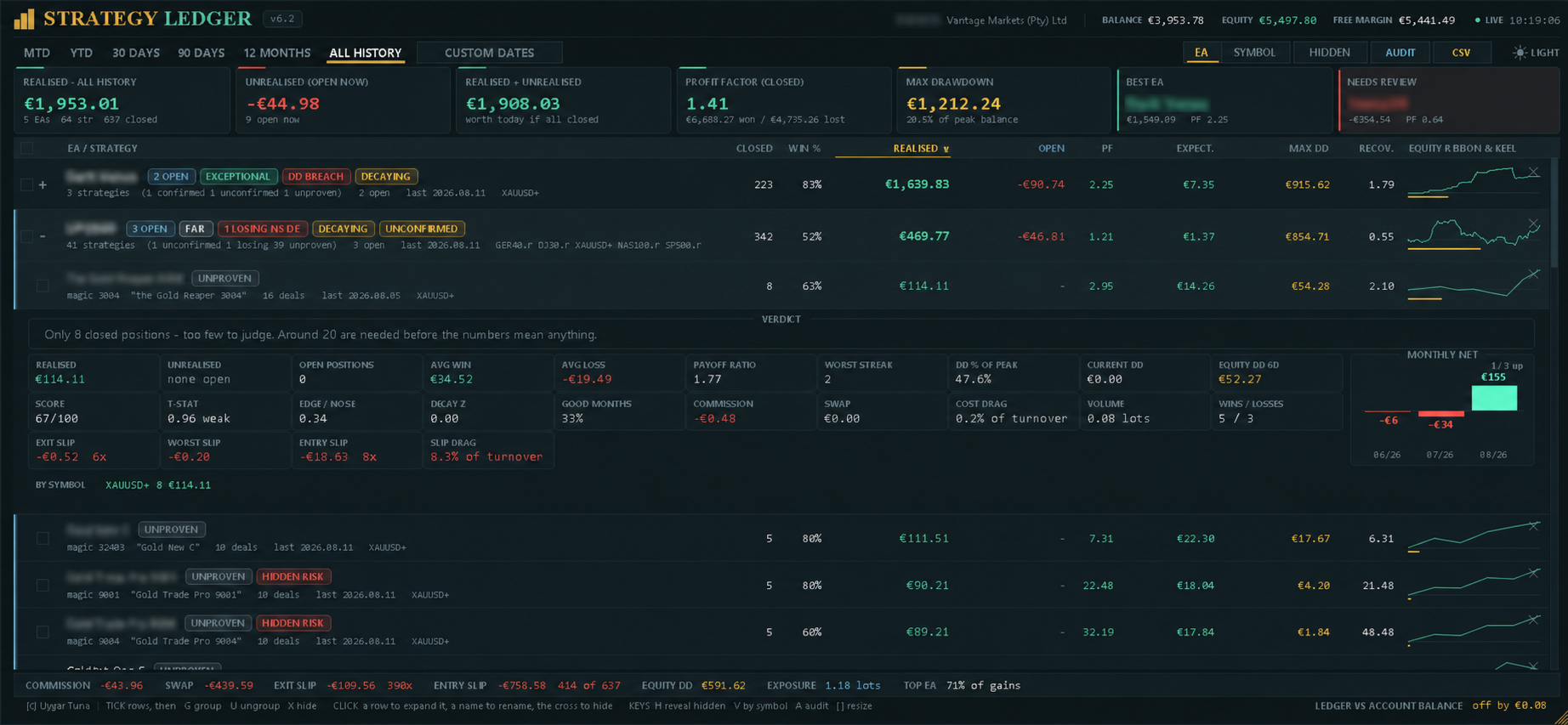
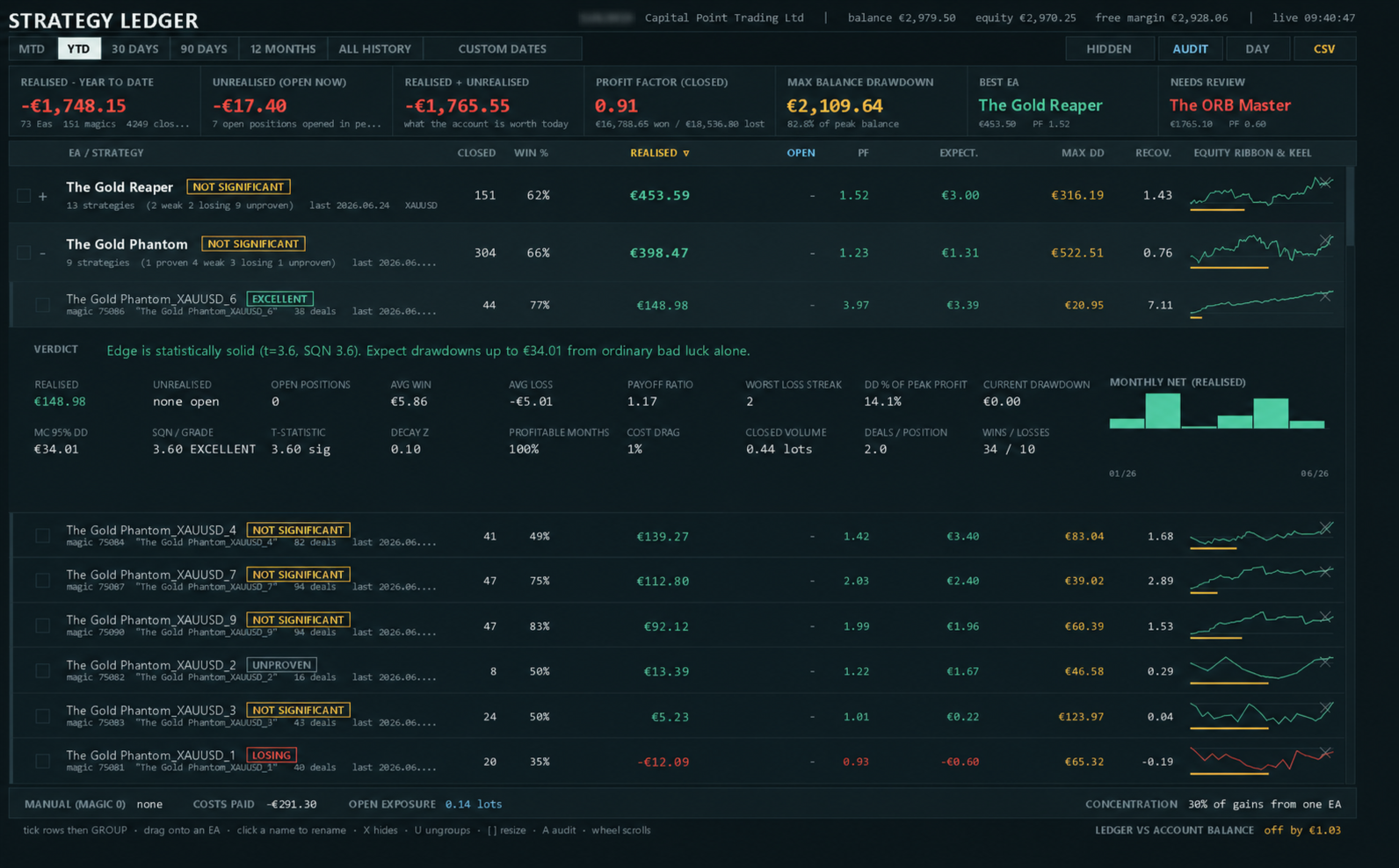
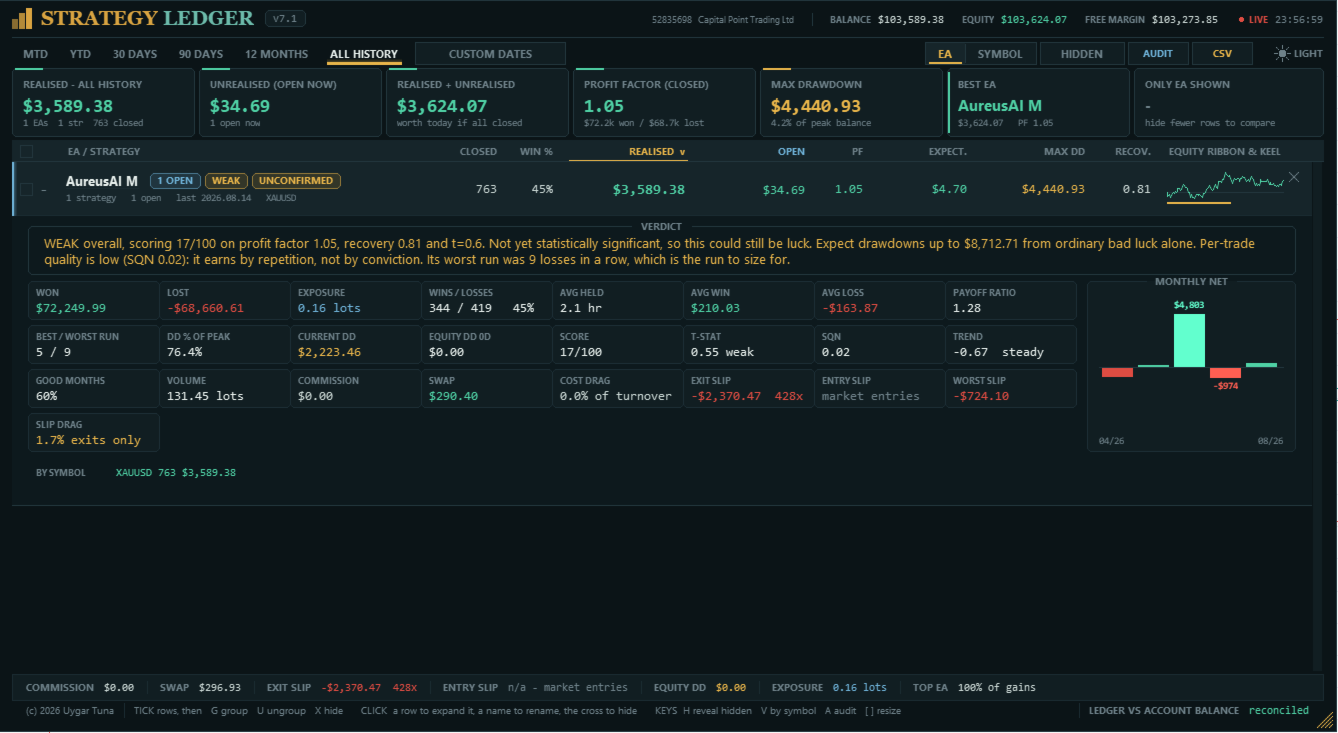
The expanded detail contains total won and lost, open exposure, wins and losses, average holding time, average win and loss, payoff ratio, best and worst consecutive runs, drawdown percentage, current drawdown, volume, and profitable-month percentage.

It also shows the score, statistical confidence, System Quality Number, recent-result trend, Monte Carlo drawdown estimate, live equity drawdown, commission, swap, cost drag, entry and exit slippage, worst measured slippage, and slippage drag. A monthly net chart and per-symbol breakdown are included.

Grades and risk marks

The score combines statistical confidence, profit factor, and recovery factor. Each component is capped before averaging. A floating loss can limit the score because closed-position statistics do not include that open loss.

The default minimum sample is 20 closed positions. Rows below it are marked Unproven. Other grades range from Losing to Exceptional according to the score and configured losing threshold. Grades describe recorded account data; they are not trading signals or forecasts.

Status marks identify open positions, no closed trades, inactivity, a losing result, open loss, open loss greater than booked profit, weaker recent results, insufficient statistical confirmation, drawdown above the shuffled-history estimate, losing strategies inside a profitable Expert Advisor, and live-equity drawdown materially above closed-position drawdown. Expanding a row shows the applicable marks and a written explanation.

Drawdown, costs, and slippage

Closed-position drawdown cannot show the full movement of positions while they remain open. Strategy Ledger can sample live equity once per second and store the largest observed fall from a previous high for the account, each Expert Advisor, and each strategy. Tracking starts when the feature is first enabled, and its start date is displayed.

When live tracking is disabled, the detail panel can show a 95th-percentile drawdown estimate produced by reshuffling closed results. This estimate and all grades describe historical data only.

Commission and swap are reported separately. The account footer also includes costs already charged on open positions. Cost drag is shown as a percentage of gross turnover when the required data is available.

Exit slippage is estimated where the exit order contains a requested price, including stop loss, take profit, and pending-order exits. Entry slippage is estimated for pending orders with a requested entry price. Market orders have no requested price for comparison, so the panel reports unavailable or partial coverage. Values are converted to account currency using current symbol tick values and include the number of measured events.

Exports

The measures export writes the displayed groups and strategies, including results, statistics, costs, slippage, grades, and written summaries. Automatic export can run after each refresh.

The audit export lists reconstructed closed positions, open positions, period and hidden-row status, and independent position-versus-deal checks. It is intended to help investigate missing history or calculation differences.

Layout and saved settings

The panel supports dark and light themes, mouse-wheel scrolling, custom width and table height, automatic chart fitting, display scaling, manual text scaling, and an optional live clock. Columns are removed progressively when the panel becomes too narrow.

Names, groups, hidden rows, expanded rows, sorting, period, view, theme, and panel size can be remembered. State and live-equity history are stored separately for each account and server. Older name and layout files are copied when available. Older equity history is adopted only when its dedicated setting is enabled.

Inputs control naming and grouping, manual trades, period basis, starting period, sorting, theme, panel position and size, chart fitting, live clock, saved layout, statistical summaries, minimum sample, Monte Carlo runs, live-equity tracking, status thresholds, automatic export, text size, diagnostic logging, and optional adoption of older equity history.

Setup and limitations

  1. In the MetaTrader History tab, select All History.
  2. Attach Strategy Ledger to a separate chart. Any symbol and timeframe can be used.
  3. Check the reconciliation line after the first scan.

Complete results require complete account history. Missing broker records, unusual deal structures, and netting reversals can create differences or unverified rows.

Slippage values are estimates. The conversion uses the symbol's current tick value rather than its value at the time of the fill. Slippage cannot be measured when an order did not specify a requested price.

If an Expert Advisor writes a different comment on every trade, the comments may create separate strategy rows. Common numbers and order references are removed automatically, and remaining rows can be grouped manually.

Questions and problem reports can be submitted through the product comments or MQL5 private messages. Include the audit export when reporting a calculation difference.

Avis 17
Gravity Tool
441
Gravity Tool 2026.08.22 04:51 
 

This is a great tool. Now it became very easy for me to keep track of every single EA's performance in a portfolio. And it has even more useful functions. It is really a jewel. So everybody, there are no many free lunches in life. Here is one of it. Grab it!

Celal Yazici
772
Celal Yazici 2026.08.20 08:24 
 

If you really want to see how the EAs work individually, this is an excellent piece of work; I really liked it.

Juan Antonio Lumbreras Marcos
198
Juan Antonio Lumbreras Marcos 2026.08.13 19:50 
 

I am genuinely impressed by this Tool, particularly the hard work behind its development. The information provided, the user interface, and the ability to view and modify variables are excellent. It definitely deserves a review from me. 5 stars

Produits recommandés
Click Trading
Jawad Tauheed
5 (2)
One Click Trading – Auto TP SL Developer TraderLinkz Version 1.00 Category Utility What it does Adds missing TP and SL to your manual trades and pending orders Sets them once per ticket Lets you move TP and SL afterward Works on hedging and netting accounts Scans on every tick and reacts on trade events Why you want it You place faster entries You get consistent risk and exit targets You reduce fat finger errors You keep full manual control Quick start Attach the EA to any chart Keep TP and SL e
FREE
Risk Manager – Account Protection Tool Risk Manager is an Expert Advisor for MetaTrader 5 designed to protect your trading account by applying automatic risk management rules. This tool does not open trades . It continuously monitors your account and enforces predefined limits to help prevent excessive losses and maintain disciplined trading. Risk Manager works in the background and can manage positions opened by manual trading or other Expert Advisors. It is particularly useful for: • Manual tr
FREE
Trade assistant pro v8
Ahmed Mohammed Bakr Bakr
2 (1)
FREE FREE FREE Trade Assistant MT5 – Professional Trading & Risk Management Panel Trade Assistant MT5 is an advanced trading panel designed to help traders execute orders faster, safer, and more professionally . It simplifies manual trading by combining smart order management , precise risk control , and one-click execution , making it ideal for both beginners and advanced traders. This tool does not trade automatically . Instead, it empowers you with full control while applying professional-gra
FREE
VR Color Levels est un outil pratique pour ceux qui appliquent l'analyse technique à l'aide d'éléments tels que la ligne de tendance, le rectangle et le texte. Il est possible d'ajouter du texte directement au graphique et de prendre des captures d'écran. Les paramètres, les fichiers de configuration, les versions de démonstration, les instructions, la résolution de problèmes peuvent être obtenus auprès de [Blog] Vous pouvez lire ou écrire des critiques sur [lien] Version pour [MetaTrader 4] L
FREE
SmartRisk Trade Tool — One-Click Risk-Based Trade Panel SmartRisk Trade Tool is a manual trading panel for MetaTrader 5 built around position sizing and risk control rather than signal generation. It does not analyze the market or suggest trade direction — it exists so that every order sent from the chart already has a calculated lot size, stop loss, and take profit consistent with a risk value the trader chooses, removing the manual arithmetic that normally happens between deciding to trade and
FREE
This MQL5 indicator creates a customizable grid of horizontal lines on your trading chart. Here's what it does: **Main Functions:** - Draws equally spaced horizontal lines across the visible price range - Supports two line types: horizontal lines or trend lines with forward projection - Automatically adjusts to price scale changes **Key Features:** 1. **Customizable Spacing**: Set grid distance in pips (20 pips by default) 2. **Flexible Starting Point**: Auto-calculates starting price or lets
FREE
FiT Panel Pro
Thonglak Janyakorn
Overview FiT Panel Pro is a professional-grade trade management panel designed for MetaTrader 5 traders who demand speed, precision, and full control over their trades. Built with a modern dark-theme UI, it combines one-click execution with advanced risk management, visual SL/TP drag lines, automatic Fibonacci-based levels, and comprehensive order management — all in a single, compact panel. Whether you are a scalper, day trader, or swing trader, FiT Panel Pro gives you the edge you need to exec
FREE
================================================================ MATRIX CONDITION MONITOR Live Trade Condition Panel for MetaTrader 5 Fully Automatic -- Works with ALL Matrix EAs ================================================================ NEVER MISS A TRADE SETUP AGAIN Matrix Condition Monitor is a free utility that attaches to any chart and automatically checks all 10 trade conditions in real time -- showing you exactly why a trade will or will not open, and alerting you the moment ever
FREE
IMPORTANT NOTE: This is a professional Trade Management Utility and on-chart assistant. It is NOT an automated trading robot. It does not open trades on its own. The UltraFast Trade Manager MT5 is the ultimate execution and risk-management suite designed to give you absolute control over your manual and algorithmic trades. When managing multiple positions, calculating complex net break-even points, or constantly monitoring the economic calendar, hesitation can lead to costly mistakes. This utili
FREE
Account Info EA It is a tool that presents on the graph all the positions of the account, and specific information concerning the positions, but also the account. It enables the user to have an image of his account at a glance. Use like any expert advisor. You can't attach it in the same chart with other expert advisor. It does not have the ability to open or manage positions. You can attach it on any chart and any timeframe.
FREE
GDS RiskLab TradeDesk Free Manual Trading Desk and Risk-Control Utility for MetaTrader 5 GDS RiskLab TradeDesk is a free chart-based utility for traders who want a cleaner manual trading workspace in MetaTrader 5. It is designed as a simple execution-support and risk-control panel. The goal is to keep the trading process more organized: review the chart, plan the trade, keep risk visible and execute manually with more structure. This tool does not generate buy or sell signals. It does not predic
FREE
GDS Renko Pip ST Chart - Pip-Based Renko Chart Indicator for MetaTrader 5 GDS Renko Pip ST Chart is a pip-based Renko chart indicator for MetaTrader 5. It helps traders build and study cleaner Renko price movement using a practical fixed pip or point-based brick structure. This tool is designed as a Renko chart foundation for manual analysis. It does not predict the market, does not generate buy or sell signals and does not decide whether a trade should be opened. Renko EDGE EA Golden Delta | A
Position Size Tool – Smart Risk Management & Trade Execution Panel The Position Size Tool is a powerful and intuitive MT5 panel that simplifies your trading by combining position sizing , risk calculation , risk/reward visualization , and order placement —all in one place. ️ Clean & Functional Interface The tool features a compact, real-time panel with the following: Balance & Equity display Live Price tracking Customizable Risk % input Auto-calculated Lot Size based on SL and Risk Input for S
FREE
Equity Master Stop v1 MT5
Frank William Jr Colbert
An advanced equity protection and trade management script. It monitors individual trade P&L and closes positions when floating equity targets (profit or loss) are met. It features "skip closing hours" for high volatility, wide spreads, or price instability times . Features: Closes trades at a target profit (`MAX_FLOATING_EQUITY`) or maximum loss (`MAX_FLOATING_LOSS`). Includes a `FORCE_CLOSE_AT_MAX_EQUITY` level that bypasses all exit protection checks. "SKIP_CLOSING_HOURS" input to pause loss
FREE
Equity monitor
Vasiliy Pritchin
Equity monitor This is a simple means change informer. I wrote it for myself, maybe someone will need it... 1. Displays the change in funds for the day. Every day, when the terminal is first launched, it remembers the current funds and monitors changes throughout the day. 2. The first day of the month, well remembers the money and, within months, to monitor changes. 3. Well, it displays the profit of the open position. To work, you need to create 4 global variables: gvarEqityDay , gvarEq
FREE
Server Clock
Flavio Javier Jarabeck
5 (5)
Many friends asked me for a simple, non-obtrusive, resource-friendly clock to track the time during their trades. It seems pretty obvious, but it is a must-have for those trading the market manually, waiting for the Market News, or just to visually know what time it is... Trading is an absorbing endeavor! So, here it is... Totally configurable, including Font Type, Font Size and Chart Location: Upper Left/Center/Right OR Lower Left/Center/Right, with a little twist of adjusting the Offset, just
FREE
Trade Behavior Mirror lit uniquement l'historique des transactions déjà clôturées de votre propre compte et compte un seul phénomène précis : l'ouverture d'une nouvelle position peu après une perte réalisée, avec un lot plus important que votre volume habituel. L'outil ne prédit rien et ne conseille rien. Chaque chiffre du panneau correspond à quelque chose qui s'est déjà produit sur ce compte. Comment les chiffres sont construits : l'outil lit jusqu'à 31 jours de transactions clôturées, tous s
FREE
Free automatic Fibonacci is an indicator that automatically plots a Fibonacci retracement based on the number of bars you select on the BarsToScan setting in the indicator. The Fibonacci is automatically updated in real time as new highest and lowest values appears amongst the selected bars. You can select which level values to be displayed in the indicator settings. You can also select the color of the levels thus enabling the trader to be able to attach the indicator several times with differe
FREE
Donchian Breakout And Rsi
Mattia Impicciatore
4.5 (2)
Description générale Cet indicateur est une version améliorée du Canal Donchian classique, enrichie de fonctionnalités pratiques pour le trading réel. En plus des trois lignes standard (supérieure, inférieure et ligne médiane), le système détecte les cassures et les affiche visuellement avec des flèches sur le graphique, en montrant uniquement la ligne opposée à la direction actuelle de la tendance pour une lecture plus claire. L’indicateur comprend : Signaux visuels : flèches colorées lors des
FREE
Voici NAS100 Auto SL and TP Maker pour MT5 : Ne manquez plus jamais le réglage du StopLoss et du TakeProfit avec notre NAS100 Auto SL and TP Maker, un assistant indispensable pour les traders qui naviguent sur le marché du Nasdaq 100 sur MetaTrader 5. Cet outil est conçu pour ceux qui recherchent une solution transparente pour automatiser la gestion des niveaux de StopLoss et TakeProfit. Caractéristiques principales : Automatisation sans effort : Surveille automatiquement les transactions sur
FREE
Lot by Risk MT5
Sergey Vasilev
4.88 (16)
La barre de trading Lot by Risk est conçue pour le trading manuel. C'est un moyen alternatif d'envoyer des ordres. La première caractéristique du panneau est l'affichage pratique des ordres à l'aide de lignes de contrôle. La deuxième caractéristique est le calcul du volume de la transaction à un risque donné en présence d'une ligne stop loss. Les lignes de contrôle sont affichées à l'aide de raccourcis clavier: take profit-touche T Par défaut; price-touche P par Défaut; stop loss – touche s p
FREE
SWDM Position Manager EA The SWDM Position Manager EA is a MetaTrader 5 Expert Advisor for automatically managing matching positions on the current chart symbol. It can manage already open positions as well as newly opened positions, as long as they match the configured position filters. It is not a classic entry-signal robot and does not open trades by itself in the default workflow. The EA is designed to protect and manage manual trades or positions opened by other tools using internal risk m
FREE
Seconds Chart Calculator Tester — Seconds chart + Risk-based position calculator + Trade management This is the free DEMO version of Seconds Calculator. You can try every feature of the full product, with a usage limit (see below). For unlimited use, get the full version. Seconds Calculator — The all-in-one tool for precision trading on MT5 — MetaTrader 5 only offers timeframes from 1 minute up. This utility adds, in a floating window over your chart, a seconds-based candlestick chart, a risk-ba
FREE
PZ Penta O MT5
PZ TRADING SLU
3.8 (5)
The Penta-O is a 6-point retracement harmonacci pattern which usually precedes big market movements. Penta-O patterns can expand and repaint quite a bit. To make things easier this indicator implements a twist: it waits for a donchian breakout in the right direction before signaling the trade. The end result is an otherwise repainting indicator with a very reliable trading signal. The donchian breakout period is entered as an input. [ Installation Guide | Update Guide | Troubleshooting | FAQ | A
FREE
Trade With Price is a powerful and user-friendly MetaTrader 5 Expert Advisor designed to simplify and accelerate your trading execution. This EA provides a smart one-click trading panel that allows traders to instantly place BUY, SELL, and pending orders directly at the current market price—eliminating the need to calculate distances in pips. Key Features One-click BUY & SELL execution Place pending orders based on market price instead of pips Clean and intuitive trading panel interface
FREE
Show Pips for MT5
Roman Podpora
4.5 (32)
Cet indicateur d'information sera utile pour ceux qui veulent toujours être au courant de la situation actuelle du compte. VERSION MT 4 -   More useful indicators L'indicateur affiche des données telles que le profit en points, en pourcentage et en devise, ainsi que le spread pour la paire actuelle et le temps jusqu'à la fermeture de la barre sur la période actuelle. Il existe plusieurs options pour placer la ligne d'information sur le graphique : À droite du prix (passe derrière le prix) ; En c
FREE
Signalator Trade Summary Panel MT5 est un utilitaire local gratuit pour MetaTrader 5 qui fournit directement sur le graphique une vue claire du compte, des positions, des symboles et du risque. Il fait partie de l'écosystème Signalator Trading and Analysis — un ensemble croissant d'outils MetaTrader pratiques pour le suivi de compte, l'analyse de marché, le scan de symboles, les alertes et l'amélioration du workflow du trader. Le panneau combine le suivi du compte et des positions avec un Symbol
FREE
Signalator Lot Size Evaluator MT5 is a free local MetaTrader 5 utility for manual traders who want to calculate an estimated position size before placing a trade. It helps you plan a trade using the selected symbol, BUY or SELL direction, planned entry price, Stop Loss, optional Take Profit and risk percentage. The calculator uses current account information together with broker-provided symbol specifications to estimate the suggested lot size and key risk values. The workflow is simple: define
FREE
MultiTimeframe Info Feed (MIF) Indicator Description: MultiTimeframe Info Feed (MIF) is a smart MQL5 indicator that displays a dynamic, real-time info panel directly on your chart, offering powerful insight into current market conditions. Key features include: Real-time display of Open, High, Low, Close, and live Tick price Tick Rate (ticks per second) for assessing market activity Auto-calculated Entry Price on new candle formation Signal direction detection (BUY / SELL) Price action pattern re
FREE
Are you tired of drawing trendlines every time you're analyzing charts? Or perhaps you would like more consistency in your technical analysis. Then this is for you. This indicator will draw trend lines automatically when dropped on a chart. How it works Works similar to standard deviation channel found on mt4 and mt5. It has 2 parameters: 1. Starting Bar 2. Number of bars for calculation The   starting bar   is the bar which drawing of the trend lines will begin, while the   number of bars for c
FREE
Les acheteurs de ce produit ont également acheté
Trade Assistant MT5
Evgeniy Kravchenko
4.41 (216)
It helps to calculate the risk per trade, the easy installation of a new order, order management with partial closing functions, trailing stop of 7 types and other useful functions. Additional materials and instructions Installation instructions - Application instructions - Trial version of the application for a demo account Line function -   shows on the chart the Opening line, Stop Loss, Take Profit. With this function it is easy to set a new order and see its additional characteristics bef
Bienvenue sur Trade Manager EA, l’outil ultime de gestion des risques conçu pour rendre le trading plus intuitif, précis et efficace. Ce n’est pas seulement un outil d’exécution d’ordres ; c’est une solution complète pour la planification des trades, la gestion des positions et le contrôle des risques. Que vous soyez débutant, trader expérimenté ou scalpeur ayant besoin d’une exécution rapide, Trade Manager EA s’adapte à vos besoins, offrant une flexibilité sur tous les marchés, des devises et i
Farmed Hedge Yield Farming | All Markets (Manual - Hybrid - Semi/Automated EA) VERIFIED TRADING RESULTS - Farmed Hedge Yield Axi Copy:  https://www.mql5.com/en/signals/2356376 - Farmed Hedge Yield Exn Copy:   https://www.mql5.com/en/signals/2356404 - Farmed Hedge Yield V Copy:  https://www.mql5.com/en/signals/2357156 * Before purchasing, please feel free to send me a message if you have any questions about the product or setup. - You can test the system using Strategy Tester: Visual Mode , a
Version Bêta Le Telegram to MT5 Signal Trader est presque prêt pour la sortie officielle en version alpha. Certaines fonctionnalités sont encore en développement et vous pourriez rencontrer de petits bugs. Si vous rencontrez des problèmes, merci de les signaler, vos retours aident à améliorer le logiciel pour tout le monde. Telegram to MT5 Signal Trader est un outil puissant qui copie automatiquement les signaux de trading depuis des chaînes ou groupes Telegram vers votre compte MetaTrader 5 .
================================================================================ POC BREAKOUT - V20.72. Full Professional Grade Toolkit ================================================================================ POC Breakout is a full MetaTrader 5 trading dashboard for discretionary traders who want breakout signals, Point of Control (POC) context, volume profiles, order flow, market structure, news, alerts, and advanced trade planning in one professional workspace. Attached directly to you
TradePanel MT5
Alfiya Fazylova
4.88 (167)
Trade Panel est un assistant commercial multifonction. L'application contient plus de 50 fonctions de trading pour le trading manuel et permet d'automatiser la plupart des tâches commerciales. Instructions d'utilisation + tutoriel vidéo : https://www.mql5.com/fr/blogs/post/772371 Version d'essai de l'application pour un compte démo : https://www.mql5.com/fr/blogs/post/762644 Comment installer l'application : https://www.mql5.com/fr/blogs/post/762645 Comment tester l'application en mode visuel :
Local Trade Copier EA MT5
Juvenille Emperor Limited
4.94 (148)
Découvrez une expérience exceptionnellement rapide de copie de trades avec le   Local Trade Copier EA MT5 . Avec sa configuration facile en 1 minute, ce copieur de trades vous permet de copier des trades entre plusieurs terminaux MetaTrader sur le même ordinateur Windows ou Windows VPS avec des vitesses de copie ultra-rapides de moins de 0.5 seconde. Que vous soyez un trader débutant ou professionnel, le   Local Trade Copier EA MT5   offre une large gamme d'options pour le personnaliser en fonc
EA Overfitter
Stephen J Martret
5 (1)
That backtest looks great. But will it still be making money tomorrow, next week, next month? EA Overfitter re-runs your EA on 100 price histories it has never seen. One score tells you if the edge is real. A backtest tells you what an EA did on one price history — the one that happened to occur. What you cannot tell from it is how much of that result was the strategy and how much was the particular path. EA Overfitter answers that. It builds up to 100 synthetic price histories your EA has n
Telegram to MT5 Multi-Channel Copier   copie automatiquement les signaux de trading de vos canaux Telegram directement vers MetaTrader 5. Pas de bots, pas d'extensions de navigateur, pas de copie manuelle. Un signal arrive sur Telegram et l'EA ouvre le trade dans votre terminal en quelques secondes. Et avant de copier un canal, le backtester intégré vous montre ce que ce canal aurait fait sur votre compte. Le produit comprend deux composants : une application Windows qui écoute vos canaux Telegr
Astro Trade MT5
Indra Maulana
5 (6)
25% discount on the release of the tool: only for the next 3 buyers Send a message to receive a demo version. AstroTrade Trading Assistant AstroTrade is a comprehensive multi-functional trading utility developed for the MetaTrader 5 platform. It integrates essential tools for trade execution, risk management, and technical monitoring into a single unified interface. The application is designed to assist traders in managing their daily operations through a visual and structured environment. Vi
HINN MagicEntry Extra
ALGOFLOW OÜ
4.74 (19)
HINN MAGIC ENTRY – the ultimate tool for entry and position management! SIMPLE. FASTEST. INTUITIVE. MAX AUTOMATED. Place orders by selecting a level directly on the chart! full description   ::  demo-version  :: 60-sec-video-description Key features: - Market, limit, and pending orders - Automatic lot size calculation - Automatic spread and commission accounting - Unlimited partitial take-profits  - Breakeven and trailing stop-loss and take-profit  functions - Invalidation leves - Intuitive, a
Exp COPYLOT CLIENT for MT5
Vladislav Andruschenko
3.97 (35)
Copieur professionnel de trades pour MetaTrader 5 Un copieur de trades rapide, professionnel et fiable pour MetaTrader . COPYLOT permet de copier des trades Forex entre les terminaux MT4 et MT5 avec prise en charge des comptes Hedge et Netting . La version MT5 de COPYLOT prend en charge : - MT5 Hedge → MT5 Hedge - MT5 Hedge → MT5 Netting - MT5 Netting → MT5 Hedge - MT5 Netting → MT5 Netting - MT4 → MT5 Hedge - MT4 → MT5 Netting Version MT4 Description complète + DEMO + PDF Comment acheter Comme
Premium Trade Manager - Le panneau de trading avec un coach intégré Premium Trade Manager intègre un coach de trading directement dans votre graphique, avec un moteur d'exécution complet en dessous. Configurez le trade comme vous le faites toujours, puis laissez Max, votre coach de trading IA, analyser ce setup exact par rapport à votre compte en direct et vous donner un verdict clair avant de vous engager : le stop est-il discipliné, le risque est-il raisonnable, une publication à fort impact e
Anchor Trade Manager
Kalinskie Gilliam
5 (9)
Your EAs cannot see each other, but Anchor can. Anchor gives you one place to coordinate your EAs, manage risk, and decide when trading is allowed. It works alongside the trading bots you already use without any changes to them. The Problem One EA opens a trade. Then another starts trading. The next thing you know, you wake up to multiple grids built across your account. Each EA may be doing exactly what it was designed to do, but together they can place far more risk on your account than you in
Telegram To MT5 Ultra
Mirel Daniel Gheonu
5 (5)
Telegram To MT5 — Copieur de signaux Transformez les appels de trading de vos canaux Telegram en véritables ordres MT5 — automatiquement, sur autant de comptes que vous le souhaitez, avec le risque et les règles entièrement sous votre contrôle. Telegram To MT5 relie les canaux VIP / de signaux que vous suivez déjà sur Telegram à votre terminal MetaTrader 5. Une application de bureau compagnon gratuite lit les messages (même des canaux qui bloquent les bots), et cet Expert Advisor les exécute sur
Power Candles Strategy Scanner - Outil de recherche de configurations multi-symboles à optimisation automatique Le Power Candles Strategy Scanner utilise le même moteur d'auto-optimisation que celui qui alimente l'indicateur Power Candles, pour chaque symbole de votre Market Watch, en parallèle. Un panneau vous indique quels symboles sont statistiquement négociables à l'instant, quelle stratégie est la plus performante pour chacun, la paire Stop Loss / Take Profit optimale, et vous alerte dès qu
Strategy Ledger Pro
Abdullah Uygar Tuna
5 (1)
Strategy Ledger Pro est un panneau d'analyse de compte en lecture seule pour MetaTrader 5. Il sépare les résultats du compte par Expert Advisor, stratégie, symbole et numéro magique. Manuel  détaillé avec chaque fonction expliquée. MetaTrader affiche un seul solde pour l'ensemble du compte. Quand plusieurs Expert Advisors tradent ensemble, ce solde ne montre pas ce que chacun a apporté. Strategy Ledger Pro lit l'historique du compte, reconstruit les positions clôturées, les attribue à des stra
MT5 to Telegram Signal Provider est un utilitaire facile à utiliser et entièrement personnalisable qui permet l'envoi de signaux spécifiés vers un chat, un canal ou un groupe Telegram, transformant ainsi votre compte en fournisseur de signaux. Contrairement à la plupart des produits concurrents, il n'utilise pas d'importations DLL. [ Démonstration ] [ Manuel ] [ Version MT4 ] [ Version Discord ] [ Canal Telegram ]  New: [ Telegram To MT5 ] Configuration Un guide utilisateur étape par étape est
Grid Manual MT5
Alfiya Fazylova
4.73 (22)
Grid Manual est un panneau de trading permettant de travailler avec une grille d'ordres. L'utilitaire est universel, possède des paramètres flexibles et une interface intuitive. Il fonctionne avec une grille d'ordres non seulement dans le sens des pertes, mais aussi dans le sens de l'augmentation des profits. Le commerçant n'a pas besoin de créer et de maintenir une grille d'ordres, l'utilitaire le fera. Il suffit d'ouvrir une ordre et "Grid Manual" créera automatiquement une grille de ordres po
The News Filter MT5
Leolouiski Gan
4.78 (23)
Ce produit filtre tous les conseillers experts et les graphiques manuels pendant les heures de publication des actualités, de sorte que vous n'avez pas à vous soucier des pics de prix soudains qui pourraient détruire vos configurations de trading manuelles ou les transactions entrées par d'autres conseillers experts. Ce produit est également livré avec un système de gestion des ordres complet qui peut gérer vos positions ouvertes et vos ordres en attente avant la publication de toute actualité.
Signal Trading View to MT5 Pro
Mirel Daniel Gheonu
4.5 (2)
Signal TradingView to MT5 Pro Automator Exécution professionnelle instantanée entre TradingView et MetaTrader 5 Automatisez votre stratégie de trading avec le pont de communication le plus robuste entre les alertes TradingView et l'exécution réelle sur MT5. Conçu pour les traders qui exigent vitesse, flexibilité et une gestion des risques impeccable, cet Expert Advisor transforme tout message d'alerte en un ordre au marché ou à cours limité précis. POINTS FORTS ET AVANTAGES Moteur d'analyse univ
Footprint Chart Pro — Professional OrderFlow EA for MetaTrader 5 Version 6.34 | Professional tool for real traders | Institutional-Grade Visualization DEMO USERS - PLEASE SELECT EVERY TICK / REAL TICK WHEN TESTING AND YOU HAVE DOWNLOADED HISTORICAL DATA. IF YOU SEE A WAITING SCREEN AND IT IS NOT DOWNLOADING, IT MEANS YOU HAVE LOW HISTORICAL DATA. TRY 1 MIN AND 5 MIN FIRST ON 1 DAY DATA. ONE DAY DATA SHOULD BE THE NEWEST AND MOST CURRENT DATE. PLEASE WAIT UNTIL THE MARKET HAS ROLLED OVER PERIOD.
Trade Dashboard MT5
Fatemeh Ameri
4.95 (132)
Trade Dashboard simplifies how you open, manage, and control your trades, with built-in lot size calculation. It allows you to execute trades, manage risk, and control positions directly on the chart, with tools such as partial close, breakeven, and trailing stop. Designed to reduce manual work and help you stay focused on your trading decisions. A demo version is available for testing. Detailed explanations of features are provided within the MQL5 platform. Installation instructions are include
FUTURES ORDERFLOW FOOTPRINT CHART Professional OrderFlow EA for MetaTrader 5 Version 1.01| Professional tool for real traders | Institutional-Grade Visualization STRATEGY TESTER USERS - PLEASE SELECT EVERY REAL TICK WHEN TESTING AND YOU HAVE DOWNLOADED HISTORICAL DATA. IF YOU SEE A WAITING SCREEN AND IT IS NOT DOWNLOADING, IT MEANS YOU HAVE LOW HISTORICAL DATA. TRY 1 MIN AND 5 MIN FIRST ON 1 DAY DATA. ONE DAY DATA SHOULD BE THE NEWEST AND MOST CURRENT DATE. PLEASE WAIT UNTIL THE MARKET HAS ROL
Envoyez-moi un message après l’achat pour recevoir le kit complet du manuel + un essai de 3 jours de l’API OpenAI pour tester les fonctionnalités d’IA + un autre cadeau bonus Le prix actuel est un tarif promotionnel limité pour la mise à jour du relancement d’août — sécurisez votre édition maintenant avant l’augmentation du prix. Prochain prix : $340 C’est complètement différent de tous les panneaux de trading que vous avez pu essayer ou voir sur le marché. C’est l’un des panneaux de trading al
Advanced Dashboard Ultra
Mirel Daniel Gheonu
5 (6)
Stats Dashboard & Journal ULTRA pour MT5 Le Centre de Commandement de Trading Complet : Analytique, Automatisation & Intelligence des Actualités. Stats Dashboard ULTRA est l'évolution ultime de l'outil d'analyse Pro. Il transforme MetaTrader 5 en une station de trading professionnelle, combinant une analyse de performance de niveau institutionnel avec une protection automatisée contre les actualités et des métriques psychologiques avancées. Conçu pour les traders manuels et les gestionnaires de
Trade copier MT5
Alfiya Fazylova
4.61 (56)
Trade Copier est un utilitaire professionnel conçu pour copier et synchroniser les commandesentre les comptes de trading. Les commandes sont copiées du compte/terminal du fournisseur vers le compte/terminal du destinataire, qui sont installés sur le même ordinateur ou vps. PROMOTION - Si vous avez déjà acquis le "Trade copier MT5", vous pouvez obtenir le "Trade copier MT4" gratuitement (pour la copie MT4 > MT5 et MT4 < MT5). Pour obtenir des informations plus détaillées sur les conditions, veuil
Ultimate Extractor
Clifton Creath
5 (8)
Ultimate Extractor - Professional Trading Analytics for MT5 *****this is the local HTML version of Ultimate Extractor. !!!!!it is not compatible with Cloud!!!! For the online version please reach out to me directly****** Ultimate EA manager also now available when you use cloud pro and above for free!! Ultimate Extractor transforms your MetaTrader 5 trading history into actionable insights with comprehensive analytics, interactive charts, and real-time performance tracking. What It Does Automa
Risk Manager Pro MT5 is an account protection Expert Advisor for traders who want strict risk control inside MetaTrader 5. The utility monitors your account equity, daily and weekly results, drawdown, open positions, trade count, consecutive losses, and trading hours. When a configured limit is reached, it can automatically close positions, cancel pending orders, stop other EAs, send notifications, or close the terminal. Instead of relying on discipline during a stressful trading session, you de
Seconds Chart MT5
Boris Sedov
4.61 (18)
Seconds Chart - un outil unique pour créer des graphiques en secondes dans MetaTrader 5 . Grâce à Seconds Chart , vous pouvez créer un graphique avec une période définie en secondes, offrant une flexibilité et une précision idéales pour l'analyse, indisponibles sur les graphiques standards en minutes ou en heures. Par exemple, la période S15 indique un graphique avec des bougies d'une durée de 15 secondes. Vous pouvez utiliser n'importe quels indicateurs et experts advisors compatibles avec les
Plus de l'auteur
Strategy Ledger Pro
Abdullah Uygar Tuna
5 (1)
Strategy Ledger Pro est un panneau d'analyse de compte en lecture seule pour MetaTrader 5. Il sépare les résultats du compte par Expert Advisor, stratégie, symbole et numéro magique. Manuel  détaillé avec chaque fonction expliquée. MetaTrader affiche un seul solde pour l'ensemble du compte. Quand plusieurs Expert Advisors tradent ensemble, ce solde ne montre pas ce que chacun a apporté. Strategy Ledger Pro lit l'historique du compte, reconstruit les positions clôturées, les attribue à des stra
Aurelia Forge
Abdullah Uygar Tuna
5 (1)
Official live signal: [Coming Soon] ————————————————————————— AURELIA FORGE — The Grid Lab Not just a grid EA. A complete grid research system with honest risk math. LAUNCH PRICING: $149 — price rises $50 every 10 copies sold. No exceptions, no discounts later. Most grid EAs sell you a black box and a dream. Aurelia Forge gives you a laboratory: a professional grid engine with unlimited configurations, prop-firm-grade protection, an embedded machine-learning layer, and a built-in opti
GoldMatrix Pro
Abdullah Uygar Tuna
5 (1)
Important Note About the Live Signal The Equity Booster module is designed to open multiple positions during ranging market conditions. In the current live signal setup, these trades operate with relatively wide trailing stops, which can sometimes lead to higher temporary exposure. To keep overall risk under control, I occasionally step in and close Equity Booster positions manually when exposure reaches a level I’m not comfortable with. In upcoming updates, I intend to implement a more advance
Pullback Sniper X
Abdullah Uygar Tuna
5 (1)
Pullback Sniper X Precision Entries. Controlled Risk. No Guesswork. Pullback Sniper X is a precision-engineered trading system designed to do one thing exceptionally well: enter the market at high-probability pullbacks after momentum is confirmed . Instead of chasing price or relying on lagging signals, Pullback Sniper X waits patiently for the market to come back to value — then strikes with sniper-level accuracy. Built for traders who value discipline over impulse , the system focuses on: Clea
Apex Gold Breakout
Abdullah Uygar Tuna
Apex Gold Breakout is an Expert Advisor for XAUUSD on the H1 timeframe. It identifies pivot-detected support and resistance levels, then places ATR-buffered pending stop orders ahead of price to catch confirmed breakouts in either direction. The system pairs anticipatory entries with multi-stage exits: a partial take-profit at a configurable R-multiple, break-even protection, and ATR-scaled trailing on the runner. A daily-loss kill switch halts new entries after a threshold drawdown, and weekend
Filtrer:
terry lee
317
terry lee 2026.09.02 17:22 
 

L'utilisateur n'a laissé aucun commentaire sur la note

Abdullah Uygar Tuna
1451
Réponse du développeur Abdullah Uygar Tuna 2026.09.02 21:50
Thank you very much for your review and support! A lot of work went into performance optimization to ensure that, despite the dashboard’s rich analytics and content, it doesn’t slow down the PC or interfere with the EAs. I personally tested it on an account with hundreds of strategies running simultaneously, and the additional performance burden was almost negligible. Thanks again for the feedback!
playgold
1318
playgold 2026.08.30 03:57 
 

L'utilisateur n'a laissé aucun commentaire sur la note

Abdullah Uygar Tuna
1451
Réponse du développeur Abdullah Uygar Tuna 2026.08.30 09:58
Hello, thanks for your review and support! And yes, that was exactly my reaction when I saw how much the slippage adds up to! I had to triple-check my calculations to make sure they were correct. No wonder the BT results can be so different from live trading for some EAs…
DMKAS
17
DMKAS 2026.08.28 10:36 
 

L'utilisateur n'a laissé aucun commentaire sur la note

Abdullah Uygar Tuna
1451
Réponse du développeur Abdullah Uygar Tuna 2026.08.29 17:26
Thank you very much for your kind words and recommendation! I’m really glad Strategy Ledger is helping you analyze your portfolio and individual strategies.
Gravity Tool
441
Gravity Tool 2026.08.22 04:51 
 

This is a great tool. Now it became very easy for me to keep track of every single EA's performance in a portfolio. And it has even more useful functions. It is really a jewel. So everybody, there are no many free lunches in life. Here is one of it. Grab it!

Abdullah Uygar Tuna
1451
Réponse du développeur Abdullah Uygar Tuna 2026.08.29 17:26
Thank you for the great feedback! I’m happy to hear Strategy Ledger makes tracking your EAs easier and more useful.
Celal Yazici
772
Celal Yazici 2026.08.20 08:24 
 

If you really want to see how the EAs work individually, this is an excellent piece of work; I really liked it.

Abdullah Uygar Tuna
1451
Réponse du développeur Abdullah Uygar Tuna 2026.08.29 17:25
Thank you for your kind feedback! I’m glad you’re enjoying Strategy Ledger and finding it useful for analyzing your EAs individually.
basa2021
353
basa2021 2026.08.19 07:28 
 

L'utilisateur n'a laissé aucun commentaire sur la note

Abdullah Uygar Tuna
1451
Réponse du développeur Abdullah Uygar Tuna 2026.08.19 19:23
I really appreciate your detailed feedback and five-star review. I’m especially glad you’re finding the slippage analysis and overall performance useful. It means a lot to hear that Strategy Ledger is providing real value. Thanks for your support!
Juan Antonio Lumbreras Marcos
198
Juan Antonio Lumbreras Marcos 2026.08.13 19:50 
 

I am genuinely impressed by this Tool, particularly the hard work behind its development. The information provided, the user interface, and the ability to view and modify variables are excellent. It definitely deserves a review from me. 5 stars

Abdullah Uygar Tuna
1451
Réponse du développeur Abdullah Uygar Tuna 2026.08.13 20:29
Thank you so much, Juan! I really appreciate your kind words and five-star review. Indeed a lot of work has gone into Strategy Ledger, so it’s great to hear that you’re enjoying it. Thanks again for your support!
projektfarm GmbH
760
Till Florian Dominic Brehm 2026.08.11 12:21 
 

It's a great tool to get a quick overview of your account. Especially the performance graphs of each set are very helpful.

Abdullah Uygar Tuna
1451
Réponse du développeur Abdullah Uygar Tuna 2026.08.11 13:40
Thank you very much! Really glad you’re finding it useful. I appreciate the feedback!
Flabby
34
Flabby 2026.08.10 10:43 
 

L'utilisateur n'a laissé aucun commentaire sur la note

Abdullah Uygar Tuna
1451
Réponse du développeur Abdullah Uygar Tuna 2026.08.10 11:48
Thank you! I’m glad you’re enjoying the tool, and I really appreciate you taking the time to leave a review.
IamGroot1982
78
IamGroot1982 2026.08.09 13:35 
 

Great tool to identify individual performances. Thank you for the hard work!

Abdullah Uygar Tuna
1451
Réponse du développeur Abdullah Uygar Tuna 2026.08.10 07:44
Thank you so much! I am glad you’re enjoying the tool and really appreciate your support!
Ivan Giovanni Rapisarda
248
Ivan Giovanni Rapisarda 2026.08.08 16:31 
 

This tool really surprised me. It’s extremely useful, and for anyone running multiple strategies on the same account, it’s perfect for keeping everything under control. Very good work — honestly, it’s much better than some paid tools or monthly subscription services out there. I admit that the settings are not as straightforward as they could be, but for someone who has been in the game for a few years, they’re not that difficult to understand, even without looking at the guide. Congratulations on the great work!

Abdullah Uygar Tuna
1451
Réponse du développeur Abdullah Uygar Tuna 2026.08.08 17:05
Thank you very much for using the tool and taking the time to share your feedback. I’m delighted that Strategy Ledger is helping you keep multiple strategies organised and under control. The tool is designed to be plug-and-play and works just fine with its default settings, while the additional options provide greater flexibility for advanced users. That said, I completely understand and agree that the settings could be clearer and more intuitive, and I will continue improving this aspect. Thank you again for your support and encouraging words!
Cristian Salute
479
Cristian Salute 2026.08.08 14:50 
 

Finally an alternative to all those server-based services! An authentic native utility on MT5 that runs locally without servers, maximum privacy, maximum efficiency! Really well done, excellent, professional level. A lot of effort has been made here and those who have made it know their stuff. We should all be grateful for this, especially free! It is a real gift and a real blessing on this marketplace, the real tool that all algo traders really needed! Thank you

Abdullah Uygar Tuna
1451
Réponse du développeur Abdullah Uygar Tuna 2026.08.08 17:06
Thank you very much for your review. Privacy, efficiency, and keeping Strategy Ledger fully local and server-free were important goals from the beginning, so it is especially rewarding to know that you value them. I truly appreciate your recognition of the work behind the tool and your generous support. Thank you again!
Antonius Henry S
283
Antonius Henry S 2026.08.06 13:24 
 

L'utilisateur n'a laissé aucun commentaire sur la note

Abdullah Uygar Tuna
1451
Réponse du développeur Abdullah Uygar Tuna 2026.08.06 13:32
I truly appreciate your support and am glad to hear that the tool is helpful for you. I will continue doing my best to improve the tools and provide value to the community. Thank you again for your encouragement.
Chiwi's IT
841
Paula Bianca Van Kerchove 2026.08.06 11:44 
 

Strategy Ledger is an excellent and very useful tool. It is one of the best MQL5 utilities I have used for analysing and comparing the performance of multiple Expert Advisors and strategies on several trading accounts from different brokers. The information is presented clearly, the statistics are detailed, and it makes it much easier to see which EAs are performing well and which ones need attention. The tool is also read-only, so it does not interfere with your trades. Support from the developer through another ommunity group is fast, helpful and professional. Cyber Wolfdog Trading highly recommends Strategy Ledger to traders who use multiple Expert Advisors and want a clear overview of their results.

Abdullah Uygar Tuna
1451
Réponse du développeur Abdullah Uygar Tuna 2026.08.06 12:07
Thank you very much for such a thoughtful and detailed review. Receiving this kind of insightful feedback from an experienced user is especially meaningful and greatly appreciated. I’m very glad Strategy Ledger is helping you analyse and compare your EAs more clearly across different accounts. I’m always available for any questions, suggestions, or ideas for improvement. Thank you again for your support.
Victor Minaev
2820
Victor Minaev 2026.07.29 05:43 
 

Great utility. Very useful for analyzing large portfolios on an account. It clearly shouldn't be free

Abdullah Uygar Tuna
1451
Réponse du développeur Abdullah Uygar Tuna 2026.07.29 08:31
Thanks for the comments—I’m glad you like it! The tool may be free, but your valuable feedback is priceless. :)
Alex Krol
39
Alex Krol 2026.07.28 21:24 
 

L'utilisateur n'a laissé aucun commentaire sur la note

Abdullah Uygar Tuna
1451
Réponse du développeur Abdullah Uygar Tuna 2026.07.29 08:30
Thanks for the kind feedback. I’m really glad you find it useful!
Sang Yoon Kim
161
Sang Yoon Kim 2026.07.27 20:41 
 

For a free utility this is a great way to keep your strategies organized. The instruction is some what intuitive but could use little more description. For example if you want to group different EA, you want to click multi EAs and press G then type name you want then and only then press enter. Maybe I am not using it correcctly but if it is possible to hide or ignore EA's so that it does occupy the entire window. Can't really scroll down or anything. If you have tested multi dozens of EAs under one account it's kinda hard to keep them organized. Also in the future if you decide to drop newly tested EA or system you can't really do it. Maybe I am using it wrong and tell me if I am doing something. But in general this is a great EA to keep track of your multi strategy portfolio.

Update. After reading Author's comment I realized that the panel itself was not showing 1/3. I did not realize as even I change the panel width and height values in input did not made any changes to the actual size so I thought the panel was fitting perfectly but after taking a careful look and off setting x y by -400 each I was able to see the right bottom corner where I can "drag". After making the panel smaller I offset the x y to 0 I was able to address all other concerns I had..

The utility is really great just need to set it up properly to show entire panel. Only thing I would ask for is equity max dd. Maybe the pro version might have this feature in the future.

Abdullah Uygar Tuna
1451
Réponse du développeur Abdullah Uygar Tuna 2026.07.27 21:04
Thank you for the kind words and such a useful review. Your description of grouping is exactly right: tick the rows, press G, type the name, then Enter. You were right about hiding and scrolling in the earlier versions. Both were missing and both have since been added, so do update to the latest build. Click the small cross at the right of a row to hide it, and every total adjusts as though it were not there. The HIDDEN button, or the H key, brings hidden rows back so you can restore them. The table scrolls with the mouse wheel, the scrollbar, or Page Up and Page Down, and the panel can be made taller by dragging the corner or using the [ and ] keys. Newly tested systems need no setup. The dashboard refreshes about once a second, so a new magic number appears as soon as it opens its first position, before anything has closed. And when you retire one, the cross takes it out of the view and the totals without touching your history. Your point about instructions was fair. The description now covers how the dashboard works and every parameter, and there is a short video. Please tell me if anything is still awkward or you have other ideas. Thank you again.
Répondre à l'avis