TradingCoPilot
- Yardımcı programlar
-
Viktor Mitrofanov
 I turn MQL5 Expert Advisors into fully automated Preset Machines. I keep your original trading logic, split it into manageable configurations, run them through my own tester-validator, and deliver a ready-to-use system with selected working presets.
 - Sürüm: 12.2
Trading Co-Pilot for MetaTrader 5
Advanced Position Management for Manual Traders
Trading Co-Pilot is a professional trade management assistant designed for traders who open positions manually and want precise, automated control over risk and profit handling.
It does not open trades. It manages them intelligently.
You focus on entries. The Co-Pilot protects and optimizes the exit.
How It Works
Once you open a manual position, Trading Co-Pilot automatically:
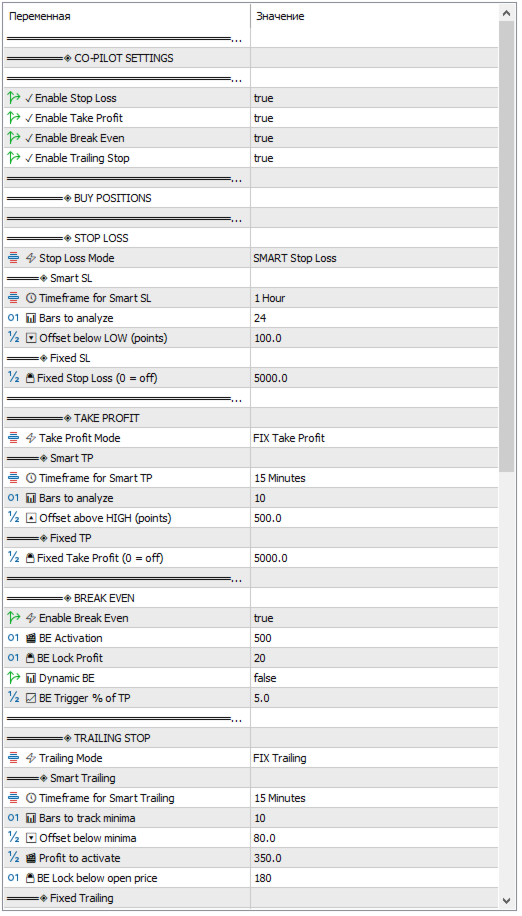
• Applies Stop Loss
• Sets Take Profit
• Activates Break Even
• Manages Trailing Stop
You can choose between Smart logic based on market structure or Fixed levels based on predefined points.
Every function can be enabled or disabled independently.
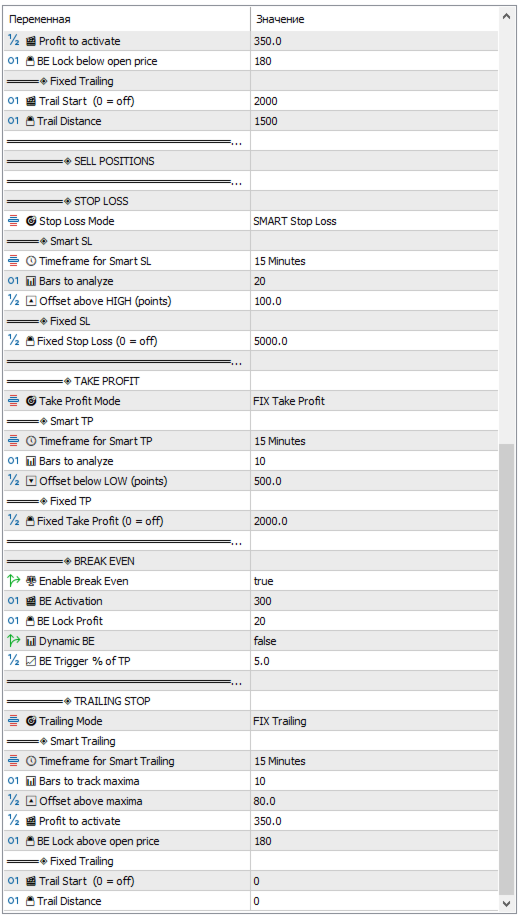
The system works separately for BUY and SELL positions, giving you full flexibility.
Key Advantages
1. Professional Risk Control
Automatically protects every manual trade using structured logic instead of emotional decisions.
2. Smart Stop Loss
Calculates Stop Loss using recent market highs and lows on selected timeframes.
3. Smart Take Profit
Targets realistic price levels based on structure instead of arbitrary numbers.
4. Dynamic Break Even
Moves Stop Loss to break even when the trade reaches defined progress levels.
5. Intelligent Trailing
Locks in profits as the market moves in your favor.
6. Modular Control
Each module can be turned on or off depending on your trading style.
Core Input Parameters
General Settings
-
CoPilotStopLoss – Enable or disable Stop Loss management
-
CoPilotTakeProfit – Enable or disable Take Profit management
-
CoPilotBreakEven – Enable or disable Break Even
-
CoPilotTrailing – Enable or disable Trailing Stop
BUY Position Settings
Stop Loss
-
Buy_SL_Mode – Stop Loss mode
-
SMART
-
FIX
-
Smart SL parameters:
-
Buy_SmartSL_Timeframe – Timeframe for analysis
-
Buy_SmartSL_Bars – Number of bars to analyze
-
Buy_SmartSL_Offset – Offset below structure low in points
Fixed SL:
-
FixSL_Buy – Fixed Stop Loss in points
Take Profit
-
Buy_TP_Mode – Take Profit mode
-
SMART
-
FIX
-
Smart TP parameters:
-
Buy_SmartTP_Timeframe – Timeframe for analysis
-
Buy_SmartTP_Bars – Number of bars to analyze
-
Buy_SmartTP_Offset – Offset above structure high in points
Fixed TP:
-
FixTP_Buy – Fixed Take Profit in points
Break Even
-
UseBreakEvenBuy – Enable Break Even
-
FixBreakEvenPointsBuy – Activation distance in points
-
FixBreakEvenPlusBuy – Extra profit locked after BE activation
-
UseDynamicBreakEvenBuy – Enable dynamic BE
-
BETriggerPercentBuy – Break Even trigger as percentage of TP
Trailing Stop
-
Buy_Trailing_Mode – Trailing mode
-
SMART
-
FIX
-
Smart trailing parameters:
-
Buy_SmartTrailing_Timeframe – Timeframe for trailing logic
Who Is This For?
• Manual traders who want automation without losing control
• Traders who struggle with emotional exits
• Scalpers and intraday traders
• Swing traders who want structured management
• Portfolio traders managing multiple positions
Why Use Trading Co-Pilot?
Because entries are only half of trading.
Profitability comes from disciplined exit management.
Trading Co-Pilot enforces structure, consistency, and precision on every position.
It turns manual trading into a controlled, professional process.