Trade Assistant MT5 PRO
- Yardımcı programlar
- Sürüm: 3.40
- Güncellendi: 10 Haziran 2026
- Etkinleştirmeler: 15

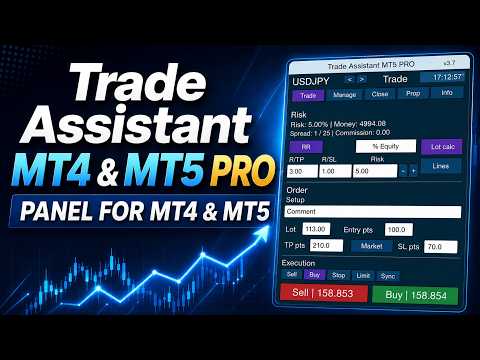
Trade Assistant MT4/MT5 PRO, MetaTrader 4/5 için geliştirilmiş profesyonel bir trading panelidir. İşlemleri hızlı, pratik ve görsel olarak net şekilde kontrol etmek isteyen traderlar için tasarlanmıştır. Ürün, tekrarlayan manuel işlemleri azaltmaya, emir açma ve yönetme sürecini hızlandırmaya, risk yönetimini standartlaştırmaya ve manuel trading’i daha disiplinli hale getirmeye yardımcı olur.
Bu araç trader yerine sinyal aramaz ve sihirli sonuçlar vaat etmez. Görevi çok daha pratik ve faydalıdır: doğrudan grafik üzerinde kullanabileceğiniz rahat bir trading altyapısı sunmak. Giriş noktasını, işlem fikrini ve piyasa mantığını siz belirlersiniz. Trade Assistant MT4/MT5 PRO ise bu fikri net risk, pozisyon hacmi, Stop Loss, Take Profit, Breakeven, Trailing Stop ve açık pozisyon yönetimi içeren kesin bir trading planına hızlıca dönüştürmenize yardımcı olur.
Her seferinde pozisyon hacmini manuel hesaplamaktan, terminalin standart emir pencerelerini açmaktan, Stop Loss mesafesini kontrol etmekten, koruma seviyelerini taşımaktan, Pending Orders silmekten, Partial Close yapmaktan ve işlemin kendi sistem kurallarınıza uyup uymadığını sürekli kontrol etmekten yorulduysanız, bu asistan tam olarak sizin için oluşturulmuştur.
Kullanım talimatı: Trade Assistant MT4/MT5 PRO kullanım talimatını açNeden çoğu manuel trader bu araca ihtiyaç duyar
Birçok trader için asıl sorun strateji eksikliği değildir. Sorun, trading fikri ile gerçek uygulama arasında çok fazla manuel adım bulunmasıdır.
Trader riski hesaplarken, hacmi ayarlarken, Stop Loss mesafesini kontrol ederken, yeni emir penceresini açarken, emir tipini kontrol ederken, işlemi onaylarken ve sonra pozisyonu yönetirken piyasa çoktan hareket etmiş olabilir. Duygular artar, hata sayısı yükselir.
Manuel trading’de en sık görülen problemler:
risk yüzdesi bilinir, ancak pozisyon hacmi her seferinde farklı hesaplanır;
Stop Loss kurallara göre değil, “göz kararı” yerleştirilir;
trader pozisyonu hızlıca Breakeven’a taşımak ister, ancak bunu gecikmeli yapar;
Trailing Stop düzenli uygulanmaz;
Partial Close manuel yapılır ve her zaman doğru zamanda gerçekleşmez;
grafikte işlemin tüm yapısını hızlıca görmek zordur;
Pending Orders grafikte gerekenden daha uzun süre kalır;
yüksek volatilitede işlem yürütme çok fazla zaman alır.
Trade Assistant MT4/MT5 PRO tam olarak bu pratik sorunları çözmek için tasarlanmıştır. Bu bir oyuncak ya da dekoratif panel değildir. Daha dikkatli, hızlı ve sistemli işlem yapmak isteyen traderlar için gerçek bir çalışma aracıdır.
Trade Assistant MT4/MT5 PRO ile ne elde edersiniz
Grafiğe kurduktan sonra tek bir arayüzde aşağıdaki özellikleri birleştiren kullanışlı bir trading paneli elde edersiniz:
hızlı Buy ve Sell butonları;
işlem başına risk hesaplama;
belirlenen riske göre pozisyon hacmi hesaplama;
Entry / Stop Loss / Take Profit seviyeleriyle çalışma;
işlem yapısının doğrudan grafikte görselleştirilmesi;
Risk/Reward oranı ayarı;
manuel ve otomatik Breakeven;
birden fazla Trailing Stop seçeneği;
pozisyonun Partial Close ile kısmi kapatılması;
Pending Orders silme;
gizli koruma seviyelerinin yönetimi;
Virtual Pending Orders yönetimi;
ayrı bilgi bloğu üzerinden işlem durumunun kontrolü.
MetaTrader 4/5’in standart pencereleri arasında geçiş yapmak yerine, işlemi tek bir kontrol merkezinden yönetirsiniz.
Ürünün ana fikri
Trade Assistant MT4/MT5 PRO, manuel trading’i şu hale getirmek için oluşturulmuştur:
daha hızlı;
daha doğru;
daha görsel ve anlaşılır;
daha disiplinli;
sistemli risk yönetimi için daha uygun.
Bu özellikle şu traderlar için önemlidir:
intraday işlem yapanlar;
günde birkaç işlem açanlar;
fiyat seviyeleriyle çalışanlar;
Stop Loss ve Take Profit’i her işlemin zorunlu parçası olarak kullananlar;
money management kurallarını ihlal etmek istemeyenler;
tam otomatik algoritma yerine manuel kontrolü tercih edenler.
Ürünün temel avantajları
1. Hızlı işlem açma
Panel, gereksiz adımlar olmadan Buy ve Sell işlemleri açmanıza olanak tanır.
Terminalin standart pencerelerinde zaman kaybetmezsiniz ve işlemin temel parametrelerini doğrudan grafikte görürsünüz.
2. Dahili risk yönetimi
Riski uygun bir formatta belirlersiniz, panel ise Stop Loss ve işlem enstrümanının özelliklerini dikkate alarak pozisyon hacmini hesaplar.
3. Görsel kontrol
Sadece alanlara rakam girmezsiniz. İşlemin yapısını grafikte görürsünüz: giriş, stop, take profit, risk bölgesi ve potansiyel kâr bölgesi.
4. Zaman tasarrufu
Asistan, özellikle aktif trading, yüksek volatilite ve birden fazla giriş senaryosu ile çalışırken rutin işlemlerin sayısını azaltır.
5. İşlem yönetimi
Girişten sonra panel yalnızca pozisyon açmaya değil, pozisyonu yönetmeye de yardımcı olur: Breakeven’a taşıma, Trailing Stop etkinleştirme, hacmin bir kısmını kapatma ve Pending Orders silme.
6. Evrensellik
Ürün neredeyse her manuel trading tarzı için kullanılabilir: scalping, intraday, breakout trading, pullback trading, seviye bazlı trading ve ilgi bölgelerine göre trading.
Ana fonksiyonlar
1. Buy / Sell butonları
Panelde piyasa işlemleri açmak için hızlı trading butonları bulunur. Bu, işlem yürütme hızının ve trading senaryosunu gerçek zamanlı kontrol etmenin önemli olduğu durumlarda kullanışlıdır.
Desteklenenler:
Buy;
Sell;
Stop;
Limit.
Bu nedenle panel yalnızca piyasa girişleri için değil, Pending Orders üzerinden işlem yapmak için de uygundur.
2. İşlem başına risk hesaplama
Ürünün en önemli fonksiyonlarından biri Risk Calculation özelliğidir.
Riski şu formatlarda belirleyebilirsiniz:
bakiyenin yüzdesi;
equity yüzdesi;
free margin yüzdesi;
hesap para biriminde sabit tutar;
panelde bulunan alternatif hesaplama modları.
Bundan sonra asistan şunları hesaplar:
parasal risk;
pozisyon büyüklüğü;
işlem hacmi;
belirlenen risk ile mevcut Stop Loss arasındaki ilişki.
Bu, farklı enstrümanlarda ve farklı piyasa koşullarında aynı kurallarla işlem yapmaya yardımcı olur.
Pratikte bu fonksiyon şunları sağlar:
işlemler risk açısından karşılaştırılabilir hale gelir;
aşırı büyük hacim açma olasılığı azalır;
trading sistemi kurallarına uymak kolaylaşır;
stratejiyi ölçeklendirmek daha net hale gelir;
duyguların etkisi azalır.
3. Stop Loss’a göre pozisyon hacmi hesaplama
Dahili hacim hesaplama şu unsurları dikkate alır:
seçilen risk modu;
Stop Loss büyüklüğü;
sembol özellikleri;
minimum hacim;
maksimum hacim;
hacim adımı;
enstrümanın trading parametreleri.
Bu sayede panel, lotu manuel hesaplayıp yanlışlıkla plana uymayan bir pozisyon açma hatasını önlemeye yardımcı olur.
Aktif manuel trading için bu özellikle önemlidir. Güçlü bir strateji bile pozisyon hacmi her seferinde düzensiz seçiliyorsa anlamını kaybeder.
4. Entry / Stop Loss / Take Profit seviyeleri
Panel işlemin temel yapısıyla çalışır:
Entry;
Stop Loss;
Take Profit.
Bu seviyeler işlemi önceden hazırlamak ve senaryoyu görsel olarak kontrol etmek için kullanılabilir.
Bu yaklaşımın avantajları:
trader işlem planının yapısını hemen görür;
işlem açılmadan önce kalitesini değerlendirmek kolaylaşır;
risk/kâr oranı daha net hale gelir;
uygulama disiplinini kontrol etmek kolaylaşır;
görsel işlem yapısı grafik üzerinde çalışmayı daha rahat hale getirir.
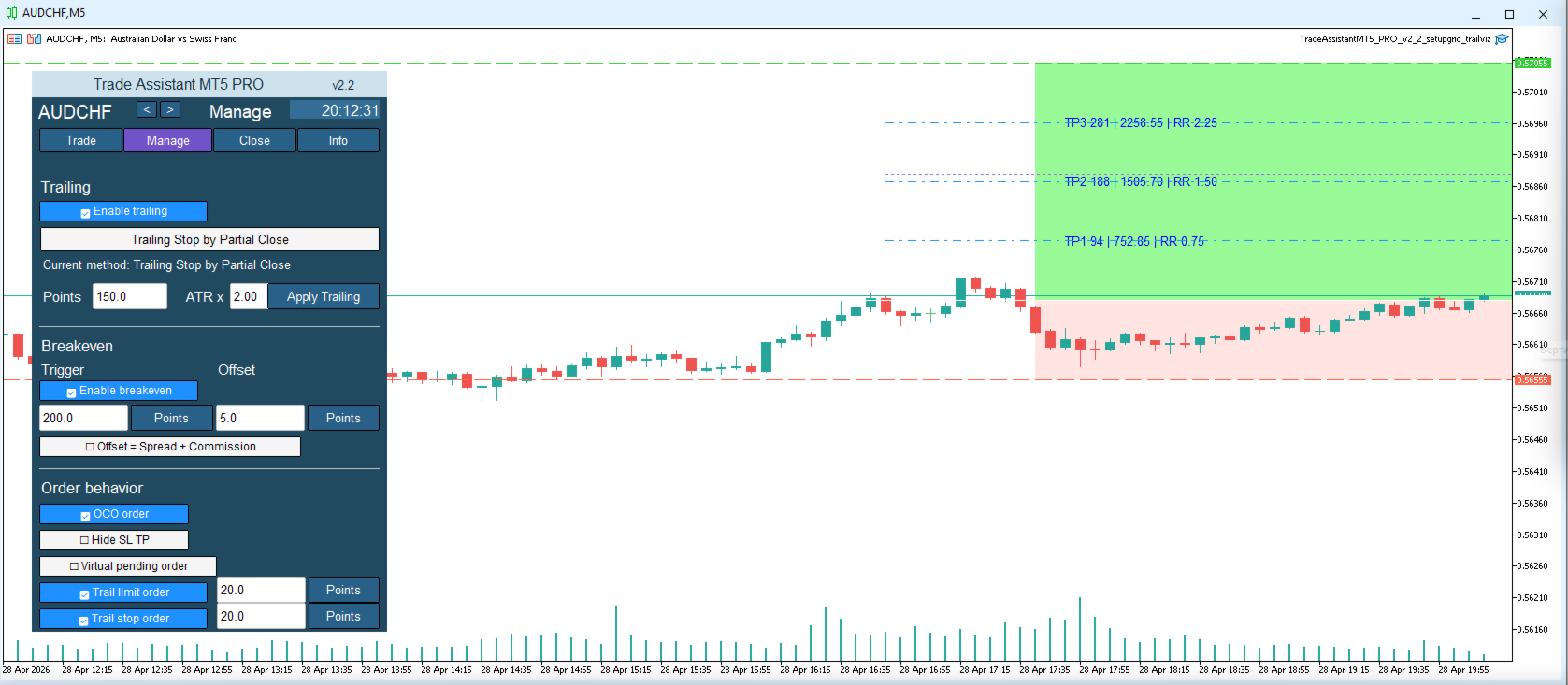
5. Grafikte görsel işlem haritası
Trade Assistant MT4/MT5 PRO yalnızca butonlar ve giriş alanlarından ibaret değildir.
Grafikte trading senaryosunun net bir görsel yapısını oluşturur.
Genellikle trader şunları görür:
risk bölgesi;
potansiyel kâr bölgesi;
giriş seviyesi;
Stop Loss seviyesi;
Take Profit seviyesi;
işleme ait ek görsel referanslar.
Bu, karar anında özellikle faydalıdır:
stop seviyesinin mantıklı olup olmadığı hemen görülür;
hacmin aşırı büyük olup olmadığı daha kolay değerlendirilir;
işlemin kendi kurallarınıza uyup uymadığı daha net anlaşılır.
Birçok trader için panelin en faydalı bölümlerinden biri tam olarak bu görselleştirmedir.
6. Risk/Reward ve TP/SL oranı ayarı
Panel, Take Profit ile Stop Loss arasındaki oranı kullanmanıza olanak tanır.
İstenen işlem profilini hızlıca ayarlayabilirsiniz:
1:1;
1.5:1;
2:1;
3:1;
ve diğer değerler.
Trading sisteminiz sabit veya yarı sabit risk/kâr oranına dayanıyorsa bu çok kullanışlıdır.
Avantajları:
işlem hazırlığını hızlandırır;
işlemleri standartlaştırır;
trading’i algoritmik disipline yaklaştırır;
strateji istatistiklerini korumayı kolaylaştırır.
7. Breakeven — başabaş seviyesine taşıma
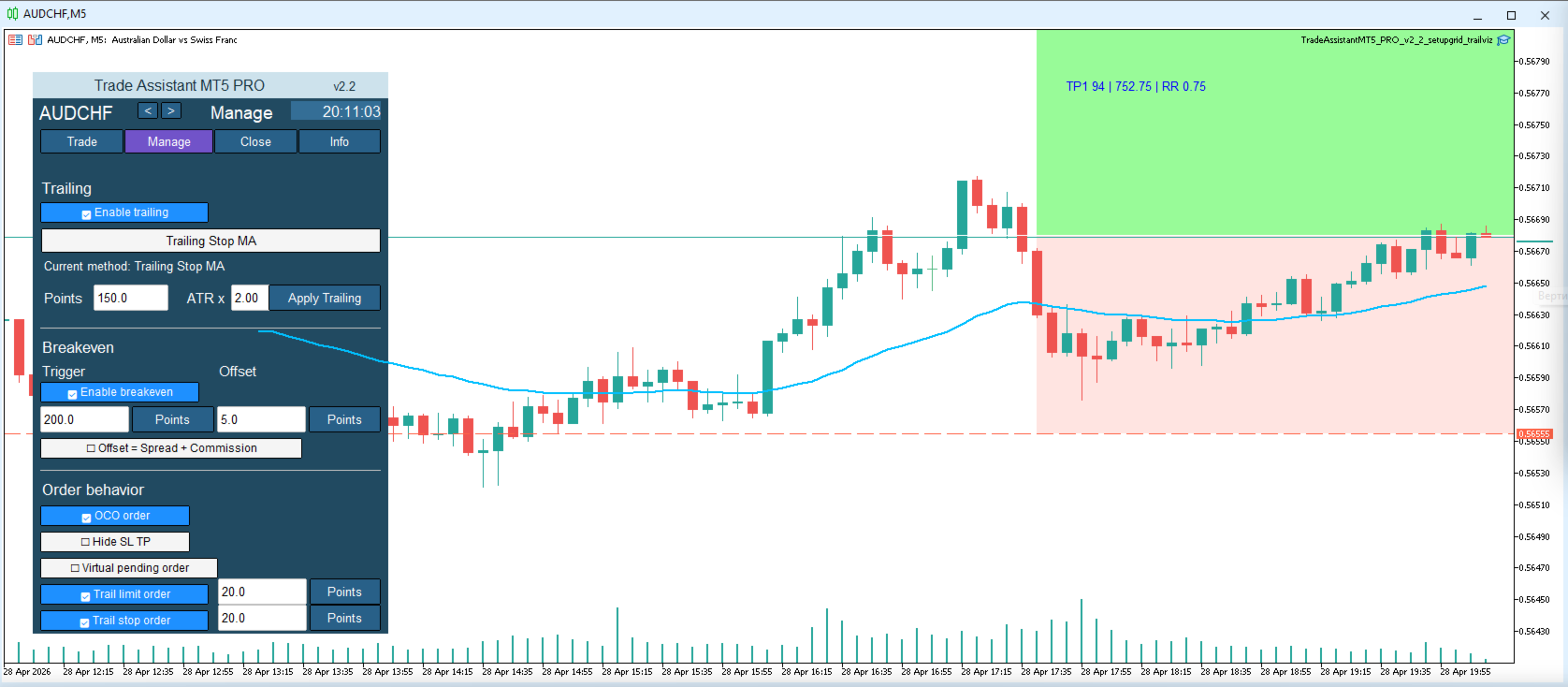
Panelde Breakeven bloğu bulunur.
Bu özellik şunları sağlar:
pozisyonu manuel olarak Breakeven’a taşıma;
fiyat belirlenen mesafeyi geçtikten sonra Stop Loss’u otomatik taşıma;
offset kullanma;
spread ve commission dikkate alma.
Breakeven neden gereklidir:
Fiyat doğru yönde belirli bir mesafe ilerlediğinde trader genellikle pozisyondaki riski kaldırmak ister. Bunu her seferinde manuel yapmak pratik değildir. Asistan bu süreci kolaylaştırır.
Ayarlanabilenler:
tetikleme seviyesi;
giriş noktasına göre offset;
maliyetlerin dikkate alınması;
sonraki yönetim mantığı.
Bu, pozisyonu korumaya ve duygusal kararları azaltmaya yardımcı olur.
8. Trailing Stop
Ürün, Trailing Stop ile pozisyon yönetimini destekler.
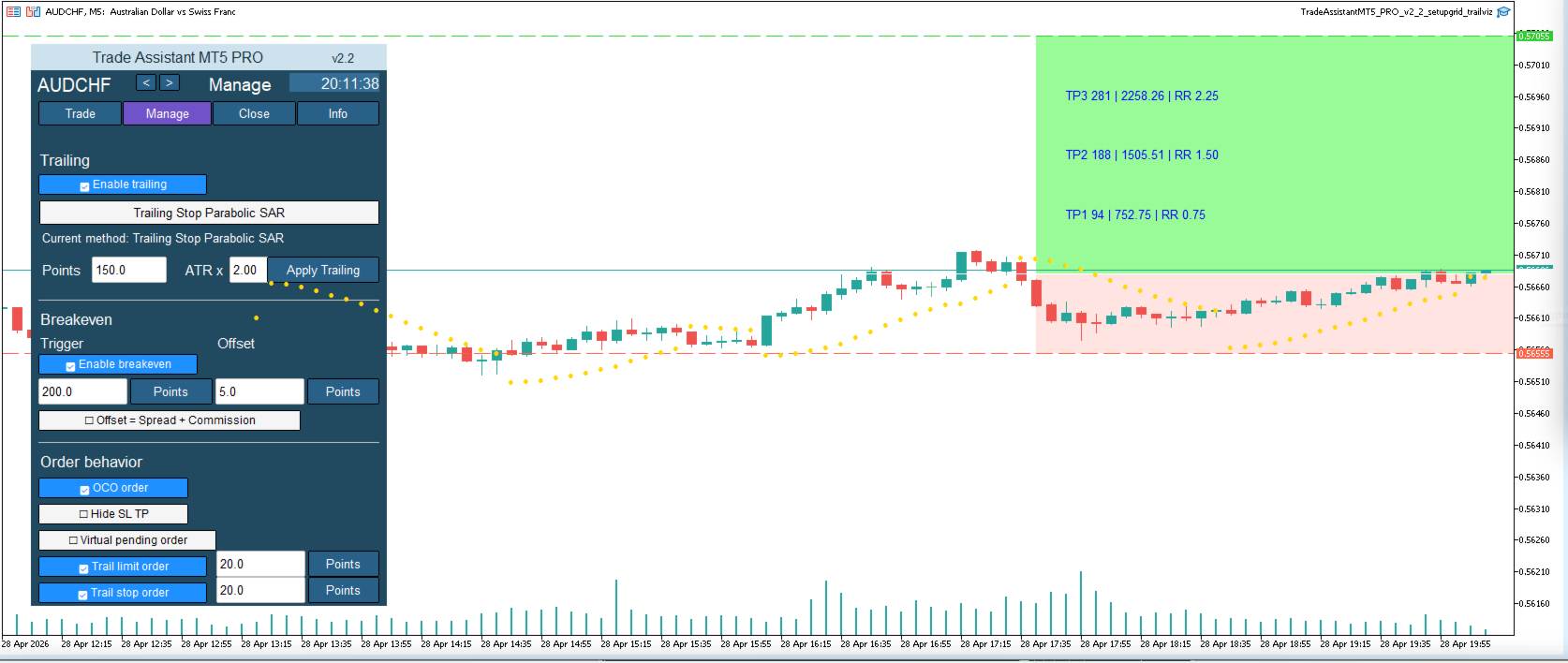
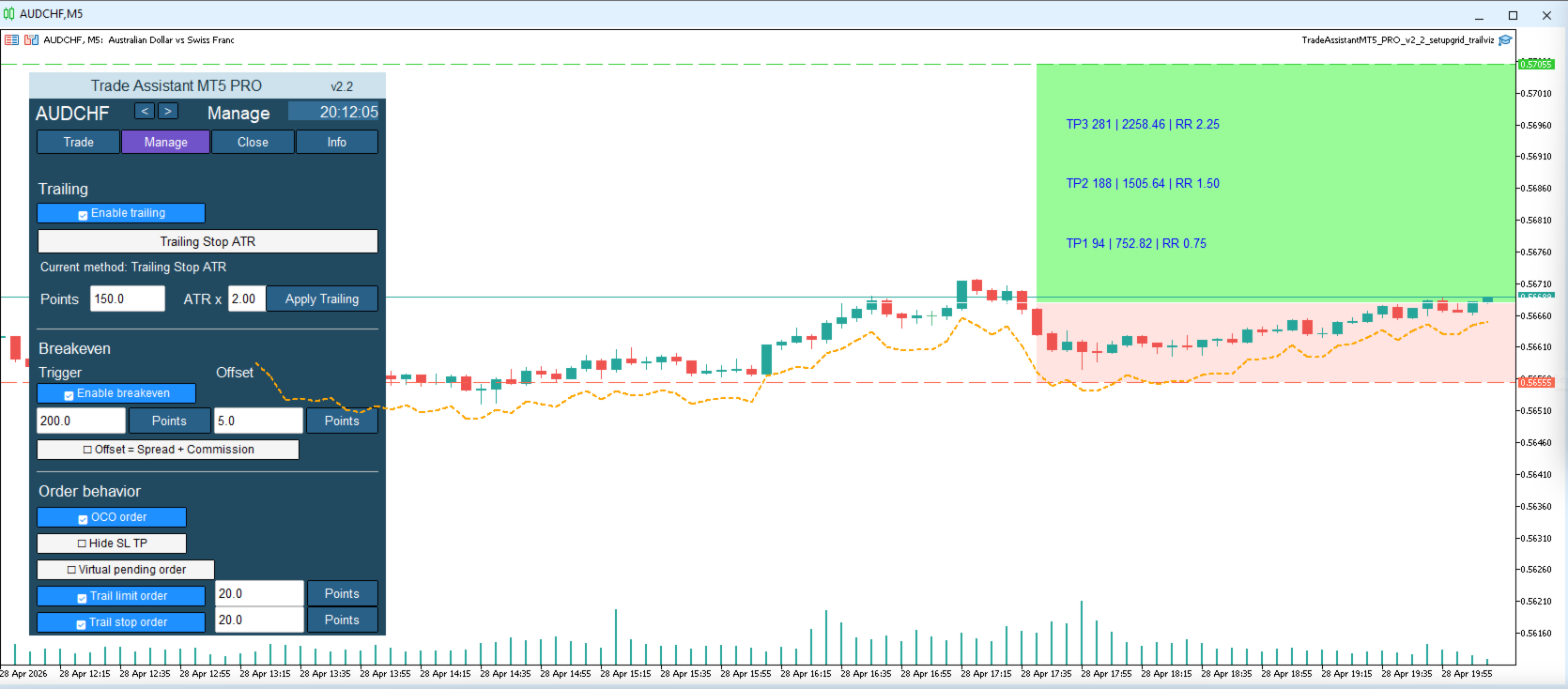
Kullanılabilen trailing mantıkları şunları içerir:
mesafeye göre standart trailing;
ATR’ye göre trailing;
Moving Average’a göre trailing;
Fractals’a göre trailing;
Parabolic SAR’a göre trailing;
önceki mumun maksimum/minimum seviyesine göre trailing;
ek mantığa sahip diğer takip seçenekleri.
Neden önemlidir:
Birçok trader giriş yapmayı bilir, ancak pozisyon yönetiminde zorlanır. Sonuç olarak ya kârı çok erken alır ya da açık kârı uzun süre korumasız bırakır.
Trailing Stop şunlara yardımcı olur:
açık kârı koruma;
güçlü hareketleri takip etme;
manuel rutinin bir kısmını otomatikleştirme;
daha tutarlı işlem yapma.
9. Partial Close
Panelde Partial Close fonksiyonu bulunur.
Trader şu durumlarda kullanır:
kârın bir kısmını sabitlemek;
riski azaltmak;
fiyat ilerledikçe pozisyon hacmini küçültmek;
Partial Close’u Breakeven ve Trailing Stop ile birlikte kullanmak.
Bu özellikle şunlar için faydalıdır:
intraday trading;
dalga senaryoları;
seviye bazlı trading;
kademeli kâr alma.
10. Pending Orders yönetimi
Trade Assistant MT4/MT5 PRO, Pending Orders ile çalışmayı kolaylaştırır.
Panelde şu işlemler yapılabilir:
Stop ve Limit emirleri yerleştirme;
Pending Orders silme;
artık geçerli olmayan setup’ları iptal etme mantığı;
giriş senaryolarını koruma.
Bu, özellikle piyasa hızlı değiştiğinde zaman kazandırır ve rastgele hataları azaltır.
11. OCO mantığı
Panel, emir yönetimi mantığı içinde One Cancels Other prensibini destekler.
Bu şu durumlarda faydalı olabilir:
breakout senaryoları;
alternatif giriş noktaları;
bir senaryonun diğerini iptal etmesi gerektiğinde.
Bu mantık emir yönetimini daha profesyonel hale getirir ve grafikte gereksiz Pending Orders kalmasını önlemeye yardımcı olur.
12. Hide SL/TP
Gelişmiş modlarda asistan gizli koruma seviyelerinin kullanılmasına izin verir:
gizli Stop Loss;
gizli Take Profit.
Bu neden kullanılır:
bazı traderlar gerçek seviyelerin broker’a gönderilmesini istemez;
koruma mantığı Expert Advisor üzerinden kontrol edilir;
işlem yönetimi panel içinde kalır.
Önemli: gizli seviyeler için terminalin ve Expert Advisor’ın aktif kalması gerekir.
13. Virtual Pending Orders
Panel Virtual Pending Orders kullanabilir.
Bu modda giriş mantığı broker tarafındaki standart pending order ile değil, panelin dahili algoritmasıyla kontrol edilir.
Avantajları:
manuel senaryo yönetiminde esneklik;
gizli giriş mantığı kullanabilme;
trading planı üzerinde daha ince kontrol.
Bu, manuel trading’de sanal mekanizmaların nasıl ve neden kullanılacağını anlayan traderlar için bir araçtır.
14. Bilgi bloğu ve trading durumu
Panelde ayrı bir bilgi bölümü bulunur. Bu bölüm şunları görmeye yardımcı olur:
mevcut sembol;
spread;
risk parametreleri;
koruma fonksiyonlarının durumu;
panelin aktif modları;
ana trading yapılandırması.
Bu, trading sürecinde kontrol ve teşhis için kullanışlıdır.