Second and Custom Timeframe Charts MT5
- Yardımcı programlar
- Sürüm: 6.0
- Etkinleştirmeler: 5

Second and Custom Timeframe Charts
See the market between standard timeframes.
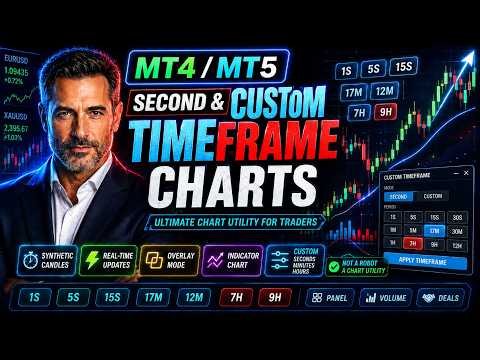
Second and Custom Timeframe Charts is a professional chart utility for MetaTrader 5 that creates synthetic candles for non-standard timeframes directly from market data. It is designed for traders who need more flexibility than the default MT5 timeframe set can provide.
Standard charts show only fixed periods. But the market does not always move in standard blocks. Sometimes the most important structure is visible on 5 seconds, 15 seconds, 17 minutes, 12 minutes, 7 hours, or another custom period that your platform does not offer by default.
This tool gives you that missing layer of market vision.
With Second and Custom Timeframe Charts, you can build and switch between custom second, minute, and hour charts using a clean on-chart panel. The utility creates synthetic candles, updates them in real time, and can also create a custom symbol chart so indicators can be applied to the generated timeframe.
It is not a trading robot. It does not open, close, or modify trades. It is a visual and analytical tool created to give you more control over how you read price action.
Why this tool is useful
Most traders are limited by default timeframes. They jump from M1 to M5, from M15 to H1, or from H4 to D1, missing everything in between.
Second and Custom Timeframe Charts removes that limitation.
You can analyze the market with custom periods such as:
1S, 5S, 10S, 15S, 20S, 17M, 12M, 7H, 9H
You are not locked into standard chart intervals. You can create the timing structure that fits your trading logic, your instrument, and your strategy.
Main features
Custom second charts
Create synthetic candles for short-term market reading, including 1S, 5S, 10S, 15S, 20S and other second-based periods.
Custom minute charts
Build non-standard minute charts such as 12M, 17M, 20M, 45M or any other custom minute interval.
Custom hour charts
Analyze higher-timeframe structure with flexible hour periods such as 7H, 9H or other non-standard hour charts.
On-chart timeframe switch panel
Switch between custom timeframes directly from the chart with a simple visual button panel.
Synthetic candlestick display
The utility builds candles with open, high, low, close and tick volume values based on available market data.
Real-time updates
The synthetic chart updates automatically using timer and tick events.
Custom symbol chart creation
The tool can create a separate custom symbol chart for the selected synthetic timeframe. This makes it possible to apply indicators to the generated chart.
Optional overlay mode
Synthetic candles can be drawn directly over the current chart when overlay mode is enabled.
Synthetic volume display
View volume bars calculated for the generated custom timeframe.
Synthetic price line
Display the current synthetic close price line for easier chart reading.
Deal markers
Show buy and sell deal markers on the synthetic chart to review entries and exits in the context of the custom timeframe.
Flexible visual settings
Customize candle colors, wick color, price line color, volume colors, panel position, candle width, and chart display behavior.
What makes it different
This is not just a visual panel with buttons.
Second and Custom Timeframe Charts actually builds synthetic candles from available tick and M1 data, then displays them as a custom market structure. For second-based timeframes, the utility can use tick data. For minute and hour-based timeframes, it builds candles from M1 data.
The result is a much more flexible way to study price movement.
You can see fast microstructure, unusual rhythm, and custom timing zones that are normally invisible in standard MetaTrader 5 charts.
Who it is for
This utility is useful for:
Scalpers who need second-based market structure.
Intraday traders who want more precise entries and better timing.
Price action traders who want to test non-standard candle periods.
Algorithmic traders who want to visually study custom timeframe behavior.
Traders who use indicators and need a separate custom symbol chart.
Manual traders who want a cleaner and more flexible chart workflow.
Anyone who feels limited by standard MT5 timeframes.
Example use cases
Use 1S or 5S charts to study very fast market movement.
Use 10S, 15S, or 20S charts to smooth tick noise while keeping high-speed detail.
Use 12M or 17M charts to analyze non-standard intraday rhythm.
Use 7H or 9H charts to review broader structure from a different perspective.
Use the custom symbol chart to apply your favorite indicators to the generated timeframe.
Use deal markers to review your trades on the exact custom period that matters to your strategy.
How it works
Attach the utility to a MetaTrader 5 chart.
Set the list of custom timeframes in the input parameters.
Use the panel buttons to select the timeframe you want.
The utility builds synthetic candles for the selected period.
If enabled, it creates and opens a custom symbol chart for indicator analysis.
The chart continues updating automatically as new data arrives.
Important settings
InpTimeframes
List of custom timeframes separated by commas. Supported formats: S for seconds, M for minutes, H for hours. Example: 1S,5S,10S,15S,20S,17M,12M,7H,9H.
InpMaxBars
Maximum number of synthetic bars to display.
InpTimerSec
Update interval in seconds.
InpCreateIndicatorChart
Creates a custom symbol chart for the selected synthetic timeframe.
InpOpenIndicatorChartOnSwitch
Automatically opens the custom symbol chart when switching timeframe.
InpDrawOverlayChart
Draws the synthetic candles directly on the current chart.
InpShowSyntheticVolume
Shows calculated volume bars for the synthetic candles.
InpShowSyntheticPriceLine
Shows the current synthetic price line.
InpShowSyntheticDeals
Shows historical buy and sell deal markers on the synthetic chart.
InpFallbackToM1WhenNoTicks
Allows fallback to M1 data when tick data is unavailable for second-based charts.
Important notes
This product is a charting and analysis utility. It does not trade automatically.
It does not provide trading signals.
It does not guarantee profit.
The quality and depth of second-based charts depend on the tick data available from your broker and terminal history.
Minute and hour custom charts are built from M1 data.
For best results, allow MetaTrader 5 to load enough historical data for the symbol you want to analyze.
Why traders choose custom timeframes
A standard timeframe can hide important information.
A custom timeframe can reveal a cleaner rhythm, a better structure, or a more useful candle flow for your trading style.
Second and Custom Timeframe Charts gives you the freedom to stop adapting your analysis to the platform’s default limitations and start building charts around the way you actually read the market.
More control.
More flexibility.
More market context.
Second and Custom Timeframe Charts turns MetaTrader 5 into a more flexible charting workspace for traders who want to look deeper than standard timeframes.