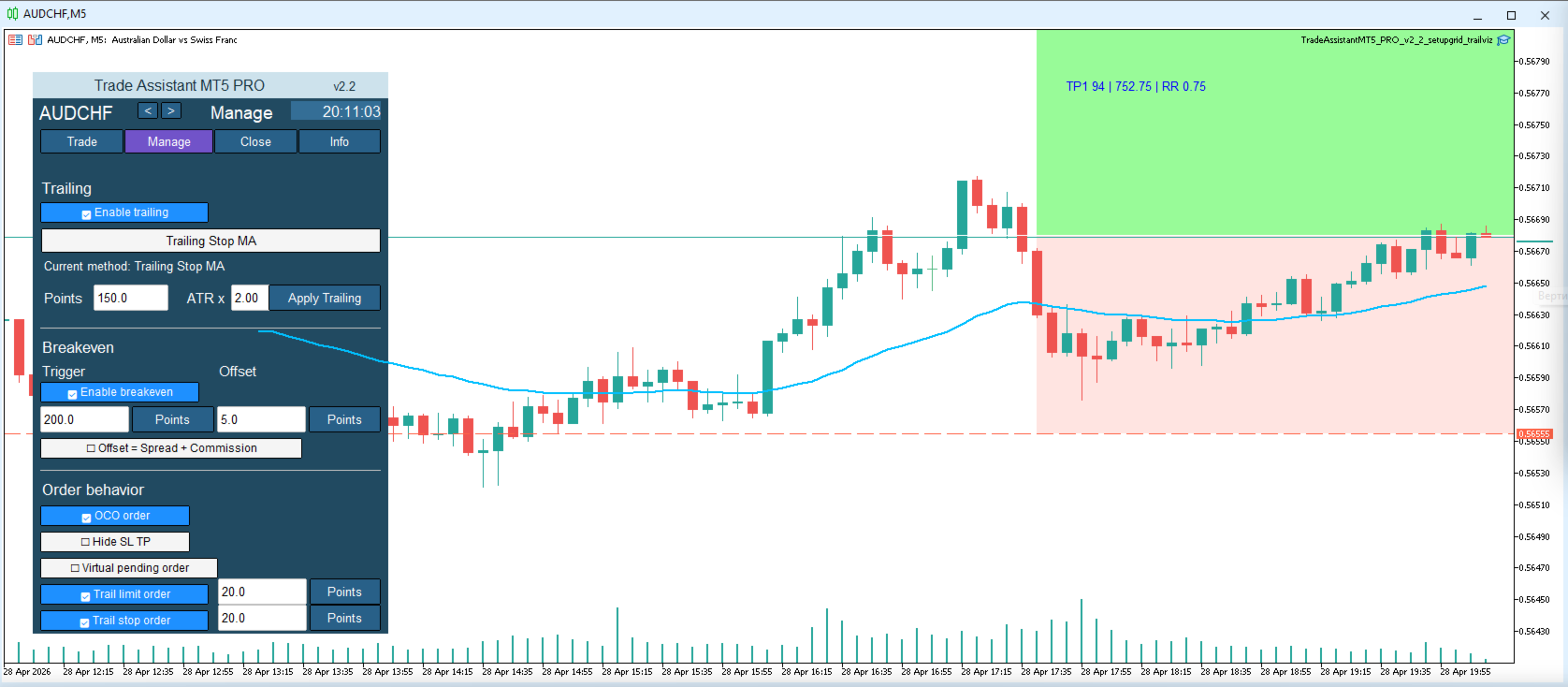
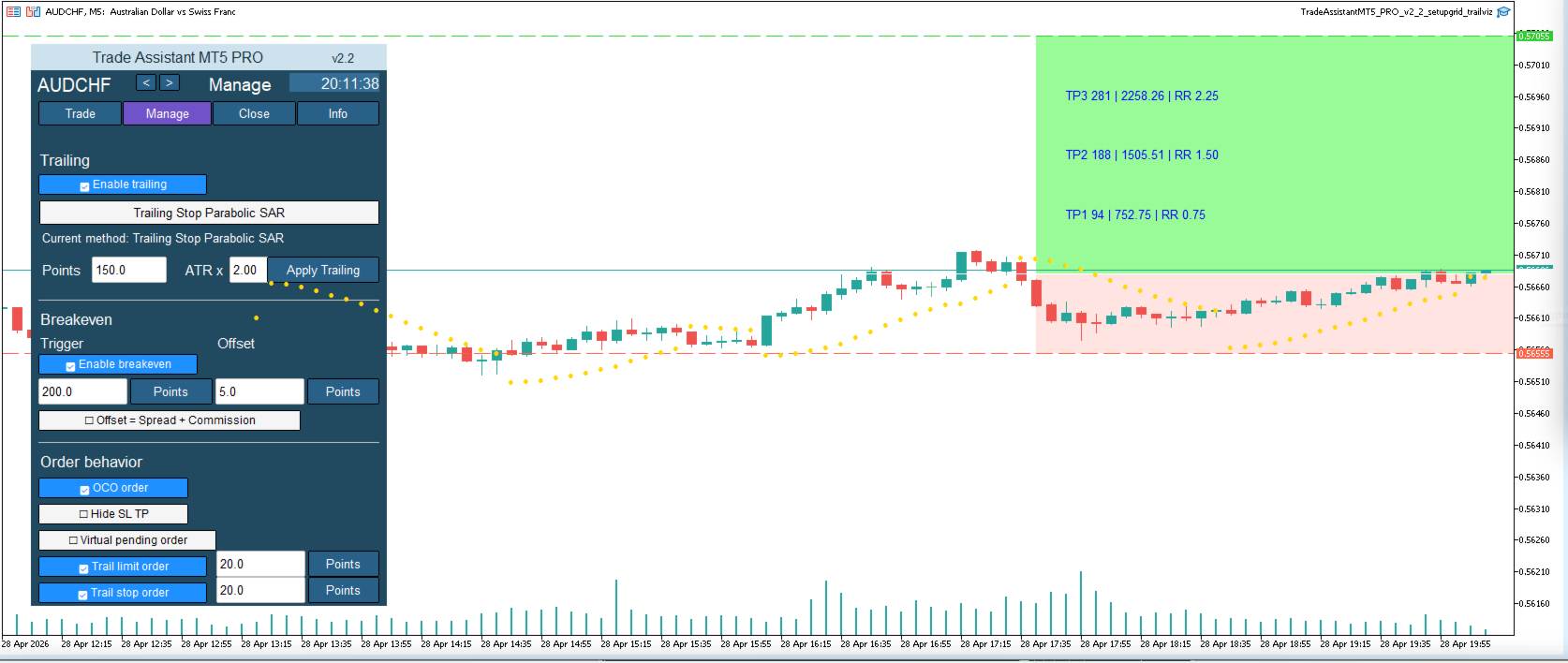
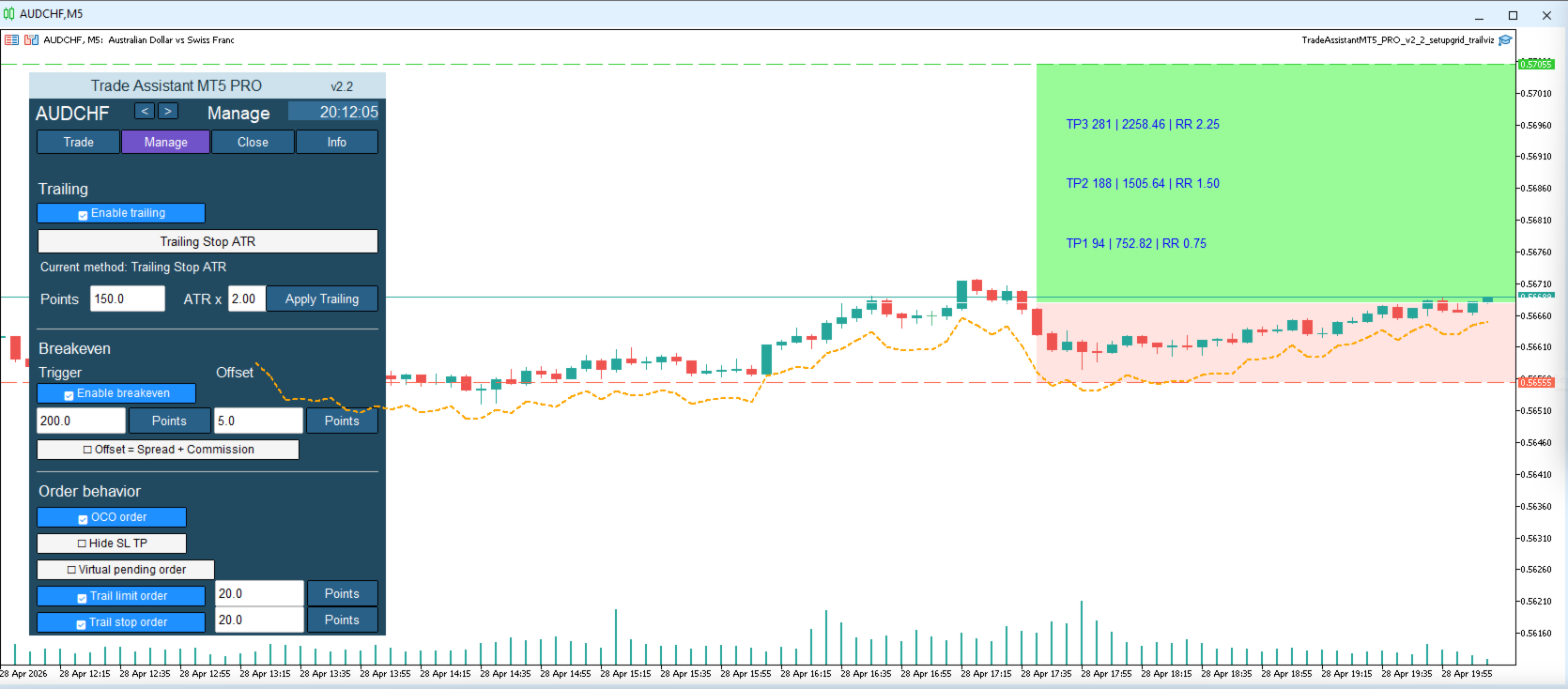
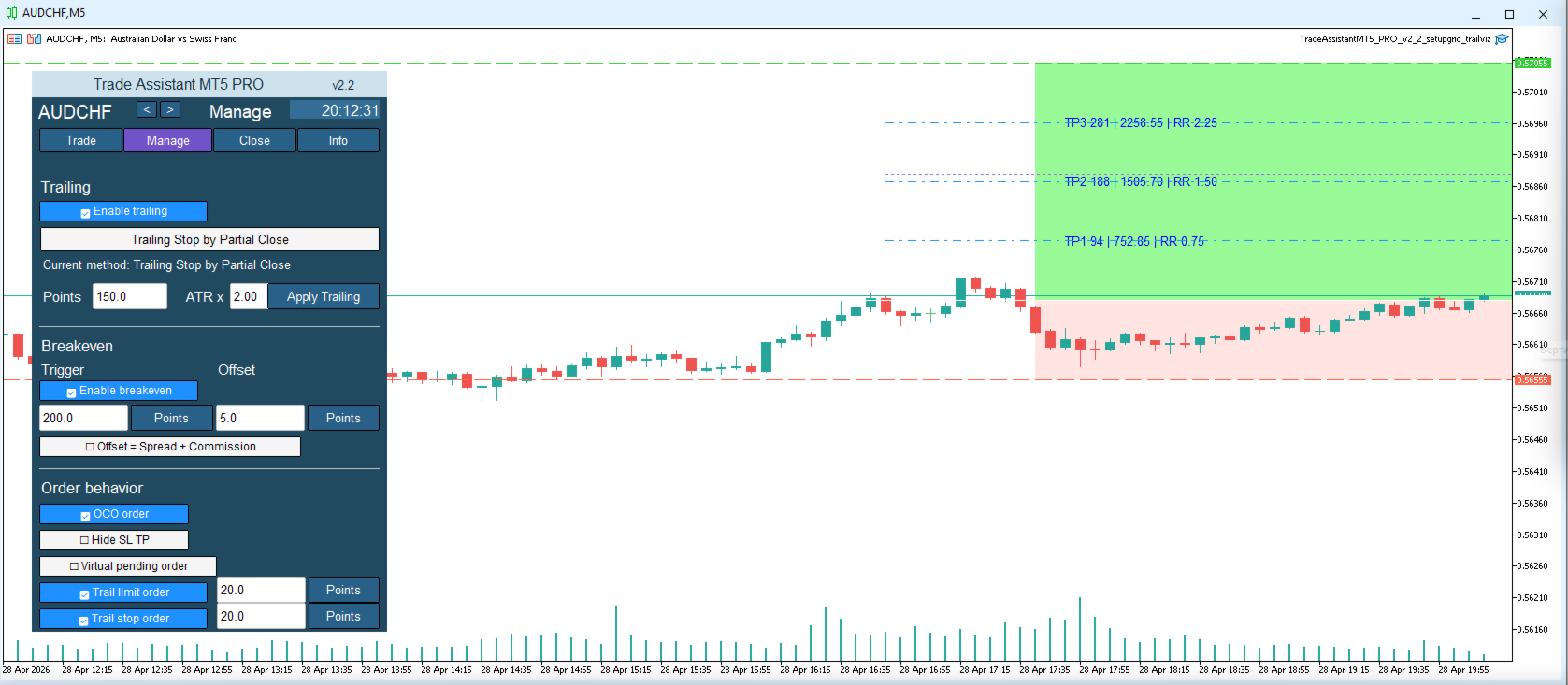
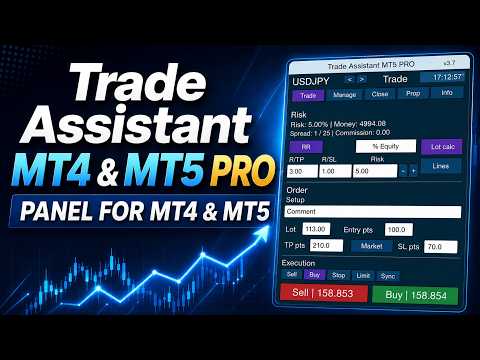
Trade Assistant MT5 PRO

  • ユーティリティ
  • Andrei Strashko
    Andrei Strashko
    私の名前はアンドレイです。私はプロのトレーダーであり、MetaTrader 4 および MetaTrader 5 向けの取引ソリューション開発者です。10年以上にわたり、取引ロボット、インジケーター、スクリプト、戦略を開発し、実際の取引経験と深いプログラミング知識を組み合わせてきました。
  • バージョン: 3.40
  • アップデート済み: 10 6月 2026
  • アクティベーション: 15

使用説明:Trade Assistant MT4/MT5 PRO の使用説明を開く

Trade Assistant MT4/MT5 PRO 使用説明

Trade Assistant MT4/MT5 PRO は、MetaTrader 4/5 用のプロフェッショナルなトレードパネルです。素早く、便利で、視覚的に分かりやすく取引を管理したいトレーダーのために作られています。この製品は、日常的な手作業を減らし、注文の発注と管理を速くし、リスク管理を標準化し、手動トレードをより規律あるものにします。

このツールは、トレーダーの代わりにシグナルを探すものではありません。また、魔法のような結果を約束するものでもありません。その目的はもっと実用的です。チャート上に便利なトレードインフラを提供することです。エントリーポイント、取引アイデア、市場ロジックはあなたが決めます。そして Trade Assistant MT4/MT5 PRO は、そのアイデアを明確なリスク、ポジションサイズ、Stop Loss、Take Profit、Breakeven、Trailing Stop、ポジション管理を含む正確なトレードプランへ素早く変換する手助けをします。

毎回ポジションサイズを手動で計算し、標準の注文ウィンドウを開き、Stop Loss までの距離を確認し、保護レベルを移動し、Pending Orders を削除し、Partial Close を行い、さらにその取引が自分のシステムルールに合っているかを確認することに疲れているなら、このアシスタントはまさにあなたのためのツールです。

なぜ多くの手動トレーダーにこのツールが必要なのか

多くのトレーダーの問題は、戦略がないことではありません。問題は、トレードアイデアから実行までの間に手作業が多すぎることです。

トレーダーがリスクを計算し、取引量を設定し、Stop Loss までの距離を確認し、新規注文ウィンドウを開き、注文タイプを確認し、取引を実行し、その後ポジションを管理している間に、市場はすでに動いてしまうことがあります。感情は強くなり、ミスも増えます。

手動トレードでよくある問題:

リスクのパーセンテージは分かっているが、ポジションサイズの計算が毎回違う;

Stop Loss がルールではなく感覚で置かれている;

ポジションを素早く Breakeven に移動したいが、操作が遅れる;

Trailing Stop の使用が一貫していない;

Partial Close が手動で行われ、適切なタイミングで実行されないことがある;

チャート上で取引全体の構造を素早く確認しにくい;

Pending Orders が必要以上に長くチャートに残る;

高ボラティリティ時に、実行操作に時間がかかりすぎる。

Trade Assistant MT4/MT5 PRO は、まさにこれらの実務的な問題を解決するためのツールです。これはおもちゃでも装飾的なパネルでもありません。より正確に、より速く、よりシステム的に取引したいトレーダーのための実用的な作業ツールです。

Trade Assistant MT4/MT5 PRO で得られるもの

チャートにインストールすると、次の機能を1つのインターフェースにまとめた便利なトレードパネルを利用できます:

Buy / Sell の高速ボタン;

1回の取引ごとのリスク計算;

設定されたリスクに基づくポジションサイズ計算;

Entry / Stop Loss / Take Profit レベルの管理;

チャート上での取引構造の可視化;

Risk/Reward 比率の設定;

手動および自動の Breakeven;

複数の Trailing Stop モード;

Partial Close;

Pending Orders の削除;

隠し保護レベルの管理;

Virtual Pending Orders の管理;

専用情報ブロックによる取引状態の確認。

MetaTrader 4/5 の標準ウィンドウを行き来する代わりに、1つの取引管理センターから操作できます。

製品の基本コンセプト

Trade Assistant MT4/MT5 PRO は、手動トレードを次のようにするために作られています:

より速く;

より正確に;

より視覚的で分かりやすく;

より規律あるものに;

システム的なリスク管理に適したものに。

これは特に次のようなトレーダーに重要です:

デイトレードを行う人;

1日に複数の取引を行う人;

価格レベルを基準に取引する人;

Stop Loss と Take Profit を必須要素として使う人;

マネーマネジメントのルールを破りたくない人;

完全自動アルゴリズムではなく、手動コントロールを好む人。

主なメリット

1. 素早い取引開始

パネルでは、余計な操作なしに Buy と Sell を開くことができます。

標準の注文ウィンドウに時間を使う必要がなく、チャート上で取引の主要パラメータをすぐに確認できます。

2. 内蔵リスク管理

使いやすい形式でリスクを設定すると、パネルが Stop Loss と取引銘柄の仕様を考慮してポジションサイズを計算します。

3. 視覚的なコントロール

数字を入力するだけではありません。チャート上で、エントリー、ストップ、テイクプロフィット、リスクゾーン、潜在的な利益ゾーンを確認できます。

4. 時間の節約

特にアクティブトレード、高ボラティリティ、複数のエントリーシナリオを扱う場面で、繰り返し作業を減らします。

5. 取引の管理

エントリー後も、パネルはポジション管理をサポートします。Breakeven への移動、Trailing Stop の有効化、Partial Close、Pending Orders の削除などを行えます。

6. 汎用性

この製品は、スキャルピング、デイトレード、ブレイクアウト取引、押し目・戻り売り取引、レベル取引、関心ゾーンでの取引など、ほぼあらゆる手動トレードスタイルで使用できます。

主な機能

1. Buy / Sell ボタン

パネルには、成行注文を素早く開くための高速ボタンがあります。実行速度とリアルタイムでの取引シナリオ管理が重要な場面で便利です。

対応:

Buy;

Sell;

Stop;

Limit。

そのため、このパネルは成行エントリーだけでなく、Pending Orders を使った取引にも適しています。

2. 1取引ごとのリスク計算

製品の最も重要な機能の1つが Risk Calculation です。

リスクは次の形式で設定できます:

残高のパーセンテージ;

Equity のパーセンテージ;

Free Margin のパーセンテージ;

口座通貨での固定金額;

パネルに用意されたその他の計算モード。

その後、アシスタントは次を計算します:

金額ベースのリスク;

ポジションサイズ;

取引量;

設定リスクと現在の Stop Loss の関係。

これにより、異なる銘柄や異なる市場環境でも、同じルールで取引しやすくなります。

実際の効果:

各取引のリスクを比較しやすくなる;

過大なポジションを開く可能性が下がる;

トレードシステムのルールを守りやすくなる;

戦略の拡張や調整がしやすくなる;

感情の影響を減らせる。

3. Stop Loss に基づくポジションサイズ計算

内蔵のポジションサイズ計算では、次の要素を考慮します:

選択されたリスクモード;

Stop Loss の大きさ;

シンボル仕様;

最小取引量;

最大取引量;

取引量ステップ;

取引銘柄のパラメータ。

これにより、ロットを手動で計算して、意図せず計画と違うポジションを開いてしまう典型的なミスを防ぎやすくなります。

アクティブな手動トレードでは、これは特に重要です。どれほど優れた戦略でも、ポジションサイズが毎回バラバラであれば意味を失います。

4. Entry / Stop Loss / Take Profit レベル

パネルは取引の基本構造と連動します:

Entry;

Stop Loss;

Take Profit。

これらのレベルは、取引を事前に準備し、視覚的に確認するために使用できます。

この方法のメリット:

トレーダーが取引プランの構造をすぐに確認できる;

エントリー前に取引の質を評価しやすい;

リスクと利益の関係が分かりやすい;

実行ルールを守りやすい;

チャート上での作業がより便利になる。

5. チャート上の取引ビジュアルマップ

Trade Assistant MT4/MT5 PRO は、ボタンや入力欄だけのツールではありません。

チャート上に、取引シナリオの分かりやすい視覚構造を作ります。

通常、トレーダーは次を確認できます:

リスクゾーン;

潜在的な利益ゾーン;

エントリーレベル;

Stop Loss レベル;

Take Profit レベル;

取引に関する追加の視覚的ガイド。

これは判断の瞬間に非常に役立ちます:

Stop Loss が論理的かどうかをすぐに確認できる;

ポジションサイズが大きすぎないか判断しやすい;

取引が自分のルールに合っているか理解しやすい。

多くのトレーダーにとって、可視化はこのパネルで最も有用な部分の1つになります。

6. Risk/Reward と TP/SL 比率の設定

パネルでは、Take Profit と Stop Loss の比率を使用できます。

希望する取引プロファイルを素早く設定できます:

1:1;

1.5:1;

2:1;

3:1;

その他の値。

固定または半固定のリスクリワード比率を中心にしたトレードシステムを使っている場合、これは非常に便利です。

メリット:

取引準備が速くなる;

取引構造を統一できる;

トレードがアルゴリズム的な規律に近づく;

戦略統計を維持しやすくなる。

7. Breakeven — 建値への移動

パネルには Breakeven ブロックがあります。

この機能では次が可能です:

手動でポジションを Breakeven に移動する;

価格が設定距離を進んだ後、自動的に Stop Loss を移動する;

オフセットを使用する;

spread と commission を考慮する。

Breakeven が必要な理由:

価格が有利な方向へ一定距離進んだ後、トレーダーはポジションのリスクを取り除きたいと考えることがよくあります。毎回手動で行うのは不便です。アシスタントはこの作業を簡単にします。

設定できる内容:

発動レベル;

エントリーポイントからのオフセット;

取引コストの考慮;

その後の管理ロジック。

これにより、ポジションを保護し、感情的な判断を減らせます。

8. Trailing Stop

この製品では、Trailing Stop を使ってポジションを管理できます。

利用できる Trailing ロジックには次が含まれます:

距離ベースの標準 Trailing;

ATR に基づく Trailing;

Moving Average に基づく Trailing;

Fractals に基づく Trailing;

Parabolic SAR に基づく Trailing;

前のバーの高値/安値に基づく Trailing;

追加ロジックを持つその他の管理方式。

なぜ重要なのか:

多くのトレーダーはエントリーはできますが、ポジション管理が苦手です。その結果、利益を早く確定しすぎたり、含み益を長時間保護しないままにしたりします。

Trailing Stop は次を助けます:

含み益を保護する;

強い値動きに追随する;

手動作業の一部を自動化する;

より一貫した取引を行う。

9. Partial Close

パネルには Partial Close 機能があります。

これは、トレーダーが次を行いたい場合に使います:

利益の一部を確定する;

リスクを減らす;

価格の進行に応じてポジション量を減らす;

Partial Close を Breakeven や Trailing Stop と組み合わせる。

特に次に適しています:

デイトレード;

波動シナリオ;

レベル取引;

段階的な利益確定。

10. Pending Orders 管理

Trade Assistant MT4/MT5 PRO は、Pending Orders の管理を簡単にします。

パネルでは次の操作が可能です:

Stop / Limit 注文の配置;

Pending Orders の削除;

無効になった setup のキャンセルロジック;

エントリーシナリオの保護。

市場が速く変化する場面では、時間を節約し、偶発的なミスを減らせます。

11. OCO ロジック

パネルは、注文管理ロジック内で One Cancels Other の考え方をサポートします。

これは次の場面で役立ちます:

ブレイクアウトシナリオ;

代替エントリーポイント;

一方のシナリオがもう一方をキャンセルすべき場合。

このロジックにより、注文管理がよりプロフェッショナルになり、不要な Pending Orders をチャート上に残すことを避けやすくなります。

12. Hide SL/TP

高度なモードでは、アシスタントは隠し保護レベルを使用できます:

隠し Stop Loss;

隠し Take Profit。

これが必要な理由:

一部のトレーダーは、実際の保護レベルをブローカーに送信したくない;

保護ロジックを EA 側で管理したい;

取引管理をパネル内部に残したい。

重要:隠しレベルを使用するには、ターミナルと EA が稼働している必要があります。

13. Virtual Pending Orders

パネルは Virtual Pending Orders を使用できます。

このモードでは、エントリーロジックはブローカー側の標準 Pending Order ではなく、パネル内部のアルゴリズムによって管理されます。

メリット:

手動シナリオ管理の柔軟性;

隠しエントリーロジックの使用;

トレードプランのより細かい管理。

これは、手動トレードで仮想メカニズムをどのように、なぜ使うのかを理解しているトレーダー向けの機能です。

14. 情報ブロックと取引状態

パネルには、次を確認できる専用の情報セクションがあります:

現在のシンボル;

spread;

リスクパラメータ;

保護機能の状態;

パネルの有効モード;

主要な取引設定。

これは、取引中の管理と診断に便利です。

おすすめのプロダクト
BerelzBridge
Barend Willem Van Den Berg
BerelzBridge Pro 口座情報を含む、全時間足に対応したMT5からJSONへのデータブリッジ。 概要 BerelzBridge Proは、ライブ市場データをディスク上のJSONファイルにエクスポートするMT5インジケーターです。bid/ask価格、スプレッド、ティック出来高、日足統計、口座情報、および全9つの時間足のOHLCVバーを書き出します。ファイルは設定可能な間隔(デフォルトは2秒)で更新されます。 このインジケーターは、同じチャート上のエキスパートアドバイザーと競合することなく共存できます。DLL、WebRequest、その他の外部依存関係は使用しません。異なるチャートで複数のインスタンスを実行し、複数の銘柄のデータを同時にエクスポートできます。 エクスポートされるデータ 完全な桁精度でのBid/Ask価格 ポイント単位のスプレッド 現在のバーのティック出来高 日足の高値、安値、始値 M1、M5、M15、M30、H1、H4、D1、W1、MN1のOHLCVバー 時間足あたり最大500本のバー(設定可能) 口座データ:残高、有効証拠金、証拠金、有効証拠金残高、評価損益
TradePilotmt5
Hossein Khalil Alishir
TradePilot Expert Advisor (EA) for MetaTrader 5 TradePilot is a professional and user-friendly Expert Advisor (EA) for MetaTrader 5 (MT5) . It simplifies automated trading , risk management , and trade execution with a smart trading panel . Perfect for beginners and experienced traders looking for a reliable trade manager EA with automated lot size calculation and smart position management. Key Advantages User-Friendly Trading Panel: Customizable panel with buttons and hotkeys for fast ex
BulkOp Trade Manager
Ahmed Jumaa Saif Ali Almheiri
BulkOp Trade Manager Trade faster. Manage smarter. Close with confidence. BulkOp Trade Manager is a powerful MT5 utility EA built for traders who need speed, control, and clean execution directly from the chart. It is designed for active manual traders, scalpers, gold traders, and anyone who wants to manage multiple positions with less delay and fewer clicks. Why BulkOp? Ultra-fast Buy and Sell execution One-click Bulk Close Profit One-click Bulk Close Loss Keyboard trading control Bulk order e
CosmiCLab SMC FIBO CosmiCLab SMC FIBO is a professional trading indicator designed for traders who use Smart Money Concepts (SMC), market structure analysis and Fibonacci retracement levels. The indicator automatically detects market swings and builds Fibonacci levels based on the latest impulse movement. It also identifies market structure changes such as BOS (Break of Structure) and CHOCH (Change of Character), helping traders understand the current market direction. CosmiCLab SMC FIBO also pr
SL TP Panel — Visual Trading Panel for MT5 A convenient trading panel that lets you place pending orders by simply dragging lines on the chart. Stop Loss, Take Profit, order type, and lot size — everything is controlled with your mouse in seconds. Who is this for This panel is designed for manual traders who value speed of execution. Instead of opening the order window, filling in fields, and calculating levels — just drag a line to the desired price and click one button. Key Features Visua
BreakEvan Utility  Is a simple tool in a panel with this utilities: This utility will draw a Golden Line in the chart applied showing the breakeven price, considering all the positions opened for that specific symbol. Also the information panel shows: Balance Breakeven Price for that chart Force Breakeven (for that symbol) as ON/OFF Force Breakeven Global (takes into account all trades opened) as ON/OFF Total Lots opened for Symbol Total Lots opened Global And two buttons: Force Breakeven: Whe
Turbo Close All is a powerful and versatile script designed to help traders quickly and efficiently manage their trading positions and pending orders on MetaTrader 5. With its advanced features and customizable settings, this script is an essential tool for traders who want to streamline their trading process and maintain control over their positions and orders. Key Features: Comprehensive Closing Options: Turbo Close All allows you to close all market positions and/or delete pending orders bas
Candlestick Pattern Scanner is a multi-timeframe and multi-symbol dashboard and alert system that checks all timeframes and currency pairs for different candlestick patterns that are formed in them. Scanner is integrated   with support and resistance zones so you can check the candlestick patterns in most important areas of the chart to find breakout and reversal patterns in the price chart. Download demo version   (works on M4,M6,M12,H3,H8 timeframes and 20 symbols of Market Watch window) Read
ENGLISH DESCRIPTION (Full Version) SMC TrendMatrix PRO (v2.36) — Multi-Timeframe Smart Money Zone Matrix SMC TrendMatrix PRO is a professional analytical tool designed for traders utilizing the Smart Money Concepts (SMC) and Inner Circle Trader (ICT) methodologies. The indicator automatically scans up to 21 timeframes simultaneously, identifies strong institutional zones of interest (Order Blocks with strict liquidity sweep and momentum filters), and consolidates the entire analysis into a s
Easy Trade Executor は、MT5向けの高速なポジションサイズ計算、注文執行、およびトレード管理ツールです。 Open Price、Stop Loss、Take Profit レベルをチャート上に直接配置し、自動的にポジションサイズを計算して、数回のクリックだけでリスクを管理しながら取引を開始できます。 なぜ Easy Trade Executor を選ぶのか? Easy Trade Executor は、単にリスク計算を行うだけでなく、チャート上で迅速かつ効率的に取引を管理したいトレーダーのために開発されました。 このツールは、ポジションサイズ計算、注文執行、トレード管理を1つのワークフローに統合し、手動計算やターミナルの複数ウィンドウを頻繁に切り替えることなく、トレードそのものに集中できるようにします。 Easy Trade Executor の主な機能: リスクに基づく自動ポジションサイズ計算; チャート上から直接 Market Order と Pending Order を発注; 自動的なポジション管理のための Trailing Stop; ワンクリックでの決

Recovery Manager Panel MT5 is a manual order management panel for traders who want to manage open positions directly from the chart in a clearer and more organized way. This tool is not a signal robot. It does not predict market direction, generate entry signals, or trade automatically based on market forecasts. Instead, it helps traders work with positions that are already open. You can calculate possible recovery lot sizes, view estimated target levels on the chart, and use available floating
EA Hedger MT5
Sergej Chukhista
3 (2)
Have you bought a trading advisor, subscribed to a signal, or are you trading manually ?! Don't forget about risk management. EA Hedger   is a professional trading utility with many settings that allows you to manage risks using hedging. Hedging is a trading technique that involves opening opposite positions to those already open positions. With the help of hedging, the position can be completely or partially blocked (locked). For example, you have three open positions on your account: EURUSD b
BTC Trading Assistant EA (MT5) Manual trading assistant that helps place and manage trades with automated risk and stop management. Overview BTC Trading Assistant EA is a utility Expert Advisor for MetaTrader 5 intended for manual traders. It provides a chart interface to execute BUY/SELL/CLOSE actions and automates selected trade management functions such as position sizing, initial SL/TP placement, break-even, trailing stop and optional partial profit taking. This EA does not generate trade si
If you've ever stared at a gold chart, done the math in your head three times, and still second-guessed your lot size right before entry - this tool was built for you. XAUUSD moves fast. Spreads widen. ATR shifts. And if your position sizing routine isn't tight, one rushed entry can blow past your intended risk before the candle even closes. I built this calculator because I got tired of toggling between a spreadsheet and my MT5 terminal every single time I wanted to size a trade properly. Gold
For DEMO - please contact me and I will send you demo version to test the product. BreakEven ProSync – Advanced Trade Management Tool for MetaTrader 5 Overview The  BreakEven ProSync  is a powerful utility designed to enhance trade management in   MetaTrader 5 . It provides   one-click break-even functionality ,   hotkey trading ,   position synchronization , and   visual SL/TP tracking —all in a single, user-friendly tool. Perfect for manual traders who want   faster execution   and   better r
Excellent dashboard for analytics. The panel helps to analyze the values of the   Momentum  indicator and its signals. With this panel you can: watch the current signal from  Momentum  on all timeframes; watch the current signal from  Momentum  for different symbols; watch the current Momentum   value; several types of signals for analytics. Values in a table cell: value of Momentum Signal type: Momentum crosses "100" line Momentum upper/lower "100" line Momentum direction Work option: all
Margin Call Shield – Defend Your Margin on Your Terms Margin Call Shield is a tool for MetaTrader 5 traders who want to decide for themselves which open positions are closed during margin call situations before the platform does so automatically based on its internal rules. By default, the broker or platform decides which positions to close, often using undisclosed algorithms. Margin Call Shield lets you set this order according to your own strategy. Why Was Margin Call Shield Created? In a mar
This EA is there to take your trade closing stress away. Quickly close as many trades as you have opened at the click of a button, INCLUDING PENDING ORDERS. This works on the MT5 platform whether it be currencies, Indices, stocks or Deriv synthetic indices. I have saved it under utilities as it is a utility, however, to install this, you have to save the file in you "EA" folder. That is; Go to "File", then "Open Data Folder", "MQL5" and then "Experts". Paste this file there. Restart MT5 and you'
DDKiller Pro
Njaratahiry Michael Randrianiaina
Stop Blowing Your Account. Once and For All. DDKiller Pro is the MT5 risk guardian that runs silently on your chart and shuts down trading the moment you hit a limit — whether you're grinding a prop firm challenge or managing your own CFD account. The problem every trader knows: You set your rules. You break them anyway. One revenge trade. One overleveraged position. One session that erases a month of gains. DDKiller Pro removes that decision from your hands entirely. What it does: The second yo
Exp5 Duplicator
Vladislav Andruschenko
4.78 (9)
Duplicator for MetaTrader 5 — 1つの端末内で動作するプロフェッショナルなポジション複製システム MetaTrader 5 ですでに開かれているポジションを自動で複製し、総ボリュームを拡張し、独自のロット設定を適用しながら、複製ポジションを明確なルールで管理したいトレーダーのための信頼性の高い Expert Advisor です。 手動売買、アルゴリズム売買、そして既存ポジションをより柔軟に管理したい場面に適した実用的なツールです。 Duplicator for MT5 は独自の売買戦略で新規ポジションを開くものではありません。役割は、MetaTrader 5 口座内にすでに存在しているポジションを監視し、指定した条件に従ってその複製を作成することです。複製回数、ロットサイズ、Stop Loss、Take Profit、コメント、追加の管理条件まで細かく設定できます。 異なるプラットフォーム間のコピーではなく、 同じ MetaTrader 5 端末内で ポジションを正確に複製したい場合、この MT5 版 Duplicator はその目的のために作られていま
Net Exposure & Net Average Price is a lightweight utility Expert Advisor for MetaTrader 5 hedge accounts . This tool helps traders instantly understand their true market exposure when multiple Buy and Sell positions are open on the same symbol. What the EA Does The EA displays a clear on-chart panel showing: Total Buy Trades Total Buy Lots Total Sell Trades Total Sell Lots Net Lots (Net Exposure) Net Average Price (hedge-adjusted breakeven) The Net Average Price represents the true breakeven
Protected profit это логическое продолжение проекта Equity monitor. Исправлены недочёты и внесены дополнительные моменты. В данном продукте разработан процентный  Traling stop, как на отдельную позицию, так и на дневную прибыль в целом. Есть возможность закрыть позицию по заданному проценту убытка, а так же можно закрыть все позиции по проценту дневной прибыли. Настройки просты и понятны.  Например: Риск на позицию 1% Позиция закроется если процент убытка превысит 1%. Traling 3% допустимое сниже
Symbol Manager or Grid Manager, designed to group orders into one position (by Symbol or by Magic Number). This utility will be useful to multi-currency traders (many EAs), who can have multiple orders on several pairs. You will be able to see the total number of lots, the total profit, and set virtual stop loss and virtual take profit. To set a real TP (or SL), you must first set the virtual value, and then enter the command in this cell: "set". If you want to set real TP/SL for all orders at
MetaTrader 5 用トレーディングパネル — チャートとキーボードから行うプロフェッショナルなワンクリック取引 アクティブトレーダーのために設計された高機能 Trading Panel。標準の MetaTrader 操作よりも、はるかに速く、直感的に、そして効率的に取引を実行できます。 本パネルは、ポジション管理、未決注文管理、利益コントロール、執行スピードをひとつのプロフェッショナルなワークスペースに集約した実践的なソリューションです。 これは単なる補助ツールではありません。MetaTrader 5 のための本格的な trading cockpit です。チャートから直接操作し、キーボードで素早くコマンドを実行し、自動計算や視覚的なガイドを活用することで、手動トレードをより速く、より明確に、より快適にします。 このパネルを使えば、チャート上からワンクリックで注文を実行でき、標準の MetaTrader コントロールと比べて最大 30 倍速く取引操作を行うことができます。 新しいプレミアム版が利用可能です: VirtualTradePad PRO SE で取引ワークフローを強
Eabotpro Copy Trade is a simple and robust file-based trade copier EA for MetaTrader 5. It can work in two modes inside the same file: MASTER (writes all trades to a common file) and SLAVE (reads the file and copies the trades to another account). This makes it easy to copy trades between multiple MT5 accounts on the same PC or VPS without DLLs or external servers. Main features: - Single EA with dual mode: MASTER or SLAVE (selectable by input) - Copies market orders (BUY/SELL) and pending ord
Trading Co-Pilot for MetaTrader 5 Advanced Position Management for Manual Traders Trading Co-Pilot is a professional trade management assistant designed for traders who open positions manually and want precise, automated control over risk and profit handling. It does not open trades. It manages them intelligently. You focus on entries. The Co-Pilot protects and optimizes the exit. How It Works Once you open a manual position, Trading Co-Pilot automatically: • Applies Stop Loss • Sets Take Profit
FREE
Crypto_Forex MT5用インジケーター「 WPR with 2 Moving Averages 」(リペイント機能なし) - WPR自体はスキャルピングに最適なオシレーターの1つです。 - 「WPR and 2 Moving Averages」インジケーターを使用すると、WPRオシレーターの高速移動平均線と低速移動平均線を確認できます。 - このインジケーターを使用すると、価格調整を早期に把握できます。 - このインジケーターはパラメータで簡単に設定でき、どの時間枠でも使用できます。 - 買いと売りのエントリー条件は画像で確認できます。 - WPR MA クロスの PC およびモバイル アラート付き。 買いシグナルの条件例: (1) - 高速MAが低速MAを下向きにクロスし、WPR値が-50を下回っている場合:買いトレードを開きます。 (2) - WPR値が-20を超える買われすぎゾーンに入ったら:買いトレードを終了します。 売りシグナルの条件例: (1) - 高速MAが低速MAを下向きにクロスし、WPR値が-50を超えている場合:売りトレードを開きます。 (2) WP
目標利益に達した際の自動利益確定 EquityTargetCloser   — は、MetaTrader 5用のユーティリティ型エキスパートアドバイザーです。   エクイティが現在の残高を指定された利益額だけ上回った時点で 、すべての市場ポジションをクローズし、保留注文を削除します。全ポジションをクローズした後、目標は自動的に引き上げられます。新しい閾値 = 新しい残高 + 指定利益。このEAは取引を開始せず、既存のポジションのみを管理し、利益を確実に確定し、蓄積された資金を保護します。 MT4-version:  https://www.mql5.com/en/market/product/169850 仕組み エキスパートアドバイザーは、   エクイティ   を動的な目標値と継続的に比較します。 目標値 =   現在の残高(Balance) + plusMoney   (米ドル)。 エクイティがこの金額以上になると、保護が作動します。   すべての市場ポジション   (全銘柄)をクローズします。 パラメータ   Delete pending orders = true の場合、
Auto SLTP Maker MT5  is an assistant for all those who forget to set StopLoss and/or TakeProfit in deal parameters, or trade on a very fast market and fail to place them in time. This tool automatically tracks trades without StopLoss and/or TakeProfit and checks what level should be set in accordance with the settings. The tool works both with market and pending orders. The type of orders to work with can be set in the parameters. It can track either trades for the instrument it runs on, or all
Bneu Execution and Scaling System — Professional Trading Command Center Premium on-chart command center with 5 dashboard tabs. 28-pair opportunity radar scans every 8 seconds. Dual-gate qualification: indicator engine + AI confidence scoring. One-click execution with auto SL/TP and smart lot sizing. Full autopilot mode with 6 built-in safeguards. Multi-account trade copier (publisher or receiver in one EA). Adaptive Money Management protects every position automatically. WHAT IT DOES Attach
このプロダクトを購入した人は以下も購入しています
Trade Assistant MT5
Evgeniy Kravchenko
4.43 (211)
取引 ごとのリスクの 計算、新規注文 の 簡単 な 設置、部分的 な 決済機能 を 持 つ 注文管理、 7 種類 のトレーリングストップなど 、便利 な 機能 を 備 えています 。 追加の資料と説明書 インストール手順   -   アプリケーションの手順   -   デモアカウント用アプリケーションの試用版 ライン機能 チャート上にオープニングライン、ストップロス、テイクプロフィットを表示します。この機能により、新規注文を簡単に設定することができ、注文を出す前にその特徴を確認することができます。   リスク計算 リスク計算機能は、設定されたリスクとストップロス注文のサイズを考慮して、新規注文のボリュームを計算します。ストップロスの大きさを自由に設定できると同時に、設定したリスクを守ることができます。 Lot calc ボタン - リスク 計算 を 有効 / 無効 にします 。 Risk フィールドでは 、必要 なリスクの 値 を 0 から 100 までのパーセンテージまたは 預金通貨 で 設定 します 。 設定」 タブで 、 リスク 計算 の 種類 を 選択 します :「 $ 通
Trade Manager EAへようこそ。これは、取引をより直感的、正確、そして効率的にするために設計された究極の リスク管理ツール です。これは単なるオーダー実行ツールではなく、包括的な取引計画、ポジション管理、リスク管理のためのソリューションです。初心者から上級者、迅速な実行を必要とするスキャルパーまで、Trade Manager EAはあらゆるニーズに対応し、為替、指数、商品、暗号通貨などさまざまな市場で柔軟に対応します。 Trade Manager EAを使用すると、複雑な計算が過去のものになります。市場を分析し、エントリーポイント、ストップロス、テイクプロフィットのレベルをチャート上のラインでマークし、リスクを設定するだけで、Trade Managerが最適なポジションサイズを即座に計算し、SLとTPをピップ、ポイント、口座通貨でリアルタイムに表示します。すべての取引が簡単かつ効果的に管理されます。 主な機能: ポジションサイズ計算機 :定義されたリスクに基づいて取引サイズを瞬時に決定します。 簡単な取引計画 :エントリー、ストップロス、テイクプロフィットを設定するためのド
Local Trade Copier EA MT5
Juvenille Emperor Limited
4.96 (139)
Local Trade Copier EA MT5 による、驚くほど高速な取引コピーを体験してください。1分で簡単にセットアップできるこの取引コピー機は、同じWindowsコンピュータまたはWindows VPS上の複数のMetaTrader端末間で取引をコピーすることができ、0.5秒未満の高速コピースピードを実現します。 初心者であろうとプロのトレーダーであろうと、 Local Trade Copier EA MT5 には、あなたの特定のニーズに合わせてカスタマイズするための幅広いオプションが用意されています。これは、利益の可能性を高めたい人にとって究極のソリューションです。 今すぐ試してみて、これが市場で最も速くて簡単なトレードコピー機である理由を理解してください。 ヒント: デモアカウントで Local Trade Copier EA MT5 デモバージョンをダウンロードして試すことができます: ここ ダウンロードした無料のデモ ファイルを MT5 >> ファイル >> データ フォルダを開く >> MQL5 >> Experts フォルダに貼り付けて、ターミナルを再起動しま
TradePanel MT5
Alfiya Fazylova
4.87 (157)
Trade Panelは多機能なトレーディングアシスタントです。アプリには手動取引用の50以上のトレーディング機能が搭載されており、ほとんどの取引作業を自動化することができます。 購入前に、デモアカウントでアプリのデモ版をテストすることができます。デモアカウント用のアプリの試用版をダウンロードするには、次のリンクをご利用ください: https://www.mql5.com/en/blogs/post/750865 。 完全な手順 こちら 。 取引。 ワンクリックで取引操作を行うことができます: リスクを自動計算して指値注文やポジションを開く。 複数の注文やポジションをワンクリックで開く。 注文のグリッドを開く。 保留中の注文やポジションをグループごとに閉じる。 ポジションの方向を反転(Buyを閉じてSellを開く、またはSellを閉じてBuyを開く)。 ポジションをブロックする(不足している量のポジションを開くことでBuyとSellのポジション量を等しくする)。 すべてのポジションを部分的にワンクリックで閉じる。 すべてのポジションの利食い(Take Profit)および損切り(Sto
ベータリリース Telegram to MT5 Signal Trader はまもなく正式なアルファ版をリリースします。いくつかの機能はまだ開発中で、小さな不具合に遭遇する可能性があります。問題が発生した場合はぜひご報告ください。皆さまのフィードバックがソフトウェア改善に役立ちます。 Telegram to MT5 Signal Trader は、 Telegram のチャンネルやグループからの取引シグナルを自動的に MetaTrader 5 にコピーする強力なツールです。 パブリックおよびプライベートの両方のチャネルに対応し、複数のシグナル提供元を複数のMT5口座に接続可能です。ソフトウェアは高速で安定し、すべての取引を細かく制御できます。 インターフェースは直感的で、ダッシュボードとチャートは見やすく設計されており、リアルタイムで動作状況をモニターできます。 必要環境 MQL の制限により、EA は Telegram と通信するためのデスクトップアプリが必要です。 インストーラーは公式の インストールガイド にあります。 主な機能 マルチプロバイダー: 複数の Telegram
Quant AI Agents are independent trading Expert Advisors. Instead of trading using a fixed strategy like other conventional EAs, Quant AI Agents   is a   multi-agent AI trading framework   that turns natural-language strategy prompts into live.  WANT THE SAME RESULTS AS MY LIVE SIGNAL?   Use the exact same brokers I do:   IC MARKETS , IC TRADING   .  Unlike the centralized stock market, Forex has no single, unified price feed.  Every broker sources liquidity from different providers, creating un
Trade Dashboard simplifies how you open, manage, and control your trades, with built-in lot size calculation. It allows you to execute trades, manage risk, and control positions directly on the chart, with tools such as partial close, breakeven, and trailing stop. Designed to reduce manual work and help you stay focused on your trading decisions. A demo version is available for testing. Detailed explanations of features are provided within the MQL5 platform. Installation instructions are include
AI Agent Supervisor is NOT an Expert Advisor. AI Agent Supervisor   is a   multi-agent AI risk & portfolio supervisor   that watches every EA on your account and intervenes in real time.  WANT AN AI PORTFOLIO MANAGER WATCHING YOUR FLEET 24/7?   Run your fleet on the same brokers I do:   IC MARKETS , IC TRADING   .  Unlike the centralized stock market, Forex has no single, unified price feed.  Every broker sources liquidity from different providers, creating unique data streams. The Supervisor r
Exp COPYLOT CLIENT for MT5
Vladislav Andruschenko
3.91 (33)
MetaTrader 5 用のプロフェッショナル取引コピー機 MetaTrader 向けの高速・高性能・信頼性の高い 取引コピー機 です。 COPYLOT は、MT4 と MT5 のターミナル間で Forex 取引をコピーでき、 Hedge 口座と Netting 口座の両方に対応しています。 COPYLOT MT5 版の対応構成: - MT5 Hedge → MT5 Hedge - MT5 Hedge → MT5 Netting - MT5 Netting → MT5 Hedge - MT5 Netting → MT5 Netting - MT4 → MT5 Hedge - MT4 → MT5 Netting MT4 版 完全な説明 + DEMO + PDF 購入方法 インストール方法 ログファイルの取得方法 テストと最適化の方法 Expforex のすべての製品 MT4 ターミナルへのコピーも可能です(MT4 → MT4、MT5 → MT4): COPYLOT CLIENT for MT4 COPYLOT は、2台、3台、さらには10台のターミナル間で同時に動作できる、プロフェッ
Premium Trade Manager - MetaTrader 5 向け迅速・規律ある取引管理ツール Premium Trade Manager は、決断に集中しながらパネルがルーティンを担ってくれることを求めるトレーダーのためのツールです。サイジング、発注、分割決済、トレール、ニュース対応、プロップファームの制限管理を、すべての取引で同じ規律ある方法で実行します。 MetaTrader 5 用の高速チャート内パネルで、毎回の取引における機械的な作業を一手に引き受けます。方向・銘柄・タイミングはあなたが決める。パネルはリスクに基づいてポジションサイズを計算し、ストップとターゲットを設定した状態で注文を出し、分割決済でスケールアウトし、残りをトレールします。ファンデッドトレーダーにはさらに一歩踏み込んだ機能があります。主要 8 社のプロップファームの実際のルールを内蔵し、各制限まで今どれだけの余裕があるかをリアルタイムで表示し、ハードリミットを超える注文をブロックします。 購入前に実際に触れて試せます。 インタラクティブなウォークスルーでは、ブラウザ上でライブパネルをそのまま操作で
Power Candles Strategy Scanner - 自動最適化型マルチシンボル設定ファインダー パワーキャンドル・ストラテジー・スキャナーは 、パワーキャンドル・インジケーターを駆動するのと全く同じ自己最適化エンジンを、マーケットウォッチに登録されているすべての銘柄に対して並行して実行します。1つのパネルで、現在統計的に取引可能な銘柄、各銘柄で勝率の高い戦略、最適なストップロス/テイクプロフィットの組み合わせが表示され、新たなシグナルが発生した瞬間に通知が届きます。 このツールは、Stein Investmentsのエコシステムの一部です。  18種類以上のツールをすべて閲覧し、AIを活用したセットアップの推奨を受け取り、  https://stein.investments でコミュニティに参加しましょう 市場動向を網羅。銘柄ごとに3,000件以上の自動最適化。2種類のアラート。ワンクリックでチャートを切り替えて即座にアクション。 なぜこれが必要なのか 多くのマルチ銘柄スキャナーは、 価格の動き (ボラティリティ、変動率、銘柄ごとのRSI)を表示するだけです。それ
Farmed Hedge Yield Farming | All Markets (Manual - Hybrid - Semi/Automated EA) MULTI-ASSET SUPPORT Trade any asset available on your broker - Forex: Major, Minor, Exotic pairs - Crypto: BTC, ETH, XRP, SOL, BNB - Stocks: Apple, Tesla, Amazon, Google, etc. - Commodities: Gold, Silver, Oil, Gas - Indices: US30, NAS100, SPX500, DAX40 - Any CFD your broker offers VERIFIED TRADING RESULTS - Farmed Hedge Yield Axi Copy:  https://www.mql5.com/en/signals/2356376 - Farmed Hedge Yield Exn Copy:   https:/
Footprint Chart Pro — Professional OrderFlow EA for MetaTrader 5 Version 6.34 | Professional tool for real traders | Institutional-Grade Visualization DEMO USERS - PLEASE SELECT EVERY TICK / REAL TICK WHEN TESTING AND YOU HAVE DOWNLOADED HISTORICAL DATA. IF YOU SEE A WAITING SCREEN AND IT IS NOT DOWNLOADING, IT MEANS YOU HAVE LOW HISTORICAL DATA. TRY 1 MIN AND 5 MIN FIRST ON 1 DAY DATA. ONE DAY DATA SHOULD BE THE NEWEST AND MOST CURRENT DATE. PLEASE WAIT UNTIL THE MARKET HAS ROLLED OVER PERIOD.
Custom Alerts AIO:マルチマーケット監視を一括で実現 — 設定不要ですぐに使えるインテリジェントツール 概要 Custom Alerts AIO は、追加のインジケーター設定が不要で、インストール後すぐに利用できる高機能マーケットスキャナーです。FX Power、FX Volume、FX Dynamic、FX Levels、IX Power を内部にすべて統合し、主要なすべての資産クラス(為替、金属、指数、暗号資産)を一括監視できます。MetaTrader の仕様により、株式は個別のシンボルとして追加可能ですが、一般的には利用頻度は低めです。 1. なぜ Custom Alerts AIO を選ぶべきか 追加ライセンス不要 • 必要なすべての Stein Investments インジケーターが内蔵されており、すぐに使用可能です。 • チャートに表示されるグラフィックは省略されており、アラート生成に特化した構成です。 市場を広範囲にカバー • 為替、金属、暗号資産、株価指数に対応(株式は手動追加可能)。 • シンボル名を入力する必要はなく、プロパティで資産クラス
The product will copy all telegram signal to MT5 ( which you are member) , also it can work as remote copier.  Easy to set up, copy order instant, can work with almost signal formats, image signal,  s upport to translate other language to English Work with all type of channel or group, even channel have "Restrict Saving Content", work with  multi channel, multi MT5 Work as remote copier: with signal have ticket number, it will copy exactly via ticket number. Support to backtest signal. How to s
EA を買う前に、本当に耐えられるのか、それともバックテストでたまたま良く見えただけなのかを確認してください。 ほとんどのロボットは、見栄えのするバックテストと一緒に売られています。 右肩上がりのカーブ。 良い Profit Factor。 ほとんど疑いのない見た目。 それでも、その多くの EA は、市場がその履歴どおりに動かなくなった瞬間に崩れ始めます。 なぜでしょうか。 それは、バックテストが証明するのは一つだけだからです。 その戦略が、ある特定の価格の流れでは機能したということです。 別の流れでも通用することは証明しません。 頑健であることも証明しません。 もちろん、その EA があなたのお金に値することも証明しません。 なぜなら、あなたが EA を買うのは過去のきれいなカーブを眺めるためではないからです。 変化する市場で使うために買うのです。 AntiOverfit PRO がすること AntiOverfit PRO は、MetaTrader 5 の Expert Advisor が本当にしっかりしているのか、それとも特定の過去データにたまたまうまくはまっているだけなのかを確
この製品は、ニュースタイム中にすべてのエキスパートアドバイザーと手動チャートをフィルタリングするため、急激な価格変動によるマニュアルトレードのセットアップの破壊や他のエキスパートアドバイザーによって入力された取引について心配する必要はありません。この製品には、ニュースのリリース前にオープンポジションとペンディングオーダーを処理できる完全な注文管理システムも付属しています。 The News Filter  を購入すると、将来のエキスパートアドバイザーのためにビルトインのニュースフィルターに頼る必要はなく、今後はすべてのエキスパートアドバイザーをここからフィルタリングできます。 ニュース選択 ニュースソースは、Forex Factoryの経済カレンダーから取得されます。 USD、EUR、GBP、JPY、AUD、CAD、CHF、NZD、CNYなど、任意の通貨数に基づいて選択できます。 Non-Farm(NFP)、FOMC、CPIなどのキーワード識別に基づいて選択することもできます。 影響レベルによってフィルタリングするニュースを選択することができ、低、中、高の影響範囲から選択できます。
Timeless Charts
Samuel Manoel De Souza
5 (6)
Timeless Charts is an all-in-one trading utility for professional traders. It combines custom chart types such as Seconds Charts and Renko with advanced order flow analysis using Footprints , Clusters , Volume Profiles , VWAP studies, and anchored analysis tools for deeper market insight. Trading and position management are handled directly from the chart through an integrated trade management panel , while Market Replay and Virtual Accounts provide environments for practicing trading skills and
YuClusters
Yury Kulikov
4.93 (42)
Attention: You can view the program operation in the free version  YuClusters DEMO .  YuClusters is a professional market analysis system. The trader has unique opportunities to analyze the flow of orders, trade volumes, price movements using various charts, profiles, indicators, and graphical objects. YuClusters operates on data based on Time&Sales or ticks information, depending on what is available in the quotes of a financial instrument. YuClusters allows you to build graphs by combining da
SMC Trade Pilot MT5 Smart Money Conceptsトレーダー向けの半自動トレーディングアシスタント。チャートのスクリーンショット付きシグナルをTelegramで受け取り、ワンタップでトレードを発注。パソコンから離れていても、スマートフォンからポジションを管理できます。 解決する課題 Smart Moneyのセットアップはあなたを待ってくれません。Order BlocksやLiquidity Sweepsは、ロンドンオープン、ニューヨークオープン、またはアジアセッション中に形成されることが多く、あなたが仕事中、会議中、画面から離れているときに発生します。チャートを確認したときには、セットアップはすでに過ぎ去っています。 SMC Trade Pilotはあなたのスマートフォンをリアルタイムのトレーディングコックピットに変えます。アシスタントはSMCシグナルを求めて24時間チャートをスキャンします。セットアップが形成されると、完全なトレードチケットをTelegramチャットに送信します: チャートスクリーンショット、方向、エントリー価格、推奨ストップロス、推奨テ
Seconds Chart - MetaTrader 5で秒足チャートを作成するユニークなツールです。 Seconds Chart を使用すると、秒単位のタイムフレームでチャートを構築でき、標準的な分足や時間足チャートでは得られない柔軟性と分析精度を実現します。例えば、 S15 は15秒足を表します。カスタムシンボルをサポートしているインジケーターやEAをすべて使用できます。標準的なチャートと同様に便利に操作できます。 標準的なツールとは異なり、 Seconds Chart は超短期のタイムフレームでも高い精度と遅延なく作業できるように設計されています。 Free Demo: Seconds Chart v2.29 Demo.ex5 無料デモをダウンロードしてご自身でお確かめください: 完全機能版 - すべての機能を制限なく利用可能 24時間テスト - 精度と利便性を評価するのに十分な時間 デモ口座のみ - ほとんどのブローカーで簡単に開設可能 GBPCADチャートのみ - ほとんどの端末で利用可能 デモのインストール方法(60秒) 上記のリンクからデモファイルをダウンロード Met
================================================================================ POC BREAKOUT - V20.72. Full Professional Grade Toolkit ================================================================================ POC Breakout is a full MetaTrader 5 trading dashboard for discretionary traders who want breakout signals, Point of Control (POC) context, volume profiles, order flow, market structure, news, alerts, and advanced trade planning in one professional workspace. Attached directly to you
Copy Cat More Trade Copier MT5 (コピーキャット MT5) は、今日の取引課題に対応して設計されたローカルトレードコピーシステムと完全なリスク管理・実行フレームワークです。プロップファームのチャレンジから個人ポートフォリオ管理まで、堅牢な実行、資本保護、柔軟な設定、高度な取引処理の組み合わせで、あらゆる状況に適応します。 コピーシステムはマスター(送信側)とスレーブ(受信側)の両方のモードで動作し、成行注文と指値注文、取引修正、部分決済、両建て決済操作のリアルタイム同期を行います。デモ口座とライブ口座、取引ログインまたは投資家ログインの両方に対応し、EA、ターミナル、またはVPSが再起動してもパーシスタント取引メモリシステムを通じて復旧を保証します。複数のマスターとスレーブをユニークIDで同時に管理でき、ブローカー間の違いはプレフィックス/サフィックス調整またはカスタムシンボルマッピングを通じて自動的に処理されます。 マニュアル/設定  | Copy Cat More MT4 | チャンネル  特別機能: 設定が簡単 — わずか30秒で完了(ビデオをご覧
MT5 to Telegram Signal Provider は、Telegramのチャット、チャンネル、またはグループに 指定された シグナルを送信することができる、完全にカスタマイズ可能な簡単なユーティリティです。これにより、あなたのアカウントは シグナルプロバイダー になります。 競合する製品とは異なり、DLLのインポートは使用していません。 [ デモ ] [ マニュアル ] [ MT4版 ] [ Discord版 ] [ Telegramチャンネル ]  New: [ Telegram To MT5 ] セットアップ ステップバイステップの ユーザーガイド が利用可能です。 Telegram APIの知識は必要ありません。必要な全ては開発者から提供されます。 主な特長 購読者に送信する注文の詳細をカスタマイズする機能 例えば、Bronze、Silver、Goldといった階層型のサブスクリプションモデルを作成できます。Goldサブスクリプションでは、すべてのシグナルが提供されます。 id、シンボル、またはコメントによって注文をフィルターできます 注文が実行されたチャート
Telegram to MT5 Multi-Channel Copier は、Telegram チャンネルからのトレードシグナルを MetaTrader 5 に自動的に直接コピーします。ボットも、ブラウザ拡張機能も、手動コピーも不要です。Telegram でシグナルを受信すると、EA が数秒以内にターミナルでトレードを開きます。 本製品は 2 つのコンポーネントで構成されています:Telegram チャンネルを監視する Windows アプリケーションと、MT5 ターミナルでシグナルを実行するこの Expert Advisor です。MT4 バージョンも利用可能です。 セットアップガイドとアプリケーションのダウンロード: https://www.mql5.com/en/blogs/post/768988 動作の仕組み Windows アプリケーションは、ボットではなくお客様自身の API 認証情報を使用して Telegram に接続します。これにより、プライベートチャンネルや VIP チャンネルを含め、登録しているあらゆるチャンネル、グループ、フォーラムトピックを読み取れます。シグナル
Prop Firm Os
Gayathiri Gopalakrishnan
5 (1)
PROP FIRM OS Structured Trading Assistant for MetaTrader 5 PROP FIRM OS is a structured trading assistant designed for MetaTrader 5 users who prefer rule-based market analysis and organized trading workflows. The Expert Advisor combines market analysis tools, scanner functions, dashboard monitoring, alerts, risk-control settings, and trade management features inside one system. PROP FIRM OS is designed to help traders follow selected rules, filters, and monitoring conditions during trading activ
Trade Manager は、リスクを自動的に計算しながら、取引を迅速に開始および終了するのに役立ちます。 過剰取引、復讐取引、感情的な取引を防止する機能が含まれています。 取引は自動的に管理され、アカウントのパフォーマンス指標はグラフで視覚化できます。 これらの機能により、このパネルはすべてのマニュアル トレーダーにとって理想的なものとなり、MetaTrader 5 プラットフォームの強化に役立ちます。多言語サポート。 MT4バージョン  |  ユーザーガイド + デモ Trade Manager はストラテジー テスターでは機能しません。 デモについてはユーザーガイドをご覧ください。 危機管理 % または $ に基づくリスクの自動調整 固定ロットサイズを使用するか、ボリュームとピップに基づいた自動ロットサイズ計算を使用するオプション RR、Pips、または価格を使用した損益分岐点ストップロス設定トレーリングストップロス設定 目標に達したときにすべての取引を自動的に終了するための 1 日あたりの最大損失 (%)。 過度のドローダウンからアカウントを保護し、オーバートレードを防ぎます
TelegramからMT5へ: 究極のシグナルコピーソリューション Telegram to MT5 を使えば、取引がシンプルになります。DLL を必要とせず、Telegram のチャンネルやチャットから MetaTrader 5 プラットフォームに取引シグナルを直接コピーできる最新ツールです。この強力なソリューションは、正確なシグナル実行、豊富なカスタマイズオプション、時間の節約、そして効率性の向上を実現します。 [ Instructions and DEMO ] 主な特徴 直接的なTelegram API統合 電話番号とセキュアコードで認証します。 ユーザーフレンドリーな EXE ブリッジを通じてチャット ID を簡単に管理できます。 複数のチャネル/チャットを追加、削除、更新して、同時に信号をコピーします。 高度なフィルターによる信号解析 例外的な単語 (例: 「レポート」、「結果」) を含む不要な信号をスキップします。 柔軟な SL および TP 形式 (価格、ピップ、ポイント) をサポートします。 価格ではなくポイントを指定するシグナルのエントリ ポイントを自動的に計算します。
News filter, equity guard & session control for all your EAs — one tool, full protection — Free Demo | Latest Updates Take a Break has evolved from a basic news filter into a comprehensive account protection solution . It pauses your other Expert Advisors during news events or based on custom filters. When trading resumes, it automatically restores your entire chart setup , including all EA settings. New in v10: an integrated AI Trade Assessment evaluates each new trade entry directly on your ch
EA Auditor
Stephen J Martret
5 (2)
EA Auditor is an independent analysis tool for traders evaluating Expert Advisors and trading signals on MetaTrader 5. It audits backtest reports, reviews posted developer signals, and cross-verifies the two against each other to help traders assess strategies before committing capital. The MQL5 market offers a wide range of Expert Advisors from many developers, with varying approaches, quality, and transparency. EA Auditor provides a consistent, data-driven framework for reviewing them, answer
作者のその他のプロダクト
私の製品 Trade Assistant MT5 Standard は、MetaTrader 5 用のトレードパネルです。手動トレーダー向けに作られており、素早いリスク計算、ロット計算、視覚的なトレード計画、そしてチャート上からの基本的な注文実行を可能にします。 これは、無料のリスク計算ツール Risk Calculator Panel MT5 と、フルバージョンの Trade Assistant MT5 PRO の中間に位置するバージョンです。 Standard バージョンは、取引の準備とエントリーに必要な基本機能を求める一方で、高度な自動ポジション管理までは必要としないトレーダーに適しています。 このパネルは、リスクに基づいて事前にポジションサイズを計算し、Entry / Stop Loss / Take Profit レベルを作成し、リスク/リワード比率を確認し、取引を開き、基本的なポジション管理を行うのに役立ちます。 使用説明: Trade Assistant MT4/MT5 Standard User Guide 主な機能 リスク計算 Trade Assistant MT5
私の製品 製品ライン Trade Assistant MT5 Standard Trade Assistant MT5 PRO Risk Calculator Panel MT5 は、MetaTrader 5 用の無料パネルです。リスク計算、ポジションサイズ計算、そしてチャート上での視覚的なトレード計画を目的として作られています。 このパネルは、設定したリスクに基づいて事前にロットを計算し、Entry / Stop Loss / Take Profit レベルを作成し、リスク/リワード比率を確認し、市場に入る前に取引構造を確認するのに役立ちます。 このツールは取引を開きません。ポジションを閉じることも、注文を送信することもありません。計算、可視化、トレードシナリオの準備専用のツールです。 使用説明: Risk Calculator Panel MT4/MT5 User Guide 主な機能 リスク計算 Risk Calculator Panel MT5 は、市場に入る前に取引の潜在的なリスクを計算できます。 利用可能なリスク計算モード: 口座通貨での固定金額; Balance のパーセ
FREE
Golden Wolf SMC Trendline is a professional market structure and Smart Money Concepts indicator for MetaTrader 5. Golden Wolf SMC Trendline also works together with Golden Wolf SMC Trendline Alerts:  https://www.mql5.com/ru/market/product/179163 Golden Wolf SMC Trendline is the main visual indicator. It analyzes the chart and displays market structure, zones, signals and the current market condition. Golden Wolf SMC Trendline Alerts is a companion notification indicator. It reads information fro
FREE
私の製品 製品ライン Trade Assistant MT4 Standard Trade Assistant MT4 PRO Risk Calculator Panel MT4 は、MetaTrader 4 端末用のプロフェッショナルなリスク計算パネルです。このツールは、取引前にロットサイズ、金額ベースのリスク、潜在利益、Risk/Reward 比率、ポジション価値、概算証拠金を計算するのに役立ちます。 このパネルはチャート上で直接動作します。トレーダーは外部の計算機を使ったり、ポジションサイズを手動で計算したりする必要がありません。取引方向を選択し、リスクを設定し、Entry、Stop Loss、Take Profit のレベルを配置するだけで、Expert Advisor が主要なパラメータを自動的に計算します。 使用説明: Risk Calculator Panel MT4/MT5 User Guide 主な機能 設定リスクに基づくロットサイズ計算 トレーダーは、リスクを Balance、Equity、Free Margin のパーセンテージとして指定することも、金額で手動設定
FREE
Golden Wolf SMC Trendline is a professional market structure and Smart Money Concepts indicator for MetaTrader 4.   Golden Wolf SMC Trendline also works together with Golden Wolf SMC Trendline Alerts:  https://www.mql5.com/ru/market/product/179256 Golden Wolf SMC Trendline is the main visual indicator. It analyzes the chart and displays market structure, zones, signals and the current market condition. Golden Wolf SMC Trendline Alerts is a companion notification indicator. It reads information f
FREE
My products   Important:   Quantum SuperTrend AI Alerts MT5 works in combination with the main   Quantum SuperTrend AI   indicator. Quantum SuperTrend AI Alerts MT5- user guid   Quantum SuperTrend AI Alerts MT5 is a notification indicator and on-chart dashboard for MetaTrader 5. It is designed to work together with the main Quantum SuperTrend AI indicator and provide clear alerts when trading signals appear. This product does not generate independent trading signals. It reads the signal buffe
FREE
My products   In the product line: Candlestick Pattern Detector   — a free basic version. Candlestick Patterns Standard   — a paid single-chart version with extended patterns and filters Japanese Candlestick Patterns Pro MT5   — a professional single-chart version with a summary table Multi-Currency Candlestick Pattern Scanner   — the ultimate version: a multi-currency and multi-timeframe scanner with a dashboard panel  Every buyer of this indicator additionally receives a Bonus Package: The Ca
FREE
My products: https: // www.mql5.com/ru/users/astra077/seller In the product line: Candlestick Pattern Detector   — a free basic version. Candlestick Patterns Standard   — a paid single-chart version with extended patterns and filters  https://www.mql5.com/ru/market/product/174659 Japanese Candlestick Patterns Pro MT4   — a professional single-chart version with a summary table  https://www.mql5.com/ru/market/product/174681 Multi-Currency Candlestick Pattern Scanner   — the ultimate version: a mu
FREE
My products   Important:   Quantum SuperTrend AI Alerts MT4 works together with   Quantum SuperTrend AI MT4 . Quantum SuperTrend AI Alerts MT4 Quantum SuperTrend AI Alerts MT4 is a notification and dashboard add-on for Quantum SuperTrend AI MT4 . It reads the signals from the main Quantum SuperTrend AI MT4 indicator and sends alerts when a new trade signal or exit signal appears. This tool is designed for traders who already use Quantum SuperTrend AI MT4 and want to receive clear notification
FREE
My products Product Line Trade Assistant MT4 Standard Trade Assistant MT4 PRO Risk Calculator Panel MT4   is a professional risk calculation panel for the MetaTrader 4 terminal. The tool helps traders calculate trade parameters in advance: lot size, monetary risk, potential profit, Risk/Reward ratio, position value and estimated margin. The panel works directly on the chart. The trader does not need to use third-party calculators or calculate position size manually. It is enough to select the tr
FREE
Universal Trade Copier MT4  is a professional local trade copying utility designed to copy trades between MetaTrader 4 and MetaTrader 5 terminals on the same computer or VPS. The product supports multiple copying directions: MT4 → MT4 MT5 → MT5 MT4 → MT5 MT5 → MT4 To copy trades in MT5, you need to purchase  Universal Trade Copier MT5   The copier is suitable for traders who manage multiple accounts, use different MetaTrader terminals, work with different brokers, or need to copy trades betwe
My products: https: // www.mql5.com/ru/users/astra077/seller In the product line: Candlestick Pattern Detector   — a free basic version. Candlestick Patterns Standard   — a paid single-chart version with extended patterns and filters  https://www.mql5.com/ru/market/product/174659 Japanese Candlestick Patterns Pro MT4   — a professional single-chart version with a summary table  https://www.mql5.com/ru/market/product/174681 Multi-Currency Candlestick Pattern Scanner   — the ultimate version: a mu
My products: https: // www.mql5.com/ru/users/astra077/seller In the product line: Candlestick Pattern Detector   — a free basic version. Candlestick Patterns Standard   — a paid single-chart version with extended patterns and filters  https://www.mql5.com/ru/market/product/174659 Japanese Candlestick Patterns Pro MT4   — a professional single-chart version with a summary table  https://www.mql5.com/ru/market/product/174681 Multi-Currency Candlestick Pattern Scanner   — the ultimate version: a m
My products: https: // www.mql5.com/ru/users/astra077/seller In the product line: Candlestick Pattern Detector   — a free basic version. Candlestick Patterns Standard   — a paid single-chart version with extended patterns and filters  https://www.mql5.com/ru/market/product/174659 Japanese Candlestick Patterns Pro MT4   — a professional single-chart version with a summary table  https://www.mql5.com/ru/market/product/174681 Multi-Currency Candlestick Pattern Scanner   — the ultimate version: a mu
使用説明: Trade Assistant MT4/MT5 PRO の使用説明を開く Trade Assistant MT4/MT5 PRO 使用説明 Trade Assistant MT4/MT5 PRO は、MetaTrader 4/5 用のプロフェッショナルなトレードパネルです。素早く、便利で、視覚的に分かりやすく取引を管理したいトレーダーのために作られています。この製品は、日常的な手作業を減らし、注文の発注と管理を速くし、リスク管理を標準化し、手動トレードをより規律あるものにします。 このツールは、トレーダーの代わりにシグナルを探すものではありません。また、魔法のような結果を約束するものでもありません。その目的はもっと実用的です。チャート上に便利なトレードインフラを提供することです。エントリーポイント、取引アイデア、市場ロジックはあなたが決めます。そして Trade Assistant MT4/MT5 PRO は、そのアイデアを明確なリスク、ポジションサイズ、Stop Loss、Take Profit、Breakeven、Trailing Stop、ポジション管理を含む正確なト
My products   Important:   Quantum SuperTrend AI MT4 works together with   Quantum SuperTrend AI Alerts MT4 Quantum SuperTrend AI MT4 is a visual SuperTrend-based indicator for MetaTrader 4, designed to identify trend entries, filter weak signals, and display trade statistics directly on the chart. The indicator shows trend direction, Buy/Sell signals, ATR Take Profit levels, ATR TP exits, reverse SuperTrend exits, and optional AI Exit signals. A built-in statistics panel displays total trades,
PatternGuard VWAP Trader — a Smart Expert Advisor for Market Structure-Based Trading PatternGuard VWAP Trader is an advanced trading Expert Advisor designed to identify high-quality entry points after price exits a zone of market uncertainty. The strategy is based on a combination of VWAP logic, a NO TRADE zone, candlestick pattern confirmation, trend filtering, and flexible trade management. The EA does not open trades randomly. It analyzes market structure, waits for price to leave a consolida
Gold Wolf EA — Automated Gold Trading Expert Advisor for MT4 / MT5 Gold Wolf EA is an automated trading Expert Advisor for MetaTrader 4 and MetaTrader 5, developed for trading XAUUSD based on trend-following logic, market condition filtering, and controlled risk management. The EA is not designed for aggressive high-frequency trading. Its main objective is to identify suitable market conditions, avoid unnecessary entries, and trade only when the internal strategy conditions are met. Gold Wolf EA
Dream of the Golden Wolf EA The gold market moves fast, but not every movement is suitable for trading. Dream of the Golden Wolf EA is an automated trading Expert Advisor designed for XAUUSD and optimized for the M5 timeframe . The EA analyzes market structure, trend direction, momentum, price activity, and additional confirmation signals before opening a trade. The main goal of the EA is not to open as many trades as possible, but to identify higher-quality trading conditions where several fact
Golden Wolf Grid PRO is an Expert Advisor for MetaTrader 4 , designed for automated trading on Gold / XAUUSD using the M15 timeframe . The EA is based on a grid trading strategy and is created to work with market fluctuations, opening and managing trades automatically according to the selected parameters. Golden Wolf Grid PRO comes with optimized settings for XAUUSD M15 , so you can use the prepared configuration or perform your own optimization and forward testing according to your broker, acco
私の製品 Trade Assistant MT4 Standard は、MetaTrader 4 用のトレードパネルです。手動トレーダー向けに作られており、素早いリスク計算、ロット計算、視覚的なトレード計画、そしてチャート上からの基本的な注文実行を可能にします。 これは、無料のリスク計算ツール Risk Calculator Panel MT4 と、フルバージョンの Trade Assistant MT4 PRO の中間に位置するバージョンです。 Standard バージョンは、取引の準備とエントリーに必要な基本機能を求める一方で、高度な自動ポジション管理までは必要としないトレーダーに適しています。 このパネルは、リスクに基づいて事前にポジションサイズを計算し、Entry / Stop Loss / Take Profit レベルを作成し、リスク/リワード比率を確認し、取引を開き、基本的なポジション管理を行うのに役立ちます。 使用説明: Trade Assistant MT4/MT5 Standard User Guide 主な機能 リスク計算 Trade Assistant MT4
Golden Wolf Investors Dream is designed for traders who want fast, clear, and practical market analysis directly on the chart. The indicator combines the key elements of Bill Williams’ methodology and presents them in a clean visual format. Its main purpose is to help traders quickly identify market direction, read momentum, track fractals, monitor the Alligator, and receive clear BUY and SELL signals. Golden Wolf Investors Dream is especially useful when you need to understand whether the marke
MPA Trend Dashboard — Multi-Symbol Market Scanner for MetaTrader 4 MPA Trend Dashboard is a multi-symbol technical analysis indicator for MetaTrader 4. It is designed to help traders monitor several trading instruments from one chart and quickly evaluate market direction using a combination of popular technical indicators. The indicator displays a compact signal dashboard directly on the chart. For each selected symbol, it shows BUY, SELL or WAIT signals based on multiple market analysis tools.
Golden Wolf SMC Trendline Alerts is a companion notification indicator for MetaTrader 4, designed to work together with the main indicator Golden Wolf SMC Trendline MT4:  https://www.mql5.com/ru/market/product/179255 This indicator is not a replacement for the main dashboard system. It is an additional monitoring and alert module that expands the functionality of  Golden Wolf SMC Trendline MT4  by displaying a clean information panel on the chart and sending notifications when important market s
ボーナス:Golden Wolf GameChanger を購入すると、 Trade Assistant MT5 PRO をプレゼントとして受け取れます。購入後、MQL 経由で私にメッセージを送ってください。期間限定オファーです。 Golden Wolf GameChanger は、MetaTrader 5 用の強力な自動売買エキスパートアドバイザーです。Game Changer インジケーターのシグナルを、注文管理、リスク管理、取引シリーズ管理、保護アルゴリズムを柔軟に備えた自動売買システムへ変換したい方のために作られました。 このエキスパートアドバイザーは、XAUUSD / GOLD のゴールド取引向けに作成・最適化されており、推奨時間足は M15 です。ゴールドはボラティリティ、強い値動き、素早い反転で知られています。そのため、Golden Wolf GameChanger EA は、反応速度、規律、取引アルゴリズムの正確な実行が重要となるアクティブトレード向けに設計されています。 アドバイザーのコンセプト Golden Wolf GameChanger EA は Game C
Golden Wolf GameChanger is a powerful visual signal indicator for MetaTrader 4, created for traders who want to see the market direction faster, cleaner, and with more confidence. The market is full of noise. Candles move fast. Price changes direction without warning. Many traders enter too late, exit too early, or miss the real movement because they do not have a clear visual structure on the chart. Golden Wolf GameChanger was designed to solve this problem. This indicator combines trend logic,
My products Trade Assistant MT4 Standard   is a trading panel for MetaTrader 4, created for manual traders who need fast risk calculation, lot size calculation, visual trade planning and basic order execution directly from the chart. It is an intermediate version between the free risk calculator   Risk Calculator Panel MT4   and the full version   Trade Assistant MT4 PRO . The Standard version is suitable for traders who need the main tools for preparing and opening trades, but do not require ad
Universal Trade Copier MT4    is a professional local trade copying utility designed to copy trades between MetaTrader 4 and MetaTrader 5 terminals on the same computer or VPS. The product supports multiple copying directions: MT4 → MT4 MT5 → MT5 MT4 → MT5 MT5 → MT4 To copy trades in MT5, you need to purchase   Universal Trade Copier MT5  The copier is suitable for traders who manage multiple accounts, use different MetaTrader terminals, work with different brokers, or need to copy trades bet
My products:   https://www.mql5.com/ru/users/astra077/seller In the product line: Candlestick Pattern Detector   — a free basic version. Candlestick Patterns Standard   — a paid single-chart version with extended patterns and filters:  https://www.mql5.com/ru/market/product/174530 Japanese Candlestick Patterns Pro MT5   — a professional single-chart version with a summary table:  https://www.mql5.com/ru/market/product/173411 Multi-Currency Candlestick Pattern Scanner   — the ultimate version: a
Bonus: every buyer receives Trade Assistant MT5 Standard as a gift.  After purchase, please contact the seller through the MQL5 private messaging system. Important:   Quantum SuperTrend AI  works in combination with the   Quantum SuperTrend AI  Alerts MT5   indicator. Quantum SuperTrend AI is a professional visual trend indicator for MetaTrader 5, designed to identify SuperTrend-based entries, ATR Take Profit exits, reverse-trend exits, and filter-confirmed signals directly on the chart. The
フィルタ:
レビューなし
レビューに返信