Pending Order Grid MT5

The Pending Order Grid is a multi-symbol multi-timeframe script that enables multi-strategy implementation based on pending order grids. 

General Description 

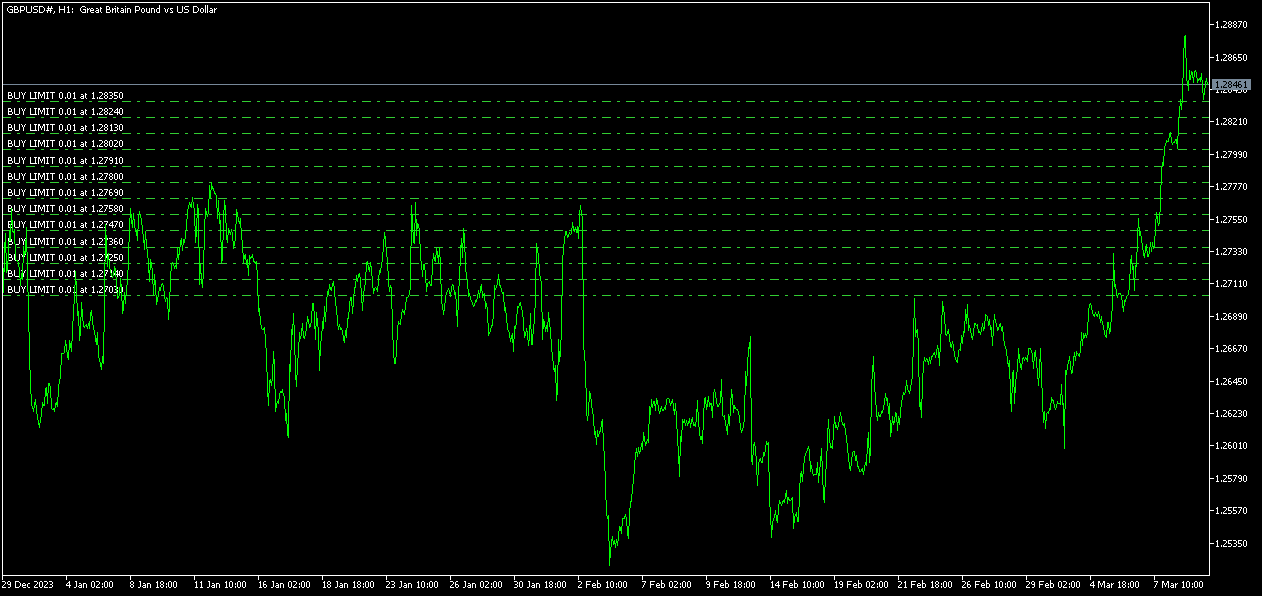
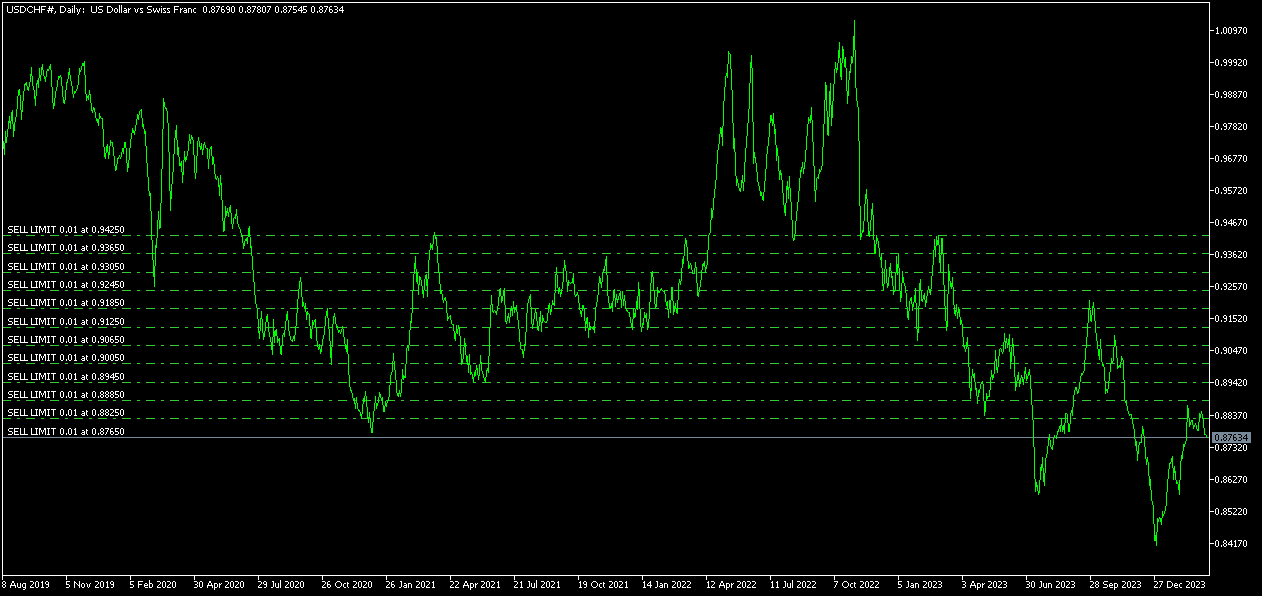
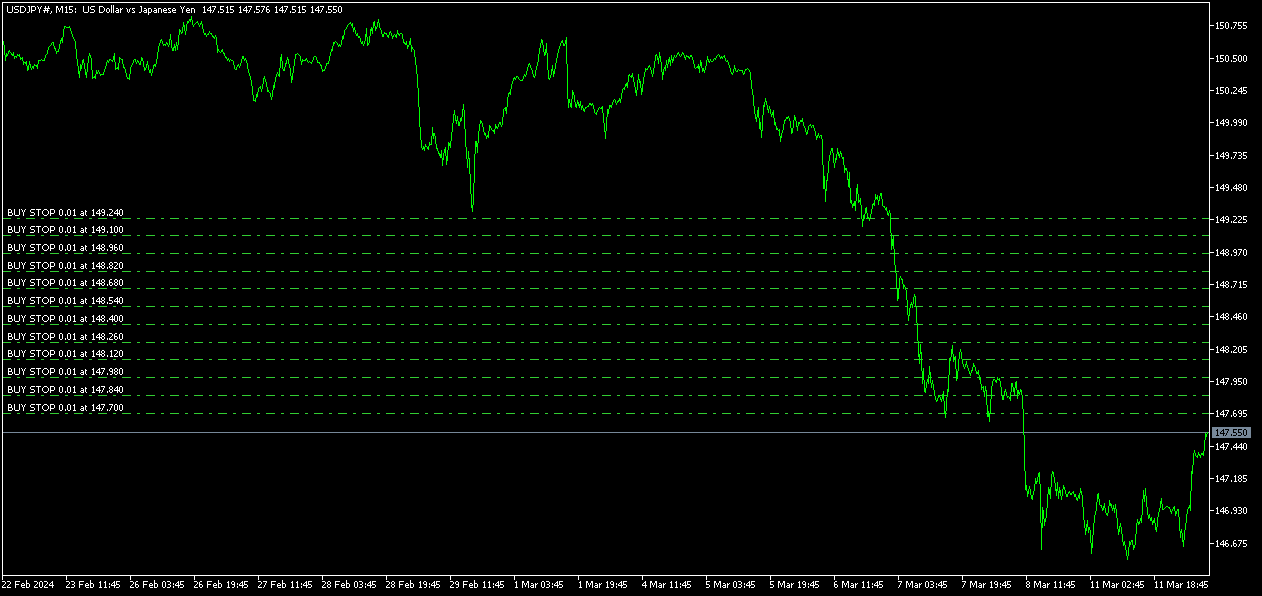
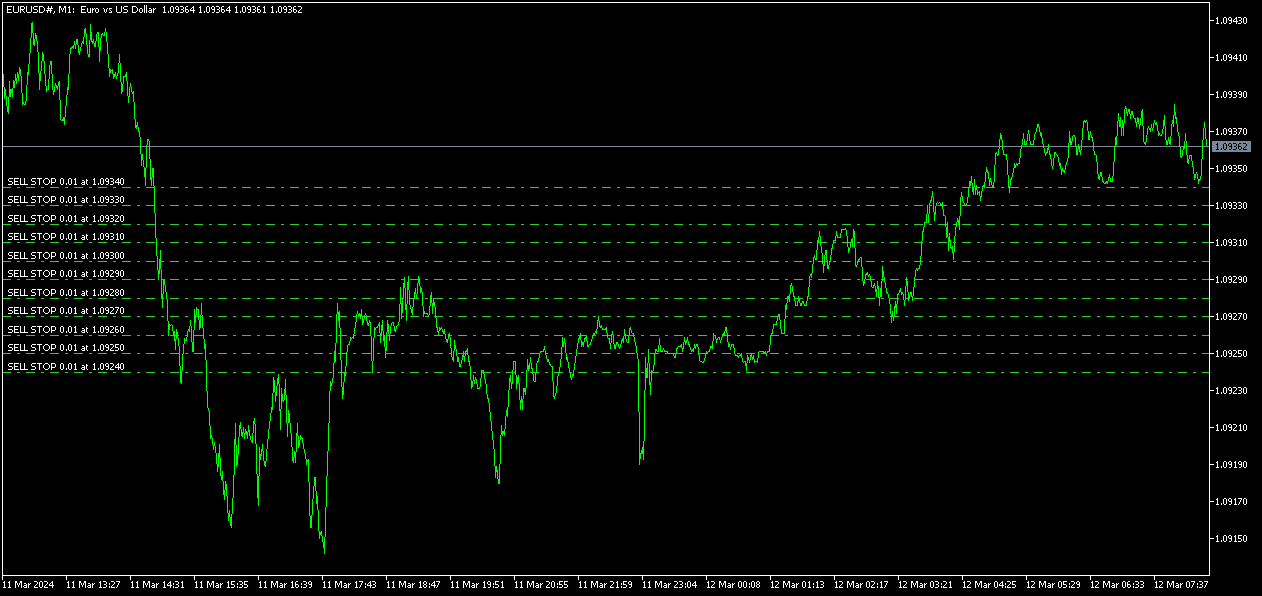
The Pending Order Grid allows the performing of a user-defined strategy through the creation of pending order grids. The script places pending orders of a given type (Buy Limit, Sell Limit, Buy Stop, or Sell Stop) at equidistant price levels to form each grid. The beginning and finish of every grid are defined by the Start Price and Stop Price input parameters, respectively. The user might set up different grids to exist simultaneously – it's only needed to execute the script multiple times at the chart window(s) of the intended symbol(s). 

Risk Management 

The volume used to place a pending order is chosen between a fixed and a variable lot size, available through the Volume and Free Margin % input parameters, respectively. If there isn't enough money in the account for the chosen volume, a request for placing the order is still sent to the trade server. The purpose is to allow the corresponding position opening if the free margin increases enough until the target price is reached. This increase could be due to an account deposit or position profit between the placing and triggering of the pending order. 

Input Parameters 

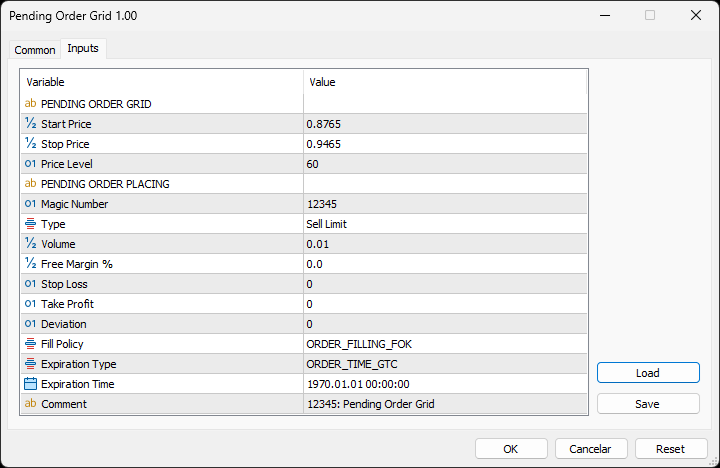
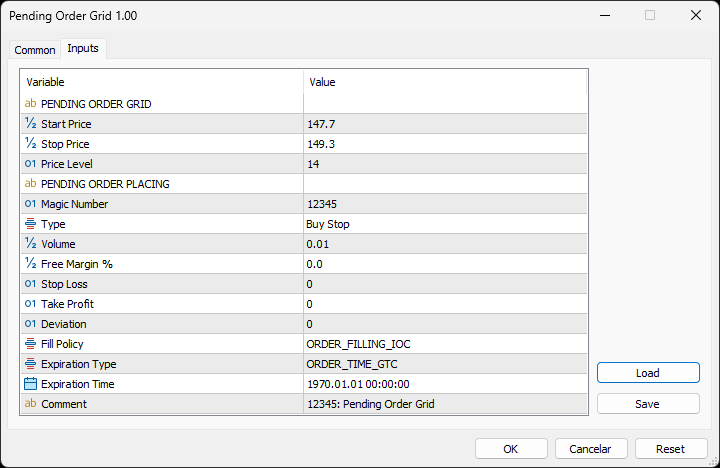
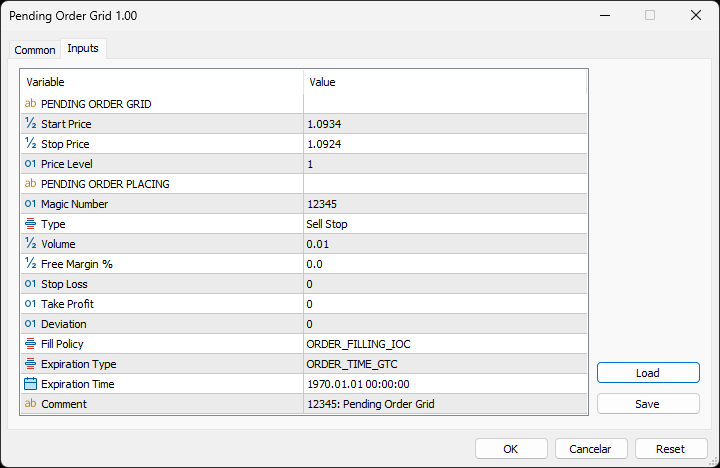
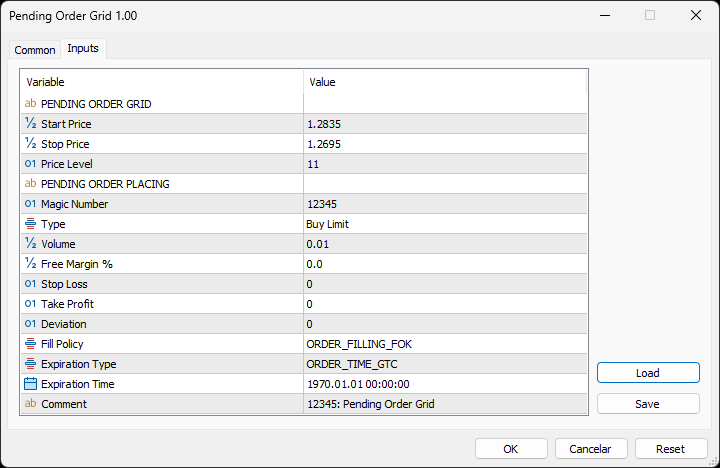
PENDING ORDER GRID 

  • Start Price: Price used to define the grid’s start. 
  • Stop Price: Price used to define the grid’s stop. 
  • Price Level: Distance used between pending orders of the same type (pips). 

PENDING ORDER PLACING 

  • Magic Number: Script’s identifier. 
  • Type: Pending order type used to form the grid. 
  • Volume: Lot size per deal (lots). 
  • Free Margin %: Percentage of account free margin used to calculate the lot size per deal (%). 
  • Stop Loss: Distance from the pending order's target price for placing a Stop Loss (pips). 
  • Take Profit: Distance from the pending order's target price for placing a Take Profit (pips). 
  • Deviation: Maximum allowed slippage from the requested price (pips). 
  • Fill Policy: Volume execution policy. 
  • Expiration Type: Order validity mode. 
  • Expiration Time: Order validity period (used only with the ORDER_TIME_SPECIFIED validity mode). 
  • Comment: Text message displayed in the Trade or History tabs of the Toolbox window and Objects list after placing a pending order (it only allows 31 characters).

Some of the available parameters accept values that lead to particular options. 

  • Price Level: A null value means that the target price is constant for all pending orders. 
  • Volume: A value lower than the minimum allowed volume by the broker is converted in this last. A value higher than the maximum available volume by the free margin is converted in this last. 
  • Free Margin %: A value whose volume doesn’t reach the minimum allowed volume by the broker is converted in this last. A value whose volume exceeds the maximum available volume by the free margin is converted in this last. 
  • Stop Loss or Take Profit: A null value means the parameter’s inactive function. Any value between 0 and the Stop Level is converted in this last. 

The input parameters that define the start and stop of the grid must obey a few rules. 

  • Both the limits of the grid must be selected: Start Price and Stop Price. 
  • Buy Limit or Sell Stop orders grid: The Start Price cannot exceed the Ask/Bid price minus the Stop Level, respectively. The Stop Price cannot exceed the Start Price. 
  • Sell Limit or Buy Stop orders grid: The Start Price must equate/exceed the Bid/Ask price plus the Stop Level, respectively. The Stop Price must equate/exceed the Start Price. 

Displayed Information 

The script possesses a vast number of messages to inform the user about errors and conditions changes that might occur during its execution. The messages are shown through the Alert function (by a pop-up window), its content includes: 

  1. The warning that an input parameter has been incorrectly set. 
  2. The info that the account doesn't have enough money for the chosen volume (see the Risk Management section above). 
  3. The info that the number of permitted orders by the broker has been reached. 
  4. The Trade Server Return Codes description. 
  5. The symbol’s quotes (immediately) before the trade request’s formation, followed by the symbol’s quotes (immediately) after the trade server’s decision. 
  6. The Runtime Errors description. 
  7. The standard function in the include file where the runtime error was detected (only relevant to the programmer). 

Note: Some elements of the list are displayed simultaneously (in the same text line): 4, 5 and 6; 6 and 7. 

Observations 

During high activity periods, the trade servers decision on whether a trade request is executed or rejected may suffer significant delays. Some data used in the request sent to the server might become incorrect, leading to the order’s rejection. When the server is evaluating a request and the symbol's quotes are updated, three cases might occur: 

  1. Pending order placing – the pending order’s target price becomes an incorrect distance. 
  2. Position opening/modifying – the position’s Stop Loss or Take Profit intended level becomes an incorrect distance. 
  3. Position modifying – the position’s Stop Loss or Take Profit previous level takes to its closing. 

The symbol’s quotes mentioned in the fifth element of the list in the Displayed Information section are especially useful here (since firsts usually differ from lasts). A careful analysis of these quotes, knowing the implication that certain quote changes have on the request’s evaluation, permits understanding the reason when these cases occur. To avoid the request’s rejection by the trade server due to “invalid stops” (cases 1 and 2), the prices/levels used should exceed the symbol’s Stop Level by a few pips. 

A Buy/Sell position is opened at the Ask/Bid price and closed at the Bid/Ask price. Since the position’s stop orders (Stop Loss and Take Profit) are triggered at this last price, in a pending order, they are calculated from the order's target price -/+ the current spread (Ask - Bid), respectively. 

When placing a pending order, the validity period can’t be less than 1 minute. During a grid creation, the script doesn’t place pending orders if the current time exceeds the Expiration Time minus 1 minute (when the validity period is previously selected). 

Conclusion 

The Pending Order Grid is a helpful and efficient tool regarding the manual creation of pending order grids, especially when the grids consist of a significant number of orders, enabling a simple and intuitive setting of the grids to form. 

Önerilen ürünler
The Realtime Statistics MT5  is an innovative tool designed for traders who want to keep track of their trading performance in real-time. This MetaTrader 5 Expert Advisor (EA) is packed with customizable features that allow you to monitor crucial trading statistics directly on your chart, ensuring you always have the insights you need to make informed trading decisions. Check out the Realtime Statistics MT5 User Guide Here Try out the  FREE  Realtime Statistics MT5 Demo  Here Key Features: Compr
Binance Trade Manager — is an utility that allows you to transmit trade orders from your MetaTrader 5 to the Binance exchange. It will suite you if you want to use your favorite MetaTrader 5, getting all the benefits of trading cryptocurrencies directly on the exchange (low commission, high liquidity, absolute transparency, etc.) Binance Trade Manager can work in two modes: copying trades from a demo-account , which your MetaTrader 5 is connected to (cryptocurrencies must be available on this ac
Gold Xau Gold
Francisco-fabio Braga Viana
Gold XAU Gold – Institutional Expert Advisor for XAUUSD Gold XAU Gold is a professional Expert Advisor designed exclusively for XAUUSD (Gold) . It combines institutional trading concepts, trend analysis, price action, and advanced risk management to identify high-probability trading opportunities. Built for traders who value discipline, consistency, and capital protection, the EA automatically filters low-quality setups and executes trades only when predefined conditions are met. Key Features F
Phantom Exit Guard
Napat Puangjunkum
Phantom Exit Guard Intelligent Trade Management Utility for MetaTrader 5 You open the trade. This EA handles everything after that. Phantom Exit Guard is not a trading robot. It does not open positions. Instead, it monitors every trade on your chart (manual or from another EA) and applies professional-grade exit management that most retail traders simply cannot execute by hand. --- Key Features 1. Automatic Breakeven Once your trade reaches a configurable profit threshold (default: 200 Po
Gold Scalper Ultimate – Automated Scalping Expert Advisor for MT5 Gold Scalper Ultimate is an automated Expert Advisor developed for short-term trading and scalping strategies in the Forex market. The EA uses ATR-based trade management and optional Heikin Ashi analysis to identify trading opportunities and manage positions automatically. It is designed for fast market environments and supports flexible configuration for different trading styles and risk preferences. Trading Logic The EA analyze
Titan X Pro EA
Sahib Ul Ahsan
5 (1)
Titan X Pro EA Overview Titan X Pro EA is an Expert Advisor for MetaTrader 5, developed for automated trading XAUUSD, BTCUSD, ETHUSD. The system is built around one simple idea: the user should not have to become the operator of their own Expert Advisor. There is no need to configure dozens of parameters, constantly monitor the chart or interfere with active trade management. Titan X Pro EA independently handles the entire technical trading cycle — from evaluating current market conditions t
Pending Order Grid EA MT5
Francisco Manuel Vicente Berardo
The Pending Order Grid is a multi-symbol multi-timeframe Expert Advisor that enables multi-strategy implementation based on pending order grids.  General Description   The Pending Order Grid allows the performing of a user-defined strategy through the creation of pending order grids. The Expert Advisor places pending orders of a given type (Buy Limit, Sell Limit, Buy Stop, or Sell Stop) at equidistant price levels to form each grid. The user might set up different grids to exist simultaneously
Alpha Bullish Engine MT5 Overview Alpha Bullish Engine is a professional Expert Advisor for MetaTrader 5 designed to identify and trade high-quality market bullish opportunities while maintaining a strong focus on risk management and capital preservation. Built with a combination of trend analysis, momentum assessment, and intelligent trade management, the EA is designed to operate in favorable market conditions while avoiding unnecessary exposure during less suitable environments. Key Features
USD Scalper MT5
Joseph Anthony Aya-ay Yutig
DİĞER EA'ları ÜCRETSİZ EDİNİN!!! DİĞER EA'ları ÜCRETSİZ EDİNİN!!! DİĞER EA'ları ÜCRETSİZ EDİNİN!!! DİĞER EA'ları ÜCRETSİZ EDİNİN!!! DİĞER EA'ları ÜCRETSİZ EDİNİN!!! USD Scalper MT5, USD Çiftleri için bir Sinirsel EA'dır. Bu ürün GBPUSD, EURUSD, AUDUSD, NZDUSD için üretilmiştir. Gelecekte eklenen yeni ÇİFTLER olabilir. MEVCUT ÇİFTLER: GBPUSD EURUSD AUDUSD NZDUSD - SONRAKİ VERSİYONDA EKLENECEKTİR GİRİŞLER: ZARAR DURDUR'A GÖRE RİSK YÜZDESİ (1 seçilirse İşlem başına maksimum risk %1'dir
Liquidity Scalping EA Precision Liquidity Trading • M5 & M15 Liquidity Scalping EA is an advanced automated trading system designed for traders who focus on precision entries and flexible risk control. The EA is built around liquidity sweep concepts and dynamic price behavior to identify short-term trading opportunities in fast-moving markets. Lightweight and highly configurable, it provides a structured scalping framework that can be adapted to different trading styles and market conditions. C
Equity Tracker MT5 Equity Tracker MT5, MetaTrader 5 için geliştirilmiş bir izleme Expert Advisor’üdür ve bildirim mesajları aracılığıyla işlem faaliyetlerini, hesap durumunu ve teknik koşulları raporlar. Expert Advisor, alım satım mantığından bağımsız olarak çalışır ve emir yürütme ya da işlem yönetimini etkilemez. Bu ürün işlem açmaz, değiştirmez veya kapatmaz. Yalnızca izleme ve bildirim görevlerini yerine getirir. Amaç Equity Tracker MT5, işlem terminalini sürekli takip etmeden hesap durumund
Local Trade Copier by RWBTradeLab — copy trades between MetaTrader 5 accounts on the same PC, instantly and reliably. One lightweight tool that turns any MT5 account into a Master (signal source) or a Client (copier) — just pick the role in the inputs. Perfect for managing multiple accounts, copying your own strategy across brokers, or running prop-firm and personal accounts side by side. No DLL required · Works across different brokers & account types · One file, both roles ——————————————
New York Breaker
Joao Jara Carvalho
New York Breaker is an Opening Range Breakout strategy for US100, trading the open of the New York session, optimized for NAS100/US100. No martingale, no grid, no empty promises. Installation guide . Blog . To better understand my view on trading, risk management and portfolio construction, read the article Trading is not about getting rich overnight . My story I started trading 6 years ago. Like many people, I thought the fastest path to financial freedom was buying a miracle EA on the MQL5 Mar
BragaQuant Institutional XAUUSD
Francisco-fabio Braga Viana
BRAGA QUANT EA – Institutional XAUUSD Institutional Gold Trading for XAUUSD BRAGA QUANT EA is an Expert Advisor developed exclusively for XAUUSD (Gold) , combining Smart Money Concepts (SMC) , trend analysis, and adaptive risk management to identify high-probability trading opportunities. The EA is designed to trade only when multiple institutional confirmations align, avoiding low-quality entries during ranging or directionless markets. Key Features Designed exclusively for XAUUSD Smart Mon
Titan Backup
Elies Noah Siebenpfeiffer
Introducing Titan Backup : Are you ready to enhance your trading game with an automated system built for precision and flexibility? Meet Titan Backup , your expert trading assistant designed to capture high-profit breakouts by identifying accumulation zones . This powerful Expert Advisor (EA) excels in high-volatility markets such as the Nasdaq 100 and Crypto 10 , offering both hands-free automation and manual assistance to support your trading strategies. How Titan Backup Works: Titan Backup ru
Ex Gold MT5 EA
Richard Kofi Anim Darko
After You download the EA kindly join our telegram group below..... https://t.me/aFXeas EX GOLD MT5 EA is a unique fully automated Expert Advisor which uses a combination of price action and indicators to find profitable entries on the market. It uses an average of standard deviation to follow the trend for additional entries hence taking advantage of the trend. Its unique but simple parameter makes it suitable for beginners and experienced traders. The EA was designed to trade Gold on the M1,
FxWorldGodfathermq5
Afjal Hussain Swapan
roduct Overview Smart Grid Hedging EA is an advanced algorithmic trading system that combines   trend filtering ,   grid trading , and   hedging strategies   to create a robust automated trading solution. This Expert Advisor is designed for forex and commodity markets with special optimization for gold (XAUUSD) trading.   Core Features Dual Engine System Engine A : Specialized for buy (long) positions with independent magic number Engine B : Specialized for sell (short) positions with independ
Click Average EA
Jan Isaac Rodriguez Castro
Click Average EA – Smart Position Averaging for MT5  Simplify Your Trading Strategy with one-click position averaging! This expert advisor automatically calculates the weighted average price of your open positions and adjusts Take Profit levels dynamically—saving you time and maximizing efficiency. Key Features:  One-Click Averaging – Instantly balance multiple positions with a single button.  Weighted Price Calculation – Precise averaging based on volume for accurate TP placement.  Magic Numb
Bobot Scalper Gold
Richard Tolentino
BoBot Scalper — Trend Scalping’in Yeni Dönemi Başladı. XAUUSD, endeksler veya hızlı hareket eden paritelerde işlem yapıyorsanız… bu EA tam size göre tasarlandı. BoBot Scalper , geliştirilmiş MACD/LWMA motoru ile piyasa kalabalığından daha önce gerçek trend devamı sinyallerini tespit eder. Hızlı tepki verir, riski temiz şekilde yönetir ve kademeli para bazlı trailing sistemi ile kârı güvenli şekilde kilitler. Bu, bir scalping EA’sinde bulabileceğiniz en akıllı takip yöntemlerinden biridir. Bu EA
MUNNA EA GOLD Professional Institutional XAUUSD Trading Robot MUNNA EA GOLD is a professional Expert Advisor designed exclusively for XAUUSD (Gold) trading on the M5 timeframe . Unlike traditional indicator-based robots, this EA combines institutional trading concepts with advanced risk management to identify high-probability market opportunities while protecting trading capital. The strategy focuses on liquidity sweeps, value-area reclaims, trend confirmation, Fair Value Gap (FVG), Break of Str
Code Scalper
Ivan Simonika
This bot can classify ticks into classes from 0 to 64, after which after analyzing the tick micro-signals it determines which way to open a position. You can work with an expert only on real ticks how to optimize and test! When working, an expert uses position accounting in any mode, both netting (there can be only one position for one symbol) and with independent position accounting or hedging (there can be many positions for one symbol). Configurable bot parameters TypeFilling - Type of exe
MT5 Copier Sync Receiver   is a MetaTrader 5 expert advisor designed to receive trade snapshots from a transmitter EA and mirror them into a target account with high accuracy. It is built for multi-broker use, with support for symbol mapping, ticket tracking, and trade synchronization even when brokers use different symbol names or suffixes. Features Receives and processes copied trade data from the transmitter. Opens, modifies, and closes receiver positions based on source changes. Synchronizes
The   DYJ GlobalForexTradeWarCandleShapeMT5   strategy: it is provided with one combined built-in indicators:   DYJ CandleShapeMT5   in order to determine the signals and has different inputs for Short and Long positions in order to improve its precision. The   DYJ CandleShapeMT5  contains 80 shapes, such as MORNING STAR, DOJI STAR, HARAMI CROSS,INVERT HAMMER,ENGULFING..... Most trading strategies put their emphasis on finding out when to enter the market. Whether it’s technical or fundamental,
EA Nation
Joseph Anthony Aya-ay Yutig
The Expert Advisors' strategy came from a Facebook Group EA Nation. The group has over 40k members. It opens a hedge trade for every new candle and opens grid when the position is on the losing side of the trade.  Average Grid = N                     = the sum of 6 bars before the current bar/ N Timeframe = it opens a new hedge trade when a new bar appears Auto Lot = 1 Lot means in $10,000 Lot Size will be 0.01 NO MORE HEDGE = When one side reaches to N trades, it won't open a hedge trade un
Gold Blue Dragon PRO
Jose Miguel De Sousa Castro
Gold Blue Dragon PRO Professional XAUUSD Grid & Basket Management Expert Advisor for MetaTrader 5. Gold Blue Dragon is a powerful and intelligent Expert Advisor designed for XAUUSD traders who want a structured, disciplined and fully automated approach to the market. Built around a refined combination of trend detection, controlled grid entries, basket-based risk management and dynamic profit protection, this EA is designed to help traders capture strong gold movements while keeping the strateg
Hybrid Trade Panel
Kankawee Jongsukhee
Hybrid Trade Panel Visual Risk Planner and Scalper SPECIAL LAUNCH WEEK PROMO: Only $79!  To celebrate the release of Hybrid Trade Panel, grab your lifetime copy at this exclusive introductory price.  The price will increase to the regular price of $149 next week. Do not miss out—secure your copy now! THE ULTIMATE 2-IN-1 TRADING STATION Welcome to the Hybrid Trade Panel V1.27. Whether you are a lightning-fast scalper reacting to the market, or a calculated strategist planning your exa
ORB Quantum Apex
Napat Puangjunkum
ORB QUANTUM APEX     Institutional Indices Breakout Engine  Indices trend harder and longer than currency pairs. By capturing the initial momentum of the New York or London session open, ORB Quantum Apex secures high-probability payouts without relying on dangerous grid or martingale systems.  === WHY ORB QUANTUM APEX? === 1. PURE ORB STRATEGY: The system records the High and Low of the market during the first 'X' minutes of the session open. If price breaks the High, it buys. If it breaks the
This EA is for only Deriv Synthetic indices.  Forex MT4 Version here:   https://www.mql5.com/en/market/product/89114 Forex MT5 version here:  https://www.mql5.com/en/market/product/89113 Hello traders, I believe you all know that risk and money management along with psychology are the keys to success in trading. No matter how strong one’s strategy is, without these 3 criteria they will always face losses in the long run. I have created an EA to control our human behaviors. This EA will force u
The EA opens and closes new orders on time. It can be used to implement trading scenarios of any complexity by creating a list of tasks.   There are two options for completing the task The task is executed on the specified date and time - it is executed once and is removed from the list. The task is executed with repetition on the specified day of the week and time - the task with repetitions is not removed from the list.   Panel settings Symbol - select the symbol for the trade function. Time -
MT5 → Telegram Notifier (Utility · Informers) Send trading events from MetaTrader 5 directly to Telegram. Perfect for journaling, team alerts, or remote monitoring. What it does Trade Open : posts BUY/SELL, BUY/SELL Limit, BUY/SELL Stop, lots, entry, SL/TP, local time. (Optional chart screenshot.) SL/TP Update : short message — only what changed (new SL or TP), posted as reply to the original trade message. Partial / Full Close : posts closed volume, price, Net P/L (swap + commission included),
Bu ürünün alıcıları ayrıca şunları da satın alıyor
Trade Assistant MT5
Evgeniy Kravchenko
4.43 (214)
It helps to calculate the risk per trade, the easy installation of a new order, order management with partial closing functions, trailing stop of 7 types and other useful functions. Additional materials and instructions Installation instructions - Application instructions - Trial version of the application for a demo account Line function -   shows on the chart the Opening line, Stop Loss, Take Profit. With this function it is easy to set a new order and see its additional characteristics bef
Trade Manager EA’ye hoş geldiniz! Ticaretin daha sezgisel, hassas ve verimli hale gelmesi için tasarlanmış nihai risk yönetim aracı ile tanışın. Bu sadece bir emir verme aracı değil; ticaret planlaması, pozisyon yönetimi ve risk kontrolü için kapsamlı bir çözüm. İster yeni başlayan bir yatırımcı olun, ister deneyimli bir trader ya da hızlı emir gerektiren bir scalper, Trade Manager EA ihtiyaçlarınıza uyum sağlar ve forex, endeksler, emtialar ve kripto paralar dahil tüm piyasalarda esneklik sunar
Local Trade Copier EA MT5
Juvenille Emperor Limited
4.96 (142)
Local Trade Copier EA MT5   ile olağanüstü hızlı işlem kopyalama deneyimi yaşayın. Kolay 1 dakikalık kurulumuyla bu işlem kopyalayıcısı, aynı Windows bilgisayarda veya Windows VPS'te birden fazla MetaTrader terminali arasında işlemleri kopyalamanıza olanak tanır ve 0.5 saniyenin altındaki şimşek hızında kopyalama hızları sunar. Başlangıç seviyesinde veya profesyonel bir tüccar olsanız da,   Local Trade Copier EA MT5 , spesifik ihtiyaçlarınıza göre özelleştirmek için geniş bir seçenek yelpazesi s
TradePanel MT5
Alfiya Fazylova
4.88 (162)
Trade Panel, çok işlevli bir ticaret asistanıdır. Uygulama, manuel ticaret için 50'den fazla ticaret fonksiyonu içerir ve çoğu ticaret görevini otomatikleştirmeyi mümkün kılar. Satın almadan önce demo hesapta demo sürümü test edebilirsiniz. Demo hesap için uygulamanın deneme sürümünü indirin: https://www.mql5.com/en/blogs/post/750865 . Talimatların tamamı buraya . Ticaret. Tek tıklamayla ticaret işlemleri yapmayı sağlar: Risk otomatik hesaplaması ile bekleyen emirleri ve pozisyonları açmak. Bird
Beta Sürümü Telegram to MT5 Signal Trader resmi alfa sürümüne neredeyse hazır. Bazı özellikler hâlâ geliştirilmekte olup küçük hatalarla karşılaşabilirsiniz. Sorun yaşarsanız lütfen bildirin, geri bildiriminiz yazılımın herkes için gelişmesine yardımcı olur. Telegram to MT5 Signal Trader , Telegram kanallarından veya gruplarından gelen işlem sinyallerini otomatik olarak MetaTrader 5 hesabınıza kopyalayan güçlü bir araçtır. Herkese açık ve özel kanalları destekler ve birden fazla sinyal sağlayıc
Farmed Hedge Yield Farming | All Markets (Manual - Hybrid - Semi/Automated EA) MULTI-ASSET SUPPORT Trade any asset available on your broker - Forex: Major, Minor, Exotic pairs - Crypto: BTC, ETH, XRP, SOL, BNB - Stocks: Apple, Tesla, Amazon, Google, etc. - Commodities: Gold, Silver, Oil, Gas - Indices: US30, NAS100, SPX500, DAX40 - Any CFD your broker offers VERIFIED TRADING RESULTS - Farmed Hedge Yield Axi Copy:  https://www.mql5.com/en/signals/2356376 - Farmed Hedge Yield Exn Copy:   https:/
================================================================================ POC BREAKOUT - V20.72. Full Professional Grade Toolkit ================================================================================ POC Breakout is a full MetaTrader 5 trading dashboard for discretionary traders who want breakout signals, Point of Control (POC) context, volume profiles, order flow, market structure, news, alerts, and advanced trade planning in one professional workspace. Attached directly to you
Exp COPYLOT CLIENT for MT5
Vladislav Andruschenko
3.97 (35)
MetaTrader 5 için profesyonel işlem kopyalayıcı MetaTrader için hızlı, profesyonel ve güvenilir bir işlem kopyalayıcı . COPYLOT , MT4 ve MT5 terminalleri arasında Forex işlemlerini kopyalamanıza olanak tanır ve Hedge ile Netting hesaplarını destekler. COPYLOT MT5 sürümü şunları destekler: - MT5 Hedge → MT5 Hedge - MT5 Hedge → MT5 Netting - MT5 Netting → MT5 Hedge - MT5 Netting → MT5 Netting - MT4 → MT5 Hedge - MT4 → MT5 Netting MT4 sürümü Tam açıklama + DEMO + PDF Nasıl satın alınır Nasıl kurul
Power Candles Strateji Tarayıcısı - Kendi Kendini Optimize Eden Çoklu Sembol Kurulum Bulucu Power Candles Strateji Tarayıcısı , Power Candles göstergesini çalıştıran aynı kendinden optimize edici motoru, Piyasa İzleyicinizdeki her sembol üzerinde yan yana çalıştırır. Tek bir panel, şu anda istatistiksel olarak hangi sembollerin işlem yapılabilir olduğunu, her birinde hangi stratejinin kazandığını, en uygun Stop Loss / Take Profit çiftini gösterir ve yeni bir sinyal geldiği anda size bildirim gön
Trade copier MT5
Alfiya Fazylova
4.59 (49)
Trade Copier, ticaret hesapları arasındaki işlemleri kopyalamak ve senkronize etmek için tasarlanmış profesyonel bir yardımcı programdır. Kopyalama, tedarikçinin hesabından/terminalinden alıcının aynı bilgisayarda veya vps'de kurulu olan hesabına/terminaline gerçekleşir. KAMPANYA - Eğer zaten "Trade copier MT5" aldıysanız, "Trade copier MT4"ü ücretsiz olarak alabilirsiniz (MT4 > MT5 ve MT4 < MT5 kopyalamalar için). Koşullar hakkında daha fazla bilgi almak için lütfen bizimle özel mesaj yoluyla i
Anchor: The EA Manager Run your full EA portfolio without conflicts, without stacked risk, and without watching every chart yourself. Anchor coordinates up to 64 Expert Advisors on a single account, including daily loss protection built for prop firm rules. Attach Anchor to any chart. Type your EA names and magic numbers in one line. Click OK. Anchor begins coordinating immediately. Built for portfolios. Built for prop firms. Built for discipline. The Problem Running multiple EAs on the same acc
YuClusters
Yury Kulikov
4.93 (43)
Attention: You can view the program operation in the free version  YuClusters DEMO .  YuClusters is a professional market analysis system. The trader has unique opportunities to analyze the flow of orders, trade volumes, price movements using various charts, profiles, indicators, and graphical objects. YuClusters operates on data based on Time&Sales or ticks information, depending on what is available in the quotes of a financial instrument. YuClusters allows you to build graphs by combining da
Footprint Chart Pro — Professional OrderFlow EA for MetaTrader 5 Version 6.34 | Professional tool for real traders | Institutional-Grade Visualization DEMO USERS - PLEASE SELECT EVERY TICK / REAL TICK WHEN TESTING AND YOU HAVE DOWNLOADED HISTORICAL DATA. IF YOU SEE A WAITING SCREEN AND IT IS NOT DOWNLOADING, IT MEANS YOU HAVE LOW HISTORICAL DATA. TRY 1 MIN AND 5 MIN FIRST ON 1 DAY DATA. ONE DAY DATA SHOULD BE THE NEWEST AND MOST CURRENT DATE. PLEASE WAIT UNTIL THE MARKET HAS ROLLED OVER PERIOD.
Telegram to MT5 Multi-Channel Copier , Telegram kanallarınızdaki trading sinyallerini otomatik olarak doğrudan MetaTrader 5'e kopyalar. Bot yok, tarayıcı uzantısı yok, manuel kopyalama yok. Telegram'da bir sinyal alırsınız ve EA birkaç saniye içinde terminalinizde işlem açar. Ürün iki bileşen içerir: Telegram kanallarınızı dinleyen bir Windows uygulaması ve sinyalleri MT5 terminalinizde yürüten bu Expert Advisor. Bir MT4 sürümü de mevcuttur. Kurulum kılavuzu ve uygulama indirme: https://www.mql5
The product will copy all telegram signal to MT5 ( which you are member) , also it can work as remote copier.  Easy to set up, copy order instant, can work with almost signal formats, image signal,  s upport to translate other language to English Work with all type of channel or group, even channel have "Restrict Saving Content", work with  multi channel, multi MT5 Work as remote copier: with signal have ticket number, it will copy exactly via ticket number. Support to backtest signal. How to s
FUTURES ORDERFLOW FOOTPRINT CHART Professional OrderFlow EA for MetaTrader 5 Version 1.01| Professional tool for real traders | Institutional-Grade Visualization STRATEGY TESTER USERS - PLEASE SELECT EVERY REAL TICK WHEN TESTING AND YOU HAVE DOWNLOADED HISTORICAL DATA. IF YOU SEE A WAITING SCREEN AND IT IS NOT DOWNLOADING, IT MEANS YOU HAVE LOW HISTORICAL DATA. TRY 1 MIN AND 5 MIN FIRST ON 1 DAY DATA. ONE DAY DATA SHOULD BE THE NEWEST AND MOST CURRENT DATE. PLEASE WAIT UNTIL THE MARKET HAS ROL
Riskinizi otomatik olarak hesaplarken işlemlere hızlı bir şekilde girip çıkmanıza yardımcı olacak Ticaret Yöneticisi. Aşırı Ticaret, İntikam Ticareti ve Duygusal Ticaretten korunmanıza yardımcı olacak özellikler içerir. İşlemler otomatik olarak yönetilebilir ve hesap performans ölçümleri bir grafikte görselleştirilebilir. Bu özellikler, bu paneli tüm manuel yatırımcılar için ideal kılar ve MetaTrader 5 platformunun geliştirilmesine yardımcı olur. Çoklu Dil desteği. MT4 Sürümü  |  Kullanım Kılavu
MetaTrader 5 için Trading Panel — grafik ve klavyeden profesyonel tek tıkla işlem kontrolü Aktif traderlar için geliştirilmiş güçlü bir Trading Panel; işlemleri standart MetaTrader arayüzüne göre çok daha hızlı açmanıza, yönetmenize ve kapatmanıza yardımcı olur. Bu çözüm; pozisyonları, bekleyen emirleri, toplam kârı ve işlem yürütmesini tek bir profesyonel çalışma alanında kontrol etmek isteyen kullanıcılar için tasarlanmıştır. Bu sadece sıradan bir yardımcı araç değildir. MetaTrader 5 için ger
EA Auditor
Stephen J Martret
5 (4)
EA Auditor is an independent analysis tool for traders evaluating Expert Advisors and trading signals on MetaTrader 5. It audits backtest reports, reviews posted developer signals, and cross-verifies the two against each other to help traders assess strategies before committing capital. The MQL5 market offers a wide range of Expert Advisors from many developers, with varying approaches, quality, and transparency. EA Auditor provides a consistent, data-driven framework for reviewing them, answer
Seconds Chart - MetaTrader 5 için saniye bazlı grafikler oluşturmanıza olanak sağlayan eşsiz bir araçtır. Seconds Chart sayesinde saniye cinsinden zaman dilimleriyle grafik oluşturabilir, standart dakika veya saatlik grafiklerde mümkün olmayan esneklik ve analiz hassasiyetine ulaşabilirsiniz. Örneğin, S15 zaman dilimi 15 saniyelik mum çubuklarını ifade eder. Desteklenen özel sembollerle herhangi bir gösterge ve danışman kullanabilirsiniz. Onlarla çalışmak, standart grafiklerde işlem yapmak kadar
Trade Dashboard simplifies how you open, manage, and control your trades, with built-in lot size calculation. It allows you to execute trades, manage risk, and control positions directly on the chart, with tools such as partial close, breakeven, and trailing stop. Designed to reduce manual work and help you stay focused on your trading decisions. A demo version is available for testing. Detailed explanations of features are provided within the MQL5 platform. Installation instructions are include

Welcome to ENTRY IN THE ZONE WITH SMC MULTI TIMEFRAME Entry In The Zone with  SMC Multi Timeframe  is a professional trading indicator built on Smart Money Concepts (SMC), combining market structure analysis with a No Repaint BUY / SELL signal system in a single indicator. It helps traders understand market structure more clearly, identify key price zones, and focus on higher-quality trading opportunities. By combining Multi-Timeframe Analysis, Points of Interest (POIs), and real-time signals, t
LIMITED SUMMER SALE -40% ! ONLY $470 insead of $790!  Maximum real discount! ONLY UNTIL 08/22 The core idea: using the user interface, you configure the parameters the chart must meet before entering a position (or positions), choose which entry models to use, and set the rules for when trading and planning should end. Lazy Trader  handles the rest: it  takes over all the routine chart watching and execution! full description  :: 3 key videos [1] ->  [2]   ->  [3] What can it do? - Understand
Quant AI Agents are independent trading Expert Advisors. Instead of trading using a fixed strategy like other conventional EAs, Quant AI Agents   is a   multi-agent AI trading framework   that turns natural-language strategy prompts into live.  WANT THE SAME RESULTS AS MY LIVE SIGNAL?   Use the exact same brokers I do:   IC MARKETS , IC TRADING   .  Unlike the centralized stock market, Forex has no single, unified price feed.  Every broker sources liquidity from different providers, creating un
EASY Insight AIO – Akıllı ve zahmetsiz yatırım için hepsi bir arada çözüm Genel Bakış Tüm piyasayı — Forex, Altın, Kripto, Endeksler ve hatta Hisseler — saniyeler içinde, manuel grafik incelemesi, gösterge kurulumu ya da karmaşık ayarlar olmadan analiz edebildiğinizi hayal edin. EASY Insight AIO , yapay zekâ destekli yatırım için nihai, kullanıma hazır dışa aktarma aracınızdır. Tüm piyasanın kapsamlı bir anlık görüntüsünü tek bir temiz CSV dosyasında sunar; bu dosya ChatGPT, Claude, Gemini, Pe
Bu ürün, haber saatlerinde tüm uzman danışmanları ve manüel grafikleri filtreler, böylece manüel ticaret kurulumlarınızı veya diğer uzman danışmanlar tarafından girilen işlemleri yok edebilecek ani fiyat dalgalanmaları konusunda endişelenmenize gerek kalmaz. Bu ürün, herhangi bir haber yayınlanmadan önce açık pozisyonlarınızı ve bekleyen emirlerinizi yönetebilen tam bir sipariş yönetim sistemi ile birlikte gelir.   The News Filter'ı   satın aldığınızda, gelecekteki uzman danışmanlar için yerleşi
Trader Evolution
Siarhei Vashchylka
5 (7)
" Trader Evolution " - A utility designed for traders who use wave and technical analysis in their work. One tab of the utility is capable of money management and opening orders, and the other can help in making Elliott wave and technical analysis. Manual (Be sure to read before purchasing) | Version for MT4 Advantages 1. Trading in a few clicks. Immediate and pending orders are available in the panel 2. Money management. The program automatically selects the appropriate lot size 3. Simplifies
EA Performance Tracker (AESTracker) A clean, modern dashboard that shows exactly how your trades and EAs are performing — right on your chart. It reads your full account history automatically and breaks down the numbers by magic number / strategy. Display only — it does not place any trades. What it shows - Account header: live Balance, Equity, and Open (floating) P/L - Profit summary: gross profit, net profit, and the exact commission & swap deducted - Key stats: win rate, profit factor, exp
Premium Trade Manager - İçine Koç Yerleştirilmiş İşlem Paneli Premium Trade Manager , grafiğinizin içine bir trading koçu yerleştirir; altında tam bir yürütme motoru çalışır. İşlemi her zamanki gibi kurun, ardından yapay zeka trading koçunuz Max, o kurulumu tam olarak okusun ve canlı hesabınıza göre taahhüt etmeden önce size net bir değerlendirme sunsun: stop disiplinli bir yaklaşıma uyuyor mu, risk büyüklüğü makul mü, yüksek etkili bir haber dakikalar sonra mı geliyor, prop firm limitinize yakl
Timeless Charts
Samuel Manoel De Souza
5 (7)
Timeless Charts, profesyonel yatırımcılar için hepsi bir arada bir trading aracıdır. Saniye Grafikleri ve Renko gibi özel grafik türlerini, Footprints , Clusters , Hacim Profilleri , VWAP çalışmaları ve gelişmiş piyasa analizi sağlayan sabitlenmiş analiz araçlarıyla gelişmiş emir akışı analiziyle birleştirir. İşlem ve pozisyon yönetimi, entegre işlem yönetim paneli aracılığıyla doğrudan grafik üzerinden gerçekleştirilirken, Market Replay ve Sanal Hesaplar trading becerileri ve stratejileri üzeri
Yazarın diğer ürünleri
Multiple Position Opening MT5
Francisco Manuel Vicente Berardo
1 (1)
The Multiple Position Opening is a multi-symbol multi-timeframe script used to open simultaneously various positions.  Risk Management   The volume used to open a position is chosen between a fixed and a variable lot size, available through the Volume and Free Margin % input parameters, respectively. If there isn't enough money in the account for the chosen volume, this is reduced to the highest possible value (corresponding to free margin). If this reduction leads to a correct volume (if the
Position Selective Close MT5
Francisco Manuel Vicente Berardo
The Position Selective Close is a multi-symbol multi-timeframe script used to close simultaneously various positions.  General Description   The Position Selective Close   possesses   three operation modes (Intersection,   Union   and All) that control the way   as   four position features (symbol, magic number,   type   and profit) are used. The modes, available through the Selection Mode input parameter, relate to the features, available through the “Select by Feature” and “Feature” input pa
FREE
Tick Data Record MT5
Francisco Manuel Vicente Berardo
The Tick Data Record is a multi-symbol multi-timeframe Expert Advisor that records tick data for later graphical representation and analysis.  General Description  The Tick Data Record offers a(n) alternative/complement to the online/offline price charts displayed through the MT4/MT5 platform. The Expert Advisor permits to write and save the current/history values of Time, Bid, Ask, Spread, Last and Volume to a text file (“.txt”). The idea is to copy/open the obtained register to/in a spreadshe
FREE
Tick Data Record MT4
Francisco Manuel Vicente Berardo
The Tick Data Record is a multi-symbol multi-timeframe Expert Advisor that records tick data for later graphical representation and analysis.  General Description   The Tick Data Record offers a(n) alternative/complement to the online/offline price charts displayed through the MT4/MT5 platform. The Expert Advisor   permits   to write and save the current/history values of Time, Bid, Ask, Spread, Last and Volume to a text file (“.txt”). The idea is to copy/open the obtained register to/in a spr
FREE
The Environment State Info Print is a script to display the constants that describe the current runtime environment of a MQL5 program.  General Description   The constants are divided into four groups in the   Environment State section of the MQL5 documentation and each group is divided into enumerations/subgroups (with designations  “Integer”, “Double” or “String”). The script displays constants in two ways: a single constant or all group constants. The constants are obtained by selecting the


FREE
Scientific Calculator MT4
Francisco Manuel Vicente Berardo
The Scientific Calculator is a script designed to compute science, engineering and mathematics expressions.   General Description   The expression to calculate must obey syntax rules and precedence order, being constituted by the following elements:   Integer and real numbers.   Mathematical operators for addition (+), subtraction (-), multiplication (*), division (/) and exponentiation (^).   Mathematical and trigonometric functions .   Curved parentheses (()) to define the precedence and co
FREE
Scientific Calculator MT5
Francisco Manuel Vicente Berardo
The Scientific Calculator is a script designed to compute science, engineering and mathematics expressions.  General Description   The expression to calculate must obey syntax rules and precedence order, being constituted by the following elements:   Integer and real numbers.  Mathematical operators for addition (+), subtraction (-), multiplication (*), division (/) and exponentiation (^).  Mathematical and trigonometric functions .  Curved parentheses (()) to define the precedence and contain
FREE
The Environment State Info Print is a script to display the constants that describe the current runtime environment of a MQL4 program.  General Description   The constants are divided into four groups in the Environment State section of the MQL4  documentation and each group is divided into enumerations/subgroups (with designations “ Market Info”, “Integer”, “Double” or “String”). The script displays constants in two ways: a single constant or all group constants. The constants are obtained by
FREE
Order Selective Delete MT4
Francisco Manuel Vicente Berardo
The Order Selective Delete is a multi-symbol multi-timeframe script used to delete simultaneously various pending orders.  General Description   The Order Selective Delete   possesses   three operation modes (Intersection,   Union   and All) that control the way   as   three pending order features (symbol, magic   number   and type) are used. The modes, available through the Selection Mode input parameter, relate to the features, available through the “Select by Feature” and “Feature” input pa
FREE
Position Selective Close MT4
Francisco Manuel Vicente Berardo
The Position Selective Close is a multi-symbol multi-timeframe script used to close simultaneously various positions.  General Description   The Position Selective Close   possesses   three operation modes (Intersection,   Union   and All) that control the way   as   four position features (symbol, magic number,   type   and profit) are used. The modes, available through the Selection Mode input parameter, relate to the features, available through the “Select by Feature” and “Feature” input pa
FREE
Order Selective Delete MT5
Francisco Manuel Vicente Berardo
The Order Selective Delete is a multi-symbol multi-timeframe script used to delete simultaneously various pending orders.  General Description   The Order Selective Delete   possesses   three operation modes (Intersection,   Union   and All) that control the way   as   three pending order features (symbol, magic   number   and type) are used. The modes, available through the Selection Mode input parameter, relate to the features, available through the “Select by Feature” and “Feature” input pa
FREE
Double Trailing Stop MT4
Francisco Manuel Vicente Berardo
The Double Trailing Stop is a multi-symbol multi-timeframe Expert Advisor that allows the Stop Loss and Take Profit trailing of positions.  General Description   The Double Trailing Stop’s purpose is to secure profit and minimize losses of the opened positions. The Expert Advisor places stop orders (Stop Loss or Take Profit) at the Trailing Stop distance from the market price when the symbol's quote reaches/overcomes the Trailing Start distance from the position’s opening price (a single-time
The Multiple Position Opening is a multi-symbol multi-timeframe script used to open simultaneously various positions.  Risk Management   The volume used to open a position is chosen between a fixed and a variable lot size, available through the Volume and Free Margin % input parameters, respectively. If there isn't enough money in the account for the chosen volume, this is reduced to the highest possible value (corresponding to free margin). If this reduction leads to a correct volume (if the
Pending Order Grid MT4
Francisco Manuel Vicente Berardo
The Pending Order Grid is a multi-symbol multi-timeframe script that enables multi-strategy implementation based on pending order grids.  General Description   The Pending Order Grid allows the performing of a user-defined strategy through the creation of pending order grids. The script places pending orders of a given type (Buy Limit, Sell Limit, Buy Stop, or Sell Stop) at equidistant price levels to form each grid. The beginning and finish of every grid are defined by the Start Price and Sto
Pending Order Grid EA MT4
Francisco Manuel Vicente Berardo
The Pending Order Grid is a multi-symbol multi-timeframe Expert Advisor that enables multi-strategy implementation based on pending order grids.  General Description   The Pending Order Grid allows the performing of a user-defined strategy through the creation of pending order grids. The Expert Advisor places pending orders of a given type (Buy Limit, Sell Limit, Buy Stop, or Sell Stop) at equidistant price levels to form each grid. The user might set up different grids to exist simultaneously
Double Trailing Stop MT5
Francisco Manuel Vicente Berardo
The Double Trailing Stop is a multi-symbol multi-timeframe Expert Advisor that allows the Stop Loss and Take Profit trailing of positions.  General Description   The Double Trailing Stop’s purpose is to secure profit and minimize losses of the opened positions. The Expert Advisor places stop orders (Stop Loss or Take Profit) at the Trailing Stop distance from the market price when the symbol's quote reaches/overcomes the Trailing Start distance from the position’s opening price (a single-time
Pending Order Grid EA MT5
Francisco Manuel Vicente Berardo
The Pending Order Grid is a multi-symbol multi-timeframe Expert Advisor that enables multi-strategy implementation based on pending order grids.  General Description   The Pending Order Grid allows the performing of a user-defined strategy through the creation of pending order grids. The Expert Advisor places pending orders of a given type (Buy Limit, Sell Limit, Buy Stop, or Sell Stop) at equidistant price levels to form each grid. The user might set up different grids to exist simultaneously
Filtrele:
Değerlendirme yok
Değerlendirmeye yanıt